228SF - Multimeter PCE Instruments - Free user manual and instructions
Find the device manual for free 228SF PCE Instruments in PDF.


User questions about 228SF PCE Instruments
0 question about this device. Answer the ones you know or ask your own.
Ask a new question about this device
Download the instructions for your Multimeter in PDF format for free! Find your manual 228SF - PCE Instruments and take your electronic device back in hand. On this page are published all the documents necessary for the use of your device. 228SF by PCE Instruments.
USER MANUAL 228SF PCE Instruments
Southpoint Business Park
Ensign way
Hampshire / Southampton
United Kingdom, SO31 4RF
From outside UK: +44
Tel: (0) 2380 98703 0
Fax: (0) 2380 98703 9
info@industrial-needs.com
www.pce-instruments.com/english
www.pce-instruments.com
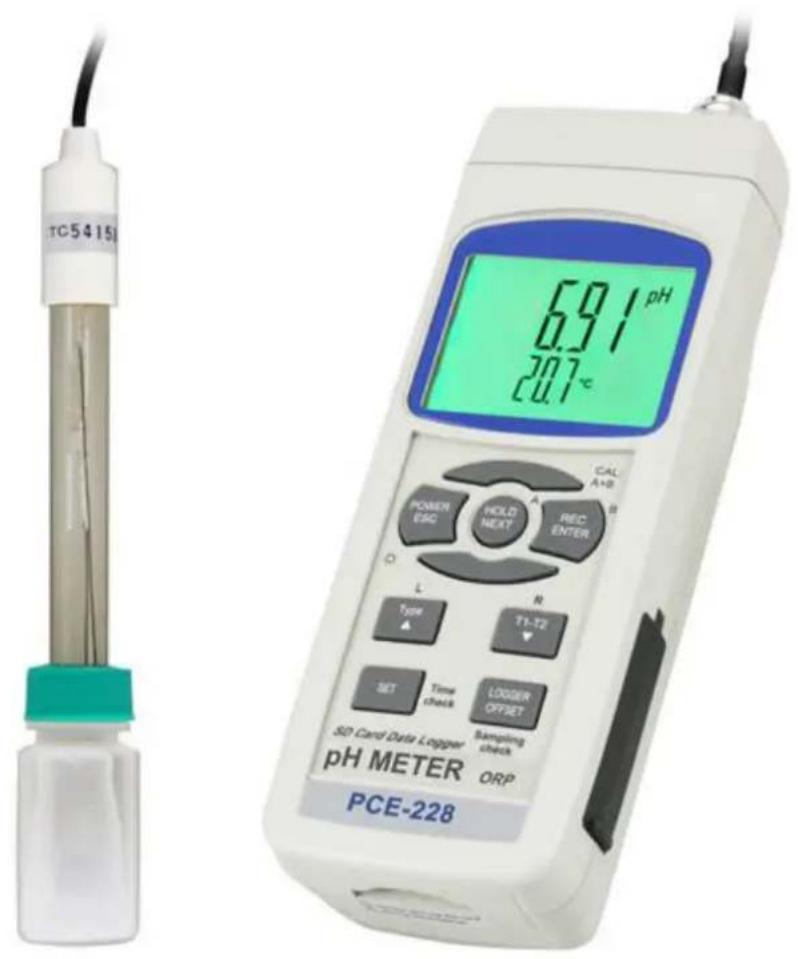
Manual pH Meter PCE-228
text_image
TC54151 6.91 pH 20.7 °C POWER ESC A CALC HOLD NEXT REC ENTER L R Type T1-T2 SET Time check OFFSET SD Card Data Logger pH METER ORP PCE-228Contents
1 Introduction .... 3
2 Safety notes....3
3 Specifications....4
3.1 General 4
3.2 Electrical (23 ± 5 °C)....4
4 System description .... 5
5 pH / mV measurement and calibration procedure....6
5.1 pH measurement (manual temperature compensation)....7
5.2 pH measurement (ATC, automatic temperature)....7
5.3 mV measurement 7
5.4 pH calibration....7
6 Other functions....9
6.1 Data Hold....9
6.2 Data record (MAX / MIN reading) 9
6.3 LCD backlight on/off....9
7 Datalogger....9
7.1 Preparation before using the datalogger function 9
7.2 Auto datalogger (set sampling time ≥ 1 second) ..... 9
7.3 Manual datalogger (set sampling time = 0 second) 10
7.4 How to check the time information....10
7.5 How to check the sampling time information....10
7.6 SD card data structure....11
8 Saving data from the SD card to the computer (EXCEL software)....11
9 Advanced settings....12
9.1 SD memory card format.... 13
9.2 Set clock time (Year/Month/Date, Hour/Minute/Second)....13
9.3 Set sampling time (Hour/Minute/Second) 13
9.4 Auto power off management....13
9.5 Set beeper sound on/off....14
9.6 Decimal point of SD card setting....14
9.7 Select the temperature unit °C or °F 14
9.8 Set the pH manual temperature compensation value 14
9.9 ESC 14
10 Power supply from optional mains adaptor 15
11 Battery replacement.... 15
12 System reset....15
13 RS-232 PC serial interface 15
14 Disposal 17
15 Contact....17
15.1 PCE Instruments UK....17
15.2 PCE Americas 17
1 Introduction
Thank you for purchasing a PCE-228 from PCE Instruments.
* pH : 0 to 14.00 pH, mV (ORP) : ± 1999 mV.
* pH measurement can select ATC or manual Temp. adj..
* Optional ATC probe for pH measurement.
* pH measurement can make the auto calibration for pH 7, pH 4 and pH 10 or other value.
* Real time SD memory card Datalogger, it Built-in Clock and Calendar, sampling time set from 1 sec to 8 hour 59 min. 59 sec.
* Manual datalogger is available (set the sampling time to 0), during execute the manual datalogger function, it can set the different position (location) No. (position 1 to position 99).
* Innovation and easy operation, computer is not need to setup extra software, after execute datalogger, just take away the SD card from the meter and plug in the SD card into the computer, it can down load the all the measured value with the time information (year/month/date/hour/minute/second) to the Excel directly, then user can make the further data or graphic analysis by themselves.
* SD card capacity : 1 GB to 16 GB.
* LCD with green light backlight, easy reading.
* Can default auto power off or manual power off.
* Data hold, record max. and min. reading.
* Microcomputer circuit, high accuracy.
* Power by UM3/AA (1.5 V) x 6 batteries or DC 9V adapter.
* RS232/USB PC COMPUTER interface.
* Wide applications: water conditioning, aquariums, beverage, fish hatcheries, food processing, photography, laboratory, paper industry, plating industry, quality control, school & college, water conditioning.
2 Safety notes
Please read this manual carefully and completely before you use the device for the first time. The device may only be used by qualified personnel and repaired by PCE Instruments personnel. There is no warranty of damages or injuries caused by non-observance of the manual.
- The device may only be used in the approved temperature range.
- The case should only be opened by qualified personnel of PCE Instruments.
- The instrument should never be placed with the user interface facing an object (e.g. keyboard side on a table).
- You must not make any technical changes to the device.
- The appliance should only be cleaned with a damp cloth / use only pH-neutral cleaner.
This user's handbook is published by PCE Instruments without any guarantee.
We expressly point to our general guarantee terms which can be found in our general terms of business.
If you have any questions please contact PCE Instruments.
3 Specifications
3.1 General
| Measurement range | 0.00 to 14.00 pH-1,999 to 0 to 1,999 mV (only with the optional Redox electrode)0.0...65.0 °C (only the temperature sensor) |
| Resolution | 0.01 pH1 mV0.1°C |
| Accuracy (at 20°C) | ± (0.02 pH + 2 digits)± (0.5 % + 2 digits)±0.5°C |
| Calibration | Automatic three-point calibration |
| Temperature compensation | automatic from 0 to 65°C or manual between 0 and 100°C removing the temperature sensor |
| Electrode | pH PE-03 electrode,1 meter cable and BNC plugtemperature range: 0 ... 60 °C |
| Measurement rate | adjustable from 1 second up to8 hours 59 min 59 sec |
| Display | LCD display: 52 x 38 mm |
| Memory | SD card from 1 ... 16 GB(2 GB memory card included) |
| Interface | RS-232 |
| Software | optional |
| Power supply | 6 x 1.5 V AA batteries / mains adapter 9 V (optional) |
| Operating conditions | 0 to 50°C max. 80% r.h. |
| Dimensions | 177 x 68 x 45 mm |
| Weight | 490 g |
3.2 Electrical (23 ± 5 °C)
| pH electrode | Optional, any pH electrode with BNC connector | |
| Measurement | pH | 0 ... 14 pH |
| mV | -1999 ... 1999 mV | |
| Input impedance | 10^12 ohm | |
| Temperature compensation for pH measurement | Manual | 0 ... 100 °C, can be adjusted via button on front panel |
| Automatic (ATC) | with the optional temperature probe 0 ... 65 °C | |
| pH calibration | pH7, pH4 and pH10, 3-point calibration ensures the best linearity and accuracy | |
4 System description

text_image
3-14 3-13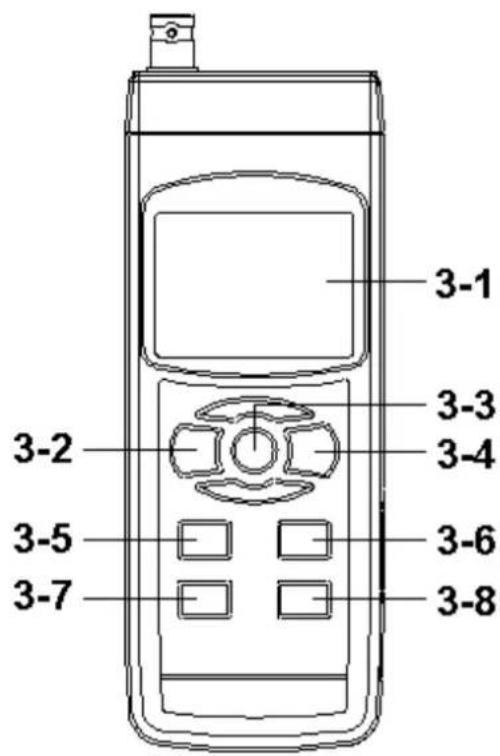
text_image
3-1 3-2 3-3 3-4 3-5 3-6 3-7 3-8
text_image
3-11 3-12 3-10 3-9 3-17 3-16 3-15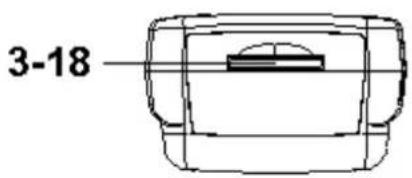
text_image
3-183-1 Display
3-2 Power Button (Backlight Button)
3-3 Hold Button (ESC Button)
3-4 REC Button (Enter Button)
3-5 ▲ Button
3-6 ▼ Button ( Function Button )
3-7 Time Button
3-8 Logger Button ( SET Button, Sampling check )
3-9 Stand
3-10 Battery Compartment/Cover
3-11 Battery Cover Screw
3-12 Tripod Fix Nut
3-13 Temp. Socket ( pH ATC Socket )
3-14 pH Socket ( BNC Socket )
3-15 DC 9V Power Adapter Input Socket
3-16 Reset Button
3-17 RS-232 Output Terminal
3-18 SD card socket
5 pH / mV measurement and calibration procedure
The meter default functions are:
* The display unit is set to pH.
* The temperature unit is set to °C.
* Manual ATC ( without connect the ATC probe )
* Auto power off.
* The sampling time of data logger function is 2 seconds.
text_image
4-1 4-2 4-3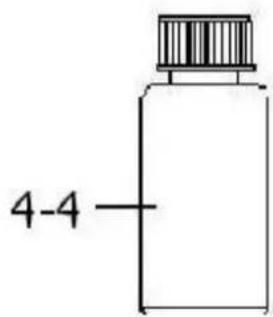
text_image
4-4
If the meter is connected to the pH electrode for the first time, you should make the calibration before operation. The calibration procedures can be found further down.
5.1 pH measurement (manual temperature compensation)
1) Power on the meter by pressing "Power Button" (3-2) once.
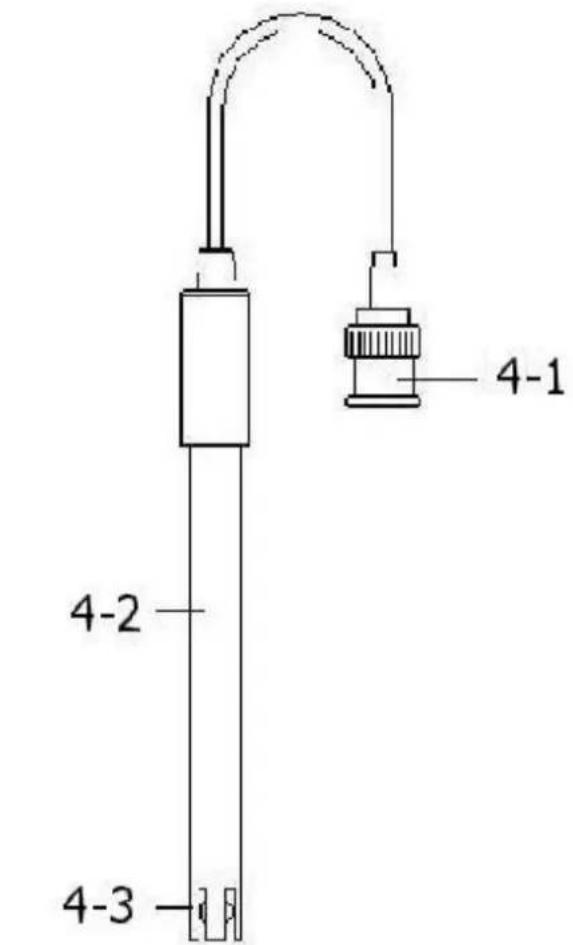
2) Prepare the pH Electrode (optional), install the "Probe Plug" (4-1) into the "pH Socket/BNC Socket" (3-14).
3) Adjust the manual Temp. value same as the solution's temperature exactly, the procedures refer chapter 8-8, page 25.
4) Hold the "Electrode Handle" (4-2) by hand and let the "Sensing head" (4-3) immersed wholly into the measured solution and little shake the electrode.
5) The main display will show the pH value, the bottom display will show the setting manual Temp. value.
5.2 pH measurement (ATC, automatic temperature)
1) All the procedures are same as 5-1 pH measurement (manual Temp. compensation) but should prepare one temperature probe (optional), insert the probe's plug into the "Temp. Socket" (3-13), immerse the sensing head of temperature probe into the measurement solution.
2) The main display will show the pH value, the bottom display will show the sensing Temp. value of the measured solution (measured from ATC probe).
When not using the Electrode, you must immerse the "Electrode sensing head" (4-3) into the "Protection bottle" (4-4).
5.3 mV measurement
The instrument build in mV ( millivolt ) measurement function, which enable you to make ion-selective, ORP (oxidation-reduction potential), and other precise mV measurements.
1) Press the "Function Button" (3-6) once, the Display unit "pH" will change to "mV"
* Press the : Function Button " once will return to " pH " function.
2) Prepare the ORP Electrode ( optional, ORP-14 ), install the " Probe Plug " of ORP electrode into the " pH Socket/BNC Socket " (3-14).
3) The Display will show the mV value.
5.4 pH calibration
Calibration consideration
The most ideal pH ELECTRODE generates 0 mV at pH 7.00 (177.4 mV at pH 4) and meter has been always calibrated with signals which simulate the most ideal pH ELECTRODE (based on 25 ambient °C environment). However not every pH ELECTRODE is as accurate as the most ideal one, so calibration procedures are necessary to be done before the first time measurement. In addition to the first time measurement, users are also recommended to execute the calibration procedures to ensure the high accuracy measurement.
Required equipment for calibration
1) pH ELECTRODE (optional)
2) pH buffer solutions (optional)
Calibration procedure
1) Prepare the pH Electrode (optional), install the "Probe Plug" (4-1) into the "pH Socket/BNC Socket" (3-16).
2) Power on the meter by pressing "Power Button" (3-2) once.
3) Adjust the "Temperature Compensation Value" to make it same as the temperature value of the pH buffer solution.
* Manual temperature compensation value adjustment procedure, see further down.
* Automatic temperature compensation, it should plug in the ATC probe (optional).
4) Hold the "Electrode Handle" (4-2) by hand and let the "Sensing head" (4-3) immersed wholly into the measured solution and little shake the probe. Display will show the pH value.
* If use the ATC probe, should imerse the ATC ptobe into the solution together.
5) Use the two fingers to press the "REC Button" (3-4) and "HOLD Button" (3-3) at the same time. Until Display will show the following screen then release the both fingers.

text_image
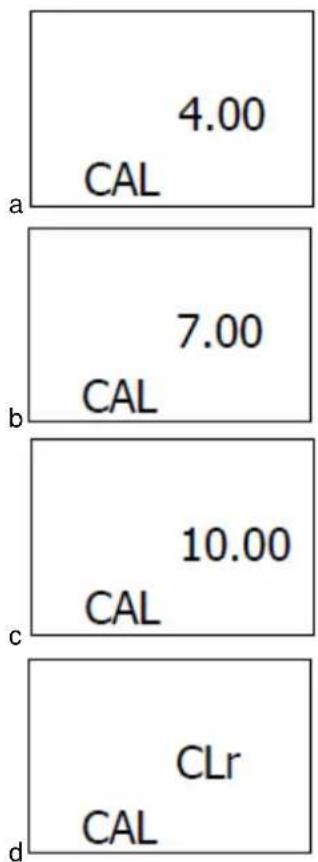
PH CAL6) Press the " ▲ Button " (3-5) or " ▼ Button "(3-6) once in sequence to select the following screen.
other
| Category | Value | |---|---| | a | 4.00 | | CAL | | | b | 7.00 | | CAL | | | c | 10.00 | | CAL | | | d | CLr | | CAL | |For pH 4.00 calibration
For pH 7.00 calibration
For pH 10.00 calibration
Clear the existing calibration data
* After the above a, b, c screen is selected, then cooperate the relative standard solution, for example the b screen should cooperate the pH 7.00 standard solution. a screen should cooperate the pH 4.00 standard solution.
Pressing the "Enter Button" (3-4) will save the calibration data and finish the calibration procedures.
* If you select the d screen, press the "Enter Button" (3-4) will clear existing calibration data.
7) The complete procedures should execute the two calibration points:
pH7 calibration
pH4 calibration (or pH10 calibration)
* The calibration procedures should execute start from pH7 calibration then follow pH4 (or pH10) calibration.
* Rinse the electrode with distilled water again when make each point calibration ( pH7, pH4 or pH10 ).
* Repeat above two points procedures two times at least.
6 Other functions
6.1 Data Hold
During the measurement, press the "Hold Button" (3-3) once will hold the measured value & the LCD will display a "HOLD" symbol. Press the "Hold Button" once again will release the data hold function.
6.2 Data record (MAX / MIN reading)
1) The data record function records the maximum and minimum readings. Press the "REC Button" (3-4) once to start the Data Record function and there will be a "REC." symbol on the display.
2) With the "REC." symbol on the display :
a) Press the "REC Button" (3-4) once, the "REC. MAX." symbol along with the maximum value will appear on the display. If you intend to delete the maximum value, just press the "Hold Button" (3-3) once, then the display will show the "REC." symbol only & execute the memory function continuously.
b) Press the "REC Button" (3-4) again, the "REC. MIN." symbol along with the minimum value will appear on the display. If you intend to delete the minimum value, just press the "Hold Button" (3-3) once, then the display will show the "REC." symbol only & execute the memory function continuously.
c) To exit the memory record function, just press the" REC " button for 2 seconds at least. The display will revert to the current reading.
6.3 LCD backlight on/off
After power ON, the "LCD Backlight" will light automatically. During the measurement, press the "Backlight Button" (3-2) once will turn OFF the" LCD Backlight ". Press the "Backlight Button" once again will turn ON the "LCD Backlight" again.
7 Datalogger
7.1 Preparation before using the datalogger function
a. Insert the SD card
Prepare a "SD memory card" (1 GB to 16 GB, optional), insert the SD card into the "SD card socket" (3-20). The front panel of the SD card should face against the down case.
b. SD card Format
If SD card just the first time use into the meter, it recommend to make the "SD card Format" at first. please see further down.
c. Time setting
If the meter is used at first time, it should to adjust the clock time exactly, please see further down.
d. Decimal format setting

The numerical data structure of SD card is default used the " . " as the decimal, for example "20.6" "1000.53". But in certain countries ( Europe ...) is used the ", " as the decimal point, for example " 20, 6 ", "1000,53". Under such situation, it should change the Decimal character at first, details of setting the Decimal point can be found further down.
7.2 Auto datalogger (set sampling time ≥ 1 second)
a. Start the datalogger
Press the "REC Button (3-4) once, the LCD will show the text "REC", then press the "Logger Button" (3-8), the bottom text "DATALOGGER" will flash, at the same time the measuring data along the time information will be saved into the memory circuit.
Note:
* How to set the sampling time, refer to the description further down.
* How to set the beeper sound is enable, refer to the description further down.
b. Pause the datalogger
During execute the Datalogger function, if press the "Logger Button" (3-8) once will pause the Datalogger function (stop to save the measuring data into the memory circuit temporally). At the same time the text of "DATALOGGER" will be no flashing.
Note:
If you press the "Logger Button" (3-8) once again will execute the Datalogger again, the bottom text "DATALOOPER" will flash.
c. Finish the Datalogger
During pause the Datalogger, press the "REC Button" (3-4) continuously at least two seconds, the "REC" indication will be disappeared and finish the Datalogger.
7.3 Manual datalogger (set sampling time = 0 second)
a. Set sampling time 0 second
Press the "REC Button (3-4) once, the LCD will show the text "REC", then press the "Logger Button" (3-8) once, the bottom text "DATALOGGER" will flashing once and Beeper will sound once, at the same time the measuring data along the time information will be saved into the memory circuit. The lower Display will show the Position (Location) no. and saved into the SD card too.
Note:
During execution of the Manual Datalogger, press the " ▲ Button " (3-5) the lower no. ( position no.) will flash. It can use the " ▲ Button " (3-5) or " ▼ Button " ( 3-6) to set the measuring position ( 1 to 99, for example room 1 to room 99 ) to identify the measurement location , the lower Display will show P x ( x = 1 to 99 ).
b. Finish the Datalogger
Press the "REC Button" (3-4) continuously at least two seconds, the "REC" indication will disappear and finish the Datalogger.
7.4 How to check the time information
During the normal measurement screen ( not execute the Datalogger ),
1) If press "Time Button" (3-7) once, the lower LCD display will present the time information of Hour/Minute/Second (h.m.s) in the lower Display.
2) If press "Time Button" (3-7) once again, the lower LCD display will present the time information of Year/Month/Date (yy.mm.dd) in the lower Display.
3) If press "Time Button" (3-7) once again, the LCD will return to normal screen.
7.5 How to check the sampling time information
During the normal measurement screen ( not execute the Datalogger ), If press " Sampling Button " (3-8) once , the lower LCD display will present the Sampling time information in second unit.
7.6 SD card data structure
1) When the SD card is used into the meter for the first time, the SD card will generate a route:
PHA01
2) If the first time to execute the Datalogger, under the route PHA01\, will generate a new file name PHA01001.XLS. After exist the Datalogger, then execute again, the data will save to the PHA01001.XLS until Data column reach to 30,000 columns, then will generate a new file, for example PHA01002.XLS.
3) Under the folder PHA01\, if the total files more than 99 files, will generate anew route, such as PHA02\
4) The file's route structure :
PHA01\
PHA01001.XLS
PHA01002.XLS
PHA01099.XLS
PHA02\
PHA02001.XLS
PHAA02002.XL
PHA02099.XLS
PHAXX\
Note:
XX: Max. value is 10.
8 Saving data from the SD card to the computer (EXCEL software)
1) After executing the Data Logger function, take away the SD card out from the "SD card socket" (3-18).
2) Plug in the SD card into the Computer's SD card slot (if your computer build in this installation) or insert the SD card into the "SD card adapter". then connect the "SD card adapter" into the computer.
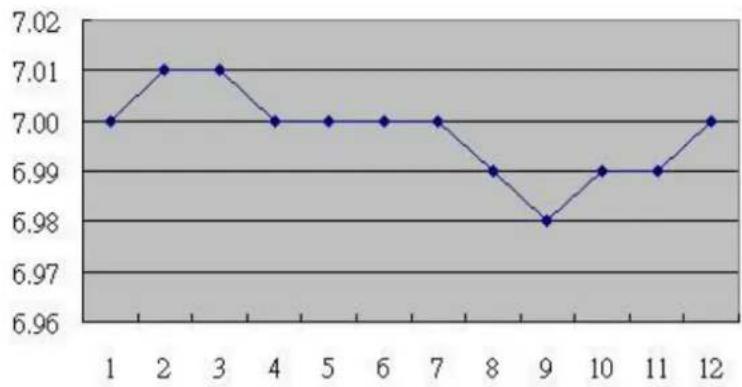
3) Power ON the computer and run the "EXCEL software". Down load the saving data file (for example the file name: PHA01001.XLS, PHA01002.XLS) from the SD card to the computer. The saving data will present into the EXCEL software screen (for example as following EXCEL data screens), then user can use those EXCEL data to make the further Data or Graphic analysis usefully.
EXCEL data screen (example 1)
| A | B | C | D | E | F | G | |
| 1 | Position | Date | Time | Ch1_Value | Ch1_Unit | Ch2_Value | Ch2_unit |
| 2 | 1 | 2009/8/12 | 13:26:37 | 7.00 | ph | 25.0 | Degree_C |
| 3 | 2 | 2009/8/12 | 13:26:39 | 7.01 | ph | 25.0 | Degree_C |
| 4 | 3 | 2009/8/12 | 13:26:41 | 7.01 | ph | 25.0 | Degree_C |
| 5 | 4 | 2009/8/12 | 13:26:43 | 7.00 | ph | 25.0 | Degree_C |
| 6 | 5 | 2009/8/12 | 13:26:45 | 7.00 | ph | 25.0 | Degree_C |
| 7 | 6 | 2009/8/12 | 13:26:47 | 7.00 | ph | 25.0 | Degree_C |
| 8 | 7 | 2009/8/12 | 13:26:49 | 7.00 | ph | 25.0 | Degree_C |
| 9 | 8 | 2009/8/12 | 13:26:51 | 6.99 | ph | 25.0 | Degree_C |
| 10 | 9 | 2009/8/12 | 13:26:53 | 6.98 | ph | 25.0 | Degree_C |
| 11 | 10 | 2009/8/12 | 13:26:55 | 6.99 | ph | 25.0 | Degree_C |
| 12 | 11 | 2009/8/12 | 13:26:57 | 6.99 | ph | 25.0 | Degree_C |
| 13 | 12 | 2009/8/12 | 13:26:59 | 7.00 | ph | 25.0 | Degree_C |
EXCEL data screen (example 2)
| A | B | C | D | E | F | G | H | |
| 1 | Position | Date | Time | Ch1_Value | Ch1_Unit | Ch2_Value | Ch2_unit | |
| 2 | 1 | 2009/8/12 | 13:26:37 | 7.00 | ph | 25.0 | Degree_C | |
| 3 | 2 | 2009/8/12 | 13:26:39 | 7.01 | ph | 25.0 | Degree_C | |
| 4 | 3 | 2009/8/12 | 13:26:41 | 7.01 | ph | 25.0 | Degree_C | |
| 5 | 4 | 2009/8/12 | 13:26:43 | 7.00 | ph | 25.0 | Degree_C | |
| 6 | 5 | 2009/8/12 | 13:26:45 | 7.00 | ph | 25.0 | Degree_C | |
| 7 | 6 | 2009/8/12 | 13:26:47 | 7.00 | ph | 25.0 | Degree_C | |
| 8 | 7 | 2009/8/12 | 13:26:49 | 7.00 | ph | 25.0 | Degree_C | |
| 9 | 8 | 2009/8/12 | 13:26:51 | 6.99 | ph | 25.0 | Degree_C | |
| 10 | 9 | 2009/8/12 | 13:26:53 | 6.98 | ph | 25.0 | Degree_C | |
| 11 | 10 | 2009/8/12 | 13:26:55 | 6.99 | ph | 25.0 | Degree_C | |
| 12 | 11 | 2009/8/12 | 13:26:57 | 6.99 | ph | 25.0 | Degree_C | |
| 13 | 12 | 2009/8/12 | 13:26:59 | 7.00 | ph | 25.0 | Degree_C | |
| 14 | ||||||||
| 15 | ||||||||
| 16 | ||||||||
| 17 | ||||||||
| 18 | ||||||||
| 19 | ||||||||
| 20 | ||||||||
| 21 | ||||||||
| 22 | ||||||||
| 23 | ||||||||
| 24 | ||||||||
| 25 | ||||||||
| 26 |
EXCEL data screen (example 3)
line
| X | Y | |---|---| | 1 | 7.00 | | 2 | 7.01 | | 3 | 7.01 | | 4 | 7.00 | | 5 | 7.00 | | 6 | 7.00 | | 7 | 7.00 | | 8 | 6.99 | | 9 | 6.98 | | 10 | 6.99 | | 11 | 6.99 | | 12 | 7.00 |9 Advanced settings
Under do not execute the Datalogger function, press the "SET Button" (3-8) continuously at least two seconds will enter the "Advanced Setting" mode. Then press the "SET Button" (3-8) once a while in sequence to select the eight main function, the display will show:
Sd F..... SD memory card Format
dAtE.....Set clock time ( Year/Month/Date, Hour/Minute/Second )
SP-t.....Set sampling time ( Hour/Minute/Second )
PoFF.....A. uto power OFF management
bEEP.....S..et beeper sound ON/OFF
dEC......Set SD card Decimal character
t-CF.....Select the Temp. unit to °C or °F
t-SEt.....S..et pH manual Temp. compensation value, pH only
ESC..... Escape from the advanced setting
Note:
During execute the " Advanced Setting " function, if press " ESC Button " (3-3) will exit the " Advanced Setting " function, the LCD will return to normal screen.
9.1 SD memory card format
When the lower display shows " Sd F "
1) Use the " ▲ Button " (3-5) or " ▼ Button " (3-6) to select the upper value to " yES " or " no ".
yES - Intend to format the SD memory card no - Not execute the SD memory card format
2) If select the upper to "yES", press the "Enter Button" (3-4) once again, the Display will show text "yES Enter" to confirm again, if make sure to do the SD memory card format, then press "Enter Button" once will format the SD memory clear all the existing data that already saving into the SD card.
9.2 Set clock time (Year/Month/Date, Hour/Minute/Second)
When the upper display show " dAtE "
1) Use the "▲ Button" (3-5) or "▼ Button" (3-6) to adjust the value (Setting start from Year value). After the desired value is set, press the "Enter Button" (3-4) once will going to next value adjustment (for example, first setting value is Year then next to adjust Month, Date, Hour, Minute, Second value).
Note:
The adjusted value will flash.
2) After set all the time value (Year, Month, Date, Hour, Minute, Second), press the "SET Button" (3-8) once will save the time value, then the screen will jump to Sampling time "setting screen (see below).
Note:
After the time value is setting, the internal clock will run precisely even Power off if the battery is under normal condition (No low battery power).
9.3 Set sampling time (Hour/Minute/Second)
When the upper display shows "SP-t"
1) Use the " ▲ Button " (3-5) or " ▼ Button " (3-6) to adjust the value ( Setting start from Hour value ). After the desired value is set, press the " Enter Button " (3-4) once will going to next value adjustment (for example, first setting value is Hour then next to adjust Minute, Second value ).
Note:
The adjusted value will flash.
2) After set all the sampling time value ( Hour, Minute, Second ), press the " SET Button " (3-8) once will save the sampling value with default then the screen will jump to " Auto power OFF " setting screen (see below).
9.4 Auto power off management
When the lower display shows " PoFF "
1) Use the " ▲ Button " (3-5) or " ▼ Button " (3-6) to select the upper value to " yES " or " no ".
yES - Auto Power Off management will be enabled. no - Auto Power Off management will be disabled.
2) After select the upper text to "yES" or "no", press the "Enter Button" (3-4) will save the setting function with default.
9.5 Set beeper sound on/off
When the lower display show "bEEP"
1) Use the "Button" (3-5) or "▼ Button" (3-6) to select the upper value to "yES" or "no".
yES - Meter's beep sound will be ON with default. no - Meter's beep sound will be OFF with default.
2) After select the upper text to "yES" or "no", press the "Enter Button" (3-4) will save the setting function with default.
9.6 Decimal point of SD card setting
The numerical data structure of SD card is default used the " . " as the decimal, for example "20.6" "1000.53". But in certain countries ( Europe ...) is used the ", " as the decimal point, for example " 20,6 " "1000,53". Under such situation, it should change the Decimal character at first.
When the lower display show " dEC "
1) Use the " ▲ Button " (3-5) or " ▼ Button " (3-6) to select the upper text to " bASIC " or " Euro ".
bASIC - Use " . " as the Decimal point with default. Euro - Use ", " as the Decimal point with default.
2) After select the upper text to "bASIC" or "Euro", press the "Enter Button" (3-4) will save the setting function with default.
9.7 Select the temperature unit °C or °F
When the lower display shows "t-CF"
1) Use the " ▲ Button " (3-5) or " ▼ Button " (3-6) to select the upper Display text to " C " or " F ".
C - Temperature unit is °C F - Temperature unit is °F
2) After Display unit is selected to "C" or "F", press the "Enter Button" (3-4) will save the setting function with default.
9.8 Set the pH manual temperature compensation value
When the lower display show "t-SEt"
1) This function only for the pH measurement of adjusting the pH electrode's manual Temp. compensation value. The default value is 25 °C (77 °F).
2) Use the " ▲ Button " (3-5) or " ▼ Button " (3-6) to select the upper value to the desired Temp. compensation value ( °C or °F ), then press the " Enter Button " (3-4) will save the setting value with default.
9.9 ESC
When the display shows "ESC"
When the Display show the text "ESC", then press the "Enter Button" (3-4) will finish the Advanced Setting procedures and return to the normal measuring screen.
Note:
During execute the " Advanced Setting " function, if press " ESC Button " ( 3-3, Fig. 1 ) will exit the " Advanced Setting " function, the LCD will return to normal screen.
10 Power supply from optional mains adaptor
The meter also can supply the power supply from the DC 9V Power Adapter ( optional ). Insert the plug of Power Adapter into " DC 9V Power Adapter Input Socket " (3-15). The meter will permanent power ON when use the DC ADAPTER power supply ( The power Button function is disabled ).
11 Battery replacement
1) When the left corner of LCD display show ", it is necessary to replace the battery. However, in spec. measurement may still be made for several hours after low battery indicator appears before the instrument become inaccurate.
2) Loose the screws of the "Battery Cover" (3-10) and take away the "Battery Cover" from the Instrument and remove the battery.
3) Replace with DC 1.5 V battery ( UM3, AA, Alkaline/heavy duty ) x 6 PCs, and reinstate the cover.
4) Make sure the battery cover is secured after changing batteries.
12 System reset
If troubles arise such as :
CPU system is hold ( for example, the key button cannot be operated... )
then make the system RESET will fix the problem. The system RESET procedures will be either following method :
During the power on, use a pin to press the "Reset Button" (3-16) once a while will reset the circuit system.
13 RS-232 PC serial interface
The instrument has RS232 PC serial interface via a 3.5 mm terminal (3-17).
The data output is a 16 digit stream which can be utilized for user's specific application.
An RS-232 lead with the following connection will be required to link the instrument with the PC serial port.

text_image
Meter PC (9W 'D" Connector) Center Pin....Pin 4 (3.5 mm jack plug) Ground/shield....Pin 2 2.2 K resister Pin 5The 16 digits data stream will be displayed in the following format :
Each digit indicates the following status:
| D15 | Start Word | ||
| D14 | 4 | ||
| D13 | When send the upper display data = 1When send the lower display data = 2 | ||
| D12, D11 | Annunciator for Display | ||
| PH = 05 | mV = 18 | ||
| D10 | Polarity0 = Positive 1 = Negative | ||
| D9 | Decimal Point(DP), position from right to the left0 = No DP, 1= 1 DP, 2 = 2 DP, 3 = 3 DP | ||
| D8 to D1 | Display reading, D1 = LSD, D8 = MSDFor example :If the display reading is 1234, then D8 to D1 is : 00001234 | ||
| D0 | End Word | ||
RS-232 format: 9600, N, 8, 1
| Baud rate | 9600 |
| Parity | No parity |
| Data bit no. | 8 data bits |
| Stop bit | 1 stop bit |
14 Disposal
For the disposal of batteries, the 2006/66/EC directive of the European Parliament applies. Due to the contained pollutants, batteries must not be disposed of as household waste. They must be given to collection points designed for that purpose.
In order to comply with the EU directive 2012/19/EU we take our devices back. We either re-use them or give them to a recycling company which disposes of the devices in line with law.
If you have any questions, please contact PCE Instruments.

15 Contact
If you have any questions about our range of products or measuring instruments please contact PCE Instruments.
15.1 PCE Instruments UK
By post:
PCE Instruments UK Ltd.
Units 12/13 Southpoint Business Park
Ensign Way, Southampton
Hampshire
United Kingdom, SO31 4RF
By phone:
02380 987 035
15.2 PCE Americas
By post:
PCE Americas Inc.
711 Commerce Way
Suite 8
Jupiter
33458 FL
USA
By phone:
561 320 9162