12G-SDI - Audio / Vidéo MuxLab - Free user manual and instructions
Find the device manual for free 12G-SDI MuxLab in PDF.


User questions about 12G-SDI MuxLab
0 question about this device. Answer the ones you know or ask your own.
Ask a new question about this device
Download the instructions for your Audio / Vidéo in PDF format for free! Find your manual 12G-SDI - MuxLab and take your electronic device back in hand. On this page are published all the documents necessary for the use of your device. 12G-SDI by MuxLab.
USER MANUAL 12G-SDI MuxLab
- Safety Precautions....3
- Introduction......4
- Features......4
- Package Contents......4
- Specifications....5
- Hardware Interface....6
6.1 Front Panel....6
6.2 Left Side Panel....6
6.3 Rear Panel....6 - Software Interface....7
7.1 Software Control....7
7.2 Software Settings....7
7.3 Video Settings....8
7.4 Firmware Upgrade....8
7.5 General Settings....9 - Application Diagram....10
1. Safety Precautions
To ensure the best performance from the product, please read all instructions carefully before using the device. Save this manual for future reference.
- Follow basic safety precautions to reduce the risk of fire, electrical shock, and injury.
- Do not dismantle the housing or modify the module. It may result in electrical shock or burns.
- Do not open or remove the housing of the device as you may be exposed to dangerous voltage or other hazards.
- To prevent fire or shock hazard, do not expose the unit to rain, moisture and do not install this product near water. Keep the product away from liquids.
- Spillage into the housing may result in fire, electrical shock, or equipment damage. If an object or liquid falls or spills on the housing, unplug the module immediately.
- Do not use liquid or aerosol cleaners to clean this unit. Always unplug the power to the device before cleaning.
- Using supplies or parts not meeting the product specifications may cause damage, deterioration or malfunction.
• Refer all servicing to qualified service personnel.
• Install the device in a place with adequate ventilation to avoid damage caused by overheat. - Unplug the power when left unused for a long period of time.
- Information on disposal of devices: do not burn or mix with general household waste, please treat them as normal electrical waste.
Copyright Notice
All contents in this manual are copyrighted, and cannot be cloned, copied, or translated without the express permission of MuxLab Inc. Product specifications and information in this document are for reference only, and the content may be updated from time to time without prior notice.
2. Introduction
The 12G-SDI Repeater (Model 500742) is a 12G-SDI to 12G-SDI Repeater with Amplification and Re-clocking Technology and auto source video format detection. It performs high-quality, low-delay video auto format detection, video signal re-clocking, and video signal amplification for transmission over a long distance. It features one 12G-SDI video input, one 12G-SDI loop video output, a locking Power Supply connector, and a USB port for software control and firmware upgrade. An output LED shows the status of the Phase Locked Loop (PLL) Video Signal Locking.
3. Features
- Wide support of SDI video signal resolutions
• High Quality 12G-SDI Re-clocking & Amplification Technology
• Multi-Standard Support (12G, 6G, 3G, HD, and SD-SDI)
• Auto Source Video Format Detection
• Supports 16-channel, 24-bit Audio formats - Easy plug and play installation
- Rugged design and integrated brackets for easy mounting
- Optional configuration via USB port and the MuxLab SDI Manager software available for easy control and firmware upgrade
4. Package Contents
• One (1) 12G-SDI Repeater
- One (1) Universal Power Supply including international plug connections for use around the world
• One (1) USB to Mini-USB cable
• One (1) User manual (available via download)
Notes: Confirm that the product and accessories are all included. If not, please contact the supplier from which you purchased the unit.
5. Specifications
| Specifications | |
| Environment | SD-SDI up to 12G-SDI |
| Video Resolution | 12G-SDI |
| Distance at 12G-SDI | Input 100M / Output 100M (Cable: Canare L-5.5CUHD)Input 70M / Output 50M (Cable: Belden 1694A) |
| Distance at 3G-SDI | Input 100M / Output 100M (Cable: Belden 1694A) |
| USB Link | Mini-USB |
| Power Supply | 12VDC, Locking connector |
| Working Temperature | 0°C to 40°C, up to 95% humidity non-condensing |
| Storage Temperature | -20°C to 60°C. Bring to working temperature range before power-up. |
| Supported Video Formats | |
| SDI Input Video Resolutions | 12G-SDI 4096x2160p, 60/50fps3840x2160p, 60/50fps6G-SDI 4096x2160p, 30/25/24fps3840x2160p, 30/25/24fps3G-SDI 1920x1080p, 60/50fpsHD-SDI 1920x1080p, 30/25/24fps1920x1080i, 60/50fps1280x720p, 60/50fpsSD-SDI 720x480i, 60fps720x576i, 50fps |
| SDI Output Video Resolutions | SDI Loop Through has same video resolutions and frame rates as SDI Video Input |
| Supported Audio Formats | |
| SDI Audio Input | Up to 16-Channel, 24-bit, up to 48 kHz |
| SDI Audio Output | Up to 16-Channel, 24-bit, up to 48 kHz |
| Mechanical | |
| Housing | Black Metal Enclosure |
| Dimensions 100 x 70 x 26mm | |
| Warranty | 2 years |
| Order Information | 500742 12G-SDI Repeater (UPC: 627699007426) |
6. Hardware Interface
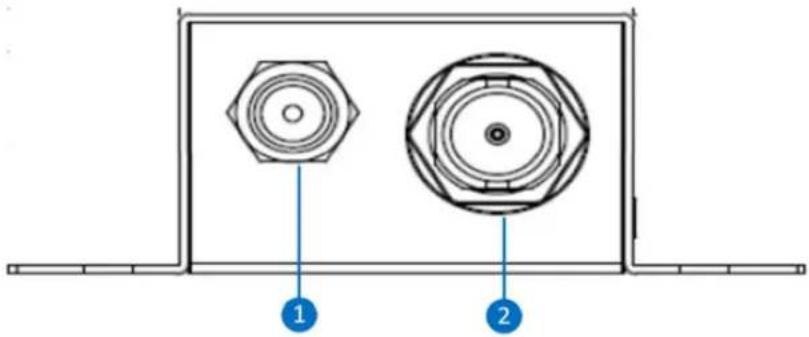
6.1 Front Panel
text_image
Technical diagram showing two labeled components (1 and 2) within a rectangular frame, with circular features inside each component.Locking 12VDC Power interface.1.
Video 12G-SDI Input BNC Connector.2.
6.2 Left Side Panel

natural_image
Technical diagram of a mechanical or electronic component with labeled pins and connectors (no readable text or symbols)Mini-USB connector to connect a PC running the MuxLab SDI Manager Software.1.
6.3 Rear Panel

text_image
Technical diagram showing a mechanical component with labeled parts 1 and 2Video 12G-SDI Output BNC Connector.1.
LED for Phase Locked Loop (PLL) locking indication.2.
7 Software Interface
The 12G-SDI Repeater can be used right out of the box, without the use of any software. However, the MuxLab SDI Manager software is available for basic configuration and firmware upgrade.
The MuxLab SDI Manager software can be used to manage the 12G-SDI Repeater.
The software features also a firmware upgrade option for future firmware releases.
The software runs on Windows operating system and is available for download on the MuxLab website.
7.1 Software Download
When running the MuxLab SDI Manager software, you will see the splash screen below. Make sure to connect the USB cable between the PC and the device.

text_image
MuxLab Muxlab SDI Manager Please connect to the USB Device7.2 Software Settings
Once connected, you will see the Main screen. On the left side, the software will display the image of the connected 12G-SDI Repeater, the software version as well as the firmware version. It will also display the status of each video 12G-SDI port.
7.3 Video Settings
On the right side, under the Video tab, you can confirm the cable length used as Short or Long.

text_image
MuxLab 12G-SDI Repeater No Signal - FW Ver 3 1:0.1 No Signal - Ver : 1.0 4.9 Video F/W Update Setting Cable Length : Long OK7.4 Firmware Upgrade
The F/W Update tab will display the menu for upgrading the device's firmware.

text_image
MuxLab 12G-SDI Repeater No Signal - FW Ver 3.1.0.1 No Signal - Ver 1.0.4.9 File Name: *.BIN:..XOL:*.FIN File Size : Check Sum : 0x0000 0x0000 Status :To upgrade the firmware, three files could be provided depending on what need to be updated.
The firmware upgrade procedure is as follows:
- Go to the "F/W Update" tab
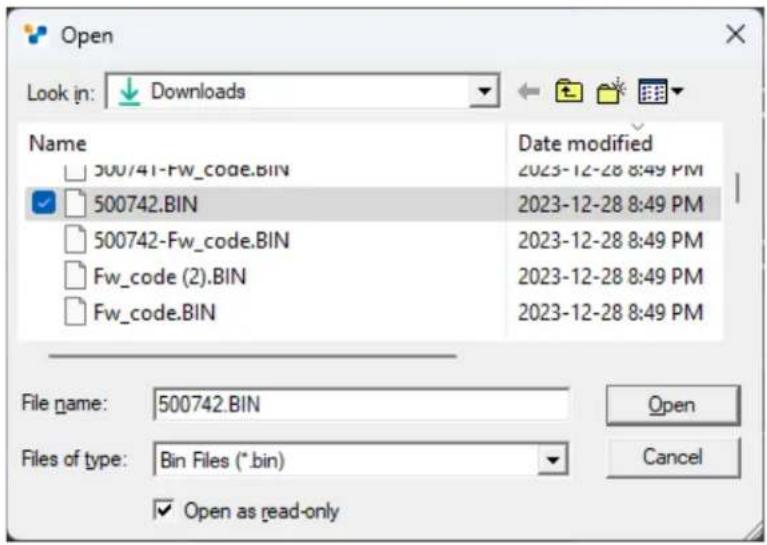
- Click on the folder button to select the file(s)
• A File Open Menu will appear
text_image
Open Look in: Downloads Name 500741-Fw_code.BIN 500742.BIN 500742-Fw_code.BIN Fw_code (2).BIN Fw_code.BIN Date modified 2023-12-28 8:49 PM 2023-12-28 8:49 PM 2023-12-28 8:49 PM 2023-12-28 8:49 PM 2023-12-28 8:49 PM File name: 500742.BIN Files of type: Bin Files (*.bin) Open Cancel ✓ Open as read-only- Select a BIN file or a FIN file to update.
- Click on "Start" button; a progress bar will be displayed. Make sure the device is powered at all times during the firmware update process.
- Once the progress bar is complete, repeat the two steps above for all the three files for upgrade.
• After all the three files have been uploaded successfully, power cycle the device.
7.5 General Settings
The Setting Tab can be used to perform a hardware reset. The device will reboot for a few seconds and will reconnect to the software.

text_image
MuxLab 12G-SDI Repeater - No Signal - FW Ver 3 1.0.1 - No Signal - Ver : 1.0 4.9 Video F/W Update Setting Hardware Reset- Application Diagram
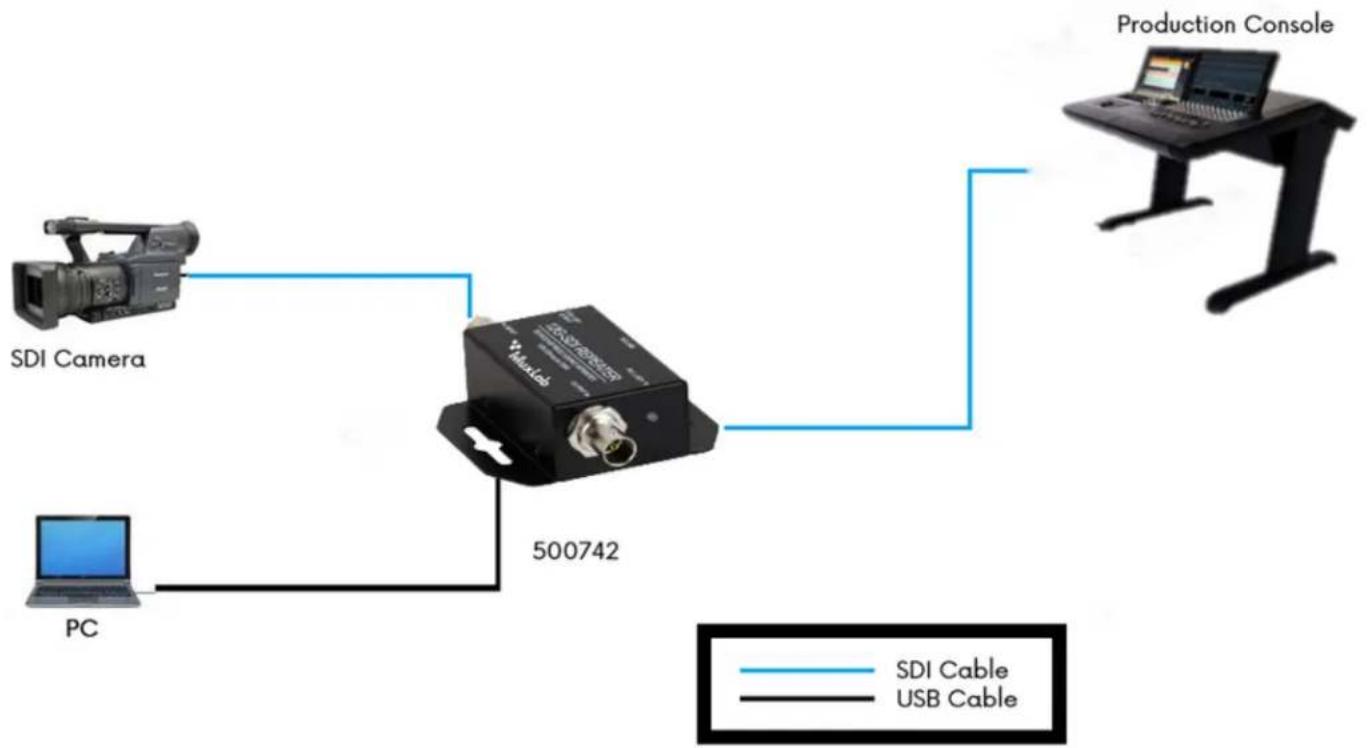
flowchart
graph LR
    A["SDI Camera"] -->|USB Cable| B["Production Console"]
    C["PC"] -->|USB Cable| B
    B -->|USB Cable| A
    style A fill:#f9f,stroke:#333
    style C fill:#ccf,stroke:#333
    style B fill:#cfc,stroke:#333