Mini-PC-1 - Mini PC MuxLab - Free user manual and instructions
Find the device manual for free Mini-PC-1 MuxLab in PDF.


User questions about Mini-PC-1 MuxLab
0 question about this device. Answer the ones you know or ask your own.
Ask a new question about this device
Download the instructions for your Mini PC in PDF format for free! Find your manual Mini-PC-1 - MuxLab and take your electronic device back in hand. On this page are published all the documents necessary for the use of your device. Mini-PC-1 by MuxLab.
USER MANUAL Mini-PC-1 MuxLab
natural_image
Two MuxLab server units with ports and connectors, no visible text or symbols on the devices themselves.Table of Contents
- Safety Precautions....3
- Introduction......4
- Features....5
- Package Contents....5
- Appearance and Interface....6
- Specifications....6
- Using the mounting screws....8
- Typical Application ...... 9
- Troubleshooting....10
1. Safety Precautions
To ensure the best performance from the product, please read all instructions carefully before using the device. Save this manual for future reference.
- Follow basic safety precautions to reduce the risk of fire, electrical shock, and injury.
- Do not dismantle the housing or modify the module. It may result in electrical shock or burns.
- Do not open or remove the housing of the device as you may be exposed to dangerous voltage or other hazards.
- To prevent fire or shock hazard, do not expose the unit to rain, moisture and do not install this product near water. Keep the product away from liquids.
- Spillage into the housing may result in fire, electrical shock, or equipment damage. If an object or liquid falls or spills on the housing, unplug the module immediately.
- Do not use liquid or aerosol cleaners to clean this unit. Always unplug the power to the device before cleaning.
- Using supplies or parts not meeting the product specifications may cause damage, deterioration or malfunction.
- Refer all servicing to qualified service personnel.
● Install the device in a place with adequate ventilation to avoid damage caused by overheating.
● Unplug the power when left unused for a long period of time. - Information on disposal of devices: do not burn or mix with general household waste, please treat them as normal electrical waste.
Copyright Notice
All contents in this manual are copyrighted, and cannot be cloned, copied, or translated without the express permission of MuxLab Inc. Product specifications and information in this document are for reference only, and the content may be updated from time to time without prior notice.
2. Introduction
Despite its small size, MuxMeet Mini-PC-1 (model: 500823) offers incredible versatility as it is equipped with an 8th generation Intel Core i5 processor, 8GB DDR4 RAM, 128GB SSD, one HDMI 2.0 port, one DP port, four USB 3.0 ports, four USB 2.0 ports, two Gb LAN ports, and a video card Intel HD Graphics 620, the MuxMeet Mini-PC-1 is a great solution when performance needs are high, but space requirements are tight.
The MuxMeet Mini-PC-1 features a die-cast aluminum chassis that protects the system from the rigors of the environment such as dust or dirt, making it durable enough for heavy-duty work but also eye-catching enough for home and office, the MuxMeet Mini-PC-1 is built to last no matter what the working conditions.
3. Features
- Processor Intel Core i5-8250u
● Memory 8GB DIMM DDR4 - Storage 128GB SSD
● Video Intel UHD Graphics 620
● Audio Intel High Definition
● Operating System Windows 10 - HDMI and DP ports
● Black color PVP top and aluminum alloy body
4. Package Contents
● One (1) MuxMeet Mini-PC-1
● One (1) Power Supply
- One (1) Cable
● Four (4) mounting screws
● One (1) User manual (available via download)
Notes: Confirm that the product and accessories are all included. If not, please contact the supplier from which you purchased the unit.
5. Appearance and Interface
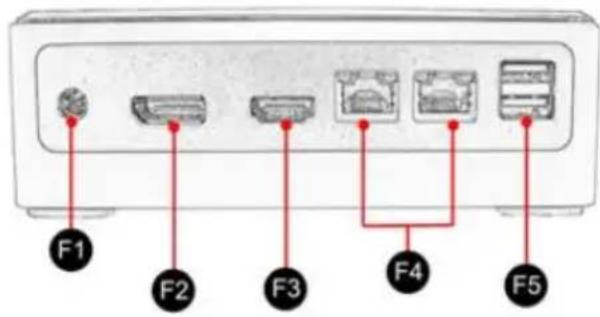
Front
text_image
F1 F2 F3 F4 F5F1: Power supply socket(12V DC IN)
F2: DP display ports(1 piece)
F3: HDMI display ports(1 piece)
F4: RJ45 Gigabit LAN ports(2 pieces)
F5: USB 3.0 ports(2 pieces)
Rear
flowchart
graph TD
    R1["Terminal R1"] --> A["Node"]
    R2["Terminal R2"] --> A
    R3["Terminal R3"] --> B["Node"]
    R4["Terminal R4"] --> C["Node"]
    R5["Terminal R5"] --> C
    R6["Terminal R6"] --> D["Node"]
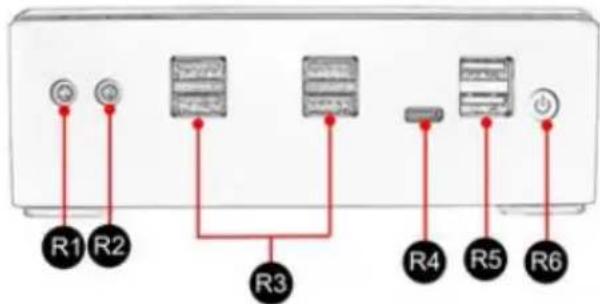
R1: MIC
R2: SPK
R3: USB 2.0 ports(4 pieces)
R4: Type-C USB3.0(1 piece)
R5: USB 3.0 ports(2 pieces)
R6: Power On/Off Switch
6. Specifications
| System | |
| CPU | Onboard Intel Core i5-8250u |
| TDP | 15W |
| Motherboard | 140 x 130mm customized size |
| Memory | 2 x SO-DIMM DDR4 Slot, Supports4GB/8GB/16GB/32GB DDR4-2133/2400 |
| OS | Windows 10 |
| PXE | Yes |
| Audio | Intel High Definition Audio Controller |
| Network | 1 x Onboard Intel Ethernet Connection I219-LM1 x Onboard Realtek RTL8168/8111/8112 Gigabit Ethernet Controller10/100Mbps/1000Mbps BaseT LAN |
| Video | Intel UHD Graphics 620 |
MuxMeet Mini-PC-1 Operation Manual
| Wi-Fi | |
| Module | 1 x M.2 NVME/NGFF slot for Wi-Fi module |
| Antenna | 2 x inner RF cables and without external antenna |
| Input/Output ports | |
| Switch | 1 x Power On/Off Switch |
| Power | 1 x Power in |
| USB | 4 x USB 2.0, 4 x USB 3.0 |
| USB-C | 1 x Type-C USB 3.0 |
| Display | 1 x DP, 1 x HDMI 2.0 |
| LAN | 2 x RJ45 Giga LAN |
| Audio | 1 x MIC, 1 x SPK |
| Storage | |
| MSATA | 1 x M.2 slot for NGFF/NVME SSD, support 6Gb/s |
| SATA | 1 x SATA 3.0 slot for SATA HDD or SSD, support 6Gb/s (no space to install) |
| Product Dimension & Details | |
| Dimensions (DxWxH) | 5.90" x 5.39" x 1.96" (150mm x 137mm x 50mm) |
| Weight | Net 0.65kg, Gross 1.15kg |
| Shell | Black color PVP top and aluminum alloy body |
| Cooling Mode | With a copper cooling fan |
| Other | |
| Operating Temperature | 0° - 70° Centigrade |
| Relative Humidity | 10%~85% |
| Warranty | 2 years |
| Order Information | 500823 MuxMeet Mini-PC-1 (UPC: 627699008232) |
| Package Content | 1 x Mini-PC, 1 x Power Adapter, 1 x Power Cord, 4 x mounting screws, 1 x User Manual (available via download) |
7. Using the mounting screws
- Prepare the mounting screws

natural_image
Sketch of multiple bolts arranged in a cluster (no text or symbols visible)- Check that the screw holes on the MuxMeet Mini-PC-1 have clear access.

natural_image
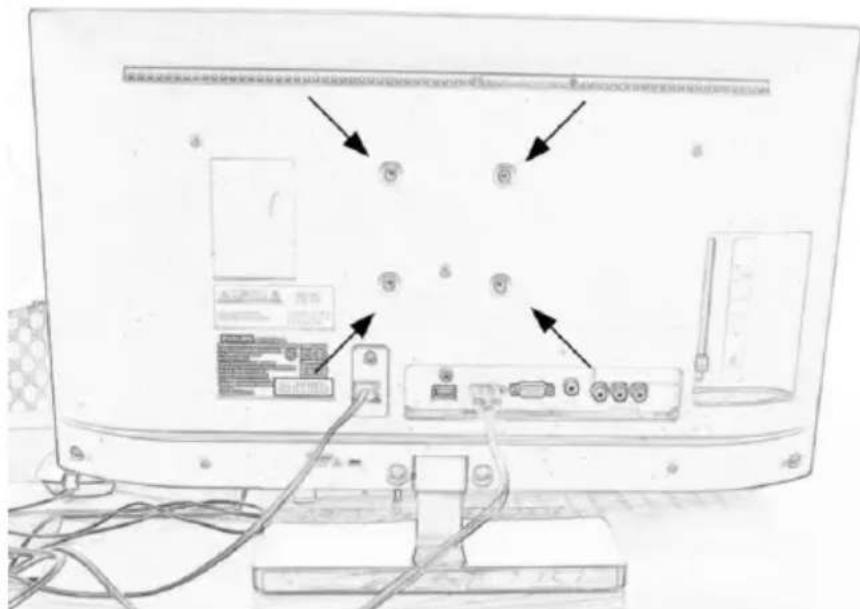
Top-down schematic of a square grid pattern with corner connectors (no text or symbols)- Install the screws on the back of the screen.
text_image
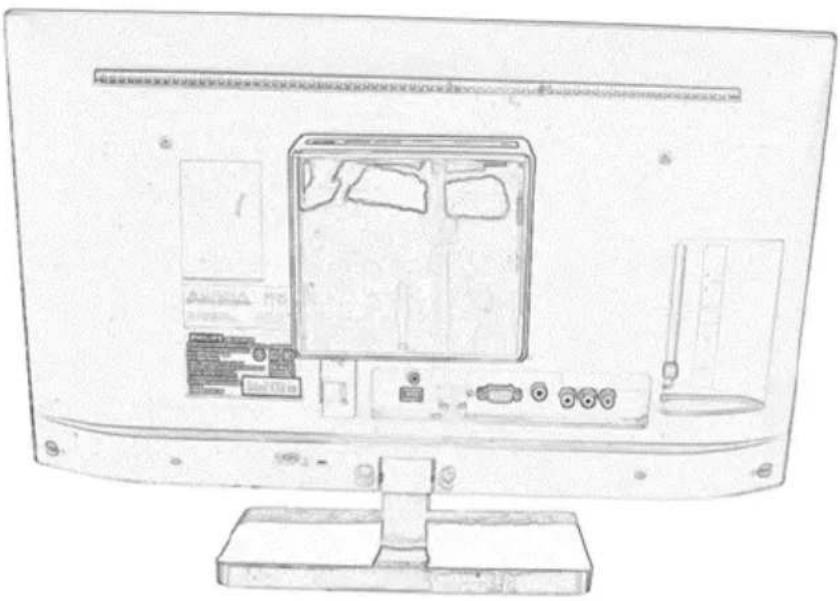
Diagram of a computer monitor rear panel with labeled ports and connectors, showing internal components and cable connections.4. Mount the MuxMeet Mini-PC-1
natural_image
Line drawing of a computer monitor rear view showing internal components like CPU, RAM, and drive unit (no text or symbols)8. Typical Application
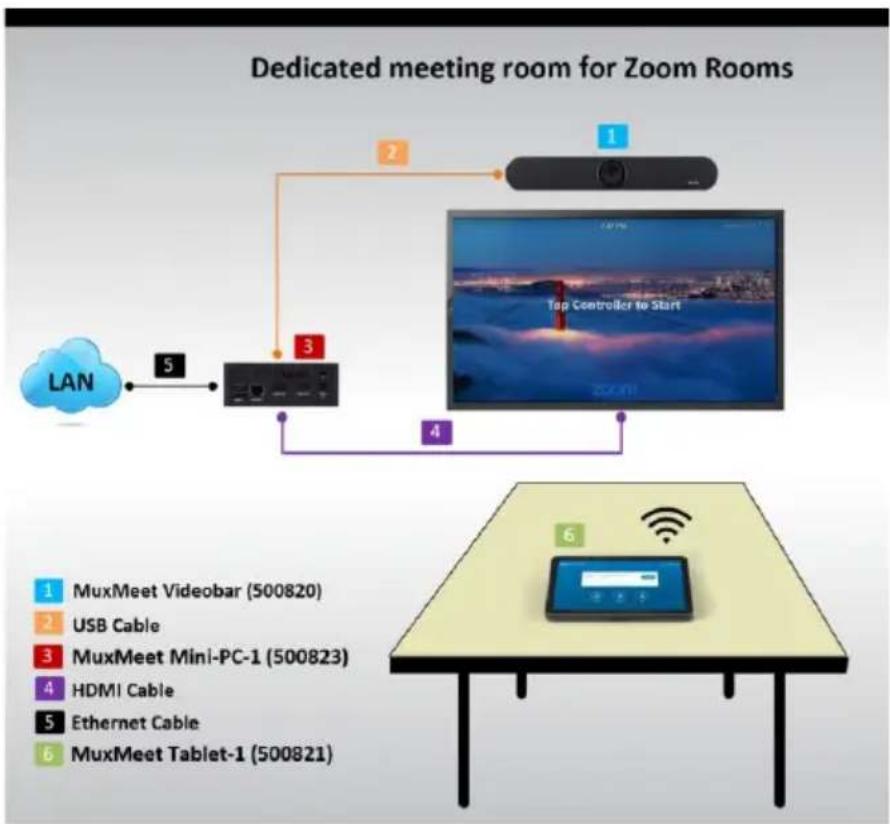
flowchart
graph TD
    A["LAN"] -->|5| B["Device"]
    B -->|3| C["Top Controller to Start"]
    C -->|4| D["Screen"]
    E["MuxMeet Videobar (500820)"] --> F["Table with Wi-Fi icon"]
    G["USB Cable"] --> H["Table with Wi-Fi icon"]
    I["MuxMeet Mini-PC-1 (500823)"] --> J["Table with Wi-Fi icon"]
    K["HDMI Cable"] --> L["Table with Wi-Fi icon"]
    M["Ethernet Cable"] --> N["Table with Wi-Fi icon"]
    O["MuxMeet Tablet-1 (500821)"] --> P["Table with Wi-Fi icon"]
9. Troubleshooting
The following table describes some of the symptoms and possible solutions regarding the MuxMeet Mini-PC-1.
| symptom | Probable cause | Possible solution |
| No Image | No power or wrong power supplyHDMI or DP cable | Check power connectionsCheck the HDMI and/or DP cable |
| Flickering Image | Synchronization | Check the HDMI or DP Cable |
If you still cannot diagnose the problem, please call MuxLab Customer Technical Support at 877-689-5228 (toll-free in North America) or (+1) 514-905-0588 (International).
MuxLab PRODIGITAL™
MuxLab Inc.
2321 Rue Cohen
Montreal, Quebec
Canada H4R 2N7
Tel.: +1 (514) 905-0588 Fax: +1 (514) 905-0589
Toll Free (North America): 877 689-5228
URL: www.muxlab.com
E-mail: info@muxlab.com