
500408 - Audio/Video Accessories MuxLab - Free user manual and instructions
Find the device manual for free 500408 MuxLab in PDF.


| Product Type | HDMI 2.0 Extender Kit |
| Model Number | 500408 |
| Brand | MuxLab |
| Video Resolution Support | Up to 4K@60Hz 4:4:4 |
| Maximum Extension Distance | 164 ft (50 m) over Cat5e/6 |
| Bandwidth | 18 Gbps |
| HDCP Compliance | HDCP 2.2 / HDCP 1.4 |
| HDMI Compliance | HDMI 2.0 |
| Supported Audio Formats | LPCM 2.0/2.1/5.1/6.1/7.1, Dolby Digital, Dolby TrueHD, Dolby Digital Plus, DTS-ES, DTS HD Master, DTS HD-HRA, DTS-X |
| HDR Support | Yes |
| IR Pass-through | One-way (from receiver to transmitter) |
| HDMI Loop-out | Yes, on transmitter |
| Power over Cable (PoC) | Yes, either unit can power the other |
| Auto EDID Copy | Yes |
| Dimensions (Transmitter/Receiver) | 61 mm (W) x 88 mm (D) x 18 mm (H) |
| Weight (Transmitter / Receiver) | 160 g / 155 g |
| Power Supply | Input: 100-240 VAC, 50/60 Hz; Output: 12 VDC, 1 A |
| Power Consumption | 3.84 W |
| Housing Material | Metal enclosure |
| Color | Black |
| Operating Temperature | 32 – 104 °F (0 – 40 °C) |
| Storage Temperature | -4 – 140 °F (-20 – 60 °C) |
| Warranty | 2 years |
| Package Contents | Transmitter, Receiver, IR Blaster cable (1.5 m), IR Receiver cable (1.5 m), 12V/1A locking power adapter, 4 mounting ears, user manual (download) |
| Cleaning Instructions | Unplug before cleaning; do not use liquid or aerosol cleaners |
| Safety Warnings | Do not dismantle; avoid moisture; install with adequate ventilation; refer servicing to qualified personnel |
| Repairability | No user-serviceable parts; refer to qualified service personnel |
Frequently Asked Questions - 500408 MuxLab
User questions about 500408 MuxLab
0 question about this device. Answer the ones you know or ask your own.
Ask a new question about this device
Download the instructions for your Audio/Video Accessories in PDF format for free! Find your manual 500408 - MuxLab and take your electronic device back in hand. On this page are published all the documents necessary for the use of your device. 500408 by MuxLab.
USER MANUAL 500408 MuxLab
- Safety Precautions....3
- Introduction......4
- Features......4
- Package Contents......4
- Specifications....5
- Operation Controls and Functions....6
6.1 Transmitter Panel....6
6.2 Receiver Panel....7
6.3 IR Pin Definition....7 - Application Example....9
1 Safety Precautions
To ensure the best performance from the product, please read all instructions carefully before using the device. Save this manual for future reference.
- Follow basic safety precautions to reduce the risk of fire, electrical shock, and injury.
- Do not dismantle the housing or modify the module. It may result in electrical shock or burns.
- Do not open or remove the housing of the device as you may be exposed to dangerous voltage or other hazards.
- To prevent fire or shock hazard, do not expose the unit to rain, moisture and do not install this product near water. Keep the product away from liquids.
- Spillage into the housing may result in fire, electrical shock, or equipment damage. If an object or liquid falls or spills on the housing, unplug the module immediately.
- Do not use liquid or aerosol cleaners to clean this unit. Always unplug the power to the device before cleaning.
- Using supplies or parts not meeting the product specifications may cause damage, deterioration or malfunction.
• Refer all servicing to qualified service personnel.
• Install the device in a place with adequate ventilation to avoid damage caused by overheat. - Unplug the power when left unused for a long period of time.
- Information on disposal of devices: do not burn or mix with general household waste, please treat them as normal electrical waste.
Copyright Notice
All contents in this manual are copyrighted, and cannot be cloned, copied, or translated without the express permission of MuxLab Inc. Product specifications and information in this document are for reference only, and the content may be updated from time to time without prior notice.
2 Introduction
The HDMI 2.0 Extender Kit, 50m (Model: 500408) allows extend a high-definition video/audio signals and one-way IR commands up to 164ft/50m between the transmitter and receiver over a single Cat5e/6 cable. This extender supports up to 4K/60Hz 4:4:4 video resolution, 18Gbps bandwidth, HDCP 2.2., HDMI Loop-out on the Transmitter, and one-way IR pass-through enabling source control.
The extender includes one Transmitter unit and Receiver unit. The Transmitter unit is responsible for capturing HDMI input signal and carries the signal via one Cat5e/6 cable, and emitting IR control signals. The Receiver unit is responsible for receiving the HDMI signal and capturing IR control signals.
3 Features
• HDMI 2.0, HDCP 2.2 / HDCP 1.4 and DVI 1.0 compliant
• Supports 18Gbps bandwidth
- Supports input and output video resolution up to 4K/60Hz 4:4:4, extends distance up to 164ft /50m
• Supports one HDMI loop output
• Supports one-way IR pass-through
• Supports HDR function
- Supports PoC (Power over Cable) function, it means that either transmitter or receiver is powered supply by 12VDC/1A power adapter, the other doesn't need power supply
• Supports automatic copy EDID function
- Compact design for easy and flexible installation
4 Package Contents
• One (1) HDMI 2.0 Extender (Transmitter)
• One (1) HDMI 2.0 Extender (Receiver)
• One (1) IR Blaster cable (1.5 meters)
• One (1) 20\~60KHz IR Receiver cable(1.5 meters)
• One (1) 12VDC/1A Locking Power adapter
• Four (4) Mounting Ears
• One (1) User manual (available via download)
Notes: Confirm that the product and accessories are all included. If not, please contact the supplier from which you purchased the unit.
5 Specifications
| Technical | |
| HDMI Compliance | HDMI 2.0 |
| HDCP Compliance | HDCP 2.2 / HDCP 1.4 |
| Video Bandwidth | 18Gbps |
| Video Resolution | Up to 4K/60Hz 4:4:4 |
| Color Space | RGB / YCbCr 4:4:4, YCbCr 4:2:2/4:2:0, YUV 4:4:4 |
| Color Depth | 8/10/12-bit (1080P/60Hz, 4K/30Hz, 4K/60Hz YCbCr 4:2:2/4:2:0)8-bit (4K/60Hz 4:4:4) |
| HDMI Audio Formats | LPCM 2.0/2.1/5.1/6.1/7.1, Dolby Digital, Dolby TrueHD, Dolby Digital Plus(DD+),DTS-ES, DTS HD Master, DTS HD-HRA, DTS-X |
| ESD Protection Human body model — ±8kV (Air-gap discharge) & ±4kV (Contact discharge) | |
| Connection | |
| Transmitter | Inputs: 1 x HDMI Type A [19-pinfe male]1 x SERVICE [Micro USB, Update port]Outputs: 1 x HDMI Type A [19-pin female]1 x IR OUT [3.5mm Stereo Mini-jack]1 x CAT OUT [RJ45, 8-pin female] |
| Receiver | Inputs: 1 x IR IN [3.5mm Stereo Mini-jack]1 x CAT IN [RJ45, 8-pin female]1 x SERVICE [Micro USB, Update port]Outputs: 1 x HDMI Type A [19-pin female] |
| Mechanical | |
| Housing Metal Enclosure | |
| Color Black | |
| Dimensions | Transmitter / Receiver:61mm [W] x 88mm [D] x 18mm [H] |
| Weight | Transmitter: 160g, Receiver: 155g |
| Power Supply | Input: 100 - 240VAC 50/60HzOutput: 12VDC/1A |
| Power Consumption | 3.84W |
| Operating Temperature | 32 - 104°F / 0 - 40°C |
| Storage Temperature | -4 - 140°F / -20 - 60°C |
| Relative Humidity | 20 - 90% RH (no condensation) |
| Generic Specification | |
| Warranty | 2 years |
| Order Information | 500408 HDMI 2.0 Extender Kit, 50M (UPC: 627699004081) |
6 Operation Controls and Functions
6.1 Transmitter Panel


| No | Name Function Description | |
| 1 | HDMI OUT | HDMI loop output port, connect to HDMI display device such as TV or Projector with an HDMI cable |
| 2 | HDMI IN | HDMI input port, connect to HDMI source device such as DVD or PS4 player with an HDMI cable |
| 3 | CAT OUT | Connect to CAT IN port on the receiving end with a CAT6 cable |
| 4 | Power Indicator Lamp (Green) | The LED will illuminate when the transmitter is powered on |
| 5 | Data signal Indicator Lamp (Orange) | The LED will illuminate when the transmitter and the receiver have signal transmission |
| 6 | Firmware update portService port | |
| 7 IR OUT | Connect to wideband IR Blaster cable. The IR signal is from the IR IN port of the receiver | |
| 8 | 12VDC | Plug 12VDC/1A power supply into the unit and connect the adapter to an AC outlet.(Note: The extender supports PoC function, it means that either transmitter or receiver is powered on by the 12VDC/1A power adapter, the other doesn't need power supply) |
6.2 Receiver Panel


| No | Name Function Description | |
| 1 | HDMI OUT | HDMI output port, connect to HDMI display device such as TV or Projector with an HDMI cable |
| 2 | CAT IN | Connect to CAT OUT port on the transmitter end with a CAT6 cable |
| 3 | Power Indicator Lamp (Green) | The LED will illuminate when the receiver is powered on |
| 4 | Data signal Indicator Lamp (Orange) | The LED will illuminate when the transmitter and the receiver have signal transmission |
| 5 | Service port | Firmware update port |
| 6 | IR IN | Connect to wideband IR Receiver cable. The IR signal will send to the IR OUT port of the transmitter |
| 7 | 12VDC | Plug 12VDC/1A power supply into the unit and connect the adapter to an AC outlet.(Note: The extender supports PoC function, it means that either transmitter or receiver is powered on by the 12VDC/1A power adapter, the other doesn't need power supply) |
6.3 IR Pin Definition
IR Receiver and Blaster pin's definition as below:

natural_image
Close-up of two black cables with a metallic connector, no visible text or symbolsIR Receiver IR Blaster

natural_image
Two black cables with metallic connectors, one open and one inserted (no text or symbols visible)

The following is a diagram about the use method of IR cable.
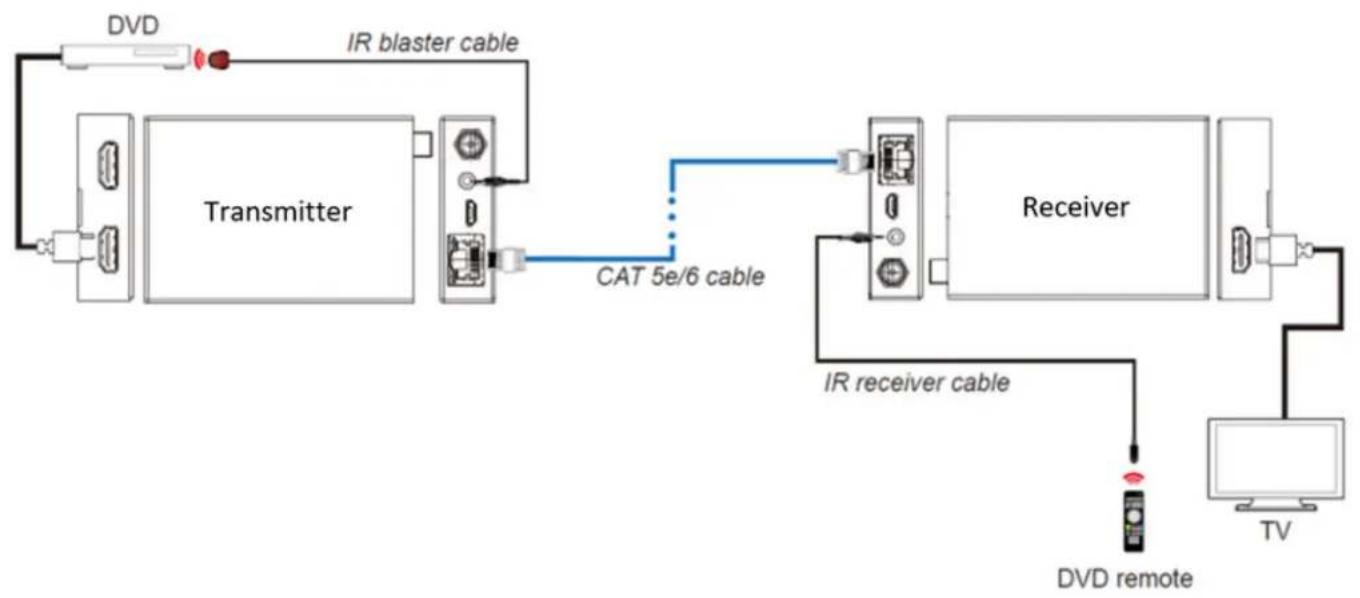
flowchart
graph LR
    DVD[" DVD "] --> Transmitter[" Transmitter "]
    Transmitter -->|IR blaster cable| Receiver[" Receiver "]
    Transmitter -->|CAT 5e/6 cable| Receiver
    Receiver -->|IR receiver cable| TV[" TV "]
    TV -->|DVD remote| Remote[" Remote "]
7 Application Example

flowchart
graph TD
    A["TRANSMITTER"] --> B["IRE"]
    B --> C["DC 12V"]
    D["HDMI OUT"] --> E["UNHDTV"]
    F["HDMI IN"] --> G["DVD or Blu-ray Player"]
    H["CAT OUT"] --> I["Service"]
    J["IR OUT"] --> K["Power Supply"]
    L["IR Blaster"] --> M["Service"]
    N["IRE Exter"] --> O["DC 12V"]
    P["HDMI OUT"] --> Q["UNHDTV"]
    R["Receiver"] --> S["UNHDTV"]
    T["IR Extender"] --> U["DC 12V"]

Brand : MuxLab
Model : 500408
Category : Audio/Video Accessories