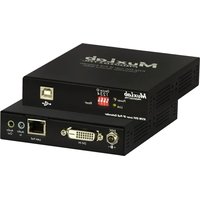
500772 - Audio/video converter MuxLab - Free user manual and instructions
Find the device manual for free 500772 MuxLab in PDF.


Pick your language and provide your email: we'll send you a specifically translated version.
| Product type | Audio/video converter |
| Brand | MuxLab |
| Model | 500772 |
| Dimensions (W x D x H) | 130 x 80 x 25 mm |
| Weight | 0.25 kg |
| Power supply | 5V DC, 1A (via USB or included adapter) |
| Input interfaces | HDMI, VGA, Composite (RCA), Audio L/R |
| Output interfaces | HDMI, VGA, Composite (RCA), Audio L/R, Optical (TOSLINK) |
| Supported video resolutions | Up to 1920x1080p (60 Hz) |
| Supported audio formats | PCM 2ch, Dolby Digital 5.1, DTS |
| HDCP support | Yes (HDCP 1.4) |
| EDID emulation | Yes (built-in EDID table) |
| Firmware upgradeable | Via USB port |
| LED indicators | Power, Signal, HDMI/ VGA/ Composite active |
| Operating temperature | 0°C to 50°C |
| Color | Black |
| Housing material | Aluminum + plastic |
| Certifications | CE, FCC, RoHS |
| Included accessories | Power adapter, USB cable, user manual |
| Warranty | 2 years (limited) |
Frequently Asked Questions - 500772 MuxLab
What input sources can I connect to the MuxLab 500772?
The MuxLab 500772 supports HDMI, VGA, and composite (RCA) video inputs with corresponding stereo audio inputs.
Can I convert an HDMI signal to VGA?
Yes, the converter supports HDMI to VGA conversion, including audio extraction to analog L/R or optical output.
Does the device require external power?
Yes, it requires 5V DC power via the included USB cable or an optional power adapter (1A recommended).
What is the maximum video resolution supported?
The MuxLab 500772 supports resolutions up to 1080p (1920x1080) at 60 Hz on all outputs.
Can I use this converter for gaming consoles?
Yes, it works with HDMI consoles like PS4, Xbox One, and older VGA/component consoles, though HDCP may block some protected content.
How do I switch between input sources?
The converter auto-detects the active input or can be manually selected via a front-panel button (if equipped) or a remote (if included).
Is audio extraction supported?
Yes, audio can be extracted from HDMI to analog stereo L/R or digital optical (TOSLINK) outputs.
What should I do if there is no video output?
Check that the input source is powered, the cable is securely connected, and the converter is receiving power. Verify HDCP compatibility for protected content.
Can I use it with an HDCP-protected source like a Blu-ray player?
The MuxLab 500772 is HDCP 1.4 compliant, so it will pass HDCP-protected signals to HDCP-compliant displays. Non-compliant displays may show a black screen.
Is there a manual available for download?
Yes, the user manual can be downloaded in PDF from notice-facile.com or the MuxLab website.
User questions about 500772 MuxLab
0 question about this device. Answer the ones you know or ask your own.
Ask a new question about this device
No questions yet. Be the first to ask one.
Download the instructions for your Audio/video converter in PDF format for free! Find your manual 500772 - MuxLab and take your electronic device back in hand. On this page are published all the documents necessary for the use of your device. 500772 by MuxLab.
USER MANUAL 500772 MuxLab
Manual assistant
Powered by Anthropic
Waiting for your message
Product information
Brand : MuxLab
Model : 500772
Category : Audio/video converter