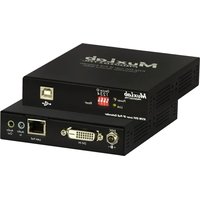
500771-TX - Audio/video converter MuxLab - Free user manual and instructions
Find the device manual for free 500771-TX MuxLab in PDF.


Pick your language and provide your email: we'll send you a specifically translated version.
| Product Type | Audio/Video Converter (Transmitter) |
| Model | 500771-TX |
| Brand | MuxLab |
| Video Resolution | Up to 4K@60Hz (4:4:4) |
| Supported Audio Formats | PCM, Dolby Digital, DTS, up to 7.1 channels |
| Transmission Distance | Up to 100 meters (328 feet) over Cat6a/7 |
| Input Connectors | 1x HDMI, 1x Ethernet (RJ45) |
| Output Connectors | 1x Ethernet (RJ45), 1x HDMI loop-out |
| HDCP Support | HDCP 2.2 and 1.4 |
| EDID Management | Built-in EDID emulation and pass-through |
| Power Supply | 5V DC, 2A (external adapter included) |
| Power Consumption | 6W (max) |
| Dimensions (W x D x H) | 120 x 75 x 30 mm (4.7 x 3.0 x 1.2 inches) |
| Weight | 200 g (7.05 oz) |
| Operating Temperature | 0°C to 50°C (32°F to 122°F) |
| Storage Temperature | -20°C to 60°C (-4°F to 140°F) |
| Certifications | CE, FCC, RoHS |
| Warranty | 2 years limited |
| Included Accessories | Power adapter, user manual, mounting brackets |
| Maintenance | Clean with dry soft cloth; avoid liquids |
| Safety | Use only supplied power adapter; do not expose to moisture |
| Repairability | No user-serviceable parts; contact support for repairs |
Frequently Asked Questions - 500771-TX MuxLab
What is the maximum distance supported by the MuxLab 500771-TX?
The 500771-TX can transmit 4K video up to 100 meters (328 feet) over Cat6a or Cat7 Ethernet cable.
Does it support 4K resolution?
Yes, it supports 4K@60Hz with 4:4:4 color sampling, provided the source and display support that resolution.
Can I use it with a non-HDCP source?
The device supports HDCP 2.2 and 1.4, but it will not pass non-HDCP content if the display requires HDCP. You may need to disable HDCP on the source if possible.
What type of cable is required?
Use shielded Cat6a or Cat7 solid core cable with RJ45 connectors. Avoid using patch cables or flat cables for long runs.
Does the transmitter require a separate power supply?
Yes, the 500771-TX includes a 5V DC 2A power adapter. It must be plugged into a power outlet to operate.
Can I connect multiple receivers to one transmitter?
The 500771-TX is a point-to-point transmitter. To connect multiple receivers, use an HDBaseT splitter or a matrix switch.
How do I update the firmware?
Firmware updates are available on the MuxLab support website. Connect the device via USB to a computer and use the provided update tool.
Is there a loop-out feature?
Yes, the 500771-TX has an HDMI loop-out port for local monitoring at the transmitter location.
What audio formats are supported?
It supports PCM 2.0/5.1/7.1, Dolby Digital, Dolby Digital Plus, Dolby TrueHD, DTS, DTS-HD, and DTS-X (up to 7.1 channels).
Does it work with PoE (Power over Ethernet)?
No, the 500771-TX does not support PoE. It requires a separate power adapter for operation.
User questions about 500771-TX MuxLab
0 question about this device. Answer the ones you know or ask your own.
Ask a new question about this device
No questions yet. Be the first to ask one.
Download the instructions for your Audio/video converter in PDF format for free! Find your manual 500771-TX - MuxLab and take your electronic device back in hand. On this page are published all the documents necessary for the use of your device. 500771-TX by MuxLab.
USER MANUAL 500771-TX MuxLab
Manual assistant
Powered by Anthropic
Waiting for your message
Product information
Brand : MuxLab
Model : 500771-TX
Category : Audio/video converter