
Xtrix 2065 - Microphone PHONIC - Free user manual and instructions
Find the device manual for free Xtrix 2065 PHONIC in PDF.


| Product Type | Digital Power Amplifier |
| Model | Xtrix 2065 |
| Brand | Phonic |
| Output Power (8Ω Stereo) | 2 x 650W |
| Output Power (4Ω Stereo) | 2 x 1100W |
| Output Power (2Ω Stereo) | 2 x 1880W (20ms pulse) |
| Output Power (16Ω Bridge) | 1 x 1300W |
| Output Power (8Ω Bridge) | 1 x 2200W |
| Output Power (4Ω Bridge) | 1 x 3740W (20ms pulse) |
| Output Power (70V Hi-Z) | 4 x 1100W |
| Output RMS Voltage | 72.1V (rated power, 1kHz) |
| Maximum Input Level | 8.7Vrms (+21dBu) default gain |
| Gain (Rated Power, 1kHz) | 19dB (default), adjustable 19-37dB |
| THD+N | Typical 0.05% (10% rated power, 1kHz, 8Ω) |
| Crosstalk | ≥90dB (20Hz-1kHz, below rated power, 8Ω) |
| Frequency Response | Typical +0/-0.5dB (20Hz-20kHz, 10% rated power, 8Ω) |
| Input Impedance | 20kΩ balanced, 10kΩ unbalanced |
| Damping Factor | ≥1000 (8Ω, 20Hz-200Hz) |
| Signal-to-Noise Ratio | ≥105dB (default gain, A-weighted, 20Hz-20kHz, 8Ω) |
| Power Supply | 100-240VAC ±10%, 50/60Hz |
| Protection | Under voltage, DC, over temperature, overload, short circuit |
| DSP Features | Input/output delay up to 30ms/20ms, 4x4 routing, 8-band input PEQ, 5-band output PEQ, FIR filters up to 512 taps, volume/mute/phase, RMS and peak limiters, presets, speaker config |
| Connectivity | Dual RJ45 Ethernet with built-in switch and UDP, analog XLR inputs, speaker outputs (CH A/B/C/D), AC power input |
| Dimensions (WxHxD) | 483 x 45 x 370 mm (19" x 1.77" x 14.56") |
| Net Weight | 9 kg (19.9 lbs) |
| Cooling | Forced air flow front to back, dust screen |
| Cleaning | Use dry cloth only, unplug before cleaning |
| Safety | Do not expose to rain or moisture; use only with specified attachments; unplug during lightning storms; refer servicing to qualified personnel |
Frequently Asked Questions - Xtrix 2065 PHONIC
User questions about Xtrix 2065 PHONIC
0 question about this device. Answer the ones you know or ask your own.
Ask a new question about this device
Download the instructions for your Microphone in PDF format for free! Find your manual Xtrix 2065 - PHONIC and take your electronic device back in hand. On this page are published all the documents necessary for the use of your device. Xtrix 2065 by PHONIC.
USER MANUAL Xtrix 2065 PHONIC
DSP SIGNAL PROCESSING FLOW 4
Phonic preserves the right to improve or alter any information within this document without prior notice
IMPORTANT SAFETY INSTRUCTIONS
The apparatus shall not be exposed to dripping or splashing and that no objects filled with liquids, such as vases, shall be placed on the apparatus. The MAINS plug is used as the disconnect device, the disconnect device shall remain readily operable.
Warning: the user shall not place this apparatus in the confined area during the operation so that the mains switch can be easily accessible.
- Read these instructions before operating this apparatus.
- Keep these instructions for future reference.
- Heed all warnings to ensure safe operation.
- Follow all instructions provided in this document.
- Do not use this apparatus near water or in locations where condensation may occur.
- Clean only with dry cloth. Do not use aerosol or liquid cleaners. Unplug this apparatus before cleaning.
- Do not block any of the ventilation openings. Install in accordance with the manufacturer's instructions.
- Do not install near any heat sources such as radiators, heat registers, stoves, or other apparatus (including amplifiers) that produce heat.
- Do not defeat the safety purpose of the polarized or grounding-type plug. A polarized plug has two blades with one wider than the other. A grounding type plug has two blades and a third grounding prong. The wide blade or the third prong is provided for your safety. If the provided plug does not fit into your outlet, consult an electrician for replacement of the obsolete outlet.
- Protect the power cord from being walked on or pinched particularly at plug, convenience receptacles, and the point where they exit from the apparatus.
- Only use attachments/accessories specified by the manufacturer.
- Use only with a cart, stand, tripod, bracket, or table specified manufacturer, or sold with the apparatus. When a cart is used, use caution when moving the cart/apparatus combination to avoid injury from tip-over.
- Unplug this apparatus during lighting storms or when unused for long periods of time.
- Refer all servicing to qualified service personnel. Servicing is required when the apparatus has been damaged in any way, such as power-supply cord or plug is damaged, liquid has been spilled or objects have fallen into the apparatus, the apparatus has been exposed to rain or moisture, does not operate normally, or has been dropped.
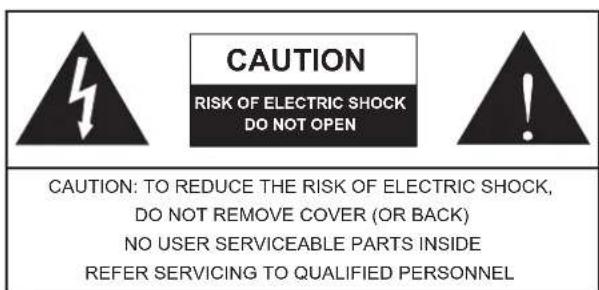

The lightning flash with arrowhead symbol, within an equilateral triangle, is intended to alert the user to the presence of uninsulated "dangerous voltage" within the product's enclosure that may be of sufficient magnitude to constitute a risk of electric shock to persons.

The exclamation point within an equilateral triangle is intended to alert the user to the presence of important operating and maintenance (servicing) instructions in the literature accompanying the appliance.
WARNING: To reduce the risk of fire electric shock, do not expose this apparatus to rain or moisture.
CAUTION: Use of controls or adjustments or performance of procedures other than those specified result in hazardous radiation exposure.

It is suitable for use in areas with an altitude of 5000m or less

Suitable for use in tropical climates
INTRODUCTION
The Xtrix series digital power amplifiers feature constant resistance and constant voltage output, an integrated DSP, an integrated switch, support for the UDP protocol, and the ability to monitor the power amplifier through an ethernet network cable.
The Xtrix series power amplifiers utilize the company's proprietary multi-loop regulation technology and boast excellent technical specifications, particularly the power amplification technology optimized for low impedance and high current, which results in a power amplifier with a greater than 90% efficiency and excellent stability.
The switching power supply utilizes active PFC and soft switching technology.
FEATURES
- The input delay of each channel is 30ms, the output delay is 20ms, and the step is 0.01ms;
- Audio input level matching +-18db;
- 4x4 audio route mixing, mixing ratio - 80dB + 18dB;
- 8-segment input parameter EQ, 5-segment output parameter EQ, high-low pass filter;
- Support FIR filters of order 512 and below;
• Volume, mute, phase adjustment, and mode selection; - Output average value, peak limiter;
- Save / retrieve parameters between machines;
- Speaker parameter configuration;
- User / parameters / factory permission setting.
PREPARATION
- Before turning on the power supply, be sure to adjust all the volume of the power amplifier to the minimum to prevent damage to the equipment or harsh noise caused by incorrect wiring. When turning on the volume, adjust it slowly until the effect is stable.
- Please check the AC voltage before connecting the AC power supply.
- When the current is overloaded, this series of power amplifiers can protect the circuit automatically. When a fuse blows, remove it from the fuse box and replace it with the specified model.
FRONT PANEL

- Ethernet interface: dual RJ45 network interface, built-in switch and support UDP protocol.
- Cooling vent: the forced air flow from front to back passes through the dust screen.
- LCD control panel: integrated LCD control panel with backlight.
- Control knob: rotate to select DSP menu and press to confirm.
- Power switch: used to turn the power supply on and off.
The power is turned on when the switch is pressed, and the light ring on the switch is always on.
Adjust all volume controls to the lowest setting before turning on the power to prevent damage to the machine caused by incorrect wiring.
REAR PANEL

- AC Power input: configure different specifications of power line depending on the amplifier's output power.
- Fan: provide forced ventilation from front to back for cooling.
- Output interface: speaker socket. In stereo or single channel mode, use the following method to connect the speaker to the socket:
CH-A/B/C/D
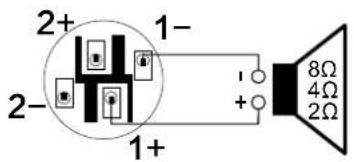
In bridge mode, use the following method to connect the speaker to the socket:
CH-A/C

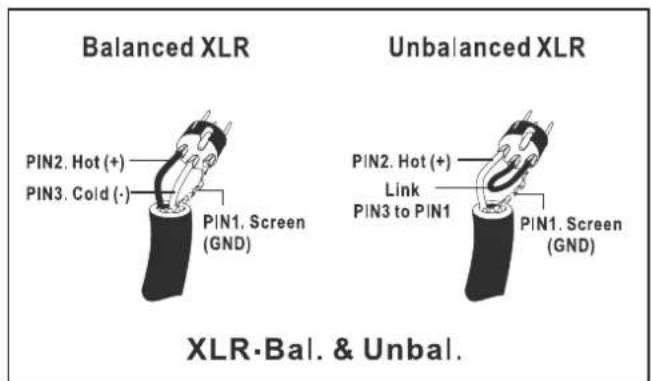
- Analog audio interface: balanced sound signal input plug. XLR input can be connected as follows:
SPECIFICATIONS
| Xtrix 2150 | Xtrix 4100 | Xtrix 2065 | Xtrix 4045 | |
| 8Ω/Stereo | 2X1500W | 4X1000W | 2X650W | 4X450W |
| 4Ω/Stereo | 2X2550W | 4X1700W | 2X1100W | 2X765W |
| 2Ω/Stereo* | 2X3580W | 4X2990W | 2X1880W | 2X1300W |
| 16Ω/Bridge | 1X3000W | 2X2000W | 1X1300W | 1X900W |
| 8Ω/Bridge | 1X5100W | 2X3400W | 1X2200W | 1X1530W |
| 4Ω/Bridge* | 1X7140W | 2X5780W | 1X3740W | 1X2600W |
| 100VHi-Z | 2X2500W | - | - | - |
| 70VHi-Z | 2X2400W | 4X1700W 4X1100W | - | |
| Output RMS voltage (Rated Power,1kHz) | 109.5V | 89.4V | 72.1V | 60.0V |
| Maximum input level | 8.7Vrms(+21dBu)(Default Gain) | |||
| Gain(Rated Power,1kHz) | 23dB | 21dB | 19dB | 18dB |
| Default Gain (Rated Power,1kHz) | 21dB~39dB23dB~41dB 19dB~37dB | 18dB~36dB | ||
| THD+N | Typical:0.05% (10% Rated Power,1kHz,8Ω) | |||
| Crosstalk | ≥90dB(20Hz-1kHz,below Rated Power,8Ω) | |||
| Frequency response | Typical:+0,-0.5dB(10% Rated Power,20Hz-20kHz,8Ω) | |||
| Input impedance | 20kΩ (Balance),10kΩ (Unbalance) | |||
| Damping factor | ≥1000(8Ω,20Hz-200Hz) | |||
| SNR | ≥105dB(Default Gain, A weighted,20Hz-20kHz,8Ω) | |||
| Main power | 100~240VAC±10%,50/60Hz | |||
| Protection | Protection:Under voltage, DC, Over temperature; Limiter: Over temperature,Over load, Short . | |||
| Size(WxHxD) | 483x45x465mm19"x1.77"x18.3" | 483x45x370mm19"x1.77"x14.56" | 483x45x370mm19"x1.77"x14.56" | 483x45x370mm19"x1.77"x14.56" |
| Net weight | 9kg/19.9lbs12kg/26.5lbs | 9kg/19.9lbs | 9kg/19.9lbs | |
* This power is measured using 20ms pulse 1kHz sine wave at 1% total harmonic distortion.
DSP SIGNAL PROCESSING FLOW

flowchart
graph LR
    A["Source1 Analog"] --> B["EQ"]
    C["Source2 Analog"] --> D["EQ"]
    E["Source3 Analog"] --> F["EQ"]
    G["Source4 Analog"] --> H["EQ"]
    B --> I["Source1 Source2 Source3 Source4"]
    D --> I
    F --> I
    H --> I
    I --> J["Volume 18dB"] --> K["OutA"]
    I --> L["Volume -36dB"] --> M["OutB"]
    I --> N["Volume -36dB"] --> O["OutC"]
    I --> P["Volume -38.6dB"] --> Q["OutD"]

flowchart
graph LR
    Input1 --> FIR1
    Input2 --> FIR2
    Input3 --> FIR3
    Input4 --> FIR4
    FIR1 --> EQ1
    EQ1 --> Trim0dB
    Trim0dB --> Delay0ms
    Delay0ms --> Phase0°
    Phase0° --> RMSLimiter
    RMSLimiter --> PeakLimiter
    PeakLimiter --> ModeLowZ
    ModeLowZ --> MuteMute
    MuteMute --> Stereo1
    Stereo1 --> OutA
    Stereo1 --> OutB
    Stereo1 --> MuteMute
    MuteMute --> Stereo2
    Stereo2 --> OutC
    Stereo2 --> OutD
Service and maintenance
For replacement parts, service and repair, please contact the phonic agent in your country. Phonic doesn't work The user shall provide the maintenance manual and advise the user not to repair the machine without authorization, otherwise he will not be able to obtain any warranty service. You can log in http://www.phonic.COM/where/find your nearest agent.
Guarantee
Phonic promises to provide perfect warranty service for each product. Depending on the region, the warranty period orThere is an extension. Since the date of original purchase, phonic has strictly followed the operation specifications of the operation manual,Provide at least 1-year warranty service for problems caused by product material and workmanship. P Honi C according to the warrantyExample: repair or replace defective products at your own choice. Please be sure to keep the purchase certificate properly in order to obtain warranty service. For applications without RM a number (return authorization), phonic will not handle return or repair services. guaranteeThe service is only applicable to problems arising from normal use. Users should use the product correctly in strict accordance with the operating instructions, Any problems caused by wanton damage, unauthorized maintenance, accidents, wrong use or human negligence are not allowedWithin the scope of warranty acceptance. In addition, warranty repair only applies to valid purchases at authorized agents. if needFor all warranty information, please log in http://www.phonic.com/warranty/.
Customer service and technical support
Please visit http://www.phonic.com/support/. From this website, you can get various common informationAnswer questions, technical guidance, Download product drivers, get return guidance and other useful lettersRest.
support@phonic.com
http://www.phonic.com
PHONIC
使用手册
目录
简介 1
功能 1
准备工作 1
前面板 1
后面板 2
规格 3
DSP信号处理流程 4
规格
| Xtrix 2150 | Xtrix 4100 | Xtrix 2065 | Xtrix 4045 | |
| 8Ω/立体声 | 2X1500W | 4X1000W | 2X650W | 4X450W |
| 4Ω/立体声 | 2X2550W | 4X1700W | 2X1100W | 2X765W |
| 2Ω/立体声* | 2X3580W | 4X2990W | 2X1880W | 2X1300W |
| 16Ω/桥接 | 1X3000W | 2X2000W | 1X1300W | 1X900W |
| 8Ω/桥接 | 1X5100W | 2X3400W | 1X2200W | 1X1530W |
| 4Ω/桥接* | 1X7140W | 2X5780W | 1X3740W | 1X2600W |
| 100V定压 | 2X2500W | - | - | - |
| 70V定压 | 2X2400W | 4X1700W 4X1100W | - | |
| RMS输出电压(THD=1%,1KHz) | 109.5V | 89.4V | 72.1V | 60.0V |
| 最大输入电平 | 8.7Vrms(+21dBu)(默认增益) | |||
| 默认增益(额定输出功率,1kHz) | 23dB 21dB 19dB | 18dB | ||
| 增益范围(额定输出功率,1kHz) | 21dB~39dB23dB~41dB 19dB~37dB | 18dB~36dB | ||
| THD+N | 典型值:0.05%(10%额定输出功率,1KHZ,8Ω) | |||
| 串扰抑制 | ≥90dB(低于额定功率,20Hz-1kHz,8Ω) | |||
| 频率响应 | 典型值:+0,-0.5dB(10%额定输出功率,20Hz-20kHz,8Ω) | |||
| 输入阻抗 | 20kΩ(平衡),10kΩ(非平衡) | |||
| 阻尼系数 | ≥1000(8Ω,20Hz-200Hz) | |||
| 信噪比 | ≥105dB(默认增益,A计权,20Hz-20kHz,8Ω) | |||
| 电源要求 | 100~240VAC±10%,50/60Hz | |||
| 保护功能 | 电源欠压保护、功放输出直流保护、过热保护、温度功率控制、过载功率控制 | |||
| 尺寸(WxHxD) | 483x45x465mm19"x1.77"x18.3" | 483x45x370mm19"x1.77"x14.56" | 483x45x370mm19"x1.77"x14.56" | 483x45x370mm19"x1.77"x14.56" |
| 净重 | 12kg/26.5lbs | 9kg/19.9lbs | 9kg/19.9lbs | 9kg/19.9lbs |

Brand : PHONIC
Model : Xtrix 2065
Category : Microphone