
SPM-1 - Microphone PHONIC - Free user manual and instructions
Find the device manual for free SPM-1 PHONIC in PDF.


| Product Type | Dynamic Microphone |
| Dimensions (Diameter x Length) | Approx. 50 mm x 180 mm |
| Weight | Approx. 300 g |
| Power Supply | None (passive dynamic) |
| Polar Pattern | Cardioid |
| Frequency Response | 50 Hz - 15 kHz |
| Impedance | 600 ohms |
| Connector | XLR (3-pin) |
| Application | Live vocals, public address |
| Color | Black |
| Material | Metal body with grille |
| On/Off Switch | Yes |
| Included Accessories | Microphone clip, 3-pin XLR cable |
| Cleaning | Wipe with a dry cloth; avoid moisture |
| Safety Notes | Do not drop; keep away from water |
| Spare Parts Availability | Grille and capsule available |
| Warranty | 1 year limited |
| Manufacturer | Phonic Corporation |
Frequently Asked Questions - SPM-1 PHONIC
User questions about SPM-1 PHONIC
0 question about this device. Answer the ones you know or ask your own.
Ask a new question about this device
Download the instructions for your Microphone in PDF format for free! Find your manual SPM-1 - PHONIC and take your electronic device back in hand. On this page are published all the documents necessary for the use of your device. SPM-1 by PHONIC.
USER MANUAL SPM-1 PHONIC
natural_image
White SPM-1 audio recording device with beige mesh head and control knobs (no visible text or symbols on body)Phonic preserves the right to improve or alter any information within this document without prior notice V2.0 30 / 08 / 2022
Professional USB Microphone
SPM-1 Easy Manual
This is a high-quality USB microphone that produces a full-range, rich sound. It's designed for professional recording as well as gaming and everyday vocal use. Using the integrated monitor mix control, you can mix the direct microphone signal (for example, your voice) and the sound from your audio recording software on your computer/device (the music that are singing along to). The headphone volume control allows you to freely adjust the volume of the real-time monitoring.
Specifications:
Pick up Pattern: Cardioid
Frequency Response: 20 Hz - 20 kHz
Sensitivity: -36 dB +/-2 dB (0 dB=1 V/Pa at 1 kHz)
Max Input SPL: 125 dB (at 1 KHz, 1% T.H.D)
Sampling Rate: 24 bit/96 kHz
Outputs: USB and 3.5 mm stereo jack
Microphone is 44.1 / 48 / 88.2 / 96 kHz@16bit or 24bit
Playback is 44.1 / 48 kHz @ 16bit
Package Contents:
• High class metal microphone holder x1pc
- Tripod microphone stand x1pc
• USB cable (1.8m) x1pc
Features:
• Support both PC and Mac, driver-free
• Great sound performance
• Headphone output with volume control
- Microphone mix control
Operation:
Monitor mix control
The Monitor mix control (the top knob) is used to'mix' the direct microphone signal (for example, your voice) and the sound from your computer/audio device's recording software (the music you're singing along to). By turning the knob counter-clockwise, you can hear more of the direct microphone signal and less of the computer/device software signal. As you turn the knob clockwise, you will hear more of the computer/device signal and less of the direct microphone signal. We recommend that you begin by turning the knob to the center position. This ensures that you are hearing an equal balance of the direct and computer/device signals, allowing you to achieve an ideal signal balance.
Headphone volume control
The bottom knob controls the volume of the headphones. When headphones are plugged into the SPM-1 via the headphone jack, it allows you to adjust the volume of the playback.
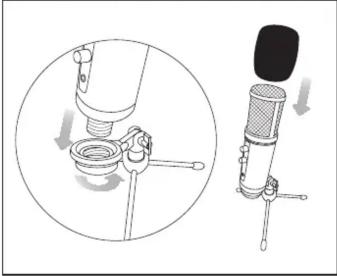
- SETUP 1/2
natural_image
Diagram showing a microphone being inserted into a device, with no visible text or symbols- SETUP 2/2

- INSTALLATION - WINDOWS 7 / 8 / 10
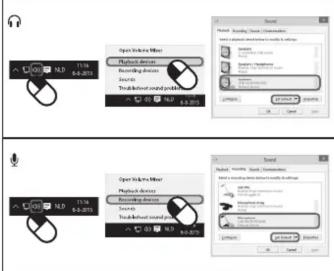
- VOLUME CONTROL

- MICROPHONE DIRECTION


Brand : PHONIC
Model : SPM-1
Category : Microphone