SOM-6872VC-U1A2 - Motherboard Advantech - Free user manual and instructions
Find the device manual for free SOM-6872VC-U1A2 Advantech in PDF.


User questions about SOM-6872VC-U1A2 Advantech
0 question about this device. Answer the ones you know or ask your own.
Ask a new question about this device
Download the instructions for your Motherboard in PDF format for free! Find your manual SOM-6872VC-U1A2 - Advantech and take your electronic device back in hand. On this page are published all the documents necessary for the use of your device. SOM-6872VC-U1A2 by Advantech.
USER MANUAL SOM-6872VC-U1A2 Advantech
natural_image
Illustration of four electronic circuit boards with white outlines on a purple background, no text or symbols present.SOM-6872
Copyright
The documentation and the software included with this product are copyrighted 2021 by Advantech Co., Ltd. All rights are reserved. Advantech Co., Ltd. reserves the right to make improvements in the products described in this manual at any time without notice. No part of this manual may be reproduced, copied, translated, or transmitted in any form or by any means without the prior written permission of Advantech Co., Ltd. The information provided in this manual is intended to be accurate and reliable. However, Advantech Co., Ltd. assumes no responsibility for its use, nor for any infringements of the rights of third parties that may result from its use.
Acknowledgments
Intel® and Pentium® are trademarks of the Intel® Corporation.
Microsoft Windows and MS-DOS are registered trademarks of Microsoft Corp.
All other product names or trademarks are properties of their respective owners.
Product Warranty (2 years)
Advantech warrants the original purchaser that each of its products will be free from defects in materials and workmanship for two years from the date of purchase.
This warranty does not apply to any products that have been repaired or altered by persons other than repair personnel authorized by Advantech, or products that have been subject to misuse, abuse, accident, or improper installation. Advantech assumes no liability under the terms of this warranty as a consequence of such events.
Because of Advantech's high quality-control standards and rigorous testing, most customers never need to use our repair service. If an Advantech product is defective, it will be repaired or replaced free of charge during the warranty period. For out-of-warranty repairs, customers will be billed according to the cost of replacement materials, service time, and freight. Please consult your dealer for more details.
If you believe your product to be defective, follow the steps outlined below.
-
Collect all the information about the problem encountered. (For example, CPU speed, Advantech products used, other hardware and software used, etc.) Note anything abnormal and list any onscreen messages displayed when the problem occurs.
-
Call your dealer and describe the problem. Please have your manual, product, and any helpful information readily available.
-
If your product is diagnosed as defective, obtain a return merchandise authorization (RMA) number from your dealer. This allows us to process your return more quickly.
-
Carefully pack the defective product, a completed Repair and Replacement Order Card, and a proof of purchase date (such as a photocopy of your sales receipt) into a shippable container. Products returned without a proof of purchase date are not eligible for warranty service.
-
Write the RMA number clearly on the outside of the package and ship the package prepaid to your dealer.
Part No. 2006M68700 Edition 1
Printed in Taiwan October 2021
Declaration of Conformity
CE
This product has passed the CE test for environmental specifications when shielded cables are used for external wiring. We recommend the use of shielded cables. This type of cable is available from Advantech. Please contact your local supplier for ordering information.
Test conditions for passing also include the equipment being operated within an industrial enclosure. In order to protect the product from damage caused by electrostatic discharge (ESD) and EMI leakage, we strongly recommend the use of CE-compliant industrial enclosure products.
FCC Class B
This equipment has been tested and found to comply with the limits for a Class B digital device, pursuant to part 15 of the FCC Rules. These limits are designed to provide reasonable protection against harmful interference in a residential installation. This equipment generates, uses, and can radiate radio frequency energy and, if not installed and used in accordance with the instruction manual, may cause harmful interference to radio communications. However, there is no guarantee that interference will not occur in a particular installation. If this equipment does cause harmful interference to radio or television reception, which can be determined by turning the equipment off and on, the user is encouraged to try to correct the interference by one or more of the following measures:
■ Reorient or relocate the receiving antenna.
■ Increase the separation between the equipment and receiver.
■ Connect the equipment into an outlet on a circuit different from that to which the receiver is connected.
Consult the dealer or an experienced radio/TV technician for assistance.
FM
This equipment has passed FM certification. According to the National Fire Protection Association, work sites are categorized into different classes, divisions, and groups based on hazard considerations. This equipment is compliant with the specifications for Class I, Division 2, Groups A, B, C, and D indoor hazards.
Technical Support and Assistance
- Visit the Advantech website at www.advantech.com/support to obtain the latest product information.
- Contact your distributor, sales representative, or Advantech's customer service center for technical support if you need additional assistance. Please have the following information ready before calling:
– Product name and serial number
– Description of your peripheral attachments
– Description of your software (operating system, version, application software, etc.)
– A complete description of the problem - The exact wording of any error messages
Warnings, Cautions, and Notes
Warning! Warnings indicate conditions, which if not observed, can cause personal injury!

Caution! Cautions are included to help prevent hardware damage and data losses. For example,

"Batteries are at risk of exploding if incorrectly installed. Do not attempt to recharge, force open, or heat the battery. Replace the battery only with the same or equivalent type as recommended by the manufacturer. Discard used batteries according to the manufacturer's instructions."
Note! Notes provide optional additional information.

Document Feedback
To assist us with improving this manual, we welcome all comments and constructive criticism. Please send all feedback in writing to support@advantech.com.
Packing List
Before system installation, check that the items listed below are included and in good condition. If any item does not accord with the list, contact your dealer immediately.
■ 1 x SOM-6872 CPU module
■ 1 x Heatspreader (1960093586N000)
Safety Instructions
- Read these safety instructions carefully.
- Retain this user manual for future reference.
- Disconnect the equipment from all power outlets before cleaning. Use only a damp cloth for cleaning. Do not use liquid or spray detergents.
-
For pluggable equipment, the power outlet socket must be located near the equipment and easily accessible.
-
Protect the equipment from humidity.
-
Place the equipment on a reliable surface during installation. Dropping or letting the equipment fall may cause damage.
-
The openings on the enclosure are for air convection. Protect the equipment from overheating. Do not cover the openings.
-
Ensure that the voltage of the power source is correct before connecting the equipment to a power outlet.
-
Position the power cord away from high-traffic areas. Do not place anything over the power cord.
-
All cautions and warnings on the equipment should be noted.
-
If the equipment is not used for a long time, disconnect it from the power source to avoid damage from transient overvoltage.
-
Never pour liquid into an opening. This may cause fire or electrical shock.
-
Never open the equipment. For safety reasons, the equipment should be opened only by qualified service personnel.
-
If any of the following occurs, have the equipment checked by service personnel:
– The power cord or plug is damaged.
– Liquid has penetrated the equipment.
– The equipment has been exposed to moisture.
- The equipment is malfunctioning, or does not operate according to the user manual.
– The equipment has been dropped and damaged.
– The equipment shows obvious signs of breakage.
-
Do not leave the equipment in an environment with a storage temperature of below -20 °C (-4 °F) or above 60 °C (140 °F) as this may damage the components. The equipment should be kept in a controlled environment.
-
CAUTION: Batteries are at risk of exploding if incorrectly replaced. Replace only with the same or equivalent type as recommended by the manufacturer. Discard used batteries according to the manufacturer's instructions.
-
In accordance with IEC 704-1:1982 specifications, the sound pressure level at the operator's position does not exceed 70 dB (A).
DISCLAIMER: These instructions are provided according to IEC 704-1 standards. Advantech disclaims all responsibility for the accuracy of any statements contained herein.
Safety Precautions - Static Electricity
Follow these simple precautions to protect yourself from harm and the products from damage.
To avoid electrical shock, always disconnect the power from the PC chassis before manual handling. Do not touch any components on the CPU card or other cards while the PC is powered on.
- Disconnect the power before making any configuration changes. A sudden rush of power after connecting a jumper or installing a card may damage sensitive electronic components.
Table of Contents
Chapter 1 General Information ....1
1.1 Introduction ...... 2
1.2 Functional Block Diagram .... 3
Figure 1.1 Functional block diagram.... 3
1.3 Product Specifications.... 4
1.3.1 Compliance 4
1.3.2 Feature List 4
1.3.3 Processor System.... 5
1.3.4 Graphics/Audio 6
1.3.5 Expansion Interfaces 6
1.3.6 Serial Bus....7
1.3.7 I/O 7
1.3.8 Power Management....9
1.3.9 Environment.... 10
1.3.10 Power Consumption.... 11
1.3.11 Performance ...... 11
1.3.12 Selection Guide w/ P/N.... 11
1.3.13 Packing List.... 11
1.3.14 Development Board 12
1.3.15 Optional Accessories 12
1.3.16 Pin Description.... 12
Chapter 2 Mechanical Information ......13
2.1 Board Information.... 14
Figure 2.1 Board chip identification - front 14
Figure 2.2 Board chip location – rear.... 14
2.1.1 Connector List.... 15
Table 2.1: SFAN1 Fan.... 15
2.2 Mechanical Diagram ...... 15
Figure 2.3 Board mechanical diagram - front 15
Figure 2.4 Board mechanical diagram - rear 16
Figure 2.5 Board mechanical diagram - side 16
2.3 Assembly Drawing 17
Figure 2.6 Assembly diagram ...... 17
Figure 2.7 AMD FP6 height and tolerance .... 17
Chapter 3 AMI BIOS ......19
3.1 Introduction ...... 20
Figure 3.1 Setup program initial screen....20
3.2 Entering Setup 20
3.3 Main Setup 21
Figure 3.2 Main setup screen 21
3.4 Advanced BIOS Features Setup 22
Figure 3.3 Advanced BIOS features setup screen .... 22
3.4.1 Trusted Computing 23
Figure 3.4 Trusted computing screen 23
3.4.2 ACPI Settings.... 24
Figure 3.5 ACPI settings screen 24
3.4.3 Embedded Controller 25
Figure 3.6 Embedded controller screen.... 25
Figure 3.7 Serial port 1 configuration screen.... 26
Figure 3.8 Serial port 2 configuration screen.... 27
Figure 3.9 Hardware monitor screen 28
Figure 3.10ACPI Report method configuration screen.... 29
3.4.4 Serial Port Console Redirection.... 30
Figure 3.11 Serial port console redirection screen .... 30
Figure 3.12 Console redirection Settings screen.... 31
3.4.5 CPU Configuration.... 32
Figure 3.13CPU configuration screen 32
Figure 3.14Socket0 screen.... 33
3.4.6 SATA Configuration 34
Figure 3.15SATA configuration screen.... 34
3.4.7 USB Configuration 35
Figure 3.16USB configuration screen.... 35
3.4.8 AMI ROM Dispatch Policy 36
Figure 3.17AMI ROM dispatch policy screen 36
Figure 3.18AMI PCI driver version screen.... 37
3.4.9 Network Stack.... 38
Figure 3.19Network stack screen 38
Figure 3.20Network stack screen 38
3.4.10 NVMe Configuration 39
Figure 3.21NVMe configuration screen 39
3.4.11 AMD CBS 40
Figure 3.22CPU Common options screen.... 40
Figure 3.23CPU Common options screen.... 41
Figure 3.24NBIO Common options screen.... 42
Figure 3.25Audio configuration screen.... 43
Figure 3.26SMU Common options screen 44
Figure 3.27CPPC screen.... 45
Figure 3.28FCH Common options screen 46
Figure 3.29SATA Configuration options screen 47
Figure 3.30USB Configuration options screen 48
Figure 3.31Combo PHY static configuration screen.... 49
Figure 3.32Ac Power loss options screen .... 50
3.4.12 AMD PBS....51
Figure 3.33AMD PBS screen 51
3.4.13 NIC Configuration 52
Figure 3.34NIC configuration screen.... 52
Figure 3.35Link speed screen 53
3.5 Chipset Settings.... 54
3.5.1 South Bridge 54
Figure 3.36 South bridge screen 54
Figure 3.37SB USB Configuration screen 55
Figure 3.38XHCI0/XHCI1 screen 55
3.5.2 NXP3460 Configuration 56
Figure 3.39NXP3460 Configuration screen.... 56
3.5.3 North Bridge.... 57
Figure 3.40 North bridge screen.... 57
Figure 3.41 Socket 0 information screen.... 58
3.5.4 PCIE Lanes Configuration 58
Figure 3.42PCIE Lanes Configuration screen 58
3.6 Security Settings 60
Figure 3.43Security setting screen 60
3.6.1 Secure Boot 61
Figure 3.44 Secure boot screen 61
3.6.2 Vendor Keys 62
Figure 3.45Vendor keys screen....62
3.6.3 Boot Configuration 63
Figure 3.46Boot Configuration screen.... 63
3.7 Save & Exit 64
Figure 3.47 Security setup....64
Chapter 4 S/W Introduction and Installation ....65
4.1 S/W Introduction....66
4.2 Driver Installation 66
4.2.1 Windows Driver Setup 66
4.2.2 Other OS....66
4.3 Advantech iManager 67
Appendix A Pin Assignment 69
A.1 SOM-6872 Type 6 Pin Assignment....70
Appendix B Watchdog Timer 75
B.1 Programming the Watchdog Timer 76
Appendix C Programming GPIO ....77
C.1 GPIO Register....78
Appendix D System Assignments ......79
D.1 System I/O Ports 80
Table D.1: System I/O ports.... 80
D.2 Interrupt Assignments 81
Table D.2: Interrupt Assignments.... 81
D.3 1st MB Memory Map 83
Table D.3: 1st MB Memory Map 83
Chapter 1
General Information
This chapter details background information on the SOM-6872 CPU Computer on Module.
Sections include:
Introduction
Functional Block Diagram
Product Specification
1.1 Introduction
Advantech's SOM-6872 COM Express Type 6 module is equipped with an AMD Ryzen™ Embedded V2000 SoC. This module delivers excellent performance and supports 8 x cores, 16 x threads, turbo boost (up to 4.25GHz), and 4 x independent 4K displays. Advantech's SOM-6872 features built-in I/O interfaces and facilitates excellent graphic performance without requiring additional graphics cards.
This small (95 x 95 mm/3.74 x 3.74 in) module delivers superior performance via 54W high TDP, and uses 24% less space compared to COMe Basic models. Despite being small, it delivers a high CPU Mark score and was tested by PASSMARK Performance Test V10.1, 21716. This solution supports diverse I/O interfaces — including USB 3.2 Gen 2, PCIe Gen 3, GbE, SATA 3, and 4K display interfaces (DP++, HDMI, VGA, and LVDS). In addition, the on board TPM and 64GB ECC/Non-ECC memory improves both security and reliability
Advantech iManager (SUSI4) satisfies diverse embedded application requirements — including multi-level watchdog timer, voltage and temperature monitoring, thermal protection and mitigation through processor throttling, LCD backlight on/off and brightness control, embedded storage for customized information.
Acronyms
| Term Definition | |
| AC'97 Audio CODEC (Coder-Decoder) | |
| ACPI | Advanced Configuration Power Interface – standard to implement power saving modes in PC-AT systems. |
| BIOS | Basic Input Output System – firmware in PC-AT system used to initialize system components before handing control over to the operating system. |
| CAN | Controller-area network (CAN or CAN-bus) is a vehicle bus standard designed to allow microcontrollers to communicate with each other within a vehicle without a host computer. |
| DDI Digital Display Interface – containing Display Port, HDMI/DVI, and SDVO. | |
| EAPI | Embedded Application Programmable Interface.Software interface for COM Express® specific industrial function:System informationWatchdog timerI2C BusFlat Panel brightness controlUser storage areaGPIO |
| GbE | Gigabit Ethernet |
| GPIO | General purpose input output |
| HDA | Intel High Definition Audio (HD Audio) refers to the specification released by Intel in 2004 for delivering high definition audio that is capable of playing back more channels at higher quality than AC'97 |
| I2C | Inter Integrated Circuit – 2 wire (clock and data) signaling scheme allowing communication between integrated circuit, primarily used to read and load register values. |
| ME | Management Engine |
| PC-AT | “Personal Computer – Advanced Technology” – an IBM trademark term used to refer to Intel based personal computer in 1990s. |
| PEG PCI Express Graphics | |
| RTC | Real Time Clock – battery backed circuit in PC-AT systems that keeps system time and date as well as certain system setup parameters. |
| SPD | Serial Presence Detect – refers to serial EEPROM on DRAMs that has DRAM Module configuration information. |
| TPM | Trusted Platform Module, chip to enhance the security features of a computer system. |
| UEFI Unified Extensible Firmware Interface | |
| WDT Watch Dog Timer | |
1.2 Functional Block Diagram
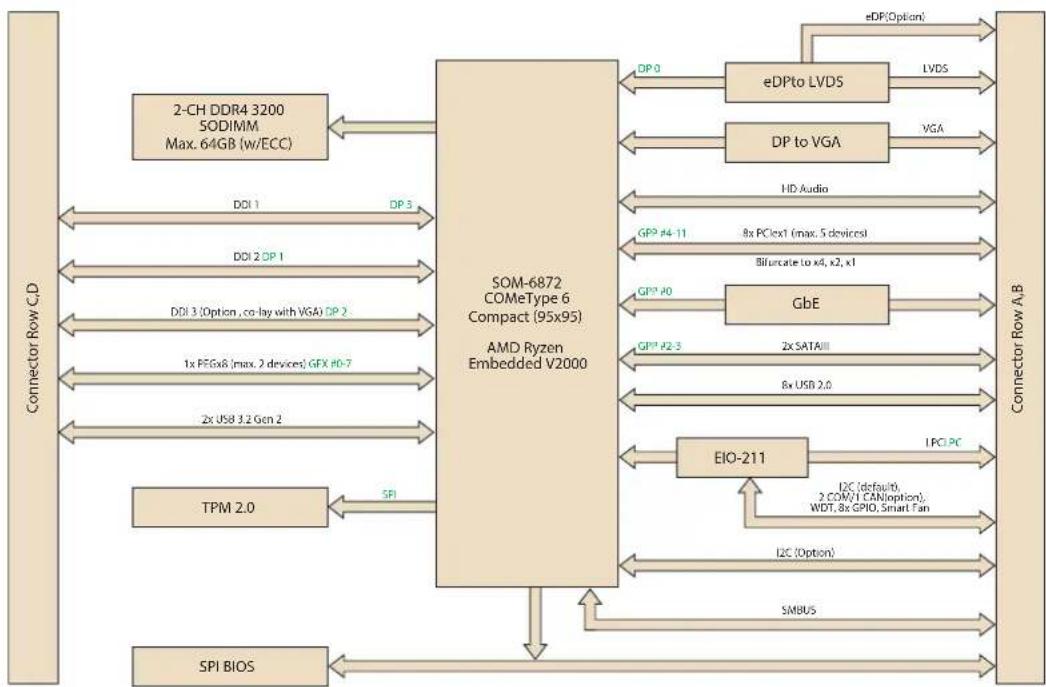
flowchart
graph TD
    A["Connector Row C.D"] -->|DOI 1| B["SOM-6872 COMeType 6 Compact (95x95) AMD Ryzen Embedded V2000"]
    A -->|DOI 2| B
    A -->|DOI 3| B
    A -->|DOI 3 (Option, co-lay with VGA) DP 2| B
    A -->|1x PEGx8 (max. 2 devices) GFX HD-7| B
    A -->|2x USB 3.2 Gen 2| B
    A -->|TPM 2.0| B
    A -->|SPI BIOS| B
    B -->|SP1| C["EIO-211"]
    C -->|I2C (Option)| D["Connector Row A.B"]
    C -->|I2C (default), 2 COM/1 CAN option)| D
    C -->|LPCI PC| D
    C -->|GPP #4-11| D
    C -->|GPP #0| D
    C -->|GlbE| D
    C -->|Bifurcate to x4, k2, x1| D
    C -->|HD Audio| D
    C -->|VGA| D
    C -->|LVDS| D
    C -->|eDPto LVDS| D
    D -->|eDP(Option)| D
    D -->|DP0| B
    D -->|eDP(Option)| B
Figure 1.1 Functional block diagram
1.3 Product Specifications
1.3.1 Compliance
PICMG COM Express R3.0 Compact module
■ Compact Size – 95 x 95 mm (3.73 x 3.74 in)
■ Pin-out Type 6 compatible
1.3.2 Feature List
| Feature Type Connector Row Feature | Type 6 Define | SOM-6872 | ||
| Max. Min. | ||||
| Display | A-B | LVDS Channel A (18/24-bit) | 101 | |
| A-B | LVDS Channel B (18/24-bit) | 101 | ||
| A-B | eDP (muxed on LVDS Channel A) | 101 | ||
| A-B VGA 101 | ||||
| Expansion | A-B PCI Express x1 6 1 6 | |||
| A-B LPC 111 | ||||
| Serial | A-B SMBus 111 | |||
| A-B I2C Bus 111 | ||||
| A-B Serial Port | 202 | |||
| A-B | CAN Bus (muxed on SER1) | 101 | ||
| I/O | A-B | LAN Port 0 (Gigabit Ethernet) | 1 1 1 | |
| A-B SATA 4 1 2 | ||||
| A-B USB 2.0 8 4 8 | ||||
| A-B USB Client 1 0 0 | ||||
| A-B HD Audio 1 0 1 | ||||
| A-B SPI Bus 2 1 1 | ||||
| A-B | General Purpose I/O (GPIO) | 8 8 8 | ||
| A-B | SDIO (muxed on GPIO) | 1 0 0 | ||
| A-B | Express Card Support | 2 1 0 | ||
| A-B | Watchdog Timer Output | 1 0 1 | ||
| A-B Speaker Out 1 1 1 | ||||
| A-B | External BIOS ROM Support | 2 0 2 | ||
| A-B | Power Button Support | 1 1 1 | ||
| A-B Power Good 1 1 1 | ||||
| A-B | VCC_5V_SBY Contacts | 4 4 4 | ||
| A-B Sleep 1 0 1 | ||||
| A-B Thermal Protection 1 0 1 | ||||
| A-B Lid Input | 1 0 1 | |||
| A-B Battery Low Alarm | 1 0 1 | |||
| A-B | Suspend/Wake Signals | 3 0 3 | ||
| A-B | Fan PWM / Tachometer | 2 0 2 | ||
| A-B | Trusted Platform Modules | 1 0 1 | ||
| Display | C-D | Digital Display Interfaces 1 - 3 | 3 0 3 | |
| I/O | C-D | PEG (PCI Express x16) | 1 0 1(X8) | |
| C-D | PCI Express x1 | 2 0 2 | ||
| C-D | USB 3.0 (Gen2, 10Gbps) | 4 0 2 | ||
| C-D | Rapid Shutdown | 1 0 1 | ||
1.3.3 Processor System
| CPU | Std. Freq. | 1T Boost Freq. | Core/Thread | L2C/L3C | TDP(W) |
| V2748 | 2.9GHz | 4.25GHz | 8/16 | 4M/8M | 35-54W |
| V2546 | 3.0GHz | 3.95GHz | 6/12 | 3M/8M | 35-54W |
| V2718 | 1.7GHz | 4.15Ghz | 8/16 | 4M/8M | 10-25W |
| V2516 | 2.1GHz | 3.95GHz | 6/12 | 3M/8M | 10-25W |
*TDP can be configured up to 25W or down to 12.5W.
1.3.4 Graphics/Audio
AMD Radeon Graphics core with up to 7 x GPU compute units.
■ Performance upgrades from V1000 with faster frequency and clocking
■ HVEC and H.264 (10-bit) decode and encode support, VP9 Decode
■ 4 x Display Pipes supporting up to 4K Resolution
Up to 4 x DisplayPort 1.4, HDMI™ 2.1 (HDMI 6G), eDP 1.3
V2000 Graphics Implementation • 1 x sDMA Engine • Up to 7 x cores, 2 x Rendered Backend+ (RB+) • 1 MB L2 Cache • System resources are shared. No dedicated memory for the Graphics • Up to 1.43 TFLOPS (FP32) or 2.87 TFLOPS (FP16)
| CPU Graphic Core Max Freq. |
| V2748 Radeon 7 units 1.6GHz |
| V2546 Radeon 6 units 1.5GHz |
| V2718 Radeon 7 units 1.6GHz |
| V2516 Radeon 6 units 1.5GHz |
Dual Display:
- LVDS/eDP + VGA
- LVDS/eDP + DP (1/2)
- VGA + DP (1/2)
- DP1 + DP2
Triple Display:
- LVDS/eDP + VGA + DP (1/2)
- LVDS/eDP + DP1 + DP2
- VGA + DP1 + DP2
Quad Display:
- LVDS/eDP + VGA + DP1 + DP2
1.3.5 Expansion Interfaces
1.3.5.1 PCIe x1
PCI Express x1: Supports default 5 x ports PCIe x1 compliant to PCIe Gen 3 (8.0 GT/s) specifications, configurable to PCIe x4 or PCIe x2. Several configurable combinations may need BIOS modifiers. Please contact the Advantech sales team or FAE for further details.
| Type 6 | Row A,B Row C,D | ||||||||
| P0 | P1 | P2 | P3 | P4 | P5 | P6 | P7 | ||
| Default | Config. | X1 | X1 | X1 | X1 | X4 | |||
| Option | X1 | X1 | X2 | X4 | |||||
| Option | X2 | X1 | X1 | X4 | |||||
| Option | X2 | X2 | X4 | ||||||
| Option | X4 | X4 | |||||||
| Option | X4 | X1 | X1 | X1 | X1 | ||||
1.3.5.2 LPC
Supports Low Pin Count (LPC) 1.1 specification, without DMA or bus mastering. Supports connection to Super I/O, embedded controller, or TPM. LPC clock is 24MHz.
1.3.6 Serial Bus
1.3.6.1 SMBus
Supports SMBus 2.0 specification with Alert pin.
1.3.6.2 I2C Bus
Supports I2C bus 7-bit and 10-bit address modes.
1.3.7 I/O
1.3.7.1 Gigabit Ethernet
Ethernet: Intel® I210IT/AT Gigabit LAN supports 10/100/1000Mbps Speed.
1.3.7.2 SATA
Support up to 2 x ports SATA Gen 3 (6.0 Gb/s), backward compliant to SATA Gen 2 (3.0 Gb/s) and Gen 1 (1.5 Gb/s). Maximum data rate of 600 MB/s. Supports AHCI 1.3 and 1.3.1 modes.
1.3.7.3 USB 3.0 (3.2 Gen2)/USB 2.0
Supports 2 x ports USB 3.2 Gen2 (10 Gbps) and 8 x ports USB 2.0 (480 Mbps) which are backward compatible to USB 1.x. Supports LPM (U0, U1, U2, and U3) manageability that saves USB 3.1 power.
Note! Notice: We strongly recommend using a certified cable to meet USB 3.2 Gen 2 performance requirements.

1.3.7.4 USB 3.2
| Type 6 P0 P1 P2 P3 | ||
| SoC P0 P1 NA NA | ||
| Type 6 OC_01 | OC_23 | |
| SoC USB_OC# | OC_0 | NA |
1.3.7.5 SPI Bus
Supports BIOS flash only. SPI clock can be 17, 30, or 48MHz, capacity up to 16MB.
1.3.7.6 GPIO
4 x programmable general purpose input or output (GPIO).
1.3.7.7 Watchdog
Supports multi-level watchdog time-out output.
Provides 1-65536 level, from 0\~65535 sec intervals.
1.3.7.8 Serial Ports
2 x ports, 2-wire serial port (Tx/Rx) supports 16550 UART compliance.
■ Programmable FIFO or character mode
■ 16-byte FIFO buffer on transmitter and receiver in FIFO mode
■ Programmable serial-interface characteristics: 5, 6, 7, or 8-bit character
■ Even, odd, or no parity bit selectable
■ 1, 1.5, or 2 stop bit selectable
Baud rate up to 115.2K
1.3.7.9 TPM
Supports TPM 2.0 module by default.
1.3.7.10 Smart Fan
Support 2 x Fan PWM control signal and 2 x tachometer input for fan speed detection. Provides 1 x on module with connector and the other to carrier board followed by PICMG COM Express R3.0 specification.
1.3.7.11 BIOS
The BIOS chip is on module by default. This device also allows users to place BIOS chips on the carrier board with appropriate design and jumper settings on BIOS_DIS#[1:0].
| BIOS_DIS0# BIOS_DIS#1 Boot up destination/function | |
| Open Open Boot from Module's SPI BIOS | |
| Open GND | SPI_CS0# to Carrier Board, SPI_CS1# to Module |
| GND GND | SPI_CS0# to Module, SPI_CS1# to Carrier Board |
Note! If the system COMS is cleared, we strongly suggest entering the BIOS setup menu and loading default settings on the first boot up

Clear CMOS
| Setting Type Jumper Setting | Clear RTC CMOS (Time & Date) | BIOS Setting Load Default | |
| Default Setting | Without jumper | V | N/A |
| Optional Setting | Jumper 1-2 | V | V |
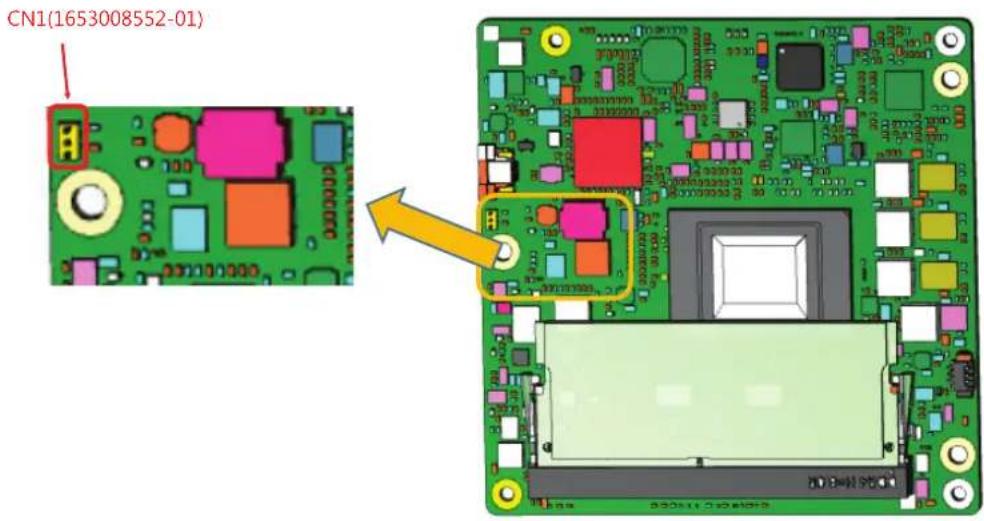
Purpose: The standard module has no jumper at CN1, so BIOS settings are maintained without a RTC coin battery. If you need to restore BIOS default settings, please follow the steps below:
text_image
CN1(1653008552-01)- Remove the Coin Battery
- Put the jumper on CN1 pin1-2
- Turn on the power supply
- The System will boot up a few times
- BIOS will be load default settings successfully
1.3.8 Power Management
1.3.8.1 Power Supply
Supports both ATX and AT power modes. The VSB is for optional suspend power if the user does not require standby (suspend-to-RAM) support. The RTC Battery is optional if keeping the time/date function is not required.
VCC: 8.5 \~ 20V
■ VSB: 4.75 \~ 5.25V (Suspend power)
■ RTC Battery Power: 2.0 \~ 3.3V
1.3.8.2 PWROK
Power OK uses the main power supply. A high value indicates that the power supply is adequate. This signal can be used to hold off module startup and allow carrier based FPGAs or other configurable devices time to be programmed.
1.3.8.3 Power Sequence
According to PICMG COM Express R3.0 specifications.
1.3.8.4 Wake Event
Supports various wake-up events enabling users to apply solution in different scenarios.
■ Wake-on-LAN(WOL): Wake to S0 from S3/S4/S5
USB Wake: Wake to S0 from S3/S4
PCIe Device Wake: Depends on user inquiry and may need customized BIOS
■ LPC Wake: Depends on user inquiry and may need customized BIOS
1.3.8.5 Advantech S5 ECO Mode (Deep Sleep Mode)
Advantech iManager provides additional features that allow the system to enter a very low suspend power mode called S5 ECO mode. In this mode, the module will cut all power, including suspend and active power, into chipset and keep an on-module controller active. Under 50mW power is consumed in this mode, which means the user's battery pack can last longer. This mode is enabled in BIOS, the system (or module) will only support boot via a power button. It can use other methods like WOL.
1.3.9 Environment
1.3.9.1 Temperature
Operating: 0 \~ 60 °C (32 \~ 140 °F)
Storage: -40 \~ 85 °C (-40 \~ 185 °F)
1.3.9.2 Humidity
Operating: 40 °C (104 °F) @ 95% relative humidity, non-condensing
Storage: 60 °C (140 °F) @ 95% relative humidity, non-condensing
1.3.9.3 Vibration Tolerance
3.5G, 5\~500Hz X/Y/Z Axis
1.3.9.4 Drop Test (Shock)
Federal Standard 101 Method 5007 test procedure with standard packing.
1.3.9.5 EMC
CE EN55022 Class B and FCC Certifications: Validated with standard development boards in Advantech chassis.
1.3.9.6 MTBF
Please refer to the Advantech SOM-6872 Series Reliability Prediction Report No: TBD. (Release date: 2020 Q1).
1.3.9.7 OS Support (duplicate with SW chapter)
Advantech Embedded Software Services' mission is to "Enhance quality of life with Advantech platforms and Microsoft Windows embedded technology." We enable Windows Embedded software products on Advantech platforms to more effectively support the embedded computing community. Customers are freed from the hassle of dealing with multiple vendors (Hardware suppliers, System integrators, Embedded OS distributor) for projects. Our goal is to make Windows Embedded Software solutions easily and widely available to the embedded computing community.
To install the drivers, please connect to the Internet and browse the website http://support.advantech.com.tw to download the setup file.
1.3.9.8 Advantech iManager
Supports APIs for GPIO, smart fan control, multi-stage watchdog timer, and output, temperature sensor, hardware monitor, etc. Follow the PICMG EAPI 1.0 specifications to provide backwards compatibility.
1.3.10 Power Consumption
| Power Consumption Table (Watt.) | ||||||
| VCC=12V VSB=5V | Active Power Domain | Suspend Power Domain | Mechanical off | |||
| Power State S0 Max. Load S0 | Burn-in S0 Idle S5 | S5 Deep Sleep | RTC (uA) | |||
| SOM-6872C7-S7A1 | 59.721W 25.493W 4.204W | 0.490W 0.176W | 4.82uA | |||
Hardware Configuration:
- MB: SOM-6872VCA-U9A1 (PCB: A101-1)
- DRAM: 2 x Advantech 32G 2R x8 DDR4 3200 ECC SO
- Other board: SOM-EA01
Test Conditions:
- Test temperature: room temperature (about 25 °C/77 °F)
- Test voltage: rated voltage DC +12.0V
- Test loading:
■ Maximum load mode: Running programs.
■ Idle mode: DUT power management off and no running any program.
- OS: Windows 10 Enterprise
1.3.11 Performance
For reference performance or benchmark data in comparison with other modules, please refer to "Advantech COM Performance and Power Consumption Table".
1.3.12 Selection Guide w/ P/N
| Part No. | SoC | eDP/LVDS | Core/Thread | Base Freq. | 1T Boost Freq. | SoC TDP | LLC | DDR4 SODIMM | Thermal solution | Operating Temp. |
| SOM-6872VC-U9A1 | V2748 | eDP | 8/16 | 2.9GHz | 4.25GHz | 35-54W | 8MB | 3200MT/s | Active | 0 ~ 60 °C;32 ~ 140°F |
| SOM-6872VCA-U9A1 | V2748 | LVDS | 8/16 | 2.9GHz | 4.25GHz | 35-54W | 8MB | 3200MT/s | Active | 0 ~ 60 °C;32 ~ 140°F |
| SOM-6872VC-H0A1 | V2546 | eDP | 6/12 | 3.0GHz | 3.95GHz | 35-54W | 8MB | 3200MT/s | Active | 0 ~ 60 °C;32 ~ 140°F |
| SOM-6872VC-S7A1 | V2718 | eDP | 8/16 | 1.7GHz | 4.15GHz | 10-25W | 8MB | 3200MT/s | Active | 0 ~ 60 °C;32 ~ 140°F |
| SOM-6872VC-U1A1 | V2516 | eDP | 6/12 | 2.1GHz | 3.95GHz | 10-25W | 8MB | 3200MT/s | Active | 0 ~ 60 °C;32 ~ 140°F |
1.3.13 Packing List
| Part No. | Description | Quantity |
| - | SOM-6872 CPU module | 1 x |
| 1970005034T001 | Heatspreader (include in 10W-25W SKUs only) | 1 x |
| 1970005033T001 | Heatspreader (include in 35W-54W SKUs only) | 1 x |
1.3.14 Development Board
Part No. Description
SOM-DB5830-00A2 Development Board SOM-DB5830 A2 (LVDS)
SOM-DB5830A-00A2 Development Board SOM-DB5830 A2 (eDP)
1.3.15 Optional Accessories
Part No. Description
1970004870T001 Semi-cooler
1.3.16 Pin Description
Advantech provides useful checklists for schematic design and layout routing. The schematic checklist will specify detail about each pins' electrical properties and how to connect it in different circumstances. The layout checklist will specify the layout constraints and recommendations for trace length, impedance, and other necessary information during design.
Please contact your nearest Advantech branch office or call to acquire design documents and further advance support.
Chapter 2
Mechanical Information
This chapter details mechanical information on the SOM-6872 CPU Computer on Module.
Sections include:
Board Information
Mechanical Drawing
Assembly Drawing
2.1 Board Information
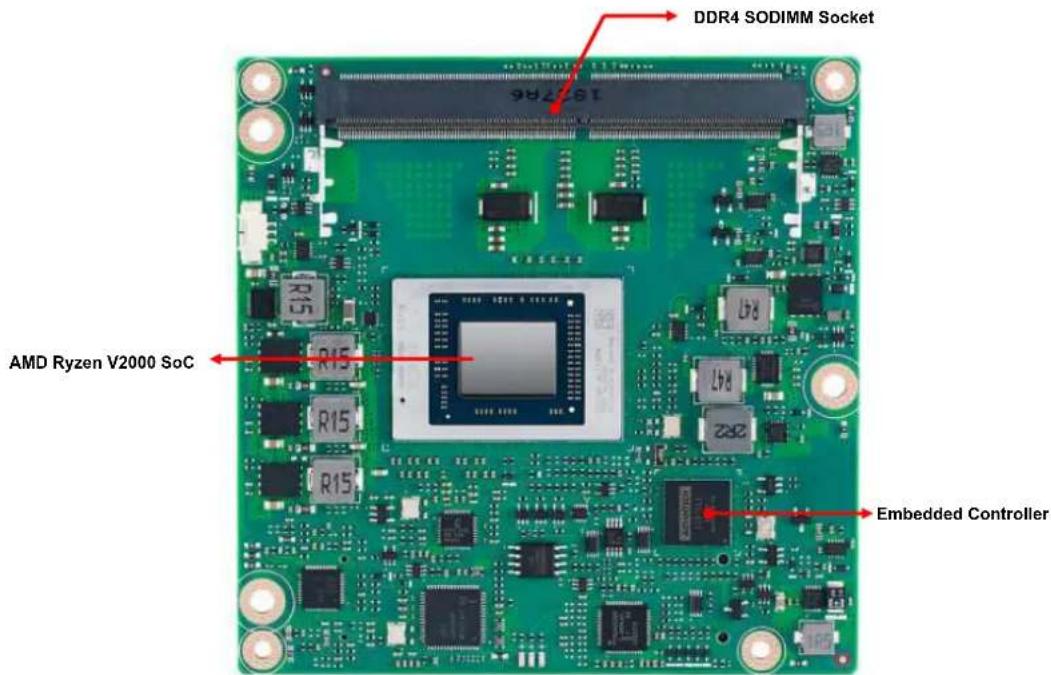
The figures below represent the main chips on the SOM-6872 Computer-on-Module. Please be aware of these positions when designing carrier boards to avoid mechanical problems. Use the thermal solution contacts for best thermal dissipation performance.
text_image
DDR4 SODIMM Socket AMD Ryzen V2000 SoC Embedded ControllerFigure 2.1 Board chip identification – front

text_image
DDR4 SODIMM Socket S03502 CQC12001067469 888V8 94V-0 2050 FC CE ADAMTECH EMS Board to board connector Board to board connectorFigure 2.2 Board chip location – rear
2.1.1 Connector List
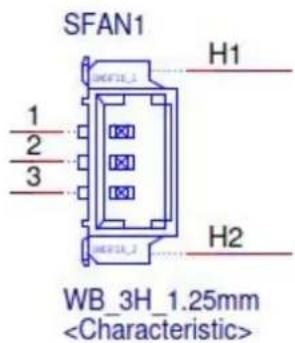
Table 2.1: SFAN1 Fan
| SFAN1 Fan |
| Description Wafer 1 x 3P/1.25mm/(M)/NY46/RA/Sn/S/WH/H3.4mm |
| Pin Pin Name |
| 1 Fan Tach0-Input |
| 2 Fan Out |
| 3 GND |
text_image
SFAN1 H1 1 2 3 HB_F18_1 HB_F18_2 H2 WB_3H_1.25mm2.2 Mechanical Diagram
For more details about 2D/3D models, check out Advantech's COM support service website http://com.advantech.com.
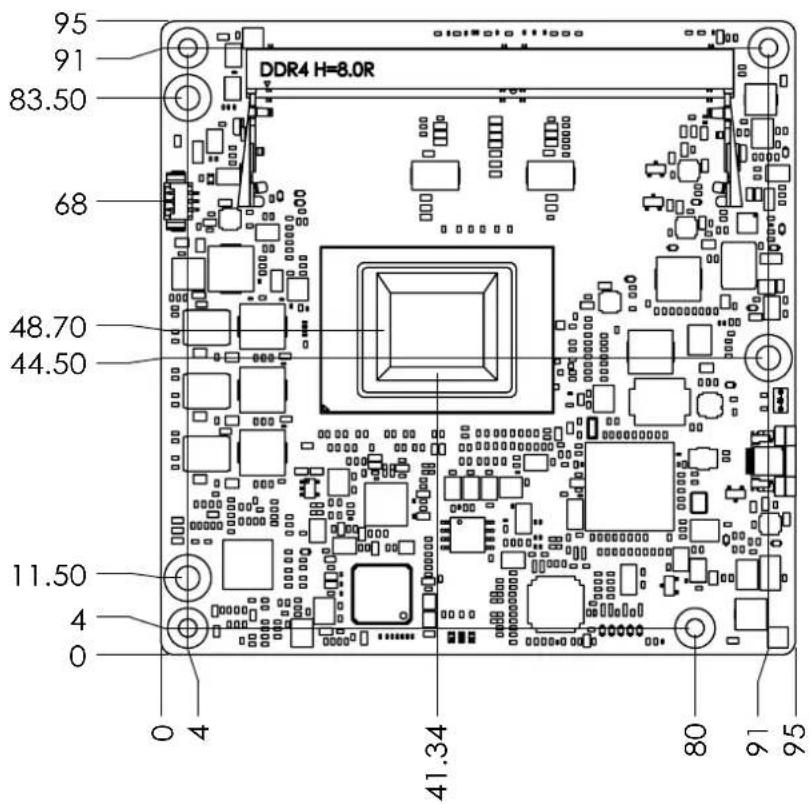
text_image
95 91 DDR4 H=8.0R 83.50 68 48.70 44.50 11.50 4 0 0 4 41.34 80 91 95Figure 2.3 Board mechanical diagram - front
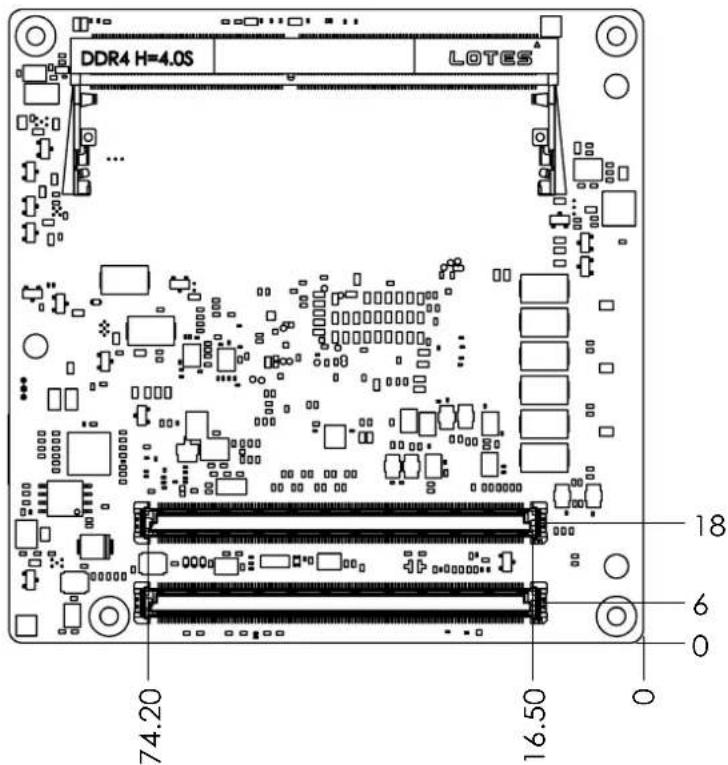
text_image
DDR4 H=4.0S LOTES 74.20 16.50 18 6 0Figure 2.4 Board mechanical diagram - rear
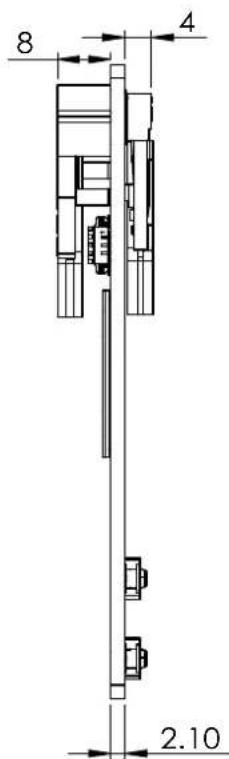
text_image
8 4 2.10Figure 2.5 Board mechanical diagram - side
2.3 Assembly Drawing
These figures demonstrate the assembly order for the thermal module — it covers attaching the COM module to the carrier board.
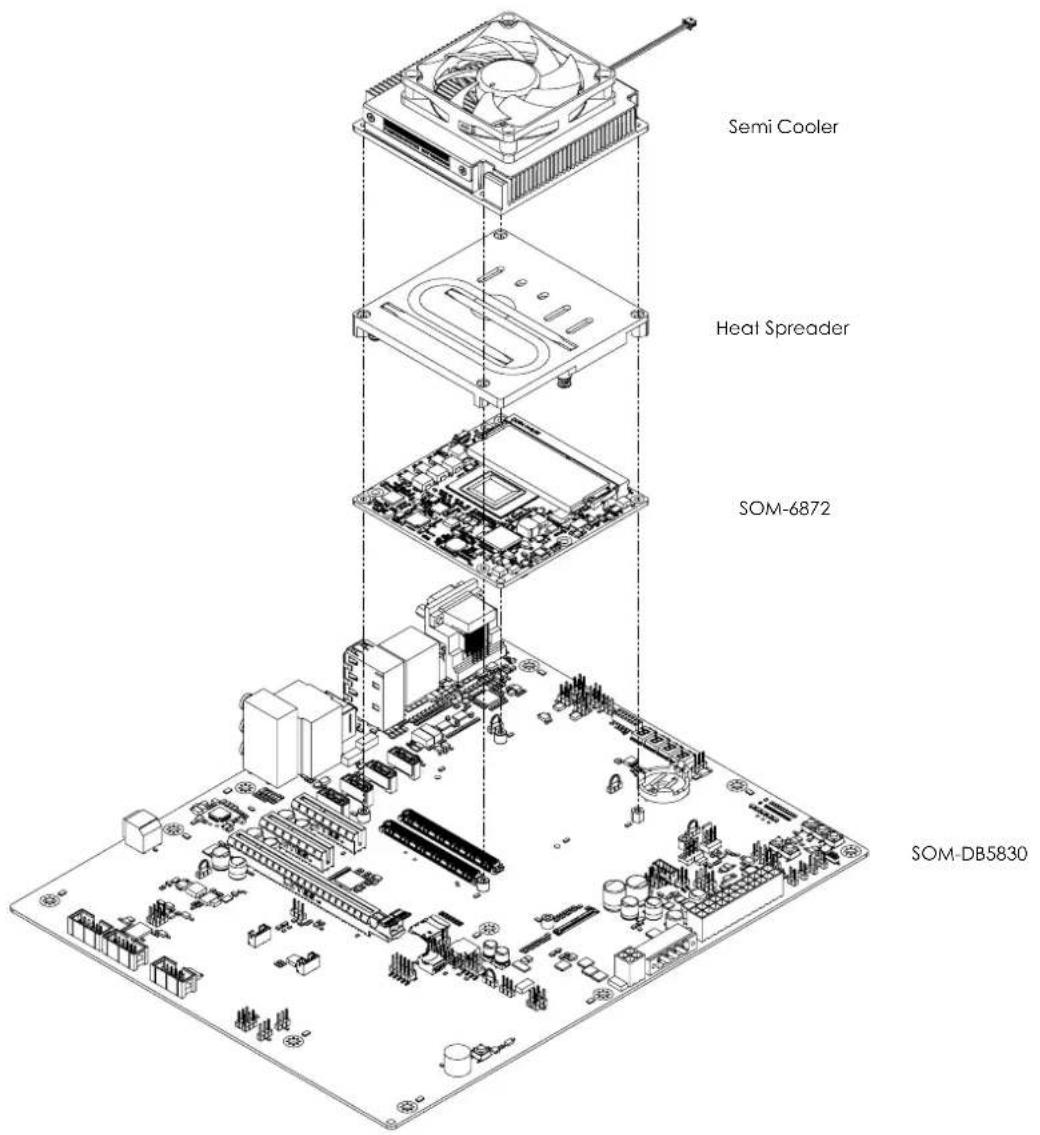
text_image
Semi Cooler Heat Spreader SOM-6872 SOM-DB5830Figure 2.6 Assembly diagram
There are 3 x reserved screw holes for SOM-6872 that are used in pre-assembling it with the heat spreader.
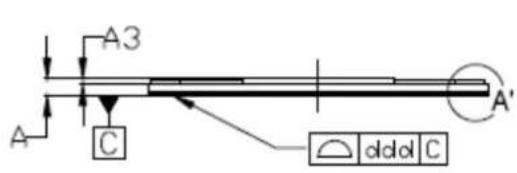
Please consider the CPU and chip height tolerance when designing your thermal solution.
text_image
A3 A C A' ddd C
text_image
STIFFENER RING A4 6 A2 A1Figure 2.7 AMD FP6 height and tolerance
(For all other SKUs please contact Advantech sales or FAE for more details)
Chapter 3
AMI BIOS
This chapter details BIOS setup information for the SOM-6872 CPU computer-on module.
Sections include:
Introduction
Entering Setup
Hot/Operation Key
■ Exit BIOS Setup Utility
3.1 Introduction
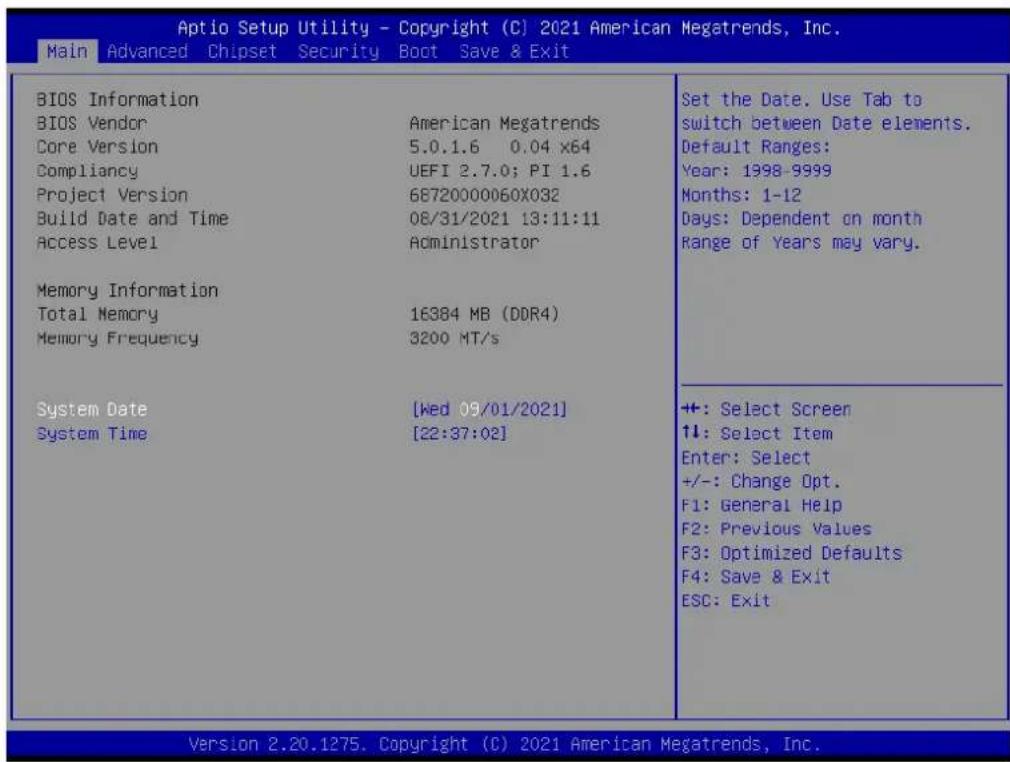
AMI BIOS has been integrated into many motherboards for over a decade. With the AMI BIOS Setup Utility, users can modify BIOS settings and control various system features. This chapter describes the basic navigation of the BIOS Setup Utility.
text_image
Aptio Setup Utility - Copyright (C) 2021 American Megatrends, Inc. Main Advanced Chipset Security Boot Save & Exit BIOS Information BIOS Vendor Core Version Compliance Project Version Build Date and Time Access Level Memory Information Total Memory Memory Frequency System Date System Time American Megatrends 5.0.1.6 0.04 x64 UEFI 2.7.0; PI 1.6 68720000060X032 08/31/2021 13:11:11 Administrator 16384 MB (DDR4) 3200 MT/s [Wed 09/01/2021] [22:37:02] Set the Date. Use Tab to switch between Date elements. Default Ranges: Year: 1998-9999 Months: 1-12 Days: Dependent on month Range of Years may vary. +: Select Screen ↑↓: Select Item Enter: Select +/-: Change Opt. F1: General Help F2: Previous Values F3: Optimized Defaults F4: Save & Exit ESC: Exit Version 2.20.1275. Copyright (C) 2021 American Megatrends, Inc.Figure 3.1 Setup program initial screen
AMI's BIOS ROM has a built-in Setup program that allows users to modify the basic system configuration. This information is stored in flash ROM so it retains the Setup information when the power is turned off.
3.2 Entering Setup
Turn on the computer and then press or
3.3 Main Setup
When users first enter the BIOS Setup Utility, users will enter the Main setup screen. Users can always return to the Main setup screen by selecting the Main tab. There are two Main Setup options. They are described in this section. The Main BIOS Setup screen is shown below.

text_image
Aptio Setup Utility - Copyright (C) 2021 American Megatrends, Inc. Main Advanced Chipset Security Boot Save & Exit BIOS Information BIOS Vendor American Megatrends Core Version 5.0.1.6 0.04 x64 Compliance UEFI 2.7.0; PI 1.6 Project Version 68720000060x032 Build Date and Time 08/31/2021 13:11:11 Access Level Administrator Memory Information Total Memory 16384 MB (DDR4) Memory Frequency 3200 MT/s System Date [Wed 09/01/2021] System Time [22:37:02] Set the Date. Use Tab to switch between Date elements. Default Ranges: Year: 1998-9999 Months: 1-12 Days: Dependent on month Range of Years may vary. ++: Select Screen ↑↓: Select Item Enter: Select +/-: Change Opt. F1: General Help F2: Previous Values F3: Optimized Defaults F4: Save & Exit ESC: Exit Version 2.20.1275. Copyright (C) 2021 American Megatrends, Inc.Figure 3.2 Main setup screen
The Main BIOS setup screen has two main frames. The left frame displays all the options that can be configured. Grayed-out options cannot be configured; options in blue can. The right frame displays the key legend.
Above the key legend is an area reserved for a text message. When an option is selected in the left frame, it is highlighted in white. Often a text message will accompany it.
■ System time / System date
Use this option to change the system time and date. Highlight System Time or System Date using the
3.4 Advanced BIOS Features Setup
Select the Advanced tab from the SOM-6872 setup screen to enter the Advanced BIOS Setup screen. Users can select any item in the left frame of the screen, such as CPU Configuration, to go to the sub menu for that item. Users can display an Advanced BIOS Setup option by highlighting it using the
| Aptio Setup Utility - Copyright (C) 2021 American Megatrends, Inc. Main Advanced Chipset Security Boot Save & Exit | |
| Trusted Computing ACPI Settings Embedded Controller Serial Port Console Redirection CPU Configuration SATA Configuration AMI Graphic Output Protocol Policy Option ROM Dispatch Policy PCI Subsystem Settings USB Configuration Network Stack Configuration NVMe Configuration AMD CBS AMD PBS Intel(R) I210 Gigabit Network Connection - 00:A0:C9:00:00:00 | Trusted Computing Settings +: Select Screen ↑↓: Select Item Enter: Select +/-: Change Opt. F1: General Help F2: Previous Values F3: Optimized Defaults F4: Save & Exit ESC: Exit |
| Version 2.20.1275. Copyright (C) 2021 American Megatrends, Inc. | |
Figure 3.3 Advanced BIOS features setup screen
Trusted Computing
Trusted Computing Settings
ACPI Settings
System ACPI Parameters
■ Embedded Controller
Embedded Controller Parameters
Serial Port Console Redirection
Serial Port Console Redirection
CPU Configuration
CPU Configuration Parameters
■ SATA Configuration
SATA Configuration
■ AMI Graphic Output Protocol Policy
AMI Graphic Output Protocol Policy
Option ROM Dispatch Policy
Option ROM Dispatch Policy
PCI Subsystem Settings
PCI Subsystem Settings
USB Configuration
USB Configuration Parameters
■ Network Stack Configuration
Network Stack Settings
NVME Configuration
3.4.1 Trusted Computing
| Aptio Setup Utility - Copyright (C) 2021 American Megatrends, Inc. Advanced | |
| TPM 2.0 Device Found Firmware Version: 7.62 Vendor: IFX Security Device Support [Enable] Active FCR banks SHA-1,SHA256 Available PCR banks SHA-1,SHA256 SHA-1 PCR Bank [Enabled] SHA256 PCR Bank [Enabled] Pending operation [None] Platform Hierarchy [Enabled] Storage Hierarchy [Enabled] Endorsement Hierarchy [Enabled] TPM 2.0 UEFI Spec Version [TCG_2] Physical Presence Spec Version [1.3] TPM 2.0 Interfacetype [TIS] Device Select [Auto] | Enables or Disables BIOS support for security device. 0.S. will not show Security Device. TCG EFI protocol and INT1A interface will not be available. |
| +: Select Screen ↑↓: Select Item Enter: Select +/-: Change Opt. F1: General Help F2: Previous Values F3: Optimized Defaults F4: Save & Exit ESC: Exit | |
| Version 2.20.1275. Copyright (C) 2021 American Megatrends, Inc. | |
Figure 3.4 Trusted computing screen
■ Security Device Support
Enables or Disables BIOS support for security device. The OS will not show Security Device. TCG EFI protocol and INT1A interface will not be available
SHA-1 PCR Bank
Enable or disable SHA-1 PCR Bank
SHA256 PCR Bank
Enable or disable SHA256 PCR Bank
Pending Operation
Schedule an operation for the security device. Note: Your computer will reboot during restart in order to change state of security device
Platform Hierarchy
Enable or disable platform hierarchy
Storage Hierarchy
Enable or disable Storage Hierarchy
■ Endorsement Hierarchy
Enable or disable Endorsement Hierarchy
TPM2.0 UEFI Spec version
Select the TCG2 spec version support, TCG_1_2: the compatible mode for Win8/Win10, TCG_2: Support new TCG2 protocol and event format for Win10 or later
■ Physical Presence Spec Version
Select to Tell O.S. to support PPI Spec Version 1.2 or 1.3. Note some HCK tests might not support 1.3.
TPM2.0 Interface Type
Select the communication interface to TPM2.0 device
Device select
TPM1.2 will restrict support to TPM1.2 devices, TPM2.0 will restrict support to TPM2.0 devices, Auto will support both with the default set to TPM2.0 devices if not found, TPM1.2 devices will enumerated
3.4.2 ACPI Settings
text_image
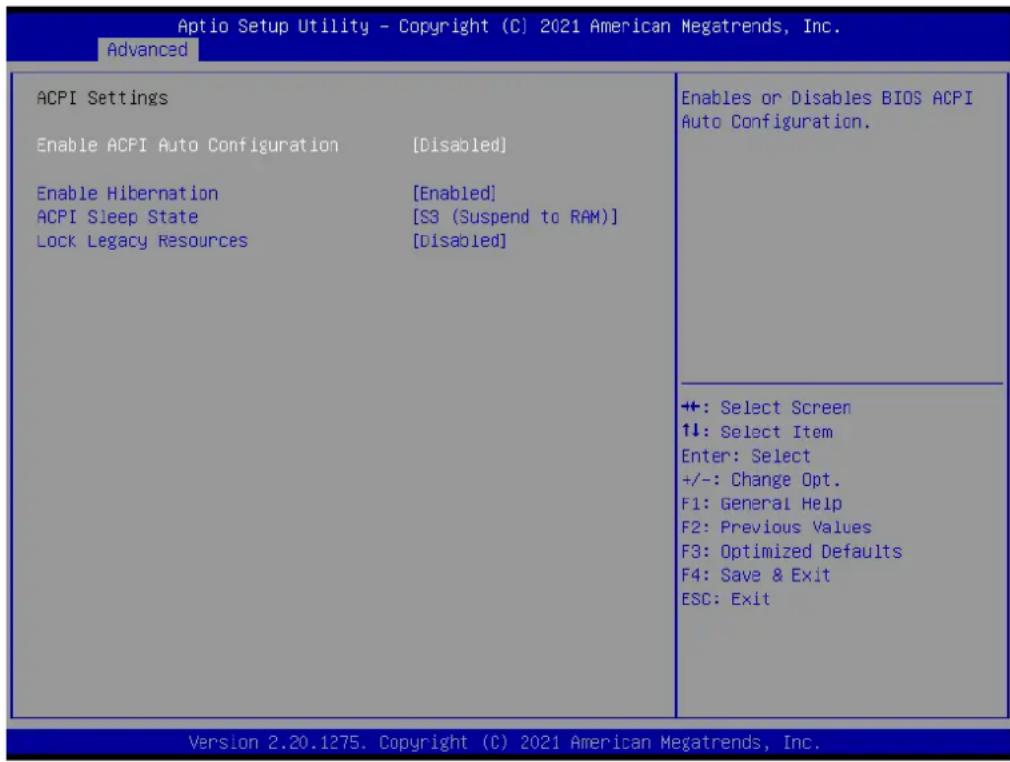
Aptio Setup Utility - Copyright (C) 2021 American Megatrends, Inc. Advanced ACPI Settings Enable ACPI Auto Configuration [Disabled] Enable Hibernation [Enabled] ACPI Sleep State [S3 (Suspend to RAM)] Lock Legacy Resources [Disabled] Enables or Disables BIOS ACPI Auto Configuration. +: Select Screen ↑↓: Select Item Enter: Select +/-: Change Opt. F1: General Help F2: Previous Values F3: Optimized Defaults F4: Save & Exit ESC: Exit Version 2.20.1275. Copyright (C) 2021 American Megatrends, Inc.Figure 3.5 ACPI settings screen
■ Enable ACPI Auto Configuration
Enables or Disables BIOS ACPI Auto Configuration.
■ Enable Hibernation
Enables or Disables System ability to Hibernate (OS/S4 Sleep State). This option may be not effective with some OS.
ACPI Sleep State
Select the highest ACPI sleep state the system will enter when the SUSPEND button is pressed
■ Lock Legacy Resources
Enables or Disables Lock of Legacy Resources
3.4.3 Embedded Controller
text_image
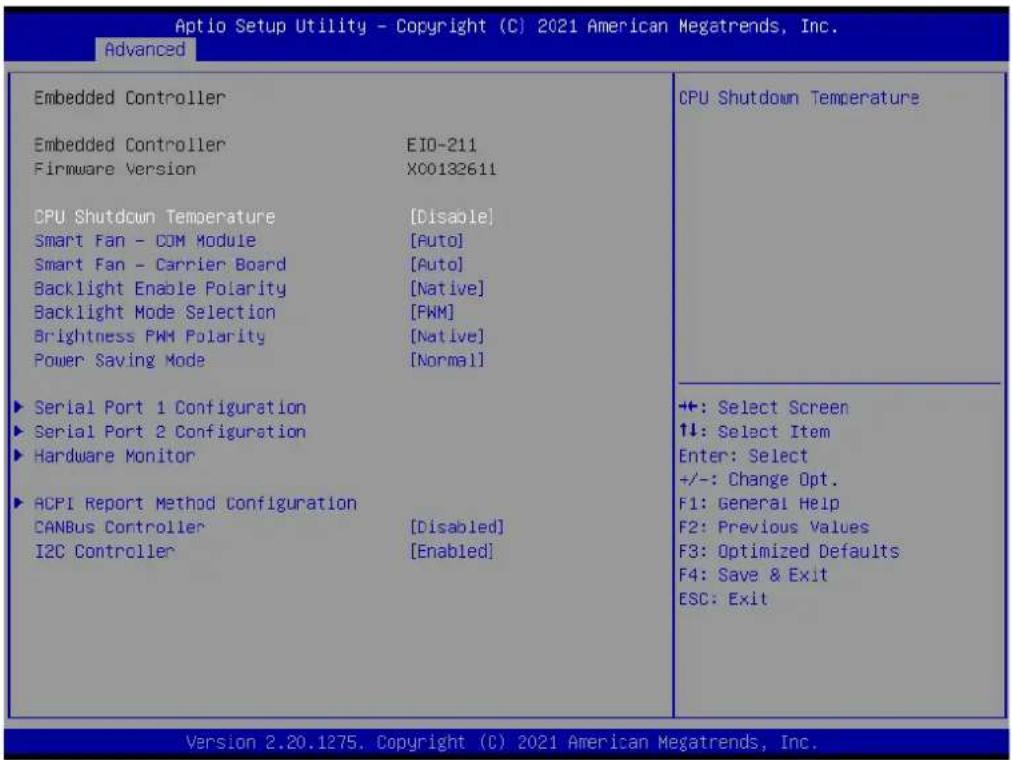
Aptio Setup Utility - Copyright (C) 2021 American Megatrends, Inc. Advanced Embedded Controller Embedded Controller EIO-211 Firmware Version XC0132611 CPU Shutdown Temperature [Disable] Smart Fan - COM Module [Auto] Smart Fan - Carrier Board [Auto] Backlight Enable Polarity [Native] Backlight Mode Selection [PWM] Brightness PWM Polarity [Native] Power Saving Mode [Normal] Serial Port 1 Configuration Serial Port 2 Configuration Hardware Monitor ACPI Report Method Configuration CANBus Controller [Disabled] I2C Controller [Enabled] CPU Shutdown Temperature +: Select Screen ↑↓: Select Item Enter: Select +/-: Change Opt. F1: General Help F2: Previous Values F3: Optimized Defaults F4: Save & Exit ESC: Exit Version 2.20.1275. Copyright (C) 2021 American Megatrends, Inc.Figure 3.6 Embedded controller screen
■ CPU Shutdown Temperature
CPU Shutdown Temperature
Smart Fan-COM Module
Control COM Module Smart Fan function. Get value from EC and only set value when save changes
Smart Fan - Carrier Board
Control Carrier Board Smart FAN function. Get value from EC and only set value when Save Changes.
■ Backlight Enable Polarity
Switch Backlight Enable Polarity for Native or Invert
■ Backlight Mode Selection
Switch Backlight Control to PWM or DC mode.
■ Brightness PWM Polarity
Backlight Control Brightness PWM Polarity for Native or Invert
Power Saving Mode
Select Power Saving Mode
Serial Port 1 Configuration
Set Parameters of Serial Port 1 (COMA)
Serial Port 2 Configuration
Set Parameters of Serial Port 2 (COMB)
Hardware Monitor
Monitor hardware status
■ ACPI Report Method Configuration
Select ACPI Reporting Method for EC Devices
CANBus Controller
Enable/Disable CANBus controller on RDC-IS200
I2C Controller
Enable/Disable I2C controller on RDC-IS200
3.4.3.1 Serial Port 1 Configuration

text_image
Aptio Setup Utility - Copyright (C) 2021 American Megatrends, Inc. Advanced Serial Port 1 Configuration Serial Port [Enabled] Device Settings IC=3F3h; IRQ=4; Change Settings [Auto] Enable or Disable Serial Port (COM) +: Select Screen ↑↓: Select Item Enter: Select +/-: Change Opt. F1: General Help F2: Previous Values F3: Optimized Defaults F4: Save & Exit ESC: Exit Version 2.20.1275. Copyright (C) 2021 American Megatrends, Inc.Figure 3.7 Serial port 1 configuration screen
Serial Port
Enable or Disable Serial Port (COM)
Device Settings
Set Parameters of Serial Port 1 (COMA)
Change Settings
Select an optimal settings for Super IO Device
3.4.3.2 Serial Port 2 Configuration
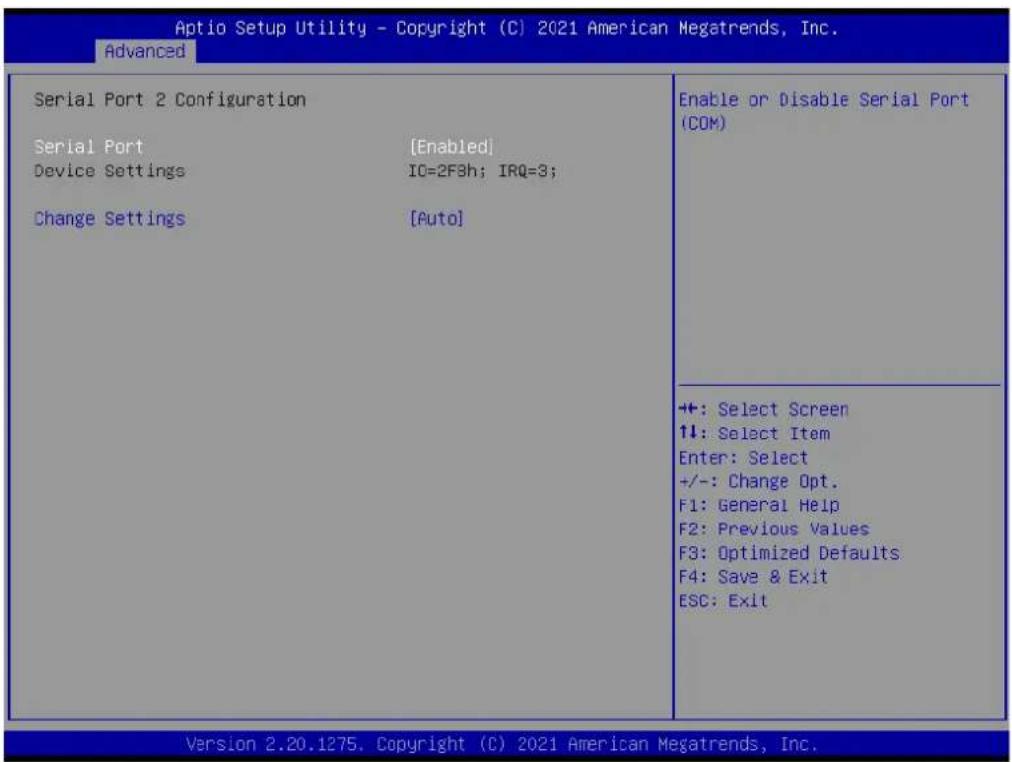
text_image
Aptio Setup Utility - Copyright (C) 2021 American Megatrends, Inc. Advanced Serial Port 2 Configuration Serial Port [Enabled] Device Settings IC=2F3h; IRQ=3; Change Settings [Auto] Enable or Disable Serial Port (COM) ++: Select Screen ↑↓: Select Item Enter: Select +/-: Change Opt. F1: General Help F2: Previous Values F3: Optimized Defaults F4: Save & Exit ESC: Exit Version 2.20.1275. Copyright (C) 2021 American Megatrends, Inc.Figure 3.8 Serial port 2 configuration screen
Serial Port
Enable or Disable Serial Port (COM)
■ Device Settings
Set Parameters of Serial Port 2 (COMB)
■ Change Settings
Select an optimal settings for Super IO Device
3.4.3.3 Hardware Monitor

text_image
Aptio Setup Utility - Copyright (C) 2021 American Megatrends, Inc. Advanced PC Health Status CPU Temperature : +50.9°C/ +123.6°F COM Module FAN : 3729 RPM Carrier Board FAN : 0 RPM +12V : +11.97 V + 5V : +5.01 V VBAT : +2.95 V ++: Select Screen ↑↓: Select Item Enter: Select +/-: Change Opt. F1: General Help F2: Previous Values F3: Optimized Defaults F4: Save & Exit ESC: Exit Version 2.20.1275. Copyright (C) 2021 American Megatrends, Inc.Figure 3.9 Hardware monitor screen
3.4.3.4 ACPI Report Method Configuration
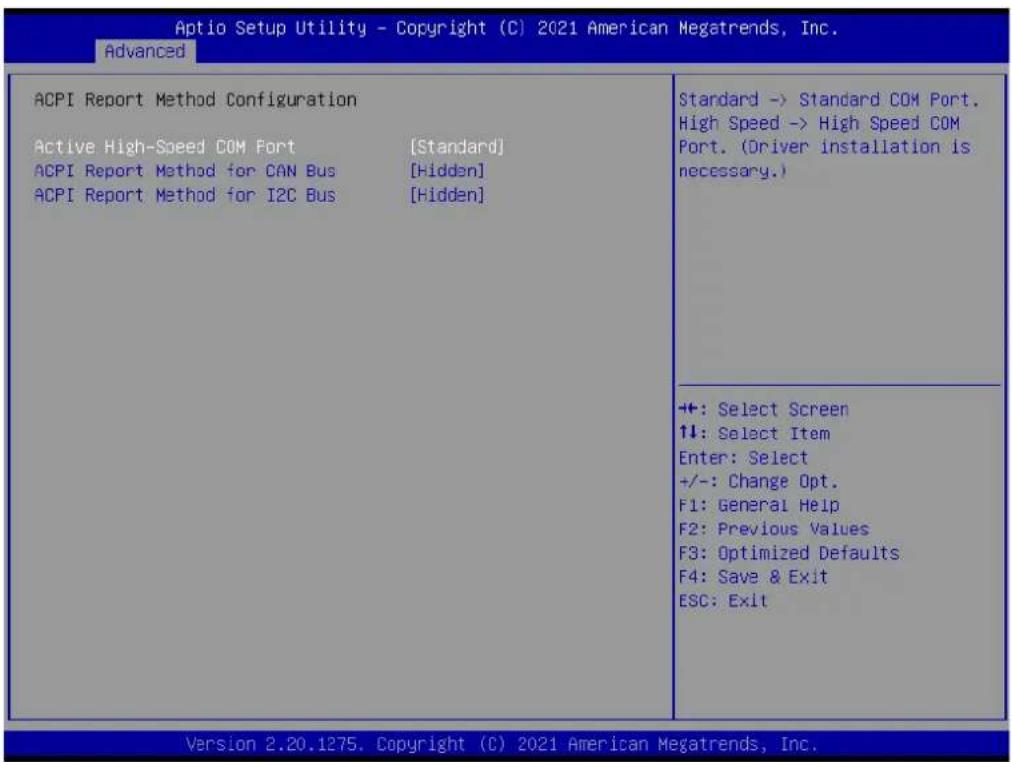
text_image
Aptio Setup Utility - Copyright (C) 2021 American Megatrends, Inc. Advanced ACPI Report Method Configuration Active High-Speed COM Port [Standard] ACPI Report Method for CAN Bus [Hidden] ACPI Report Method for I2C Bus [Hidden] Standard -> Standard COM Port. High Speed -> High Speed COM Port. (Driver installation is necessary.) ++: Select Screen ↑↓: Select Item Enter: Select +/-: Change Opt. F1: General Help F2: Previous Values F3: Optimized Defaults F4: Save & Exit ESC: Exit Version 2.20.1275. Copyright (C) 2021 American Megatrends, Inc.Figure 3.10 ACPI Report method configuration screen
■ Active High-Speed COM Port
Standard -> Standard COM Port. High Speed -> High Speed COM Port(Driver installation is necessary)
■ ACPI Report Method for CAN Bus
Select the ACPI reporting method for EC CAN Bus. Hidden -> Reported as reserved motherboard resource. Exposed -> Reported vendor_HID(Driver installation is necessary)
■ ACPI Report Method for I2C Bus
Select the ACPI reporting method for EC I2C Bus. Hidden -> Reported as reserved motherboard resource. Exposed -> Reported vendor_HID(Driver installation is necessary)
3.4.4 Serial Port Console Redirection
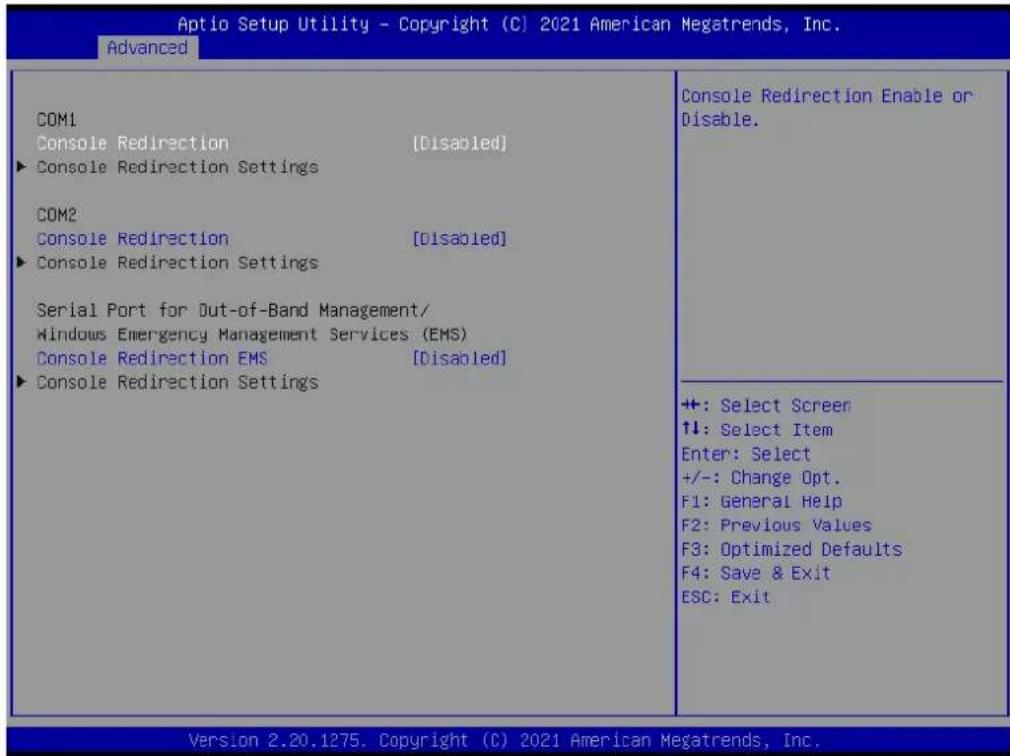
text_image
Aptio Setup Utility - Copyright (C) 2021 American Megatrends, Inc. Advanced COM1 Console Redirection [Disabled] ► Console Redirection Settings COM2 Console Redirection [Disabled] ► Console Redirection Settings Serial Port for Out-of-Band Management/ Windows Emergency Management Services (EMS) Console Redirection EMS [Disabled] ► Console Redirection Settings Console Redirection Enable or Disable. +: Select Screen ↑↓: Select Item Enter: Select +/-: Change Opt. F1: General Help F2: Previous Values F3: Optimized Defaults F4: Save & Exit ESC: Exit Version 2.20.1275. Copyright (C) 2021 American Megatrends, Inc.Figure 3.11 Serial port console redirection screen
COM1
■ Console Redirection
Console Redirection Enable or Disable.
■ Console Redirection Settings
The settings specify how the host computer and the remote computer (which the user is using) will exchange data. Both computers should have the same or compatible settings.
COM2
■ Console Redirection
Console Redirection Enable or Disable.
■ Console Redirection Settings
The settings specify how the host computer and the remote computer (which the user is using) will exchange data. Both computers should have the same or compatible Serial Port for Out-of-Band Management/ Windows Emergency Management Services (EMS)
■ Console Redirection EMS
Console Redirection Enable or Disable.
■ Console Redirection Settings
The settings specify how the host computer and the remote computer (which the user is using) will exchange data. Both computers should have the same or compatible settings.
3.4.4.1 Console Redirection Settings
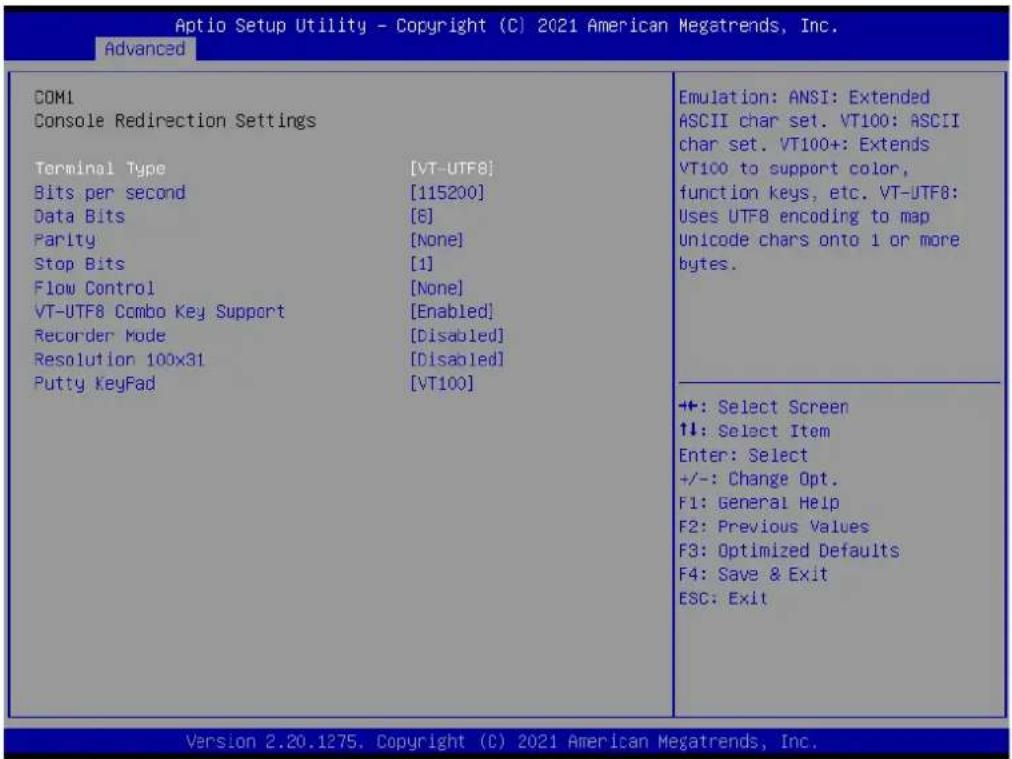
text_image
Aptio Setup Utility - Copyright (C) 2021 American Megatrends, Inc. Advanced COM1 Console Redirection Settings Terminal Type [VT-UTF8] Bits per second [115200] Data Bits [6] Parity [None] Stop Bits [1] Flow Control [None] VT-UTF8 Combo Key Support [Enabled] Recorder Mode [Disabled] Resolution 100x31 [Disabled] Putty KeyPad [VT100] Emulation: ANSI: Extended ASCII char set. VT100: ASCII char set. VT100+: Extends VT100 to support color, function keys, etc. VT-UTF8: Uses UTF8 encoding to map Unicode chars onto 1 or more bytes. ++: Select Screen ↑↓: Select Item Enter: Select +/-: Change Opt. F1: General Help F2: Previous Values F3: Optimized Defaults F4: Save & Exit ESC: Exit Version 2.20.1275. Copyright (C) 2021 American Megatrends, Inc.Figure 3.12 Console redirection Settings screen
Terminal Type
Emulation:ANSI:Extended ASCII char set. VT1000:ASCII char set.
V100+:Extends VT100 to support color, function keys, etc. VT-UTF8:Uses UTF8 encoding to map Unicode chars onto 1 or more bytes
Bits Per second
Select serial port transmission speed. The speed must be matched on the other side. Long or noisy lines may require lower speeds
Data Bits
Data Bits
Parity
A parity bit can be sent with the data bits to detect some transmission errors.
Even: parity bit is 0 if the num of 1's in the data bits is even. Odd: parity bit is 0 if num of 1's in the data bits is odd. Mark: parity bit always 1. Space: Parity bit is always 0. Mark and Space Parity do not allow for error detection
Stop Bits
Stop bits indicate the end of a serial data packet.(A start bit indicates the beginning). The standard setting is 1 stop bit. Communication with slow devices may require more than 1 stop bit.
Flow Control
Flow control can prevent data loss from buffer overflow. When sending data, if the receiving buffers are full, a "stop" signal can be sent to stop the data flow.
Once the buffers are empty, a "start" signal can be sent to re-start the flow. Hardware flow control uses two wires to send start/stop signals
■ VT-UTF8 Combo Key Support
Enable VT-UTF8 combination key support for ANSI/VT100 terminals
Recorder Mode
With this mode enabled only text will be sent. This is to capture terminal data
■ Resolution 100X31
Enables or disables extended terminal resolution
Putty Keypad
Select FunctionKey and KeyPad on Putty
3.4.5 CPU Configuration

text_image
Aptio Setup Utility - Copyright (C) 2021 American Megatrends, Inc. Advanced CPU Configuration Module Version: RenoirCpu 08 AGESA Version : Embedded-FP6 PI 1006 PSS Support [Enabled] PPC Adjustment [FState 0] NX Mode [Enabled] SVM Mode [Enabled] ► Node 0 Information Enable/disable the generation of ACPI_PPC, _PSS, and _PCT objects. +: Select Screen ↑↓: Select Item Enter: Select +/-: Change Opt. F1: General Help F2: Previous Values F3: Optimized Defaults F4: Save & Exit ESC: Exit Version 2.20.1275. Copyright (C) 2021 American Megatrends, Inc.Figure 3.13 CPU configuration screen
PSS Support
Enable/Disable the generation of ACPI_PPC, _PSS and PCT objects
■ PPC Adjustment
Provide to adjust PPC object
NX Mode
Enable/Disable no-execute page protection function
SVM Mode
Enable/Disable CPU virtualization
- Node 0 Information
View Memory Information related to Node 0

text_image
Aptio Setup Utility - Copyright (C) 2021 American Megatrends, Inc. Advanced Socket0: AMD Ryzen Embedded V2748 with Radeon Graphics 8 Core(s) Running @ 2932 MHz 1218 mV Processor Family: 17h Processor Model: 60h-6Fh CPUID: 00660F01 Current Speed:2900 MHZ Min Speed:1400 MHZ Microcode Patch Level: 8600106 ----- Cache per core ---- L1 Instruction Cache: 32 KB/8-way L1 Data Cache: 32 KB/8-way L2 Cache: 512 KB/8-way Total L3 Cache per Socket: 8 MB/16-way ++: Select Screen ↑↓: Select Item Enter: Select +/-: Change Opt. F1: General Help F2: Previous Values F3: Optimized Defaults F4: Save & Exit ESC: Exit Version 2.20.1275. Copyright (C) 2021 American Megatrends, Inc.Figure 3.14 Socket0 screen
3.4.6 SATA Configuration
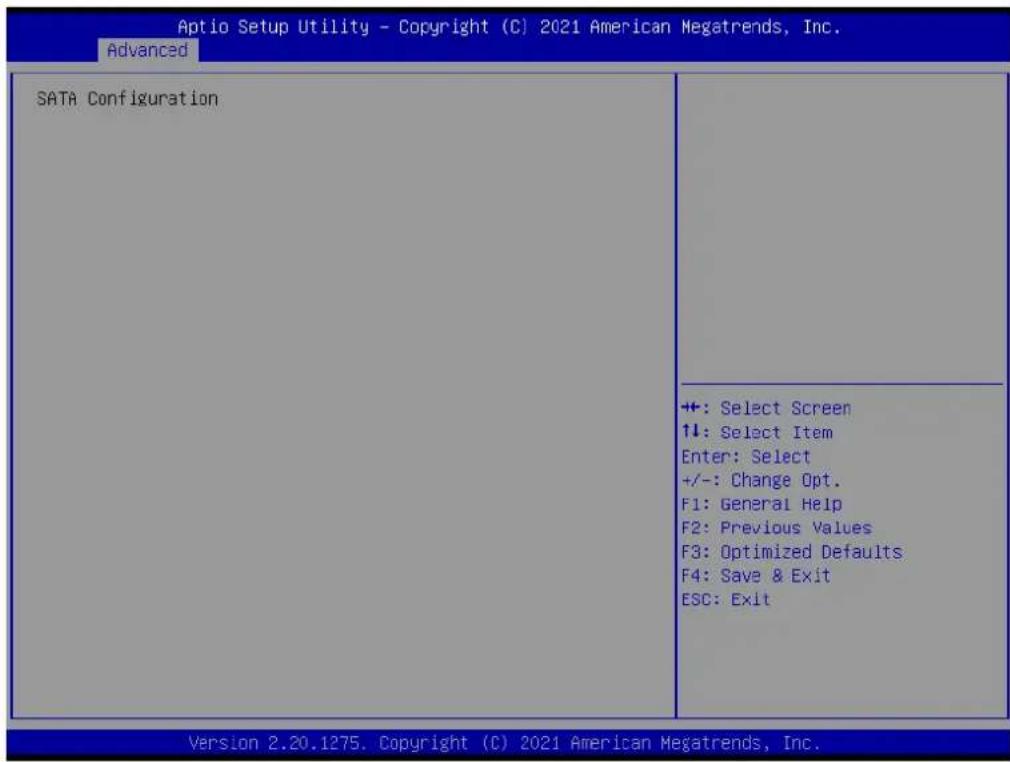
text_image
Aptio Setup Utility - Copyright (C) 2021 American Megatrends, Inc. Advanced SATA Configuration +: Select Screen ↑↓: Select Item Enter: Select +/-: Change Opt. F1: General Help F2: Previous Values F3: Optimized Defaults F4: Save & Exit ESC: Exit Version 2.20.1275. Copyright (C) 2021 American Megatrends, Inc.Figure 3.15 SATA configuration screen
3.4.7 USB Configuration
text_image
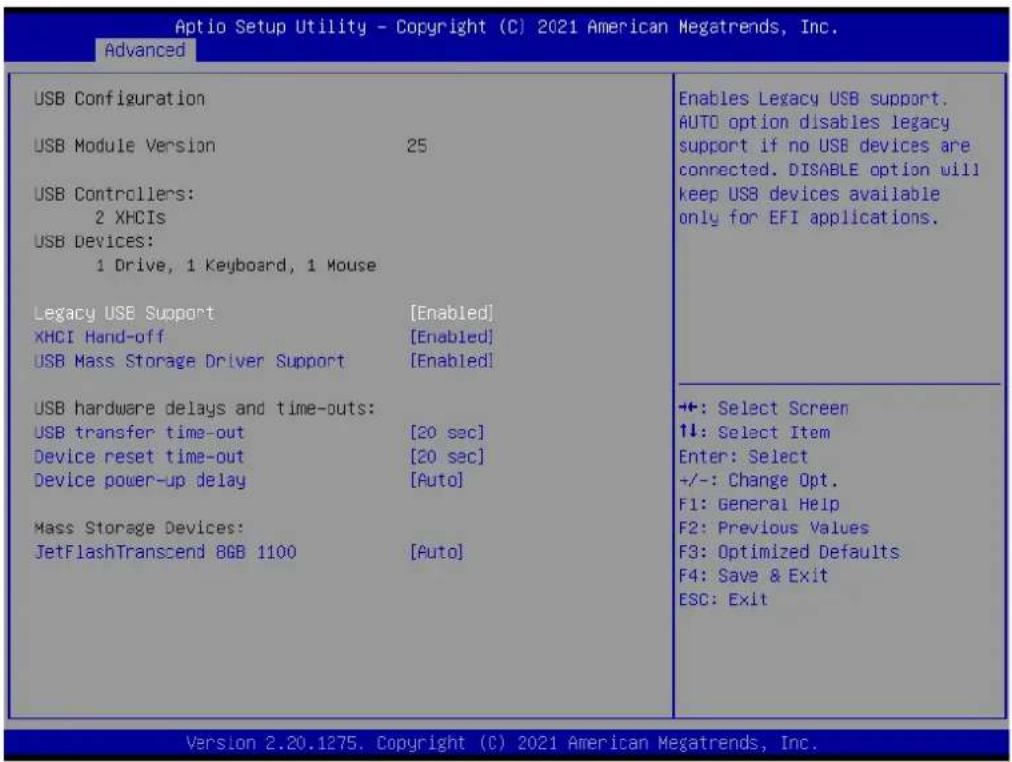
Aptio Setup Utility - Copyright (C) 2021 American Megatrends, Inc. Advanced USB Configuration USB Module Version 25 USB Controllers: 2 XHCIs USB Devices: 1 Drive, 1 Keyboard, 1 Mouse Legacy USB Support [Enabled] XHCI Hand-off [Enabled] USB Mass Storage Driver Support [Enabled] USB hardware delays and time-outs: USB transfer time-out [20 sec] Device reset time-out [20 sec] Device power-up delay [Auto] Mass Storage Devices: JetFlashTranscend BGB 1100 [Auto] Enables Legacy USB support. AUTO option disables legacy support if no USB devices are connected. DISABLE option will keep USB devices available only for EFI applications. +: Select Screen ↑↓: Select Item Enter: Select +/-: Change Opt. F1: General Help F2: Previous Values F3: Optimized Defaults F4: Save & Exit ESC: Exit Version 2.20.1275. Copyright (C) 2021 American Megatrends, Inc.Figure 3.16 USB configuration screen
■ Legacy USB Support
Enables Legacy USB support. AUTO option disables legacy support if no USB devices are connected. DISABLE option will keep USB devices available only for EFI applications.
XHCI Hand-off
This is a workaround for OS without XHCI hand-off support. The XHCI ownership change should be claimed by XHCI driver.
USB Mass Storage Driver Support
Enable/Disable USB Mass Storage Driver Support.
USB transfer time-out
The time-out value for Control, Bulk, and Interrupt transfers.
■ Device reset time-out
USB mass storage device Start Unit command time-out.
■ Device power-up delay
Maximum time the device will take before it properly reports itself to the Host Controller.'Auto' uses default value: for a Root port it is 100 ms, for a Hub port the delay is taken from Hub descriptor.
JetFlashTranscend 8GB 1100
3.4.8 AMI ROM Dispatch Policy
text_image
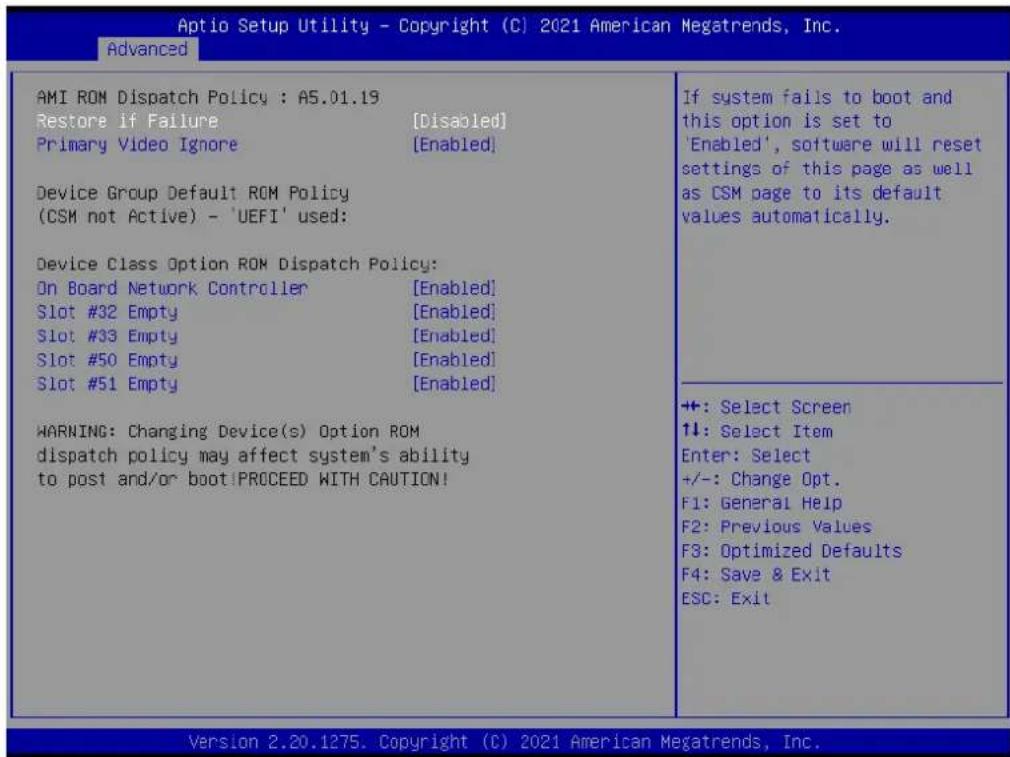
Aptio Setup Utility - Copyright (C) 2021 American Megatrends, Inc. Advanced AMI ROM Dispatch Policy : A5.01.19 Restore if Failure [Disabled] Primary Video Ignore [Enabled] Device Group Default ROM Policy (CSM not Active) - 'UEFI' used: Device Class Option ROM Dispatch Policy: On Board Network Controller [Enabled] Slot #32 Empty [Enabled] Slot #33 Empty [Enabled] Slot #50 Empty [Enabled] Slot #51 Empty [Enabled] WARNING: Changing Device(s) Option ROM dispatch policy may affect system's ability to post and/or boot!PROCEED WITH CAUTION! If system fails to boot and this option is set to 'Enabled', software will reset settings of this page as well as CSM page to its default values automatically. +: Select Screen ↑↓: Select Item Enter: Select +/-: Change Opt. F1: General Help F2: Previous Values F3: Optimized Defaults F4: Save & Exit ESC: Exit Version 2.20.1275. Copyright (C) 2021 American Megatrends, Inc.Figure 3.17 AMI ROM dispatch policy screen
Restore if Failure
If system fails to boot and this option is set to "enabled", software will reset settings of this page as well as CSH page to its default values automatically
■ Primary Video Ignore
If software will detect that due to the policy settings. Option ROM of primary video device will not dispatch, it will ignore this device policy settings, and restore it to "enable" automatically
■ On Board Network Controller
Onboard device has:
UEFI[X]
Lagacy[X]
Embedded ROM(s)
VIDX8086;DIOX1533
@s0|Bx1|Dx0|Fx0
Slot #32 Empty
Enable or disable option ROM execution for selected slot
Slot #33 Empty
Enable or disable option ROM execution for selected slot
Slot #50 Empty
Enable or disable option ROM execution for selected slot
Slot #51 Empty
Enable or disable option ROM execution for selected slot
text_image
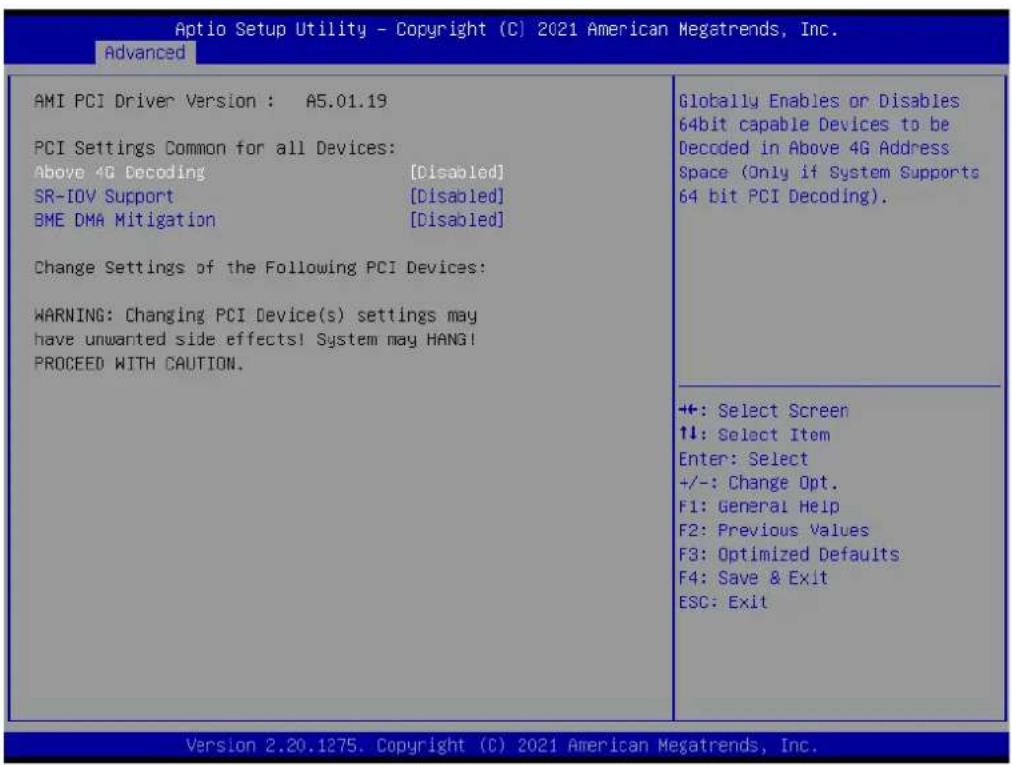
Aptio Setup Utility - Copyright (C) 2021 American Megatrends, Inc. Advanced AMI PCI Driver Version : A5.01.19 PCI Settings Common for all Devices: Above 4G Decoding [Disabled] SR-IOV Support [Disabled] BME DMA Mitigation [Disabled] Change Settings of the Following PCI Devices: WARNING: Changing PCI Device(s) settings may have unwanted side effects! System may HANG! PROCEED WITH CAUTION. Globally Enables or Disables 64bit capable Devices to be Decoded in Above 4G Address Space (Only if System Supports 64 bit PCI Decoding). ++: Select Screen ↑↓: Select Item Enter: Select +/-: Change Opt. F1: General Help F2: Previous Values F3: Optimized Defaults F4: Save & Exit ESC: Exit Version 2.20.1275. Copyright (C) 2021 American Megatrends, Inc.Figure 3.18 AMI PCI driver version screen
■ Above 4G Decoding
Globally enables or disables 64bits cable devices to be decoded in above 4G address space (only if system supports 64 bit PCI decoding)
SR-IOV support
If system has SR-IOV capable PCIe devices, this option enables or disables single root IO virtualization support
BHE DNA mitigation
Re-enables bus master attribute disabled during Pci enumeration for PCI bridges after SMM locked
3.4.9 Network Stack

text_image
Aptio Setup Utility - Copyright (C) 2021 American Megatrends, Inc. Advanced Network Stack [Disabled] Enable/Disable UEFI Network Stack +: Select Screen ↑↓: Select Item Enter: Select +/-: Change Opt. F1: General Help F2: Previous Values F3: Optimized Defaults F4: Save & Exit ESC: Exit Version 2.20.1275. Copyright (C) 2021 American Megatrends, Inc.Figure 3.19 Network stack screen
Network Stack
Enable/Disable UEFI Network Stack
3.4.9.1 Network Stack Configuration
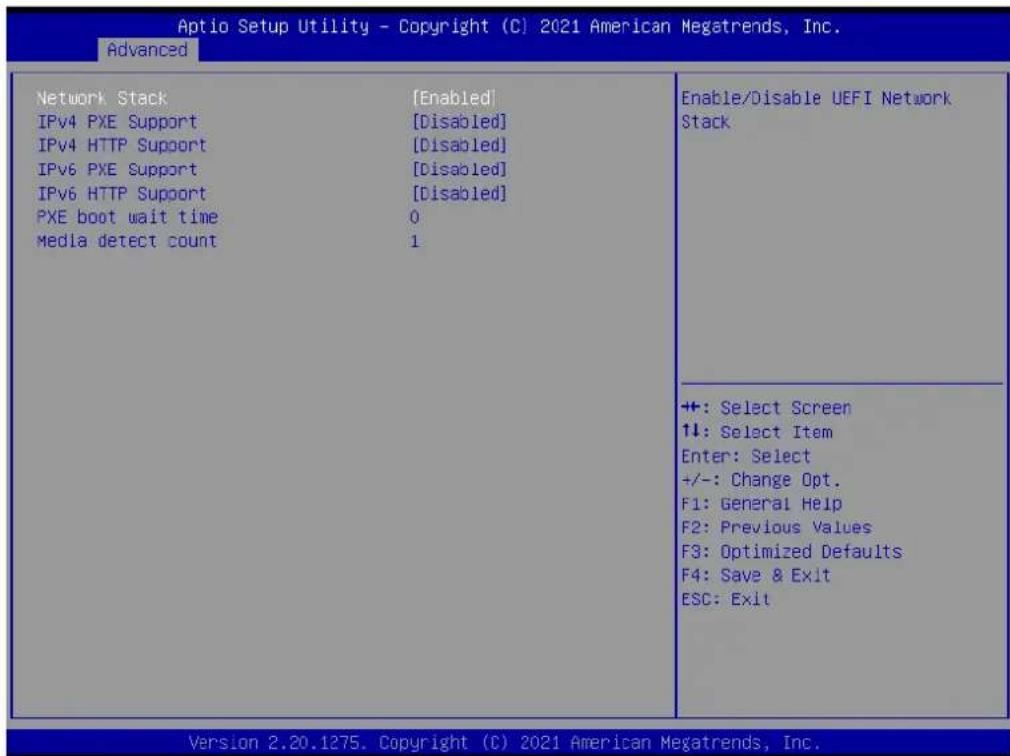
text_image
Aptio Setup Utility - Copyright (C) 2021 American Megatrends, Inc. Advanced Network Stack [Enabled] IPv4 PXE Support [Disabled] IPv4 HTTP Support [Disabled] IPv6 PXE Support [Disabled] IPv6 HTTP Support [Disabled] PXE boot wait time 0 Media detect count 1 Enable/Disable UEFI Network Stack +: Select Screen ↑↓: Select Item Enter: Select +/-: Change Opt. F1: General Help F2: Previous Values F3: Optimized Defaults F4: Save & Exit ESC: Exit Version 2.20.1275. Copyright (C) 2021 American Megatrends, Inc.Figure 3.20 Network stack screen
■ Network Stack
Enable/Disable UEFI Network Stack
■ IPv4 PXE support
Enable/Disable IPv4 PXE boot support. If disabled, IPv4 PXE boot support will not be available
■ IPv4 HTTP Support
Enable/Disable IPv4 HTTP boot support. If disabled, IPv4 HTTP boot support will not be available
■ IPv6 PXE Support
Enable/Disable IPv6 PXE boot support. If disabled, IPv6 PXE boot support will not be available
■ IPv6 HTTP Support
Enable/Disable IPv6 HTTP boot support. If disabled, IPv6 HTTP boot support will not be available
■ PXE boor wait time
Wait time in seconds to press ESC key to abort the PXE boot. Use either +/- or numeric keys to set the value
■ Media detect count|
Number of times presence of media will be checked. Use either +/- or numeric keys to set the value
3.4.10 NVMe Configuration
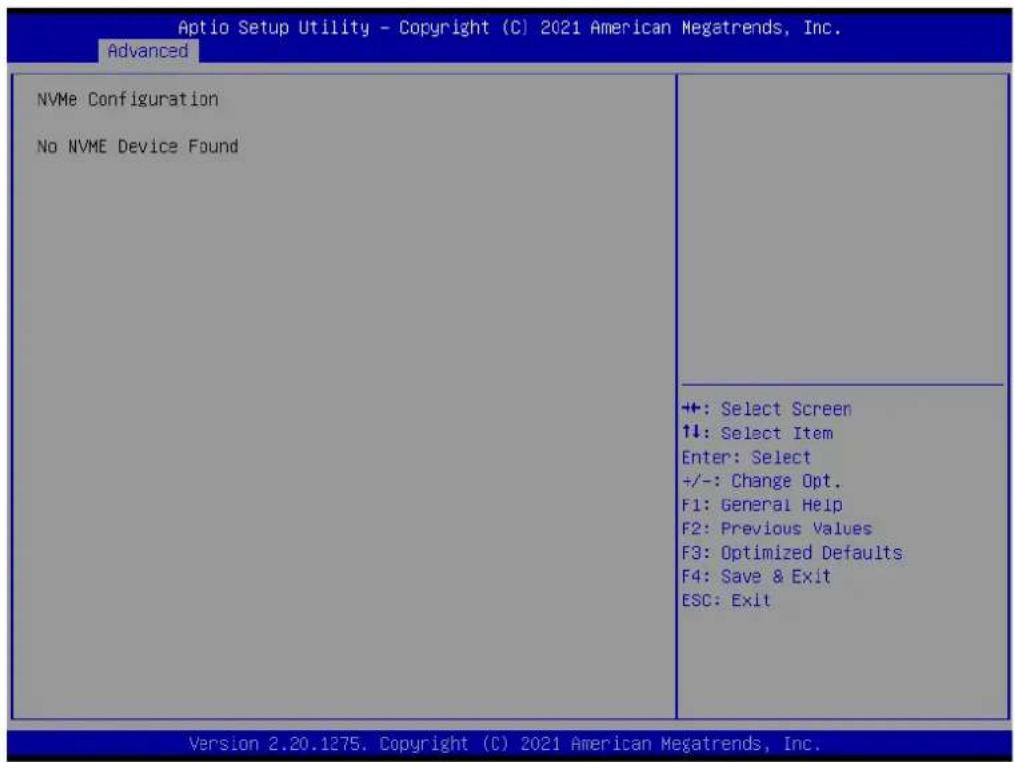
text_image
Aptio Setup Utility - Copyright (C) 2021 American Megatrends, Inc. Advanced NVMe Configuration No NVME Device Found ++: Select Screen ↑↓: Select Item Enter: Select +/-: Change Opt. F1: General Help F2: Previous Values F3: Optimized Defaults F4: Save & Exit ESC: Exit Version 2.20.1275. Copyright (C) 2021 American Megatrends, Inc.Figure 3.21 NVMe configuration screen
No NVNE Device Found
3.4.11 AMD CBS
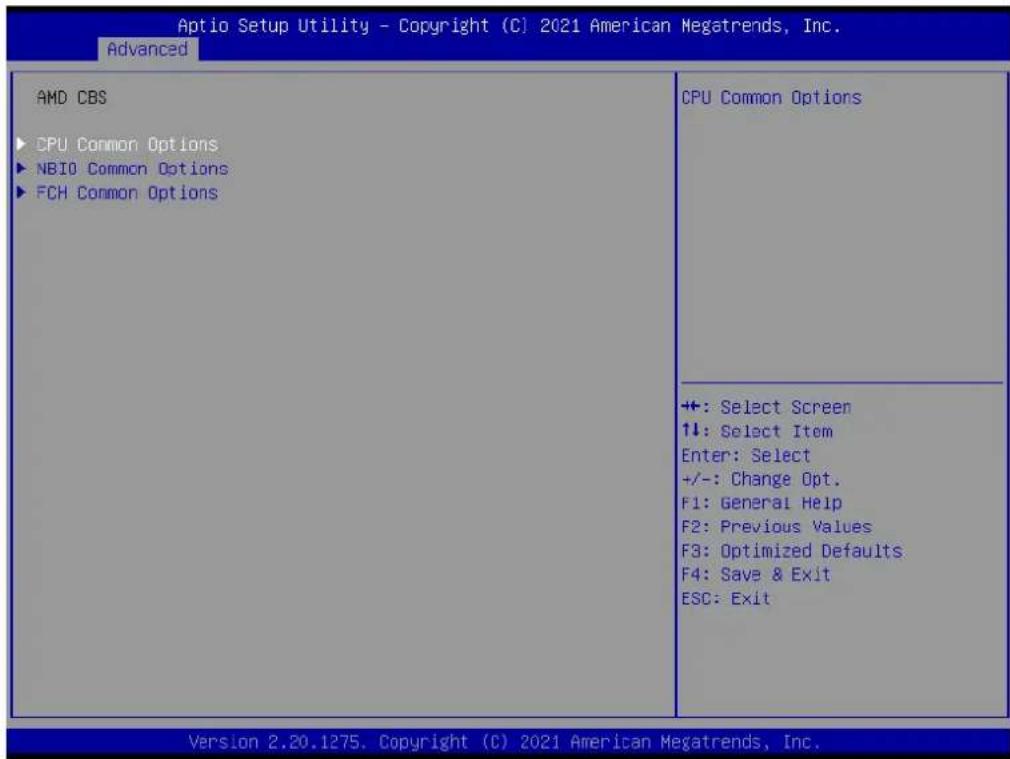
text_image
Aptio Setup Utility - Copyright (C) 2021 American Megatrends, Inc. Advanced AMD CBS ►CPU Common Options ►NBIO Common Options ►FCH Common Options CPU Common Options +: Select Screen ↑↓: Select Item Enter: Select +/-: Change Opt. F1: General Help F2: Previous Values F3: Optimized Defaults F4: Save & Exit ESC: Exit Version 2.20.1275. Copyright (C) 2021 American Megatrends, Inc.Figure 3.22 CPU Common options screen
■ CPU Common Options
CPU common options
■ NBIO Common Options
NBIO Common Options
■ FCH Common Options
FCH Common Options
3.4.11.1 CPU Common Options

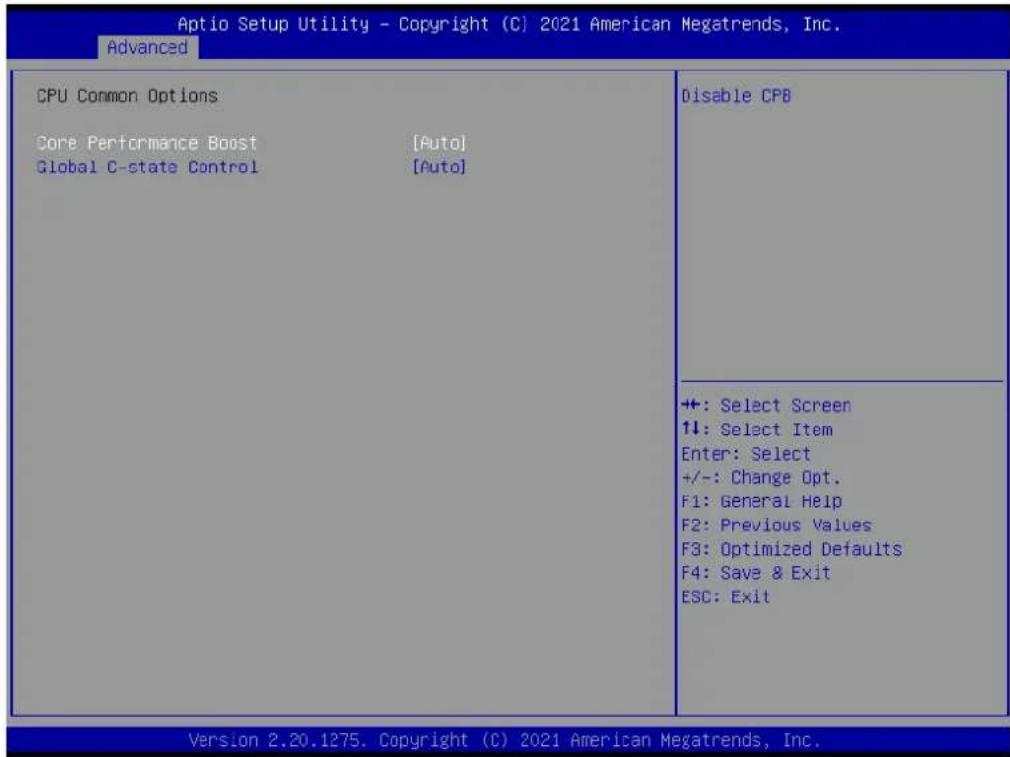
text_image
Aptio Setup Utility - Copyright (C) 2021 American Megatrends, Inc. Advanced CPU Common Options Core Performance Boost [Auto] Global C-state Control [Auto] Disable CPB +: Select Screen 1: Select Item Enter: Select +/-: Change Opt. F1: General Help F2: Previous Values F3: Optimized Defaults F4: Save & Exit ESC: Exit Version 2.20.1275. Copyright (C) 2021 American Megatrends, Inc.Figure 3.23 CPU Common options screen
Core Performance Boost
Disable CPB
Global C-State Control
Control IO based C-state generation and DF C-states. There is another DF Cstate option which will be synchronized with this option if DF Cstate option is auto
3.4.11.2 NBIO Common Options
text_image
Aptio Setup Utility - Copyright (C) 2021 American Megatrends, Inc. Advanced CPU Common Options Core Performance Boost [Auto] Global C-state Control [Auto] Disable CPB +: Select Screen 1↓: Select Item Enter: Select +/-: Change Opt. F1: General Help F2: Previous Values F3: Optimized Defaults F4: Save & Exit ESC: Exit Version 2.20.1275. Copyright (C) 2021 American Megatrends, Inc.Figure 3.24 NBIO Common options screen
IOMMU
Enable/Disable IOMMU
■ PCIe ARI Support
Enable /Disable ARI
■ PSPP Policy
No help string
■ Audio Configuration
Audio Configuration
■ SMU Common Options
SMU Common Options
Audio Configuration
text_image
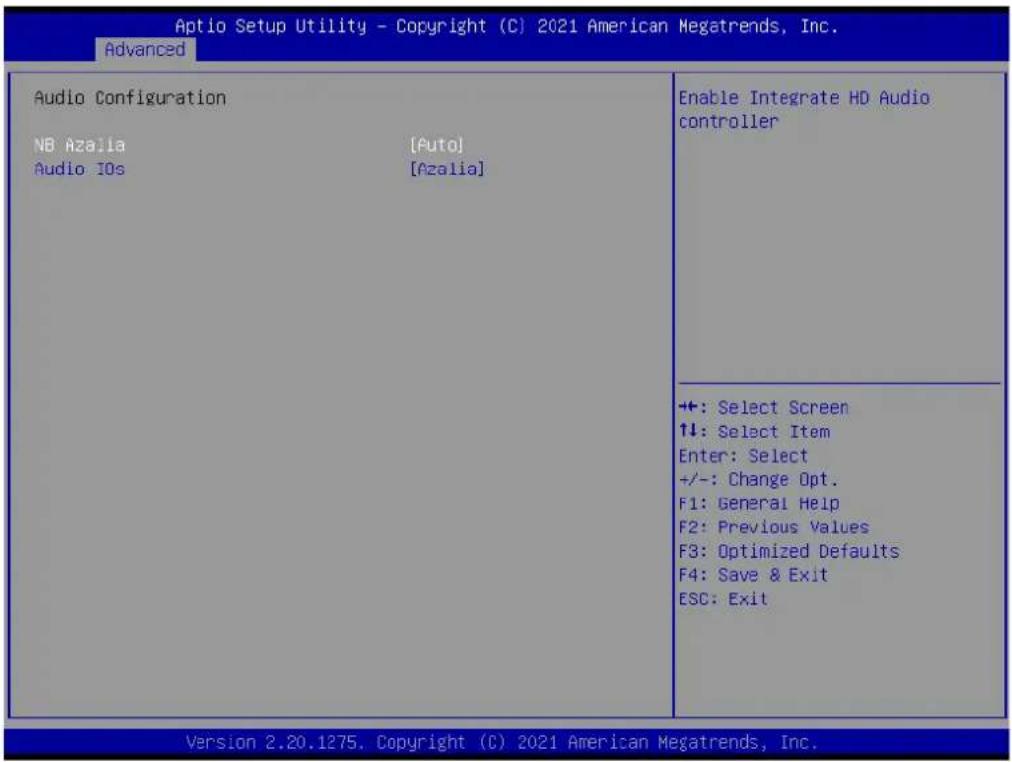
Aptio Setup Utility - Copyright (C) 2021 American Megatrends, Inc. Advanced Audio Configuration NB Azalia [Auto] Audio IOs [Azalia] Enable Integrate HD Audio controller +: Select Screen ↑↓: Select Item Enter: Select +/-: Change Opt. F1: General Help F2: Previous Values F3: Optimized Defaults F4: Save & Exit ESC: Exit Version 2.20.1275. Copyright (C) 2021 American Megatrends, Inc.Figure 3.25 Audio configuration screen
NB Azalia
Enable Integrate HD Audio Controller
Audio IOs
Audio IOs Control
SMU Common Options
text_image
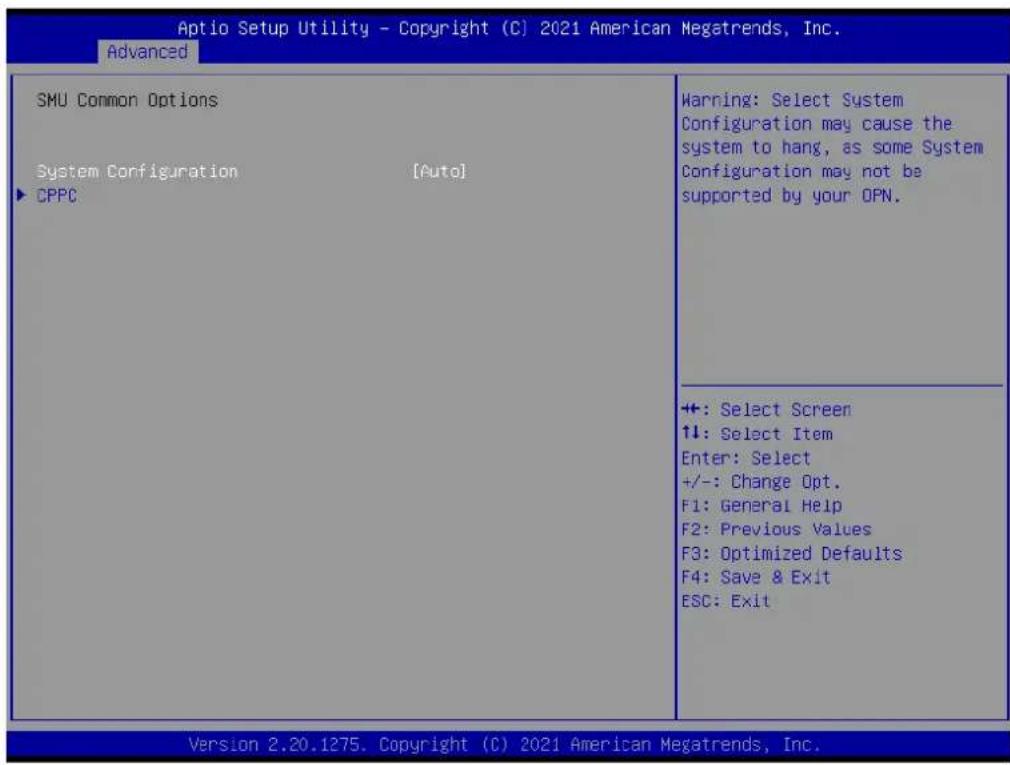
Aptio Setup Utility - Copyright (C) 2021 American Megatrends, Inc. Advanced SMU Common Options System Configuration [Auto] ▶ CPPC Warning: Select System Configuration may cause the system to hang, as some System Configuration may not be supported by your OPN. +: Select Screen ↑↓: Select Item Enter: Select +/-: Change Opt. F1: General Help F2: Previous Values F3: Optimized Defaults F4: Save & Exit ESC: Exit Version 2.20.1275. Copyright (C) 2021 American Megatrends, Inc.Figure 3.26 SMU Common options screen
System Configuration
Warning: Select system configuration may cause the system to hang, as some system configuration may not be supported by your OPN
CPPC
CPPC
text_image
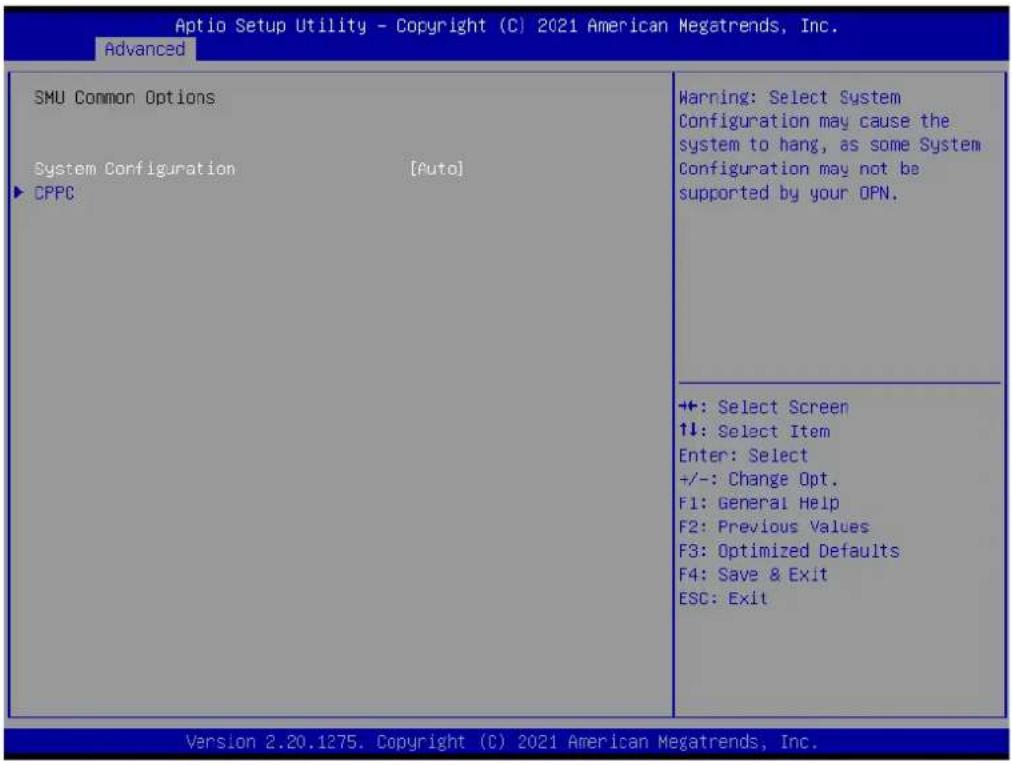
Aptio Setup Utility - Copyright (C) 2021 American Megatrends, Inc. Advanced SMU Common Options System Configuration [Auto] ▶ CPPC Warning: Select System Configuration may cause the system to hang, as some System Configuration may not be supported by your OPN. +: Select Screen 1↓: Select Item Enter: Select +/-: Change Opt. F1: General Help F2: Previous Values F3: Optimized Defaults F4: Save & Exit ESC: Exit Version 2.20.1275. Copyright (C) 2021 American Megatrends, Inc.Figure 3.27 CPPC screen
CPPC CTRL
CCPC Control: Enable-Override, Disable-Set default
FCH Common Options
text_image
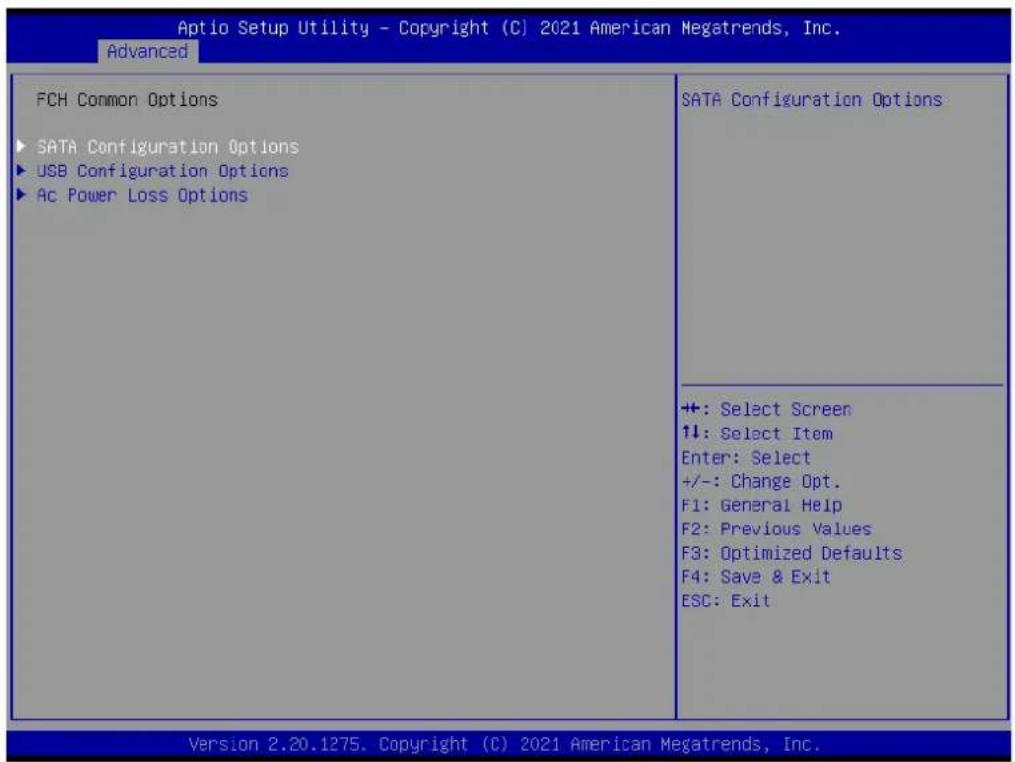
Aptio Setup Utility - Copyright (C) 2021 American Megatrends, Inc. Advanced FCH Common Options ► SATA Configuration Options ► USB Configuration Options ► Ac Power Loss Options SATA Configuration Options ++ +: Select Screen ↑↓: Select Item Enter: Select +/-: Change Opt. F1: General Help F2: Previous Values F3: Optimized Defaults F4: Save & Exit ESC: Exit Version 2.20.1275. Copyright (C) 2021 American Megatrends, Inc.Figure 3.28 FCH Common options screen
■ SATA Configuration Options
SATA Configuration Options
USB Configuration Options
USB Configuration Options
Ac Power Loss Options
Ac Power Loss Options
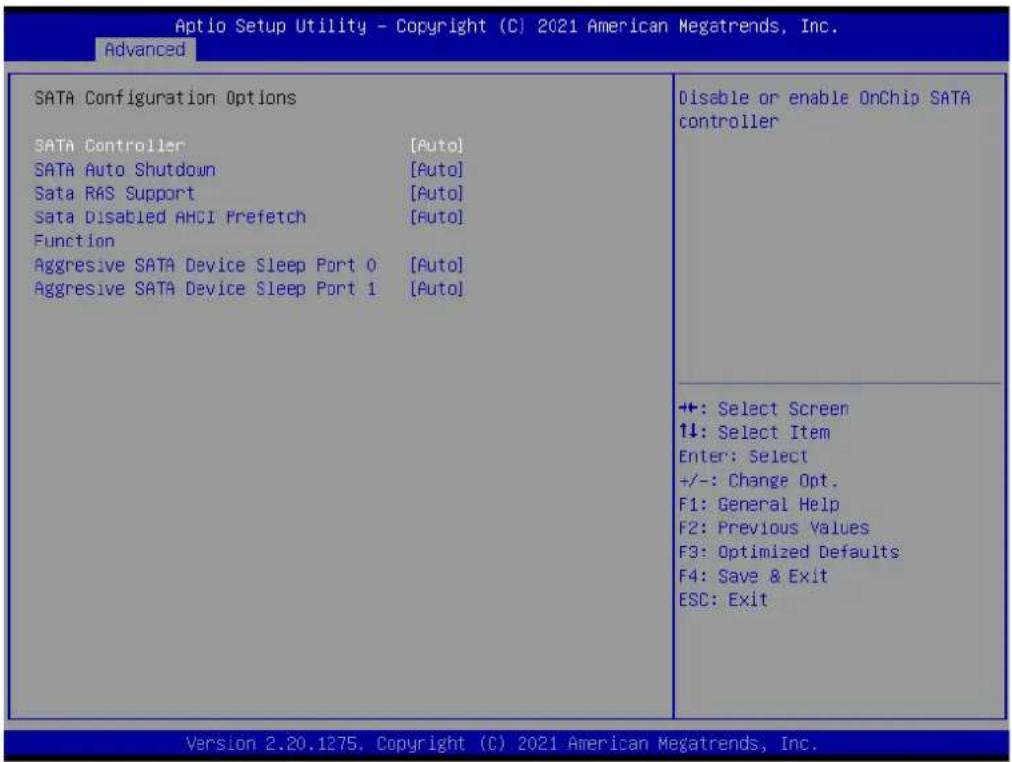
■ SATA Configuration Options
text_image
Aptio Setup Utility - Copyright (C) 2021 American Megatrends, Inc. Advanced SATA Configuration Options SATA Controller [Auto] SATA Auto Shutdown [Auto] Sata R&S Support [Auto] Sata Disabled AHCI Prefetch [Auto] Function Aggressive SATA Device Sleep Port 0 [Auto] Aggressive SATA Device Sleep Port 1 [Auto] Disable or enable OnChip SATA controller +: Select Screen ↓: Select Item Enter: Select +/-: Change Opt. F1: General Help F2: Previous Values F3: Optimized Defaults F4: Save & Exit ESC: Exit Version 2.20.1275. Copyright (C) 2021 American Megatrends, Inc.Figure 3.29 SATA Configuration options screen
SATA Controller(s)
Disable or enable onchip SATA controller
SATA Auto Shutdown
Disable SATA controller if there is no port connection
SATA RAS Support
Disable or enable SATA RAS support
SATA Disable AHCI Prefetch Function
Disable or enable SATA
Disabled AHCI Prefetch Function
Aggressive SATA Device Sleep Port0
No help string
Aggressive SATA Device Sleep Port1
No help string
USB Configuration Options

text_image
Aptio Setup Utility - Copyright (C) 2021 American Megatrends, Inc. Advanced USB Configuration Options XHCI0 controller enable [Auto] XHCI1 controller enable [Auto] ► Combo PHY Static Configuration Enable or disable USB3 controller. +: Select Screen ↑↓: Select Item Enter: Select +/-: Change Opt. F1: General Help F2: Previous Values F3: Optimized Defaults F4: Save & Exit ESC: Exit Version 2.20.1275. Copyright (C) 2021 American Megatrends, Inc.Figure 3.30 USB Configuration options screen
xHCI0 controller enable
Enable or disable USB3 controller
xHCI1 controller enable
Enable or disable USB3 controller
Combo Phy Static Configuration
Combo Phy Static Configuration
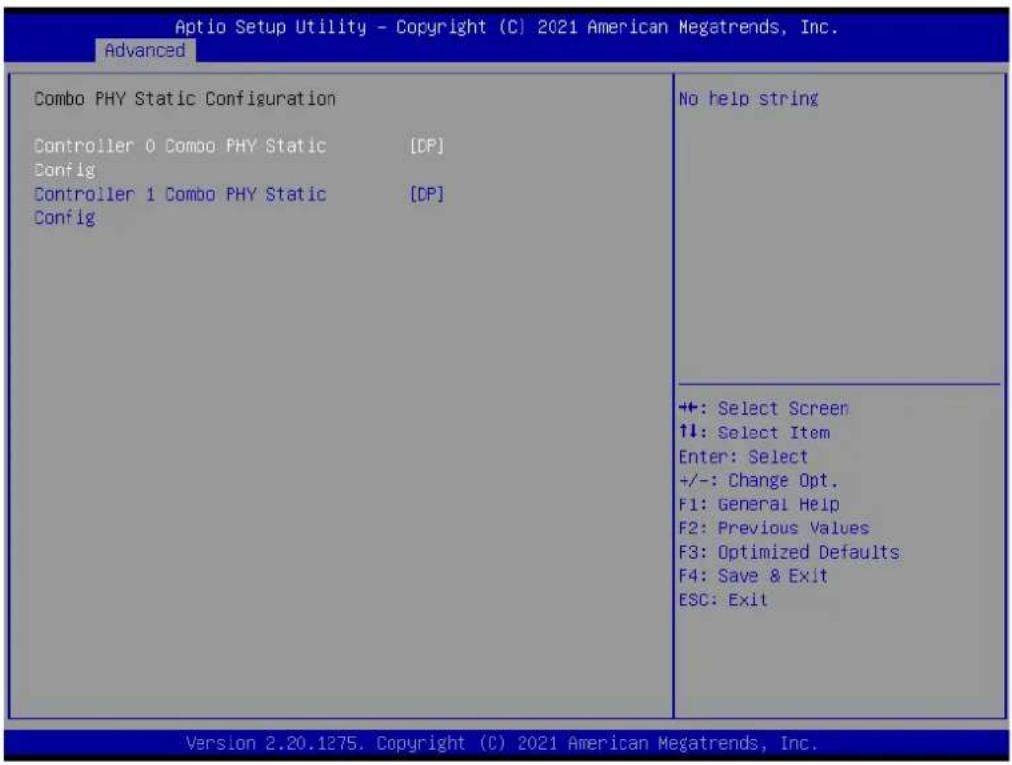
Combo PHY Static Configuration
text_image
Aptio Setup Utility - Copyright (C) 2021 American Megatrends, Inc. Advanced Combo PHY Static Configuration Controller 0 Combo PHY Static [DP] Config Controller 1 Combo PHY Static [DP] Config No help string +: Select Screen 1: Select Item Enter: Select +/-: Change Opt. F1: General Help F2: Previous Values F3: Optimized Defaults F4: Save & Exit ESC: Exit Version 2.20.1275. Copyright (C) 2021 American Megatrends, Inc.Figure 3.31 Combo PHY static configuration screen
- Controller 0 Combo PHY Static Config No help string
- Controller 1 Combo PHY Static Config No help string
Ac Power Loss Options

text_image
Aptio Setup Utility - Copyright (C) 2021 American Megatrends, Inc. Advanced Ac Power Loss Options Ac Loss Control [Always Off] Select Ac Loss Control Method +: Select Screen ↑↓: Select Item Enter: Select +/-: Change Opt. F1: General Help F2: Previous Values F3: Optimized Defaults F4: Save & Exit ESC: Exit Version 2.20.1275. Copyright (C) 2021 American Megatrends, Inc.Figure 3.32 Ac Power loss options screen
Ac Loss Control
Select Ac Loss Control Method
3.4.12 AMD PBS
text_image
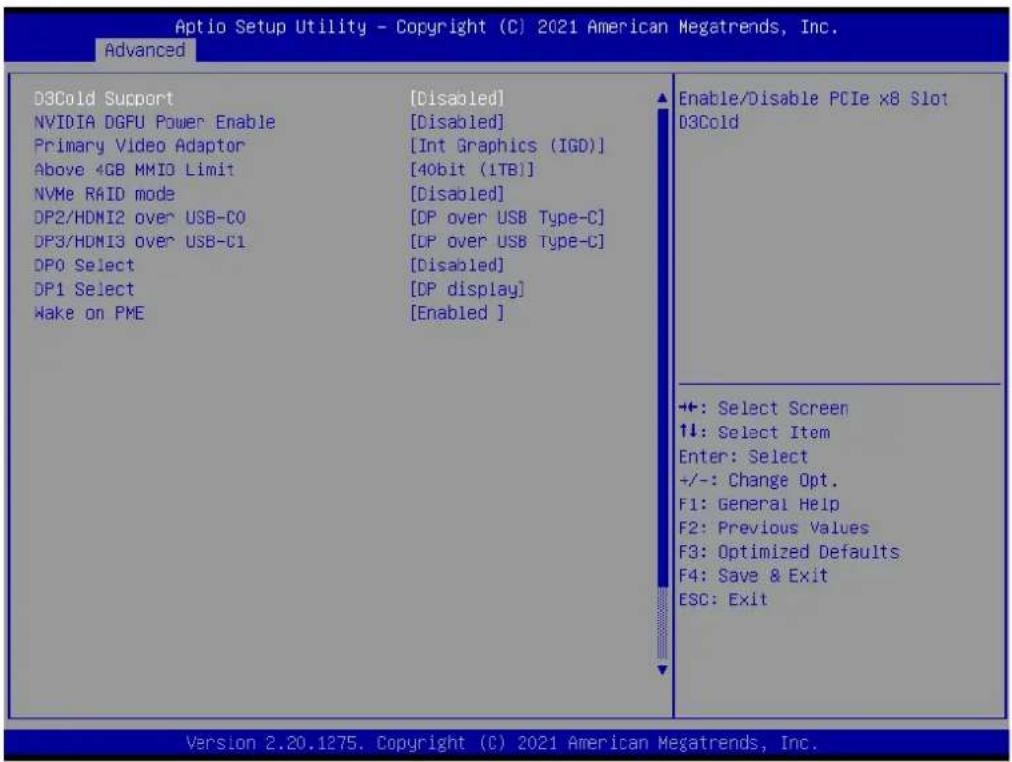
Aptio Setup Utility - Copyright (C) 2021 American Megatrends, Inc. Advanced D3Cold Support NVIDIA DGPU Power Enable Primary Video Adaptor Above 4GB MMIO Limit NVMe RAID mode DP2/HDMI2 over USB-CO DP3/HDMI3 over USB-C1 DP0 Select DP1 Select Wake on PME [Disabled] [Disabled] [Int Graphics (IGD)] [40bit (1TB)] [Disabled] [DP over USB Type-C] [DP over USB Type-C] [Disabled] [DP display] [Enabled ] Enable/Disable PCIe x8 Slot D3Cold +#: Select Screen ↑↓: Select Item Enter: Select +/-: Change Opt. F1: General Help F2: Previous Values F3: Optimized Defaults F4: Save & Exit ESC: Exit Version 2.20.1275. Copyright (C) 2021 American Megatrends, Inc.Figure 3.33 AMD PBS screen
D3cold Support
Enable/Disable PCIeX8 Slot D3Cold
NVIDIA DGPU Power Enable
For NVIDIA mobile DGPU card only. Output DGPU_EN# S9 pin and DGPU_SEL# B17 pin to high at every power on state
■ Primary Video Adaptor
Select internal/external graphics
■ Above 4GB MMIO Limit
Select above 4GB MMIO limit to 35-48 bits limit
NVMe RAID mode
Enable or disable NVMe RAID mode. Please setting the "PCIe/GFX Ians configuration" item according to the RAID configuration
■ DP2 Select
Config Display port 2 to Display Port, HDMI or Disable
■ DP3 Select
Config Display port 3 to Display Port, HDMI or Disable
DP0/eDP LVDS
Config Display port 0 to eDP or Disable
■ DP1 Select
Config Display port 1 to Display Port, HDMI or Disable
■ Make on PME
Determines the action taken when the system power is off and a PCI power management. Enable wake up event occurs.
3.4.13 NIC Configuration
text_image
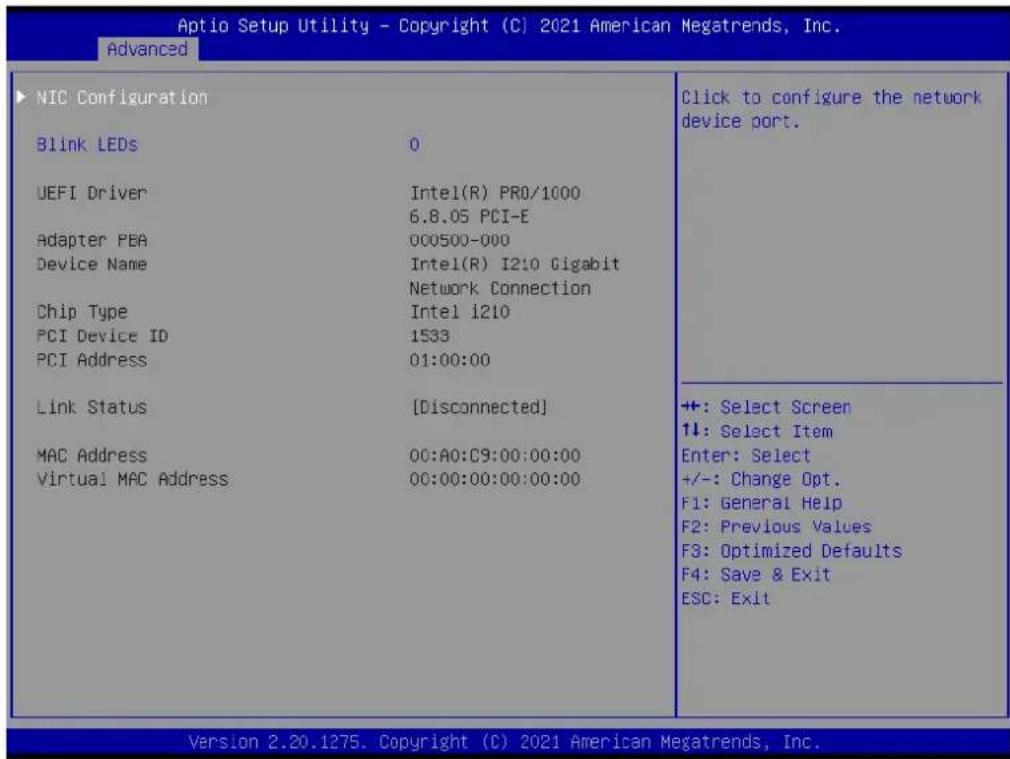
Aptio Setup Utility - Copyright (C) 2021 American Megatrends, Inc. Advanced NIC Configuration Blink LEDs 0 UEFI Driver:Intel(R) PRO/1000 6.8.05 PCI-E Adapter PEA 000500-000 Device Name:Intel(R) I210 Gigabit Network Connection Chip Type:Intel i210 PCI Device ID 1533 PCI Address 01:00:00 Link Status [Disconnected] MAC Address 00:A0:C9:00:00:00 Virtual MAC Address 00:00:00:00:00:00 Click to configure the network device port. +: Select Screen ↑↓: Select Item Enter: Select +/-: Change Opt. F1: General Help F2: Previous Values F3: Optimized Defaults F4: Save & Exit ESC: Exit Version 2.20.1275. Copyright (C) 2021 American Megatrends, Inc.Figure 3.34 NIC configuration screen
NIC configuration
Click to configuration the network device port
Blink LEDs
Identify the physical network port by blinking the associated LED
text_image
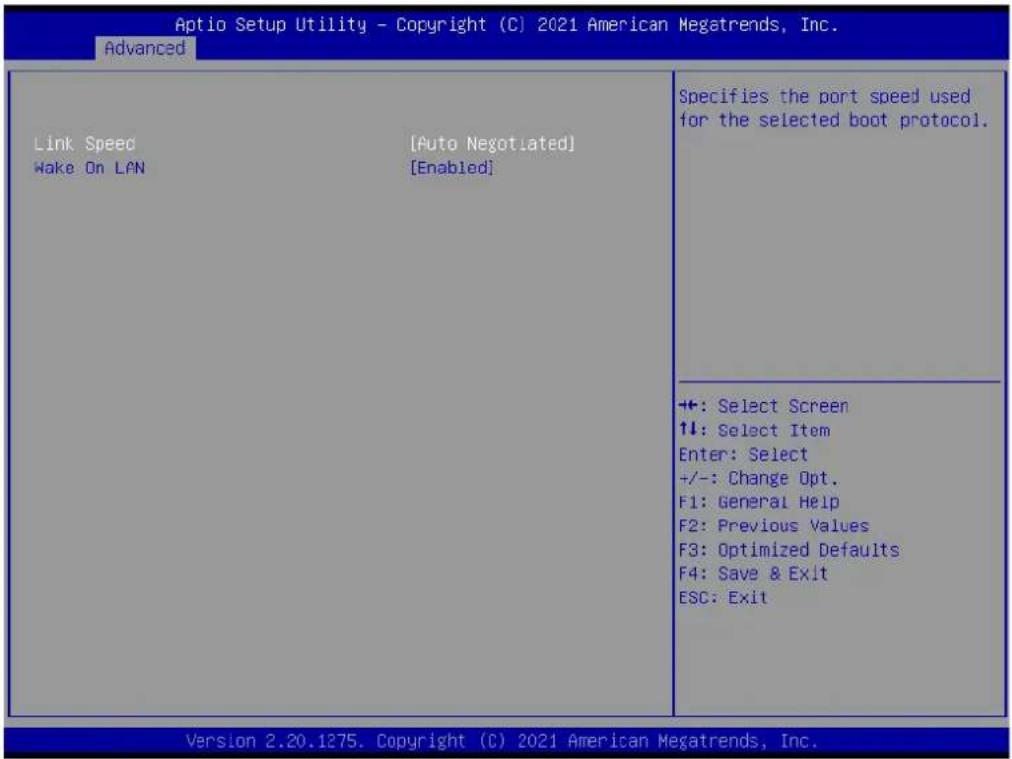
Aptio Setup Utility - Copyright (C) 2021 American Megatrends, Inc. Advanced Link Speed [Auto Negotiated] Wake On LAN [Enabled] Specifies the port speed used for the selected boot protocol. ++: Select Screen 11: Select Item Enter: Select +/-: Change Opt. F1: General Help F2: Previous Values F3: Optimized Defaults F4: Save & Exit ESC: Exit Version 2.20.1275. Copyright (C) 2021 American Megatrends, Inc.Figure 3.35 Link speed screen
Link Speed
Specifies the port speed used for the selected boot protocol
Wake On Lan
Enables the server to be powered on using an in-band magic paket
3.5 Chipset Settings
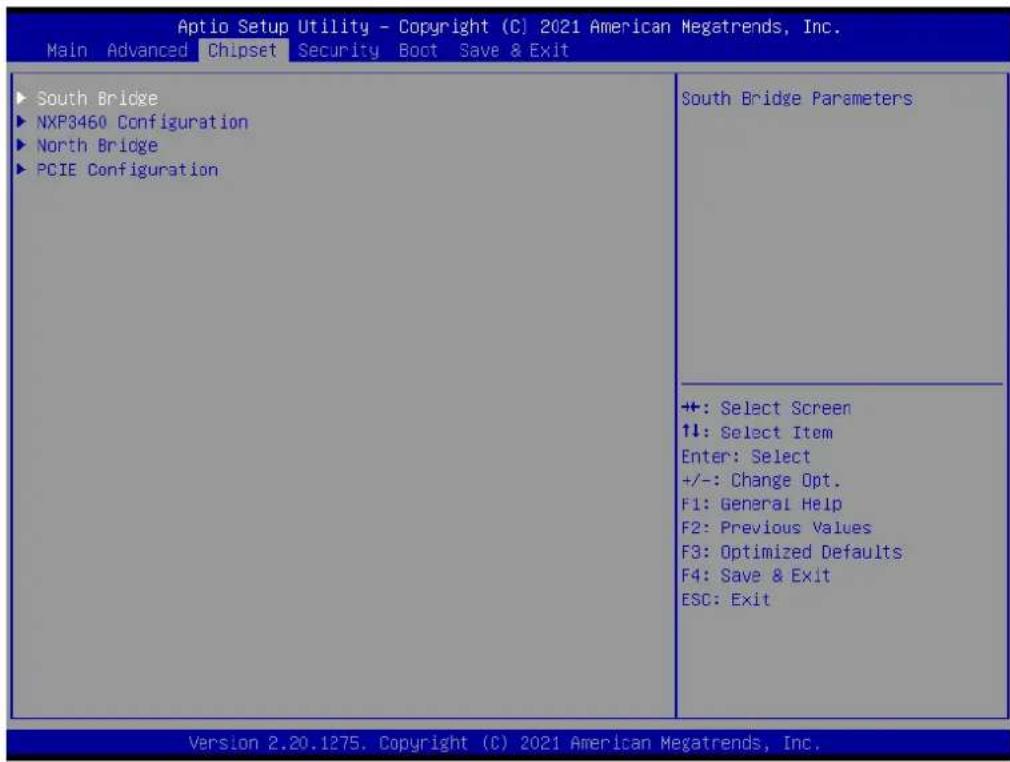
Select the chipset tab from the SOM-6872 setup screen to enter the chipset BIOS Setup screen. You can display a chipset BIOS setup option by highlighting it using the
3.5.1 South Bridge
text_image
Aptio Setup Utility - Copyright (C) 2021 American Megatrends, Inc. Main Advanced Chipset Security Boot Save & Exit ► South Bridge ► NXP3460 Configuration ► North Bridge ► PCIE Configuration South Bridge Parameters +: Select Screen ↑↓: Select Item Enter: Select +/-: Change Opt. F1: General Help F2: Previous Values F3: Optimized Defaults F4: Save & Exit ESC: Exit Version 2.20.1275. Copyright (C) 2021 American Megatrends, Inc.Figure 3.36 South bridge screen
South Bridge
South Bridge parameters
NXP3460 Configuration
NXP3460 parameters
North Bridge
North bridge parameters
■ PCIE Configuration
PCIE Configuration parameters
3.5.1.1 SB USB Configuration
text_image
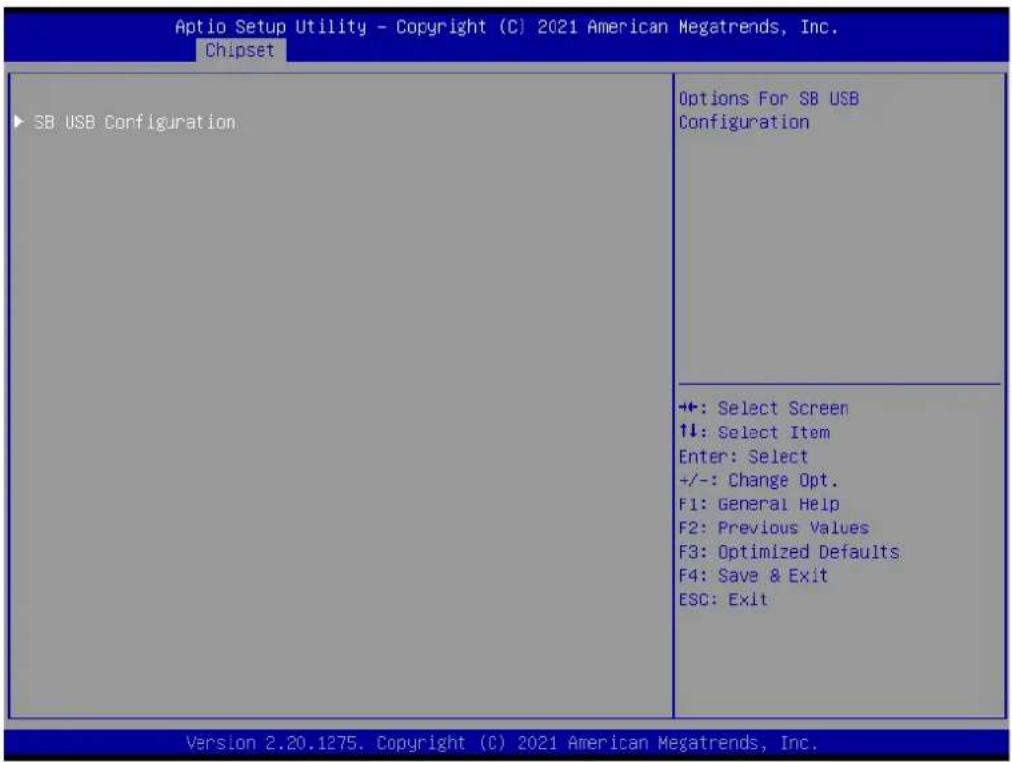
Aptio Setup Utility - Copyright (C) 2021 American Megatrends, Inc. Chipset ▶ SB USB Configuration Options For SB USB Configuration ++: Select Screen ↑↓: Select Item Enter: Select +/-: Change Opt. F1: General Help F2: Previous Values F3: Optimized Defaults F4: Save & Exit ESC: Exit Version 2.20.1275. Copyright (C) 2021 American Megatrends, Inc.Figure 3.37 SB USB Configuration screen
SB USB Configuration
Options For SB USB Configuration
text_image
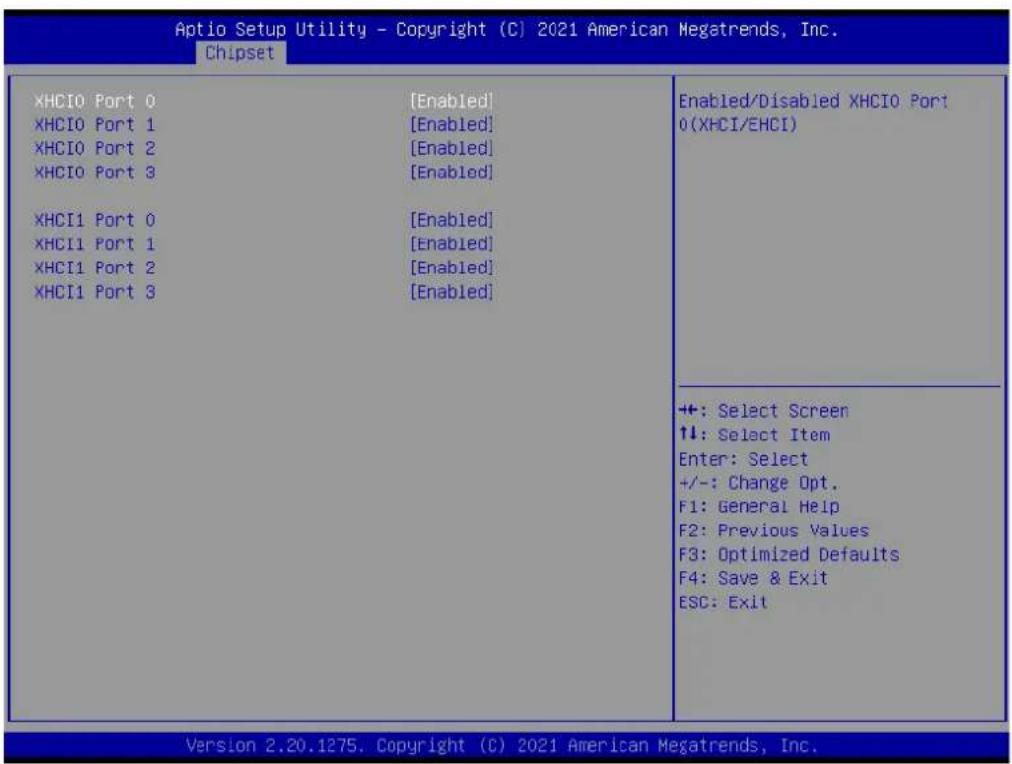
Aptio Setup Utility - Copyright (C) 2021 American Megatrends, Inc. Chipset XHCI0 Port 0 [Enabled] XHCI0 Port 1 [Enabled] XHCI0 Port 2 [Enabled] XHCI0 Port 3 [Enabled] XHCI1 Port 0 [Enabled] XHCI1 Port 1 [Enabled] XHCI1 Port 2 [Enabled] XHCI1 Port 3 [Enabled] Enabled/Disabled XHCI0 Port 0(XHCI/EHCI) ++: Select Screen ↑↓: Select Item Enter: Select +/-: Change Opt. F1: General Help F2: Previous Values F3: Optimized Defaults F4: Save & Exit ESC: Exit Version 2.20.1275. Copyright (C) 2021 American Megatrends, Inc.Figure 3.38 XHCI0/XHCI1 screen
■ XHCI0 Port0
Enable/Disable XHCI0 Port0(XHCI/EHCI)
■ XHCI0 Port1
Enable/Disable XHCI0 Port1(XHCI/EHCI)
■ XHCI0 Port2
Enable/Disable XHCI0 Port2(XHCI/EHCI)
■ XHCI0 Port3
Enable/Disable XHCI0 Port3(XHCI/EHCI)
3.5.2 NXP3460 Configuration
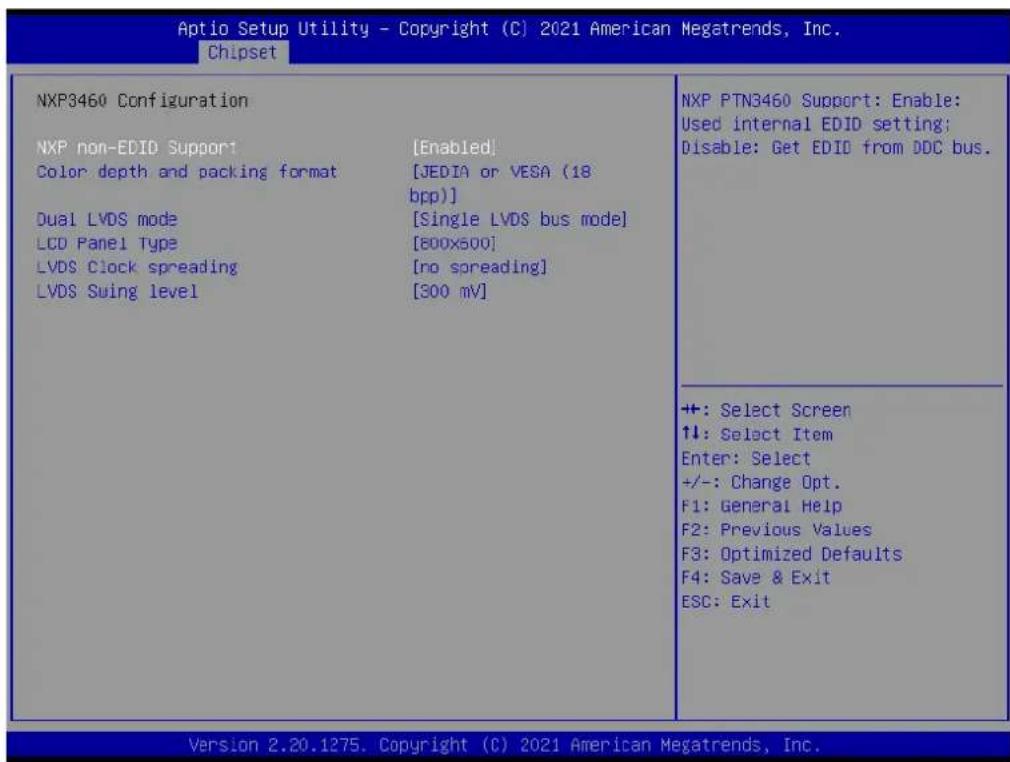
text_image
Aptio Setup Utility - Copyright (C) 2021 American Megatrends, Inc. Chipset NXP3460 Configuration NXP non-EDID Support [Enabled] Color depth and packing format [JEDIA or VESA (18 bpp)] Dual LVDS mode [Single LVDS bus mode] LCD Panel Type [800x500] LVDS Clock spreading [no spreading] LVDS Swing level [300 mV] NXP PTN3460 Support: Enable: Used internal EDID setting; Disable: Get EDID from DDC bus. +: Select Screen ↑↓: Select Item Enter: Select +/-: Change Opt. F1: General Help F2: Previous Values F3: Optimized Defaults F4: Save & Exit ESC: Exit Version 2.20.1275. Copyright (C) 2021 American Megatrends, Inc.Figure 3.39 NXP3460 Configuration screen
■ NXP non-EDID Support
NXP PTN3460 Support: Enable: Used internal EDID setting; Disable: Get EDID from DDC bus
■ Color depth and packing format
Select LCD panel
Dual LVDS mode
Dual LVDS mode
■ LCD panel type
Select LCD panel
■ LVDS Clock spreading
LVDS Clock spreading
■ LVDS Swing level
LVDS Swing level
3.5.3 North Bridge

text_image
Aptio Setup Utility - Copyright (C) 2021 American Megatrends, Inc. Chipset North Bridge Configuration Memory Information Total Memory 16384 MB (DDR4) Socket 0 Information View Information related to Socket 0 +: Select Screen +: Select Item Enter: Select +/-: Change Opt. F1: General Help F2: Previous Values F3: Optimized Defaults F4: Save & Exit ESC: Exit Version 2.20.1275. Copyright (C) 2021 American Megatrends, Inc.Figure 3.40 North bridge screen
Total memory
Total memory in the system
- Socket0 Information
View information related to Socket0
3.5.3.1 Socket 0 Information
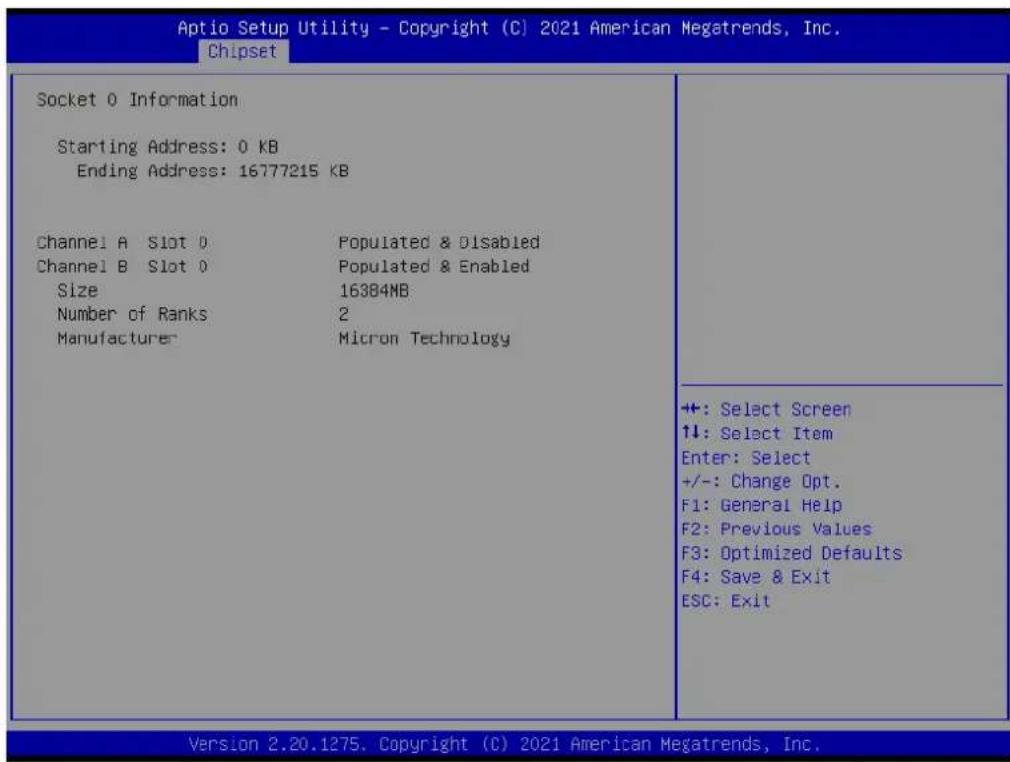
text_image
Aptio Setup Utility - Copyright (C) 2021 American Megatrends, Inc. Chipset Socket 0 Information Starting Address: 0 KB Ending Address: 16777215 KB Channel A Slot 0 Populated & Disabled Channel B Slot 0 Populated & Enabled Size 16384MB Number of Ranks 2 Manufacturer Micron Technology +: Select Screen ↑↓: Select Item Enter: Select +/-: Change Opt. F1: General Help F2: Previous Values F3: Optimized Defaults F4: Save & Exit ESC: Exit Version 2.20.1275. Copyright (C) 2021 American Megatrends, Inc.Figure 3.41 Socket 0 information screen
3.5.4 PCIE Lanes Configuration

text_image
Aptio Setup Utility - Copyright (C) 2021 American Megatrends, Inc. Chipset PCIE Lanes Configuration PCIEX16_1 Port [x8] PCIE-4X1_1 Port [x1x1x1x1] PCIE-4X1_2 Port [x4] Pcie Port Control [Enabled] Device 1 Fun 1 [Auto] ASPM Mode(Dev#1/Func#1) [Auto] Hotplug Mode(Dev#1/Func#1) [Auto] Device 2 Fun 4 [Auto] ASPM Mode(Dev#2/Func#4) [Auto] Hotplug Mode(Dev#2/Func#4) [Auto] Device 1 Fun 2 [Auto] ASPM Mode(Dev#1/Func#2) [Auto] Hotplug Mode(Dev#1/Func#2) [Auto] Device 1 Fun 3 [Auto] ASPM Mode(Dev#1/Func#3) [Auto] Hotplug Mode(Dev#1/Func#3) [Auto] Device 2 Fun 1 [Auto] ASPM Mode(Dev#2/Func#1) [Auto] Hotplug Mode(Dev#2/Func#1) [Auto] Device 2 Fun 2 [Auto] ASPM Mode(Dev#2/Func#2) [Auto] Hotplug Mode(Dev#2/Func#2) [Auto] Device 2 Fun 3 [Auto] ASPM Mode(Dev#2/Func#3) [Auto] PCIEX16_1 Port setting has x8,x4x4 +: Select Screen ↑↓: Select Item Enter: Select +/-: Change Opt. F1: General Help F2: Previous Values F3: Optimized Defaults F4: Save & Exit ESC: Exit Version 2.20.1275. Copyright (C) 2021 American Megatrends, Inc.Figure 3.42 PCIE Lanes Configuration screen
PCIEX16_1 Port
PCIEX16_1 port setting has x8, x4x4
■ PCIE-4X1_1 Port
PCIE-4X1_1 Port setting has x4, x2, x1 Max RP number:6 and Onboard LAN
■ PCIE-4X1_2 Port
PCIE-4X1_2 Port setting has x4, x1 Max RP number:6 and Onboard LAN
■ Pcie Port Control
Disabled: Skip this page setup item, and use the default CRB setting
■ Device1 Fun 1
Enable/Disable/Auto, Auto used board default setting
■ ASPM mode(Dev#1/Func#1)
NB root port ASPM Mode Control
■ Hotplug Mode(Dev#1/Func#1)
NB Root Port Hotplug Mode Control
■ Device2 Fun 4
Enable/Disable/Auto, Auto used board default setting
■ ASPM mode(Dev#2/Func#4)
NB root port ASPM Mode Control
■ Hotplug Mode(Dev#2/Func#4)
NB Root Port Hotplug Mode Control
■ Device1 Fun 2
Enable/Disable/Auto, Auto used board default setting
■ ASPM mode(Dev#1/Func#2)
NB root port ASPM Mode Control
■ Hotplug Mode(Dev#1/Func#2)
NB Root Port Hotplug Mode Control
■ Device1 Fun 3
Enable/Disable/Auto, Auto used board default setting
■ ASPM mode(Dev#1/Func#3)
NB root port ASPM Mode Control
■ Hotplug Mode(Dev#1/Func#3)
NB Root Port Hotplug Mode Control
■ Device2 Fun 1
Enable/Disable/Auto, Auto used board default setting
■ ASPM mode(Dev#2/Func#1)
NB root port ASPM Mode Control
■ Hotplug Mode(Dev#2/Func#1)
NB Root Port Hotplug Mode Control
■ Device2Fun 2
Enable/Disable/Auto, Auto used board default setting
■ ASPM mode(Dev#2/Func#2)
NB root port ASPM Mode Control
■ Hotplug Mode(Dev#2/Func#2)
NB Root Port Hotplug Mode Control
■ Device2Fun 3
Enable/Disable/Auto, Auto used board default setting
■ ASPM mode(Dev#2/Func#3)
NB root port ASPM Mode Control
■ Hotplug Mode(Dev#2/Func#3)
NB Root Port Hotplug Mode Control
3.6 Security Settings
Select Security Setup from the SOM-6872 Setup main BIOS setup menu. All Security Setup options, such as password protection is described in this section. To access the sub menu for the following items, select the item and press
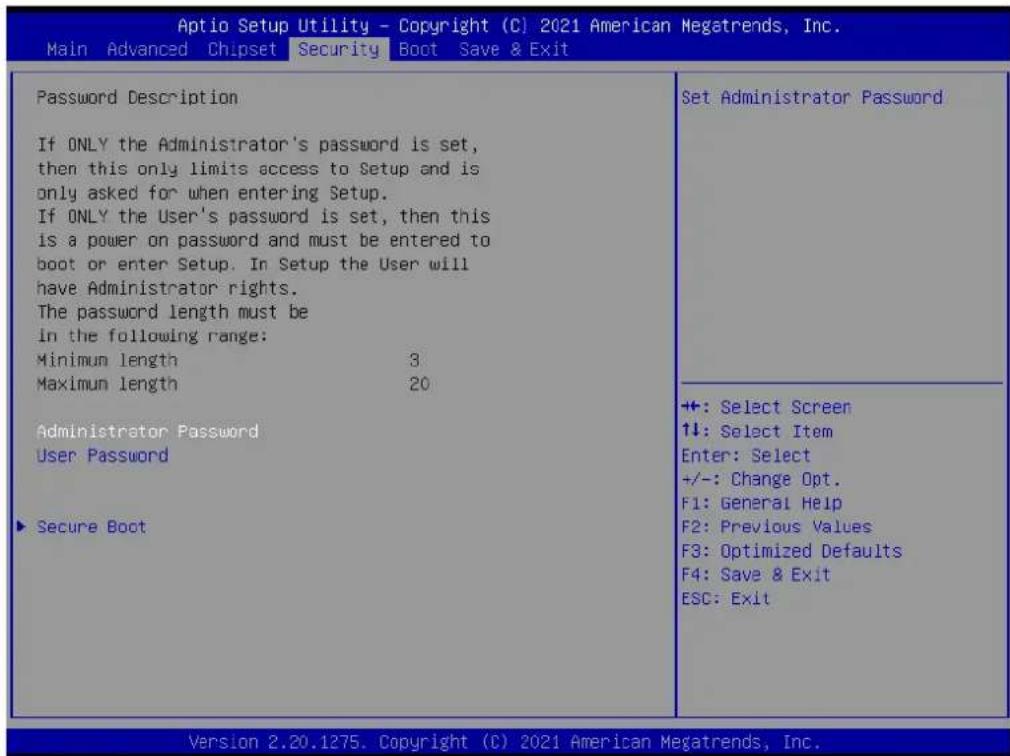
text_image
Aptio Setup Utility - Copyright (C) 2021 American Megatrends, Inc. Main Advanced Chipset Security Boot Save & Exit Password Description If ONLY the Administrator's password is set, then this only limits access to Setup and is only asked for when entering Setup. If ONLY the User's password is set, then this is a power on password and must be entered to boot or enter Setup. In Setup the User will have Administrator rights. The password length must be in the following range: Minimum length 3 Maximum length 20 Administrator Password User Password ▶ Secure Boot Set Administrator Password +: Select Screen ↑↓: Select Item Enter: Select +/-: Change Opt. F1: General Help F2: Previous Values F3: Optimized Defaults F4: Save & Exit ESC: Exit Version 2.20.1275. Copyright (C) 2021 American Megatrends, Inc.Figure 3.43 Security setting screen
Administrator Password
Set Setup Administrator Password
User Password
Set User Password
Secure Boot
Secure Boot Configuration
3.6.1 Secure Boot
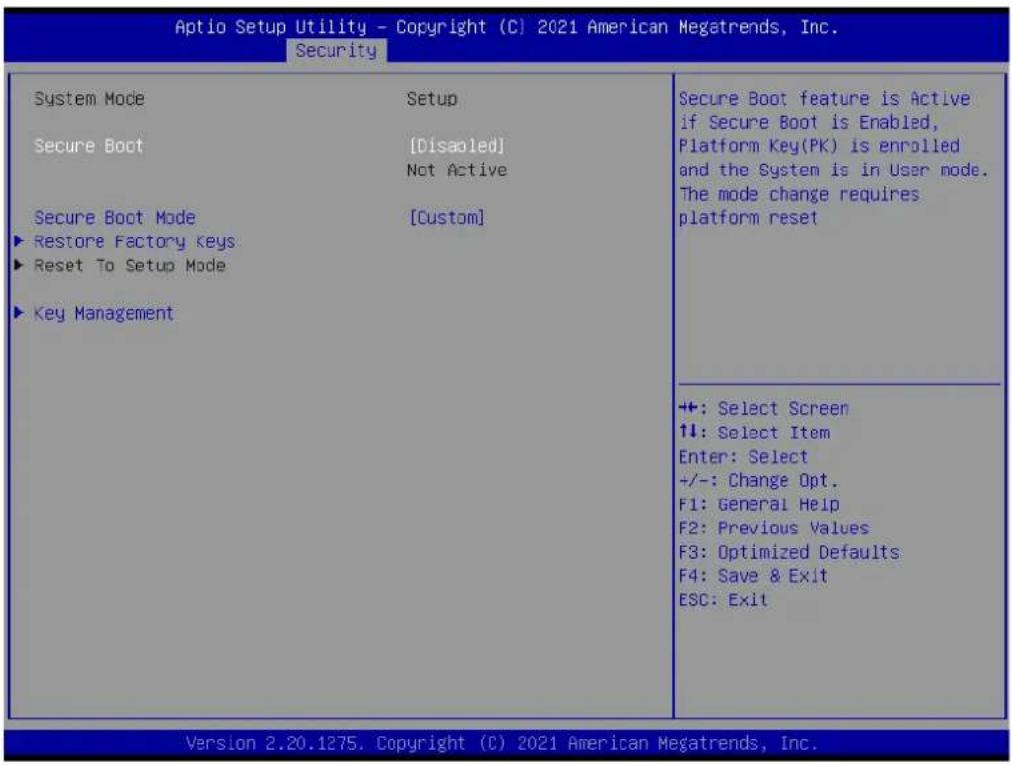
text_image
Aptio Setup Utility - Copyright (C) 2021 American Megatrends, Inc. Security System Mode Setup Secure Boot [Disabled] Not Active Secure Boot Mode [Custom] ►Restore Factory Keys ►Reset To Setup Mode ►Key Management Secure Boot feature is Active if Secure Boot is Enabled, Platform Key(PK) is enrolled and the System is in User mode. The mode change requires platform reset +: Select Screen 1: Select Item Enter: Select +/-: Change Opt. F1: General Help F2: Previous Values F3: Optimized Defaults F4: Save & Exit ESC: Exit Version 2.20.1275. Copyright (C) 2021 American Megatrends, Inc.Figure 3.44 Secure boot screen
- Secure boot mode
Secure boot mode options: Standard or Custom. In custom mode, secure boot policy variables can be configured by a physically present user without full authentication
Force system to user mode. Install factory default secure boot key databases
■ Reset To Setup Mode
Delete all secure boot key databases from NVRAM
Key management
Enables expert users to modify secure boot policy variables without full authentication
3.6.2 Vendor Keys
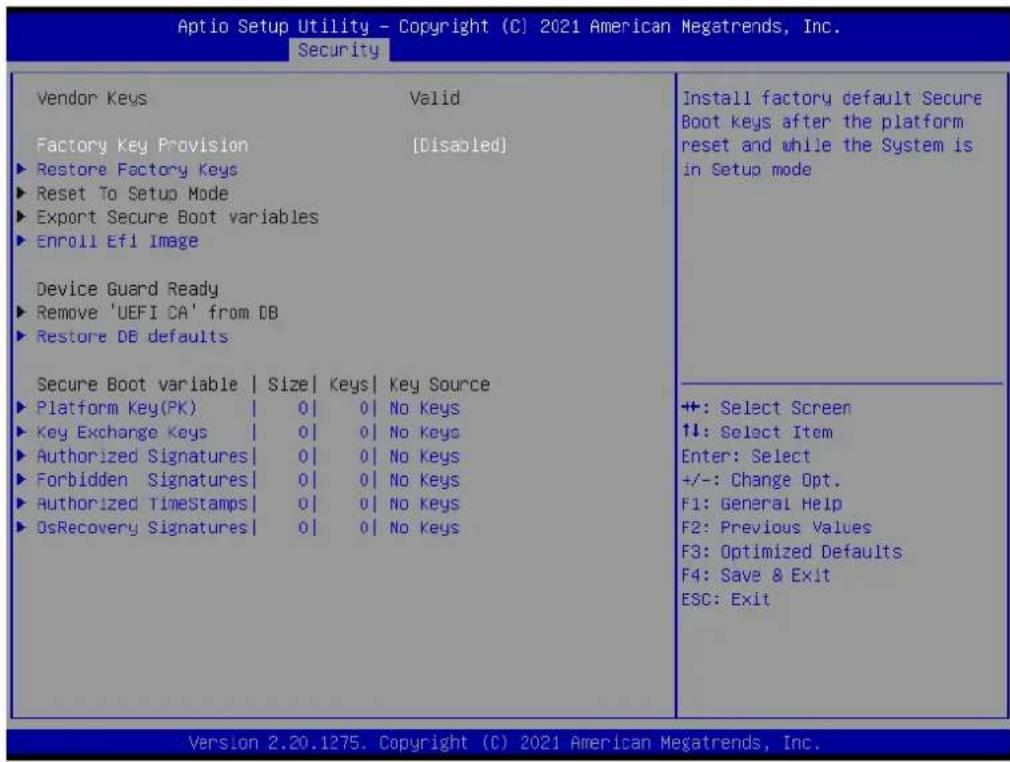
text_image
Aptio Setup Utility - Copyright (C) 2021 American Megatrends, Inc. Security Vendor Keys Valid Factory Key Provision [Disabled] ►Restore Factory Keys ►Reset To Setup Mode ►Export Secure Boot variables ►Enroll Ef1 Image Device Guard Ready ►Remove 'UEFI CA' from DB ►Restore DB defaults Secure Boot variable | Size | Keys | Key Source ►Platform Key(PK) | 0 | 0 | No Keys ►Key Exchange Keys | 0 | 0 | No Keys ►Authorized Signatures | 0 | 0 | No Keys ►Forbidden Signatures | 0 | 0 | No Keys ►Authorized TimeStamps | 0 | 0 | No Keys ►OsRecovery Signatures | 0 | 0 | No Keys Install factory default Secure Boot keys after the platform reset and while the System is in Setup mode +: Select Screen ↑↓: Select Item Enter: Select +/-: Change Opt. F1: General Help F2: Previous Values F3: Optimized Defaults F4: Save & Exit ESC: Exit Version 2.20.1275. Copyright (C) 2021 American Megatrends, Inc.Figure 3.45 Vendor keys screen
■ Factory Key Provision
Install factory default secure boot keys after the platform reset and while the system is in setup mode
Restore Factory Keys
Force system to user mode. Install factory default secure boot key databases
■ Reset To Setup Mode
Delete all secure boot key databases from NVRAM
■ Export Secure Boot variables
Copy NVRAM content of secure boot variables to files in a root folder on a file system device
Enroll Efi Image
Allow the image to run in secure boot mode. Enroll SHA256 hash certificate of a PE image into authorized signature database(db)
■ Remove 'UEFI CA' from DB
Device guard ready system must not list "Microsoft UEFI CA" certificate in authorized signature database(db)
■ Restore DB defaults
Restore DB variable to factory defaults
3.6.3 Boot Configuration
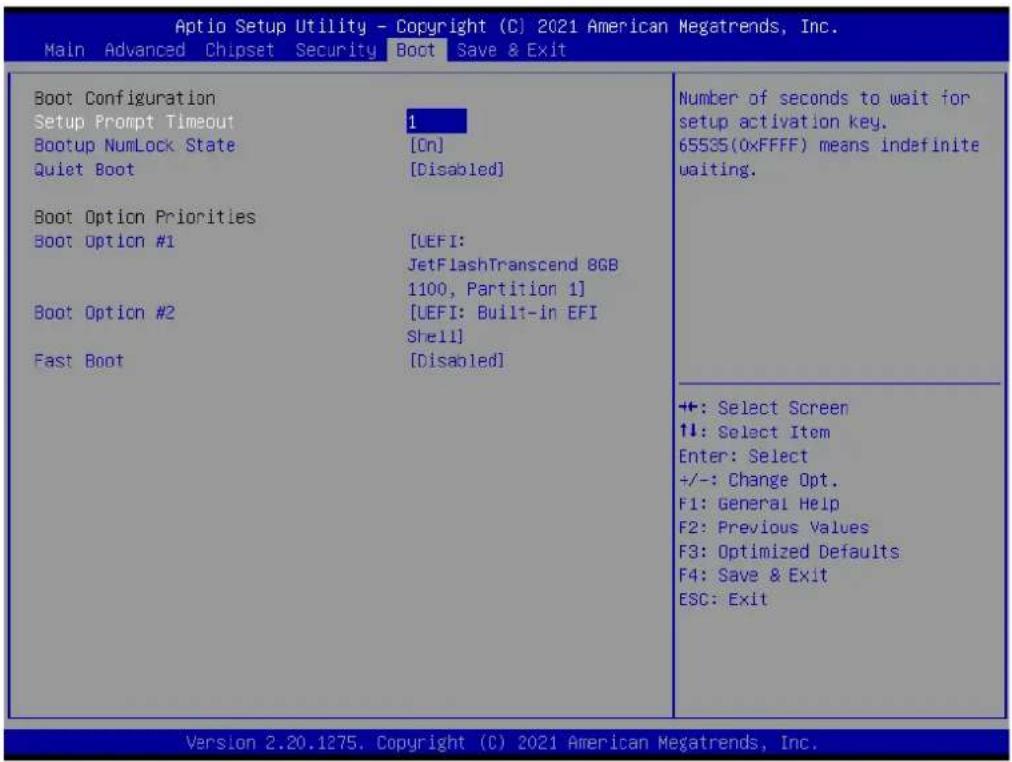
text_image
Aptio Setup Utility - Copyright (C) 2021 American Megatrends, Inc. Main Advanced Chipset Security Boot Save & Exit Boot Configuration Setup Prompt Timeout Bootup NumLock State Quiet Boot Boot Option Priorities Boot Option #1 Boot Option #2 Fast Boot 1 [On] [Disabled] [LEFI: JetFlashTranscend 8GB 1100, Partition 1] [LEFI: Built-in EFI Shell] [Disabled] Number of seconds to wait for setup activation key. 65535(0xFFFF) means indefinite waiting. ++: Select Screen 11: Select Item Enter: Select +/-: Change Opt. F1: General Help F2: Previous Values F3: Optimized Defaults F4: Save & Exit ESC: Exit Version 2.20.1275. Copyright (C) 2021 American Megatrends, Inc.Figure 3.46 Boot Configuration screen
Setup Prompt Timeout
Number of seconds to wait for setup activation key. 65535(0xFFFF) means indefinite waiting.
■ Bootup NumLock State
Select the keyboard NumLock state
Quiet Boot
Enables or disables Quiet Boot option
■ Boot Option Priorities
■ Boot Option #1
Sets the system boot order
Fast Boot
Enable or Disable FastBoot features. Most probes are skipped to reduce time cost during boot.
3.7 Save & Exit
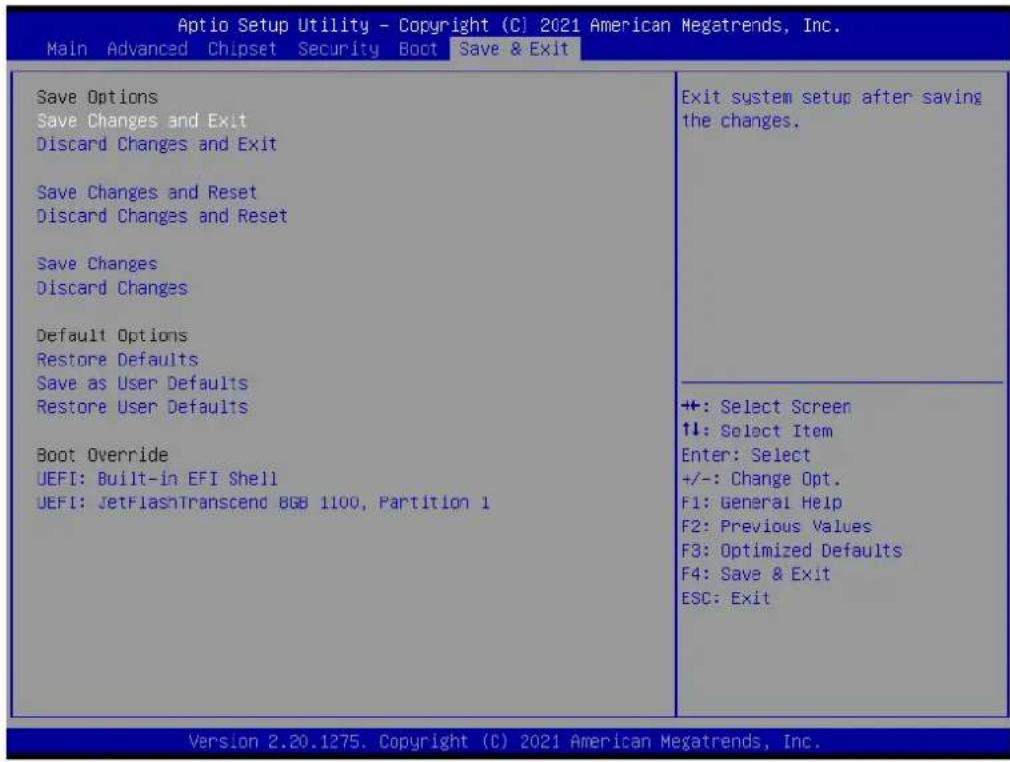
text_image
Aptio Setup Utility - Copyright (C) 2021 American Megatrends, Inc. Main Advanced Chipset Security Boot Save & Exit Save Options Save Changes and Exit Discard Changes and Exit Save Changes and Reset Discard Changes and Reset Save Changes Discard Changes Default Options Restore Defaults Save as User Defaults Restore User Defaults Boot Override UEFI: Built-in EFI Shell UEFI: JetFlashTranscend 8GB 1100, Partition 1 Exit system setup after saving the changes. +: Select Screen ↑↓: Select Item Enter: Select +/-: Change Opt. F1: General Help F2: Previous Values F3: Optimized Defaults F4: Save & Exit ESC: Exit Version 2.20.1275. Copyright (C) 2021 American Megatrends, Inc.Figure 3.47 Security setup
Save Options
■ Save Changes and Exit
Exit system setup after saving the changes.
- Discard Changes and Exit
Exit system setup without saving any changes.
■ Save Changes and Reset
Reset the system after saving the changes.
- Discard Changes and Reset
Reset system setup without saving any changes.
- Default Options
- Restore Defaults
Restore/Load Default values for all the setup options.
■ Save as User Defaults
Save the changes done so far as User Defaults.
- Restore User Defaults
Restore the User Defaults to all the setup options.
Chapter 4
S/W Introduction and Installation
S/W Introduction
Driver Installation
■ Advantech iManager
4.1 S/W Introduction
Advantech Embedded Software Services' mission is to "Enhance quality of life with Advantech platforms and Microsoft Windows embedded technology" We enable Windows Embedded software products on Advantech platforms to more effectively support the embedded computing community. Customers are freed from the hassle of dealing with multiple vendors (Hardware suppliers, System integrators, Embedded OS distributors) for projects. Our goal is to make Windows Embedded Software solutions easily and widely available to the embedded computing community.
4.2 Driver Installation
The Intel Chipset Software Installation (CSI) utility installs the Windows INF files that outline to the operating system how the chipset components will be configured.
4.2.1 Windows Driver Setup
SOM-6872 supports Windows* 10 Enterprise. To install the drivers on a windows-based operation system, please connect to Internet and browse the website http://support.advantech.com.tw and download the drivers that you want to install and follow Driver Setup instructions to complete the installation
4.2.2 Other OS
SOM-6872 supports Linux:
Ubuntu (by Request)
Wind River VxWorks* 7.0 (by Request)
4.3 Advantech iManager
Advantech's platforms come equipped with iManager, a micro controller that delivers embedded features to system integrators. Embedded features have been moved from the OS/BIOS level to the board level — increasing reliability and simplifying integration.
iManager runs whether the operating system is running or not; it can count the boot times and running hours of the device, monitor device health, and provide an advanced watchdog to handle errors just as they happen. iManager also comes with a secure & encrypted EEPROM for storing important security key or other customer define information. All the embedded functions are configured through API and provide corresponding utilities to demonstrate. These APIs comply with PICMG EAPI (Embedded Application Programmable Interface) specification and unify in the same structures. It makes these embedded features easier to integrate, speed up developing schedule, and provide the customer's software continuity while upgrade hardware. More details of how to use the APIs and utilities, please refer to Advantech iManager 2.0 Software API User Manual.
Control

GPIO
General Purpose Input/Output is a flexible parallel interface that allows a variety of custom connections. It allows users to monitor the level of signal input or set the output status to switch on/off a device. Our API also provides Programmable GPIO, which allows developers to dynamically set the GPIO input or output status.

SMBus
SMBus is the System Management Bus defined by Intel® Corporation in 1995. It is used in personal computers and servers for low-speed system management communications. The SMBus API allows a developer to interface a embedded system environment and transfer serial messages using the SMBus protocols, allowing multiple simultaneous device control.

PC
^1 PC is a bi-directional two wire bus that was developed by Philips for use in their televisions in the 1980s. The PC API allows a developer to interface with an embedded system environment and transfer serial messages using the ^1 PC protocols, allowing multiple simultaneous device control.
Monitor

Watchdog
A watchdog timer (WDT) is a device that performs a specific operation after a certain period of time if something goes wrong and the system does not recover on its own. A watchdog timer can be programmed to perform a warm boot (restarting the system) after a certain number of seconds.

Hardware Monitor
The Hardware Monitor (HWM) API is a system health supervision API that inspects certain condition indexes, such as fan speed, temperature and voltage.

Hardware Control
The Hardware Control API allows developers to set the PWM (Pulse Width Modulation) value to adjust fan speed or other devices; it can also be used to adjust the LCD brightness.
Display

Brightness Control
The Brightness Control API allows a developer to interface with an embedded device to easily control brightness.

Backlight
The Backlight API allows a developer to control the backlight (screen) on/off in an embedded device.
Power Saving

CPU Speed
Make use of Intel SpeedStep technology to reduce power power consumption. The system will automatically adjust the CPU Speed depending on system loading.

System
Throttling
Refers to a series of methods for reducing power consumption in computers by lowering the clock frequency. These APIs allow the user to lower the clock from 87.5% to 12.5%.
Appendix A
Pin Assignment
This appendix provides information regarding the SOM-6872 CPU System on Module hardware pin assignment.
Sections include:
■ SOM-6872 Type 6 Pin Assignment
A.1 SOM-6872 Type 6 Pin Assignment
This section provides the SOM-6872 pin assignment on COM Express connector. This is compliant with COMR.0 R3.0 Type 6 pin-out definitions. For more details regarding the use of these pins and/or to acquire design reference, please contact Advantech. Advantech can provide a design guide, checklist, reference schematic, an/or hardware/software support.
| SOM-6872 Row A,B | ||||
| A1 | GND (FIXED) | B1 | GND (FIXED) | |
| A2 | GBE0_MDI3- | B2 | GBE0_ACT# | |
| A3 | GBE0_MDI3+ | B3 | LPC_FRAME# | |
| A4 | GBE0_LINK100# | B4 | LPC_AD0 | |
| A5 | GBE0_LINK1000# | B5 | LPC_AD1 | |
| A6 | GBE0_MDI2- | B6 | LPC_AD2 | |
| A7 | GBE0_MDI2+ | B7 | LPC_AD3 | |
| A8 | GBE0_LINK# | B8 | N/A | |
| A9 | GBE0_MDI1- | B9 | N/A | |
| A10 | GBE0_MDI1+ | B10 | LPC_CLK | |
| A11 | GND (FIXED) | B11 | GND (FIXED) | |
| A12 | GBE0_MDI0- | B12 | PWRBTN# | |
| A13 | GBE0_MDI0+ | B13 | SMB_CK | |
| A14 | N/A | B14 | ||
| A15 | SUS_S3# | B15 | ||
| A16 | SATA0_TX+ | B16 | ||
| A17 | SATA0_TX- | B17 | ||
| A18 | SUS_S5# | B18 | ||
| A19 | SATA0_RX+ | B19 | ||
| A20 | SATA0_RX- | B20 | ||
| A21 | GND (FIXED) | B21 | GND (FIXED) | |
| A22 | N/A | B22 | ||
| A23 | N/A | B23 | ||
| A24 | SUS_S5# | B24 | ||
| A25 | N/A | B25 | ||
| A26 | N/A | B26 | ||
| A27 | BATLOW# | B27 | ||
| A28 | (S)ATA_ACT# | B28 | ||
| A29 | HDA_SYNC | B29 | ||
| A30 | HDA_RST# | B30 | ||
| A31 | GND (FIXED) | B31 | GND (FIXED) | |
| A32 | HDA_BITCLK | B32 | ||
| A33 | HDA_SDOUT | B33 | ||
| A34 | BIOS_DIS0# | B34 | ||
| A35 | THRMTRIP# | B35 | ||
| A36 | USB6- | B36 | ||
| A37 | USB6+ | B37 | ||
| A38 | USB_6_7_OC# | B38 | ||
| A39 | USB4- | B39 | ||
| A40 | USB4+ | B40 | ||
| A41 | GND (FIXED) B41 GND (FIXED) | ||
| A42 | USB2- B42 USB3- | ||
| A43 | USB2+ B43 USB3+ | ||
| A44 | USB_2_3_OC# B44 USB_0_1_OC# | ||
| A45 | USB0- B45 USB1- | ||
| A46 | USB0+ B46 USB1+ | ||
| A47 | VCC_RTC B47 N/A | ||
| A48 | RSVD B48 N/A | ||
| A49 | GBE0_SDP B49 SYS_RESET# | ||
| A50 | LPC_SERIRQ B50 CB_RESET# | ||
| A51 | GND (FIXED) B51 GND (FIXED) | ||
| A52 | PCIE_TX5+ B52 PCIE_RX5+ | ||
| A53 | PCIE_TX5- | B53 | PCIE_RX5- |
| A54 | GPIO | B54 | GPIO1 |
| A55 | PCIE_TX4+ B55 PCIE_RX4+ | ||
| A56 | PCIE_TX4- | B56 | PCIE_RX4- |
| A57 | GND B57 GPO2 | ||
| A58 | PCIE_TX3+ B58 PCIE_RX3+ | ||
| A59 | PCIE_TX3- | B59 | PCIE_RX3- |
| A60 | GND (FIXED) B60 GND (FIXED) | ||
| A61 | PCIE_TX2+ | B61 | PCIE_RX2+ |
| A62 | PCIE_TX2- | B62 | PCIE_RX2- |
| A63 | GPI1 | B63 | GPIO3 |
| A64 | PCIE_TX1+ B64 | PCIE_RX1+ | |
| A65 | PCIE_TX1- | B65 | PCIE_RX1- |
| A66 | GND | B66 | WAKE0# |
| A67 | GPIO2 | B67 | WAKE1# |
| A68 | PCIE_TX0+ B68 | PCIE_RX0+ | |
| A69 | PCIE_TX0- | B69 | PCIE_RX0- |
| A70 | GND (FIXED) B70 | GND (FIXED) | |
| A71 | LVDS_A0+ | B71 | LVDS_B0+ |
| A72 | LVDS_A0- B72 | LVDS_B0- | |
| A73 | LVDS_A1+ | B73 | LVDS_B1+ |
| A74 | LVDS_A1- B74 | LVDS_B1- | |
| A75 | LVDS_A2+ | B75 | LVDS_B2+ |
| A76 | LVDS_A2- B76 | LVDS_B2- | |
| A77 | LVDS_VDD_EN | B77 | LVDS_B3+ |
| A78 | LVDS_A3+ | B78 | LVDS_B3- |
| A79 | LVDS_A3- B79 | LVDS_BKLT_EN | |
| A80 | GND (FIXED) B80 | GND (FIXED) | |
| A81 | LVDS_A_CK+ | B81 | LVDS_B_CK+ |
| A82 | LVDS_A_CK- | B82 | LVDS_B_CK- |
| A83 | LVDS_I2C_CK | B83 | LVDS_BKLT_CTRL |
| A84 | LVDS_I2C_DAT | B84 | VCC_5V_SBY |
| A85 | GPIO3 | B85 | VCC_5V_SBY |
| A86 | N/A | B86 | VCC_5V_SBY |
| A87 | eDP_HPD | B87 | VCC_5V_SBY |
| A88 | PCIE_CLK_REF+ | B88 | BIOS_DIS1# |
| A89 | PCIE_CLK_REF- B89 VGA_RED | |||
| A90 | GND (FIXED) B90 GND (FIXED) | |||
| A91 | SPI_POWER B91 VGA_GRN | |||
| A92 | SPI_MISO B92 VGA_BLU | |||
| A93 | GPO0 B93 VGA_HSYNC | |||
| A94 | SPI_CLK B94 VGA_VSYNC | |||
| A95 | SPI_MOSI B95 VGA_I2C_CK | |||
| A96 | TPM_PP B96 VGA_I2C_DAT | |||
| A97 | N/A B97 SPI_CS# | |||
| A98 | SER0_TX B98 N/A | |||
| A99 | SER0_RX B99 N/A | |||
| A100 | GND (FIXED) B100 GND (FIXED) | |||
| A101 | SER1_TX B101 FAN_PWMOUT | |||
| A102 | SER1_RX | B102 | FAN_TACHIN | |
| A103 | LID# | B103 | SLEEP# | |
| A104 | VCC_12V | B104 | VCC_12V | |
| A105 | VCC_12V | B105 | VCC_12V | |
| A106 | VCC_12V | B106 | VCC_12V | |
| A107 | VCC_12V | B107 | VCC_12V | |
| A108 | VCC_12V | B108 | VCC_12V | |
| A109 | VCC_12V | B109 | VCC_12V | |
| A110 | GND (FIXED) B110 GND (FIXED) | |||
| SOM-6872Row C,D | ||||
| C1 | GND (FIXED) D1 GND (FIXED) | |||
| C2 | GND | D2 | GND | |
| C3 | USB_SSRX0- | D3 | USB_SSTX0- | |
| C4 | USB_SSRX0+ | D4 | USB_SSTX0+ | |
| C5 | GND | D5 | GND | |
| C6 | USB_SSRX1- | D6 | USB_SSTX1- | |
| C7 | USB_SSRX1+ | D7 | USB_SSTX1+ | |
| C8 | GND | D8 | GND | |
| C9 | N/A | D9 | N/A | |
| C10 | N/A | D10 | N/A | |
| C11 | GND (FIXED) D11 GND (FIXED) | |||
| C12 | N/A | D12 | N/A | |
| C13 | N/A | D13 | N/A | |
| C14 | GND | D14 | GND | |
| C15 | N/A | D15 | DDI1_CTRLCLK_AUX+ | |
| C16 | N/A | D16 | DDI1_CTRLDATA_AUX- | |
| C17 | N/A | D17 | N/A | |
| C18 | N/A | D18 | N/A | |
| C19 | PCIE_RX6+ | D19 | PCIE_TX6+ | |
| C20 | PCIE_RX6- | D20 | PCIE_TX6- | |
| C21 | GND (FIXED) D21 GND (FIXED) | |||
| C22 | PCIE_RX7+ | D22 | PCIE_TX7+ | |
| C23 | PCIE_RX7- | D23 | PCIE_TX7- | |
| C24 | DDI1_HPD | D24 | N/A | |
| C25 | N/A D25 | N/A |
| C26 | N/A D26 | DDI1_PAIR0+ |
| C27 | N/A D27 | DDI1_PAIR0- |
| C28 | N/A D28 | N/A |
| C29 | N/A D29 | DDI1_PAIR1+ |
| C30 | N/A D30 | DDI1_PAIR1- |
| C31 | GND (FIXED) | D31 GND (FIXED) |
| C32 | DDI2_CTRLCLK_AUX+ | D32 DDI1_PAIR2+ |
| C33 | DDI2_CTRLDATA_AUX- | D33 DDI1_PAIR2- |
| C34 | DDI2_DDC_AUX_SEL | D34 DDI1_DDC_AUX_SEL |
| C35 | N/A D35 | N/A |
| C36 | N/A D36 | DDI1_PAIR3+ |
| C37 | N/A D37 | DDI1_PAIR3- |
| C38 | N/A D38 | N/A |
| C39 | N/A D39 | DDI2_PAIR0+ |
| C40 | N/A D40 | DDI2_PAIR0- |
| C41 | GND (FIXED) | D41 GND (FIXED) |
| C42 | N/A D42 | DDI2_PAIR1+ |
| C43 | N/A D43 | DDI2_PAIR1- |
| C44 | N/A D44 | DDI2_HPD |
| C45 | N/A D45 | N/A |
| C46 | N/A D46 | DDI2_PAIR2+ |
| C47 | N/A D47 | DDI2_PAIR2- |
| C48 | N/A D48 | N/A |
| C49 | N/A D49 | DDI2_PAIR3+ |
| C50 | N/A D50 | DDI2_PAIR3- |
| C51 | GND (FIXED) | D51 GND (FIXED) |
| C52 | PEG_RX0- | D52 PEG_TX0+ |
| C53 | PEG_RX0- | D53 PEG_TX0- |
| C54 | N/A D54 | N/A |
| C55 | PEG_RX1+ | D55 PEG_TX1+ |
| C56 | PEG_RX1- | D56 PEG_TX1- |
| C57 | N/A D57 | TYPE2# (GND) |
| C58 | PEG_RX2+ | D58 PEG_TX2+ |
| C59 | PEG_RX2- | D59 PEG_TX2- |
| C60 | GND (FIXED) | D60 GND (FIXED) |
| C61 | PEG_RX3+ | D61 PEG_TX3+ |
| C62 | PEG_RX3- | D62 PEG_TX3- |
| C63 | N/A D63 | N/A |
| C64 | N/A D64 | N/A |
| C65 | PEG_RX4+ | D65 PEG_TX4+ |
| C66 | PEG_RX4- | D66 PEG_TX4- |
| C67 | RAPID_SHUTDOWN | D67 GND |
| C68 | PEG_RX5+ | D68 PEG_TX0+ |
| C69 | PEG_RX5- | D69 PEG_TX0- |
| C70 | GND(FIXED) | D70 GND(FIXED) |
| C71 | PEG_RX6+ | D71 PEG_TX6+ |
| C72 | PEG_RX6- | D72 PEG_TX6- |
| C73 GND D73 GND |
| C74 PEG_RX7+ D74 PEG_TX7+ |
| C75 PEG_RX7- D75 PEG_TX7- |
| C76 GND D76 GND |
| C77 N/A D77 N/A |
| C78 N/A D78 N/A |
| C79 N/A D79 N/A |
| C80 GND (FIXED) D80 GND (FIXED) |
| C81 N/A D81 N/A |
| C82 N/A D82 N/A |
| C83 N/A D83 N/A |
| C84 GND D84 GND |
| C85 N/A D85 N/A |
| C86 N/A D86 N/A |
| C87 GND D87 GND |
| C88 N/A D88 N/A |
| C89 N/A D89 N/A |
| C90 GND (FIXED) D90 GND (FIXED) |
| C91 N/A D91 N/A |
| C92 N/A D92 N/A |
| C93 GND D93 GND |
| C94 N/A D94 N/A |
| C95 N/A D95 N/A |
| C96 GND D96 GND |
| C97 N/A D97 RSVD |
| C98 N/A D98 N/A |
| C99 N/A D99 N/A |
| C100 GND (FIXED) D100 GND (FIXED) |
| C101 N/A D101 N/A |
| C102 N/A D102 N/A |
| C103 GND D103 GND |
| C104 VCC_12V D104 VCC_12V |
| C105 VCC_12V D105 VCC_12V |
| C106 VCC_12V D106 VCC_12V |
| C107 VCC_12V D107 VCC_12V |
| C108 VCC_12V D108 VCC_12V |
| C109 VCC_12V D109 VCC_12V |
| C110 GND (FIXED) D110 GND (FIXED) |
Appendix B
Watchdog Timer
This appendix provides information regarding the watchdog timer programming for the SOM-6872 CPU System on Module.
Sections include:
■ Watchdog Timer Programming
B.1 Programming the Watchdog Timer
| Trigger Event Note |
| IRQ (BIOS setting default disable)** |
| NMI N/A |
| SCI Support |
| Power Off Support |
| H/W Restart Support |
| WDT Pin Activate Support |
** WDT new driver support automatically selects available IRQ number from BIOS, and then sets the EC. Only Windows 10 supports this feature.
For other OS it uses the IRQ number from BIOS settings as usual.
For details, please refer to iManager and/or the software API's user manual.
Appendix C
Programming GPIO
This appendix details the General Purpose Input and Output pin settings
Sections include:
System I/O ports
C.1 GPIO Register
| GPIO Byte Mapping H/W Pin Name |
| BIT0 GPO0 |
| BIT1 GPO1 |
| BIT2 GPO2 |
| BIT3 GPO3 |
| BIT4 GPI0 |
| BIT5 GPI1 |
| BIT6 GPI2 |
| BIT7 GPI3 |
For details, please refer to iManager and Software API User Manual.
Appendix D
System Assignments
This appendix details the system resource allocation on the SOM-6872 CPU System on Module.
Sections include:
System I/O ports
■ DMA Channel Assignments
■ Interrupt Assignments
■ ^st MB Memory Map
D.1 System I/O Ports
Table D.1: System I/O ports
| Addr.Range(Hex) Device |
| 0x00000299-0x0000029A Motherboard resources |
| 0x000002C0-0x000002DF Motherboard resources |
| 0x000002A0-0x000002BF Motherboard resources |
| 0x000002A0-0x000002BF Motherboard resources |
| 0x00000290-0x0000029F Motherboard resources |
| 0x0000029E-0x000002AD Motherboard resources |
| 0x00000060-0x0000006F Motherboard resources |
| 0x00000200-0x0000027F Motherboard resources |
| 0x00000200-0x0000027F Motherboard resources |
| 0x00000300-0x0000037F Motherboard resources |
| 0x00000280-0x0000028F Motherboard resources |
| 0x00000280-0x0000028F Motherboard resources |
| 0x000002F0-0x000002F7 Motherboard resources |
| 0x00000062-0x00000062 Microsoft ACPI-Compliant Embedded Controller |
| 0x00000066-0x00000066 Microsoft ACPI-Compliant Embedded Controller |
| 0x00000070-0x00000071 System CMOS/real time clock |
| 0x000003F8-0x000003FF Communications Port (COM1) |
| 0x000002F8-0x000002FF Communications Port (COM2) |
| 0x0000EF00-0x0000EFFF AMD RadeonTM Graphics |
| 0x00000020-0x00000021 Programmable interrupt controller |
| 0x000000A0-0x000000A1 Programmable interrupt controller |
| 0x00000000-0x000003AF PCI Express Root Complex |
| 0x00000000-0x000003AF Direct memory access controller |
| 0x000003E0-0x00000CF7 PCI Express Root Complex |
| 0x000003B0-0x000003DF PCI Express Root Complex |
| 0x00000D00-0x0000FFFF PCI Express Root Complex |
| 0x00000040-0x00000043 System timer |
| 0x0000E000-0x0000EFFF PCI Express Root Port |
| 0x00000010-0x0000001F Motherboard resources |
| 0x00000022-0x0000003F Motherboard resources |
| 0x00000063-0x00000063 Motherboard resources |
| 0x00000065-0x00000065 Motherboard resources |
| 0x00000067-0x0000006F Motherboard resources |
| 0x00000072-0x0000007F Motherboard resources |
| 0x00000080-0x00000080 Motherboard resources |
| 0x00000084-0x00000086 Motherboard resources |
| 0x00000088-0x00000088 Motherboard resources |
| 0x0000008C-0x0000008E Motherboard resources |
| 0x00000090-0x0000009F Motherboard resources |
| 0x000000A2-0x000000BF Motherboard resources |
| 0x000000B1-0x000000B1 Motherboard resources |
| 0x000000E0-0x000000EF Motherboard resources |
| 0x000004D0-0x000004D1 Motherboard resources |
Table D.1: System I/O ports
| 0x0000040B-0x0000040B Motherboard resources |
| 0x000004D6-0x000004D6 Motherboard resources |
| 0x00000C00-0x00000C01 Motherboard resources |
| 0x00000C14-0x00000C14 Motherboard resources |
| 0x00000C50-0x00000C51 Motherboard resources |
| 0x00000C52-0x00000C52 Motherboard resources |
| 0x00000C6C-0x00000C6C Motherboard resources |
| 0x00000C6F-0x00000C6F Motherboard resources |
| 0x00000CD0-0x00000CD1 Motherboard resources |
| 0x00000CD2-0x00000CD3 Motherboard resources |
| 0x00000CD4-0x00000CD5 Motherboard resources |
| 0x00000CD6-0x00000CD7 Motherboard resources |
| 0x00000CD8-0x00000CDF Motherboard resources |
| 0x00000800-0x0000089F Motherboard resources |
| 0x00000B00-0x00000B0F Motherboard resources |
| 0x00000B20-0x00000B3F Motherboard resources |
| 0x00000900-0x0000090F Motherboard resources |
| 0x00000910-0x0000091F Motherboard resources |
| 0x00000061-0x00000061 System speaker |
| 0x0000F000-0x0000FFFF PCI Express Root Port |
| 0x00000081-0x00000083 Direct memory access controller |
| 0x00000087-0x00000087 Direct memory access controller |
| 0x00000089-0x0000008B Direct memory access controller |
| 0x0000008F-0x0000008F Direct memory access controller |
| 0x000000C0-0x000000DF Direct memory access controller |
D.2 Interrupt Assignments
Table D.2: Interrupt Assignments
| Interrupt# Interrupt Source | |
| IRQ 0 | High precision event timer |
| IRQ 0 | System timer |
| IRQ 3 | Communications Port (COM2) |
| IRQ 4 | Communications Port (COM1) |
| IRQ 6 | Motherboard resources |
| IRQ 6 | Motherboard resources |
| IRQ 6 | Motherboard resources |
| IRQ 7 | AMD GPIO Controller |
| IRQ 8 | High precision event timer |
| IRQ 10 | AMD I2C Controller |
| IRQ 36 | High Definition Audio Controller |
| IRQ 37 | AMD Sensor Fusion Hub |
| IRQ 39 | AMD Audio CoProcessor |
| IRQ 39 | High Definition Audio Controller |
| IRQ 1024 | Trusted Platform Module 2.0 |
| IRQ 4294967282 | Intel® I210 Gigabit Network Connection #4 |
Table D.2: Interrupt Assignments
| IRQ 4294967281 Intel® I210 Gigabit Network Connection #4 |
| IRQ 4294967280 Intel® I210 Gigabit Network Connection #4 |
| IRQ 4294967279 Intel® I210 Gigabit Network Connection #4 |
| IRQ 4294967278 Intel® I210 Gigabit Network Connection #4 |
| IRQ 4294967277 Intel® I210 Gigabit Network Connection #4 |
| IRQ 4294967276 Intel® I210 Gigabit Network Connection #4 |
| IRQ 4294967275 Intel® I210 Gigabit Network Connection #4 |
| IRQ 4294967274 Intel® I210 Gigabit Network Connection #4 |
| IRQ 4294967273 Intel® I210 Gigabit Network Connection #4 |
| IRQ 4294967291 Standard SATA AHCI Controller |
| IRQ 4294967268 AMD USB 3.10 eXtensible Host Controller - 1.10 (Microsoft) |
| IRQ 4294967267 AMD USB 3.10 eXtensible Host Controller - 1.10 (Microsoft) |
| IRQ 4294967266 AMD USB 3.10 eXtensible Host Controller - 1.10 (Microsoft) |
| IRQ 4294967265 AMD USB 3.10 eXtensible Host Controller - 1.10 (Microsoft) |
| IRQ 4294967264 AMD USB 3.10 eXtensible Host Controller - 1.10 (Microsoft) |
| IRQ 4294967263 AMD USB 3.10 eXtensible Host Controller - 1.10 (Microsoft) |
| IRQ 4294967262 AMD USB 3.10 eXtensible Host Controller - 1.10 (Microsoft) |
| IRQ 4294967261 AMD USB 3.10 eXtensible Host Controller - 1.10 (Microsoft) |
| IRQ 4294967272 AMD RadeonTM Graphics |
| IRQ 4294967271 AMD RadeonTM Graphics |
| IRQ 4294967270 AMD RadeonTM Graphics |
| IRQ 4294967269 AMD RadeonTM Graphics |
| IRQ 4294967290 AMD USB 3.10 eXtensible Host Controller - 1.10 (Microsoft) |
| IRQ 4294967289 AMD USB 3.10 eXtensible Host Controller - 1.10 (Microsoft) |
| IRQ 4294967288 AMD USB 3.10 eXtensible Host Controller - 1.10 (Microsoft) |
| IRQ 4294967287 AMD USB 3.10 eXtensible Host Controller - 1.10 (Microsoft) |
| IRQ 4294967286 AMD USB 3.10 eXtensible Host Controller - 1.10 (Microsoft) |
| IRQ 4294967285 AMD USB 3.10 eXtensible Host Controller - 1.10 (Microsoft) |
| IRQ 4294967284 AMD USB 3.10 eXtensible Host Controller - 1.10 (Microsoft) |
| IRQ 4294967283 AMD USB 3.10 eXtensible Host Controller - 1.10 (Microsoft) |
| IRQ 4294967260 AMD PSP 10.0 Device |
| IRQ 4294967259 AMD PSP 10.0 Device |
| IRQ 4294967293 PCI Express Root Port |
| IRQ 4294967292 PCI Express Root Port |
| IRQ 4294967294 PCI Express Root Port |
D.3 1 ^st MB Memory Map
Table D.3: 1 ^st MB Memory Map
| Addr. Range (Hex) Device | |
| 0xFED00000-0xFED003FF High precision event timer | |
| 0xFEA00000-0xFEA7FFFF Intel® I210 Gigabit Network Connection #4 | |
| 0xFEA00000-0xFEA7FFFF PCI Express Root Port | |
| 0xFEA80000-0xFEA83FFF Intel® I210 Gigabit Network Connection #4 | |
| 0xFED81500-0xFED818FF AMD GPIO Controller | |
| 0xFED81200-0xFED812FF AMD GPIO Controller | |
| 0xFE900000-0xFE9007FF Standard SATA AHCI Controller | |
| 0xFE900000-0xFE9007FF PCI Express Root Port | |
| 0xFE600000-0xFE6FFFFFF AMD USB 3.10 eXtensible Host Controller - 1.10 (Microsoft) | |
| 0xD0000000-0xDFFFFFF AMD RadeonTM Graphics | |
| 0xD0000000-0xDFFFFFF PCI Express Root Complex | |
| 0xD0000000-0xDFFFFFF PCI Express Root Port | |
| 0xE0000000-0xE01FFFFFF AMD RadeonTM Graphics | |
| 0xFE800000-0xFE87FFFFFF AMD RadeonTM Graphics | |
| 0xFE500000-0xFE5FFFFFF AMD USB 3.10 eXtensible Host Controller - 1.10 (Microsoft) | |
| 0xFE700000-0xFE7FFFFFF AMD PSP 10.0 Device | |
| 0xFE8B2000-0xFE8B3FFF AMD PSP 10.0 Device | |
| 0xFE8C0000-0xFE8FFFFFF AMD Audio CoProcessor | |
| 0xFE8B4000-0xFE8B7FFF High Definition Audio Controller | |
| 0xF0000000-0xF7FFFFFF System board | |
| 0xA0000-0xBFFFF PCI Express Root Complex | |
| 0xC0000-0xDFFFF PCI Express Root Complex | |
| 0xFEE00000-0xFFFFFFFF PCI Express Root Complex | |
| 0xFEE00000-0xFFFFFFFF Motherboard resources | |
| 0xFED40000-0xFED44FFF Trusted Platform Module 2.0 | |
| 0xFEB80000-0xFEBFFFFFF Motherboard resources | |
| 0xFE400000-0xFE4FFFFFF AMD Sensor Fusion Hub | |
| 0xFE400000-0xFE4FFFFFF PCI Express Root Port | |
| 0xFE8B0000-0xFE8B1FFF AMD Sensor Fusion Hub | |
| 0xFE8B8000-0xFE8BFFFF High Definition Audio Controller | |
| 0xFEDC2000-0xFEDC2FFF AMD I2C Controller | |
| 0xFEC00000-0xFEC00FFF Motherboard resources | |
| 0xFEC01000-0xFEC01FFF Motherboard resources | |
| 0xFEDC0000-0xFEDC0FFF Motherboard resources | |
| 0xFED80000-0xFED8FFFF Motherboard resources | |
| 0xFEC10000-0xFEC10FFF Motherboard resources | |
| 0xFF000000-0xFFFFFFFF Motherboard resources | |
| 0xFD000000-0xFDFFFFFF Motherboard resources |
ADVANTECH
Enabling an Intelligent Planet
www.advantech.com
Please verify specifications before quoting. This guide is intended for reference purposes only.
All product specifications are subject to change without notice.
No part of this publication may be reproduced in any form or by any means, electronic, photocopying, recording or otherwise, without prior written permission from the publisher.
All brand and product names are trademarks or registered trademarks of their respective companies.
© Advantech Co., Ltd. 2021