AIMB-277 - Motherboard Advantech - Free user manual and instructions
Find the device manual for free AIMB-277 Advantech in PDF.


User questions about AIMB-277 Advantech
0 question about this device. Answer the ones you know or ask your own.
Ask a new question about this device
Download the instructions for your Motherboard in PDF format for free! Find your manual AIMB-277 - Advantech and take your electronic device back in hand. On this page are published all the documents necessary for the use of your device. AIMB-277 by Advantech.
USER MANUAL AIMB-277 Advantech
natural_image
Illustration of four electronic circuit boards with white outlines on a purple background (no text or symbols)AIMB-277
Intel® Core™ i9/i7/i5/i3/Pentium/Celeron LGA1200 Mini-ITX with HDMI/DP/VGA/LVDS (or eDP), 2 COM & 8 USB, 2 LAN, and M.2 E/M key
Copyright
The documentation and the software included with this product are copyrighted 2011 by Advantech Co., Ltd. All rights are reserved. Advantech Co., Ltd. reserves the right to make improvements in the products described in this manual at any time without notice. No part of this manual may be reproduced, copied, translated or transmitted in any form or by any means without the prior written permission of Advantech Co., Ltd. Information provided in this manual is intended to be accurate and reliable. However, Advantech Co., Ltd. assumes no responsibility for its use, nor for any infringements of the rights of third parties, which may result from its use.
Acknowledgments
IBM and PC are trademarks of International Business Machines Corporation. Intel® Core™ i7/i5/i3, Pentium, Celeron® is a trademark of the Intel Corporation. All other product names or trademarks are properties of their respective owners.
Product Warranty (2 years)
Advantech warrants to you, the original purchaser, that each of its products will be free from defects in materials and workmanship for two years from the date of purchase.
This warranty does not apply to any products which have been repaired or altered by persons other than repair personnel authorized by Advantech, or which have been subject to misuse, abuse, accident or improper installation. Advantech assumes no liability under the terms of this warranty as a consequence of such events.
Because of Advantech's high quality-control standards and rigorous testing, most of our customers never need to use our repair service. If an Advantech product is defective, it will be repaired or replaced at no charge during the warranty period. For out-of-warranty repairs, you will be billed according to the cost of replacement materials, service time and freight. Please consult your dealer for more details.
If you think you have a defective product, follow these steps:
- Collect all the information about the problem encountered. (For example, CPU speed, Advantech products used, other hardware and software used, etc.) Note anything abnormal and list any onscreen messages you get when the problem occurs.
- Call your dealer and describe the problem. Please have your manual, product, and any helpful information readily available.
- If your product is diagnosed as defective, obtain an RMA (return merchandise authorization) number from your dealer. This allows us to process your return more quickly.
- Carefully pack the defective product, a fully-completed Repair and Replacement Order Card and a photocopy proof of purchase date (such as your sales receipt) in a shippable container. A product returned without proof of the purchase date is not eligible for warranty service.
- Write the RMA number visibly on the outside of the package and ship it prepaid to your dealer.
Part No. 2006027701 Edition 2
Printed in China August 2021
A Message to the Customer
Advantech Customer Services
Each and every Advantech product is built to the most exacting specifications to ensure reliable performance in the harsh and demanding conditions typical of industrial environments. Whether your new Advantech equipment is destined for the laboratory or the factory floor, you can be assured that your product will provide the reliability and ease of operation for which the name Advantech has come to be known. Your satisfaction is our primary concern. Here is a guide to Advantech's customer services. To ensure you get the full benefit of our services, please follow the instructions below carefully.
Technical Support
We want you to get the maximum performance from your products. So if you run into technical difficulties, we are here to help. For the most frequently asked questions, you can easily find answers in your product documentation. These answers are normally a lot more detailed than the ones we can give over the phone.
So please consult this manual first. If you still cannot find the answer, gather all the information or questions that apply to your problem, and with the product close at hand, call your dealer. Our dealers are well trained and ready to give you the support you need to get the most from your Advantech products. In fact, most problems reported are minor and are able to be easily solved over the phone.
In addition, free technical support is available from Advantech engineers every business day. We are always ready to give advice on application requirements or specific information on the installation and operation of any of our products.
Declaration of Conformity
FCC Class B
Note: This equipment has been tested and found to comply with the limits for a Class B digital device, pursuant to part 15 of the FCC Rules. These limits are designed to provide reasonable protection against harmful interference in a residential installation. This equipment generates, uses and can radiate radio frequency energy and, if not installed and used in accordance with the instructions, may cause harmful interference to radio communications. However, there is no guarantee that interference will not occur in a particular installation. If this equipment does cause harmful interference to radio or television reception, which can be determined by turning the equipment off and on, the user is encouraged to try to correct the interference by one or more of the following measures:
■ Reorient or relocate the receiving antenna.
■ Increase the separation between the equipment and receiver.
■ Connect the equipment into an outlet on a circuit different from that to which the receiver is connected.
- Consult the dealer or an experienced radio/TV technician for help.
CPU Compatibility
| Processor Number | Max_TDP Code Name Cores/Threads S-Spec Lithography | ||||
| i9-10900E 65W Comet Lake 10/20 SRJFD 14nm | |||||
| i7-10700E 65W Comet Lake 8/16 SRJFJ 14nm | |||||
| i5-10500E 65W Comet Lake 6/12 SRJFL 14nm | |||||
| I3-10100E 65W Comet Lake 4/8 SRH6E 14nm | |||||
| G6400E | 58W Comet Lake 2/4 SRH6G 14nm | ||||
| G5900E | 58W Comet Lake 2/2 SRH7T 14nm | ||||
| i9-10900TE | 35W Comet Lake 10/20 SRJFC 14nm | ||||
| i7-10700TE | 35W Comet Lake 8/16 SRJFG 14nm | ||||
| i5-10500TE | 35W Comet Lake 6/12 SRH6D 14nm | ||||
| I3-10100TE | 35W Comet Lake 4/8 SRH6F 14nm | ||||
| G5900TE | 35W Comet Lake 2/2 SRH6J 14nm | ||||
Memory Compatibility
| Category | Speed | Capacity | Vendor | Module_PN | Chip_PN | ADVANTECH P/N | ECC | Result |
| DDR4 | 3200 | 16GB | Advantech | SQR-SD4N16G3K2S NCB | SEC001 K4A8G08 5WCBCWE | SQR-SD4N16G3K 2SNCB | N | PASS |
| DDR4 | 2666 | 16GB | Advantech | AQD-SD4U16N26-SE | SEC 928 K4A8G08 5WC BCTD | AQD-SD4U16N26-SE | N | PASS |
| DDR4 | 2666 | 32GB | Advantech | SQR-SD4N32G2K6S NME | SEC 849 K4AAG08 5WM BCTD | SQR-SD4N32G2K 6SNME | N | PASS |
| DDR4 | 2666 | 8GB Advantech | SQR-SD4N8G2K6S NBCB | SEC 837 K4A8G08 5WC BCTD | SQR-SD4N8G2K6 SNBCB | N | PASS | |
| DDR4 | 2666 | 4GB Advantech | SQR-SD4N4G2K6S NEFB | SEC 907 K4A4G08 5WF BCTD | SQR-SD4N4G2K6 SNEFB | N | PASS | |
| DDR4 | 2400 | 4GB Advantech | SQR-SD4N4G2K4S NEFB | SEC007 K4A4G08 5WFBCTD | SQR-SD4N4G2K4 SNEFB | N | PASS | |
| DDR4 | 3200 | 32GB | Advantech | AQD-SD4U32GN32-SB | SEC019 K4AAG08 5WABCWE | AQD-SD4U32GN3 2-SB | N | PASS |
| DDR4 | 2133 | 8GB Advantech | AQD-SD4U8GN21-SG | SEC 552 BCPB K4A4G085W D | AQD-SD4U8GN21 -SG | N | PASS | |
| DDR4 | 3200 | 8GB Advantech | AQD-SD4U8GN32-SE | SEC001 K4A8G08 5WCBCWE | AQD-SD4U8GN32 -SE | N | PASS | |
M.2 SSD Compatibility
| Dimension Interface | Bandwidth Performance | Category Vendor Model | ADVANTECH P/N | Result | |||
| 2280 | M.2 Key B+M | PCIe v3.0 | NVMe PCIe SSD | Advantech | SQF-CM8V4-512G-E8E | SQF-CM8V4-512G-E8E | PASS |
| 2280 | M.2 Key M | PCIe v3.0 | NVMe PCIe SSD | LITE-ON CA | 3-8D512 | 96FD80-P512-LIS | PASS |
| 2280 | M.2 Key B+M | SATA3 SSD Advantech CV1-8B256 | 96FD80-N256-LIS | PASS | |||
| 2242 | M.2 Key B+M | SATA3 SSD Advantech | SQF-SM4M2-512G-SBE | SQF-SM4M2-512G-SBE | PASS | ||
| 2242 | M.2 Key B+M | SATA3 SSD Advantech | SQF-SM4V2-512G-SBC | SQF-SM4V2-512G-SBC | PASS | ||
| 2280 | M.2 Key B+M | SATA3 SSD Advantech | SQF-SM8M4-512G-SBE | SQF-SM8M4-512G-SBE | PASS | ||
| 2280 | M.2 Key M | PCIe v3.0 | NVMe PCIe SSD | Advantech | S1TR19117601000002 | SQF-CM8V4-960G-ECE | PASS |
| 2230 | M.2 Key A+E | PCIe v3.0 | NVMe PCIe SSD | Advantech | SQF-CM3V1-512G-EDC | SQF-CM3V1-512G-EDC | PASS |
M.2 WiFi Compatibility
| Dimension Interface | Bandwidth Performance | Category Vendor Model | ADVANTECH P/N | Result | |||
| 2230 | M.2 Key A+E | PCIE | Wireless LAN + Bluetooth | Advantech | EWM-W192M201E | EWM-W192M201E | PASS |
| 2230 | M.2 Key A+E | PCI-E / USB | Wireless LAN + Bluetooth | Advantech | EWM-W163M201E | EWM-W163M201E | PASS |
| 2230 M.2 Key | E PCI-E / | USB | Wireless LAN + Bluetooth | Advantech | EWM-W162M201E | EWM-W162M201E | PASS |
Ordering Information
| P/N Chipset DP | LVDS/eDP | VGA | HDMI2.0a | GbELAN | COM | SATAIII | USB3.2 Gen2 | USB3.2 Gen1 | USB2.0 | M.2 Mkey | M.2 Ekey | PCIex16 | TPM | AMP | ||
| AIMB-277G2-FLA1E | Q470E | 1 | 1 / (1) | 1 | 1 | 2 | 2 | 3 | 4 | 4 | 0 | 1 | 1 | 1 | 1 | 1 |
| AIMB-277G2-00A1E | Q470E | 1 | 0 / (1) | 0 | 1 | 2 | 2 | 3 | 4 | 4 | 0 | 1 | 1 | 1 | 0 | 0 |
^* () Supports by BOM options
Note! USB power current delivery under S5 Max. 1.8A.

Initial Inspection
Before you begin installing your motherboard, please make sure that the following materials have been shipped:
1 x AIMB-277 Intel Core™ i9/i7/i5/i3 LGA1200 Mini-ITX motherboard
1 x SATA HDD cable
■ 1-to-2 serial port cables, 20 cm
■ 1 x I/O port bracket
1 x startup manual
1 x warranty card
If any of these items are missing or damaged, contact your distributor or sales representative immediately. We have carefully inspected the AIMB-277 mechanically and electrically before shipment. It should be free of marks and scratches and in perfect working order upon receipt. As you unpack the AIMB-277, check it for signs of shipping damage. (For example, damaged box, scratches, dents, etc.) If it is damaged or it fails to meet the specifications, notify our service department or your local sales representative immediately. Also notify the carrier. Retain the shipping carton and packing material for inspection by the carrier. After inspection, we will make arrangements to repair or replace the unit.
Contents
Chapter 1 General Information ....1
1.1 Introduction ...... 2
1.2 Features 2
1.3 Specifications 2
1.3.1 System 2
1.3.2 Memory 2
1.3.3 Input/Output 2
1.3.4 Graphics.... 3
1.3.5 Ethernet LAN 3
1.3.6 Industrial Features ...... 3
1.3.7 Mechanical and Environmental Specifications.... 3
1.4 Jumpers and Connectors 4
Table 1.1: Connector and Header List.... 4
1.5 Board Layout: Jumper and Connector Locations.... 5
Figure 1.1 Jumper and Connector Location (Top Side)....5
Figure 1.2 Jumper and Connector Location (Bottom Side) ...... 6
1.6 AIMB-277 Board Diagram 6
Figure 1.3 AIMB-277 Board Diagram 6
1.7 Safety Precautions 7
1.8 Jumper Settings 7
1.8.1 How to Set Jumpers....7
1.8.2 CMOS Clear (JCMOS1).... 8
Table 1.2: JCMOS1 8
1.8.3 Watchdog Timer Output and OBS Beep (JWDT1+JOBS1)...... 8
Table 1.3: Watchdog Timer Output and OBS Beep (JWDT1+JOBS1)....8
1.8.4 ATX/AT Mode Selection (PSON1) 8
Table 1.4: ATX/AT Mode Selection (PSON1)....8
1.8.5 LVDS/eDP Panel Voltage Selection (JLVDS3)...... 9
Table 1.5: LVDS/eDP Panel Voltage Selection (JLVDS3) ..... 9
1.8.6 LVDS VESA, JEIDA Format Selection Pin Header (JLVDS_VCON3) 9
Table 1.6: LVDS VESA, JEIDA Format Selection Pin Header (JL-VDS_VCON3)....9
1.9 System Memory 10
1.10 Memory Installation Procedures.... 10
1.11 Cache Memory.... 10
1.12 Processor Installation.... 10
Chapter 2 Connecting Peripherals ....11
2.1 Introduction ...... 12
2.2 ATX 12V Power Supply Connector (ATX12V1) & ATX Power Supply Connector (EATXPWR1) 12
2.3 DisplayPort+ High Definition Multimedia Interface (DP1+HDMI1) ...... 13
2.4 LAN1_USB12 + LAN2_USB34, USB56, USB78.... 14
2.5 VGA connector (VGA1).... 15
2.6 HD Analog Audio Interface (Audio1) 16
2.7 Amplifier Connector (AMP1) 16
2.8 NGFF M.2 M-Key Connector for 2280 Module (M2M1) 17
2.9 NGFF M.2 E-Key Connector for 2230 Module (M2E1) 18
2.10 LVDS/eDP Connector (LVDS_EDP3) 18
2.11 LVDS Backlight Inverter Power Connector (INV3).... 19
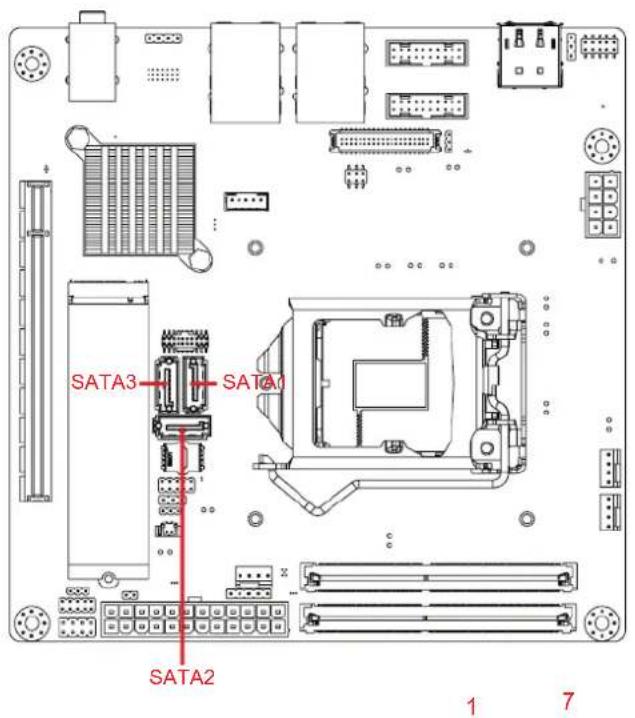
2.12 Serial ATA Interface Connector (SATA1/2/3).... 19
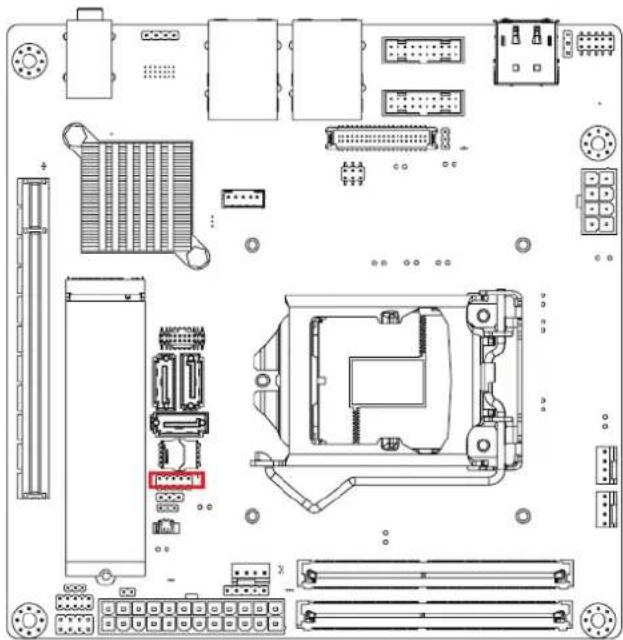
2.13 eSPI Interface Connector (ESPI1) 20
2.14 8-bit General Purpose I/O Pin Header (GPIO1).... 21
2.15 COM Port Pin Header (COM12) 21
2.16 Case Open Connector (JCASE2) 22
2.17 PCI Express X16 Slot (PCIEX16_1) 23
2.18 Power LED Pin Header (JFP2) 23
2.19 SPI BIOS Flash Socket (SPI1).... 24
2.20 Power Switch/HDD LED/SMBUS/Speaker Pin Header (JFP1) 24
2.21 System Fan #1 Connector /System Fan #2 Connector (SYSFAN1/2).... 25
2.22 CPU FAN Connector (CPUFAN1) 25
2.23 CMOS Battery Connector (BAT1).... 26
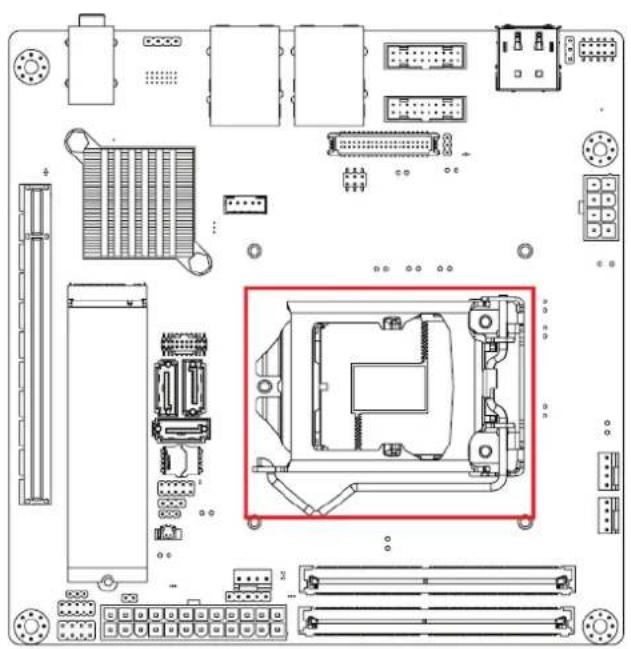
2.24 CPU Socket (CPU1) 26
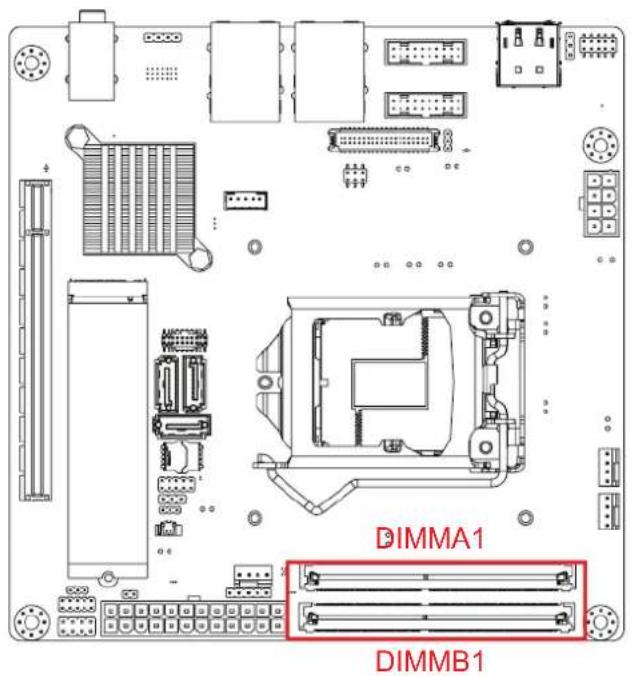
2.25 DDR4 SO-DIMM Socket (DIMMA1, DIMMB1).... 27
Chapter 3 BIOS Operation ...... 29
3.1 Introduction ...... 30
3.2 BIOS Setup 30
3.2.1 Main Menu 31
3.2.2 Advanced BIOS Features 32
3.3 Chipset Configuration Setting 53
3.3.1 System Agent (SA) Configuration.... 54
3.3.2 PCH-I/O Configuration.... 58
3.4 Security 64
3.5 Boot Setting 66
3.6 Save & Exit Configuration 67
Chapter 4 Software Introduction & Service ..... 69
4.1 Introduction ...... 70
4.2 Value-Added Software Services 70
4.2.1 Software API....70
Chapter 5 Chipset Software Installation Utility 73
5.1 Before You Begin.... 74
5.2 Introduction 74
Chapter 6 VGA Setup 75
6.1 Introduction ...... 76
6.2 Windows 10 VGA Driver Installation 76
Chapter 7 LAN Configuration ...... 77
7.1 Introduction ...... 78
7.2 Features.... 78
7.3 Installation.... 78
7.4 Windows® 10 Driver Setup (Intel i219LM&Intel i211AT) 79
Appendix A I/O Pin Assignments 81
A.1 Connector and Header List Description: 82
A.1.1 SYSTEM FAN Power Connector (SYSFAN1) 82
Table A.1: SYSTEM FAN Power Connector (SYSFAN1)...... 82
A.1.2 CPU FAN Power Connector (CPUFAN1) 82 Table A.2: CPU FAN Power Connector (CPUFAN1) 82
A.1.3 CML CPU Socket (CPU1) 82
A.1.4 ATX 12V Power Supply Connector (ATX12V1)....83 Table A.3: ATX 12V Power Supply Connector (ATX12V1)....83
A.1.5 VGA connector (VGA1)....83 Table A.4: VGA connector (VGA1)....83
A.1.6 DisplayPort+ High Def Multimedia Interface (DP1+HDMI1) ..... 84 Table A.5: DisplayPort+ High Definition Multimedia Interface (DP1+HDMI1)..... 84
A.1.7 USB 3.2 Gen1+2.0 pin header (USB56)....84 Table A.6: USB 3.2 Gen1+2.0 pin header (USB56)....84
A.1.8 USB 3.2 Gen1+2.0 pin header (USB78)....85 Table A.7: USB 3.2 Gen1+2.0 pin header (USB78)....85
A.1.9 eDP/LVDS Panel Connector (LVDS_EDP3).... 86 Table A.8: eDP/LVDS Panel Connector (LVDS_EDP3) .... 86
A.1.10 USB 3.2 Gen2+RJ45 1 port (LAN2_USB34) ....87 Table A.9: USB 3.2 Gen2+RJ45 1 port (LAN2_USB34) ....87
A.1.11 USB 3.2 Gen2+RJ45 1 port (LAN1_USB12)....88 Table A.10:USB 3.2 Gen2+RJ45 1 port (LAN1_USB12)....88
A.1.12 Audio amplifier output pin header (AMP1) 89 Table A.11:Audio amplifier output pin header (AMP1) 89
A.1.13 Front panel audio pin header (AUDIO1) 89 Table A.12:Front panel audio pin header (AUDIO1) 89
A.1.14 LVDS backlight inverter power connector (INV3) ..... 90 Table A.13:LVDS Backlight inverter power connector (INV3)..... 90
A.1.15 PCI Express X16 Slot (PCIEX16_1) 90 Table A.14:PCI Express X16 Slot (PCIEX16_1) 90
A.1.16 NGFF M.2 M-Key connector for 2280 module (M2M1)....93 Table A.15:NGFF M.2 M-Key conn for 2280 module (M2M1) .... 93
A.1.17 COM Port (COM12) 95 Table A.16:COM Port (COM12) 95
A.1.18 SATA Signal Connector (SATA1\~3) 95 Table A.17:SATA Signal Connector (SATA1\~3) 95
A.1.19 SPI BIOS Flash Socket (SPI1).... 96 Table A.18:SPI BIOS Flash Socket (SPI1).... 96
A.1.20 ESPI debug card Pin Header (ESPI1) 96 Table A.19:ESPI debug card Pin Header (ESPI1) 96
A.1.21 Battery Wafer Box (BAT1) 96 Table A.20: Battery Wafer Box (BAT1) 96
A.1.22 8-bit General Purpose I/O Pin Header (GPIO1)....97 Table A.21:8-bit General Purpose I/O Pin Header (GPIO1)....97
A.1.23 Power Switch/HDD LED/SMBUS/Speaker Pin Header (JFP1) .. 97 Table A.22:Power Switch/HDD LED/SMBUS/Speaker Pin Header (JFP1).... 97
A.1.24 Case-Open Detect Connector (JCASE2)....97 Table A.23:Case-Open Detect Connector (JCASE2)....97
A.1.25 Power LED Pin Header (JFP2) 97 Table A.24:Power LED Pin Header (JFP2) 98
A.1.26 ATX 12/5V/3V/5VSBV Power Supply Connector (EATXPWR1). 98 Table A.25:ATX 12/5V/3V/5VSBV Power Supply Connector (EATXPWR1) .... 98
A.1.27 SYSTEM FAN Power Connector (SYSFAN2) 99 Table A.26:SYSTEM FAN Power Connector (SYSFAN2) 99
A.1.28 DDR4 SO-DIMM Socket (DIMMB1)....99
A.1.29 DDR4 SO-DIMM Socket(DIMMA1).... 99
A.1.30 NGFF M.2 E-Key connector for 2242 module (M2E1)....99 Table A.27:NGFF M.2 E-Key conn for 2242 module (M2E1) ... 100
Chapter 1
General Information
1.1 Introduction
AIMB-277 is designed with the Intel® Q470E PCH for industrial applications that require both performance computing and enhanced power management capabilities. The motherboard supports Intel desktop Corei9/i7/i5/i3/Pentium/Celeron processors, up to 20 MB SmartCache, and 2 x DDR4 2933MHz SO-DIMM, up to 64 GB. Multiple I/O connectivity of 2 x serial ports, 4 x USB 3.2 Gen 2 + 4 x USB 3.2 Gen 1, 2 x GbE LAN, 3 x SATA III, 1 x NGFF (M.2_E key), 1 x NGFF (M.2_M Key) connector, and 1 x PCIe x16 slot are also supported.
1.2 Features
I/O connectivity: 2 x serial ports, 4 x USB 3.2 Gen 2 + 4 x USB 3.2 Gen 1, 3 x SATAIII, 1 M.2 M key & 1 M.2 E key, 2 GbE LAN, 1 PCIe x16
Standard Mini-ITX form factor with industrial features: The AIMB-277 is a full-featured Mini-ITX motherboard with balanced expandability and performance.
Wide selection of storage devices: SATA HDD, M.2 (M key), customers benefit from the flexibility of using the most suitable storage device for larger capacity.
- Optimized integrated graphics solution: With Intel® Graphics flexible, it supports versatile display options and a 32/64 bit 3D graphics engine.
1.3 Specifications
1.3.1 System
CPU: LGA1200 Intel desktop Core i9/i7/i5/i3/Pentium/Celeron processors compliant.
BIOS: AMI EFI 256 Mbit SPI BIOS.
System chipset: Intel® Q470E.
■ SATA hard disk drive interface:
- Three on-board SATA connector with data transmission rates up to 600 MB
- One M.2 M key to support PCIe/NVMe x4 M.2 2280.
1.3.2 Memory
■ RAM: 2 x 260-pins SODIMM socket support dual channel DDR4 2933MHz SDRAM, up to 64GB Max.
1.3.3 Input/Output
Serial ports: Two serial ports; support RS-232/422/485.
USB port: Supports four USB 3.2 Gen 2 with a transmission rates of up to 10 Gbps and four USB 3.2 Gen 1 with transmission rates of up to 5 Gbps.
■ GPIO connector: 8-bit general purpose Input/Output.
1.3.4 Graphics
■ Controller: Intel® HD graphics
■ eDP: Supports max. resolution 4096 x 2160 @ 60Hz, colay LVDs
■ DP1.4: Supports max. resolution 4096 x 2304 @ 60 Hz
■ HDMI2.0a: Supports max. resolution 4096 x 2160 @ 60 Hz
■ VGA: Supports max. resolution 1920 x 1200 @ 60 Hz
LVDs: Supports single/dual channel 18/24-bit with maximum resolution up to 1920 x 1200 @ 60 Hz (LVDs colay with eDP)
1.3.5 Ethernet LAN
■ Supports dual 10/100/1000 Mbps Ethernet port (s) via PCI Express x1 bus which provides 500 MB/s data transmission rates.
- Controller: - GbE LAN1: Intel i219LM - GbE LAN2: Intel i211AT
1.3.6 Industrial Features
- Watchdog timer: Can generate a system reset. The watchdog timer is programmable, with each unit equal to one second or one minute (255 levels).
1.3.7 Mechanical and Environmental Specifications
Operating temperature: 0 \~ 60° C (32 \~ 140° F, depending on CPU).
■ Storage temperature: -40 \~ 85° C (-40 \~ 185° F).
■ Humidity: 5 \~ 95% non-condensing.
■ Power supply voltage: +3.3V, +5V, +12V, -12V, +5VSB
Power consumption:
Intel Core i9-10900E 2.8GHz, 2pcs 32GB DDR4 3200MHz SDRAM, Boost: 117.882W; Typical: 102W
■ Board size: 170 mm x 170 mm (6.69" x 6.69").
■ Board weight: 0.365 kg.
1.4 Jumpers and Connectors
Connectors on the AIMB-277 motherboard link it to devices such as hard disk drives and a keyboard. In addition, the board has a number of jumpers used to configure the system for your application.
The tables below list the function of each of the board jumpers and connectors. Later sections in this chapter give instructions on setting jumpers. Chapter 2 gives instructions for connecting external devices to your motherboard.
Table 1.1: Connector and Header List
| Description Location Name | ||
| 1 SYSTEM FAN Power Connector SYSFAN1 | ||
| 2 CPU FAN Power Connector CPUFAN1 | ||
| 3 CML CPU Socket CPU1 | ||
| 4 ATX 12V Power Supply Connector ATX12V1 | ||
| 5 VGA connector VGA1 | ||
| 6 DisplayPort+ High Definition Multimedia Interface DP1+HDMI1 | ||
| 7 USB 3.2+2.0 pin header | USB56 | |
| 8 USB 3.2+2.0 pin header | USB78 | |
| 9 eDP/LVDS Panel Connector | LVDS_EDP3 | |
| 10 USB3.2+RJ45 1 port | LAN2_USB34 | |
| 11 USB3.2+RJ45 1 port | LAN1_USB12 | |
| 12 Audio amplifier output pin header | AMP1 | |
| 13 Front panel audio pin header | AUDIO1 | |
| 14 LVDS Backlight inverter power connector | INV3 | |
| 15 PCI Express X16 Slot | PCIEX16_1 | |
| 16 NGFF M.2 M-Key connector for 2280 module | M2M1 | |
| 17 COM Port | COM12 | |
| 18 SATA Signal Connector | SATA3 | |
| 19 SATA Signal Connector | SATA1 | |
| 20 SATA Signal Connector | SATA2 | |
| 21 SPI BIOS Flash Socket | SPI1 | |
| 22 ESPI debug card Pin Header | ESPI1 | |
| 23 Battery Wafer Box | BAT1 | |
| 24 8-bits General Purpose I/O Pin Header | GPIO1 | |
| 25 Power Switch/HDD LED/SMBUS/Speaker Pin Header | JFP1 | |
| 26 Case-Open Detect Connector | JCASE2 | |
| 27 Power LED Pin Header | JFP2 | |
| 28 ATX 12/5V/3V/5VSBV Power Supply Connector | EATXPWR1 | |
| 29 SYSTEM FAN Power Connector SYSFAN2 | ||
| 30 DDR4 SO-DIMM Socket | DIMMB1 | |
| 31 DDR4 SO-DIMM Socket | DIMMA1 | |
| 32 NGFF M.2 E-Key connector for 2242 module | M2E1 | |
1.5 Board Layout: Jumper and Connector Locations

text_image
AUDIO1 AMP1 LAN1_USB12 LAN2_USB34 DP1+HDMI1 USB56 USB78 JSMB3 VGA1 LVDS_EDP3 JLVDS_VCON3 INV3 JLVDS3 PCIEX16 ATX12V1 M2M1 COM12 CPU1 SATA1 SATA3 SATA2 SPI1 ESPI1 JFP2 JCMOS1 BAT1 SYSFAN2 CPUFAN1 SYSFAN1 PSON1 GPIO1 JCPSE2 JFP1 EATXPWR1 JWDT1+JOBS1 DIMMB1 DIMMA1Figure 1.1 Jumper and Connector Location (Top Side)

natural_image
Top-down schematic of a computer motherboard layout with no visible text or symbolsFigure 1.2 Jumper and Connector Location (Bottom Side)
1.6 AIMB-277 Board Diagram
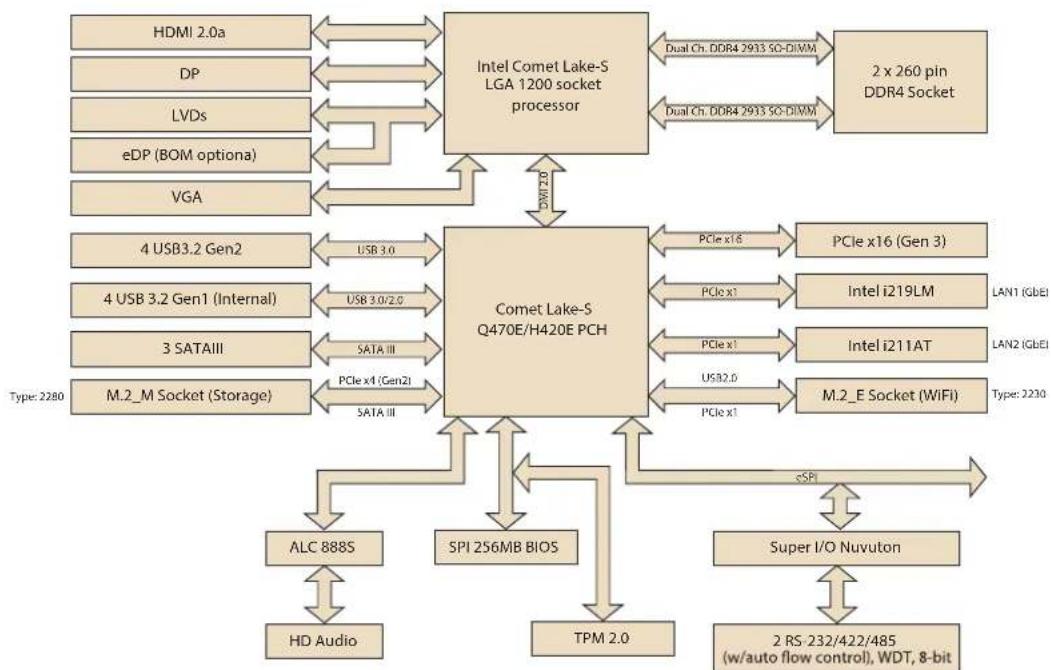
flowchart
graph TD
    A["Intel Comet Lake-S LGA 1200 socket processor"] -->|Dual Ch. DDR4 2933 SC-DIWM| B["2 x 260 pin DDR4 Socket"]
    A -->|Dual Ch. DDR4 2933 SC-DIWM| C["Comet Lake-S Q470E/H420E PCH"]
    D["HDMI 2.0a"] <--> A
    E["DP"] <--> A
    F["LVDs"] <--> A
    G["eDP (BOM optiona)"] <--> A
    H["VGA"] <--> A
    I["4 USB3.2 Gen2"] <--> J["USB 3.0"]
    K["4 USB 3.2 Gen1 (Internal)"] <--> L["USB 3.0/2.0"]
    M["3 SATAIII"] <--> N["SATA III"]
    O["M.2_M Socket (Storage)"] <--> P["SATA III"]
    Q["PCIe x16"] --> R["PCIe x16 (Gen 3)"]
    S["PCIe x1"] --> T["Intel i219LM"]
    U["PCIe x1"] --> V["Intel i211AT"]
    W["PCIe x1"] --> X["M.2_E Socket (WiFi)"]
    Y["USB3.0"] --> Z["Type: 2280"]
    AA["PCIe x1"] --> AB["LAN1 (GbEI)"]
    AC["PCIe x1"] --> AD["LAN2 (GbEI)"]
    AE["USB3.2"] --> AF["Type: 2230"]
    AG["PCIe x1"] --> AH["Super I/O Nuvuton"]
    AI["ALC 888S"] --> AJ["HD Audio"]
    AK["SPI 256MB BIOS"] --> AL["TPM 2.0"]
    AM["2 RS-232/422/485 (w/auto flow control), WDT, 8-bit"] --> AN
Figure 1.3 AIMB-277 Board Diagram
1.7 Safety Precautions
Warning!
Always completely disconnect the power cord from chassis whenever you work with the hardware. Do not make connections while the power is on. Sensitive electronic components can be damaged by sudden power surges. Only experienced electronics personnel should open the PC chassis.

Caution!
Always ground yourself to remove any static charge before touching the motherboard. Modern electronic devices are very sensitive to electrostatic discharges. As a safety precaution, use a grounding wrist strap at all times. Place all electronic components on a static-dissipative surface or in a static-shielded bag when they are not in the chassis.

Caution!
The computer is provided with a battery-powered real-time clock circuit. There is a danger of explosion if battery is incorrectly replaced. Replace only with same or equivalent type recommended by the manufacturer. Discard used batteries according to manufacturer's instructions.

Caution!
There is a danger of a new battery exploding if it is incorrectly installed. Do not attempt to recharge, force open, or heat the battery. Replace the battery only with the same or equivalent type recommended by the manufacturer. Discard used batteries according to the manufacturer's instructions.

1.8 Jumper Settings
This section provides instructions on how to configure your motherboard by setting the jumpers. It also includes the motherboard's default settings and your options for each jumper.
1.8.1 How to Set Jumpers
You can configure your motherboard to match the needs of your application by setting the jumpers. A jumper is a metal bridge that closes an electrical circuit. It consists of two metal pins and a small metal clip (often protected by a plastic cover) that slides over the pins to connect them. To “close” (or turn ON) a jumper, you connect the pins with the clip. To “open” (or turn OFF) a jumper, you remove the clip. Sometimes a jumper consists of a set of three pins, labeled 1, 2, and 3. In this case you connect either pins 1 and 2, or 2 and 3. A pair of needle-nose pliers may be useful when setting jumpers.
1.8.2 CMOS Clear (JCMOS1)
The AIMB-277 motherboard contains a jumper that can erase CMOS data and reset the system BIOS information. Normally this jumper should be set with pins 1-2 closed. If you want to reset the CMOS data, set CMOS1 to 2-3 closed for just a few seconds, and then move the jumper back to 1-2 closed. This procedure will reset the CMOS to its default setting.
Table 1.2: JCMOS1
| Function Jumper Settings | ||
| Keep CMOS data (Default) |  | 1-2 closed |
| Clear CMOS data | 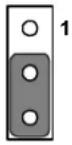 | 2-3 closed |
1.8.3 Watchdog Timer Output and OBS Beep (JWDT1+JOBS1)
Table 1.3: Watchdog Timer Output and OBS Beep (JWDT1+JOBS1)
| Function Jumper Setting | |
| Watchdog Timer Output (2-3) (Default)OBS BEEP(4-5) (Default) | 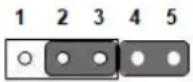 (2 and 3)+(4 and 5) (2 and 3)+(4 and 5) |
| Watchdog Timer Disable (1-2)OBS BEEP(4-5) (Default) |  (1 and 2)+(4 and 5) (1 and 2)+(4 and 5) |
1.8.4 ATX/AT Mode Selection (PSON1)
Table 1.4: ATX/AT Mode Selection (PSON1)
| Function Jumper Setting | |
| ATX Mode (Default) | 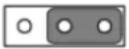 |
| 1 2 3 | |
| AT Mode | 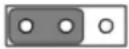 |
| 1 2 3 | |
1.8.5 LVDS/eDP Panel Voltage Selection (JLVDS3)
Table 1.5: LVDS/eDP Panel Voltage Selection (JLVDS3)
| Function Jumper Setting | |||
| Jumper position for +3.3V (Default) | 2 | 4 | 6 |
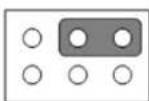 | |||
| 1 | 3 | 5 | |
| Jumper position for +5V | 2 | 4 | 6 |
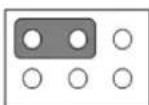 | |||
| 1 | 3 | 5 | |
| Jumper position for +12V | 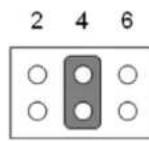 | ||
| 1 | 3 | 5 | |
AIMB-277 has two sockets for a 260-pin DDR4 SO-DIMM. These sockets use a 1.2 V unbuffered double data rate synchronous DRAM (DDR SDRAM). DRAM is available in capacities of 4GB, 8GB, 16GB and 32GB. The sockets can take any combination with SODIMMs of any size, giving a total memory size between 4GB, 8GB, 16GB, and up to max 64GB. AIMB-277 does NOT support error checking and correction (ECC).
1.10 Memory Installation Procedures
To install SODIMMs, first make sure the two handles of the SODIMM socket are in the “open” position, i.e., the handles lean outward. Slowly slide the SODIMM module along the plastic guides on both ends of the socket. Then firmly but gently (avoid pushing down too hard) press the SODIMM module well down into the socket, until you hear a click when the two handles have automatically locked the memory module into the correct position of the SODIMM socket. To remove the memory module, just push both handles outward, and the memory module will be ejected by the mechanism.
1.11 Cache Memory
The AIMB-277 supports a CPU with one of the following built-in full speed last level caches:
20MB for Inter Core i9-10900E/i9-10900TE
16MB for Inter Core i7-10700E/i7-10700TE
12MB for Inter Core i5-10500E/i7-10500TE
6MB for Inter Core i3-10100E/i7-10100TE
6MB for Inter Core i3-10100E/i7-10100TE
4MB Pentium G6400E/G6400TE
2MB Celeron G5900E/G5900TE
The built-in second-level cache in the processor yields much higher performance than conventional external cache memories.
1.12 Processor Installation
The AIMB-277 is designed to supported Intel 10th Gen LGA1200, Core i9/Core i7/Core i5/Core i3, Pentium, Celeron processor.
Chapter 2
Connecting Peripherals
2.1 Introduction
You can access most of the connectors from the top of the board as it is being installed in the chassis. If you have a number of cards installed or have a packed chassis, you may need to partially remove the card to make all the connections.
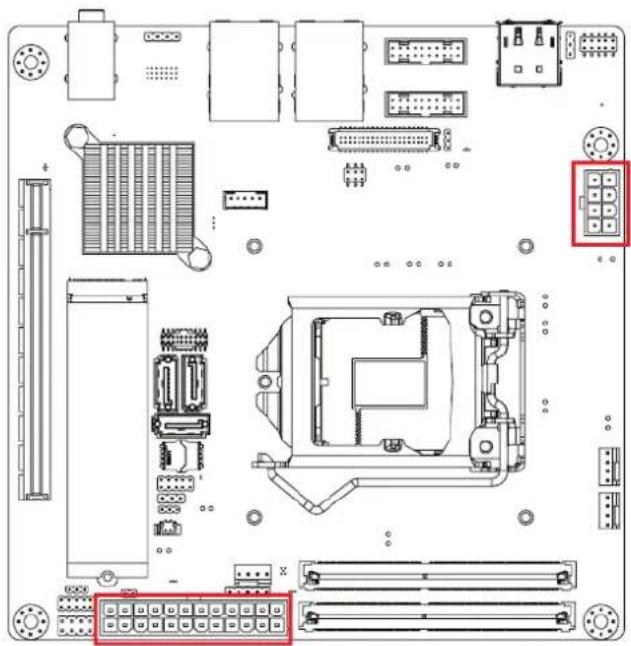
2.2 ATX 12V Power Supply Connector (ATX12V1) & ATX Power Supply Connector (EATXPWR1)
natural_image
Top-down schematic of a computer motherboard showing internal components and connectors (no text or labels)
text_image
ATX12V1 5 6 7 8 1 2 3 4 ATX_4X2V_4.2mmPin Signal Pin Definition
| 1 GND |
| 2 GND |
| 3 GND |
| 4 GND |
| 5 +12V |
| 6 +12V |
| 7 +12V |
| 8 +12V |
Pin Signal Pin Definition Pin Signal Pin Definition
| 1 +3.3V_1 13 | +3.3V_4 | |
| 2 +3.3V_2 14 | -12V | |
| 3 COM_1 | 15 | COM_4 |
| 4 +5V_1 | 16 | PS_ON# |
| 5 COM_2 | 17 | COM_5 |
| 6 +5V_2 | 18 | COM_6 |
| 7 COM_3 | 19 | COM_7 |
| 8 PWR_OK | 20 | NC |
| 9 +5VSB 21 +5V_3 |
| 10 +12V1_1 22 +5V_4 |
| 11 +12V1_2 23 +5V_5 |
| 12 +3.3V_3 24 COM_8 |
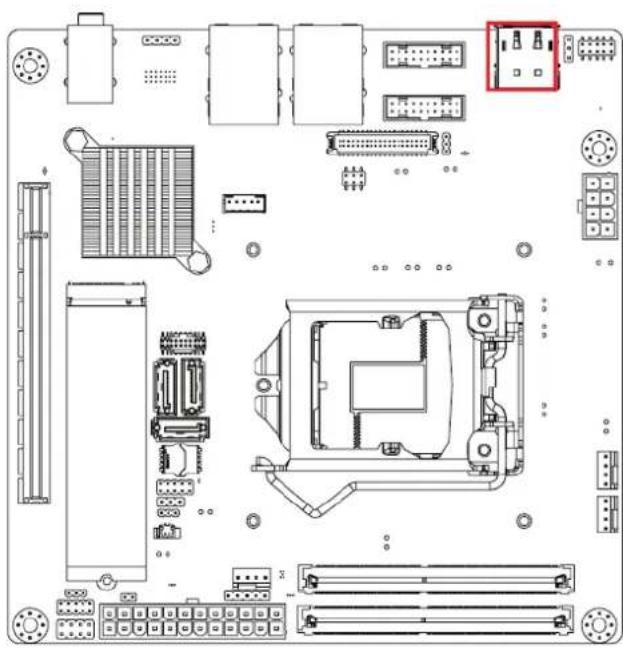
2.3 DisplayPort+ High Definition Multimedia Interface (DP1+HDMI1)
natural_image
Top-down schematic of a computer motherboard showing CPU socket, RAM slots, and connectors (no text or labels)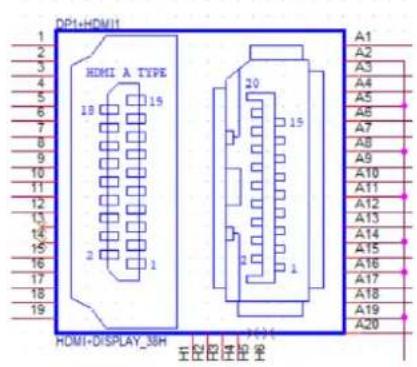
text_image
DP1+HDMI HDMI A TYPE 18 15 2 1 20 15 A1 A2 A3 A4 A5 A6 A7 A8 A9 A10 A11 A12 A13 A14 A15 A16 A17 A18 A19 A20 HDMI+DISPLAY_38H 主输出 2 3 4 5 6 7 8 9 10 11 12 13 14 15 16 17 18 19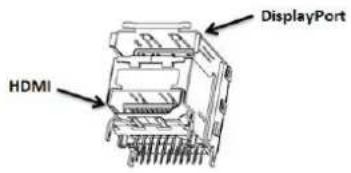
text_image
DisplayPort HDMI2.4 LAN1\_USB12 + LAN2\_USB34, USB56, USB78
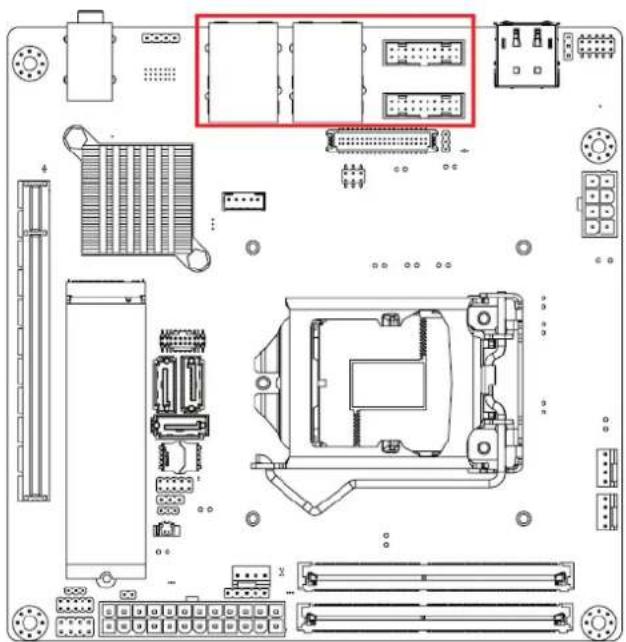
The AIMB-277 provides up to eight USB ports. Four USB3.2 Gen2 on the rear side and two pin header on the board. The USB interface complies with USB specification Rev. 2.0 and Rev. 3.0 supporting transmission rates up to 10 Gbps for USB1234, and up to 5Gbps for USB5678. The USB interface can be disabled in the system BIOS setup. The AIMB-277 is equipped with two high-performance 1000 Mbps Ethernet LAN adapter, which are supported by all major network operating systems. The RJ-45 jacks on the rear panel provides for convenient LAN connection.
natural_image
Top-down schematic of a computer motherboard showing internal components and connectors (no text or labels)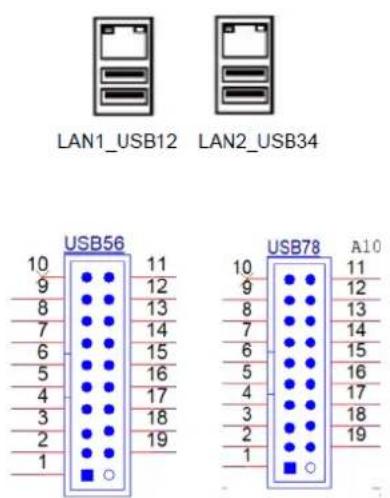
text_image
LAN1_USB12 LAN2_USB34 USB56 10 11 9 12 8 13 7 14 6 15 5 16 4 17 3 18 2 19 1 USB78 A10 10 11 9 12 8 13 7 14 6 15 5 16 4 17 3 18 2 19 12.5 VGA connector (VGA1)
natural_image
Top-down schematic of a computer motherboard showing CPU socket, RAM slots, and various connectors (no text or labels)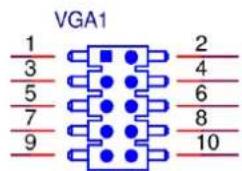
text_image
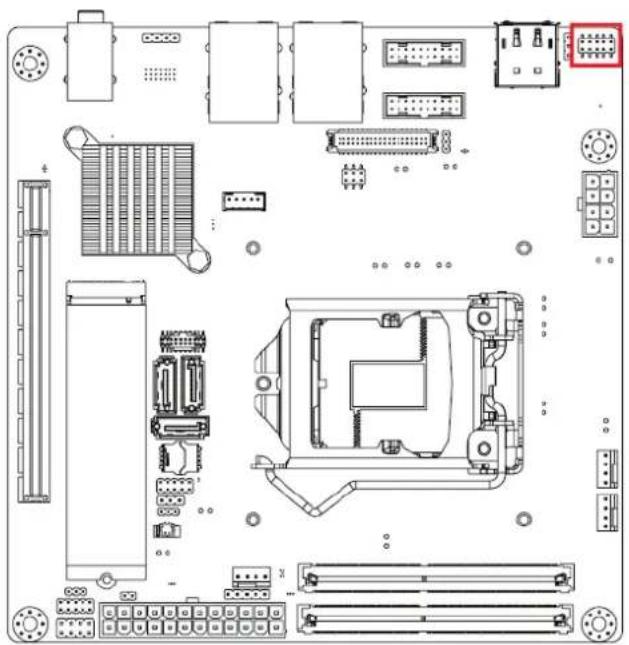
VGA1 1 2 3 4 5 6 7 8 9 10PH_5x2V_S2.0mm
Pin Signal Pin Definition
| 1 VGA1_b_R |
| 2 VGA1_a_DCLK |
| 3 VGA1_b_G |
| 4 VGA1_FOC_ON |
| 5 VGA1_b_B |
| 6 VGA1_a_DDAT |
| 7 VGA1_b_VS |
| 8 GND |
| 9 VGA1_b_HS |
| 10 +VCC_TMDS |
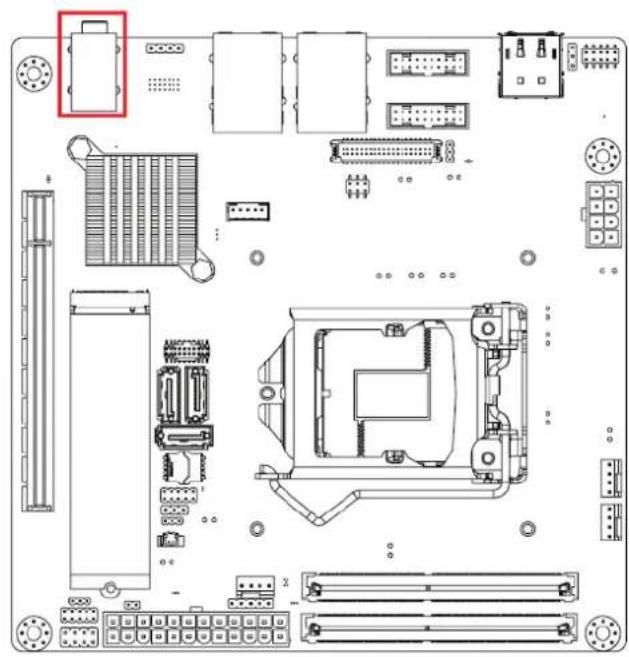
2.6 HD Analog Audio Interface (Audio1)
natural_image
Top-down schematic of a computer motherboard showing CPU socket, RAM slots, and various connectors (no text or labels)
text_image
LINE IN LINE OUT MIC INAUDIO1
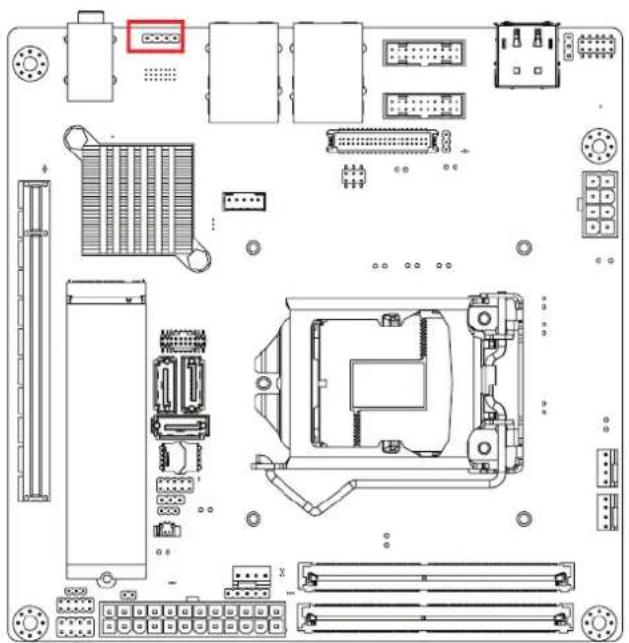
2.7 Amplifier Connector (AMP1)
natural_image
Technical line drawing of a computer motherboard with various connectors and slots (no text or labels)
Pin Signal Pin Definition
| 1 SPK_R+ |
| 2 SPK_R- |
| 3 SPK_L- |
| 4 SPK_L+ |
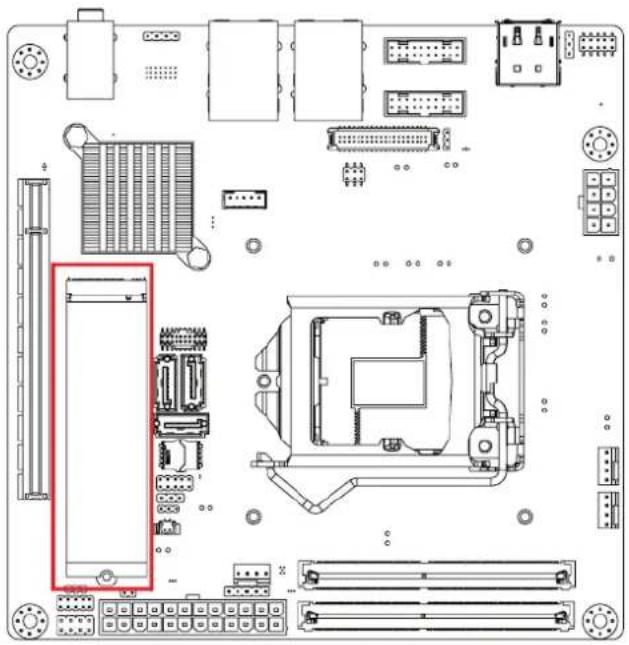
2.8 NGFF M.2 M-Key Connector for 2280 Module (M2M1)
natural_image
Top-down schematic of a computer motherboard showing CPU socket, RAM slots, and various connectors (no text or labels)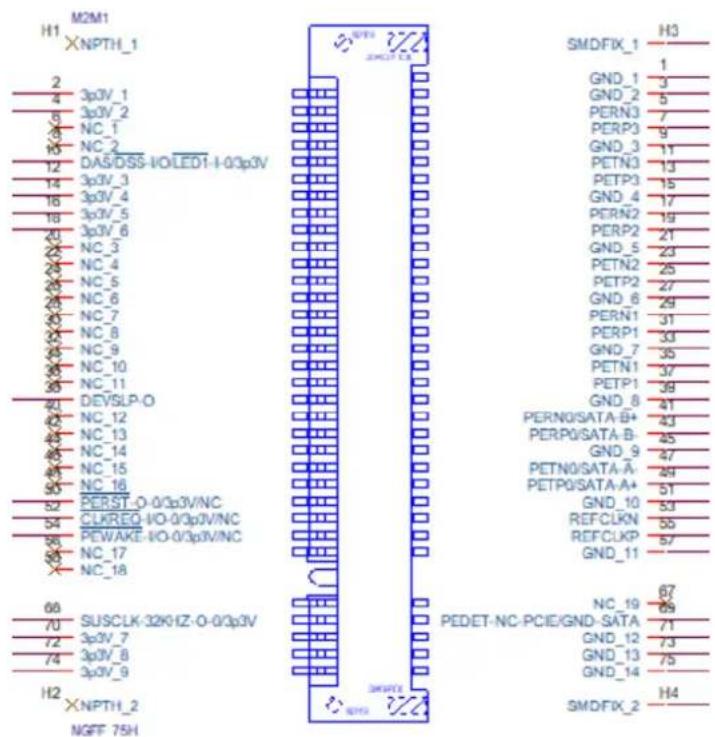
text_image
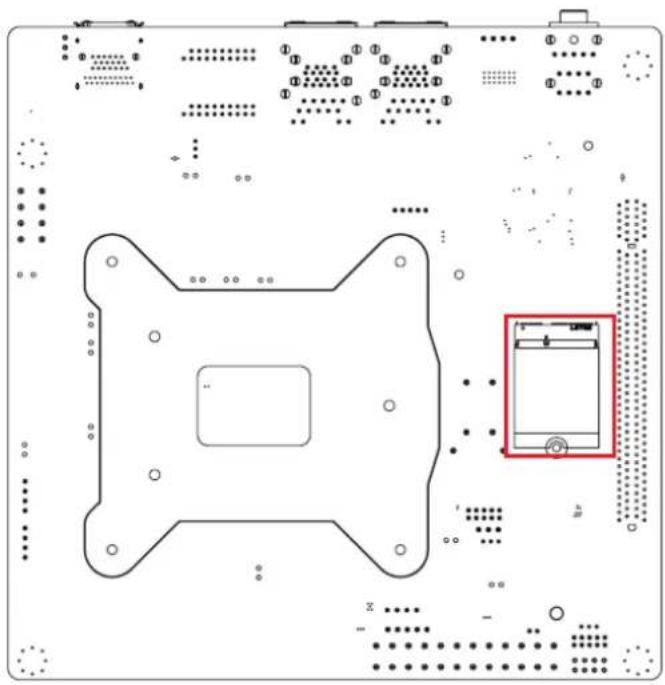
H1 M2M1 XNPTH_1 2 4 5 6 7 8 9 10 11 12 13 14 15 16 17 18 19 20 21 22 23 24 25 26 27 28 29 30 31 32 33 34 35 36 37 38 39 40 41 42 43 44 45 46 47 48 49 50 51 52 53 54 55 56 57 58 59 60 61 62 63 64 65 66 67 68 69 70 71 72 73 74 75 76 77 78 79 80 81 82 83 84 85 86 87 88 89 90 91 92 93 94 95 96 97 98 99 100 SMDFIX_1 H3 1 GND_1 3 GND_2 5 PERN3 7 PERP3 9 GND_3 11 PETN0 13 PETP3 15 GND_4 17 PERN2 19 PERP2 21 GND_5 23 PETN2 25 PETP2 27 GND_6 29 PERN1 31 PERP1 33 GND_7 35 PETN1 37 PETP1 39 GND_8 41 PERN0/SATA-B+ 43 PERP0/SATA-B- 45 GND_9 47 PETN0/SATA-A- 49 PETP0/SATA-A+ 51 GND_10 53 REFCLKN 55 REFCLKP 57 GND_11 NC_19 67 PEDET-NC-PCIE/GND-SATA 71 GND_12 73 GND_13 75 GND_14 SMDFIX_2 H4 XNPTH_2 SMDFIX_2 NGFF 75H2.9 NGFF M.2 E-Key Connector for 2230 Module (M2E1)
natural_image
Top-down schematic of a computer motherboard layout with no visible text or symbols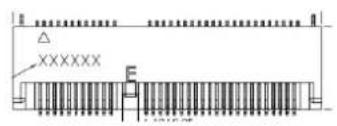
text_image
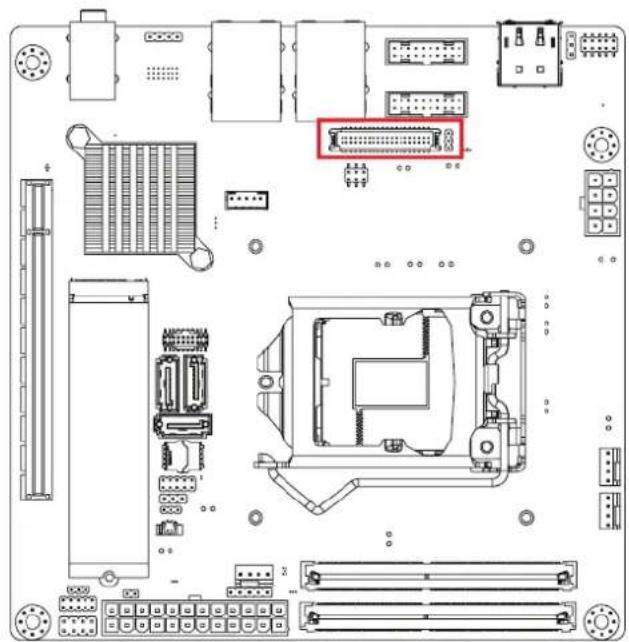
XXXXXX2.10 LVDS/eDP Connector (LVDS\_EDP3)
natural_image
Top-down schematic of a computer motherboard showing CPU socket, RAM slots, and connectors (no text or labels)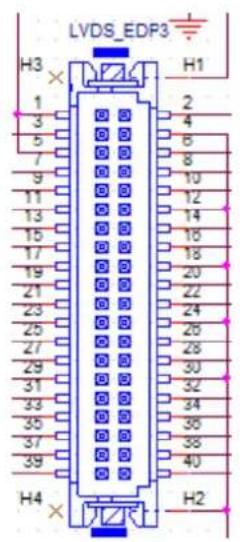
text_image
LVDS_EDP3 H3 1 2 3 4 5 6 7 8 9 10 11 12 13 14 15 16 17 18 19 20 21 22 23 24 25 26 27 28 29 30 31 32 33 34 35 36 37 38 39 40 H4 H22.11 LVDS Backlight Inverter Power Connector (INV3)

natural_image
Top-down schematic of a computer motherboard showing CPU socket, RAM slots, and connectors (no text or labels)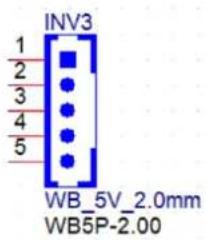
text_image
INV3 1 2 3 4 5 WB_5V_2.0mm WB5P-2.002.12 Serial ATA Interface Connector (SATA1/2/3)
AIMB-286EF features a high performance Serial ATA III interface (up to 600 MB/s) which eases hard drive cabling with thin, space-saving cables.
text_image
SATA3 SATA1 SATA2 1 7
Pin Signal
1 GND
2 TX+
3 TX-
4 GND
5 RX-
6 RX+
7 GND
2.13 eSPI Interface Connector (ESPI1)
text_image
Technical diagram of a computer motherboard with labeled components and connectors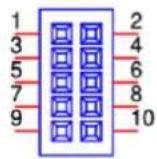
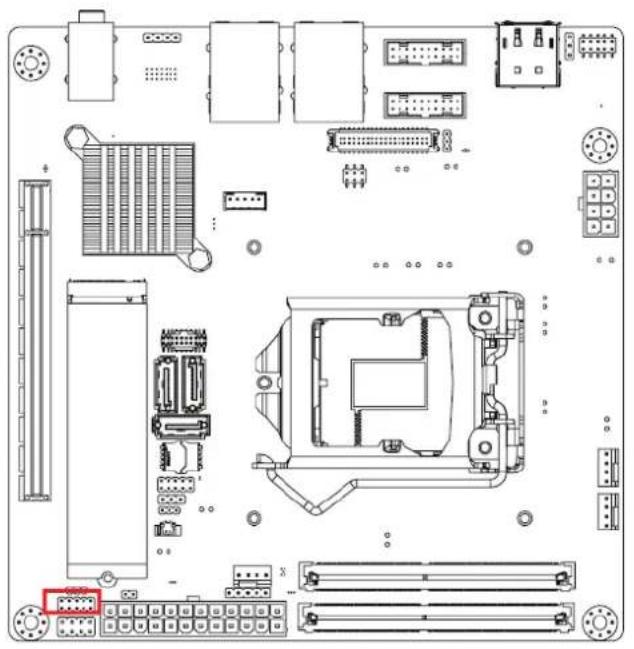
2.14 8-bit General Purpose I/O Pin Header (GPIO1)
natural_image
Top-down schematic of a computer motherboard showing internal components like CPU socket, RAM slots, and connectors (no text or labels)
2.15 COM Port Pin Header (COM12)

natural_image
Top-down schematic of a computer motherboard showing CPU socket, RAM slots, and various connectors (no text or labels)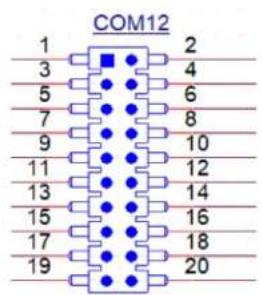
text_image
COM12 1 2 3 4 5 6 7 8 9 10 11 12 13 14 15 16 17 18 19 20Pin Signal Pin Definition Pin Signal Pin Definition
| 1 COM1_422_485_TX- 2 COM1_DSR# |
| 3 COM1_422_485_TX+ 4 COM1_RTS# |
| 5 COM1_422_RX+ 6 COM1_CTS# |
| 7 COM1_422_RX- 8 COM1_RI# |
| 9 GND 10 GND |
| 11 COM2_422_485_TX- 12 COM2_DSR# |
| 13 COM2_422_485_TX+ 14 COM2_RTS# |
| 15 COM2_422_RX+ 16 COM2_CTS# |
| 17 COM2_422_RX- 18 COM2_RI# |
| 19 GND 20 GND |
2.16 Case Open Connector (JCASE2)

natural_image
Top-down schematic of a computer motherboard showing CPU socket, RAM slots, and various connectors (no text or labels)
Pin Signal
1 Case Open
2 GND
2.17 PCI Express X16 Slot (PCIEX16\_1)
AIMB-277 provides 1 x PCI express x16 slot.

natural_image
Top-down schematic of a computer motherboard showing CPU socket, RAM slots, and various connectors (no text or labels)2.18 Power LED Pin Header (JFP2)

natural_image
Top-down schematic of a computer motherboard showing CPU socket, RAM slots, and various connectors (no text or labels)
Pin Signal Pin Definition
| 1 SIO_SUSLED_R | |
| 2 | NC |
| 3 SIO_SUSLED | |
2.19 SPI BIOS Flash Socket (SPI1)

natural_image
Top-down schematic of a computer motherboard showing CPU socket, RAM slots, and connectors (no text or labels)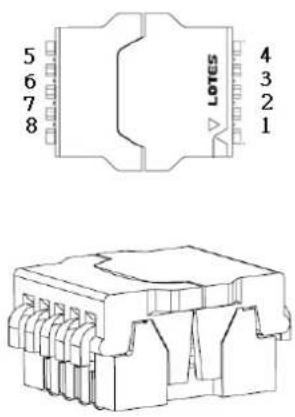
text_image
5 6 7 8 4 3 2 1 LOTES2.20 Power Switch/HDD LED/SMBUS/Speaker Pin Header (JFP1)

natural_image
Top-down schematic of a computer motherboard showing CPU socket, RAM slots, and connectors (no text or labels)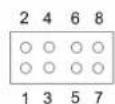
Pin Signal Pin Definition Pin Signal Pin Definition
| 1 FP_HDD_LED 2 PWR_BTN |
| 3 FP_HDD_LED# 4 GND |
| 5 SMB_DAT_JFP1 6 FP_SYS_RESET# |
| 7 SMB_CLK_JFP1 8 GND |
2.21 System Fan #1 Connector /System Fan #2 Connector (SYSFAN1/2)
If a fan is used, this connector supports cooling fans of 500 mA (6 W) or less.

text_image
SYSFAN1 H1 4 3 2 1 W_4V_2.54mm WAFER4P-2.54 SYSFAN1 SYSFAN22.22 CPU FAN Connector (CPUFAN1)
If a fan is used, this connector supports cooling fans of 500 mA (6 W) or less.

text_image
H1 W_4V_2.54mm WAFER4P-2.542.23 CMOS Battery Connector (BAT1)

text_image
Technical diagram of a computer motherboard with labeled components and a close-up of the circuit breaker pinout.2.24 CPU Socket (CPU1)
natural_image
Top-down schematic of a computer motherboard showing CPU socket, RAM slots, and connectors (no text or labels)2.25 DDR4 SO-DIMM Socket (DIMMA1, DIMMB1)
text_image
DIMMA1 DIMMB1Chapter 3
BIOS Operation
3.1 Introduction
With the AMI BIOS Setup program, you can modify BIOS settings and control the special features of your computer. The Setup program uses a number of menus for making changes and turning special features on or off. This chapter describes the basic navigation of the AIMB-277 setup screens.
3.2 BIOS Setup
The AIMB-277 Series system has AMI BIOS built in, with a CMOS SETUP utility that allows users to configure required settings or to activate certain system features. The CMOS SETUP saves the configuration in the CMOS RAM of the motherboard. When the power is turned off, the battery on the board supplies the necessary power to preserve the CMOS RAM.
When the power is turned on, press the button during the BIOS POST (Power-On Self Test) to access the CMOS SETUP screen.
Control Keys
<↑><↓><←><→>Move to select item
<Enter> Select item
<Esc> Main Menu - Quit without saving changes to the CMOS
Sub Menu - Exit current page and return to the Main Menu
<Page Up/+> Increase the numeric value or make changes
<Page Down/-> Decrease the numeric value or make changes
<F1> General help, for Setup Sub Menu
<F2> Item help
<F5> Loads previous values
<F7> Loads setup defaults
<F10> Saves all CMOS changes
3.2.1 Main Menu
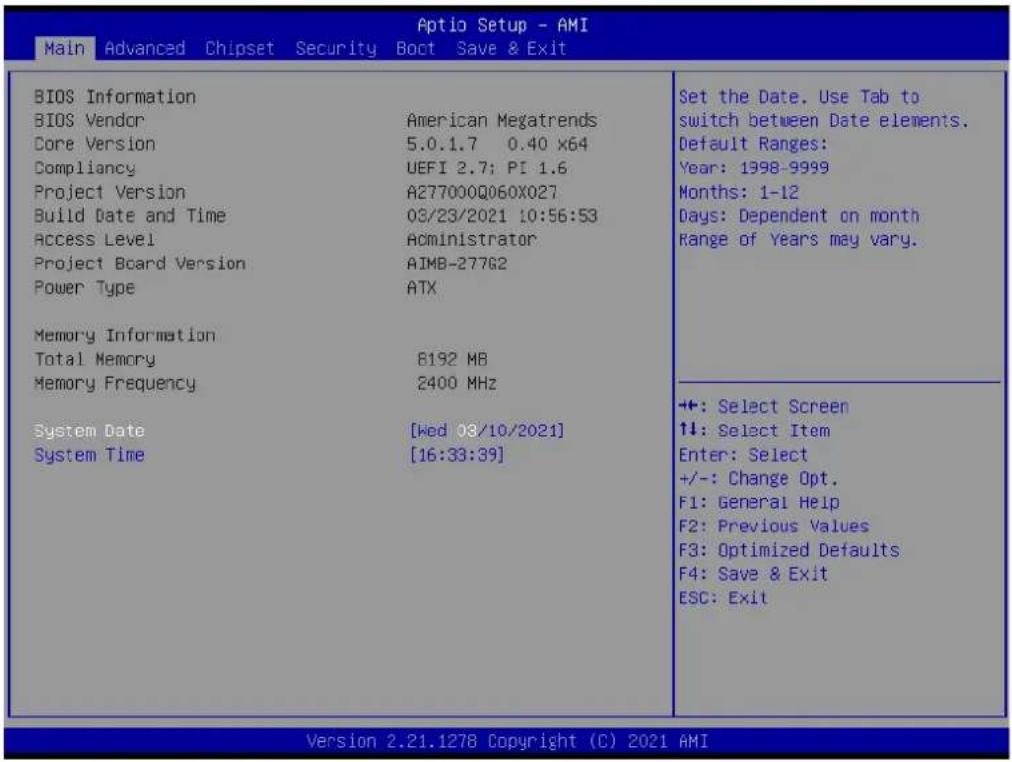
Press to enter AMI BIOS CMOS Setup Utility, the Main Menu will appear on the screen. Use arrow keys to select among the items and press
text_image
Main Advanced Chipset Security Boot Save & Exit BIOS Information BIOS Vendor American Megatrends Core Version 5.0.1.7 0.40 x64 Compliancy UEFI 2.7; PI 1.6 Project Version A277000Q060X027 Build Date and Time 03/23/2021 10:56:53 Access Level Administrator Project Board Version AIMB-27782 Power Type ATX Memory Information Total Memory 8192 MB Memory Frequency 2400 MHz System Date [Wed 08/10/2021] System Time [16:33:39] Set the Date. Use Tab to switch between Date elements. Default Ranges: Year: 1398-9999 Months: 1-12 Days: Dependent on month Range of Years may vary. ++: Select Screen 11: Select Item Enter: Select +/-: Change Opt. F1: General Help F2: Previous Values F3: Optimized Defaults F4: Save & Exit ESC: Exit Version 2.21.1278 Copyright (C) 2021 AMIThe Main BIOS setup screen has two main frames. The left frame displays all the options that can be configured. Grayed-out options cannot be configured; options in blue can. The right frame displays the key legend.
Above the key legend is an area reserved for a text message. When an option is selected in the left frame, it is highlighted in white. Often a text message will accompany it.
■ System Time/System Date
Use this option to change the system time and date. Highlight the System Time or System Date using the
3.2.2 Advanced BIOS Features
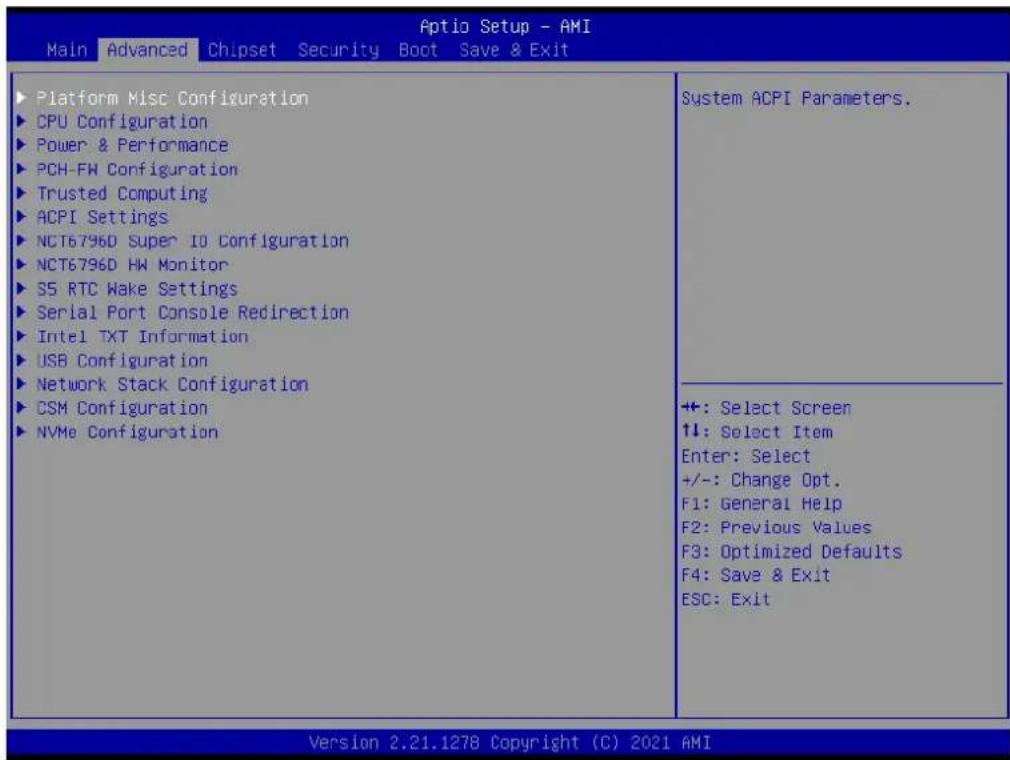
Select the Advanced tab from the AIMB-277 setup screen to enter the Advanced BIOS Setup screen. You can select any of the items in the left frame of the screen, such as CPU Configuration, to go to the sub menu for that item. You can display an Advanced BIOS Setup option by highlighting it using the
text_image
Aptio Setup - AMI Main Advanced Chipset Security Boot Save & Exit ► Platform Misc Configuration ► CPU Configuration ► Power & Performance ► PCH-FW Configuration ► Trusted Computing ► ACPI Settings ► NCT6796D Super 10 Configuration ► NCT6796D HW Monitor ► S5 RTC Wake Settings ► Serial Port Console Redirection ► Intel TXT Information ► USB Configuration ► Network Stack Configuration ► CSM Configuration ► NVMe Configuration System ACPI Parameters. +: Select Screen ↑↓: Select Item Enter: Select +/-: Change Opt. F1: General Help F2: Previous Values F3: Optimized Defaults F4: Save & Exit ESC: Exit Version 2.21.1278 Copyright (C) 2021 AMI3.2.2.1 Platform Misc Configuration

text_image
Advanced Aptio Setup - AMI Platform Misc Configuration Native PCIE Enable [Enabled] Native ASFM [Auto] Bit - PCIe Native * control 0 - ~ Hot Plug 1 - SHPC Native Hot Plug control 2 - ~ Power Management Events 3 - PCIe Advanced Error Reporting control 4 - PCIe Capability Structure control 5 - Latency Tolerance Reporting control +: Select Screen 1: Select Item Enter: Select +/-: Change Opt. F1: General Help F2: Previous Values F3: Optimized Defaults F4: Save & Exit ESC: Exit Version 2.21.1278 Copyright (C) 2021 AMI■ Native PCIE Enable [Enable]
Native ASPM [Auto]
3.2.2.2 CPU Configuration
text_image
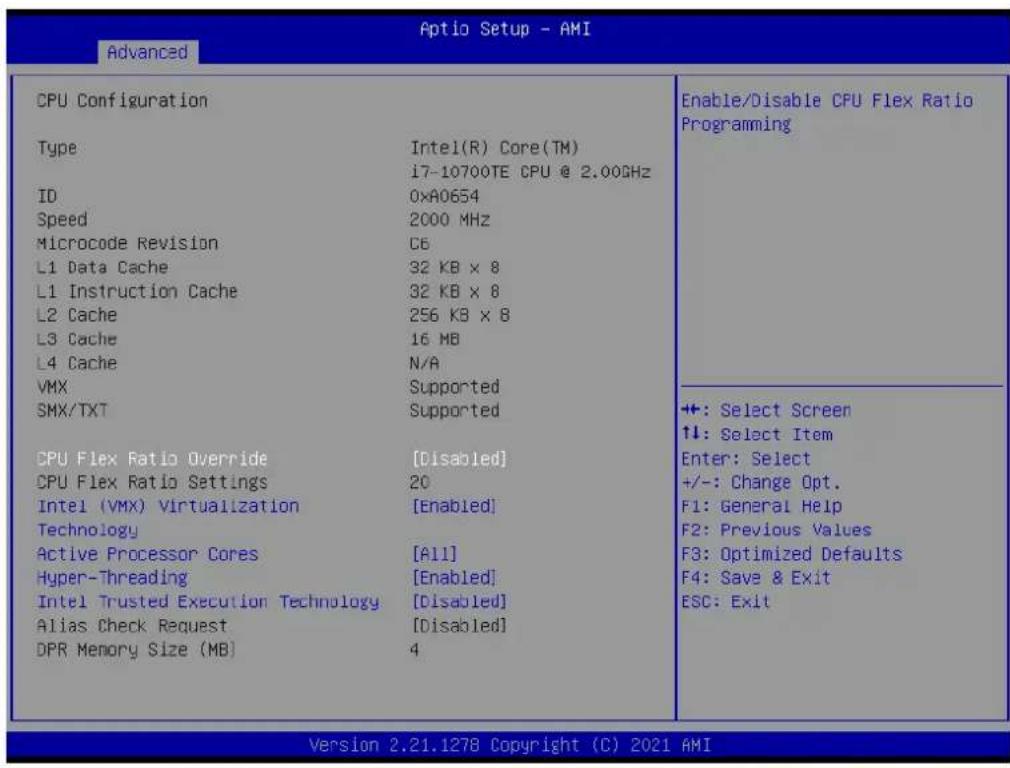
Advanced CPU Configuration Type Intel(R) Core(TM) i7-10700TE CPU @ 2.00GHz ID 0xA0654 Speed 2000 MHz Microcode Revision C6 L1 Data Cache 32 KB x 8 L1 Instruction Cache 32 KB x 8 L2 Cache 256 KB x 8 L3 Cache 16 MB L4 Cache N/A VMX Supported SMX/TXT Supported CPU Flex Ratio Override [Disabled] CPU Flex Ratio Settings 20 Intel (VMX) Virtualization [Enabled] Technology Active Processor Cores [A11] Hyper-Threading [Enabled] Intel Trusted Execution Technology [Disabled] Alias Check Request [Disabled] DPR Memory Size (MB) 4 Enable/Disable CPU Flex Ratio Programming +: Select Screen ↑↓: Select Item Enter: Select +/-: Change Opt. F1: General Help F2: Previous Values F3: Optimized Defaults F4: Save & Exit ESC: Exit Version 2.21.1278 Copyright (C) 2021 AMI■ CPU Flex Ratio Override [Disabled]
Intel (VMX) Virtualization [Enabled]
■ Active Processor Cores [All]
Hyper-Threading [Enabled]
Intel Trusted Execution Technology [Disabled]
■ Alias Check Request [Disabled]
3.2.2.3 Power & Performance

text_image
Advanced Power & Performance ► CPU - Power Management Control ► GT - Power Management Control CPU - Power Management Control Options +: Select Screen 1: Select Item Enter: Select +/-: Change Opt. F1: General Help F2: Previous Values F3: Optimized Defaults F4: Save & Exit ESC: Exit Version 2.21.1278 Copyright (C) 2021 AMICPU - Power Management Control
text_image
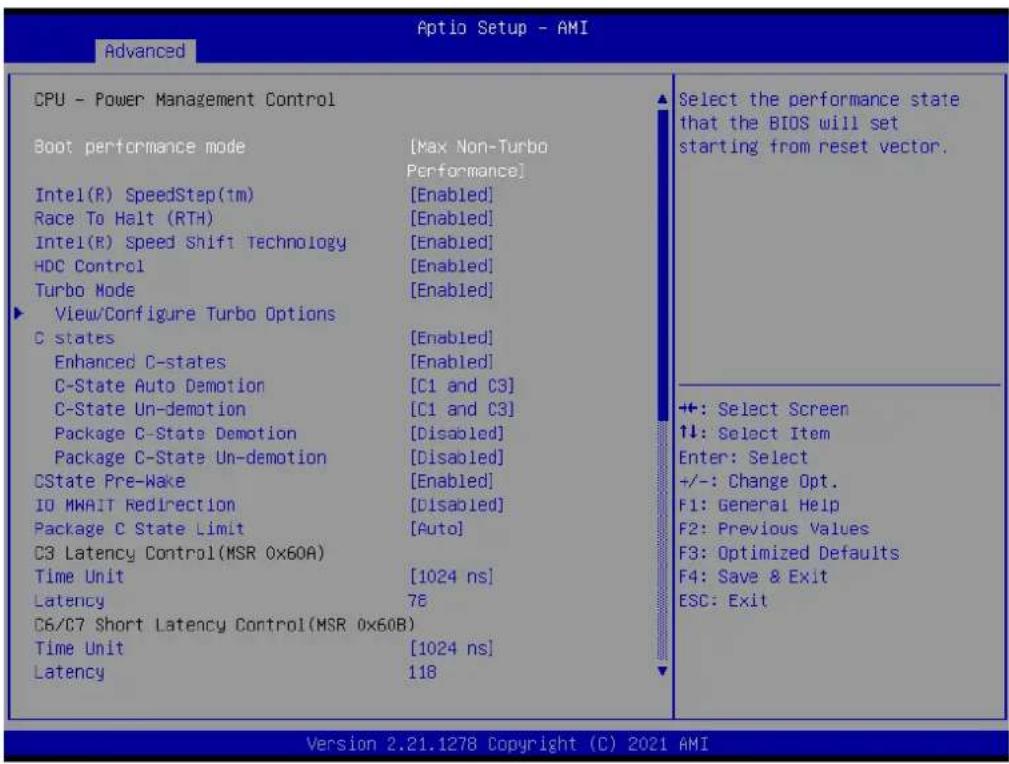
Advanced CPU - Power Management Control Boot performance mode [Max Non-Turbo Performance] Intel(R) SpeedStep(tm) [Enabled] Race To Halt (RTH) [Enabled] Intel(R) Speed Shift Technology [Enabled] HDC Control [Enabled] Turbo Mode [Enabled] View/Configure Turbo Options C states [Enabled] Enhanced C-states [Enabled] C-State Auto Demotion C1 and C3] C-State Un-demotion C1 and C3] Package C-State Demotion [Disabled] Package C-State Un-demotion [Disabled] CState Pre-Wake [Enabled] IO MWAIT Redirection [Disabled] Package C State Limit [Auto] C3 Latency Control(MSR 0x60A) Time Unit [1024 ns] Latency 76 C6/C7 Short Latency Control(MSR 0x60B) Time Unit [1024 ns] Latency 118 Select the performance state that the BIOS will set starting from reset vector. ++: Select Screen ↑↓: Select Item Enter: Select +/-: Change Opt. F1: General Help F2: Previous Values F3: Optimized Defaults F4: Save & Exit ESC: Exit Version 2.21.1278 Copyright (C) 2021 AMI
text_image
Optio Setup - AMI Advanced Time Unit [1024 ns] Latency 78 C6/C7 Short Latency Control(MSR 0x60B) Time Unit [1024 ns] Latency 118 C6/C7 Long Latency Control(MSR 0x60C) Time Unit [1024 ns] Latency 148 C8 Latency Control(MSR 0x633) Time Unit [1024 ns] Latency 250 C9 Latency Control(MSR 0x634) Time Unit [1024 ns] Latency 332 C10 Latency Control(MSR 0x635) Time Unit [1024 ns] Latency 1010 Thermal Monitor [Enabled] Interrupt Redirection Mode [FAIR with Fixed Selection Priority] Timed MHAIT [Disabled] ► Custom P-state Table Energy Performance Gain [Disabled] EPG DIMM Idd3N 26 EPG DIMM Idd3P 11 Enable/disable Energy Performance Gain. +: Select Screen ↑↓: Select Item Enter: Select +/-: Change Opt. F1: General Help F2: Previous Values F3: Optimized Defaults F4: Save & Exit ESC: Exit Version 2.21.1278 Copyright (C) 2021 AMI■ Boot Performance Mode [Max Non-Turbo Performance]
Intel ^® SpeedStep (tm) [Enabled]
■ Race To Halt (RTH) [Enabled]
Intel (R) Speed Shift Technology [Enabled]
■ HDC Control [Enabled]
■ Turbo Mode [Enabled]
View/Configure Turbo Options
■ Enhanced C states [Enabled]
■ Enhanced C-states [Enabled]
■ C-state Auto Demotion [C1 and C3]
■ C-state Un- demotion [C1 and C3]
■ Package C-state Demotion [Disabled]
■ Package C-state Un-demotion [Disabled]
C-State Pre-Wake [Enabled]
■ IO MWAIT Redirection [Disabled]
■ Package C-state Limit [Auto]
■ Time Unit [1024 ns]
■ Thermal Monitor [Enabled]
■ Interrupt Redirection Mode Selection [PAIR with Fixed Priority]
Timed MWAIT [Disabled]
■ Energy Performance Gain [Disabled]
Current Turbo Settings

text_image
Advanced Aptio Setup - AMI Current Turbo Settings Max Turbo Power Limit 4095.375 Min Turbo Power Limit 0.0 Package TCP Limit 35.0 Power Limit 1 65.0 Power Limit 2 130.0 Turbo Ratio Limit Core0 (TRLC) 1 Turbo Ratio Limit Core1 (TRLC) 2 Turbo Ratio Limit Core2 (TRLC) 3 Turbo Ratio Limit Core3 (TRLC) 4 Turbo Ratio Limit Core4 (TRLC) 5 Turbo Ratio Limit Core5 (TRLC) 6 Turbo Ratio Limit Core6 (TRLC) 7 Turbo Ratio Limit Core7 (TRLC) 8 Turbo Ratio Limit Ratio0 (TRLR) 44 Turbo Ratio Limit Ratio1 (TRLR) 44 Turbo Ratio Limit Ratio2 (TRLR) 43 Turbo Ratio Limit Ratio3 (TRLR) 42 Turbo Ratio Limit Ratio4 (TRLR) 41 Turbo Ratio Limit Ratio5 (TRLR) 40 Turbo Ratio Limit Ratio6 (TRLR) 39 Turbo Ratio Limit Ratio7 (TRLR) 37 Enable/Disable Energy Efficient P-state feature. When set to 0, will disable access to ENERGY_PERFORMANCE_BIAS MSR and CPUID Function 6 ECX[3] will read 0 indicating no support for Energy Efficient policy setting. When set to 1 will enable access to ENERGY_PERFORMANCE_BIAS MSR +: Select Screen 1: Select Item Enter: Select +/-: Change Opt. F1: General Help F2: Previous Values F3: Optimized Defaults F4: Save & Exit ESC: Exit Version 2.21.1278 Copyright (C) 2021 AMI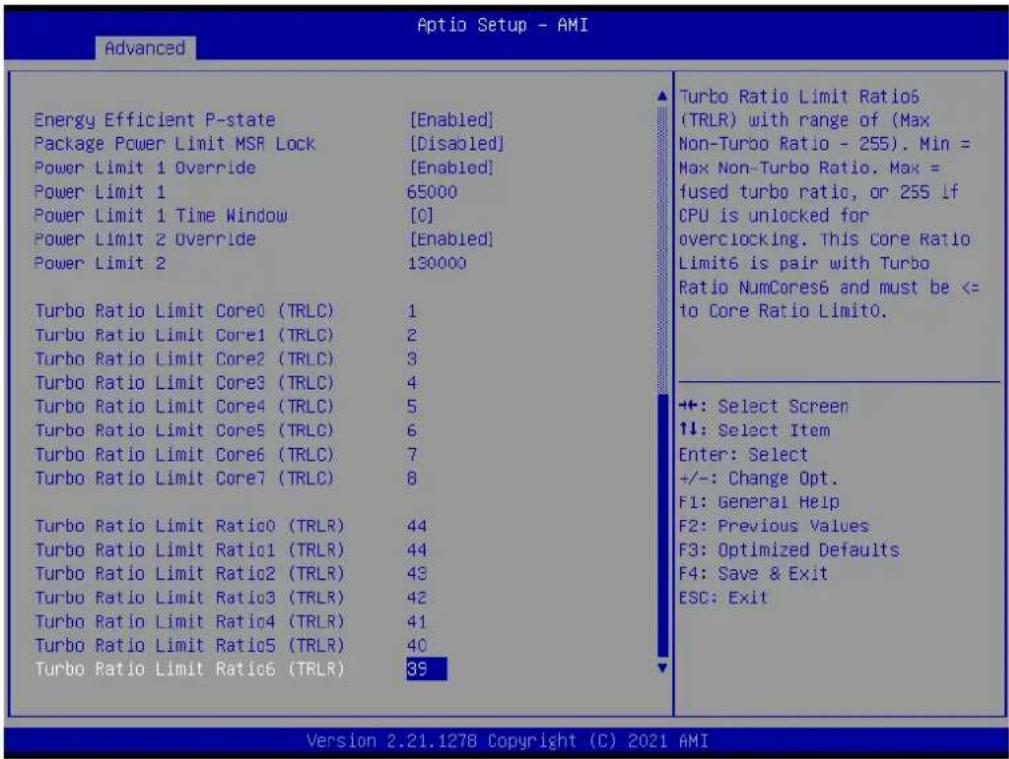
text_image
Aptio Setup - AMI Advanced Energy Efficient P-state [Enabled] Package Power Limit MSR Lock [Disabled] Power Limit 1 Override [Enabled] Power Limit 1 65000 Power Limit 1 Time Window [0] Power Limit 2 Override [Enabled] Power Limit 2 130000 Turbo Ratio Limit Core0 (TRLC) 1 Turbo Ratio Limit Core1 (TRLC) 2 Turbo Ratio Limit Core2 (TRLC) 3 Turbo Ratio Limit Core3 (TRLC) 4 Turbo Ratio Limit Core4 (TRLC) 5 Turbo Ratio Limit Core5 (TRLC) 6 Turbo Ratio Limit Core6 (TRLC) 7 Turbo Ratio Limit Core7 (TRLC) 8 Turbo Ratio Limit Ratio0 (TRLR) 44 Turbo Ratio Limit Ratio1 (TRLR) 44 Turbo Ratio Limit Ratio2 (TRLR) 43 Turbo Ratio Limit Ratio3 (TRLR) 42 Turbo Ratio Limit Ratio4 (TRLR) 41 Turbo Ratio Limit Ratio5 (TRLR) 40 Turbo Ratio Limit Ratio6 (TRLR) 39 Turbo Ratio Limit Ratio6(TRLR) 39 Turbo Ratio Limit Ratio6(TRLR) 39 Turbo Ratio Limit Ratio6(TRLR) 39 Turbo Ratio Limit Ratio6(TRLR) 39 Turbo Ratio Limit Ratio6(TRLR) 39 Turbo Ratio Limit Ratio6(TRLR) 39 Turbo Ratio Limit Ratio6(TRLR) 39 Turbo Ratio Limit Ratio6(TRLR) Turbo Ratio Limit Ratio6(TRLR) Turbo Ratio Limit Ratio6(TRLR) Turbo Ratio Limit Ratio6(TRLR) Turbo Ratio Limit Ratio6(TRLR) Turbo Ratio Limit Ratio6(TRLR) Turbo Ratio Limit Ratio6(TRLR) Turbo Ratio Limit Ratio6(TRLR) Turbo Ratio Limit Ratio6(TRLR) Turbo Ratio Limit Ratio6(TRLR) Turbo Ratio Limit Ratio6(TRLR)■ Energy Efficient P-state [Enabled]
Package Power Limit MSR Lock [Disabled]
■ Power Limit 1 Override [Enabled]
■ Power Limit 1 Time Window [0]
■ Power Limit 2 Override [Enabled]
■ Energy Efficient Turbo [Auto]
Custom P-State Table
text_image
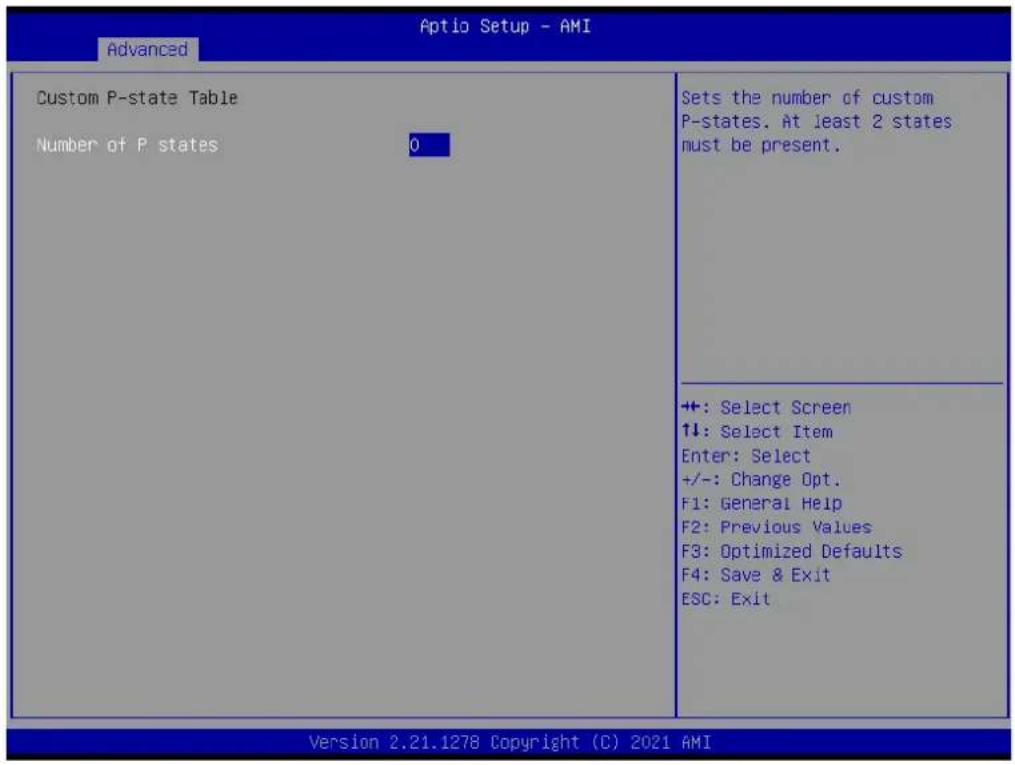
Optio Setup - AMI Advanced Custom P-state Table Number of P states 0 Sets the number of custom P-states. At least 2 states must be present. ++ : Select Screen ↑↓: Select Item Enter: Select +/-: Change Opt. F1: General Help F2: Previous Values F3: Optimized Defaults F4: Save & Exit ESC: Exit Version 2.21.1278 Copyright (C) 2021 AMIGT - Power Management Control

text_image
Optio Setup - AMI Advanced GT - Power Management Control RC6(Render Standby) [Enabled] Maximum GT frequency [Default Max Frequency] Disable Turbo GT frequency [Disabled] Check to enable render standby support. ++: Select Screen 1↓: Select Item Enter: Select +/-: Change Opt. F1: General Help F2: Previous Values F3: Optimized Defaults F4: Save & Exit ESC: Exit Version 2.21.1278 Copyright (C) 2021 AMI■ RC6 (Render Standby) [Enabled]
■ Maximum GT frequency [Default Max Frequency]
■ Disable Turbo GT frequency [Disabled]
3.2.2.4 PCH-FW Configuration
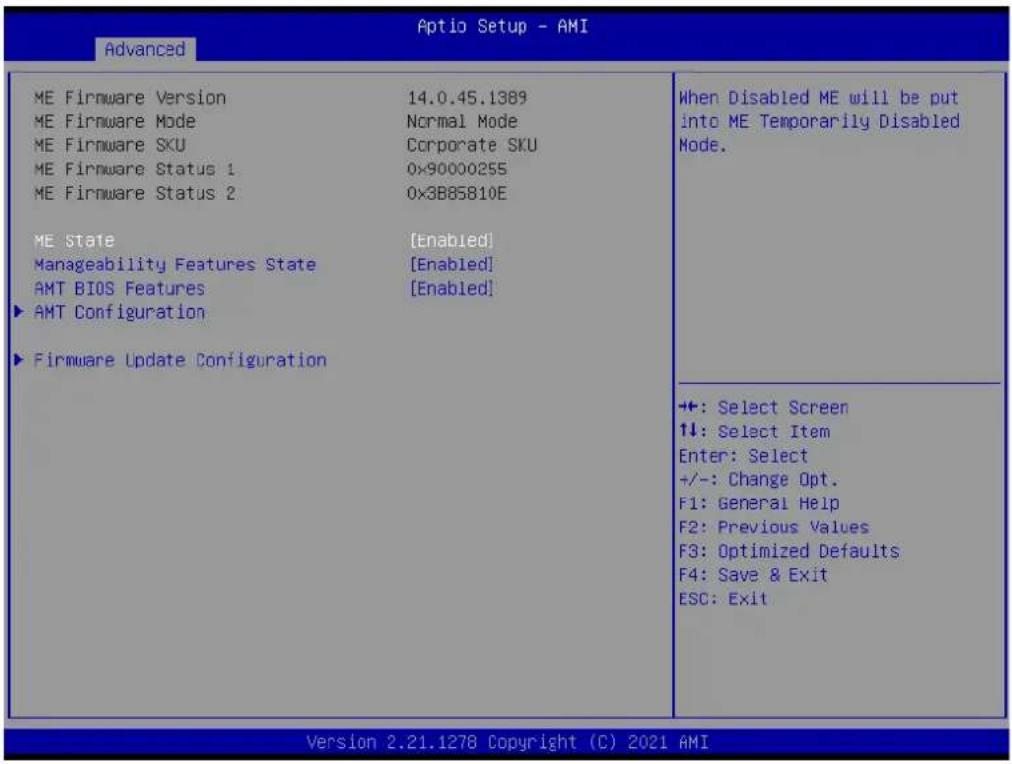
text_image
Advanced ME Firmware Version 14.0.45.1389 ME Firmware Mode Normal Mode ME Firmware SKU Corporate SKU ME Firmware Status 1 0x90000255 ME Firmware Status 2 0x3B85810E ME State [Enabled] Manageability Features State [Enabled] AMT BIOS Features [Enabled] ▶ AMT Configuration ▶ Firmware Update Configuration When Disabled ME will be put into ME Temporarily Disabled Mode. ++: Select Screen 1: Select Item Enter: Select +/-: Change Opt. F1: General Help F2: Previous Values F3: Optimized Defaults F4: Save & Exit ESC: Exit Version 2.21.1278 Copyright (C) 2021 AMIME State [Enabled]
■ Manageability Features Stage [Enabled]
■ AMT BIOS Features [Enabled]
AMT Configuration
Firmware Update Configuration
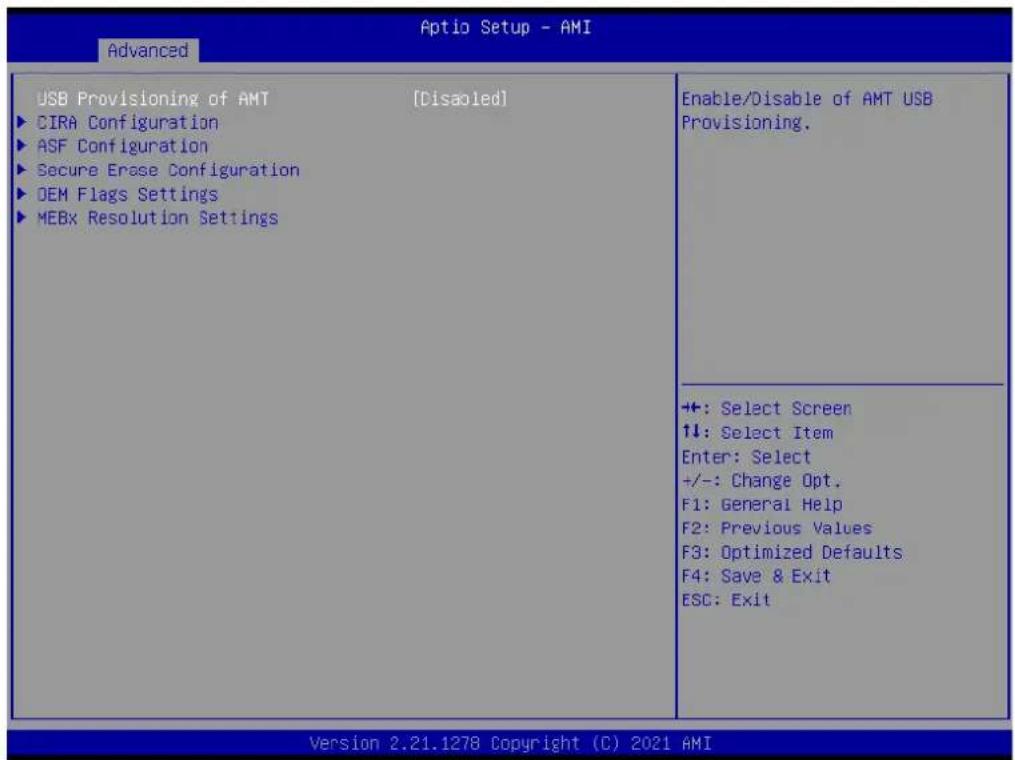
text_image
Advanced Optio Setup - AMI USB Provisioning of AMT [Disabled] ► CIRA Configuration ► ASF Configuration ► Secure Erase Configuration ► DEM Flags Settings ► MEBx Resolution Settings Enable/Disable of AMT USB Provisioning. ++: Select Screen ↑↓: Select Item Enter: Select +/-: Change Opt. F1: General Help F2: Previous Values F3: Optimized Defaults F4: Save & Exit ESC: Exit Version 2.21.1278 Copyright (C) 2021 AMIUSB Provisioning of AMT [Disabled]
CIRA Configuration
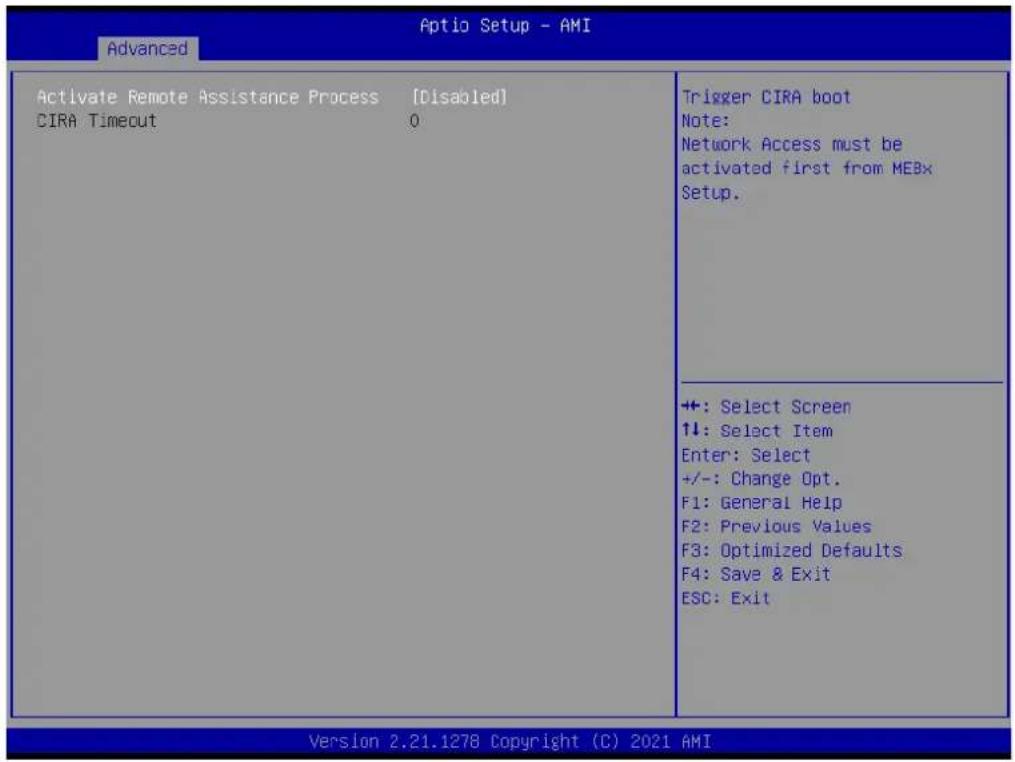
text_image
Aptio Setup - AMI Advanced Activate Remote Assistance Process [Disabled] CIRA Timeout 0 Trigger CIRA boot Note: Network Access must be activated first from MEBx Setup. ++ : Select Screen ↑↓: Select Item Enter: Select +/-: Change Opt. F1: General Help F2: Previous Values F3: Optimized Defaults F4: Save & Exit ESC: Exit Version 2.21.1278 Copyright (C) 2021 AMI■ Activate Remote Assistance Process [Disabled]
ASF Configuration
![Advantech AIMB-277 - ■ Activate Remote Assistance Process [Disabled] - 1](/content/2026/06/1228732/images/81be705c3924b18681de02eae36c4ee86bed7c3bd817112429cb7bbcd9351ab1.jpg)
text_image
Advanced PET Progress [Enabled] WatchDog [Disabled] OS Timer 0 BIOS Timer 0 ASF Sensors Table [Disabled] Enable/Disable PET Events Progress to receive PET Events. ++: Select Screen ↑↓: Select Item Enter: Select +/-: Change Opt. F1: General Help F2: Previous Values F3: Optimized Defaults F4: Save & Exit ESC: Exit Version 2.21.1278 Copyright (C) 2021 AMIPET Progress [Enabled]
WatchDog [Disabled]
■ ASF Sensors Table [Disabled]
Secure Erase Configuration

text_image
Advanced Aptio Setup - AMI Secure Erase mode [Simulated] Force Secure Erase [Disabled] Charge Secure Erase module behavior: Simulated: Performs SE flow without erasing SSD Real: Erase SSD. ++: Select Screen ↑↓: Select Item Enter: Select +/-: Change Opt. F1: General Help F2: Previous Values F3: Optimized Defaults F4: Save & Exit ESC: Exit Version 2.21.1278 Copyright (C) 2021 AMI- Secure Erase mode [Simulated]
■ Force Secure Erase [Disabled]
OEM Flags Settings

text_image
Aptio Setup - AMI Advanced MEBx hotkey Pressed [Disabled] MEBx Selection Screen [Disabled] Hide Unconfigure ME Confirmation [Disabled] Prompt MEBx OEM Debug Menu Enable [Disabled] Unconfigure ME [Disabled] OEMFLag Bit 1: Enable automatic MEBx hotkey press. ++: Select Screen ↑↓: Select Item Enter: Select +/-: Change Opt. F1: General Help F2: Previous Values F3: Optimized Defaults F4: Save & Exit ESC: Exit Version 2.21.1278 Copyright (C) 2021 AMI■ MEBx Hotkey Pressed [Disabled]
■ MEBx Selection Screen [Disabled]
■ Hide Unconfigured ME Confirmation Prompt [Disabled]
■ MEBx OEM Debug Menu Enable [Disabled]
■ Unconfigure ME [Disabled]
MEBx Resolution Settings
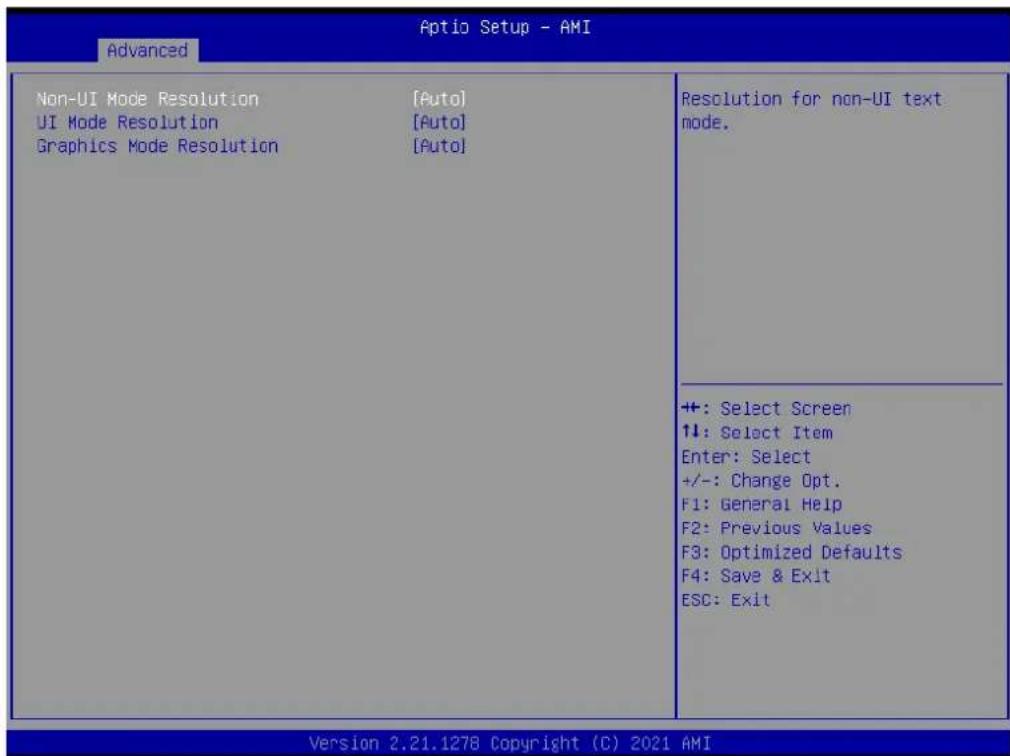
text_image
Advanced Non-UI Mode Resolution [Auto] UI Mode Resolution [Auto] Graphics Mode Resolution [Auto] Resolution for non-UI text mode. +: Select Screen ↑↓: Select Item Enter: Select +/-: Change Opt. F1: General Help F2: Previous Values F3: Optimized Defaults F4: Save & Exit ESC: Exit Version 2.21.1278 Copyright (C) 2021 AMI■ Non-UI Mode Resolution [Auto]
■ UI Mode Resolution [Auto]
■ Graphics Mode Resolution [Auto]
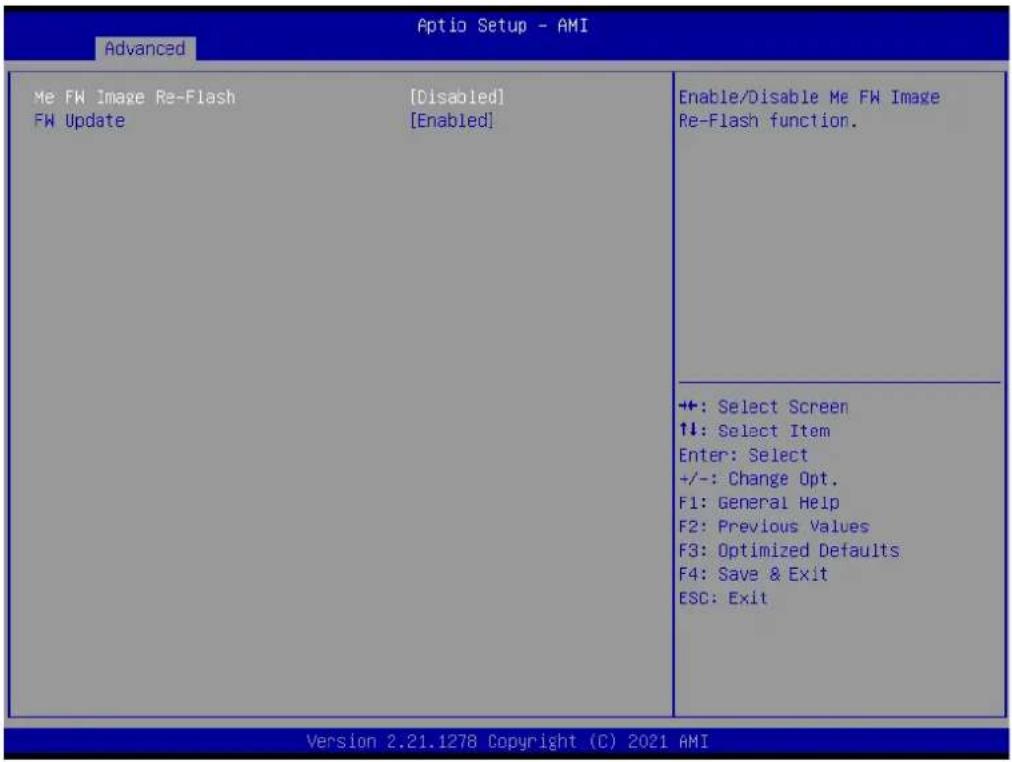
Firmware Update Configuration
text_image
Aptio Setup - AMI Advanced Me FW Image Re-Flash [Disabled] FW Update [Enabled] Enable/Disable Me FW Image Re-Flash function. ++: Select Screen ↑↓: Select Item Enter: Select +/-: Change Opt. F1: General Help F2: Previous Values F3: Optimized Defaults F4: Save & Exit ESC: Exit Version 2.21.1278 Copyright (C) 2021 AMI■ Me FW Image Re-Flash [Disabled]
■ FW Update [Enabled]
3.2.2.5 Trusted Computing
| TPM 2.0 Device Found Firmware Version: 7.2 Vendor: NTC | Enables or Disables BIOS support for security device. 0.S. will not show Security Device. TCG EFI protocol and INT1A interface will not be available. | |
| Security Device Support Active PCR banks Available PCR banks | [Enable] SHA-1,SHA256 SHA-1,SHA256,SHA384 | |
| SHA-1 PCR Bank SHA256 PCR Bank SHA384 PCR Bank | [Enabled] [Enabled] [Disabled] | |
| Pending operation Platform Hierarchy Storage Hierarchy Endorsement Hierarchy TPM 2.0 UEFI Spec Version Physical Presence Spec Version TPM 2.0 InterfaceType Device Select | [None] [Enabled] [Enabled] [TCG_2] [1.3] [TIS] [Auto] | |
| +: Select Screen ↑↓: Select Item Enter: Select +/-: Change Opt. F1: General Help F2: Previous Values F3: Optimized Defaults F4: Save & Exit ESC: Exit | ||
■ Security Device Support [Enabled]
SHA-1 PCR Bank [Enabled]
■ SHA256 PCR Bank [Enabled]
■ SHA384 PCR Bank [Disabled]
■ Pending operation [None]
■ Platform Hierarchy [Enabled]
■ Storage Hierarchy [Enabled]
■ Endorsement Hierarchy [Enabled]
TPM 2.0 UEFI Spec Version [TCG_2]
■ Physical Presence Spec Version [1.3]
TPM 2.0 InterfaceType [TIS]
■ Device Select [Auto]
3.2.2.6 ACPI Settings

text_image
Advanced ACPI Settings Enable ACPI Auto Configuration [Disabled] Enable Hibernation [Enabled] ACPI Sleep State [S3 (Suspend to RAM)] Enables or Disables BIOS ACPI Auto Configuration. ++: Select Screen ↑↓: Select Item Enter: Select +/-: Change Opt. F1: General Help F2: Previous Values F3: Optimized Defaults F4: Save & Exit ESC: Exit Version 2.21.1278 Copyright (C) 2021 AMI■ Enable ACPI Auto Configuration [Disabled]
■ Enable Hibernation [Enabled]
■ ACPI Sleep State [S3 (Suspend to RAM)]
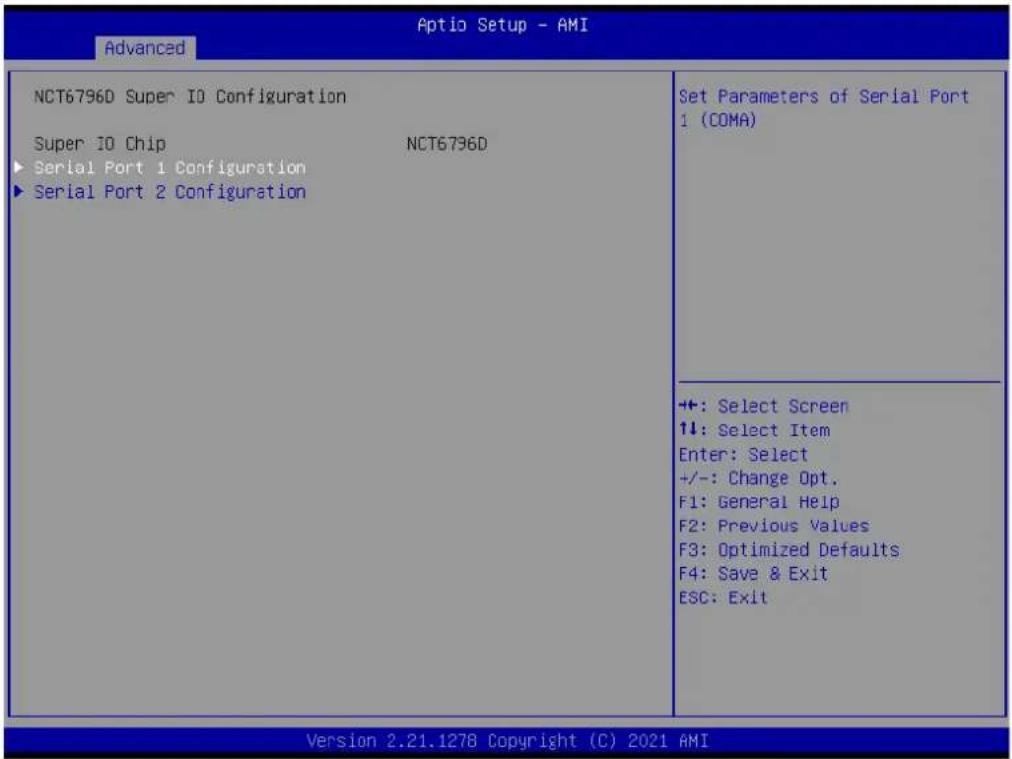
3.2.2.7 NCT6796D Super IO Configuration
text_image
Advanced NCT6796D Super IO Configuration Super IO Chip NCT6796D ► Serial Port 1 Configuration ► Serial Port 2 Configuration Set Parameters of Serial Port 1 (COMA) ++: Select Screen 1↓: Select Item Enter: Select +/-: Change Opt. F1: General Help F2: Previous Values F3: Optimized Defaults F4: Save & Exit ESC: Exit Version 2.21.1278 Copyright (C) 2021 AMI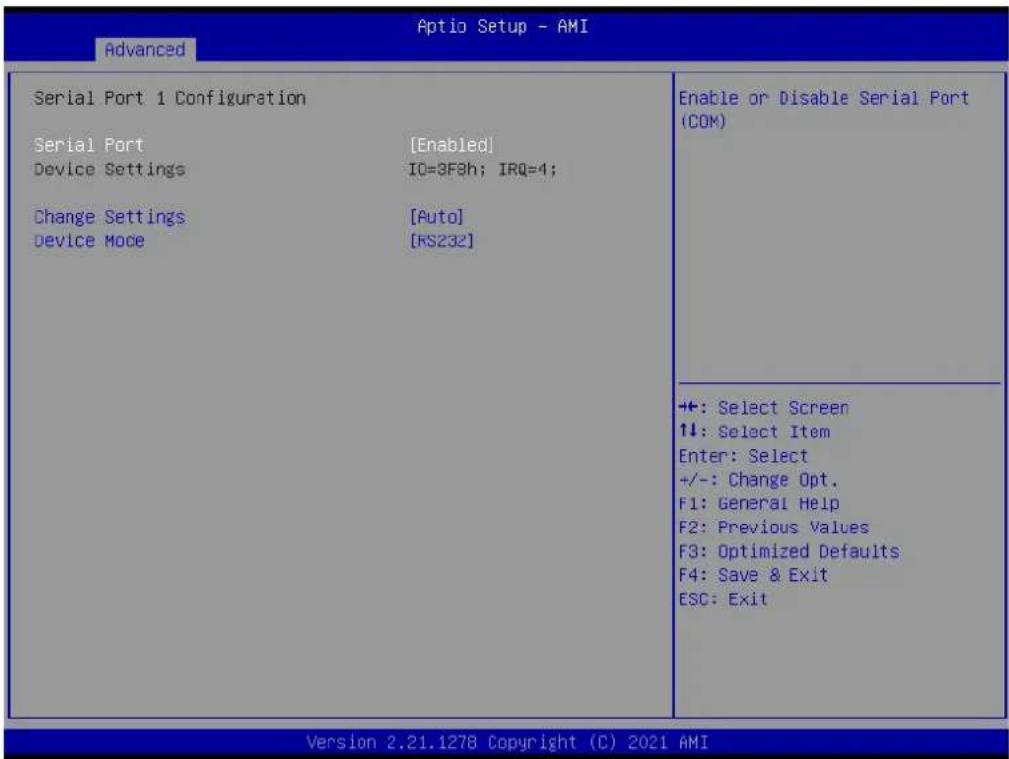
text_image
Advanced Serial Port 1 Configuration Serial Port [Enabled] Device Settings IO=3F8h; IRQ=4; Change Settings [Auto] Device Mode [RS232] Enable or Disable Serial Port (COM) +: Select Screen ↑↓: Select Item Enter: Select +/-: Change Opt. F1: General Help F2: Previous Values F3: Optimized Defaults F4: Save & Exit ESC: Exit Version 2.21.1278 Copyright (C) 2021 AMISerial Port [Enabled]
■ Change Settings [Auto]
■ Device Mode [RS232]
text_image
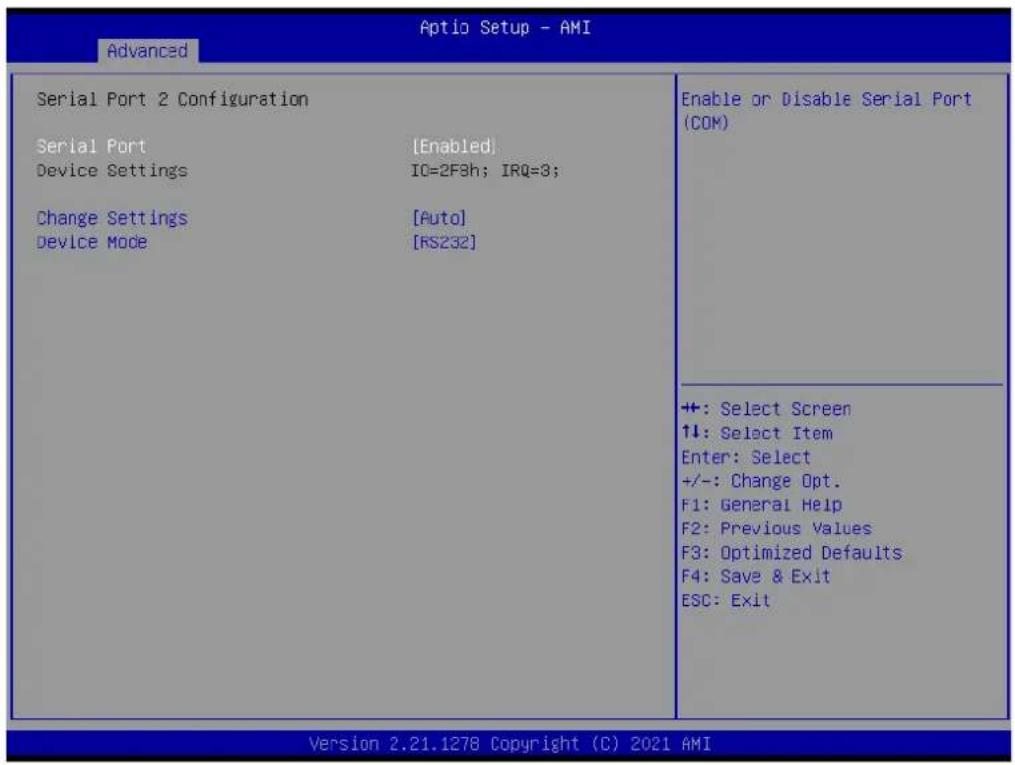
Advanced Serial Port 2 Configuration Serial Port [Enabled] Device Settings IO=2F3h; IRQ=3; Change Settings [Auto] Device Mode [RS232] Enable or Disable Serial Port (COM) +: Select Screen ↑↓: Select Item Enter: Select +/-: Change Opt. F1: General Help F2: Previous Values F3: Optimized Defaults F4: Save & Exit ESC: Exit Version 2.21.1278 Copyright (C) 2021 AMISerial Port [Enabled]
■ Change Settings [Auto]
■ Device Mode [RS232]
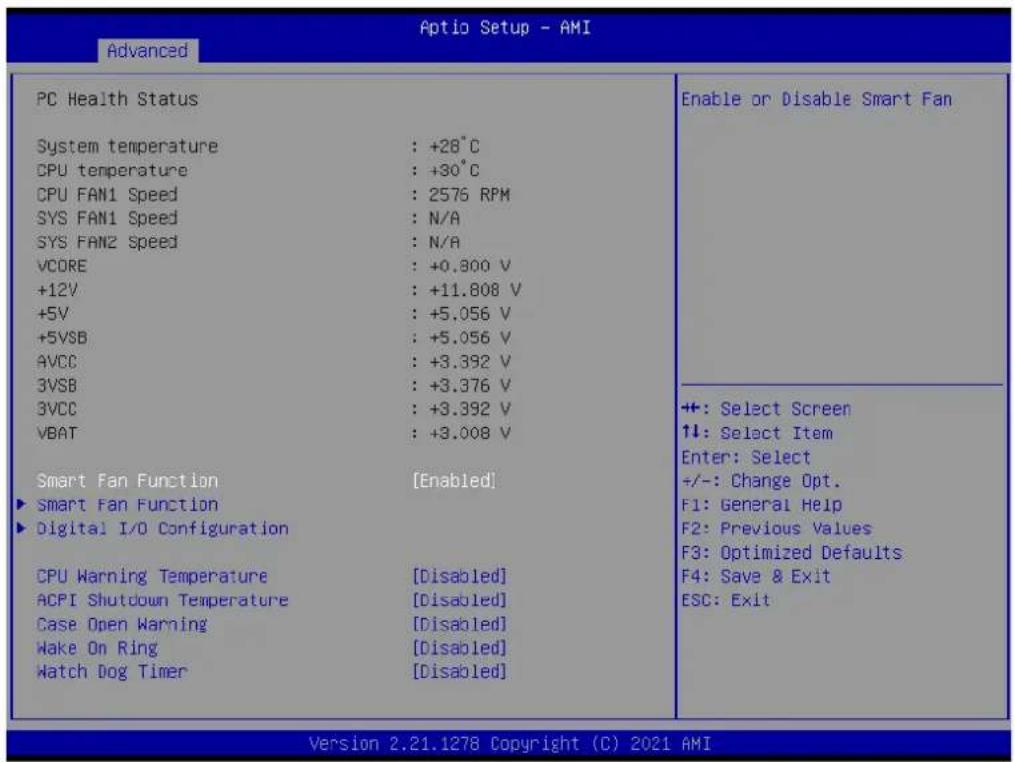
3.2.2.8 NCT6796D HW Monitor
text_image
Advanced Aptio Setup - AMI PC Health Status System temperature : +28°C CPU temperature : +30°C CPU FAN1 Speed : 2576 RPM SYS FAN1 Speed : N/A SYS FAN2 Speed : N/A VCORE : +0.800 V +12V : +11.808 V +5V : +5.056 V +5VSB : +5.056 V AVCC : +3.392 V 3VSB : +3.376 V 3VCC : +3.392 V VBAT : +3.008 V Smart Fan Function [Enabled] ► Smart Fan Function ► Digital I/O Configuration CPU Warning Temperature [Disabled] ACPI Shutdown Temperature [Disabled] Case Open Warning [Disabled] Wake On Ring [Disabled] Watch Dog Timer [Disabled] Enable or Disable Smart Fan +: Select Screen ↑↓: Select Item Enter: Select +/-: Change Opt. F1: General Help F2: Previous Values F3: Optimized Defaults F4: Save & Exit ESC: Exit Version 2.21.1278 Copyright (C) 2021 AMISmart Fan Function [Enabled]
■ CPU Warning Temperature [Disabled]
■ ACPI Shutdown Temperature [Disabled]
■ Case Open Warning [Disabled]
■ Wake On Ring [Disabled]
■ Watch Dog Timer [Disabled]
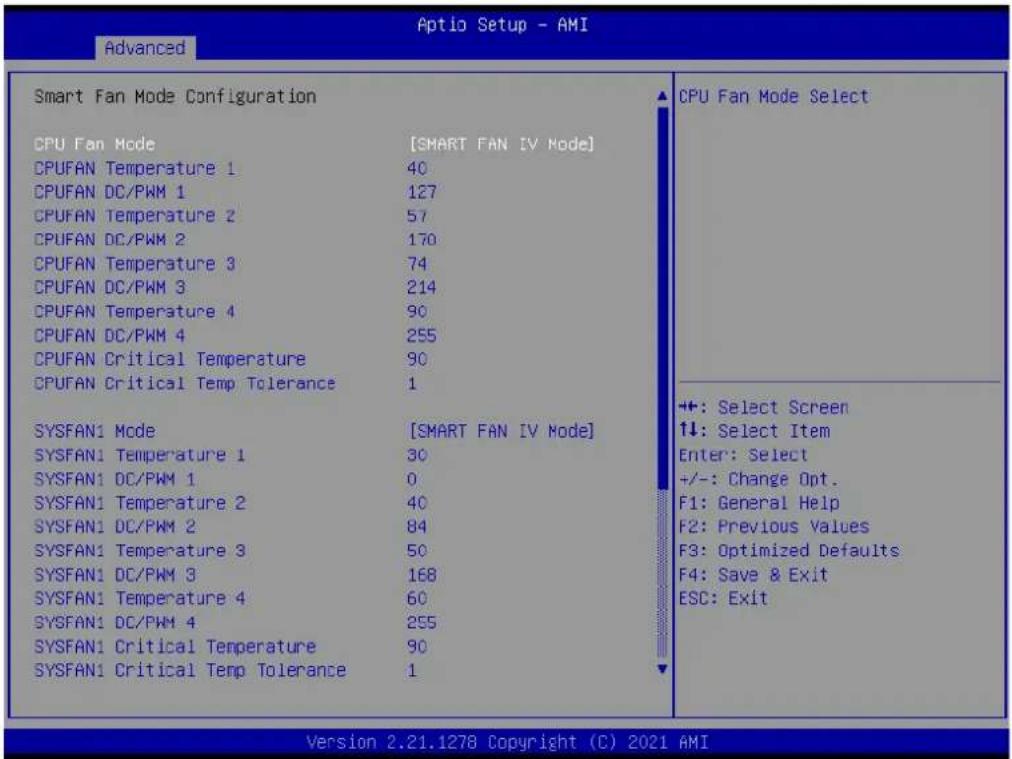
Smart Fan Function
text_image
Aptio Setup - AMI Advanced Smart Fan Mode Configuration CPU Fan Mode [SMART FAN IV Mode] CPUFAN Temperature 1 40 CPUFAN DC/PWM 1 127 CPUFAN Temperature 2 57 CPUFAN DC/PWM 2 170 CPUFAN Temperature 3 74 CPUFAN DC/PWM 3 214 CPUFAN Temperature 4 90 CPUFAN DC/PWM 4 255 CPUFAN Critical Temperature 90 CPUFAN Critical Temp Tolerance 1 SYSFAN1 Mode [SMART FAN IV Mode] SYSFAN1 Temperature 1 30 SYSFAN1 DC/PWM 1 0 SYSFAN1 Temperature 2 40 SYSFAN1 DC/PWM 2 84 SYSFAN1 Temperature 3 50 SYSFAN1 DC/PWM 3 168 SYSFAN1 Temperature 4 60 SYSFAN1 DC/PWM 4 255 SYSFAN1 Critical Temperature 90 SYSFAN1 Critical Temp Tolerance 1 CPU Fan Mode Select ++: Select Screen 1↓: Select Item Enter: Select +/-: Change Opt. F1: General Help F2: Previous Values F3: Optimized Defaults F4: Save & Exit ESC: Exit Version 2.21.1278 Copyright (C) 2021 AMI■ CPU Fan Mode [SMART FAN IV Mode]

text_image
Advanced CPUFAN Critical Temp Tolerance 1 SYSFAN1 Mode [SMART FAN IV Mode] SYSFAN1 Temperature 1 30 SYSFAN1 DC/PWM 1 0 SYSFAN1 Temperature 2 40 SYSFAN1 DC/PWM 2 84 SYSFAN1 Temperature 3 50 SYSFAN1 DC/PWM 3 168 SYSFAN1 Temperature 4 60 SYSFAN1 DC/PWM 4 255 SYSFAN1 Critical Temperature 90 SYSFAN1 Critical Temp Tolerance 1 SYSFAN2 Mode [SMART FAN IV Mode] SYSFAN2 Temperature 1 30 SYSFAN2 DC/PWM 1 0 SYSFAN2 Temperature 2 40 SYSFAN2 DC/PWM 2 84 SYSFAN2 Temperature 3 50 SYSFAN2 DC/PWM 3 168 SYSFAN2 Temperature 4 60 SYSFAN2 DC/PWM 4 255 SYSFAN2 Critical Temperature 90 SYSFAN2 Critical Temp Tolerance 1 Input Tolerance of Critical Temperature (Range:0 - 7) +: Select Screen ↑↓: Select Item Enter: Select +/-: Change Opt. F1: General Help F2: Previous Values F3: Optimized Defaults F4: Save & Exit ESC: Exit Version 2.21.1278 Copyright (C) 2021 AMIDigital I/O Configuration

text_image
Optio Setup - AMI Advanced Digital I/O Configuration Digital I/O Pin 1 [Input] Digital I/O Pin 2 [Input] Digital I/O Pin 3 [Input] Digital I/O Pin 4 [Input] Digital I/O Pin 5 [Input] Digital I/O Pin 6 [Input] Digital I/O Pin 7 [Input] Digital I/O Pin 8 [Input] Configure Digital I/O Pin. ++ : Select Screen ↑↓: Select Item Enter: Select +/-: Change Opt. F1: General Help F2: Previous Values F3: Optimized Defaults F4: Save & Exit ESC: Exit Version 2.21.1278 Copyright (C) 2021 AMIDigital I/O Pin 1\~8 [Input]
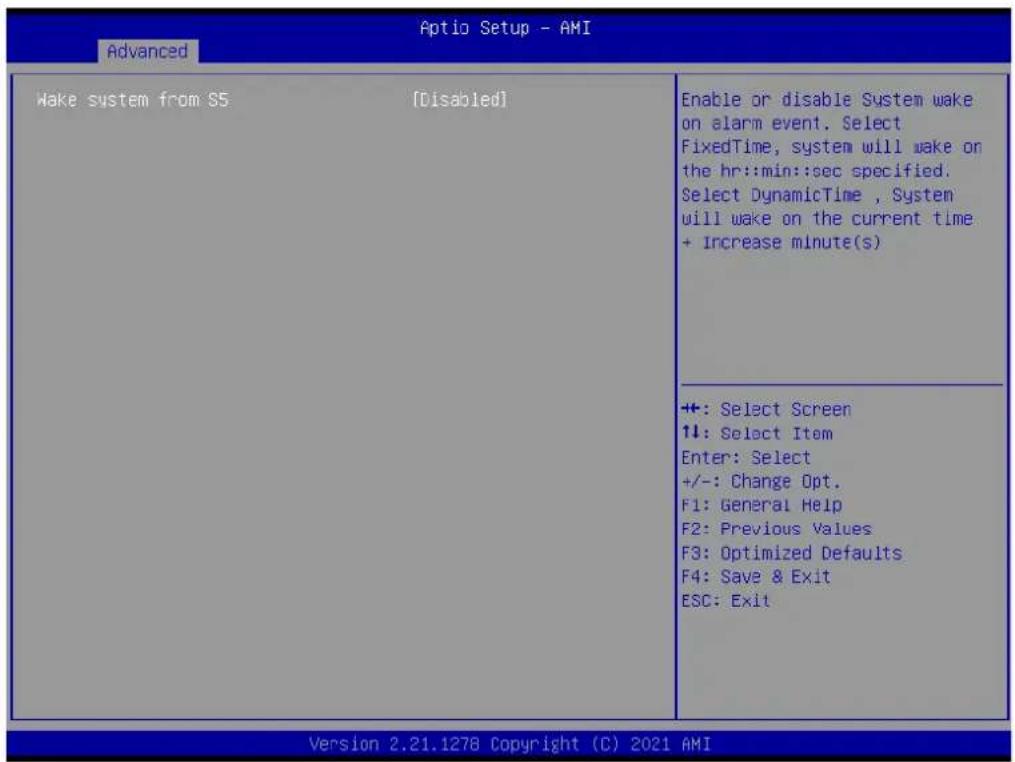
3.2.2.9 S5 RTC Wake Settings
text_image
Advanced Aptio Setup - AMI Wake system from S5 [Disabled] Enable or disable System wake on alarm event. Select FixedTime, system will wake on the hr::min::sec specified. Select DynamicTime , System will wake on the current time + Increase minute(s) +: Select Screen 1↓: Select Item Enter: Select +/-: Change Opt. F1: General Help F2: Previous Values F3: Optimized Defaults F4: Save & Exit ESC: Exit Version 2.21.1278 Copyright (C) 2021 AMI■ Wake system from S5 [Disabled]
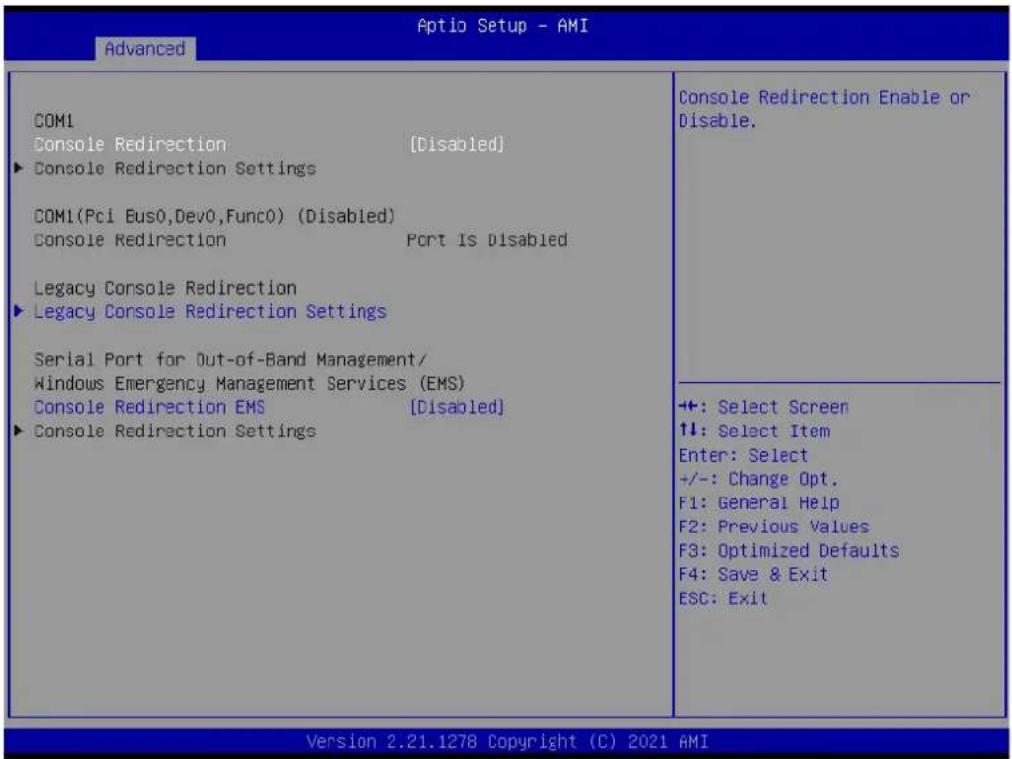
3.2.2.10 Serial Port Console Redirection
text_image
Aptio Setup - AMI Advanced COM1 Console Redirection [Disabled] ► Console Redirection Settings COM1(Pc1 Bus0,Dev0,Func0) (Disabled) Console Redirection Port Is Disabled Legacy Console Redirection ► Legacy Console Redirection Settings Serial Port for Out-of-Band Management/ Windows Emergency Management Services (EMS) Console Redirection EMS [Disabled] ► Console Redirection Settings Console Redirection Enable or Disable. ++: Select Screen ↑↓: Select Item Enter: Select +/-: Change Opt. F1: General Help F2: Previous Values F3: Optimized Defaults F4: Save & Exit ESC: Exit Version 2.21.1278 Copyright (C) 2021 AMI■ Console Redirection [Disabled]
■ Console Redirection EMS [Disabled]
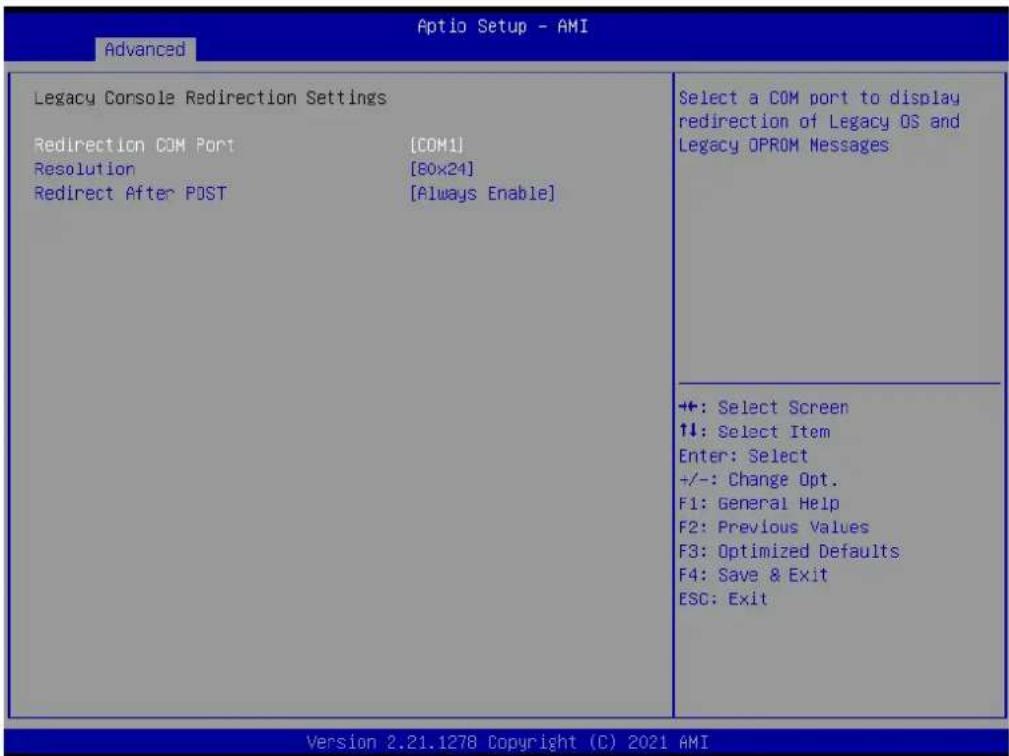
Legacy Console Redirection Settings
text_image
Advanced Aptio Setup - AMI Legacy Console Redirection Settings Redirection COM Port [COM1] Resolution [BOX24] Redirect After POST [Always Enable] Select a COM port to display redirection of Legacy OS and Legacy OPROM Messages ++: Select Screen ↑↓: Select Item Enter: Select +/-: Change Opt. F1: General Help F2: Previous Values F3: Optimized Defaults F4: Save & Exit ESC: Exit Version 2.21.1278 Copyright (C) 2021 AMI■ Redirection COM Port [COM1]
■ Resolution [80x24]
■ Redirect After POST [Always Enable]
3.2.2.11 Intel TXT Information

text_image
Advanced Intel TXT Information Chipset Production Fused BiosAcn Production Fused Chipset Txt Supported Cpu Txt Supported Error Code None Class Code None Major Code None Minor Code None ++: Select Screen ↑↓: Select Item Enter: Select +/-: Change Opt. F1: General Help F2: Previous Values F3: Optimized Defaults F4: Save & Exit ESC: Exit Version 2.21.1278 Copyright (C) 2021 AMI3.2.2.12 USB Configuration
text_image
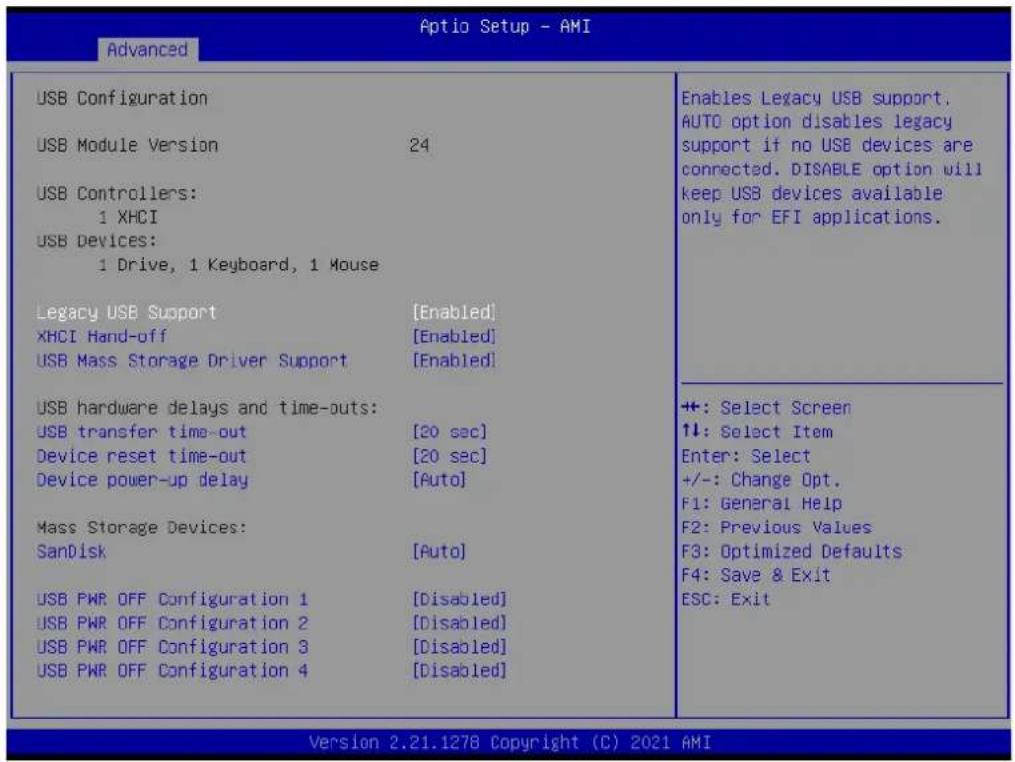
Advanced Optio Setup - AMI USB Configuration USB Module Version 24 USB Controllers: 1 XHCI USB Devices: 1 Drive, 1 Keyboard, 1 Mouse Legacy USB Support [Enabled] XHCI Hand-off [Enabled] USB Mass Storage Driver Support [Enabled] USB hardware delays and time-outs: USB transfer time-out [20 sec] Device reset time-out [20 sec] Device power-up delay [Auto] Mass Storage Devices: SanDisk [Auto] USB PWR OFF Configuration 1 [Disabled] USB PWR OFF Configuration 2 [Disabled] USB PWR OFF Configuration 3 [Disabled] USB PWR OFF Configuration 4 [Disabled] Enables Legacy USB support. AUTO option disables legacy support if no USB devices are connected. DISABLE option will keep USB devices available only for EFI applications. ++: Select Screen ↑↓: Select Item Enter: Select +/-: Change Opt. F1: General Help F2: Previous Values F3: Optimized Defaults F4: Save & Exit ESC: Exit Version 2.21.1278 Copyright (C) 2021 AMI■ Legacy USB Support [Enabled]
XHCI Hand-off [Enabled]
USB Mass Storage Driver Support [Enabled]
USB transfer time-out [20 sec]
■ Device reset time-out [20 sec]
■ Device power-up delay [Auto]
SanDisk [Auto]
USB PWR OFF Configuration1 [Disabled]
USB PWR OFF Configuration2 [Disabled]
USB PWR OFF Configuration3 [Disabled]
USB PWR OFF Configuration4 [Disabled]
Note! USB power current delivery under S5 Max. 1.8A.

3.2.2.13 Network Stack Configuration
text_image
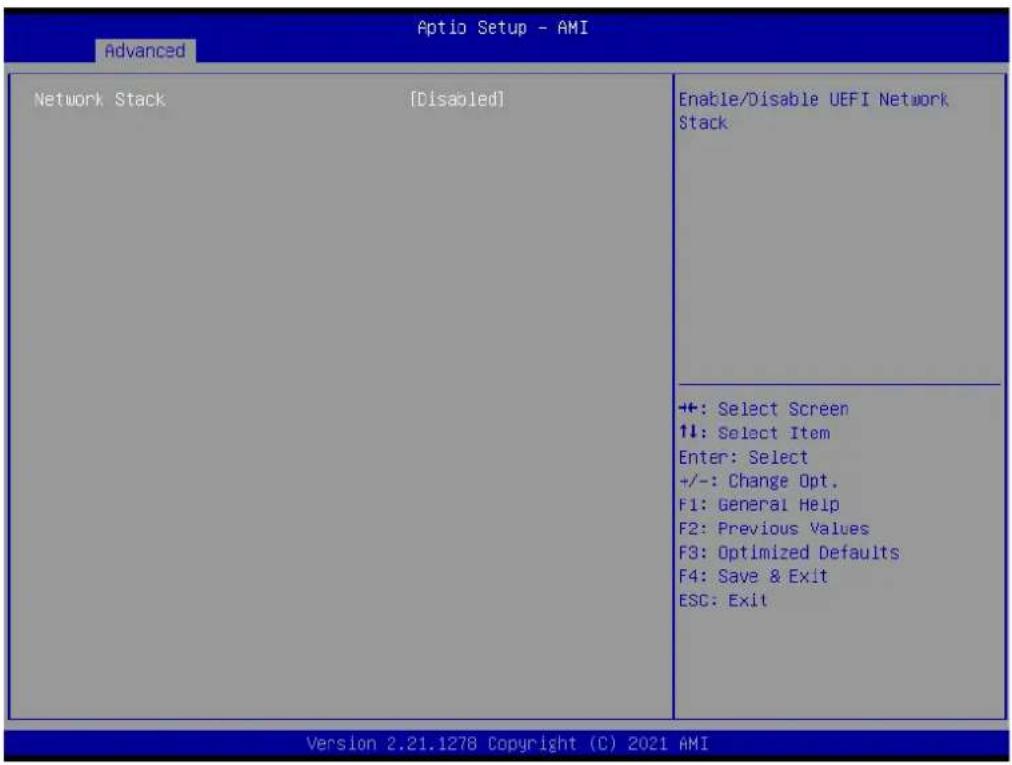
Advanced Aptio Setup - AMI Network Stack [Disabled] Enable/Disable UEFI Network Stack ++: Select Screen 11: Select Item Enter: Select +/-: Change Opt. F1: General Help F2: Previous Values F3: Optimized Defaults F4: Save & Exit ESC: Exit Version 2.21.1278 Copyright (C) 2021 AMI■ Network Stack [Disabled]
3.2.2.14 CSM Configuration
text_image
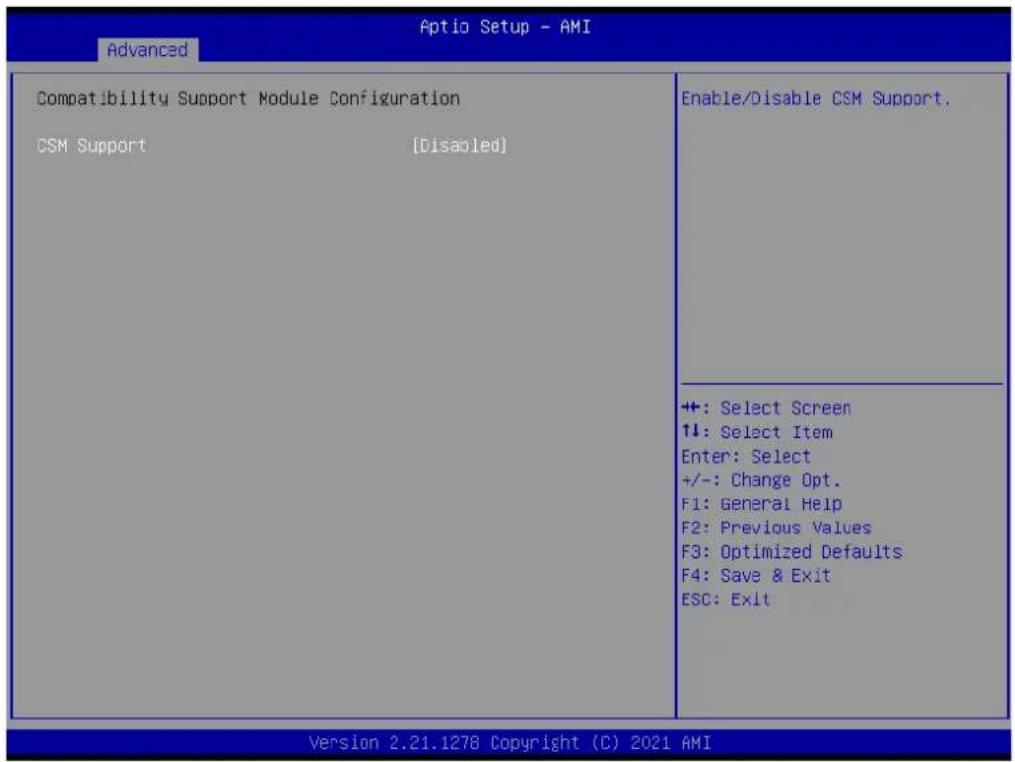
Aptio Setup - AMI Advanced Compatibility Support Module Configuration CSM Support [Disabled] Enable/Disable CSM Support. ++: Select Screen ↑↓: Select Item Enter: Select +/-: Change Opt. F1: General Help F2: Previous Values F3: Optimized Defaults F4: Save & Exit ESC: Exit Version 2.21.1278 Copyright (C) 2021 AMI■ CSM Support [Disabled]
3.2.2.15 NVMe Configuration
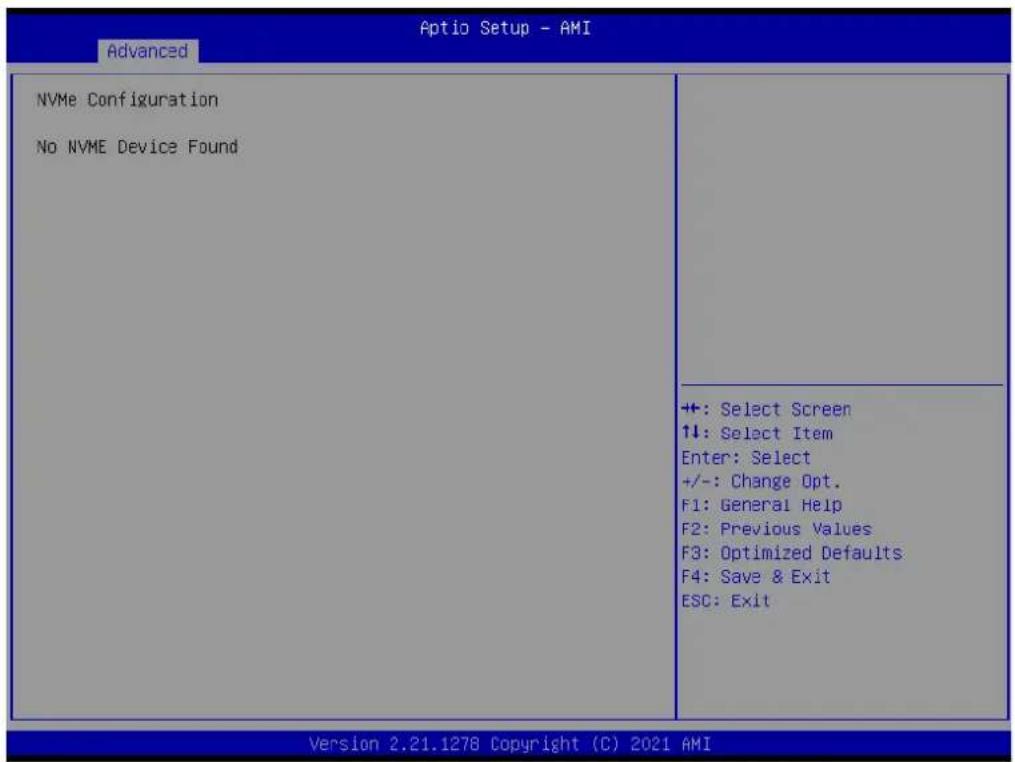
text_image
Aptio Setup - AMI Advanced NVMe Configuration No NVME Device Found ++: Select Screen ↑↓: Select Item Enter: Select +/-: Change Opt. F1: General Help F2: Previous Values F3: Optimized Defaults F4: Save & Exit ESC: Exit Version 2.21.1278 Copyright (C) 2021 AMI3.3 Chipset Configuration Setting
Select the chipset tab from the BIOS setup screen to enter the Chipset Setup screen. Users can select any item in the left frame of the screen, such as PCI express Configuration, to go to the sub menu for that item. Users can display a Chipset Setup option by highlighting it using the
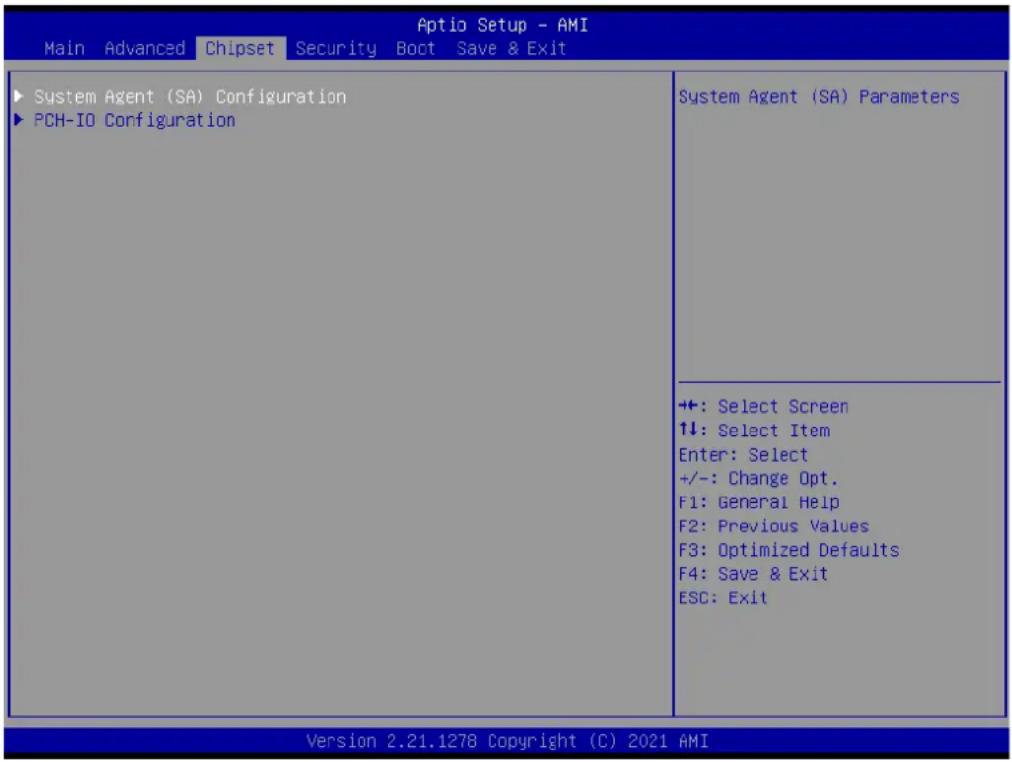
text_image
Aptio Setup - AMI Main Advanced Chipset Security Boot Save & Exit ► System Agent (SA) Configuration ► PCH-IO Configuration System Agent (SA) Parameters ++: Select Screen 1↓: Select Item Enter: Select +/-: Change Opt. F1: General Help F2: Previous Values F3: Optimized Defaults F4: Save & Exit ESC: Exit Version 2.21.1278 Copyright (C) 2021 AMI3.3.1 System Agent (SA) Configuration
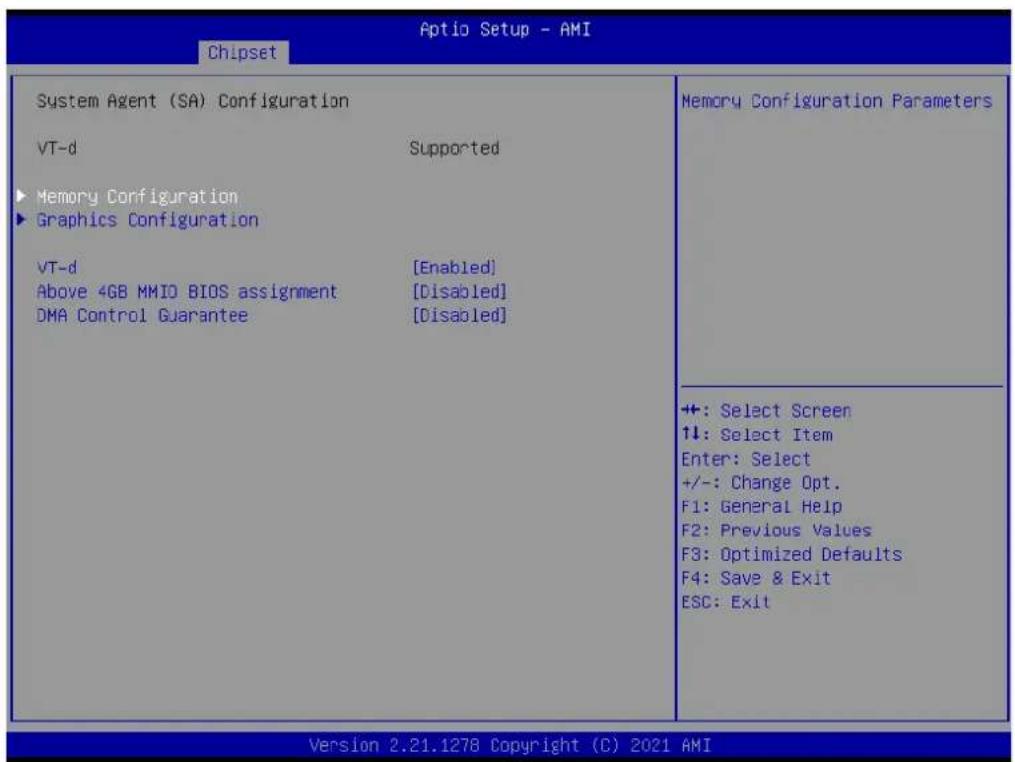
text_image
Aptio Setup - AMI Chipset System Agent (SA) Configuration VT-d Supported ► Memory Configuration ► Graphics Configuration VT-d [Enabled] Above 4GB MMIO BIOS assignment [Disabled] DMA Control Guarantee [Disabled] Memory Configuration Parameters +: Select Screen ↑↓: Select Item Enter: Select +/-: Change Opt. F1: General Help F2: Previous Values F3: Optimized Defaults F4: Save & Exit ESC: Exit Version 2.21.1278 Copyright (C) 2021 AMIVT-d [Enabled]
■ Above 4GB MMIO BIOS assignment [Disabled]
■ DMA Control Guarantee [Disabled]
3.3.1.1 Memory Configuration
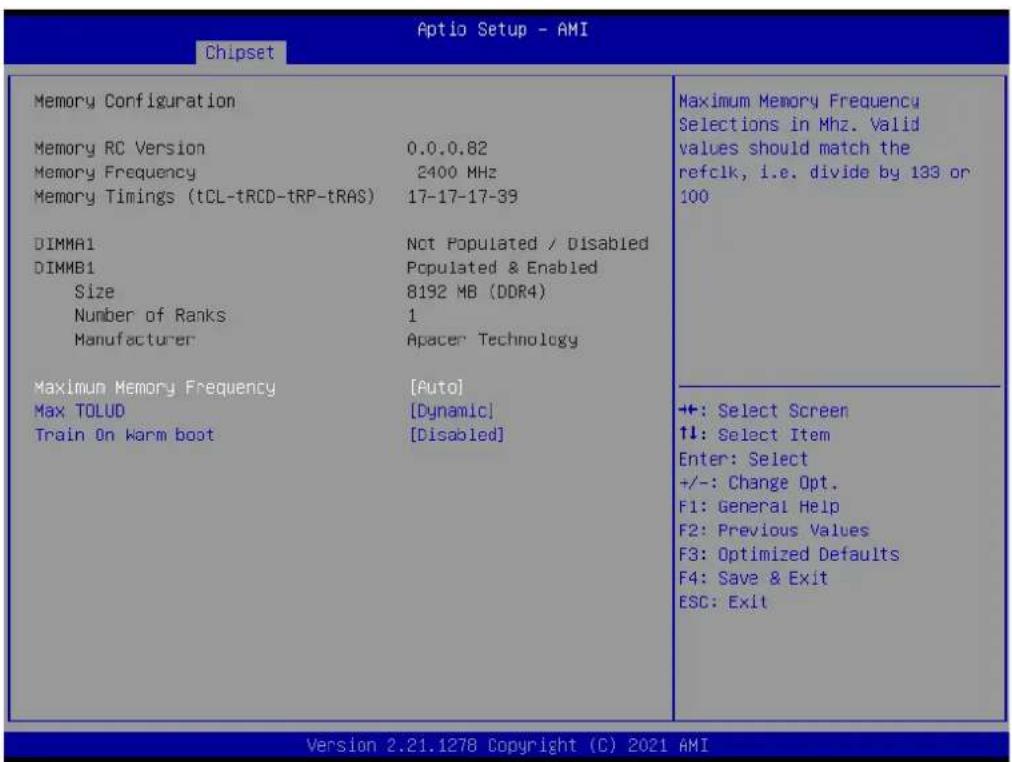
text_image
Aptio Setup - AMI Chipset Memory Configuration Memory RC Version 0.0.0.82 Memory Frequency 2400 MHz Memory Timings (tCL-tRCD-trP-trAS) 17-17-17-39 DIMMA1 Not Populated / Disabled DIMMB1 Populated & Enabled Size 8192 MB (DDR4) Number of Ranks 1 Manufacturer Apacer Technology Maximum Memory Frequency [Auto] Max TOLUD [Dynamic] Train On Warm boot [Disabled] Maximum Memory Frequency Max TOLUD Train On Warm boot ++: Select Screen ↑!: Select Item Enter: Select +/-: Change Opt. F1: General Help F2: Previous Values F3: Optimized Defaults F4: Save & Exit ESC: Exit Version 2.21.1278 Copyright (C) 2021 AMI Maximum Memory Frequency Selections in Mhz. Valid values should match the refclk, i.e. divide by 133 or 100 ++: Select Screen ↑!: Select Item Enter: Select +/-: Change Opt. F1: General Help F2: Previous Values F3: Optimized Defaults F4: Save & Exit ESC: ExitThe item shows you memory specification included RC version, frequency, size and voltage information etc.
■ Maximum Memory Frequency (Auto)
Max TOLUD [ Dynamic ]
■ Train On Warm boot [Disabled]
3.3.1.2 Graphics Configuration
text_image
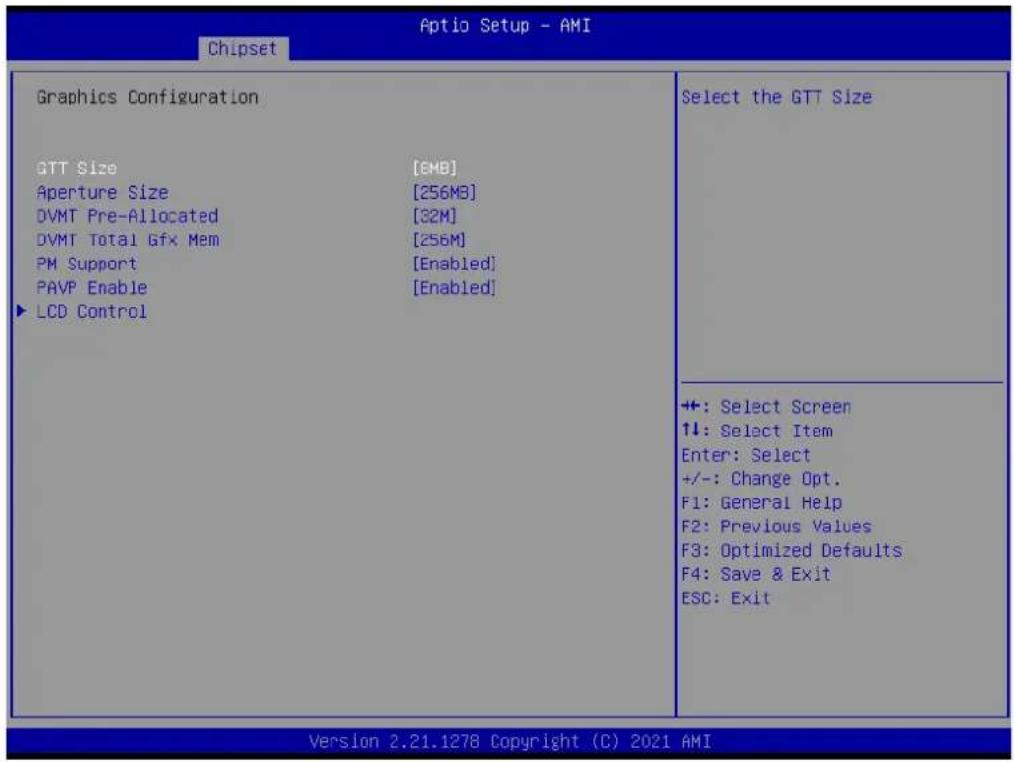
Chipset Aptio Setup - AMI Graphics Configuration GTT Size [EMB] Aperture Size [256MB] DVMT Pre-Allocated [32M] DVMT Total Gfx Mem [256M] PM Support [Enabled] PAVP Enable [Enabled] ► LCD Control Select the GTT Size ++: Select Screen ↑↓: Select Item Enter: Select +/-: Change Opt. F1: General Help F2: Previous Values F3: Optimized Defaults F4: Save & Exit ESC: Exit Version 2.21.1278 Copyright (C) 2021 AMIGTT size [8MB]
Aperture Size [256MB]
DVMT Pre-Allocated [32M]
DVMT Total Gfx Mem [256M]
■ PM Support [Enabled]
PAVP Enable [Enabled]
3.3.1.3 LCD Control

text_image
Aptio Setup - AMI Chipset LCD Control LVDS Panel Type [Disabled] eDP/LVDS Backlight Signal Control [LINEAR] eDP/LVDS Backlight Control PWM 100 LVDS Backlight PWM Frequency [23.47 KHz] Control +: Select Screen 1: Select Item Enter: Select +/-: Change Opt. F1: General Help F2: Previous Values F3: Optimized Defaults F4: Save & Exit ESC: Exit Version 2.21.1278 Copyright (C) 2021 AMI■ LVDS Panel Type [Disabled]
■ eDP/LVDS Backlight Signal Control [LINEAR]
■ LVDS Backlight PWM Frequency Control [23.47 KHz]
3.3.2 PCH-I/O Configuration
text_image
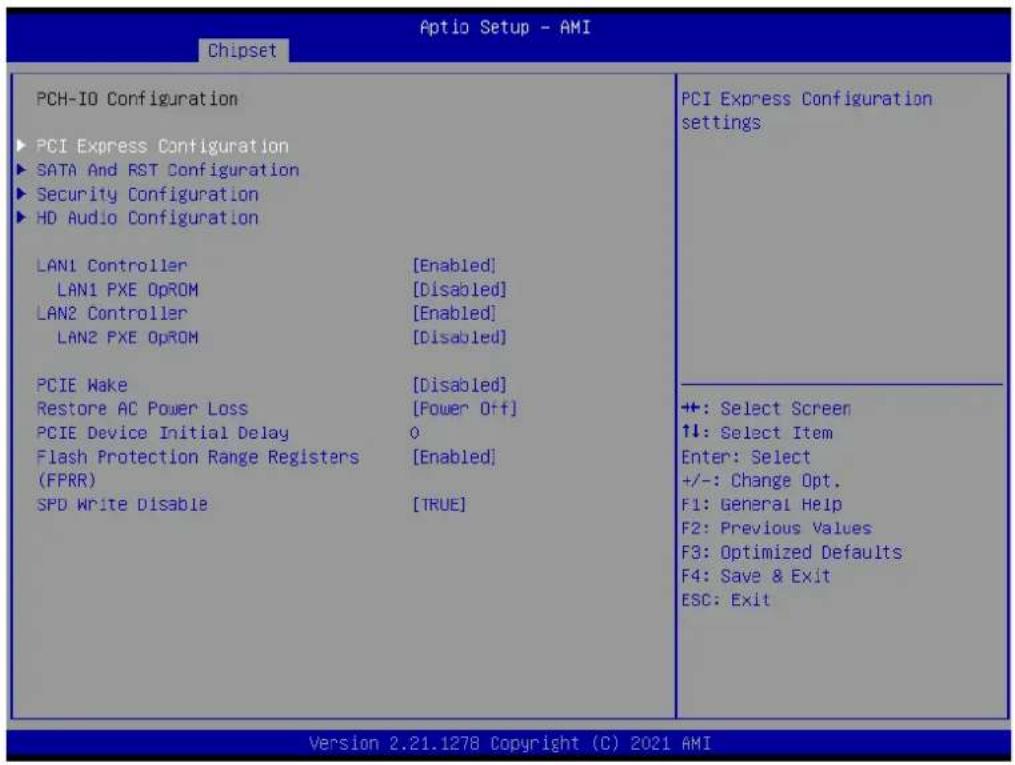
Aptio Setup - AMI Chipset PCH-IO Configuration PCI Express Configuration SATA And RST Configuration Security Configuration HD Audio Configuration LAN1 Controller [Enabled] LAN1 PXE OpROM [Disabled] LAN2 Controller [Enabled] LAN2 PXE OpROM [Disabled] PCIE Make [Disabled] Restore AC Power Loss [Power Off] PCIE Device Initial Delay O Flash Protection Range Registers [Enabled] (FPRR) SPD Write Disable [TRUE] PCI Express Configuration settings +: Select Screen ↑↓: Select Item Enter: Select +/-: Change Opt. F1: General Help F2: Previous Values F3: Optimized Defaults F4: Save & Exit ESC: Exit Version 2.21.1278 Copyright (C) 2021 AMI3.3.2.1 PCI Express Configuration

text_image
Aptio Setup - AMI Chipset PCI Express Configuration PCI Express Clock Gating [Enabled] PCIe-USB Clitch M/A [Disabled] ► M.2 M-key slot ► LAN2 Controller ► M.2 E-key slot PCI Express Clock Gating Enable/Disable for each root port. ++ +: Select Screen ↑↓: Select Item Enter: Select +/-: Change Opt. F1: General Help F2: Previous Values F3: Optimized Defaults F4: Save & Exit ESC: Exit Version 2.21.1278 Copyright (C) 2021 AMI■ PCI Express Clock Gating [Enabled]
■ PCIe-USB Glitch W/A [Disabled]
M.2 M-key slot
text_image
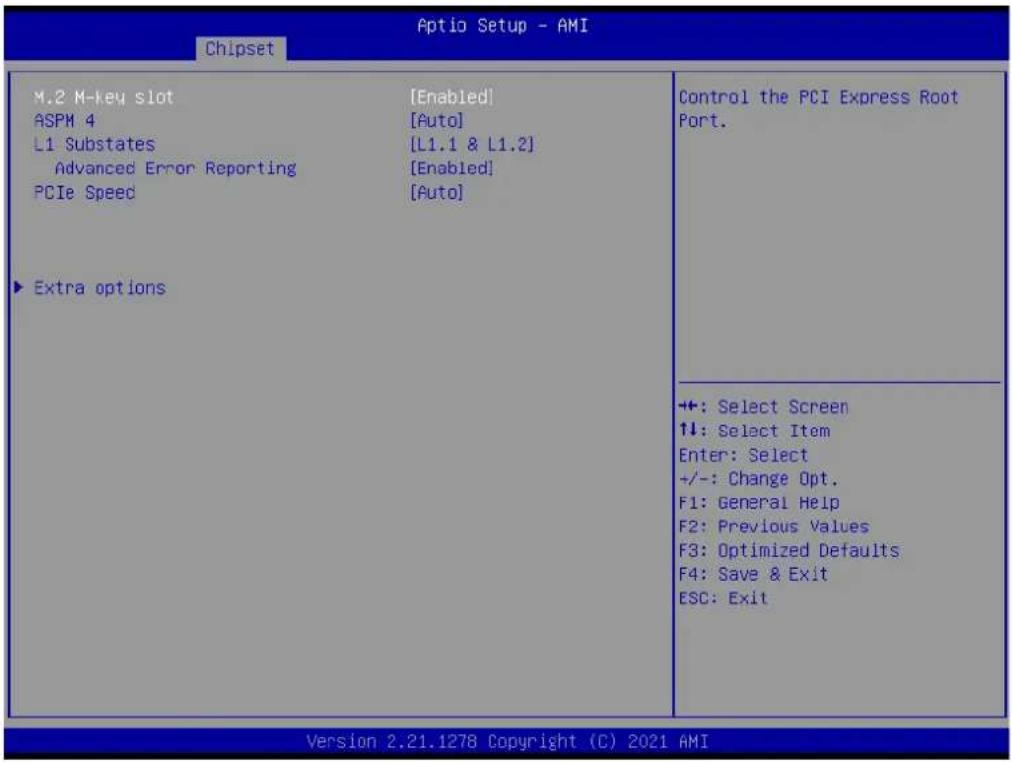
Aptio Setup - AMI Chipset M.2 M-key slot [Enabled] ASPM 4 [Auto] L1 Substates [L1.1 & L1.2] Advanced Error Reporting [Enabled] PCIe Speed [Auto] ▶ Extra options Control the PCI Express Root Port. ++: Select Screen ↑↓: Select Item Enter: Select +/-: Change Opt. F1: General Help F2: Previous Values F3: Optimized Defaults F4: Save & Exit ESC: Exit Version 2.21.1278 Copyright (C) 2021 AMI■ M.2 M-key slot [Enabled]
ASPM 4 [Auto]
L1 Substates [L1.1 & L1.2]
■ Advanced Error Reporting [Enabled]
PCIe Speed [Auto]
LAN2 Controller

text_image
Aptio Setup - AMI Chipset LAN2 Controller [Enabled] ASPM 10 [Auto] L1 Substates [L1.1 & L1.2] Advanced Error Reporting [Enabled] PCIe Speed [Auto] ▶ Extra options Control the PCI Express Root Port. ++: Select Screen ↑↓: Select Item Enter: Select +/-: Change Opt. F1: General Help F2: Previous Values F3: Optimized Defaults F4: Save & Exit ESC: Exit Version 2.21.1278 Copyright (C) 2021 AMIM.2 E-key slot
text_image
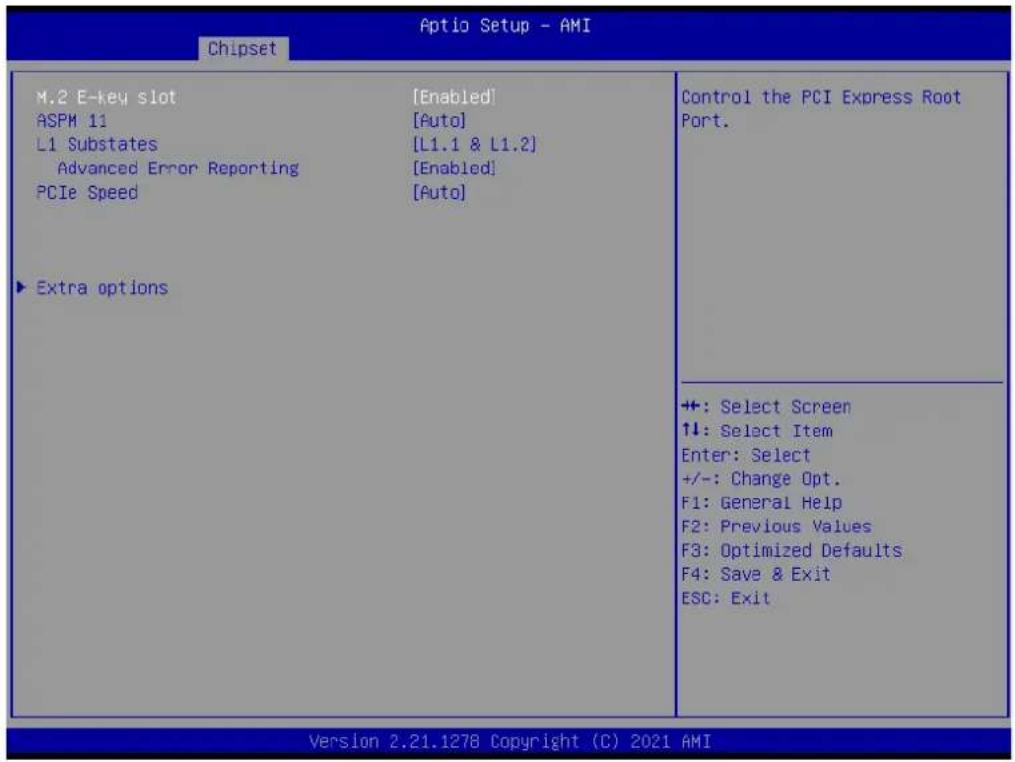
Aptio Setup - AMI Chipset M.2 E-key slot [Enabled] ASPM 11 [Auto] L1 Substates [L1.1 & L1.2] Advanced Error Reporting [Enabled] PCIe Speed [Auto] ► Extra options Control the PCI Express Root Port. ++ +: Select Screen ↑↓: Select Item Enter: Select +/-: Change Opt. F1: General Help F2: Previous Values F3: Optimized Defaults F4: Save & Exit ESC: Exit Version 2.21.1278 Copyright (C) 2021 AMI■ M.2 E-key slot [Enabled]
ASPM 11 [Auto]
L1 Substates [L1.1 & L1.2]
■ Advanced Error Reporting [Enabled]
PCIe Speed [Auto]
Extra options
text_image
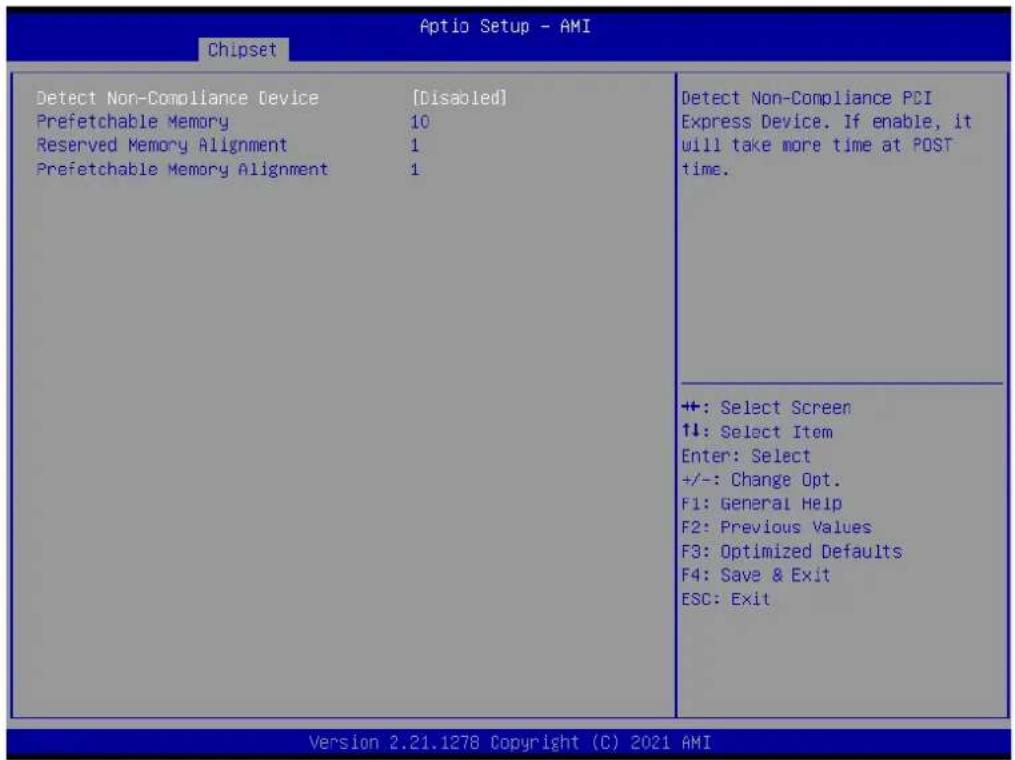
Aptio Setup - AMI Chipset Detect Non-Compliance Device [Disabled] Prefetchable Memory 10 Reserved Memory Alignment 1 Prefetchable Memory Alignment 1 Detect Non-Compliance PCI Express Device. If enable, it will take more time at POST time. ++: Select Screen ↑↓: Select Item Enter: Select +/-: Change Opt. F1: General Help F2: Previous Values F3: Optimized Defaults F4: Save & Exit ESC: Exit Version 2.21.1278 Copyright (C) 2021 AMI■ Detect Non-Compliance Device [ Disabled ]
3.3.2.2 SATA and RST Configuration
text_image
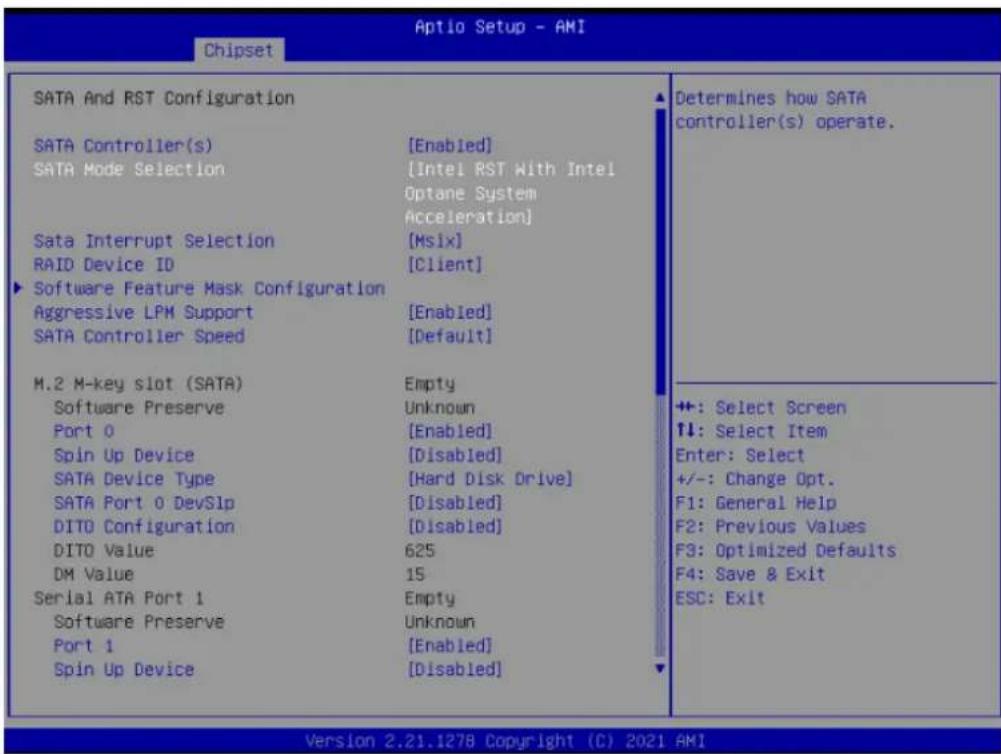
Aptio Setup - AMI Chipset SATA And RST Configuration SATA Controller(s) SATA Mode Selection Sata Interrupt Selection RAID Device ID ► Software Feature Mask Configuration Aggressive LPM Support SATA Controller Speed M.2 M-key slot (SATA) Software Preserve Port 0 Spin Up Device SATA Device Type SATA Port 0 DevSlp DITO Configuration DITO Value DM Value Serial ATA Port 1 Software Preserve Port 1 Spin Up Device [Enabled] [Intel RST With Intel Optane System Acceleration] [Msix] [Client] [Enabled] [Default] Empty Unknown [Enabled] [Disabled] [Hard Disk Drive] [Disabled] [Disabled] 625 15 Empty Unknown [Enabled] [Disabled] Determines how SATA controller(s) operate. ++: Select Screen ↑↓: Select Item Enter: Select +/-: Change Opt. F1: General Help F2: Previous Values F3: Optimized Defaults F4: Save & Exit ESC: Exit Version 2.21.1278 Copyright (C) 2021 AMI■ SATA Controller(s) [ Enabled ]
■ SATA Mode Selection [ AHCI ]
■ Aggressive LPM Support [ Enabled ]
■ SATA Controller Speed [ Default ]
■ Port 0 [Enabled]
■ Spin Up Device [ Disabled ]
■ SATA Device Type [ Hard Disk Drive ]
■ SATA Port 0 DevS1p [ Disabled]
■ DITO Configuration [ Disabled ]
■ Port 1 [Enabled]
■ Spin Up Device [ Disabled ]
■ SATA Device Type [ Hard Disk Drive ]
■ SATA Port 1 DevS1p [ Disabled]
■ DITO Configuration [ Disabled ]
M.2 M-key slot (SATA)
Serial ATA Port 1 (SATA)
text_image
Chipset Aptio Setup - AMI Port 1 Spin Up Device SATA Device Type SATA Port 1 DevSlp DITO Configuration DITO Value DM Value Serial ATA Port 2 Software Preserve Port 2 Spin Up Device SATA Device Type SATA Port 2 DevSlp DITO Configuration DITO Value DM Value Serial ATA Port 3 Software Preserve Port 3 Spin Up Device SATA Device Type SATA Port 3 DevSlp DITO Configuration DITO Value DM Value [Enabled] [Disabled] [Hard Disk Drive] [Disabled] [Disabled] 625 15 Empty Unknown [Enabled] [Disabled] [Hard Disk Drive] [Disabled] [Disabled] 625 15 Enable/Disable DITO Configuration +: Select Screen ↑↓: Select Item Enter: Select +/-: Change Opt. F1: General Help F2: Previous Values F3: Optimized Defaults F4: Save & Exit ESC: Exit Version 2.21.1278 Copyright (C) 2021 AMISerial ATA Port 2 (SATA)
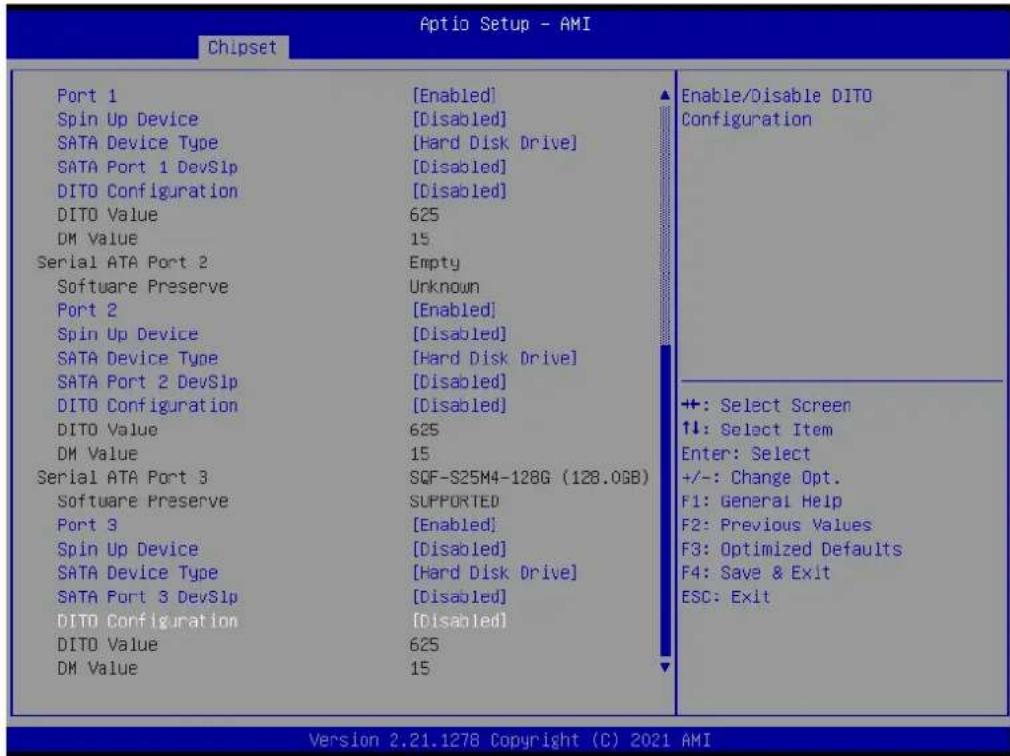
■ Port 2 [Enabled ]
■ Spin Up Device [ Disabled ]
■ SATA Device Type [ Hard Disk Drive ]
■ SATA Port 2 DevS1p [ Disabled]
■ DITO Configuration [ Disabled ]
Serial ATA Port 3 (SATA)
■ Port 3 [Enabled]
■ Spin Up Device [ Disabled ]
■ SATA Device Type [ Hard Disk Drive ]
■ SATA Port 3 DevS1p [ Disabled]
■ DITO Configuration [ Disabled ]
3.3.2.3 Security Configuration

text_image
Chipset Aptio Setup - AMI Security Configuration RTC Memory Lock [Enabled] BIOS Lock [Enabled] Enable will lock bytes 38h-3Fh in the lower/upper 128-byte bank of RTC RAM ++: Select Screen 11: Select Item Enter: Select +/-: Change Opt. F1: General Help F2: Previous Values F3: Optimized Defaults F4: Save & Exit ESC: Exit Version 2.21.1278 Copyright (C) 2021 AMI■ RTC Memory Lock [Enabled]
BIOS Lock [Enabled]
3.3.2.4 HD Audio Configuration

text_image
Aptio Setup - AMI Chipset HD Audio Subsystem Configuration Settings HD Audio [Enabled] Control Detection of the HD-Audio device. Disabled = HDA will be unconditionally disabled Enabled = HDA will be unconditionally enabled. +: Select Screen 1↓: Select Item Enter: Select +/-: Change Opt. F1: General Help F2: Previous Values F3: Optimized Defaults F4: Save & Exit ESC: Exit Version 2.21.1278 Copyright (C) 2021 AMIHD Audio [Enabled]
3.4 Security
text_image
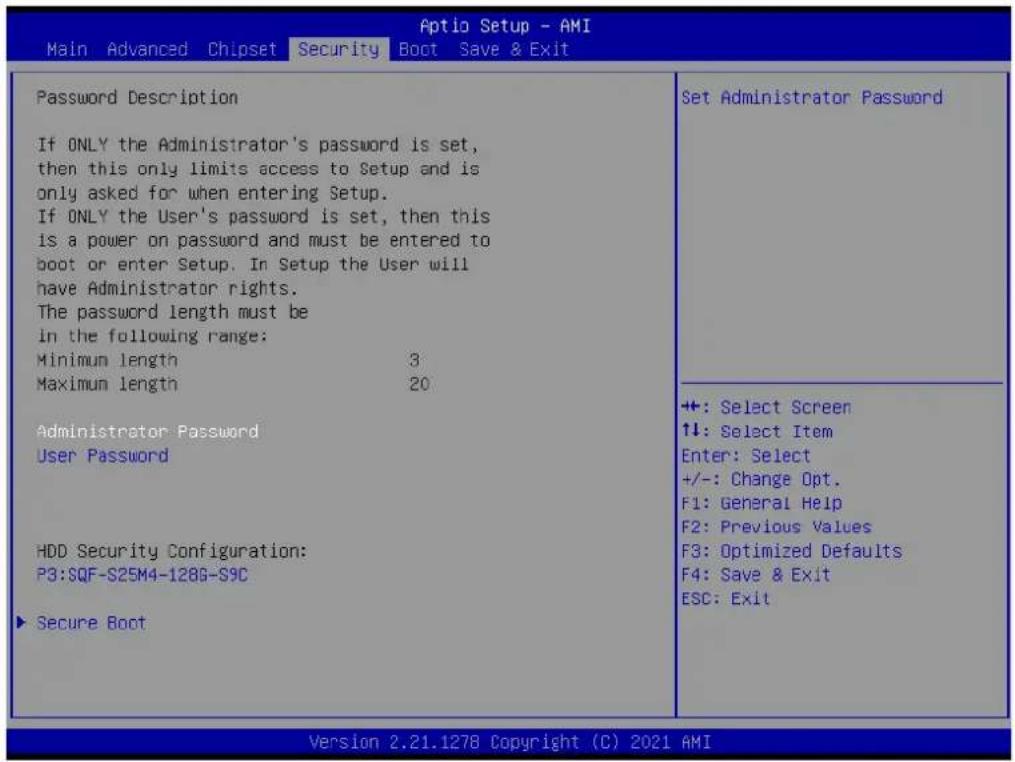
Aptio Setup - AMI Main Advanced Chipset Security Boot Save & Exit Password Description If ONLY the Administrator's password is set, then this only limits access to Setup and is only asked for when entering Setup. If ONLY the User's password is set, then this is a power on password and must be entered to boot or enter Setup. In Setup the User will have Administrator rights. The password length must be in the following range: Minimum length 3 Maximum length 20 Administrator Password User Password HDD Security Configuration: P3:SQF-S25M4-128G-S9C ▶ Secure Boot Set Administrator Password +: Select Screen ↑↓: Select Item Enter: Select +/-: Change Opt. F1: General Help F2: Previous Values F3: Optimized Defaults F4: Save & Exit ESC: Exit Version 2.21.1278 Copyright (C) 2021 AMIAdministrator Password
Select this option and press
User Password
Select this option and press
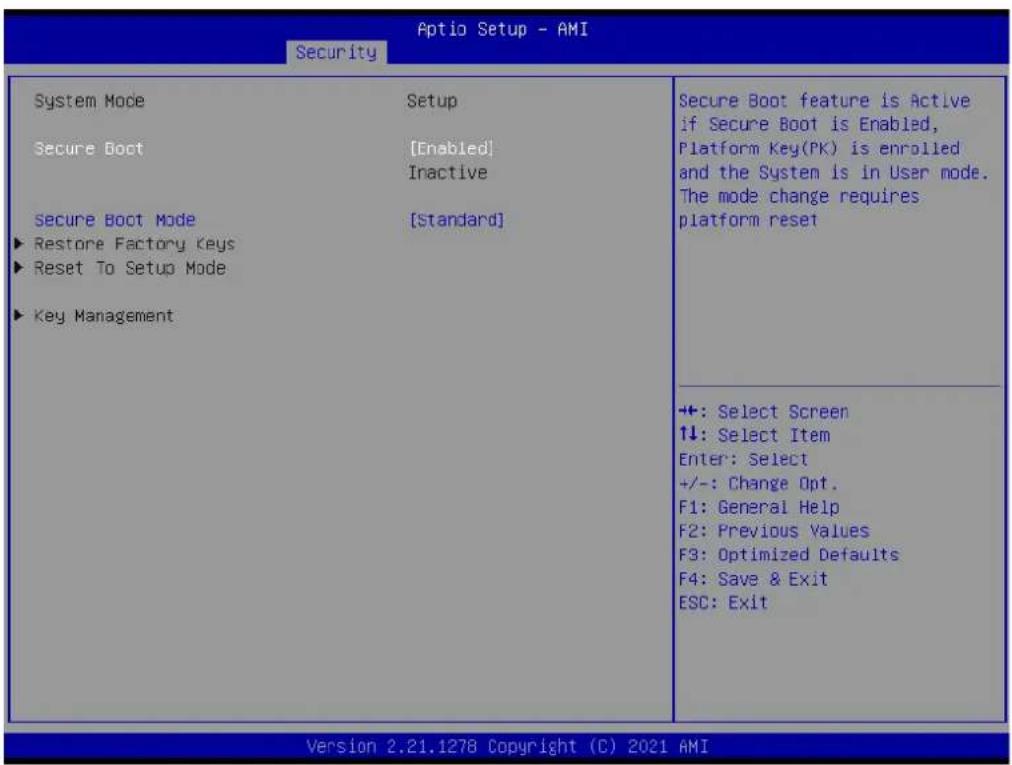
text_image
Aptio Setup - AMI Security System Mode Setup Secure Boot [Enabled] Inactive Secure Boot Mode [Standard] ► Restore Factory Keys ► Reset To Setup Mode ► Key Management Secure Boot feature is Active if Secure Boot is Enabled, Platform Key(PK) is enrolled and the System is in User mode. The mode change requires platform reset +: Select Screen 1↓: Select Item Enter: Select +/-: Change Opt. F1: General Help F2: Previous Values F3: Optimized Defaults F4: Save & Exit ESC: Exit Version 2.21.1278 Copyright (C) 2021 AMI- Secure Boot [ Enabled]
- Secure Boot Mode [Standard]
3.5 Boot Setting
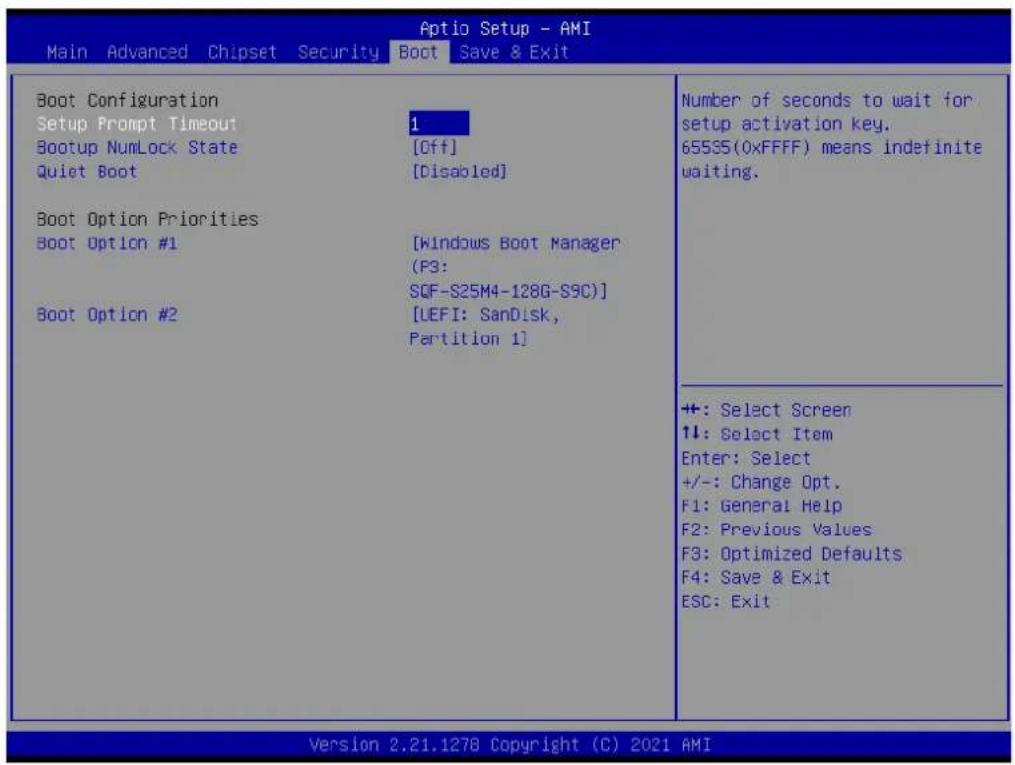
text_image
Aptio Setup - AMI Main Advanced Chipset Security Boot Save & Exit Boot Configuration Setup Prompt Timeout Bootup NumLock State Quiet Boot 1 [Off] [Disabled] Boot Option Priorities Boot Option #1 [Windows Boot Manager (F3: SQF-S25M4-128G-S9C)] Boot Option #2 [UEFI: SanDisk, Partition 1] Number of seconds to wait for setup activation key. 65S35(0xFFFF) means indefinite waiting. ++: Select Screen ↑↓: Select Item Enter: Select +/-: Change Opt. F1: General Help F2: Previous Values F3: Optimized Defaults F4: Save & Exit ESC: Exit Version 2.21.1278 Copyright (C) 2021 AMISetup Prompt Timeout
User the <+> and <-> keys to adjust the number of seconds to wait for setup activation key.
■ Bootup NumLock State [Off]
On or off power on state for the NumLock.
■ Quiet Boot [Disabled]
If this option is set to disabled, the BIOS displays normal POST messages. If enabled, an OEM logo is shown instead of POST messages.
3.6 Save & Exit Configuration
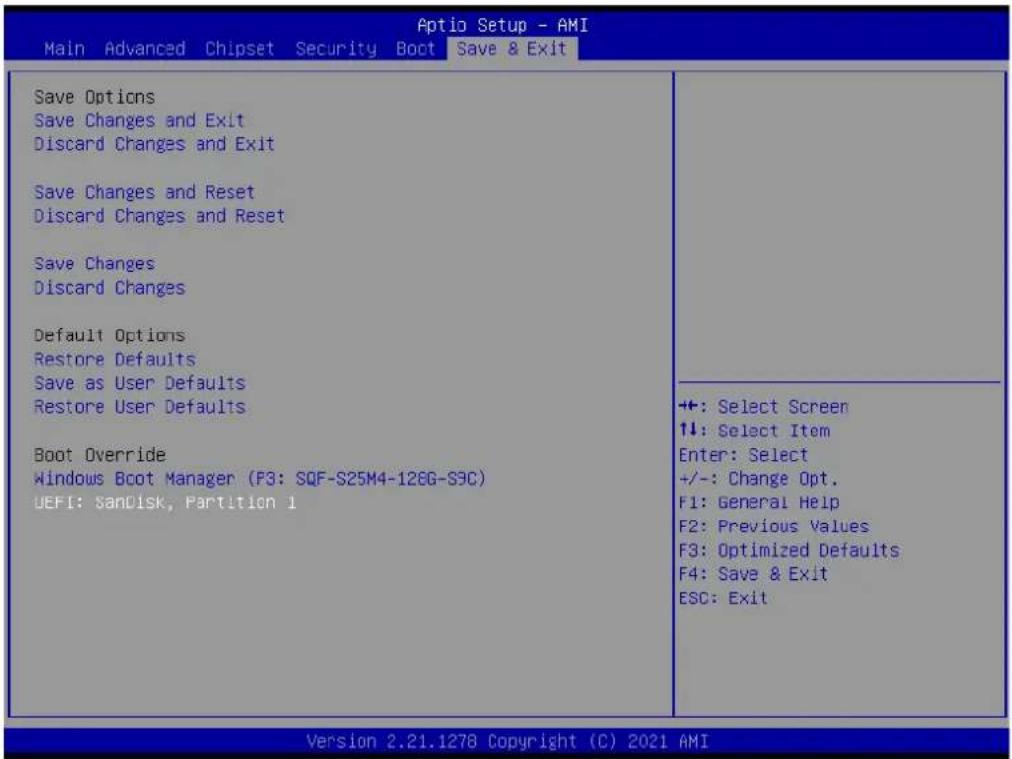
text_image
Aptio Setup - AMI Main Advanced Chipset Security Boot Save & Exit Save Options Save Changes and Exit Discard Changes and Exit Save Changes and Reset Discard Changes and Reset Save Changes Discard Changes Default Options Restore Defaults Save as User Defaults Restore User Defaults Boot Override Windows Boot Manager (F3: SQF-S25M4-128G-S9C) UEFI: SanDisk, Partition 1 ++: Select Screen ↑↓: Select Item Enter: Select +/-: Change Opt. F1: General Help F2: Previous Values F3: Optimized Defaults F4: Save & Exit ESC: Exit Version 2.21.1278 Copyright (C) 2021 AMI■ Save Changes and Exit
Exit system setup after saving the changes.
- Discard Changes and Exit
Exit system setup without saving the changes.
■ Save Changes and Reset
Reset the system after saving the changes.
- Discard Changes and Reset
Reset system setup without saving any changes.
■ Save Changes
Save changes done so far to any of the setup options.
- Discard Changes
- Discard changes done so far to any of the setup options.
- Restore Default
Restore/Load default values for all the setup options.
- Save as User Default
- Save the changes done so far as user defaults.
- Restore User Default
Restore the user defaults to all the setup options.
Chapter 4
Software Introduction & Service
4.1 Introduction
The mission of Advantech Embedded Software Services is to "Enhance quality of life with Advantech platforms and Microsoft® Windows® embedded technology." We enable Windows® Embedded software products on Advantech platforms to more effectively support the embedded computing community. Customers are freed from the hassle of dealing with multiple vendors (hardware suppliers, system integrators, embedded OS distributors) for projects. Our goal is to make Windows® Embedded Software solutions easily and widely available to the embedded computing community.
4.2 Value-Added Software Services
Software API: An interface that defines the ways by which an application program may request services from libraries and/or operating systems. Provides not only the underlying drivers required but also a rich set of user-friendly, intelligent and integrated interfaces, which speeds development, enhances security and offers add-on value for Advantech platforms. It plays the role of catalyst between developer and solution, and makes Advantech embedded platforms easier and simpler to adopt and operate with customer applications.
4.2.1 Software API
4.2.1.1 Control
GP I/O

natural_image
Blue square icon with a white abstract line and checkmark symbol (no text or numbers)General Purpose Input/Output is a flexible parallel interface that allows a variety of custom connections. It allows users to monitor the level of signal input or set the output status to switch on/off the device. Our API also provide Programmable GPIO, which allows developers to dynamically set the GPIO input or output status.
SMBus

natural_image
Blue square icon with a white abstract symbol resembling a battery or connector (no text or numbers)SMBus is the System Management Bus defined by Intel Corporation in 1995. It is used in personal computers and servers for low-speed system management communications. The SMBus API allows a developer to interface a embedded system environment and transfer serial messages using the SMBus protocols, allowing multiple simultaneous device control.
4.2.1.2 Display
Brightness Control

natural_image
Blue square icon with a white sunburst symbol (no text or numbers)The Brightness Control API allows a developer to access embedded devices and easily control brightness.
4.2.1.3 Monitor
Watchdog

natural_image
White dog head silhouette on blue background (no text or symbols)A watchdog timer (WDT) is a device that performs a specific operation after a certain period of time if something goes wrong and the system does not recover on its own. A watchdog timer can be programmed to perform a warm boot (restarting the system) after a certain number of seconds.
Hardware Monitor

natural_image
Blue square icon with white thermometer and propeller symbol (no text)The Hardware Monitor (HWM) API is a system health supervision API that inspects certain condition indexes, such as fan speed, temperature and voltage.
Chapter 5
Chipset Software Installation Utility
5.1 Before You Begin
To facilitate the installation of the enhanced display drivers and utility software, read the instructions in this chapter carefully. The drivers for the AIMB-277 are located on the Advantech support website: http://support.advantech.com/Support/. The drivers on the support website will guide and link you to the utilities and drivers under a Windows system. Updates are provided via Service Packs from Microsoft*.
Note! The driver files on the website are compressed. Do not attempt to install the drivers by copying the files manually. You must download the files and decompress them first. Also, please use the supplied SETUP program to install the drivers.
Before you begin, it is important to note that most display drivers need to have the relevant software application already installed in the system prior to installing the enhanced display drivers. In addition, many of the installation procedures assume that you are familiar with both the relevant software applications and operating system commands. Review the relevant operating system commands and the pertinent sections of your application software's user manual before performing the installation.
5.2 Introduction
The Intel ^® Chipset Software Installation (CSI) utility installs the Windows INF files that outline to the operating system how the chipset components will be configured. This is needed for the proper functioning of the following features:
Core PCI PnP services
■ Serial ATA interface support
USB support
- Identification of Intel ^ chipset components in the Device Manager
Note! This utility is used for the following versions of Windows, and it has to be installed before installing all the other drivers:

Windows 10 (64-bit)
Chapter 6
VGA Setup
6.1 Introduction
The 10th Gen Intel Core i processors are embedded with an integrated graphics controller. You need to install the VGA driver to enable the function.
Optimized integrated graphic solution: Intel Graphics Flexible supports versatile display options and a 3D graphics engine. Dual independent displays include enhanced display modes for widescreen flat panels for, extended, twin, clone and dual display modes, and optimized 3D support delivers an intensive and realistic visual experience.
6.2 Windows 10 VGA Driver Installation
Note! Before installing this driver, make sure the CSI utility has been installed in your system. See Chapter 5 for information on installing the CSI utility.
Download the driver from website on your computer. Navigate to the "AIMB-277_Graphic_Win10 (64-bit)" folder and click "setup.exe" to complete the installation of the drivers for Windows 10.
Win10 driver for AIMB-277

text_image
2021-04-20 | Driver | Document No.1-4510873071 Related Product: AIMB-277 Solution: Win10(64bit) driver for AIME-277 AIMB-277_Chip_Win10(64bit) 2021-04-20 Download AIMB-277_Graphic_Win10(64bit) 2021-04-20 Download AIMB-277_Intel_LAN_Win10(64bit) 2021-04-20 Download AIMB-277_ME_Win10(64bit) 2021-04-20 Download AIMB-277_Audio_Win10(64bit) 2021-04-20 Download AIMB-277_RAID_Win10(64bit) 2021-04-20 Download AIMB-277_Others_Win10(64bit) 2021-04-20 DownloadChapter 7
LAN Configuration
7.1 Introduction
The AIMB-277 has two Gigabit Ethernet LANs via dedicated PCI Express x1 lanes Intel i211AT and I219LM (Phi) that offer bandwidth of up to 500 MB/sec, eliminating the bottleneck of network data flow and incorporating Gigabit Ethernet at 1000 Mbps.
7.2 Features
■ Integrated 10/100/1000 Mbps transceiver
■ 10/100/1000 Mbps triple-speed MAC
■ High-speed RISC core with 24-KB cache
■ On-chip voltage regulation
■ Wake-on-LAN (WOL) support
■ PCI Express X1 host interface
7.3 Installation
Note! Before installing this driver, make sure the CSI utility has been installed in your system. See Chapter 5 for information on installing the CSI utility.
The AIMB-277's Intel i211AT and Intel i219LM Gigabit integrated controllers support all major network operating systems. However, the installation procedure varies from system to system. Please find and use the section that provides the driver setup procedure for the OS you are using.
7.4 Windows® 10 Driver Setup (Intel i219LM&Intel i211AT)
Download the driver from support website on your computer and decompressed the file. Select the "Autorun" then navigate to the directory for your OS.
Note! Before installing this driver, make sure the CSI utility has been installed in your system. See Chapter 5 for information on installing the CSI utility.
Win10 driver for AIMB-277
2021-04-20 Driver Document No.1-4510873071
Related Product:
AIMB-277
Solution

text_image
Win10(64bit) driver for AIMB-277 AIMB-277_Chip_Win10(64bit) 2021-04-20 Download AIMB-277_Graphic_Win10(64bit) 2021-04-20 Download AIMB-277_Intel_LAN_Win10(64bit) 2021-04-20 Download AIMB-277_ME_Win10(64bit) 2021-04-20 Download AIMB-277_Audic_Win10(64bit) 2021-04-20 Download AIMB-277_RAID_Win10(64bit) 2021-04-20 Download AIMB-277_Others_Win10(64bit) 2021-04-20 DownloadAppendix A
I/O Pin Assignments
A.1 Connector and Header List Description:
A.1.1 SYSTEM FAN Power Connector (SYSFAN1)

text_image
SYSFAN1 H1 4 3 2 1 W_4V 2.54mm WAFER4P-2.54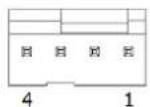
Table A.1: SYSTEM FAN Power Connector (SYSFAN1)
| Pin Signal Pin Definition |
| 1 GND |
| 2 SYSTEM FAN VCC |
| 3 SYSTEM FAN SPEED |
| 4 SYSTEM FAN PWM |
A.1.2 CPU FAN Power Connector (CPUFAN1)

text_image
H1 4 3 2 1 W_4V_2.54mm WAFER4P-2.54 4 1Table A.2: CPU FAN Power Connector (CPUFAN1)
| Pin Signal Pin Definition |
| 1 GND |
| 2 SYSTEM FAN VCC |
| 3 SYSTEM FAN SPEED |
| 4 SYSTEM FAN PWM |
A.1.3 CML CPU Socket (CPU1)
A.1.4 ATX 12V Power Supply Connector (ATX12V1)
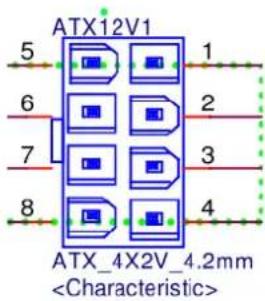
text_image
ATX12V1 5 1 6 2 7 3 8 4 ATX_4X2V_4.2mmTable A.3: ATX 12V Power Supply Connector (ATX12V1)
| Pin Signal Pin Definition |
| 1 GND |
| 2 GND |
| 3 GND |
| 4 GND |
| 5 +12V |
| 6 +12V |
| 7 +12V |
| 8 +12V |
A.1.5 VGA connector (VGA1)
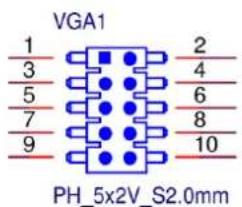
text_image
VGA1 1 2 3 4 5 6 7 8 9 10 PH_5x2V_S2.0mmTable A.4: VGA connector (VGA1)
| Pin Signal Pin Definition |
| 1 VGA1_b_R |
| 2 VGA1_a_DCLK |
| 3 VGA1_b_G |
| 4 VGA1_FOC_ON |
| 5 VGA1_b_B |
| 6 VGA1_a_DDAT |
| 7 VGA1_b_VS |
| 8 GND |
| 9 VGA1_b_HS |
| 10 +VCC_TMDS |
A.1.6 DisplayPort+ High Def Multimedia Interface (DP1+HDMI1)

text_image
DP1+HOM1 HDMI A TYPE 18 19 2 1 20 19 A1 A2 A3 A4 A5 A6 A7 A8 A9 A10 A11 A12 A13 A14 A15 A16 A17 A18 A19 A20 HOMI+DISPLAY_38H 主输出 2 3 4 5 6 7 8 9 10 11 12 13 14 15 16 17 18 19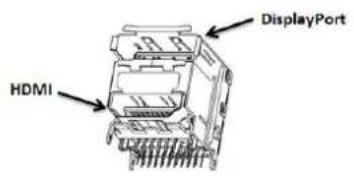
text_image
HDMI DisplayPortTable A.5: DisplayPort+ High Definition Multimedia Interface (DP1+HDMI1)
Pin Signal Pin Definition Pin Signal Pin Definition
| 1 HDMI2_Z_D2+ A1 DP1_0+ | |
| 2 GND A2 GND | |
| 3 HDMI2_Z_D2- A3 DP1_0- | |
| 1 HDMI2_Z_D1+ 11 DP1_1+ | |
| 2 GND 12 GND | |
| 3 HDMI2_Z_D1- 13 DP1_1- | |
| 4 HDMI2_Z_D0+ 14 DP1_2+ | |
| 5 GND 15 GND | |
| 6 HDMI2_Z_D0- 16 DP1_2- | |
| 7 HDMI2_Z_CLK+ 17 DP1_3+ | |
| 8 GND 18 GND | |
| 9 HDMI2_Z_CLK- | 19 DP1_3- |
| 10 | |
A.1.7 USB 3.2 Gen1+2.0 pin header (USB56)

text_image
USB56 10 11 9 12 8 13 7 14 6 15 5 16 4 17 3 18 2 19 1 ■ ○Table A.6: USB 3.2 Gen1+2.0 pin header (USB56)
| Pin | Signal Pin Definition | Pin | Signal Pin Definition |
| 1 | +USBV3 | 11 | USB2_D6+ |
| 2 | USB31_P5_z_RX- | 12 | USB2_D6- |
Table A.6: USB 3.2 Gen1+2.0 pin header (USB56)
| 3 USB31_P5_z_RX+ 13 GND |
| 4 GND 14 USB31_P6_z_TX+ |
| 5 USB31_P5_z_TX- 15 USB31_P6_z_TX- |
| 6 USB31_P5_z_TX+ 16 GND |
| 7 GND 17 USB31_P6_z_RX+ |
| 8 USB2_D5- 18 USB31_P6_z_RX- |
| 9 USB2_D5+ 19 +USBV3 |
| 10 |
A.1.8 USB 3.2 Gen1+2.0 pin header (USB78)

text_image
USB78 10 9 8 7 6 5 4 3 2 1 A10 11 12 13 14 15 16 17 18 19Table A.7: USB 3.2 Gen1+2.0 pin header (USB78)
| Pin Signal Pin Definition Pin Signal Pin Definition | |||
| 1 | +USBV4 | 11 | USB2_D8+ |
| 2 | USB31_P7_z_RX- | 12 | USB2_D8- |
| 3 | USB31_P7_z_RX+ | 13 | GND |
| 4 | GND | 14 | USB31_P8_z_TX+ |
| 5 | USB31_P7_z_TX- | 15 | USB31_P8_z_TX- |
| 6 | USB31_P7_z_TX+ | 16 | GND |
| 7 | GND | 17 | USB31_P8_z_RX+ |
| 8 | USB2_D7- | 18 | USB31_P8_z_RX- |
| 9 | USB2_D7+ | 19 | +USBV4 |
| 10 | |||
A.1.9 eDP/LVDS Panel Connector (LVDS\_EDP3)
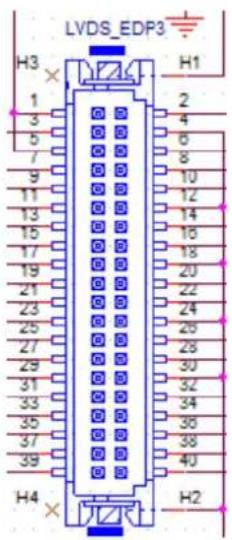
text_image
LVDS_EDP3 H3 1 2 3 4 5 6 7 8 9 10 11 12 13 14 15 16 17 18 19 20 21 22 23 24 25 26 27 28 29 30 31 32 33 34 35 36 37 38 39 40 H4 H2Table A.8: eDP/LVDS Panel Connector (LVDS_EDP3)
A.1.14LVDS backlight inverter power connector (INV3)

text_image
INV3 1 2 3 4 5 WB_5V_2.0mm WB5P-2.00Table A.13: LVDS Backlight inverter power connector (INV3)
| Pin Signal Pin Definition |
| 1 +V12_INV1 |
| 2 GND |
| 3 INV1_ENBKL |
| 4 INV1_VBR |
| 5 +V5_INV1 |
A.1.15PCI Express X16 Slot (PCIEX16\_1)
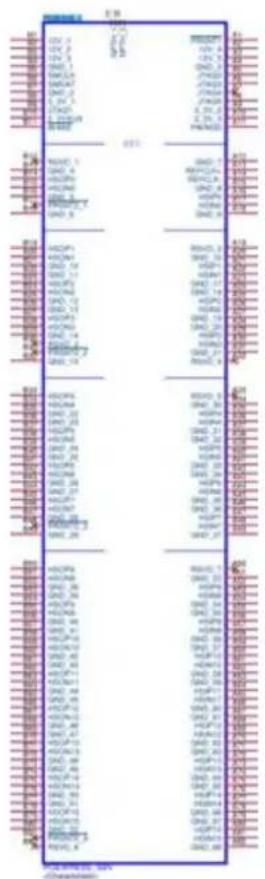
text_image
CPU 1 CPU 2 CPU 3 CPU 4 CPU 5 CPU 6 CPU 7 CPU 8 CPU 9 CPU 10 CPU 11 CPU 12 CPU 13 CPU 14 CPU 15 CPU 16 CPU 17 CPU 18 CPU 19 CPU 20 CPU 21 CPU 22 CPU 23 CPU 24 CPU 25 CPU 26 CPU 27 CPU 28 CPU 29 CPU 30 CPU 31 CPU 32 CPU 33 CPU 34 CPU 35 CPU 36 CPU 37 CPU 38 CPU 39 CPU 40 CPU 41 CPU 42 CPU 43 CPU 44 CPU 45 CPU 46 CPU 47 CPU 48 CPU 49 CPU 50 CPU 51 CPU 52 CPU 53 CPU 54 CPU 55 CPU 56 CPU 57 CPU 58 CPU 59 CPU 60 CPU 61 CPU 62 CPU 63 CPU 64 CPU 65 CPU 66 CPU 67 CPU 68 CPU 69 CPU 70 CPU 71 CPU 72 CPU 73 CPU 74 CPU 75 CPU 76 CPU 77 CPU 78 CPU 79 CPU 80 CPU 81 CPU 82 CPU 83 CPU 84 CPU 85 CPU 86 CPU 87 CPU 88 CPU 89 CPU 90 CPU 91 CPU 92 CPU 93 CPU 94 CPU 95 CPU 96 CPU 97 CPU 98 CPU 99 CPU100Table A.14: PCI Express X16 Slot (PCIEX16_1)
| Pin Signal Pin Definition Pin Signal Pin Definition |
| B1 12V_1 A1 PRSNT1 |
Table A.14: PCI Express X16 Slot (PCIEX16_1)
| B2 12V_2 A2 12V_4 | |
| B3 12V_3 A3 12V_5 | |
| B4 GND_1 A4 GND_3 | |
| B5 SMCLK A5 JTAG2 | |
| B6 SMDAT A6 JTAG3 | |
| B7 GND_2 A7 JTAG4 | |
| B8 3_3V_1 A8 JTAG5 | |
| B9 JTAG1 A9 3_3V_2 | |
| B10 3_3VAUX A10 3_3V_3 | |
| B11 WAKE A11 PWRGD | |
| B12 RSVD_1 | A12 GND_7 |
| B13 GND_4 A13 REFCLK+ | |
| B14 HSOP0 | A14 REFCLK- |
| B15 HSON0 A15 GND_8 | |
| B16 GND_5 A16 HSIP0 | |
| B17 PRSNT2_1 | A17 HSIN0 |
| B18 GND_6 A18 GND_9 | |
| B19 HSOP1 | A19 RSVD_3 |
| B20 HSON1 A20 GND_16 | |
| B21 GND_10 | A21 HSIP1 |
| B22 GND_11 | A22 HSIN1 |
| B23 HSOP2 | A23 GND_17 |
| B24 HSON2 A24 GND_18 | |
| B25 GND_12 | A25 HSIP2 |
| B26 GND_13 | A26 HSIN2 |
| B27 HSOP3 | A27 GND_19 |
| B28 HSON3 A28 GND_20 | |
| B29 GND_14 | A29 HSIP3 |
| B30 RSVD_2 | A30 HSIN3 |
| B31 PRSNT2_2 | A31 GND_21 |
| B32 GND_15 | A32 RSVD_4 |
| B33 HSOP4 | A33 RSVD_5 |
| B34 HSON4 A34 GND_30 | |
| B35 GND_22 | A35 HSIP4 |
| B36 GND_23 | A36 HSIN4 |
| B37 HSOP5 | A37 GND_31 |
| B38 HSON5 A38 GND_32 | |
| B39 GND_24 | A39 HSIP5 |
| B40 GND_25 | A40 HSIN5 |
| B41 HSOP6 | A41 GND_33 |
| B42 HSON6 A42 GND_34 | |
| B43 GND_26 | A43 HSIP6 |
| B44 GND_27 | A44 HSIN6 |
| B44 GND_27 | A45 GND_35 |
| B46 HSON7 A46 GND_36 | |
| B47 GND_28 | A47 HSIP7 |
| B48 PRSNT2_3 | A48 HSIN7 |
Table A.14: PCI Express X16 Slot (PCIEX16_1)
| B49 GND_29 A49 GND_37 |
| B50 HSOP8 A50 RSVD_7 |
| B51 HSON8 A51 GND_53 |
| B52 GND_38 A52 HSIP8 |
| B53 GND_39 A53 HSIN8 |
| B54 HSOP9 A54 GND_54 |
| B55 HSON9 A55 GND_55 |
| B56 GND_40 A56 HSIP9 |
| B57 GND_41 A57 HSIN9 |
| B58 HSOP10 A58 GND_56 |
| B59 HSON10 A59 GND_57 |
| B60 GND_42 A60 HSIP10 |
| B61 GND_43 A61 HSIN10 |
| B62 HSOP11 A62 GND_58 |
| B63 HSON11 A63 GND_59 |
| B64 GND_44 A64 HSIP11 |
| B65 GND_45 A65 HSIN11 |
| B66 HSOP12 A66 GND_60 |
| B67 HSON12 A67 GND_61 |
| B68 GND_46 A68 HSIP12 |
| B69 GND_47 A69 HSIN12 |
| B70 HSOP13 A70 GND_62 |
| B71 HSON13 A71 GND_63 |
| B72 GND_48 A72 HSIP13 |
| B73 GND_49 A73 HSIN13 |
| B74 HSOP14 A74 GND_64 |
| B75 HSON14 A75 GND_65 |
| B76 GND_50 A76 HSIP14 |
| B77 GND_51 A77 HSIN14 |
| B78 HSOP15 A78 GND_66 |
| B79 HSON15 A79 GND_67 |
| B80 GND_52 A80 HSIP15 |
| B81 PRSNT2_4 A81 HSIN15 |
| B82 RSVD_6 A82 GND_68 |
A.1.16NGFF M.2 M-Key connector for 2280 module (M2M1)
Table A.15: NGFF M.2 M-Key conn for 2280 module (M2M1)
| Pin Signal Pin Definition Pin Signal Pin Definition |
| 1 DCD# [1] 2 DSR# [1] |
| 3 RXD [1] 4 RST# [1] |
| 5 TXD [1] 6 CTS# [1] |
| 7 DTR# [1] 8 RI# [1] |
| 9 GND 10 GND |
| 11 DCD# [2] 12 DSR# [2] |
| 13 RXD [2] 14 RST# [2] |
| 15 TXD [2] 16 CTS# [2] |
| 17 DTR# [2] 18 RI# [2] |
| 19 GND 20 GND |

text_image
M2M1 H1 XNPTH_1 2 4 6 8 10 12 14 16 18 20 22 24 26 28 30 32 34 36 38 40 42 44 46 48 50 52 54 56 58 60 62 64 66 68 70 72 74 76 78 80 82 XNPTH_2 NGFF 75H SMOFIX_1 GND_1 GND_2 PERN3 PERP3 GND_3 PETN3 PETP3 GND_4 PERN2 PERP2 GND_5 PETN2 PETP2 GND_6 PERN1 PERP1 GND_7 PETN1 PETP1 GND_8 PERNOSATA-B+ PERPOSATA-B- GND_9 PETNOSATA-A- GND_10 REFCLKN REFCLKP GND_11 NC_16 PEDET-NC-PCIE/GND-SATA- GND_12 GND_13 GND_14 SMOFIX_2 H3 1 2 3 5 7 9 11 13 15 17 19 21 23 25 27 29 31 33 35 37 39 41 43 45 47 49 51 53 55 57 67 71 73 75 H4| Pin | Signal Pin Definition6 | Pin | Signal Pin Definition |
| 1 | GND_1 | 2 | 3p3V_1 |
| 3 | GND_2 | 4 | 3p3V_2 |
| 5 | PERN3 | 6 | NC_1 |
| 7 | PERP3 | 8 | NC_2 |
| 9 | GND_3 | 10 | DAS/DSS-I/O/LED1-I-03p3V |
| 11 | PETN3 | 12 | 3p3V_3 |
| 13 | PETP3 | 14 | 3p3V_4 |
| 15 | GND_4 | 16 | 3p3V_5 |
| 17 | PERN2 | 18 | 3p3V_6 |
19 PERP2 20 NC_3
21 GND_5 22 NC_4
23 PETN2 24 NC_5
25 PETP2 26 NC_6
27 GND_6 28 NC_7
29 PERN1 30 NC_8
31 PERP1 32 NC_9
33 GND_7 34 NC_10
35 PETN1 36 NC_11
37 PETP1 38 DEVSLP-O
39 GND_8 40 NC_12
41 PERN0/SATA-B+ 42 NC_13
43 PERP0/SATA-B- 44 NC_14
45 GND_9 46 NC_15
47 PETN0/SATA-A- 48 NC_16
49 PETP0/SATA-A+ 50 PERST-O-0/3p3V/NC
51 GND_10 52 CLKREQ-I/O-0/3p3V/NC
53 REFCLKN 54 PEWAKE-I/O-0/3p3V/NC
55 REFCLKP 56 NC_17
57 GND_11 58 NC_18
59 60
61 62
63 64
65 66
67 NC_19 68 SUSCLK-32KHZ-O-0/3p3V
69 PEDET-NC-PCIE/GND-SATA 70 3p3V_7
71 GND_12 72 3p3V_8
73 GND_13 74 3p3V_9
75 GND_14
A.1.17COM Port (COM12)
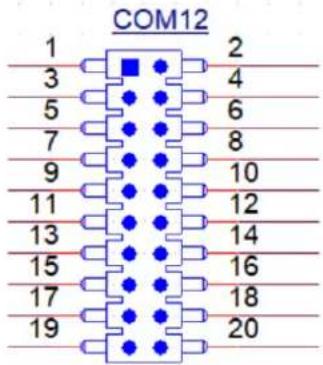
text_image
COM12 1 2 3 4 5 6 7 8 9 10 11 12 13 14 15 16 17 18 19 20Table A.16: COM Port (COM12)
| Pin Signal Pin Definition Pin Signal Pin Definition | ||
| 1 COM1_422_485_TX- 2 COM1_DSR# | ||
| 3 COM1_422_485_TX+ 4 COM1_RTS# | ||
| 5 COM1_422_RX+ 6 COM1_CTS# | ||
| 7 COM1_422_RX- 8 COM1_RI# | ||
| 9 GND | 10 | GND |
| 11 | COM2_422_485_TX- 12 | COM2_DSR# |
| 13 COM2_422_485_TX+ 14 | COM2_RTS# | |
| 15 COM2_422_RX+ 16 | COM2_CTS# | |
| 17 COM2_422_RX- 18 | COM2_RI# | |
| 19 GND | 20 | GND |
A.1.18 SATA Signal Connector (SATA1\~3)
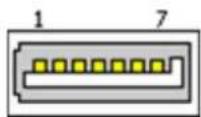
Table A.17: SATA Signal Connector (SATA1\~3)
| Pin | Signal Pin Definition |
| 1 | GND |
| 2 | TX+ |
| 3 | TX- |
| 4 | GND |
| 5 | RX- |
| 6 | RX+ |
| 7 | GND |
A.1.19 SPI BIOS Flash Socket (SPI1)
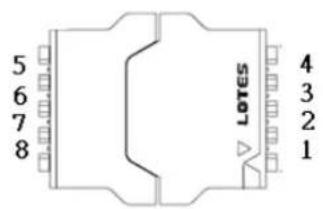
text_image
5 6 7 8 LOTES 4 3 2 1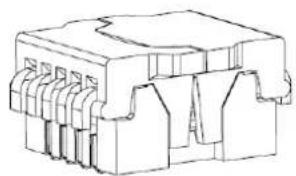
natural_image
Technical line drawing of a mechanical component with multiple slots and mounting holes (no text or symbols)Table A.18: SPI BIOS Flash Socket (SPI1)
Pin Signal Pin Definition Pin Signal Pin Definition
| 1 CS# 5 MOSI |
| 2 MISO 6 SCK |
| 3 WP# / IO2 7 HOLD# / IO3 |
| 4 GND 8 +3.3V |
A.1.20ESPI debug card Pin Header (ESPI1)
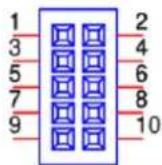
Table A.19: ESPI debug card Pin Header (ESPI1)
| Pin Signal Pin Definition Pin | Signal Pin Definition | ||
| 1 | SIO_LED_A | 2 | SIO_LED_F |
| 3 | SIO_LED_B | 4 | SIO_LED_G |
| 5 | SIO_LED_C | 6 | SIO_DGL0# |
| 7 | SIO_LED_D | 8 | SIO_DGR0# |
| 9 | SIO_LED_E | 10 | GND |
A.1.21 Battery Wafer Box (BAT1)
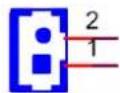
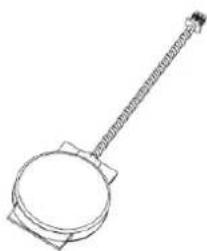
natural_image
Line drawing of a frying pan with a handle and square base (no text or symbols)Table A.20: Battery Wafer Box (BAT1)
| Pin | Signal Pin Definition |
| 1 | VBAT |
| 2 | GND |
A.1.228-bit General Purpose I/O Pin Header (GPIO1)
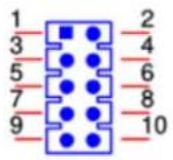
Table A.21: 8-bit General Purpose I/O Pin Header (GPIO1)
| Pin Signal Pin Definition Pin Signal Pin Definition |
| 1 GPIO0 2 GPIO4 |
| 3 GPIO1 4 GPIO5 |
| 5 GPIO2 6 GPIO6 |
| 7 GPIO3 8 GPIO7 |
| 9 +V5_DUAL 10 GND |
A.1.23 Power Switch/HDD LED/SMBUS/Speaker Pin Header (JFP1)
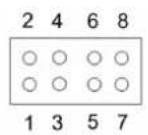
Table A.22: Power Switch/HDD LED/SMBUS/Speaker Pin Header (JFP1)
| Pin Signal Pin Definition Pin Signal Pin Definition | |||
| 1 | FP_HDD_LED | 2 | PWR_BTN |
| 3 | FP_HDD_LED# | 4 | GND |
| 5 | SMB_DAT_JFP1 | 6 | FP_SYS_RESET# |
| 7 | SMB_CLK_JFP1 | 8 | GND |
A.1.24Case-Open Detect Connector (JCASE2)

Table A.23: Case-Open Detect Connector (JCASE2)
| Pin | Signal Pin Definition |
| 1 | Case Open |
| 2 | GND |
A.1.25Power LED Pin Header (JFP2)
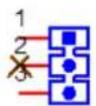
Table A.24: Power LED Pin Header (JFP2)
| Pin Signal Pin Definition | |
| 1 SIO_SUSLED_R | |
| 2 | NC |
| 3 SIO_SUSLED | |
A.1.26ATX 12/5V/3V/5VSBV Power Supply Connector (EATXPWR1)
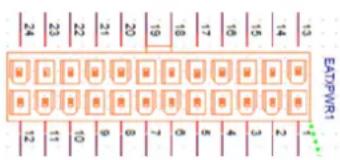
other
| Row | Column | Value | |---|---|---| | 13 | EAT/PWR1 | 1 | | 14 | EAT | 2 | | 15 | EAT | 3 | | 16 | EAT | 4 | | 17 | EAT | 6 | | 18 | EAT | 0 | | 19 | EAT | 7 | | 20 | EAT | 6 | | 21 | EAT | 9 | | 22 | EAT | 10 | | 23 | EAT | 11 | | 24 | EAT | 12 |Table A.25: ATX 12/5V/3V/5VSBV Power Supply Connector (EATXPWR1)
| Pin Signal Pin Definition Pin Signal Pin Definition | ||
| 1 +3.3V_1 13 +3.3V_4 | ||
| 2 +3.3V_2 14 -12V | ||
| 3 COM_1 15 COM_4 | ||
| 4 +5V_1 16 PS_ON# | ||
| 5 COM_2 17 COM_5 | ||
| 6 +5V_2 18 COM_6 | ||
| 7 COM_3 19 COM_7 | ||
| 8 PWR_OK 20 NC | ||
| 9 +5VSB | 21 +5V_3 | |
| 10 | +12V1_1 | 22 +5V_4 |
| 11 | +12V1_2 | 23 +5V_5 |
| 12 | +3.3V_3 24 COM_8 | |
A.1.27 SYSTEM FAN Power Connector (SYSFAN2)
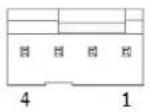
Table A.26: SYSTEM FAN Power Connector (SYSFAN2)
| Pin Signal Pin Definition |
| 1 GND |
| 2 SYS2_FAN_PWMOUT_R |
| 3 SYS2_FAN_SPEED |
| 4 SYS2_FAN_PWMOUT_R |
A.1.28DDR4 SO-DIMM Socket (DIMMB1)
A.1.29DDR4 SO-DIMM Socket(DIMMA1)

text_image
67.20±0.3 OPERATING VOLTAGE PRINT 1.2 TYPE B TYPE B 5093 150H ATTEND φ0.90±0.1 73.40±0.05 φ1.40±0.1 14.5 14.70 0.65 10 ① ③ ②(Please see JEDEC STANDARD Pin Definition)
A.1.30NGFF M.2 E-Key connector for 2242 module (M2E1)
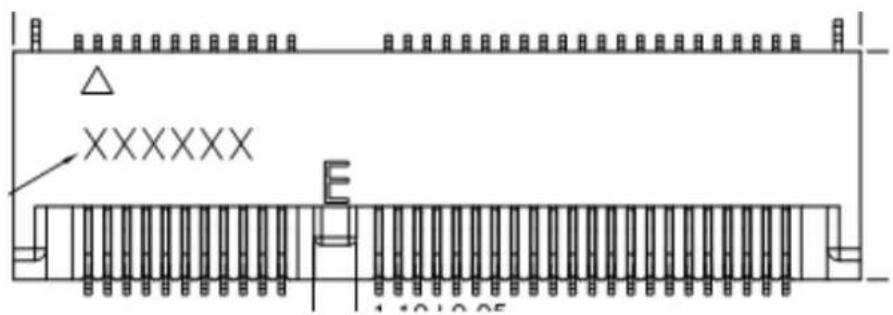
text_image
XXXXXX E 1 12 13 05Table A.27: NGFF M.2 E-Key conn for 2242 module (M2E1)
Pin Signal Pin Definition Pin Signal Pin Definition
| 1 GND 2 +3.3V | |
| 3 USB_D+ 4 +3.3V | |
| 5 USB_D- 6 WiFi_LED# (I)(OD) | |
| 7 GND 8 I2S SCK (O/I)(0/1.8V) | |
| 9 NC 10 I2S WS (I/O)(0/1.8V) | |
| 11 NC 12 I2S SD_IN (I)(0/1.8V) | |
| 13 NC 14 I2S SD_OUT (O)(0/1.8V) | |
| 15 NC 16 BT_LED# (I)(OD) | |
| 17 NC 18 GND | |
| 19 NC 20 UART WAKE# (I)(0/3.3V) | |
| 21 NC 22 UART RXD (I)(0/1.8V) | |
| 23 NC 24 Connector KEY | |
| 25 Connector KEY | 26 Connector KEY |
| 27 Connector KEY | 28 Connector KEY |
| 29 Connector KEY | 30 Connector KEY |
| 31 Connector KEY | 32 UART TXD |
| 33 GND 34 UART CTS | |
| 35 PETp0 | 36 UART RTS |
| 37 PETn0 | 38 NC |
| 39 GND 40 NC | |
| 41 PERp0 | 42 NC |
| 43 PERn0 | 44 COEX3 |
| 45 GND 46 COEX2 | |
| 47 REFCLKp0 | 48 COEX1 |
| 49 REFCLKn0 | 50 SUSCLK(32kHz) (O)(0/3.3V) |
| 51 GND 52 PERST0# (O)(0/3.3V) | |
| 53 CLKREQ0# | 54 W_DISABLE2# (O)(0/3.3V) |
| 55 PEWAKE0# | 56 W_DISABLE1# (O)(0/3.3V) |
| 57 GND 58 NC | |
| 59 NC 60 NC | |
| 61 NC 62 NC | |
| 63 GND 64 RESERVED | |
| 65 NC 66 RESERVED | |
| 67 NC 68 NC | |
| 69 GND 70 PCIE_WAKE# | |
| 71 NC 72 +3.3V | |
| 73 NC 74 +3.3V | |
ADVANTECH
Enabling an Intelligent Planet
www.advantech.com
Please verify specifications before quoting. This guide is intended for reference purposes only.
All product specifications are subject to change without notice.
No part of this publication may be reproduced in any form or by any means, electronic, photocopying, recording or otherwise, without prior written permission of the publisher.
All brand and product names are trademarks or registered trademarks of their respective companies.
© Advantech Co., Ltd. 2021