IFM-928E - Home Appliance Imarflex - Free user manual and instructions
Find the device manual for free IFM-928E Imarflex in PDF.


User questions about IFM-928E Imarflex
0 question about this device. Answer the ones you know or ask your own.
Ask a new question about this device
Download the instructions for your Home Appliance in PDF format for free! Find your manual IFM-928E - Imarflex and take your electronic device back in hand. On this page are published all the documents necessary for the use of your device. IFM-928E by Imarflex.
USER MANUAL IFM-928E Imarflex
natural_image
Exterior view of a modern office air conditioner unit with a large fan and control panel (no visible text or symbols)IFM-928E
SPECIFICATION
MODEL NO. : IFM-928E
RATED VOLTAGE : 230Va.c. 60Hz
POWER CONSUMPTION : 90 Watts
IMPORTANT SAFEGUARDS
When using electrical appliances, basic safety precautions should always be followed, including the following:
- Read all instructions carefully before use.
- Check the condition of the unit after taking out from the box. Ensure that all parts are in good condition.
- Before using the unit, check if the voltage indicated corresponds with the convenience outlet (230Va.c.).
- Do not use any appliance with a damaged cord or plug. If the cord is damaged it should be replaced with the same type and size or bring the unit to the nearest authorized service center.
- Do not attempt to repair, adjust or replace parts in the unit. It must be checked and repaired by an authorized lmarflex technician or by similar qualified persons in order to avoid electric hazard.
- Do not place the unit near gas stove or electric stove.
- Children should be supervised to ensure that they do not play with the appliances.
- This appliance is not intended for use by person (including children) with reduced physical sensory or mental capacities or lack of experience and knowledge, unless that have given supervision or instruction concerning use of the appliances by person responsible for their safety.
- This unit must only be used for room ventilation. Do not use in bathrooms.
- Do not insert any object into the Fan Guard.
- Make sure the grill guards are fastened according to the instructions
- Do not use the plug to stop or start the operation of the unit, it may damage the appliance.
- Do not use the Misting Function if there is no water in the tank.
- Use only clean water and replace water if not use for more than 2 days.
- Make sure the drain plug (below the appliance) is secured and locked tight before filling and after draining.
- To prevent electric shock do not operate the unit with wet hands.
- For household use only, not intended for any business purposes.
- Save this instruction manual for future reference.
Introduction
Misting fans are a viable alternative to air conditioner. These misting fan systems utilize the process known as evaporative cooling.
These misting fans are similar to humidifier; it increases the amount of moisture in the air in a particular room, the fan blows a very fine mist of water into the air, this moisture evaporates and absorbs the heat from the air effectively to cool the area. The hotter the area, the quicker the evaporation occurs.
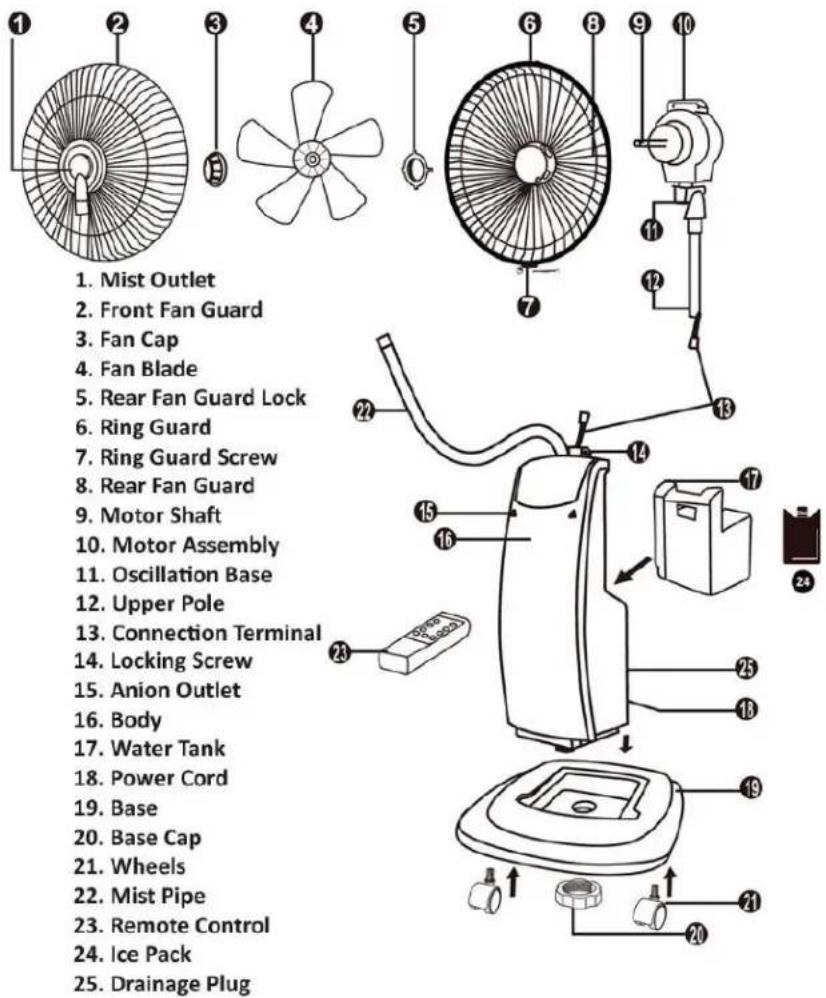
DESCRIPTION OF PARTS
text_image
1. Mist Outlet 2. Front Fan Guard 3. Fan Cap 4. Fan Blade 5. Rear Fan Guard Lock 6. Ring Guard 7. Ring Guard Screw 8. Rear Fan Guard 9. Motor Shaft 10. Motor Assembly 11. Oscillation Base 12. Upper Pole 13. Connection Terminal 14. Locking Screw 15. Anion Outlet 16. Body 17. Water Tank 18. Power Cord 19. Base 20. Base Cap 21. Wheels 22. Mist Pipe 23. Remote Control 24. Ice Pack 25. Drainage PlugHow to Assemble
- Remove all packaging material and make sure that you have all of the parts necessary for assembling your fan.
- Set the Base (19) on a level dry surface and insert five Wheels (21) into the Base (19), (see pic. 1)
- Insert the threaded end of the Body (16) into the Base (19), and then secure with the Base Nut (20). (See pic 2)
- Connect the two Connection Terminal (13) well, and place the Upper Pole (12) into the top of Body (16) fasten Locking Screw (14) clockwise to lock.
- Unscrew the Rear Fan Guard Lock (5) on the front of the motor by turning counterclockwise.
- Fit the Rear Fan Guard (8) to the Motor Housing (10) by matching the three Rear Holes of the fan guard to the three round pins in front of the motor housing (10) and then secure the Rear Fan Guard (8) to the Motor Housing (10) by tightening the Rear Fan Guard Lock (5) (see pic.3)
- Put the Fan Blade (4) onto the Motor Shaft (9) by matching the shafts slots with the blades
slot; tighten the Fan Blade (4) with Fan Cap (3) by turning it counterclockwise. (See pic.4)
-
Test Fan Blade by rotating with your hands, make sure there isn't any contact with the cap, the fan blade should rotate freely, and otherwise repeat all steps again.
-
Place Front Fan Guard (2) onto Rear Fan Guard (8) assembly, push-up the Clamp and tightened with the Ring Guard (6). Secure by tightening the Ring Guard Screw (7) at the bottom of the rear grill. (See pic.5)
-
Insert the threaded end of the Mist Pipe (22) into the Mist Outlet (1). (See pic.6)

text_image
Pic.1 Pic.2 Pic.3 Pic.4 Pic.5 Pic.6How to Use
text_image
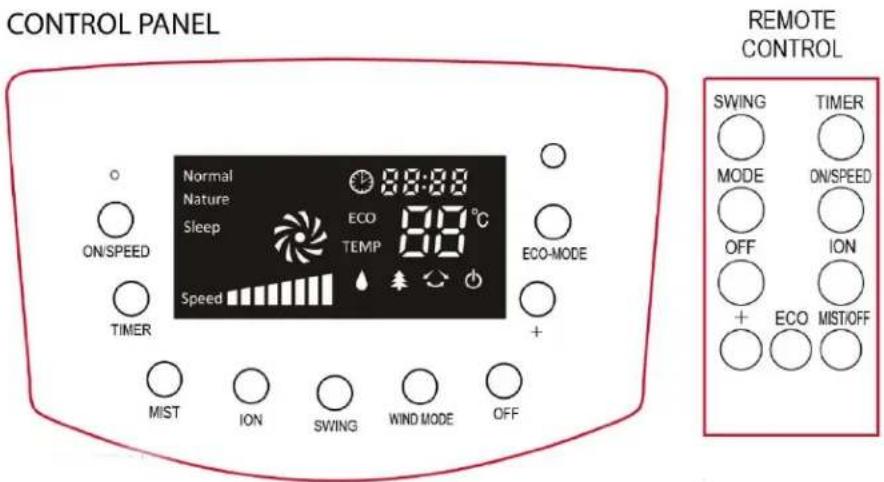
CONTROL PANEL Normal Nature Sleep ECO TEMP 88:88 °C ECO-MODE Speed + MIST ION SWING WIND MODE OFF REMOTE CONTROL SWING TIMER MODE ON/SPEED OFF ION + ECO MIST/OFF- Plug the unit into the convenience outlet.
Set the fan on a flat surface. The power indicator ⏻ on the display will be lighted. -
Press ON/SPEED Button to turn ON. The Fan will automatically start in the medium speed and the icon 📋 will appear on the display.
-
Press ON/SPEED BUTTON to set the desired speed.
Each time the button is pressed, the speed increases from low to medium, and then to high. The speed indicator and fan indicator on the display will light up and glinting as fast as the speed increases.
-
The room temperature 25^ C is shown when the unit is turn ON.
-
Press the TIMER BUTTON repeatedly to choose the desired number of hours, the icon will be shown. The timer can be set up to 12 hours, set time will appear on the display and will count down until it turns OFF.
-
Press the MIST Button to switch ON and OFF the Mist Function.
The icon will be lighted on and off respectively.
NOTE: Make sure that the tank is filled with water before using the Mist Function. This icon will glitter when water tank is empty.
-
Press ION button to activate the IONIZER function. The ionizer introduces negative ions into the air that works to purify the air in the room. The icon will be lighted when the function is switched on. Press this button again to turn OFF.
-
The SWING Button provides you the choices of fixed direction and swing airflow. The icon will be lighted when the function is switched ON. Press this button again to turn OFF.
-
Press the MODE BUTTON to choose wind setting:
When the fan is initially turn ON, the default wind mode (normal) is selected and icon Normal light up. Press the button once to select Sleep wind mode as icon Sleep up. Press twice to select Natural wind mode as icon Nature up.
- Normal Mode - can be adjusted from low to high speed
- Sleep Mode - the fan will automatically adjust the fan speed from low to high repeatedly without setting the speed.
-
Natural Mode - Imitates the feel of wind caressing your face as in outdoor environment by varying fan speed from high to low blows repeatedly.
-
The ECO thermostat control is designed for energy economized. Press the ECO-MODE button to activate the thermostat control, ECO and icon 25°C
will appear on the display. Press this button ⚙ to set required temperature from 18-40°C.
NOTE: The room and ECO setting temperature will alternately appear on the display to show the current temperature.
- When the room temperature is lower than the temperature setting, the ECO thermostat will adjust fan speed to LOW mode automatically. If room temperature is higher than the temperature setting, it will adjust fan speed to HIGH mode automatically.
-
Press the OFF Button to turn OFF the unit.
-
Unplug the unit after every use.
NOTE: Never try to adjust the height of the unit as the connection inside may be pulled.
HOW TO USE MIST FUNCTION
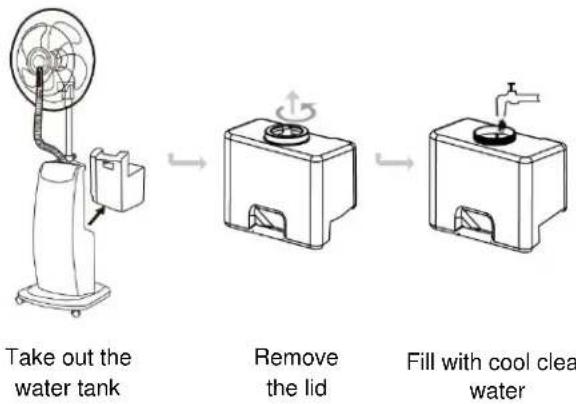
- After assembling the unit, fill the Water Tank (17) with enough cool clean water. Return tank into the unit and press the mist button to activate the mist function.
NOTE:
- Carefully place water tank in its original position.
- Do not press the mist button if the tank is not in its proper place.
• Always check the water level before using the mist function.
flowchart
graph LR
    A["Take out the water tank"] --> B["Remove the lid"]
    B --> C["Fill with cool clear water"]
HOW TO USE THE ICE PACK
flowchart
graph LR
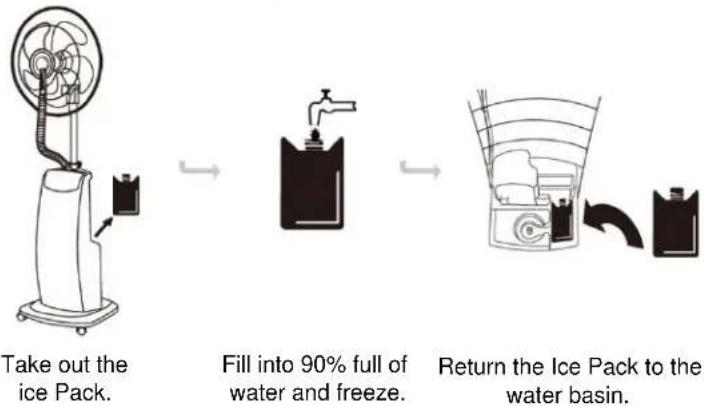
    A["Take out the ice Pack."] --> B["Fill into 90% full of water and freeze."]
    B --> C["Return the Ice Pack to the water basin."]
NOTE:
- Ice pack is reusable; do not change the water and contents of the pack.
- Do not consume the contents of the pack.
• Children should be supervised to ensure that they do not play with the Ice Pack.
TIP:
Make sure that the Ice Pack is completely frozen to enhance cooling effect.
Drainage
- Make sure the Drainage plug (25) (rear side of the unit) is secured and locked tight before filling and after draining.
- Use only clean water in tank and drain away water which has been in the basin for more than 3 days.
CLEANING MAINTENANCE
- Cleaning The Fan
- Always unplug the unit from the convenience outlet before disassembling.
- To disassemble the unit, simply reverse the assembly instruction.
- Vacuum clean or use soft cloth to remove the loose dust and dirt from the screen.
- Never operate unit without the Front Fan Guard in its position
• Decalcifying Water Tank
-
Decalcify the unit every six months if it is used regularly especially with hard water.
-
Place water tank once a week for 15 minutes in hot water in order to avoid germ formation which would cause deposits and clogging.
-
Do not clean appliance using window cleaner, furniture polish, thinner, hot water (above 50°C) or water below 20°C.
- Cleaning The Water Basin
-
Drain water which is left in the unit for more than 3 days.
-
Take out the water tank from the unit.
-
Remove drainage plug on the back of the unit.
-
Discharge remaining water from the basin and clean with soft cloth.
-
Return the drainage cover after cleaning.
- Cleaning The Main Body
-
Use only warm soapy water and cloth. Do not use abrasive materials to avoid scratches.
-
Be careful and ensure water and other liquids do not wet the control panel.