
KH 2415 - Alarm Clock SILVERCREST - Free user manual and instructions
Find the device manual for free KH 2415 SILVERCREST in PDF.



| Product type | Alarm clock radio |
| Brand | SILVERCREST |
| Model | KH 2415 |
| Dimensions (L × W × H) | 110 × 75 × 27 mm |
| Weight (without batteries) | Approx. 122 g |
| Power supply | 4 AAA 1.5V batteries (not included) |
| Display | Digital clock, date, temperature, alarm, wellness sounds |
| Main functions | Alarm, snooze, 6 wellness sounds (stream, cricket, waterfall, wind, storm, white noise), temperature display (°C/°F), backlight, headphone jack, sleep timer (15/30/45 min) |
| Settings | Time, date, alarm: via sliding switch and buttons; 12/24 h format |
| Operating temperature range | 5 to 35 °C |
| Relative humidity | 5 to 90 % (non-condensing) |
| Headphone output | 70 to 100 mV |
| Care and cleaning | Wipe with a slightly damp cloth; do not use harsh cleaners; do not press on the display |
| Safety | Do not use outdoors or in humid rooms; protect from dust, moisture and sunlight; do not open the housing; hearing damage risk with prolonged headphone use at high volume |
| Batteries | Remove batteries if not used for a long time; replace all batteries at the same time; do not recharge, throw into fire or short-circuit |
| Package contents | 1 alarm clock, 1 instruction manual |
| Warranty | 3 years from date of purchase |
Frequently Asked Questions - KH 2415 SILVERCREST
User questions about KH 2415 SILVERCREST
0 question about this device. Answer the ones you know or ask your own.
Ask a new question about this device
Download the instructions for your Alarm Clock in PDF format for free! Find your manual KH 2415 - SILVERCREST and take your electronic device back in hand. On this page are published all the documents necessary for the use of your device. KH 2415 by SILVERCREST.
USER MANUAL KH 2415 SILVERCREST
GB DE-STRESS TRAVEL CLOCK
Operating instructions
CZ PReHrAvaC NA CESTY
Návod k obsluze
SK CESTOVNY AKUSTICKY SYSTÉM
Návod na obsluhu
Intended use 2
Items supplied 2
Device description 3
Technical Data 4
Safety instructions 4
Inserting batteries 6
Setting the date and time 7
Setting a wake-up time 8
Alarm functions / Light 9
Wellness Sounds 10
Temperature display 11
Cleaning and care 11
Maintenance 12
Disposal 12
Importer 13
Warranty and Service 14
DE-STRESS TRAVEL CLOCK KH2415
Preserve these operating instructions for future reference. Pass these instructions on to whoever may acquire the device at a future date.
Intended use
This product is intended for utilisation as an alarm and as a sound system for personal relaxation, and is only for use in dry environments in domestic households. This product is not intended for use outdoors, nor for commercial or industrial applications.
Items supplied
1 x Device
1 x Operating instructions
- Check to ensure that the device is undamaged, all component parts are present and that all packaging remnants are removed from it.
Illustration A:
1 Button "MONTH - HOUR"
2 Button "DATE-MIN"
3 Button "YEAR - 12/24"
4 Button "°C - °F"
5 Button "SNOOZE - LIGHT"
Button "SELECT"
Volume regulator "OFF-VOLUME"
8 "SLEEP"- slide switch
9 Headphone connection
10 Tuning slide switch
1 Alarm slide switch
Illustration B:
12 Battery compartment cover
B Batteries (not supplied)
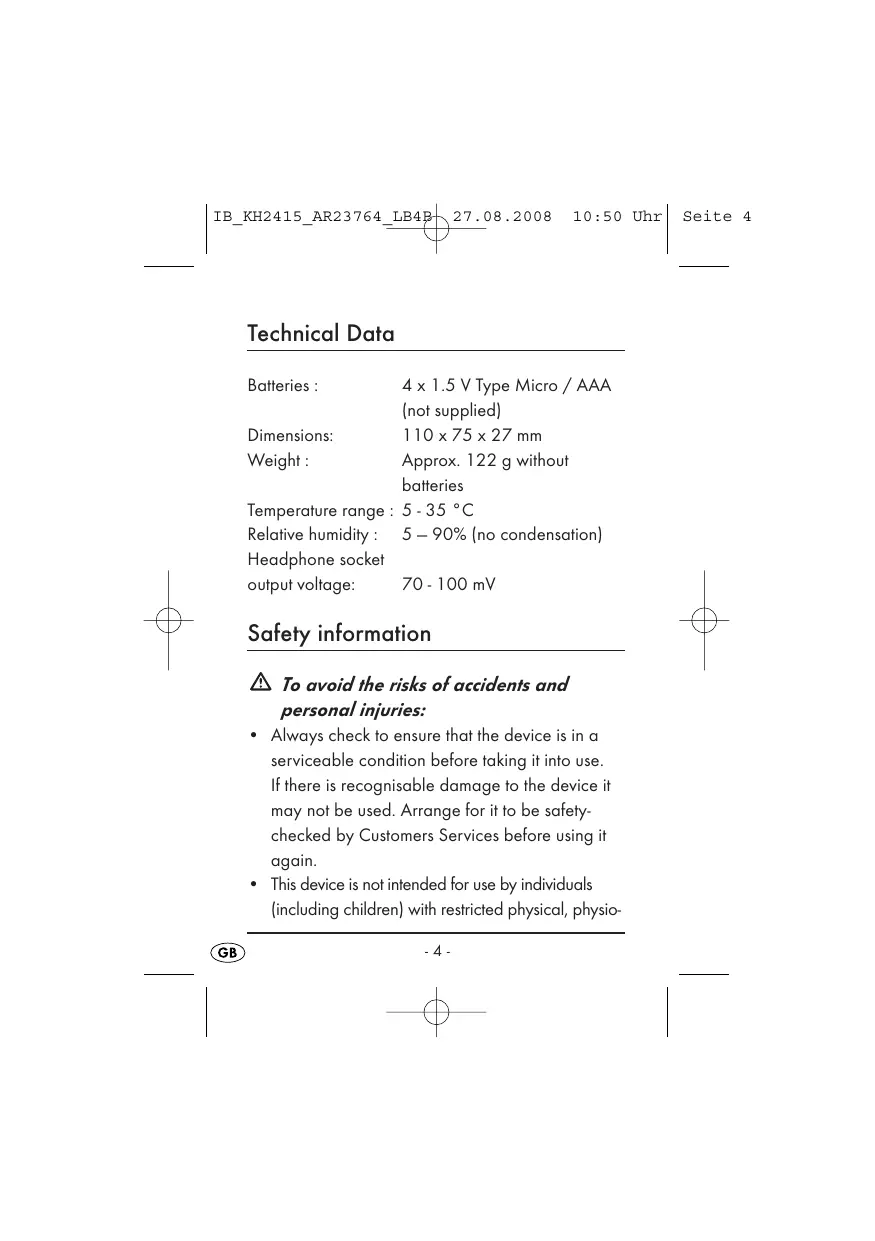
Batteries: 4 x 1.5 V Type Micro / AAA (not supplied)
Dimensions: 110 × 75 × 27 ~mm
Weight: Approx. 122 g without batteries
Temperature range: 5-35 °C
Relative humidity: 5 - 90% (no condensation)
Headphone socket
output voltage: 70 - 100 mV
Safety information
To avoid the risks of accidents and personal injuries:
-
Always check to ensure that the device is in a serviceable condition before taking it into use. If there is recognisable damage to the device it may not be used. Arrange for it to be safely-checked by Customers Services before using it again.
-
This device is not intended for use by individuals (including children) with restricted physical, physio
logical or intellectual abilities or deficiencies in experience and/or knowledge unless they are supervised by a person responsible for their safety or receive from this person instruction in how the device is to be used. Children should be supervised to ensure that they do not play with the device.
- Attention: Listening to music for long periods through headphones set at a high sound level can lead to hearing damage!
To avoid damage to the device:
- Protect the device from dust and moisture as well as direct sunlight. Use it only in dry rooms, do not use it outdoors or in damp areas.
- NEVER open any part of the device housing, unless instructions to do so are given herein.
Interaction with batteries
- Leaking batteries can cause damage to the appliance. Remove the batteries if you do not intend to use the device for an extended period.
-
Always exchange all batteries at the same time, for new batteries of the same type.
-
In the event of a leaking battery: Put on protective gloves and clean the battery compartment with a dry cloth.
- Batteries may not be thrown into fires, taken apart or short-circuited. Do not attempt to recharge batteries. They could explode.
- Should a battery be accidentally swallowed, IMMEDIATELY seek medical assistance!
Inserting the batteries
- Slide the battery compartment cover ⑫ off and insert the batteries ⑬ (not supplied) as shown in the illustration. Close and secure the battery compartment. The device is now ready for use.
To adjust the clock, push the tuning slide switch 10 into the position "TIME". The time shown in the display blinks as a check.
- Using the button "MONTH - HOUR" ① you can now adjust the hours.
Using the button "DATE-MIN" 2 you can now adjust the minute display.
To set the date, push the tuning slide switch 10 into the position "CAL". The year number blinks and the indicator "YR" appears in the display as a check.
Using the button "YEAR - 12/24" ③ you can now adjust the year number.
- Using the button "MONTH - HOUR" ① you can now adjust the month.
- Using the button "DATE-MIN" 2 you can now adjust the day. The weekday indicator next to the date is automatically worked out by the clock.
- To close the time and date setting, push the tuning slide switch 10 into the position "LOCK".
Using the button "YEAR - 12/24" 3 you can now select between time presentation in either the 12 hour or 24 hour mode.
Setting the alarm time
- For this, push the tuning slide switch 10 into the position "ALM". The time in the display blinks and the indicator "AL" appears.
- Using the button "MONTH - HOUR" ① you can now adjust the hours.
Using the button "DATE-MIN" 2 you can now adjust the minute display. - To close the alarm setting, push the tuning slide switch 10 into the position "LOCK".
-
You can check the alarm time by pressing either the button "MONTH - HOUR" ① or "DATE - MIN" ②. In the display appears the alarm time and the indicator "AL" as a check.
-
Place the alarm slide switch ① into the position ...
-
"ALM ON", to switch the alarm function on.
An alarm symbol appears in the display. - "ALM OFF", to switch the alarm function off. The alarm symbol in the display extinguishes.
-
"SNZ", to switch the alarm function on and, at the same time, the snooze function.
-
When you press on the button
5 "SNOOZE / LIGHT" and ...
- the function "ALM ON" has been selected, then you finish the alarm function for this day. The alarms sounds again on the following day.
- the function "SNZ" has been selected, then you interrupt the alarm function for 5 minutes.
On its expiration, the alarm sounds again.
- the function "ALM OFF" has been selected, then you switch on the display background illumination (light) for approx. 3 seconds.
-
When the alarm sounds the display illumination is switched on at the same time.
-
Turn the volume regulator ⑦ clockwise from the position "OFF" to a middle position.
- By pressing the button "SELECT" ⑥ you can now select one of the 6 proposed Wellness Sounds - "babbling brook", "cricket", "waterfall", "wind", "distant storm" and "white noise".
- Using the volume regulator ⑦ select a pleasant sound level.
- Should you connect headphones, you can hear the Wellness Sounds in an improved sound quality and, whether reclining or seated, completely relax.

Warning: Listening for long periods at a high sound level can cause hearing damage!
Using the "SLEEP" slide switch 8 select the time period for the Wellness Sounds. Programmable are 15, 30 or 45 minutes. On the expiry of this period the Wellness Sounds can be restarted by pressing the button "SELECT" 6 once again.
- Turn the volume regulator ① into the position "OFF" if you want to prematurely end the Wellness Sounds.
Temperature Display
- Press the button 4 to switch the temperature indicator over from ^ C to ^ F .
Cleaning and Maintenance
- Do NOT press on the display when cleaning it. Otherwise, the liquid crystals in the display could be damaged.
- Only clean the device with a lightly moistened cloth. Never use aggressive cleaning agents. They can damage the surfaces.
-
Do not permit fluids to permeate into the interior of the device.
-
The device is maintenance-free. No form of maintenance, either on or in the device, is intended for execution by the user. In the event of malfunction or apparent damage, make contact with our Customer Services.
Disposal
Disposing of the device

Do not dispose of this device in your normal domestic waste.
Dispose of the device through an approved disposal centre or at your community waste facility. This device is subject to the provisions of European Guidelines 2002/96/EC. Observe the currently applicable regulations. In case of doubt, please contact your waste disposal centre.
Disposing of the batteries
Do not dispose of the batteries with household waste. Every consumer is statutorily obliged to dispose of batteries at a collection site of his community/city district or at a retail store. This obligation is intended to ensure that batteries are disposed of in an environmentally safe fashion. Only dispose of batteries when they are fully discharged.

Dispose of all packaging materials in an environmentally friendly manner.
Importer
KOMPERNASS GMBH
BURGSTRASSE 21
D-44867 BOCHUM
www.kompernass.com
A 3-year warranty applies to this device, starting with the date of purchase. This device has been manufactured with care and meticulously examined before delivery. Please retain your receipt as proof of purchase. In the case of a warranty claim, please make contact by telephone with our service department. Only in this way can a post-free despatch for your goods be assured.
The warranty covers only claims for material and manufacturing defects, not for worn parts or for damage to fragile components, e.g. buttons or batteries. This product is for private use only and is not intended for commercial use.
The warranty becomes void in cases of abusive and improper handling, use of force and internal modifications not carried out by our authorized Service Centre. Your statutory rights are not restricted in any way by this warranty.

DES Ltd
Units 14-15
Bilston Industrial Estate
Oxford Street
Bilston
WV147EG
Tel.: 0870/787-6177
Fax: 0870/787-6168
e-mail: support.uk@kompernass.com

Irish Connection
Harbour view
Howth
Co. Dublin
Tel: 00353 (0) 87 99 62 077
Fax: 00353 18398056
e-mail: support.ie@kompernass.com


- DE-STRESS TRAVEL CLOCK KH2415
- Intended use
- Items supplied
- Illustration A:
- Illustration B:
- Safety information
- To avoid the risks of accidents and personal injuries:
- To avoid damage to the device:
- Interaction with batteries
- Inserting the batteries
- Setting the alarm time
- Temperature Display
- Cleaning and Maintenance
- Disposal
- Disposing of the device
- Do not dispose of this device in your normal domestic waste.
- Disposing of the batteries
- Importer
- DES Ltd
- Irish Connection
Brand : SILVERCREST
Model : KH 2415
Category : Alarm Clock