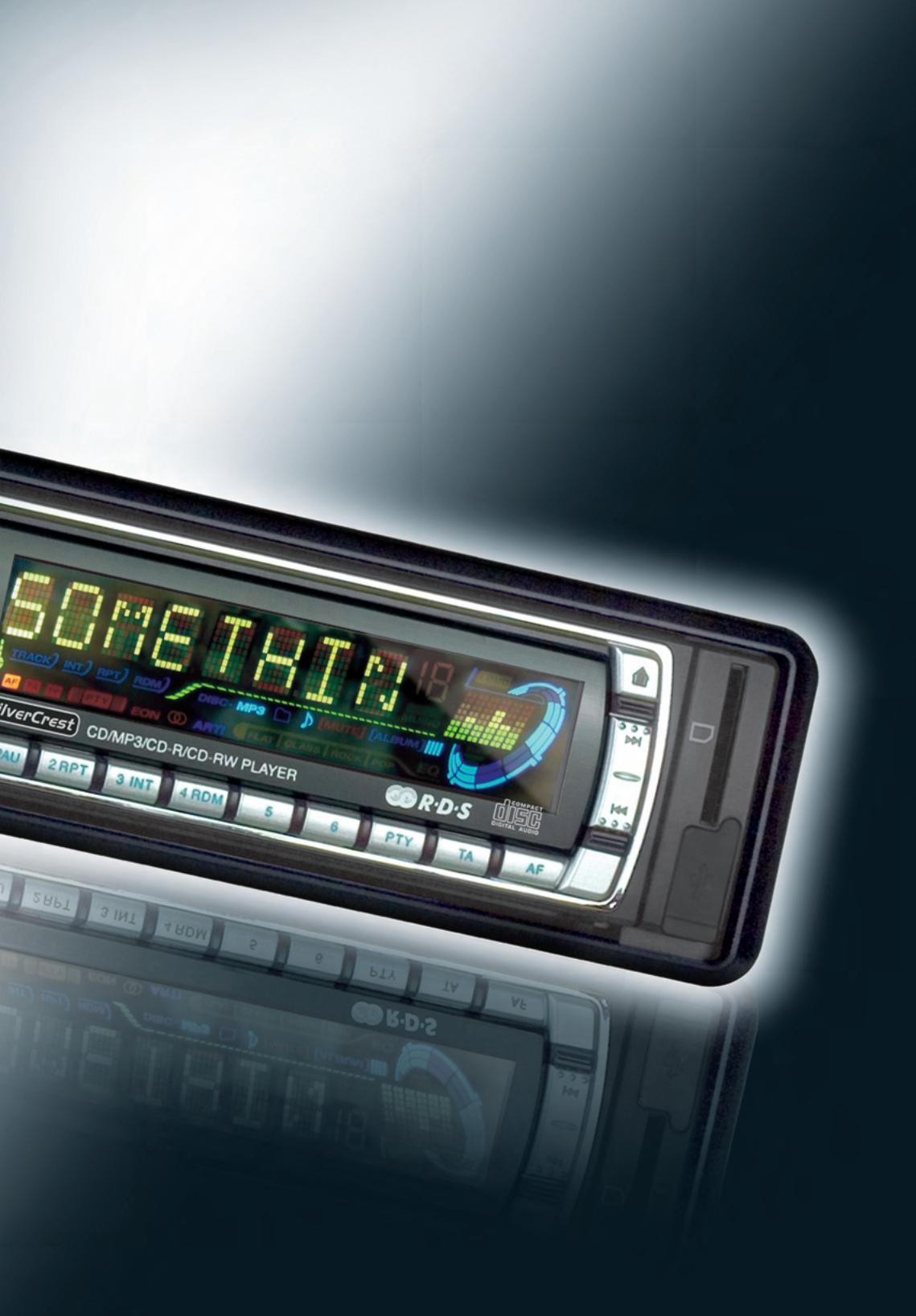
KH 2380 - Car stereo SILVERCREST - Free user manual and instructions
Find the device manual for free KH 2380 SILVERCREST in PDF.


| Product type | Car radio with CD, USB, SD/MMC player and FM/MW/LW tuner |
| Brand | SILVERCREST |
| Model | KH 2380 |
| Dimensions (approx.) | 18 x 5 x 16 cm (DIN standard format) |
| Weight (approx.) | Approx. 500 g |
| Power supply | 12-13.8 V DC, max. consumption 10 A, fuse 10 A |
| Main functions | Radio reception FM/MW/LW, CD/CD-R/CD-RW playback, USB, MP3, SD/MMC, WMA recording, IR remote control, detachable panel |
| Output power | 4 x 20 W (max.) |
| Connections | ISO 12V, ISO speakers (4-8 Ω), line input (RCA L/R), front/rear line outputs (RCA), USB port, SD/MMC slot, antenna, CD changer (DIN 8) |
| Maintenance and cleaning | Clean plastic surfaces with a dry cloth. Do not use solvents. |
| Safety | Fuse 10 A, automatic shutdown in case of fault, do not expose to moisture or excessive heat |
| Spare parts and repairability | Repairs only by an approved professional. Contact customer service (see warranty card). |
| General information | 30-page manual in French, 36-month warranty, imported by Kompernaß GmbH |
Frequently Asked Questions - KH 2380 SILVERCREST
User questions about KH 2380 SILVERCREST
0 question about this device. Answer the ones you know or ask your own.
Ask a new question about this device
Download the instructions for your Car stereo in PDF format for free! Find your manual KH 2380 - SILVERCREST and take your electronic device back in hand. On this page are published all the documents necessary for the use of your device. KH 2380 by SILVERCREST.
USER MANUAL KH 2380 SILVERCREST
GBIEOperation manual
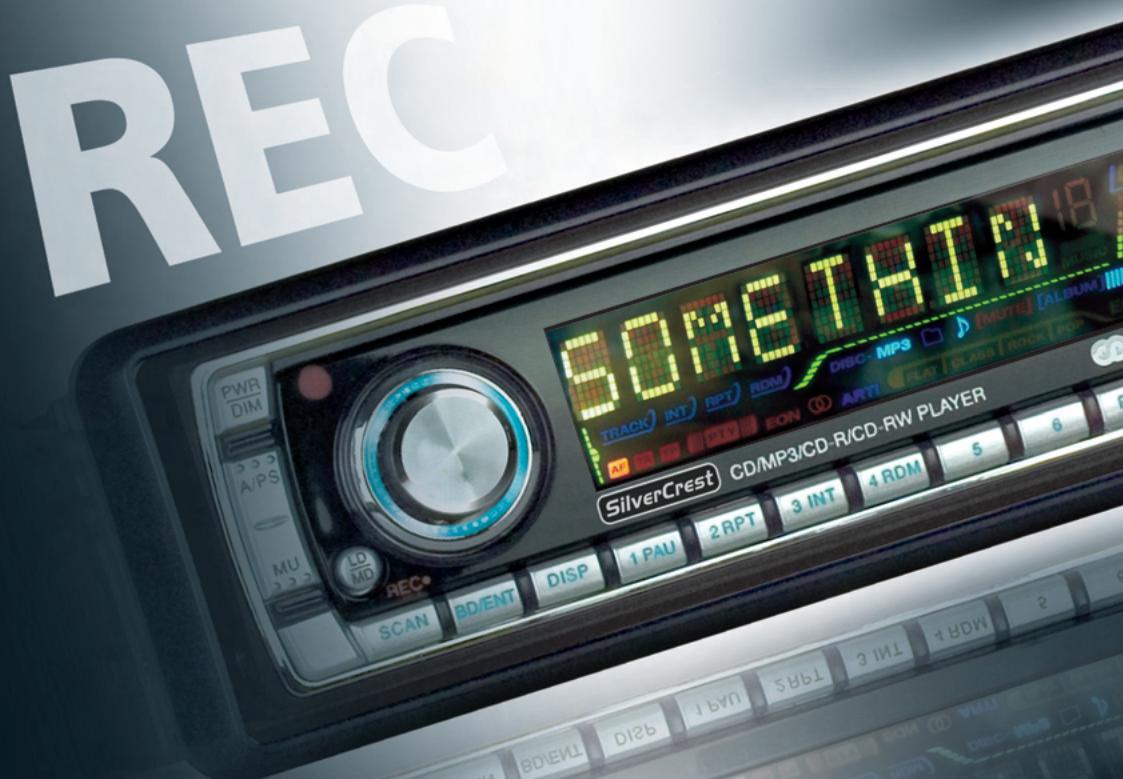
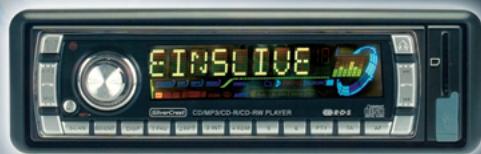
KH 2380
GB/IE Operation and Safety Notes.. 5
A
B
C
D
Introduction
For your personal safety.. 6
Proper Use 6
Equipment.. 6
Scope of Supply. 7
Technical Information.. 8
Audio Storage Media. 8
Safety
Important specific notes on safety.. 9
Preparation
Installation
Removing the control panel from the car radio.. Page 11
Installation of the DIN assembly bracket into the car's instrument panel.. Page 11
Connection to the car's loudspeaker . Page 12
Connection with car's 12VDC power supply Page 12
Connection with CD Changer . Page 13
Connection of an amplifier . 13
Connecting a portable audio device . Page 13
Connecting to the aerial of the motor vehicle.. Page 14
Attaching to the DIN assembly bracket . Page 14
Attaching the control panel.. Page 14
Operation
Switching on.. Page 14
Turning off . 15
Selecting and adjusting the sound.. 15
Selecting and adjusting playback functions.. Page 15
Adjusting volume. Page 16
Setting the 3-Band PLL Tuner.. Page 16
Playing from audio storage media.. Page 18
CD, CD-R and CD-RW. Page 18
USB Memory Stick, MP3 Player or SD/MMC.. Page 20
Recording/Storing/Deleting on SD, MMC or a USB Memory Stick...... Page 21
Promote Control. Page 22
Troubleshooting
Maintenance and Service.. 23
Disposal. Page 24
Information
Important warranty notes.. Page 24
Importer. Page 24
Car Radio KH 2380
Introduction
For your personal safety
Please read the operating instructions carefully; to do so, unfold the pages featuring the illustrations. Pay precise attention to the notes when taking the device into operation. Should you have any further questions on how to use this car radio recorder, please contact your national service point (see guarantee card). Store the operating instructions safely for later reference and hand them to third parties when passing your car radio recorder to a new user.
Proper Use
The KH 2380 car radio is suitable for private use for receiving radio stations in the FM/MW/LW range and for playing back CD, CD-R, CD-RW, USB Memory-Stick, MP3 Player, SD and MMC audio storage media. It is able to make recordings in WMA format on to SD, MMC or USB memory stick (not supplied) of the radio stations being played back. The car radio has a removable control panel and an IR remote control device which can only be supplied with electricity by means of 1 lithium battery of type CR2025, 3V DC. The car radio may only be connected to the 12V DC supply. The device is suitable for connecting to four loudspeakers with an impedance of 4-8 Ohm, a maximum of four power amplifiers (to the four speaker output channels) and a CD changer. Any careless use or use other than for the intended purpose will result in the guarantee becoming invalid.
Equipment
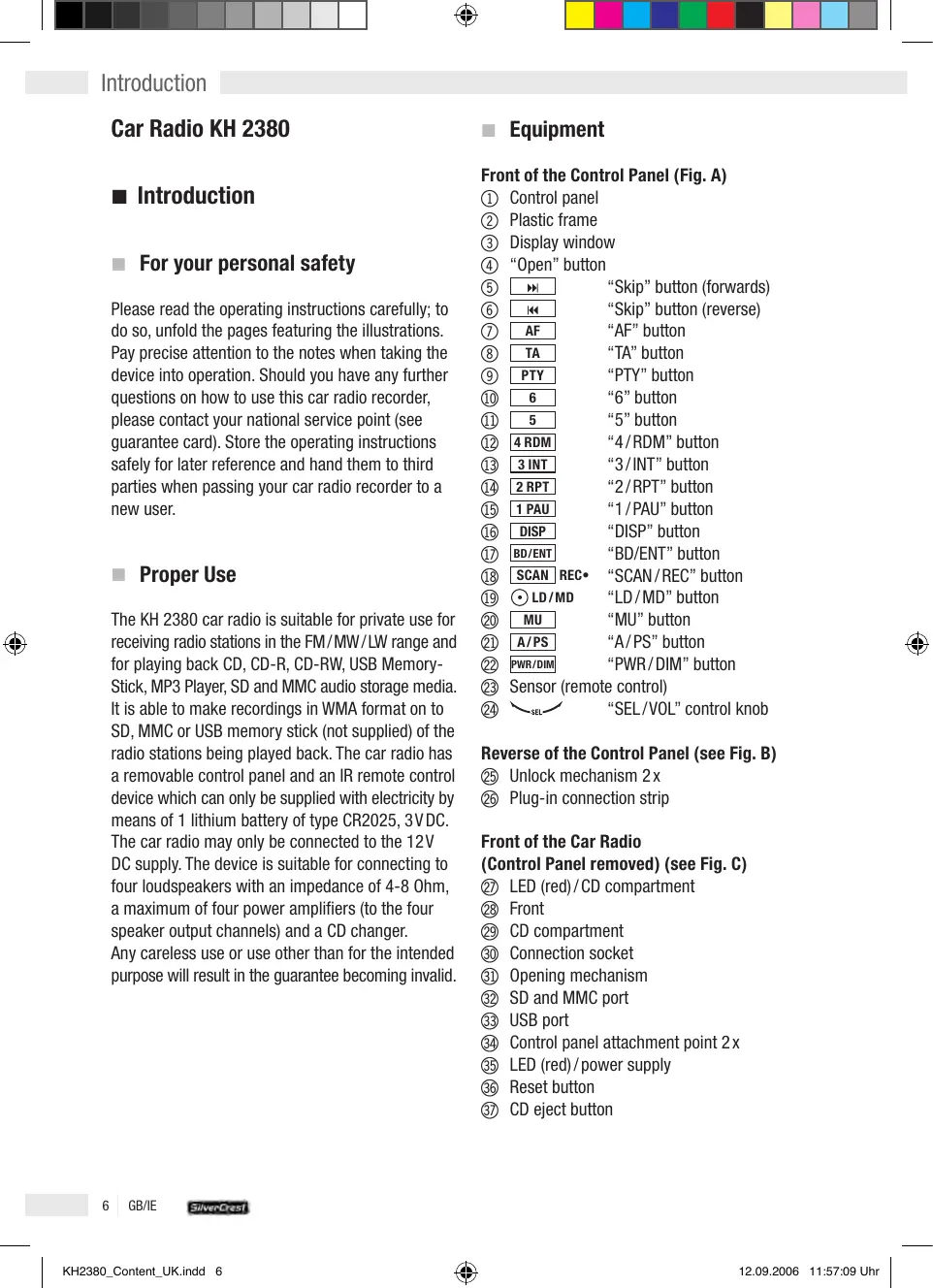
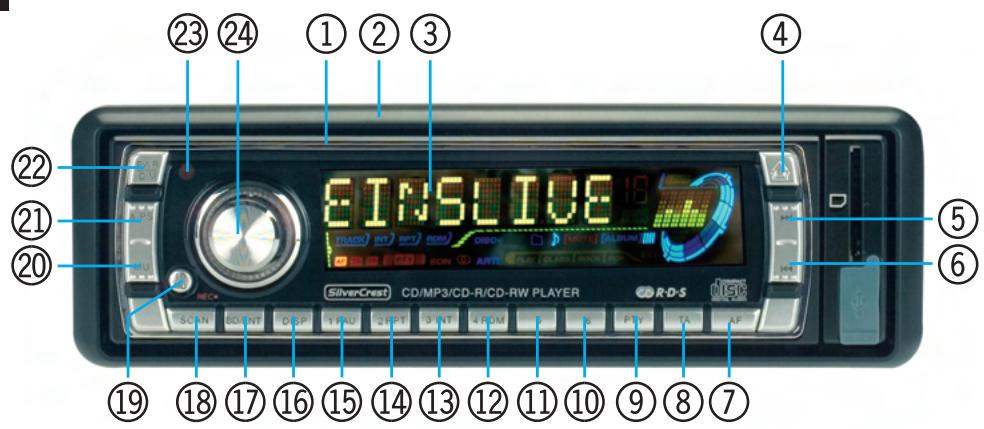
Front of the Control Panel (Fig. A)
① Control panel
② Plastic frame
③ Display window
④ “Open” button
⑤ "Skip" button (forwards)
"Skip" button (reverse)
⑦ AF “AF” button
⑧ TA “TA” button
⑨ PTY "PTY" button
10 6 "6" button
5 "5" button
12 4RDM "4/RDM" button
3 INT "3/INT" button
14 2RPT "2/RPT" button
15 1 PAU "1/PAU" button
DISP "DISP" button
17 BD/ENT "BD/ENT" button
18 SCANREC· "SCAN/REC" button
19 LD/MD "LD/MD" button
MU “MU” button
A/PS "A/PS" button
22 PWR/DIM “PWR/DIM” button
23 Sensor (remote control)
24 “SEL/VOL”control knob
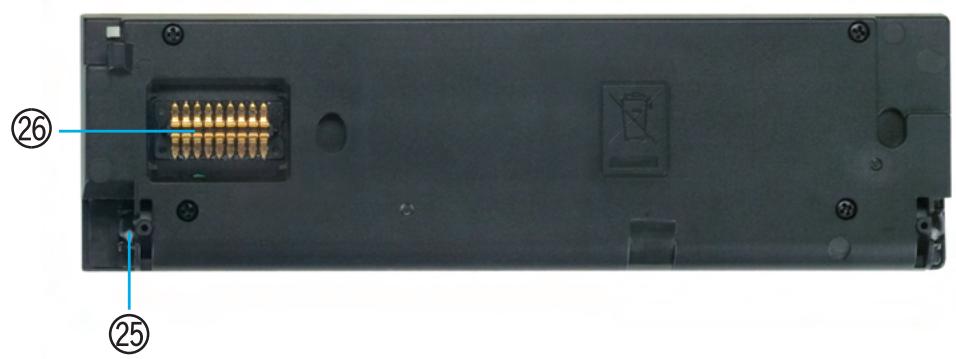
Reverse of the Control Panel (see Fig. B)
25 Unlock mechanism 2x
26 Plug-in connection strip
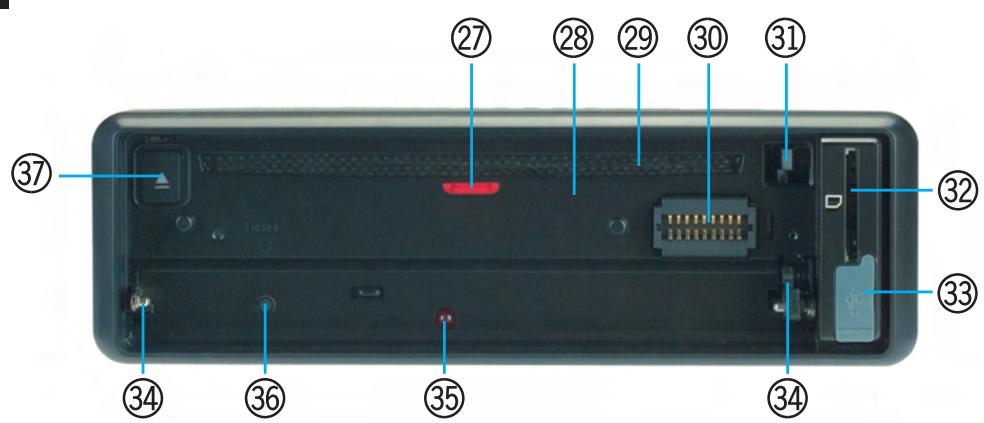
Front of the Car Radio (Control Panel removed) (see Fig. C)
② LED(red)/CD compartment
28 Front
CD compartment
30 Connection socket
③ Opening mechanism
③ SD and MMC port
③ USB port
34 Control panel attachment point 2x
⑤ LED(red)/power supply
36 Reset button
③ CD eject button
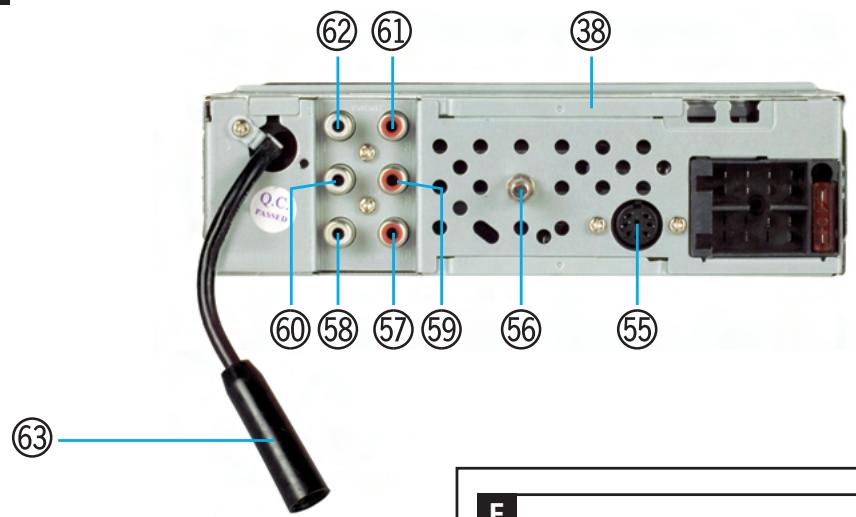
Reverse of the Car Radio (see Fig. D)
③ Metal housing with vents
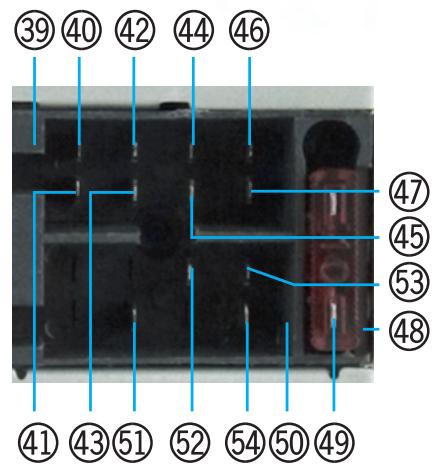
ISO plug jack for loudspeaker connection
40 Plug-in for rear right loudspeaker (+)
④ Plug-in for rear right loudspeaker (-)
42 Plug-In for front right loudspeaker (+)
43 Plug-in for front right loudspeaker (-)
44 Plug-in for front left loudspeaker (+)
45 Plug-in for front left loudspeaker (-)
46 Plug-in for rear left loudspeaker (+)
47 Plug-in for rear left loudspeaker (-)
48 Flat blade fuse socket
49 Flat blade fuse 10A
ISO plug jack to the 12VDC power connection (including connection of an automatic aerial)
⑤ Plug-in for 12VDC constant current
⑤2 Plug-in for electric aerial
53 Plug-in for 12VDC ignition current
⑤4 Plug-in for minus/earth connection in the vehicle
55 DIN 8-pole plug jack (CD changer connection)
⑤ 6 Attachment screw (including M5 nut and washer)
LINE IN R cinch plug jack (red/right)
LINE IN L cinch plug jack (white/left)
OUT/REAR cinch R plug jack (loudspeaker connection [red / rear right])
OUT/REAR cinch L plug jack (loudspeaker connection [white/rear left])
OUT/FRONT cinch plug jack (loudspeaker connection [red/front right])
OUT/FRONT cinch plug jack (loudspeaker connection [white / front left])
⑥ Aerial socket
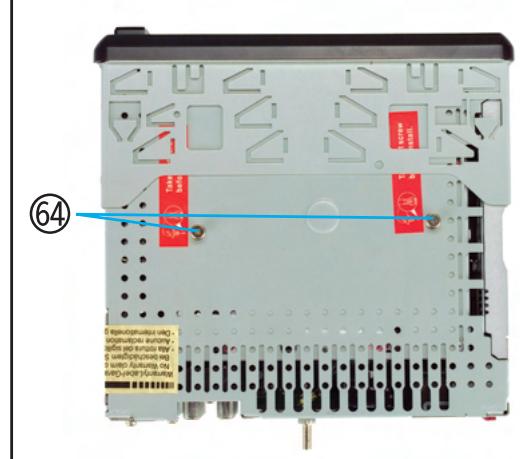
Top of the Car Radio (see Fig. E)
Transport safety screw 2x
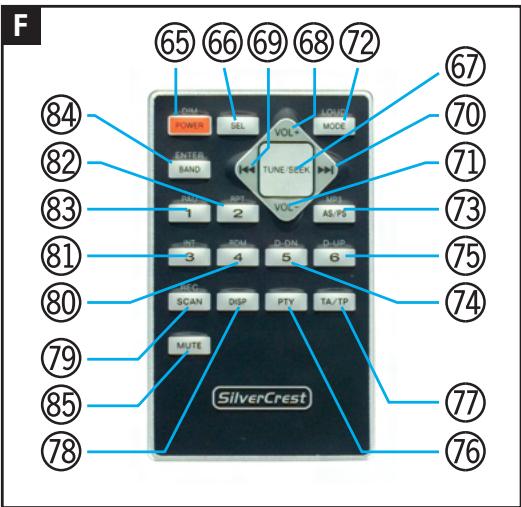
Front of the Remote Control (see Fig. F)
65 DIM POWER “DIM POWER/ 心 ” button
66 “SEL” button
67 “TUNE/SEEK”multifunction button: + 68 "VOL ^+ "button (upper)
69 Skip button (reverse)
70 skip button (forwards)
71 "VOL"button (lower)
⑦ LOUD MODE “MODE/LOUD” button
73 MP3 AS/PS "MP3/AS/PS" button
D-DN 5 "D-DN/5" button
D-UP 6 "D-UP/6" button
76 PTY "PTY" button
TA/TP "TA/TP" button
DISP "DISP" button
79 SCANREC "REC/SCN" button
80 RDM 4 "4/RDM" button
81 INT 3 "3/INT" button
82 RPT 2 "2/RPT" button
83 PAU 1 “1/PAU button
84 ENTER BAND "BAND/ENTER" button
MUTE "MUTE" button
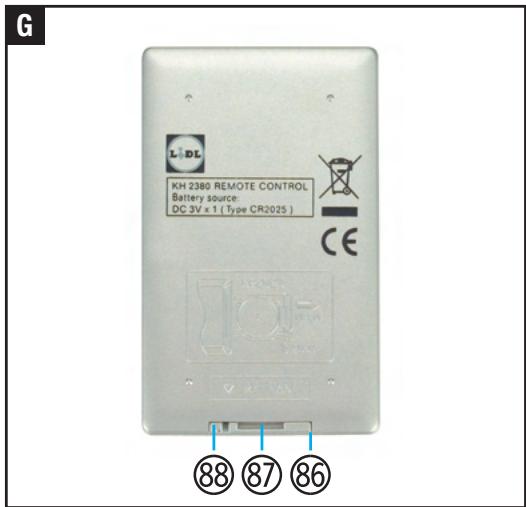
Rear of the Remote Control (see Fig. G)
Battery compartment
87 Battery holder
88 Unlock button
Scope of Supply
1 x Car radio (including control panel)
1 x IR remote control (including 1 x lithium battery of type CR2025, 3VDC)
1 x Plastic box (for control panel)
1x DIN assembly bracket
2x Installation key
1 x Anchoring plate (including attachment material)
1 x Set of instructions
Technical Information
Car Radio
Nominal voltage: 13.8VDC (minus pole negative, connected to vehicle's chassis)
Power consumption: max. 10A
Output: max. 4 × 20W active power factor
Distortion: -40 dB (1%)
Amplifier TAD 7386
4 band preset EQ
Electronic master level for: Low-frequency and high-frequency sound, loudness, fade-in/fade-out, balance
Pre-amplifier In (LINE IN)
Input level: 775mV = 0 dB
Impedance: 47 k Ohm
Pre-amplifier Out (LINE OUT)
Output: 2000mV
Impedance: 4,7 k Ohm
Sound control
Bass frequency: 100Hz± 10 dB
High frequency: 10kHz± 10dB
Connections
ISO:12VDC
ISO: loudspeaker (max. 2 pairs) (4-8 Ohm)
MP3 player or USB memory stick
(USB 1.1 and 2.0)
SD or MMC
CD changer
Max. four amplifiers
Display
Liquid crystal screen
(8-digit alpha-numerical Dot Matrix LCD Display)
Background lighting
(colour blue, 2 dimming levels)
3 Band PLL Tuner
Display: frequency band, radio stations, mono or stereo reception, pre-sets, activated EON, AF, TA/TP and mute function
FM band (FM 1, FM 2, FM 3)
Frequency band: 87.5 - 108 MHz
Channel increment: 50kHz
Intermediate frequency: 10.7 MHz
Stereo separation: 25 dB
Noise cancellation: 50 dB
Pre-set stations: 18
MW Band (MW 1, MW 2)
Frequency band: 530 - 1600 KHz
Interim frequency: 450 KHz
Available sensitivity: 32dB V
Pre-set stations: 12
LW Band (LW 1)
Frequency band: 144 - 290 KHz
Interim frequency: 450 KHz
Available sensitivity: 32dB V
Pre-set stations: 6
IR remote control
Nominal voltage: 3VDC
Power supply: 1 x Lithium battery type CR2025, 3V DC
Current consumption: approx. 30mA
Wave range: near-infrared 0.7 - 1.4 μm
Dimensions: 85 × 6 × 52 ~mm (LxHxW)
Audio Storage Media
Play
Data formats: MP3 with ID3, WMA compatible
Media: CD, CD-R, CD-RW, SD, MMC, USB 1.1 and
2.0 (stick or plug-in connection)
Noise cancellation: >60 dB
Channel separation: >50 dB
Frequency range: 20Hz - 20kHz
Display: Directory, file, track, album, artist, duration
Search function: File, track and starting letter are
displayed
Recording
Data formats:WMA
Storage devices: SD, MMC or USB memory stick
Playback source: 3-band PLL tuner
Display: Directory, file, track, album, artist, duration
Safety

Important specific notes on safety
The following notes are for your safety and satisfaction in operating the device. Please observe that noncompliance with these safety notes may lead to substantial risks caused by accident.
Explanation of the icons and terminology used.
Danger! Avoid risk to life!
Caution! Avoid risk of injury and damage to property!
Tip! What to do!
Danger!
- Do not allow small children unsupervised near the packaging material! Risk of suffocation!
- Do not allow infants and children unsupervised into the vicinity of the device!
-
Protect yourself against an electric shock! Avoid any short circuits during connections:
-
with the vehicle's 12VDC power supply
- with the max. 2 pairs of loudspeakers with the impedance 4-8 Ohm
- with a CD changer
- with a terminal amplifier
Before connecting to the 12VDC power supply of a car, obtain information on how to maintain electrical safety based on the vehicle's operation manual!
- Ensure that when connecting to a vehicle's 12VDC power supply, there is no voltage in the vehicle's connecting cables. Equip the connecting cords with fuse holders (3x15A)!
- When installing into a car, ensure that the vehicle is out of operation and in a secure standstill position! Turn off the ignition and bring the vehicle into parking position with applied hand-brake.
- Complete the connection to the 12VDC power supply while fully protected against humidity!
- Complete the installation in a car, the assembly, the maintenance and the service disconnected from the 12VDC power supply!
- Do not expose the device to moisture, fire, heat
and sustained temperature in excess of 50^
- Do not damage any lines carrying fuel or for electricity, brakes, hydraulics, water or data transfer when tightening the screws!
- Ensure that the 12VDC constant current plug-in (5), the 12VDC ignition current plug-in (5) and possibly the powered aerial plug-in (5) do not come into contact with a fuel line (e.g. petrol-carrying line)!
- Do not allow yourself to be distracted while driving by operating the car radio or from its displays! Familiarise yourself with its operation before driving and practise the safe use of the car radio's features! Set the volume only to such level that the sirens of emergency vehicles can be heard on time.
Caution!
- Avoid injuries and damage to the sensitive sense of hearing of passengers (in particular infants, children and pets) while in the car! Adjust the volume and balance of the loudspeakers for all passengers to a healthy and comfortable level!
- Adjust the volume such that you can always hear the warning signals of other road users.
Before operation, check if all components have been assembled in accordance with the operating instructions!
Before assembly and operation, check the delivery for damage and completeness!
Use the car radio only with the supplied original parts! - Do not cover the metal casing ③ with objects!
- Protect all electronic contact areas against short circuiting, humidity, damage and impurities!
Do not place the device on or near a car battery!
Prevent a short circuit and damage! Ensure that no alien matter or objects can access the inside! - Disconnect the car radio in the event of operational malfunctioning and damage instantly from the 12VDC power supply!
- Connection to the loudspeakers, CD changer, amplifier and audio storage devices (CD, CD-R, CD-RW, USB memory stick, MP3 player, SD, and MMC) must be carried out as described in the relevant operating manual.
Have the car radio repaired exclusively by
authorised and trained professional staff! In the event of repairs, contact your national service point (see guarantee card)!
Do not expose the device to mechanical stress!
- Avoid theft and unauthorised use especially if the device has been installed in a car! Before leaving the parked vehicle, remove the control panel of the car radio and store it safely in the plastic box.
Exchange any defect fuses only against new fuses of the same type with identical A (Ampere) rating!
If not used for extended periods of time, remove the battery from the remote control!
Tip! What to do!
- When recording radio programmes please observe the copyright regulations of the country in which you are using the device.
Prepare yourself and take your time when familiarising yourself with the car radio's operation! Ensure a tidy environment in which you are not disturbed and perform the initial operation with maximum concentration. - Carefully plan the assembly point. Observe that the assembled car radio does not cause obstruction while driving the vehicle.
The audio data of a CD-R, CD-RW can only be played if they were fully burnt on to the media.
Use the highly sensitive CD-R, CD-RW in accordance with their operating instructions! - Avoid interruptions while playing audio storage media! Clean the CD, CD-R and CD-RW before use with a dry anti-static cloth, wiping from the centre toward the edge of the disk!
- Ensure that the playing of audio storage media is not interrupted by condensation! Remove the CD, CD-R, CD-RW in the case of high humidity and low ambience temperatures from the device.
- Please ensure that audio storage media used for playback are not exposed to condensation! Remove CDs, CD-Rs and CD-RWs from the device if the humidity is high and the ambient temperatures low. Use audio storage media only with completely dry surfaces.
- Store audio storage media outside of the device
in an appropriate protective cover.
Obtain an overview of the most important specific terminology:
Receiver: Electronic receiver for radio broadcasts and sound data of storage media and simultaneously pre-amplifier.
Tuner: Receives and issues radio signals.
PLL (Phase-locked-loop): Electronic switching which enables precision reception of radio frequencies.
FM (Ultra-short wave): Band receiver for radio broadcasting (Frequency range: 87.5 - 108 MHz).
MW (Medium wave): Band receiver for radio broadcasting (Frequency range: 530 - 1600 KHz).
LW (Long wave): Band receiver for radio broadcasting (Frequency range: 144 - 290 KHz).
CD/CD-R/CD-RW (Compact Disc): Storage medium for sound and image data (disk approx. 120mm
- USB (Universal Serial Bus): Universal interface for data transmission.
SD (Secure Digital Card): Storage media for sound and image data (rectangular approx. 24 × 1 × 32 mm ).
MMC (Multimedia Card): Storage media for sound and image data (rectangular approx. 24 × 1 × 32 mm ).
MP3 (Moving Picture Experts Group Layer 3): Compressed audio format.
ID3: Additional information which provides details on track and artist of audio files (e.g. MP3).
WMA (Windows Media Audio): Compressed audio format.
LINE IN: Connection for feeding audio data into a HiFi device.
LINE OUT: Connection to send out audio data from a HiFi device.
Cinch: Standardised plug connector to transfer electrical signals.
- RDS (Radio Data System): Encrypted additional information broadcast by radio stations in addition to conventional music and language.
O AF (Alternative frequency): Function to automatically receive the optimum frequency of the programme tuned into.
○ TA/TP (Traffic Announcement/Traffic Program): Function to receive traffic updates.
EON (Enhanced Other Networks): If TA/TP function is activated, while listening to a broadcasting of a radio station the programme switches automatically as soon as traffic updates are broadcast. Traffic updates are then broadcast at a pre-set volume.
- PTY (Program Type): Function to receive special program (e.g. rock music).
HiFi (High Fidelity): Quality standard for audio replay devices.
DIN 8 pole plug: adapter to connect electronic HiFi device in accordance with DIN standard (e.g. CD changer connection to a MP3 car radio recorder).
ISO plug: Adapter to connect electronic HiFi devices in accordance with International Organization for Standardization.
Preparation
The following auxiliaries and tools are required for the connection and for the assembly, which are not included in the delivery:
1x ISO plug to connect car's loudspeaker
1x ISO plug to make 12VDC connection
1x Powered aerial connection with connector
1 x Pair of loudspeakers impedance 4-8 Ohm, (incl. feed line)
3x Fuse holder with fuse 15A
1x DIN assembly cut-out in car's instrument panel
9x Biscuit connectors
1 x Stripping tongs or cable stripping knife
1x Screw driver
1 x Spanner with 8 mm opening
1x Biro
To connect an antenna already installed in the vehicle you may need:
1 x Antenna adapter (in accordance with the Technical Data for the antenna)
To connect a CD changer you require:
1x Connecting line with DIN-8-pole plug
To connect a final amplifier you require:
2x Cinch connecting cable (insulation and plug: white/red)
For the connection of a portable audio device you require:
1 x Cinch connection cable/3.5 mm jack (insulation and plug: white/red)
To record MP3 or WMA formats you require:
1 x MMC approx. 1 GB storage capacity or
1 x SD approx. 1 GB storage capacity
or
1 x USB memory stick approx. 1 GB storage capacity
Installation
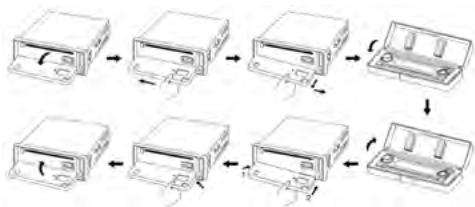
Removing the control panel from the car radio
- Avoid hard contact with the display window ③.
- Press the "Open" button ④ and allow the control panel ① to reach the horizontal position.
- Push the control panel ① slightly to the left and pull it forwards.
- Store the control panel in the plastic box (see also the illustration in the section "Attaching the Control Panel").
Installation of the DIN assembly bracket into the car's instrument panel
- Completely unscrew the safety transport screws ⑥ 4 from the metal casing 38 (see Fig. E) and carefully remove the plastic frame ② from the front of the device 28 .
- Release the attachment points by slightly raising the upper frame edge and pulling it carefully towards the front.
- Push the two installation keys between the
metal housing ③ and the preassembled DIN assembly bracket until they clearly lock in place. Ensure that the convex side faces outwards in each case. Store the installation keys carefully for future use.
- Remove the DIN assembly bracket and place it flush in the DIN assembly cut-out of the vehicle's instrument panel.
- Secure the DIN assembly bracket against removal. Bend approximately ten tin dog points on both the upper and lower side of the DIN assembly bracket from the inside towards the outside. Please ensure that the DIN assembly bracket is installed flush in the DIN assembly cut-out.
- Attach the plastic frame ② completely to the front of the device ⑧.
Connection to the car's loudspeaker
Tip! Use an ISO plug.
- Lead the connecting cables for the speakers already installed in the vehicle carefully out of the DIN mounting frame at the front.
- Hook up the connecting cable of the ISO plug with the connecting cable of the loudspeakers fitted in the car with the help of eight biscuit connectors. Ensure that the connection of the eight biscuit connectors does not cause any short circuits and that the fixing screws are firmly tightened.
- Hook up the connecting lead of the plug in ④ 0 with the (+) lead for the rear right loudspeaker.
- Hook up the connecting lead of the plug in ④ with the (-) lead for the rear right loudspeaker.
- Hook up the connecting lead of the plug in ④ 2 with the (+) lead for the front right loudspeaker.
- Hook up the connecting lead of the plug in ④ 3 with the (-) lead for the front right loudspeaker.
- Hook up the connecting lead of the plug in ④ with the (+) lead for the front left loudspeaker.
- Hook up the connecting lead of the plug in ④ 5 with the (-) lead for the front left loudspeaker.
- Hook up the connecting lead of the plug in ④ 6 with the (+) lead for the rear left loudspeaker.
- Hook up the connecting lead of the plug in ④ 7 with the (-) lead for the rear left loudspeaker.
Connection with car's 12VDC power supply
Danger!
Before hooking up to the car's 12VDC power supply consult the vehicle's operation manual on how to observe electrical safety!
- Ensure that when connecting the 12VDC power supply there is no voltage on the vehicle's connecting cords. Do not damage any safety facilities, e.g. board computer and alarm system of vehicle.
- Connect the 12VDC power supply with the 3x 15A fuse holders!
During vehicle installation ensure that the vehicle is out of operation and is in safe standstill! Turn off the ignition and bring the vehicle into parking position with activated hand-brake!
During connection, use tools with double-insulated handle!
- Avoid electrical short circuits when connecting to the 12VDC power supply.
- Connect the car radio with the 12VDC power supply while fully protected against humidity!
Tip! Use an ISO plug.
- Ensure that the fault-free flat blade fuse 10A ④ is inserted all the way to the catch of the flat blade fuse socket 48 .
- Carefully guide the connecting cable to hook up the 12VDC power supply through the front out of the DIN assembly bracket.
- Connect the ISO plug with the connecting cables of the 12VDC power supply with the 3 × 15A fuse holders. Ensure that the connections of the 3 × 15A fuse holders do not cause any short circuits and that the fixing screws are firmly tightened.
- Connect the cable for the 12VDC constant current plug-in (5) using a 15A safety holder with the vehicle's connecting cable for the 12VDC constant current.
- Optional - only if an electric aerial is connected: Using one 15A fuse holder each, connect the cables for the 12VDC ignition current ⑤ and electric aerial ⑤ plug-ins to the connection
cable for 12VDC ignition current of the vehicle. In this manner the car radio and an electric aerial can only use current from the vehicle when the ignition is switched on.
- Connect the cable for the vehicle's minus/ ground connection plug-in ⑤ 4 with the help of a biscuit connector with the car's connection cable for the minus pole (battery's minus pole which by standard is connected with the car's chassis).
Connection with CD Changer
Tip! Use a connecting cable with DIN 8-pole plug.
A standard CD changer with DIN 8-pole connector can be connected to the device.
- Install the connecting cable with the DIN 8-pole plug in accordance with its operation manual in the car.
- Guide the connecting cable with the DIN 8-pole plug to the CD changer and carefully out of the front of the DIN assembly bracket.
- Insert the DIN 8-pole plug of the connecting cable until it catches into the DIN 8-pole plug jack AUX 55 to the rear of the casing.
- Insert the DIN 8-pole plug to the other end of the connecting cable until it catches into the DIN 8-pole plug-jack AUX of the CD changer.
Connection of an amplifier
Tip!
Use two cinch connection cables (insulation and plug: white/red). One amplifier per speaker output channel can be connected to the device.
Install the two cinch connection cables in the vehicle according to their operating instructions.
Pass two cinch connection cables to the amplifier and carefully out of the front of the DIN assembly bracket.
- Insert the red plug of the first cinch connection
cable as far as it will go into the OUT/REAR cinch R plug jack (amplifier connection [red/ rear right]) 59.
- Then insert the two red plugs of the first cinch connection cable as far as it will go into the REAR cinch R plug jack (amplifier connection [red/ rear right]) of the amplifier.
- Insert the white plug of the first cinch connection cable as far as it will go into the OUT/REAR cinch L plug jack (amplifier connection [white/rear left]) ⑥ 0
- Then insert the second white plug of the first cinch connection cable as far as it will go into the REAR cinch L plug jack (amplifier connection [white/rear left]) of the amplifier.
- Insert the red plug of the second cinch connection cable as far as it will go into the OUT/FRONT cinch plug jack (amplifier connection [red/front right]) ⑥1.
- Then insert the second red plug of the second cinch connection cable as far as it will go into the FRONT cinch plug jack (amplifier connection [red/front right]) of the amplifier.
- Insert the white plug of the second cinch connection cable as far as it will go into the OUT/FRONT cinch plug jack (amplifier connection [white/front left]) 62.
- Then insert the second white plug of the second cinch connection cable as far as it will go into the FRONT cinch plug jack (amplifier connection [white/front left]) of the amplifier.
Connecting a portable audio device
For establishing a cinch connection to any audio source the headphone output (3.5 mm stereo jack) of any audio device (e.g. MP3 player) can be connected to the car radio.
Use a 3.5mm jack plug connection cable to 2x cinch plugs.
- Guide the cinch connection cable to the portable audio device and carefully out of the front of the DIN assembly bracket.
- Insert the red plug of the cinch connection cable as far as it will go into the LINE IN R
cinch plug jack [red/ rear right] 57.
- Insert the white plug of the cinch connection cable as far as it will go into the LINE IN L cinch plug jack [white/rear left] 58.
- Then insert the 3.5mm stereo jack into the headphone output of the audio device.
In order to play back the sound, press the LD/MD button 19 until the letters AUX appear in the display window. - For operation of the external device, please see its operating instructions.
- Connecting to the aerial of the motor vehicle
- Guide the connection cable of the vehicle aerial carefully out of the front of the DIN assembly bracket up to the car radio.
- Insert the plug of the connection cable of the vehicle aerial as far as it will go into the aerial socket ③ of the car radio. If necessary, use an aerial adapter in accordance with the technical data of the aerial.
If present: Connect the 12VDC connection cable of an electric aerial to the electric aerial ⑤ plug-in.
- Attaching to the DIN assembly bracket
- Insert the rear of the car radio together with the connected cables carefully into the DIN assembly bracket.
- Ensure that no objects are able to cover the vents of the metal housing ③ 8
- Ensure that there is no connection cable between the metal housing ③ and the DIN assembly bracket. Prevent the cables from becoming caught, as any damage may result in a short circuit and malfunctioning of the device or the vehicle's electronic system.
- Push the car radio into the DIN assembly bracket until it distinctly locks into place.
- You should also secure your device against theft. Fix the attachment screw 56 with the
anchoring plate and the attachment material to the engine fire wall of the vehicle.
- Ensure that all cables are properly connected and that the power supply is working correctly. The LED (red)/power supply ⑤ flashes.
- Use the tip of a ballpoint pen to press the reset button ③ on the front of the device (see Fig. C).
Attaching the control panel
- Remove the control panel ① from the plastic box.
- Avoid hard contact with the display window ③.
- Place the rear left-hand edge of the control panel ① on the control panel attachment point ③4 on the front of the device.
- Ensure that the plug-in connection strip ⑥ is positioned in front of the connection socket ③.
- Carefully press the rear right-hand edge of the control panel ① against the control panel attachment point ③ until it distinctly locks into place.
- Fold the control panel ① upwards and allow it to lock into place.
Operation
Switching on
- Press the PWR/DIM button ②.
The factory settings of the device are as follows:
- The word [WELCOME] appears in the display window ③.
-
The buttons are illuminated in blue (these can be adjusted on two levels).
-
Press the PWR/Dim button ② and adjust the brightness (dimming).
- The tuner is activated and [FM 1] (1st FM band), 87.50 (station frequency) appears in the display window ③ . [EON] and [AF] flash.
- The loudspeakers play back the reception from the tuner.
- Turn the "SEL/VOL" control knob ② to adjust the volume as desired.
Turning off
- Press and hold the PWR/DIM button ② for two seconds. The background light of the control panel ① goes out and the display window ③ reads [GOODBYE]. When turning off, the device stores all settings from the last operation. When turning the device on again, the last used audio storage medium or the tuner starts to play.
Selecting and adjusting the sound
VOL: Volume of the loudspeakers
- Adjust the loudspeakers to the desired volume by turning the "SEL/VOL" control knob ②4.
BAS: Bass (lower range of the loudspeaker sound)
- Press THE "SEL/VOL" control knob ② until [BAS] appears in the display window ③.
- Turn the "SEL/VOL" control knob ② to set the desired bass level.
Values between [-7] and [7] can be selected.
TRE: Treble (higher range of the loudspeaker sound)
- Press the "SEL/VOL" control knob ② 4 repeatedly until [TRE] appears in the display window ③ .
- Turn the "SEL/VOL" control knob ② to set the desired treble level.
Values between [-7] and [7] can be selected.
BAL: Balance (difference in volume between the left and right loudspeakers)
Press the "SEL/VOL" control knob 24 until
[BAL] appears in the display window ③.
- Turn the "SEL/VOL" control knob ② to set the desired balance.
Values between [8L] and [8R] can be selected. The mean value is [0].
FAD: Fading (difference in volume between the front and rear loudspeakers)
Press the "SEL/VOL" control knob ② until [FAD] appears in the display window ③.
- Turn the "SEL/VOL" control knob ② to set the desired fading level. Values between [8F] and [8R] can be selected. The mean value is [0].
Your settings are automatically stored.
Selecting and adjusting playback functions
- Press the "SEL/VOL" control knob ② and keep it held down for two seconds.
In order to select the next function press the "SEL/VOL" control knob until you have reached the required function.
INVOL: Volume when switching on.
- Turn the "SEL/VOL" control knob ② to set the desired volume of the car radio when switching on.
ADJ: Time display.
- Set the desired hour setting by turning the "SEL/VOL" control knob ② clockwise.
- Set the desired minute setting by turning the "SEL/VOL" control knob ② counter clockwise.
TAVOL: Volume at which the traffic information is played back from the tuner.
- Turn the "SEL/VOL" control knob ② to set the desired volume of the traffic information played through the tuner. Please ensure that this important information for road users is loud enough for you to hear.
Note: If the volume is too high there is a danger that you will be startled or unable to hear other road users.
EON: (ON/OFF): EON function on or off.
- Turn the "SEL/VOL" control knob ② until the display ③ reads [EON ON]; the EON function is now activated.
- Turn the "SEL/VOL" control knob ② until the display ③ reads [EON OFF]; the EON function is now deactivated.
DSP: (NONE/CLAS/ROCK/POP/FLAT):
Selection of an acoustic pattern for various playback styles of music and language with preset bass and treble levels.
- Turn the "SEL/VOL" control knob (2) until [NONE] appears in the display window (3). The acoustic pattern of your setting for [BAS] and [TRE] is selected.
- Turn the "SEL/VOL" control knob ② until [CLAS] appears in the display window ③; the acoustic pattern for classical music is selected.
- Turn the "SEL/VOL" control knob ② until [ROCK] appears in the display window ③; the acoustic pattern for rock music is selected.
- Turn the "SEL/VOL" control knob ② until [POP] appears in the display window ③; the acoustic pattern for pop music is selected.
- Turn the "SEL/VOL" control knob ② until [FLAT] appears in the display window ③; the acoustic pattern for speech is selected.
Your settings are automatically stored.
The device automatically changes back to playback mode after five seconds.
Adjusting volume
- Increase the volume by turning the "SEL/VOL" control knob ② clockwise.
- Reduce the volume by turning the "SEL/VOL" control knob (24) counter clockwise.
Mute Function
The mute function enables you to turn off the loudspeakers.
- Press the MU button ②. Playback is muted and [MUTE] appears in the display window ③.
- Press the MU button 20 again. Playback
continues as before the MUTE function was activated and [MUTE] disappears from the display window ③.
Loudness Function
The loudness function increases the playback level of the bass sounds when the volume is low.
- Press the LD/MD button 19 and keep it held down for approximately 2 seconds. The loudness function is activated, [LOUD ON] appears in the display window ⑦ followed by [LOUD].
- Turn the "SEL/VOL" control knob ② again. [LOUD OFF] appears in the display window.
- Press the LD/MD button 19 again and keep it held down for approximately 2 seconds. The loudness function is deactivated, [LOUD OFF] appears in the display window ③ followed by [LOUD].
Setting the 3-Band PLL Tuner
Press the LD/MD button 19 until TUNER appears in the display window ③.
You can select 3xFM frequency bands (FM1, FM2 and FM3), 2xmedium wave frequency bands (MW1 and MW2) and 1xlong wave frequency band. Each frequency band has six presets on which you can store radio stations.
- Press the BD/ENT button ① and select the frequency band you wish to receive. In the display window ③ you will now see the designation of the frequency band (e.g. [FM2]), the frequency (e.g. [99.20]) of a radio station that is being received or the programme ID during stereo reception and [TP] for traffic information.
Automatic Station Search
- Start the station search at lower frequencies by briefly pressing the 144 button ⑥. The tuner automatically plays back the next radio station that it receives and shows the information in the display window ③.
- Start the station search at higher frequencies by briefly pressing the button. The tuner automatically plays back the next radio station that it receives.
Manual Radio Station Search
- Press the button ⑥ or button ⑤ in order to activate the manual station search. [MANUAL] appears in the display window ③ .
- Press the 14 button ⑥ and keep it held down until the desired lower frequency is displayed. Touch the 14 button ⑥ lightly to approach the desired frequency step by step.
- Press the button ⑤ and keep it held down until the desired higher frequency is displayed. Touch the button ⑤ lightly to approach the desired frequency step by step.
If you do not use the 44 button ⑥ or 44 button ⑤ within five seconds the device changes to the automatic station search.
[AUTO] appears in the display window ③.
You can determine the storage location of the radio station being received.
- Press the button of the desired storage location for approximately 2 seconds:
| 1 PAU | button ⑤ |
| 2 RPT | button ④ |
| 3 INT | button ③ |
| 4 RDM | button ② |
| 5 | button ⑪ |
| 6 | button ⑩ |
The number of the storage location appears in the display window ③.
Automatic Radio Station Search and Storage
This function searches automatically for six radio stations within the selected frequency band whose field strength is sufficient.
- Press the A/PS button in order to start the preset scan (PS) function. The radio station search plays one of the radio stations that can be received for 5 seconds. Information on the radio station being received flashes in the display window together with the number of the storage location, e.g. [4].
The car radio stores the radio station on storage location 4.
You can determine the storage location of the radio station being received.
You can store the stations on whichever storage location you wish.
- In order to do so, press the button of the desired storage location within the five seconds in which the information flashes:
| 1 PAU | button ⑮ |
| 2 RPT | button ⑭ |
| 3 INT | button ⑮ |
| 4 RDM | button ⑱ |
| 5 | button ⑲ |
| 6 | button ⑳ |
Information on the storage location appears in the display window ③.
Playing Back the Stored Stations
Press the button of the stored radio station that you wish to listen to:
| 1 PAU | button ⑤ |
| 2 RPT | button ⑭ |
| 3 INT | button ⑮ |
| 4 RDM | button ⑯ |
| 5 | button ⑰ |
| 6 | button ⑱ |
Including Traffic Information in Playback
- Activate the EON function (see chapter: "Selecting and Adjusting Playback Functions").
- Press the TA button ⑧ once in order to include traffic information in playback.
[TA] appears in the display window ③ if the radio station to which you are listening transmits traffic information.
[TA] flashes in the display window ③ if the radio station to which you are listening does not transmit any traffic information. For the duration of the traffic information being transmitted the tuner switches automatically within the same radio company to the radio station transmitting the traffic information. Note: When traffic information is transmitted CD playback is interrupted and then started again automatically.
- Press the TA button ⑧ again to switch this function off.
AF Function (Alternative Frequencies)
This function makes it possible for the tuner to permanently optimise reception of a radio station.
- Press the AF button ⑦ ; [AF] appears in the display window ③ . The tuner searches for and receives the optimum frequency that can be received on which the radio station being played back is transmitted.
- Press and hold down the AF button ⑦ so that [REG ON] appears in the display window ③ . The tuner searches within the surrounding region for identical radio stations of the radio company.
Press the AF button ⑦. [REG OFF] appears in the display window ③. The tuner searches for all radio stations
PTY Function
Select this function in order to receive stations with special programme categories.
- Press and hold down the PTY button; the following programme categories appear in the display window:
[NEWS]
[AFFAIRS]
[INFO]
[SPORT]
[EDUCATE]
[DRAMA]
[CULTURE]
[SCIENCE]
[VARIED]
[POP M]
[ROCK M]
[EASY M]
[LIGHT M]
[CLASSICS]
[OTHER M]
[WEATHER]
[FINANCE]
[CHILDREN]
[SOCIAL]
[RELIGION]
[PHONE IN.]
[TRAVEL]
[LEISURE]
[JAZZ]
[COUNTRY]
[NATION M]
[OLDIES]
[FOLK M]
[DOCUMENT]
[TEST]
[ALARM]
- Immediately after that turn the „SEL/VOL“ control knob ② and select the desired programme category.
- Then press the PTY button ⑨.
[PTY] appears in the display window (3) if the function is activated.
If no suitable station is found at the time, ,NOT FND appears in the display window and the station you were listening to previously is received again.
DISP Function
- Press the DISP button ⑥; the display window ③ now shows the current time, station, frequency, PTY, artist, track, info (depending on the radio station you are listening to).
Playing from audio storage media
CD, CD-R and CD-RW
Tip!
- Use the highly sensitive CD-R, CD-RW in accordance with their operating instructions!
- Avoid interruptions while playing audio storage media! Clean the CD, CD-R and CD-RW before use with a dry anti-static cloth, wiping from the centre toward the edge of the disk!
- Ensure that the playing of audio storage media is not interrupted by condensation! Remove the CD, CD-R, CD-RW in the case of high humidity and low ambience temperatures from the device. Use audio storage media only with completely dry surfaces.
- Store audio storage media outside of the device in an appropriate protective cover.
Inserting a CD
- Press the "Open" button ④. The control panel ① folds forwards. The LED (red)/CD compartment ② and the CD eject button ③ light up in red.
- Ensure that there is no CD, CD-R or CD-RW in the CD compartment ⑨
In order to do so, press the CD eject button 37.
If you would like to listen to a CD, CD-R or CD-RW, insert it carefully into the CD compartment ②. The device draws the CD, CD-R or CD-RW in. - Please ensure that the side on which the audio data are to be found is facing downwards.
- Fold the control panel ① upwards and allow it to lock into place.
[TOC READ] appears in the display window ③ (the list of contents is read in). Playback begins automatically and information on the track number, running time, artist and track (MP3 data) appears in the display window ③.
Selecting Tracks
You can define the sequence of playback.
- Press the 14 button ⑥ to jump to the previous track.
- Press the button ⑤ to jump to the next track.
Accessing Track Passages
Within a track you can access previous or subsequent passages.
- Press and hold down the 144 button 6 in order to access a preceding passage within a track.
- Press and hold down the >> button ⑤ in order to access a subsequent passage within a track.
As soon as the button used is released, playback continues from the accessed passage
Select a track by storage location
(Only possible with MP3 data)
- Press the A/PS button ②. On the display ③ the third pre-set position flashes [001].
-
Turn the „SEL/VOL“ control knob ②, select the third pre-set position of the desired track and press the „SEL/VOL“ control knob ②. On the display ③ the second pre-set position flashes.
-
Turn the „SEL/VOL“ control knob ②, select the second pre-set position of the desired track and press the „SEL/VOL“ control knob ②. On the display ③ the first pre-set position flashes.
- Turn the "SEL/VOL" control knob ② , select the first figure of the storage location for the desired track and press the "SEL/VOL" control knob ④ .
- Press the BD/ENT button ① and the desired tracks will be played.
Select a track by file name
- Press the A/PS button ② twice. On the display ③ the first position of the file entry [A**] flashes.
- Turn the "SEL/VOL" control knob ② , select the first position of the file (number/letter) of the desired track and press the "SEL/VOL" control knob ④ . On the display ③ the second position of the file flashes.
- Turn the "SEL/VOL" control knob ② , select the second position of the file of the desired track and press the "SEL/VOL" control knob ④ . On the display ③ the third position of the file flashes.
- Turn the "SEL/VOL" control knob ② , select the third figure of the file information for the desired track and press the "SEL/VOL" control knob ④ .
- Press the BD/ENT button ① once to display the file details (e.g. [VAN]).
- Turn the "SEL/VOL" control knob ② and select the desired track.
- Press the BD/ENT button ① once; this is followed by the playing of the desired file.
Changing the Folder Sequence
You can only use this function with CDs, CD-Rs, CD-RWs, a USB stick or SD/MMC if these contain MP3 data and are arranged in folder structures.
- Press the 5 button ⑪ and the folder before the one currently being played back is started.
- Press the 6 button 10 and the folder after the one currently being played back is started
Selecting Folders
You can only use this function with CDs, CD-Rs, CD-RWs, a USB stick or SD/MMC if these contain MP3 data and are arranged in folder structures.
- Press the A/PS button ② three times. The folder currently being played back is shown in the display window.
- Turn the „SEL/VOL“ control knob ②4 and select the desired folder.
- Press the BD/ENT button ① and the first track of the selected folder is played back.
Pause
- Press the 1 PAU button 15 to temporarily interrupt playing.
- Press the 1 PAU button 15 again to resume play mode.
Repeat
- Press the 2RPT button 14 and the currently playing track is constantly played. The display 3 reads [RPT ONE]. This is followed by the repeated play of the current track.
- Press the 2 RPT button ④ again. The display ③ reads [RPT DIR]. This is followed by the repeated play of the current folder.
- Press the 2 RPT button 14 again. The display 3 reads [RPT ALL]. This is followed by the repeated play of all tracks.
Interval
- Press the 3 INT button ③ to play the first seconds of all tracks. [INT] appears in the display ③.
- Press the 3 INT button ⑬ again to resume regular play mode.
[INT] disappears from the display ③.
Random play
Press the 4RDM button ② to play the tracks at random. [RDM] appears in the display ③
- Press the 4RDM button ① again to resume regular play mode.
[RDM] disappears from the display ③.
Removal
- Press the "Open" button ④. The control panel ① folds towards the front.
Press die CD eject button ③ and the CD, CD-R or CD-RW is pushed out of the CD compartment ②. Remove the CD, CD-R or CD-RW within 5 seconds. Otherwise this is drawn back into the device.
USB Memory Stick, MP3 Player or SD/MMC
Caution!
Optimum data transfer at the USB port ③ can only be guaranteed with a USB memory stick. Due to the large number of USB memory sticks available it is not possible to guarantee compatibility with current and future USB products.
(1) Tipp!
Use the USB memory stick/MP3 player or SD/MMC in accordance with their operating instructions!
Insertion
- Insert the USB plug of the USB audio storage medium (MP3 player or USB memory stick) (with data in MP3 or WMA format) completely into the USB port ③.
or
- Insert the SD/MMC (with data in MP3 or WMA format) completely into the SD and MMC port ② (see illustration on the device).
- Please ensure that the flattened corner is facing downwards and the contact surface to the left.
Playback
Playback begins automatically and the following information appears in the display window ③: track, running time, memory frequency, artist and status of the storage locations.
If the USB stick is already in the USB port 33, press the LD/MD button until [USB] appears in the display window ③. or
- If there is an SD/MMC (with data in MP3 format) in the SD and MMC port ② , press the LD/MD button until [SD/MMC] appears
in the display window ③.
For the following operations please see the following chapter:
Playing back from Audio Storage Media/ CDs, CD-Rs and CD-RWs:
- Selecting tracks
- Accessing track passages
- Selecting tracks on the basis of the storage location
- Selecting tracks on the basis of the file name
- Changing the folder sequence
- Selecting folders
- Pause
Repeat - Scanning
- Random Playback
Disconnecting
- Remove the USB memory stick completely from the USB port ③3. or
- Press the SD/MMC in the SD and MMC port ② in order to unlock it.
- Remove the SD/MMC completely from the SD and MMC port ②.
Recording/Storing/Deleting on SD, MMC or a USB Memory Stick
You can store recordings from the tuner (radio) or an audio CD/MP3/WMA CD on an SD, MMC or USB memory stick. The recordings are made in the same order and end automatically when the memory is completely full.
All recordings are made in WMA format.
Note: (REC MMC), (COPY MMC), (MMC ALL) and (MMC ONE) functions are only possible if an SD or MMC is used.
Note: (REC USB), (COPY USB), (USB ALL) and (USB ONE) functions are only possible if a USB memory stick is used.
Recording from the Tuner
- Insert an SD or MMC into the SD and MMC port ② or Insert a USB memory stick into the USB port ③
- Use the LD/MD button to select playback from the 3-band PLL tuner.
Starting Recording
- Press the BD/ENT button ⑦ and keep it pressed for two seconds. [REC MMC] appears in the display window ③ (if an SD or MMC is used). or
[REC USB] appears in the display window (if a USB memory stick is used). - Press the BD/ENT button ①. [RECORD] appears in the display window ③. Then [R] appears (flashing), followed by information on the storage location (e.g. [01]) and the length of the recording (e.g. [19.58]).
Stopping Recording
- Press the BD/ENT button ①.
Recording from Audio CD
- Insert an audio CD into the CD compartment (29).
- Insert an SD or MMC into the SD and MMC port ② or Insert a USB memory stick into the USB port ③
- Use the LD/MD button 19 to select CD mode.
- Select the track you wish to record.
Starting Recording
- Press the SCAN REC· button 18 and keep it pressed for two seconds. [REC MMC] appears in the display window ③ (an SD or MMC is used). or
[REC USB] appears in the display window ③ (if a USB memory stick is used).
The following properties are possible by pressing the SCAN REC- button ⑧ repeatedly (depending on whether an SD/MMC or a USB stick is used)
- MMC ALL- all the tracks are recorded on SD/MMC.
- USB ALL- all the tracks are recorded on USB.
-
MMC ONE - the current track is recorded on SD/MMC.
-
USB ONE - the current track is recorded on USB.
- Press the BD/ENT button ①. [RECORD] appears in the display window ③, followed by [R] (flashing), information on the storage location (e.g. [01]) and the length of the recording (e.g. [19.58]).
Stopping Recording
- Press the BD/ENT button ⑦.
Recording from MP3/WMA-CD
- Insert an MP3/WMA CD into the CD compartment 29.
Insert an SD or MMC into the SD and MMC port ② or
Insert a USB memory stick into the USB port 33.
Use the LD/MD button 19 to select CD mode.
- Select the track which you would like to record.
Starting Recording
- Press the SCAN REC button ⑧ and keep it pressed for two seconds. [COPY MMC] appears in the display window ③ (if an SD or MMC is used).
or
[COPY USB] appears in the display window (if a USB memory stick is used).
The following properties are only possible by repeatedly pressing the SCAN REC button (depending on whether an SD/MMC or USB stick is used)
COPY MMC- the current track is recorded on SD/MMC.
- COPY USB- the current track is recorded on USB.
- Press the BD/ENT button ①. [COPY] appears in the display window ③. Then the percentage of the storage medium that is used up is displayed.
Stopping Recording
- Press the BD/ENT button ①.
Starting Delete
Use the LD/MD button 19 to select the SD/MMC mode.
- Press the SCAN REC· button 18 and keep it pressed for two seconds. [DELETE] appears in the display window ③.
- Press the BD/ENT-Taste ①. The current track is deleted automatically.
■ Promote Control
You can also operate the device with the remote control.
Tip!
Familiarise yourself with use of the similar buttons on the remote control (see Fig. F). Please see the layout of the control panel ① for the functions.
Ensure that the front edge of the remote control is pointing in the direction of the sensor ② of the control panel ①.
- Please note that the AF function only works with the AF button ⑦ on the control panel ①.
- Please also note the modified procedure for:
Adjusting the Volume
- Increase the volume by pressing the + button 68.
- Reduce the volume by pressing the vol button ⑦.
Insert the battery
- Activate the unlock button and pull the battery holder from the battery compartment (see Fig. G).
- Place a Lithium battery type CR2025, 3VDC into the battery holder ⑧ so that one side marked with “+” faces up. Then slide the battery holder ⑦ into the battery compartment ⑥ until it distinctly catches.
Troubleshooting
Error Cause Remedy
The device can not be switched on or the display ③ indicates [ERROR].
The connections for the 12VDC power supply are faulty.
Check that the wiring of the device is correct (see the section on "Connecting to the Vehicle's 12VDC Power Supply"). Then press the RESET button ③ with the tip of the ballpoint pen. or
The 10A 49 flat blade fuse in the flat blade fuse socket 48 is broken.
Replace the broken flat blade fuse with a new 10A flat blade fuse. Then press the RESET button ③ with the tip of the ballpoint pen. or
A 15A fuse of the fuse holder of the 12VDC power supply is broken.
Replace the broken fuse with a new 15A fuse. Then press the RESET button ③ with the tip of the ballpoint pen. If the fuse is broken again, check that the wiring is correct. or
The device is broken.
Please contact the service centre for your country (see guarantee card).
The device cannot be operated.
The control panel ① is wrongly connected.
Ensure that the control panel ① is correctly connected (see the section on attaching the control panel). or
The battery of the remote control is flat.
Replace the used battery with a new lithium battery of type CR2025, 3VDC. or
The sensor 23 of the control panel 1 and/or remote control may be dirty.
Clean the sensor 23 of the control panel 1 or the remote control if necessary. or
The device is broken.
Please contact the service centre for your country (see guarantee card).
The stored stations do not remain stored if the control panel is removed or the engine turned off.
The connections for 12V constant current ⑤ and 12 volt ignition current ④ have been mixed up on the ISO plug in the vehicle (various layouts of the respective manufacturers). As soon as the ignition is switched off the internal memory of the radio no longer has any power supply.
The colour coding of the stated cables must be red and yellow. In this case swap over the connections for 12V constant current 51 and 12 volt ignition current 53. Some manufacturers provide the opportunity of swapping the two cables by means of preassembled plug-in connectors. A further possibility is to purchase an additional ISO adapter (plug on socket) with plug-in connectors from a specialist shop and also to swap over the two contacts (red and yellow).
This work should only be carried out by a professional electrician.
■ Maintenance and Service
- Switch off the device.
The device is maintenance free.
Clean plastic surfaces of the device and of the remote control with a dry cloth. Do not use solvents or other aggressive cleaning agents.
Changing the battery of the remote control
- Activate the unlock button ⑦ and pull the battery holder ⑧ from the battery compartment ⑤ (see Fig. G).
- Place a Lithium battery type CR2025, 3VDC into the battery holder 6 so that one side marked with “+” faces up. Then slide the battery holder 6 into the battery compartment 8 until it distinctly catches.
Disposal

The packaging material comprises 100% environmentally friendly materials which can be disposed of at local recycling points.

Do not dispose of electronic appliances in household waste!
In accordance with the European Directive 2002/96/EG on Waste Electrical and Electronic Equipment and its implementation into national law, waste electrical appliances must be separately collected and recycled in an environmentally friendly manner.
Information on disposal options for waste electrical equipment can be obtained from your local or municipal administration.
Battery Disposal
You as the end consumer are statutorily obliged (battery code) to return all used batteries. Batteries containing hazardous materials are marked with the following symbol, which indicates their prohibition of being disposed of with regular household waste. The designations for the decisive heavy metal are: Cd = Cadmium, Hg = Quicksilver, Pb = Lead Please take used batteries to a disposal facility of your town or municipality or return to the dealer. In doing so you meet a statutory obligation and contribute substantially to the protection of our environment.
Information
Important warranty notes
Thank you for deciding on buying a Silvercrest product with a 36-month warranty (from the date of purchase).
Please read the documentation enclosed with the product carefully before use.
Should there be a complaint or hardware disturbance, in spite of the high quality level of the device, you have the option of contacting the service hotline. If there is no telephonic solution, you will receive a processing number (RMA) as well as the address where you can send your product for processing the warranty.
In case you are sending in the product, please enclose a copy of the purchase receipt.
The device should be packed in a manner that is safe for transport and the RMA number should be directly visible.
Products sent in without the RMA number cannot be processed.
Note: Your warranty claims are not limited by the warranty.
Importer
KompernaB GmbH
Burgstr. 21
D-44867 Bochum
Germany
SilverCrest
MP3 Car Radio KH 2380
To warrant a free repair please contact the service hotline. Hold you purchase receipt ready.
Kompernass Service
United Kingdom
08707/876177
Kompernass Service Ireland
087-9962077
Please write return address in capital letters:
www.mysilvercrest.de
Name:
First name:
Street:
Postal code/city:
Country:
Telephone:
Date / signature:
Description of defect: