
IG-A20E - Air purifier SHARP - Free user manual and instructions
Find the device manual for free IG-A20E SHARP in PDF.




| Product type | Plasmacluster ion generator air purifier |
| Brand | SHARP |
| Model | IG-A20E |
| Dimensions (W × D × H) | 594 × 230 × 480 mm |
| Weight | 10.5 kg |
| Power supply | 220-240 V ~ 50/60 Hz |
| Power consumption (max/min) | 22 W (high speed) / 9 W (low speed) |
| Noise level (max/min) | 45 dBA (high speed) / 34 dBA (low speed) |
| Airflow rate (max/min) | 468 m³/h (high speed) / 306 m³/h (low speed) |
| Ion density (max) | 25,000 ions/cm³ (high speed) |
| Purification technology | High-density Plasmacluster ion generator |
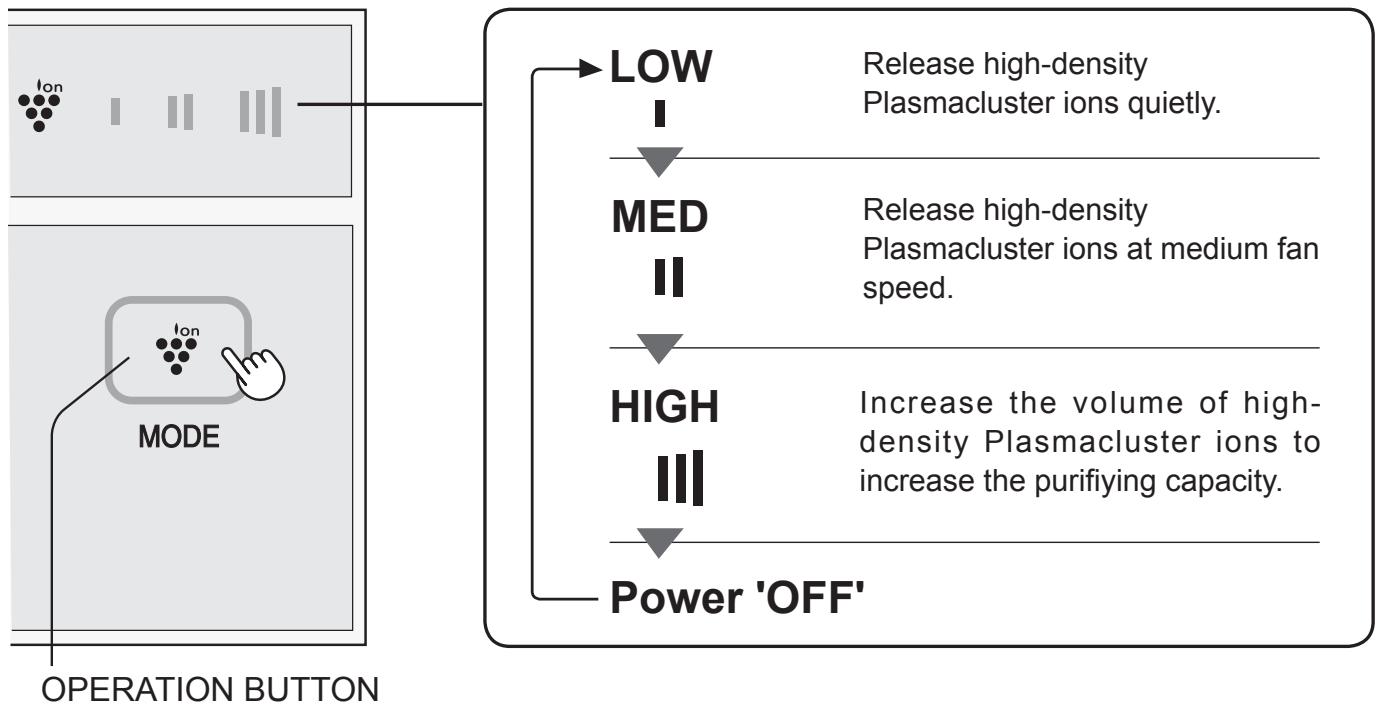
| Fan speeds | 3 speeds: HIGH, MEDIUM, LOW |
| Functions | Automatic restart, filter cleaning indicator, ion unit replacement indicator |
| Filter maintenance | Clean every 2 weeks (vacuum or fresh water wash) |
| Ion unit replacement | Every 2 years (17,500 hours) - model IZ-CA20E |
| Standby power consumption | Approximately 0.8 W |
| Power cord length | 2.0 m |
| Operating ambient temperature | 0 to 35 °C |
| Safety | Automatic shutdown in case of malfunction, overcurrent protection, do not use with wet hands |
| Included accessories | Wall mounting kit, screws, cap, instruction manual |
| Main materials | ABS (casing), PBT (ion unit) |
| Recommended coverage area | Up to 23 m² (for 25,000 ions/cm³ at high speed) |
| Warranty | Not specified, but repair by Sharp authorized center only |
Frequently Asked Questions - IG-A20E SHARP
User questions about IG-A20E SHARP
0 question about this device. Answer the ones you know or ask your own.
Ask a new question about this device
Download the instructions for your Air purifier in PDF format for free! Find your manual IG-A20E - SHARP and take your electronic device back in hand. On this page are published all the documents necessary for the use of your device. IG-A20E by SHARP.
USER MANUAL IG-A20E SHARP
Plasmacluster is a trademark of SHARP Corporation.
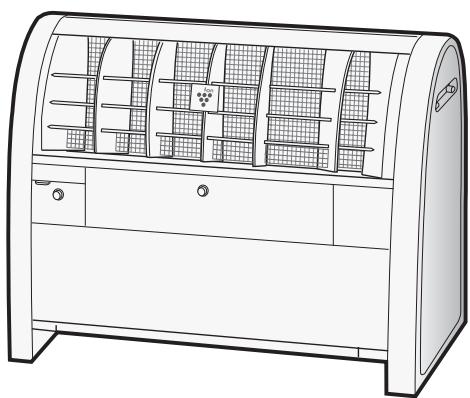
IG-A20E IG-A40E
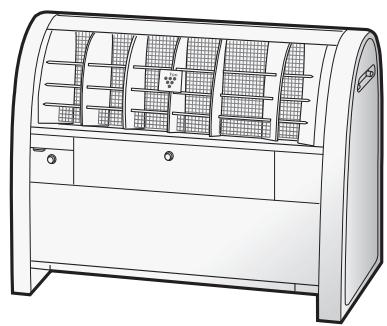
IG-A20E
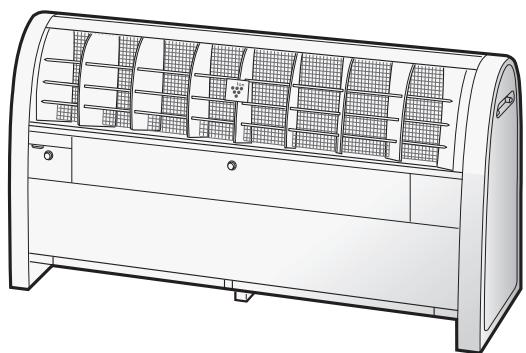
IG-A40E
SHARP
SHARP CORPORATION
Osaka, Japan
Read and keep this manual carefully.
IMPORTANT SAFETY INSTRUCTIONS E-2
·WARNING E-2 - CAUTIONS CONCERNING OPERATION - INSTALLATION GUIDELINES
PARTS NAME E-3
CLEANING AND MAINTENANCE E-7
- MAIN UNIT E-7
- FILTER
PLASMACLUSTER ION GENERATING UNIT REPLACEMENT E-8
HOW TO REPLACE THE PLASMACLUSTER ION GENERATING UNIT…E-9
SPECIFICATIONS E-11
TROUBLESHOOTING E-12
- While IG-A20E and IG-A40E can inactivate suspended viruses and other contaminants, they cannot create a completely sterile environment. SHARP does not guarantee their ability to prevent microbial infection.
- To enable stable emission of high-density Plasmacluster ions, the Plasmacluster Ion Generating Unit mounted in IG-A20E and IG-A40E must be replaced periodically*.
- Replacement is required approximately every 2 years (17,500 hours) when operated 24 hours a day. IG-A20E and IG-A40E will stop operating after about 26 months (19,000 hours) if the Plasmacluster Ion Generating Unit is not replaced.
Thank you for purchasing this SHARP Plasmacluster Ion Generator. Please read this manual carefully before using the Plasmacluster Ion Generator.
After reading, keep the manual in a convenient location for future reference.
IMPORTANT SAFETY INSTRUCTIONS
When using electrical appliances, basic safety precautions should be followed, including the following:
WARNING - To reduce the risk of electric shock, fire, or injury:
- Read all instructions before using the unit.
- Use only a 220-240 volt outlet.
- DO NOT use the unit if the power cord or plug is damaged, or the connection to the wall outlet is loosened. Periodically remove dust from the plug.
- DO NOT insert fingers or foreign objects into the air intake or air outlet.
- Always hold the plug and never pull on the cord when removing the power plug.
Electric shock and/or fire from a short circuit may result.
- DO NOT remove the plug when your hands are wet.
- DO NOT use the unit near gas appliances or fireplaces.
- If the power cord is damaged, it must be replaced by the manufacturer, its service agent, a Sharp authorized Service Center or qualified person in order to avoid a hazard.
- Be cautious when cleaning the unit.
Strong corrosive cleansers may damage the exterior.
- DO NOT use it in the areas where the unit may get wet. DO NOT use spray products near the unit. DO NOT use in the rooms, containing oil component, incense, cigarettes' sparks, and chemical fumes.
- DO NOT operate when using aerosol insecticides or in rooms where there is oily residue, incense, sparks from lit cigarettes, chemical fumes in the air, or in locations where the unit may get wet, such as bathroom.
- DO NOT use these silicone-containing products in the room where the unit is installed.
- Only a Sharp authorized Service Center should service this Plasmacluster Ion Generator. Contact the nearest Service Center for any problems, adjustments, or repairs.
- This appliance is not intended for use by persons (including children) with reduced physical, sensory or mental capabilities, or lack of experience and knowledge, unless they have been given supervision or instruction concerning use of the appliance by a person responsible for their safety. Children should be supervised to ensure that they do not play with the appliance.
- Do not ride on the main unit and do not sit on or lean it, it may cause injury or malfunction.
CAUTIONS CONCERNING OPERATION:
- DO NOT block the air intake and/or air outlet.
- DO NOT use the unit near or on hot objects, such as stoves or heaters, or where it may come into contact with steam.
- Always operate the main unit in an upright position. Always unplug the unit before cleaning.
- Clean the exterior with a soft cloth only, otherwise the main unit surface may be damaged or cracked.
- Keep the main unit away from water.
INSTALLATION GUIDELINES:
- Place at least 2m away from equipment utilizing electric waves such as televisions or radios to avoid electrical interference when using the unit.
- Avoid using in locations where the unit is exposed to condensation or drastic temperature changes. Appropriate room temperature is between 0 - 35°C .
- Avoid locations where grease or oily smoke is generated, otherwise the main unit surface may crack as a result.
NOTE - Radio or TV Interference:
If this Plasmacluster Ion Generator may cause interference to radio or television reception, try to correct the interference by one or more of the following measures:
- Reorient or relocate the receiving antenna.
- Increase the distance between the unit and radio/TV receiver.
- Connect the equipment into an outlet on a circuit different from that to which the receiver is connected.
- Consult the dealer or an experienced radio/TV technician for help.
PARTS NAME
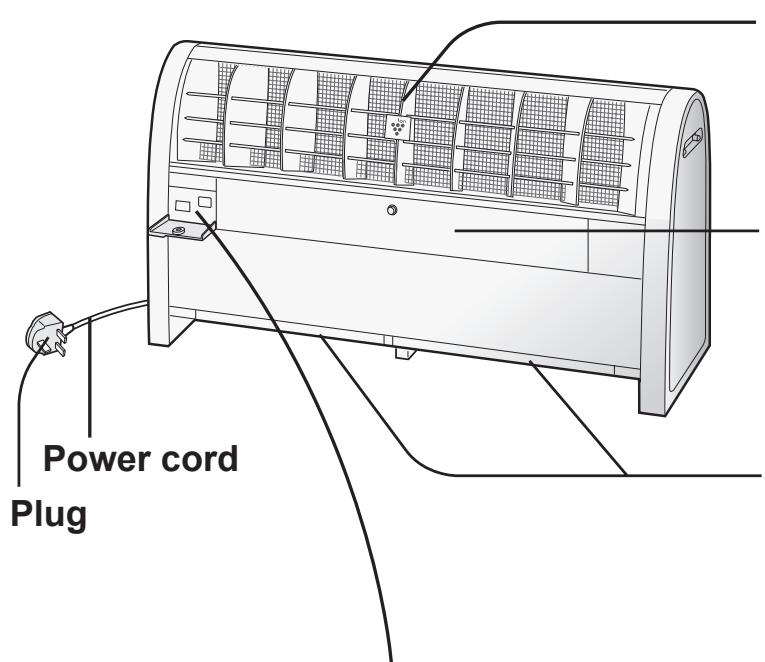
Louvers
(Air outlet of Plasmacluster Ion)
High density Plasmacluster Ion is discharged forward. (Do not put anything in front of the unit.)
Plasmacluster Ion Generating Unit (Inside)
Please open the cover only when replacing the Plasmacluster Ion Generating Unit. (See page E-9)
Filter (Air Intake)
*Clean the filter periodically.
*Do not block the air intake or do not put anything into the unit.
CONTROL PANEL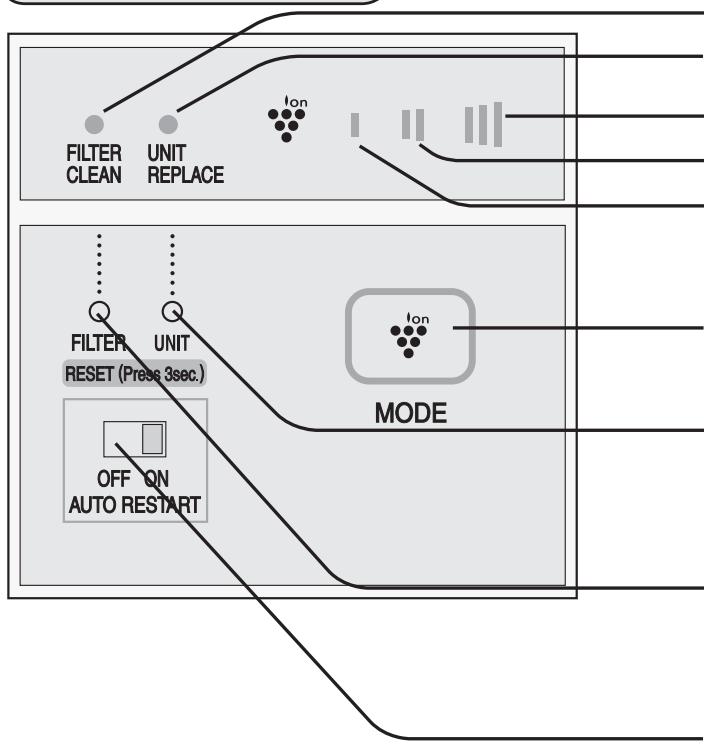
FILTER CLEAN Light (yellow)
UNIT REPLACEMENT Light (red)
HIGH
MED
Fan Speed
Indicator (blue)
LOW
OPERATION Button
UNIT RESET Button
Press this button for 3 seconds after replacing the Plasmacluster Ion Generating Unit.
Do not press it for any other purposes.
FILTER RESET Button
After cleaning the filter, plug in the power cord and press the FILTER RESET button for 3 seconds.
AUTO RESTART Switch
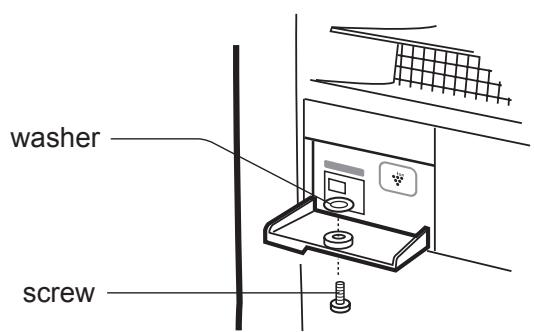
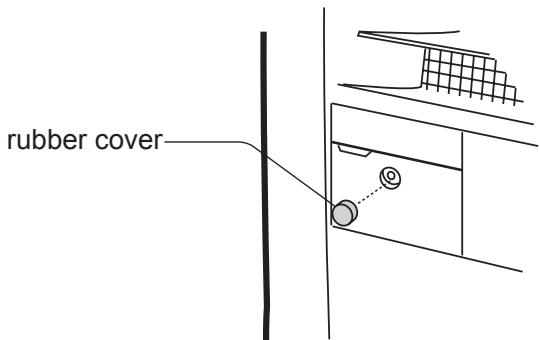
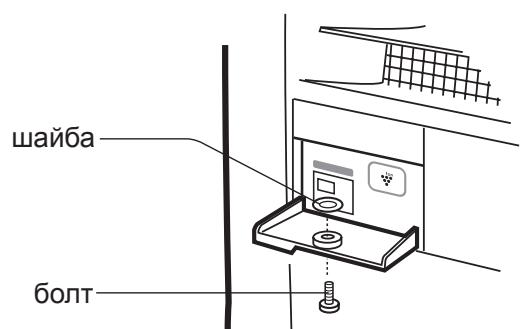
If necessary, the operation cover can be fixed with the accessory screw.
INSTALLATION POSITION
Place the main unit on a smooth, stable surface in a room, and insert the plug into an outlet. Please note the required clearance.
UPSIDE more than 60cm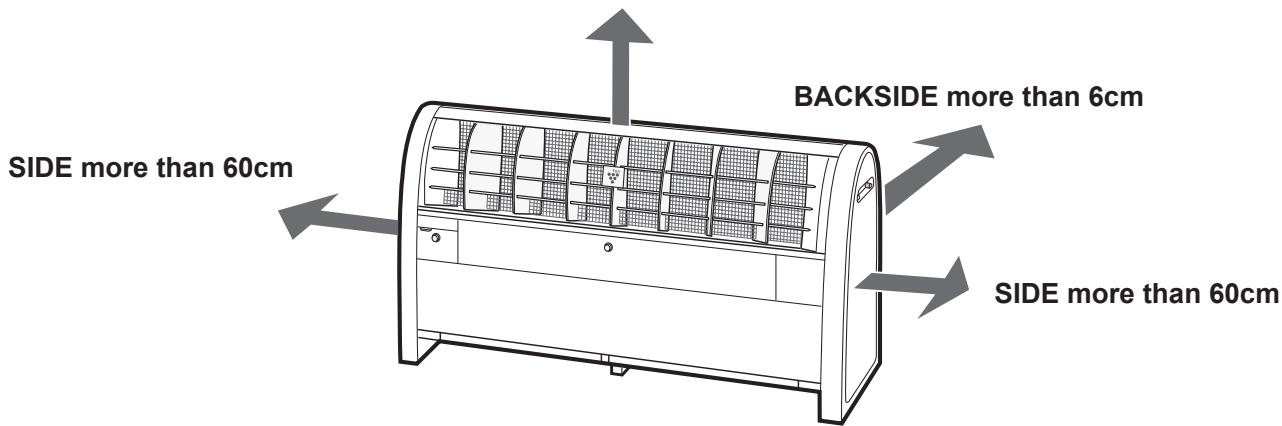
Installation Guidance
- To secure the performance, do not put anything in front of the unit.
- To secure the performance, do not block the air intake or put anything into the unit.
- If necessary, the unit can be fixed to the wall using accessory parts or anchor bolts. See page E-5.
DO NOT USE the following items near the unit: silicone-containing products* SPRAY
WAX
PESTICIDES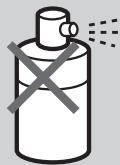
*Hair care products, cosmetic products, waterproof sprays, polish, glass cleaner, wipes, and wax.
ACCESSORIES
Operation manual - Tip-resistant kit - Screw kit
Tip-resistant kit
(In case of fixing the main unit to the wall)
Mounting parts for wall (2 pcs)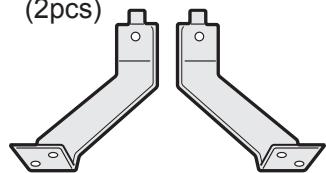
Screws for the main unit (2 pcs)

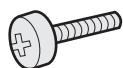
Screw kit for operation cover
Screw (1 pc)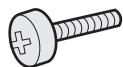
Rubber cover (1 pc)
Washer (1 pc)
Anchor bolt, nut, and washer for fixing to the floor and screw for the wall for fixing to the wall are not included as accessory parts.
HOW TO INSTALL THE UNIT
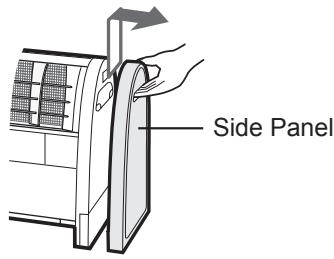
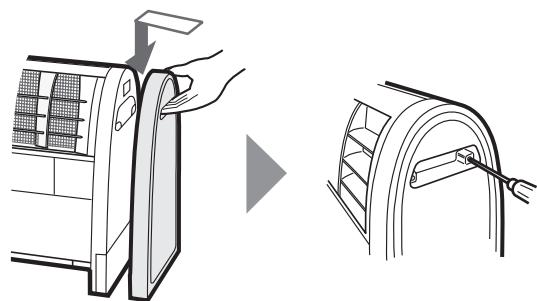
1 Unscrew the painted screws (2 pcs on each side).
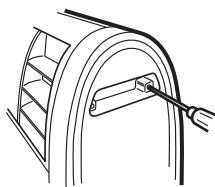
2 Lift up the Side Panel and remove it outward.
In case of fixing the main unit to the floor by anchor bolts. Measure the position of the anchor
Measure the position of the anchor bolts and fix them to the floor.
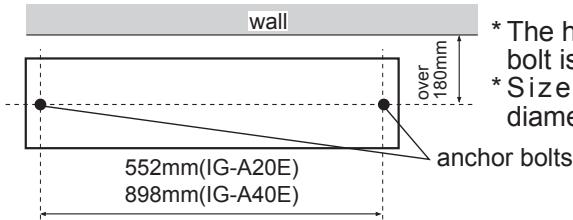
- The height of the anchor bolt is 25mm or less. *Size of anchor bolt diameter is 8mm or less.
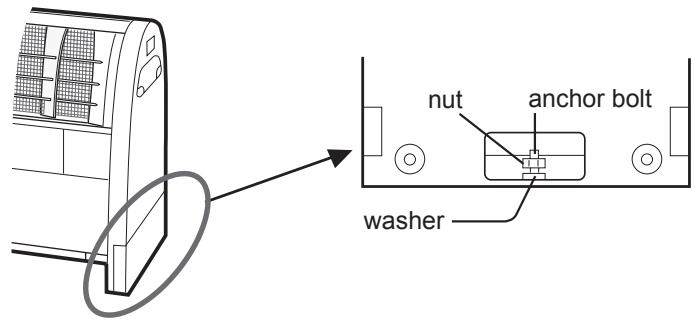
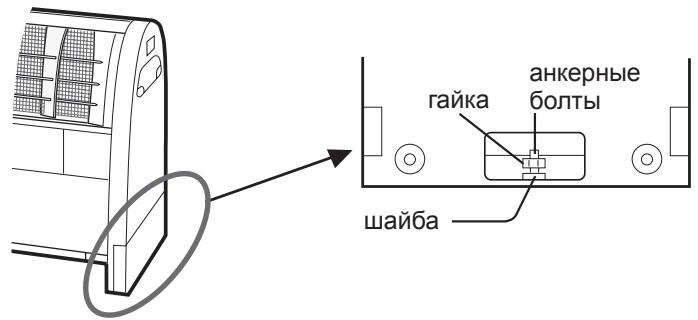
Put the main unit on the anchor bolts and tighten surely with washer and nut.
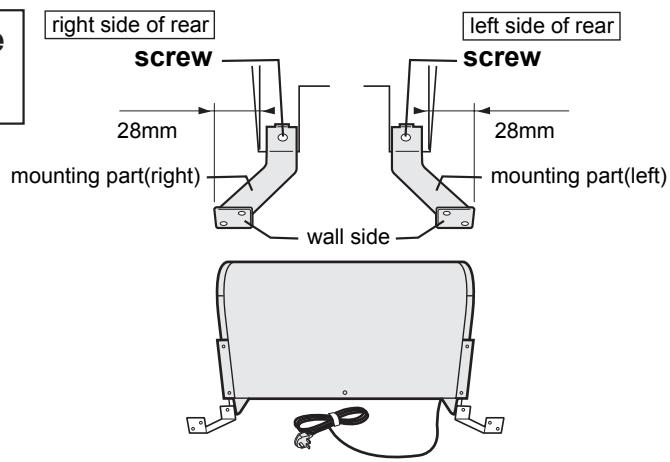
In case of fixing the main unit to the wall with the mounting parts.
Fix the mounting parts to the main unit by screws. (Right and left side)
The mounting parts and screws are accessory parts. (Each 2 pcs)
Screws are to be surely tightened.
- Depending on the material of the wall, it may not be able to tighten.
4 Attach the Side Panel and screw the painted screws on both sides.
OPERATION
This operation manual is based on IG-A40E.
The operation is the same as for IG-A20E.
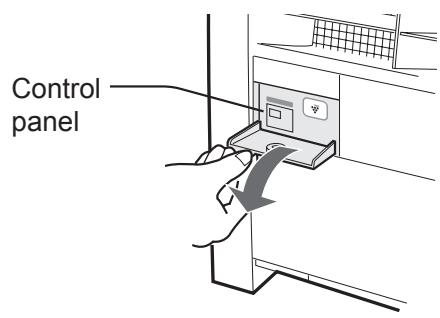
Open the cover of the control panel.
If the cover is fixed with a screw, remove the rubber cover and the screw, then open the control panel cover.
Close the cover of the control panel.
If necessary, secure the cover with the provided screw and washer, and replace the rubber cover.
(See page E-3)
Press the operation button to select the desired mode.
AUTO START
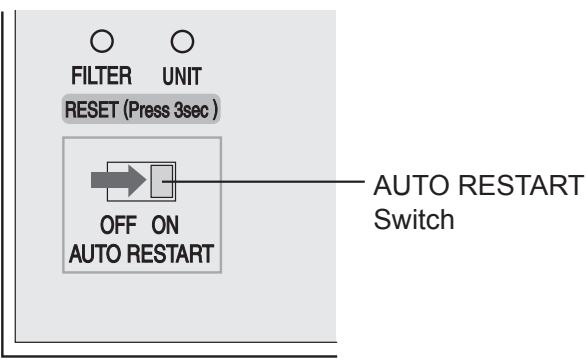
If the AUTO START switch is set to "ON" and the unit is accidentally unplugged, or if the circuit breaker trips due to a power failure, the unit will automatically start operation at the previous setting when power is restored.
CLEANING AND MAINTENANCE
WARNING:
When cleaning the unit, be sure to unplug the power cord first, and never handle the plug with wet hands.
Electric shock and/or bodily injury may occur as a result.
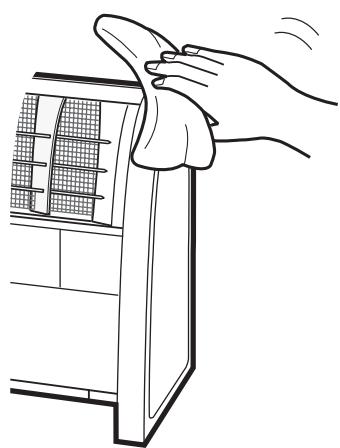
Main Unit
Every month or more often if necessary.
Wipe with a dry soft cloth.
Use water and a mild detergent.
Then, wipe with a wet cloth.
Make sure to dry it out.
FILTER
Every 2 weeks or more often if necessary.
The FILTER CLEAN light will be lit after approximately 1 month (approximately 720 hours) when operated 24 hours a day.
Pull out the filter from the bottom of the main unit and remove dust using a vacuum cleaner or similar tools.
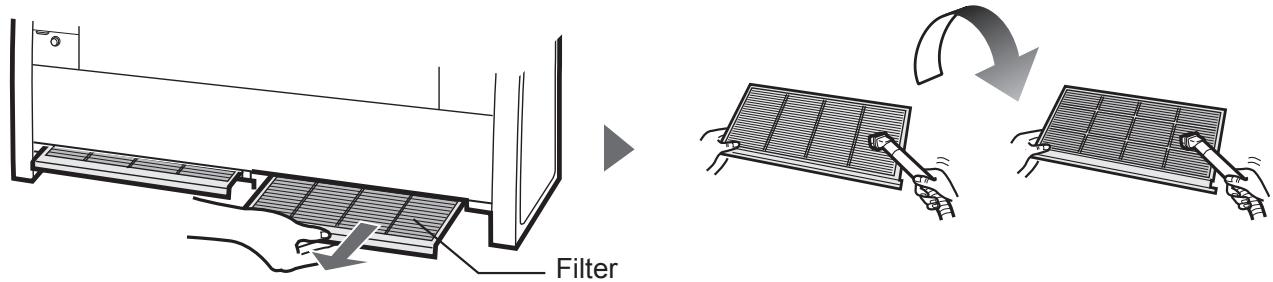
IG-A20E Filter (1 pc)
IG-A40E Filter (2 pcs)
*A filter is not a disposable item; clean the filter often.
- When the filter is very dirty, wash it with water or use a mild kitchen detergent.
CAUTION
- Do not rub with a hard sponge and do not bend it when washing.
- Avoid drying filters outdoors under sunlight or using near a stove.
FILTER RESET Button
After cleaning, insert the plug and press RESET Button for 3 seconds.
PLASMACLUSTER ION GENERATING UNIT REPLACEMENT
In order to release Plasmacluster Ion stably, periodical replacement of Plasmacluster Ion Generating Unit is necessary. The Unit Replacement Light will be ON as a reminder for replacement.
| Elapsed Time | Display | Message |
| Beginning to use. | Lighting(blue) FILTER UNIT REPLACE | Operate normally |
| Approx. 2 years. (approx. 17,500hours) | flashing(red) Lighting(blue) FILTER UNIT REPLACE | Suggest replacing Plasmacluster Ion Generating Unit. |
| Approx. 2 years and 2 months. (approx.19,000hours) | flashing faster(red) FILTER UNIT REPLACE | ·Unit has stopped working. ·Replace the Plasmacluster Ion Generating Unit. |
| Plasmacluster lons are not released. | flashing (red) | flashing (blue) | Error* |
| FILTER CLEAN | UNIT REPLACE | Ion |
*Usage environment affects the lifetime of the Plasmacluster Ion Generator. The Plasmacluster Ion Generator may stop working before estimated lifetime. In this case, press Operation Button again and restart. If this does not help, replace with a new Plasmacluster Ion Generating Unit.
Plasmacluster Ion Generating Unit for Replacement
| Plasmacluster Ion Generating Unit | |
| Model Number | IZ-CA40E (for IG-A40E) IZ-CA20E (for IG-A20E) |
Please dispose the used Plasmacluster Ion Generating Unit according to any local laws and regulations.
-materials-
- Case: Acrylonitrile Butadiene Styrene (ABS)
- Unit: Polybuthylene Terephthalate (PBT), Electric parts.
HOW TO REPLACE THE PLASMACLUSTER ION GENERATING UNIT
*When replacing the Plasmacluster Ion Generating Unit, be sure to turn off the main unit, unplug the power cord, and never handle the plug with wet hands.
1 Remove the rubber cover and unscrew the center screw of the Ion Generator Cover.
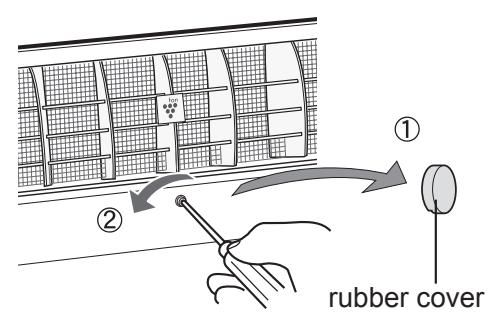
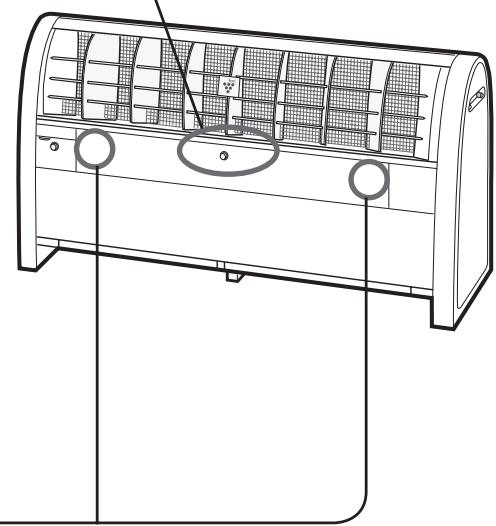
Push the both corner of Ion Generator Cover and open it. (IG-A40E only)
Ion Generator Cover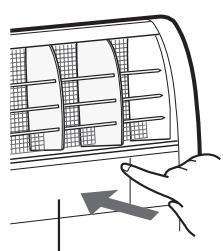
(see next page)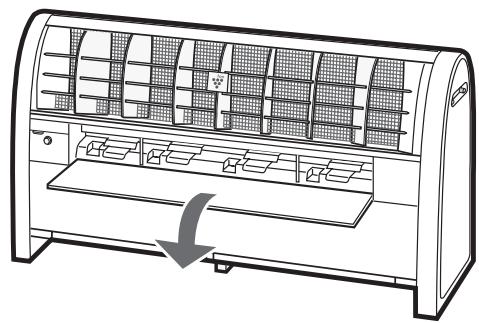
HOW TO REPLACE THE PLASMACLUSTER ION GENERATING UNIT
3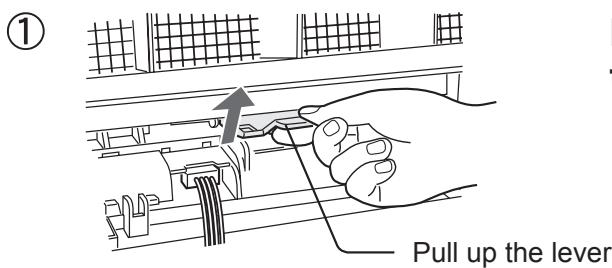
Pull up the lever in the direction of the arrow to unlock it.
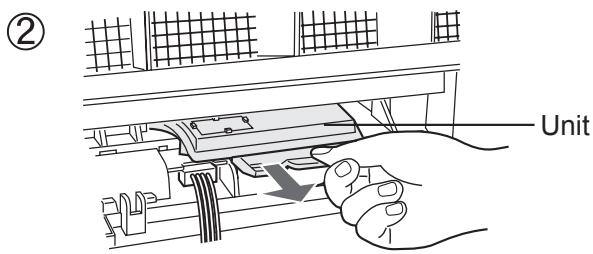
Pull the lever in the direction of the arrow and take out the Plasmacluster Ion Generating Unit.
Remove the connector cover.
(IG-A40E only : 4 pcs)
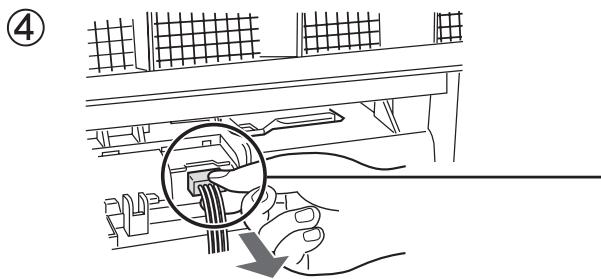
Disconnect the connector of Plasmacluster Ion Generating Unit.
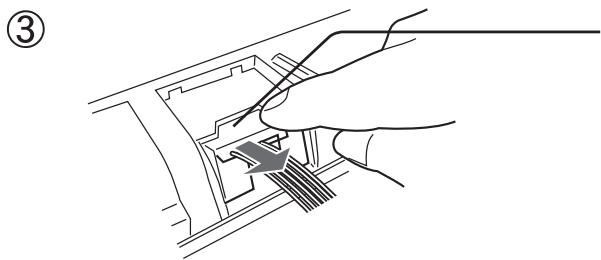
Push and unlock the connector, take out the connector in the direction of the arrow.
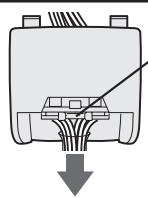
(5) IG-A20E
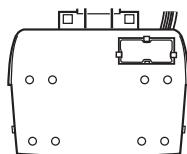
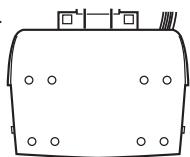
Plasmacluster Ion Generating Unit without sensor.
IG-A20E : 1pc
IG-A40E: 3pcs
without sensor (1pc)
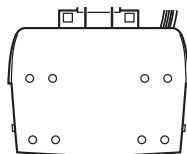
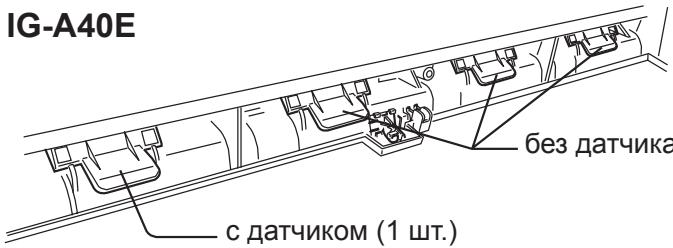
IG-A40E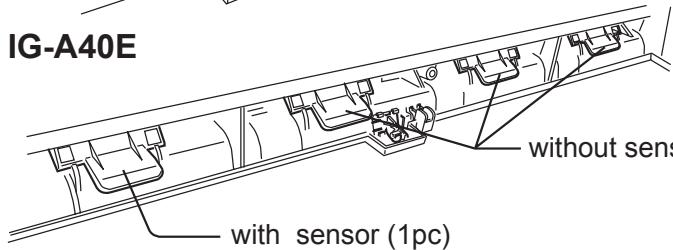
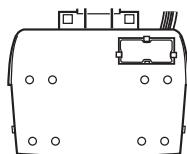
Plasmacluster Ion Generating Unit with sensor.
IG-A20E : 1pc
IG-A40E : 1pc
without sensor (3pcs)
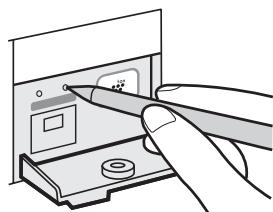
Reset button for Plasmacluster Ion Generating Unit
After replacing the Plasmacluster Ion Generating Unit, insert the plug and press the UNIT RESET Button for 3 seconds.
SPECIFICATIONS
| Model | IG-A20E | IG-A40E | ||||
| Power supply | 220-240V, 50/60Hz | |||||
| Fan speed | HIGH | MED. | LOW | HIGH | MED. | LOW |
| Power consumption (W) | 22 | 14 | 9 | 39 | 20 | 10 |
| Operating noise level (dBA) | 45 | 40 | 34 | 47 | 40 | 34 |
| Airflow volume (m³/hour) | 468 | 390 | 306 | 840 | 648 | 510 |
| Applicable floor surface area (m²)*1 | 23 | 50 | ||||
| Ion density (ions/cm³)*2 | 25,000 | 12,000 | 7,000 | 25,000 | 12,000 | 7,000 |
| Power cord (m) | 2.0 | |||||
| Outer dimensions (mm) | 594(W)×480(H)×230(D) | 940(W)×480(H)×230(D) | ||||
| Weight (kg) | 10.5 | 15.0 | ||||
1 The target floor surface area for which an emitted airborne ion density of about 25,000 ions/cm³ can be measured at a point near the center of the room (at a height of about 1.2m from the floor), during operation at the HIGH mode when the main unit is placed near a wall. 2 Ions, counted per cm³, blown into air near the center of the room (at a height of approx. 1.2m from the floor) during operation at each airstream setting when the main unit is placed near the wall. - The number of ions will vary according to the room conditions and operation mode.
Standby Power
In order to operate the electrical circuits while the power plug is inserted in the wall outlet, this product consumes about 0.8W of standby power.
For energy conservation, unplug the power cord when the unit is not in use.
TROUBLESHOOTING
Before calling for service, please review the TROUBLESHOOTING chart below. Since the problem may not be unit malfunction.
| Problem | WHAT TO DO |
| The Plasmacluster Ion Generator does not work. | Make sure to put in the plug. |
| flashing faster (red) | Approx. 2 years and 2 month (Approx 19,000 hours) has been passed. Replace with a new Plasmacluster Ion Generating Unit. See page E-8,9,10. |
| FLASHING (red) FLashing (blue) | Plasmacluster lons are not released. Press the Operation Button and restart. If all lights keep flashing, replace with new Plasmacluster Ion Generating Unit. See page E-8,9,10. •Dust may block the filter, clean the filter. |
| FLashing (blue) | Failure Unplug and ask the store you purchased or Sharp Sevice Center. |
| FLashing (blue) | Failure Unplug and ask the store you purchased or Sharp Sevice Center. |
| The discharged air has odor. | The Plasmacluster Ion Generator releases a small trace of ozone which may produce odor. This is not detrimental to health. |
| A clicking or ticking sound comes from the unit while operating the Plasmacluster Ion Generator. | Loudness can be changed depending on a room humidity, but the effectiveness is the same. Relocate the Plasmacluster Ion Generator if necessary. |
| Lighting (yellow) | Filter cleaning time. See page E-7. After cleaning the filter, press FILTER RESET Button for 3 seconds. |
| A discontinuous noise is heard. The air flow decreases. | Filter is getting dirty. Clean the filter. After cleaning the filter, press FILTER RESET Button for 3 seconds. |

Attention: Your product is marked with this symbol. It means that used electrical and electronic products should not be mixed with general household waste. There is a separate collection system for these products.
A. Information on Disposal for Users (private households)
1. In the European Union
Attention: If you want to dispose of this equipment, please do not use the ordinary dust bin!
Used electrical and electronic equipment must be treated separately and in accordance with legislation that requires proper treatment, recovery and recycling of used electrical and electronic equipment.
Following the implementation by member states, private households within the EU states may return their used electrical and electronic equipment to designated collection facilities free of charge. In some countries your local retailer may also take back your old product free of charge if you purchase a similar new one.
*) Please contact your local authority for further details.
If your used electrical or electronic equipment has batteries or accumulators, please dispose of these separately beforehand according to local requirements.
By disposing of this product correctly you will help ensure that the waste undergoes the necessary treatment, recovery and recycling and thus prevent potential negative effects on the environment and human health which could otherwise arise due to inappropriate waste handling.
2. In other Countries outside the EU
If you wish to discard this product, please contact your local authorities and ask for the correct method of disposal.
For Switzerland: Used electrical or electronic equipment can be returned free of charge to the dealer, even if you don't purchase a new product. Further collection facilities are listed on the homepage of www.swico.ch or www.sens.ch.
B. Information on Disposal for Business Users.
1. In the European Union
If the product is used for business purposes and you want to discard it:
Please contact your SHARP dealer who will inform you about the take-back of the product. You might be charged for the costs arising from take-back and recycling. Small products (and small amounts) might be taken back by your local collection facilities.
For Spain: Please contact the established collection system or your local authority for take-back of your used products.
2. In other Countries outside the EU
If you wish to discard of this product, please contact your local authorities and ask for the correct method of disposal.
rubber (1 piece)
washer
(1 piece)


Anchor bolt, nut, and washer for fixing to the floor and screw for the wall for fixing to the wall are not included as accessory parts.
UNIT INSTALLATION GUIDE
TROUBLESHOOTING D-12
rubber housing (1 pc)
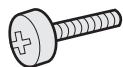

slitting (1 pc)

IG-A20E Filter (1 pc)
IG-A40E Filter (2 pcs)
Replacement Plasmacluster Ion Generating Unit
| Plasmacluster Ion Generating Unit | |
| Modelnummer | IZ-CA40E (voor IG-A40E) IZ-CA20E (voor IG-A20E) |
without sensor (1 pc.)
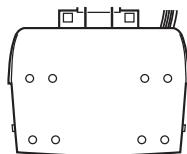
IG-A40E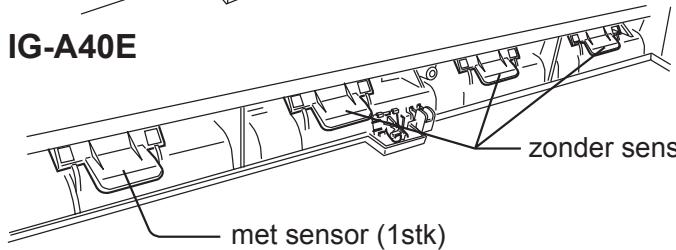
Plasmacluster Ion Generating Unit with sensor.
IG-A20E: 1 pc.
IG-A40E: 1 pc.
TECHNICAL SPECIFICATIONS R-11
TROUBLESHOOTING R-12
IG-A20E and IG-A40E can activate and eliminate impurities and other contaminants in the air, but they cannot create a completely sterile environment. SHARP does not guarantee that the device can prevent microbial infection. - To ensure the effective use of Plasmacluster ions at high concentration, it is necessary to periodically replace the Plasmacluster ion generating unit installed in IG-A20E and IG-A40E. Replacement is required approximately every 2 years (17,500 hours) if the device is used 24 hours a day. IG-A20E and IG-A40E will stop working approximately after 26 months (19,000 hours) if the Plasmacluster ion generating unit is not replaced.
IMPORTANT SAFETY INSTRUCTIONS
When using electrical appliances, basic safety precautions should always be followed, including the following:
WARNING - To reduce the risk of electric shock, fire, or injury:
- Read all instructions before using this appliance.
- Use only a 220-240V outlet.
- Do not use the appliance if the power cord or plug is damaged, or if the plug does not fit firmly into the outlet.
- Periodically remove dust from the power plug. Do not insert fingers or foreign objects into the air intake or outlet openings.
- Always hold the plug when unplugging it from the outlet, and never pull on the cord. This can lead to electric shock or fire due to a short circuit. Do not unplug with wet hands. Do not operate this device near gas stoves or open flames.
- If the power cord is damaged, it must be replaced by the manufacturer, its service agent, or a similarly qualified person to avoid risk. Be careful when installing the device. Aggressive cleaning agents can damage the housing. Do not use the device in damp rooms. Do not spray aerosols near the device. Do not install in rooms containing oil residue, odorous substances, sparks from lit cigarettes, or chemical vapors. Do not operate the device when using aerosol insecticides or in rooms containing oil residue, odorous substances, sparks from lit cigarettes, or chemical vapors, in showers or damp rooms, for example, in a bathroom.
- Do not use these flammable products in the room where the device is installed. Only an authorized Sharp service center should perform maintenance on this ion generator Plasmacluster. Contact the nearest service center if problems arise, if adjustment or repair is needed.
- This device is not intended for use by persons (including children) with reduced physical, sensory, or mental capabilities, or lack of experience and knowledge, unless they are under supervision or have been given instructions on using the device by a person responsible for their safety. Children should be supervised to ensure they do not play with the device. Do not sit or lean on the device; this can cause injury or malfunction.
PRECAUTIONS FOR USE:
Do not block the air intake or outlet. Do not install on heat sources, such as heaters, or in places where steam may affect the device. Operate the device only in a vertical position. Always unplug the device before servicing. Clean the housing only with a soft cloth. Otherwise, the surface may be damaged or crack. Keep the device away from water.
INSTALLATION INSTRUCTIONS:
- When using the device, place it at least 2 m away from other devices that generate electromagnetic waves, such as televisions or radios, to avoid electromagnetic interference. Do not use the device in damp places or in places with sudden temperature changes. Suitable operating conditions: when the room temperature is 0 to 35°C. Do not place in areas with oil smoke or soot. As a result, the surface of the device may crack.
NOTE - TV and radio interference:
If the Plasmacluster ion generator causes interference with TV or radio reception, try to correct the situation by taking the following measures:
- Connect the antenna to the device. - The device is designed for use with a radio receiver.
- Connect the device to a power outlet in a different circuit, not the one to which the radio receiver is connected.
- Consult a dealer or an experienced radio/TV technician for help.
NAMES OF PARTS
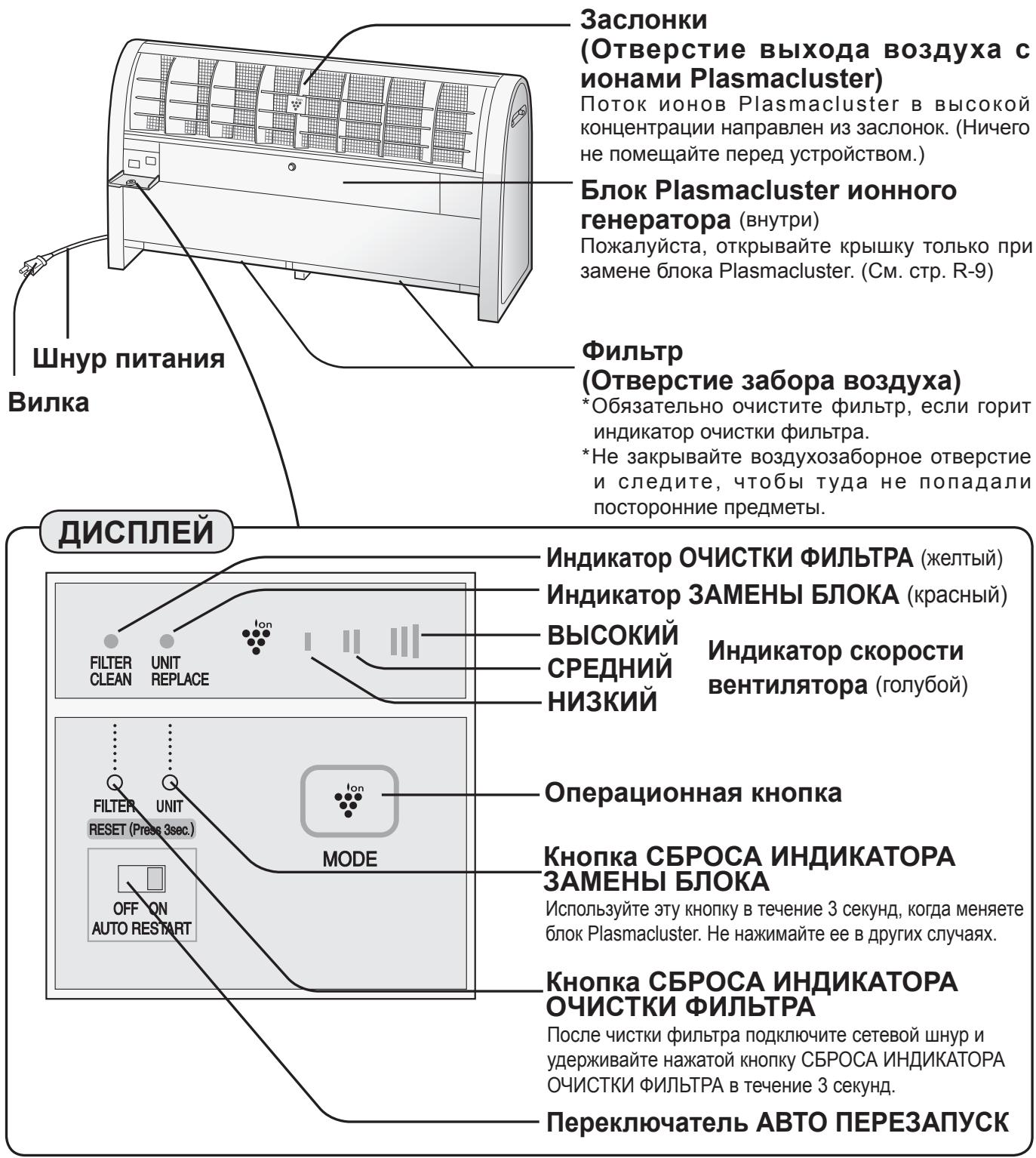
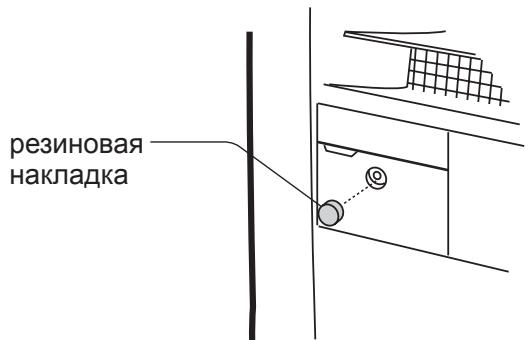
SECURE THE WORKING COVER WITH A SCREW
If necessary, the working cover can be secured with an additional screw.
INSTALLATION
Place the main unit on a flat, stable surface indoors and plug the plug into a power outlet.
Please maintain the required distances.
SIDE MINIMUM 60 cm
REAR MINIMUM 6 cm
TOP MINIMUM 60 cm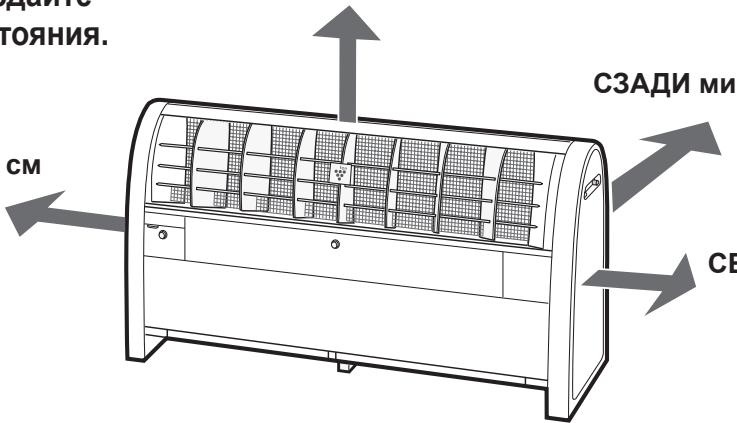
SIDE MINIMUM 60 cm
INSTALLATION MANUAL
- To ensure reliable operation of the device, do not place anything in front of it.
- To ensure reliable operation of the device, do not cover the air intake opening and make sure that no foreign objects get into it.
- If necessary, the device can be mounted on a wall using the mounting brackets included in the kit, or using an anchor bolt (purchased separately). See page R-5. Mounting with the mounting brackets included in the kit, or with an anchor bolt, see page R-5.
Do not use the listed products near the device. Products containing alcohol*
sprays

wax

polishes

* Hair care products, cosmetics, alcohol-containing sprays, glass cleaners, polishes, and wax.
ACCESSORIES
- Operating manual
- Mounting kit
- Fastening kit
Mounting kit
Mark the locations of the anchor bolts and screw them in partially.
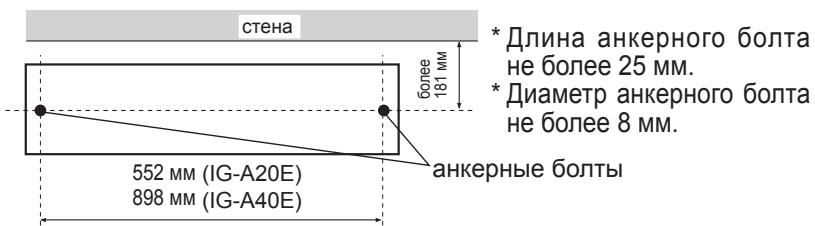
Install the device using the anchor bolts, securely tightening them with the nuts.
Fastening the device to the wall with mounting brackets.
Attach the mounting brackets to the main unit with bolts (right and left, 2 pcs.).
The mounting brackets and screws are included in the accessory kit (2 brackets, 2 screws).
The screws should be tightened securely.
- Depending on the wall material, it may not be possible to tighten them.
right and left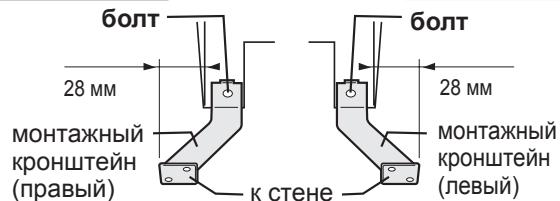
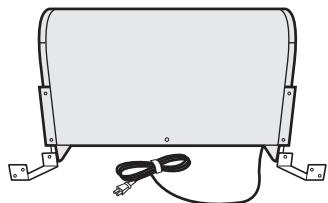
4. Attach the side panel in place and secure it with bolts on both sides, as shown in the figure.
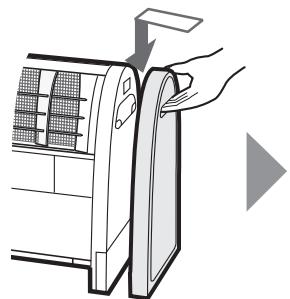
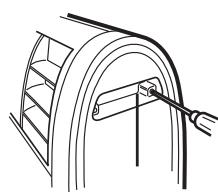
Operation
- This manual is for the operation of IG-A40E.
This manual can also be used for operating the IG-A20E.
Open the work panel cover.
If the cover is secured with a bolt, remove the rubber gasket, unscrew the bolt, then press the plastic tab to open the work panel cover.
Close the work panel cover.
If necessary, secure the cover with the bolt and washer, and replace the rubber gasket.
(See page R-3)
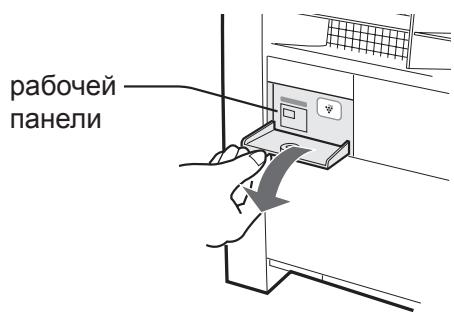
Press the operation button to select the desired mode.
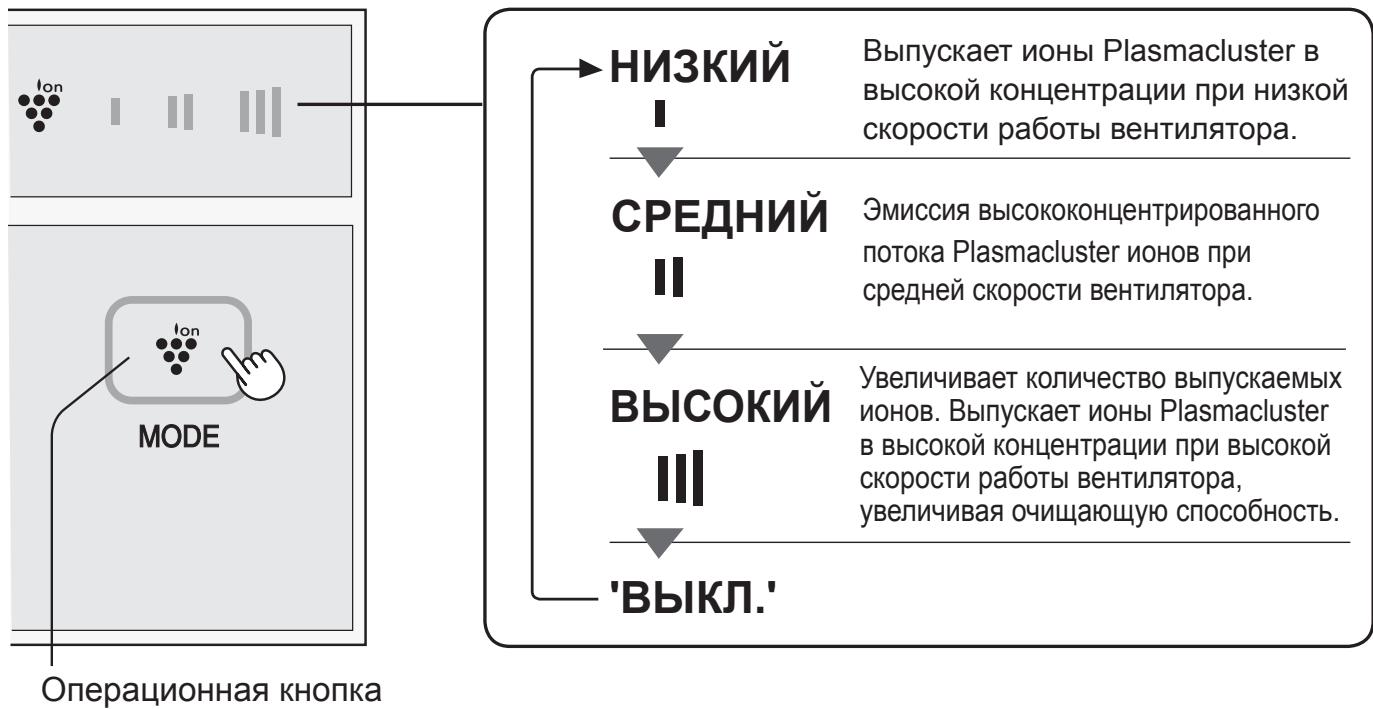
ABTO ΠEPE3ANYCK
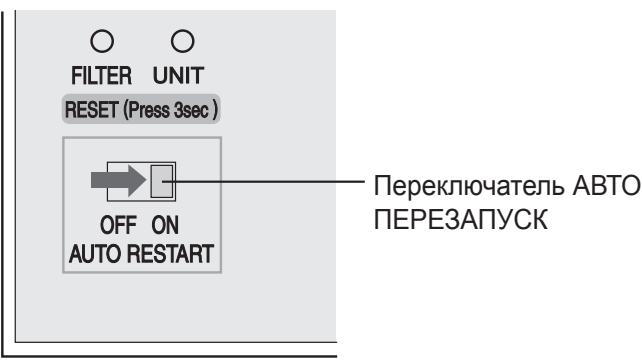
If the auto restart switch is set to "ON" and then the device was disconnected from the network, or a power failure occurred, after power is restored, the unit will automatically restart with the settings that were set before.
MAINTENANCE
WARNING:
When servicing or maintaining the device, be sure to disconnect the power cord. Never insert the plug into the outlet with wet hands.
This may result in electric shock or fire due to a short circuit.
MAIN UNIT
Every month, or as needed, clean.
Wipe with a dry soft cloth.
Then wipe with a damp cloth.
Be sure to wipe the main unit dry.
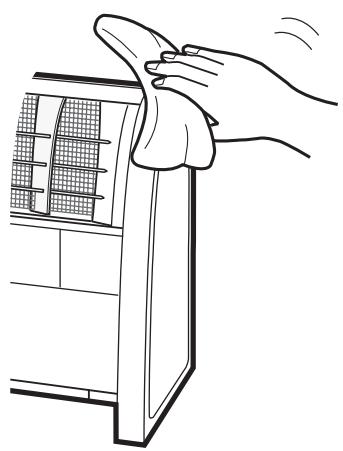
FILTER
Every 2 weeks, or as needed, clean.
HOW TO REPLACE THE PLASMACLUSTER ION GENERATOR BLOCK
Pull the lever up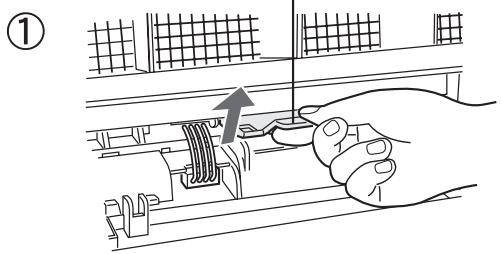
Remove the Plasmacluster unit from the protective bag.
(3)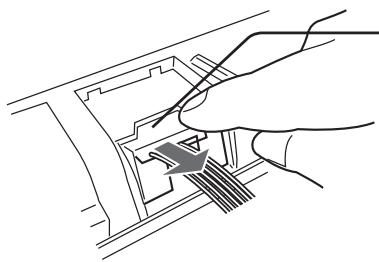
Turn the connector cap.
Connector, remove
Connector by
in the direction of the arrow.
(5)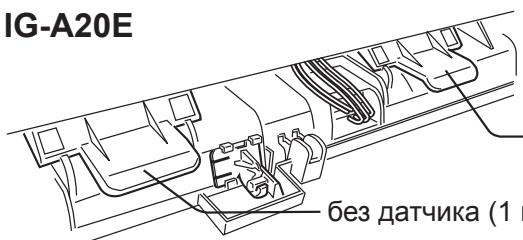
Plasmacluster unit without the cap.
IG-A20E: 1W.
IG-A40E: 3W.
TECHNICAL SPECIFICATIONS
1
1

| Lagiae liangyuan liangyuan liangyuan liangyuan liangyuan liangyuan liangyuan liangyuan liangyuan liangyuan liangyuan liangyuan liangyuan liangyuan liangyuan liangyuan liangyuan liangyuan liangyuan liangyuan liangyuan liangyuan liangyuan liangyuan liangyuan liangyean liangyuan liangyuan liangyuan liangyuan liangyuan liangyuan liangyuan liangyuan liangyuan liangyuan liangyuan liangyuan liangyuan liangyuan liangyuan liangyuan liangyuan liangyuan liangyuan liangyuan liangyuan liangyuan liangyuan liangyuan liangyuer liangyuan liangyuan liangyuan liangyuan liangyuan liangyuan liangyuan liangyuan liangyuan liangyuan liangyuan liangyuan liangyuan liangyuan liangyuan liangyuan liangyuan liangyuan liangyuan liangyuan liangyuan liangyuan liangyuan liangyuan liangyue liangyuan liangyuan liangyuan liangyuan liangyuan liangyuan liangyuan liangyuan liangyuan liangyuan liangyuan liangyuan liangyuan liangyuan liangyuan liangyuan liangyuan liangyuan liangyuan liangyuan liangyuan liangyuan liangyuan liangyuan liangyuzai liangyuan liangyuan liangyuan liangyuan liangyuan liangyuan liangyuan liangyuan liangyuan liangyuan liangyuan liangyuan liangyuan liangyuan liangyuan liangyuan liangyuan liangyuan liangyuan liangyuan liangyuan liangyuan liangyuan liangyuan liangyucai liangyuan liangyuan liangyuan liangyuan liangyuan liangyuan liangyuan liangyuan liangyuan liangyuan liangyuan liangyuan liangyuan liangyuan liangyuan liangyuan liangyuan liangyuan liangyuan liangyuan liangyuan liangyuan liangyuan liangyuan liang yue liangyuan liangyuan liangyuan liangyuan liangyuan liangyuan liangyuan liangyuan liangyuan liangyuan liangyuan liangyuan liangyuan liangyuan liangyuan liangyuan liangyuan liangyuan liangyuan liangyuan liangyuan liangyuan liangyuan liangyuan liang yucai liangyuan liangyuan liangyuan liangyuan liangyuan liangyuan liangyuan liangyuan liangyuan liangyuan liangyuan liangyuan liangyuan liangyuan liangyuan liangyuan liangyuan liangyuan liangyuan liangyuan liangyuan liangyuan liangyuan liangyuan liANGYUANGYUANGYUANGYUANGYUANGYUANGYUANGYUANGYUANGYUANGYUANGYUANGYUANGYUANGYUANGYUANGYUANGYUANGYUANGYUANGYUANGYUANGYUANGYUANGYUANGYUANGYUANGYUANGYUANGYUANGYUANGYUANGYUANGYUYanguenguyenguyenguyenguyenguyenguyenguyenguyenguyenguyenguyenguyenguyenguyenguyenguyenguyenguyenguyenguyenguyenguyenguyenguyenguyenguyenguyenguyenguyenguyenguyenguyenguyenguyenguyenguyenguyenguyenguyenguyenguyenguyenguyenguyenguyenguyenguyenguyenguyenguyengUYANGYUANGYUANGYUANGYUANGYUANGYUANGYUANGYUANGYUANGYUANGYUANGYUANGYUANGYUANGYUANGYUANGYUANGYUANGYUANGYUANGYUANGYUANGYUANGYUANGYUANGYUANGYUANGYUANGYUANGYUANGYUANGYUANGYUUANGYUANGYUANGYUANGYUANGYUANGYUANGYUANGYUANGYUANGYUANGYUANGYUANGYUANGYUANGYUANGYUANGYUANGYUANGYUANGYUANGYUANGYUANGYUANGYUANGYUANGYUANGYUANGYUANGYUANGYUANGYUANGYUANGYUNGYYANGYUANGYUNGYYANGYUANGYUNGYYANGYUNGYYANGYUNGYYANGYUNGYYANGYUNGYYANGYUNGYYANGYUNGYYANGYUNGYYANGYUNGYYANGYUNGYYANGYUNGYYANGYUNGYYANGYUNGYYANGYUNGYYANGYUNGYYANGYUNGYYANGYUNGYYANGYUNGYYANGYUNGYYANGYUNGYYANGYUNGyy |
| IG-A40E | IG-A20E | اللهير | ||||
| سيرةزهل./0.ف��رunds/2. – 15. | مصيرالنباتالحيى | |||||
| سيرةزهل | bvgio | ال竔 | سيرةزهل | bvgio | ال竔 | سيرةزهل |
| 1. | 1. | 19 | 9 | 12 | 17 | (العربية) ادانيال皮肤病العربيةال皮肤病العربيةال皮肤病العربيةال皮肤病 |
| 12. | 2. | 2V | 12 | 2. | 20 | (العربية) بوريوس公共资源العربيةال皮肤病 |
| 01. | 12A | 12. | 1. | 19. | 27A | (العربية) ملاويتالعربيةال皮肤病 |
| 0. | 14 | *(10) ادانيال皮肤病 | ||||
| V... | 15... | 10... | V... | 15... | 10... | *(10/2008) بوريوس公共资源العربيةال皮肤病 |
| 1. | (10) بوريوس公共资源العربية | |||||
| (عlobeالعربية) 14. × (العربية) 2A. × (عربية) 92. | (عlobeالع-ie) 14. × (الع-ie) 2A. × (ع-ie) 92. | (10) بوريوس公共资源العربية | ||||
| 10. | 1.0 | (العربية) بوريوس公共资源 | ||||
Therefore a + b = 1
Therefore, the total area S = 1/2 * (r1^2 + r2^2 + r3^2) = 1/2 * (r1 + r2 + r3) * (r1^2 + r2^2 + r3^2)
1
Therefore, lg(1/a) < lg(1/b) < lg(1/c), that is, b < c
Plasmacluster is a trademark of SHARP Corporation.
IG-A20E
IG-A40E
IG-A20E
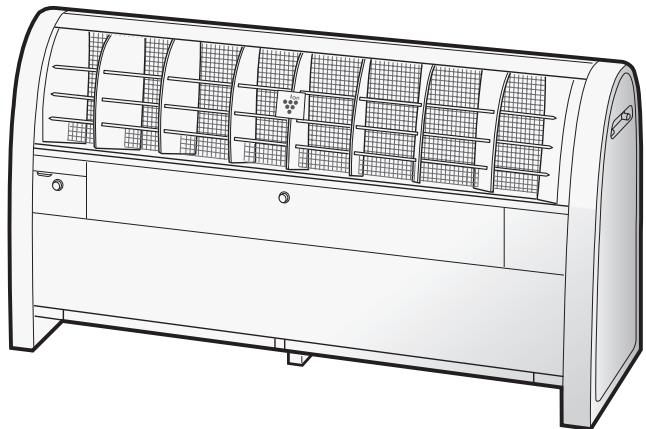
IG-A40E

- IG-A20E IG-A40E
- SHARP
- SHARP CORPORATION
- IMPORTANT SAFETY INSTRUCTIONS E
- PARTS NAME E
- CLEANING AND MAINTENANCE E
- PLASMACLUSTER ION GENERATING UNIT REPLACEMENT E
- HOW TO REPLACE THE PLASMACLUSTER ION GENERATING UNIT…E
- SPECIFICATIONS E
- TROUBLESHOOTING E
- IMPORTANT SAFETY INSTRUCTIONS
- WARNING - TO REDUCE THE RISK OF ELECTRIC SHOCK, FIRE, OR INJURY
- CAUTIONS CONCERNING OPERATION
- INSTALLATION GUIDELINES
- NOTE - RADIO OR TV INTERFERENCE
- PARTS NAME
- LOUVERS
- (AIR OUTLET OF PLASMACLUSTER ION)
- PLASMACLUSTER ION GENERATING UNIT (INSIDE)
- FILTER (AIR INTAKE)
- FILTER CLEAN LIGHT (YELLOW)
- UNIT REPLACEMENT LIGHT (RED)
- HIGH
- MED
- FAN SPEED
- INDICATOR (BLUE)
- LOW
- OPERATION BUTTON
- UNIT RESET BUTTON
- FILTER RESET BUTTON
- AUTO RESTART SWITCH
- INSTALLATION POSITION
- INSTALLATION GUIDANCE
- ACCESSORIES
- SCREW KIT FOR OPERATION COVER
- HOW TO INSTALL THE UNIT
- OPERATION
- OPEN THE COVER OF THE CONTROL PANEL
- CLOSE THE COVER OF THE CONTROL PANEL
- PRESS THE OPERATION BUTTON TO SELECT THE DESIRED MODE
- AUTO START
- CLEANING AND MAINTENANCE
- WARNING
- MAIN UNIT
- FILTER
- IG-A20E FILTER (1 PC)
- IG-A40E FILTER (2 PCS)
- CAUTION
- PLASMACLUSTER ION GENERATING UNIT REPLACEMENT
- PLASMACLUSTER ION GENERATING UNIT FOR REPLACEMENT
- HOW TO REPLACE THE PLASMACLUSTER ION GENERATING UNIT
- RESET BUTTON FOR PLASMACLUSTER ION GENERATING UNIT
- SPECIFICATIONS
- STANDBY POWER
- TROUBLESHOOTING
- INFORMATION ON DISPOSAL FOR USERS (PRIVATE HOUSEHOLDS)
- IN THE EUROPEAN UNION
- IN OTHER COUNTRIES OUTSIDE THE EU
- INFORMATION ON DISPOSAL FOR BUSINESS USERS
- UNIT INSTALLATION GUIDE
- TROUBLESHOOTING D
- REPLACEMENT PLASMACLUSTER ION GENERATING UNIT
- TECHNICAL SPECIFICATIONS R
- TROUBLESHOOTING R
- PRECAUTIONS FOR USE
- INSTALLATION INSTRUCTIONS
- NOTE - TV AND RADIO INTERFERENCE
- NAMES OF PARTS
- SECURE THE WORKING COVER WITH A SCREW
- INSTALLATION
- INSTALLATION MANUAL
- DO NOT USE THE LISTED PRODUCTS NEAR THE DEVICE. PRODUCTS CONTAINING ALCOHOL
- MOUNTING KIT
- OPEN THE WORK PANEL COVER
- CLOSE THE WORK PANEL COVER
- ABTO ΠEPE3ANYCK
- MAINTENANCE
- HOW TO REPLACE THE PLASMACLUSTER ION GENERATOR BLOCK
- TECHNICAL SPECIFICATIONS
- IG-A20E
- IG-A40E
Brand : SHARP
Model : IG-A20E
Category : Air purifier