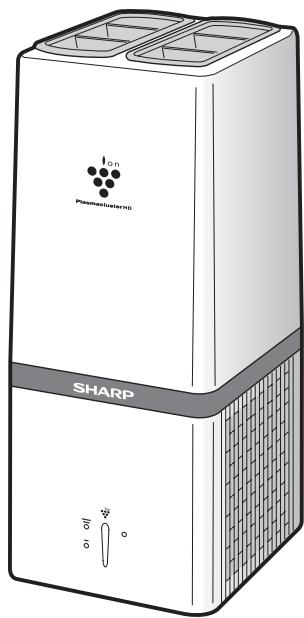
IG-A10EU - Air purifier SHARP - Free user manual and instructions
Find the device manual for free IG-A10EU SHARP in PDF.



| Product type | Air purifier |
| Brand | SHARP |
| Model | IG-A10EU |
| Technology | Plasmacluster ion generator |
| Power supply | 220-240 V, 50/60 Hz |
| Power consumption (High mode) | 14.0 W |
| Power consumption (Low mode) | 6.5 W |
| Airflow (High mode) | 102 m³/h |
| Airflow (Low mode) | 72 m³/h |
| Recommended floor area | 10 m² |
| Dimensions (W × D × H) | 140 × 160 × 345 mm |
| Weight | 2.5 kg |
| Power cord length | 1.8 m |
| Ion generator unit lifespan | Approx. 2 years (17,500 h) when operating 24h/24 |
| Operating temperature | 0 to 35 °C |
| Filter | Non-disposable filter (regular cleaning) |
| Filter cleaning | Vacuum every 2 weeks |
| Main unit cleaning | Soft dry cloth or soapy water |
| Ionizing unit replacement | Model IZ-CA10E (every 2 years approx.) |
| Replacement indicator | Red light (flashing then steady) |
| Automatic shut-off | After approx. 26 months (19,000 h) if unit not replaced |
| Safety | Automatic shut-off in case of malfunction |
| Materials | Casing: polystyrene; Unit: polyethylene terephthalate |
| Warranty | Not specified (contact Sharp service) |
Frequently Asked Questions - IG-A10EU SHARP
User questions about IG-A10EU SHARP
0 question about this device. Answer the ones you know or ask your own.
Ask a new question about this device
Download the instructions for your Air purifier in PDF format for free! Find your manual IG-A10EU - SHARP and take your electronic device back in hand. On this page are published all the documents necessary for the use of your device. IG-A10EU by SHARP.
USER MANUAL IG-A10EU SHARP
Plasmacluster is trademark of Sharp Corporation.
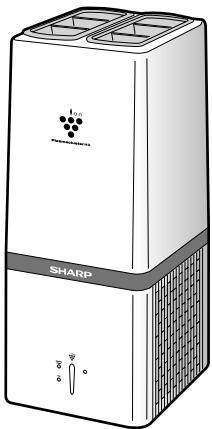
IG-A10EU
natural_image
Illustration of a Sharp water heater with labeled components and control knobs (no text or symbols beyond branding)Read and keep this manual carefully.
PLASMACLUSTER ION GENERATING UNIT REPLACEMENT....E-6
HOW TO REPLACE THE PLASMACLUSTER ION GENERATING UNIT .... E-7
SPECIFICATIONS......E-8
TROUBLESHOOTING......E-8
- While IG-A10EU can inactivate and eliminate suspended viruses and other contaminants, it cannot create a completely sterile environment. SHARP does not guarantee its ability to prevent microbial infection.
- To enable stable emission of high-density Plasmacluster ions, the Plasmacluster Ion Generating Unit mounted in IG-A10EU will need to be replaced periodically*.
* Replacement is required approximately every 2 years (17,500 hours) when operated 24 hours a day. IG-A10EU will stop operating after about 26 months (19,000 hours) if the Plasmacluster Ion Generating Unit is not replaced.
IMPORTANT SAFETY INSTRUCTIONS
When using electrical appliances, basic safety precautions should be followed, including the following:
WARNING - To reduce the risk of electrical shock, fire, or injury :
- Read all instructions before using the unit.
- Use only a 220-240 volt outlet.
- DO NOT use the unit if the power cord or plug is damaged, or the connection to the wall outlet is loosened.
• Periodically remove dust from the plug. - DO NOT insert fingers or foreign objects into the air intake or air outlet.
• Always hold the plug and never pull on the cord when removing the power plug.
Electrical shock and/or fire from a short circuit may result. - DO NOT remove the plug when your hands are wet.
- DO NOT use the unit near gas appliances or fireplaces.
- If the power cord is damaged, it must be replaced by the manufacturer, its service agent, a Sharp authorized Service Center or qualified person in order to avoid a hazard.
- Be cautious when cleaning the unit.
Strong corrosive cleansers may damage the exterior. - DO NOT use it in the areas where the unit may get wet.
• DO NOT use spray products near the unit. - DO NOT use in the rooms, containing oil component, incense, cigarettes' sparks, and chemical fumes.
- DO NOT operate when using aerosol insecticides or in rooms where there is oily residue, incense, sparks from lit cigarettes, chemical fumes in the air, or in locations where the unit may get wet, such as a bathroom.
- Only a Sharp Authorized Service Center should service this Plasmacluster Ion Generator.
Contact the nearest Service Center for any problems, adjustments, or repairs. - This appliance is not intended for use by persons (including children) with reduced physical, sensory or mental capabilities, or lack of experience and knowledge, unless they have been given supervision or instruction concerning use of the appliance by a person responsible for their safety.
- Children should be supervised to ensure that they do not play with the appliance.
CAUTIONS CONCERNING OPERATION:
- DO NOT block the air intake and/or air outlet.
- DO NOT use the unit near or on hot objects, such as stoves or heaters or where it may come into contact with steam.
• Always operate the main unit in an upright position. - Clean the exterior with a soft cloth only, otherwise the main unit surface may be damaged or cracked.
- Keep the main unit away from water.
INSTALLATION GUIDELINES:
- Place at least 2m away from equipment utilizing electric waves such as televisions or radios to avoid electrical interference when using the unit.
- Avoid using in locations where the unit is exposed to condensation or drastic temperature changes. Appropriate room temperature is between 0-35°C.
- Avoid locations where grease or oily smoke is generated, otherwise the main unit surface may crack as a result.
NOTE - Radio or TV Interference:
If this Plasmacluster Ion Generator may cause interference to radio or television reception, try to correct the interference by one or more of the following measures:
- Reorient or relocate the receiving antenna.
- Increase the distance between the unit and radio/TV receiver.
- Connect the equipment into an outlet on a circuit different from that to which the receiver is connected.
- Consult the dealer or an experienced radio/TV technician for help.
PARTS NAME
FRONT
DISPLAY
Unit Replacing
Light (red) (See E-6)
High (blue)
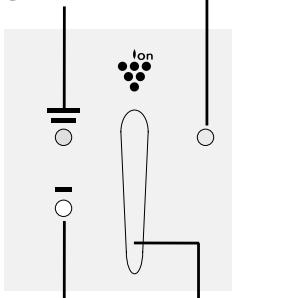
Low (blue)
Fan Speed
Indicator
Operation
Button
Filter (Air Intake)
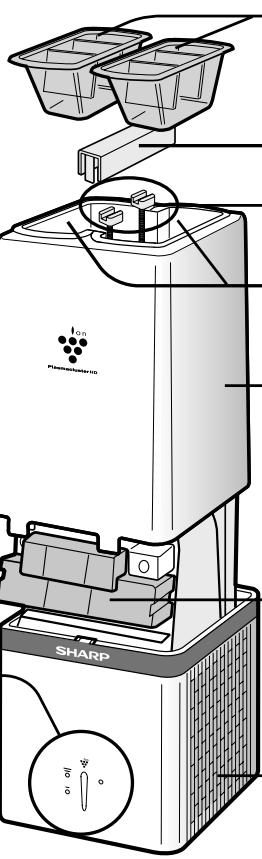
Louvers
(See E-4)
Top Cover Cap
Screws
Air outlet
Top Cover
Plasmacluster Ion
Generating Unit
(See E-6,7)
Filter (Air Intake)
(See E-5)
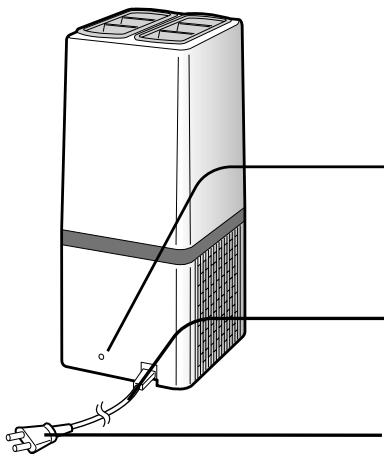
BACK
natural_image
Diagram of a device with two ports and connected cables, no text or symbols presentUse a pointed object, e.g a pen tip, to press this button after replacing Plasmacluster Ion Generating Unit.
Do not press it for any other purpose.
(This is to reset the Unit Replacing Light.)
Power Cord
Plug
E-3
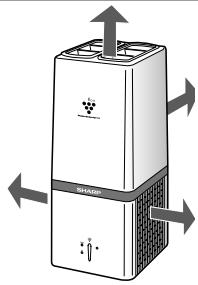
INSTALLATION POSITION
Place the main unit on a smooth, stable surface in a room and insert the plug into an outlet.
DO NOT hold the louvers when carrying the unit.
Installation Guidance.
Leave at least 15cm of clearance behind the Unit.
UPSIDE More than 1m
natural_image
Diagram of a refrigerant appliance with airflow arrows indicating movement (no text or symbols)BACKSIDE
More than 15cm
LEFT/RIGHT SIDE
More than 20cm
DO NOT USE the below items near the unit.
silicone-containing products*
SPRAY
WAX
PESTICIDE


* Hair care products, cosmetic products, water proof sprays, polish glass cleaner, wipe and wax.
OPERATION
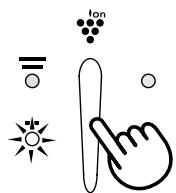
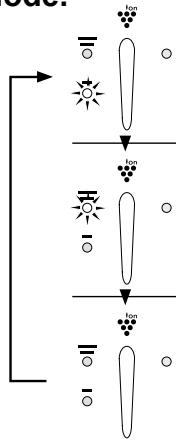
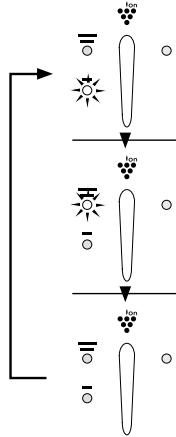
Press the operation button to directly turn on the power and select the preferred mode.
flowchart
graph TD
    A["Light Source"] --> B{Ion Transport}
    B --> C["Light Source"]
    B --> D{Ion Transport}
    D --> E["Light Source"]
    D --> F{Ion Transport}
    F --> G["Light Source"]
LOW
Release high-density Plasmacluster ions quietly.
HIGH
Increase the volume of Plasmacluster ions to increase the purifying capacity.
'OFF'
Power 'OFF'.
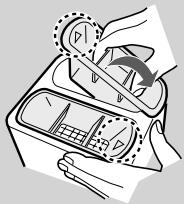
Louvers
The air comes from direction, which is stamped on the louvers.
- When releasing ions to the entire room, put each louver in an opposite direction.
- When releasing ions to the point to deodorize the adhering odor on clothes, put both louvers in the same direction.
natural_image
Illustration of a hand using a device to adjust a car interior panel (no text or symbols visible)CLEANING AND MAINTENANCE
WARNING:
When cleaning the unit, be sure to first unplug the power cord, and never handle the plug with wet hands.
Electrical shock and/or bodily injury may occur as a result.
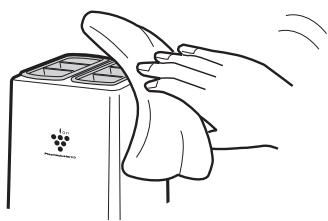
Main Unit
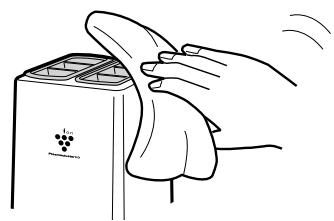
Every month or more often if necessary
Wipe with a dry soft cloth.
Use water and a mild detergent. And then, wipe with a wet cloth.
Make sure to dry out the main unit.
natural_image
Illustration of a hand cleaning a refrigerator with a cloth (no text or symbols)Filter
Every 2 weeks or more often if necessary
Gently remove dust from the filters by using a vacuum cleaner.
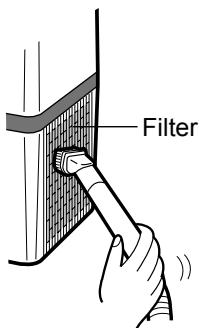
Detach the filter and remove dust with using a vacuum cleaner.
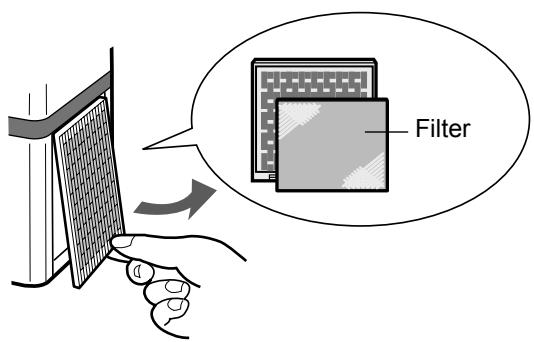
* The filter is not disposable item, often clean it.
PLASMACLUSTER ION GENERATING UNIT REPLACEMENT
In order to release Plasmacluster Ion stably, periodical Plasmacluster Ion Generating Unit replacement is necessary. The Unit Replacing Light will be ON as a reminder for replacement.
| Elapsed Time | Display | Message |
| Beginning to use | 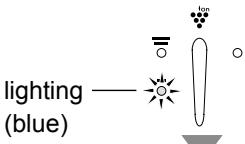 | — |
| approx. 2 years (approx. 17,500hours) | 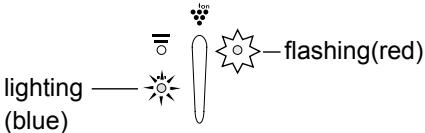 | Suggest replacing |
| approx. 2 years and 2 months (approx.19,000hours) | 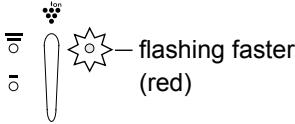 | • Stop working• Replace the Plasmacluster Ion Generating Unit |
| Plasmacluster Ions are not released. | 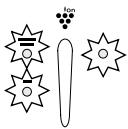 | All light are flashing | Error* |
* Usage environment affects the lifetime of the Plasmacluster Ion Generator. The Plasmacluster Ion Generator may stop working before estimated lifetime. In this case, press Operation button again and restart. If this does not help, replace with a new Plasmacluster Ion Generating Unit.
Replacement of Plasmacluster Ion Generating Unit
| Plasmacluster Ion Generating Unit | |
| Model Number | IZ-CA10E |
Please dispose the used Plasmacluster Ion Generating Unit according to any local laws and regulations.
-materials-
- Case : Polystyrene
- Unit : Polystyrene Terephthalate, Electric parts
HOW TO REPLACE THE PLASMACLUSTER ION GENERATING UNIT
* When replacing the Plasmacluster Ion Generating Unit, be sure to turn off the main unit, unplug the power cord, and never handle the plug with wet hands.
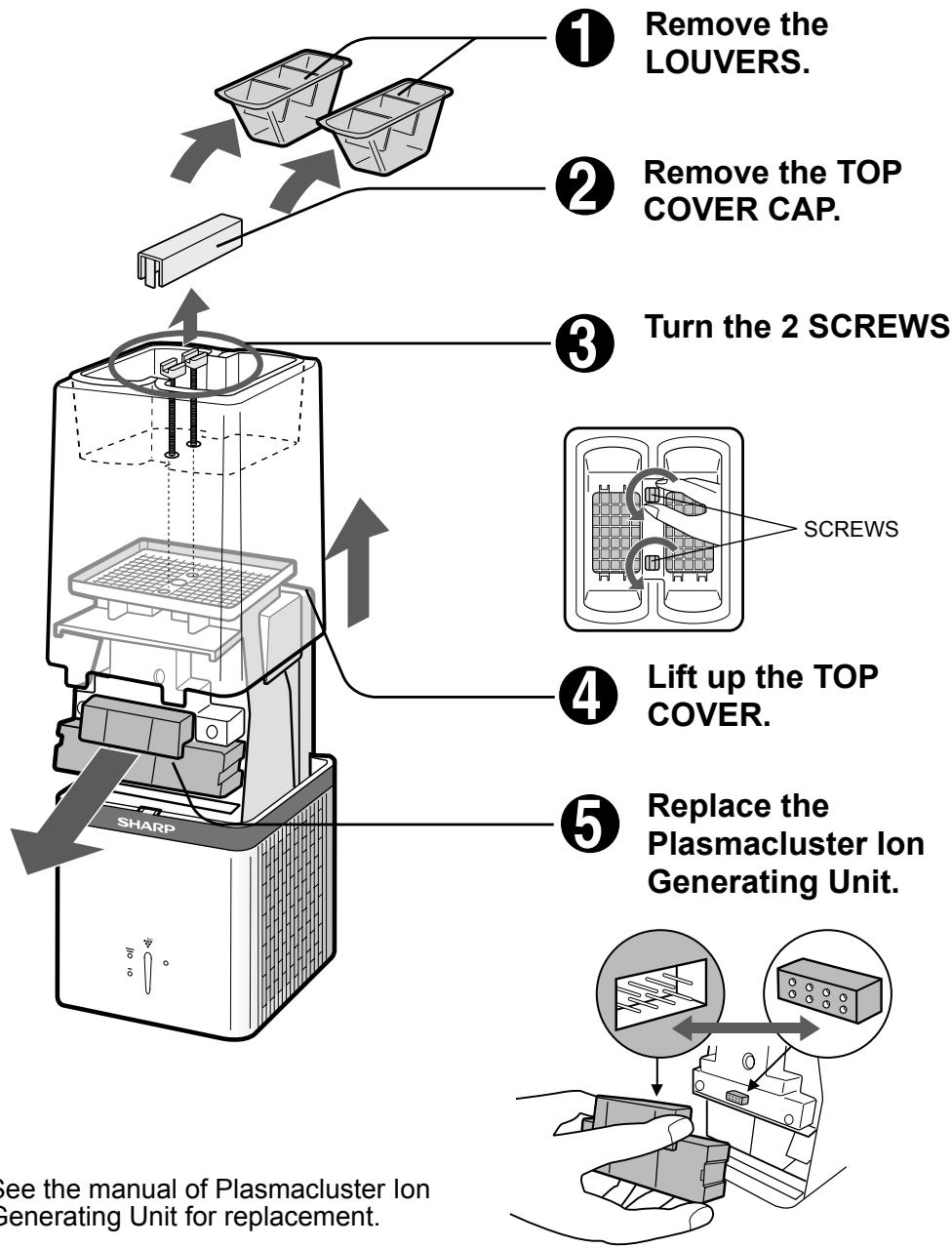
flowchart
graph TD
    A["Remove the LOUVERS."] --> B["Remove the TOP COVER CAP."]
    B --> C["Turn the 2 SCREWS"]
    C --> D["Lift up the TOP COVER."]
    D --> E["Replace the Plasmacluster Ion Generating Unit."]
SPECIFICATIONS
| Model | IG-A10EU | ||
| Power supply | 220-240V, 50/60Hz | ||
| Power consumption (W) | (High) 14.0 | (Low) 6.5 | |
| Airflow volume (m3/hour) | (High) 102 | (Low) 72 | |
| Applicable floor surface area (m2)* | 10 | ||
| Power cord (m) | 1.8 | ||
| Outer dimensions (mm) | 140 × 160 × 345 (W × D × H) | ||
| Weight (kg) | 2.5 | ||
*The target floor surface area for which an emitted airborne ion density of about 25,000 ions/cm ^3 can be measured at a point near the center of the room (at a height of about 1.2 m from the floor), during operation at the HIGH mode when the main unit is placed near a wall.
- The number of ions will vary according to the room conditions and the main unit operation mode.
TROUBLESHOOTING
Before calling for service, please review the TROUBLESHOOTING chart below, since the problem may not be Plasmacluster Ion Generator malfunctions.
| Problem | WHAT TO DO | |
| The Plasmacluster Ion Generator does not work. | Make sure to put in the plug. | |
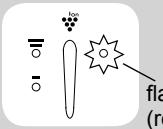 | fashing faster (red) | Approx. 2 years and 2 months (approx. 19,000 hours) has been passed.Replace with a new Plasmacluster Ion Generating Unit. See page E-6,7. |
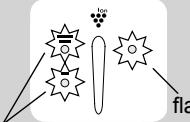 | fashing (red) | Plasmacluster Ions are not released.Press the Operation button and restart. |
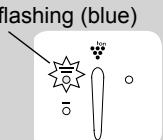
| flashing (blue) | If all lights keep flashing, replace with new Plasmacluster Ion Generating Unit. See page E-6,7. | |
| • Dust may block the filter, clean the filter. | ||
 | 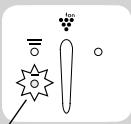 | FailureUnplug and contact the store you purchased or Sharp Service Center. |
| flashing (blue) | ||
| The discharged air has odor. | The Plasmacluster Ion Generator releases a small trace of ozone which may produce odor.This is not harmful to health. | |
| A clicking or ticking sound comes from the unit while operating the Plasmacluster Ion Generator. | Loudness can be changed depending on a room humidity, but the effectiveness is the same.Relocate the Plasmacluster Ion Generator if necessary. | |


Attention: Your product is marked with this symbol. It means that used electrical and electronic products should not be mixed with general household waste. There is a separate collection system for these products.
A. Information on Disposal for Users (private households)
1. In the European Union
Attention: If you want to dispose of this equipment, please do not use the ordinary dust bin!
Used electrical and electronic equipment must be treated separately and in accordance with legislation that requires proper treatment, recovery and recycling of used electrical and electronic equipment.
Following the implementation by member states, private households within the EU states may return their used electrical and electronic equipment to designated collection facilities free of charge*. In some countries* your local retailer may also take back your old product free of charge if you purchase a similar new one.
*) Please contact your local authority for further details.
If your used electrical or electronic equipment has batteries or accumulators, please dispose of these separately beforehand according to local requirements.
By disposing of this product correctly you will help ensure that the waste undergoes the necessary treatment, recovery and recycling and thus prevent potential negative effects on the environment and human health which could otherwise arise due to inappropriate waste handling.
2. In other Countries outside the EU
If you wish to discard this product, please contact your local authorities and ask for the correct method of disposal.
For Switzerland: Used electrical or electronic equipment can be returned free of charge to the dealer, even if you don't purchase a new product. Further collection facilities are listed on the homepage of www.swico.ch or www.sens.ch.
B. Information on Disposal for Business Users.
1. In the European Union
If the product is used for business purposes and you want to discard it:
Please contact your SHARP dealer who will inform you about the take-back of the product. You might be charged for the costs arising from take-back and recycling. Small products (and small amounts) might be taken back by your local collection facilities.
For Spain: Please contact the established collection system or your local authority for take-back of your used products.
2. In other Countries outside the EU
If you wish to discard of this product, please contact your local authorities and ask for the correct method of disposal.
INHALT
natural_image
Illustration of a refrigerant appliance with airflow arrows indicating movement (no text or symbols)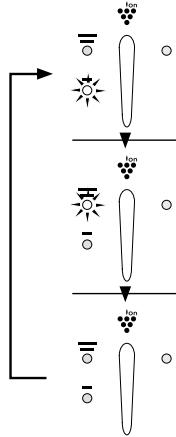
flowchart
graph TD
    A["Light"] --> B["Ion"]
    C["Dark"] --> D["Ion"]
    E["Light"] --> F["Ion"]
    G["Dark"] --> H["Ion"]
NIEDRIG
natural_image
Illustration of a hand using a rotary knob to interact with a car interior (no text or symbols visible)natural_image
Illustration of a hand pressing down on a small electronic device with a grape cluster (no text or symbols)Filter
TECHNISCHE DATEN
natural_image
Symbol of a trash bin crossed with a diagonal line, no text or numbers presentSHARP machines are proprietary articles which are produced with precision and care according to most modern production methods.
In case of proper handling and with considering of the instruction book, this machine will serve you well for a long time.
Of course, a defect cannot be ruled out.
If your appliance has a warrantyable defect in the period of warranty, please contact your dealer, where you bought the appliance. This dealer is your only contact person for any claim of warranty.
As proof for repairs during Warranty period, you need the invoice of the machine.
Please bring your defect appliances also to your dealer (where you bought the appliance) when the warranty period is over.
SHARP ELECTRONICS (EUROPE) GmbH
Parts & Technical Service
SERVICE VORGEHENSWEISE - GILT NUR FÜR DEUTSCHLAND
Lieber SHARP-Kunde
Parts & Technical Service
CONTENU
INSTRUCTIONS IMPORTANTES RELATIVES À LA SÉCURITÉ · F-2
- ATTENTION F-2
- PRÉCAUTIONS CONCERNANT L'UTILISATION……F-2
• GUIDE D'INSTALLATION ...... F-2
DÉSIGNATION DES PIÈCES ...... F-3
- AVANT F-3
- ARRIÈRE ...... F-3
POSITION D'INSTALLATION ...... F-4
FONCTIONNEMENT F-4
NETTOYAGE ET ENTRETIEN F-5
- UNITÉ PRINCIPALE ...... F-5
- FILTRE ...... F-5
REPLACEMENT DE L'UNITÉ GÉNÉRATRICE D'IONS PLASMACLUSTER · F-6
COMMENT REMPLACER L'UNITÉ GÉNÉRATRICE D'IONS PLASMACLUSTER · F-7
CARACTÉRISTIQUES TECHNIQUES……F-8
RÉSOLUTION DES PROBLÈMES......F-8
natural_image
Diagram of a refrigerant appliance with heat flow arrows indicating airflow direction (no text or symbols)DERRIÈRE
Plus de 15 cm
flowchart
graph TD
    A["Light"] --> B["Ion"]
    C["Dark"] --> D["Ion"]
    E["Light"] --> F["Ion"]
    G["Dark"] --> H["Ion"]
BAS
natural_image
Illustration of a hand using a device to adjust a car interior panel (no text or symbols visible)NETTOYAGE ET ENTRETIEN
ATTENTION :
natural_image
Illustration of hands cleaning a small appliance with a grape tag (no text or symbols)Filtre
CARACTÉRISTIQUES TECHNIQUES
natural_image
Symbol of a trash bin crossed out by a diagonal line, with no text or labels present.CLEANING AND MAINTENANCE ......D-5
• HOOFDTOESTEL D-5
- FILTER D-5
VERVANGING VAN PLASMACLUSTER ION GENERATING UNIT … D-6
HOE DE PLASMACLUSTER ION GENERATION UNIT TE VERVANGEN ··D-7
Plasmacluster Ion Generating Unit
(Zie D-6,7)
natural_image
Diagram of a refrigerant appliance with airflow arrows indicating movement (no text or symbols)ACHTERKANT Meer dan 15 cm
LINKER/ RECHTERKANT Meer dan 20 cm
natural_image
Illustration of a hand holding a device with a circular dial and arrow indicating rotation (no text or symbols)REINIGEN EN ONDERHOUD
WAARSCHUWING:
natural_image
Illustration of hands cleaning a microwave oven with a cloth (no text or symbols)Filter
natural_image
Symbol of a trash bin crossed out by a diagonal line, with no text or labels present.natural_image
Diagram of a refrigerant appliance with airflow arrows indicating movement (no text or symbols)СЗАДИ
Не менее 15 см
СЛЕВА / СПРАВА
Не менее 20 см
natural_image
Illustration of a hand holding a device with a rotary knob and control panel (no text or symbols)УХОД И ОБСЛУЖИВАНИЕ
ПРЕДУПРЕЖДЕНИЕ:
natural_image
Illustration of a hand cleaning a small object with a grape tag (no text or symbols)Фильтр
natural_image
Symbol of a trash bin crossed with no text or symbols, representing waste sorting or disposal (no text present)natural_image
Pure electrical circuit lines without any symbolsأدر البرغيين
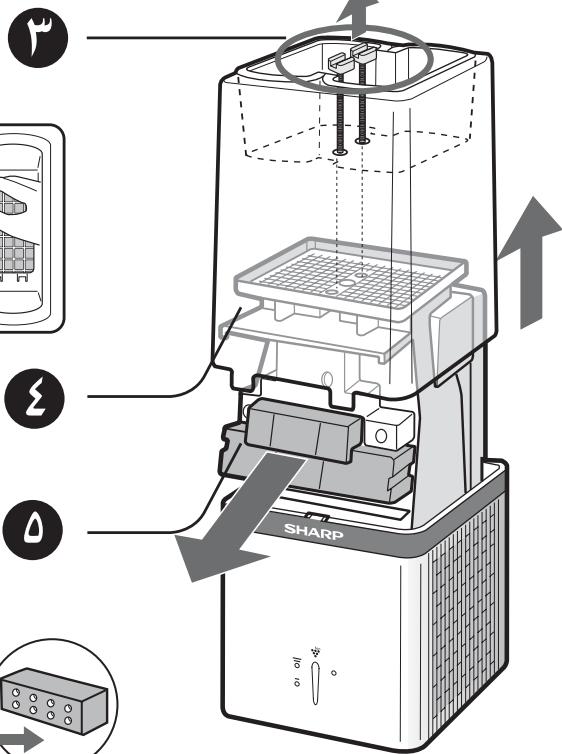
* راجع کتیب وحدة تولید أيونات بلازما
The image contains no legible text or symbols. It is a stylized, ornamental graphic with no discernible characters or punctuation. Therefore, no OCR output can be generated.
natural_image
Illustration of a hand cleaning a washing machine with a cloth (no text or symbols)الجهاز الرئيسي
natural_image
Diagram of a refrigerant appliance with heat exchanger and airflow arrows (no text or symbols)الجهةHALFWIE
أكترمن ه اسم
الجوانب
أكترمن ٠ اسم
التشغيل
natural_image
Illustration of a hand using a device to interact with a car interior (no text or symbols visible)فتحات التهوية
Plasmacluster is trademark of Sharp Corporation.
IG-A10EU