
FP-P40CX - Air purifier SHARP - Free user manual and instructions
Find the device manual for free FP-P40CX SHARP in PDF.


| Product Type | Air Purifier |
| Brand | Sharp |
| Model | FP-P40CX |
| Dimensions (H x W x D) | Approx. 430 x 240 x 240 mm |
| Weight | Approx. 4.5 kg |
| Power Supply | AC 220-240 V, 50 Hz |
| Rated Power Consumption | 30 W (max) |
| Filtration System | Pre-filter + HEPA filter + Active Carbon filter + Ionizer |
| HEPA Filter | True HEPA, captures 99.97% of particles down to 0.3 microns |
| Air Flow Rate (Max) | 200 m³/h |
| Fan Speeds | 3 speeds (Low, Medium, High) |
| Timer Function | 2, 4, 8 hours |
| Special Modes | Pollen mode, Auto mode (optional) |
| Ionizer | Sharp Plasma Cluster Ion technology |
| Noise Level | 20 - 40 dB (depending on fan speed) |
| Coverage Area | Up to 25 m² |
| Control Type | Touch panel with LED indicators |
| Maintenance | Wash pre-filter every 2 weeks; replace HEPA filter every 2 years |
| Filter Type (HEPA) | Sharp FZ-P40CX (replacement model) |
| Safety Features | Auto shut-off when front panel opened; tip-over protection |
| Repairability | User-replaceable filters; other repairs by qualified technician |
| Warranty | 2 years (EU) |
Frequently Asked Questions - FP-P40CX SHARP
User questions about FP-P40CX SHARP
0 question about this device. Answer the ones you know or ask your own.
Ask a new question about this device
Download the instructions for your Air purifier in PDF format for free! Find your manual FP-P40CX - SHARP and take your electronic device back in hand. On this page are published all the documents necessary for the use of your device. FP-P40CX by SHARP.
USER MANUAL FP-P40CX SHARP
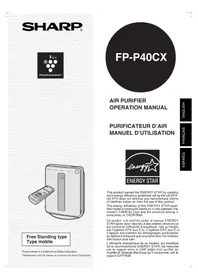
Free Standing type
*Plasmacluster is a trademark of Sharp Corporation. *Plasmacluster est une marque de commerce de Sharp Corporation.
FP-P40CX
This product earned the ENERGY STAR by meeting strict energy efficiency guidelines set by the US EPA. US EPA does not endorse any manufacturer claims of healthier indoor air from the use of this product.
The energy efficiency of this ENERGY STAR qualified model is measured based on a ratio between the model's CADR for Dust and the electrical energy it consumes, or CADR/Watt.
Please read before operating your new Air Purifier
The air purifier draws in room air from its air intake, lets the air pass through a Active Carbon Filter (deodorization filter) and a True HEPA Filter (dust collection filter) inside of the unit, then discharges the air from its air outlet. The air purifier unit repeats this process by moving its internal fan.
As air passes through, a new True HEPA Filter can remove 99.97% of dust particles, of as small as 0.3 microns. The Active Carbon Filter gradually absorbs odor elements as they repeatedly pass through the filter. (Odor elements are absorbed by the True HEPA Filter as well.)
Some odor ingredients absorbed by the filters may become separated and may be discharged through the air outlet and result in additional odor. Depending on the usage environment, especially when the product is used in a condition significantly more severe than household use, this odor may become strong in a shorter period than expected.
If the odor persists, then the filters are fully expended and it is necessary to purchase the optional replacement filter kit FZ-R45HFU.
NOTE
- The air purifier is designed to remove air-suspended dust and odor, but not harmful gases (for example, carbon monoxide contained in cigarette smoke). If the odor sources still exist, it cannot completely remove the odor. (for example, odors from construction materials and pet odors).
- It is suggested to open the window a bit when you are smoking in order to facilitate ventilation.

ENGLISH
FEATURES
Plasmacluster Ion Control
Your new air purifier will control the ratio of negative ions and positive ions depending on the condition of the room.
- Clean Mode
Approximately the same numbers of positive and negative ions are discharged.
- Ion Control Mode
Plenty of negative ions exist in natural surroundings such as waterfalls or forests. In this mode, negative ions will be released at an increased rate.
• AUTO Plasmacluster Ion Mode
The unit will switch between Clean Mode and Ion Control Mode automatically depending on the amount of impurities in the air detected by the odor sensor.
- Filters
1) Washable Active Carbon Filter
Absorbs odor elements.
Washable to maintain optimum deodorization performance.
2) True HEPA (High Efficiency Particulate Air) Filter.
High-efficiency particle collection including pollen and dust.
This device complies with Part 18 of FCC rules.
Responsible Party:
SHARP ELECTRONICS CORPORATION Sharp Plaza,
Mahwah, New Jersey 07430-2135
TEL: 1-800-BE-SHARP
Declaration of Conformity SHARP AIR PURIFIER FP-P40CX
This ISM device complies with Canadian ICES-001
Responsible Party:
SHARP ELECTRONICS OF CANADA LTD. 335 Britannia Road East Mississauga, Ontario L4Z 1W9 Canada
TEL: (905) 568-7140
CONTENTS
• FOR CUSTOMER ASSISTANCE (U.S.) .... E-2 • CONSUMER LIMITED WARRANTY (U.S.) E-3 • FOR CUSTOMER ASSISTANCE (CANADA) ... E-4 • LIMITED WARRANTY (CANADA) ...... E-5
IMPORTANT SAFETY INSTRUCTIONS .... E-6
- WARNING ...... E-6
- CAUTIONS CONCERNING OPERATION ... E-7
- REMOTE CONTROL LIMITATIONS ......E-7 • INSTALLATION GUIDELINES .....E-7 • FILTER GUIDELINES .....E-7
PART NAMES ...... E-8
- MAIN UNIT DISPLAY ....E-8 • INCLUDED.....E-8
- BACK E-8
PREPARATION...... E-9
- INSERTING BATTERIES IN THE REMOTE CONTROL ....E-9
- REMOTE CONTROL USE ......E-9
- FILTER INSTALLATION ...... E-10
OPERATION E-12
Thank you for purchasing the SHARP Air Purifier. Please read this manual carefully for the correct usage information. Before using this product, be sure to read the section: "Important Safety Instructions."
After reading this manual, retain it in a convenient location for future reference.
FOR CUSTOMER ASSISTANCE (the United States)
To aid in answering questions if you call for service or for reporting loss or theft, please use the space below to record the model and serial number located on the back side of the unit.
MODEL NUMBER
SERIAL NUMBER
DATE OF PURCHASE
Dealer Name
Address
City
State
Zip
Telephone
TO PHONE: Dial 1-800-BE-SHARP (237-4277) for:
SERVICE (for your nearest Sharp Authorized Servicer)
PARTS (for your Authorized Parts Distributor)
ACCESSORIES
ADDITIONAL CUSTOMER INFORMATION
TO WRITE: For service problems, warranty information, missing items and other assistance:
Sharp Electronics Corporation
Customer Assistance Center
1300 Naperville Drive
Romeoville, IL 60446-1091
TO ACCESS OUR WEB SITE: www.sharpusa.com
Please provide the following information when you write or call: model number, serial number, date of purchase, your complete mailing address (including zip code), your daytime telephone number (including area code) and description of the problem.
CONSUMER LIMITED WARRANTY
CONSUMER LIMITED WARRANTY FOR U.S. USERS
SHARP ELECTRONICS CORPORATION warrants to the first consumer purchaser that this Sharp brand product (the "Product"), when shipped in its original container, will be free from defective workmanship and materials, and agrees that it will, at its option, either repair the defect or replace the defective Product or part thereof with a new or remanufactured equivalent at no charge to the purchaser for parts or labor for the period(s) set forth below.
This warranty does not apply to any appearance items of the Product nor to the additional excluded item(s) set forth below nor to any Product the exterior of which has been damaged or defaced, which has been subjected to improper voltage or other misuse, abnormal service or handling, or which has been altered or modified in design or construction.
In order to enforce the rights under this limited warranty, the purchaser should follow the steps set forth below and provide proof of purchase to the servicer.
The limited warranty described herein is in addition to whatever implied warranties may be granted to purchasers by law. ALL IMPLIED WARRANTIES INCLUDING THE WARRANTIES OF MERCHANTABILITY AND FITNESS FOR USE ARE LIMITED TO THE PERIOD(S) FROM THE DATE OF PURCHASE SET FORTH BELOW. Some states do not allow limitations on how long an implied warranty lasts, so the above limitation may not apply to you.
Neither the sales personnel of the seller nor any other person is authorized to make any warranties other than those described herein, or to extend the duration of any warranties beyond the time period described herein on behalf of Sharp.
The warranties described herein shall be the sole and exclusive warranties granted by Sharp and shall be the sole and exclusive remedy available to the purchaser. Correction of defects, in the manner and for the period of time described herein, shall constitute complete fulfillment of all liabilities and responsibilities of Sharp to the purchaser with respect to the Product, and shall constitute full satisfaction of all claims, whether based on contract, negligence, strict liability or otherwise. In no event shall Sharp be liable, or in any way responsible, for any damages or defects in the Product which were caused by repairs or attempted repairs performed by anyone other than an authorized servicer. Nor shall Sharp be liable or in any way responsible for any incidental or consequential economic or property damage. Some states do not allow the exclusion of incidental or consequential damages, so the above exclusion may not apply to you.
THIS WARRANTY GIVES YOU SPECIFIC LEGAL RIGHTS. YOU MAY ALSO HAVE OTHER RIGHTS WHICH VARY FROM STATE TO STATE.
Your Product Model Number & Description:
FP-P40CX Air Purifier. Be sure to have this information available when you need service for your Product.
Warranty Period for this Product:
One (1) year parts and labor from date of purchase.
Additional Item(s) Excluded From Warranty Coverage:
Appearance items of the Product, filters, accessories, or any printed materials. Product which has been used for rental and/or commercial purposes.
Where to Obtain Service:
From a Sharp Authorized Servicer located in the United States. To find the location of the nearest Sharp Authorized Servicer, call Sharp Toll Free at 1-800-BE-SHARP.
What to Do to Obtain Service:
Ship prepaid or carry in your Product to a Sharp Authorized Servicer. Be sure to have Proof of Purchase available. If you ship the Product, be sure it is insured and packaged securely.
TO OBTAIN SUPPLY, ACCESSORY OR PRODUCT INFORMATION, CALL 1-800-BE-SHARP, OR VISIT OUR WEBSITE AT www.sharpusa.com
SHARP®
SHARP ELECTRONICS CORPORATION
Sharp Plaza, Mahwah, New Jersey 07430-2135
FOR CUSTOMER ASSISTANCE (Canada)
To aid in answering questions if you call for service or for reporting loss or theft, please use the space below to record the model and serial number located on the back side of the unit.
| MODEL NUMBER |
| SERIAL NUMBER |
| DATE OF PURCHASE |
| Dealer Name |
| Address |
| City |
| Province |
| Postal Code |
| Telephone |
TO PHONE: Dial 1-905-568-7140 for:
SERVICE (for your nearest Sharp Authorized Servicer)
PARTS (for your Authorized Parts Distributor)
ACCESSORIES
ADDITIONAL CUSTOMER INFORMATION
TO WRITE: For service problems, warranty information, missing items and other assistance:
Sharp Electronics of Canada Ltd.
Customer Care
335 Britannia Road East
Mississauga, Ontario L4Z 1W9
TO ACCESS OUR WEB SITE: www.sharp.ca
Please provide the following information when you write or call: model number, serial number, date of purchase, your complete mailing address (including Postal Code), your daytime telephone number (including area code) and description of the problem.
SHARP®
LIMITED WARRANTY (VALID IN CANADA ONLY)
Consumer Electronics Products
Congratulations on your purchase!
Sharp Electronics of Canada Ltd. (hereinafter called "Sharp") gives the following express warranty to the first consumer purchaser for this Sharp brand product, when shipped in its original container and sold or distributed in Canada by Sharp or by an Authorized Sharp Dealer:
Sharp warrants that this product is free, under normal use and maintenance, from any defects in material and workmanship. If any such defects should be found in this product within the applicable warranty period, Sharp shall, at its option, repair or replace the product as specified herein.
This warranty shall not apply to:
(a) Any defects caused or repairs required as a result of abusive operation, negligence, accident, improper installation or inappropriate use as outlined in the owner's manual. (b) Any Sharp product tampered with, modified, adjusted, or repaired by any party other than Sharp, Sharp's Authorized Service Centres, or Sharp's Authorized Servicing Dealers. (c) Damage caused or repairs required as a result of the use with items not specified or approved by Sharp, including but not limited to head cleaning tapes and chemical cleaning agents. (d) Any replacement of accessories, glassware, consumable, or peripheral items required through normal use of the product, including but not limited to earphones, remote controls, AC adapters, batteries, temperature probe, stylus, trays, filters, belts, ribbons, cables, and paper. (e) Any cosmetic damage to the surface or exterior that has been defaced or caused by normal wear and tear. (f) Any damage caused by external or environmental conditions, including but not limited to transmission line/power line voltage or liquid spillage. (g) Any product received without appropriate model, serial number, and CSA and/or cUL markings. (h) Any products used for rental or commercial purposes. (i) Any installation, setup, and/or programming charges.
Should this Sharp product fail to operate during the warranty period, warranty service may be obtained upon delivery of the Sharp product together with proof of purchase and a copy of this LIMITED WARRANTY statement to an Authorized Sharp Service Centre or an Authorized Sharp Servicing Dealer. In-home warranty service may be provided at Sharp's discretion on any Sharp television with the screen size of 27" or larger and on any Sharp Over-the-Range Microwave Oven.
This warranty constitutes the entire express warranty granted by Sharp and no other dealer, service centre or their agent or employee is authorized to extend, enlarge or transfer this warranty on behalf of Sharp. To the extent the law permits, Sharp disclaims any and all liability for direct or indirect damages or losses or for any incidental, special or consequential damages or loss of profits resulting from a defect in material or workmanship relating to the product, including damages for the loss of time or use of this Sharp product or the loss of information. The purchaser will be responsible for any removal, reinstallation, transportation and insurance costs incurred. Correction of defects, in the manner and period of time described herein, constitute complete fulfillment of all obligations and responsibilities of Sharp to the purchaser with respect to the product and shall constitute full satisfaction of all claims, whether based on contract, negligence, strict liability or otherwise.
WARRANTY PERIODS: Parts & Labour (exceptions noted)
Audio Products 1 year
Camcorder 1 year
DVD Products 1 year
LCD Projector 1 year (lamp 90 days)
LCD TV 1 year
Microwave Oven 1 year (magnetron component - 4 additional years)
Television Products 1 year (picture tube component - 1 additional year)
VCR Products 1 year
Vacuum Cleaner 1 year
Air Purifier & Air Conditioners 1 year (except filters)
To obtain the name and address of the nearest Authorized Sharp Service Centre or Dealer, please contact:
SHARP ELECTRONICS OF CANADA LTD. 335 Britannia Road, East Mississauga, Ontario L4Z 1W9
For more information on this Warranty, Sharp Canada Products,
Accessory Sales, Dealer or Service Locations, please call
(905)568-7140
Visit our Web site: www.sharp.ca


SERVICE
IMPORTANT SAFETY INSTRUCTIONS
When using electrical appliances, basic safety precautions should be followed, including the following:
WARNING - To reduce the risk of electrical shock, fire or injury to persons:
- Read all instructions before using the air purifier.
- Use only a 120-volt outlet with a polarized receptacle.
- The air purifier has a polarized plug (one blade is wider than the other is). This plug will fit in a polarized outlet only one way. Initially, if the plug does not fit into the outlet, reverse it. If it still does not fit, contact a qualified electrician or service person.
- Do not use the air purifier if the power cord or plug is damaged or the connection to the wall outlet is loose.
- Periodically remove dust from the power plug.
- Do not insert fingers or foreign objects into the intake or air outlet.
- When removing the power plug, always hold the plug and never pull the cord.
Electrical shock and/or fire from short circuit may occur as result.
- Do not use this air purifier near gas appliances or fireplaces.
- Remove the power plug from the wall outlet before cleaning the unit and when not using the unit.
Electrical shock from bad insulation and/or fire from short circuit may occur as a result.
- If the power cord is damaged, it must be replaced by the manufacturer, its service agent, Sharp authorized service or similarly qualified person in order to avoid a hazard.
- Do not operate when using aerosol insecticides or in rooms where there is oily residue, incense, sparks from lit cigarettes, chemical fumes in the air or in very high humidity condition, such as a bathroom.
- Use care when cleaning the air purifier. Strong corrosive cleansers may damage the exterior.
- Only Sharp Authorized Servicers should service this air purifier. Contact the nearest Servicer for any problems, adjustments, or repairs.
- The batteries must be removed from the remote control before disposal, and the batteries must be disposed of safely.
NOTE - Radio or TV Interference
If this air purifier should cause interference to radio or television reception, try to correct the interference by one or more of the following measures:
- Reorient or relocate the receiving antenna.
- Increase the separation between the air purifier and radio/TV receiver.
- Connect the equipment into an outlet on a circuit different from that to which the receiver is connected.
- Consult the dealer or an experienced radio/TV technician for help.
IMPORTANT SAFETY INSTRUCTIONS
CAUTIONS CONCERNING OPERATION
- Do not block the intake and air outlet.
- Do not use the unit near or on hot objects, such as a range, or where it may come into contact with steam.
- Do not use the unit on its side.
- Always hold the handle on the back of the unit when moving it. Holding the front panel when carrying may cause it to detach, thus dropping the unit and resulting in bodily injury.
- Do not operate the unit without the filter.
- Do not wash and reuse the HEPA filter. Not only does it not improve filter performance, it may cause electric shock or malfunction.
- Clean the exterior with a soft cloth only. The unit surface may be damaged or cracked. In addition, the sensor may malfunction as a result.
REMOTE CONTROL LIMITATIONS
DO NOT USE THE REMOTE CONTROL IN THE FOLLOWING LOCATIONS:
- Any location where there is inverter lighting equipment or electronic spontaneous lighting equipment. The remote control may become inoperative. In this case, move away from such lighting equipment or change direction.
- Location exposed to direct sunlight. The unit may not receive signals from the remote control.
INSTALLATION GUIDELINES
- During the operation of the product, please place the unit at least 7 feet (2m) away from equipment which involve electric waves such as televisions, radios, or wave clocks, in case electrical interference occurs to such equipment.
- Avoid a location where the sensor is exposed to direct wind. The unit may not operate properly.
- Avoid locations where curtains, etc., come into contact with the intake or air outlet. Curtains, etc., may become dirty or a malfunction may occur.
- Avoid locations where the unit is exposed to condensation, due to drastic temperature changes.
- Place on a stable surface with sufficient air circulation.
- Do not install when there is generation of lampblack, such as in a kitchen, etc. The unit surface may crack or the sensor may malfunction as a result.
- Leave at least 2 feet (60cm) of space from the wall.
The wall behind the air outlet may become dirty as time passes. When using the unit for extensive period in the same location, use a vinyl sheet, etc., to prevent the wall from becoming dirty. In addition, periodically clean the wall, etc.
FILTER GUIDELINES
- Follow the instructions in this manual for correct care and maintenance of the filters.
PART NAMES
MAIN UNIT DISPLAY
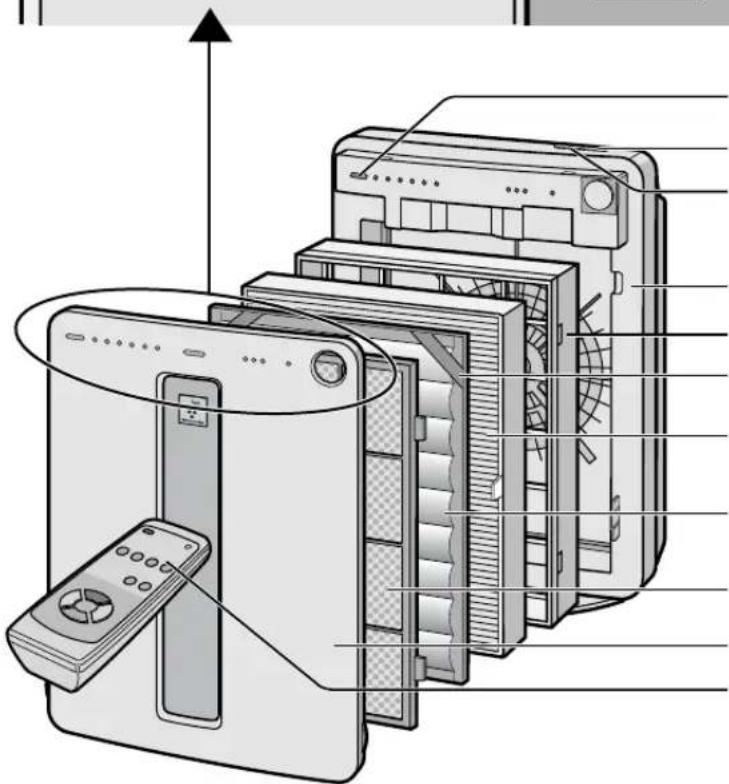
Odor Sensor
POWER ON/OFF Button See Page E-12
MODE Selection Button See Page E-12
Main Unit
Filter Frame
Band See Page E-11
True HEPA Filter (white) See Page E-10,17
Washable Active Carbon Filter (black)
See Page E-10,16,17
Pre-Filter
Front Panel
Remote Control See Page E-9,14
BACK
INCLUDED
Remote Control (1 unit)
Battery (AA battery x 2)
- Operation manual

Handle
Air Outlet
Date Label
Power Cord
Power Plug
INSERTING BATTERIES IN THE REMOTE CONTROL
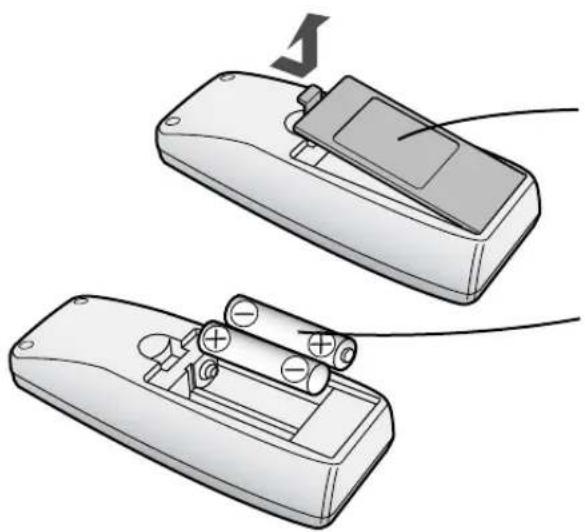
1. Remove the back cover. Press and slide the back cover to remove.
2. Insert batteries with ⊕ and ⊖ as shown below.
3. Close the back cover.
Battery Information
• The battery life is about 1 year. The batteries for this remote control are for initial use only. Change the batteries when necessary. Incorrect usage of the batteries may cause battery fluid leakage and/or damage. Take care of the following when handling: - When replacing the batteries, replace both batteries with new ones of the same type. (Use 2 AA manganese batteries.) - When not using the unit or remote control for an extended period, remove the batteries. • The batteries are for initial use only and may be depleted within 1 year.
REMOTE CONTROL USE
• The battery life is about 1 year. - The batteries for this remote control are for initial use only. Change the batteries when necessary. - Incorrect usage of the batteries may cause battery fluid leakage and/or damage. Take care of the following when handling: - When replacing the batteries, replace both batteries with new ones of the same type. (Use 2 AA manganese batteries.) - When not using the unit or remote control for an extended period, remove the batteries. • The batteries are for initial use only and may be depleted within 1 year.
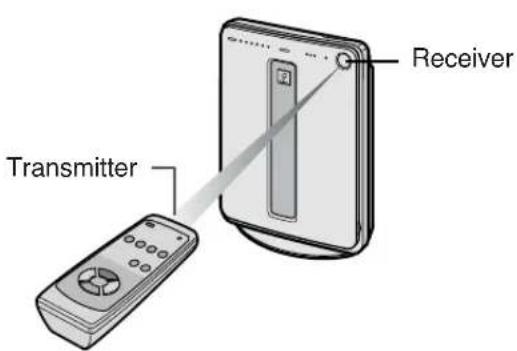
Make sure there are no objects blocking the path of the signal.
- Operate with the remote control facing the main unit receiver. • The signal range is about 23 feet (7m).
- Make sure there are no objects blocking the path of the signal.
- A beep sound will be heard from the main unit when a signal is received.
NOTE
Avoid dropping or damaging the remote control, using it in high humidity conditions, in direct sunlight, or near a heat source.
FILTER INSTALLATION
To maintain the quality of the filters, they are installed in the main unit within plastic bags. Be sure to remove the filters from the plastic bags before using the unit.
1 Remove the filters
1 Remove the Front Panel. Pull the bottom of the Front Panel.

2 Pull out the Filter Frame and remove the Pre-Filter, Active Carbon Filter, and True HEPA Filter.
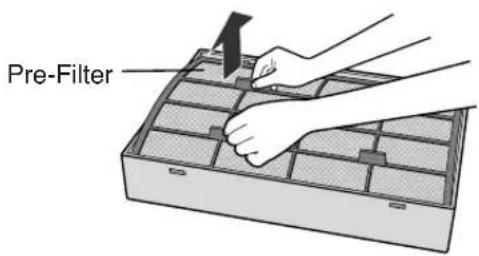

3 Remove the Active Carbon Filter (black) and True HEPA Filter (white) from the plastic bags.


2 Install the filters
1 Place the True HEPA Filter within the Filter Frame.
Please make sure that the True HEPA Filter is placed in proper orientation.
Do not install the filter backwards or the unit will not operate properly.
2 Place the Active Carbon Filter on top of the True HEPA Filter with the bands (2 places) facing up.


3 Place the Pre-filter through the bands (2 places) located in the corners of the Active Carbon Filter.
Insert the tabs of the pre-filter into the associated holes of the Filter Frame.
4 Mount the Filter Frame to the main unit.
5 Fix the Front Panel to the main unit.
6 Fill in the usage start date on the Date Label.
Use the date as a guide for the Filter Replacement schedule.


OPERATION
Main Unit Controls
MAIN UNIT OPERATION
- AUTO • QUICK CLEAN • POLLEN • SILENT
- MEDIUM • MAX

Power ON/OFF Button
• Used to start operation (short beep) and stop operation (long beep) - Plasmacluster Indicator Light and Fan Speed Indicator Light turn on/off. - Unless the power cord is unplugged, the operation starts in the previous mode the unit was operated in.
MODE Selection Button
• The operation mode can be switched.
AUTO operation
The fan speed is automatically switched (HIGH*, MEDIUM, SILENT) depending on the amount of impurities in the air. The sensors detect the impurities for efficient air purification.
QUICK CLEAN operation
The unit will operate at HIGH* fan speed for 15 minutes, then will operate at Auto operation.
The operation mode is effective when quick removal of impurities in the air is desired.
POLLEN mode operation
The unit will operate at HIGH* fan speed for 10 minutes, then will alternate between MEDIUM and HIGH* for 20 minutes.

MAX operation
The unit will operate at a fan speed of MAX.
MEDIUM operation
The unit will operate at a fan speed of MEDIUM.
SILENT operation
The unit will operate quietly using minimal air intake.
* HIGH fan speed is an intermediate speed between MEDIUM and MAX.
DETERMINING THE BASE IMPURITY RATE
For the first 30 seconds after the power plug is inserted into the wall outlet, the unit will check the conditions of the air. If operation is set to ON during this time, the CLEAN-SIGN LIGHT will alternately flash in green, orange and red.
PLASMACLUSTER INDICATOR LIGHT
Plasmacluster ion operation is selected using the remote control.
Blue light
When the Plasmacluster ion operation is in Clean Mode, or in AUTO Plasmacluster Ion Mode and the air in the room is impure, the light will activate and the unit will operate in Clean Mode.
Green light
When the Plasmacluster ion operation is in the Ion Control Mode, or in AUTO Plasmacluster Ion Mode and the air in the room is clean, this light will activate and the unit will operate in Ion Control Mode.
Light off
There are no Plasmacluster ions being generated.
- The light can be turned off by using the 'Lights ON/OFF Button' on the Remote Control. In this case, Plasmacluster ions are generated. (Please turn off the light if desired.) (See Page E-14)
CLEAN-SIGN LIGHT
The color changes according to the air condition.
Clean (Green) Slightly Impure (Orange) Very Impure (Red)
ABOUT THE CLEAN-SIGN
- The condition of the CLEAN-SIGN depends on the room air condition detected by the Odor Sensors when the plug is inserted into the wall outlet.
- It is possible to have a green CLEAN-SIGN with impurities in the air at the time that the air purifier was just introduced to the room environment. After a while, however, the base impurity rate will be adjusted to detect room air condition correctly.
- Use the Lights ON/OFF Button on the remote control to turn off the Indicator lights if desired.
CLEAN FILTER INDICATOR LIGHT
Clean the Active Carbon Filter when the CLEAN FILTER Indicator Light activates.
(The indicator light will activate in about 2 months, when using the unit 24 hours daily.) (See Page E-16)
OPERATION
Operations available with the Remote Control
• AUTO - MANUAL • POLLEN • OFF TIMER • QUICK CLEAN - Lights ON/OFF
Plasmacluster lon mode selections
• ION AUTO • CLEAN • ION CONTROL • ION OFF
POWER ON/OFF Button
- When you press the POWER ON/OFF Button, a short beep will sound and operation will start in AUTO Mode.
- Unless the power cord has been unplugged, the operation starts in the previous mode the unit was operated in. • To stop, press the POWER ON/OFF Button again. A long beep will sound and operation will stop.
Auto (Fan Speed) Button
The fan speed switches automatically depending on the amount of impurities in the air.
Manual (Fan Speed) Button
The fan speed can be switched among Silent, MEDIUM and MAX settings.
QUICK CLEAN Button
See page E-12
LIGHTS ON/OFF Button
Switches the Plasmacluster Indicator Light and CLEAN-SIGN Light either ON or OFF.

Transmitter
Filter Reset Button
When the Washable Active Carbon Filter is cleaned and reinserted into the main unit, press the Filter Reset Button with a pointed instrument such as a pen.
The Filter Indicator light will then go out with a beep.
Off Timer Button
The set time switches every time the button is pressed as shown below.

• The indicator light shows the remaining time. • The unit will stop operation when the time is up.
Pollen Mode Operation Button
See Page E-12
Plasmacluster Ion Mode Selections
ION AUTO
When pressed, the unit will switch between Clean Mode and the Ion Control Mode automatically depending on the amount of impurities in the air as detected by the dust and odor sensors. Clean Mode will operate for 1 minute when the Auto function is selected.
ION CONTROL
When pressed, the unit will constantly operate in Ion Control Mode.
The Plasmacluster Ion Indicator Light is green.
CLEAN
When pressed, the unit will constantly operate in the Clean Mode, in which the same numbers of positive and negative ions are discharged. The Plasmacluster Indicator Light is blue.
ION OFF
The generation of ions will cease and the Plasmacluster Indicator Light will go out.
CARE AND MAINTENANCE
To maintain optimum performance of this air purifier, please clean the unit including the sensor and filters periodically.
When cleaning the unit, be sure to unplug the power cord, and never handle the plug with wet hands. Electrical shock and/or bodily injury may occur as a result.

Odor Sensor Main Unit

True HEPA Filter
Do not wash the True HEPA Filter.
Washing will not improve filter performance, and it may even cause electric shock or malfunction.
Washable Active Carbon Filter
Pre-Filter
MAIN UNIT
To prevent dirt or stains on the main unit, clean as often as necessary. If stains are allowed to remain, they may become hard to clean.
Wipe with a dry, soft cloth.
For stubborn stains or dirt, use a soft cloth dampened with warm water.
Do not use volatile fluids.
Benzene, paint thinner, polishing powder, etc., may damage the surface.
Do not use detergents.
Detergent ingredients may damage the unit.
Keep the unit away from water.
ODOR SENSOR
The sensitivity of the sensor will become unstable if the sensor is dirty or blocked. Remove dust from the surfaces of the sensor openings using a vacuum cleaner.
Opening of odor sensor

PRE-FILTER
As shown in the figure, clean the top surface of the Pre-Filter lightly with a vacuum cleaner.
When Pre-Filter is very dirty, wash it in water with mild kitchen detergent and dry Pre-Filter well in the shade.

CARE AND MAINTENANCE
WASHABLE ACTIVE CARBON FILTER CARE
HAND WASH ONLY! DO NOT TUMBLE DRY!
Care Cycle
When the CLEAN FILTER Indicator Light lights up, this indicates that the filter needs to be cleaned. If the unit is kept on 24 hours a day then the Filter Indicator Light will activate in about 2 months.
The CLEAN FILTER Indicator Light is for reference. Clean the filter as often as necessary when odor persists.
1 Fill a large container with warm water, add a mild kitchen detergent and stir.
Dilute as indicated on the detergent container.

2 Allow the filter to soak approximately 30 minutes before washing.
If the filter surface is very dirty, scrub with an old toothbrush.

3 Rinse thoroughly with clean water.
CAUTION
If rinsing in a container, be sure to rinse 3 to 4 times so that the odor is rinsed thoroughly from the filter.

Remove excess water.
The filter will be saturated with water after rinsing. To decrease drying time, wrap the filter in an old thick towel so that excess water can be removed.
CAUTION
Some carbon may adhere to the towel, but it is harmless.

5 Dry the filter outdoors if possible in a well ventilated area.

CAUTION
• The wet filter is heavy. Fix it securely for drying to make sure it does not fall down. - The filter takes longer to dry in winter, and on rainy days. Wash it on a day when the weather is good and dry it in the sun.
Move it indoors at night to prevent freezing.
- Dry the filter outdoors in a well ventilated area. If dried indoors, the water dripping off the filter may soil your floor.
- Make sure that the activated carbon has not shifted to one side inside the filter. If it has, distribute it evenly with your fingers.
- Let the filter dry thoroughly. If used while the filter is still moist, then the air that is exhausted from the main unit will have an odor. It may take 1 or 2 days to dry.
6 Reinstalling the Filters.
Reinstall the filters as shown on Page E-10,11
7 Connect the power cord to the outlet and press the Filter Reset Button on the Remote Control with a pointed instrument.
- Once the Filter Reset Button has been activated, you will hear a beep sound that means the unit has been reset.
- The Filter indicator light will then go out automatically.
Filter Reset Button
FILTER REPLACEMENT GUIDELINES
The replacement period differs depending on the room environment, the usage hours, and the location of the Air Purifier. If dust or odors persist, replace the filters.
(Refer to "Please read before operating your new Air Purifier")
Guide for filter replacement timing
- Filter life can be greatly reduced in poor environments.
The presence of cigarette smoke, pet dander, and other concentrations of airborne particles will cause filters to become clogged in less time. Please check filters regularly and replace as needed.
• True HEPA Filter: Up to 5 years after opening - Washable Active Carbon Filter: Up to 5 years after opening
REPLACING THE FILTERS
1. See pages E-10, 11 for directions on how to install the filters when replacing.
After replacing the filters:
2. Be sure to press the Filter Reset Button on the Remote Control with the power cord connected to the outlet. A short beep will be heard and the operation hours stored in the memory will be reset. The CLEAN FILTER Light will then go out automatically.
3. Fill in the usage start date of the filters on the Date Label.

Replacement Filters
Model: FZ-R45HFU
• True HEPA Filter: 1 unit - Washable Active Carbon Filter: 1 unit
If you need a True HEPA Filter or a Washable Active Carbon Filter only:
• True HEPA Filter: PFIL-A097KKEZ - Washable Active Carbon Filter: PFIL-A098KKEZ
For replacement filters, contact Sharp for information. (U.S.A) 1-800-BE-SHARP or website at www.sharpusa.com (CANADA) (905) 568-7140 or website at www.sharp.ca

Disposal of Filters
Please dispose of replaced filters according to the local disposal laws and regulations.
True HEPA Filter materials:
- Filter: Polypropylene
- Frame: Polyester
Active Carbon Filter Materials:
- Deodorizer: Activated charcoal • Net: Polypropylene 60%, Polyester 40%
TROUBLESHOOTING
Before calling for repair, please review the list below, since the problem may not be a unit malfunction.
| SYMPTOM | REMEDY (not a malfunction) |
| The Remote Control does not work | Have the batteries been depleted?Are the batteries inserted correctly?Is a fluorescent light in the room flickering due to service life? |
| Odors and smoke are not removed | Clean or replace the filters if they appear to be heavily soiled.(Refer to E-16,E-17) |
| The CLEAN-SIGN Light lights green even when the air is impure | The air could be impure at the time the unit was plugged in.(Refer to E-13) |
| The CLEAN-SIGN Light lights orange or red even when the air is clean | The sensitivity of the sensors become unstable when the opening of the odor sensor is dirty or is clogged.Clean the dust around the sensor opening using a vacuum cleaner. (Refer to E-15) |
| The Plasmacluster Indicator Light remains green (or blue) and does not change | When in Clean Mode (or Ion Control Mode), the Plasmacluster Indicator Light color will not change. |
| A clicking or ticking sound is heard from the unit | Clicking sound is emitted when the unit is in the Ion Control Mode, and ticking sound is emitted when the unit is generating ions.If the sound is irritating, set the unit away from you. |
| The discharged air has an aroma or odor. | Check to see if the Iters are heavily soiled.Clean or replace the Iters.Plasmacluster Air Purifiers emit small traces of ozone which may produce an odor. These ozone emissions are well below safety levels set by FDA. |
| The unit does not operate when cigarette smoke is in the air. | Is the unit installed in a location that is difficult for the sensor to detect cigarette smoke?Is the odor sensor opening blocked or clogged?(In this case, clean the openings.) (Refer to E-15) |
| The CLEAN FILTER Indicator Light remains activated even after replacing Iter. | After replacing filters, connect the power cord to an outlet and press the Filter Reset Button on the remote control. (Refer to E-16) |
| The Plasmacluster Indicator Light or the CLEAN-SIGN Light will not activate. | Check to see if the Lights OFF Mode on the Remote Control is selected. If so, then press the Lights ON/OFF Button on the Remote Control to activate the indicator lights.(Refer to E-14) |
ERROR DISPLAY
| LAMP INDICATION | REMEDY |
| The “Silent” Fan Speed Indicator Light blinks. | Fan motor disconnected or abnormal.Operation stops.Pressing the POWER ON/OFF button will reset the error display, but if error occurs again, contact the shop where you purchased the unit. |
SPECIFICATIONS
| Model | FP-P40CX | |||
| Power supply | 120V / 60Hz | |||
| Fan Speed Operation | Fan Speed Adjustment | MAX | MED | SILENT |
| Rated Power | 50 W | 7.5 W | 3.5 W | |
| Fan Speed CFM (m3/min.) | 177 (5.0) | 70 (2.0) | 17 (0.5) | |
| Applicable Floor Surface | 253 sq.ft.* (23.5m2) | |||
| CADR(Dust/Smoke/Pollen) | 157 / 163 / 156 | |||
| Cord Length | 8.3 ft (2.5m) | |||
| Dimensions | 16-3/8 in.(W)x7-7/8 in.(D)x22-7/16 in(H)415mm(W)x200mm(D)x570mm(H) | |||
| Weight | 14.8 lbs (6.7kg) | |||
* The applicable floor surface area is appropriate for operating the unit at maximum fan speed.
Standby Power
In order to operate the electrical circuits while the power plug is inserted in the wall outlet, this product consumes about 0.3W of standby power.
For energy conservation, unplug the power cord when the unit is not in use.
SHARP®
SHARP ELECTRONICS CORPORATION
Sharp Plaza, Mahwah, New Jersey 07430-2135 U.S.A.
SHARP CORPORATION
Osaka, Japan
SHARP®
SHARP ELECTRONICS OF CANADA LTD.
335 Britannia Road East Mississauga, Ontario L4Z 1W9 Canada
SHARP CORPORATION
Osaka, Japan

- FREE STANDING TYPE
- FP-P40CX
- PLEASE READ BEFORE OPERATING YOUR NEW AIR PURIFIER
- NOTE
- ENGLISH
- FEATURES
- PLASMACLUSTER ION CONTROL
- CLEAN MODE
- ION CONTROL MODE
- AUTO PLASMACLUSTER ION MODE
- FILTERS
- WASHABLE ACTIVE CARBON FILTER
- TRUE HEPA (HIGH EFFICIENCY PARTICULATE AIR) FILTER
- RESPONSIBLE PARTY
- DECLARATION OF CONFORMITY SHARP AIR PURIFIER FP-P40CX
- CONTENTS
- IMPORTANT SAFETY INSTRUCTIONS .... E
- PART NAMES ...... E
- PREPARATION...... E
- OPERATION E
- FOR CUSTOMER ASSISTANCE (THE UNITED STATES)
- TO ACCESS OUR WEB SITE: WWW.SHARPUSA.COM
- CONSUMER LIMITED WARRANTY
- CONSUMER LIMITED WARRANTY FOR U.S. USERS
- YOUR PRODUCT MODEL NUMBER & DESCRIPTION
- WARRANTY PERIOD FOR THIS PRODUCT
- ADDITIONAL ITEM(S) EXCLUDED FROM WARRANTY COVERAGE
- WHERE TO OBTAIN SERVICE
- WHAT TO DO TO OBTAIN SERVICE
- SHARP®
- SHARP ELECTRONICS CORPORATION
- FOR CUSTOMER ASSISTANCE (CANADA)
- TO ACCESS OUR WEB SITE: WWW.SHARP.CA
- LIMITED WARRANTY (VALID IN CANADA ONLY)
- CONSUMER ELECTRONICS PRODUCTS
- CONGRATULATIONS ON YOUR PURCHASE
- IMPORTANT SAFETY INSTRUCTIONS
- WARNING - TO REDUCE THE RISK OF ELECTRICAL SHOCK, FIRE OR INJURY TO PERSONS
- NOTE - RADIO OR TV INTERFERENCE
- CAUTIONS CONCERNING OPERATION
- REMOTE CONTROL LIMITATIONS
- DO NOT USE THE REMOTE CONTROL IN THE FOLLOWING LOCATIONS
- INSTALLATION GUIDELINES
- FILTER GUIDELINES
- PART NAMES
- INCLUDED
- INSERTING BATTERIES IN THE REMOTE CONTROL
- REMOTE CONTROL USE
- MAKE SURE THERE ARE NO OBJECTS BLOCKING THE PATH OF THE SIGNAL
- FILTER INSTALLATION
- REMOVE THE FILTERS
- INSTALL THE FILTERS
- PLACE THE TRUE HEPA FILTER WITHIN THE FILTER FRAME
- PLACE THE ACTIVE CARBON FILTER ON TOP OF THE TRUE HEPA FILTER WITH THE BANDS (2 PLACES) FACING UP
- PLACE THE PRE-FILTER THROUGH THE BANDS (2 PLACES) LOCATED IN THE CORNERS OF THE ACTIVE CARBON FILTER
- MOUNT THE FILTER FRAME TO THE MAIN UNIT
- FIX THE FRONT PANEL TO THE MAIN UNIT
- FILL IN THE USAGE START DATE ON THE DATE LABEL
- OPERATION
- MAIN UNIT CONTROLS
- MAIN UNIT OPERATION
- POWER ON/OFF BUTTON
- MODE SELECTION BUTTON
- AUTO OPERATION
- QUICK CLEAN OPERATION
- POLLEN MODE OPERATION
- MAX OPERATION
- MEDIUM OPERATION
- SILENT OPERATION
- DETERMINING THE BASE IMPURITY RATE
- PLASMACLUSTER INDICATOR LIGHT
- BLUE LIGHT
- GREEN LIGHT
- LIGHT OFF
- CLEAN-SIGN LIGHT
- ABOUT THE CLEAN-SIGN
- CLEAN FILTER INDICATOR LIGHT
- OPERATIONS AVAILABLE WITH THE REMOTE CONTROL
- PLASMACLUSTER LON MODE SELECTIONS
- AUTO (FAN SPEED) BUTTON
- MANUAL (FAN SPEED) BUTTON
- QUICK CLEAN BUTTON
- LIGHTS ON/OFF BUTTON
- TRANSMITTER
- FILTER RESET BUTTON
- OFF TIMER BUTTON
- POLLEN MODE OPERATION BUTTON
- PLASMACLUSTER ION MODE SELECTIONS
- ION AUTO
- ION CONTROL
- CLEAN
- ION OFF
- CARE AND MAINTENANCE
- TRUE HEPA FILTER
- MAIN UNIT
- WIPE WITH A DRY, SOFT CLOTH
- DO NOT USE VOLATILE FLUIDS
- DO NOT USE DETERGENTS
- ODOR SENSOR
- PRE-FILTER
- WASHABLE ACTIVE CARBON FILTER CARE
- HAND WASH ONLY! DO NOT TUMBLE DRY
- CARE CYCLE
- FILL A LARGE CONTAINER WITH WARM WATER, ADD A MILD KITCHEN DETERGENT AND STIR
- ALLOW THE FILTER TO SOAK APPROXIMATELY 30 MINUTES BEFORE WASHING
- RINSE THOROUGHLY WITH CLEAN WATER
- CAUTION
- REMOVE EXCESS WATER
- DRY THE FILTER OUTDOORS IF POSSIBLE IN A WELL VENTILATED AREA
- REINSTALLING THE FILTERS
- CONNECT THE POWER CORD TO THE OUTLET AND PRESS THE FILTER RESET BUTTON ON THE REMOTE CONTROL WITH A POINTED INSTRUMENT
- FILTER REPLACEMENT GUIDELINES
- GUIDE FOR FILTER REPLACEMENT TIMING
- REPLACING THE FILTERS
- REPLACEMENT FILTERS
- DISPOSAL OF FILTERS
- TROUBLESHOOTING
- SPECIFICATIONS
- STANDBY POWER
Brand : SHARP
Model : FP-P40CX
Category : Air purifier