
KC-A50EUW - Air purifier SHARP - Free user manual and instructions
Find the device manual for free KC-A50EUW SHARP in PDF.


| Brand | Sharp |
| Model | KC-A50EUW |
| Product type | Air purifier with humidifier |
| Dimensions (W × D × H) | 400 × 230 × 618 mm |
| Net weight | 8.5 kg |
| Power supply | 220-240 V ~ 50/60 Hz |
| Power consumption (max) | 43 W |
| Recommended coverage area | Up to 30 m² |
| Purification technology | Plasmacluster 7000 (positive and negative ions) |
| Pre-filter | Washable, clean every month |
| HEPA filter | High-efficiency HEPA filter, lifespan 2 years |
| Deodorizing filter | Activated carbon filter, lifespan 2 years |
| Humidification | Evaporation humidifier, 3 L tank |
| Airflow rate (max) | 5.5 m³/min |
| Speed levels | 3 (low, medium, high) + sleep |
| Silent mode | Yes, 22 dB(A) |
| Timer | Timer 1/2/4/8 h |
| Sensors | Dust and odor sensor |
| Filter maintenance | Clean pre-filter every 2 weeks, replace HEPA and carbon every 2 years |
| Safety | Automatic shutdown on tip-over, child lock |
| Spare parts available | HEPA filters, carbon filter, water tank |
Frequently Asked Questions - KC-A50EUW SHARP
User questions about KC-A50EUW SHARP
0 question about this device. Answer the ones you know or ask your own.
Ask a new question about this device
Download the instructions for your Air purifier in PDF format for free! Find your manual KC-A50EUW - SHARP and take your electronic device back in hand. On this page are published all the documents necessary for the use of your device. KC-A50EUW by SHARP.
USER MANUAL KC-A50EUW SHARP
High-Density 7000

Device of this mark is a trademark of Sharp Corporation.
Plasmacluster is a registered trademark or a trademark of Sharp Corporation.
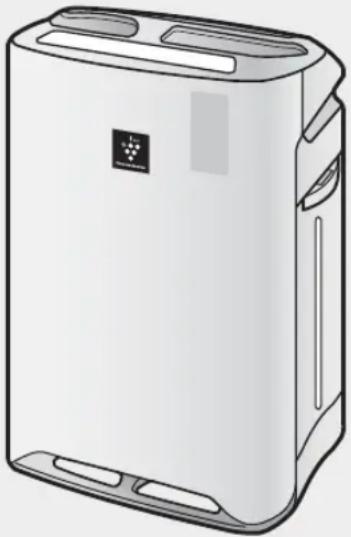
Free standing type
with Humidifying Function
OPERATION MANUAL
AIR PURIFIER
MANUAL DE INSTRUÇÕES
Air purifier with
humidifying function
* The number in this technology mark indicates an approximate number of ions supplied into air of 1 cm³, which is measured around the center of a room with the “high-density plasmcluster 7000” applicable floor area (at 1.2 m height above the floor) at the medium wind volume in humidifying & air purifying mode, or in air purifying mode, when a humidifier/air purifier or an air purifier using the high-density plasmcluster ion evolving device is placed close to a wall. This product is equipped with a device corresponding to this capacity.
Please read before operating your new Air Purifier
The air purifier draws in room air from the air intake, passes the air through a Pre-Filter, a Washable Deodorizing Filter and a HEPA Filter inside of the unit, then discharges the air through the air outlet. The HEPA Filter can remove 99.97% of dust particles as small as 0.3 microns that pass through the filter and also helps absorb odours.
The Washable Deodorizing Filter gradually absorbs odours as they pass through the filter.
Some odours absorbed by the filters may break down over time, resulting in additional odour. Depending on the usage environment, especially when the product is used in extreme environments (significantly more severe than normal household use), this odour may become strong in a shorter period than expected. If the odour persists, the filters should be replaced.
NOTE
- The air purifier is designed to remove air-suspended dust and odour, but not harmful gases (for example, carbon monoxide contained in cigarette smoke). If the source of the odour still exists, the air purifier may not completely remove the odour.

(Common illustration has used "KC-A60EU".)
FEATURES
Unique Combination of Air Treatment Technologies
Triple Filtration System + Plasmacluster + Humidification
TRAPS DUST*
Washable pre-filter traps dust and other large airborne particles.
DECREASES ODOURS
Washable deodorizing filter absorbs many common household odours.
REDUCES POLLEN & MOLD*
HEPA filter traps 99.97% of particles as small as 0.3 microns.
FRESHENS
Plasmacluster treats the air similar to the way nature cleans the environment by emitting a balance of positive and negative ions.
HUMIDIFIES
Runs up to 10 hours per filling.**
*When air is drawn through the filter system.
**Room size:
up to 48 m² (KC-A60EU)
up to 38 m² (KC-A50EU)
up to 26 m² (KC-A40EU)
Sensor Technology continuously monitors air quality, and automatically adjusts operation based on detected air purity and humidity.
CONTENTS
IMPORTANT SAFETY INSTRUCTIONS ... E-2
- WARNING • CAUTIONS CONCERNING OPERATION • INSTALLATION GUIDELINES • FILTER GUIDELINES
PART NAMES.....E-4
- FRONT / BACK
- MAIN UNIT DISPLAY • ILLUSTRATIVE DIAGRAM
PREPARATION......E-6
- FILTER INSTALLATION • REFILLING THE WATER TANK
OPERATION......E-8
- CLEAN AIR & HUMIDIFY
- CLEAN AIR
- CLEAN ION SHOWER • FAN SPEED • PLASMACLUSTER ION ON/OFF
USEFUL FUNCTION ......E-10
• LIGHTS CONTROL - CHILD LOCK • SOUND INDICATOR SETTING • ADJUSTMENT OF SENSOR DETECTION SENSITIVITY
CARE AND MAINTENANCE ......E-11
• FILTER INDICATOR - CARE INDEX • HUMIDIFYING DISINSTALLATION - WATER TANK • HUMIDIFYING FILTER • HUMIDIFYING TRAY AND COVER - BACK PANEL • DEODORIZING FILTER - UNIT • FILTER REPLACEMENT
TROUBLESHOOTING ......E-16
SPECIFICATIONS......E-19
IMPORTANT SAFETY INSTRUCTIONS
When using electrical appliances, basic safety precautions should be followed, including the following:
WARNING – To reduce the risk of electrical shock, fire or injury to persons:
- Read all instructions before using the unit.
- Use only a 220~240 volt outlet.
- Do not use the unit if the power cord or plug is damaged or the connection to the wall outlet is loose. Periodically remove dust from the plug.
- Do not insert fingers or foreign objects into the air intake or air outlet.
- When removing the power plug, always hold the plug and never pull on the cord. Electrical shock and/or fire from a short circuit may result.
- Be careful not to damage the power cord, as it may cause electric shock, excess heat, or fires.
- Do not remove the plug when your hands are wet.
- Do not use this unit near gas appliances or fireplaces.
- When refilling the Water Tank, cleaning the unit, or when the unit is not in use, be sure to unplug the unit. Electrical shock and/or fire from a short circuit may result.
- If the power cord is damaged, it must be replaced by the manufacturer, its service agent, a Sharp authorized Service Centre, or similarly qualified person in order to avoid a hazard.
- Only a Sharp Authorized Service Centre should service this air purifier. Contact the nearest Service Centre for any problems, adjustments, or repairs.
- Do not operate when using aerosol insecticides or in rooms where there is oily residue, incense, sparks from lit cigarettes, chemical fumes in the air, or in locations where the unit may get wet, such as a bathroom.
- Be cautious when cleaning the unit. Strong corrosive cleansers may damage the exterior.
- When carrying the unit, remove the Water Tank and Humidifying Tray first and hold the unit by handles on both sides.
- Do not drink the water in the Humidifying Tray or Water Tank.
- Change the water in the Water Tank daily with fresh tap water and regularly clean the Water Tank and Humidifying Tray. (See E-12 and E-13). When the unit is not in use, dispose of the water in the Water Tank and Humidifying Tray. Leaving water in the Water Tank and/or Humidifying Tray may result in mold, bacteria, and bad odours. In rare cases, this bacteria may cause harmful physical effects.
- This appliance is not intended for use by persons (including children) with reduced physical, sensory, or mental capabilities, or lack of experience and knowledge, unless they have been given supervision or instruction concerning use of the appliance by a person responsible for their safety. Children should be supervised to ensure they do not play with the appliance.
NOTE – Radio or TV Interference
If this air purifier should cause interference to radio or television reception, try to correct the interference by one or more of the following measures:
- Reorient or relocate the receiving antenna.
- Increase the separation distance between the unit and radio/TV receiver.
- Connect the equipment into an outlet on a circuit different from that to which the receiver is connected.
- Consult the dealer or an experienced radio/TV technician for help.
CAUTIONS CONCERNING OPERATION
- Do not block the intake and/or air outlet.
- Do not use the unit near or on hot objects, such as stoves or heaters, or where it may come into contact with steam.
- Always operate the unit in an upright position.
- Hold the unit by using the handles on both sides when moving. Do not move when the unit is in operation.
- Do not move or change the direction of the main unit while dragging the casters.
- Lift it up and move such as a tatami mat, a floor which gets damaged easily, an uneven place, and thick-poled carpet.
- When moving by the caster, move it in a horizontal direction.
- Turn the appliance off and remove the water tank before moving, take care not to catch your fingers.
- Do not operate the unit without the filters, Water Tank, and Humidifying Tray properly installed.
- Do not wash and reuse the HEPA filter.
Not only does it not improve filter performance, it may cause electric shock or malfunction.
Clean the exterior with a soft cloth only.
Do not use volatile fluids and/or detergents.
The unit surface may be damaged or cracked.
In addition, the sensors may malfunction as a result.
- Frequency of maintenance required (descaling) will depend on the hardness or the impurities of the water that you use; the harder the water the more often descaling will be necessary.
- Keep the unit away from water.
INSTALLATION GUIDELINES
- When using the unit, place at least 2m away from equipment utilizing electric waves such as televisions or radios to avoid electrical interference.
- Avoid a location where the sensor is exposed to direct wind.
The unit may not operate properly.
- Avoid use in locations where furniture, fabrics or other items may come in contact with and restrict the air intake and/or air outlet.
- Avoid use in locations where the unit is exposed to condensation or drastic temperature changes. Appropriate conditions are when room temperature is between 5 – 35 °C.
- Place on a stable surface with sufficient air circulation.
When placing the unit on a heavily carpeted area, the unit may vibrate slightly.
Place the unit on an even surface to avoid water leakage from the Water Tank and/or Humidifying Tray.
- Avoid locations where grease or oily smoke is generated. The unit surface may crack or the sensor may malfunction as a result.
- Place the unit about 30 cm (1 ft) away from the wall in order to ensure proper airflow.
The wall directly behind the air outlet may become dirty over time. When using the unit for an extended period of time in the same location, periodically clean the wall and protect the wall with a vinyl sheet, etc. to prevent the wall from becoming dirty.
FILTER GUIDELINES
- Follow the instructions in this manual for correct care and maintenance of the filters.
FRONT / BACK
| 1 Main Unit Display (Ref.E-5) | |
| 2 | Front Monitor |
| 3 | Main Unit |

(Shape of plug depends on country.)
| 1 Air Outlet 6 Float | ||
| 2 Handle (2 Locations) | 7 Humidifying Tray | |
| 3 Sensor (Internal)•Dust Sensor•Temperture / Humidity Sensor•Odour Sensor(KC-A60EU•KC-A50EU ONLY) | 8 Caster (4 Locations) | |
| 9 HEPA Filter (white) | ||
| 10 Deodorizing Filter (black) | ||
| 11 Back Panel (Pre-Filter) | ||
| 12 Air Inlet | ||
| 4 Water Tank 13 Power Cord / Plug | ||
| 5 Humidifying Filter | ||
INCLUDED
• Operation manual - Slipper

×4

MAIN UNIT DISPLAY
| 1 POWER ON Button | |||
| a CLEAN AIR MODE Button / INDICATOR LIGHT (green) | |||
| b CLEAN AIR & HUMIDIFY MODE Button / INDICATOR LIGHT (green) | |||
| c CLEAN ION SHOWER MODE Button / INDICATOR LIGHT (green) | |||
| 2 LIGHT CONTROL Button 5 CHILD-LOCK Button /INDICATOR LIGHT (green) | |||
| 3 Plasmacluster Ion ON / OFF Button /INDICATOR LIGHT (green) | 6 Plasmacluster Sign | ||
| 4 FILTER RESET Button /INDICATOR LIGHT (red) | 7 FAN SPEED Button /INDICATOR LIGHT (green) | ||
| 8 POWER OFF Button | |||
ILLUSTRATIVE DIAGRAM![graph TD A["Humidity Monitor"] --> B["60"] B --> C["HUMIDITY"] C --> D["Clean SIGN"] D --> E["Dust Monitor"] E --> F["Clean"] E --> G["Impure"] E --> H["red"] I["Odour Monitor*"] --> J["Green"] J --> K["Faint Strong"] K --> L["Red"] M["Humidify Light"] --> N["green: Humidity ON"] M --> O["off: Humid…](/content/2026/06/1296699/images/637208658476da6cddccdb3b7d1a35f94aed13e9884273ab7340b6bf15df0a23.jpg)
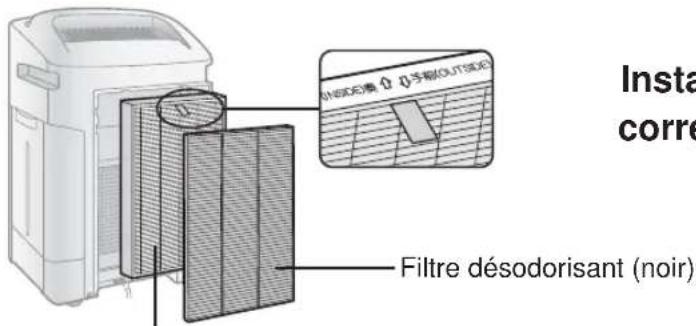
FILTER INSTALLATION
1
Remove the Back Panel.

HEPA filter (White)
Deodorizing filter (Black)
2
Remove the Filters from the
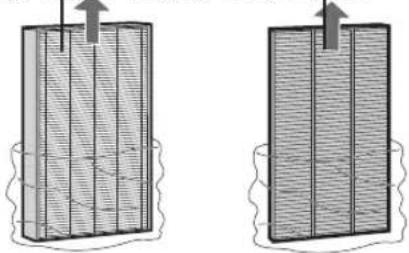
plastic bag.
3
Install the Filters in the correct

order as shown.
HEPA filter (White)
4

Install the Back Panel.
5
Fill in the usage start date on the

Date Label.
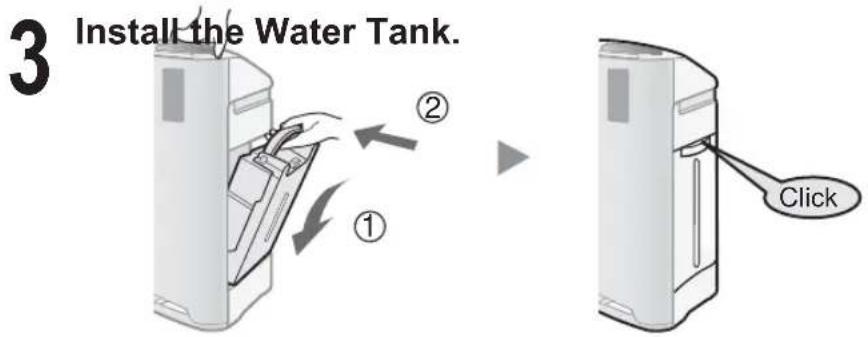
REFILLING THE WATER TANK
When using the Clean Air & Humidify Mode, or the Clean ION Shower Mode.

Remove the Water Tank.

CAUTION
- Check to see that there is no water leaking.
- Be sure to wipe off any excess water on the outside of the Water Tank.
- When carrying the Water Tank, hold it with both hands so that the Water Tank opening is facing up.
CAUTION
- Do not expose the unit to water. Short circuit and/or electrical shock may occur as a result.
- Do not use hot water (40 °C), chemical agents, aromatic substances, dirty water, or other damaging substances, deformation and/or malfunction may occur.
- Use only fresh tap water. Use of other water sources may promote the growth of mold, fungus and/or bacteria.
CLEAN AIR & HUMIDIFY
Using to quickly clean the air, reduce odours and to humidify.

- Select the desired fan speed. (Ref. E-9)
- Unless the power cord has been unplugged, the operations start in the previous mode it was operated in.
NOTE
• Fill the Water Tank. (Ref. E-7) - When the Water Tank is empty, the unit will operate in "CLEAN AIR MODE" and is flashing (red).
STOP

About Automatic Humidify Mode
The Temperature/Humidity sensors automatically detect and adjust humidity according to changes in room temperature. Depending on the size and humidity of the room, humidity may not reach 55~65 %. In such cases, it is recommended that CLEAN AIR & HUMIDIFY/MAX MODE be used.
| Temperature Humidity | |
| ~18 °C 65 % | |
| 18 °C~24 °C 60 % | |
| 24 °C~ 55 % | |
CLEAN AIR
Using when additional humidity is not required.
START
- Select the desired fan speed. (Ref. E-9)
- Unless the power cord has been unplugged, the operations start in the previous mode it was operated in.
STOP

CLEAN ION SHOWER
Releases high-density Plasmacluster ions and discharges strong air flow for 60 minutes.
START
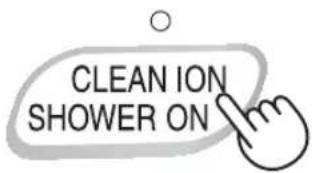
NOTE
- If the "Plasmacluster ion is OFF, the plasmacluster ion will be not released.
- When the operation finishes, the unit will return to the prior operation mode. It is possible to switch this mode to another while operating. However, the CLEAN ION SHOWER mode will not function after switching mode.
FAN SPEED
Select the desired fan speed.

![graph LR A[" "] --> B[" "] B --> C[" "] C --> D[" "] D --> E[" "] E --> F[" "] F --> G[" "] style A fill:#fff,stroke:#000 style B fill:#fff,stroke:#000 style C fill:#fff,stroke:#000 style D fill:#fff,stroke:#000 style E fill:#fff,stroke:#000 style F fill:#fff,stroke:#000 style G fill:#fff,stroke:#00…](/content/2026/06/1296699/images/e48694979ac15addeee50a6059b4f4571fc7759f8dac3244e6d8a2f2db67024e.jpg)
NOTE
AUTO

The fan speed is automatically switched (between HIGH and LOW) depending on the amount of impurities in the air. The sensors detect impurities for efficient air purification.
POLLEN

The unit will operate at High Level for 10 minutes, then will alternate between MEDIUM and HIGH.
![graph TD A["10 minutes: High fan level"] --> B["20 minutes: Medium fan level"] B --> C["20 minutes: High fan level"]](/content/2026/06/1296699/images/62b79954be07a8d0ec69527ba6a050f3d8b9e74ed11ff38430ff0a7ff7bca65a.jpg)
PLASMACLUSTER ION ON/OFF
When Plasmacluster is ON, both the Indicator Light and Plasmacluster Indicator Light turn on.
ON

USEFUL FUNCTIONS
LIGHT CONTROL
Use this function to select the desired brightness.

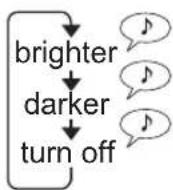
CHILD LOCK
Operation of the unit display will be locked. It is the same method as starting operation.
ON CANCELLATION

SOUND INDICATOR SETTING
The unit can be set to give an audible signal when the Water Tank is empty.
ON
(with the unit OFF)

CANCELLATION
(with the unit OFF)

ADJUSTMENT OF SENSOR DETECTION SENSITIVITY
DUST MONITOR and ODOUR MONITOR is constantly red to reduce sensitivity, and set to "high" if the DUST MONITOR and ODOUR MONITOR is constantly green to increase sensitivity.
RED……SET to "LOW" GREEN…SET to "HIGH"
1

more than 3 sec.
(with the unit OFF)
2

![graph TD A[" "] --> B["○"] B --> C["↓"] C --> D["○"] D --> E["↓"] E --> F["○"] style A fill:#fff,stroke:#000 style B fill:#fff,stroke:#000 style C fill:#fff,stroke:#000 style D fill:#fff,stroke:#000 style E fill:#fff,stroke:#000 style F fill:#fff,stroke:#000 note1["...... High"] --> A note2["......…](/content/2026/06/1296699/images/b05709c2b78264ddf2d0056a17aef3fdb3a588ad74ac5eab4bed1f5b2cd60abe.jpg)
3

CAUTION
- If the power OFF button is not pushed within 8 seconds of adjusting sensor sensitivity, the setting will be saved automatically.
- The sensor sensitivity setting will be saved even if the unit is unplugged.
FILTER INDICATOR
The indicator light will turn on after approximately 720 hours. (30 days × 24 hours = 720)
Press for 3 sec.
Reminder to perform maintenance of parts below.
After performing maintenance, reset the filter indicator. (Ref. E-12)
more than 3 sec.
CARE INDEX
- Filter Indicator Light turn on.
Humidifying Filter (Ref. E-12)

Water Tank (Ref. E-12) Humidifying Tray (Ref. E-13)
- Notice an unpleasant odour from the air outlet.
- Filter performance appears fall and / or odour persist.
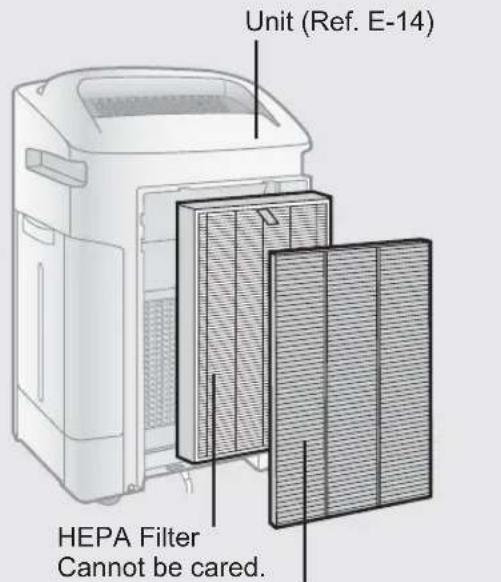
Deodorizing Filter (Ref. E-14)
HUMIDIFYING DISINSTALLATION
After maintenance, replace the parts accurately.

WATER TANK

Rinse the inside with a small amount of water.
CAUTION
- Do not shake the Water Tank with holding the carrying handle.
NOTE for stubborn dirt...

Clean inside of the water tank with a soft sponge and the tank cap with a cotton swab or a toothbrush.
Toothbrushes Tank cap
HUMIDIFYING FILTER

Rinse with plenty of water.
CAUTION
- Do not remove the Humidifying Filter from a filter frame.
- Avoid spilling water from the Humidifying Tray.
NOTE for stubborn dirt...
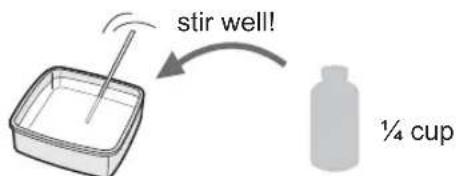
- Soak in water with the descaling solution about 30 minutes.
CAUTION
When using lemon juice, soak time more longer.
- Remove the descaling solution with plenty of water.
Descaling solution
• Citric acid (available at some drugstores) • 100% bottled lemon juice with no pulp.
2 1/2 cups of water

3 cups of water
HUMIDIFYING TRAY AND COVER

- Remove the Humidifying Tray Cover.
- Rinse the inside of the Humidifying Tray and the Humidifying Tray Cover with a toothbrush.
CAUTION
- Do not remove the Float and the Roller.
- If the Float and/or the Roller comes off. (Ref. E-17)
NOTE: For stubborn dirt...
TRAY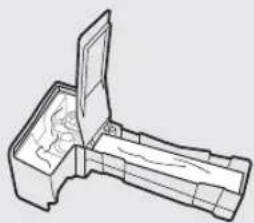
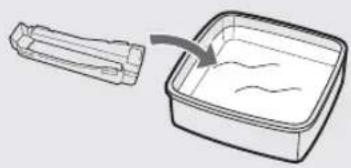
- Fill the tray half way with water.
- Add a small amount of kitchen detergent.
- Soak for 30 minutes.
- Remove the kitchen detergent with clean water.
COVER
- Soak in water with a small amount of kitchen detergent about 30 minutes.
- Remove the kitchen detergent with clean water.
Clean difficult to reach parts with a cotton swab or toothbrush.
CAUTION
DO NOT use the detergents shown on E-14.
If cause deformation, tarnishing, cracking (water leakage)
BACK PANEL

Gently remove dust with a vacuum cleaner attachment or similar tool.
NOTE for stubborn dirt...

- Soak in water with kitchen detergent about 10 minutes.
CAUTION
DO NOT scrub the back panel hard.
- Remove the kitchen detergent with clean water.
- Dry filter completely in a well ventilated area.
CARE AND MAINTENANCE
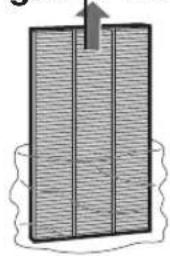
DEODORIZING FILTER
HAND WASH ONLY!
DO NOT DRY IN CLOTHES DRYER!
1
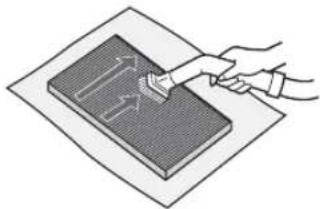
Remove the dust on the DEODORIZING FILTER.
2

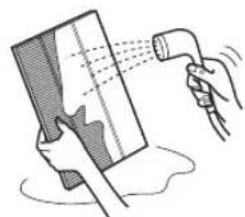
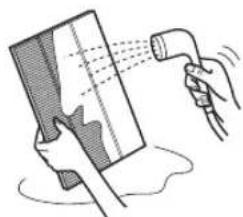
Rinse the DEODORIZING FILTER with water.
CAUTION
- When washing the filter for the first time, the rinse water may be brown. This does not affect deodorization performance.
- Avoid bending or folding the filter when washing.
3
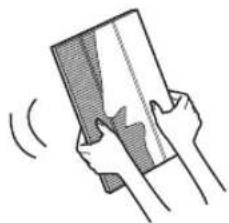
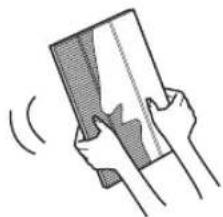
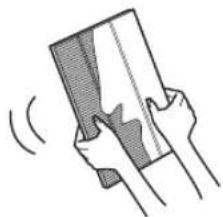
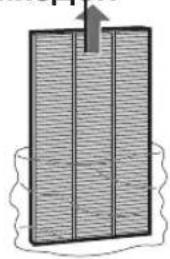
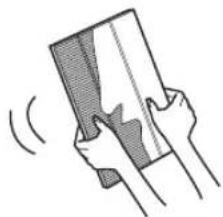
Remove as much of the moisture as possible.
4
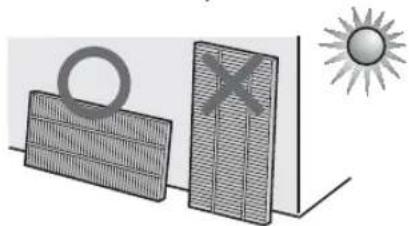
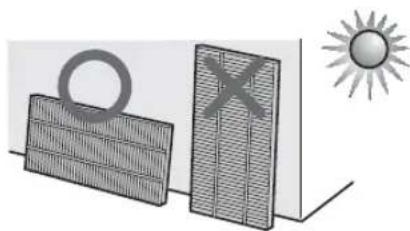
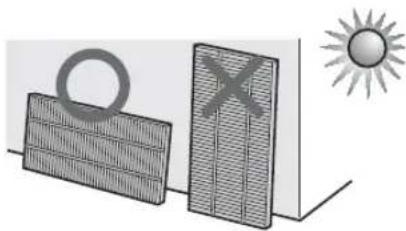
When possible, dry outdoors.

Dry filter completely in a well ventilated area.
(about 6 hours to dry out)
CAUTION
- Avoid drying filter outdoors during inclement weather (e.g. rain or cold temperatures).
- Do not allow filter to freeze.
- If filter is dried indoors, take precautions, such as placing towels, etc under the filter to prevent water damage to the floor.
UNIT

Wipe with a dry, soft cloth.
CAUTION
• Do not use volatile fluids Benzine paint thinner, polish powder, may damage the surface. • Do not use detergents Detergent ingredients may damage the unit.
FILTER REPLACEMENT
Replacement timing
Filter life will vary depending on the room environment, usage, and location of the unit. If dust or odour persists, replace the filter.
(Refer to "Please read before operating your new Air Purifi er")
The following filter life and replacement period is based on the condition of smoking 5 cigarettes per day and the dust collection/deodorization power is reduced by half compared with that of new filter.
We recommend to replace the filter more frequently if the product is used in a condition significantly severer than normal household use.
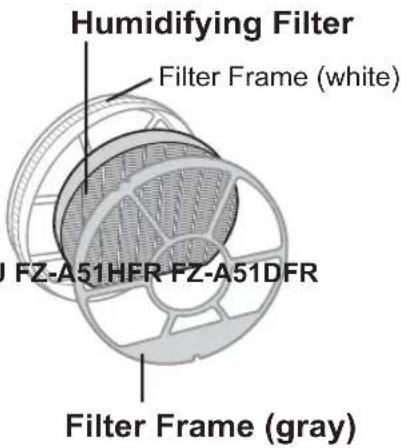
•HEPA fi Iter About 10 years after opening - Deodorizing fi Iter* About 10 years after opening • Humidifying fi Iter About 10 years after opening
* Washable deodorizing filter can be repeatedly used after washing, or it can be replaced.
Replacement Filter Model
Please consult your dealer for purchase of replacement filter.
| AIR PURIFIER MODEL | REPLACEMENT FILTER MODEL | ||
| HEPA Filter : 1 unit | Deodorizing Filter : 1 unit | Humidifying Filter : 1unit | |
| KC-A40EU FZ-A41HFR FZ-A41DFR | FZ-A61MFRK | ||
| KC-A60EU FZ-A61HFR FZ-A61DFR | |||
NOTE
Use the date label as a reminder for next replacement.
Disposal of Filters
Please dispose of used filters according to any local laws and regulations.
HEPA Filter material :
- Filter : Polypropylene
- Frame: Polyester
Deodorizing Filter material :
- Deodorizer : Activated charcoal
- Filter: Polyester, Rayon
Humidifying Filter material :
• Filter : Rayon, Polyester

TROUBLESHOOTING
Before calling for service, please review the Troubleshooting chart below, since the problem may not be a unit malfunction.
| SYMPTOM REMEDY (not a malfunction) | |
| Odours and smoke are not removed. | ·Clean or replace the fi Iters if they appear to be heavily soiled. (Ref. E-11,E-12,E-14) |
| The Front Monitor illuminates green even when the air is impure. | ·The air could be impure at the time the unit was plugged in. Unplug the unit, wait one minute, and plug the unit in again. |
| The Front Monitor illuminates orange or red even when the air is clean. | ·Sensor operation is affected if the dust sensor openings are dirty or clogged. Gently clean the dust sensors. (Ref. E-4). |
| A clicking or ticking sound is heard from the unit. | ·Clicking or ticking sounds may be audible when the unit is generating ions. |
| The discharged air has an odour. | ·Check to see if the fi Iters are heavily soiled. ·Clean or replace the fi Iters. ·Plasmacluster Air Purifiers emit small traces of ozone which may produce an odour. |
| The unit does not operate when cigarette smoke is in the air. | ·Is the unit installed in a location that is difficult for the sensor to detect cigarette smoke? ·Are the dust sensor openings blocked or clogged? (In this case, clean the openings.) (Ref. E-4) |
| Filter Indicator Light is illuminated. | ·After replacing filters, connect the power cord to an outlet and press the Filter Reset Button. (Ref. E-11) |
| The Front Monitor are turned off. | ·Check to see if the Lights OFF Mode selected. If so, then press the Lights Control Button to activate the indicator lights. (Ref. E-10) |
| The Water Supply Indicator Light does not illuminate when the tank is empty. | ·Check Styrofoam float for impurities. Clean the HumidifyingTray. Ensure unit is located on a level surface. |
| Water lever in the tank does not decrease or decreases slowly. | ·Check to see if the Humidifying Tray and Water Tank are correctly installed. Check the Humidifying Filter. ·Clean or replace the fi Iter when it is heavily soiled. (Ref. E-14 and E-15). |
| The Front Monitor lights change colour frequently. | ·The Front Monitor lights automatically change colours as impurities are detected by the dust sensor and odour sensor. |
SYMPTOM REMEDY (not a malfunction)
When the Roller / Float was removed.
• Install the Roller / Float in the order below.

ROLLER
Fix the roller in the tray from the side.

NOTE
Check the direction of the roller.
AUTO RESTART
After a power failure, the operation automatically resumes when the power recovers.
Auto Restart can be set.
- Even when the plug is unplugged or the breaker is thrown during operation, the operation resumes at the previous operation mode and settings if the power recovers.
ON
(with the unit OFF)
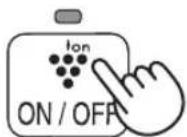
(simultaneously for more than 3 sec.)


CANCELLATION
(with the unit OFF)


(simultaneously for more than 3 seconds)
If the ⚙️ lamp lights up for 10 seconds, the setting is complete.
TROUBLESHOOTING
ERROR DISPLAY If error occurs again, contact the Sharp Service Centre.
| DIGITAL INDICATION | LAMP INDICATION ERROR | DETAILS REMEDY | |
| E2 | Flashing of the Clean Air & Humidify Indicator Light. | Abnormal humidity fi Iter. | Verify if the Humidifying Filter, Humidifying Tray and Water Tank are properly installed and then turn power ON again. |
| C1 | Flashing of the Fan Speed Indicator Light ' ☉'. | Abnormal fan motor. | Turn power OFF to cancel the error display, wait one minute, and then turn power ON. |
| C3 | - Abnormal temperature | temperature-humidity sensor. | Unplug the unit, wait one minute, and plug the unit in again. |
| C4 | - | ||
| C5 | Flashing of the Clean Ion Shower Indicator Light. | Problem in circuit board. | |
| C6 | Flashing of the Clean Air Indicator Light. | ||
| C7 | Flashing of the Fan Speed Indicator Light ' ☉' | ||
| C8 | Flashing of the Fan Speed Indicator Light ' ☉'. |
| Model KC-A60EU KC-A50EU KC-A40EU | ||||||||||
| Power supply 220 ~ 240 V 50/60 Hz | ||||||||||
| Fan Speed Adjustment | MAX MED LOW MAX MED LOW | W MAX MED LOW | ||||||||
| CLEAN AIR | Fan Speed (m3/hour) | 396 | 270 | 84 | 306 | 216 | 60 | 216 | 168 | 48 |
| Rated Power (W) | 60 | 22 | 5.3 | 42 | 18 | 4.3 | 25 | 15 | 4 | |
| Noise Level (dBA) | 49 | 40 | 19 | 49 | 41 | 16 | 46 | 40 | 16 | |
| CLEAN AIR & HUMIDIFY | Fan Speed (m3/hour) | 366 | 270 | 120 | 288 | 216 | 90 | 180 | 144 | 60 |
| Rated Power (W) | 44 | 24 | 9 | 36 | 20 | 7 | 4 | 19 | 13 | |
| Noise Level (dBA) | 47 | 40 | 24 | 47 | 41 | 23 | 42 | 35 | 20 | |
| Humidifi cation (mL/hour)*1 | 730 | 600 | 300 | 600 | 500 | 250 | 450 | 400 | 200 | |
| Recommended Room Size (m2)*2 ~48 | ~38 | ~26 | ||||||||
| High density Plasmacluster ion recommended room size (m2)*3 | ~35 | ~28 | ~21 | |||||||
| Water Tank Capacity (L) | 4.0 | 3.6 | 3.0 | |||||||
| Sensors | Dust/Odour/Temperature & Humidity | Dust/Temperature & Humidity | ||||||||
| Filter type | Dust collection | HEPA with Microbial control *4 | ||||||||
| Deodorization | Washable Deodorizing | |||||||||
| Cord Length (m) | 2.0 | |||||||||
| Dimensions (mm) | 416 (W) × 295 (D) × 643 (H) | 399 (W) × 273 (D) × 603 (H) | 382 (W) × 242 (D) × 570 (H) | |||||||
| Weight (kg) | 11.0 | 9.2 | 8.1 | |||||||
*1 • Humidification Amount changes in accordance with indoor and outdoor temperature and humidity. Humidification Amount increases as temperatures rise or humidity decreases. Humidification Amount decreases as temperatures decrease or humidity rises. • Measurement Condition: 20 °C, 30 % humidity (JEM1426) *2 • The Recommended Room Size is appropriate for operating the unit at maximum fan speed. - The Recommended Room Size area indicates the space where a certain amount of dust particles can be removed in 30 minutes. *3 - Size of a room in which approximately 7000 ions can be measured per cubic centimeter in the center of the room (at a height of approximately 1.2 meters from the floor) when the product is placed next to a wall and run at the MED operation position. *4 - The filter removes more than 99.97% of particles of 0.3-micron dust. (JEM1467) Standby Power
In order to operate the electrical circuits while the power plug is inserted in the wall outlet, this
product consumes about 0.9 W of standby power.
For energy conservation, unplug the power cord when the unit is not in use.

Attention: Your product is marked with this symbol. It means that used electrical and electronic products should not be mixed with general household waste. There is a separate collection system for these products.
A. Information on Disposal for Users (private households)
1. In the European Union
Attention: If you want to dispose of this equipment, please do not use the ordinary dust bin!
Used electrical and electronic equipment must be treated separately and in accordance with legislation that requires proper treatment, recovery and recycling of used electrical and electronic equipment.
Following the implementation by member states, private households within the EU states may return their used electrical and electronic equipment to designated collection facilities free of charge*. In some countries* your local retailer may also take back your old product free of charge if you purchase a similar new one. *) Please contact your local authority for further details.
If your used electrical or electronic equipment has batteries or accumulators, please dispose of these separately beforehand according to local requirements.
By disposing of this product correctly you will help ensure that the waste undergoes the necessary treatment, recovery and recycling and thus prevent potential negative effects on the environment and human health which could otherwise arise due to inappropriate waste handling.
2. In other Countries outside the EU
If you wish to discard this product, please contact your local authorities and ask for the correct method of disposal.
For Switzerland: Used electrical or electronic equipment can be returned free of charge to the dealer, even if you don't purchase a new product. Further collection facilities are listed on the homepage of www.swico.ch or www.sens.ch.
B. Information on Disposal for Business Users.
1. In the European Union
If the product is used for business purposes and you want to discard it:
Please contact your SHARP dealer who will inform you about the take-back of the product. You might be charged for the costs arising from take-back and recycling. Small products (and small amounts) might be taken back by your local collection facilities.
For Spain: Please contact the established collection system or your local authority for take-back of your used products.
2. In other Countries outside the EU
If you wish to discard of this product, please contact your local authorities and ask for the correct method of disposal.

NOTE
COVER
2
NOTE
MAIN UNIT DISPLAY
Remove plastic.
3

CAUTION
PLASMACLUSTER ON/OFF
Press 3 sec. more than 3 sec.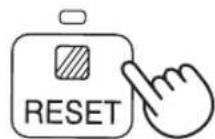
COVER


FILTER REPLACEMENT
NOTE
CONTROL PANEL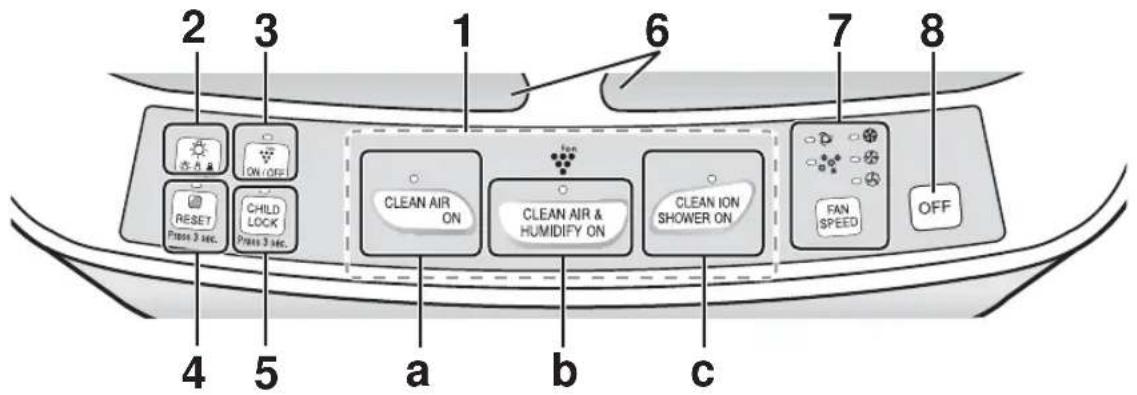
PLASMACLUSTER ION ON/OFF
COVER

NOTE
A50EU FZ-A51HFR FZ-A51DFR Filter frame (grey)

HEPA filter Washable deodorizing filter
TROUBLESHOOTING
NOTE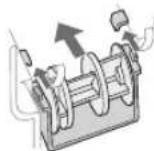
MAIN UNIT DISPLAY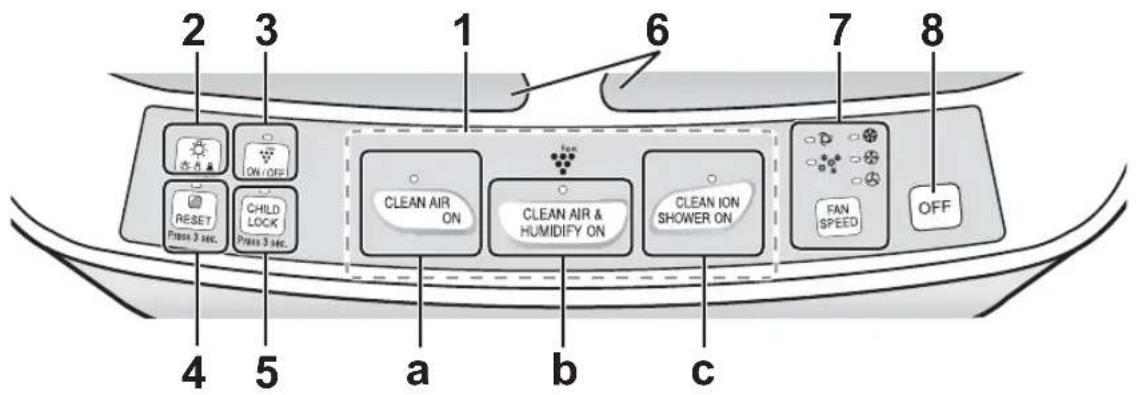
| 1 Przycisk WŁĄCZNIKA | |||
| a | Przycisk trybu CLEAN AIR (OCZYSZCZANIA POWIETRZA) / KONTROLKA (zielona) | ||
| b | Przycisk trybu CLEAN AIR & HUMIDIFY (OCZYSZCZANIA I NAWILŻANIA POWIETRZA) / KONTROLKA (zielona) | ||
| c | Przycisk trybu CLEAN ION SHOWER (STRUMIENIA CZYSTYCH JONÓW) / KONTROLKA (zielona) | ||
| 2 | Przycisk STEROWANIA OŚWIETLENIEM | 5 | Przycisk CHILD LOCK (BLOKADY RODZICIELSKIEJ)/KONTROLKA (zielona) |
| 3 | Przycisk WŁ./WYŁ. generatora jonów Plasmacluster / KONTROLKA (zielona) | 6 Z | Znak Plasmacluster |
| 4 | Przycisk RESETOWANIA FILTRÓW / KONTROLKA (czerwona) | 7 | Przycisk FAN SPEED (PRĘDKOŚCI WENTYLATORA) / KONTROLKA (zielona) |
| 8 | Przycisk WYŁĄCZNIKA | ||
EXPLODED VIEW

3

WARNING
COVER


R-4
NOTE
STOP


COVER


MAIN UNIT DISPLAY

plastic.
3
Install the Rear Panel.
5
tank
LID

Remove dust from the DEODORIZING FILTER.
2
CAUTION
NOTE
MAIN UNIT DISPLAY
Rinse with plenty of water.
CAUTION



Dry and soft
CAUTION


Device
Connection
Lid


Back panel

Back panel
Water tank
Toothbrush holder lid
Humidification filter
Descaling solution

Light control
CLEAN AIR & HUMIDIFY ON


Reserve
(White) HEPA filter

Foam filter (black)


Included with the device
User manual

Heel
Φ (π) = 2.3, 2.4, 2.5, 2.6, 2.7, 2.8, 2.9, 3.0, 3.1, 3.2, 3.3, 3.4, 3.5, 3.6, 3.7, 3.8, 3.9, 4.0, 4.1, 4.2, 4.3, 4.4, 4.5, 4.6, 4.7, 4.8, 4.9, 5.0, 5.1, 5.2, 5.3, 5.4, 5.5, 5.6, 5.7, 5.8, 5.9, 6.0, 6.1, 6.2, 6.3, 6.4, 6.5, 6.6, 6.7, 6.8, 6.9, 7.0, 7.1, 7.2, 7.3, 7.4, 7.5, 7.6, 7.7, 7.8, 7.9, 8.0, 8.1, 8.2, 8.3, 8.4, 8.5, 8.6, 8.7, 8.8, 8.9, 9.0, 9.1, 9.2, 9.3, 9.4, 9.5, 9.6, 9.7, 9.8, 9.9, 10.0
| 167 (52) | 1'72'6·'11 | ||||||
| 18-74 (22) | 113(247)×064(257)×131(1773) | 664(247)×111(257)×11(1773) | 174(247)×134(257)×110(1773) | ||||
| 467 17947 17947 (2) | ·'λ | ||||||
| 53 17947 | 17947 17947 17947 | 27777777777777777777777777777777777777777777777777777777777777777777777777777777777777777777777777777 | |||||
| 664 17947 | 27777777777777777777777777777777777777777777777777777777777777777777777777777777777777777777 | ||||||
| 17947 (2) | 27777777777777777777777777777777777777777777777777777777777777777777777777777777777777777777777777 | 2777777777777777777777777777777777777777777777777777777777777777777777777777777777777777 | |||||
| 18010 18010 18010 18010 18010 18010 18010 18010 18010 18010 18010 18010 18010 18010 18010 18010 18010 180 | 18010 18010 18010 18010 18010 18010 18010 18010 18010 18010 18010 18010 18010 18010 18010 18010 18 | 27777777777777777777777777777777777777777777777777777777777777777777777777777777777777777777777777 | 2777 | 277 | 27 | 2 | |
| 18010 18010 18010 18010 18010 18010 18010 18010 18010 18010 18010 18010 18010 18010 18010 18010 18 | |||||||
| 18010 18010 18010 18010 18010 18010 18010 18010 18010 18010 18010 18010 18010 18010 18010 18010 | |||||||
| 18010 18010 18010 18010 18010 18010 18010 18010 18010 18010 18010 18010 | |||||||
| 18010 18010 18010 201010101010101010101010101010101010101010101010101010101010101010101010101010101010101010101010101010 | |||||||
| 18010 18010 18010 18010 18010 18010 18010 18010 18010 18010 18010 | |||||||
| 229999999999999999999999999999999999999999999999999999999999999999999999999999999999999999999999999999 | 22999999999999999999999999999999999999999999999999999999999999999999999999999999999999999999999999 | 22999999999999999999999999999999999999999999999999999999999999999999999999999999999999999999999999 | |||||
| 230000000000000000000000000000000000000000000000000000000000000000000000000000000000000000000000000000 | 23000000000000000000000000000000000000000000000000000000000000000000000000000000000000000000000000 | ||||||


The device


Float roller
The cover

Special plate

Rear unit
Water tank

Humidifier device
CLEAN AIR & HUMIDIFY ON

Note
Stop
OFF
1m


#
![graph TD A["Shawshia الإجهاز الإرئيسي"] --> B["ON/OFF"] B --> C["CLEAN AIR ON"] C --> D["CLEAN AIR & HUMIDIFY ON"] D --> E["CLEAN ION SHOWER ON"] E --> F["FAN SPEED"] F --> G["OFF"] style A fill:#f9f,stroke:#333 style B fill:#ccf,stroke:#333 style C fill:#cfc,stroke:#333 style D fill:#fcc,stroke:#33…](/content/2026/06/1296699/images/bcadf6b5e191777542827a1a227246f1f23d5cf954cd1da1b659c70796afdac0.jpg)

Internal parts
Operating instructions
Protective parts
ξ×

High-Density 7000
*
Device of this mark is a trademark of Sharp Corporation.
Plasmacluster is a registered trademark or a trademark of Sharp Corporation.

Model without stand
Standing type

- PLEASE READ BEFORE OPERATING YOUR NEW AIR PURIFIER
- NOTE
- FEATURES
- TRAPS DUST
- DECREASES ODOURS
- REDUCES POLLEN & MOLD
- FRESHENS
- HUMIDIFIES
- CONTENTS
- IMPORTANT SAFETY INSTRUCTIONS
- NOTE – RADIO OR TV INTERFERENCE
- CAUTIONS CONCERNING OPERATION
- INSTALLATION GUIDELINES
- FILTER GUIDELINES
- INCLUDED
- FILTER INSTALLATION
- REFILLING THE WATER TANK
- CAUTION
- CLEAN AIR & HUMIDIFY
- STOP
- ABOUT AUTOMATIC HUMIDIFY MODE
- CLEAN AIR
- START
- CLEAN ION SHOWER
- FAN SPEED
- AUTO
- POLLEN
- PLASMACLUSTER ION ON/OFF
- ON
- USEFUL FUNCTIONS
- LIGHT CONTROL
- CHILD LOCK
- SOUND INDICATOR SETTING
- CANCELLATION
- ADJUSTMENT OF SENSOR DETECTION SENSITIVITY
- FILTER INDICATOR
- CARE INDEX
- HUMIDIFYING DISINSTALLATION
- WATER TANK
- RINSE THE INSIDE WITH A SMALL AMOUNT OF WATER
- NOTE FOR STUBBORN DIRT
- HUMIDIFYING FILTER
- RINSE WITH PLENTY OF WATER
- HUMIDIFYING TRAY AND COVER
- NOTE: FOR STUBBORN DIRT
- BACK PANEL
- GENTLY REMOVE DUST WITH A VACUUM CLEANER ATTACHMENT OR SIMILAR TOOL
- CARE AND MAINTENANCE
- DEODORIZING FILTER
- REMOVE THE DUST ON THE DEODORIZING FILTER
- RINSE THE DEODORIZING FILTER WITH WATER
- REMOVE AS MUCH OF THE MOISTURE AS POSSIBLE
- DRY FILTER COMPLETELY IN A WELL VENTILATED AREA
- UNIT
- WIPE WITH A DRY, SOFT CLOTH
- FILTER REPLACEMENT
- REPLACEMENT TIMING
- REPLACEMENT FILTER MODEL
- DISPOSAL OF FILTERS
- TROUBLESHOOTING
- SYMPTOM REMEDY (NOT A MALFUNCTION)
- AUTO RESTART
- INFORMATION ON DISPOSAL FOR USERS (PRIVATE HOUSEHOLDS)
- IN THE EUROPEAN UNION
- IN OTHER COUNTRIES OUTSIDE THE EU
- INFORMATION ON DISPOSAL FOR BUSINESS USERS
- PLASMACLUSTER ON/OFF
- WARNING
- DRY AND SOFT
- DEVICE
- CONNECTION
- RESERVE
- INTERNAL PARTS
Brand : SHARP
Model : KC-A50EUW
Category : Air purifier