AZSLSFE63GN - Safe SereneLife - Free user manual and instructions
Find the device manual for free AZSLSFE63GN SereneLife in PDF.


User questions about AZSLSFE63GN SereneLife
0 question about this device. Answer the ones you know or ask your own.
Ask a new question about this device
Download the instructions for your Safe in PDF format for free! Find your manual AZSLSFE63GN - SereneLife and take your electronic device back in hand. On this page are published all the documents necessary for the use of your device. AZSLSFE63GN by SereneLife.
USER MANUAL AZSLSFE63GN SereneLife
natural_image
Black metal-framed security cabinet with digital display and handle (no visible text or symbols)ELECTRONIC GUN SAFE
USER MANUAL
Dear valued customer,
Thank you for choosing our products! You've taken an important step in organizing and protecting your most valued possessions. Every series of our safes is professionally made and designed to provide safety. Please take time to read and familiarize yourself with the proper operating procedures of your new safe presented on the following pages.
Again, thank you for choosing our products!
Please do not keep emergency keys in your safe!
text_image
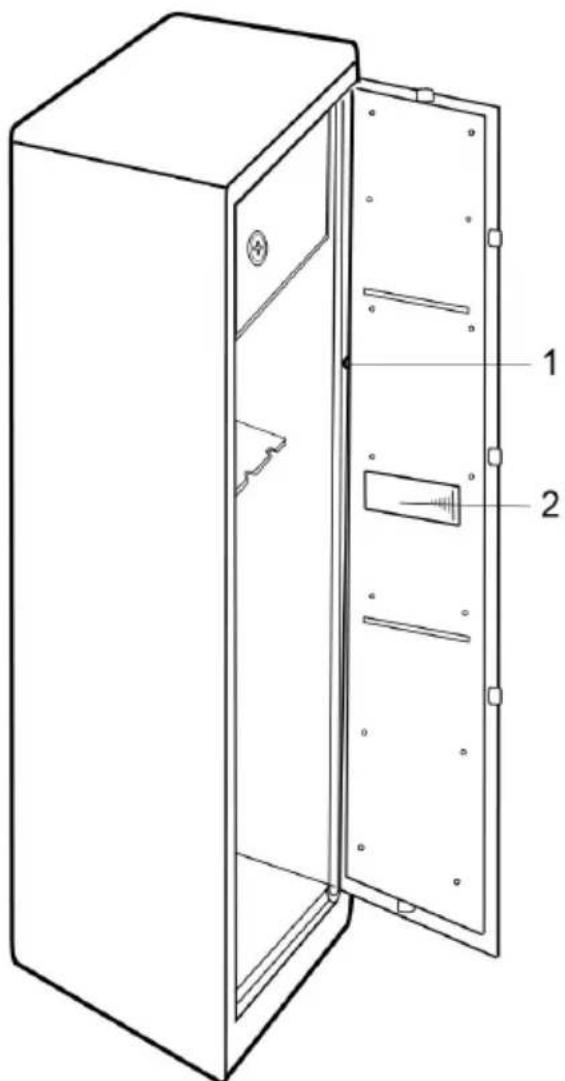
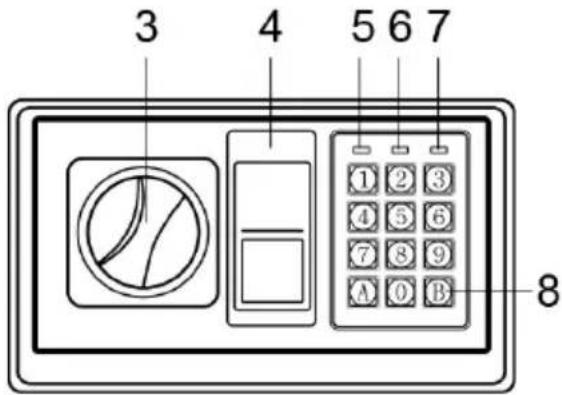
Technical diagram of an open refrigerator with labeled parts 1 and 2- Reset Button
- Battery Compartment
- Knob (Master Key)
- Emergency Lock Cover
- Green Light
- Red Light
- Yellow Light
- Confirming button
- Power supply: 4 X 1.5V batteries
Schematic drawing of control panel
text_image
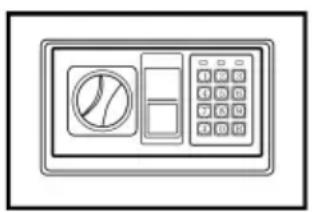
3 4 5 6 7 1 2 3 4 5 6 7 8 9 A 0 B 8NOTE: All drawings in this manual have been prepared based on the EA. The exterior design or component positions of other models may be different from what is indicated in the drawings, while the operation is the same.
OPENING YOUR SAFE FOR THE FIRST TIME
Upon first opening, users should open the safe with the emergency key. The operation in details refers to “opening the safe with the emergency key”.
- Remove the cover of the emergency lock.
- Insert the emergency key, turn it clockwise, at the same time turn the knob (master key) counter-clockwise to open the door.
NOTE: Finish operation, pull out the emergency key and keep it in a safe place.
INSERTING THE BATTERIES
- Open the door.
- Insert 4 x 1.5V batteries into the battery compartment.
- Under normal condition, if both of the red and the green lights are on at the same time, it means the voltage is low and you should insert new batteries.
NOTE: Replace 4 fresh batteries by lining them up in a manner as indicated by the "+" and "-" signs. When outage extends beyond thirty minutes, you should reset the user code.
OPENING THE DOOR
- Input your user's code (3 to 8 digits), each pressing results in one buzzer beep and the yellow light flashes.
- Press "A" or "B"(“C” or "E") button, the green light will be on.
- Rotate the knob (or master key) clockwise and pull outwards within 5 seconds, the door is opened.
NOTE: The user preset code "159". Please input the user code again if the yellow light flashes with three buzzer beeps.

CLOSING THE DOOR
• Turn the knob (or master key) counter-clockwise to close the door.
AUTOMATIC LOCK
• 3 continuously wrong entries will activate the warning beep for 20 seconds.
• Another 3 continuously wrong entries will active the warning beep for 5 minutes.
NOTE: The key pad would be disabled during the beeping. You can only stop the beeps by opening the safe with emergency key and power-cut by removing the battery.
SETTING THE USER CODE
- With the door open, press the reset button one, start setting code when the yellow lights goes on.
- Input new code (3-8 digits), and press the "A" or "B" ("C" or "E") button to confirm with 2 buzzer beeps, which indicates the acceptance and storage of the new code.
- If the yellow light flashes with 3 buzzer beeps, which means the code changing is not effective, and you need to try again.
OPENING THE SAFE WITH THE EMERGENCY KEY
Upon first receipt of the safe, an electronic circuit malfunction occurs, or codes are unknown. You could also use the emergency key to open the safe.
- Remove the cover of the emergency lock.
- Insert the emergency key, turn it count clockwise, then turn the knob (or master key) clockwise to open the door.
natural_image
Front view of a simple electrical control panel with buttons and a circular dial (no text or symbols)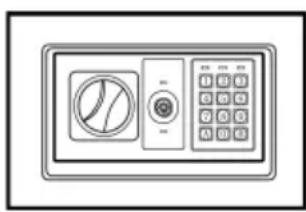
natural_image
Front view of a portable electronic control panel with a rotary dial and keypad (no visible text or symbols)