
SLSFE18FP - Safe SereneLife - Free user manual and instructions
Find the device manual for free SLSFE18FP SereneLife in PDF.


| Product Type | Fingerprint Safe |
| Brand | SereneLife |
| Model | SLSFE18FP |
| Lock Mechanism | Fingerprint, Digital Code (4-8 digits), Emergency Key |
| Fingerprint Capacity | Up to 20 fingerprints |
| Power Supply | 4 x AA batteries (not included) |
| Emergency Key | Yes, includes 2 keys |
| Material | Solid metal construction |
| Security Bolts | High-quality anti-drilling locking bolts |
| Default Code | 1234 (change upon first use) |
| Battery Life | Up to 1 year under normal use |
| Low Battery Indicator | Red light activates |
| Emergency Power | External battery box (via jack) |
| Unlock Method | Turn knob clockwise after authentication |
| Interior | Includes shelf |
| Cleaning | Use a wet cloth; avoid liquids or sprays |
| Safety Warning | Do not keep emergency keys inside the safe |
| Repairability | Contact local service center for dismantling |
Frequently Asked Questions - SLSFE18FP SereneLife
User questions about SLSFE18FP SereneLife
0 question about this device. Answer the ones you know or ask your own.
Ask a new question about this device
Download the instructions for your Safe in PDF format for free! Find your manual SLSFE18FP - SereneLife and take your electronic device back in hand. On this page are published all the documents necessary for the use of your device. SLSFE18FP by SereneLife.
USER MANUAL SLSFE18FP SereneLife
natural_image
Black metal safe with dual rotary dial and control buttons (no visible text or symbols)FINGERPRINT-ENABLED
ELECTRONIC SAFE
USER MANUAL
DIAGRAM
! Please do not keep emergency keys in your safe!
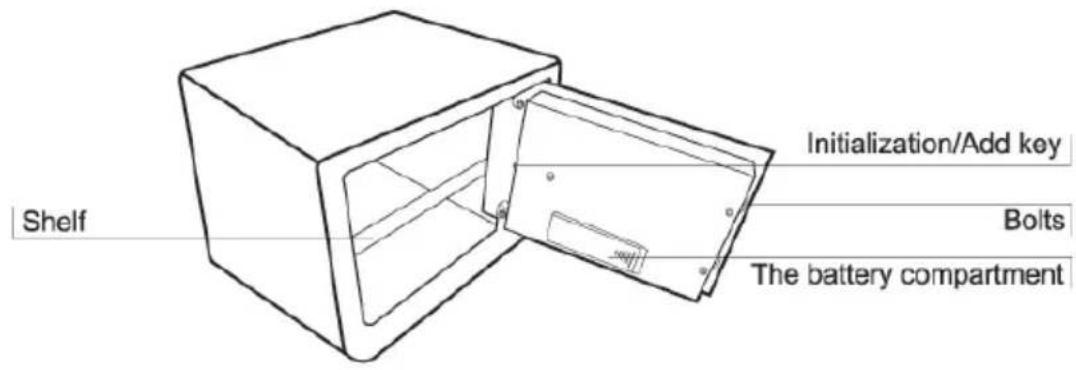
Schematic drawing of case
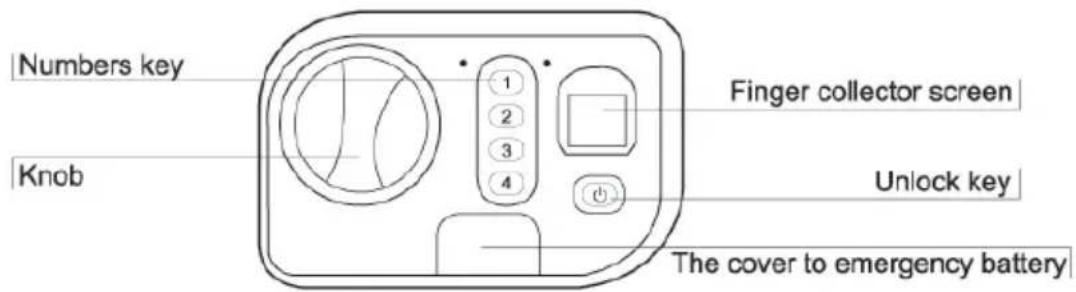
Schematic drawing of control panel
FUNCTION
- Locks: using high-quality anti-drilling locking bolts, high-theft proof performance.
• Initialization/Add key: add fingerprint registration or delete fingerprint record - Unlock key: open the safe
• Finger collector screen: fingerprint registration
• Number keys on the panel: representing 1, 2, 3, 4 separately
• Key "1": set use code
• Gilded badge: remove the cover and open emergency lock
• Power supply: 4 X AA batteries
FEATURES
• This safe is a high-tech product, and plays a strong role in psecurity.
• Use fingerprint recognition instead of a key or digital code for greater convenience
• Maximum of 20 fingerprints can be registered
- Constructed from solid materials to resist attack from hand & power tools
• User-friendly product, original design, unique structure
PREPARATION
• The safe on delivery comes with no registered fingerprints.
- The safe is not loaded with batteries, you may insert the emergency key into the emergency keyhole to open the door.
- Uncover the battery compartment cover at the back of door. And put in 4 X AA batteries. Please pay attention to the polarity of the batteries. For normal use, the batteries last up to one year.
- The preset code of safe on delivery is "1234", the user may open the door with the preset code when batteries are placed and tested normal.
NOTE: For security of your property, you will need to change the preset code.
POWER SUPPLY
- Pull the door open.
• Pull out the battery compartment cover. - Replace 4 fresh batteries by lining them up in a manner as indicated by the "+" and "-" signs.
NOTE: If the red light activates, it means the batteries are low. So you can plug the emergency battery boxes into the jack to power. While choosing batteries, it's suggested to use high-powered, high quality alkaline batteries. Please do not use any inferior, counterfeit or carbon-zinc batteries.
FINGERPRINT REGISTRATION
- Press Initialization/Add key, and you'll hear a short "Bleep, Bleep".
- Put your finger at finger collector screen where the red light is. You'll hear "Bleep, Bleep" for two times.
• After about a second, a long "Bleep" follows a short one, which means that fingerprint registration succeeded. (3 short "Bleep, Bleep, Bleep" means registration failed.)
• According to this method, you can register other fingerprints.
NOTE: A maximum of 20 fingerprints can be registered.
SET USER CODE
Press number key "1" for about 5 seconds, the green indicator light will turn on. Input the current/original code and press the unlock key to confirm. After hearing a "Bleep", input new code (4 to 8 digits) and press the unlock key. Input the code again, and press the unlock key. Hearing a "Bleep" means the operation was successful.
NOTE: Factory preset code is 1234.
SET USER CODE
- Fingerprint unlock: Press unlock key, the red light at finger collector screen is on. Don't remove any fingerprint registered at finger collector screen until the red light off. After hearing a long "Bleep", the green light shining, motor drives. Please turn the knob clockwise, then unlock succeed.
- Password unlock: Input code (4 to 8 digits) and press unlock key to confirm. After hearing a long "Bleep", the green light shining, motor drives. Please turn the knob clockwise, and unlock succeed.

NOTE: In order to improve the success rate of finger identification, users can refer to the following advice: Avoid using the finger collector screen in bright light. It's suggested that each user registers 2-3 fingerprints. Women and children should try to register with thumb and middle finger. Try to press with even weight for an accurate print. Avoid pressing with too much or too little weight. If the air is very dry, try breatheing on fingers till a little wet.
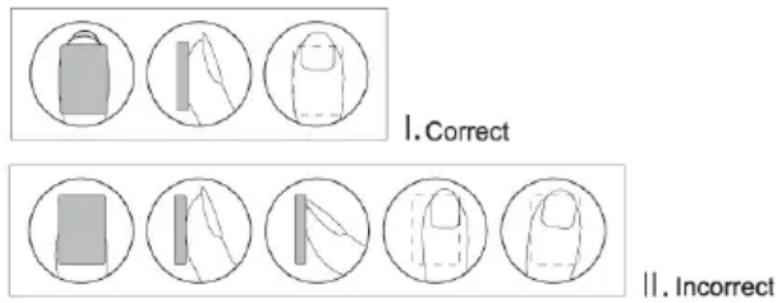
EMERGENCY KEY
During first use, in case of circuit malfunction, if you forgot your codes, or your fingerprint isn't being recognized, you could also use the emergency key to open the safe.
- Use inside-hexagonal spanner to open the gilded badge on the safe door, then you will see the emergency lock.
- Unlock with emergency key, and turn the emergency key counter clockwise on the panel.
• Turn the knob clockwise and open the safe door.

NOTE: For your total security, please take care of the emergency key and keep them in one secret place OUTSIDE of the safe.
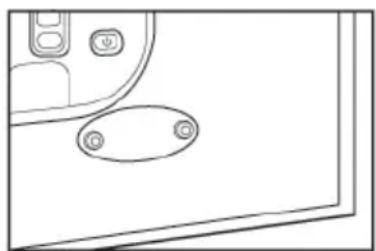
natural_image
Pure technical line drawing of a door panel with two circular buttons and a handle (no text or symbols)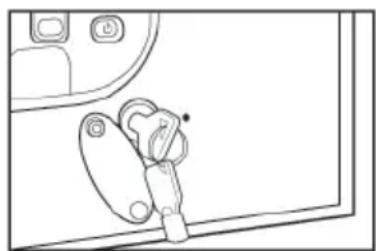
natural_image
Line drawing of a mechanical component with no visible text or symbolsSYSTEM INITIALIZATION/DELETION
Press the Initialization/Add key for around 5 seconds, the green indicator light will blink about 12 times. Let go of the key when it stops blinking. After hearing a long "tick", all fingerprints records in the module will be eliminated and return to factory setting.
IMPORTANT NOTES
- Do not use liquid or a sprayer to clean the safe. Use a wet cloth instead.
- Do not place the product in an insecure and elevated place, lest it may fall over and damage the product or hurt people. Never spill liquid over the control panel, or it may cause electrical shock to the electronic parts inside and disable their proper functions.
- Never try to dismantle the product by yourself. Unguided Dismantling and incorrect reassembly of the inside of back cover may damage the electrical circuit and affects its performance. Where maintenance is required, please contact the local service center or local distributor.
SereneLife™
Brand : SereneLife
Model : SLSFE18FP
Category : Safe