
HWS-1103H-E - Heat pump TOSHIBA - Free user manual and instructions
Find the device manual for free HWS-1103H-E TOSHIBA in PDF.


| Product type | Air-water heat pump (split system) |
| Brand | TOSHIBA |
| Model | HWS-1103H-E (outdoor unit) + HWS-1403XWHM3-E (hydraulic unit) |
| Heating capacity | 11.2 kW (nominal conditions) |
| Cooling capacity | 10.0 kW (nominal conditions) |
| COP heating/cooling | 4.77 / 2.84 |
| Power supply | Single-phase 220-230 V / 50 Hz or three-phase 380-400 V / 50 Hz depending on version |
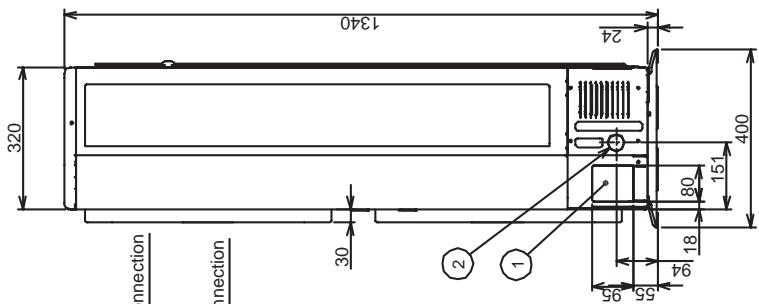
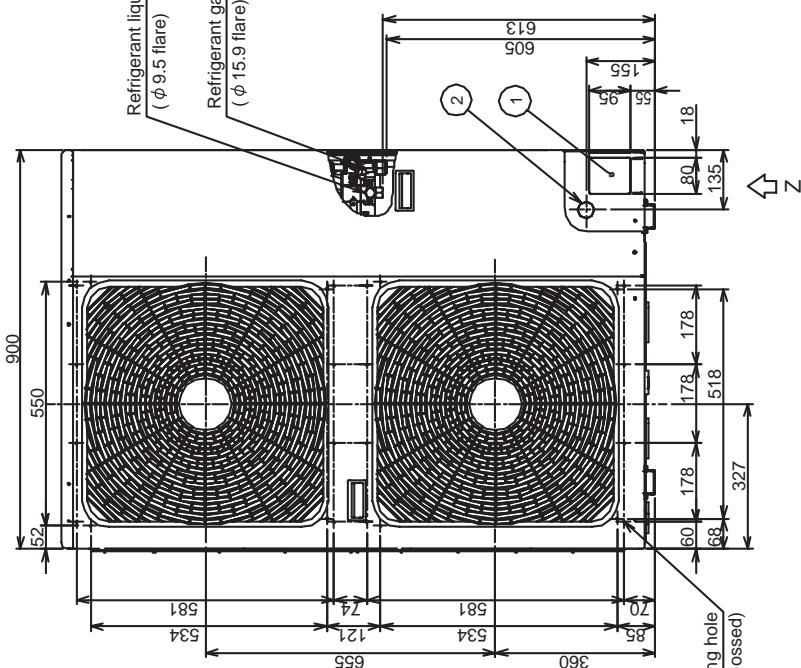
| Outdoor unit dimensions (H x W x D) | 1340 x 900 x 320 mm |
| Outdoor unit weight | 93 kg |
| Hydraulic unit dimensions (H x W x D) | 925 x 525 x 355 mm |
| Hydraulic unit weight | 54 kg |
| Sound level outdoor / hydraulic | 49 dB(A) / 29 dB(A) |
| Outdoor temperature range | -20 °C to 43 °C |
| Refrigerant / Charge | R410A / 2.7 kg |
| Max pipe length / height difference | 30 m / ±30 m |
| Circulation pump (max) | 190 W |
| Max water pressure | 300 kPa |
| Electric backup | 6 or 9 kW (optional) |
| Main functions | Heating, cooling, domestic hot water, frost protection, antibacterial, night mode |
| Maintenance | Annual inspection (insulation, leaks, heat exchanger cleanliness, tightening connections) |
| Safety | High/low pressure switch, bimetallic thermostat, overheat protection, flow switch |
| Spare parts and repairability | Spare parts available (compressor, electronic boards, fans, valves) – professional intervention required |
| General information | User manual and service manual available in French for free download |
Frequently Asked Questions - HWS-1103H-E TOSHIBA
User questions about HWS-1103H-E TOSHIBA
0 question about this device. Answer the ones you know or ask your own.
Ask a new question about this device
Download the instructions for your Heat pump in PDF format for free! Find your manual HWS-1103H-E - TOSHIBA and take your electronic device back in hand. On this page are published all the documents necessary for the use of your device. HWS-1103H-E by TOSHIBA.
USER MANUAL HWS-1103H-E TOSHIBA
1 SAFETY PRECAUTIONS 3
2 NEW REFRIGERANT (R410A). 6
2-1.Safety During Installation and Service 6
2-2.Installing refrigerant pipe 7
2-2-1.Steel pipe and joint 7
2-2-2. Processing of piping materials 8
2-3.Tools. 10
2-3-1.Necessary tools. 10
2-4.Recharging of refrigerant 11
2-5.Brazing of pipes 13
2-5-1.Materials of brazing. 13
2-5-2.Flux 13
2-5-3.Brazing 13
3 Specifications 15
4 Outside Drawing 18
4-1.Hydro unit 18
4-2.Outdoor unit 19
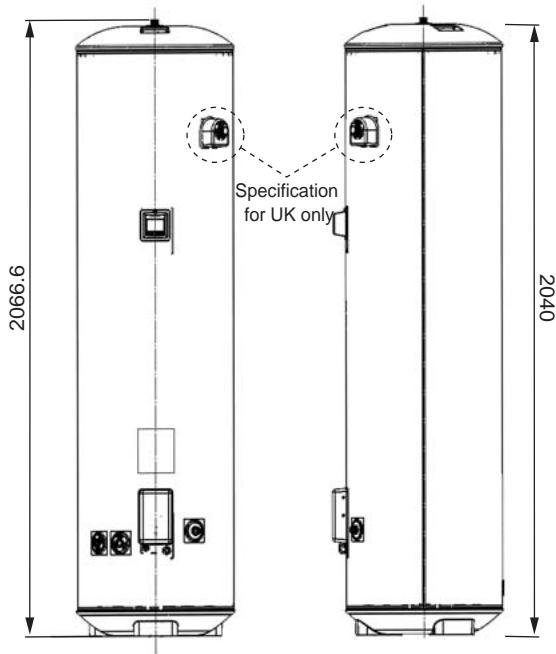
4-3.Hot water cylinder 21
5 Wiring Diagram 22
5-1.HydroUnit. 22
5-2.Outdoor Unit (Single phase Type) 23
5-3.Outdoor Unit (3 phase type). 24
5-4.Hot Water Cylinder Unit 25
6 Key Electric Component Rating. 26
6-1.Hydro Unit. 26
6-2.Outdoor Unit 28
6-3.Hot Water Cylinder Unit 31
6-4.Water Heat Exchange Control Board 32
6-5.Outdoor Control Board (Single phase Type) 33
6-6.Outdoor Unit Control (3 phase type). 35
MCC-1596 (Compressor IPDU) 35
MCC-1597 (Fan Motor IPDU). 36
MCC-1599 (Interface (CDB)) 37
MCC-1600 (Noise Filter). 38
7 Refrigeration Cycle / Water System Diagram 39
7-1.Water System Diagram 39
7-2.Refrigeration Cycle System Diagram 41
8 Operational Description 43
9 Method of Defect Diagnosis 81
9-1.Matters to be confirmed first. 82
9-1-1. Check the power supply voltage 82
9-1-2. Check for any miswiring of the connection cables between the hydro unit and the outdoor unit 82
9-1-3.About the installation of the temperature sensor. 82
9-2.Non-defective operation (program operation) ... No fault code display appears. 82
9-3.Outline of the determination diagram 83
9-3-1.Procedure of defect diagnosis. 83
9-3-2.How to determine from the check code on the remote control 83
9-3-3.How to cancel a check code on the remote controller 83
9-3-4.How to diagnose by error code 84
9-4.Diagnosis flow chart for each error code 91
9-4-1.Hydro unit failure detection 91
9-4-2.Outdoor Unit Failure Detection 109
9-4-3.Temperature sensor, temperature-resistance characteristic table 122
9-5. Operation check by PC board switch 123
9-5-1. Operation check mode 123
9-6.Brief method for checking the key components 124
9-6-1.Hydro unit 124
9-6-2.Outdoor unit 125
10 Hydro unit and Outdoor Unit Settings. 127
11 Replacement of the Service P.C. Board 152
12 How to Exchange Main Parts 153
13 Periodic Inspection Items 193
14 Part Exploded View, Part List. 194
1 SAFETY PRECAUTIONS
The unit and this service guide list very important safety precautions.
Understand the following details (indications and symbols) before reading the body text, and follow the instructions.
[About indication]
| Indication | Meaning of Indication |
| DANGER | Indicates that a wrong operation may cause a service engineer and the third persons around to get fatal or serious injuries. |
| WARNING | Indicates that a wrong operation may cause a service engineer and the third persons around to get fatal or serious injuries, or that unit defective after the operation may cause a user to have a similar serious accident. |
| CAUTION | Indicates that a wrong operation may cause a service engineer and the third persons around to get injuries or may cause property damage*, or that unit defective after the operation may cause a user to have a similar accident. |
- Property damage indicates extended damage to property, furniture, livestock, or pets.
[About symbols]
| Symbols | Meaning of Symbols |
| ⊗ | Indicates a forbidden action. Specific forbidden actions are described in text near the symbol. |
| ● | Indicates a forcible (must do) action. Specific forcible actions are described in text near the symbol. |
| △ | Indicates a caution (including danger and warning). Specific cautions are described in picture or text inside or near the symbol. |
| DANGER |
| <Turn off the power breaker> Turn off the power breaker before removing the front panel and cabinet. • Failure to do so may cause a high voltage electric shock, leading to death or injury. • During an operation, the second side circuit of high pressure transmission(*) are applied with a high voltage of 230V or higher. • Touching the circuit even with an electrical insulator, let alone a bare hand or body, causes an electric shock. *: For details, see the schematic. |
| <Discharge between terminals> When the front panel and cabinet are removed, make short-circuit current to discharge between high pressure capacitor terminals. • Failure to do so may cause a high voltage electric shock, leading to death or injury. • After the power is turned off, the high pressure capacitor is still charged with high voltage. |
| <Forbidden> Do not turn on the power breaker after removing the front panel cabinet. • Failure to do so may cause a high voltage electric shock, leading to death or injury. |
| WARNING |
| <Check earth ground> Before starting failure diagnosis or repair, check that the ground wire (*) is connected to the unit ground terminal. ·An unconnected ground wire could cause an electric shock if electric leakage occurs. ·If the earth ground is not properly connected, ask an electrical worker for rework of the ground connection. *: Ground wire of class D grounding |
| <No modification>Do not modify the unit. · Do not disassemble or modify the parts also. · A fire, an electric shock, or an injury may occur. |
| <Use specified parts>Use the specified parts (*) when replacing them. · Using parts other than specified ones may cause a fire or an electric shock. *: For details, see the parts price list. |
| <Keep children away from unit>Keep any person (including children) other than service engineers away from a failure diagnosis or repairing place. · A tool or disassembled parts may cause an injury. · Advise the customer to keep the third persons (including children) away from the unit. |
| <Insulation treatment>After connecting a cut lead with a crimp contact, discharge by facing the closed side upward. · Connect lead wires with crimping terminals and turn the closed end upwards to avoid exposure to water. |
| <Watch out for fire>Observe the following instructions when repairing the refrigerant cycle. (1) Watch out for surrounding fire. Always put out the fire of stove burner or other devices before starting the repair. Should the fire fail to be put out, the oil mixed with refrigerant gas could catch fire. (2) Do no use a welder in a closed room. A room with no ventilation may cause carbon monoxide poisoning. (3) Keep away flammable materials. The materials may catch the fire of a welder. |
| <Use refrigerant carefully>Check the refrigerant name to use the tools and members appropriate for the refrigerant. · A product using the refrigerant R410A has the refrigerant name prominently displayed on its outdoor unit. In addition, the diameter of the service port is changed from that of the conventional R22 to prevent incorrect filling. Never use refrigerant other than R410A for Air to Water Heat Pump using R410A. Also, never use R410A for Air to Water Heat Pump using other refrigerant (such as R22). · A mixture of R410A with different ones excessively raises the pressure in the refrigerant cycle, leading to an injury due to burst. Do not make additional charge of the refrigerant. · An additional charge when refrigerant gas leaks changes the refrigerant composition in the refrigerant cycle, causing the characteristics change of the Air to Water Heat Pump or excessive high pressure in the refrigerant cycle with more than the specified amount of refrigerant charged. This may cause burst or an injury. If the refrigerant gas leaks, perform refrigerant recovery or other operation to make the Air to Water Heat Pump contain no refrigerant, and then perform vacuuming. After that, refill the unit with the defined amount of liquid refrigerant. Never charge refrigerant exceeding the amount specified. When the refrigerant cycle is refilled with refrigerant, do not enter air or refrigerants other than the specified refrigerant, R410A. · A mixture of R410A with air or an inappropriate substance causes excessive high pressure inside the refrigerant cycle, leading to an injury due to burst. Check that there is no refrigerant gas leak after the installation is completed. · If it catches fire of a fan heater, a space heater, or a stove, poisonous gases may be produced. |
| <Be careful with wiring>After a repair is completed, be sure to reassemble the parts and put the wiring back to its original state. In addition, be careful with the internal wiring not to be caught in a cabinet or panel. · A defective assembly or wiring may cause a disaster at a customer site due to electrical leakage or a fire. |
| <Check for water leak>After the repair of a water pathway is completed, check that there is no water leak. · In using the product, water leak may cause a fire at a customer site due to electrical leakage or an electric shock. |
| <Check insulation>After the work is completed, check with an insulating-resistance tester (500V) that the insulation resistance between the live and dead-metal parts is 2 MΩ or higher.A low insulation resistance may cause a disaster at a customer site due to electrical leakage or an electric shock. |
| <ventilate>Ventilate if refrigerant gas leaks during service work.Should refrigerant gas catch fire, poisonous gases may be produced. A closed room full of leaking refrigerant results in the absence of oxygen; it is dangerous. Make sure to ventilate. |
| <Caution: electric shock>When checking a circuit while energized if necessary, use rubber gloves not to contact the live part.Contact with the live part may cause an electric shock.The unit contains high-voltage circuits. Contact with a part in the control board with your bare hand may cause an electric shock. Take enough care to check circuits. |
| <Turn off the power breaker>Because the electrical components are energized with high voltage, always turn off the power breaker before starting to work.Failure to do so may cause an electric shock. |
| <Always do>Should refrigerant gas leak, find where the gas leaks and properly repair it.To stop the repair work because the leakage location cannot be identified, perform refrigerant recovery and close the service valve. Failure to do so may cause the refrigerant gas to leak in a room. Although refrigerant gas alone is harmless, if it catches fire of a fan heater, a space heater, or a stove, poisonous gases may be produced.When installing the unit or re-installing it after relocation, follow the installation guide for proper operation.A defective installation may cause a refrigerant cycle defective, a water leak, an electric shock, or a fire. |
| <Check after repair>After a repair is completed, check for any abnormality.Failure to do so may cause a fire, an electric shock, or an injury.Turn off the power breaker to perform check.After a repair is completed (and the front panel and cabinet are placed), make a test run to check for any abnormality such as smoke or abnormal sound.Failure to do so may cause a fire or an electric shock. Place the front panel and cabinet before making a test run. |
| <Check after re-installation>Check that the following are properly performed after re-installation.(1) The ground wire is properly connected.(2) The installation is stable without any tilt or wobbles.Failure to check them may cause a fire, an electric shock, or an injury. |
| CAUTION |
| Wear gloves (*) when performing repair. ·Failure to do so may cause an injury when accidentally contacting the parts. *: Thick gloves such as cotton work gloves |
| Perform service work when the unit becomes cool enough after the operation. ·High temperature of compressor piping or other equipment after a cooling or heating operation may cause burn. |
| Tighten a flare nut with a torque wrench ·A flare nut tightened too much might crack after a long period, causing refrigerant leak. |
2 NEW REFRIGERANT (R410A)
This Air to Water Heat Pump adopts a new refrigerant HFC (R410A) to prevent destruction of the ozone layer. The working pressure of R410A refrigerant is 1.6 times higher than that of the conventional refrigerant R22. The refrigerant oil is also changed for the new refrigeration. Therefore, during installation or service work, be sure that water, dust, former refrigerant, or refrigeration machine oil does not enter the refrigerant cycle of the new type refrigerant Air to Water Heat Pump. A wrong installation or service operation may cause a serious accident. Read carefully the following instructions to use the tools or members for R410A for safety work.
2-1. Safety During Installation and Service
- Use only the refrigerant R410A for Air to Water Heat Pump using R410A.
A mixture of R410A with different ones excessively raises the pressure in a refrigerant cycle, leading to an injury due to burst.
- Check the refrigerant name to use the tools and members appropriate for the refrigerant.
A product using the refrigerant R410A has the refrigerant name prominently displayed on its outdoor unit. In addition, the diameter of the service port is changed from that of the conventional R22 to prevent incorrect filling.
- Ventilate if refrigerant gas leaks during service work.
Should refrigerant gas catch fire, poisonous gases may be produced. A closed room full of leaking refrigerant results in the absence of oxygen; it is dangerous. Make sure to ventilate.
- When the refrigerant cycle is refilled with refrigerant, do not mix air or refrigerants other than the specified refrigerant, R410A.
A mixture of R410A with air or an inappropriate substance causes excessive high pressure inside the refrigerant cycle, leading to an injury due to burst.
- Check that no refrigerant gas leaks after the installation is completed.
Should a refrigerant gas leak in a room and catch fire, poisonous gases may be produced.
- When installing the unit that contains large amount of refrigerant such as Air to Water Heat Pump, take measures to prevent the refrigerant from exceeding the threshold concentration in case it leaks.
Should leaking refrigerant exceed the threshold concentration could cause an accident due to oxygen deficient.
- When installing the unit or re-installing it after relocation, follow the installation guide for proper operation.
A defective installation may cause a refrigerant cycle defective, a water leak, an electric shock, or a fire.
- Do not modify the product. Do not disassemble or modify the parts also.
A fire, an electric shock, or an injury may occur.
2-2. Installing refrigerant pipe
2-2-1. Steel pipe and joint
For refrigerant piping, steel pipe and joints are mainly used. Select those comply with JIS (Japanese Industrial Standards) for a service work. Also, use such clean piping materials that less impurities attach to the inside of pipe and joints.
Copper pipe
Use copper pipe of the "copper and copper alloy seamless pipe" type with attach oil quantity of 40mg / 10m or less. Do not use pipe that is cracked, distorted, or discoloured (especially inside). The expansion valve or capillary may get clogged with impurities.
Considering that Air to Water Heat Pump using R410A is higher in pressure than those using the conventional R22, be sure to select the material that comply with the standard.
Table 2-1 shows the thickness of copper pipe used for R410A.
Never use commercially available thin-walled copper pipe of 0.8mm thick or less.
Table 2-1 Wall thickness of copper pipe
| Wall thickness (mm) | ||
| Nominal diameter | Outer diameter | R410A |
| 3/8 | 9.52 | 0.80 |
| 5/8 | 15.88 | 1.00 |
Joints
For the joint of copper pipe, flared joint and socket joint are used. Remove impurities from a joint before using it.
- Flared joint
A flared joint cannot be used for the copper pipe whose outer diameter is 20mm or larger. A socket joint can be used instead in that case.
Table 2-2-3 and 2-2-4 show the dimensions of flare pipe, the end of flared joint, and flare nuts.
- Socket joint
A socket joint is used to connect the thick-walled pipe of mainly 20mm or larger in diameter.
Table 2-2 shows the wall thickness of socket joints.
Table 2-2 The minimum wall thickness of socket joints
| Nominal diameter | Reference of outer diameter of copper pipe connected (mm) | Minimum joint wall thickness (mm) |
| 3/8 | 9.52 | 0.80 |
| 5/8 | 15.9 | 1.00 |
2-2-2. Processing of piping materials
When installing refrigerant pipe, prevent water or dust from entering the pipe, and do not use oil other than lubricant used for Air to Water Heat Pump. Make sure that no refrigerant leak occurs.
If piping needs lubrication, use lubricating oil whose water content is removed.
After the oil is put in, be sure to seal the container with airproof cover or other covers.
Flare and precautions
1) Cut a pipe.
Cut slowly with a pipe cutter so that the pipe is not distorted.
2) Remove burr and flaw.
A burr or flaw in a flare part may cause refrigerant leak. Remove carefully all the burrs, and clean up the cut ends before installation.
3) Insert a flare nut.
4)Flare
Check that the clasps and copper pipe are clean. Flare correctly using the clasp. Use a flare tool for R410A or the conventional one. Flare processing dimension varies depending on the flare tool type. When using the conventional flare tool, use a gauge for size adjustment to secure the A dimension.
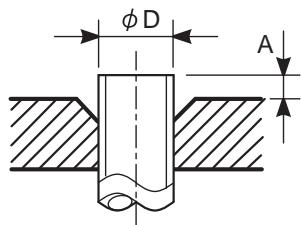
Figure 2-2-1 Flare dimension
Table 2-2-3 Flare processing related dimension for R410A
| Nominal diameter | Outer diameter (mm) | Wall thickness (mm) | A (mm) | ||
| Flare tool for R410A clutch type | Conventional flare tool | ||||
| Clutch type | Butterfly-nut type | ||||
| 3/8 | 9.52 | 0.8 | 0 to 0.5 | 1.0 to 1.5 | 2.0 to 2.5 |
| 5/8 | 15.9 | 1.0 | 0 to 0.5 | 1.0 to 1.5 | 2.0 to 2.5 |
Table 2-2-4 Dimension of flare for R410A and flare nut
| Nominal diameter | Outer diameter (mm) | Wall thickness (mm) | Dimension (mm) | Flare nut width (mm) | |||
| A | B | C | D | ||||
| 3/8 | 9.52 | 0.8 | 13.0 | 13.2 | 9.7 | 20 | 18 |
| 5/8 | 15.9 | 1.0 | 19.1 | 19.7 | 15.9 | 24.5 | 26 |
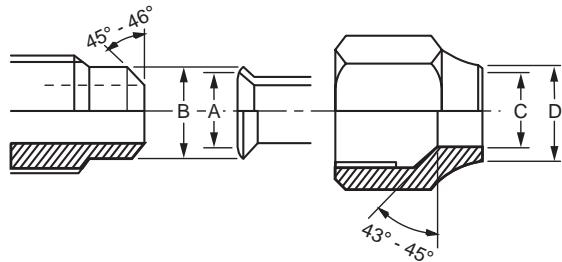
Figure 2-2-2 Relationship between flare nut and flare surface
Flare connecting procedure and precautions
1) Make sure that the flare and connecting portions do not have any flaw and dust.
2) Correctly align the flared surface and the connecting axis.
3) Tighten the flare with designated torque by means of a torque wrench. The tightening torque for R410A is the same as that for the conventional R22. If the torque is weak, gas leakage may occur. If it is too strong, the flare nut may crack and may be made non-removable. When choosing the tightening torque, comply with values designated by products. Table 2-2-5 shows reference values.
NOTE
When applying oil to the flare surface, be sure to use oil designated by the product. Using any other oil deteriorates the lubricating oil, possibly causing the compressor to burn out.
Table 2-2-5 Tightening torque of flare for R410A (Reference values)
| Nominal diameter | Outer diameter (mm) | Tightening torque N·m (kgf·m) |
| 3/8 | 9.52 | 33 to 42 (3.3 to 14.2) |
| 5/8 | 15.9 | 66 to 82 (6.8 to 8.2) |
2-3. Tools
2-3-1. Necessary tools
In Air to Water Heat Pump using R410A, the service port diameter of packed valve of the outdoor unit is changed to prevent mixing of other refrigerant. To reinforce the pressure resistance, flare dimensions and opposite side dimensions of flare nut (For Ø 12.7 copper pipe) of the refrigerant piping are lengthened.
Because the refrigerating machine oil is changed, mixing of oil may generate sludge, clog capillary, or cause other problems. Accordingly, the tools to be used include:
- tools dedicated for R410A (Those that cannot be used for the conventional refrigerant, R22)
- tools dedicated for R410A, but can be also used for the conventional refrigerant, R22
- tools that can be used for the conventional refrigerant, R22.
The following table shows the tools dedicated for R410A and their interchangeability.
Tools dedicated for R410A (The following tools must be for R410A)
Tools whose specifications are changed for R410A and their interchangeability
| No. | Tool to be used | Usage | R410A Air to Water Hear Pump installation | Conventional refrigerant Air to Water Heat Pump installation | |
| For R410A Existence of new equipment | Conventional equipment can be used | New equipment can be used with conventional refrigerant | |||
| 1 | Flare tool | Pipe flaring | Yes | *(Note 1) | Yes |
| 2 | Copper pipe gauge for adjusting projection margin | Flaring by conventional flare tool | Yes | *(Note 1) | *(Note 1) |
| 3 | Torque wrench (For Ø15.9) | Connection of flare nut | Yes | No | No |
| 4 | Gauge manifold | Evacuating, refrigerant charge, run check, etc. | Yes | No | No |
| 5 | Charge hose | ||||
| 6 | Vacuum pump adapter | Vacuum evacuating | Yes | No | Yes |
| 7 | Electrical balance for refrigerant charging | Refrigerant charge | Yes | No | Yes |
| 8 | Refrigerant cylinder | Refrigerant charge | Yes | No | No |
| 9 | Leakage detector | Gas leakage check | Yes | No | Yes |
| 10 | Charging cylinder | Refrigerant charge | *(Note 2) | No | No |
- (Note 1) Flaring for R410A by using the conventional flare tool requires projection margin adjustment. This adjustment requires copper pipe gauge or other instrument.
- (Note 2) A charging cylinder for R410A is currently under development.
General tools (Conventional tools are available)
In addition to the above dedicated tools, the following equipment also available for R22 is necessary as the general tools.
- Vacuum pump
Use this by attaching vacuum pump adapter.
-
Reamer
-
Pipe bender
-
Level vial
-
Screwdriver (+, -)
-
Spanner or Monkey wrench
-
Hole core drill (Ø65)
- Hexagon wrench (Opposite side 4mm)
- Tape measure
- Metal saw
Also prepare the following equipment for other work methods or run check.
-
Clamp meter
-
Insulation resistance meter
-
Thermometer
-
Electroscope
2-4. Recharging of refrigerant
Recharge, if necessary, the specified amount of new refrigerant according to the following procedure.
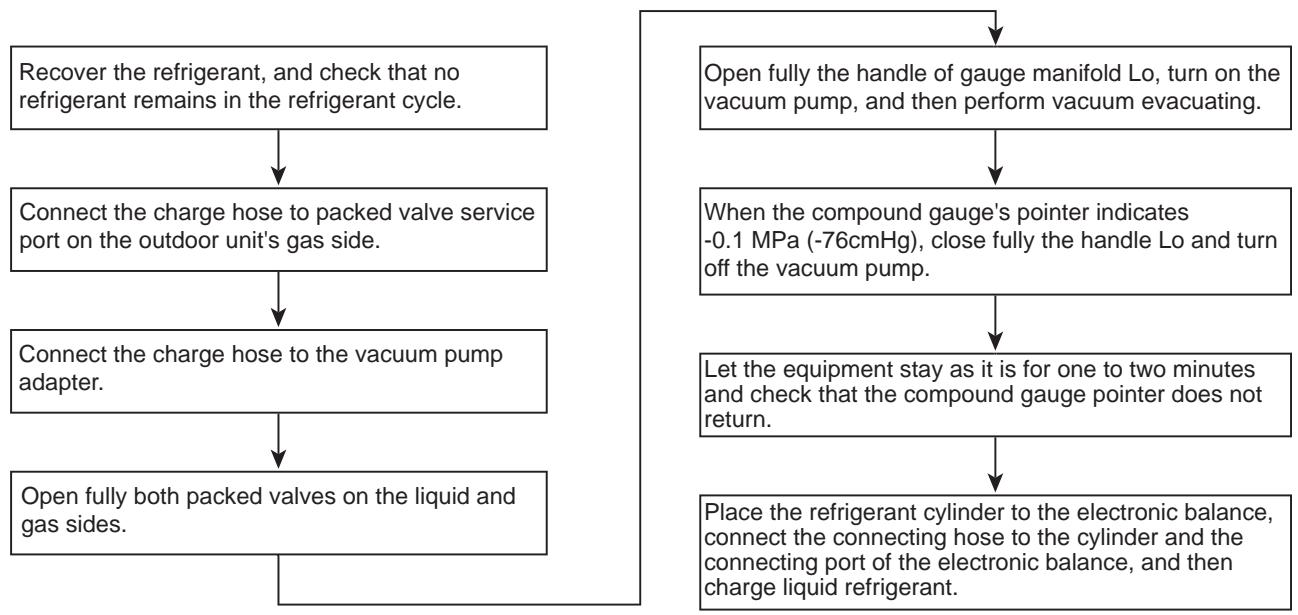
(For refrigerant charging, see the figure below)
NOTE
- Never charge refrigerant exceeding the specified amount.
- If the specified amount of refrigerant cannot be charged, charge it a little at a time while running refrigerant recovery (pump down).
- Do not make additional charging.
An additional charge when refrigerant leaks changes the refrigerant composition in the refrigerant cycle, causing the characteristics change of the Air to Water Heat Pump or excessive high pressure in the refrigerant cycle with more than the specified amount of refrigerant charged. This may cause burst or an injury.
Fig. 2-4-1 Configuration of refrigerant charging
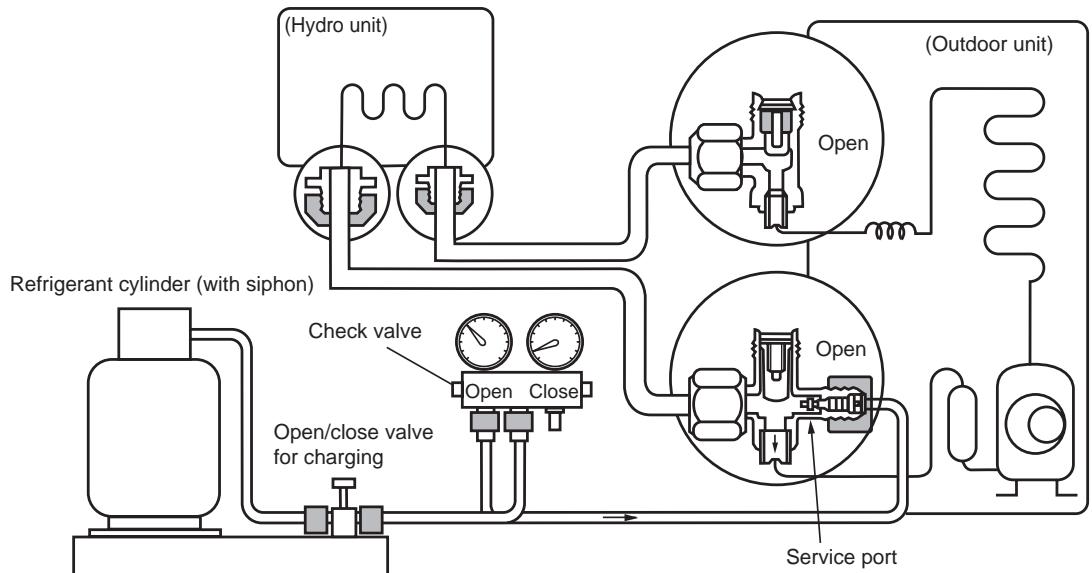
Electronic balance for refrigerant charging
NOTE
- Make sure that the setting is appropriate so that liquid can be charged.
- A cylinder with siphon enables liquid to be charged without the cylinder turned upside down.
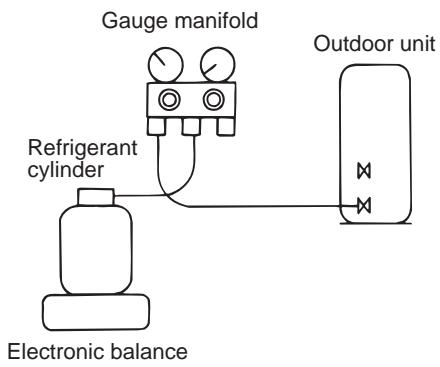
[Cylinder with siphon]
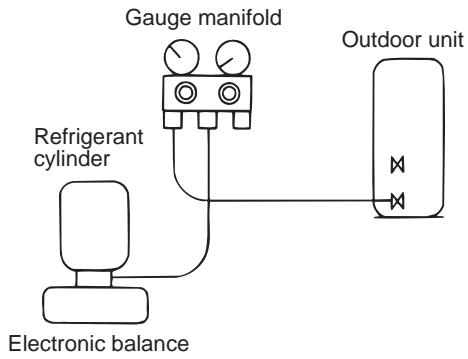
[Cylinder without siphon]
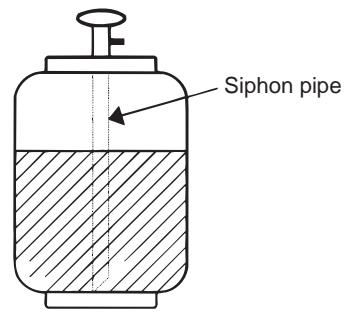
NOTE
- Because R410A is HFC mixed refrigerant, charging with gas changes the charged refrigerant composition, causing the equipment characteristics to change.
2-5. Brazing of pipes
2-5-1. Materials of brazing
Silver brazing metal
Silver brazing metal is an alloy mainly composed of silver and copper.
It uses iron, copper, or copper alloy, and is relatively expensive though it excels in soldering.
Phosphor bronze brazing metal
Phosphor bronze brazing metal is generally used to join copper or copper alloy.
Low temperature brazing metal
Low temperature brazing metal is generally called solder, and is an alloy of tin and lead. Do not use it for refrigerant piping because its adhesive capacity is low.
NOTE
- Phosphor bronze brazing metal tends to react with sulfur, producing a fragile compound water solution. This may cause gas leakage. Therefore, use other type of brazing metal at a hot spring resort or similar place, and coat the surface with coatings.
- To braze the pipe again while performing service work, use the same type of brazing metal.
2-5-2. Flux
Why flux is necessary
- Removing all the oxide film and any foreign matter on the metal surface assists the flow of brazing metal.
- Flux prevents the metal surface from being oxidized in the course of brazing.
- Reducing the brazing metal's surface tension enables the brazing metal to adhere for better metal processing.
Characteristics of flux
- The activation temperature of flux matches the brazing temperature.
- A wide effective temperature range makes flux hard to carbonize.
- It is easy to remove slag after brazing.
- The corrosive action to the treated metal and brazing metal is minimum.
- The good performance of flux gives no harm to a human body. Since flux works in a complicated manner as described above, select an appropriate type of flux according to metal treatment type, brazing metal and brazing method, or other conditions.
Type of flux
Non-corrosive flux
It is generally a compound of borax and boric acid. It is effective when brazing temperature is higher than 800^ .
Active solvent
Most of this type of flux is generally used for silver brazing.
It features the increase of oxide film while moving the capability to the borax-boric acid compound to add compounds such as potassium fluoride, potassium chloride, or sodium fluoride.
Piping materials for brazing and brazing metal / flux
| Piping material | Brazing metal to be used | Flux to be used |
| Copper - Copper | Phosphor copper | Do not use |
| Copper - Iron | Silver | Paste flux |
| Iron - Iron | Silver | Vapour flux |
NOTE
- Do not enter flux into the refrigerant cycle.
- If chlorine contained in the flux remains within the pipe, the lubricating oil deteriorates. Because of this, use a flux that does not contain chlorine.
- When adding water to the flux, use water that does not contain chlorine. (e.g. distilled water or ion-exchange water)
- Remove the flux after brazing.
2-5-3. Brazing
Brazing must be performed by a person qualified and experienced with theoretical knowledge since the operation requires sophisticated techniques.
Perform brazing while flowing dry nitrogen gas (N2) to prevent oxide film from forming during brazing application to the inside of the pipe.
NOTE
- Never use gas other than nitrogen gas.
Brazing method to prevent oxidation
1) Attach a reducing valve and a flow meter to the nitrogen cylinder.
2) Use a copper pipe to direct the piping material, and attach the flow meter to the balance.
3) Apply a mark to the clearance between the piping material and the copper pipe filled with nitrogen to prevent the back flow of the nitrogen gas.
4) If the nitrogen gas flows out, be sure to keep open the piping end.
5) Use the reducing valve to adjust the nitrogen gas flow speed to 0.05m^3/hour or 0.02MPa (0.2kgf/cm^2) .
6) After the steps above, keep the nitrogen gas flowing until the pipe cools down to a certain extent. (Temperature where the pipe is cool enough to be touched by hands)
7) Remove the flux completely after brazing.
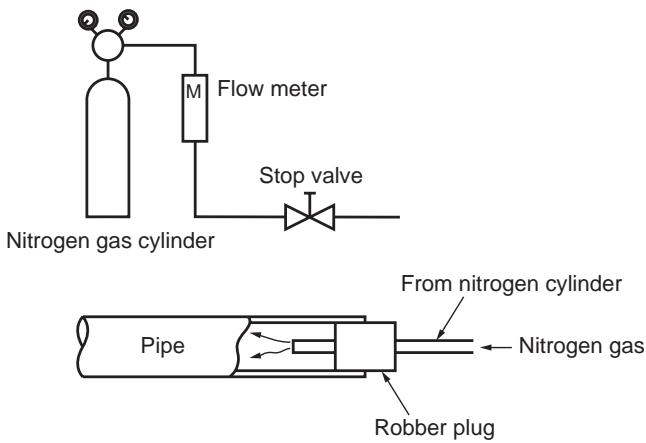
Fig 2-5-1 Prevention of oxidation during brazing
3 Specifications
| Unit name | Hydro unit | HWS-803XWHM3-E, 803XWHT6-E, 803XWHD6-E, 803XWHT9-E | ||
| Outdoor unit | HWS-803H-E | |||
| Heating capacity *1 (kW) | 8.0 | |||
| Cooling capacity *2 (kW) | 6.0 | |||
| Variable range of compressor frequency | 10 - 70 Hz | |||
| Power source | Single phase 50Hz 220 - 230V | |||
| Operation mode | Heating | Cooling | ||
| Electric characteristic *1 *2 | Hydro unit | Current (A) | 0.98 | 0.46 |
| Power (kW) | 0.101 | 0.097 | ||
| Power factor (%) | 91.5 | 91.7 | ||
| Outdoor unit | Current (A) | 7.64 | 8.90 | |
| Power (kW) | 1.719 | 2.033 | ||
| Power factor (%) | 97.8 | 99.3 | ||
| Total | Starting current (A) | 8.62 | 9.36 | |
| Operating noise *1 *2 *4 | Hydro unit (dB(A)) | 29 | 29 | |
| Outdoor unit (dB(A)) | 49 | 49 | ||
| Coefficient of performance *1 *2 | 4.40 | 2.82 | ||
| Hydro unit | Outer dimension | Height (mm) | 925 | |
| Width (mm) | 525 | |||
| Depth (mm) | 355 | |||
| Net weight (kg) | 50 | |||
| Color | Silky shade (Munsell 1Y8.5/0.5) | |||
| Remote controller | Height (mm) | 120 | ||
| Outer dimension *3 | Width (mm) | 120 | ||
| Depth (mm) | 16 | |||
| Circulating pump | Motor output (W) | 125 (MAX) | ||
| Flow rate (L/min) | 22.9 | 17.2 | ||
| Type | Non-self-suction centrifugal pump | |||
| Heat exchanger | Plate-type heat exchange | |||
| Outdoor unit | Outer dimension | Height (mm) | 890 | |
| Width (mm) | 900 | |||
| Depth (mm) | 320 | |||
| Net weight (kg) | 63 | |||
| Color | Silky shade (Munsell 1Y8.5/0.5) | |||
| Compressor | Motor output (W) | 1400 | ||
| Type | Twin rotary type with DC-inverter variable speed control | |||
| Model | DA220A2F-22L | |||
| Fan motor | Standard air capacity (m³/min) | 50.0 | ||
| Motor output (W) | 60 | |||
| Refrigerant piping | Connection method | Flare connection | ||
| Hydro unit | Liquid | Ø9.52 | ||
| Gas | Ø15.9 | |||
| Outdoor unit | Liquid | Ø9.52 | ||
| Gas | Ø15.9 | |||
| Maximum length (m) | 30 | |||
| Maximum chargeless length (m) | 30 | |||
| Maximum height difference (m) | ±30 | |||
| Minimum length (m) | 5 | |||
| Refrigerant | Refrigerant name | R410A | ||
| Charge amount (kg) | 1.8 | |||
| Water piping | Pipe diameter | R1 1/4 | ||
| Maximum length (m) | None (Need the flow rate 13g/min or more) | |||
| Maximum height difference (m) | ±7 | |||
| Maximum working water pressure (kPa) | 300 | |||
| Operating temperature range | Hydro unit (℃) | 5-32 | ||
| Outdoor unit (℃) | -20-43 | |||
| Operating humidity range | Hydro unit (%) | 15-85 | ||
| Outdoor unit (%) | 15-100 | |||
| Wiring connection | Power wiring | 3 wires: including ground line (Outdoor unit) | ||
| Connecting line | 4 wires: including ground line | |||
1 Heating performance measurement conditions: outside air temperature 7^ , water supply temperature 30^ , outlet temperature 35^ , refrigerant piping length 7.5m (no height difference).
2 Cooling performance measurement conditions: outside air temperature 35^ , water supply temperature 12^ , outlet temperature 7^ , refrigerant piping length 7.5m (no height difference).
3 • The remote controller should be shipped with the hydro unit.
- Use two 1.5-meter wires to connect the hydro unit with the remote controller.
4 The outdoor unit operating noise is measured at the point of 1m away from the unit back surface centre and 1m high from the ground. The hydro unit operating noise is measured at the point of 1m away from the unit front surface centre.
The value of the operating noise varies depending on room structure where the unit is installed.
5 Do not leave the hydro unit at 5 °C or below
6 Check the water piping for leakage under the maximum operating pressure.
| Unit name | Hydro unit | HWS-1403XWHM3-E, 1403XWHT6-E, 1403XWHD6-E, 1403XWHT9-E | ||||
| Outdoor unit | HWS-1103H-E | HWS-1403H-E | ||||
| Heating capacity *1 (kW) | 11.2 | 14.0 | ||||
| Cooling capacity *2 (kW) | 10.0 | 11.0 | ||||
| Variable range of compressor frequency | 10 - 60Hz | 10 - 70 Hz | ||||
| Power source | Single phase 50Hz 220 - 230V | |||||
| Operation mode | Heating | Cooling | Heating | Cooling | ||
| Electric characteristic *1 *2 | Hydro unit | Current (A) | 0.63 | 0.61 | 0.67 | 0.63 |
| Power (kW) | 0.135 | 0.130 | 0.145 | 0.135 | ||
| Power factor (%) | 93.2 | 92.7 | 94.0 | 93.2 | ||
| Outdoor unit | Current (A) | 9.94 | 14.88 | 13.37 | 17.47 | |
| Power (kW) | 2.215 | 3.39 | 2.965 | 3.945 | ||
| Power factor (%) | 96.9 | 99.1 | 96.4 | 98.1 | ||
| Total | Starting current (A) | 10.57 | 15.49 | 14.04 | 18.10 | |
| Operating noise *1 *2 *4 | Hydro unit (dB(A)) | 29 | 29 | 29 | 29 | |
| Outdoor unit (dB(A)) | 49 | 49 | 51 | 51 | ||
| Coefficient of performance *1 *2 | 4.77 | 2.84 | 4.50 | 2.70 | ||
| Hydro unit | Outer dimension | Height (mm) | 925 | |||
| Width (mm) | 525 | |||||
| Depth (mm) | 355 | |||||
| Net weight (kg) | 54 | |||||
| Color | Silky shade (Munsell 1Y8.5/0.5) | |||||
| Remote controller Outer dimension *3 | Height (mm) | 120 | ||||
| Width (mm) | 120 | |||||
| Depth (mm) | 16 | |||||
| Circulating pump | Motor output (W) | 190 (MAX) | ||||
| Flow rate (L/min) | 32.1 | 28.9 | 40.1 | 31.5 | ||
| Type | Non-self-suction centrifugal pump | |||||
| Heat exchanger | Plate-type heat exchange | |||||
| Outdoor unit | Outer dimension | Height (mm) | 1340 | |||
| Width (mm) | 900 | |||||
| Depth (mm) | 320 | |||||
| Net weight (kg) | 93 | |||||
| Color | Silky shade (Munsell 1Y8.5/0.5) | |||||
| Compressor | Motor output (W) | 2500 | ||||
| Type | Twin rotary type with DC-inverter variable speed control | |||||
| Model | DA422A3F-25M | |||||
| Fan motor | Standard air capacity (m³/min) | 103.0 | ||||
| Motor output (W) | 100 x 2 | |||||
| Refrigerant piping | Connection method | Flare connection | ||||
| Hydro unit | Liquid | Ø9.52 | ||||
| Gas | Ø15.9 | |||||
| Outdoor unit | Liquid | Ø9.52 | ||||
| Gas | Ø15.9 | |||||
| Maximum length (m) | 30 | |||||
| Maximum chargeless length (m) | 30 | |||||
| Maximum height difference (m) | ±30 | |||||
| Minimum length (m) | 5 | |||||
| Refrigerant | Refrigerant name | R410A | ||||
| Charge amount (kg) | 2.7 | |||||
| Water piping | Pipe diameter | R1 1/4 | ||||
| Maximum length (m) | None (Need the flow rate 17.5£/min or more) | |||||
| Maximum height difference (m) | ±7 | |||||
| Maximum working water pressure (kPa) | 300 | |||||
| Operating temperature range | Hydro unit (℃) | 5-32 | ||||
| Outdoor unit (℃) | -20-43 | |||||
| Operating humidity range | Hydro unit (%) | 15-85 | ||||
| Outdoor unit (%) | 15-100 | |||||
| Wiring connection | Power wiring | 3 wires: including ground line (Outdoor unit) | ||||
| Connecting line | 4 wires: including ground line | |||||
1 Heating performance measurement conditions: outside air temperature 7 °C, water supply temperature 30 °C, outlet temperature 35 °C, refrigerant piping length 7.5 m (no height difference).
2 Cooling performance measurement conditions: outside air temperature 35^ , water supply temperature 12^ , outlet temperature 7^ , refrigerant piping length 7.5m (no height difference).
3 • The remote controller should be shipped with the hydro unit.
- Use two 1.5-meter wires to connect the hydro unit with the remote controller.
4 The outdoor unit operating noise is measured at the point of 1m away from the unit back surface centre and 1m high from the ground. The hydro unit operating noise is measured at the point of 1m away from the unit front surface centre.
The value of the operating noise varies depending on room structure where the unit is installed.
5 Do not leave the hydro unit at 5 °C or below.
6 Check the water piping for leakage under the maximum operating pressure.
| Unit name | Hydro unit | HWS-1403XWHM3-E, 1403XWHT6-E, 1403XWHD6-E, 1403XWHT9-E | |||||
| Outdoor unit | HWS-1103H8(R)-E | HWS-1403H8(R)-E | HWS-1603H8(R)-E | ||||
| Heating capacity *1 (kW) | 11.2 | 14.0 | 16.0 | ||||
| Cooling capacity *2 (kW) | 10.0 | 11.0 | 13.0 | ||||
| Variable range of compressor frequency | 10 - 60Hz | 10 - 60 Hz | 10 - 70 Hz | ||||
| Power source | 3 phase 50Hz 380 - 400V | ||||||
| Operation mode | Heating | Cooling | Heating | Cooling | Heating | ||
| Electric characteristic *1 *2 | Hydro unit | Current (A) | 0.63 | 0.61 | 0.67 | 0.63 | 0.69 |
| Power (kW) | 0.135 | 0.130 | 0.145 | 0.135 | 0.150 | ||
| Power factor (%) | 93.2 | 92.7 | 94.0 | 93.2 | 94.5 | ||
| Outdoor unit | Current (A) | 4.03 | 5.65 | 5.23 | 6.50 | 5.95 | |
| Power (kW) | 2.255 | 3.39 | 3.065 | 3.945 | 3.570 | ||
| Power factor (%) | 81.1 | 87.0 | 84.9 | 88.0 | 87.0 | ||
| Total | Starting current (A) | 4.66 | 6.26 | 6.06 | 7.13 | 4.26 | |
| Operating noise *1 *2 *4 | Hydro unit (dB(A)) | 29 | 29 | 29 | 29 | 29 | |
| Outdoor unit (dB(A)) | 49 | 50 | 51 | 51 | 52 | ||
| Coefficient of performance *1 *2 | 4.69 | 2.84 | 4.36 | 2.70 | 4.30 | ||
| Hydro unit | Outer dimension | Height (mm) | 925 | ||||
| Width (mm) | 525 | ||||||
| Depth (mm) | 355 | ||||||
| Net weight (kg) | 54 | ||||||
| Color | Silky shade (Munsell 1Y8.5/0.5) | ||||||
| Remote controller Outer dimension *3 | Height (mm) | 120 | |||||
| Width (mm) | 120 | ||||||
| Depth (mm) | 16 | ||||||
| Circulating pump | Motor output (W) | 190 (MAX) | |||||
| Flow rate (L/min) | 32.1 | 28.9 | 40.1 | 31.5 | 45.8 | ||
| Type | Non-self-suction centrifugal pump | ||||||
| Heat exchanger | Plate-type heat exchange | ||||||
| Outdoor unit | Outer dimension | Height (mm) | 1340 | ||||
| Width (mm) | 900 | ||||||
| Depth (mm) | 320 | ||||||
| Net weight (kg) | 93 | ||||||
| Color | Silky shade (Munsell 1Y8.5/0.5) | ||||||
| Compressor | Motor output (W) | 2500 | |||||
| Type | Twin rotary type with DC-inverter variable speed control | ||||||
| Model | DA422A3F-27M | ||||||
| Fan motor | Standard air capacity (m³/min) | 103.0 | |||||
| Motor output (W) | 100 x 2 | ||||||
| Refrigerant piping | Connection method | Flare connection | |||||
| Hydro unit | Liquid | Ø9.52 | |||||
| Gas | Ø15.9 | ||||||
| Outdoor unit | Liquid | Ø9.52 | |||||
| Gas | Ø15.9 | ||||||
| Maximum length (m) | 30 | ||||||
| Maximum chargeless length (m) | 30 | ||||||
| Maximum height difference (m) | ±30 | ||||||
| Minimum length (m) | 5 | ||||||
| Refrigerant | Refrigerant name | R410A | |||||
| Charge amount (kg) | 2.7 | ||||||
| Water piping | Pipe diameter | R1 1/4 | |||||
| Maximum length (m) | None (Need the flow rate 17.5£/min or more) | ||||||
| Maximum height difference (m) | ±7 | ||||||
| Maximum working water pressure (kPa) | 300 | ||||||
| Operating temperature range | Hydro unit (℃) | 5-32 | |||||
| Outdoor unit (℃) | -20-43 | ||||||
| Operating humidity range | Hydro unit (%) | 15-85 | |||||
| Outdoor unit (%) | 15-100 | ||||||
| Wiring connection | Power wiring | 5 wires: including ground line (Outdoor unit) | |||||
| Connecting line | 4 wires: including ground line | ||||||
1 Heating performance measurement conditions: outside air temperature 7 °C, water supply temperature 30 °C, outlet temperature 35 °C, refrigerant piping length 7.5 m (no height difference).
2 Cooling performance measurement conditions: outside air temperature 35^ , water supply temperature 12^ , outlet temperature 7^ , refrigerant piping length 7.5m (no height difference).
3 • The remote controller should be shipped with the hydro unit.
- Use two 1.5-meter wires to connect the hydro unit with the remote controller.
4 The outdoor unit operating noise is measured at the point of 1m away from the unit back surface centre and 1m high from the ground. The hydro unit operating noise is measured at the point of 1m away from the unit front surface centre.
The value of the operating noise varies depending on room structure where the unit is installed.
5 Do not leave the hydro unit at 5 °C or below.
6 Check the water piping for leakage under the maximum operating pressure.
4 Outside Drawing
4-1. Hydro unit
HWS-803XWHM3-E, 803XWHT6-E, 803XWHD6-E, 803XWHT9-E
HWS-1403XWHM3-E, 1403XWHT6-E, 1403XWHD6-E, 1403XWHT9-E
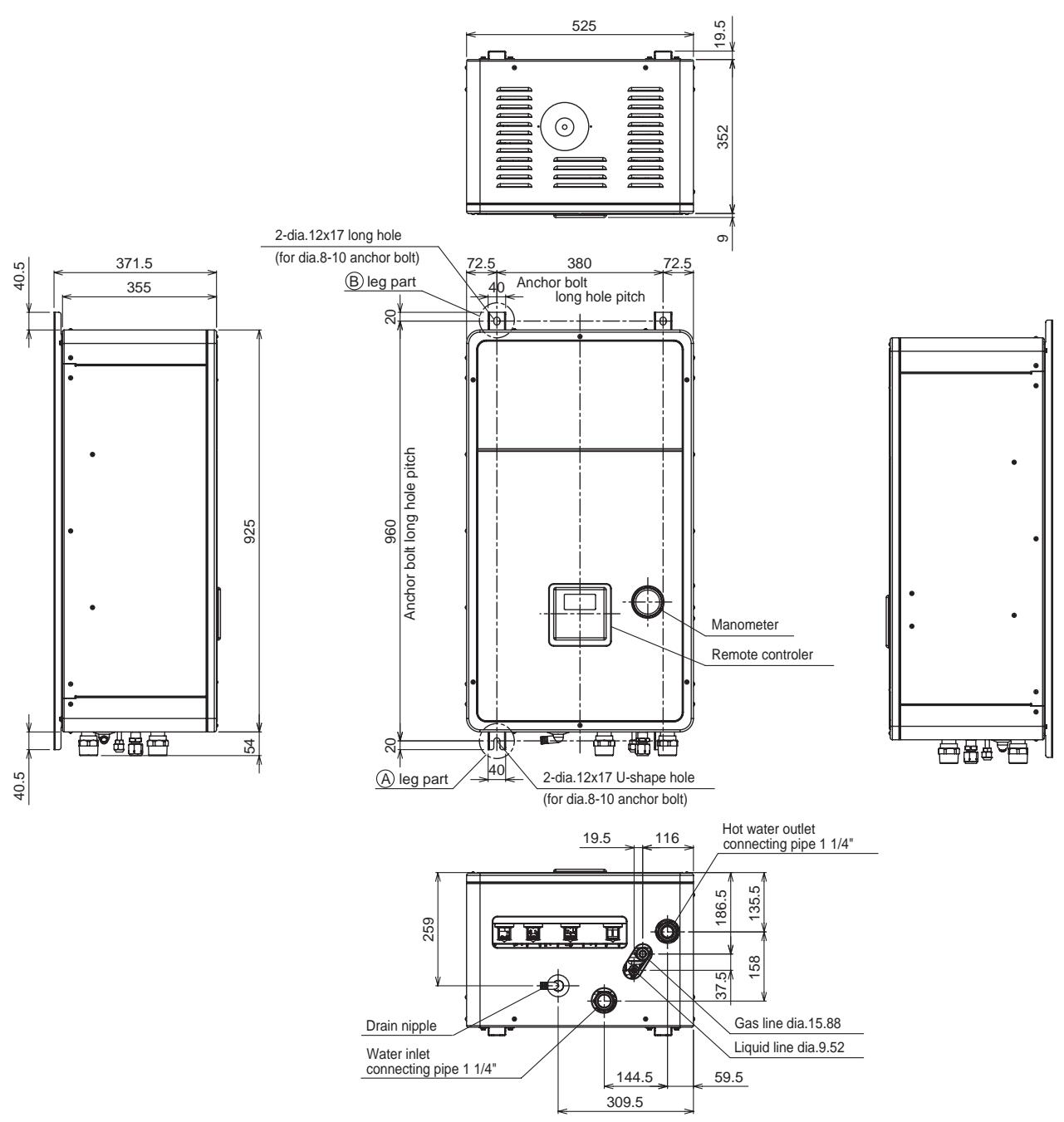
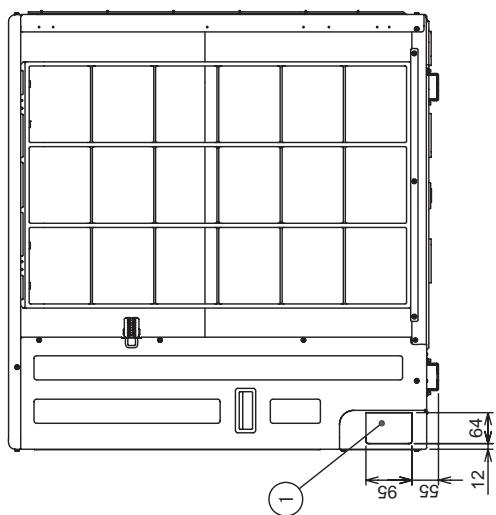
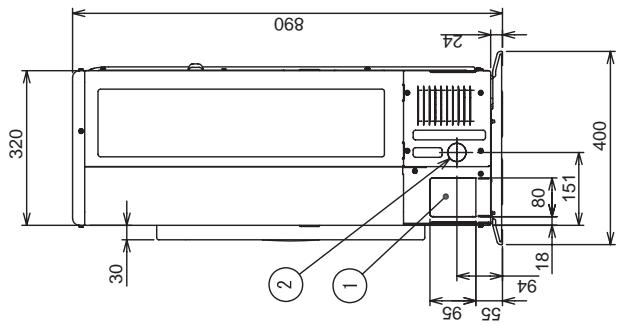
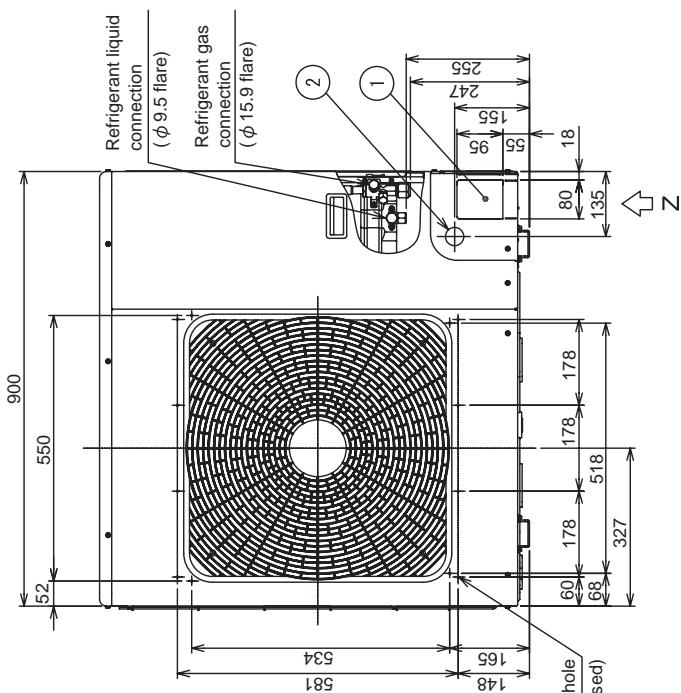
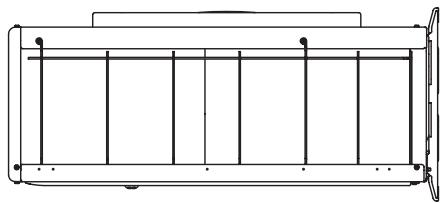
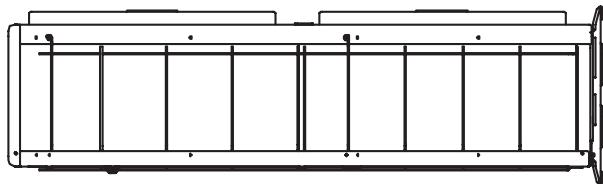
4-2. Outdoor unit
HWS-803H-E
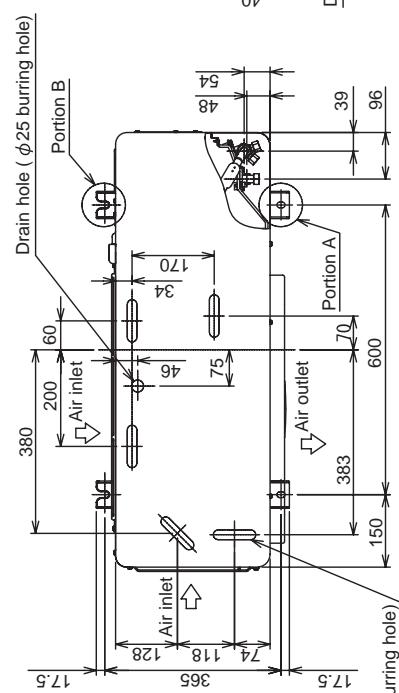
| Name | Description | |
| ① | Refrigerant piping outlet Indoor and outdoor connecting line outlet | — |
| ② | Power source intake hole | φ 38 knockout hole |
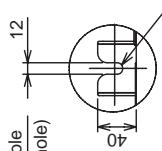
Mounting bolt hole
Details of portion B ( 12× 17 U-shape hole)
Mounting bolt hole
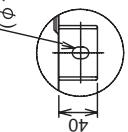
Details of portion A
Details of portion A .
outdoor unit
Optional mounting hole
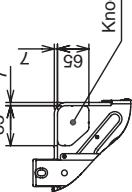
(12-phi 3 embossed)
7
Z arrow view
| Name | Description | |
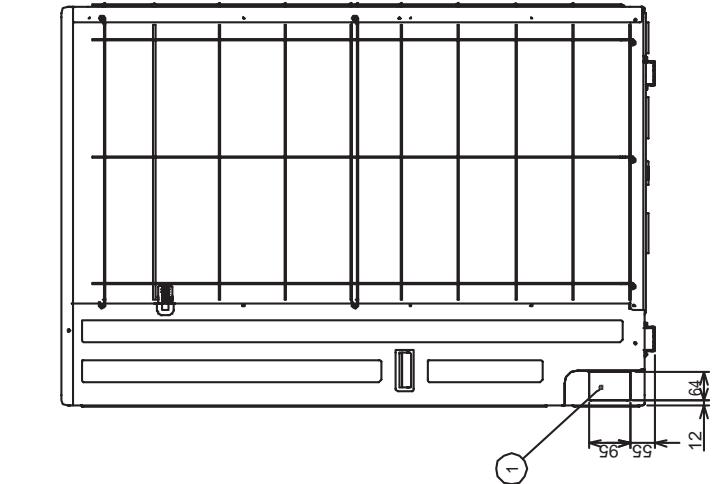
| ① | Refrigerant piping outlet Indoor and outdoor connecting line outlet | — |
| ② | Power source intake hole | ∅38 knockout hole |
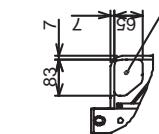
Details of portion B ( 12× 17 U-shape hole)
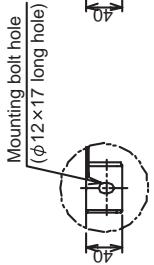
Details of portion A
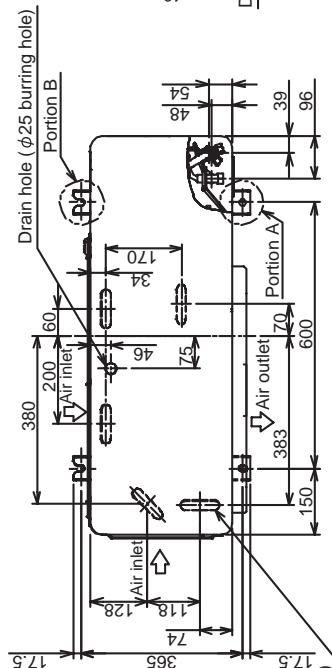
5-Drain hole ( 20× 88 burring hole)
Knockout for lower part of piping
Z arrow view
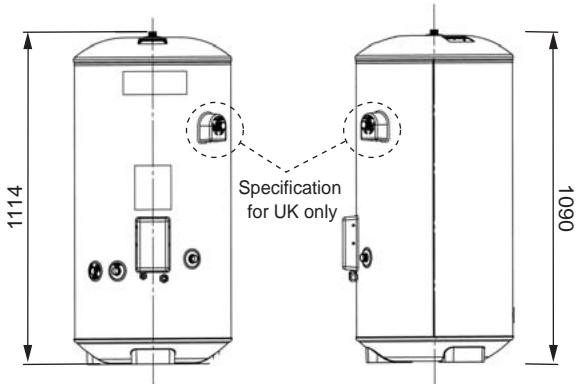
4-3. Hot water cylinder
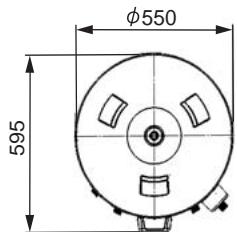
HWS-3001CSHM3-E(-UK)
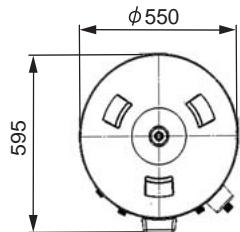
HWS-2101CSHM3-E(-UK)
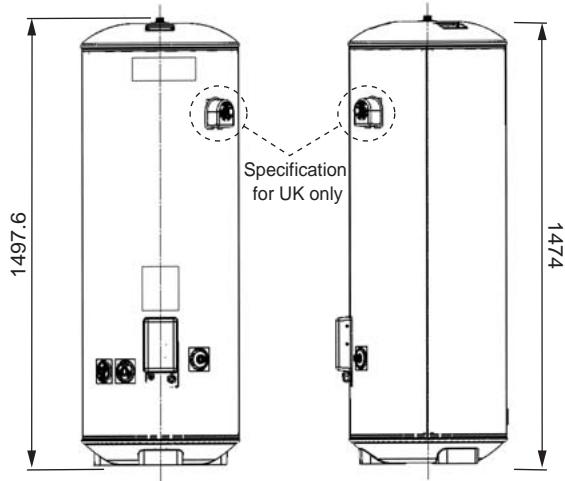
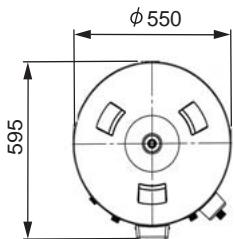
HWS-1501CSHM3-E(-UK)
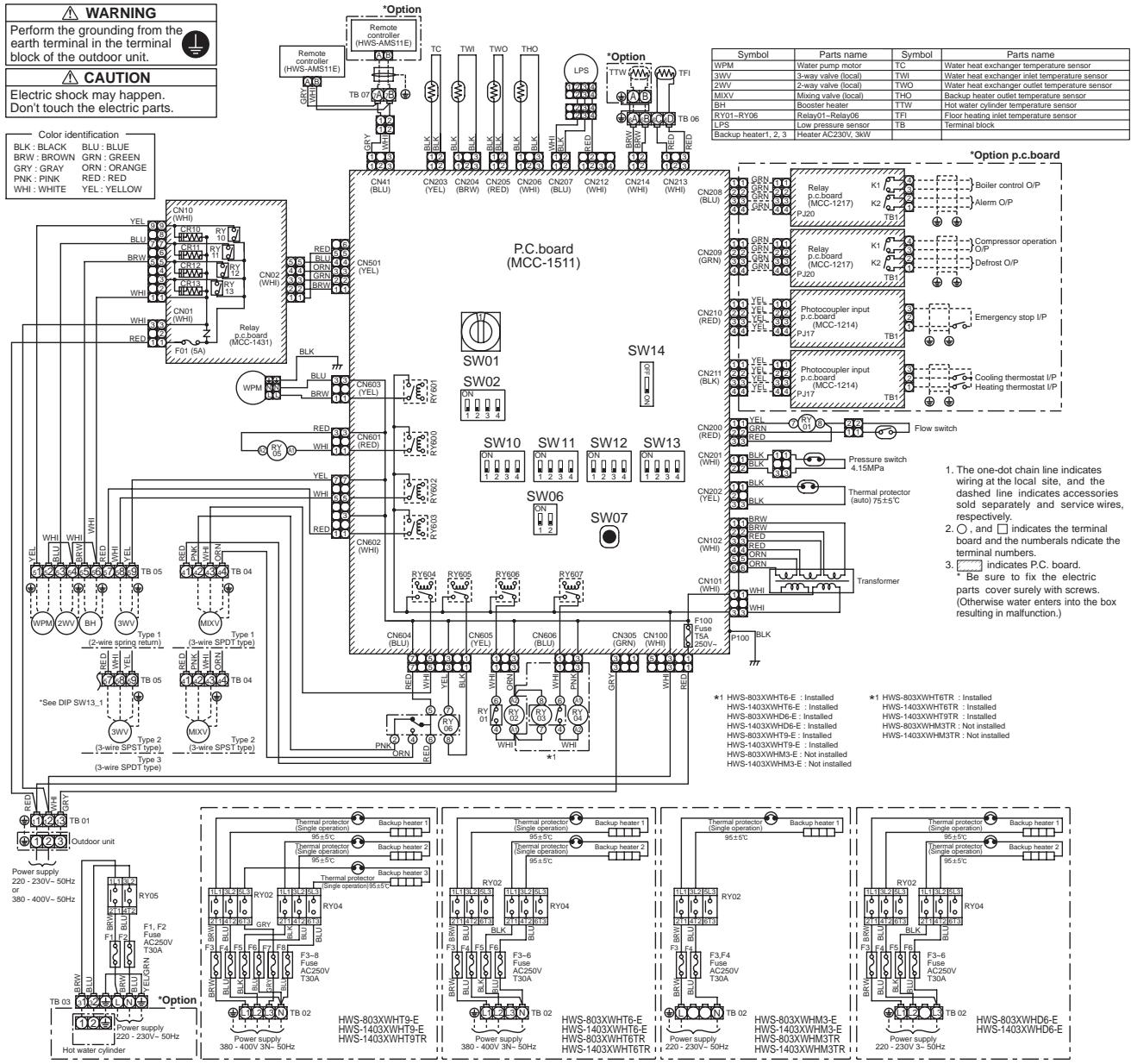
5 Wiring Diagram
5-1. Hydro Unit
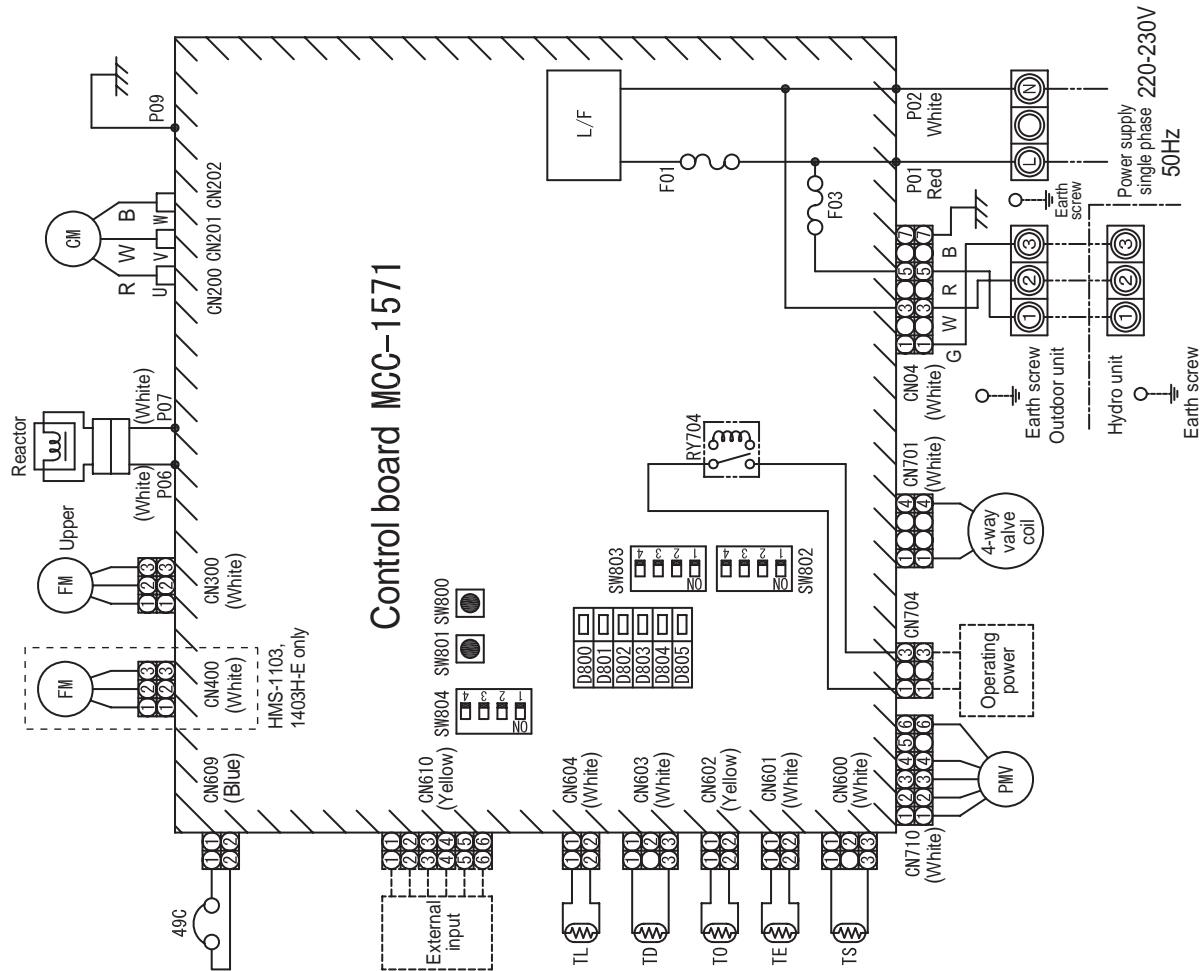
5-2. Outdoor Unit (Single phase Type)
HWS-803H-E, HWS-1103H-E, HWS-1403H-E
| Symbol | Item name |
| CM | Compressor |
| FM | Fan motor |
| PMV | Pulse motor valve coil |
| TD | Discharge temperature sonor |
| TS | Suction temperature sensor |
| TE | Heat exchange sensor 1 |
| TL | Heat exchange sensor 2 |
| TO | Outdoor temperature sensor |
| 4F | Linetilter |
| 20SF | 4-way valve coil |
| 49C | Compressor case thermostat |
| F01 | Fuse 25 A, 250 VAC |
| F03 | Fuse 10A, 250 VAC |
- © indicates a terminal plate. The number inside indicates the terminal number.
- The double-dashed line indicates a local wiring while the dashed line indicates
an optional accessory or service wiring.
-
indicates a printed board.
-
For the hydro unit circuit, see the hydro unit wiring diagram.
5-3. Outdoor Unit (3 phase type)
HWS-1103H8(R)-E, -1403H8(R)-E, -1603H8(R)-E
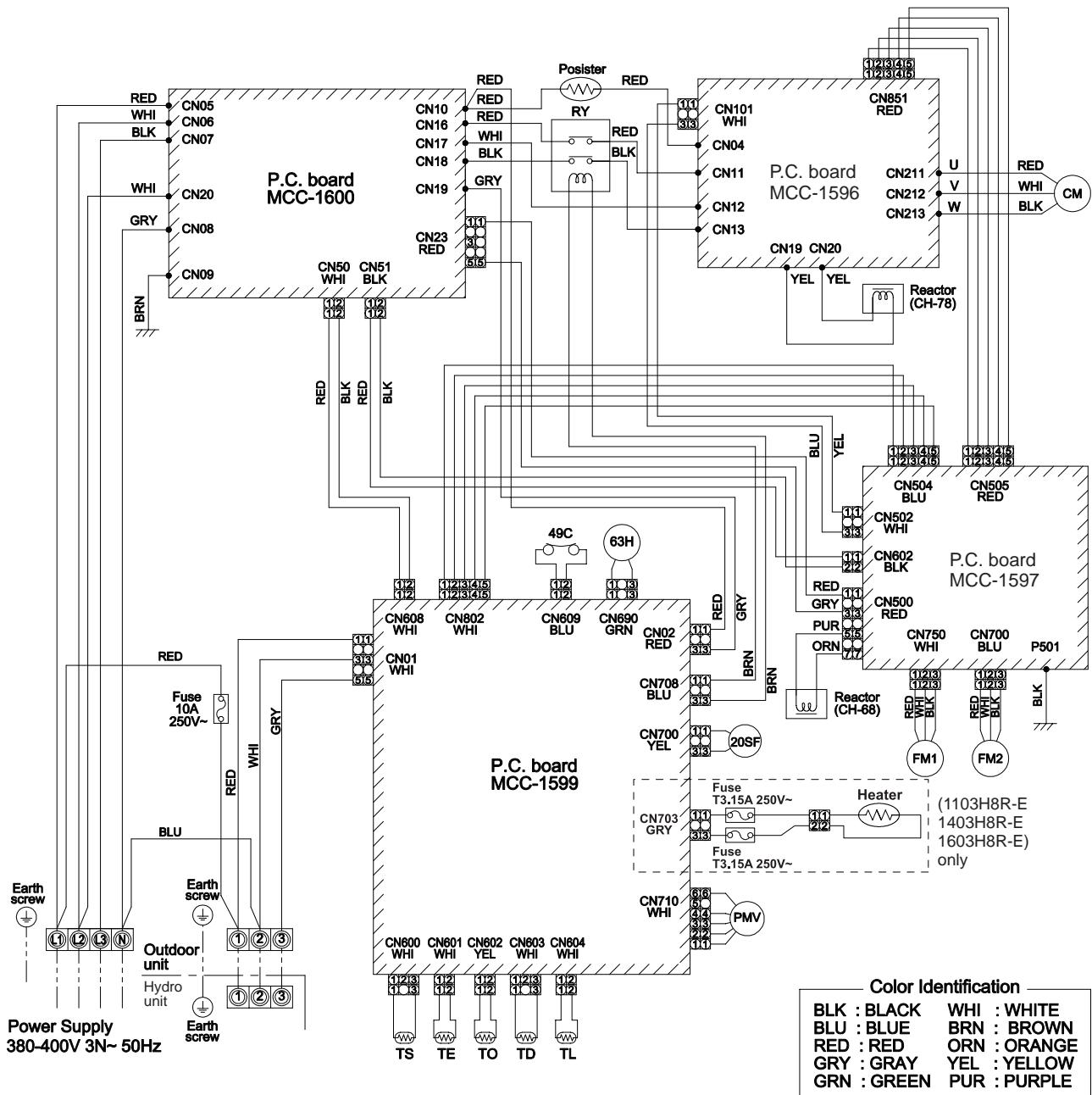
| Symbol | Part name |
| CM | Compressor |
| FM1,2 | Fan motor |
| PMV | Pulse motor valve |
| TD | Pipe temperature sensor (Discharge) |
| TS | Pipe temperature sensor (Suction) |
| TE | Heat exchanger sensor 1 |
| TL | Heat exchanger sensor 2 |
| TO | Outside temperature sensor |
| 20SF | 4-way valve coil |
| 49C | Compressor case thermostat |
| 63H | High-pressure switch |
| RY | Relay |
- indicates the terminal block. Alphanumeric characters in the cycle indicate terminal No.
- The two-dot chain line indicates the wiring procured locally.
- indicates the P.C. board.
4.For the hydro unit circuit, refer to the wiring diagram of the indoor unit.
5-4. Hot Water Cylinder Unit
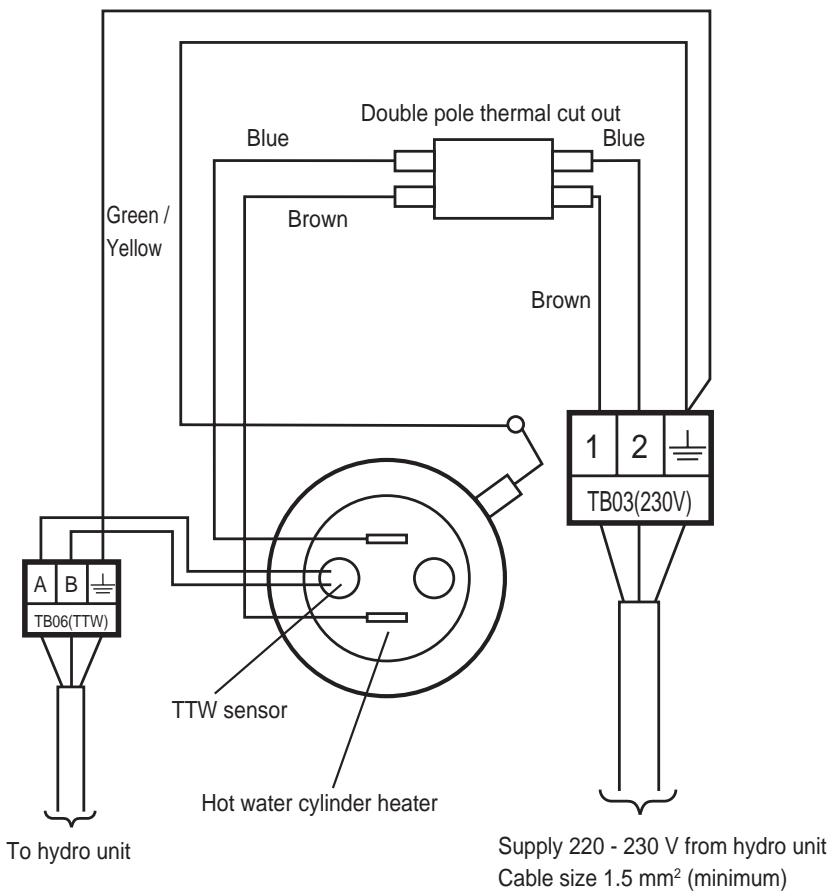
6 Key Electric Component Rating
6-1. Hydro Unit
HWS-803XWHM3-E, T6-E, D6-E, T9-E
| No. | Component name | Model name | Type name | Rating | |||
| M3-E | T6-E | D6-E | T9-E | ||||
| 1 | Circulating pump | O | O | O | O | UPS025-65 K 130 | AC230 V 0.54 A (MAX) |
| 2 | Backup heater 6 kW | O | O | O | - | AC 400 V (3N) 6 kW (AC230 V 3 kW compatible) | |
| 3 | Backup heater 9 kW | O | - | AC400V (3N) 9 kW | |||
| 4 | Water heat exchange temperature sensor (TC sensor) | O | O | O | O | - | 10 kΩ (25°C) |
| 5 | Water inlet temperature sensor (TWI sensor) | O | O | O | O | - | 10 kΩ (25°C) |
| 6 | Water outlet temperature sensor (TWO sensor) | O | O | O | O | - | 10 kΩ (25°C) |
| 7 | Heater outlet water temperature sensor (THO sensor) | O | O | O | O | - | 10 kΩ (25°C) |
| 8 | Floor inlet temperature sensor (TFI sensor) | O | O | O | O | - | 10 kΩ (25°C) |
| 9 | Pressure switch | O | O | O | O | - | Operating pressure 4.15 MPa +0 -0.3 MPa |
| 10 | Low pressure sensor | O | O | O | O | - | Operating pressure 0.20 MPa |
| 11 | Bimetal thermostat (auto) | O | O | O | O | - | Operating temperature 75±3°C DC42 V / 0.2 A |
| 12 | Bimetal thermostat (single operation) | O | O | O | O | - | Operating temperature 95±5°C AC250 V / 16 A |
| 13 | Flow switch | O | O | O | O | - | Operating flowing quantity 13 ℓ/min |
| 14 | Output board (OP) | OP | OP | OP | OP | TCB-PCIN3E | AC230 V 0.5 A DC24 V 1 A |
| 15 | Input board (OP) | OP | OP | OP | OP | TCB-PCM03E | Contact input |
| 16 | Remote control (Main) | O | O | O | O | HWS-AMS11E | |
| 17 | Remote control (Sub) | OP | OP | OP | OP | HWS-AMS11E | |
| 18 | Water 3-way valve terminal | O | O | O | O | - | AC230 V 0.1 A 2Wire, 3Wire SPST, SPDT type mountable |
| 19 | Water 2-way valve terminal | O | O | O | O | - | AC230 V 0.1 A 2Wire type mountable |
| 20 | Mixing valve terminal | O | O | O | O | - | AC230 V 0.1 A 3Wire SPST, SPDT type mountable |
| 21 | Circulating pump terminal | O | O | O | O | - | AC230 V 1.0 A |
| 22 | Booster heater terminal | O | O | O | O | - | AC230 V 1.0 A |
| 23 | Fuse | O | O | O | O | - | AC 250 V 30 A |
O……Applied
OP……Optional accessory
HWS-1403XWHM3-E, T6-E, D6-E, T9-E
| No. | Component name | Model name | Type name | Rating | |||
| M3-E | T6-E | D6-E | T9-E | ||||
| 1 | Circulating pump | O | O | O | O | UPS25-80 130 | AC230 V 0.83 A (MAX) |
| 2 | Backup heater 6 kW | O | O | O | - | AC 400 V (3N) 6 kW (AC230 V 3kW compatible) | |
| 3 | Backup heater 9 kW | O | - | AC 400 V (3N) 9 kW | |||
| 4 | Water heat exchange temperature sensor (TC sensor) | O | O | O | O | - | 10 kΩ (25°C) |
| 5 | Water inlet temperature sensor (TWI sensor) | O | O | O | O | - | 10 kΩ (25°C) |
| 6 | Water outlet temperature sensor (TWO sensor) | O | O | O | O | - | 10 kΩ (25°C) |
| 7 | Heater outlet water temperature sensor (THO sensor) | O | O | O | O | - | 10 kΩ (25°C) |
| 8 | Floor inlet temperature sensor (TFI sensor) | O | O | O | O | - | 10 kΩ (25°C) |
| 9 | Pressure switch | O | O | O | O | - | Operating pressure 4.15 MPa +0 -0.3 MPa |
| 10 | Low pressure sensor | O | O | O | O | - | Operating pressure 0.20 MPa |
| 11 | Thermal protector (auto) | O | O | O | O | - | Operating temperature 75±3°C DC42 V / 0.2 A |
| 12 | Thermal protector (single operation) | O | O | O | O | - | Operating temperature 95±5°C AC250 V 16 A |
| 13 | Flow switch | O | O | O | O | - | Operating flowing quantity 17.5 L/min |
| 14 | Output board (OP) | OP | OP | OP | OP | TCB-PCIN3E | AC230 V 0.5 A DC24 V 1 A |
| 15 | Input board (OP) | OP | OP | OP | OP | TCB-PCM03E | Contact input |
| 16 | Remote control (Main) | O | O | O | O | HWS-AMS11E | |
| 17 | Remote control (Sub) | OP | OP | OP | OP | HWS-AMS11E | |
| 18 | Water 3-way valve terminal | O | O | O | O | - | AC230 V 0.1 A 2Wire, 3Wire SPST, SPDT type mountable |
| 19 | Water 2-way valve terminal | O | O | O | O | - | AC230 V 0.1 A 2Wire type mountable |
| 20 | Mixing valve terminal | O | O | O | O | - | AC230 V 0.1 A 3Wire SPST, SPDT type mountable |
| 21 | Circulating pump terminal | O | O | O | O | - | AC230 V 1.0 A |
| 22 | Booster heater terminal | O | O | O | O | - | AC230 V 1.0 A |
| 23 | Fuse | O | O | O | O | - | AC 250 V 30 A |
O……Applied
OP……Optional accessory
6-2. Outdoor Unit
HWS-803H-E
| No. | Component name | Type name | Rating |
| 1 | Compressor | DA220A2F-22L | |
| 2 | Outdoor fan motor | ICF-280-A60-1 | Output 60 W |
| 3 | 4-way valve coil | VHV-01AP552B1 | AC220 - 230 full-wave rectifier input, alive time 10 sec or less |
| 4 | Pulse motor valve (PMV) coil | CAM-MD12TF-15 | DC12 V |
| 5 | Compressor case thermostat | US-622KXTMQO-SS | OFF: 125±4°C ON: 90±5°C |
| 6 | Reactor | CH-56 | 5.8 mH, 18.5 A |
| 7 | PC board | MCC-1571 | Input 1Ø, AC220 - 230 V ± 10 %, 50/60 Hz |
HWS-1103H-E, 1403H-E
| No. | Component name | Type name | Rating |
| 1 | Compressor | DA422A3F-25M | |
| 2 | Outdoor fan motor (x2) | ICF-280-A100-1 | Output 100 W |
| 3 | Reactor (x2) | CH-44 | 1.4 mH, 25 A |
| 4 | 4-way valve coil | AC220 - 230 V full-wave rectifier input, alive time 10 sec or less | |
| 5 | Pulse motor valve (PMV) coil | UKV-A038 | DC12 V |
| 6 | Board | MCC-1560 | Input 3Ø, AC230 V±23 V, 50/60 Hz |
| 7 | Compressor case thermostat | US-622KXTMQO-SS | OFF = 125 ± 4 °C, ON = 90 ± 5 °C |
| 8 | PC board | MCC-1571 | Input 1Ø, AC220 - 230 V ± 10 %, 50/60 Hz |
HWS-1103H8(R)-E, 1403H8(R)-E, 1603H8(R)-E
| No. | Component name | Type name | Rating |
| 1 | Compressor | DA422A3F-27M | |
| 2 | Outdoor fan motor (x2) | ICF-280-A100-1 | Output 100 W |
| 3 | Reactor | CH-78 | 4.2 mH, 16 A |
| 4 | Reactor | CH-68 | 18 mH, 5 A |
| 5 | 4-way valve coil | STF-01A5502E1 | AC220 - 230 V |
| 6 | Pulse motor valve (PMV) coil | UKV-A038 | DC12 V |
| 7 | PC board (Compressor) | MCC-1596 | |
| 8 | PC board (Fan motor drive) | MCC-1597 | |
| 9 | PC board (Control) | MCC-1599 | |
| 10 | PC board (Noise filter) | MCC-1600 | |
| 11 | High pressure switch | ACB-4UB83W | OFF = 4.15 +0, -0.3 Mpa |
| 12 | Compressor case thermostat | US-622 | OFF = 125 ± 4 °C, ON = 90 ± 5 °C |
| 13 | Relay | EL200/240 A2-F() | Contact = AC480V, 20 A |
6-3. Hot Water Cylinder Unit
| No. | Component name | Model name | Type name | Rating | ||
| 1501 CSH M3-E (-UK) | 2101 CSH M3-E (-UK) | 3001 CSH M3-E (-UK) | ||||
| 1 | Hot water cylinder heater | O | O | O | - | AC230 V 2.75 KW |
| 2 | Hot water cylinder temperature sensor (TTW sensor) | O | O | O | - | 10 kΩ (25°C) |
| 3 | Thermal cut-out | O | O | O | - | Operating temperature Manual reset 82°C (+3k/-2k) |
O……Applied
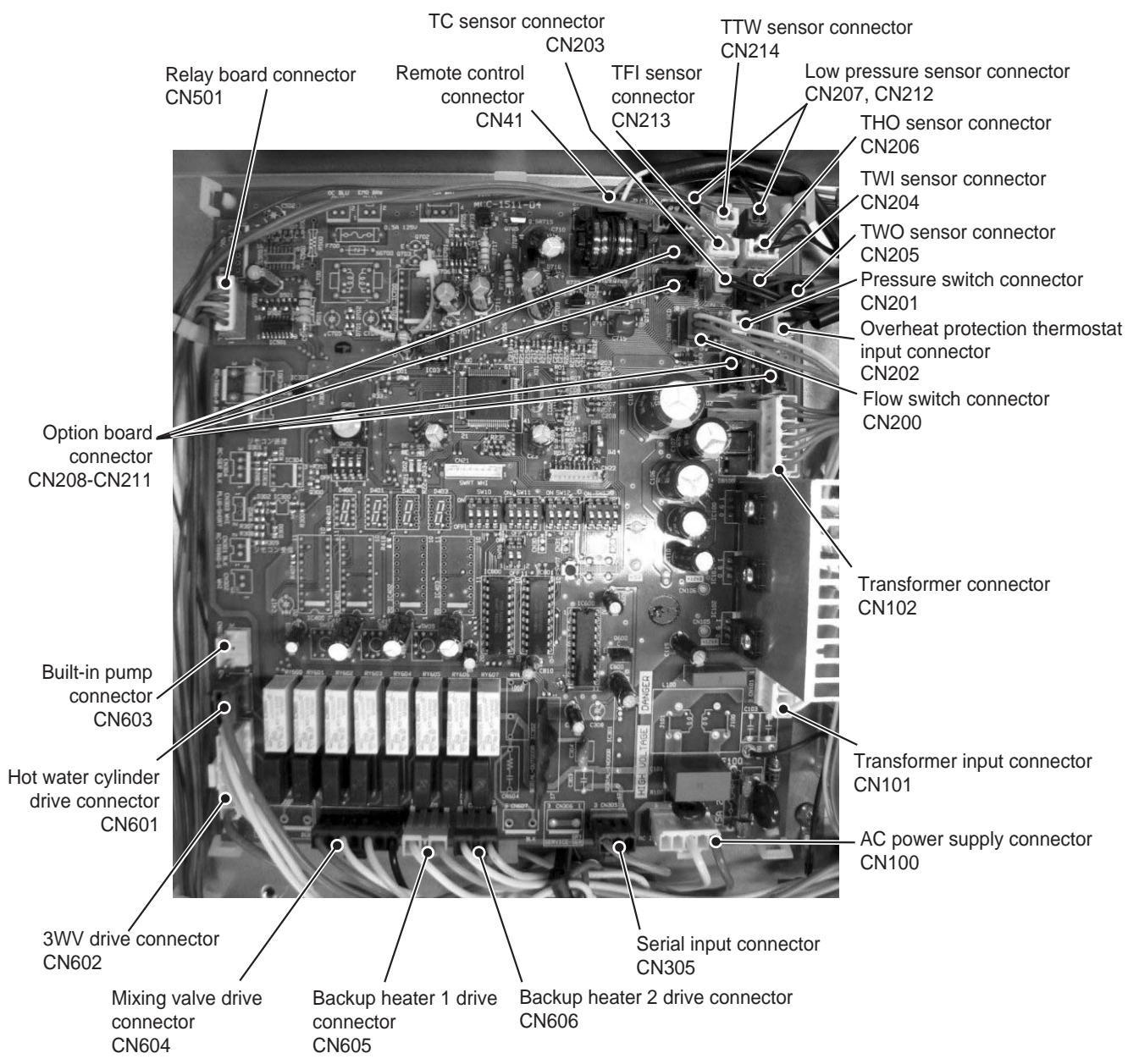
6-4. Water Heat Exchange Control Board
HWS-803XWHM3-E, 803XWHT6-E, 803XWHD6-E, 803XWHT9-E
HWS-1403XWHM3-E, 1403XWHT6-E, 1403XWHD6-E, 1403XWHT9-E
6-5. Outdoor Control Board (Single phase Type)
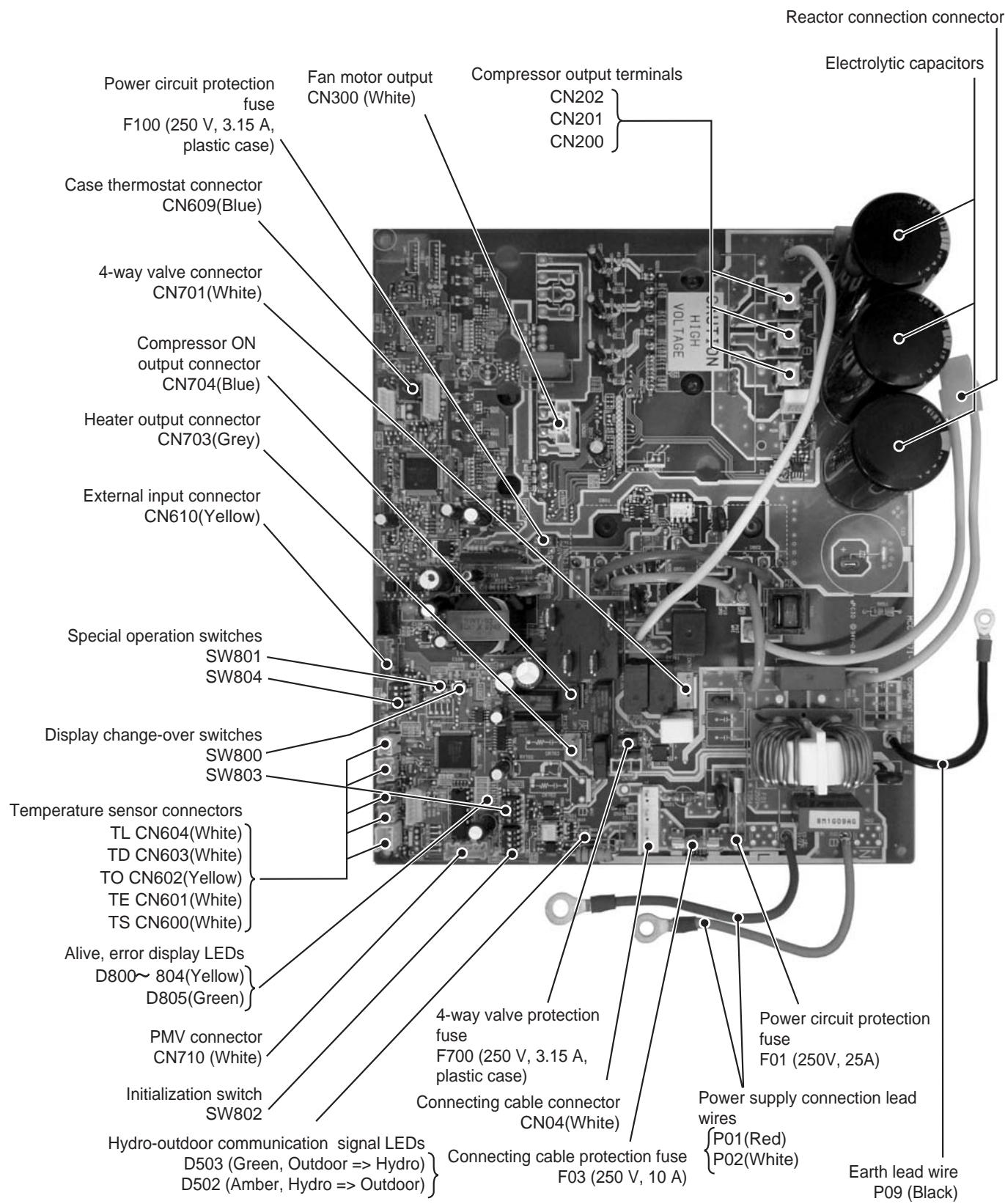
HWS-803H-E
HWS-1103H-E, 1403H-E
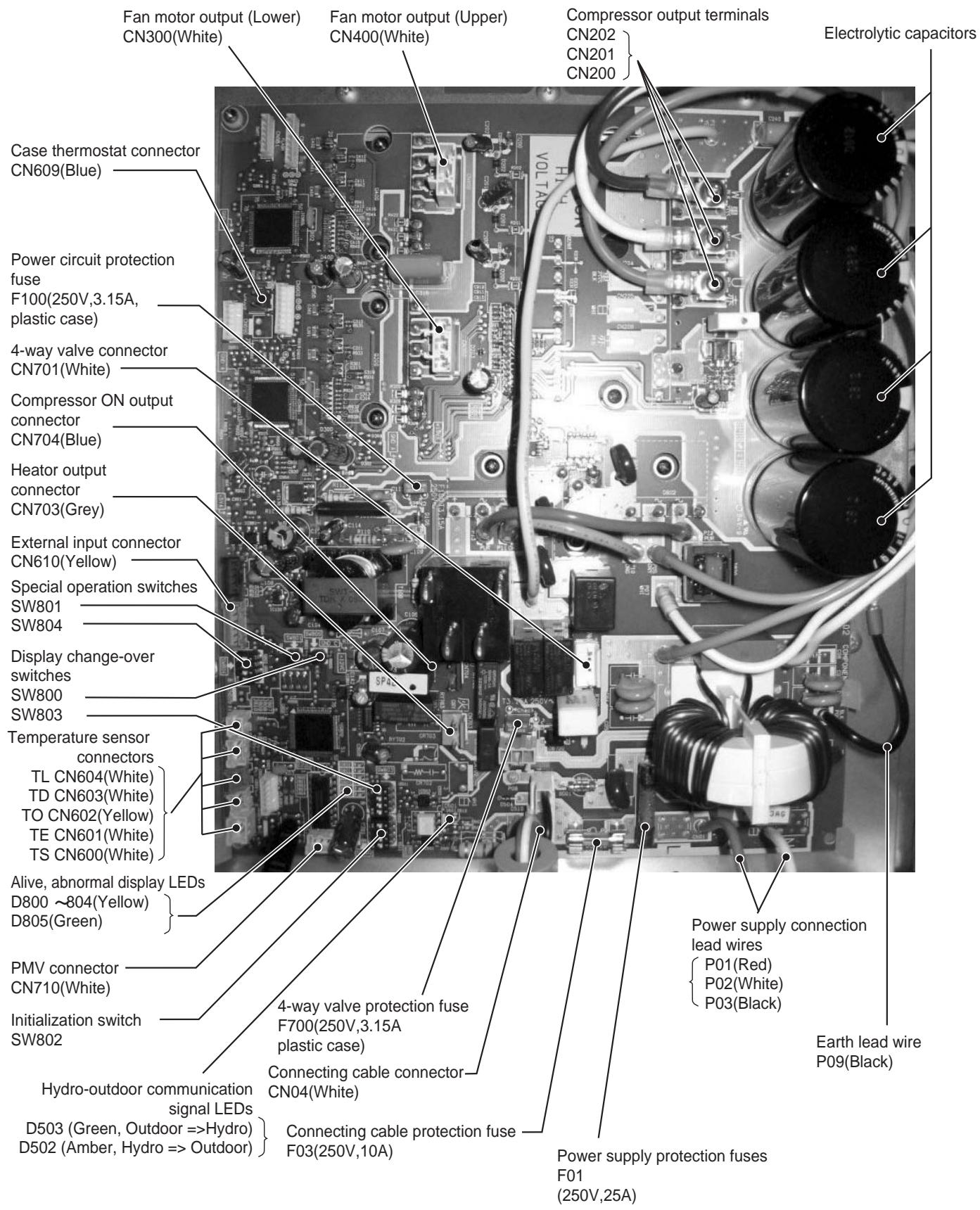
6-6. Outdoor Unit Control (3 phase type)
HWS-1103H8(R)-E, 1403H8(R)-E, 1603H8(R)-E
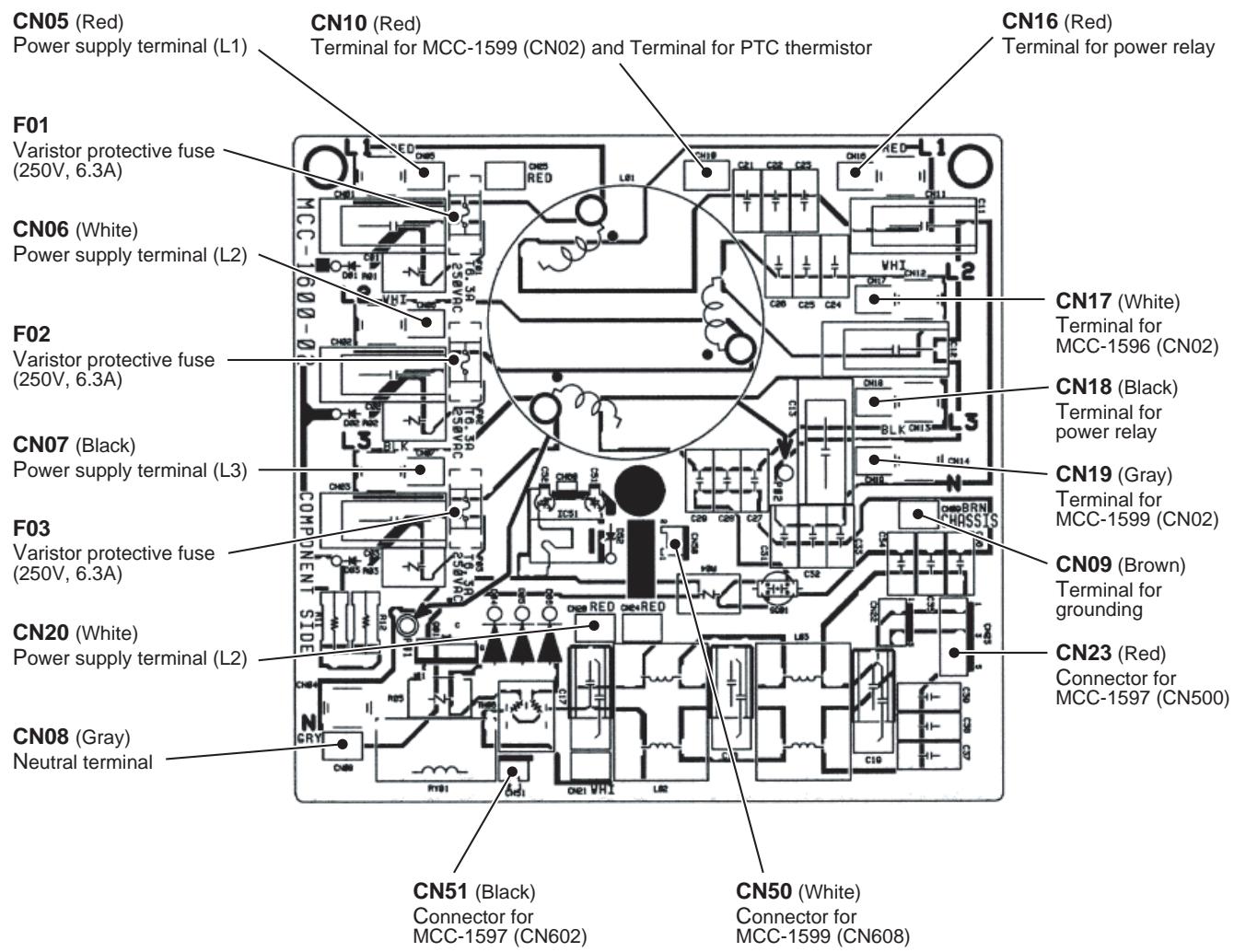
MCC-1596 (Compressor IPDU)
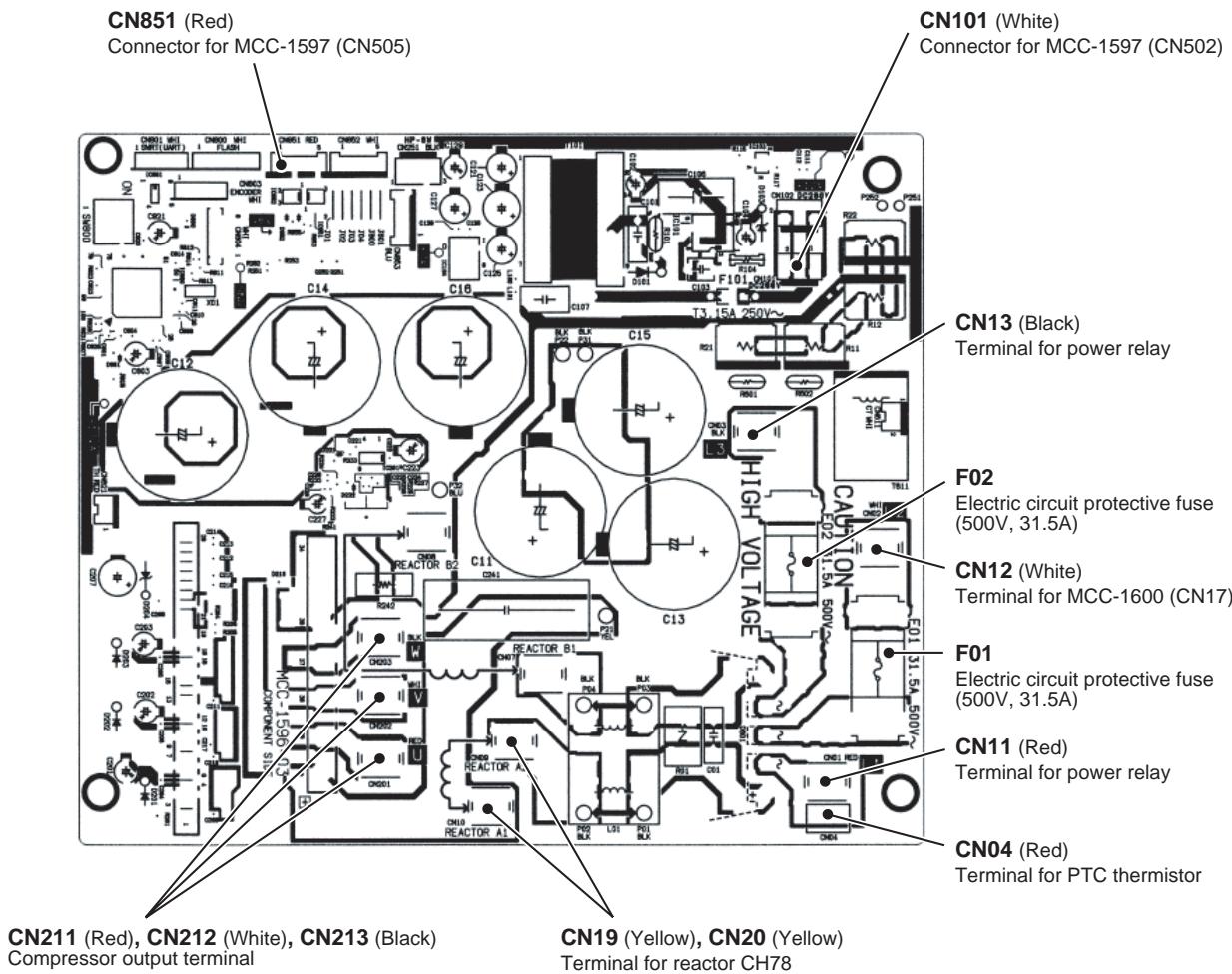
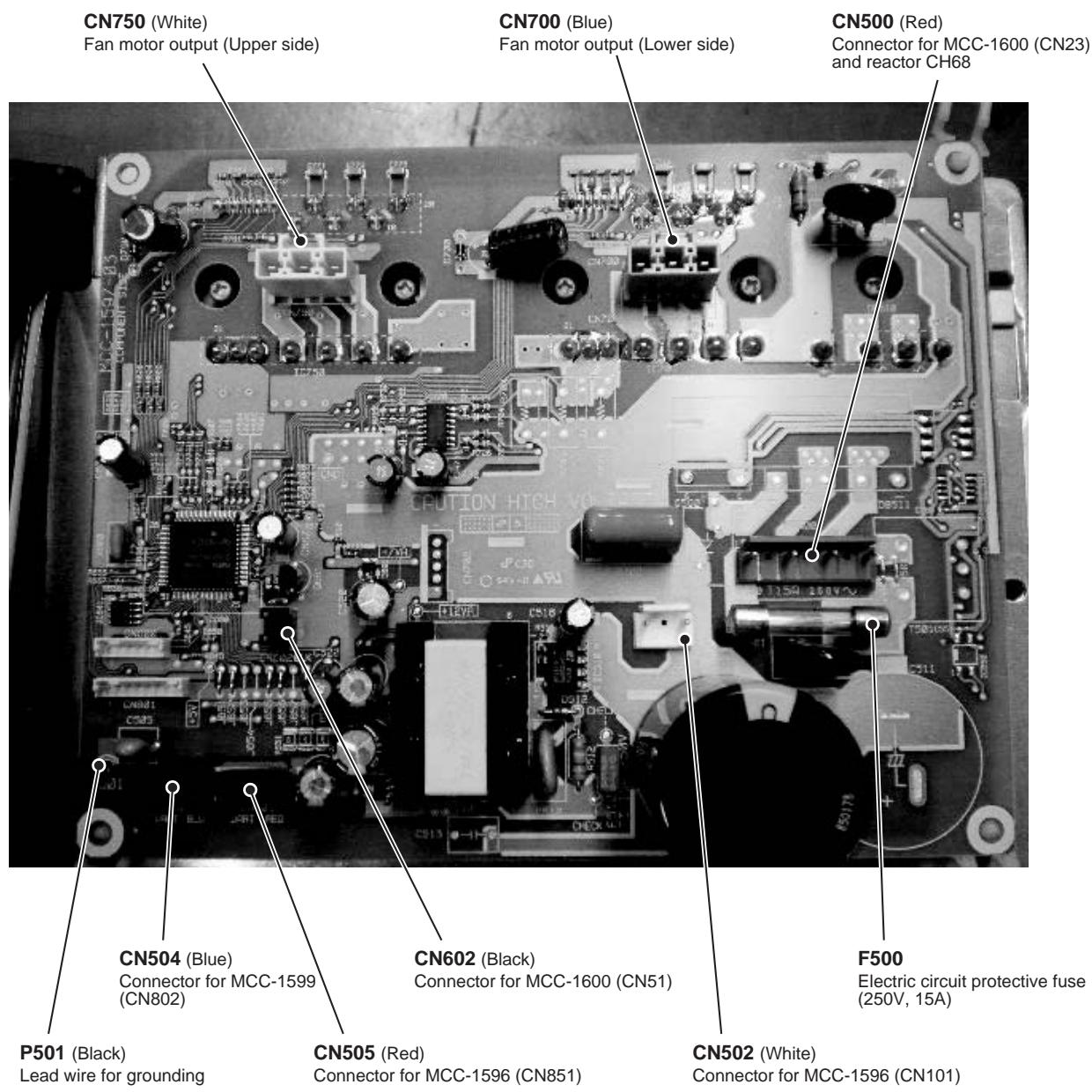
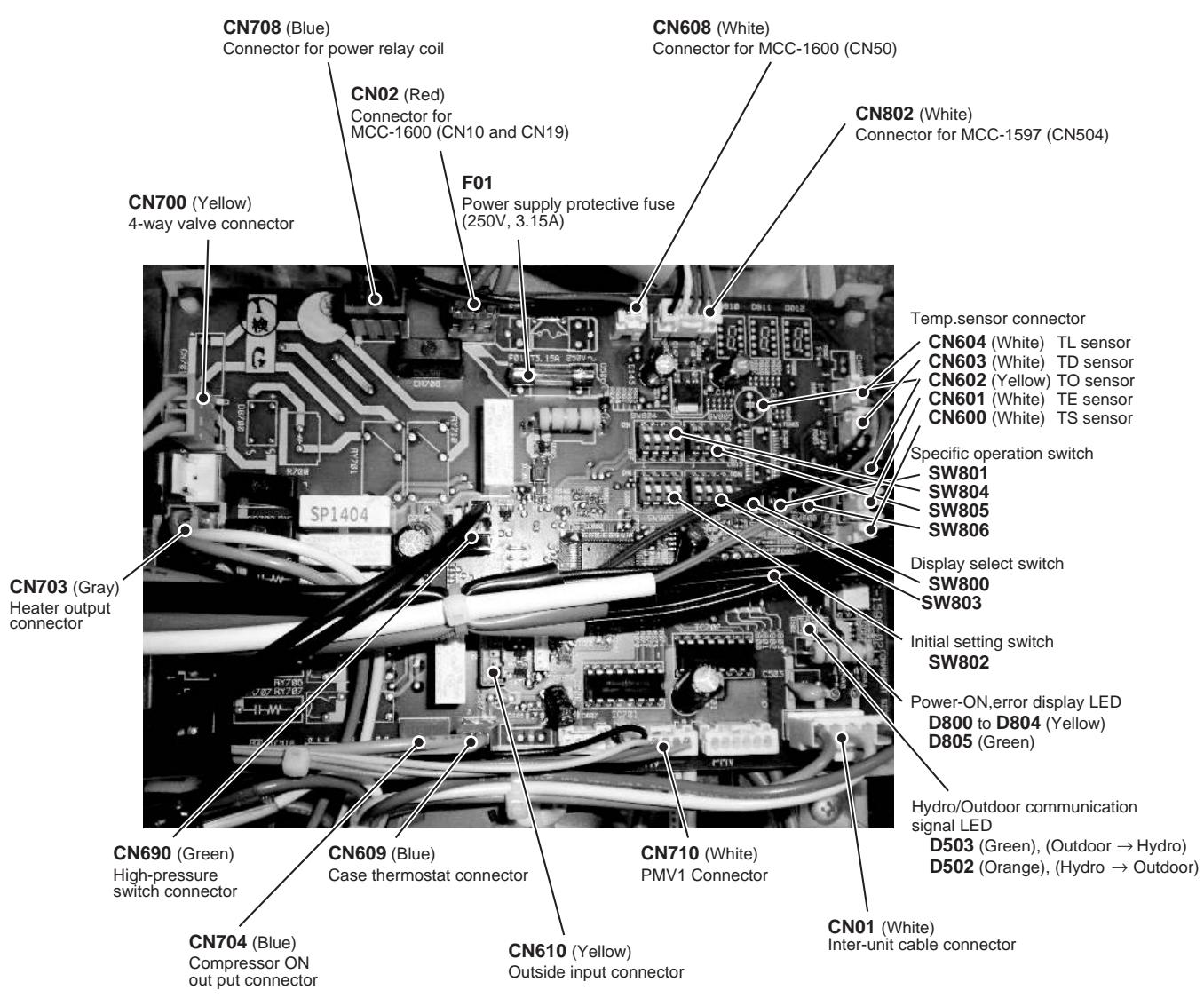
7 Refrigeration Cycle / Water System Diagram
7-1. Water System Diagram
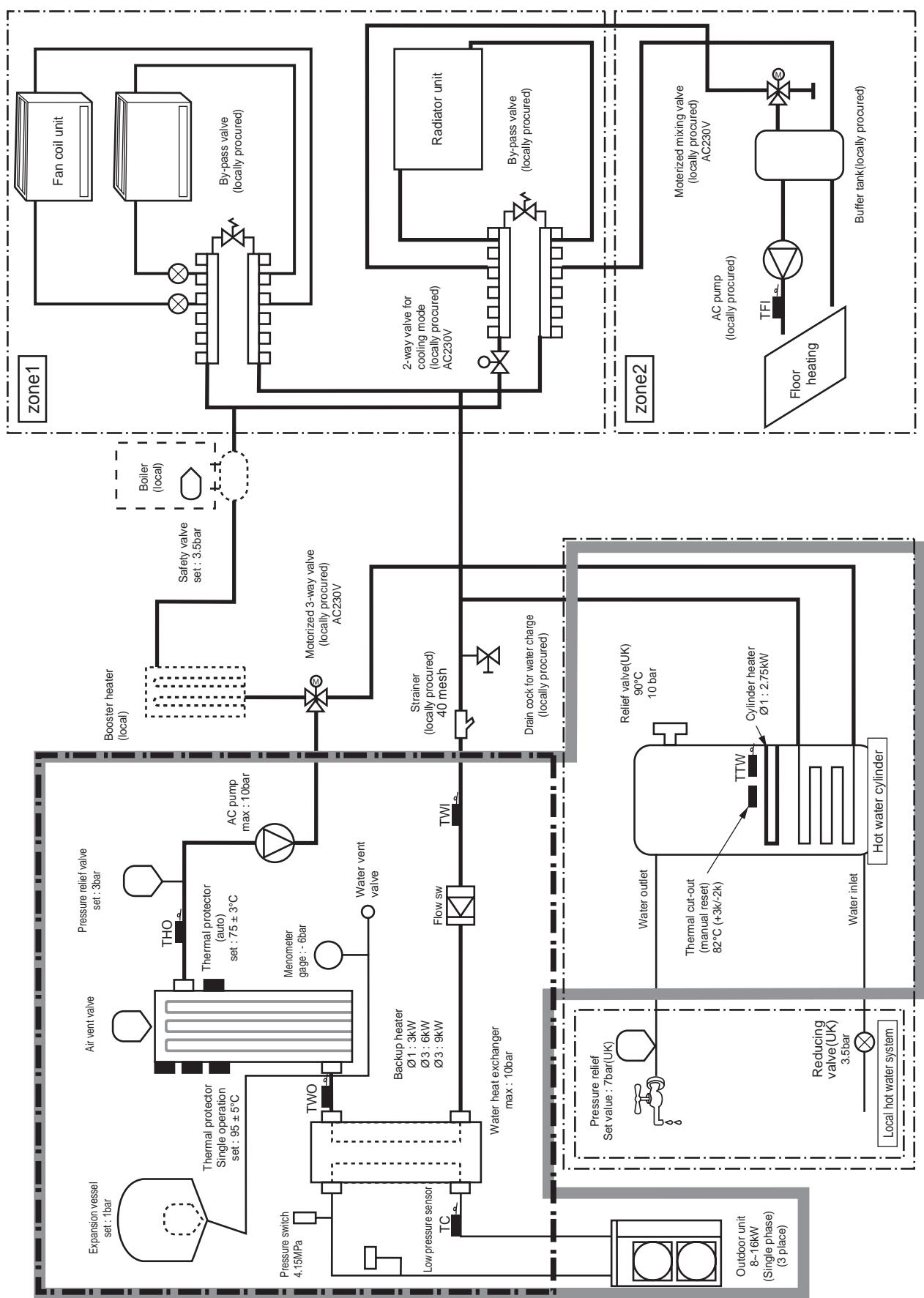
Installation example of water circuit
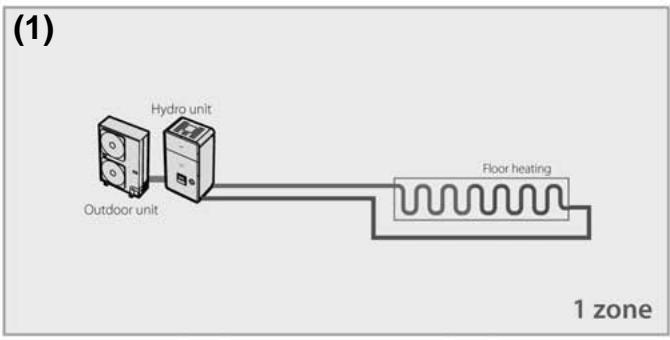
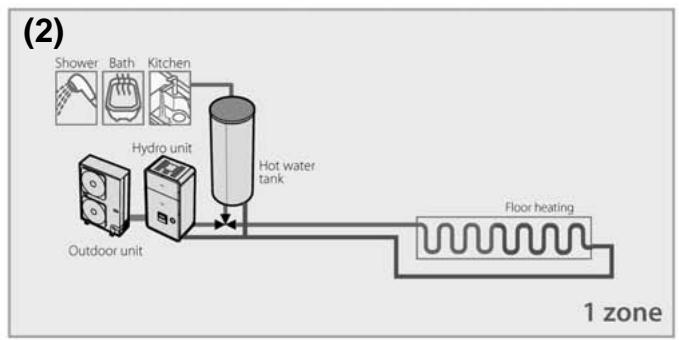
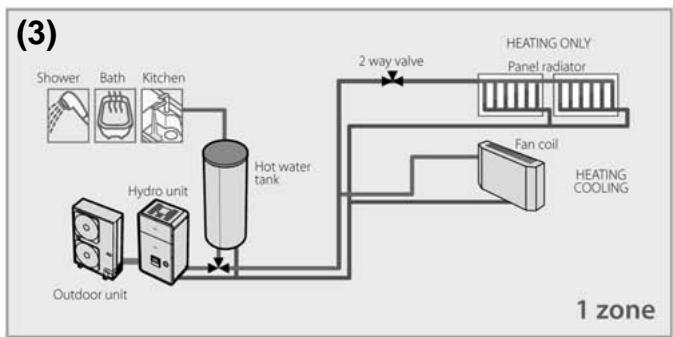
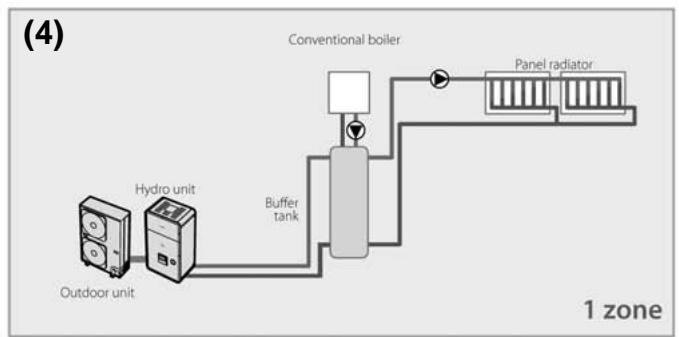
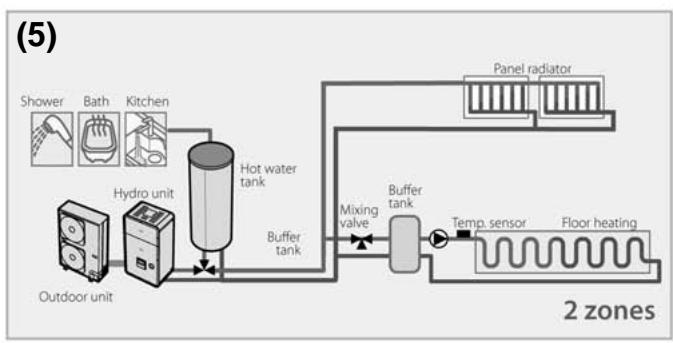
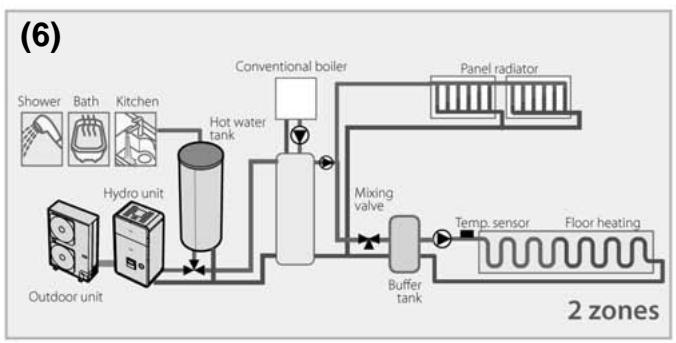
The water flowing for a system without buffer tank ((1), (2), (3), (5)) requires 17.5/ (803XWH 13.0 / ) or more. This water flowing requires 5 or more branches of Floor heating or Radiator etc.
Less than 5 branches may cause a flow deficiency. In this case, please provide a buffer tank and secondary pumps as shown in (4).
Please check how to install the boiler (See page 52)
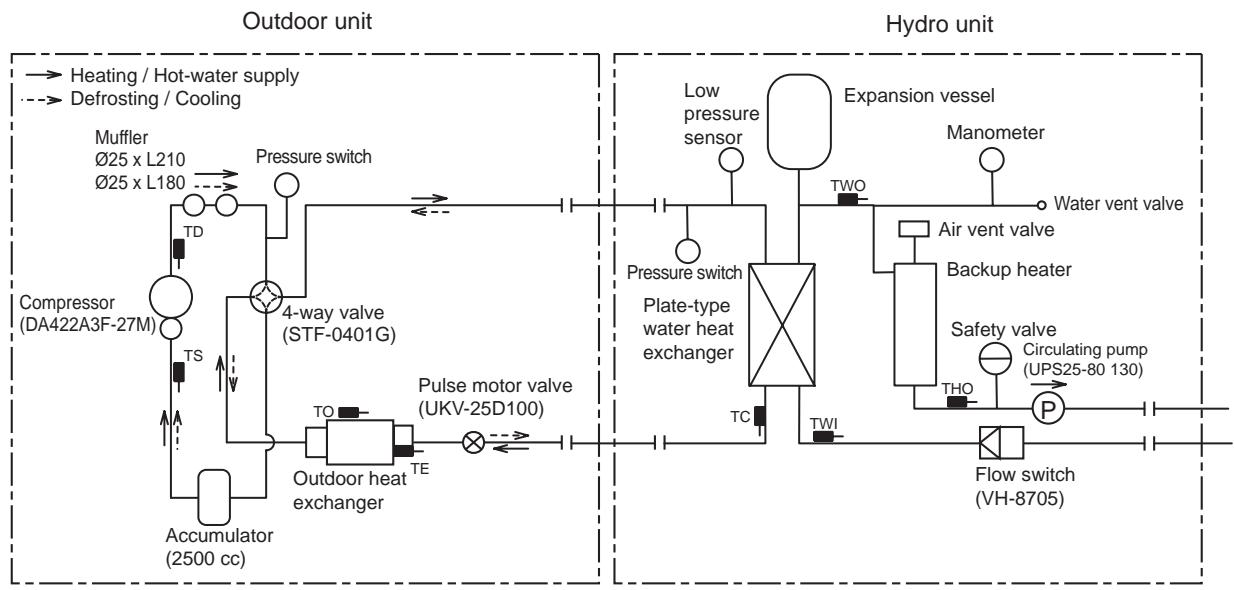
7-2. Refrigeration Cycle System Diagram
HWS-803XWHM3-E, HWS-803XWHT6-E, HWS-803XWHD6-E, HWS-803XWHT9-E/HWS-803H-E
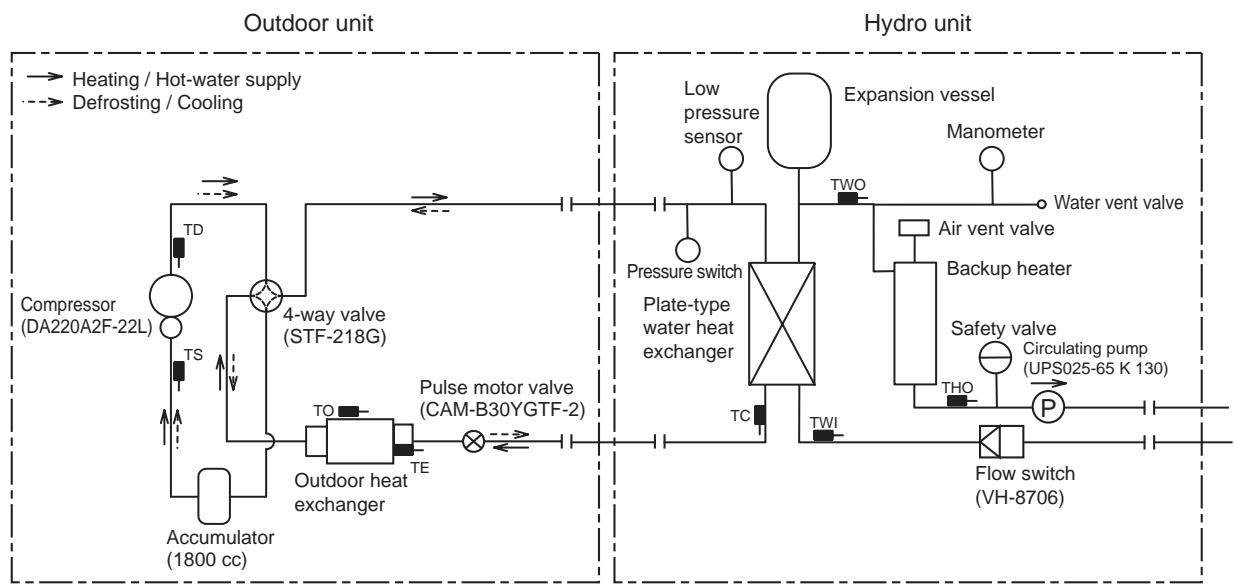
HWS-1403XWHM3-E, HWS-1403XWHT6-E, HWS-1403XWHD6-E, HWS-1403XWHT9-E/ HWS-1103H-E, HWS-1403H-E
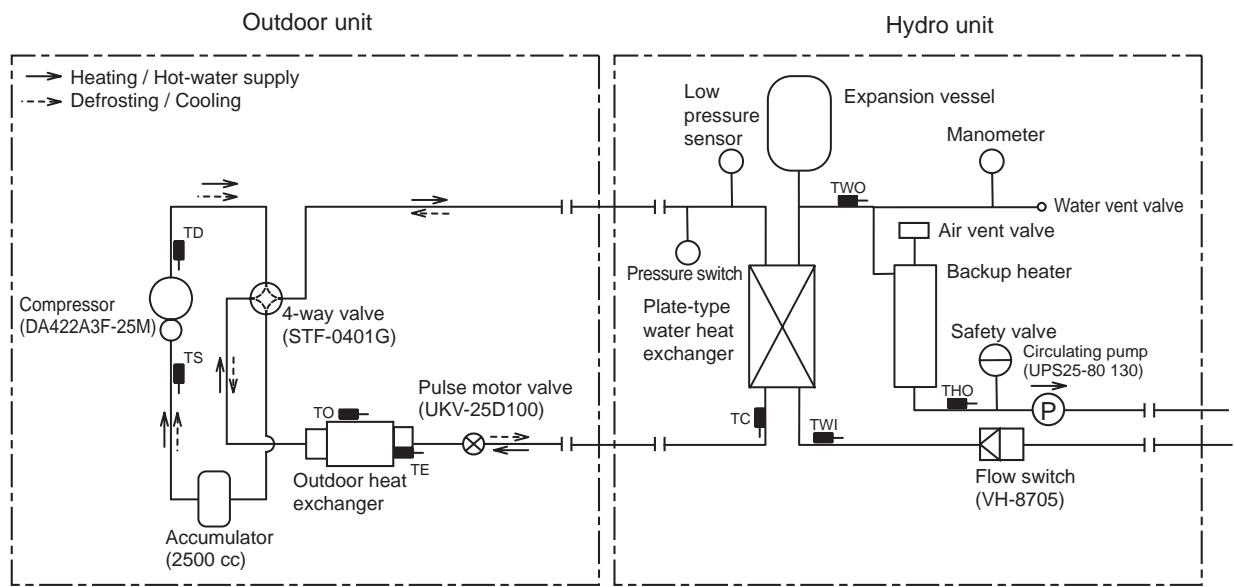
HWS-1403XWHM3-E, HWS-1403XWHT6-E, HWS-1403XWHD6-E, HWS-1403XWHT9-E/ HWS-1103H8(R)-E, HWS-1403H8(R)-E, HWS-1603H8(R)-E
8 Operational Description
This chapter describes the working circuit and control of Air to Water Heat Pump about the following operations.
| Item | Page | |||
| 8-1 | 8-1. Basic Operation1) Operation control2) Hot water supply operation3) Heating operation4) Cooling operation | 44 to 46 | ||
| 8-2 | 8-2. Operation Mode and Control Method1) Heat pump operation range of hot water supply, heating and cooling2) Hot water supply operation3) Heating operation4) Cooling operation5) Simultaneous operations of "hot water supply" and "heating"6) Simultaneous operations of "hot water supply" and "cooling"7) Boiler control8) Hot water boost operation9) Anti bacteria (ANTI BACTERIA) operation10) Night set back (NIGHT SET BACK) operation11) FROST PROTECTION operation12) AUTO operation13) Night time low-noise operation | 47 to 57 | ||
| 8-3 | 8-3. Hydro Unit Control1) Capacity control (compressor, high-temperature release, low-temperature release)2) Heater control3) Circulation pump control4) Control by the flow switch5) Mixing Valve control (2-temperature heating control)6) Room temperature control7) Room temperature control with the thermostat8) Control of force stop and restart9) Control of limit of heat pump operation10)Output signal control 11)Output signal control 212) Q-H characteristics of hydro unit13) Automatic restart control14) Piping freeze prevention control15) High return water protect control. | 58 to 71 | ||
| 8-4 | 8-4. Outdoor unit control1) PMV (Pulse motor valve) control2) Discharge temperature release control3) Current release control4) Current releases shift control5) Outdoor fan control6) Defrosting control7) Winding heating control8) Short circuit operation prevention control9) Over current protection control10) High pressure release control11) High pressure switch12) Compressor case thermostat13) Bottom plate heater control | 72 to 80 | ||
| Item | Operation flow and applicable data, etc. | Operation description | ||
| 8-1. Basic Operation | 1) Operation control Remote controller | 1. Purpose The operations of the hydro unit and the outdoor unit are controlled according to user-defined operation condition settings. 2. Details The operation controls include those shown on the left. 3. Operations 1) An operation condition is selected with the remote controller. 2) Setting the remote controller button to "ON" transmits a signal to the hydro unit. 3) The hydro unit controller controls the operations shown on the left while also controlling the water 2-way valve, water 3-way valve, circulation pump, mixing valve, hot water cylinder heater, and backup heater. 4) The hydro unit controller transmits an operation instruction to the outdoor unit, and uses serial signals to transmit and receive control statuses. 5) The outdoor unit control unit performs the operation controls shown on the left while also controlling the compressor, outdoor fan motor, pulse motor valve, and 4-way valve. | ||
| Operation condition selection | Remote control settings <Heating> Temperature setting <Hot water supply > Temperature setting <Cooling> Temperature setting • Auto Temp • Anti Bacteria • Frost protection • Hot waterboost | |||
| Heating: Run/Stop Hot water supply: Run/Stop Cooling: Run/Stop | ||||
| Serial signals transmit and receive | ||||
| Hydro unit | AC 230 V for Hot water cylinder heater AC 400 V (3N-) for Back up heater | |||
| Serial signals transmit and receive | Water heat exchange Sub board | Thermostat (Cooling/Heating) Forcible stop input Error Alarm stop output Defrosting output Operation output Boiler "ON/OFF" Booster Heater | ||
| 2WV_W 3WV_W Hot water supply heater MG Mixing Valve Pressure switch Lo pressure sensor | Water heat exchange control board | Condensed temperature sensor (TC) Water inlet temperature sensor (TWI) Water outlet temperature sensor (TWO) Water heater outlet temperature sensor (THO) Hot water cylinder sensor (TTW) Floor inlet sensor (TFI) Overheat prevention thermostat Flow switch Hot water cylinder heater Backup heater 1 power-relay Backup heater 2 power-relay AC pump 1 (Built-in pump) | ||
| Serial signals transmit and receive | ||||
| Outdoor unit | Serial communication | AC 220 - 230 V for heat pump (Single phase type) AC 380 - 400V for heat pump (3 phase type) | ||
| Serial signals transmit and receive | Outdoor unit control • Inverter frequency control • Waveform synthesis function • Calculation function (Temperature calculation) • AD conversion function • Rapid heating function • Compressor restart • Delay function • G-Tr overcurrent prevention function • Defrosting operation function | Inverter | Compressor Outdoor fan motor | |
| Outdoor unit control | Td sensor Ts sensor Te sensor To sensor PMV 4-way valve | |||
| High pressure switch (3 phase type only) | ||||
| Item | Operation flow and applicable data, etc. | |||||||||||||||||||||||||||||||||||||||||||||||||||||||||||||||||||||||||||||||||||||||||||||||||||||||||||||||||||||||||||||||||||||||||||||||||||||||||||||||||||||||||||||||||||||||||||||||||||||||||||||||||||||||||||||||||||||||||||||||||||||||||||||||||||||||||||||||||||||||||||||||||||||||||||||||||||||||||||||||||||||||||||||||||||||||||||||||||||||||||||||||||||||||||||||||||||||||||||||||||||||||||||||||||||||||||||||||||||||||||||||||||||||||||||||||||||||||||||||||||||||||||||||||||||||||||||||||||||||||||||||||||||||||||||||||||||||||||||||||||||||||||||||||||||||||||||||||||||||||||||||||||||||||||||||||||||||||||||||||||||||||||||||||||||||||||||||||||||||||||||||||||||||||||||||||||||||||||||||||||||||||||||||||
| 8-1. Basic Operation | 2) Hot water supply operation | |||||||||||||||||||||||||||||||||||||||||||||||||||||||||||||||||||||||||||||||||||||||||||||||||||||||||||||||||||||||||||||||||||||||||||||||||||||||||||||||||||||||||||||||||||||||||||||||||||||||||||||||||||||||||||||||||||||||||||||||||||||||||||||||||||||||||||||||||||||||||||||||||||||||||||||||||||||||||||||||||||||||||||||||||||||||||||||||||||||||||||||||||||||||||||||||||||||||||||||||||||||||||||||||||||||||||||||||||||||||||||||||||||||||||||||||||||||||||||||||||||||||||||||||||||||||||||||||||||||||||||||||||||||||||||||||||||||||||||||||||||||||||||||||||||||||||||||||||||||||||||||||||||||||||||||||||||||||||||||||||||||||||||||||||||||||||||||||||||||||||||||||||||||||||||||||||||||||||||||||||||||||||||||||
| [HOT WATER] button set to "ON" | Hot water temperature: 40°C to 75°C | Hot water supply: 40°C to 75°C | Hot water supply: 40°C to 75°C | Hot water supply: 40°C to 75°C: | Hot water supply: 40°C to40°C: | Hot water supply: 40°C to 40°C: | Hot water supply: 40°C to 40°C: | |||||||||||||||||||||||||||||||||||||||||||||||||||||||||||||||||||||||||||||||||||||||||||||||||||||||||||||||||||||||||||||||||||||||||||||||||||||||||||||||||||||||||||||||||||||||||||||||||||||||||||||||||||||||||||||||||||||||||||||||||||||||||||||||||||||||||||||||||||||||||||||||||||||||||||||||||||||||||||||||||||||||||||||||||||||||||||||||||||||||||||||||||||||||||||||||||||||||||||||||||||||||||||||||||||||||||||||||||||||||||||||||||||||||||||||||||||||||||||||||||||||||||||||||||||||||||||||||||||||||||||||||||||||||||||||||||||||||||||||||||||||||||||||||||||||||||||||||||||||||||||||||||||||||||||||||||||||||||||||||||||||||||||||||||||||||||||||||||||||||||||||||||||||||||||||||||||||||||||||||||||||||||
| Hydro unit control | Circulation pump "ON/OFF" control Water 3-way valve control Number of outdoor fan motor revolutions control Pulse motor valve control 4-way valve control | Number of compressor revolutions control Number of outdoor fan motor revolutions control Pulse motor valve control 4-way valve control | Number of compressor revolutions control Number of outdoor fan motor revolutions control Pulse motor valve control 4-way valve control | Number of compressor revolutions control Number of outdoor fan motor revolutions control Pulse motor valve control 4-way valve control | Number of compressor revolutions control Number of outdoor fan motor revolutions control Pulse motor valve control 4-way valve control | Number of compressor revolution controls Number of outdoor fan motor revolutions control Pulse motor valve control 4-way valve control | Number of compressor revolution controls Number of outdoor fan motor revolutions control Pulse motor valve control 4-way valve control | Number of compressor revolution controls Number of outdoor fan motor revolutions control Pulse motor valve control 4-way valve control | Number of compressor revolution controls Number of outdoor fan motor revolutions control Pulse motor valve control 4-way valve control | Number of compressor revolution controlled Number of outdoor fan motor revolutions control Pulse motor valve control 4-way valve control | Number of compressor revolution controlled Number of outdoor fan motor revolutions control Pulse motor valve control 4-way valve control | Number of compressor revolution controlled Number of outdoor fan motor revolutions control Pulse motor valve control 4-way valve control | Number of compressor revolution controlled Number of outdoor fan motor revolutions control Pulse motor valve control 4-way valve control | Number of compressor revolution controls Number of outdoor fan motor revolutions control Pulse motor valve control 4-way valve control | Number of compressor revolution controlled Number of outdoor fan motor revolutions control Pulse motor valve control 4-way valve control | Number of compressor revolution controlled Number of outdoor fan motor revolutions control Pulse motor valve control 4-way valve control | Number of compressor revolution control Number of outdoor fan motor revolutions control Pulse motor valve control 4-way valve control | Number of compressor revolution controlled Number of outdoor fan motor revolutions control Pulse motor valve control 4-way valve control | Number of compressor revolution controlled Number of outdoor fan motor revolutions control Pulse motor valve control 4-way valve control | Number of compressor revolution controlled Number of outdoor fan motor revolutions control Pulse motor valve control 4-way valve control | Number of compressor revolution control Number of outdoor fan motor revolutions control Pulse motor valve control 4-way valve control | Number of compressor revolution control Number of outdoor fan motor revolutions control Pulse motor valve control 4-way valve control | Number of compressor revolution control Number of outdoor fan motor revolutions control Pulse motor valve control 4-way valve control | Number of compressor revolution control Number of outdoor fan motor revolutions control Pulse motor valve control 4-way valve control | Number of compressor revolution controlled Number of outdoor fan motor revolutions control Pulse motor valve control 4-way valve control | Number of compressor revolution control Number of outdoor fan motor revolutions control Pulse motor valve control 4-way valve control | Number of compressor revolution control Number of outdoor fan motor revolutions control Pulse motor valve control 4-way valve control | Number of compressor revolution controlled Number of outdoor fan motor revolutions control Pulse motor valve control 4-way valve control | Number of compressor revolution controlled Number of outdoor fan motor revolutions control Pulse motor valve control 4-way valve control | Number of compressor revolution control Number of outdoor fan motor revolutions control Pulse motor valve control 4-way valve control | Number of compressor revolution控制 Number of outdoor fan motor revolutions control Pulse motor valve control 4-way valve control | Number of compressor revolution控制 Number of outdoor fan motor revolutions control Pulse motor valve control 4-way valve control | Number of compressor revolution控制 Number of outdoor fan motor revolutions control Pulse motor valve control 4-way valve control | Number of compressor revolution控制 Number of outdoor fan motor revolutions control Pulse motor valve control 4-way valve control | Number of compressor revolution control Number of outdoor fan motor revolutions control Pulse motor valve control 4-way valve control | Number of compressor revolution控制 Number of outdoor fan motor revolutions control Pulse motor valve control 4-way valve control | Number of compressor revolution控制 Number of outdoor fan motor revolutions control Pulse motor valve control 4-way valve control | Number of compressor revolution control Number of outdoor fan motor revolutions control Pulse motor valve control 4-way valve control | Number of compressor revolution control Number of outdoor fan motor revolutions control Pulse motor valve control 4-way valve control | Number of compressor revolution control Number of outdoor fan motor revolutions control Pulse motor valve control 4-way valve control | Number of compressor revolution控制 Number of outdoor fan motor revolutions control Pulse motor valve control 4-way valve control | Number of compressor revolution控制 Number of outdoor fan motor revolutions control Pulse motor valve control 4-way valve control | Number of compressor revolutioncontrol Number of outdoor fan motor revolutions control Pulse motor valve control 4-way valve control | Number of compressor revolution控制 Number of outdoor fan motor revolutions control Pulse motor valve control 4-way valve control | Number of compressor revolutioncontrol Number of outdoor fan motor revolutions control Pulse motor valve control 4-way valve control | Number of compressor revolutioncontrol Number of outdoor fan motor revolutions control Pulse motor valve control 4-way valve control | Number of compressor revolutioncontrol Number of outdoor fan motor revolutions control Pulse motor valve control 4-way valve control | Number of compressor revolutioncontrol Number of outdoor fan motor revolutions control Pulse motor valve control 4-way valve control | Number of compressor revolution控制 Number of outdoor fan motor revolutions control Pulse motor valve control 4-way valve control | Number of compressor revolutioncontrol Number of outdoor fan motor revolutions control Pulse motor valve control 4-way valve control | Number of compressor revolution控制 Number of outdoor fan motor revolutions control Pulse motor valve control 4-way valve control | Number of compressor revolution控制 Number of outdoor fan motor revolutions control Pulse motor valve control 4-way valve control | Number of compressor revolutioncontrol Number of outdoor fan motor revolutions control Pulse motor valve control 4-way valve control | Number of compressor revolutioncontrol Number of outdoor fan motor revolutions control Pulse motor valve control 4-way valve control | Number of compressor revolution控制 Number of outdoor fan motor revolutions control Pulse motor valve control 4-way valve control | Number of compressor revolution控制 Number of outdoor fan motor revolutions control Pulse motor valve control 4-way valve control | Number of compressor revolution控制 Number of outdoor fan motor revolutions control Pulse motor valve control 4-way valve control | Number of compressor revolutioncontrol Number of outdoor fan motor revolutions control Pulse motor valve control 4-way valve control | Number of compressor revolution control Number of outdoor fan motor revolutions control Pulse motor valve control 4-way valve control | Number of compressor revolutioncontrol Number of outdoor fan motor revolutions control Pulse motor valve control 4-way valve control | Number of compressor revolutioncontrol Number of outdoor fan motor revolutions control Pulse motor valve control 4-way valve control | Number of compressor revolutioncontrol Number of outdoor fan motor revolutions control Pulse motor valve control 4-way valve control | Number of compressor revolution control Number of outdoor fan motor revolutions control Pulse motor valve control 4-way valve control | Number of compressor revolutioncontrol Number of outdoor fan motor revolutions control Pulse motor valve control 4-way valve control | Number of compressor revolution control Number of outdoor fan motor revolutions control Pulse motor valve control 4-way valve control | Number of compressor revolutioncontrol Number of outdoor fan motor revolutions control Pulse motor valve control 4-way valve control | Number of compressor revolution控制 Number of outdoor fan motor revolutions control Pulse motor valve control 4-way valve control | Number of compressor revolutioncontrol Number of outdoor fan motor revolutions control Pulse motor valve control 4-way valve control | Number of compressor revolution control Number of outdoor fan motor revolutions control Pulse motor valve control 4-way valve control | Number of compressor revolution control Number of outdoor fan motor revolutions control Pulse motor valve control 4-way valve control | Number of compressor revolution control Number of outdoor fan motor revolutions control Pulse motor valve control 4-way valve control | Number of compressor revolutioncontrol Number of outdoor fan motor revolutions control Pulse motor valve control 4-way valve control | Number of compressor revolution control Number of outdoor fan motor revolutions control Pulse motor valve control 4-way valve control | Number of compressor revolution control Number of outdoor fan motor revolutions control Pulse motor valve control 4-way valve control | Number of compressor revolutioncontrol Number of outdoor fan motor revolutions control Pulse motor valve control 4-way valve control | Number of compressor revolutioncontrol Number of outdoor fan motor revolutions control Pulse motor valve control 4-way valve control | Number of compressor revolution control Number of outdoor fan motor revolutions control Pulse motor valve control 4-way valve control | Number of compressor revolution control Number of outdoor fan motor revolutions control Pulse motor valve control 4-way valve control | Number of compressor revolution控制 Number of outdoor fan motor revolutions control Pulse motor valve control 4-way valve control | Number of compressor revolutioncontrol Number of outdoor fan motor revolutions control Pulse motor valve control 4-way valve control | Number of compressor revolution control Number of outdoor fan motor revolutions control Pulse motor valve control 4-way valve control | Number of compressor revolution控制 Number of outdoor fan motor revolutions control Pulse motor valve control 4-way valve control | Number of compressor revolutioncontrol Number of outdoor fan motor revolutions control Pulse motor valve control 4-way valve control | Number of compressor revolutioncontrol Number of outdoor fan motor revolutions control Pulse motor valve control 4-way valve control | Number of compressor revolution control Number of outdoor fan motor revolutions control Pulse motor valve control 4-way valve control | Number of compressor revolution控制 Number of outdoor fan motor revolutions control Pulse motor valve control 4-way valve control | Number of compressor revolution control Number of outdoor fan motor revolutions control Pulse motor valve control 4-way valve control | Number of compressor revolutioncontrol Number of outdoor fan motor revolutions control Pulse motor valve control 4-way valve control | Number of compressor revolutioncontrol Number of outdoor fan motor revolutions control Pulse motor valve control 4-way valve control | Number of compressor revolution控制 Number of outdoor fan motor revolutions control Pulse motor valve control 4-way valve control | Number of compressor revolution control Number of outdoor fan motor revolutions control Pulse motor valve control 4-way valve control | Number of compressor revolutioncontrol Number of outdoor fan motor revolutions control Pulse motor valve control 4-way valve control | Number of compressor revolution control Number of outdoor fan motor revolutions control Pulse motor valve control 4-way valve control | Number of compressor revolution控制 Number of outdoor fan motor revolutions control Pulse motor valve control 4-way valve control | Number of compressor revolution控制 Number of outdoor fan motor revolutions control Pulse motor valve control 4-way valve control | Number of compressor revolution 控制 Number of outdoor fan motor revolutions control Pulse motor valve control 4-way valve control | Number of compressor revolution控制 Number of outdoor fan motor revolutions control Pulse motor valve control 4-way valve control | Number of compressor revolution控制 Number of outdoor fan motor revolutions control Pulse motor valve control 4-way valve control | Number of compressor revolution控制 Number of outdoor fan motor revolutions control Pulse motor valve control 4-way valve control | Number of compressor revolution 控制 Number of outdoor fan motor revolutions control Pulse motor valve control 4-way valve control | Number of compressor regulation Number of outdoor fan motor revolutions control Pulse motor valve control 4-way valve control | Number of compressor regulation Number of outdoor fan motor revolutions control Pulse motor valve control 4-way valve control | Number of compressor regulation Number of outdoor fan motor revolutions control Pulse motor valve control 4-way valve control | Number of compressor regulation Number of outdoor fan motor revolutions control Pulse motor valve control 4-way valve control | Number of compressor regulation Number of exterior drive range T1 Setting available range | -15 to 0°C | -15 to +15°C | |||||||||||||||||||||||||||||||||||||||||||||||||||||||||||||||||||||||||||||||||||||||||||||||||||||||||||||||||||||||||||||||||||||||||||||||||||||||||||||||||||||||||||||||||||||||||||||||||||||||||||||||||||||||||||||||||||||||||||||||||||||||||||||||||||||||||||||||||||||||||||||||||||||||||||||||||||||||||||||||||||||||||||||||||||||||||||||||||||||||||||||||||||||||||||||||||||||||||||||||||||||||||||||||||||||||||||||||||||||||||||||||||||||||||||||||||||||||||||||||||||||||||||||||||||||||||||||||||||||||||||||||||||||||||||||||||||||||||||||||||||||||||||||||||||||||||||||||||||||||||||||||||||||||||||||||||||||
| Item | Operation flow and applicable data, etc. | Operation description | |||
| 8-1. Basic Operation | 4) Cooling operation | 1. Purpose Cooling 2. Details This section performs cooling operation according to cooling conditions specified for the steps on the left. 3. Operations 1) Set the [ZONE1, 2] remote controller button to "ON". 2) The hydro unit controller starts to transmit a cooling operation signal to the outdoor unit control unit. 3) The hydro unit controller performs the operation controls shown on the left while also controlling the circulation pump, water 2-way valve, and water 3-way valve. 4) The outdoor unit controls the compressor, outdoor fan motor, pulse motor valve, and 4-way valve based on the operation signals transmitted by the hydro unit. | |||
| ZONE1, 2 button set to "ON" | |||||
| Hydro unit control | Circulation pump "ON/OFF" control Water 3-way valve control Water 2-way valve control | ||||
| Operation instruction signal transmit | Number of compressor revolutions control Number of outdoor fan motor revolutions control Pulse motor valve control 4-way valve control | ||||
| Outdoor unit control | |||||
| NOTE: No coding mode in default setting. When use the cooling mode, please change the FC02 to "0". Related FC | |||||
| FC No. | Setting item | Default | Setting available range | ||
| 02 | Cooling mode availability | 1: No | 0: Yes | ||
| Item | Operation flow and applicable data, etc. |
| 8-2. Operation Mode and Control Method | 1) Heat pump operation range of hot water supply, heating and cooling The heat pump operation range of hot water supply, heating and cooling is shown on the figures below. 1)HWS-803XWH**-E Heater for heating (Conditional operation range) Start condition: The compressor stops for less than 2 hours and TD>50°C. Heater for heating (Conditional operation range) Start condition: The compressor stops for less than 2 hours and TD>50°C. Heater for heating (Conditional operation range) Start condition: The compressor stops for less than 2 hours and TD>40°C. Heater for heating (Conditional operation range) Start condition: The compressor stops for less than 2 hours and TD>40°C. Heater for heating (Conditional operation range) Start condition: The compressor stops for less than 2 hours and TD>40°C. Heater for heating (Conditional operation range) Start condition: The compressor stops for less than 2 hours and TD>40°C. Heater for Heating Water temperature at inlet (TWI) |
| Item | Operation flow and applicable data, etc. | |||||||||||
| 8-2. Operation Mode and Control Method | The following shows the operation modes and controlled objects. | |||||||||||
| Operation mode Controlled object | Cooling only | Heating only | Hot water supply only | Heating and Hot water both operate | Cooling and Hot water both operate | |||||||
| Heat pump select for heating | Heat pump select for hot water supply | Heat pump select for cooling | Heat pump select for hot water supply | |||||||||
| Heating side | Hot water supply side | Heating side | Hot water supply side | Cooling side | Hot water supply side | Cooling side | Hot water supply side | |||||
| Heat pump | O | O | O | O | x | x | O | O | x | x | O | |
| Backup heater | x | O | x | O | x | x | x | x | x | x | x | |
| Hot water cylinder heater | x | x | O | x | O | x | O | x | O | x | O | |
| ○ Possible × Not possible | ||||||||||||
| 2) Hot water supply operation 1) Operation start condition When the [HOT WATER] remote controller button is pressed and the following operation start condition is met, the operation starts. • TTW < 38°C is detected. 2) Operation mode determination An operation mode is determined according to the temperature of TTW sensor. • Heat pump operation selection *1 *2 • When TTW < 38°C (a zone in the right figure) is met, the heat pump operation is selected. • Heater operation selection When 45°C ≤ TTW < TSC_H (b zone in the right figure) is met, the heater operation is selected. • Thermostat status "OFF" selection When TTW ≥ TSC_H is met, the thermostat status "OFF" is selected. 3) Operation stop The operation stops in the following cases. • The remote controller gives a stop instruction. • TTW ≥ TSC_H is met. *1: When the outside temperature is -20°C or below, the heater operation is selected even if the TTW temperature falls into "a zone". *2: When "Hot water supply" and "Heating" are simultaneously in operation, the heater operation may be selected depending on the outside air temperature. Related FC | ||||||||||||
| FC No. | Setting item | Default | Setting available range | |||||||||
| 1E | Upper limit of hot water supply temperature | 75°C | 60-80°C | |||||||||
| 1F | Lower limit of hot water supply temperature | 40°C | 40-60°C | |||||||||
| 20 | Heat pump start temperature | 38°C | 20-45°C | |||||||||
| 21 | Heat pump end temperature | 45°C | 40-50°C | |||||||||
| 24 | Outside air correction start temperature for hot water supply*3 | 0°C | -20-10°C | |||||||||
| 25 | Outside air correction temperature for hot water supply*3 | 3 degree | 0 -15 degree | |||||||||
| *3:When the outside temperature is 0°C or below, the boil-up temperature will be higher that setting temperature in hot water supply mode. | ||||||||||||
| Item | Operation flow and applicable data, etc. | ||||
| 8-2. Operation Mode and Control Method | 3) Heating operation <Operation only for ZONE1> • This operation is enabled when DP_SW12_2 ZONE1 is set to "OFF" (default). • The remote controller displays ZONE1 settings, and only the set temperature of ZONE1 can be changed. <Operation for ZONE1 and ZONE2 (2 temperatures control)> • This operation is enabled when DP_SW12_2 ZONE1 is set to "OFF" (default) and DP_SW12_3 ZONE2 to "ON". • The remote controller displays ZONE1 ZONE2 settings, and the set temperatures of ZONE1 ZONE2 can be changed. • To set temperatures for ZONE1 and ZONE2, use SELECT <▶> to switch between ZONE1 and ZONE2. • For 2 zone temperatures control, the flow adjustment of MIXING VALVE controls the water temperature of ZONE2. For details, see the description on MIXING VALVE control in 8-3-5. 1) Operation start condition Pressing the [ZONE1, 2] button of remote controller starts a heating operation. *1 *2 2) Operation mode selection An operation mode is determined according to the temperature of TWI sensor. • Heat pump operation selection *1 *2 When TWI < TSC_F (d zone in the right figure) is met, the heat pump operation is selected. • Thermostat status "OFF" When TWI ≥ TSC_F (e zone in the right figure) is met, the thermostat status "OFF" is selected. 3) Operation stop condition When the following condition is met, the heating operation stops. • The remote controller gives a stop instruction. *1: When the outside temperature is -20°C or below, the heater operation is selected even if the TWI temperature falls into "d zone". *2: When "Hot water supply" and "Heating" are simultaneously in operation, the heater operation may be selected depending on the outside air temperature. Related FC | ||||
| FC No. | Setting item | Default | Setting available range | ||
| 1A | Upper limit of heating (Zone1) limited temperature | 55 | 37-55°C | ||
| 1B | Lower limit of heating (Zone1) limited temperature | 20 | 20-37°C | ||
| 1C | Upper limit of heating (Zone2) limited temperature | 55 | 37-55°C | ||
| 1D | Lower limit of heating (Zone2) limited temperature | 20 | 20-37°C | ||
| Item | Operation flow and applicable data, etc. | |||
| 8-2. Operation Mode and Control Method | 4) Cooling operation Pressing the [ZONE1, 2] button and then [OPERATION MODE] starts a cooling operation. 1) Operation start condition Pressing the [ZONE1, 2] button and then [OPERATION MODE] starts a cooling operation. 2) Operation mode selection An operation mode is determined according to the temperature of TWI sensor. • Heat pump operation selection *1 When TWI ≥ TSC_F (d zone in the right figure) is met, the heat pump operation is selected. • Thermostat status "OFF" When TWI < TSC_F (e zone in the right figure) is met, the thermostat status "OFF" is selected. 3) Operation stop condition When either of the following conditions is met, the cooling operation stops. • The remote controller gives a stop instruction. • The operation is switched to heating. *1: When the outside temperature is 10°C or below, cooling does not start even if the TWI temperature falls into "d zone". Related FC | |||
| FC No. | Setting item | Default | Setting available range | |
| 02 | Cooling mode availability | 1: Not permit | 0: Permitted | |
| 18 | Upper limit of cooling setting temperature | 25 | 20-30°C | |
| 19 | Lower limit of cooling setting temperature | 10 | 10-20°C | |
| 5) Simultaneous operations of "hot water supply" and "heating" At the time of "Hot water supply" and "Heating" simultaneous operation, the operation mode is select as follows depending on the outside air temperature. • f zone Operation with hot water supply priority A heat pump operation is performed in the hot water supply side, and a heating operation in the heating side. • g zone Operation with heating priority A heat pump operation is performed in the heating side, and a cylinder heater operation in the hot water supply side. Operation mode by zone | ||||
| Zone | Hot water supply side | Heating side | ||
| f | Heat pump *2 | Stop *2 | ||
| g | Heater | Heat pump | ||
| h | Heater *3 | Heater *3 | ||
| *2: Note that after a heat pump operation for "Hot water supply" is selected in f zone, when the operation moves to a heater operation for "hot water" and then 5 minutes has passed (Hot water supply operation in b zone), the operation mode changes as follows. When TTW ≥ 45°C (FC: changeable) is met, the operation ends f zone and returns to f zone. *3: If the h-zone operation starts while external temperature is higher than -20°C, the h-zone operation continues for 60 minutes. | ||||
| Related FC | ||||
| FC No. | Setting item | Default Setting available range | ||
| 07 | Maximum HP operation time for hot water heater, when "hot water supply" + "heating mode" both operate. | 30 min 0-120min | ||
| 22 | Priority mode switch temperature | 0°C -20-20°C | ||
| * Note: When user selects "hot water supply" and "ZONE1,2", and Heat pump selects hot water supply mode, the Maximum operating time of heat pump is 30 min. | ||||
| 8-2. Operation Mode and Control Method | 6) Simultaneous operations of "hot water supply" and "cooling" For simultaneous operations of "hot water supply" and "cooling", basically cooling runs by a heat pump operation, and hot water supply by a heater operation. | |||
| Hot water supply side | Cooling side | |||
| Normal | Heater * | Heat pump * | ||
| * By setting FC_01 to "1", heat pump operation for "hot water supply" is permitted. Under the setting, the heat pump runs for the hot water supply side when TTW is less than 38°C. | ||||
| Hot water supply side | Cooling side | |||
| TTW<38°C | Heat pump | stop | ||
| The operation mode returns to normal when TTW become 45°C or more (FC: variable). Related FC | ||||
| FC No. | Setting item | Default Setting available range | ||
| 02 | Cooling mode availability | 1: Not permit 0: Permitted | ||
| 0F | Heat pump operation for hot water supply permitted/not permitted | 0: Not permit 1:Permitted (Heat pump may run for hot water supply.) | ||
| Item | Operation flow and applicable data, etc. | |||
| 8-2. Operation Mode and Control Method | 7) Boiler control The boiler assists the hot water supply operation and heating operation according to the boiler's position. 7-1) Boiler setting ·TCB-PCIN3E optional P.C. board is required. Connect its connection cable to CN208 port on the PC board of the hydro unit. ·Setting DPSW on the hydro unit: DP_SW13_2="ON/OFF" switches "Using boiler/Not using boiler (Default)". Set the switch to "ON" when using the boiler. ·The temperature switching the boiler and heat pump: FC_23=-10°C (Default) See the next item. The boiler output becomes effective when the outside air temperature is -10°C or less. ·Boiler position setting: DP_SW02_1="ON/OFF" must be switched in accordance with the boiler position from the 3-way valve; before the 3-way valve/after the 3-way valve and in the heating side (Default). When the switch is set to "ON", the boiler runs in the hot water supply operations or heating operation. The action of the 3-way valve depends on heat pump's action and the boiler follows their action. When the switch is set to "OFF", the boiler runs in heating operation. Also, the boiler runs when the heat pump is running for hot water supply while heating and supplying hot water simultaneously. ·Priority setting between the boiler and hydro unit: FC_3E="0/1" switches the running priority; hydro unit (Default)/boiler. When FC_3E is set to "0" (Default), the hydro unit has priority, the boiler stops as temperature reaches the hydro unit's temperature setting. When FC_3E is set to "1", the boiler continues to run even after temperature reaches the hydro unit's temperature setting. (The setting of FC_3E is effective during the HP+Boiler operation.) ·Coordination setting of the boiler and heat pump: when FC_5B="0", the boiler and heat pump runs simultaneously (Default). when FC_5B="1", only the boiler runs (however, if the external air temperature becomes the boiler-HP switching temperature or more within 60 minutes, the heater may run instead for up to 60 minutes.) when FC_5B="2", the heater runs. *1:When FC_3E is set to "0" (Default), the hydro unit has priority, the boiler stops as temperature reaches the hydro unit's temperature setting. When FC_3E is set to "1", the boiler continues to run even after temperature reaches the hydro unit's temperature setting. | |||
| TO<=10° | -10*-<TO | |||
| HEATING | Boiler + HP*** | HP | ||
| HOT WATER | HP | HP | ||
| HEATING & HOT WATER | Boiler for heating HP for hot water or heating | HP | ||
| COOLING | - | HP (TO≥10) | ||
| COOLING & HOT WATER | HP for cooling Heater for hot water*** | HP for cooling Heater for hot water*** | ||
| TO<=10° | -10*-<TO | |||
| HEATING | Boiler + HP** | HP | ||
| HOT WATER | Boiler + HP** | HP | ||
| HEATING & HOT WATER | Boiler + HP** | HP | ||
| COOLING | - | HP (TO≥10) | ||
| COOLING & HOT WATER | HP for cooling Heater for hot water*** | HP for cooling Heater for hot water*** | ||
| Item | Operation flow and applicable data, etc. | |||
| 8-2. Operation Mode and Control Method | 7-2) Boiler-output control ·I zone: heat pump operation Normally the heat pump operation is executed in the zone. ·J zone: heat pump operation and boiler operation *1 In the zone, the heat pump + boiler operation (*2) is executed and the heater operation is executed in the hot-water-supply side. TO ·Heat pump & boiler operation ·Heat pump & boiler operation ·J zone ·Diff: 5K | |||
| Boiler position (DPSW02_1) | FC62 (Activate/deactivate A02 error detection) | Temperature range in which the boiler signal is output (Detected temperature of TWI, TWO or THO) | ||
| 0 (After 3-way valve, heating side) | 0 | TWI or TWO or THO<58°C | ||
| 1 | TWI or TWO or THO<58°C | |||
| 0 (Before 3-way valve) | 0 | TWI or TWO or THO<70°C | ||
| 1 | No limit *1 | |||
| 7-3) Boiler output limit control The boiler power output is limited depending on the settings of boiler position (DPSW02_1) and FC62. | ||||
| Boiler position (DPSW02_1) | FC62 (Activate/deactivate A02 error detection) | Temperature recognized as A02 error (Detected temperature of TWI, TWO or THO) | ||
| 0 (After 3-way valve, heating side) | 0 | TWI or TWO or THO≥70°C (Beep) | ||
| 1 | TWI or TWO or THO≥70°C (Beep) | |||
| 1 (Installed) | 0 | TWI or TWO or THO≥70°C (Beep) | ||
| 1 | No error detection *1 (No beep) | |||
| *1 If a user runs the boiler under the condition that no limit has been set, and hot water from the boiler has damaged parts inside of the hydro unit, the user is fully responsible for the damage. Related FC | ||||
| FC No. | Setting item | Default | Variable range | |
| 23 | Boiler-heat pump switching temperature | -10°C | -20-20°C | |
| 3E | Control priority between the hydro unit and boiler (Control valid for operating heat pump mode) | 0: Hydro unit control | Independent temperature control for the hydro unit and boiler | |
| 5B | Coordination of the boiler and heat pump | 0: Boiler and Heat pump | 1: Boiler only 2: Heater only | |
| 62 | Activate/deactivate A02 error detection | 0: Activate | 1: Deactivate | |
| 8-2. Operation Mode and Control Method | 8) Hot water boost operation A hot water boost operation heats the water quickly to the set temperature TSC_H = 75°C (FC_09). 1) How to operate · When pressing the [HOT WATER BOOST] button after pressing the remote controller [HOT WATER] button, a heat pump operation in progress in the heating side switches to in the hot water side, and continues the operation regardless of the hot water supply start condition, TTW < 38°C. In addition, the hot water cylinder is immediately energized to start a Hot water supply operation under TSC_H = 75°C. · A hot water boost operation returns to the usual operation after 60 minutes passed or reached 75°C. · The remote controller display during a hot water boost operation is the same as the set temperature display of a usual Hot water supply operation. · The usual set temperature change is used for changing the set temperature during a hot water boost operation. Change the BOOST set temperature with FC_09, if necessary. HOT WATER button set to "ON" HOT WATER BOOST button set to "ON" Current heat pump operation Hot water supply side 75°C hot water operation (FC_09) 60 minutes operating time (FC_08) Usual operation Related FC | |||
| FC No. | Setting item | Default | Setting available range | |
| 09 | HOT WATER BOOST set temperature | 75°C | 40-80°C | |
| 08 | HOT WATER BOOST operation time | 60 min | 30-180 min Every 10 min | |
| 8-2. Operation Mode and Control Method | 9) Anti bacteria (ANTI BACTERIA) operation An anti bacteria operation regularly performs a Hot water supply operation with the set temperature TSC_H = 75°C (can be set with FC_0A). 1) How to operate · Pressing the [HOT WATER] button and then the remote controller [ANTI BACTERIA] button changes the setting to TSC_H = 75°C at the set cycle and time (both can be set with the remote controller FC) to start ANTI BACTERIA operation. · The first anti bacteria operation starts when press the [ANTI BACTERIA] button and starting time come. · When the set temperature 75°C is reached after the ANTI BACTERIA operation started, the set temperature remains another 30 minutes (can be set with FC_0B). · The priority zone determined by the outside temperature selects an operation, Hot water heat pump or hot water supply heater. · The hot water heat pump operation, when selected, ignores the hot water supply start condition (TTW < 38°C) and forcibly performs a hot water operation. · During ANTI BACTERIA operation (Forcible hot water operation at 75°C), the hot water set temperature display is not changed. If it is changed from the remote controller, the normal hot water set temperature will be changed. | |||
| HOT WATER button set to "ON" | ||||
| ANTI BACTERIA button set to "ON" | ||||
| Anti bacteria start time | ||||
| 75°C hot water supply operation | ||||
| 75°C hot water supply operation for 30 minutes | ||||
| Usual hot water supply operation (Set temperature: 40°C to 75°C) | ||||
| Caution | ||||
| · During a 75°C hot water supply operation with ANTI BACTERIA, the remote controller does not display 75°C. · Be careful not to burn yourself; Output water may be hotter than that displayed on the remote controller. | ||||
| Related FC | ||||
| FC No. | Setting item | Default | Setting available range | |
| 0A | Anti bacteria set temperature | 75°C | 65-80°C | |
| 0B | Anti bacteria holding time | 30 min | 0 - 60 min | |
| Remote control OC | Anti bacteria start time | 22:00 | 0:00-22:00 | |
| Remote control OD | Anti bacteria operation cycle | 7 days | Every day to 10 days | |
| 8-2. Operation Mode and Control Method | 10) Night set back (NIGHT SET BACK) operationA night set back operation performs heating at 5K lower and cooling at 5K higher temperatures against the remote controller set temperature from the setting start time (22:00) to the end time (6:00) every day.Note) • Set the remote controller time before starting a NIGHT SET BACK operation.The set time can be changed with remote controller FC. (See page 114)Related FC | |||
| FC No. | Setting item | Default | Setting available range | |
| Remote controller OE | Night set back start Time setting | 22:00 | 0:00-23:00 | |
| Remote controller OF | Night set back end Time setting | 6:00 | 0:00-23:00 | |
| 26 | Night set back setting Temperature width | 5 degree | 3 -20 degree | |
| 58 | Night set back setting activate | 0. Zone 1 & 2 | 1. Zone 1 only | |
| 11) FROST PROTECTION operationA frost protection operation performs heating at the set temperature RSC_F = 15°C (FC).1) How to operate• Pressing the remote controller [ZONE1, 2] button and then the [FROST PROTECTION] button starts a heating operation at the set temperature of 15°C.• Pressing again the [FROST PROTECTION] button cancels the FROST PROTECTION operation.The remote controller displays "F" as the temperature during FROST PROTECTION.A set temperature change during a FROST PROTECTION operation cancels the operation.2) Automatic stop of frost protection operationThe operation period of frost protection can be set at FC 12 and 13 on the remote control.Longest period available: 20 days and 23 hoursBy entering the operation period (day and hour) at FC 12 and 13 on the remote control and pressing the [Frost Protection] button, the operation period is set and the frost protection operation will automatically be finished after the period has passed.The operation period setting (day and hour) is stored in the memory.Related FC | ||||
| FC No. | Setting item | Default | Setting available range | |
| 3A | FROST PROTECTION Yes / No | 1: Yes | 0: No | |
| 3B | FROST PROTECTION Set temperature | 15°C | 10-20°C | |
| 12 (remote control) | FROST running period (days) | 0 | 0-20 days | |
| 13 (remote control) | FROST running period (hours) | 0 | 0-23hours | |
| Item | Operation flow and applicable data, etc. | ||||
| 8-2. Operation Mode and Control Method | 12) AUTO operation An auto operation sets the water temperature TSC_F depending on the outside air temperature TO by following the table below. 1) How to operate • Pressing the remote controller [ZONE1, 2] button and then the [AUTO] button starts AUTO operation for heating. An operation starts at the set temperature of straight-line approximation for the following: water temperature 40°C with the outside temperature -20°C (FC), 35°C with -10°C (T1)(FC), 30°C with 0°C (FC), 25°C with 10°C (T3), and 20°C with 20°C (TC). • For 2-temperature control, although Auto-Curve in ZONE2 shows 80% of that of ZONE1 (FC), the water temperature setting does not fall below 20°C. • During an AUTO operation, pressing again the [AUTO] button returns to the usual manual set heating operation. • The remote controller displays "A" as the temperature during an AUTO operation. (When 2-temperature control is enabled, the remote controller displays "A.") • Long-pressing the [AUTO] button during an AUTO operation activates the Auto-Curve FC change mode, enabling the set Auto-Curve water temperature to be shifted by ±5K range (FC_27). When using the auto curve shift function please note the maximum and minimum water temperature at 55°C and 20°C respectively. • Even if the temperature setting is changed during an AUTO operation, the operation continues. • An AUTO operation works with a heating operation only, not with a cooling or a hot water supply operation. | ||||
| Related FC | |||||
| FC No. | Setting item | Default | Setting available range | ||
| 18 | Upper limit of cooling set temperature | 25°C | 20-30°C | ||
| 19 | Lower limit of cooling set temperature | 10°C | 10-20°C | ||
| 1A | Upper limit of heating (ZONE1) set temperature | 55°C | 37-55°C | ||
| 1B | Lower limit of heating (ZONE1) set temperature | 20°C | 20-37°C | ||
| 1C | Upper limit of heating (ZONE2) set temperature | 55°C | 37-55°C | ||
| 1D | Lower limit of heating (ZONE2) set temperature | 20°C | 20-37°C | ||
| 27 | Set temperature shift with heating set to Auto | 0 | -5 to 5 k | ||
| 29 | Outside air temperature T1 temperature | -10°C | -15-0°C | ||
| 2B | Outside air temperature T3 temperature | 10°C | 0-15°C | ||
| 2C | Set temperature when out side air temperature is -20 °C. | 40°C | 20-55°C | ||
| 2D | Set temperature when out side air temperature is -10 °C (T1). | 35°C | 20-55°C | ||
| 2E | Set temperature when out side air temperature is 0 °C. | 30°C | 20-55°C | ||
| 2F | Set temperature when out side air temperature is 10 °C (T3). | 25°C | 20-55°C | ||
| 30 | Set temperature when out side air temperature is 20 °C. | 20°C | 20-55°C | ||
| 31 | Auto-Curve ratio of ZONE2 | 80% | 0-100% | ||
| 13) Night time low-noise operation A night time low-noise operation reduces operation frequency and the number of outdoor fan rotations for a certain period during night time as noise control for urban operation. Maximum operation frequency 40.2 Hz (Hot water supply/ Heating/ Cooling) Maximum fan tap 460 rpm (803H-E) 500 rpm (1103H-E, 1403H-E) (1103H8(R)-E, 1403H8(R)-E, 1603H8(R)-E) The night time low-noise operation is enabled/ disabled by changing the remote controller FC_09. <How to set> - Refer to "11. Night time Low-noise Setting" on page 139. 1) Press the TEMP. ▼ and TEST ▲ button at the same time for 4 seconds or longer. (Shifted to the night time low-noise setting mode) The Code No. field displays "09", and the DATA "0000", SETTING, and ▲ being displayed blink. 2) Press TIME ▼ to set enable "1" or disable "0". PressING SET ▲ change DATA and SETTING display to be lit and the setting is confirmed. (When "1" as enable is set, the night time low-noise setting is enabled, the control starts at the set start time.) 3) Press TEST ▲ to exit the night time low-noise time setting mode. The SETTING and ▲ goes out, returning to its original status. | |||||
| Item | Operation flow and applicable data, etc. | |
| 8-3. Hydro Unit Control | 1) Capacity control (compressor, high-temperature release, low-temperature release) This unit controls the compressor frequency and heater output so that the water outlet temperature matches the remote controller set temperature. 1-1) Compressor control •Calculates the different between the remote controller set temperature (TSC_H, TSC_F) and the water outlet temperature (Hot water supply: THO, Heating: TWO). •Sets the Hz signal correction amount that determines the number of compressor rotations by the temperature difference. •Detects the number of compressor rotations. •Compares the Hz signal correction amount and the current operation Hz, and changes the compressor output according to the difference. *The control details are the same for hot water supply, heating, and cooling. | |
| Remote controller Temperature settings (TSC_H, TSC_F) | Hydro unit Water outlet temperature (THO, TWO) | |
| TSC_H-THO for hot water supply TSC_F-TWO for heating/cooling Hz signal correction Number of compressor rotation detection Hz signal correction ≤ Operation Hz Inverter output change Number of compressor rotation change | ||
| Compressor frequency changeable range 10 Hz to 70 Hz (803, 1403H-E, 1603H8(R)-E) 10 Hz to 60 Hz (1103H-E, 1103H8(R)-E) 10 Hz to 66 Hz (1403H8(R)-E) |
| Item | Operation flow and applicable data, etc. | |||||
| 8-3. Hydro Unit Control | 1-2) High temperature release control A heat pump operation is performed as shown in the table below according to the TC sensor detecting temperature. • For the detected temperature, TC (= TWO + 2 degree) of a heat pump operation is used. The values of T7 through T10 varies depending on TWI. (See the table below) • If the compressor frequency instruction from the hydro unit is less than 10 Hz, the compressor stops. • TC > 62°C causes the compressor to stop abnormally. When the compressor restarts 140 seconds after the stop and TC > 62°C is not detected for 20 minutes, the abnormal stop counter is cleared. 10 times of compressor abnormal stop stops the operation of heat pump, and fault code A11 is displayed on the remote controller. • If the heat pump operation is switched to other operation, the abnormality detection counter is reset to 0. | |||||
| TC (TWO+2) T11 (62.0°C) T10 R9 T8 T7 | Forcible stop O (down) P (slow down) Q (keep) R2 (slow up) S (normal) | |||||
| TC=TWO+2degree (°C) | ||||||
| TWI | T7 | T8 | T9 | T10 | T11 | |
| TWI<30 | 57.0 | 59.0 | 60.0 | 61.0 | 62.0 | |
| 30 ≤ TWI<35 | 57.0 | 59.0 | 60.0 | 61.0 | 62.0 | |
| 35 ≤ TWI<40 | 56.5 | 58.5 | 59.5 | 60.5 | 62.0 | |
| 40 ≤ TWI<45 | 56.5 | 58.5 | 59.5 | 60.5 | 62.0 | |
| 45 ≤ TWI<50 | 56.0 | 58.0 | 59.0 | 60.0 | 62.0 | |
| 50 ≤ TWI | 56.0 | 58.0 | 59.0 | 60.0 | 62.0 | |
| 1-3) Low temperature release control A heat pump operation is performed as shown in the table below according to the TC sensor detecting temperature. • For the detected temperature, TC = TWO of a heat pump operation is used. The values of T7 through T10 varies depending on TWI. (See the table below) • If the compressor frequency instruction from the hydro unit is less than 10 Hz, the compressor stops. • TC < 3°C causes the compressor to stop abnormally. When the compressor restarts when 140 seconds has passed after the stop and TC < 3°C is not detected for 20 minutes, the abnormal stop counter is cleared. 10 times of compressor abnormal stop stops the operation of heat pump, and fault code A11 is displayed on the remote controller. • If the heat pump operation is switched to other operation, the abnormality detection counter is reset to 0. | ||||||
| TC (TWO) T7 R1 (slow up) T8 T9 T10 T11 | S (normal) R2 (slow up) Q (keep) P (slow down) O (down) Forcible stop | |||||
| TC=TWO (°C) | ||||||
| TWI | T7 | T8 | T9 | T10 | T11 | |
| TWI<10 | 10.0 | 8.0 | 6.0 | 4.0 | 3.0 | |
| 10 ≤ TWI<15 | 10.5 | 8.5 | 6.5 | 4.5 | 3.0 | |
| 15 ≤ TWI<20 | 11.0 | 9.0 | 7.0 | 5.0 | 3.0 | |
| 20 ≤ TWI | 11.5 | 9.5 | 7.5 | 5.5 | 3.0 | |
| Item | Operation flow and applicable data, etc. |
| 8-3. Hydro Unit Control | 2) Heater control 2-1) Hot water supply operation During a hot water heat pump operation, the unit energizes the hot water cylinder heater (2.75 kW) when all the following conditions are met. Note that when the hot water supply set temperature (TSC_F) is reached, the unit stops energizing the heater. · When 30 minutes has passed after the hot water heat pump operation started. · The water inlet temperature (TWI) reaches 50°C. · The hot water cylinder sensor reaches the HP_OFF temperature (45°C-FC). · The HP_ON temperature (38°C-FC) is reached without the hot water HP status. · HOT WATER BOOST operation is in progress. |
| TTW 85 TSC_H Heat pump_OFF(45) | Abnormality detection (A03 displayed) Z zone Y zone Heater off X zone Heater on (Heater on without hot water heat pump) |
| 2-2) Heating operation 1) Heater control at the time of heat pump operation · Object to be controlled: Backup heater The backup heater control starts when 13 minutes has passed after the heating heat pump operation started and select the ZONE (A-D). The backup heater control increases, decreases, or maintains the number of heaters every 10 minutes (FC) depending on the difference between the heating set temperature (TSC_F) and the heater outlet temperature (THO). When the heating set temperature (TSC_F) is reached, the hydro stops energizing the backup heater. THO 70 E zone D zone C zone B zone A zone | Abnormality detection (A02 displayed) Diff: 2K *1 HWS-803H-E only Heater off Heater output down every 5, 10, 15, or 20 minutes Diff: 2K KEEP Diff: 2K Heater output up every 10, 20, 30, or 40 minutes |
| Status | Heater ON / OFF |
| Heater 1 | Backup heater 3 kW = ON |
| Heater 2 | Backup heater 9 kW = ON |
| The single-phase model of 3 kW has the backup heater 1 only. The three-phase model of 6 kW has heater 1+2 of 6 kW. | |
| Item | Operation flow and applicable data, etc. | |||
| 8-3. Hydro Unit Control | 2) Control at the time of heating heater operation • Controlled Object: Backup heater, Booster heater The backup heater control starts when 13 minutes has passed after the heating heat pump operation started. The backup heater control increases, decreases, or maintains the number of heaters every 10 minutes (FC) depending on the difference between the heating set temperature (TSC_F) and the heater outlet temperature (THO). Note that when the heating set temperature (TSC_F) is reached, the unit stops energizing the heater. | |||
| THO 70 TSC_F+2 TSC_F-0 TSC_F-2 | E zone D zone C zone B zone A zone | Abnormality detection Diff : 2K Heater off Heater output down every 5, 10, 15, or 20 minutes Diff : 2K KEEP Diff : 2K Heater output up every 10, 20, 30, or 40 minutes | ||
| Status | Heater ON / OFF | |||
| Heater 1 | Backup heater 3 kW = ON | |||
| Heater 2 | Backup heater 9 kW = ON | |||
| Heater 3 | Heater 2 + Booster heater | |||
| The single-phase model of 3 kW has the backup heater 1 only. The three-phase model of 6 kW has heater 1+2 of 6 kW. Booster heater operation come only output signal. (Booster heater activate under heater only mode) Related FC | ||||
| FC No. | Setting item | Default | Setting available range | |
| 20 | Hot water supply heat pump start temperature | 38°C | 20-45°C | |
| 21 | Hot water supply heat pump stop temperature | 45°C | 40-50°C | |
| 33 | Heater control of down time | 1:10 min | 0:5 min 2:15 min 3:20 min | |
| 34 | Heater control of up time | 0:10 min | 1:20 min 2:30 min 3:40 min | |
| 2-3) Heater control at the time of defrosting • Object to be controlled: Backup heater When a defrosting operation starts during the heating heat pump operation, the unit energizes a backup heater (3 kW) according to the heater outlet temperature sensor (THO) and the set temperature (TSC_F) as follows. 1) When the heater outlet temperature sensor (THO) drops to the temperature of 2°C below the set temperature Defrosting ends according to the usual heater control. | ||||
| Status | Heater ON / OFF | |||
| Heater 1 | Backup heater 3 kW = ON | |||
| 2-4) Forcible heater energization To prevent freeze, the unit energizes or stops energizing a backup heater (3 kW) regardless of the unit status, not operated or in operation. • Object to be controlled: Backup heater 1) Energization start condition: TWO < 4 or TWI < 4 or THO < 4 2) Energization stop condition: TWO ≥ 5 and TWI ≥ 5 and THO ≥ 5 Defrosting ends according to the usual heater control. | ||||
| 2-5) No heater operation According to the DP_SW11 setting, the unit switches the energize/ not energize for the hot water cylinder, backup heater, and booster. For details, see 10-1. (Caution) All heater should be added to this Air to water system. The system has been designed to operate with all electrical heaters energized. | ||||
| 8-3. Hydro Unit Control | 3) Circulation pump control One circulation pump (enhancing pump P2) can be connected to the unit in addition to the built-in circulation pump P1. You can change the settings of the built-in pump P1 and the enhancing pump P2 using DP_SW10-1, 2, and 3 in the hydro unit. | |||
| Item | Operation | Initial value | DPSW | |
| AC pump | 01: Built-in pump P1's action during how water supply operation: HP operation only/Always energized | OFF: HP operation only | SW10-1 | |
| 02: Built-in pump P1's action during heating operation: Always energized/Turned off when TO sensor detect over than 20°C. | OFF: Always energized | SW10-2 | ||
| 03: Enhancing pump P2's action: Interlock/Non-interlock with the built-in pump P1 | OFF: Interlock² | SW10-3 | ||
| 04: None | ||||
| If the enhancing pump P2 is set to Non-interlock, the pump P1 is always energized. | ||||
| 3-1) Controlling the built-in circulation pump P1 Pump type: AC motor, rated voltage 230V, three-speed (changed manually) The pump operation starts under the condition below: · When the [HOT WATER] or [ZONE1,2] button is pressed. The pump operation stops under the condition below: · When the [HOT WATER] or [ZONE1,2] button is pressed. (Operation will stop fully in about 1 minute.) The pump operation stops/restarts under the conditions shown below. · When changing operation modes, the pump stops for 30 seconds. | ||||
| Boiler is installed or not (DPSW13_2) | Boiler position (DPSW02_1) | P1 pump control Stop/restart temperatures (TWI or TWO or THO) | ||
| 0 (Not installed) | 0 (After 3-way valve, heating side) | 70°C / 68°C | ||
| 1 (Before 3-way valve) | 70°C / 68°C | |||
| 1 (Installed) | 0 (After 3-way valve, heating side) | 70°C / 68°C | ||
| 1 (Before 3-way valve) | 58°C / 55°C | |||
| 3-2) Controlling the built-in pump P1 during the hot water supply operation You can change the action of the built-in pump P1 during the hot water supply operation using DP_SW10-1. · DP_SW10-1 OFF(Default): The pump stops as the HP for hot water supply stops. · DP_SW10-1 ON: The pump is always energized. | ||||
| 3-3) Controlling the built-in pump P1 during the heating operation You can change the action of the built-in pump P1 during the heating operation using DP_SW10-2. · DP_SW10-2 OFF(Default): The pump is always energized. · DP_SW10-1 ON: The pump stops when To ≥ 20°C. (Practically the HP for heating is turned off.) | ||||
| 3-4) Enhancing circulation pump P2 Pump type: AC motor, rated voltage 230V, connectable directly up to 200W rated power output. You can select whether the pump P2 is interlocked with the pump P1 using DP_SW10-3. The pump P1 is always energized if the pump P2 is not interlocked. | ||||
| 3-5) Controlling the enhancing pump P2 You can change the action of the enhancing pump P2 during cooling operation by setting FC64. · FC64="00"(Default): The pump is always energized. · FC64="01" : The pump is always stopped. | ||||
| 3-6) Controlling the built-in pump P1 during cooling operation controlled with the room temperature thermostat or room temperature remote control. You can change the action of the built-in pump P1 by setting FC65. · FC65="00"(Default): The pump is always energized. · FC65="01" : The pump is stopped when the thermostat is turned off. | ||||
| Related FC | ||||
| FC No. | Setting item | Default | Setting value | |
| 5A | Control of the pump P1 during the hot water supply operation | 0: Interlocked with HP | 1: Always energized Equal to DPSW10-1 | |
| 64 | Control of the pump P2 during in cooling operation | 0: Always ON | 1: Always stopped | |
| 65 | Control of the pump P1 while using the room temperature control or room temperature thermostat | 0: Always ON | 1: Stopped when the thermostat is OFF | |
| 9E | Turn off the P1 when TO sensor detect over than this temperature | 0: 20°C | 10~30°C | |
| 8-3. Hydro Unit Control | 4) Control by the flow switch Whether water flows or not is judged with the ON/OFF of the flow switch. | |||
| Model | Determined that water flows when: | Determined that water does not flow when: | ||
| HWS-803**E | 13L or more water flows per minute | Water less than 13L flows per minute | ||
| HWS-1403**E | 18L or more water flows per minute | Water less than 18L flows per minute | ||
| Without water-flow determination from the flow switch after the hot water supply operation, heating operation, or cooling operation, The HP, backup heater and booster heater are not energized. Similarly, The "A01" error indication flashes if the flow switch judged that water does not flow. The specification of the flow switch is the same in 803**E and 1403**-E. The flow setting differs due to the specification of piping in the hydro unit. | ||||
| 5) Mixing Valve control (2-temperature heating control) To set different radiator unit supply temperatures or floor heating supply temperatures, the unit performs Mixing Valve control. When Mixing Valve "Yes" is selected, the unit controls Mixing Valve every 4 minutes (FC) based on the difference TSC_A T between the Zone2 set temperature and TFI (floor inlet water temperature sensor) temperature as follows: TSC_A T | 2 ≤ TSC_A T | -2 ≤ TSC_A T < 2 | -2 > TSC_A T | |
| Control value | +1 step (Open) | ±0 step | -1 step (Close) | |
| Initial value | Driving range | 1 step | Control cycle | |
| 6 | 0-12 | 3 WV move 7.5 degrees | 4 min (FC) | |
| To enable 2 zone temperature control switch DP_SW12-3 to ON. NOTE: The mixing valve will automatically be reset if 24 hours pass with the valve fully closed. Related FC | ||||
| FC No. | Setting item | Default | Setting available range | |
| 0C | Mixing Valve operation time | 60 | 30 - 240 sec | |
| 59 | Mixing Valve control time | 4 | 1 - 30 min | |
| 6) Room temperature control You can install a sub remote control (separately purchased) in a room to control room temperature. 6-1) Installing the sub remote control • Wiring with the main unit (See the figure on the right): After detaching the front panel, connect the sub remote control to the right terminal on the main remote control, which is connected with the hydro unit. (No polarity) • Place to install (inside a room): At the height of 100cm-150cm on a wall Opposite to the radiator or fan coil installed No assignment when floor heating is used on the room. Right terminal on the main remote control | ||||
| 6-2) Room temperature control settings • Function code setting:FC_40="1" • Setting of DPSW on the remote control: DP_SW01,02="ON"(DP_SW03,04="OFF") Connecting terminal on the remote controller DP_SW01,02="ON" (DP_SW03,04="OFF") | ||||
| 8-3. Hydro Unit Control | 6-3) Control method · The water temperature setting at starting operation is 40°C (FC_9D) at heating and 20°C (FC_96) at cooling. · The target water outlet temperature is adjusted by 1deg every 30 minutes based on the TSC_rc, the temperature setting on the remote control, and the room temperature (temperature indicated on the remote control: T_rc). The adjustable range of water temperature is set with FC18-1B. · The temperature set on the remote control and actual room temperature may differ depending on the place of the remote control or room space. In that case, adjust temperature detection using FC02 (for heating) and FC03 (for cooling) on the remote control. | |||
| T_rc TSC_rc+a TSC_rc+β TSC_rc-x Heating operation Thermo off A zone B zone C zone D zone α-β=1.0 β-γ=0.5 γ=0.5 TSC_rc+y TSC_rc+z TSC_rc+α TSC_rc+z Thermo off D zone α-β=1.0 β-γ=0.5 γ=0.5 How to shift up/down the temperature by remote controller FC02, 03 · Setting temperature (remote controller) is higher than room temperature: example. 1deg Change remote controller FC02, 03 = "-1K" to "-2K" · Setting temperature (remote controller) is lower than room temperature: example. 1deg Change remote controller FC02, 03 = "-1K" to "0" | ||||
| T_rc | Correction control | |||
| Heating | Cooling | |||
| D zone | Setting is corrected upward Water temperature setting is up by 1deg every 30 minutes. | Setting is corrected upward Water temperature setting is down by 1deg every 30 minutes. | ||
| C zone | No correction | No correction | ||
| B zone | Setting is corrected downward. Water temperature setting is down by 1deg every 30 minutes. | Setting is corrected downward. Water temperature setting is down by 1deg every 30 minutes. | ||
| A zone | Thermo off | |||
| Related FC | ||||
| FC No. | Setting item | Default | Variable range | |
| 18 | Upper limit of cooling temperature setting | 25 | 18-25°C | |
| 19 | Lower limit of cooling temperature setting | 10 | 10-18°C | |
| 1A | Upper limit of heating temperature setting (Zone 1) | 55 | 37-55°C | |
| 1B | Lower limit of heating temperature setting (Zone 1) | 20 | 20-37°C | |
| 40 | Room temperature control | 0 | 0:Not permitted 1:Permitted | |
| 96 | Initial water temperature setting when controlling cooling by the room temperature remote control and room temperature thermostat | 20 | 10-25°C | |
| 9D | Initial water temperature setting when controlling heating by the room temperature remote control and room temperature thermostat | 40 | 20-55°C | |
| 02 (remote control) | Room temperature correction (at heating) | -1 | -10K - +10K, 1K step | |
| 03 (remote control) | Room temperature correction (at cooling) | -1 | -10K - +10K, 1K step | |
| 7) Room temperature control with the thermostat You can install a commercially available thermostat to control room temperature. | ||||
| 7-1) Installing the room temperature thermostat · TCB-PCM03E optional P.C. board is required. Connect its connection cable to CN211 port on the PC board of the hydro unit. · Wiring to the main unit: connect the optional p.c. board TCB-PCM03E to the hydro unit after detaching the front panel. Thermostat for heating : Connect TCB-PCM03E between the terminals (1) and (3). Thermostat for cooling : Connect TCB-PCM03E between the terminals (2) and (3). · Place to install (inside a room): At the height of 120cm-180cm on a wall Opposite to the radiator or fan coil installed No assignment when floor heating is used on the room. | ||||
| 8-3. Hydro Unit Control | 7-2) Room temperature thermostat control setting • Setting of DPSW on the hydro unit :DP_SW02_4="ON"(Default"OFF") | TCB-PCMO3E PJ17 TOSHIDA 619864 Terminal label | CN210 Red CN211 Black | |
| 7-3) Heating thermostat operation When the heating thermostat does not reach the assigned temperature (the circuit between (1) and (3) is closed), heating starts under the setting that water temperature for heating is 40°C. If the heating thermostat has not reached the assigned temperature 30 minutes after heating had started, the water temperature setting is turned up 1 degree, and the same action will be repeated every 30 minutes until the thermostat reaches the assigned temperature. The backup heater and booster heater are controlled in the same way as in the normal HP operation. When the heating thermostat reaches the assigned temperature (the circuit between (1) and (3) is open), the heat pump shifts to the "thermostat off" operation. During the operation, the water temperature setting is turned down by 1 degree every 30 minutes. The backup heater and booster heater are tuned off as the heat pump shifts to the "thermostat off" operation. 7-4) Cooling thermostat operation When the cooling thermostat does not reach the assigned temperature (the circuit between (2) and (3) is open), cooling starts under the setting that water temperature fro cooling is 20°C. If the cooling thermostat has not reached the assigned temperature 30 minutes after cooling had started, the water temperature setting is turned down 1 degree, and the same action will be repeated every 30 minutes until the thermostat reaches the assigned temperature. When the cooling thermostat reaches the assigned temperature (the circuit between (2) and (3) is closed), operation shifts to the "thermostat off" operation. During the operation, the water temperature setting is turned up by 1 degree every 30 minutes. | ||||
| Room thermostat | Correction control | Heating operation | Cooling operation | |
| CLOSE | Setting is corrected upward | Thermo on The water temperature setting is turned up by 1 degree every 30 minutes. | Thermo off The water temperature setting is turned up by 1 degree every 30 minutes. | |
| OPEN | Setting is corrected downward. | Thermo off The water temperature setting is turned down by 1 degree every 30 minutes. | Thermo on The water temperature setting is turned down by 1 degree every 30 minutes. | |
| Item | Operation flow and applicable data, etc. | ||||
| 8-3. Hydro Unit Control | 8) Control of force stop and restart The unit can be stopped and restarted with external input. By setting FC52 and FC61, you can set an operation mode to run/stop or can run/stop the unit in the mode assigned on the remote control. • TCB-PCM03E optional P.C. board is required. Connect its connection cable to CN210 port on the PC board of the hydro unit. Terminal label | ||||
| 8-1)Setting the control method Select a control method by setting FC52. • FC52="0":Stops ESTIA as the circuit between the terminals (1) and (3) is closed. (Default) • FC52="1":Stops ESTIA as the circuit between the terminals (1) and (3) is opened. • FC52="24":Starts ESTIA as the circuit between the terminals (1) and (3) is closed. Stops ESTIA as the circuit between the terminals (1) and (3) is closed. • FC52="3":Starts/Stops ESTIA as the circuit between the terminals (1) and (3) is received closed plus. | |||||
| 8-2)Setting the object to control Select an operation mode by setting FC61. • FC61="0":Hot water supply and heating (Default) • FC61="1":Follows the setting on the remote control (If the hot water supply operation, heating operation, or hot water supply + heating operation is started manually after the unit was stopped with an external input, the new status is reflected to the setting on the remote control.) • FC61="2":Hot water supply only • FC61="3":Heating only | |||||
| 8-3)Cautions The circuit between the external input terminals (1) and (3) is also used to control the limit of heat pump operation. You cannot use the forced stop control when the circuit is configured to control the limit of heat pump operation. (See page 68) | |||||
| 8-4)Setting example • When you want to turn on/off the unit with static external input reflecting the operation setting on the remote control (hot water supply, heating, or hot water supply and heating). FC52="2", FC61="1" | |||||
| ○ RC on condition × RC off condition FC61=1 & FC52=2 | |||||
| Operation status 1 | Operation pattern | ||||
| Heating | ○ | ○ | × | × | |
| Hot water | ○ | × | ○ | × | |
| ○ open signal input | Manually ON/OFF change by remote controller | ||||
| Operation status 2 | Heating | × | × | × | × |
| Hot water | × | × | × | × | |
| ○ close signal input | close signal input | ||||
| Operation status 3 | Heating | ○ | ○ | × | × |
| Hot water | ○ | × | ○ | × | |
| ○ open signal input | |||||
| Operation status 4 | Heating | × | × | × | × |
| Hot water | × | × | × | × | |
| Basic operation logic There are 4 operation combination pattern for Heating & Hot water When open signal is input, the operation status change to the next status. For example, if current operation status is heating ON and hot water OFF, then next status to be heating OFF & hot water OFF when pulse is input Hydro unit memorize the status of the operation pattern before changing OFF status by close signal. If pulse is input at operation status 2, the operation pattern in the status 3 is same pattern in the status 1. Manually ON/OFF If customer change operation pattern manually by remote controller, change then operation pattern will not be same as the basic logic. 1. If customer stop operation (Heating off and hot water off) by the controller, then both heating& hot water are not to be ON with close or open signal. 2. If the unit is stopped (Heating off and hot water off) by open signal, operation pattern will be referred to the pattern before the unit OFF by close signal. · When you want to turn on/off with the pulse input reflecting the operation setting on the remote control (hot water supply, heating, or hot water supply and heating). FC52="3", FC61="1" | |||||
| ○ RC on condition × RC off condition | |||||
| FC61=1 & FC52=3 | |||||
| Operation status 1 | Operating pattern | ||||
| Heating | ○ | ○ | × | × | |
| Hot water | ○ | × | ○ | × | |
| ↓ Pulse input | Manually ON/OFF change by remote controller | ||||
| Operation status 2 | Heating | × | × | × | ○ |
| Hot water | × | × | × | ○ | |
| ↓ Pulse input | Pulse input | ||||
| Operation status 3 | Heating | ○ | ○ | × | × |
| Hot water | ○ | × | ○ | × | |
| ↓ Pulse input | |||||
| Operation status 4 | Heating | × | × | × | ○ |
| Hot water | × | × | × | ○ | |
| There are 4 operation combination pattern for Heating & Hot water When pulse signal is input, the operation status change to the next status. For example, if current operation status is heating ON and hot water OFF, then next status to be heating OFF & hot water OFF when pulse is input Hydro unit memorize the status of the operation pattern before changing OFF status by pulse signal. If pulse is input at operation status 2, the operation pattern in the status 3 is same pattern in the status 1. If customer change operation pattern manually by remote controller, then operation pattern will not be same as the basic logic. 1. If customer stop operation (Heating off and hot water off) by the controller, then both heating& hot water to be ON with pulse input. 2. If the unit is stopped (Heating off and hot water off) by pulse input, operation pattern will be referred to the pattern before the unit OFF by pulse. | |||||
| Related FC | |||||
| FC No. | Setting item | Default | Setting value | ||
| 52 | Control method | 0 | 0-3 (See 8-1.) | ||
| 61 | Object to control | 0 | 0-3 (See 8-2.) | ||
| Item | Operation flow and applicable data, etc. | |||
| 9) Control of limit of heat pump operationWhen the peak period of electric power charge is set due to the contract or other conditions, you can limit heat pump operation and give priority to boiler operation using an external input signal. (This control functions only during the period the signal is input.)TCB-PCM03E optional board is requiredConnect its connection cable to CN210 port on the PC board of the hydro unit. | TCB-PCIN3E PJ20Terminal label | CN208BlueCN209Green | ||
| 9-1)Setting the control methodSelect an operation mode by setting FC61.FC61="4":Hot water cylinder heater=OFF, backup heater=OFF (Built-in pump is ON.)FC61="5":Hot water cylinder heater=OFF, backup heater=OFF, heat pump=OFF, Built-in pump is stopped. | ||||
| 9-2)Control summaryWhen the TEMPO signal is input (the circuit is closed), the boiler signal is output regardless the outside temperature and devices are turned off following the setting on FC61.1. Basic operation: heating operation using the boiler2. Switching to hot water supply: the water circuit is switched to the hot water supply side as the unit detect that TTW is less than 38°C.3. Switching to heating: the water circuit is switched to the heating side as the unit detect that TTW is 45°C or more, or 30 minutes has passed since operation started. Heating operation continues at least 30 minutes. | ||||
| 10)Output signal control 1(TCB-PCIN3E optional P.C. board is required. Connect its connection cable to the CN208 terminal on the P.C. board in the hydro unit.)The circuit between the terminals (1) and (2) gets closed as an error detection signal is output.The circuit between the terminals (3) and (4) gets closed as a boiler signal is output.The RED lamp on the P.C. board lights up when the signals are output. | ||||
| 11)Output signal control 2(TCB-PCIN3E optional P.C. board is required. Connect its connection cable to the CN209 terminal on the P.C. board in the hydro unit.)< FC67="0": Default >The circuit between the terminals (1) and (2) is closed during defrosting.The circuit between the terminal (3) and (4) is closed while the compressor is running.< FC67="1">The circuit between the terminals (1) and (2) gets closed as an error is detected.The circuit between the terminals (3) and (4) is closed during operation (when the remote control is ON)The RED lamp on the P.C. board lights up when the signals are output. | ||||
| Related FC | ||||
| FC No. | Setting item | Default | Setting value | |
| 67 | Changing the condition of optional output (For the optional P.C. board connected to CN209) | 0: 1-3 During defrosting2-3 While compressor is running. | 1: 1-3 As error is detected2-3 During operation | |
| Item | Operation flow and applicable data, etc. | |||||||||||||
| 12)Q-H characteristics of hydro unit The following shows the Q-H characteristics. 12-1)HWS-803XWHM3-E, T6-E, D6-E, T9-E Hydraulic heat exchanger(8kW)QH characteristics Minimum flow rate | ||||||||||||||
| 8 | ||||||||||||||
| 230V | ||||||||||||||
| 230V | 220V | |||||||||||||
| 220V | SW3 | |||||||||||||
| Out of Operation Range | 230V | SW2 | ||||||||||||
| 220V | SW1 | |||||||||||||
| 10 | 15 | 20 | 25 | 30 | 35 | 40 | 45 | 50 | 55 | 60 | 65 | 75 | ||
| Flow rate(L/min) | ||||||||||||||
| 12-2)HWS-1403XWHM3-E, T6-E, D6-E, T9-E Hydraulic heat exchanger(14kW)QH characteristics Minimum flow rate | ||||||||||||||
| 10 | ||||||||||||||
| 9 | ||||||||||||||
| 8 | ||||||||||||||
| 7 | ||||||||||||||
| 6 | ||||||||||||||
| 5 | ||||||||||||||
| 4 | 230V | |||||||||||||
| 3 | 230V | 220V | ||||||||||||
| 2 | Out of Operation Range | 220V | 230V | 220V | SW2 | |||||||||
| 1 | SW1 | |||||||||||||
| 0 | 5 | 10 | 20 | 25 | 30 | 35 | 40 | 45 | 50 | 55 | 60 | 65 | 75 | |
| Item | Operation flow and applicable data, etc. |
| 8-3.Hydro Unit Control | 13)Automatic restart controlThe unit records operation information before a power outage and retrieves the information after the power is restored to restart automatically the operation with the information. |
| 13-1)Operation during remote controllerThe operation status before a power outage automatically restarts after the power is restored. (The merit functions are also enabled)Approximately 6 hours or more after a power outageThe operation status before a power outage automatically restarts after the power is restored.But the merit functions (Night Set Back, Anti Bacteria) are disabled.The remote controller time displays "---". (The merit functions are disabled) | |
| 13-2)Operation during forcible automatic operationA forcible automatic operation is performed when the power is restored after a power outage. | |
| 13-3)Operation during defrosting operationWhen the power is restored after a power outage, the usual operation restarts.Note: The operation details recorded before a power outageOperation mode: Hot water supply, Heating, Cooling, Hot water supply + Heating, Hot water supply + CoolingSet temperature: Hot water set temperature, Heating set temperature, Cooling set temperatureMerit function: Hot water supply operation (Anti Bacteria)Heating operation (Night Set Back) | |
| 14)Piping freeze prevention controlThis control operates when the power is on regardless the remote controller setting ON or OFF.To prevent frost bursting of the water piping for hot water supply and heating, the unit flows water with the circulation pump when the temperature sensor value falls below a certain temperature. | |
| 14-1)Piping freeze prevention control 11) Start condition: TWO < 4°C or THWI < 4°C.or THO < 4°C2) End condition: TWO ≥ 5°C and TWI ≥ 5°C and THO ≥ 5°C3)-1 How to operate (circulation pump)When the circulation pump is not in operation, if the sensor detects the freeze prevention control start temperature, the unit operate the circulation pump.During a freeze prevention operation, a heat pump operation does not start.When neither [HOT WATER] nor [ZONE1, 2] is in operation, if the end condition is not met when 3 minutes has passed after an operation starts, the unit performs the operation in 3)-2 to prevent freeze.3)-2 How to operate (circulation pump + backup heater)When neither [HOT WATER] nor [ZONE1, 2] is in operation, if the end condition is not met when 3 minutes has passed after an operation starts.End condition: TWO ≥ 5°C and TWI ≥ 5°C and THO ≥ 5°CHeating with the set temperature 55°C operates.3)-3 Abnormal stopIf a freeze prevention operation continues for 30 minutes and does not meet the end condition, the operation stops as abnormal stop. (Remote controller check code: A05) | |
| 14-2)Piping freeze prevention control 2TC and TWO activates freeze prevention regardless of a heat pump operation mode.1) Determination condition: TWO>20°C, 2*TC+TWO<-12°C is continuously detected for 30 seconds or longer. Or TWO ≤ 20°C, TC+TWO<4°C is continuously detected for 30 seconds or longer.2) Determination cancellation conditionsThe stop or operation mode is changed by the remote controllerThe mode is defrosting at the time of determinationAt the next time of defrosting, the start condition is not met.The mode is other than defrosting at the time of determinationAfter cooling, heating, hot water heat pump restarts, the start condition is not met for 10 minutes.3) Error displayIf freeze determination cancellation condition is not met, A04 error is displayed. | |
| 14-3)Piping freeze prevention control 3This control applies only when defrosting is in operation.1) Determination condition: During defrosting, TWI ≤ 15°C is continuously detected for 30 seconds or longer (After the stop, the unit restarts.)2) Determination cancellation conditionAt the next time of defrosting, the start condition is not met.3) Error displayIf freeze determination cancellation condition is not met, A04 error is displayed. |
| Item | Operation flow and applicable data, etc. | |||
| 8-3. Hydro Unit Control | 14-4)Piping freeze prevention control 4 When the value of Ps sensor is low, freeze prevention is activated regardless of a heat pump operation mode. 1) Determination condition: Low pressure sensor detects PS < 0.2 MPa and 90 seconds passes (defrosting and cooling) (During a defrosting operation for cooling and heating, or hot water supply) Low pressure sensor detects PS < 0.2 MPa and 10 minutes passes (heating and hot water supply operation) 2) Determination cancellation condition • After a restart, the start condition is not met for 30 minutes. • At the next time of defrosting, the start condition is not met. (Defrosting operation for heating or hot water supply) 3) Error display • If freeze determination cancellation condition is not met, A08 error is displayed. | |||
| 15) High return water protect control. The hydro unit protects against high return water which made by separate boiler system. TWI, TWO, THO 70 50 When A02 error appeared, the built-in pump will stop. Related FC | ||||
| FC No. | Setting item | Default | Setting available range | |
| 62 | Activate/deactivate A02 error detection | 0: Activate | 1: Deactivate | |
| This FC62 function is valid when DP_SW13-2 is ON. (See 10.1-1. Setting switch names and positions) | ||||
| Item | Operation flow and applicable data, etc. |
| 8-4. Outdoor unit control | 1) PMV (Pulse motor valve) control Valve opening is controlled using the expansion valve with a pulse motor according to a heat pump operation status. ·PMV is controlled between 30 and 500 pulses during an operation. ·At the time of a cooling operation, PMV is controlled with the usual target value of 1 to 4 K temperature difference between TS sensor and TC sensor. ·At the time of a hot water supply or heating operation, PMV is controlled with the usual target value of 2 to 4 K (for 803H-E) or -1 to 4 K (for 1103, 1403H-E) +1to 4 K (11 to 1603H8(R)-E) temperature difference between TS sensor and TE sensor. ·For both cooling and heating, if the cycle is overheated, PMV is controlled using the TD sensor.The usual target value is 91°C for a cooling operation, and 96°C for a heating operation. * A defective sensor may cause liquid back flow or abnormal overheat of the compressor, significantly shortening the compressor life. If the compressor or other equipment is repaired, first check that the resistance of each sensor or the refrigerant cycle has no problem, then start the operation. |
| 2) Discharge temperature release control This control detects an abnormality of the refrigerant cycle or compressor to perform failure prevention. ·This control reduces operation frequency if the PMV control does not lower the outlet temperature or if the outlet temperature rapidly rises. The frequency control is broken down to the unit of 0.6 Hz to stabilize the cycle. ·If the discharge temperature detects the abnormal stop zone, the compressor stops and then restarts after 150 seconds. The abnormality detection counter is cleared when the operation continues for 10 minutes. If detected 4 times, the error code is displayed and the compressor does not restart. * An abnormality could occur due to too less refrigerant, PMV defective, or cycle stuck. ·For details about an error displayed, see the check code list. | |
| TD [°C] Abnormal stop Frequency normal down Frequency slow down Frequency hold Frequency slow up (up to the point instructed) As instructed |
| Item | Operation flow and applicable data, etc. | ||||
| 8-4. Outdoor unit control | 3) Current release control The number of compressor rotation is controlled so that current value of the compressor drive circuit does not exceed the specified value. · The outdoor unit detects the input current. · The outside air temperature is detected and used to set the specified value of current. · The number of compressor rotation instructed by the hydro unit is used to determine whether the current value exceeds the specified value. · If exceeds, the number of compressor rotation is reduced to the most approximate number instructed by the hydro unit within the specified value range. | ||||
| Outside unit current inverter Main circuit control current | Outside air temperature (TO) Current release point setting | ||||
| Operation current ≤ Settings Yes Compressor operation Hz down Current degradation Capacity control continue | |||||
| Heating, Hot water supply | |||||
| Outside temperature TO (degree °C) | Current release value (A) | ||||
| 803H-E | 1103H-E, 1403H-E | 1103H8(R)-E | 1403H8(R)-E | 1603H8(R)-E | |
| 35 ≤ TO | 12.0 | 11.2 | |||
| 15 ≤ TO < 35 | 20.0 - (To - 15) × 0.4 | 13.2 - (To - 15) × 0.1 | |||
| TO < 15 | 18.0 | 20.0 | 13.2 | ||
| Cooling | |||||
| Outside temperature TO (degree °C) | Current release value (A) | ||||
| 803H-E | 1103, 1403H-E | 1103H8(R)-E | 1403H8(R)-E | 1603H8(R)-E | |
| 44 ≤ TO | 9.5 | 15.0 | 47.0 | 7.5 | 7.5 |
| 39 ≤ TO < 44 | 13.0 | 17.7 | 7.5 | 8.7 | 9.6 |
| 10 ≤ TO < 39 | 16.0 | 20.0 | 9.6 | 9.6 | 9.6 |
| No cooling operation available for TO < 10°C. | |||||
| Heating, Hot water supply | Cooling | ||||
| (A) CT 20.0 18.0 803H-E 1103 to 1603H8(R)-E 15 35 TO (°C) | (A) CT 20.0 16.0 15.0 9.5 10 | 1103, 1403H-E 1403H-E 803H-E 803H-E 9.6 7.5 39 44 TO (°C) | (A) CT 9.6 8.7 7.5 10 | 1603H8(R)-E 1403H(R)-E 1103H8(R)-E 13.2 9.6 7.5 39 44 47 (°C) | |
| Item | Operation flow and applicable data, etc. | ||||||||
| 8-4. Outdoor unit control | 4) Current releases shift control During a cooling operation, this control prevents the electronic parts, such as a compressor drive element, and compressor from failing. · The current release control value (I) is selected from the following table according to the TO sensor value. Current release control value (I) | ||||||||
| Temperature range | 803H-E | 1103H-E | 1403H-E | ||||||
| 50°C ≤ TO | 10.5 | 14.1 | 14.1 | ||||||
| 45°C ≤ TO < 50°C | 10.5 | 14.1 | 14.1 | ||||||
| 39°C ≤ TO < 45°C | 14.0 | 14.1 | 16.4 | ||||||
| TO < 39°C | 16.0 | 14.1 | 16.4 | ||||||
| TO error | 10.5 | 14.1 | 14.1 | ||||||
| Temperature range | 1103H8(R)-E | 1403H8(R)-E | 1603H8(R)-E | ||||||
| 47°C ≤ TO | 7.5 | 7.5 | 7.5 | ||||||
| 39°C ≤ TO < 47°C | 7.5 | 8.7 | 9.6 | ||||||
| 10 ≤ TO < 39°C | 9.6 | 9.6 | 9.6 | ||||||
| TO error | 7.5 | 7.5 | 7.5 | ||||||
| 5) Outdoor fan control The outdoor side control part controls the number of fan motor rotations by receiving an operation instruction from the indoor side (Hydro unit) control part. · Although the fan motor is a DC motor, which has non-step variable numbers of rotations, it is limited to some steps for convenience of control. The number of fan tap rotation allocation [rpm] | |||||||||
| W1 | W2 | W3 | W4 | W5 | W6 | W7 | W8 | ||
| 803H-E | 200 | 230 | 260 | 300 | 340 | 380 | 420 | 460 | |
| 1103, 1403H-E | Upper | 240 | 240 | 260 | 320 | 380 | 480 | 500 | |
| 1103 to 1603H8(R)-E | Lower | 200 | 200 | 280 | 360 | 400 | 500 | 520 | |
| 5-1) Cooling fan control · The TL sensor, TO sensor and operation frequency control the outdoor fan. The control is performed by 1 tap of the DC fan control (14 taps). · For 60 seconds after the start, the maximum fan tap for each zone that is shown in the following table is fixed. After that, the fan is controlled according to the TL sensor temperature. TL [°C] WE tap + 1 tap/20 secs (Up to the maximum number of rotation for each zone) Number of rotation hold - 1 tap/20 secs (Up to the minimum number of rotation for each zone) | |||||||||
| Item | Operation flow and applicable data, etc. | ||||||
| 8-4. Outdoor unit control | HWS-803H-E | ||||||
| Temperature range | Less than 20 Hz | 20 Hz or more to less than 45 Hz | 45 Hz or more | ||||
| Minimum | Maximum | Minimum | Maximum | Minimum | Maximum | ||
| 38°C ≤ TO | W6 | WC | W8 | WE | WA | WE | |
| 29°C ≤ TO < 38°C | W5 | WB | W7 | WD | W9 | WD | |
| 15°C ≤ TO < 29°C | W4 | W8 | W6 | WA | W8 | WC | |
| 5°C ≤ TO < 15°C | W3 | W6 | W5 | W8 | W7 | WA | |
| 0°C ≤ TO < 5°C | W2 | W4 | W4 | W6 | W5 | W8 | |
| -4°C ≤ TO < 0°C | W2 | W3 | W3 | W5 | W4 | W6 | |
| TO < -4°C | OFF | OFF | OFF | W2 | OFF | W3 | |
| TO error | OFF | WC | OFF | WE | OFF | WE | |
| HWS-1103H-E, 1403H-E | |||||||
| Temperature range | Less than 20 Hz | 20 Hz or more to less than 45 Hz | 45 Hz or more | ||||
| Minimum | Maximum | Minimum | Maximum | Minimum | Maximum | ||
| 38°C ≤ TO | W6 | WC | W8 | WC | WA | WD | |
| 29°C ≤ TO < 38°C | W5 | WB | W7 | WC (WB for 1102) | W9 | WC | |
| 15°C ≤ TO < 29°C | W4 | W8 | W6 | WA | W8 | WC | |
| 5°C ≤ TO < 15°C | W3 | W6 | W5 | W8 | W7 | WA | |
| 0°C ≤ TO < 5°C | W2 | W4 | W4 | W6 | W5 | W8 | |
| -4°C ≤ TO < 0°C | W2 | W3 | W3 | W5 | W4 | W6 | |
| TO < -4°C | W1 | W2 | W1 | W4 | W2 | W6 | |
| TO error | W1 | WC | W1 | WC | W2 | WD | |
| HWS-1103H8(R)-E, 1403H8(R)-E, 1603H8(R)-E | |||||||
| Temperature range | Less than 20 Hz | 20 Hz or more to less than 45 Hz | 45 Hz or more | ||||
| Minimum | Maximum | Minimum | Maximum | Minimum | Maximum | ||
| 38°C ≤ TO | W6 | WC | W8 | WD | WA | WD | |
| 29°C ≤ TO < 38°C | W5 | WB | W7 | WC (WB for 1103) | W9 | WC | |
| 15°C ≤ TO < 29°C | W4 | W8 | W6 | WA | W8 | WC | |
| 5°C ≤ TO < 15°C | W3 | W6 | W5 | W8 | W7 | WA | |
| 0°C ≤ TO < 5°C | W2 | W4 | W4 | W6 | W5 | W8 | |
| Item | Operation flow and applicable data, etc. | ||
| 8-4. Outdoor unit control | 5-2) Hot water supply and heating fan control 1) The TE sensor, TO sensor and operation frequency control the outdoor fan. (The minimum W1 to the maximum are controlled according to the table below.) 2) For 3 minutes after the start, the maximum fan tap for each zone that is shown in the following table is fixed. After that, the fan is controlled according to the TE sensor temperature. 3) If TE ≥ 24°C continues for 5 minutes, the operation stops. No error code is displayed for this; the status is the same as the usual thermostat off. The operation restarts after 150 seconds. This intermittent running is not abnormal. | ||
| NOTE | It TO < -5°C and the heat-pump was thermo-off, the out-door fan motor (up/down) continue to run 10 mins with W3 rotation. | ||
| TE [°C] 24 21 18 15 | -2 tap/20 secs (to W1) Stop time count -2 tap/20 secs (to W1) -1 tap/20 secs (to W1) Number of revolutions hold +1 tap/20 secs (Up to the maximum tap for each zone) | ||
| For 803H-E | |||
| Temperature range | Less than 20 Hz | 20 Hz or more to less than 45 Hz | 45 Hz or more |
| Maximum | Maximum | Maximum | |
| 10°C ≤ TO | W7 | W8 | W9 |
| 5°C ≤ TO < 10°C | W9 | WB | WD |
| -3°C ≤ TO < 5°C | WD | WD | WE |
| -10°C ≤ TO < -3°C | WE | WE | WE |
| TO < -10°C | WF | WF | WF |
| TO abnormal | WF | WF | WF |
| For 1103H-E | |||
| Temperature range | Less than 20 Hz | 20 Hz or more to less than 45 Hz | 45 Hz or more |
| Maximum | Maximum | Maximum | |
| 10°C ≤ TO | W7 | W8 | W9 |
| 5°C ≤ TO < 10°C | W9 | WA | WA |
| -3°C ≤ TO < 5°C | WA | WA | WB |
| -10°C ≤ TO < -3°C | WB | WB | WB |
| TO < -10°C | WD | WD | WD |
| TO abnormal | WD | WD | WD |
| For 1403H-E | |||
| Temperature range | Less than 20 Hz | 20 Hz or more to less than 45 Hz | 45 Hz or more |
| Maximum | Maximum | Maximum | |
| 10°C ≤ TO | W7 | W8 | W9 |
| 5°C ≤ TO < 10°C | W9 | WA | WB |
| -3°C ≤ TO < 5°C | WB | WB | WC |
| -10°C ≤ TO < -3°C | WC | WC | WC |
| TO < -10°C | WD | WD | WD |
| TO abnormal | WD | WD | WD |
| Item | Operation flow and applicable data, etc. | |||||||
| For 1103H8(R)-E | ||||||||
| Temperature range | Less than 20 Hz | 20 Hz or more to less than 45 Hz | 45 Hz or more | |||||
| Maximum | Maximum | Maximum | ||||||
| 10°C ≤ TO | W7 | W8 | W9 | |||||
| 5°C ≤ TO < 10°C | W9 | WA | WA | |||||
| -3°C ≤ TO < 5°C | WA | WA | WC | |||||
| -10°C ≤ TO < -3°C | WC | WC | WC | |||||
| TO < -10°C | WD | WD | WD | |||||
| TO abnormal | WD | WD | WD | |||||
| For 1403H8(R)-E, 1603H8(R)-E | ||||||||
| Temperature range | Less than 20 Hz | 20 Hz or more to less than 45 Hz | 45 Hz or more | |||||
| Maximum | Maximum | Maximum | ||||||
| 10°C ≤ TO | W7 | W8 | W9 | |||||
| 5°C ≤ TO < 10°C | W9 | WA | WB (WC) | |||||
| -3°C ≤ TO < 5°C | WB (WC) | WB (WC) | WC | |||||
| -10°C ≤ TO < -3°C | WC | WC | WC | |||||
| TO < -10°C | WD | WD | WD | |||||
| TO abnormal | WD | WD | WD | |||||
| (1603H8-E, 1603H8R-E only) | ||||||||
| Item | Operation flow and applicable data, etc. | |||||||
| 8-4. Outdoor unit control | 6) Defrosting control This control defrosts the outdoor heat exchanger. The temperature sensor (TE sensor) of the outdoor heat exchanger determines frost formation, and then defrosting is performed in the 4-way valve reverse defrosting method. 1) During a heating operation, defrosting is performed when the TE sensor meets any of the conditions in A through D zones. 2) During defrosting, when TE sensor maintains 12°C or higher for 3 seconds or 7°C ≤ TE < 12°C for a minute, the defrosting ends. Also, when defrosting continues for 10 minutes even if the TE sensor temperature is below 7°C, the defrosting ends. 3) After the defrosting, stop the compressor for approx. 40 seconds before starting a heating operation. 4) Switching the jumper "J805" and "J806" of the outdoor control board can change the time of d above mentioned. (Factory default: 150 minutes) | |||||||
| Heating operation starts | ||||||||
| TE 0 [°C] -2 -5 -10 -23 (-25)* | 10 | 15 | 39 | 45 | 55 | [d] | [min] | *1 In 10 to 15 minutes after the heating operation starts, the lowest value of TE is recorded as TEO, and the lowest temperature of To as ToO. *2 Inside brackets: For 803H-E |
| A zone | D zone | |||||||
| B zone | ||||||||
| C zone | ||||||||
| To Normal | ||||||||
| A Zone | Maintain " (TEO - TE) - (ToO - To) ≥ 3°C" for 20 sec | |||||||
| B Zone | Maintain " (TEO - TE) - (ToO - To) ≥ 2°C" for 20 sec | |||||||
| C Zone | Maintain " TE ≤ -23°C" for 20 sec (except 803H-E) Maintain " TE < -25°C" for 20 sec (803H-E) | |||||||
| D Zone | Accumulate compressor operation status of TE < -2°C for 150 min | |||||||
| Jumper switching O: Short circuit x: Open | ||||||||
| J805 | J806 | [d] | ||||||
| O | O | 150 min (Factory default) | ||||||
| O | x | 90 min | ||||||
| x | O | 60 min | ||||||
| x | x | 30 min | ||||||
| Compressor Outdoor fan 4-way valve 500pulse 200pulse Outdoor PMV 0pulse | ON OFF ON OFF ON OFF ON OFF ON OFF ON OFF ON OFF ON OFF ON OFF ON OFF ON OFF ON OFF ON OFF ON OFF ON OFF ON OFF ON OFF ON OFF ON OFF ON OFF ON OFF ON OFF ON OFF ON OFF ON OFF ON OFF | Defrosting operation | ||||||
| Item | Operation flow and applicable data, etc. |
| 8-4. Outdoor unit control | 7) Winding heating control 1) This control energizes the inactive compressor instead of the case heater to warm the compressor. The purpose is to prevent the refrigerant from staying inside the compressor. 2) After the unit is installed, failure to perform energization for the given time period may cause the compressor to fail. Also, when starting an operation long after the power left off, first energize the compressor before starting the operation in the same way as a trial run. 3) Energization is determined by the TD sensor and TO sensor. If the TO sensor fails, the TE sensor automatically takes over the operation. Determine if the TO sensor has failed check the LED's on the outdoor unit PCB. 4) If TD is 30°C or higher, the energization stops. (Usual) TO 18°C 15°C 10°C 8°C Not energized Intermittently energized 10 mins: ON / 5 mins: OFF Output "equal to 40W" Continuously energized Output "equal to 40W" (when TO sensor fails) TE 20°C 18°C 12°C 10°C Not energized Intermittently energized 10 mins: ON / 5 mins: OFF Output "equals to 40W" Continuously energized Output "equals to 40W" Notes During winding energization, energizing noise may be heard, but this is not abnormal. |
| 8) Short circuit operation prevention control 1) In 11 minutes after the operation start, the compressor may not stop for protection. This status is not abnormal. (The operation duration time of the compressor varies depending on a operation status.) 2) If the operation stops with the remote controller, the operation does not continue. | |
| 9) Over current protection control 1) A detection of abnormal current with the over current protection control stops the compressor. 2) Set the abnormality detection counter to 1, and restarts the compressor after 150 seconds. 3) When the stop by over current protection control counts 8 times, error code is displayed and the compressor does not restart. (Remote controller error code display: HO1) |
| Item | Operation flow and applicable data, etc. | |||||
| 8-4. Outdoor unit control | 10) High pressure release control 1) To prevent excessive hi pressure rise, operation frequency is controlled by the TL sensor when cooling and by TWO sensor when heating. 2) If the TL sensor when cooling or the TWO sensor when heating detects an abnormal stop zone temperature, the compressor stops and the abnormality detection counter increments. 3) When the compressor stops in 2), the operation restarts when the temperature returns to the usual operation zone ("e" or below) after 150 seconds. 4) When the compressor stops in 2), the abnormality detection counter is cleared when the operation continues for 10 minutes. If the counter counts 10 times, error code is displayed and the compressor does not restart. 5) For details about an check code displayed, see the check code list. Heating TC Cooling TL [°C] a b c d e | Abnormal stop | ||||
| Frequency normal down | ||||||
| Frequency slow down | ||||||
| Frequency hold | ||||||
| Frequency slow up (up to the point instructed) | ||||||
| As instructed | ||||||
| 803H-E | 1103H-E, 1403H-E | 1103H8(R)-E, 1403H8(R)-E, 1603H8(R)-E | ||||
| Heating | Cooling | Heating | Cooling | Heating | Cooling | |
| TC (TWO+2) | TL | TC (TWO+2) | TL | TC (TWO+2) | TL | |
| a | 64°C | 63°C | 64°C | 63°C | 62°C | 63°C |
| b | 62°C | 62°C | 62°C | 62°C | 59°C | 62°C |
| c | 60°C | 60°C | 60°C | 60°C | 57°C | 60°C |
| d | 58°C | 58°C | 58°C | 58°C | 52°C | 58°C |
| e | 54°C | 54°C | 54°C | 54°C | 51°C | 54°C |
| 11) High pressure switch The high pressure switch detects abnormal high pressure (higher than 4.15Mpa) in cooling cycle and protect the compressor. · The high pressure switch stops the compressor as the pressure in the cooling cycle becomes higher than 4.15Mpa. · The compressor will restart three minutes after stopping. · If the high pressure switch functions again after restarting, the compressor stops and the "A07" error code is indicated. 12) Compressor case thermostat The compressor case thermostat functions to protect the compressor when the blow-out temperature from the compressor is too high. · The compressor case thermostat on the upper part of compressor stops the compressor. · The compressor will restart three minutes after stopping. · If the compressor case thermostat functions again after restarting (functions at 125°C), compressor stops and the "H04" error code is indicated. 13) Bottom plate heater control 13-1)Controllable models (Models equipped with the bottom plate heater (outdoor,3 phases,400V) only) · HWS-1403XWH**-E/HWS-1103H8R-E · HWS-1403XWH**-E/HWS-1403H8R-E · HWS-1403XWH**-E/HWS-1603H8R-E 13-2)Target to control Control ON and OFF of the bottom plate heater using the outdoor temperature sensor (To). | ||||||
9 Method of Defect Diagnosis
In order to diagnose the defective part of the heat pump system, first understand the symptom of the defect.
(1) Check the operation status. (It does not move, or it moves but stops, etc.)
(2) Flashing display on the display part of the hydro unit.
(3) Check the "check code" by the remote control.
Please refer to the following procedure of defect diagnosis for the identification.
| No. | Procedure of defect diagnosis | Remark | |
| 9-1 | Matters to be confirmed first | 9-1-1Check the power supply voltage 9-1-2Check for any miswiring of the connection cables between the hydro unit and the outdoor unit 9-1-3About the installation of the temperature sensor | Check the power supply for the heat pump hot water heater, the crossover between the hydro unit and the outdoor unit, and the installation of temperature sensors. |
| 9-2 | Non-defective operation (program operation) | Non-defective program operations for the protection of the heat pump unit. | |
| 9-3 | Outline of the determination diagram | 9-3-1Procedure of defect diagnosis 9-3-2How to determine from the check code display on the remote controller 9-3-3How to cancel a check code on the remote controller 9-3-4How to diagnose by error code | With reference to the "check code", roughly identify the defect from the defect diagnosis for the heat pump hot water heater and determine the defective part from individual symptoms. |
| 9-4 | Diagnosis flow chart for each error code | 9-4-1Hydro unit failure detection 9-4-2Outdoor unit failure detection 9-4-3Temperature sensor, temperature-resistance characteristic table | |
| 9-5 | Operation check by PC board | 9-5-1Operation check mode | The operation check mode allows to determine good or not by checking the operation of the 4-way valve, 2-way valve and pulse motor valve. |
| 9-6 | Brief method for checking the key components | 9-6-1Hydro unit 9-6-2Outdoor unit | How to determine the presence of any defect particularly in functional parts. |
9-1. Matters to be confirmed first
9-1-1. Check the power supply voltage
Check that the power supply voltage is AC220-230 V± 10 % (signal phase type), AC380-400 V± 10 % (3 phase type). If the power supply voltage is not in this range, it may not operate normally.
9-1-2. Check for any miswiring of the connection cables between the hydro unit and the outdoor unit
The hydro unit and the outdoor unit are connected with three connection cables. Make sure the interconnecting connections between the hydro unit and the outdoor unit terminal blocks are connected to the correct terminal numbers. If not connected correctly, the heat pump system does not operate. However, a miswiring would not cause damage to the equipment.
9-1-3. About the installation of the temperature sensor
If each sensor is removed due to the replacement of the water heat exchange or inverter board, or the replacement of the refrigeration cycle parts, make sure to put the sensor back to the position where it was before.
Each sensor position has a marking. Make sure to put it back to the exact position.
- Make sure to install it with a sensor holder so that the temperature sensing part of the sensor and the straight part of the copper piping are attached with each other tightly.
- If the installation of the sensor is incomplete or the installed position is wrong, it will not perform a normal control operation and may cause a defect such as a malfunction of the equipment or an occurrence of an abnormal sound, etc.
9-2. Non-defective operation (program operation) ... No fault code display appears.
In order to control the heat pump unit, there are the following operations as the built-in program operations in the microcomputer. If a claim occurs about the operation, please confirm whether it falls under any of the contents in the following table.
If it does, please understand that the symptom is not a defect of the equipment, and it is an operation necessary for the control and maintenance of the heat pump unit.
Table 9-2-1 Non-defective operation
| No. | Operation of the heat pump system | Explanation |
| 1 | The compressor sometimes does not operate even within the range of compressor "ON". | The compressor does not operate during the operation of the compressor reboot timer (3 min). Even after the power activation, the compressor reboot timer continues to be active. |
| 2 | During the hot water supply or heating operation, without reaching the set temperature, the compressor operation frequency stays at a frequency of less than the maximum Hz or lowers down. | It may be caused by the high temperature release control (release protection control by the temperature of the water heat exchanger) or the current release control. |
| 3 | The "Stop" operation on the remote control will not stop the circulating pump. (The same for hot water supply, heating and cooling) | In order to deal with the temperature increase in the heat exchanger after stopping, the operation continues for 1 min after the compressor is stopped. |
| 4 | "ON" on the remote control will not operate the compressor. (It will not operate even after the reboot delay timer elapsed) | When the outdoor temperature (TO sensor detection temperature) is -20°C or lower, the heat pump will not operate in order to protect the compressor, and the heater will operate instead. |
| 5 | When the power is turned on, it starts operation without operating the remote control. | • The auto restart operation may be working. • The antifreeze operation may be working. • If the TWI, TWO or THO sensor detects a temperature below 4°C, the operation changes from circulating pump ----> circulating pump + heater.) |
9-3. Outline of the determination diagram
The first determination of whether a defective part is in the hydro unit or the outdoor unit can be performed by the following method.
9-3-1. Procedure of defect diagnosis
In the case of a defect, please apply the following procedure in order to find the defective part.
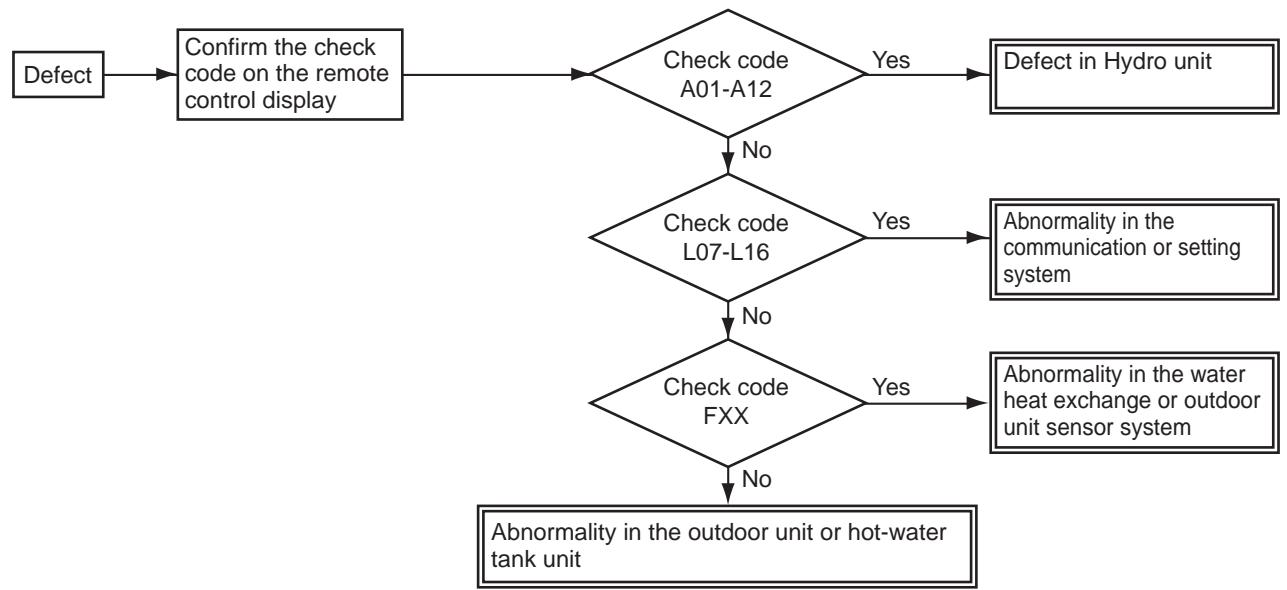
9-3-2. How to determine from the check code on the remote control
If the defect is limited by the check code displayed on the remote control, please repair the defect based on the table on the next page.
The check codes are separated into two groups: software and hardware errors.
Since a hardware error cannot be cancelled without a part replacement etc., please perform a repair.
If its abnormality is determined, the abnormality is noticed by indicating the check code on the remote control check code display part while sounding off a buzzer.
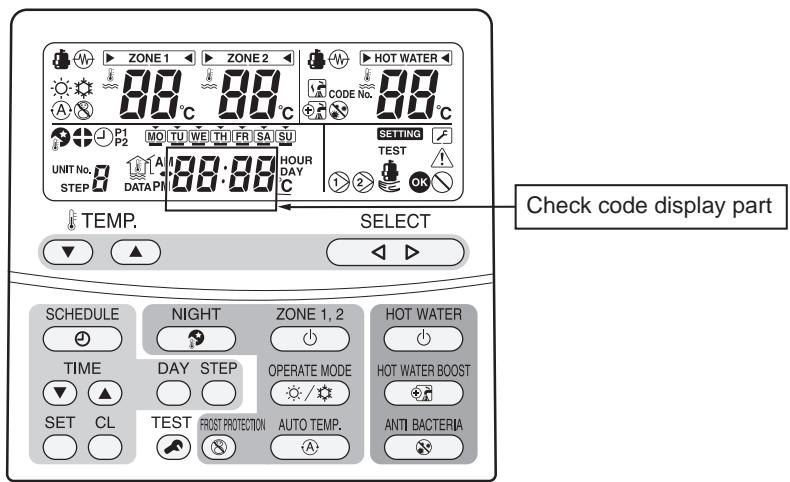
9-3-3. How to cancel a check code on the remote controller
(1) Press ZONE1.2 or HOT WATER button (on the operation side) to clear the check code.
(2) Press to stop a buzzer for an abnormality only.
Although the above procedure cancels the check code, the hardware error will be displayed again until the hardware repair is completed.
9-3-4. How to diagnose by error code
Defect mode detected by the water heat exchange
O ... Possible
x..... Not possible
| Check code | Diagnostic functional operation | Determination and action | Number of abnormalities for confirmation | Detailed item | ||
| Operational cause | Backup present | Automatic reset | ||||
| A01 | Pump or flowing quantity error1) Detected by TC sensorTC≥63°C is detected in the heating or hot water supply heat pump operation (except for defrosting). | × | × | 1. Almost no or little water flow.Not enough vent airDirt clogging in the water piping system.The water piping is too long.Installation of buffer tank and secondary pump | 4 | 91 |
| 2) Detected by flow switch abnormalityWhen no signal of the flow switch is showing 2 min after the built-in pump operation started. | 2 | 91 | ||||
| 3) Detection of chattering abnormality in the flow switch inputChattering detection: Detects input changes (OFF↔ON) 4 times within 10 seconds during operation. | 4 | 91 | ||||
| 4) Disconnection of the flow switch connectorWhen the stopped built-in pump starts its operation, the flow switch status is detecting "water flow". | 1. Disconnection of the flow switch connector.2. Defect of the flow switch. | 2 | 91 | |||
| A02 | Temperature increase error (heating)When one of the TWI, TWO and THOSensors exceeds 70°C. | Heating×Hot waterO | O | 1. Check the water inlet, water outlet and heater outlet (TWI, TWO, THO)sensors.2. Defect of the backup heater (defect automatic reset thermostat). | 1 | 92 |
| A03 | Temperature increase error (hot water supply)When the TTW sensor exceeds 85°C. | HeatingOHot water× | O | 1. Check the hot water cylinder sensor (TTW).2. Check the hot water cylinder thermal cut-out. | 1 | 93 |
| A04 | Antifreeze operation1)TWO>20°C condition:2×TC+TWO<-12°C is detected.2)TWO≤20°C condition:TC+TWO<4°C is detected.3)TWI≤10°C is detected during defrosting. | O | × | 1. Almost no or little water flow.Dirt clogging in the water piping system.The water piping is too long.2. Check the heater power circuit.Power supply voltage, breaker, power supply connection3. Set the presence of the backup heater.4. Check the water inlet, water outlet and heat exchange (TWI, TWO, TC)sensors. | Heating2Hot water2Cooling4 | 94 |
| A05 | Piping antifreeze operationActivating the heater under the condition of TWO<4orTWI<4orTHO<4 does not achieve TWO,TWI,THO≥5°C after 30 min elapsed. | O | O | 1. Check the heater power circuit.Power supply voltage, breaker, power supply connection2. Check the water inlet, water outlet and heater outlet sensors (TWI., TWO, THO).3. Disconnection of the backup heater. | 1 | 95 |
| A07 | Pressure switch operationThe pressure switch operates for 300 sec continuously during the heat pump operation. | O | × | 1. Almost no or little water flow.2. Defect of the flow switch.3. On-load operation under the above conditions.4. Defect in the pressure switch. | 1 | 96 |
| A08 | Low pressure sensor operation errorThe low pressure sensor detected 0.2 MPa or less. | O | × | 1. Almost no or little water flow.2. Defect of the flow switch.3. On-load cooling or prolonged defrosting (a lot of frost formation) under the above conditions. | 8 | 97 |
| 4. Defect in the low pressure sensor. | 2 | |||||
| A09 | Overheat protection operationWhen the thermostat of the backup heater activates during the operation of the heat pump or backup heater.When the thermostat operation is activated while it has been stopped. | O | × | 1. No water (heating without water) or no water flow.2. Defect of the flow switch. | 2 | 98 |
| 3. Defect of the backup heater (poor automatic reset thermostat). | 1 | |||||
| A11 | Operation of the release protectionWhen the TWO release counts to 10. | Heating Cooling × Hot water O | × | 1. Almost no water flow.2. Defect of the flow switch.3. Check the water outlet temperature sensor (TWO). | 10 | 99 |
| A12 | Heating, hot water heaterThe antifreeze control is detected under the condition of TWI<20°C while TWI>15°C, TTW>20°C is not detected after the heater backup. | O | O | 1. Activated by a large load of heating or hot water supply.2. Check the heater power circuit (backup or hot water cylinder heater).Power supply voltage, breaker, power supply connection | 1 | 100 |
| E03 | Regular communication error between hydro unit and remote controllerWhen there is no regular communication from the remote control for 3 min, or when no remote control is equipped. | × | O | 1. Check remote control connection.2. Defect in the remote control. | 1 | - |
| E04 | Regular communication error between hydro unit and outdoor unit The serial signal cannot be received from outdoor. | O | O | 1. Check the serial circuit.Miswiring of the crossover between the water heat exchanger and the outdoor unit | 1 | 101 |
| F03 | TC sensor errorOpen or short circuit in the heat exchange temperature sensor. | O | O | 1. Check the resistance value and connection of the heat exchange temperature sensor (TC). | 1 | 101 |
| F10 | TWI sensor errorOpen or short circuit in the water inlet temperature sensor. | O | O | 1. Check the resistance value and connection of the water inlet temperature sensor (TWI). | 1 | 103 |
| F11 | TWO sensor errorOpen or short circuit in the water outlet temperature sensor. | × | O | 1. Check the resistance value and connection of the water outlet temperature sensor (TWO). | 1 | 103 |
| F14 | TTW sensor errorOpen or short circuit in the hot water cylinder sensor. | × | O | 1. Check the resistance value and connection of the hot water cylinder sensor (TTW). | 1 | 104 |
| F17 | TFI sensor errorOpen or short circuit in the floor temperature sensor. | × | O | 1. Check the resistance value and connection of the floor-inlet temperature sensor (TFI). | 1 | 104 |
| F18 | THO sensor errorOpen or short circuit in the heater outlet temperature sensor. | × | O | 1. Check the resistance value and connection of the heater outlet temperature sensor (THO). | 1 | 104 |
| F19 | Detection of THO disconnection errorWhen TWO-THO>15K is detected and 30 sec elapsed. | × | × | 1. Check for any disconnection of the heater outlet temperature sensor (THO). | 1 | 105 |
| F20 | TFI sensor errorWhen TWO-TFI>30K is detected and TFI<TWI-5K is detected. | × | × | 1. Check the connection of the floor-inlet temperature sensor (TFI). | 1 | 106 |
| F23 | Low pressure sensor errorWhen PS<0.07 MPa is detected for 90 sec or more. (cooling, defrosting)When PS<0.07 MPa is detected for 10 min or more. (hot water supply, heading) | O | O | 1. Check the connection (body or connection wiring) of the low pressure sensor.2. Check the resistance value of the low pressure sensor. | 1 | 107 |
| F29 | EEROM errorInconsistency is detected once without verify ACK after writing to EEPROM. | × | × | 1. Replace the water heat exchange control board. | 1 | 107 |
| F30 | Extended IC errorWhen the extended IC is abnormal. | × | × | 1. Replace the water heat exchange control board. | 1 | 107 |
| L07 | Communication errorIndividual hydro units have a group line. | × | × | 1. Replace the water heat exchange control board. | 1 | 107 |
| L09 | Communication errorThe capability code for the hydro unit has not been set. | × | × | 1. Check the setting of the FC01 capability specifications.HWS-803xx-E = 0012HWS-1403xx-E = 0017 | 1 | 108 |
| L16 | Setting errorWhen ZONE1 has not been set, while ZONE2 has been set. | × | × | 1. Check the body DP-SW12_2,3. | 1 | 108 |
Defect mode detected by the outdoor unit
O ... Possible
x.... Not possible
| Check code | Diagnostic functional operation | Determination and action | Number of abnormalities for confirmation | Detailed item | ||
| Operational cause | Backup present | Automatic reset | ||||
| F04 | TD sensor errorOpen or short circuit in the discharge temperature sensor. | O | × | 1. Check the resistance value and connection of the discharge sensor (TD). | 1 | 102 119 |
| F06 | TE sensor errorOpen or short circuit in the heat exchange temperature sensor. | O | × | 1. Check the resistance value and connection of the heat exchange temperature sensor (TE). | 1 | 102 119 |
| F07 | TL sensor errorOpen or short circuit in the heat exchange temperature sensor. | O | × | 1. Check the resistance value and connection of the heat exchange temperature sensor (TL). | 1 | 102 119 |
| F08 | TO sensor errorOpen or short circuit in the outdoor temperature sensor. | O | × | 1. Check the resistance value and connection of the outdoor temperature sensor (TO). | 1 | 103 120 |
| F12 | TS sensor errorOpen or short circuit in the suction temperature sensor. | O | × | 1. Check the resistance value and connection of the suction temperature sensor (TS). | 1 | 120 |
| F13 | TH sensor errorOpen or short circuit in the heat-sink temperature sensor. | O | × | 1. Check the resistance value and connection of the heat-sink temperature sensor (TH). | 1 | 120 |
| F15 | TE, TS sensors errorOpen or short circuit in the temperature sensors. | O | × | 1. Check for any wrong installation of the heat exchange temperature sensor (TE) and the suction temperature sensor (TS). | 1 | 120 |
| F31 | EEPROM error | O | × | 1 | 121 | |
| H01 | Compressor breakdown1 When the operation frequency lowers due to the current release 40 sec or later after the compressor activation and it stops by underrunning the minimum frequency.2 When the operation frequency lowers due to the current limit control and it stops by underrunning the minimum frequency.3 When an excess current is detected 0.8 sec or later after the compressor activation. | O | × | 1. Check the power supply voltage (AC220-230 V±10%: single phase type).(AC380-400 V±10%: 3 phase type).2. Over-loaded condition of the refrigeration cycle.3. Check that the service valve is fully open. | 8 | 109 |
| H02 | Compressor lock1 When the input current is more than zero 20 sec or later after the compressor activation and the activation has not been completed. | O | × | 1. Defect of compressor (lock) – Replace the compressor.2. Defect of compressor wiring (open phase). | 8 | 110 |
| H03 | Defect in the current detection circuit | O | × | 1. Replace the outdoor inverter control board. | 8 | 110 |
| H04 | Operation of case thermostatWhen the case thermostat exceeds 125°C. | O | × | 1. Check the refrigeration cycle (gas leak).2. Check the case thermostat and connector.3. Check that the service valve is fully open.4. Defect of the pulse motor valve.5. Check for kinked piping. | 4 | 110 |
| L10 | Unset service PC board jumperJumper J800-J803 have not been cut. | O | × | 1. Cut J800-J803. | 1 | 111 |
| L29 | The communication between the outdoor PC board MUCs errorNo communication signal between IPDU and CDB. | O | × | 1. Replace the outdoor control board. | 1 | 111 |
| P03 | The outlet temperature errorWhen the discharge temperature sensor (TD) exceeds 111°C. | O | × | 1. Check the refrigeration cycle (gas leak).2. Defect of the pulse motor valve.3. Check the resistance value of the discharge temperature sensor (TD). | 4 | 112 |
| P04 | The high pressure switch error | O | × | 10 | 113 | |
| P05 | The power supply voltage errorWhen the power supply voltage is extremely high or low. | O | × | 1. Check the power supply voltage.(AC220-230 V±10%: single phase type).(AC380-400 V±10%: 3 phase type). | 4 | 114 |
| P07 | Overheating of heat-sink errorWhen the heat-sink exceeds 105°C. | O | × | 1. Check the thread fastening and heat-sink grease between the outdoor control board and the heat-sink.2. Check the heat-sink fan duct.3. Check the resistance value of the heat-sink temperature sensor (TH). | 4 | 114 |
| P15 | Detection of gas leakWhen the discharge temperature sensor (TD) exceeds 106°C for consecutive 10 min.When the suction temperature sensor (TS) exceeds 60°C for cooling or 40°C for heating for 10 consecutive min. | O | × | 1. Check the refrigeration cycle (gas leak).2. Check that the service valve is fully open.3. Defect of the pulse motor valve.4. Check for kinked piping.5. Check the resistance value of the discharge temperature sensor (TD) and the suction temperature sensor (TS). | 4 | 115 |
| P19 | The 4-way valve inversion errorWhen the heat exchange temperature sensor (TE) exceeds 30°C or the suction temperature sensor (TS) exceeds 50°C during the heat pump operation. | O | × | 1. Check the operation of the 4-way valve unit or the coil characteristics.2. Defect of the pulse motor valve.3. Check the resistance value of the heat exchange temperature sensor (TE) and the suction temperature sensor (TS). | 4 | 116 |
| P20 | High pressure protection operationWhen an abnormal stop occurs due to the high pressure release control.When the heat exchange temperature sensor (TL) detects 63°C during the cooling operation.When the water outlet sensor (TWO) detects 60°C during the heating or hot water supply operation. | O | × | 1. Check that the service valve is fully open.2. Defect of the pulse motor valve.3. Check the outdoor fan system (including clogging).4. Over-filling of refrigerant.5. Check the resistance value of the heat exchange temperature sensor (TL) and the water outlet temperature sensor (TWO). | 10 | 117 |
| P22 | Outdoor fan system errorWhen a DC fan rotor position detection NG, element short circuit, loss of synchronization, or abnormal motor current occurs. | O | × | 1. Check the lock status of the motor fan.2. Check the connection of the fan motor cable connector.3. Check the power supply voltage.(AC220~230 V±10%: single phase type)(AC380~400 V±10%: 3 phase type) | 1-4 | 118 |
| P26 | Short circuit of the compressor driver element errorWhen an abnormal short circuit of IGBT is detected. | O | × | 1. P26 abnormality occurs when operating with the compressor wiring disconnected ... Check the control board.2. No abnormality occurs when operating with the compressor wiring disconnected ... Compressor rare short. | 8 | 118 |
| P29 | Compressor rotor position errorThe rotor position in the compressor cannot be detected. | O | × | 1. Even if the connection lead wire of the compressor is disconnected, it stops due to an abnormality in the position detection ... Replace the inverter control board.2. Check the wire wound resistor of the compressor. Short circuit ... Replace the compressor. | 8 | 118 |
Defect mode detected by the remote control
| Check code | Diagnostic functional operation | Determination and action | ||
| Operational cause | Status of air-conditioning | Condition | ||
| Not displaying at all (cannot operate by the remote control) | No communication between hydro unit an remote controller • The remote control wiring is not connected correctly. • The hydro unit has not been turned on. | Stop | - | Defect in the remote control power supply 1. Check the remote controller wiring. 2. Check the remote controller. 3. Check the hydro unit power supply wiring. 4. Check the water heat exchange control board. |
| E01 | No communication between hydro unit and remote controller • Disconnection of the crossover between the remote control and the base unit of the indoor unit (detected on the remote control side). | Stop (Automatic reset) | Displayed when the abnormality is detected. | Defect in the reception of the remote control 1. Check the remote control crossover. 2. Check the remote control. 3. Check the hydro power supply wiring. 4. Check the water heat exchanger board. |
| E02 | Defect in the signal transmission to the hydro unit. (Detected on the remote control side) | Stop (Automatic reset) | Displayed when the abnormality is detected. | Defect in the transmission of the remote control 1. Check the transmitter circuit inside the remote control. ... Replace the remote control. |
| E09 | Several remote control base units (Detected on the remote control side) | Stop (The handset continues) | Displayed when the abnormality is detected. | 1.2 Check several base units with the remote control ... The base unit is only one, and others are handsets. |
9-4. Diagnosis flow chart for each error code
9-4-1. Hydro unit failure detection
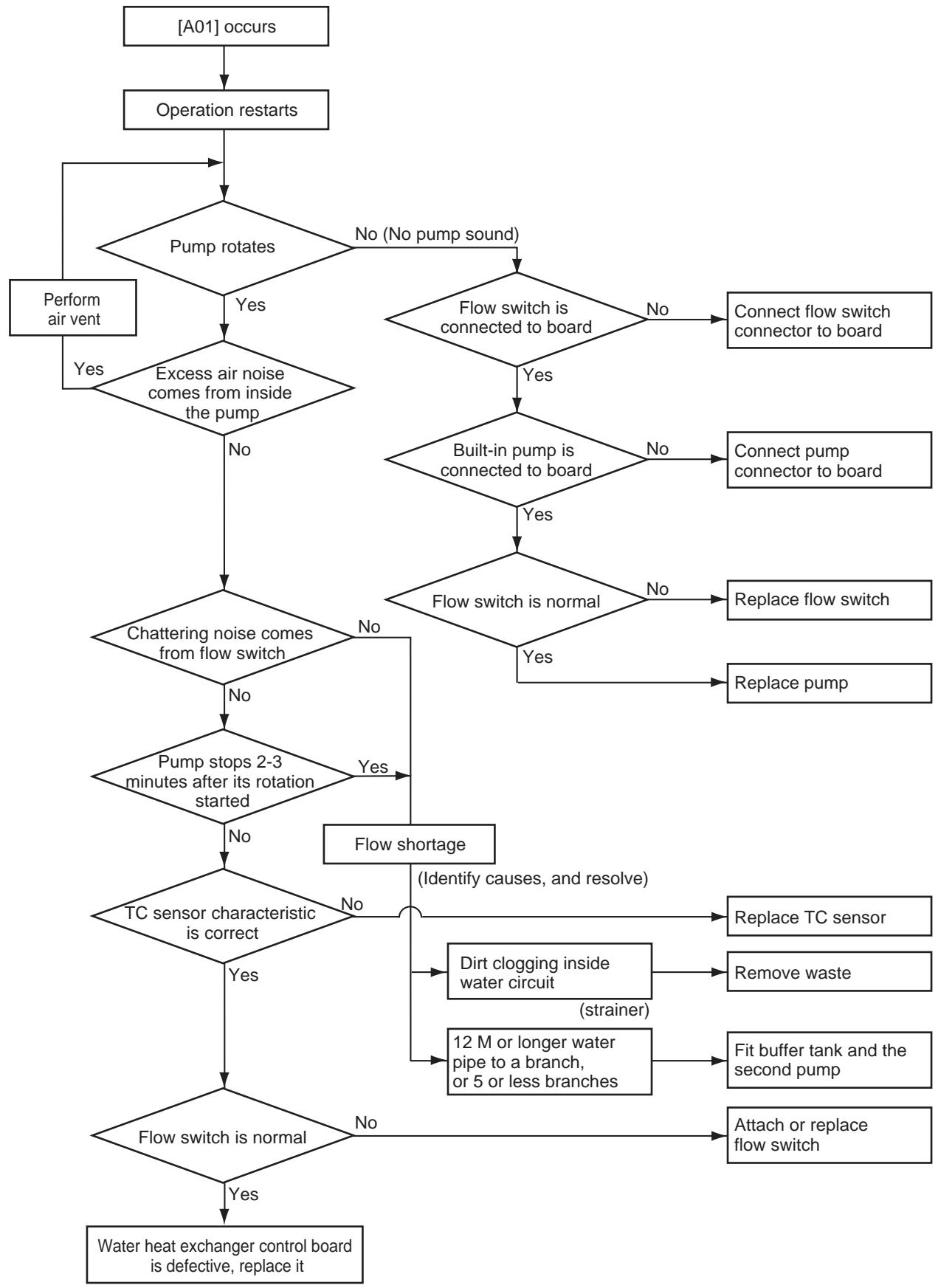
[A01] Error Pump flow determination
[A02] Error Temperature rise and error short circuit
![TOSHIBA HWS-1103H-E - [A02] Error Temperature rise and error short circuit - 1](/content/2025/01/121505/images/a997bd45ce8a2002a66b92fe3b493e04d93303c0f5b8c972c5842a5229c1c090.jpg)
- If Boiler setting is ON (DPSW13-2 is ON) and FC62 is "1", the A02 error is not detected.
[A03] Error Temperature rise and error short circuit
![TOSHIBA HWS-1103H-E - [A03] Error Temperature rise and error short circuit - 1](/content/2025/01/121505/images/ab35c8021afcc8b003bf0d80bdeb00a833cae9e103aa2c2dda02f8dd90b9b490.jpg)
[A04] Error Freeze prevention control
When the outside temperature or inlet water temperature is low (approx. 20^ or lower) and the room load is large (operation frequency ≥ rating), the freeze prevention control may be activated.
![TOSHIBA HWS-1103H-E - [A04] Error Freeze prevention control - 1](/content/2025/01/121505/images/cb7af525e1cae4c5aafc3a26ec9f684b9b083f55b0cf783aab68af4838605714.jpg)
![TOSHIBA HWS-1103H-E - [A04] Error Freeze prevention control - 2](/content/2025/01/121505/images/c74f15f320c4e55603851d1f48cad5316bbb50aa1104313b12086db96cb0a367.jpg)
[A05] Error Piping freeze prevention control
![TOSHIBA HWS-1103H-E - [A04] Error Freeze prevention control - 3](/content/2025/01/121505/images/930d19ee476b7700316b72a7465df67d4a8b9eb2d28fea7cafa6a31865e9c737.jpg)
[A07] Error Pressure switch operation (Hot water supply/Heating operation)
![TOSHIBA HWS-1103H-E - [A04] Error Freeze prevention control - 4](/content/2025/01/121505/images/0d0663069f88ce60224ac145f3779384401361eb8b271d4db66f923524eaa251.jpg)
[A08] Error Low pressure sensor lowering operation failure (Cooling/Defrosting operation)
[A09] Error Overheat prevention thermostat failure (Hot water supply/Heating operation)
![TOSHIBA HWS-1103H-E - [A09] Error Overheat prevention thermostat failure (Hot water supply/Heating operation) - 1](/content/2025/01/121505/images/1f2406f4876c0d6d9bd43fedbeabc8f972874bdc609248a462d8957db48eac3e.jpg)
*Replace water heat exchange control board or overheat preventive thermostat failure: After the control board is replaced, if the same operation repeats, the overheat preventive thermostat is determined as defective (does not operate at 75^ ).
![TOSHIBA HWS-1103H-E - [A09] Error Overheat prevention thermostat failure (Hot water supply/Heating operation) - 2](/content/2025/01/121505/images/903d0c3253c7bd7f5dd54c6ecdb552a324ff97c02d4e274ef4e23afddc01b3a3.jpg)
[A11] Error Release protection operation
![TOSHIBA HWS-1103H-E - [A09] Error Overheat prevention thermostat failure (Hot water supply/Heating operation) - 3](/content/2025/01/121505/images/1f1e88a29de7a99f78025eadaee3eb7f195741189a857e696d762f4e03aaf5b7.jpg)
[A12] Error Heating or Hot water supply heater failure
![TOSHIBA HWS-1103H-E - [A09] Error Overheat prevention thermostat failure (Hot water supply/Heating operation) - 4](/content/2025/01/121505/images/f4b02965cfe6c664a91de3ef759a03f34847e12c9e958ecab1941c88494b81f1.jpg)
[E04] Error
![TOSHIBA HWS-1103H-E - [A09] Error Overheat prevention thermostat failure (Hot water supply/Heating operation) - 5](/content/2025/01/121505/images/cfbe3cda84911472a213c53471e800b0ec79da128ed066ccc2109ae31039a874.jpg)
[F03] Error TC sensor failure
![TOSHIBA HWS-1103H-E - [A09] Error Overheat prevention thermostat failure (Hot water supply/Heating operation) - 6](/content/2025/01/121505/images/f15e7ea451a52630cbadb06f07299cf6db019c875de26b6189f34e752b2deaba.jpg)
[F04] Error TD sensor failure
![TOSHIBA HWS-1103H-E - [A09] Error Overheat prevention thermostat failure (Hot water supply/Heating operation) - 7](/content/2025/01/121505/images/91269a1b3573302836718eeffb9d94705f067d8490f384719e8f76bdd71021ac.jpg)
[F06] Error TE sensor failure
[F07] Error TL sensor failure
![TOSHIBA HWS-1103H-E - [A09] Error Overheat prevention thermostat failure (Hot water supply/Heating operation) - 8](/content/2025/01/121505/images/1006d6e5e5387445e4f1f0b5b708cf1034d585834d79429a2b37fc84d5427f3d.jpg)
![TOSHIBA HWS-1103H-E - [A09] Error Overheat prevention thermostat failure (Hot water supply/Heating operation) - 9](/content/2025/01/121505/images/defb84b6c3d8b82a438ad7073abeb242f69cd95dc8c45891e232ce1116a174a7.jpg)
[F08] Error TO sensor failure
![TOSHIBA HWS-1103H-E - [A09] Error Overheat prevention thermostat failure (Hot water supply/Heating operation) - 10](/content/2025/01/121505/images/c31280f4fde8867a9e18a2898399271357d16c36e4a569680a0839d53022f312.jpg)
[F10] Error TWI sensor failure
[F11] Error TWO sensor failure
![TOSHIBA HWS-1103H-E - [A09] Error Overheat prevention thermostat failure (Hot water supply/Heating operation) - 11](/content/2025/01/121505/images/fe10043c44be1e9178766ec9343f686fbb125ffb09a199ea4226ce88aab3f222.jpg)
![TOSHIBA HWS-1103H-E - [A09] Error Overheat prevention thermostat failure (Hot water supply/Heating operation) - 12](/content/2025/01/121505/images/6477196b04f4c3934beb7e800c1cf8afb32203e2225f020551c882e12446ee59.jpg)
[F14] Error TTW sensor failure
![TOSHIBA HWS-1103H-E - [A09] Error Overheat prevention thermostat failure (Hot water supply/Heating operation) - 13](/content/2025/01/121505/images/fbd7ec45687a770bea3bea05deb18cb48eeb0bb9e1d7064930e39530ff365d83.jpg)
[F17] Error TFI sensor failure
[F18] Error THO sensor failure
![TOSHIBA HWS-1103H-E - [A09] Error Overheat prevention thermostat failure (Hot water supply/Heating operation) - 14](/content/2025/01/121505/images/6e77a77d7d47cb708936225818bad0e25eabd3ac414652c0147825d93b9c228b.jpg)
![TOSHIBA HWS-1103H-E - [A09] Error Overheat prevention thermostat failure (Hot water supply/Heating operation) - 15](/content/2025/01/121505/images/e6812c63cf406cd5fa93479e62d67e8f1640cc1fb9e383527ca72f146952deee.jpg)
[F19] Error THO sensor detach failure
![TOSHIBA HWS-1103H-E - [A09] Error Overheat prevention thermostat failure (Hot water supply/Heating operation) - 16](/content/2025/01/121505/images/dac7ca55276522247d821ec150fe662faff0769b9041828194342bcaf6f73004.jpg)
[F20] Error TFI detach failure
[F23] Error Low pressure sensor detach failure
![TOSHIBA HWS-1103H-E - [F23] Error Low pressure sensor detach failure - 1](/content/2025/01/121505/images/20581fe7a9fc2ec628abefa4781c89d0fc9011d10a2cb804b122853b6996ba17.jpg)
*1 How to determine: When operation is stopped
[F29] Error EEPROM failure
A failure is detected in the IC10 non-volatile memory on the water heat exchanger board during a hot water supply unit operation. Replace the service board.
- If the unit does not have EEPROM inserted when the power is turned on, or if EEPROM data read or write is unavailable, automatic address mode repeats. In this case, the intensive control unit displays [97 Abnormal].
![TOSHIBA HWS-1103H-E - [F29] Error EEPROM failure - 1](/content/2025/01/121505/images/a5bf0fd2e3d6d922bf2f5f89ca214beec9d2a44e4a6ace5d8efd5e5a6ab675f6.jpg)
[F30] Error Enhanced IC failure
Enhanced IC on water heat exchanger control board is abnormal.
Replace the water heat exchanger control board to a service board.
[L07] Error
At the time of power on, detecting the above failure automatically activates the automatic address setting mode.
(Check code is not output)
Note that if the above failure is detected in the automatic address setting mode, a check code may be output.
[L09] Error
![TOSHIBA HWS-1103H-E - [L09] Error - 1](/content/2025/01/121505/images/262f56829c129dc56f813d4cbcbd7128b8aabea0cd04c061af6e1262d45f3aa8.jpg)
[L16] Error
In DP_SW12-2, 3 of main unit water heat exchanger, if ZONE1 is not set and ZONE2 is set, [L16] displays abnormality.
Set correctly DP_SW12-2, 3.
9-4-2. Outdoor Unit Failure Detection
Diagnosis procedure for each check code
- One check code may indicate multiple symptoms. In such a case, see the LED indication on the outdoor board to narrow down the check details.
- The handy remote controller displays a check code only when the same failure repeatedly occurs while the LED on the outdoor board indicates an error even if it occurs only once. This may cause indication inconsistency between the remote controller and LED.
Outdoor board LED indication method
| Dip switch setting • Setting 1 only of SW803 to ON indicates the latest failure. Because the error history is recorded, you can see the detail even after the power is once turned off. (Not including outside air temperature sensor (TO) failure) • After check work is done or when outside air temperature sensor (TO) failure is detected, set all the SW803 switches to OFF. (An abnormality now is indicated.) | <Latest abnormality> SW803 1 only is ON SW803 All OFF (Initial status) |
| Indication switching • One or more LEDs of D800 through D804 lit yellow indicates that a failure occurred. <Indication 1> • With the status above, pressing the SW800 button for one second causes the yellow LED to blink. <Indication 2> • Pressing again SW800 for one second or longer returns to <Indication 1>. • The combination of <Indication 1> and <Indication 2> can determine what kind of abnormality. | <Indication 1> ⇌ <Indication 2> (Normal) (Abnormality occurs) (Press SW800) D800 (yellow) ● D801 (yellow) ● D802 (yellow) ● D803 (yellow) ● D804 (yellow) ● D805 (green) ○ (Ocean of outlet temperature sensor failure) ●…Off ○…Light ◎…Blink |
| Check code | Outdoor LED indication | Check and Action procedure (No specific description indicates outdoor unit parts.) |
| [H01] | <Indication 1> <Indication 2> | [Compressor fails] |
| ● ○ | Power voltage is normal. (AC220-230 V±10 %: single phase type). (AC380-400 V±10 %: 3 phase type). | |
| ○ ○ | Yes | |
| ○ ○ | Wiring connection is normal. Compressor lead (Board side, compressor side reactor lead, power lead) | |
| ○ ○ | Yes | |
| ○ ○ | Abnormally over loaded | |
| ○ ○ | PC-Board 803H-E(MCC-1571) 1103 to 1403H-E (MCC-1571) 1103 to 1603H8(R)-E (MCC 1596) |
| Check code | Outdoor LED indication | Check and Action procedure (No specific description indicates outdoor unit parts.) | |
| [H02] | <Indication 1><Indication 2> | [Compressor lock] Power voltage is normal. (AC220-230 V±10%: single phase type). (AC380-400 V±10%: 3 phase type). Yes Wiring connection is normal. Compressor lead (board side, compressor side) reactor, power lead Yes Compressor is normal. Yes Refrigerant stays inside. Pulse motor valve operates normally. Yes Check outdoor board If defective, replace it | No No No No No No PC-Board 803H-E(MCC-1571) 1103 to 1403H-E (MCC-1571) 1103 to 1603H8(R)-E (MCC 1596) |
| [H04] | <Indication 1><Indication 2> | [Case thermostat operation] CN609 connector and case thermostat is normal. Yes If case thermostat is short circuited, cooling and heating can operate. Yes No gas leakage. Enough Refrigerant. Yes Service valve is fully opened. Yes Pulse motor valve is normal. Yes Check for piping collapse and break. If defective, repair or replace it. | No No No No No No No No No No No No No No No No No No No No No No No No No No No No No No No No No No No No No No No No No No No No No No No No No No No |
| [L10] | <Indication 1><Indication 2> | [Model not set] Only when service board is used Cut jumper line by following the instruction comes with the service board package | |
| [L29] | * Any of the following abnormality may occur. Seeing the LED on the outdoor board can determine which abnormality occurs. Communication failure between MCUs, Heat sink temperature sensor (TH) failure, EEPROM failure, Model not specified, Heat sink overheat failure, gas leakage detection, 4-way valve invert failure | ||
| [Communication failure between MCUs] Check outdoor control board If defective, replace it | PC-Board 803H-E(MCC-1571) 1103 to 1403H-E (MCC-1571) 1103 to 1603H8(R)-E (MCC 1596) | ||
| 803 to 1403H-E <Indication 1><Indication 2> | [Heat sink temperature sensor (TH) failure] → See [F13] details | ||
| 1103 to 1603H-E <Indication 1><Indication 2> | |||
| <Indication 1><Indication 2> | [EEPROM failure] → See [F31] details | ||
| <Indication 1><Indication 2> | [Model not set] → See [L10] details | ||
| <Indication 1><Indication 2> | [Heat sink overheat failure] → See [P07] details | ||
| <Indication 1><Indication 2> | |||
| Check code | Outdoor LED indication | Check and Action procedure (No specific description indicates outdoor unit parts.) |
| [L29] | <Indication 1> <Indication 2> | [Gas leakage failure] → See [P15] details |
| ○ ○ ○ ○ ○ ○ ○ ○ ○ ○ ○ ○ | ||
| <Indication 1> <Indication 2> | [4-way valve invert failure] → See [P19] details | |
| ○ ○ ○ ○ ○ ○ ○ ○ ○ ○ ○ ○ | ||
| [P03] | <Indication 1> <Indication 2> | [Abnormal outlet temperature] |
| ○ ○ ○ ○ ○ ○ ○ ○ ○ ○ ○ ○ | No gas leakage. Appropriate refrigerant amount. Yes Pulse motor valve is normal. Yes Abnormally over loaded No CN603 connector is normal. TD sensor resistance is normal Yes Check outdoor control board If defective, replace it PC-Board 803H-E(MCC-1571) 1103 to 1403H-E (MCC-1571) 1103 to 1603H8(R)-E (MCC 1596) | |
| [P04] | * Any of the following abnormality may occur. Seeing the LED on the outside board can determine which abnormality occurs. 1. High pressure sensor activated. 2. Power source failure (Vdc) 3. Hi pressure protection operation 4. Case thermostat operation | |
| <Display 1> <Display 2> | [High pressure SW system error] Power supply error (Vdc), High pressure protective operation, Case thermostat operation. | |
| ○ ○ ○ ○ ○ ○ ○ ○ ○ ○ | Doesn't high pressure switch operate? NO Is circuit wiring normal? NO Parts check Defective → Replace Reset the power supply and then do a trial operation according to the season. B← Cooling operation Cock Comp. IPDU PC board Defective → Replace Does cooling outdoor fan normally operate? NO Is there no fan breakage or coming-off? NO Repair defective position. Connection of connectors, Fan IPDU, Fan motor, Wiring. Is there any element which blocks heat exchanger of the outdoor unit? 1. Clogging of heat exchanger 2. Short circuit NO Overcharge of refrigerant/ Clogging/Pipe breakage/ Abnormal overload | |
| ○ ○ ○ ○ ○ ○ ○ ○ ○ ○ | Heating operation Does the heating indoor fan normally operate? NO Are connections of connectors, capacitors and fan motor normal? NO Is there any element which blocks indoor heat exchanger? 1. Filter clogging 2. Clogging of heat exchanger 3. Short circuit NO Clogging by refrigerant overcharge/Pipe breakage/ Abnormal overload Are characteristics of TC and TCJ sensor resistance value normal? NO Replace TC or TCJ sensor. | |
| <Indication 1><Indication 2> | [Case thermostat operation] → See [H04] details | |
| <Indication 1><Indication 2> | [Power source failure (Vdc)] → See [P05] details | |
| <Indication 1><Indication 2> | [Hi pressure protection operation] → See [P20] details | |
| <Indication 1><Indication 2> | [Power source failure (voltage defective, open phase)] | |
| <Indication 1><Indication 2> | [Power voltage abnormal drops or rise (AC220-230 V±10%: single phase type) (AC380-400 V±10%: 3 phase type) Yes Check outdoor control board If defective, replace it PC-Board 803H-E(MCC-1571) 1103 to 1403H-E (MCC-1571) 1103 to 1603H8(R)-E (MCC 1596) | |
| [P05] | <Indication 1><Indication 2> | |
| <Indication 1><Indication 2> | [Heat sink overheat failure] | |
| <Indication 1><Indication 2> | HWS-803H-E to 1603H-E The screws are loose in motor drive element, Q200/300/400, of outdoor control board and rectifier, DB01/02/03. (MCC-1571) Radiation grease was not applied to backside of Q200, DB01, DB02, or DB03. Yes Is there no loosening of screws of motor drive element of outdoor P.C. board (MCC-1596) Q201? Did not forget to apply radiation grease to rear side of Q201? No No Remove obstacles, Deal with short circuit | |
| <Indication 1><Indication 2> | ||
| Check code | Outdoor LED indication | Check and Action procedure (No specific description indicates outdoor unit parts.) | |
| [P15] | <Indication 1> <Indication 2> | [Gas leakage detection] | |
| ○ | No gas leakage. | Correct defective portion | |
| ○ | Appropriate refrigerant amount. | Re-charge refrigerant | |
| ○ | Yes | ||
| ○ | Pulse motor valve is normal. | Correct defective portion | |
| ○ | Yes | Replace defective parts | |
| Service valve is fully opened. | Open fully service valve | ||
| Yes | Repair or replace pipe | ||
| Piping collapse | |||
| No | |||
| Temperature sensor check | Correct connector | ||
| Discharge sensor CN603 | Replace sensor | ||
| Suction sensor CN600 | |||
| OK | PC-Board | ||
| Check outdoor control board | 803H-E (MCC-1571) | ||
| If defective, replace it | 1103H to 1403H-E (MCC-1571) | ||
| 1103H to 1603H8(R)-E (MCC-1596) | |||
| [P19] | <Indication 1> <Indication 2> | [4-way valve invert failure] 4-way valve operates normally. (Check piping temperature at the time of cooling/heating operation) Yes Temperature sensor check TE sensor CN601 TS sensor CN600 Hydro TWO sensor If defective, repair or replace it 4-way valve coil resistance is 1.3 to 1.6 kΩ. Outside control board operation check (See below) NO 4-way valve check If defective, replace it Replace 4-way coil NG Check outdoor board If defective, replace it | |
| Switching to cooling cycle | Switching to heating cycle | ||
| SW804 SW801 Press | SW804 SW801 Press | ||
| 180DCV or higher | 180DCV or higher | ||
| Note: Check with a tester With an analog tester: If a tester shows 180DCV or higher, the board is good. With digital tester: Although values shown has some range, if its maximum value is 180DCV or higher, the board is good. 1103 to 1603H8(R)-E The 4-way valve coil of 1103H8(R)-1603H8(R)-E is not self-hold type. | |||
| [P20] | <Indication 1> <Indication 2> | [Hi pressure protection operation] | |
| ○ ○ ○ ○ ○ ○ ○ ○ ○ ○ ○ ○ ○ ○ ○ ○ ○ ○ ○ ○ ○ ○ ○ ○ ○ ○ ○ ○ ○ ○ ○ ○ ○ ○ ○ ○ ○ ○ ○ ○ ○ ○ ○ ○ ○ ○ ○ ○ ○ ○ ○ _ | |||
| Service valve is fully opened. No Open fully service valve | |||
| Yes Heating season | |||
| Heating operation | |||
| Reset the power source and perform a trail operation according to the season. | |||
| Cooling season | |||
| Cooling operation | |||
| Outdoor TL sensor is normal. No Replace sensor | |||
| (Measure resistance) Yes | |||
| Outdoor fan is free from crack No Replace outdoor fan If defective, replace or tighten it | |||
| Yes Outdoor fan operates normally. No Check the same item as those for [P22] abnormality | |||
| Yes Something prevents outdoor unit heat exchange Yes Remove the disturbing element | |||
| - Clogged heat exchanger - short circuit | |||
| No Check for refrigerant overcharged, clogged cycle, pipe break, abnormal overload, etc. If defective, repair defective portion | |||
| Something prevents heat exchange of hydro unit. Yes Remove the disturbing element | |||
| - Clogged filter - Clogged heat exchanger - Short circuit | |||
| No Check for refrigerant overcharged, clogged cycle, pipe break, abnormal overload, etc. If defective, repair defective portion | |||
| Check code | Outdoor LED indication | Check and Action procedure (No specific description indicates outdoor unit parts.) | |
| [P22] | <Indication 1><Indication 2> | [Blower system failure] Power voltage is normal (AC220-230 V±10%: single phase type) (AC380-400 V±10%: 3 phase type) Yes When not energized, the fan motor can be smoothly rotated by hand. Fan motor coil resistance is normal. Between red - white leads 12 -20Ω Between white - black leads 12 - 20Ω Between black - red leads 12 - 20Ω Yes Check outdoor control board If defective, replace it | Check wiring Request power source repair Replace fan motor PC-Board 803H-E(MCC-1571) 1103 to 1403H-E (MCC-1571) 1103 to 1603H8(R)-E (MCC 1596) |
| Outdoor fan sole operation check 1) With the dip switch SW804 set as in the table below, pressing SW801 for approx. 1 second can check the outdoor fan sole operation. Perform this check to determine which of upper or lower fan has a problem. · When SW801 is pressed again for 1 second or when 2 minutes has passed, the fan stops. 2) After the check, set all the SW804 dip switches to OFF. | |||
| Outdoor fan sole operation SW804 SW801 Press | |||
| [P26] | <Indication 1><Indication 2> | [Compressor drive element shorted out] The connection between compressor lead and reactor is correct. (Check with wiring diagram) Yes A operation without compressor lead does not cause the same problem. Yes Compressor check (rare short circuit, etc.) If defective, replace it | Correct wiring Replace outdoor board PC-Board 803H-E(MCC-1571) 1103 to 1403H-E (MCC-1571) 1103 to 1603H8(R)-E (MCC 1596) |
| [P29] | <Indication 1><Indication 2> | [Position detection circuit failure] Check outdoor control board If defective, replace it | PC-Board 803H-E(MCC-1571) 1103 to 1403H-E (MCC-1571) 1103 to 1603H8(R)-E (MCC 1596) |
| Check code | Outdoor LED indication | Check and Action procedure (No specific description indicates outdoor unit parts.) |
| No code | <Indication 1><Indication 2> | [Discharge abnormality] Compressor's loss of synchronism due to rapid load change, etc. * Although the outdoor LED indicates abnormality, the compressor restarts and no abnormality is confirmed. * This may occur due to the open phase of the compressor or wiring detach. |
| [F04] | <Indication 1><Indication 2> | [Discharge temperature sensor (TD) failure] TD sensor connector (CN603) is connected Yes TD sensor resistance characteristic is normal Yes Replace outdoor control board No See the characteristic table on page 101 PC-Board 803 to 1403H-E (MCC-1571) 1103 to 1603H8(R)-E (MCC 1599) |
| [F06] | <Indication 1><Indication 2> | [Heat exchanger temperature sensor (TE) failure] TE sensor connector (CN601) is connected Yes TE sensor resistance characteristic is normal Yes Replace outdoor control board No See the characteristic table on page 101 PC-Board 803 to 1403H-E (MCC-1571) 1103 to 1603H8(R)-E (MCC 1599) |
| [F07] | <Indication 1><Indication 2> | [Heat exchanger temperature sensor (TL) failure] TL sensor connector (CN604) is connected Yes TL sensor resistance characteristic is normal Yes Replace outdoor control board No See the characteristic table on page 101 PC-Board 803 to 1403H-E (MCC-1571) 1103 to 1603H8(R)-E (MCC 1599) |
| [F08] | <Indication 1><Indication 2> | [Outside air temperature sensor (TO) failure] |
| ○●○●●●○○○ | TO sensor connector (CN602) is connected Yes See the characteristic is normal Yes Replace outdoor control board PC-Board 803 to 1403H-E (MCC-1571) 1103 to 1603H8(R)-E (MCC 1599) | |
| [F12] | <Sindication 1><Indication 2> | [Suction temperature sensor (TS) failure] |
| ○●○●●●○○○ | TS sensor connector (CN600) is connected Yes TS sensor resistance characteristic is normal Yes Replace outdoor control board PC-Board 803 to 1403H-E (MCC-1571) 1103 to 1603H8(R)-E (MCC 1599) | |
| [F13] | <Sindication 1><Indication 2> | [Heat sink temperature sensor (TH) failure] |
| ○●○●●●○○○ | Replace outdoor control board PC-Board 803 to 1403H-E (MCC-1571) 1103 to 1603H8(R)-E (MCC 1599) | |
| [F15] | <Sindication 1><Indication 2> | [Heat exchanger sensor (TE, TS) wrong wiring] |
| ○●○●●●○○○ | TE and TS sensor is attached to the correct position. Yes See the characteristic is normal Yes TS sensor resistance characteristic is normal Yes Replace outdoor control board PC-Board 803 to 1403H-E (MCC-1571) 1103 to 1603H8(R)-E (MCC 1599) |
| Check code | Outdoor LED indication | Check and Action procedure (No specific description indicates outdoor unit parts.) | |
| [F31] | <Indication 1> <Indication 2> | [EEPROM failure] | |
| ○ ○ ○ ○ ● ○ ● ○ ○ ○ ○ ○ | Check outdoor control board If defective, replace it | PC-Board 803 to 1403H-E (MCC-1571) 1103 to 1603H8(R)-E (MCC 1599) | |
9-4-3. Temperature sensor, temperature-resistance characteristic table
TC, TWI, TWO, TFI, TTW, TE, TS, TO sensors
Typical value
| Temperature (°C) | Resistance value (kΩ) | ||
| (Minimum) | (Standard) | (Maximum) | |
| -10 | 55.42 | 55.73 | 60.04 |
| 0 | 32.33 | 33.80 | 35.30 |
| 10 | 19.63 | 20.35 | 21.09 |
| 20 | 12.23 | 12.59 | 12.95 |
| 25 | 9.75 | 10.00 | 10.25 |
| 30 | 7.764 | 7.990 | 8.218 |
| 40 | 5.013 | 5.192 | 5.375 |
| 50 | 3.312 | 3.451 | 3.594 |
| 60 | 2.236 | 2.343 | 2.454 |
| 70 | 1.540 | 1.623 | 1.709 |
| 80 | 1.082 | 1.146 | 1.213 |
| 90 | 0.7740 | 0.8237 | 0.8761 |
| 100 | 0.5634 | 0.6023 | 0.6434 |
TD, TL sensors
Typical value
| Temperature (°C) | Resistance value (kΩ) | ||
| (Minimum) | (Standard) | (Maximum) | |
| 0 | 150.5 | 161.3 | 172.7 |
| 10 | 92.76 | 99.05 | 105.6 |
| 20 | 58.61 | 62.36 | 66.26 |
| 25 | 47.01 | 49.93 | 52.97 |
| 30 | 37.93 | 40.22 | 42.59 |
| 40 | 25.12 | 26.55 | 28.03 |
| 50 | 17.00 | 17.92 | 18.86 |
| 60 | 11.74 | 12.34 | 12.95 |
| 70 | 8.269 | 8.668 | 9.074 |
| 80 | 5.925 | 6.195 | 6.470 |
| 90 | 4.321 | 4.507 | 4.696 |
| 100 | 3.205 | 3.336 | 3.468 |
TC, TWI, TWO, TFI, TTW, TE, TS, TO sensors
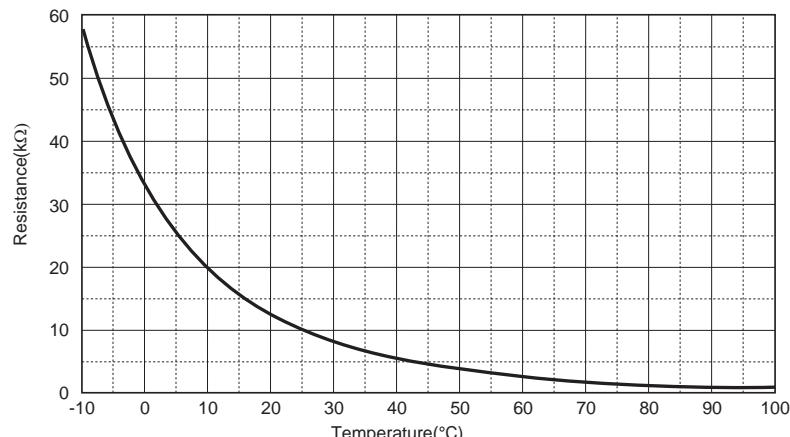
TD, TL sensors
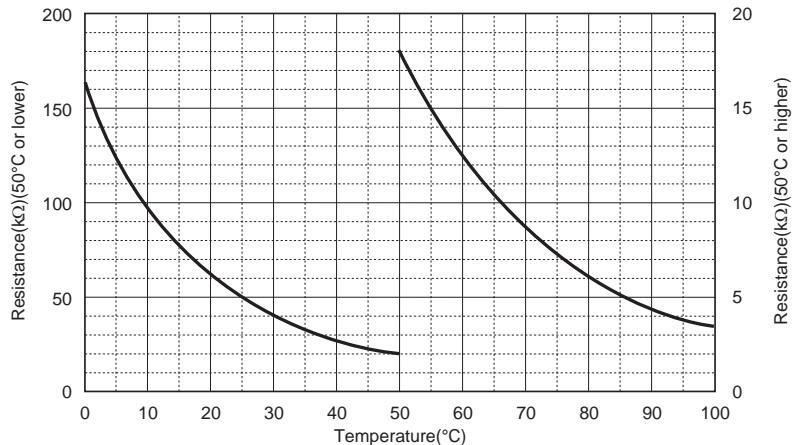
* Since the TH sensor (outdoor unit heat-sink temperature sensor) is built in the outdoor control board, the resistance value cannot be measured.
9-5. Operation check by PC board switch
9-5-1. Operation check mode
This mode allows to check the operations of the water 2-way valve, water 3-way valve, mixing valve, and circulating pump. This operation is valid when the hydro unit and the outdoor unit are turned on the power.
Operation check mode
(1) Preparation
1) Turn all of the remote controls "OFF" for the hot water supply and heating.
2) Turn off the hydro unit and the outdoor unit.
3) Remove the front panel of the hydro unit.
4) Set SW06_2 "ON".
(2) Operation check
1) Turn on the hydro unit and the outdoor unit.
2) Rotate switch DIP SW01 to position "1" and press tactile switch SW07 for 5 sec. or longer.
3) Rotating the rotary SW01 allows to check each operation.
4) Set the DIP SW06_2 "OFF" to finish.
| Rotary switch | Check contents | Remark | |
| 1 | None | ||
| 2 | 2WV_W | Alive for approx. 2 sec, not alive for 3 sec | |
| 3 | 3WV_W | ||
| 4 | Mixing valve | Alive for 30 sec in the forward direction | |
| Alive for 30 sec in the reverse direction | |||
| 5 | Built-in AC pump | Alive / not alive for 20 sec | |
| 6 | Extended AC pump 1 | Alive / not alive for 20 sec | |
| 7 | (Extended AC pump 2) | Alive / not alive for 20 sec | Reserved |
| 8 | Water heat exchange backup heater | Repeat heater 1, heater 2, and OFF every 20 sec | The built-in AC pump operates. |
| 9 | Hot water cylinder heater | Alive / not alive for 10 sec | |
| 10 | Backup heater | Alive / not alive for 10 sec | The built-in AC pump and external AC pump operate. |
| 11 | Check the alarm output. | Output for 10 sec / no output for 10 sec | |
| 12 | Check the boiler output. | Output for 10 sec / no output for 10 sec | |
| 13 | Check the defrost output. | Output for 10 sec / no output for 10 sec | |
| 14 | Check the operation output. | Output for 10 sec / no output for 10 sec | |
| 15 | None | ||
| 16 | Built-in AC pump continuous operation | Continuously alive | Do not operate the AC pump alive continuously without any water in hydro unit. |
9-6. Brief method for checking the key components
9-6-1. Hydro unit
| No. | Component name | Check procedure | ||||
| 1 | Water heat exchange temperature (TC) sensor Water inlet temperature (TWI) sensor Water outlet temperature (TWO) sensor Hot water cylinder temperature (TTW) sensor Floor inlet temperature (TFI) sensor | Remove the connector and measure the resistance value with a tester. (Normal temperature) | ||||
| Temperature Sensor | 0°C | 10°C | 20°C | 30°C | ||
| Water heat exchange temperature (TC) sensor | 33.8 kΩ | 20.35 kΩ | 12.59 kΩ | 7.99 kΩ | ||
| Water inlet temperature (TWI) sensor | ||||||
| Water outlet (TWO) sensor | ||||||
| Hot water cylinder temperature (TTW) sensor | ||||||
| Floor inlet temperature (TFI) sensor | ||||||
| 2 | Circulating pump AC pump Type UPS025-65K 130 (802XWH**-E) UPS25-80 130 (1402XWH**-E) | Remove the connection cover of the pump, and measure the resistance with a tester. L N L | Location | Resistance value | ||
| L-N | 100-200 Ω | |||||
9-6-2. Outdoor unit
| No. | Component name | Check procedure | ||
| 1 | Compressor Type DA220A2F-22L (803H-E) DA422A3F-25M (1103,1403H-E) DA422A3F-27M (1103,1403,1603H8(R)-E) | Measure the resistance value of each winding with a tester. 803 to 1403H-E | ||
| Location | Resistance value | |||
| Red - White | 1.04-1.16 Ω | |||
| White - Black | 1.04-1.16 Ω | |||
| Black - Red | 1.04-1.16 Ω | |||
| 1103 to 1603H8(R)-E | At 20°C | |||
| Location | Resistance value | |||
| Red - White | 0.75-0.83 Ω | |||
| White - Black | 0.75-0.83 Ω | |||
| Black - Red | 0.75-0.83 Ω | |||
| 2 | Outdoor fan motor Type ICF-280-A60-1 (803H-E) ICF-280-A100-1 (1103,1403H-E) (1103 to 1603H8(R)-E) | Measure the resistance value of each winding with a tester. | ||
| Location | Resistance value | |||
| 802H-E | Red - White | 32.6 ± 3.3 Ω | ||
| White - Black | ||||
| Black - Red | ||||
| 1103,1403H-E 1103 to 1603H8(R)-E | Red - White | 14.8 ± 1.5 Ω | ||
| White - Black | ||||
| Black - Red | ||||
| 3 | 4-way valve coil Type VHV-01AP552B1 STF-01AJ 502E1 | Measure the resistance value. 803 to 1403H-E 1473 Ω ± 103 Ω 1103 to 1603H8(R)-E 1435 Ω ± 144 Ω | ||
| 4 | Pulse motor valve coil Type CAM-MD12TF-15 (802H-E) | Measure the resistance value. 1 White 6 Red 3 Orange Yellow Blue 2 4 | ||
| Location | Resistance value | Condition 20°C | ||
| Red - White, Orange | 42-50 Ω | |||
| Red - Yellow, Blue | 42-50 Ω | |||
| Type UKV-A025 0100 (1103,1403H-E) (1103 to 1603H8(R)-E) | 1 Black 6 Grey 3 Red Yellow Grey Orange 2 6 4 | |||
| Location | Resistance value | Condition 20°C | ||
| Grey - Black, Red | 43-49 Ω | |||
| Grey - Yellow, Orange | 43-49 Ω | |||
| No. | Component name | Check procedure | ||||
| 5 | Suction temperature (TS) sensor Heat exchange temperature (TE) sensor Outdoor temperature (TO) sensor | Remove the connector and measure the resistance value with a tester. 10-20 kΩ (Normal temperature) | ||||
| Temperature Sensor (kΩ) | 0°C | 10°C | 20°C | 30°C | ||
| Outdoor heat exchange temperature sensor (TE) | 33.8 | 20.4 | 12.6 | 8.0 | ||
| Suction temperature sensor (TS) | ||||||
| 6 | Discharge temperature (TD) sensor | Remove the connector and measure the resistance value with a tester. | ||||
| Temperature Sensor (kΩ) | 0°C | 10°C | 20°C | 30°C | ||
| Discharge temperature sensor (TD) | 161.3 | 99.0 | 62.4 | 40.2 | ||
10 Hydro unit and Outdoor Unit Settings
Hydro unit
1. Hydro unit Setting
1-1. Setting switch names and positions
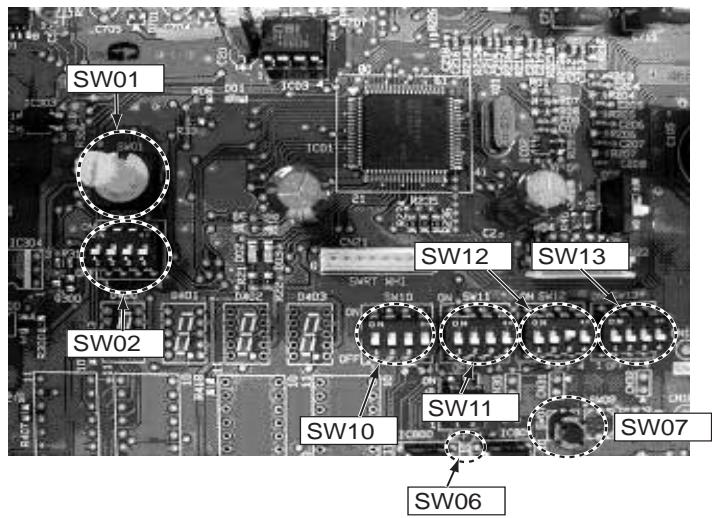
1-2. SW02 (System switching 1)
| SW02 | Switching details | Factory default | Remarks | |
| 02_1 | Boiler install position After 3WV heating side/Before 3WV | After 3WV, heating | OFF | Before 3 WV |
| 02_2 | - | - | OFF | |
| 02_3 | - | - | OFF | |
| 02_4 | Room thermostat | No | OFF | |
1-3. SW10 (Pump switching)
| SW10 | Switching details | Factory default | Remarks | |
| 10_1 | Pump P1 operation during hot water modeOFF = P1 ON during heat pump activateON = P1 Continues run | Heat-pump activate | OFF | |
| 10_2 | Pump P1 operation during room heating. P1 pump stop or not using out side air temperature.OFF = Continues runON = Pump P1 stop when TO>20 °C (Available to change the temperature setting by FC 9E) | Continuous run | OFF | |
| 10_3 | Pump P2 interlock with P1 Yes/No | Yes | OFF | |
| 10_4 | - | - | OFF | |
1-4. SW11 (Heater Yes/No switching)
| SW11 | Switching details | Factory default | Remarks | |
| 11_1 | Hydro unit backup heater Energized Yes/No | Energised | OFF | |
| 11_2 | Hot water cylinder heater Energized Yes/No | Energised | OFF | |
| 11_3 | External booster heater output Enabled Yes/No | Enabled | OFF | |
| 11_4 | - | - | OFF | |
1-5. SW12 (System switching 2)
| SW12 | Switching details | Factory default | Remarks | |
| 12_1 | Hot water supply | Yes | OFF | |
| 12_2 | ZONE1 | Yes | OFF | |
| 12_3 | ZONE2 | No | OFF | |
| 12_4 | - | - | OFF | |
1-6. SW13 (System switching 3)
| SW13 | Switching details | Factory default | Remarks | |
| 13_1 | 3WV SPST/SPSD Specification switching | SPST | OFF | |
| 13_2 | Boiler output enabled | No | OFF | |
| 13_3 | Auto Restart of power outage | Yes | OFF | |
| 13_4 | - | - | OFF | |
2. Hydro unit Function Code Setting
2-1. How to set function code
1 Press the SET and TEST and SELECT buttons at the same time for 4 seconds or longer. (See display )
2 Specify CODE NO. (FC) with the TEMP. button for temperature setting.
3 Select a setting data with the TIME button for timer setting. The value in the DATA item changes.
4 Press the SET button. (If OK lights, the status is confirmed) To change the item to be set, go to 2.
5 Pressing the TEST button moves the unit to the normal stop state.
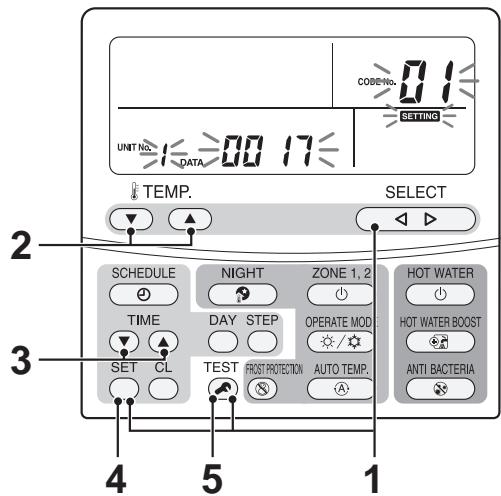
2-2. How to set remote controller function code
This operation can set the start and end time of the night time low noise, anti bacteria, night set back, or other functions.
1 Press the TEST and CL and TEMP. buttons at the same time for 4 seconds or longer. (See display ) appears on the left.
2 Specify CODE NO. (FC) with the TEMP. button for temperature setting.
3 Select a setting data with the TIME button for timer setting. The value in the DATA item changes.
4 Press the SET button.(If the blinking changes to lit, the status is normal) To change the item to be set, go to 2.
5 Pressing the TEST button moves the unit to the normal stop state.
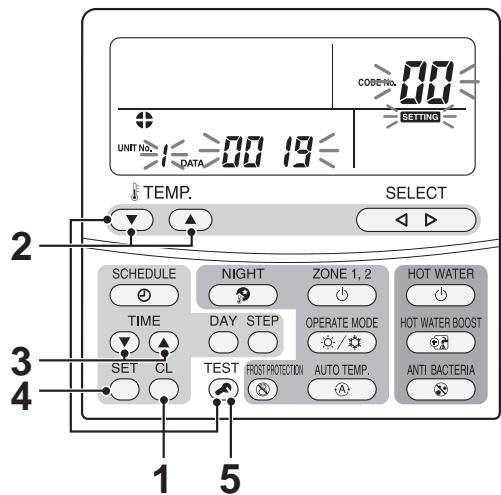
Function code table
| FC | Item | Details | First shipment | |
| 01 | Water heat exchanger capacity *1 | 0012: 803XWH**-E | 0017: 1403XWH**-E | Depends on type |
| 02 | Cooling/Non-cooling switching | 0000: Cooling | 0001: No cooling | 0001: No cooling |
| 07 | Hot water HP operation mode upper time limit | 0000: 0 min | - 0120: 120 min | 0030: 30 min |
| 08 | Hot Water Boost operation time (operating time) | 0003: 30 min | - 0018: 180 min | 0006: 60 min |
| 09 | Hot Water Boost set temperature | 0040: 40°C | - 0080: 80°C | 0075: 75°C |
| 0A | Anti bacteria set temperature | 0065: 65°C | - 0080: 80°C | 0075: 75°C |
| 0B | Anti bacteria holding time | 0000: 0 min | - 0060: 60 min | 0030: 30 min |
| 0C | Mixing valve drive time | 0003: 30 sec | - 0024: 240 sec | 0006: 60 sec |
| 0F | Hot water HP allowance while cooling + supplying hot water | 0000: Not allow | - 0001: Allow | 0000: Not allow |
| 18 | Upper limit of cooling set temperature | 0018: 20°C | - 0030: 30°C | 0025: 25°C |
| 19 | Lower limit of cooling set temperature | 0010: 10°C | - 0018: 20°C | 0010: 10°C |
| 1A | Upper limit of heating (ZONE1) set temperature | 0037: 37°C | - 0055: 55°C | 0055: 55°C |
| 1B | Lower limit of heating (ZONE1) set temperature | 0020: 20°C | - 0037: 37°C | 0020: 20°C |
| 1C | Upper limit of heating (ZONE2) set temperature | 0037: 37°C | - 0055: 55°C | 0055: 55°C |
| 1D | Lower limit of heating (ZONE2) set temperature | 0020: 20°C | - 0037: 37°C | 0020: 20°C |
| 1E | Upper limit of hot water set temperature | 0060: 60°C | - 0080: 80°C | 0075: 75°C |
| 1F | Lower limit of hot water set temperature | 0040: 40°C | - 0060: 60°C | 0040: 40°C |
| 20 | Hot water HP start temperature | 0020: 20°C | - 0045: 45°C | 0038: 38°C |
| 21 | Hot water HP stop temperature | 0040: 40°C | - 0050: 50°C | 0045: 45°C |
| 22 | Priority mode Hot water supply/Heating switching temperature | -0020: -20°C | - 0020: 20°C | 0000: 0°C |
| 23 | Boiler output enable switching temperature | -0020: -20°C | - 0020: 20°C | -0010: -10°C |
| 24 | Outside air temperature for hot water temperature compensation start | -0020: -20°C | - 0010: 10°C | 0000: 0°C |
| 25 | Hot water temperature compensation value | 0000: 0K | - 0015: 15K | 0003: 3K |
| 26 | Night set back change temperature range | 0003: 3K | - 0020: 20K | 0005: 5K |
| 27 | Set temperature shift with heating Auto | -0005: -5K | - 0005: 5K | 0000: 0K |
| 29 | Outside air temperature T1 temperature | -0015: -15°C | - 0000: 0°C | -0010: -10°C |
| 2B | Outside air temperature T3 temperature | 0000: 0°C | - 0015: 15°C | 0010: 10°C |
| 2C | Set temperature A with outside air temperature of - 20°C | 0020: 20°C | - 0055: 55°C | 0040: 40°C |
| 2D | Set temperature B with outside air temperature of T1 | 0020: 20°C | - 0055: 55°C | 0035: 35°C |
| 2E | Set temperature C with outside air temperature of 0°C | 0020: 20°C | - 0055: 55°C | 0030: 30°C |
| 2F | Set temperature D with outside air temperature of T3 | 0020: 20°C | - 0055: 55°C | 0025: 25°C |
| 30 | Set temperature E with outside air temperature of 20°C | 0020: 20°C | - 0055: 55°C | 0020: 20°C |
| 31 | Zone2 ratio with Zone1 as Auto | 0000: 0% | - 0100: 100% | 0080: 80% |
| 33 | Hydro unit backup heater down time | 0000: 5 min | 0001: 10 min | 0001: 10 min |
| 0002: 15 min | 0003: 20 min | |||
| 34 | Hydro unit backup heater up time | 0000: 10 min | 0001: 20 min | 0000: 10 min |
| 0002: 30 min | 0003: 40 min | |||
| 3A | Frost protection function Invalid/Valid | 0000: Invalid | 0001: Valid | 0001: Invalid |
| 3B | Frost protection set temperature | 0010: 10°C | - 0020: 20°C | 0015: 15°C |
| 3C | 2-way valve operation (logical reverse) control | 0000: Energised during cooling | 0001: Not energised during cooling | 0000: Activate during cooling |
| 3E | Heating HP/Boiler priority switching when using boiler | 0000: Priority on HP | 0001: Priority on boiler | 0000: Priority on HP |
| 40 | Activate/deactivate room temperature control | 0000: Deactivate | 0001: Activate | 0000: Deactivate |
1 FC_01 is needed for PCB replacement or function code reset procedure has been completed.
2 System restart with remote controller.
*3 Restart in the mode when stopping.
| FC | Item | Details | First shipment |
| 52 | External input contact logic (must be used in with FC61) | 0000: CLOSE to stop system *2 0001: OPEN to stop system *2 0002: OPEN to stop system, CLOSE to restart system (Statics input) 0003: CLOSE to stop system, CLOSE again to restart system (plus input) | 0000:CLOSE to stop |
| 54 | Logic of 3-way valve's action when powered (Single return only) | 0000: Not reversed (Hot water mode when powered) 0001: Reversed (Heating when powered) | 0000: Not reversed (Hot water mode when powered) |
| 58 | Night set back is activated | 0000: Zone 1 & 2 0001: Zone 1 only | 0000: Zone1 & 2 |
| 59 | Interval of Mixing Valve control | 0001: 1 minute - 0030: 30 minutes | 0004: 4 minutes |
| 5A | P1 setting while in hot water supply mode | 0000: While running HP only 0001: P1 continues running | |
| 5B | Boiler running setting | 0000: Boiler and HP 0001: Boiler only 0002: Heater | 0000: Boiler and HP |
| 61 | Changing the target of stopping/starting by external signal or changing the TEMPO setting | 0000: Hot water supply and heating 0001: Keeping initial status *3 0002: Hot water supply only 0003: Heating only 0004: TEMPO1 (Not activate the heaters) 0005: TEMPO2 (Not activate the heaters, inlet pump, heat pump) | 0000: Hot water supply and heating |
| 62 | Activate/deactivate A02 error detection | 0000: Activate 0001: Deactivate | 0000: Activate |
| 64 | Continuously run or stop the P2 pump while cooling | 0000: Continuously run P2 0001: Stop P2 | 0000: Continuous running |
| 65 | P1 pump setting when the thermostat is deactivated in the room temperature remote control and room temperature thermostat settings | 0000: Continuously run P1 0001: Stop P1 when the thermostat is OFF | 0000: Continuous running |
| 67 | Changing the condition of optional output (For the optional P.C. board connected to CN209) | 0000: 1-3 During defrosting 2-3 While compressor is running. 0001: 1-3 As error is detected 2-3 During operation | 0000: 1-3 During defrosting 2-3 While compressor is running. |
| 92 | Upper room temperature limit when cooling | 0000: 15°C - 0055: 30°C | 0029: 29°C |
| 93 | Lower room temperature limit when cooling | 0000: 15°C - 0055: 30°C | 0018: 18°C |
| 94 | Upper room temperature limit when heating | 0000: 15°C - 0055: 30°C | 0029: 29°C |
| 95 | Lower room temperature limit when heating | 0000: 15°C - 0055: 30°C | 0018: 18°C |
| 96 | Initial water temperature setting when controlling cooling by the room temperature remote control and room temperature thermostat | 0010: 10°C - 0055: 25°C | 0020: 20°C |
| 9D | Initial water temperature setting when controlling heating by the room temperature remote control and room temperature thermostat | 0010: 20°C - 0055: 55°C | 0020: 40°C |
| 9E | TO temperature setting to stop the P1 pump during the middle period heating | 0010: 10°C - 0030: 30°C | 0020: 20°C |
1 FC_01 is needed for PCB replacement or function code reset procedure has been completed.
2 System restart with remote controller.
*3 Restart in the mode when stopping.
Remote controller function code table
| FC | Item | Details | Fist shipment |
| 02 | Temperature correction by the room temperature sensor (heating) | -10K~+10K: By 1K steps | -1: -1K correction |
| 03 | Temperature correction by the room temperature sensor (cooling) | -10K~+10K: By 1K steps | -1: -1K correction |
| 05 | 24H/12H display switching | 0: 24H display 1: 12H (AM/PM) display | 0: 24H display |
| 09 | Night time low-noise mode | 0: Invalid 1: Valid | 0: Invalid |
| 0A | Night time low-noise start time | 0 - 23 (0:00 to 23:00) | 22: 22:00 |
| 0B | Night time low-noise end time | 0 - 23 (0:00 to 23:00) | 06: 06:00 |
| 0C | Anti bacteria start time | 0 - 23 (0:00 to 23:00) | 22: 22:00 |
| 0D | Anti bacteria start cycle | 1 - 10 (Every day to 10-day cycle) | 07: 7-day cycle |
| 0E | Starting time of Night set back | 0 - 23 (0:00 to 23:00) | 22: 22:00 |
| 0F | Ending time of Night set back | 0 - 23 (0:00 to 23:00) | 06: 06:00 |
| 11 | Remote control Alarm Tone. | 0: Alarm Tone OFF 1: Alarm Tone ON | 1: Alarm Tone ON |
| 12 | Frost running period (days) | (0 days – 20 days) | 00: No setting |
| 13 | Frost running period (hours) | (0 hours – 23 hours) | 00: No setting |
2-3. How to reset hydro function code
If the hydro unit PCB has been replaced, it is necessary to change the FC 01 (capacity setting)
(1) Preparation
1) Turn all of the remote controls "OFF" for the hot water supply [HOTWATER] and heating [ZONE1,2].
2) Turn off the power supply of the hydro unit and the outdoor unit.
3) Remove the front panel of the hydro unit and cover to the hydro unit electrical box.
4) Set SW06_1 and _2 "ON".
(2) Procedure
1) Turn on the power supply of the hydro unit and the outdoor unit.
- The small yellow LED located near the MCU should be flashing slowly.
2) Press tactile switch SW07 until the yellow LED turns off.
- When the tactile switch SW07 has been press for 5 sec, flashing becomes quickly. And when the switch will be pressed further 5 sec, the yellow LED will turn off.
When the SW07 is released, the yellow LED starts to flash quickly again.
3) Turn off the power supply of the hydro unit and the outdoor unit.
4) Set SW06_1 and _2 to "OFF".
5) Replace the electrical box cover and front panel on the hydro unit.
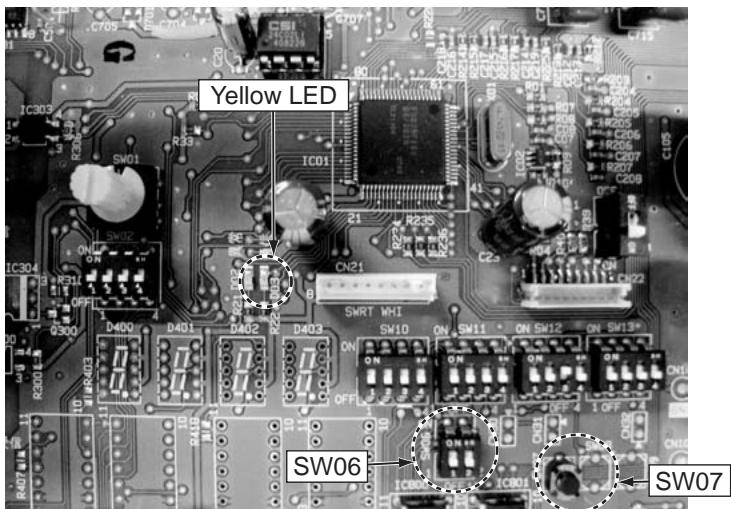
2-4. How to reset remote controller function code
It is not possible to reset the remote controller function code setting back to the default values.
3. Trial Operation
A trial operation is available with an actual operation in progress or stopped. A trial operation is available in any of the hot water supply, heating, or cooling mode. The compressor starts according to the trial operation frequency. A trial operation automatically stops after 30 minutes at the longest if not stopped with the remote controller.
1 Press the remote controller TEST button for 4 seconds or longer to display "TEST" on the LCD screen.
2 Press the HOT WATER button, and a hot water supply operation starts after 3 minutes. (See display ) (The pump immediately starts.)
3 Pressing the HOT WATER button again stops the hot water supply operation.
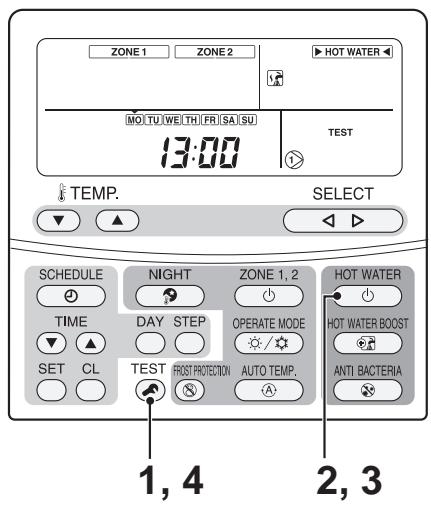
1 Press the ZONE1,2 button, and a heating operation starts after 3 minutes. (See display ) (The pump immediately starts.)
2 Pressing the ZONE1,2 button again stops the heating operation.
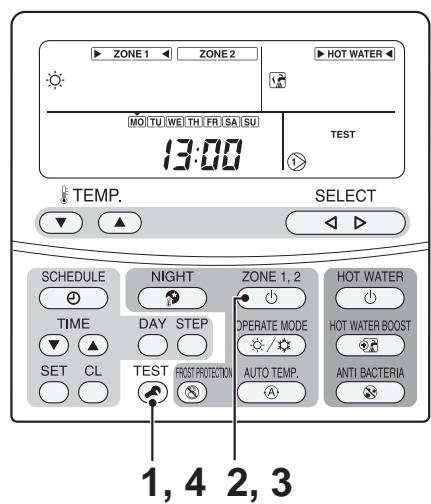
2 Press the ZONE1,2 button and then OPERATE MODE (√/√), and a cooling operation starts after 3 minutes. (The pump immediately starts.) (See display )
3 Pressing the ZONE1,2 button again stops the cooling operation.
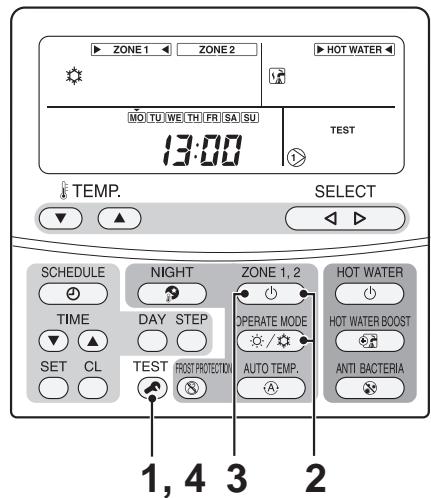
4 Press TEST on the remote controller to exit the trial operation mode.
4. Auto Curve Setting
FC code setting can make flexible Auto-Curve settings.
1 Press the TEST 和 and SET and SELECT buttons at the same time for 4 seconds or longer. (See display ) (Make sure that no operation is in progress.)
2 Specify an item code (FC) from among 29 to 2F with the TEMP. button for temperature setting.
3 Set data with the TIME button for timer setting.
4 Press the SET button. (If OK lights, the status is confirmed)
5 Repeat 2 through 4 for each item.
6 Pressing the TEST button moves the unit to the normal stop state.
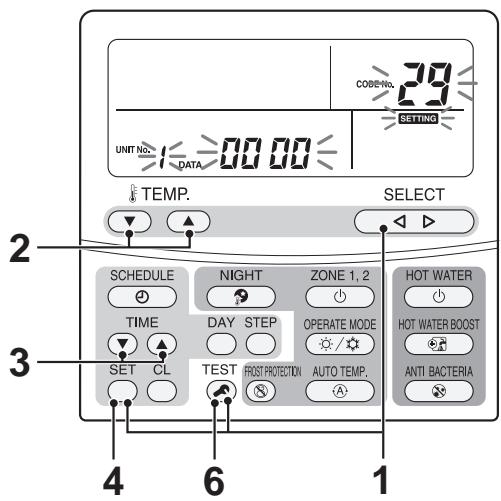
| FC | Item | Details | Fist shipment | ||
| 29 | Outside air temperature T1 temperature | -0015: -15°C | - | 0000: 0°C | -0010: -10°C |
| 2B | Outside air temperature T3 temperature | 0000: 0°C | - | 0015: 15°C | 0010: 10°C |
| 2C | Set temperature A with outside air temperature of -20°C | 0020: 20°C | - | 0055: 55°C | 0040: 40°C |
| 2D | Set temperature B with outside air temperature of T1 | 0020: 20°C | - | 0055: 55°C | 0035: 35°C |
| 2E | Set temperature C with outside air temperature of 0°C | 0020: 20°C | - | 0055: 55°C | 0030: 30°C |
| 2F | Set temperature D with outside air temperature of T3 | 0020: 20°C | - | 0055: 55°C | 0025: 25°C |
| 30 | Set temperature E with outside air temperature of 20°C | 0020: 20°C | - | 0055: 55°C | 0020: 20°C |
| 31 | Zone2 ratio with Zone1 as Auto | 0000: 0% | - | 0100: 100% | 0080: 80% |
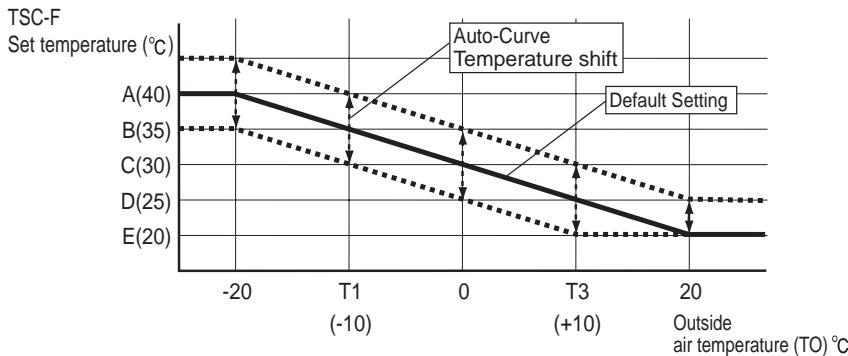
- Auto-Curve temperature shift Without Auto-Curve individually set, the set temperature can be shifted in the range of ± 5k of the current setting. (The set temperature is valid only when Auto operation is in progress.)
1 Press the AUTO TEMP (A) button for 4 seconds or longer. (See display ) (The remote controller FC setting screen appears.)
2 Set a temperature shift range with the TEMP. button for temperature setting. (-5k to 5k)
3 Press the SET button. (If ok lights, the status is confirmed)
4 Pressing the TEST button moves the unit to the normal stop state.
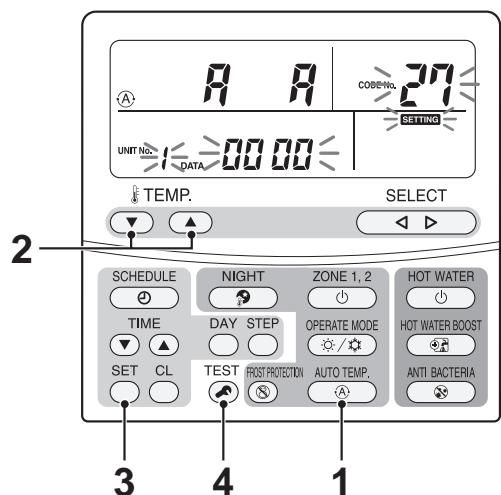
5. Time Setting
1 Press the TIME button for 4 seconds or longer. (The screen moves to the time setting mode.) (See display Day, time, , and SETTING indications blink. (Time setting is available during an operation.)
2 Specify a day to be set. Press the DAY button to select the current day. The symbol moves along above the days. ( moves by each button press from MO through SU.)
3 Set time. Use the TIME button to set time. Long press changes time display by 10 minutes.
4 Pressing the SET button ends the time setting. Ending the time setting changes the days and time to the lit state and returns to the normal display. and SETTING indications go out.)
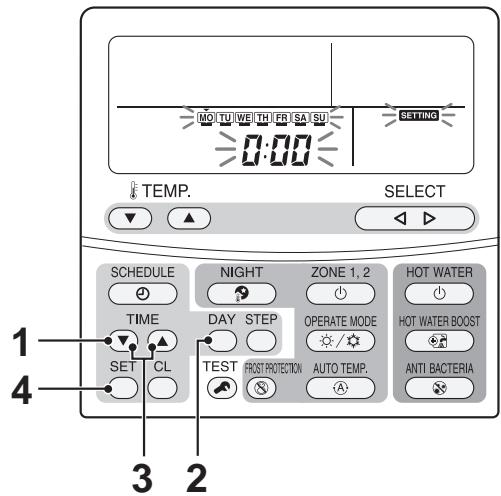
6. Scheduled Operation Setting
Schedule setting makes the following modes to be flexibly set: hot water supply, heating, cooling, hot water supply and heating, hot water supply and cooling, and stop, and set temperature.
6-1. How to set scheduled operation
Set the remote controller time.
1 Press the remote controller SCHEDULE \ button for 4 seconds or longer. (See display )
(Moves to the schedule setting mode)
The following blink: SETTING, , and P1 indications, items to be set, the set temperature of ZONE1/2 and HOT WATER (previous set temperature), day (MO TU WE TH FR SA SU), and time 0:00.
2 Specify a day to be set.
Press the DAY button to move day to the day to be set. ( moves by each button press from MO through SU. From SU, the symbol moves to MO through SU (Every day).
Press the SET button to confirm the day to be set.
3 Specify a step from among steps 1 to 8.
Press the STEP button to specify a step to be set.
(The selection moves by each STEP button press among 1 to 8, C, and L.)
Selecting "C" copies the day details already set. Go to 7.
Selection "L" clears the setting details.
Press the SET button to confirm the step to be set.
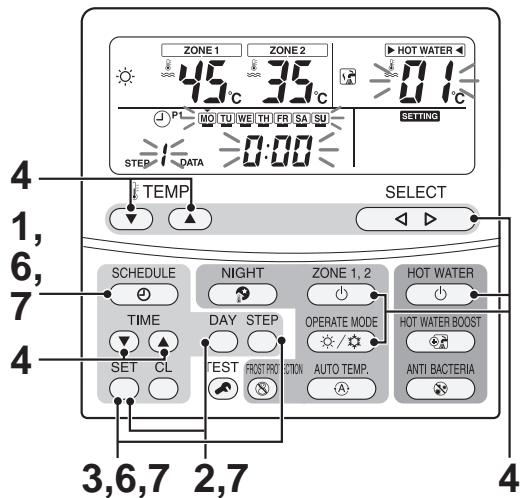
4 Specify set time, operation mode, and set temperature.
Time setting: Use the TIME button to set time.
Operation mode: Press HOT WATER for hot water supply, ZONE1,2 for heating, or ZONE1,2 for cooling, and then press OPERATE MODE. Pressing HOT WATER or ZONE1,2 again displays "---", indicating stop. When an operation mode is set, "---" appears for heating, "---" for cooling, or "---" for hot water supply, and also the temperature set last time is displayed.
Temperature setting: Use the SELECT button to select a mode and set temperature with the TEMP.
Press the SET button to confirm the set time, operation mode, and set temperature to be set.
5 Repeat 2 through 4.
(If only one schedule is set, the setting applies to all the time period after the set time. Two schedule settings are recommended.)
6 Pressing the SCHEDULE button ends the schedule setting. Ending the schedule setting blinks the light . Pressing the SET button during the 5-second blinking changes to lit, and the schedule operation starts.
7 How to copy program
Select "C" in 3 and press the SET button. (Copy source is determined.)
Press the DAY button to move to the day of copy target. Pressing the SET button overwrites the program setting to the copy target.
To set more, repeat step 2 through 4. Pressing the SCHEDULE button ends the schedule setting.
6-2. How to start and cancel schedule operation
Without schedule operation set, press the remote controller SCHEDULE button. blinks.
Pressing the SET button during the 5-second blinking changes ④ to lit, and the schedule operation starts.
With schedule operation set, press the remote controller SCHEDULE button. 1 blinks.
Pressing the CL button during the 5-second blinking causes to put out, and the schedule operation is cancelled.
7. Frost Protection Setting
This setting keeps a room with weak heating when users are not home for long hours.
1 Press the ZONE1,2 button to start a heating operation. (This is available only for a normal heating operation.) (No frost protection setting is provided to hot water supply and cooling.)
2 Pressing the FORST PROTECTION button displays the symbol and "F" for temperature setting. (See display ) The heating operation of 15^ C is set. In FC_3B in 2-2 section, the set temperature can be changed in the range of 10 to 20^ C .
3 Pressing the FORST PROTECTION button makes disappear, and the set temperature returns to the normal heating temperature. (Pressing the ZONE1,2 button ends both the frost protection and the heating operation.)
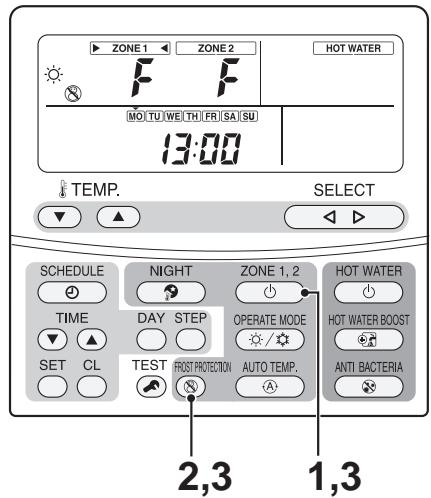
1 Press the FROST PROTECTION button for 4 seconds or longer. (Moves to the FROST day setting mode) (See display ) "12" in the Code No. field and the current time displayed blink.
2 Press the TIME button to set a desired end days. Pressing SET changes the time to be lit and the setting is confirmed.
3 Press the TEMP. button to change Code No. "13" (The codes "12" and "13" only can be changed.)
4 Press the TIME button to set a desired end hours. Pressing SET changes the time to be lit and the setting is confirmed.
5 Press the TEST button to exit the FROST PROTECTION days & time setting mode.
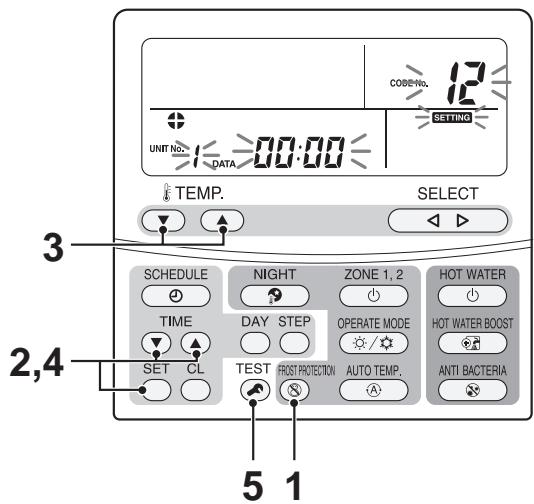
8. NIGHT Operation Setting
For night time hours, this setting changes set temperature of heating or cooling by 5k as save operation.
1 Press the ZONE1,2 button to start a heating or a cooling operation. (See display)
(Night time operation is not available for hot water supply. Use the schedule operation.)
2 Pressing the NIGHT button displays the symbol.
A night time operation lowers the set temperature by 5K for heating and raises 5K for cooling during the set time period (*1) from 22:00 to 6:00 (Default).
3 Pressing the NIGHT button again makes disappear, and the normal operation starts.
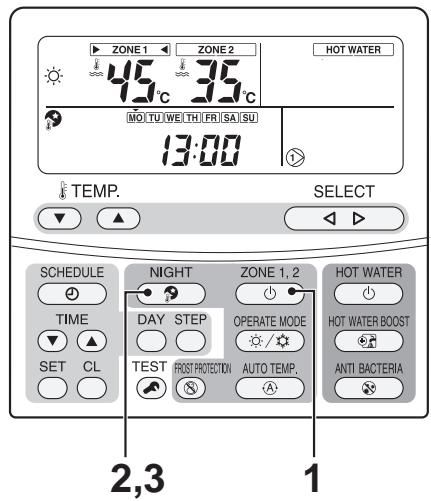
1 Press the NIGHT button for 4 seconds or longer. (Moves to the NIGHT time setting mode) (See display ) "0E" in the Code No. field and the current time displayed blink.
2 Press the TIME button to set a desired start time. Pressing SET changes the time to be lit and the setting is confirmed.
3 Press the TEMP. button to change Code No. (The codes "0E" and "0F" only can be changed.)
4 Press the TIME button to set a desired end time. Pressing SET changes the time to be lit and the setting is confirmed.
5 Press the TEST button to exit the NIGHT time setting mode.
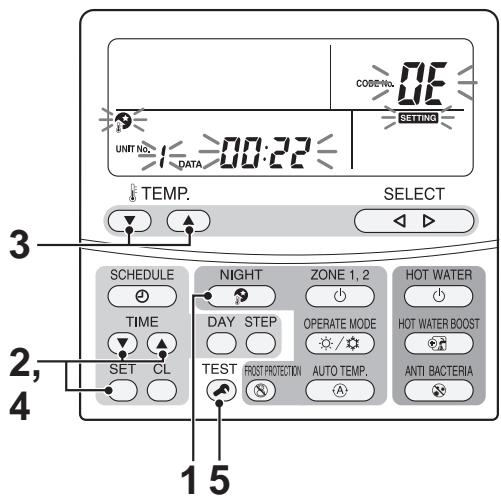
9. Anti Bacteria Setting
This setting regularly raises the hot water cylinder temperature to prevent bacteria from growing.
1 Press the HOT WATER button to start a hot water supply operation.
(Normal hot water supply operation)
(No anti bacteria setting is provided to heating and cooling.)
2 Pressing the ANTI BACTERIA button displays the symbol. (See display )
(The set temperature does not change) The hot water supply operation of 75^ C starts.
The anti bacteria operation raises water temperature to 75^ with the heat pump and heater, and automatically ends after 30 minutes.
3 After that, an anti bacteria operation automatically starts at the set time and cycle.
4 Pressing the ANTI BACTERIA button makes disappear, and the anti bacteria operation does not start.
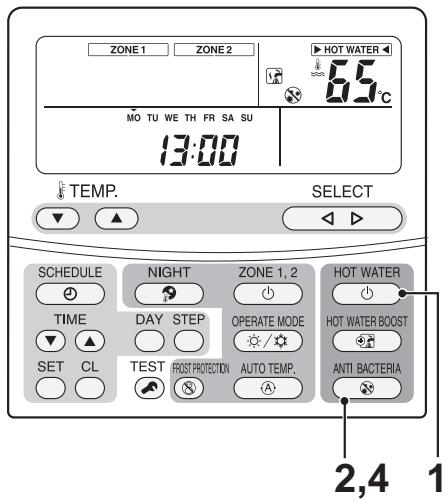
In FC_0A or 0B (See 2-2), the set temperature and holding time can be changed.
FC_0A: Set temperature change range 70 to 80^ (75°C: default)
FC_0B: Holding time change range 0 to 60 minutes (30 minutes: default)
1 Press the ANTI BACTERIA button for 4 seconds or longer. (See display )
(Moves to the anti bacteria time setting mode)
"0C" in the Code No. field and the currently set ^* and SETTING indication blink.
2 Press the TIME button to set a desired start time.
Pressing SET changes DATE (set time) 0C, and SETTING indication to be lit and the setting is confirmed.
3 Press the TEMP. button to change Code No. to "0d".
The "0d" and SETTING indication blink.
4 Press the TIME button to set a desired cycle.
Pressing SET changes DATE (set time) 0d, and SETTING indication to be lit and the setting is confirmed.
5 Press the TEST button to exit the anti bacteria time setting mode.
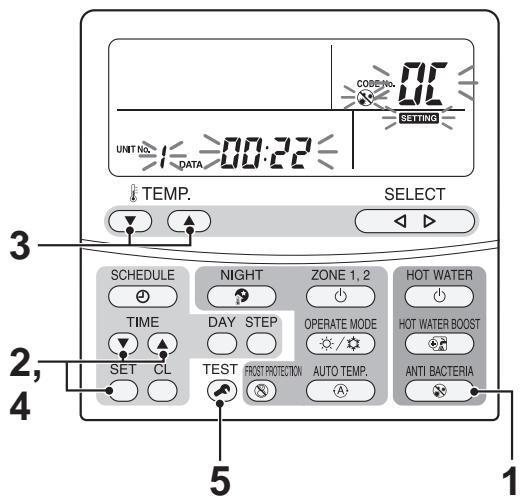
10. Hot Water Boost Setting
This setting heats the water whenever necessary by using the heat pump and hot water cylinder heater.
1 Press the HOT WATER button to start a hot water supply operation.
(Normal hot water supply operation)
2 Pressing the HOT WATER BOOST button displays the symbol. (See display)
(The set temperature does not change) The hot water supply operation of 75^ C starts.
HOT WATER BOOST operation with the heat pump and heater ends when the water temperature reaches 75^ ; however, the normal hot water supply operation automatically starts after 60 minutes even if the temperature is not as high as 75^ .
3 Pressing the HOT WATER BOOST button again makes disappear, and the HOT WATER BOOST ends.
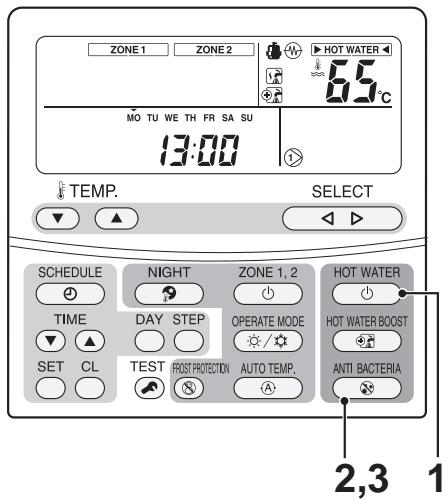
In FC_08 or 09 (See 2-2), the operation time and set temperature can be changed.
FC_08: Operation time change range 30 to 120 minutes (60 minutes: default)
FC_09: Set temperature change range 40 to 80^ (75°C: default)
11. Night time Low-noise Setting
- This setting is used to reduce noise output, from the outdoor unit, during night time for neighbours. Night time low-noise operates with lower operation frequency and fan tap than usual only for the set time period.
- The operation is the same as usual hot water supply, heating, or cooling.
- Adjust the unit time before making the settings.
1 Press the TEST and TEMP. button at the same time for 4 seconds or longer. (See display )
(Moves to the night time low-noise setting mode)
"09" displayed in the Code No. field and the DATA currently displayed, SETTING, and blink.
2 Press TIME to set enabled "1" or disabled "0".
Pressing SET changes DATA and SETTING indication to be lit and the setting is confirmed. (For DATA, only 1 or 0 can be selected.)
3 Press the TEMP. button to change Code No. to "0A". DATA and SETTING indication again blink.
4 Press the TIME button to set start time. Pressing SET changes DATA and SETTING indication to be lit and the setting is confirmed.
5 Press the TEMP. button to change Code No. to "0B". DATA and SETTING indication again blink.
6 Press the TIME button to set end time. Pressing SET changes DATA and SETTING indication to be lit and the setting is confirmed.
7 Press TEST to exit the night time low-noise time setting mode. SETTING and indications go out.
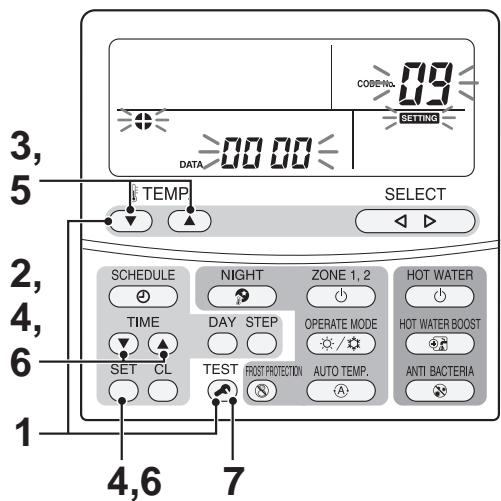
12. Forced Defrosting Setting
The FC code setting (See 2-2) can activate the forced defrosting mode for the outdoor unit operation.
(Preparation)
1 Press the remote controller buttons, TEST , SET , and SELECT , at the same time for 4 seconds or longer.(Make sure that no operation is in progress.)
2 Specify CODE NO. (FC) 46 with the TEMP. button for temperature setting.
3 Set DATA to 0001 with the TIME button for timer setting. (See display ) (Factory default is 0000)
4 Press the SET button. (If OK OK lights, the status is normal)
5 Pressing the TEST button moves the unit to the normal stop state.
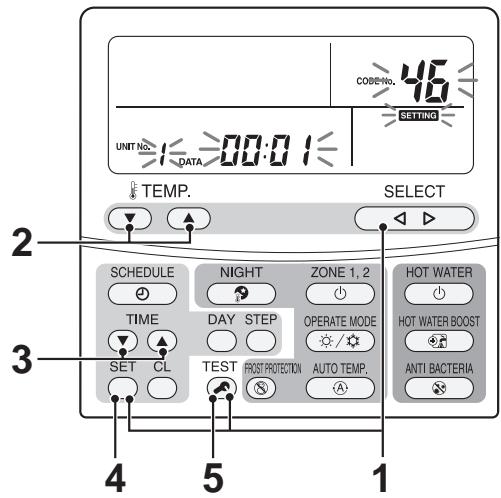
(Operation)
- Press the ZONE1,2 button.
- Set the operation to the heating mode.
- After a while, forced defrosting signals are transmitted to the outdoor unit, and the unit starts defrosting.
(Forced defrosting lasts for up to 10 minutes.)
- After the defrosting, the heating operation starts.
To perform defrosting again, start with 1 above.
(Performing the forced defrosting once cancels the forced defrosting setting above described.)
13. Display Function of Set Temperature and Other Settings
■ Sensor temperature display calling
This function calls the service monitor mode from the remote controller to show the data of the remote controller, the hydro unit, and outdoor unit.
1 Press the TEST and CL buttons at the same time for 4 seconds or longer to call the service monitor mode.
The service monitor lights up, and the temperature of CODE No. "00" displays at first. (See display )
2 Press the TEMP. button for temperature setting to change the item code to one to be monitored.
The following table shows the item codes.
| Hydro unit data | Item code | Data name | Unit |
| 00 | Control temperature (Hot water cylinder) | °C | |
| 01 | Control temperature (Zone1) | °C | |
| 02 | Control temperature (Zone2) | °C | |
| 03 | Remote controller sensor temperature | °C | |
| 04 | Condensed temperature (TC) | °C | |
| 06 | Water inlet temperature (TWI) | °C | |
| 07 | Water outlet temperature (TWO) | °C | |
| 08 | Water heater outlet temperature (THO) | °C | |
| 09 | Floor inlet temperature (TFI) | °C | |
| 0A | Hot water cylinder temperature (TTW) | °C | |
| 0B | Mixing valve position | step | |
| OE | Low pressure (Ps) × 100 | MPa |
| Outdoor unit data | Item code | Data name | Unit |
| 60 | Heat exchange temperature (TE) | °C | |
| 61 | Outside air temperature (TO) | °C | |
| 62 | Discharge temperature (TD) | °C | |
| 63 | Suction temperature (TS) | °C | |
| 65 | Heat sink temperature (THS) | °C | |
| 6A | Current | A | |
| 6D | Heat exchanger coil temperature (TL) | °C | |
| 70 | Compressor operation Hz | Hz | |
| 72 | Number of revolutions of outdoor fan (lower) | rpm | |
| 73 | Number of revolutions of outdoor fan (upper) | rpm | |
| 74 | Outdoor PMV position × 1/10 | pls |
| Service data | Item code | Data name | Unit |
| F0 | Micro computer energized accumulation time | × 100h | |
| F1 | Hot water compressor ON accumulation time | × 100h | |
| F2 | Cooling compressor ON accumulation time | × 100h | |
| F3 | Heating compressor ON accumulation time | × 100h | |
| F4 | Built-in AC pump operation accumulation time | × 100h | |
| F5 | Hot water cylinder heater operation accumulation time | × 100h | |
| F6 | Backup heater operation accumulation time | × 100h | |
| F7 | Booster heater operation accumulation time | × 100h |

3 Pressing the TEST button returns to the usual display.
14. Failure History Calling Function
NOTE
Do not press the CL button. Pressing the button deletes all the failure history of the hydro unit. If the button is pressed and the history is deleted, perform power cycle. If the current failure is the same as the one occurred last time before deleted, the history may not record the current failure.Outdoor unit
15. Outdoor Unit Setting
15-1. Refrigerant recovery control
Although HFC refrigerant is "Ozone depletion potential = 0 ", emission control is applied to it as a greenhouse effect gas. This model has a switch for the outdoor unit to perform an environment-friendlyly refrigerant recovery operation (pump down) when the model is replaced or discarded.[How to operate]
1 Remove the water in the hydro unit.
(With the water remained in the hydro unit, performing refrigerant recovery may freeze the water and burst the unit.)2 Set all the SW804 dip switches to OFF (initial status), and press the push-button switch SW801 for approx. 1 second.
A cooling operation starts. (During the operation, D805 (green LED) blinks. Note that this operation lasts for 10 minutes.3 After 3 minutes has passed, close the liquid-side valve.
4 After the refrigerant recovery is completed, close the gas-side valve.
5 Press again the push-button switch SW801 for approx. 1 second. The outdoor unit stops operation (cooling).
15-2. Outdoor unit settings (Existing piping, Power save, etc.)
The following settings are available with dip switch setting and jumper wire setting.| Function | Where to set | Control details | |||||
| Existing piping setting | SW802--- OFF | When using a Ø19.1 pipe for the existing piping, set the switch to ON. This case may decrease heating capacity depending on the outside air temperature when heating or on a room temperature. | |||||
| Power save setting | EXISTING Piping setting--- Power save setting--- Snow prevention fan control* All OFF position at factory setting | When using the power save function, set the switch to ON. This setting controls the compressor frequency lowering (about 10%) according to the heat exchange temperature of the hydro unit during a heating or hot water supply operation. | |||||
| Snow prevention fan control | This control enables the function that prevents snow from entering the draft air duct through the fan guard or a heat exchanger gap and causing motor lock. If the outside air temperature is 0°C below, this control operates the outdoor fan in W5 even if the compressor is not in operation. | ||||||
| Defrosting time change | J805, J806 | If the defrosting interval is shorter than the standard, the jumper wire is cut. For the control details or how to cut the jumper wire, see defrosting control. | |||||
| Maximum frequency change | J807 | If the maximum value of compressor frequency need to be lowered, cut the jumper wire shown on the left. This control lowers the maximum frequency when hot water supply, heating, or cooling is in operation. (HWS-803H-E only)In this case, the maximum capacity decreases.Maximum frequency of compressor | |||||
| Model | HWS-803H-E | HWS-1103H-E | HWS-1403H-E | ||||
| Cooling | Heating | Cooling | Heating | Cooling | |||
| Standard | 70.2 | 70.2 | 53.4 | 60.0 | 70.2 | ||
| J807 cut | 55.8 | 55.8 | 48.0 | 54.0 | 48.6 | ||
| Model | HWS-1103H8(R)-E | HWS-1403H(R)-E | HWS-1603H8(R)-E | ||||
| Cooling | Heating | Cooling | Heating | Cooling | |||
| Standard | 53.4 | 60.0 | 64.2 | 66.0 | 70.2 | ||
| J807 cut | 57.2 | 42.0 | 48.0 | 49.2 | 55.8 | ||
15-3. Service support functions (LED indication, Switch operation method)
The following settings are available with dip switches.(1) Overview
Using 3 dip switches (SW802, SW803, SW804) and 2 push-button switches (SW800, SW801) can make settings available and confirm operations. For operation| Part number | Specification | Operation details |
| SW800 | Press button switch | This switch switches the indications of LED (D800 to D804) on the outdoor control board. |
| SW803 | Dip switch | |
| SW801 | Press button switch | This switch enables users to perform a special operation for maintenance and inspection. |
| SW804 | Dip switch | |
| SW802 | Dip switch | This switch performs initial settings. (See 10-16-2) |
| Part number | Specification | Operation details |
| D502 | Amber LED | Signal display (signals from the hydro unit) of communication between hydro unit and outdoor unit (serial communication) |
| D503 | Green LED | Signal display (signals from the outdoor unit) of communication between hydro unit and outdoor unit (serial communication) |
| D800 to D804 | Yellow LED | Abnormality indication All OFF of SW803 or the lit status of any of D800 to D804 indicates that the outdoor control unit detects an abnormality. Setting SW803 to other than OFF shows details with LED indication. |
| D805 | Green LED | Energization indication This LED lights when the outdoor unit is energized. During a special operation with the SW801 or SW804 operation, this LED blinks. |
| Switch | Function and details |
| SW803 | Abnormality indication (Current abnormality) This switch indicates the current abnormality. Without an abnormality, the lights are off. (See (2)-2) |
| SW803 | Abnormal indication (Latest abnormality: Latest abnormality including the current one) After the abnormality status is released, this setting enables users to see the previous abnormalities. (Previous abnormality can be checked even if the power is once turned off.) * If there is an abnormality now, the abnormality details of the current one is displayed. * This setting does not display a TO sensor failure. (Check for the failure with the setting for current abnormality.) |
| TD SW803 TO SW803 TWI SW803 SW803 | Temperature sensor indication These switches indicate the temperature sensor detecting value. * TC=TWO+2 (heating, hot water supply) TC=TWO (cooling) (See (2)-3) |
| SW803 | Current indication This switch indicates the current value in the outdoor unit. (See (2)-3) |
| SW803 | Compressor operation frequency indication This switch indicates the compressor operation frequency. (See (2)-3) |
| SW803 | PMV position indication This switch indicates PMV (Pulse motor valve) position. (See (2)-3) |
(2)-2. Abnormality indication
The current abnormality and the latest abnormality (including the current one) can be identified by the LED D800 to D804 on the outdoor control board. 1) Setting all the SW803 dip switches to OFF indicates the current abnormality status. 2) Setting SW803 dip switch < 1> only to ON indicates the previous abnormality (including the current one). 3) An abnormality lights any of the LEDs from D800 to D804.(Indication 1) 4) Pressing the push-button switch SW800 for approx. 1 second switches indication.(Indication 2) 5) When SW800 is again pressed or 2 minutes has passed, the indication 1 status returns.   | Indication 1 (Initial indication) | Indication 2 (SW800 operation) | Abnormality details | Remote controller Abnormality code |
| ●●●●●○ | ●●●●●○ | Normal | --- |
| ○○●●○○ | ●●●●●○ | Discharge temperature sensor (TD) failure | F04 |
| ●●●●●○ | Heat exchanger temperature sensor (TE) failure | F06 | |
| ●●●●●○ | Heat exchanger temperature sensor (TL) failure | F07, F06 | |
| ●●●●●○ | Outside air temperature sensor (TO) failure | F08 | |
| ●●●●●○ | Suction temperature sensor (TS) failure | F12, F06 | |
| ●●●●●○ | Heat sink temperature sensor (TH) failure | F13, L29 | |
| ●●●●●○ | Heat exchanger, suction sensor (TE, TS) wrong wiring | F15, F06 | |
| ●●●●●○ | EEPROM failure | F31, L29 | |
| ●●○●○○ | ●●●●●○ | Compressor break down | H01 |
| ●●●●●○ | Compressor lock | H02 | |
| ●●●●●○ | Current detection circuit failure | H03 | |
| ●●●●○ | Faulty compressor case thermostat | H04, P04 | |
| ●○○●○○ | ●●●●●○ | Not set up the capacity | L10, L29 |
| ●●●●●○ | Communication failure between MCUs | L29 | |
| ●●●●○○ | Other abnormality (e.g. Compressor's loss of synchronism) | No abnormality confirmation | |
| ○○○●○○ | ●●●●●○ | Abnormal discharge temperature | P03 |
| ●●●●●○ | High pressure SW system error | P04 | |
| ●●●●●○ | Power failure | P05, H03, P04 | |
| ●●●●●○ | Heat sink overheat failure | P07, L29 | |
| ●●●●●○ | Gas leakage detection | P15, L29 | |
| ●●●●●○ | 4-way valve reverse failure | P19, L29 | |
| ●●●●○○ | Hi pressure protection operation | P20, P04 | |
| ●●●●○○ | Fan drive system failure | P22 | |
| ●●●●○○ | Compressor drive | P26 | |
| ●●●●○○ | Compressor rotor position failure | P29 |
| Item settingLED indication | Temperature sensor (°C) | Current(A) | Compressoroperationfrequency(r.p.s.) | PMV position(pulse) | ||||
| TDSW803THSW803 | TESW803TA SW803 | TSSW803TOSW803SW803 | TLSW803SW803 | TLSW803*Refer to page 147 | SW803 | SW803 | SW803 | |
| ●●●●●○ | less than -25 | 0-0.9 | 0-4 | 0-19 | ||||
| ○●●●●○ | -25 - -21 | 1-1.9 | 5-9 | 20-39 | ||||
| ●○●●●○ | -20 - -16 | 2-2.9 | 10-14 | 40-59 | ||||
| ○○●●●○ | -15 - -11 | 3-3.9 | 15-19 | 60-79 | ||||
| ●●○●●○ | -10 - -6 | 4-4.9 | 20-24 | 80-99 | ||||
| ○●○●●○ | -5 - -1 | 5-5.9 | 25-29 | 100-119 | ||||
| ●○○●●○ | 0 - 4 | 6-6.9 | 30-34 | 120-139 | ||||
| ○○○●○○ | 5-9 | 7-7.9 | 35-39 | 140-159 | ||||
| ●●○●○○ | 10-14 | 8-8.9 | 40-44 | 160-179 | ||||
| ○●○○●○ | 15-19 | 9-9.9 | 45-49 | 180-199 | ||||
| ●○○●○○ | 20-24 | 10-10.9 | 50-54 | 200-219 | ||||
| ○○●○○○ | 25-29 | 11-11.9 | 55-59 | 220-239 | ||||
| ●●○○●○ | 30-34 | 12-12.9 | 60-64 | 240-259 | ||||
| ○●○○●○ | 35-39 | 13-13.9 | 65-69 | 260-279 | ||||
| ●○○○●○ | 40-44 | 14-14.9 | 70-74 | 280-299 | ||||
| ○○○○○ | 45-49 | 15-15.9 | 75-79 | 300-319 | ||||
| ●●●●○○ | 50-54 | 16-16.9 | 80-84 | 320-339 | ||||
| ○●●●○○ | 55-59 | 17-17.9 | 85-89 | 340-359 | ||||
| ●○●●○○ | 60-64 | 18-18.9 | 90-94 | 360-379 | ||||
| ○○●●○○ | 65-69 | 19-19.9 | 95-99 | 380-399 | ||||
| ●●○●○○ | 70-74 | 20-20.9 | 100-104 | 400-419 | ||||
| ○●○●○○ | 75-79 | 21-21.9 | 105-109 | 420-439 | ||||
| ●○○●○○ | 80-84 | 22-22.9 | 110-114 | 440-459 | ||||
| ○○○●○○ | 85-89 | 23-23.9 | 115-119 | 460-479 | ||||
| ●●●○○○ | 90-94 | 24-24.9 | 120-124 | 480-499 | ||||
| ○●●○○○ | 95-99 | 25-25.9 | 125-129 | 500 | ||||
| ●○●○○○ | 100-104 | 26-26.9 | 130-134 | - | ||||
| ○○●○○○ | 105-109 | 27-27.9 | 135-139 | - | ||||
| ●●○○○○ | 110-114 | 28-28.9 | 140-144 | - | ||||
| ○●○○○○ | 115-119 | 29-29.9 | 145-149 | - | ||||
| ●○○○○○ | 120 or higher | 30-30.9 | 150-154 | - | ||||
| ○○○○○○ | sensor failure, not connected | 31 or higher | 155 or higher | - | ||||
| SW804 | Operation when press button switch SW801 is pressed | ||
| SW804 | Refrigerant recovery operation The outdoor unit operates cooling. The hydro unit may freeze with this operation alone. Remove beforehand the water in the hydro unit. (See 16-1) | ||
| SW804 | Hydro unit cooling request Performs a trial cooling operation. (See Note1) | ||
| SW804 | Hydro unit heating request Performs a trial heating operation.(See Note1) | ||
| SW804 | Fan motor forcible operation Forcibly performs a fan motor operation. When SW801 is pressed again or after 2 minutes, the operation returns to the normal control. | Caution: Although these controls are available during an operation, basically perform them when no operation is in progress. Performing these controls during an operation may cause dangerously rapid pressure change. | |
| SW804 | (No operation particularly) | ||
| SW804 | PMV full open operation Fully opens PMV (Pulse motor valve). When SW801 is pressed again or after 2 minutes, the operation returns to the normal control. | ||
| SW804 | PMV full close operation Fully closes PMV (Pulse motor valve). When SW801 is pressed again or after 2 minutes, the operation returns to the normal control. | ||
| SW804 | PMV half open operation Half opens (250 pulses) PMV (Pulse motor valve). When SW801 is pressed again or after 2 minutes, the operation returns to the normal control. | ||
| SW804 | 4-way valve relay operation (RY700, CN700 for check) Sets 4-way valve energization relay (RY700) to ON. When SW801 is pressed again or after 2 minutes, the operation returns to the normal control. Caution: Do not connect the coil into the body when perform this operation. | ||
| SW804 | Self-holding valve vacuum operation (Switch to heating cycle) (RY700, RY701, RY705, CN701 for check) Sets relay RY700, RY701, and RY705 to ON. (CN701 Between 1 to 4 Voltage = Approx. 325V) This function operates for 10 seconds. After that it becomes OFF. | HWS-803H-E HWS-1103H-E HWS-1403H-E only | Caution: Although these controls are available during an operation, basically perform them when no operation is in progress. Performing these controls during an operation may cause dangerously rapid pressure change. |
| SW804 | Self-holding valve release operation (Switch to cooling cycle) Sets relay RY700 to ON. (CN701 Between 1 to 4 Voltage = Approx. 325V) This function operates for 10 seconds. After that it becomes OFF. | ||
| SW804 | SV valve relay operation (RY702, CN702 for check) Sets SV valve relay (RY702) to ON. When SW801 is pressed again or after 2 minutes, the operation returns to the normal control. * HWS-1102 and 1402H-E do not have the parts mounted, so this operation is unavailable. | ||
| SW804 | Heater output relay operation (RY703, CN703 for check) Sets relay for optional heater (RY703) to ON. When SW801 is pressed again or after 2 minutes, the operation returns to the normal control. | ||
| SW804 | External output relay operation (RY704, CN704 for check) Sets relay for external output (RY704) to ON. When SW801 is pressed again or after 2 minutes, the operation returns to the normal control. | ||
| SW804 | (No operation particularly) | ||
| SW804 | External output relay operation change Note: Do not use this setting. | ||
11 Replacement of the Service P.C. Board
Setting the jumper wires and DIP switches
| Outdoor unit | Service Parts(CDB) |
| HWS-803H-E | 431-6V-400(MCC-1571) |
| HWS-1103H-E,1403H-E | 431-6V-399(MCC-1571) |
| HWS-1103H8(R)-E, 1403H8(R)-E, 1603H8(R)-E | 302-6V-015(MCC-1599) |
| Parts name | Function | Setting | |
| Jumper wire | J800~J803 | Model switching | Cut these jumper wires according to the following table. |
| J804~J811 | Settings | Set these jumper wires to the settings of the P.C. board before replacement. | |
| DIP switch | SW802 | Settings | Set SW802 to the setting of the P.C. board before replacement. |
| SW803 | LED indication switching | Set SW803 to all OFF. | |
| SW804 | Special operations for service | Set SW804 to all OFF. | |
| SW805 (Only H8series) | Special operations for service | Set SW805 to all OFF | |
Model switching (J800 to J803)
Since this service P.C. board is available for several models, cut the jumper wires according to the following table. If they are not cut correctly, an error code "L10" or "L29" appears on the remote controller and the operation of the air conditioner is disabled.| Model name | J 800 | J 801 | J 802 | J 803 |
| Factory setting (default) | ○ | ○ | ○ | ○ |
| HWS- 803H-E | × | ○ | ○ | × |
| HWS-1103H-E | × | ○ | ○ | ○ |
| HWS-1403H-E | ○ | × | × | × |
| HWS-1103H8*-E | ○ | × | × | ○ |
| HWS-1403H8*-E | × | × | × | ○ |
| HWS-1603H8*-E | ○ | ○ | ○ | × |
| *: Characters that indicate the following: No character -- Standard models R ---- For with cord heater | ○:Connected ,×:Cut | |||
12 How to Exchange Main Parts
| WARNING |
| <Turn off the power breaker>Because the electrical components are energized with high voltage, always turn off the power breaker before starting to work. |
| <Check>After a repair is complete, perform a trial operation (after attaching the front panel, upper and lower cabinets, and side cabinet) and check that no abnormality including smoke or abnormal noise occurs. Failure to do so may cause a fire or an electric shock. Place the cabinets before making a trial operation. |
| <Watch out for fire>Observe the following instructions when repairing the refrigerant cycle.(1) Watch out for surrounding fire. Always put out the fire of stove burner or other devices before starting the repair.Should the fire fail to be put out, the oil mixed with refrigerant gas could catch fire.(2) Do not use a welder in a closed room.A room with no ventilation may cause carbon monoxide poisoning.(3) Keep away flammable materials.The materials may catch the fire of a welder. |
| CAUTION |
| < Wear gloves> Wear gloves (*) when performing repair. Failure to do so may cause an injury when accidentally contacting the parts. *: Thick gloves such as cotton work gloves |
1. Hydro Unit
| No. | Exchange parts name | Work procedure | Remarks |
| 1 | Common procedure | Wear gloves when performing the work. Failure to do so may cause an injury when accidentally contacting the parts. | Front panel Electric parts box cover (lower) |
| Front panel | 1. How to remove 1) Stop the hydro unit operation, and turn off the power breaker. 2) Remove the front panel. (ST1T Ø4 × 10 6 screws) 3) After unscrew the screws, remove the front panel by pulling it toward you. | ||
| Electric parts box cover (lower) | 4) Remove the electric parts box cover (lower). (ST2T Ø4 × 8 2 screws) 5) Disconnect the power source cable and outdoor unit connecting cable from the terminal block. | ||
| Electric parts box cover (upper) | 6) Remove the electric parts box cover (upper). (ST2T Ø4 × 8 4 screws) 7) Disconnect the remote controller connecting cable from the CN41 connector of the water heat exchange board. | ||
| 2. How to attach 1) Connect the remote controller connecting cable to the water heat exchange board. 2) Attach the electric parts box cover (upper). 3) Connect the power source cable and outdoor unit connecting cable to the terminal block, and fix with the cord clamp. 4) Attach the electric parts box cover (lower). 5) Attach the front panel. | Electric parts box cover (upper) | ||
| 2 | Remote controller | 1.How to remove 1) Perform the step 1-1. 2) Remove the remote controller from the holder using a flat-blade screwdriver. (Release the stopper.) 3) Disconnect the remote controller cable from the terminal block on the back side of the remote controller. 2.How to attach 1) Attach it in the reverse order of the removal. | Remote controller holder Remote controller Remote controller cable |
| 3 | Water heat exchanger board MCC-1511 | 1.How to remove 1) Perform the step 1-1. 2) Disconnect the connectors and lead cables connected to other parts from the water heat exchanger board. 1. Connector CN100: TB 01 3P Connector (5P: White) CN101: Trans (3P: White) CN102: Trans (6P: White) CN200: Flow switch (3P: Red) CN201: Pressure switch (2P: White) CN202: Bimetal thermostat (3P: Yellow) CN203: TC sensor (2P: Yellow) CN204: TWI sensor (3P: Brown) CN205: TWO sensor (2P: Red) CN206: THO sensor (3P: White) CN207: Low pressure sensor (2P: Blue) CN212: Low pressure sensor (4P: White) CN213: TB 06 4P Terminal block (3P: White) CN214: TB 06 4P Terminal block (2P: White) CN305: TB 01 3P Terminal block (3P: Green) CN501: Relay board (6P: Yellow) CN601: Relay 05 (3P: Red) CN602: TB 04 6P Terminal block (7P: White) CN603: Pump (3P: Yellow) CN604: Relay 06, TB 04 4P Terminal block (7P: Blue) CN605: Relay 01, Relay 02 (3P: Yellow) CN606: Relay 03, Relay 04 (3P: Blue) 2. Round-shape terminal 100: Ground (ST2T Ø4 x 8 1 wire) NOTE When removing the connector, release the safety lock of the housing. 3) Release the 6 stoppers of the water heat exchanger board to remove the board. | Water heat exchanger board |
| 4 | Relay board MCC-1431 | 1. How to remove 1) Perform the step 1-1. 2) Disconnect the connectors and lead cables connected to other parts from the relay board. 1. Connector CN01: TB 01 3P Terminal block (3P: White) CN02: Water heat exchanger board (5P: White) CN10: TB 05 9P Terminal block (9P: White) | Relay board |
| When removing the connector, release the safety lock of the housing. | |||
| 3) Release the 3 stoppers of the relay board to remove the board. | |||
| 5 | Electric parts assembly | 1. How to remove 1) Perform the step 1-1. 2) Disconnect the connectors and lead cables connected to other parts from the water heat exchanger board. 1. Connector CN200: Flow switch (3P: Red) CN201: Pressure switch (2P: White) CN202: Bimetal thermostat (3P: Yellow) CN203: TC sensor (2P: Yellow) CN204: TWI sensor (3P: Brown) CN205: TWO sensor (2P: Red) CN206 THO sensor (3P: White) CN207: Low pressure sensor (2P: Blue) CN212: Low pressure sensor (4P: White) CN603: Pump (3P: Yellow) Disconnect the heater power source cable (For backup heater and hot water cylinder heater) from the MgSW. NOTE | Electric parts assembly |
| When removing the connector, release the safety lock of the housing. | |||
| 3) Remove the fixed screws. (ST2T Ø4 × 8, 2 screws) 4) Remove the electric parts assembly by pulling it toward you while pulling it upward because the assembly back side has a hook holding structure. | |||
| 6 | Side board | 1. Side board (Right) 1) Perform the step 1-1. 2) Remove the fixed screws of the side board (Right). (ST1T Ø4 × 10, 5 screws) 3) Remove the fixed screws of the side board (Right) and the manometer fixing board. (ST1T Ø4 × 10, 2 screws) 2. Side board (Left) 1) Remove the fixed screws of the side board (Left). (ST1T Ø4 × 10, 5 screws) | Side board (Right) Side board (Left) Upper Bottom board |
| 7 | Upper board | 1) Perform the step 1-1 and step 6. 2) Remove the fixed screws of the upper board. (ST1T Ø4 × 10, 4 screws) | |
| 8 | Bottom board | 1) Perform the step 1-1 and step 6. 2) Remove the fixed screws of the bottom board. (ST1T Ø4 × 10, 4 screws) |
| No. | Exchange parts name | Work procedure | Remarks | |
| 9 | Expansion vessel | To replace a water circuit part, first close the water supply source valve and the valve of water pipe connected to the hydro unit. 1) Perform the step 1-1, step 5, 6, and 7. 2) Remove the fixed band of the expansion vessel. (ST1T Ø4 × 8, 4 screws) 3) Remove the expansion vessel connection (three-piece flare nut). Replace the packing to new one when installing the expansion vessel. Part code: Service parts 37595721 Service packing assembly | Expansion vessel Expansion vessel Fixed band Replace the packing to new one when installing the expansion vessel. | |
| After the expansion vessel replacement repair, open the water supply source valve and water piping valve to pass water through the hydro unit, and check that the expansion vessel connection has no water leakage. | ||||
| 10 | Relief valve | To replace a water circuit part, first close the water supply source valve and the valve of water pipe connected to the hydro unit. 1) Perform the step 1-1, step 5, 6, and 7. 2) Remove the quick fastener. 3) Remove the relief valve by pulling it upward. The relief valve connection uses an O ring for water seal. Be careful not to scratch the O ring; otherwise, water leakage may occur. After the relief valve replacement repair, open the water supply source valve and water piping valve to pass water through the hydro unit, and check that the relief valve connection has no water leakage. | Relief valve connecting hose Internal diameter: 15mm, Length: 850L Relief valve Quick fastener | |
| 11 | Air vent valve | To replace a water circuit part, first close the water supply source valve and the valve of water pipe connected to the hydro unit. 1) Perform the step 1-1, step 5, 6, and 7. 2) Remove the air vent valve. After the air vent valve replacement repair, open the water supply source valve and water piping valve to pass water through the hydro unit, and check that the air vent valve connection has no water leakage. | Air vent valve | |
| No. | Exchange parts name | Work procedure | Remarks | |
| 12 | Pump | To replace a water circuit part, first close the water supply source valve and the valve of water pipe connected to the hydro unit. | Pump fixing board | |
| 1. How to remove 1) Perform the step 1-1, step 5, 6, and 10. 2) Remove the fixed screws of the pump fixing board. (ST1T Ø4 × 8, 2 screws) 3) Remove the 2 nuts of the heater connection and the lower side of the pump. 4) Remove the pump fixing board. (ST3T Ø6 × 16, 2 screws) 5) Remove the nut of the upper part of the pump. | ||||
| 2. How to attach | ||||
| The pump connection uses a liquid packing for water seal. When replacing the pump, use a packing which was slathered with the liquid gasket. | ||||
| Part code | Service parts | |||
| 37595721 | Packing | |||
| 1) Attach a new pump in the reverse order of the removal. | Nut | |||
| After the pump replacement repair, open the water supply source valve and water piping valve to pass water through the hydro unit, and check that the pump connection has no water leakage. | Pump fixing board | |||
| No. | Exchange parts name | Work procedure | Remarks |
| 13 | Flow switch | To replace a water circuit part, first close the water supply source valve and the valve of water pipe connected to the hydro unit. | Flow switch Water heat inlet pipe Flow switch Manometer |
| 1. How to remove 1) Perform the step 1-1 and step 5. 2) Remove the flow switch. | |||
| The flow switch connection uses an O ring for water seal. Be careful not to scratch the O ring; otherwise, water leakage may occur. | |||
| 2. How to attach 1) Attach a new flow switch in the reverse order of the removal. | |||
| NOTE | |||
| As shown on the right, place a flow sensor parallel to the water heat exchanger inlet pipe so that the wire is place on the right side from the front view. | |||
| After the flow switch replacement repair, open the water supply source valve and water piping valve to pass water through the hydro unit, and check that the flow switch connection has no water leakage. | |||
| 14 | Manometer | To replace a water circuit part, first close the water supply source valve and the valve of water pipe connected to the hydro unit. | Manometer |
| 1. How to remove 1) Perform the step 1-1 and step 5 and 6. 2) Remove the manometer. | |||
| After the manometer replacement repair, open the water supply source valve and water piping valve to pass water through the hydro unit, and check that the manometer connection has no water leakage. |
| No. | Exchange parts name | Work procedure | Remarks | |
| 15 | Heater assembly | To replace a water circuit part, first close the water supply source valve and the valve of water pipe connected to the hydro unit. | Nut Heater assembly | |
| 1. How to remove 1) Perform the step 1-1, step 5, 6, 7, and 11. 2) Remove the nut of the heater connection. 3) Remove the 2 fixed screws of the heater. 4) Pull the heater out upward. 5) Remove the insulator from the heater. | ||||
| 2. How to attach The heater connection uses a liquid packing for water seal. When replacing the heater, use a packing which was slathered with the liquid gasket. | ||||
| Part code | Service parts | |||
| 37595721 | Packing | |||
| 1) Attach a new heater in the reverse order of the removal. | ||||
| After the heater assembly replacement repair, open the water supply source valve and water piping valve to pass water through the hydro unit, and check that the heater connection has no water leakage. | ||||
| 16 | TC sensor TWI sensor TWO sensor THO sensor | 1. How to remove 1) Perform the step 1-1 and step 5. 2) Take the sensor out. | ||
| TC sensor Sensor diameter: φ6 Tube color: Black | THO sensor Sensor diameter: φ6 Tube color: Gray | |||
| TWI sensor Sensor diameter: φ4 Tube color: Blue | TWO sensor Sensor diameter: φ6 Tube color: Red | |||
| No. | Exchange parts name | Work procedure | Remarks |
| 17 | Water heat exchanger assembly | · Close the water piping source valve and the valve of water pipe connected to the hydro unit, and then remove the refrigerant and water piping. · Perform refrigerant recovery with the outdoor unit. · Disconnect all the power source cable, outdoor unit connection cable, and cylinder connection cable. | Water piping fixing Refrigerant piping fixing board Nut Electric parts box fixing Side reinforcing board (left) Water heat exchanger fixing band The piping structure slightly differs in 14kW and 8kW specifications. Water heat exchanger assembly |
| 1. How to remove 1) Perform the step 1-1, step 5, 6, and 8. 2) Remove the water pipe fixing board. (ST2T Ø4 × 8, 2 screws) 3) Remove the refrigerant piping fixing board. (ST2T Ø4 × 8, 3 screws) 4) Remove the nut of the heater connection. 5) Remove the fixed screws of the electric parts box fixing board. (ST2T Ø4 × 8, 4 screws) 6) Remove the side reinforcing board (left). (ST2T Ø4 × 8, 6 screws) 3 for inside, 3 for outside 7) Remove the water heat exchanger fixing band. (ST2T Ø4 × 8, 6 screws) 8) Remove the water heat exchanger assembly. | |||
| The heater connection uses a packing for water seal. Be careful not to scratch the packing; otherwise, water leakage may occur. | |||
| 2. How to attach 1) Attach a new water heat exchanger assembly in the reverse order of the removal. 2) Restore all piping and wiring as in the original state, and check that there is no water or refrigerant leakage. | |||
| · After the water heat exchanger assembly replacement repair, open the water supply source valve and water piping source valve to pass water through the hydro unit, and check that the connection has no water leakage. · After connecting the refrigerant pipe, check that the connection has no refrigerant leakage. |
2. Outdoor Unit
2-1. HWS-803H-E
| No. | Exchange parts name | Work procedure | Remarks |
| 1 | Common procedure | NOTE | Front panel TOSHIBA ESTIA |
| Wear gloves when performing the work. Failure to do so may cause an injury when accidentally contacting the parts. | |||
| 1. How to remove 1) Stop the operation by remote controller and turn off the breaker. 2) Remove the front panel. (Hex Ø4 x 10, 2 screws) • After unscrewing the screws, remove the front panel while pulling it downward. 3) Disconnect the power source cable and connecting cables between hydro and outdoor from the cord plank and terminals. 4) Remove the top board. (Hex Ø4 x 10, 5 screws) | Top board | ||
| 2. How to attach 1) Attach the top board. (Hex Ø4 x 10, 5 screws) At this time, insert the back side fin guard between the top board and the water heat exchanger (back side). 2) Connect the power source cable and connecting cables between indoor and outdoor to the terminal, and fix them with the cord clamp. | Insert the back side fin guard between the top board and the heat exchanger (back side). | ||
| NOTE | |||
| The power source cable and connecting cable between hydro and outdoor units must be fixed along the connecting piping by using a cable tie so that the cables do not contact the compressor, gas side valve, gas side piping and outlet pipe. | |||
| 3) Attach the front panel. (Hex Ø4 x 10, 2 screws) | |||
| 2 | Outlet cabinet | How to remove 1) Perform the step 1-1. 2) Remove the screws of the outlet cabinet and parting board. (ST1T Ø4 x 8, 3 screws) 3) Remove the screws of the outlet cabinet and bottom board. (Hex Ø4 x 10, 2 screws) 4) Remove the screws of the outlet cabinet and motor base. (ST1T Ø4 x 8, 2 screws) 5) Remove the screws of the outlet cabinet and water heat exchanger. (ST1T Ø4 x 8, 1 screw) 6) Remove the screws of the outlet cabinet and fin guard. (Hex Ø4 x 10, 2 screws) | Water heat exchanger Outlet cabinet Motor base Paring board Fin guard |
| 3 | Side cabinet | 1) Perform the step 1-1. 2) Remove the screws that fixes the inverter assembly and the side cabinet. (ST1T Ø4 x 8, 2 screws) 3) Remove the screws of the side cabinet and valve fixing board. (ST1T Ø4 x 8, 2 screws) 4) Remove the screws of the side cabinet and piping panel (back). (Hex Ø4 x 10, 2 screws) 5) Remove the screws of the side cabinet and bottom board. (Hex Ø4 x 10, 1 screw) 6) Remove the screws of the side cabinet and water heat exchanger. (Hex Ø4 x 10, 3 screws) 7) Remove the side cabinet while shifting it upward. (Inverter hook) | Inverter assembly Side cabinet Valve fixing board Piping panel (back) |
| 4 | Electric parts replacement | 1. Control board 1) Perform the step 1-1. WARNING For 1 minute after the power is turned off, do not disassemble the inverter to prevent an electric shock. 2) Remove the connector connected to the control board. (Hydro power source, temperature sensor, electric control valve coil, 4-way valve coil, compressor case thermostat, fan motor) * Remove the connector by releasing the lock in the housing. 3) Remove the lead cable connected to the control board. (Torque at tightening is 1.47 ±0.1N·m) Compressor lead U: CN200 Red V: CN201 White W: CN202 Black Remove the power source cable from the power source terminal block. (Torque at tightening is 2.5 ±0.1N·m) 4) Remove the ground wire of the control board. (Truss B tight screw Ø4 x 6, 1 screw) 5) Remove the fixed screws of the control board. (Collar screw for fixing element Ø3 x 16, 7 screws, Pan S-tight screw for fixing the board Ø3 x 20, 1 screw) 6) Remove the control board. (Supporter 5 positions) NOTE Removing the control board may be difficult due to the heat release grease for the heat sink. 7) Attach a new control board. NOTE • Be careful for not taking the compressor lead V: CN201 White for the reactor lead CN05 or 06 White. (The compressor lead has a transparent sleeve at its ring terminal. The reactor lead ring terminal does not have sleeve.) • Be sure to attach the aluminium board (Q201) and the insulating sheet (Q300). (Applying beforehand a bit of heat release grease to the back side of the insulating sheet can easily paste the sheet to the heat sink.) | Control board Compressor case thermostat Ground wire Temperatur sensor Reactor lead Electric control valve coil Indoor power source Screw for fixing board Screw for fixing element (7 screws) Power source terminal block Aluminum board (Q201) Insulating sheet (Q300) Heat release grease |
| 4 | Electric parts replacement | 2. Reactor 1) Perform the step 1-1. 2) Remove the relay connector connected to the control board. 3) Cut the binding tie that binds the compressor leads and relay connectors. 4) Remove the reactor. (Truss B tight screw Ø4 x 6, 2 screws) 5) Attach a new reactor. NOTE Be sure to bind the removed binding tie by using the commercially available binding tie. Make sure that the fan motor lead and the reactor body do not contact each other. | Relay connector Control board Control board Reactor body Fan motor lead Binding tie (Compressor lead, Relay connector) |
| 5 | Fan motor | 1) Perform the step 1-1 and step 2. 2) Remove the fan motor and the flange nut that fixes the propeller fan. • To loosen the flange nut, turn it clockwise. (Turn it counter clockwise for tightening.) | Propeller fan Turn it right to loosen |
| 3) Remove the propeller fan. 4) Remove the connector for fan motor from the inverter. (control board) | Flange nut Propeller fan | ||
| 5) Remove the fan motor lead from the fan motor lead fixing rubber on the through hole of the parting board. | Fan motor | ||
| 6) Remove the fixed screws (4 for each) while holding the fan motor so that it does not drop. | Fan motor connector | ||
| * Notes in assembling fan motor • Tighten the flange nut in 4.95 N·m (50kgf·cm) • To prevent the fan motor lead from contacting the propeller fan, adjust the length of fan motor lead fixing rubber so that it does not slack. Attach the fan motor lead fixing rubber to the parting board so that the projection part is placed on the refrigerant cycle side. • Make sure that the reactor body and the fan motor lead do not contact each other. • Be sure to bind the removed binding tie by using the commercially available binding tie. | Inverter | ||
| NOTE Fix the fan motor lead to the motor base using a metal tie so that the fan motor lead does not contact the propeller fan. | Fan motor fixing rubber | ||
| Projection/Refrigerant cycle side Fan motor | |||
| 6 | Compressor Compressor lead | 1. Remove defective compressor 1) Perform refrigerant gas recovery. 2) Perform the step 1-1 and step 2 and 3. 3) Remove the piping panel (Front). Remove screws of the piping panel (Front) and bottom board. (Hex Ø4 x 10, 2 screws) Remove screws of the piping panel (Front and Back). (Hex Ø4 x 10, 1 screw) 4) Remove the piping panel (Back). Remove screws of the piping panel (Back) and bottom board. (Hex Ø4 x 10, 2 screws) 5) Remove the valve fixing board. Remove the bolt of the valve. (Hex head bolt Ø6 x 15, 4 bolts) Remove the screws of the valve fixing board and parting board. (ST1T Ø4 x 8, 1 screw) Remove the screws of the valve fixing board and accumulator. (ST1T Ø4 x 8, 1 screw) Cut the binding tie of the discharge pipe and suction pipe to remove each sensor and the pulse motor valve coil lead. 6) Remove the soundproofing board. (Upper, Inward winding, Outward winding) 7) Remove the compressor terminal cover, and then remove the compressor lead and compressor case thermostat. 8) Remove the TD sensor fixed to the discharge pipe. 9) Remove the compressor lead. (Leave the ferrite core attached to the electric parts box.) Control board U: CN200 Red V: CN201 White W: CN202 Black (Torque at tightening is 1.47 ±0.1N·m) | Piping panel (Back) Piping panel (Front) Binding tie for heat resistance TD sensor Compressor lead Compressor case thermostat TS sensor Suction pipe Accumulator Black pipe cover for heat resistance, Binding tie for heat resistance Sensors (TL, TO, TE, TS) Motorized control valve coil lead Control board Compressor lead Ferrite core |
| 6 | Compressor Compressor lead | 10) Remove the discharge and suction pipes connected to the compressor by using a burner. ▲ WARNING When removing the piping by burning the solder, take enough care for a fire going off at the moment the wax melts if oil remains inside the piping. NOTE Do not make fire flame contact with the 4-way valve and pulse motor valve. (This may cause an operation failure.) 11) Pull out the discharge and suction pipes of the refrigerant cycle upward. 12) Remove the compressor bolts that fix the compressor to the bottom board. (3 bolts) 13) Pull the compressor out toward you. NOTE The compressor weighs 15 kg or more. Two people should be required to handle it. | Remove (Outlet pipe) Remove (Suction pipe) Compressor bolt (3 bolts) |
| No. | Exchange parts name | Work procedure | Remarks | |
| 6 | Compressor Compressor lead | 2. Attach the compressor 1) Attach the compressor in the reverse order of the removal. | Compressor lead | Wind ferrite core with compressor lead for 4 times. |
| NOTE | Ferrite core 0 to 50 (Compressor lead positioning standard) | Bind the lead at 2 positions with a commercially available binding tie | ||
| · Be sure to replace the compressor lead after the compressor replacement. (Compressor lead spare parts code: 43160591) At this time, wind the ferrite core with the compressor lead for 4 times. Bind the compressor lead that is long with a commercially available binding tie. When doing this, be careful for the compressor lead not to contact the discharge pipe. · Fix the removed sensors and pulse motor valve coil lead to the outlet and suction pipes through the piping cover by using a binding tie. At this time, be careful for the sensors and pulse motor valve coil lead not to contact the discharge pipe. (To fix the sensors and leads, use the black piping cover for heat resistance and a commercially available binding tie for heat resistance.) · Attach the soundproofing board (Inward winding, Outward winding), as shown in the right figure, through between the compressor and between the piping and parting board. · Place the compressor lead and the compressor case thermostat so that they fall into between the inward winding and outward winding of the soundproofing board. | Place soundproofing board (Outward winding) through between suction pipe and accumulator Suction pipe Accumulator Header pipe Place soundproofing board (Inward winding) through between suction pipe and header pipe Overlap soundproofing board (Outward winding) at this position | |||
| Piping cover, Binding tie, TS sensor | Soundproofing board (Upper) Soundproofing board (Outward winding) Do not make gap between soundproofing boards (Upper and Outward winding) | |||
| Piping cover, Binding tie Sensors (TL, TO, TE, TS) Pulse motor valve coil lead | ||||
| No. | Exchange parts name | Work procedure | Remarks | |
| 6 | Compressor Compressor lead | 3. Vacuuming 1) Connect the vacuum pump to the charge port of the gas piping valve to operate the vacuum pump. 2) Perform vacuuming until the vacuum low pressure gauge shows 1(mmHg). NOTE Open fully the pulse motor valve before vacuuming. With the valve closed, vacuuming between the outdoor unit liquid valve and the pulse motor valve may fail. How to make pulse motor valve forcible full open • Turn on the electric leakage breaker. • Set the SW804 dip switch 1 and 3 on the outdoor unit control board to ON. • Press SW801 on the outdoor unit control board for 1 second or longer. • After pressing SW801 for 1 second or longer, turn off the electric leakage beaker within 2 minutes. 4. Charge refrigerant 1) Add refrigerant whose amount is defined according to the piping length from the valve charge port. (HWS-802H:1.8kg) | SW804 SW801 | |
| 7 | Pulse motor valve coil | 1. How to remove 1) Perform the step 1-1 and step 3. 2) Remove the coil from the pulse motor valve body while pulling the coil upward to release the spring holding the copper pipe. 2. How to attach 1) Fix the spring to the copper pipe. | Pulse motor valve coil Spring Pulse motor valve body | |
| 8 | Fan guard | 1. How to remove 1) Perform the step 1-1 and step 2. NOTE Perform a replacement work on cardboard or cloth to prevent the product from being damaged. 2) Remove the outlet cabinet and put with the fan guard side down. 3) Release the hooks (8 positions) of the fan guard. 2. How to attach 1) Press the hooks (8 positions) with hands from the front side to fix them. NOTE Check that all the hooks are fixed to the given positions. | Bellmouth Outlet cabinet Fan guard Hooks | |
2-2. HWS-1103H-E, 1403H-E
| No. | Exchange parts name | Work procedure | Remarks |
| 1 | Common procedure | NOTE | Front panel |
| Wear gloves when performing the work. Failure to do so may cause an injury when accidentally contacting the parts. | |||
| 1. How to remove 1) Stop the operation by remote controller and turn off the breaker. 2) Remove the front panel. (Hexø4 x 10, 2 screws) • After unscrewing the screws, remove the front panel while pulling it downward. 3) Disconnect the power source cable and connecting cables between hydro and outdoor from the cord clamp and terminals. 4) Remove the top board. (Hexø4 x 10, 5 screws) | |||
| 2. How to attach 1) Attach the top board. (Hexø4 x 10, 5 screws) 2) Connect the power source cable and connecting cables between indoor and outdoor to the terminal, and fix them with the cord clamp. | |||
| NOTE | |||
| The power source cable and connecting cable between hydro and outdoor units must be fixed along the connecting piping by using a cable tie so that the cables do not contact the compressor, gas side valve, gas side piping and outlet pipe. | |||
| 3) Attach the front panel. (Hexø4 x 10, 2 screws) | Top board | ||
| 2 | Outlet cabinet | How to remove 1) Perform the step 1-1. 2) Remove the screws of the outlet cabinet and parting board. (ST1T Ø4 x 8, 4 screws) 3) Remove the screws of the outlet cabinet and bottom board. (Hex Ø4 x 10, 2 screws) 4) Remove the screws of the outlet cabinet and motor base. (ST1T Ø4 x 8, 2 screws) 5) Remove the screws of the outlet cabinet and heat exchanger. (ST1T Ø4 x 8, 1 screws) 6) Remove the screws of the outlet cabinet and fin guard. (Hex Ø4 x 10, 2 screws) | Heat exchanger Motor base Paring board Fin guard Outlet cabinet Side cabinet Valve fixing board |
| 3 | Side cabinet | 1) Perform the step 1-1. 2) Remove the screws that fixes the inverter assembly and the side cabinet. (ST1T Ø4 x 8, 2 screws) 3) Remove the screws of the side cabinet and valve fixing board. (ST1T Ø4 x 8, 2 screws) 4) Remove the screws of the side cabinet and piping panel (back). (Hex Ø4 x 10, 2 screws) 5) Remove the screws of the side cabinet and bottom board. (Hex Ø4 x 10, 1 screws) 6) Remove the screws of the side cabinet and fin guard (heat exchanger). (Hex Ø4 x 10, 5 screws) 7) Remove the side cabinet while shifting it upward (inverter hook). | |
| 4 | Electric parts replacement | 1. Control board 1) Perform the step 1-1. WARNING For 1 minute after the power is turned off, do not disassemble the inverter to prevent an electric shock. | Control board Compressor case thermostat Fan motor (lower) Ground wire Compressor lead Compressor lead Ground wire Motorized control coil Indoor power source Screw for fixing board Screw for fixing element (9 positions) Insulating sheet Hear release grease |
| 2) Remove the connector connected to the control (Hydro power source, temperature sensor, electric control valve coil, 4-way valve coil, compressor case thermostat, fan motor) * Remove the connector by releasing the lock in the housing. | |||
| 3) Remove the lead cable connected to the control board. Compressor lead U: CN200 Red V: CN201 White W: CN202 Black Reactor lead CN05 White CN06 White Relay connector | |||
| 4) Remove the ground wire of the control board. (Truss B tight screw Ø4 x 6, 1 screw) | |||
| 5) Remove the fixed screws of the control board. (Collar screw for fixing element Ø3 x 16, 9 screws, Pan S-tight screw for fixing the board Ø3 x 20, 1 screw) | |||
| 6) Remove the control board. (Supporter 5 positions) Note) Removing the control board may be difficult due to the heat release grease for the heat sink. | |||
| 7) Attach a new control board. | |||
| NOTE · Be careful for not taking the compressor lead V: CN201 White for the reactor lead CN05 or 06 White. (The compressor lead has a transparent sleeve at its ring terminal. The reactor lead ring terminal does not have sleeve.) · Be sure to attach the insulating sheet. (Applying beforehand a bit of heat release grease to the back side of the insulating sheet can easily paste the sheet to the heat sink.) | |||
| 4 | Electric parts replacement | 2. Reactor1) Perform the step 1-1.2) Remove the reactor lead connected to the control board.CN05 White, CN06 White3) Cut the binding tie that binds the compressor leads and fan motor leads.4) Remove the reactor.(Truss B tight screw Ø4 × 6, 2 screw)5) Attach a new reactor.NOTEBe sure to bind the removed binding tie by using the commercially available binding tie.Make sure that the fan motor lead and the reactor body do not contact each other. | Binding tie(Compressor lead, Reactor lead)Reactor leadControl boardControl boardReactor leadReactor leadReactor leadReactor leadReactor leadReactor leadReactor leadReactor leadReactor leadReactor leadReactor leadReactor leadReactor leadReactor leadReactor leadReactor leadReactor leadReactor leadReactor leadReactor leadReactor leadReactor leadReactor leadReactor leadReactor leadReactor leadReactor leadReactor leadReactor leadReactor leadReactor leadReactor leadReactor leadReactor lead |
| 5 | Fan motor | 1) Perform the step 1-1 and step 2. 2) Remove the fan motor and the flange nut that fixes the propeller fan. • To loosen the flange nut, turn it clockwise. (Turn it counter clockwise for tightening.) | Propeller fan Turn it right to loosen Flange nut Propeller fan Fan motor Fan motor connector (upper) Fan motor connector (lower) Fan motor ferrite core (lower) Fan motor lead fixing rubber Projection/Refrigerant cycle side Projection/Refrigerant cycle side Fan motor lead fixing rubber Projection/Refrigerant cycle side Fan motor lead fixing rubber Projection/Refrigerant cycle side Fan motor lead fixing rubber Projection/Refrigerant cycle side Fan motor lead fixing rubber Projection/Refrigerant cycle side Fan motor lead fixing rubber Projection/Refrigerant cycle side Fan motor lead fixing rubber Projection/Refrigerant cycle side Fan motor lead fixing rubber Projection/Refrigerant cycle side |
| 6 | Compressor Compressor lead | 1. Remove defective compressor 1) Perform refrigerant gas recovery. 2) Perform the step 1-1 and step 3. 3) Remove the piping panel (Front). Remove screws of the piping panel (Front) and bottom board. (Hex Ø4 × 10, 2 screws) Remove screws of the piping panel (Front and Back). (Hex Ø4 × 10, 1 screws) 4) Remove the piping panel (Back). Remove screws of the piping panel (Back) and bottom board. (Hex Ø4 × 10, 2 screws) 5) Remove the soundproofing board. (Upper, Inward winding, Outward winding) 6) Remove the compressor terminal cover, and then remove the compressor lead and compressor case thermostat. 7) Remove the TD sensor fixed to the discharge piping. 8) Remove the compressor lead. (Leave the ferrite core attached to the electric parts box.) Control board U: CN200 Red V: CN201 White W: CN202 Black 9) Remove the outlet and suction pipes connected to the compressor by using a burner. | Piping panel (Front) Piping cover TD sensor Binding tie (for heat resistance) Compressor lead Control board Compressor case thermostat Compressor lead Ferrite core Remove (Outlet pipe) Remove (Suction pipe) Compressor nut (3 nuts) |
| 警告 When removing the piping by burning the solder, take enough care for a fire going off at the moment the wax melts if oil remains inside the piping. | |||
| NOTE Do not make fire flame contact with the 4-way valve and pulse motor valve. (This may cause an operation failure.) | |||
| 10) Pull out the discharge and suction pipes of the refrigerant cycle upward. 11) Remove the compressor nuts that fix the compressor to the bottom board. (3 nuts) 12)Pull the compressor out toward you. NOTE The compressor weighs 20 kg or more. Two people should be required to handle it. | |||
| 6 | Compressor Compressor lead | 2. Attach the compressor 1) Attach the compressor in the reverse order of the removal. NOTE · Be sure to replace the compressor lead after the compressor replacement. (Compressor lead spare parts code: 43160591) At this time, wind the ferrite core with the compressor lead for 4 times. · Attach the soundproofing board (Inward winding, Outward winding), as shown in the right figure, through between the compressor and between the piping and parting board. · Fix the TD sensor with a commercially available heat resistant binding tie through the piping cover so that the sensor do not contact the discharge pipe. 3) Vacuuming 1) Connect the vacuum pump to the charge port and check joint of the gas piping valve to operate the vacuum pump. 2) Perform vacuoming until the vacuum low pressure gauge shows 1(mmHg). NOTE Open fully the pulse motor valve before vacuoming. With the valve closed, vacuoming between the outdoor unit liquid valve and the pulse motor valve may fail. How to make pulse motor valve forcible full open · Turn on the electric leakage breaker. · Set the SW804 dip switch 1 and 3 on the outdoor unit control board to ON. · Press SW801 on the outdoor unit control board for 1 second or longer. · After pressing SW801 for 1 second or longer, turn off the electric leakage breaker within 2 minutes. 4. Charge refrigerant 1) Add refrigerant whose amount is defined according to the piping length from the valve charge port. (HWS-1102H, 1402H : 2.7kg) | Compressor lead · Wind ferrite core with compressor lead for 4 times Ferrite core 0 to 50 (Compressor lead positioning standard) Place soundproofing board (Outward winding) through between suction pipe and header pipe Overlap soundproofing board (Outward winding) at this position Header pipe Suction pipe Discharge pipe Overlap soundproofing board (Inward winding) at this position through between compressor, outlet pipe, and suction pipe Do not make space between soundproofing boards (Upper and Outward winding) Soundproofing board (Upper) Rivet Make the other end of the line go through under the rivet Soundproofing board (Outward winding) SW804 SW801 |
| 7 | Pulse motor valve coil | 1. How to remove 1) Perform the step 1-1. 2) Remove the coil from the pulse motor valve body by pulling upward while rotating the coil. 2. How to attach 1) Fix the coil by exactly adjusting the coil positioning projection to the recess of the pulse motor valve body. | Recess Pulse motor valve body Positioning Motorized control valve coil |
| 8 | Fan guard | 1. How to remove 1) Perform the step 1-1 and step 2. NOTE Perform a replacement work on cardboard or cloth to prevent the product from being damaged. 2) Remove the outlet cabinet and put with the fan guard side down. 3) Release the hooks (8 positions) of the fan guard. 2. How to attach 1) Press the hooks (8 positions) with hands from the front side to fix them. NOTE Check that all the hooks are fixed to the given positions. | Fan guard Bellmouth Outlet cabinet Hooks |
2-3. HWS-1103H8(R)-E, 1403H8(R)-E, 1603H8(R)-E
| No. | Part name | Procedure | Remarks |
| 1 | Common procedure | WARNING Stop operation of the air conditioner and turn off breaker switch. CAUTION Ensure wearing of gloves when performing any work in order to avoid injury from parts, etc. 1. Detachment 1) Remove the service panel. (Hexagonal screws Ø4 x 10, 2 pcs.) • Remove the screws and then pull service panel downward to remove. 2) Remove the power supply cable and the indoor/outdoor connecting wire from the cord clamp and the terminal. 3) Remove the top plate. (Hexagonal screws Ø4 x 10, 5 pcs.) 2. Attachment 1) Attach the top plate. (Hexagonal screws Ø4 x 10, 5 pcs.) 2) Connect the power supply cable and the indoor/outdoor connecting wire to the terminal and then fix with the cord clamp. CAUTION The power supply cable and the indoor/outdoor connecting wire must be affixed along the crossover pipe using a commercially available bundling band so that they do not make contact with the compressor, gas valve, gas pipe and discharge pipe. 3) Attach the front panel. (Hexagonal screws Ø4 x10, 2 pcs.) | Top plate Top plate Top plate |
| 2 | Discharge port cabinet | 1. Detachment 1) Carry out the operation in 1. of 1) above. 2) Remove the screws fixing the inverter assembly, the discharge port cabinet and the partition board. (ST1T Ø4 x 8, 4 pcs.) 3) Remove the screws for the discharge port cabinet and the bottom plate. (Hexagonal screw Ø4 x 10, 2 pcs.) 4) Remove screw for the discharge port cabinet and heat exchanger. (ST1T Ø4 x 8, 1 pc.) 5) Remove screw for the discharge port cabinet and the motor base. (ST1T Ø4 x 8, 2 pcs.) 6) Remove screws for the discharge port cabinet and the fin guard. (Hexagonal screw Ø4 x 10, 2 pcs.) 2. Attachment 1) Attach the discharge port cabinet and end board of heat exchanger and fix with a screw. (ST1T Ø4 x 8, 1 pc.) 2) Mount other removed screws into original positions. | Heat exchanger Motor base Discharge port cabinet Bottom plate Fin guard Bottom plate |
| 3 | Side cabinet | 1. Detachment 1) Carry out the operation in 1. of 1) above. 2) Remove the screws fixing the inverter assembly and the side cabinet. (ST1T Ø4 × 10, 3 pcs.) 3) Remove the screws for the side cabinet and the valve fixing plate. (ST1T Ø4 × 10, 2 pcs.) 4) Remove screw for the side cabinet and piping panel (rear). (Hexagonal screw Ø4 × 10, 2 pcs.) 5) Remove screw for the side cabinet and the bottom plate. (Hexagonal screw Ø4 × 10, 1 pc.) 6) Remove screws for the side cabinet, heat exchanger and the fin guard. (Hexagonal screw Ø4 × 10, 5 pcs.) | Discharge port cabinet Side cabinet Inverter ass'y Valve fixing plate Hook Inverter ass'y Valve fixing plate |
| 2. Attachment 1) Temporarily suspend the side cabinet on the inverter assembly using the hook. 2) Mount the removed screws in the opposite procedure to that during detachment. | |||
| 4 | Inverter assembly | 1. Detachment 1) Carry out the operation in 1. of 1), 1. of 3) above. 2) Remove the connectors connected to the Fan IPDU board, the connector connected to other components from the control board (Interface board). CN600: TS sensor (3P: White, tube: Gray) CN601: TE sensor (2P: White, tube: Blue) CN602: TO sensor (2P: Yellow, tube: Black) CN603: TD sensor (3P: White, tube: Red) CN604: TL sensor (2P: White, tube: White) CN609: Case thermo. (2P: Blue) CN690: High pressure switch (3P: Green) CN700: 4-way coil (3P: Yellow) CN710: PMV coil (6P: White) ·Fan IPDU board CN700: Outdoors lower fan motor (3P: Blue) CN750: Outdoors upper fan motor (3P: White) Cut the banding band and remove connector connected from fan motor to fan motor relay board. ·Remove connectors after unlocking housing section. 3) Remove the screw (1 position) fixing the discharge port cabinet. 4) Cut bundling band fixing various lead lines to inverter assembly. 5) Remove sound-insulation plate (upper). 6) Remove terminal cover of compressor and remove compressor lead. 7) Pull up the inverter assembly at upper side to remove hook of partition plate (rear left part). 2. Attachment 1) Mount the inverter assembly on the partition plate. CAUTION When mounting the inverter assembly on the partitioning plate, ensure proper mounting of the hook (rear left part) with partitioning plate. 2) Mount the individual components in the opposite procedure to that during detachment. | Cut the banding band Fan IPDU board Remove the fan motor lead wire from the cord clamp. Discharge port cabinet Interface board Cut the banding band Remove the fan motor lead wire from the cord clamp. Sound-insulation plate (upper) Sound-insulation plate (rolling out) Partition plate |
| Compressor lead Case thermostat | Inverter assembly Hook Inverter assembly Inverter Assembly | Partition plate | |
| 5 | Interface board (Control board) MCC-1599 | 1. Detachment 1) Carry out the operation in 1. of 1), 1. of 3) above. 2) Remove lead wires and connectors to other components from the interface board (control board). CN01: Indoor/Outdoor connection terminal (5P: White) CN02: Power relay (3P: Red) CN600: TS sensor (3P: White, tube: Gray) CN601: TE sensor (2P: Green, tube: Blue) CN602: TO sensor (2P: Yellow, tube: Black) CN603: TD sensor (3P: White, tube: Red) CN604: TL sensor (2P: White, tube: White) CN608: Connection with noise filter board (2P: White) CN609: Case thermo. (2P:Blue) CN690: High pressure switch (3P:Green) CN700: 4-way coil (3P: Yellow) CN708: Magnet switch (3P: Blue) CN710: PMV coil (6P: White) CN802: Connection with Fan IPDU board (5P: white) * Remove connectors after unlocking housing section 3) Remove the claws of the supports (4 positions) fixing the board and remove the interface board (Control board). 2. Attachment 1) Mount the interface board (Control board). 2) Mount the individual components in the opposite procedure to that during detachment. | Interface board (Control board) Support (4 positions) Statue of control board when removed |
| 6 | Fan-IPDU board MCC-1597 | 1. Detachment 1) Carry out the operation in 1. of 1), 1. of 3) above. 2) Remove lead wires and connectors to other components from the Fan-IPDU board. CN500: Connection between reactor and noise filter board (7P, Red) CN502: Compressor IPDU board (3P, White) CN504: Interface board (5P, Blue) CN505: Compressor IPDU board (5P, Red) CN602: Noise filter board (2P, Black) CN700: Outdoors lower fan motor (3P, Blue) CN750: Outdoors upper fan motor (3P, White) * Connectors should be removed after unlocking the housing section. 3) Remove screw fixing the earth wire. 4) Remove the claw of the support (4 positions) fixing the board and the screw (5 positions) fixing the heat sink and then remove the Fan-IPDU board. 2. Attachment 1) Mount Fan-IPDU board 2) Mount components in the opposite method to that when removing. | FAN-IPDU board Screw Earth wire Support (2 positions) Screw (5 positions) Support (2 positions) Heat sink State of Fan-IPDU board when removed |
| 7 | Noise filter board MCC-1600 | 1. Detachment 1) Perform the operation in 1. of 1), 1. of 4), 1.-2 of 5) and 1.-2 of 6). 2) Remove the screws (3 positions) fixing the inverter assembly (front). Then slide the inverter assembly (front) upwardly and remove. 3) Remove the lead wires connector to other components from the noise filter board. CN05: Power supply terminal block (red) CN06: Power supply terminal block (White) CN07: Power supply terminal block (Black) CN08: Power supply terminal block (Gray) CN09: Connection to earth (Brown) CN10: Posister (Red) CN16: Relay (Red) CN17: Compressor IPDU board (White) CN18: Relay (Black) CN19: Relay (Gray) CN20: Power supply terminal block (White) CN23: Fan-IPDU board (5P, Red) CN50: Interface board (2P, White) CN51: Fan-IPDU board (2P, Back) * Connectors should be removed after unlocking the housing section. 4) Remove the claw of the support (2 positions) and the screw (2 positions) fixing the base and then remove the noise filter base. 2. Attachment 1) Mount noise filter board. 2) Mount components in the opposite method to that when removing. | Fan-IPDU boardg Interface board Inverter assembly (front) Support (2 positions) Support (2 positions) State of noizefilter boardwhen removed |
| Using the hook, it is possible to temporarily suspend the inverter assembly (front). | |||
| 8 | Compressor IPDU board MCC-1596 | 1. Detachment 1) Carry out the operation in 1. of 1), 1. of 4), 1. of 5), 1. of 6) and 1. of 7). 2) Remove the screw (4 positions) fixing the inverter assembly (IPDU). 3) Remove the lead wire and connector to other components from the compressor IPDU board. CN04: Posister (Red) CN09: Power supply terminal block (Yellow) CN10: Power supply terminal block (Yellow) CN11: Relay (Red) CN12: Noise filter board (White) CN13: Relay (Black) CN101: FAN-IPDU board (3P, White) CN211: Compressor (Red) CN212: Compressor (White) CN213: Compressor (Black) CN851: FAN-IPDU board (5P, Red) * Connectors should be removed after unlocking the housing section. 4) Slide and remove the inverter assembly (IPDU). 5) Remove the screws (4 positions) fixing the heat sink and the screws (3 positions) fixing the compressor IPDU board and then remove the compressor IPDU board. 2. Attachment 1) Mount compressor IPDU board. 2) Mount components in the opposite method to that when removing. | Inverter assembly (front) Screws (4 positions) Compressor IPDU board Screws (3 positions) State of compressor IPDU board when removed |
| 9 | Fan motor | 1. Detachment 1) Carry out works of item 1 of 1) and work of 2). 2) Remove the flange nut fixing the fan motor and the propeller fan. · The flange nut is loosened by turning it clockwise. (When tightening it, turn it counterclockwise.) 3) Remove the propeller fan. 4) Remove the connector for the fan motor from the inverter. (Remove the ferrite core of the lower fan motor because it is used.) 5) Remove the fan motor lead from the fan motor lead fixed rubber of the penetrated part of the partition board. 6) Remove the fixing screws (4 pieces each) while supporting the fan motor so that it does not fall down. · Cautions for assembling of fan motor · Tighten the flange nut with 4.95N·m (50kgf·cm). · Adjust length of the fan motor lead wire at the fan motor lead fixed rubber so that the fan motor lead is not slackened; otherwise the fan motor lead may come to contact with the propeller fan. Attach the fan motor lead fixed rubber to the partition board so that the projection is set at the refrigerating cycle side. · Be sure so that the rector body does not contact with the fan motor lead. · Be sure to bundle the removed bundling band with the bundling band on the market. · Necessarily attach the ferrite core of the lower fan motor again. (Fix it with bundling band on the market.) | Propeller fan Loosened by turning clockwise Flange nut Propeller,fan Fan motor Connector of upper fan motor Projection/Refrigerating cycle side Fan motor lead fixed rubber Ferrite core Connector of lower fan motor Fan motor lead fixed rubber Projection/Refrigerating cycle side |
| REQUIREMENT Be sure to fix the fan motor lead to the motor base using the metal band of the motor base so that the fan motor lead does not come to contact with the propeller fan. | |||
| 10 | Compressor Compressor lead | 1. Removal of defective compressor 1) Recover the refrigerant gas. 2) Carry out work of item 1 of 1), 1 of 3) and 1 of 7). 3) Remove the piping panel (Front). Remove the piping panel (Front) and screws of the bottom plate. (Hexagonal screw Ø4 × 10, 2 pcs.) Remove screw of the piping panel (Front) and the piping panel (Rear). (Hexagonal screw Ø4 × 10, 1 pc.) 4) Remove the piping panel (Rear). Remove the piping panel (Rear) and screws of the bottom plate. (Hexagonal screw Ø4 × 10, 2 pcs.) 5) Remove the sound-insulation plate. (Upper, rolling in, rolling out) 6) Remove the terminal cover of the compressor and then remove the compressor lead and the compressor case thermo. 7) Remove TD sensor which is fixed to the discharge pipe. 8) Remove the compressor lead. Control P.C. board U : CN211 Red V : CN212 White W : CN213 Black 9) Remove ferrite core from compressor lead. 10) Using a burner, remove the discharge pipe and the suction pipe which are connected to the compressor. △WARNING In case of removing the piping by broiling the welded part with a burner, if there is oil in the pipe, it may burst into flames at the moment that wax melted, so take sufficient care. △CAUTION Note so that the flame does not catch the 4-way valve and PMV. (A malfunction may be caused.) 11) Pull off the discharge pipe and the suction pipe of the refrigerating cycle upward. 12) Remove the compressor nuts which fix the compressor to the bottom plate. (3 pcs.) 13) Pull out the compressor toward you. △CAUTION As weight of the compressor is 20kg or more, handle it by 2 workers. | Piping panel (Front) Piping panel (Rear) Piping cover Bundling band (For thermal proof) TD sensor Compressor lead Ferrite core Remove (Discharge pipe) Remove (Suction pipe) Compressor nuts (3 pcs.) |
| 10 | Compressor Compressor lead (Continued) | 2. Mounting of compressor 1)Mount the compressor in the reverse procedure for removal. NOTE •After replacement of the compressor, be sure to replace the compressor lead. (Repair part code of compressor lead: 43160612) In this time, wrap the ferrite core with the compressor lead wire by 1 time. •As shown in the right figure, mount the sound-insulation plate (rolling in, rolling out) by passing through it between the compressor and the piping, and between the piping and the partition board. •Fix TD sensor by the bundling band for heatproof on the market via the pipe cover so that TD sensor does not directly come to contact with the discharge pipe. 3. Vacuuming 1)Connect the vacuum pump to the charge port and the check joint of the gas pipe valve and then drive the vacuum pump. 2)Carry out vacuoming until the vacuum low pressure gauge indicates 1 (mmHg). NOTE Before vacuoming, open PMV fully. If PMV is closed, vacuum may be impossible between liquid pipe valve and PMV of the outdoor unit. Forced full-opening method of PMV •Turn on the leakage breaker. •Turn on 1 and 3 of Dip switch SW804 on the control P.C. board of the outdoor unit. •Keep pushing SW801 on the control P.C. board of the outdoor unit for 1 second or more. •After pushing SW801 for 1 second or more, turn off the leakage breaker within 2 minutes. 4. Refrigerant charge 1)Add the refrigerant amount determined by the pipe length from the charge port of the valve. | Wrap the ferrite core with the compressor lead wire for 1 time. Compressor lead 0 to 50 (Compressor lead positioning standard) Put the end of sound-insulation plate (rolling out) on the other end at this position. Suction pipe Header pipe Discharge pipe Pass through sound-insulation plate (rolling in) between compressor and discharge pipe, suction pipe and then put the end of sound-insulation plate on the other end at this position. There should be no clearance between sound-insulation plate (upper) and sound-insulation plate (lower) Sound-insulation plate (upper) Cultural rivet Insert one side under/cultural rivet. SW804 SW801 |
| 11 | PMV coil | 1. Detachment 1) Carry out work of item 1 of 1). 2) Turn the coil while pulling upward and then remove the coil from the PMV main unit. 2. Attachment 1) Surely match the positioning projection of the coil with the concave part of PMV main unit and then fix it. | Concave part PMV main unit Positioning projection PMV coil |
| 12 | Fan guard | 1. Detachment 1) Carry out works of item 1 of 1) and 1 of 2). REQUIREMENT To prevent scratch on the product, carry out the work on cardboard, cloth, etc. 2) Remove the discharge port cabinet and then put on it so that the fan guard side directs downward. 3) Remove the hooking claws (8 positions) of the fan guard. 2. Attachment 1) Push the hooking claws (8 positions) with hands from the front side to fix the claws. REQUIREMENT Check that all the hooking claws are fixed at the specified positions. | Fan guard Bell mouth Discharge port cabinet Hooking claw |
| 13 | Bottom plate heater | 1. Detachment 1) Recover the refrigerant. (See 15-1. Refrigerant recovery control) Drain the water in the hydro unit before refrigerant recovery. 2) Execute steps 1-1, 2, and 3. 3) Detach the two fin guards. (9 pcs. hex screws Ø4 × 10) 4) Detach the two piping panels. (5 pcs. hex screws Ø4 × 10) 5) Disconnect the 3" and 5" refrigerant pipes. 6) Disconnect the fan motor connectors from the P.C. board (one for the upper fan and one for the lower fan. Cut the tie-lap bands (6) location) 7) Detach the fan motor base. (2 pcs. hex screws Ø5 × 10) 8) Remove the insulation mats (One above the compressor and two around it). 9) Remove the three nuts fixing the compressor. 10) Remove the screw fixing the partition plate and bottom plate. (1 pcs. ST1T Ø4 × 8) 11) Remove the screws fixing the heat exchanger and bottom plate. (2 pcs. ST1T Ø4 × 8) 12) Disconnect the connector of the bottom plate heater from the CDB P.C. board. 13) Lift the main unit up and detach the bottom plate. 14) Replace the heater. (21 pcs. ST2T Ø4 × 8 and 2 pcs. hex screw Ø5 × 10) 2. Attachment Execute the opposite of steps 1)-13) in reverse order. Note for step 10 The partition plate has a cutout for the heater. Connect the heater cord through the cutout when reassembling the unit. Cut out Bottom plate heater. The connector must get close to this screw. Only this cord clamp must be attached downward-facing. | 3) 4) Fan motor connection 6) 7) 8) 9) 10) 11) 12) 13) 14) 15) 16) 17) 18) 19) 20) 21) 22) 23) 24) 25) 26) 27) 28) 29) 30) 31) 32) 33) 34) 35) 36) 37) 38) 39) 40) 41) 42) 43) 44) 45) 46) 47) 48) 49) 50) 51) 52) 53) 54) 55) 56) 57) 58) 59) 60) 61) 62) 63) 64) 65) 66) 67) 68) 69) 70) 71) 72) 73) 74) 75) 76) 77) 78) 79) 80) 81) 82) 83) 84) 85) 86) 87) 88) 89) 90) 91) 92) 93) 94) 95) 96) 97) 98) 99) 100) 101) 102) 103) 104) 105) 106) 107) 108) 109) 110) 111) 112) 113) 114) 115) 116) 117) 118) 119) 120) 121) 122) 123) 124) 125) 126) 127) 128) 129) 130) 131) 132) 133) 134) 135) 136) 137) 138) 139) 140) 141) 142) 143) 144) 145) 146) 147) 148) 149) 150) 151) 152) 153) 154) 155) 156) 157) 158) 159) 160) 161) 162) 163) 164) 165) 166) 167) 168) 169) 170) 171) 172) 173) 174) 175) 176) 177) 178) 179) 180) 181) 182) 183) 184) 185) 186) 187) 188) 189) 190) 191) 192) 193) 194) 195) 196) 197) 198) 199) 200) 201) 202) 203) 204) 205) 206) 207) 208) 209) 210) 211) 212) 213) 214) 215) 216) 217) 218) 219) 220) 221) 222) 223) 224) 225) 226) 227) 228) 229) 230) 231) 232) 233) 234) 235) 236) 237) 238) 239) 240) 241) 242) 243) 244) 245) 246) 247) 248) 249) 250) 251) 252) 253) 254) 255) 256) 257) 258) 259) 260) 261) 262) 263) 264) 265) 266) 267) 268) 269) 270) 271) 272) 273) 274) 275) 276) 277) 278) 279) 280) 281) 282) 283) 284) 285) 286) 287) 288) 289) 290) 291) 292) 293) 294) 295) 296) 297) 298) 299) 300) 301) 302) 303) 304) 305) 306) 307) 308) 309) 310) 311) 312) 313) 314) 315) 316) 317) 318) 319) 320) 321) 322) 323) 324) 325) 326) 327) 328) 329) 330) 331) 332) 333) 334) 335) 336) 337) 338) 339) 340) 341) 342) 343) 344) 345) 346) 347) 348) 349) 350) 351) 352) 353) 354) 355) 356) 357) 358) 359) 360) 361) 362) 363) 364) 365) 366) 367) 368) 369) 370) 371) 372) 373) 374) 375) 376) 377) 378) 379) 380) 381) 382) 383) 384) 385) 386) 387) 388) 389) 390) 391) 392) 393) 394) 395) 396) 397) 398) 399) 400) 401) 402) 403) 404) 405) 406) 407) 408) 409) 410) 411) 412) 413) 414) 415) 416) 417) 418) 419) 420) 421) 422) 423) 424) 425) 426) 427) 428) 429) 430) 431) 432) 433) 434) 435) 436) 437) 438) 439) 440) 441) 442) 443) 444) 445) 446) 447) 448) 449) 450) 451) 452) 453) 454) 455) 456) 457) 458) 459) 460) 461) 462) 463) 464) 465) 466) 467) 468) 469) 470) 471) 472) 473) 474) 475) 476) 477) 478) 479) 480) 481) 482) 483) 484) 485) 486) 487) 488) 489) 490) 491) 492) 493) 494) 495) 496) 497) 498) 499) 500) 501) 502) 503) 504) 505) 506) 507) 508) 509) 510) 511) 512) 513) 514) 515) 516) 517) 518) 519) 520) 521) 522) 523) 524) 525) 526) 527) 528) 529) 530) 531) 532) 533) 534) 535) 536) 537) 538) 539) 540) 541) 542) 543) 544) 545) 546) 547) 548) 549) 550) 551) 552) 553) 554) 555) 556) 557) 558) 559) 560) 561) 562) 563) 564) 565) 566) 567) 568) 569) 570) 571) 572) 573) 574) 575) 576) 577) 578) 579) 580) 581) 582) 583) 584) 585) 586) 587) 588) 589) 590) 591) 592) 593) 594) 595) 596) 597) 598) 599) 600) 601) 602) 603) 604) 605) 606) 607) 608) 609) 610) 611) 612) 613) 614) 615) 616) 617) 618) 619) 620) 621) 622) 623) 624) 625) 626) 627) 628) 629) 630) 631) 632) 633) 634) 635) 636) 637) 638) 639) 640) 641) 642) 643) 644) 645) 646) 647) 648) 649) 650) 651) 652) 653) 654) 655) 656) 657) 658) 659) 660) 661) 662) 663) 664) 665) 666) 667) 668) 669) 670) 671) 672) 673) 674) 675) 676) 677) 678) 679) 680) 681) 682) 683) 684) 685) 686) 687) 688) 689) 690) 691) 692) 693) 694) 695) 696) 697) 698) 699) 700) |
13Periodic Inspection Items
For a long-term safe operation of this equipment, perform periodic inspection and parts replacement.| Hydro unit (HWS-803**-E, 1403**-E) | Frequency | Periodic inspection details |
| 1. Insulation measurement (Power source circuit/ Heater circuit) | Annually | Insulation measurement with a mega tester |
| 2. Power source measurement (No-load voltage) | Annually | Electronic voltage measurement: 220-230V ±10% |
| 3. Operation check | Annually | Hot water supply/ Heating/ Cooling operation check with remote controller |
| 4. Refrigerant leakage/ Water leakage inspection | Annually | Visual inspection and check with a leak tester: No leakage must be found |
| 5. Water heat exchanger inspection (Internal dirt and clogging) | Annually | Checking for water dirtiness in a closed cycle, Cleaning |
| 6. Inlet/ Outlet water temperature measurement | Annually | Temperature measurement: Temperature measurement during an operation |
| 7. Circulation pump inspection | Annually | No leakage or abnormal noise must be found (Replacement every 10 years: Charged) |
| 8. Air vent valve inspection | Annually | Water leakage, Air vent |
| 9. Expansion vessel | Annually | Visual check for charge pressure abnormality, water leakage, or corrosion |
| 10. Heater assembly | Annually | Check for appearance damage, deformation, or loose terminal |
| 11. Flow switch | Annually | Operation check while running |
| 12. Manometer | Annually | Water leakage, water pressure check |
| 13. Safety valve | Annually | Water leakage, Appearance check, Drainage check |
| 14. Water heat exchanger control board, Terminal block | Annually | Check for loose connector and connecting terminal |
| Outdoor unit (HWS-803H-E, 1103H-E, 1403H-E) (HWS-803H8(R)-E, 1403H8(R)-E, 1603H8(R)-E) | Frequency | Periodic inspection details |
| 1. Insulation measurement (Power source circuit/ Compressor) | Annually | Insulation measurement with a mega tester |
| 2. Power source measurement (No-load voltage/ Rated operation) | Annually | Electronic voltage measurement: 220-230V ±10% (Single phase type) 380-400V ±10% (3 phase type) |
| 3. Operation frequency (Outdoor unit operation check) | Annually | Frequency check by rated operation (See 10-13) |
| 4. Refrigerant leakage inspection | Annually | Visual inspection and check connection with a leak tester: No leakage must be found |
| 5. Air heat exchanger inspection (Dirt and clogging) | Annually | Visual inspection, Clear clogging |
| 6. Fan inspection (Scratch, damage) | Annually | Check for scratches or damages to the fan or abnormal motor sound |
| 7. Cycle parts (Compressor, 4-way valve, Pulse motor valve) | Annually Annually | Operation check by trial run |
| 8. Inverter control board, Terminal block | Annually | Check for loose connector and connecting terminal |
| Hot water cylinder (HWS-150CSHM3-E(-UK), 210CSHM3-E(-UK), 300CSHM3-E(-UK)) | Frequency | Periodic inspection details |
| 1. Insulation measurement (Power source circuit) | Annually | Insulation measurement with a mega tester |
| 2. Power source measurement (No-load voltage) | Annually | Electronic voltage measurement: 220-230V ±10% |
| 3. Water leakage inspection | Annually | Visual inspection for leakage: No leakage must be found |
| 4. Terminal block | Annually | Check for loose connector and connecting terminal |
| 5. Heater assembly | Annually | Check for appearance damage, deformation, or loose terminal |
| 6. Temperature, Pressure relief valve (Specification for UK only) | Annually | Drainage check |
14Part Exploded View, Part List
Hydro Unit  | Safety | Location No. | Part No. | Description | Number of pieces per unit | |||||||
| HWS-1403XWHM3-E | HWS-1403XWHT6-E | HWS-1403XWHD9-E | HWS-1403XWHT9-E | HWS-803XWHM3-E | HWS-803XWHT6-E | HWS-803XWHD6-E | HWS-803XWHT9-E | ||||
| 201 | 37500802 | CABINET, FRONT | 1 | 1 | 1 | 1 | 1 | 1 | 1 | 1 | |
| 202 | 37500800 | PLATE, UP | 1 | 1 | 2 | 1 | 1 | 1 | 1 | 1 | |
| 203 | 37500801 | PLATE, SIDE | 2 | 2 | 2 | 2 | 2 | 2 | 2 | 2 | |
| 204 | 37500803 | PLATE, DN, ASSY | 1 | 1 | 1 | 1 | 1 | 1 | 1 | 1 | |
| A | 205 | 37566705 | REMOTE CONTROLLER | 1 | 1 | 1 | 1 | 1 | 1 | 1 | 1 |
| 206 | 37546861 | PIPE ASSY, WATER HEAT EXCHANGER | 1 | 1 | 1 | 1 | |||||
| 206 | 37546862 | PIPE ASSY, WATER HEAT EXCHANGER | 1 | 1 | 1 | 1 | |||||
| A | 207 | 37541733 | PUMP, WATER, ASSY | 1 | 1 | 1 | 1 | ||||
| A | 207 | 37541734 | PUMP, WATER, ASSY | 1 | 1 | 1 | 1 | ||||
| 208 | 37542708 | VESSEL, EXPANSION | 1 | 1 | 1 | 1 | 1 | 1 | 1 | 1 | |
| 209 | 37547757 | VALVE, PRESSURE RELIEF | 1 | 1 | 1 | 1 | 1 | 1 | 1 | 1 | |
| 210 | 37519776 | FASTENER, QUICK | 1 | 1 | 1 | 1 | 1 | 1 | 1 | 1 | |
| 211 | 37547756 | VALVE, AIR VENT | 1 | 1 | 1 | 1 | 1 | 1 | 1 | 1 | |
| 212 | 37543706 | METER, PRESSURE | 1 | 1 | 1 | 1 | 1 | 1 | 1 | 1 | |
| A | 213 | 37545713 | HEATER ASSY | 1 | 1 | ||||||
| A | 213 | 37545714 | HEATER ASSY | 1 | 1 | 1 | 1 | 1 | |||
| A | 213 | 37545715 | HEATER ASSY | 1 | |||||||
| A | 214 | 43151273 | SWITCH, PRESSURE | 1 | 1 | 1 | 1 | 1 | 1 | 1 | 1 |
| A | 215 | 37551736 | SENSOR, LOW PRESSURE | 1 | 1 | 1 | 1 | 1 | 1 | 1 | 1 |
| 216 | 37551735 | SWITCH, FLOW | 1 | 1 | 1 | 1 | |||||
| 216 | 37551737 | SWITCH, FLOW | 1 | 1 | 1 | 1 | |||||
| 217 | 43032441 | NIPPLE, DRAIN | 1 | 1 | 1 | 1 | 1 | 1 | 1 | 1 | |
| 218 | 37595721 | PACKING, ASSY | 1 | 1 | 1 | 1 | 1 | 1 | 1 | 1 | |
| 219 | 37595720 | RING, O, ASSY | 1 | 1 | 1 | 1 | 1 | 1 | 1 | 1 | |
| A | 220 | 3026V018 | PC BOARD ASSY | 1 | 1 | 1 | 1 | 1 | 1 | 1 | 1 |
| A | 221 | 4316V338 | PC BOARD ASSY | 1 | 1 | 1 | 1 | 1 | 1 | 1 | 1 |
| A | 222 | 43152401 | CONTACTOR, MAGNETIC | 2 | 3 | 3 | 3 | 2 | 3 | 3 | 3 |
| A | 223 | 43158187 | TRANSFORMER | 1 | 1 | 1 | 1 | 1 | 1 | 1 | 1 |
| A | 224 | 43154156 | RELAY, LY-1F | 1 | 2 | 2 | 2 | 1 | 2 | 2 | 2 |
| A | 225 | 43054107 | RELAY, LY1F | 1 | 1 | 1 | 1 | 1 | 1 | 1 | 1 |
| A | 226 | 43160297 | FUSE | 4 | 6 | 6 | 8 | 4 | 6 | 6 | 8 |
| 227 | 43060059 | FUSE, HOLDER | 4 | 6 | 6 | 8 | 4 | 6 | 6 | 8 | |
| A | 228 | 43160565 | TERMINAL BLOCK, 3P, 20A | 1 | 1 | 1 | 1 | 1 | 1 | 1 | 1 |
| A | 229 | 43160566 | TERMINAL BLOCK, 6P, 20A | 1 | 1 | 1 | 1 | 1 | 1 | 1 | 1 |
| A | 230 | 4306A130 | TERMINAL BLOCK, 9P, 20A | 1 | 1 | 1 | 1 | 1 | 1 | 1 | 1 |
| A | 231 | 43160576 | TERMINAL BLOCK, 4P, 20A | 1 | 1 | 1 | 1 | 1 | 1 | 1 | 1 |
| A | 232 | 43160579 | TERMINAL | 1 | 1 | 1 | 1 | 1 | 1 | 1 | 1 |
| A | 233 | 43160561 | TERMINAL, 4P | 1 | 1 | 1 | 1 | 1 | 1 | 1 | 1 |
| A | 234 | 43050425 | SENSOR ASSY, SERVICE | 3 | 3 | 3 | 3 | 3 | 3 | 3 | 3 |
| A | 235 | 43150320 | SENSOR ASSY, SERVICE | 2 | 2 | 2 | 2 | 2 | 2 | 2 | 2 |
| 236 | 43160568 | TERMINAL, 2P | 1 | 1 | 1 | 1 | 1 | 1 | 1 | 1 | |
Outdoor Unit (HWS-803H-E)
| Safety△ | LocationNo. | Part No. | Description | Number of pieces per unit |
| HWS-803H-E | ||||
| 001 | 43019904 | HOLDER, SENSOR | 1 | |
| 002 | 43032441 | NIPPLE, DRAIN | 1 | |
| △ | 003 | 43041798 | COMPRESSOR, DA220A2F-22L | 1 |
| △ | 004 | 43046493 | COIL, PMV | 1 |
| 005 | 43046451 | VALVE, 4-WAY, STF-0218G | 1 | |
| 006 | 43047246 | BONNET, 3/8 IN | 1 | |
| 007 | 43047669 | NUT, FLANGE | 1 | |
| 008 | 43049739 | CUSHION, RUBBER | 3 | |
| △ | 009 | 43050407 | THERMOSTAT,BIMETAL | 1 |
| 010 | 43063317 | HOLDER,THERMOSTAT | 1 | |
| 011 | 43100437 | PANEL, FRONT, Piping | 1 | |
| 012 | 43100438 | PANEL, BACK, Piping | 1 | |
| 013 | 43100440 | PLATE, ROOF | 1 | |
| 014 | 43100452 | PANEL, SIDE | 1 | |
| 015 | 43100453 | PANEL, AIR OUTLET | 1 | |
| 016 | 43100454 | PANEL, FRONT | 1 | |
| 017 | 43100455 | BASE ASSY | 1 | |
| 018 | 43107276 | HANGER | 2 | |
| 019 | 43107277 | GUARD, FIN, BACK | 1 | |
| 020 | 43107278 | GUARD, FIN, SIDE | 1 | |
| 021 | 43109422 | GUARD, FAN | 1 | |
| △ | 022 | 43120244 | FAN, PROPELLER, PB521 | 1 |
| 023 | 43122113 | BELL MOUTH | 1 | |
| △ | 024 | 4312C042 | MOTOR, FAN, ICF-280-A60-1 | 1 |
| 025 | 43146686 | VALVE, PACKED, 9.52 | 1 | |
| 026 | 43146695 | VALVE, PULSE, MODULATING | 1 | |
| 027 | 43146724 | VALVE, BALL, SBV-JA5GTC-1, R0HS | 1 | |
| 028 | 43148232 | ACCUMULATOR, ASSY | 1 | |
| 029 | 4314G278 | CONDenser ASSY | 1 | |
| △ | 030 | 4314N024 | COIL, VALVE, 4WAY, VHV-01AP552B1 | 1 |
| 031 | 4314Q031 | STRAINDER | 1 | |
| 032 | 4314Q056 | STRAINDER | 1 | |
| △ | 033 | 43160591 | LEAD ASSY, COMPRESSOR | 1 |
| 034 | 43194029 | BONNET | 1 | |
| 035 | 43197183 | BOLT, COMPRESSOR | 3 |
Inverter Assembly (HWS-803H-E)
| Safety Δ | Location No. | Part No. | Description | Number of pieces per unit |
| HWS-803H-E | ||||
| Δ | 701 | 43050425 | SENSOR ASSY, SERVICE | 3 |
| 702 | 43063325 | HOLDER, SENSOR | 1 | |
| Δ | 703 | 43150319 | SENSOR ASSY, SERVICE | 2 |
| Δ | 704 | 43155188 | REACTOR, CH-56-2Z-T | 2 |
| Δ | 705 | 43160565 | TERMINAL BLOCK, 3P, 20A | 1 |
| Δ | 706 | 43160581 | TERMINAL | 1 |
| Δ | 707 | 43160589 | FUSE | 1 |
| 708 | 43163055 | HOLDER, SENSOR | 1 | |
| 709 | 43163059 | SPACER, BUSH | 1 | |
| 710 | 43163060 | SPACER, COLLAR | 1 | |
| Δ | 711 | 4316V399 | PC BOARD ASSY, MCC-1571 | 1 |
| 712 | 43063322 | HOLDER,SENSOR | 1 | |
| 713 | 43063321 | HOLDER,SENSOR | 1 |
| Safety△ | LocationNo. | Part No. | Description | Number of pieces per unit | |
| HWS-1103H-E | HWS-1403H-E | ||||
| 001 | 43019904 | HOLDER, SENSOR | 3 | 3 | |
| 002 | 43032441 | NIPPLE, DRAIN | 1 | 1 | |
| △ | 003 | 43041794 | COMPRESSOR, DA422A3F-25M | 1 | 1 |
| 004 | 43047246 | BONNET, 3/8 IN | 1 | 1 | |
| 005 | 43047669 | NUT, FLANGE | 2 | 2 | |
| 006 | 43049739 | CUSHION, RUBBER | 3 | 3 | |
| △ | 007 | 43050407 | THERMOSTAT,BIMETAL | 1 | 1 |
| 008 | 43063317 | HOLDER,THERMOSTAT | 1 | 1 | |
| 009 | 43097212 | NUT | 3 | 3 | |
| 010 | 43100437 | PANEL, FRONT, Piping | 1 | 1 | |
| 011 | 43100438 | PANEL, BACK, Piping | 1 | 1 | |
| 012 | 43100439 | PANEL, FRONT | 1 | 1 | |
| 013 | 43100440 | PLATE, ROOF | 1 | 1 | |
| 014 | 43100441 | PANEL, SIDE | 1 | 1 | |
| 015 | 43100442 | PANEL, AIR OUTLET | 1 | 1 | |
| 016 | 43100443 | BASE ASSY | 1 | 1 | |
| 017 | 43107274 | GUARD, FIN, SIDE | 1 | 1 | |
| 018 | 43107275 | GUARD, FIN, BACK | 1 | 1 | |
| 019 | 43107276 | HANGER | 3 | 3 | |
| 020 | 43109422 | GUARD, FAN | 2 | 2 | |
| △ | 021 | 43120244 | FAN, PROPELLER, PB521 | 2 | 2 |
| 022 | 43122113 | BELL MOUTH | 2 | 2 | |
| △ | 023 | 4312C037 | MOTOR, FAN, ICF-280-A100-1 | 2 | 2 |
| 024 | 43146676 | JOINT,CHECK | 1 | 1 | |
| 025 | 43146686 | VALVE, PACKED, 9.52 | 1 | 1 | |
| 026 | 43146687 | VALVE, 4-WAY, STF-0401G | 1 | 1 | |
| 027 | 43146724 | VALVE, BALL, SBV-JA5GTC-1, R0HS | 1 | 1 | |
| 028 | 43148170 | ACCUMULATOR ASS'Y | 1 | 1 | |
| 029 | 4314G266 | CONDenser ASSY, DOWN | 1 | 1 | |
| 030 | 4314G269 | CONDenser ASSY, UP | 1 | 1 | |
| 031 | 4314N023 | VALVE, PLUS, MODULAING, UKV-25D100 | 1 | 1 | |
| △ | 032 | 4314N024 | COIL, VALVE, 4WAY, VHV-01AP552B1 | 1 | 1 |
| △ | 033 | 4314N025 | COIL, PMV, UKV-A038 | 1 | 1 |
| 034 | 4314Q031 | STRAINDER | 1 | 1 | |
| 035 | 4314Q032 | STRAINDER | 1 | 1 | |
| △ | 036 | 43160591 | LEAD ASSY, COMPRESSOR | 1 | 1 |
| 037 | 43194029 | BONNET | 1 | 1 | |
| Safety Δ | Location No. | Part No. | Description | Number of pieces per unit | |
| HWS-1103H-E | HWS-1403H-E | ||||
| 701 | 43050425 | SENSOR ASSY, SERVICE | 3 | 3 | |
| 702 | 43063325 | HOLDER, SENSOR | 1 | 1 | |
| 703 | 43150319 | SENSOR ASSY, SERVICE | 2 | 2 | |
| 704 | 43158190 | REACTOR | 2 | 2 | |
| 705 | 43160565 | TERMINAL BLOCK, 3P, 20A | 1 | 1 | |
| 706 | 43160581 | TERMINAL | 1 | 1 | |
| 707 | 43160589 | FUSE | 1 | 1 | |
| 708 | 43163055 | HOLDER, SENSOR | 1 | 1 | |
| 709 | 43163059 | SPACER, BUSH | 1 | 1 | |
| 710 | 43163060 | SPACER, COLLAR | 1 | 1 | |
| 711 | 4316V400 | PC BOARD ASSY, MCC-1571 | 1 | 1 | |
| Location No. | Part No. | Description | Model name HWS | ||
| 1103H8(R)-E | 1403H8(R)-E | 1603H8(R)-E | |||
| 1 | 43019904 | Holder, Sensor | 3 | 3 | 3 |
| 2 | 43032441 | Nipple, Drain | 1 | 1 | 1 |
| 3 | 43047246 | Bonnet, 3/8 IN | 1 | 1 | 1 |
| 4 | 43047669 | Nut, Flange | 2 | 2 | 2 |
| 5 | 43049739 | Cushion, Rubber | 3 | 3 | 3 |
| 6 | 4304C703 | Compressor, DA422A3F-27M | 1 | 1 | 1 |
| 7 | 43050407 | Thermostat, Bimetal | 1 | 1 | 1 |
| 8 | 43060029 | Filter, Noise | 1 | 1 | 1 |
| 9 | 43063317 | Holder, Thermostat | 1 | 1 | 1 |
| 10 | 43197164 | Nut, Flange | 2 | 2 | 2 |
| 13 | 43100437 | Panel, Front, Piping | 1 | 1 | 1 |
| 14 | 43100438 | Panel, Back, Piping | 1 | 1 | 1 |
| 15 | 43100439 | Panel, Front | 1 | 1 | 1 |
| 16 | 43100440 | Plate, Roof | 1 | 1 | 1 |
| 17 | 43100470 | Panel, Side | 1 | 1 | 1 |
| 18 | 43100442 | Panel, Air Outlet | 1 | 1 | 1 |
| 19 | 43100443 | Base Ass'y | 1 | 1 | 1 |
| 20 | 43107274 | Guard, Fin, Side | 1 | 1 | 1 |
| 21 | 43107275 | Guard, Fin, Back | 1 | 1 | 1 |
| 22 | 43107276 | Hanger | 3 | 3 | 3 |
| 23 | 43109422 | Guard, Fan | 2 | 2 | 2 |
| 24 | 43120244 | Fan, Propeller, PB521 | 2 | 2 | 2 |
| 25 | 43122113 | Bell Mouth | 2 | 2 | 2 |
| 26 | 4312C037 | Motor, Fan, ICF-280-A100-1 | 2 | 2 | 2 |
| 27 | 43146676 | Joint, Check | 1 | 1 | 1 |
| 28 | 43146686 | Valve, Packed, 9.52 | 1 | 1 | 1 |
| 29 | 43146687 | Valve, 4-Way, STF-0401G | 1 | 1 | 1 |
| 30 | 43146722 | Coil, Solenoid, STF-01AJ502E1 | 1 | 1 | 1 |
| 31 | 43146724 | Valve, Ball, SBV-JA5GTC-1, RoHs | 1 | 1 | 1 |
| 32 | 43148170 | Accumulator, 2.5L | 1 | 1 | 1 |
| 34 | 43151301 | Switch, Pressure | 1 | 1 | 1 |
| 35 | 43160612 | Lead Ass'y, Compressor | 1 | 1 | 1 |
| 36 | 43194029 | Bonnet | 1 | 1 | 1 |
| 38 | 4314G266 | Condenser Ass'y, Down | 1 | 1 | 1 |
| 41 | 4314G269 | Condenser Ass'y, Up | 1 | 1 | 1 |
| 44 | 4314N023 | Valve, Plus, Modulaing, UKV-25D100 | 1 | 1 | 1 |
| 45 | 4314N025 | Coil, PMV, UKV-A038 | 1 | 1 | 1 |
| 46 | 4314Q031 | Strainer, 9.52 | 1 | 1 | 1 |
| 47 | 4314Q032 | Strainer | 1 | 1 | 1 |
| 48 | 43158227 | Reactor, CH-78-FC | 1 | 1 | 1 |
| Location No. | Part No. | Description | Model name HWS | ||
| 1103H8(R)-E | 1403H8(R)-E | 1603H8(R)-E | |||
| 702 | 43154177 | Relay, 480V, 20A | 1 | 1 | 1 |
| 704 | 43158207 | Reactor, CH-68 | 1 | 1 | 1 |
| 705 | 43153006 | PTC-Thermistor, ZPROYCE101A500 | 1 | 1 | 1 |
| 706 | 43050425 | Sensor Ass'y, TC (F6) | 3 | 3 | 3 |
| 707 | 43150319 | Sensor Ass'y, TD (F4) | 2 | 2 | 2 |
| 708 | 43160565 | Terminal Block, 3P, 20A, AC250A | 1 | 1 | 1 |
| 709 | 43160579 | Terminal, 30A, 4P | 1 | 1 | 1 |
| 710 | 43060859 | Fuse Block, 30A, 250V, FH153-PB | 1 | 1 | 1 |
| 711 | 4316V416 | P.C. Board Ass'y, MCC-1596, Comp.-IPDU | 1 | 1 | 1 |
| 712 | 4316V391 | P.C. Board Ass'y, MCC-1597, Fan-IPDU | 1 | 1 | 1 |
| 713 | 3026V015 | P.C. Board Ass'y, MCC-1599, CDB | 1 | 1 | 1 |
| 714 | 4316V398 | P.C. Board Ass'y, MCC-1600, N/F | 1 | 1 | 1 |
| 715 | 43063325 | Holder, Sensor | 1 | 1 | 1 |
| 717 | 43160590 | Fuse, 6.3A, AC250V | 3 | 3 | 3 |
| 718 | 43282001 | Bushing | 5 | 5 | 5 |
| 719 | 43183020 | Collar | 5 | 5 | 5 |
| 720 | 43063248 | Supporter Ass'y | 2 | 2 | 2 |
| 721 | 43060700 | Fuse, 10A, 250V | 1 | 1 | 1 |
TOSHIBA CARRIER CORPORATION
23-17, TAKANAWA 3-CHOME, MINATOKU, TOKYO 108-0074, JAPAN- SAFETY PRECAUTIONS 3
- NEW REFRIGERANT (R410A). 6
- Specifications 15
- Outside Drawing 18
- Wiring Diagram 22
- Key Electric Component Rating. 26
- Refrigeration Cycle / Water System Diagram 39
- Operational Description 43
- Method of Defect Diagnosis 81
- Hydro unit and Outdoor Unit Settings. 127
- SAFETY PRECAUTIONS
- NEW REFRIGERANT (R410A)
- 2-1. Safety During Installation and Service
- 2-2. Installing refrigerant pipe
- 2-2-1. Steel pipe and joint
- Copper pipe
- Joints
- - Flared joint
- - Socket joint
- 2-2-2. Processing of piping materials
- Flare and precautions
- Flare connecting procedure and precautions
- NOTE
- 2-3. Tools
- 2-3-1. Necessary tools
- Tools dedicated for R410A (The following tools must be for R410A)
- General tools (Conventional tools are available)
- 2-4. Recharging of refrigerant
- 2-5. Brazing of pipes
- 2-5-1. Materials of brazing
- Silver brazing metal
- Phosphor bronze brazing metal
- Low temperature brazing metal
- 2-5-2. Flux
- Why flux is necessary
- Characteristics of flux
- Type of flux
- Piping materials for brazing and brazing metal / flux
- 2-5-3. Brazing
- Brazing method to prevent oxidation
- Specifications
- Outside Drawing
- 4-1. Hydro unit
- 4-2. Outdoor unit
- HWS-803H-E
- outdoor unit
- 4-3. Hot water cylinder
- Wiring Diagram
- 5-1. Hydro Unit
- 5-2. Outdoor Unit (Single phase Type)
- 5-3. Outdoor Unit (3 phase type)
- 5-4. Hot Water Cylinder Unit
- Key Electric Component Rating
- 6-1. Hydro Unit
- 6-2. Outdoor Unit
- 6-3. Hot Water Cylinder Unit
- 6-4. Water Heat Exchange Control Board
- 6-5. Outdoor Control Board (Single phase Type)
- HWS-1103H-E, 1403H-E
- 6-6. Outdoor Unit Control (3 phase type)
- Refrigeration Cycle / Water System Diagram
- 7-1. Water System Diagram
- Installation example of water circuit
- 7-2. Refrigeration Cycle System Diagram
- HWS-1403XWHM3-E, HWS-1403XWHT6-E, HWS-1403XWHD6-E, HWS-1403XWHT9-E/ HWS-1103H8(R)-E, HWS-1403H8(R)-E, HWS-1603H8(R)-E
- Operational Description
- Method of Defect Diagnosis
- 9-1. Matters to be confirmed first
- 9-1-1. Check the power supply voltage
- 9-1-2. Check for any miswiring of the connection cables between the hydro unit and the outdoor unit
- 9-1-3. About the installation of the temperature sensor
- 9-2. Non-defective operation (program operation) ... No fault code display appears.
- 9-3. Outline of the determination diagram
- 9-3-1. Procedure of defect diagnosis
- 9-3-2. How to determine from the check code on the remote control
- 9-3-3. How to cancel a check code on the remote controller
- 9-3-4. How to diagnose by error code
- Defect mode detected by the water heat exchange
- Defect mode detected by the outdoor unit
- 9-4. Diagnosis flow chart for each error code
- 9-4-1. Hydro unit failure detection
- [A02] Error Temperature rise and error short circuit
- [A03] Error Temperature rise and error short circuit
- [A04] Error Freeze prevention control
- [A09] Error Overheat prevention thermostat failure (Hot water supply/Heating operation)
- [F23] Error Low pressure sensor detach failure
- [F29] Error EEPROM failure
- [F30] Error Enhanced IC failure
- [L07] Error
- [L09] Error
- [L16] Error
- 9-4-2. Outdoor Unit Failure Detection
- Diagnosis procedure for each check code
- 9-4-3. Temperature sensor, temperature-resistance characteristic table
- 9-5. Operation check by PC board switch
- 9-5-1. Operation check mode
- Operation check mode
- Preparation
- Operation check
- 9-6. Brief method for checking the key components
- 9-6-1. Hydro unit
- 9-6-2. Outdoor unit
- Hydro unit and Outdoor Unit Settings
- Hydro unit
- Hydro unit Setting
- 1-1. Setting switch names and positions
- 1-2. SW02 (System switching 1)
- 1-3. SW10 (Pump switching)
- 1-4. SW11 (Heater Yes/No switching)
- 1-5. SW12 (System switching 2)
- Hydro unit Function Code Setting
- 2-1. How to set function code
- 2-2. How to set remote controller function code
- 2-3. How to reset hydro function code
- If the hydro unit PCB has been replaced, it is necessary to change the FC 01 (capacity setting)
- Procedure
- 2-4. How to reset remote controller function code
- Trial Operation
- Auto Curve Setting
- Time Setting
- Scheduled Operation Setting
- 6-1. How to set scheduled operation
- Press the remote controller SCHEDULE \ array button for 4 seconds or longer. (See display )
- Specify a day to be set.
- Specify a step from among steps 1 to 8.
- Specify set time, operation mode, and set temperature.
- Repeat 2 through 4.
- Pressing the SCHEDULE button ends the schedule setting. Ending the schedule setting blinks the light . Pressing the SET button during the 5-second blinking changes to lit, and the schedule operation starts.
- How to copy program
- 6-2. How to start and cancel schedule operation
- Frost Protection Setting
- NIGHT Operation Setting
- Anti Bacteria Setting
- Press the HOT WATER button to start a hot water supply operation.
- Pressing the ANTI BACTERIA button displays the symbol. (See display )
- After that, an anti bacteria operation automatically starts at the set time and cycle.
- Pressing the ANTI BACTERIA button makes disappear, and the anti bacteria operation does not start.
- Press the ANTI BACTERIA button for 4 seconds or longer. (See display → )
- Press the TIME button to set a desired start time.
- Press the TEMP. button to change Code No. to "0d".
- Press the TIME button to set a desired cycle.
- Press the TEST button to exit the anti bacteria time setting mode.
- Hot Water Boost Setting
- Night time Low-noise Setting
- Forced Defrosting Setting
- (Preparation)
- (Operation)
- Display Function of Set Temperature and Other Settings
- ■ Sensor temperature display calling
- Failure History Calling Function
- Outdoor Unit Setting
- 15-1. Refrigerant recovery control
- [How to operate]
- Remove the water in the hydro unit.
- Set all the SW804 dip switches to OFF (initial status), and press the push-button switch SW801 for approx. 1 second.
- After 3 minutes has passed, close the liquid-side valve.
- After the refrigerant recovery is completed, close the gas-side valve.
- Press again the push-button switch SW801 for approx. 1 second. The outdoor unit stops operation (cooling).
- 15-2. Outdoor unit settings (Existing piping, Power save, etc.)
- 15-3. Service support functions (LED indication, Switch operation method)
- Overview
- (2)-2. Abnormality indication
- Replacement of the Service P.C. Board
- Setting the jumper wires and DIP switches
- Model switching (J800 to J803)
- How to Exchange Main Parts
- Hydro Unit
- Outdoor Unit
- 2-1. HWS-803H-E
- 2-2. HWS-1103H-E, 1403H-E
- 2-3. HWS-1103H8(R)-E, 1403H8(R)-E, 1603H8(R)-E
- 13Periodic Inspection Items
- 14Part Exploded View, Part List
- Outdoor Unit (HWS-803H-E)
- Inverter Assembly (HWS-803H-E)
- TOSHIBA CARRIER CORPORATION
Brand : TOSHIBA
Model : HWS-1103H-E
Category : Heat pump