
99-3009C - Installation Kit Metra - Free user manual and instructions
Find the device manual for free 99-3009C Metra in PDF.


| Product Type | Installation Kit |
| Brand | Metra |
| Model | 99-3009C |
| Compatible Vehicles | Chevrolet/Pontiac (Firebird, Camaro, Grand Prix) |
| Installation Type | DIN or Shaft-Mount |
| Parts Included | Receiver Mounting Bracket, Shaft Tabs (2), Spacer Ring, Carriage Bolt, Hex Nut, Trimplate, Faceplate, Spacers, Shaftnuts |
| Tools Required | Flat Blade Screwdriver, Utility Knife |
| Material | Plastic, Metal |
| Weight | Approx. 0.5 lb (227 g) |
| Dimensions | Approx. 7 x 2 x 5 in (180 x 50 x 130 mm) |
| Color | Black |
| Power Supply | Not required (passive kit) |
| Function | Enables installation of an aftermarket car stereo into the dash |
| Installation Difficulty | Moderate |
| Warranty | 1 year (typical for Metra) |
| Maintenance | Wipe with dry cloth; avoid moisture |
| Safety Precautions | Disconnect vehicle battery before installation; use correct tools |
| Spare Parts Available | Yes, contact Metra or Crutchfield |
| Repairability | Limited; replace entire kit if damaged |
| General Notes | Follow master sheet instructions for specific vehicle; revision 04/13/00 |
Frequently Asked Questions - 99-3009C Metra
User questions about 99-3009C Metra
0 question about this device. Answer the ones you know or ask your own.
Ask a new question about this device
Download the instructions for your Installation Kit in PDF format for free! Find your manual 99-3009C - Metra and take your electronic device back in hand. On this page are published all the documents necessary for the use of your device. 99-3009C by Metra.
USER MANUAL 99-3009C Metra
Before starting, compare items on your invoice with items received. If any parts are missing, first carefully check through packaging material. If an item is missing, please call:
Crutchfield at 1-888-955-6000
120 99-3009
Chevrolet/Pontiac
Revision 04/13/00
Parts Supplied:

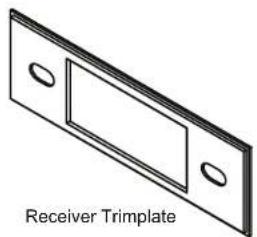
(2) Shaft Tabs
natural_image
Isometric line drawing of a Receiver Trimplate component (no text or symbols on the diagram itself)
(1) Cariage Bolt
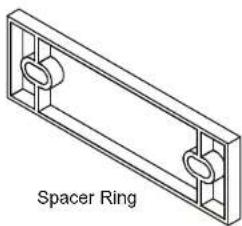
natural_image
Isometric line drawing of a rectangular frame with two side rings and a label 'Spacer Ring' below (no other text or symbols)(1) Hex Nut
The carriage bolt and nut are used only in Camaros.
Kit assembly instructions are on the following pages.

CRUTCHFIELD®
Copyright 1999 Crutchfield Corporation
Installation Kit
120 99-3009
Chevrolet/Pontiac
DIN Assembly - Firebird & Camaro
See page 4 for Grand Prix DIN assembly.
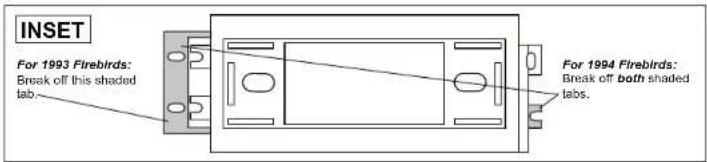
Note for Firebird installations only: Prepare kit as shown in the Inset, then proceed with the following steps.
- Using a utility knife, cut out shaft supports to create the DIN opening as shown (Figure 1).
- Remove DIN sleeve and trim ring from receiver if in place.
- Slide DIN sleeve into receiver mounting bracket and secure by bending securing tabs (Figure 2).
- Slide receiver fully into sleeve and install trim ring.
- Install assembly following instructions in the Mastersheet for your particular vehicle.
Page 2

Tools Required
Flat Blade Screwdriver

Utility Knife

CRUTCHFIELD®
Copyright 1999 Crutchfield Corporation
Installation Kit
120 99-3009
Chevrolet/Pontiac
Shaft Assembly - Firebird & Camaro
See Page 5 for Grand Prix Shaft Assembly.
Note for Firebird installations only: Prepare kit as shown in the Inset, then proceed with the following steps.
- Choose the proper spacers (supplied with your order) to allow receiver nosepiece to extend 1/8" to 1/4" beyond face of receiver mounting bracket (Figure 1).
- Insert spacer ring in receiver mounting bracket. Secure receiver, trimplate (with shaft tabs inserted) and faceplate to mounting bracket with spacers and shaftnuts as shown.
- Attach receiver control knobs.
- Install assembly following instructions in the Mastersheet for your particular vehicle.


Page 3

CRUTCHFIELD®
Copyright 1999 Crutchfield Corporation
Installation Kit
120 99-3009
Chevrolet/Pontiac
DIN Assembly - Grand Prix
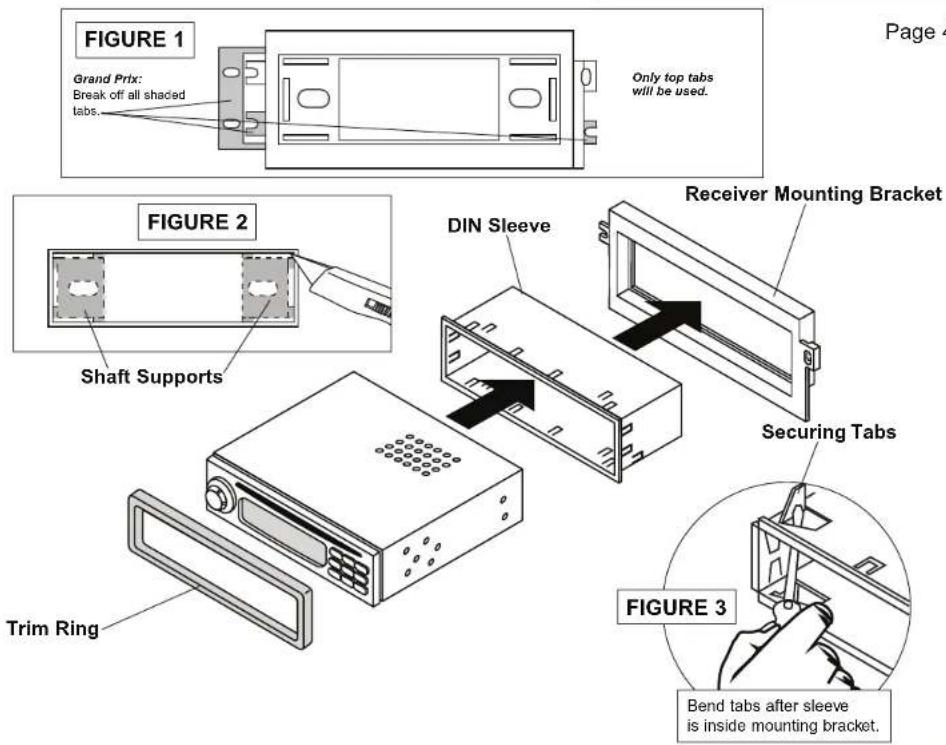
- Break off all tabs shown as shaded on receiver mounting bracket (Figure 1).
- Using a utility knife, cut out shaft supports to create the DIN opening as shown (Figure 2).
- Remove DIN sleeve and trim ring from receiver if in place.
- Slide DIN sleeve into receiver mounting bracket and secure by bending securing tabs (Figure 3).
- Slide receiver fully into sleeve and install trim ring.
- Install assembly following instructions in the Mastersheet for your particular vehicle.
Tools Required
Flat Blade Screwdriver

Utility Knife

CRUTCHFIELD®
Copyright 1999 Crutchfield Corporation
Installation Kit
120 99-3009
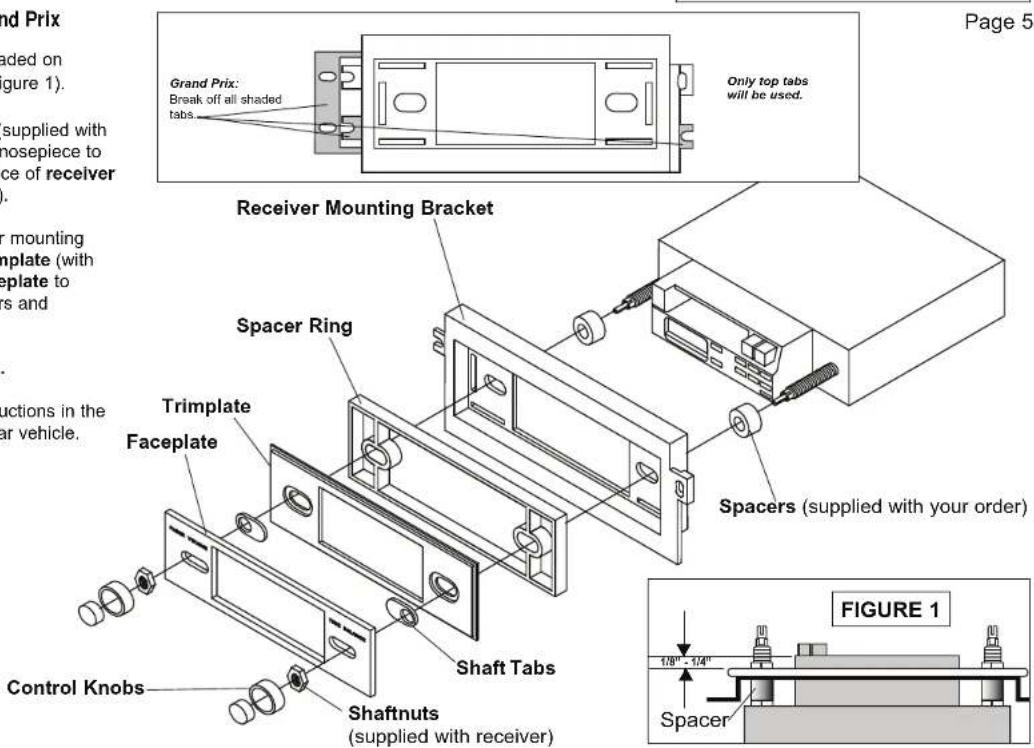
Shaft Assembly - Grand Prix
- Break off all tabs shown as shaded on receiver mounting bracket (Figure 1).
- Choose the proper spacers (supplied with your order) to allow receiver nosepiece to extend 1/8" to 1/4" beyond face of receiver mounting bracket (Figure 2).
- Insert spacer ring in receiver mounting bracket. Secure receiver, trimplate (with shaft tabs inserted) and faceplate to mounting bracket with spacers and shaftnuts as shown.
- Attach receiver control knobs.
- Install assembly following instructions in the Mastersheet for your particular vehicle.

CRUTCHFIELD®
Copyright 1999 Crutchfield Corporation


Brand : Metra
Model : 99-3009C
Category : Installation Kit