AE-244 - Security Camera Vivotek - Free user manual and instructions
Find the device manual for free AE-244 Vivotek in PDF.


User questions about AE-244 Vivotek
0 question about this device. Answer the ones you know or ask your own.
Ask a new question about this device
Download the instructions for your Security Camera in PDF format for free! Find your manual AE-244 - Vivotek and take your electronic device back in hand. On this page are published all the documents necessary for the use of your device. AE-244 by Vivotek.
USER MANUAL AE-244 Vivotek
natural_image
Exterior view of three white industrial air purifiers with visible internal components (no text or symbols)Ordering part no.:
AE-238 900041101G
AE-239 900041201G
AE-243 900041901G
AE-244 900042401G
AE-23A 900042301G
AE-23B 900042200G
AE-23C 900041700G
AE-23D 900041800G
AE-23E 900041601G
AE-23F 900042100G
Rev. 1.1
UNPACKING:
Unpack carefully. Electronic components can be damaged if improperly handled or dropped. If an item appears damaged in shipment, place it properly in its carton and notify the shipper.

IMPORTANT!:
- Read and follow Instructions: All operating and user instructions should be read and followed before the unit is to be operated.
- Electrical Connections: Only a qualified electrician is allowed to make electrical connections.

Specifications
| Model Number AE-238, AE-243 AE-23A, AE-23B, AE-23C, AE-23D | AE-239, AE-244 AE-23E, AE-23F | |||
| Power Input 24V AC/ DC | 24V AC/ DC PoE: 50~57V DC | PoE: 30/60/95W, 50~57V | DC | |
| Max. Output power budget | 30W 80W, 100W (-AIW) 30W | 25W - 30W PoE PSE | 48W - 60W PoE PSE72W - 95W PoE PSE | |
| Power Consumption Window heater: 10W;Blower: 2W; Camera: 6 ~ 8W | Window heater: 10W;Blower: 2W; Camera: 6 ~ 8W; Cold start heater: 30W | Window heater: 5W;Blower: 2W; Camera: 6 ~ 8W; IR: 6W | Window heater: 10W;Blower: 2W; Camera: 6 ~ 8W; Wiper: 6W | |
| Environmental Operation Temp. | -20°C ~ +65°C (-4°F ~ +149°F) | -20°C ~ +65°C-20°C ~ +50°C (w/ IR)-40°C (Cold start) | -20°C ~ +65°C-20°C ~ +50°C (w/ IR) | -20°C ~ +65°C-20°C ~ +50°C (w/ IR) |
| Window heater ON/OFF ≤ | 30°C (86°F) ON; ≥ 35°C (95°F) OFF | ≤ 30°C (86°F) ON; ≥ 35°C (95°F) OFF | ≤ 30°C (86°F) ON; ≥ 35°C (95°F) OFF | ≤ 30°C (86°F) ON; ≥ 35°C (95°F) OFF |
| Blower Control ≥40°C (104°F) ON; ≤ 35°C (95°F) OFF | ≥40°C (104°F) ON; ≤ 35°C (95°F) OFF | ≥40°C (104°F) ON; ≤ 35°C (95°F) OFF | ≥40°C (104°F) ON; ≤ 35°C (95°F) OFF | ≥40°C (104°F) ON; ≤ 35°C (95°F) OFF |
| Protection Level IP67, IK10 IP67, IK10 (IP66 w/ wiper) | P67, IK10 IP67, IK10 (IP66 w/ wiper) | |||
| Construction | Die-cast Aluminum Alloy | Die-cast Aluminum Alloy | Die-cast Aluminum Alloy | Die-cast Aluminum Alloy |
| Coating | White epoxy powder coating | White epoxy powder coating | White epoxy powder coating | White epoxy powder coating |
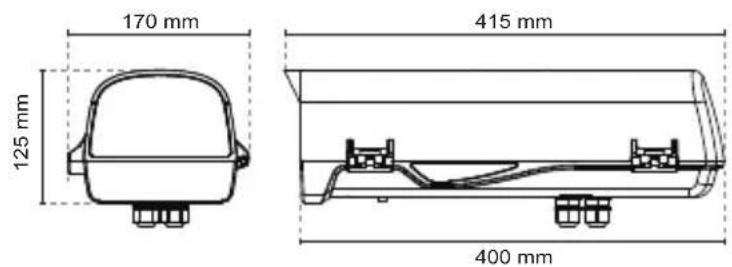
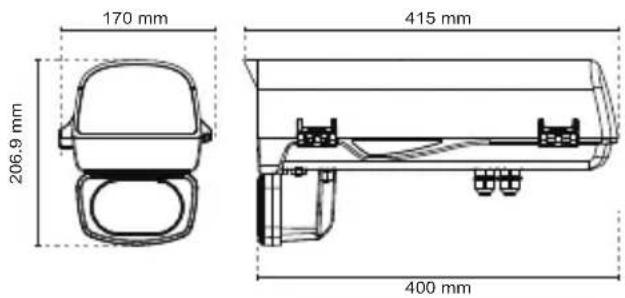
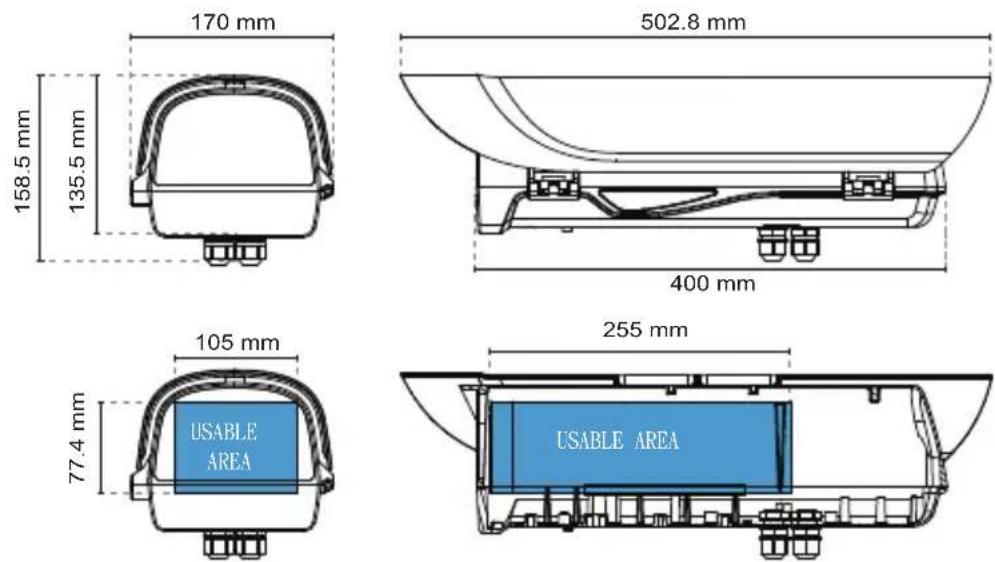
| Dimensions | 415 (L) x 170 (W) x 125 (H) mm | 502.8 (L) x 170 (W) x 135.5 (H) mm | 415 (L) x 170 (W) x 125 (H) mm - IR not included | 502.8 (L) x 170 (W) x 135.5 (H) mm - IR not included |
| Net Weight | 2,2kg (4.84 lb) | 2,7kg (5.95 lb), 2,8kg (6.18 lb - wiper model) | 2,2kg (4.85 lb) | 2,7kg (5.95 lb), 2,8kg (6.18 lb - wiper model) |
If you plan to install this camera enclosure into a tropical, sea coastal, or an environment where salt water or corrosive industrial waste water/moist are present, please seal each stainless steel screws and fittings with a silicon grease compounds. This will help prevent electrolysis to occur and extend the life span of the camera and housing.
Revision History:
Rev. 1.0: Initial release.
Rev. 1.1: Added the Accessory list and updated environmental parameters: Added the distribution board drawing for the AE-23E and -23F.
Rev. 1.2: revise specification and update part number; update IR LED distance and remove AM-11E ; update IR Control figures
Package Contents:
- T30 L wrench.
- 2x M4x8
- Truss head screw: 1x 1/4"-20X1/4"
- Truss head screw: 1x 1/4"-20X3/8"
- 1x Plastic buffer plate:

IMPORTANT:
- Disconnect devices: A readily accessible disconnect device in the building installation wiring should be incorporated.
- Electrical Connection: Only a qualified electrician is allowed to make electrical connections.

Mounting Configuration & Dimensions
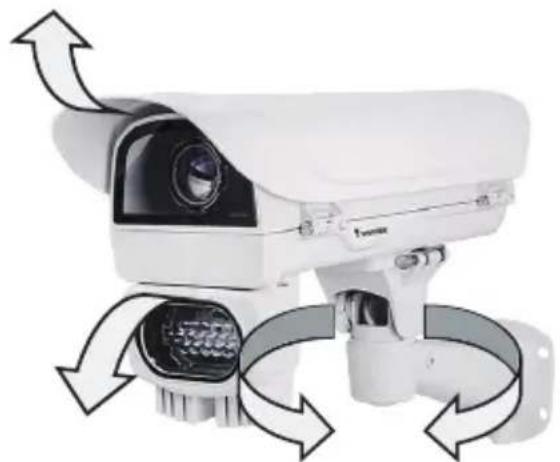
Swivel Positions and Directions
natural_image
White surveillance camera with multiple directional arrows indicating sensor or control system (no text or symbols visible)AE-238, AE-239
text_image
170 mm 125 mm 415 mm 400 mm
text_image
105 mm 77.4 mm 255 mm USABLE AREA USABLE AREAAE-243, AE-244
text_image
170 mm 206.9 mm 415 mm 400 mm
text_image
87.01 mm 135 mm 88.05 mmAE-23A, 23B, 23C, 23D, 23E, 23F
text_image
170 mm 158.5 mm 135.5 mm 502.8 mm 400 mm 105 mm 77.4 mm 255 mm USABLE AREA USABLE AREADimensions with the IR unit and wiper

text_image
217.4 mm 502.8 mm 417 mm
text_image
135 mm 88.05 mm 87.01 mm R96.5 95° 95° R96.45 95°
Component Description

text_image
Ventilation fan Window frame heater coil Ground VAIR module AC/DC or PoE Power distribution board Camera Mounting PlatformM16 1/2" Waterproof cable glands
Installation Suggestions

WARNING:
- When installing a housing that comes with an IR illuminator:
Please avoid eye exposure or apply appropriate protection, such as wearing a pair of Infrared protection glasses, when working with the product. Always use camera live view to observe IR lighting effects.
Installation
- Prepare power wires, a ground wire, and a CAT5e Ethernet cable. Pass them through the M16 waterproof connectors and its waterproof components.

text_image
Ethernet cable Ø4 ~ 6.5mm Power wires & DI/DO wires, a combo cable from IR illuminator (if applied)Note that some cables are connected when shipped. You do not need to connect heater, blower, and the front IR powere wires.
You may need to remove the RJ45 connector, and use a crimping tool to connect the Ethernet wires to an RJ45 connector inside the enclosure. Use an Ethernet cable of the width of 5 \~ 6.5mm.

text_image
a: white/orange stripe O: orange solid g: white/green stripe B: blue solid b: white/blue stripe G: green solid br: white/brown stripe BR: brown solid- When done, tighten up and install the waterproof connectors.
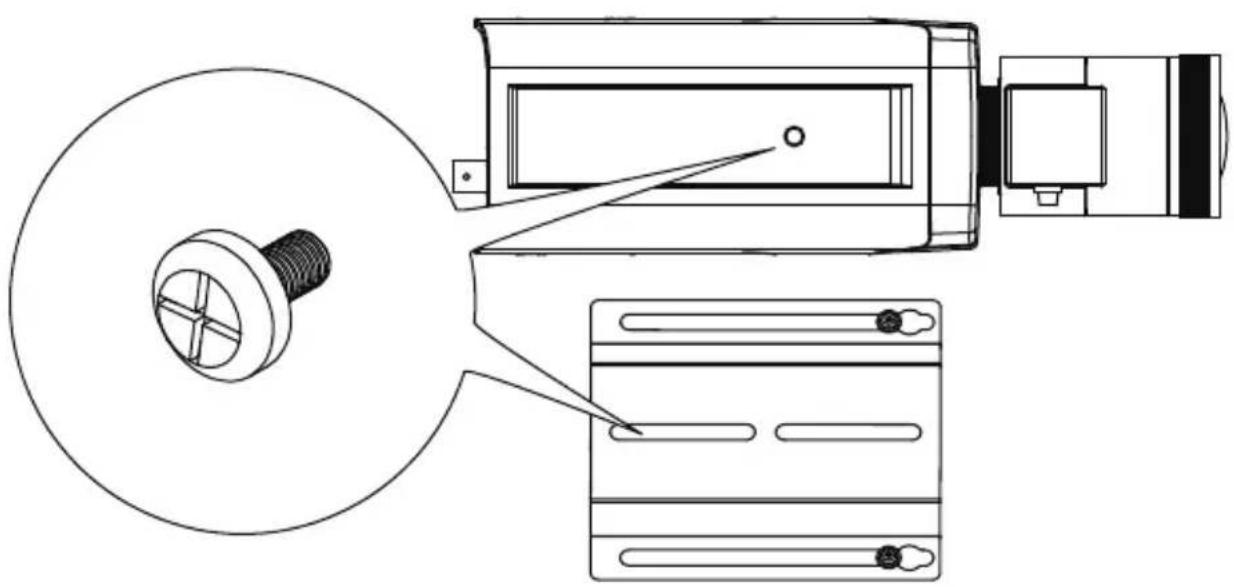
- Assemble the camera components, e.g., the CS ring and lens module. Secure the mounting plate to the bottom of the camera (the label side) using the included screw.
natural_image
Technical line drawing of a mechanical device with a bolt and control panel (no text or symbols)Intrusion Alarm - Available on AE-23A/B/C/D/E/F.
If preferred, install the intrusion alarm switch to the side of enclosure, and connect the detection wires to camera DI.
natural_image
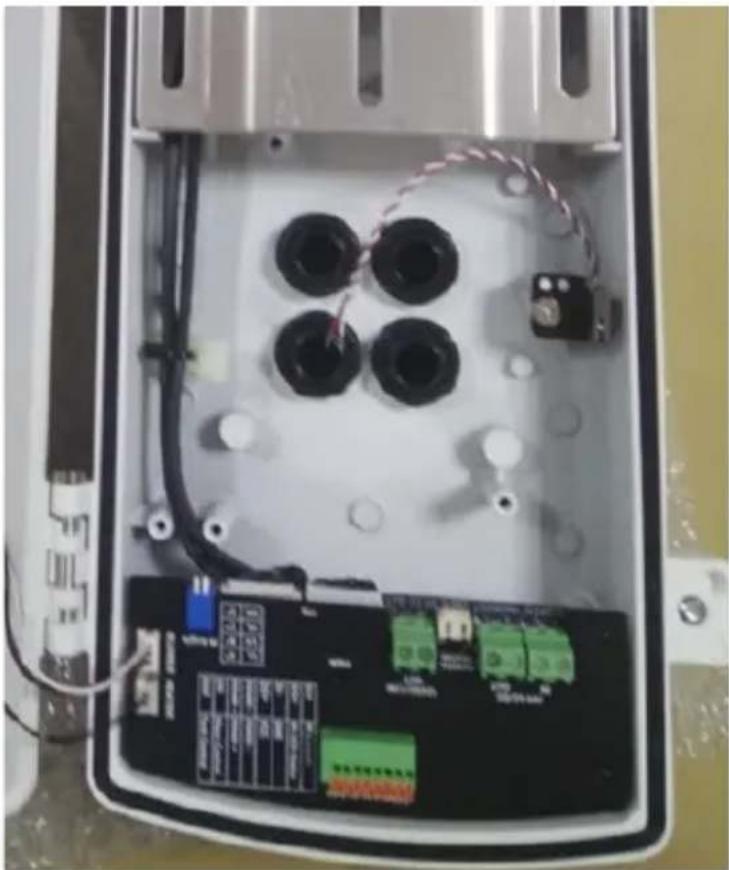
Interior view of an open electrical enclosure with four black components and wiring (no visible text or symbols)- Adjust the camera's position so that the lens module can flush align with the tempered glass. Secure the camera using the screws and washers to the bottom of the housing.

text_image
Lens flush w/ edge of enclosure- Connect 24V power source to the power input terminal. Connect power wires from the DC 12V output to the camera. You may also connect the 24V power to drive an external IRs.
Below is the distribution board drawing power from 24V AC/DC.
AE-23A, AE-23B, AE-23C, AE-23D
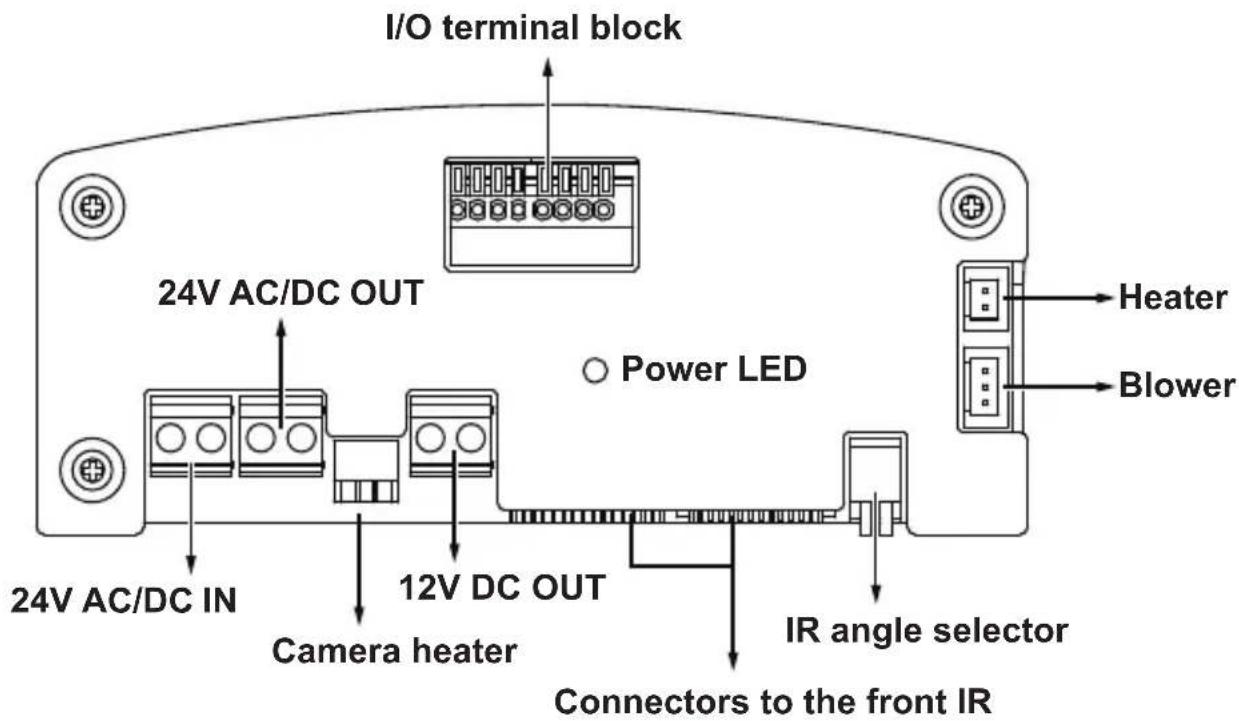
text_image
I/O terminal block 24V AC/DC OUT Power LED Heater Blower 24V AC/DC IN 12V DC OUT Camera heater IR angle selector Connectors to the front IRAE-238, AE-243
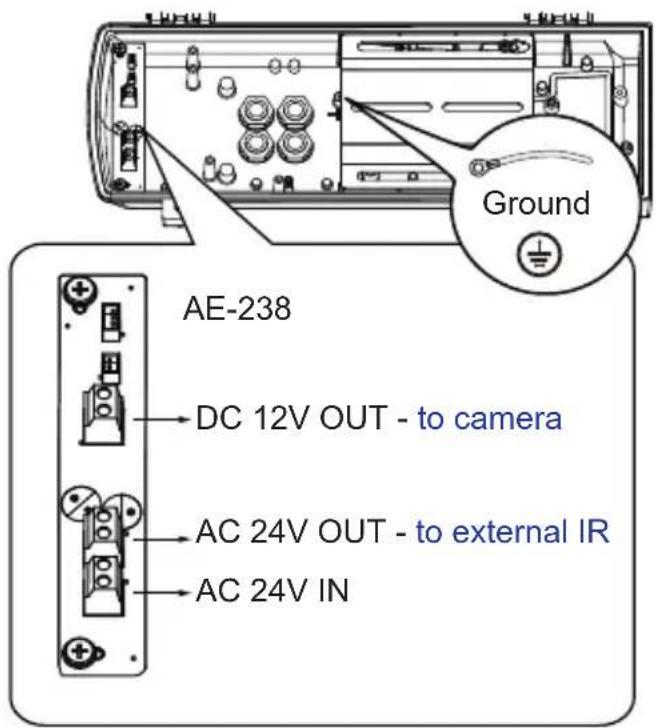
text_image
Ground AE-238 DC 12V OUT - to camera AC 24V OUT - to external IR AC 24V IN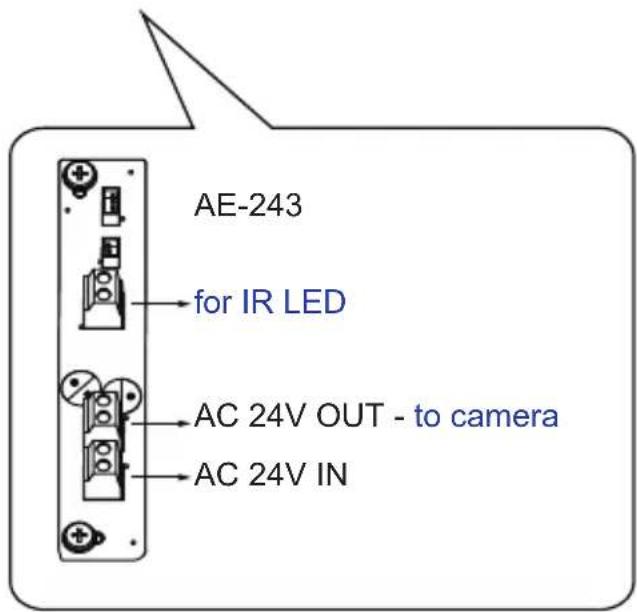
text_image
AE-243 for IR LED AC 24V OUT - to camera AC 24V INAE-23E, AE-23F
Below is the distribution board (AE-23E, -23F) that draws power from a 30/60/95W PoEPSE.

text_image
PoE power LED I/O terminal block PoE PWR TERMINAL BLOCK Heater Blower IR Control IR LED Status GND VCC RS465 - RS465 + DI1 DO1 DI- DO+ DI2 D02 BLOWER HEATER IR Angle LL A* LH B* HL C* HH D* 24VDC + OUT - IR WIPER CAMERA HEATER 24V DC OUT IR angle selector PoE IN PoE OUT ITB Connectors to the front IRAE-239, AE-244
Below is the distribution board (AE-239, -244) that draws power from a 30/60/95W PoE PSE. Note that the AE-239 and AE-244 provide 12V DC output.

text_image
PoE power LED I/O terminal block Heater Blower 12V DC OUT IR angle selector Wiper / Camera heater Connectors to the front IR 10 PoE IN PoE OUT
text_image
TERMINAL BLOCK DI1 IR Control DO1 IR LED Status DI- GND DO+ VCC RS485 - RS485 - RS485 + RS485 + DI2 Wiper Control DO2 Tank ControlFacing the rear side of the housing, from left to right:
| DO2 Tank water pump control |
| DI2 Wiper control, connects to IP camera's DO for manually triggering washer. |
| RS485+ RS485+, RS485 can be used to control IR illuminator beam angles, etc. |
| RS485- RS485- |
| DO+ +5V VCC |
| DI- GND |
| DO1 IR LED status, connects to IP camera's DI for IR status |
| DI1 IR control, synchronizes day/night mode switching for IP camera. It is related to IR cut filter. |
The AE-239/244 does not support external washer kit.
| RS485+ RS485+, RS485 can be used to control IR illuminator beam angles, etc. | |
| RS485- RS485- | |
| DO+ +5V VCC | |
| DI- GND | |
| DO1 IR LED status, connects to IP camera's DI for IR status | |
| DI1 IR control | |
Configuring IR illuminator
text_image
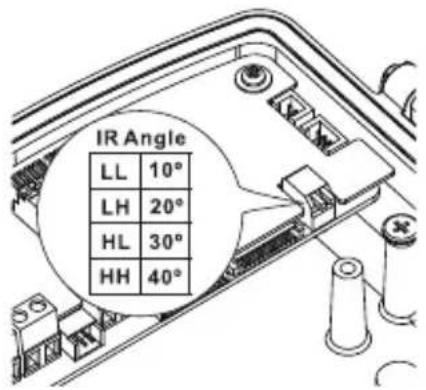
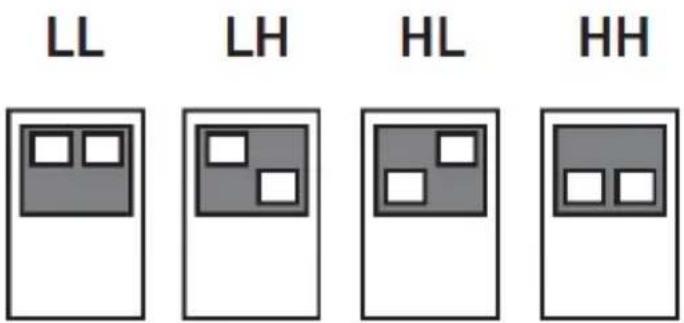
IR Angle LL 10° LH 20° HL 30° HH 40°The following enclosures comes with adjustable IR lights: AE-23A/23B/23C/23D/23E/23F
text_image
LL LH HL HHBelow are the parameters of the IR illuminator. Use the onboard jumpers to configure the beam angle for different effective illumination range.
| VAIR 48W 24W 12W | ||||||||||||
| no. of LEDs | 18P/Dual 18P/36mil Single 18P/ 30mil Single | |||||||||||
| Beam angle | 10^ | 20^ | 25^ | 30^ | 10^ | 20^ | 25^ | 30^ | 10^ | 20^ | 25^ | 30^ |
| Distance (meter) | 350m 2 | 80m 2 | 10m 150 | m 200m | 155m | 115m | 70m 140 | m 110m | 80m 50m | |||
| VAIR 6W | ||||
| no. of LEDs 4P/42mil Single | ||||
| Beam angle 10 | ° | 20° | 30° | 40° |
| Distance (meter) 100m 80m 60m 40m | ||||
-
Connection for IR control by IR light sensor, RS485 commands and camera digital output
-
IR control by IR light sensor
The day/night mode DI connection enables the synchronization of IR light sensor and then automated day/night switching mechanism on the camera.
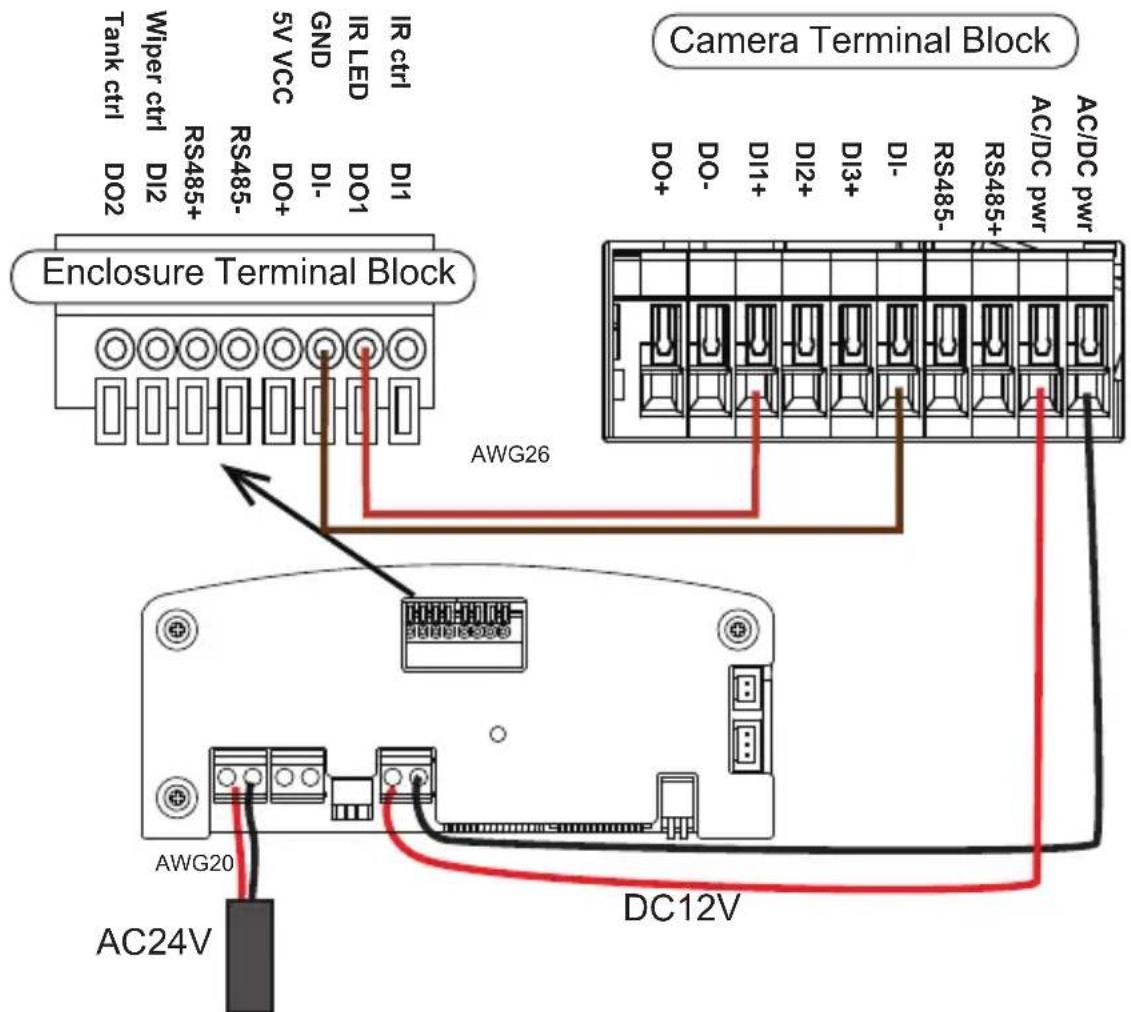
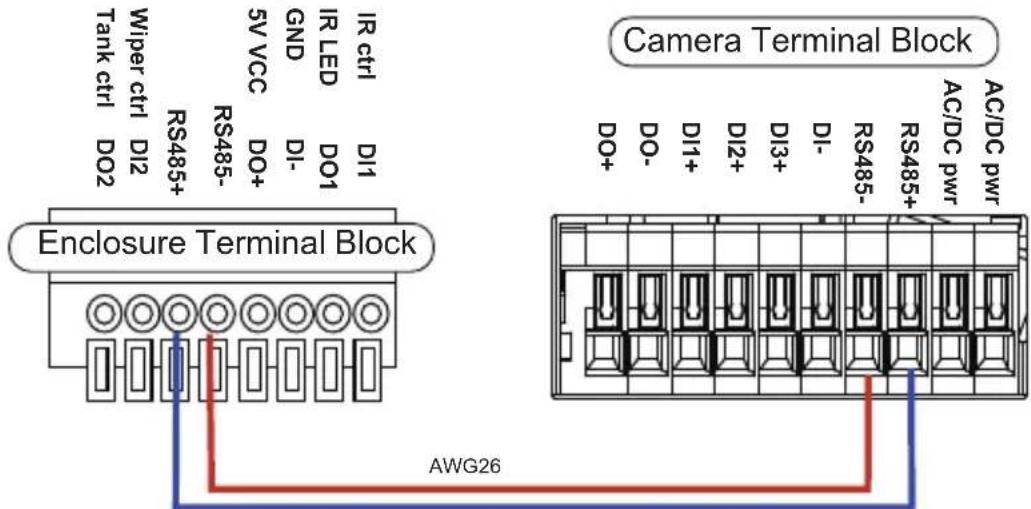
- IR control by RS485 command
Allow user to configure the RS485 command via camera web UI to cotrol IR on/off.
text_image
Camera Terminal Block Enclosure Terminal Block AWG26Note the wire gauge requirements for making the power connections. (24VAC 24W load)
| Wire Gauge 22 | 20 18 16 14 12 | ||||
| Distance 55 90 | 150 230 270 600 feet |
2. IR control by Camera DO
Camera will automatically trigger IR light on/off via DO.
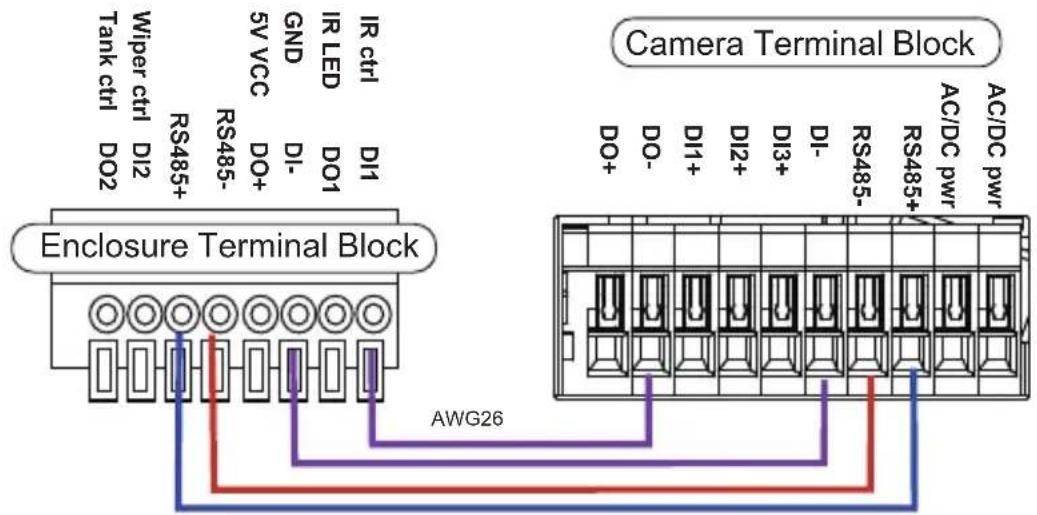
text_image
Camera Terminal Block Enclosure Terminal Block AWG26Below is a diagram for water tank and wiper control. The wiper can be started by manually triggering the Digital Output from the camera user interface.

text_image
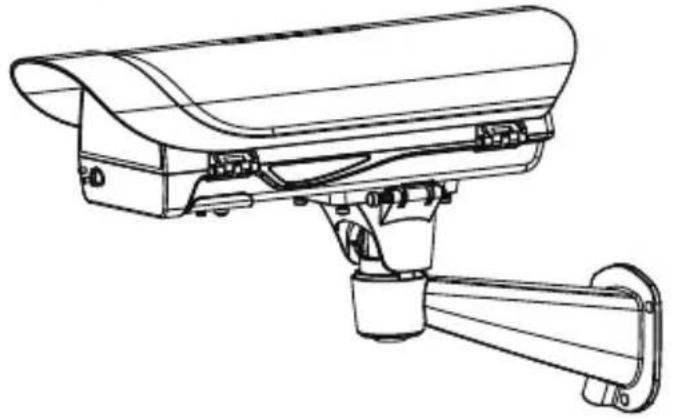
Camera Terminal Block Enclosure Terminal Block AWG26 Tank ctrl Tank low water GND Wiper ctrl DI2 RS485+ DS1 IR ctrl IR LED DI1 5V VCC GND DI- RS485- DO+ DI- DO1 DO- DO- DI1+ DI2+ DI3+ DI- RS485- RS485+ AC/DC pwr AC/DC pwr AWG20 AC24V DC12V 14- If using the AM-21E wall-mount bracket, secure the intersection bracket to the bottom of the housing by driving two screws.
Below are the mounting hole dimensions for the mounting brackets. Chances are you may need to plan for the locations of the brackets.
AM-21D
AM-811
AM-11F
AM-21E
- Install the housing to the wall-mount bracket by aiming and pressing the spring mortise, and hook the bracket onto the groove in the spring mortise.

text_image
Safety tether wire Secure the T30 anti-tam on the other side using the L-wrench. Connect the included safe between enclosure andSecure the T30 anti-tamper screws on the other side using the included L-wrench.
Connect the included safety wire between enclosure and bracket.
If using other mount brackets, use the included M6 screws to secure the housing to the bracket. Use the mounting holes indicated below.

text_image
M6 PITCH 1.0mm thread 8mm x2 16The AM-21D wall-mount, AM-11F, and AM-811 pendant brackets use the two mounting holes as indicated below.
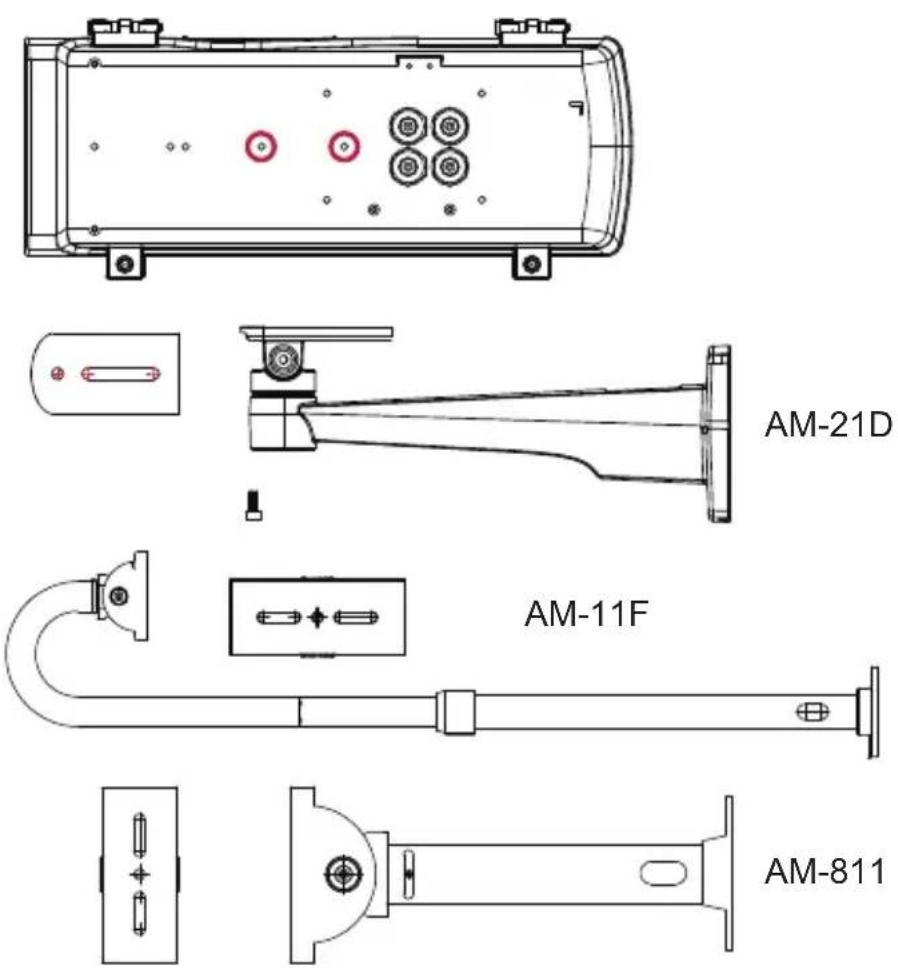
AM-21D
AM-811
Another two mounting holes in the front can be used use an IR bracket, AM-219. The bracket can be used to install external IRs.

AM-219
If external IRs are installed, you can contact VIVOTEK for a different type of waterproof connectors for the 1/2" conduits. You can then route two of the conduits through the opening in the front of the bracket to the corresponding connectors on the IR illuminators. The 24V power wires to the IR illuminators are contained within.
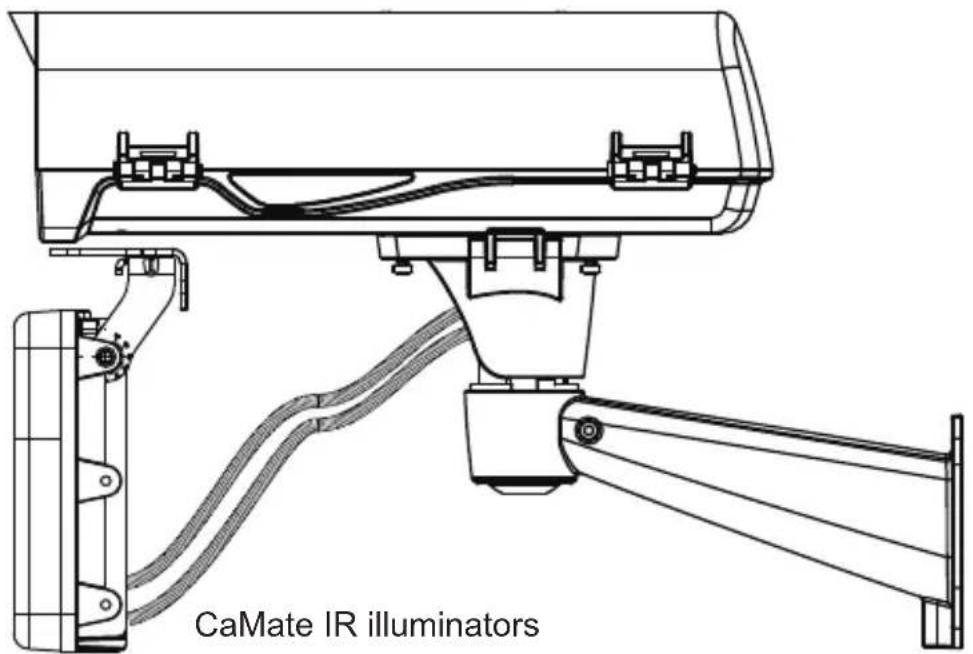
text_image
CaMate IR illuminators- Adjust zoom and focus and open a web console with the camera to tune for the best image. When zoom and focus is done, Close the top cover and fasten the top cover screws.
The housing can also be installed using the pole-mount or corner-mount options along with a power box (AA-351, AA-352), outdoor PoE switch, or junction box.

natural_image
Technical line drawings of three types of security cameras (no text or symbols present)Use the included M10 hex socket screws to secure the power box to a pole-mount or corner mount bracket.
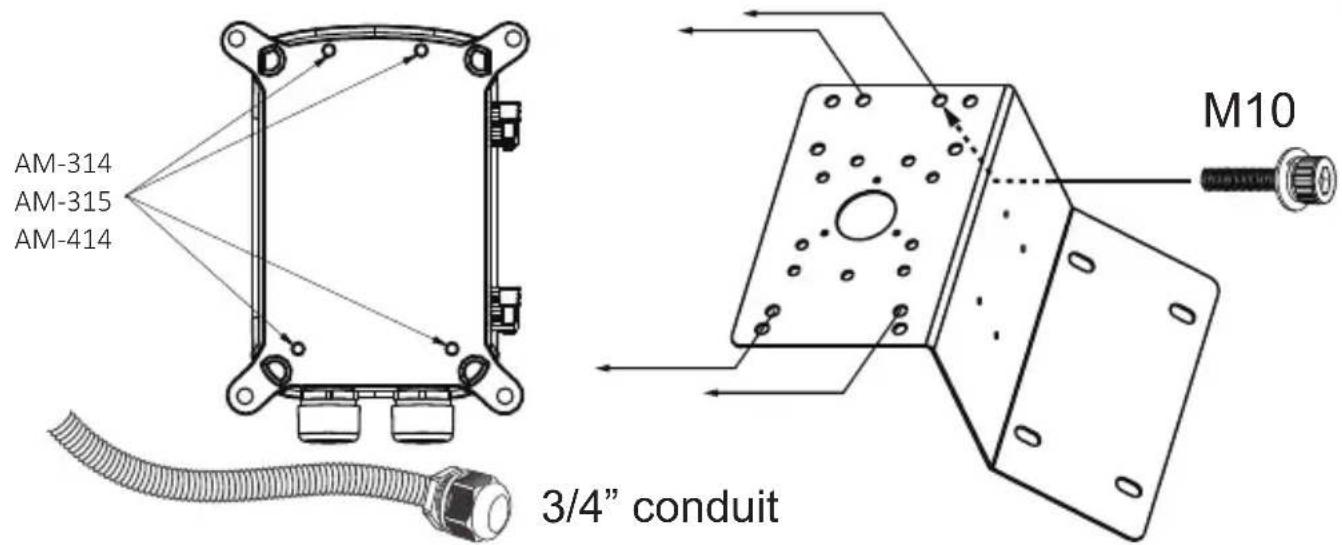
text_image
AM-314 AM-315 AM-414 M10 3/4" conduitThe mounting hole definition is illustrated below. The same mounting hole pattern apply to all pole-mount and corner-mount brackets.
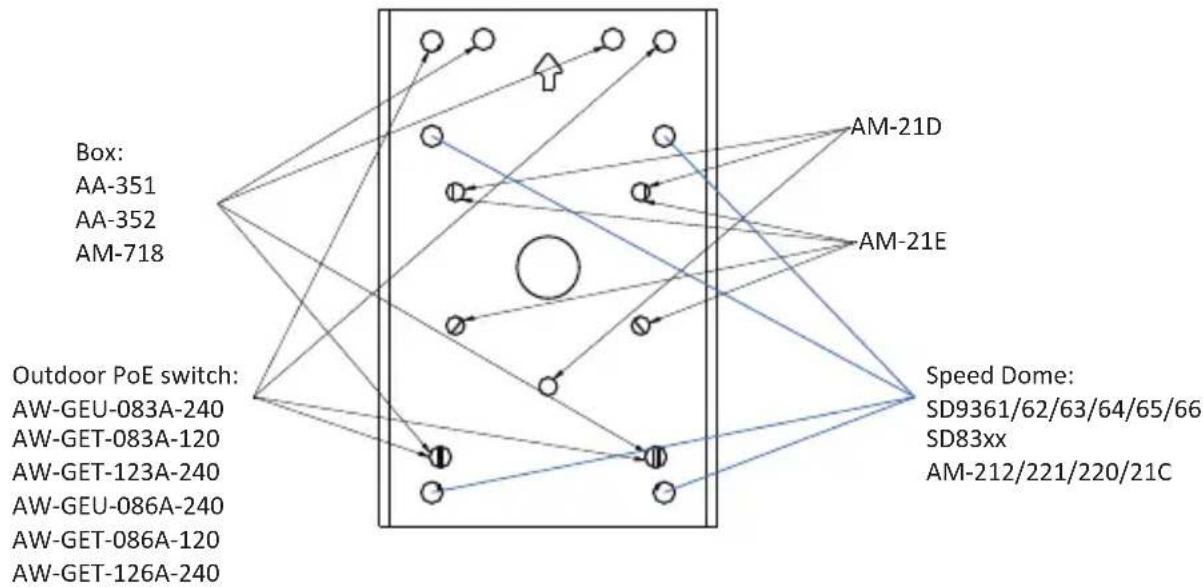
flowchart
graph TD
    A["Box: AA-351, AA-352, AM-718"] --> B["Outdoor PoE switch: AW-GEU-083A-240, AW-GET-083A-120, AW-GET-123A-240, AW-GEU-086A-240, AW-GET-086A-120, AW-GET-126A-240"]
    B --> C["Speed Dome: SD9361/62/63/64/65/66, SD83xx, AM-212/221/220/21C"]
    C --> D["AM-21D"]
    C --> E["AM-21E"]
    D --> F["Arrow to box"]
    E --> G["Arrow to box"]
    F --> H["Circle with arrow"]
    G --> I["Circle with arrow"]

natural_image
Pure geometric diagram with circles, arrows, and crosshairs inside a square frame (no text or symbols)
text_image
Ø 45If a power box or outdoor PoE switch is applied, Use the following mounting positions for the camera housings (via AM-21D and AM-21E).
natural_image
Line drawing of a surveillance camera with mounted sensor and wall-mounted cable (no text or symbols)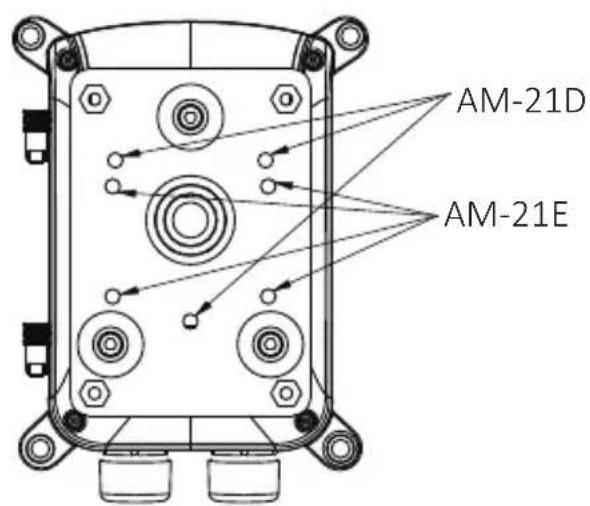
text_image
AM-21D AM-21E- If an IR illuminator is preferred, remove the metal cover from underneath the housing. Install the IR unit (AI-106, -108, -109) by fastening 4 T30 anti-tamper screws. Note that the bubber gasket should be in place when you install the unit.

natural_image
Exploded view diagram of a battery pack assembly showing internal components and mounting hardware (no text or labels)11. Firmware configurable options:
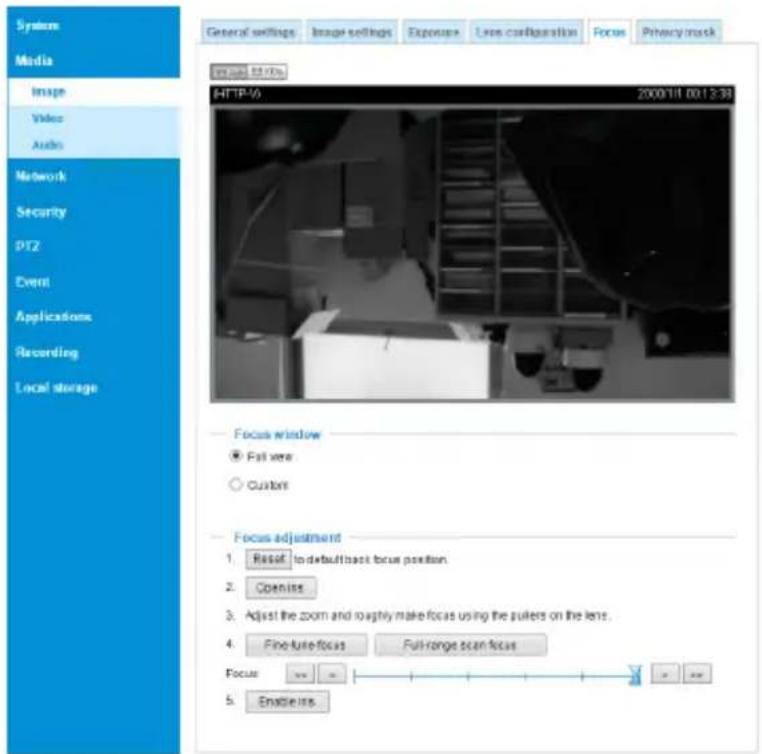
Open a web console with the camera.
Use the Media > Focus function to tune for a best image focus on your target area.
text_image
System Media Image Video Audio Network Security PT2 Event Applications Recording Local storage General settings Image settings Exposure Line configuration Focus Privacy mask image.tsdv HTP-V 2000/11/00/13:39 Focus window ● Full view ○ Custom Focus adjustment 1. Reset to default back focus position. 2. Open interest 3. Adjust the zoom and roaghtly make focus using the pulters on the lens. 4. Fine-ture focus Full-range scan focus Focus 5. Enable itIf preferred, e.g., shooting fast moving vehicles, select the 60fps frame rate.
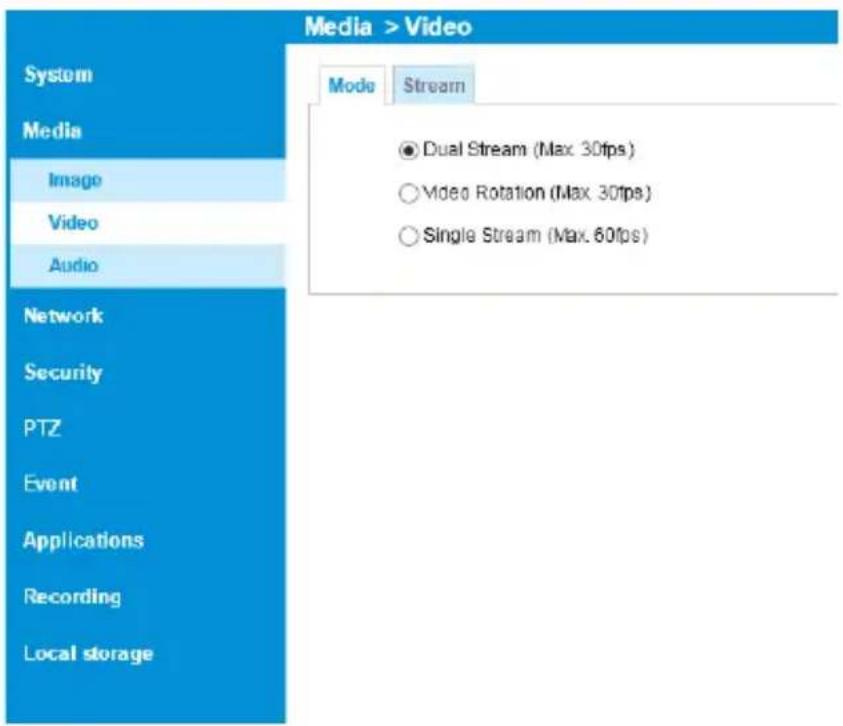
text_image
Media > Video System Media Imago Video Audio Network Security PTZ Event Applications Recording Local storage Mode Stream ● Dual Stream (Max 30fps) ○ Video Rotation (Max 30fps) ○ Single Stream (Max. 60fps)Make sure that external IR is turned on in the night mode, and that the IR cut filter option is synchronized with the digital input you connected.
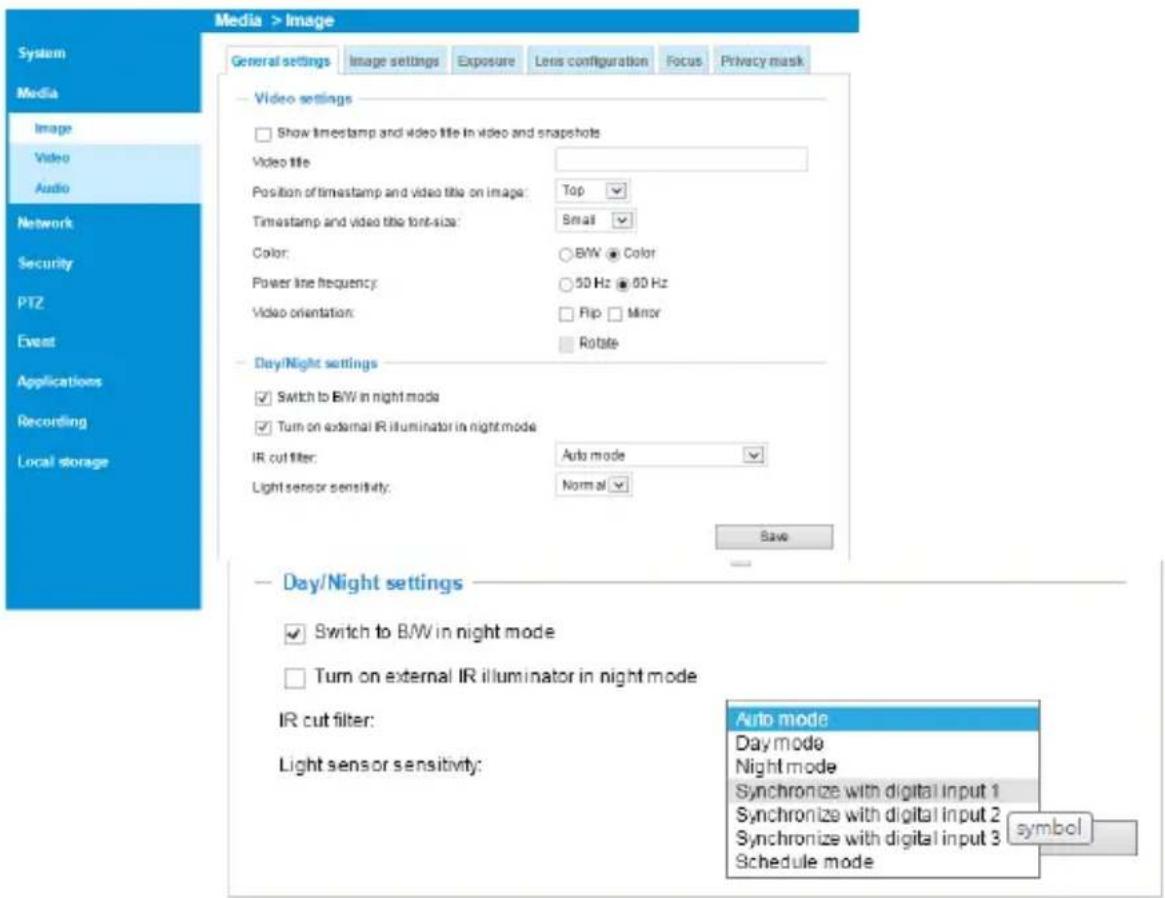
text_image
Media > Image General settings Image settings Exposure Lens configuration Focus Privacy mask System Media Image Video Audio Network Security PTZ Event Applications Recording Local storage Video settings Show timestamp and video title in video and snapshots Video title Position of timestamp and video title on image: Top Timestamp and video title font-size: Small Color: BWB Color Power line frequency: 50 Hz 60 Hz Video orientation: Flip Minor Rotate Day/Night settings Switch to BW in night mode Turn on external IR illuminator in night mode IR cut filter: Auto mode Light sensor sensitivity: Normal Save Day/Night settings Switch to BW in night mode Turn on external IR illuminator in night mode IR cut filter: Light sensor sensitivity: Auto mode Day mode Night mode Synchronize with digital input 1 Synchronize with digital input 2 Synchronize with digital input 3 Schedule mode symbolIn the night mode, check if the input signals are correctly detected. You may simulate the night mode by blocking the IR unit's light sensor. Change the triggering parameters when necessary.
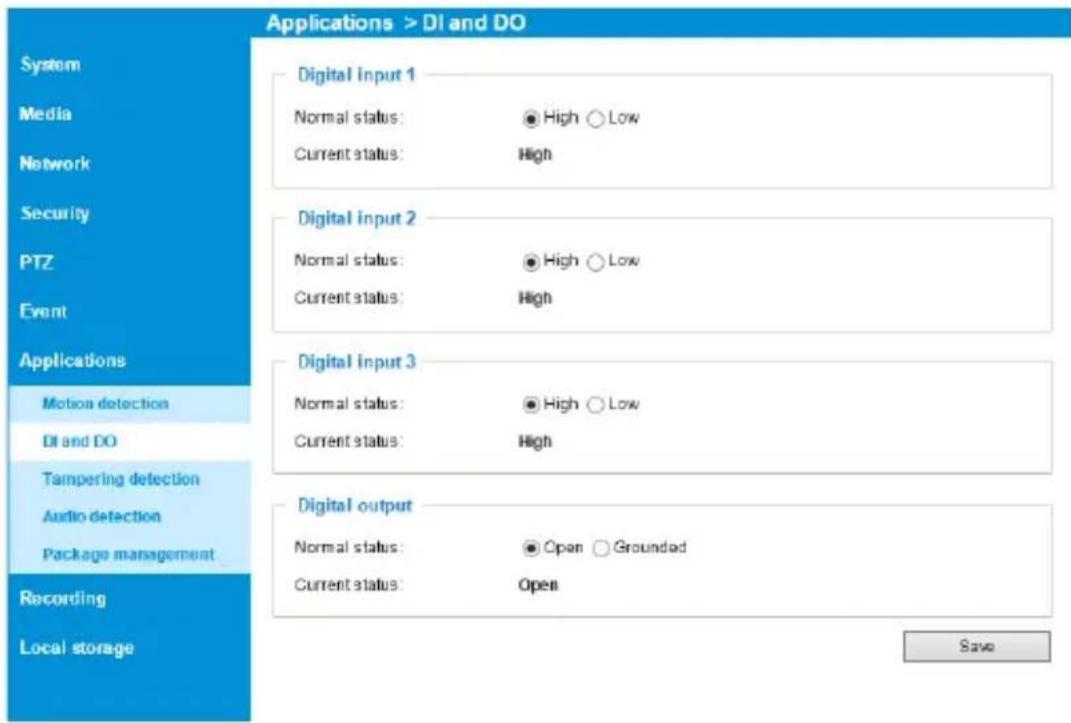
text_image
Applications > DI and DO System Media Network Security PTZ Event Applications Motion detection DI and DO Tampering detection Audio detection Package management Recording Local storage Digital input 1 Normal status: High Low Current status: High Digital input 2 Normal status: High Low Current status: High Digital input 3 Normal status: High Low Current status: High Digital output Normal status: Open Grounded Current status: Open SaveFor housings that come with IR illuminators, wiper, and washer, commands can be delivered via the RS485 protocol. The RS485 connection uses the Pelco D protocol.
Configuration parameters:
| Baud rate 2400 | |
| Data bits 8 | |
| Parity None | |
| Stop bit 1 | |
Command format:
| Byte1 Byte2 Byte3 Byte4 Byte5 Byte6 Byte7 | |||
| Sync Addr CMND1 CMND2 DATA1 DATA2 CKSM |
Addr range: 0x00 \~ 0xFE. CKSM: check sum is the last 8 bits of the sum of Byte2 through Byte6.
Command Group 1:
| Command Description Command | (hexadecimal, "ox" is omitted) | Note |
| ValR Lens Stop FF 01 00 00 00 00 | 01 Pelco D - Zoom Stop | |
| VAIR Lens Wide FF 01 00 40 00 00 | 0 41 Pelco D - Zoom Wide | |
| ValR Lens Tele | FF 01 00 20 00 00 21 Pelco D - Zoom Tele | |
| Wiper On | FF 01 00 09 00 01 0B | Pelco D – Aux 1 On |
| Wiper Off | FF 01 00 0B 00 01 0D | Pelco D – Aux 1 Off |
| Wiper and Washer On | FF 01 00 09 00 02 0C | Pelco D – Aux 2 On |
| Wiper and Washer Off | FF 01 00 0B 00 02 0E | Pelco D – Aux 2 Off |
| IR Led Force On | FF 01 00 09 00 03 0D | Pelco D – Aux 3 On |
| IR Led Force Off | FF 01 00 0B 00 03 0F | Pelco D – Aux 3 Off |
Command Group 2:
| Command Name | Command (hexadecimal, ox is omitted) | Note |
| Addr configuration | FF 01 00 18 01 dd CKSM | dd: 0x00 ~ 0xFE; for example, when addr is 2, the command looks like FF 01 00 18 01 02 1C |
| IRMode | FF 01 00 18 02 mm CKSM | mm: IR modemm=0x02: Light Sensor Auto (Default)mm=0x03: DI Triggermm=0x04: via RS485 Command(When receiving IR Led Force On / IR Led Force Off command, will switch to using the IR Mode -RS485 Command)For example,IRmode_AutoFF 01 00 18 02 02 1DIRmode_DIFF 01 00 18 02 03 1EIRmode_CMDFF 01 00 18 02 04 1F |
| LightSensorGate FF 01 00 | 18 03 LL CKSM When the IR Mode | Light Sensor Auto,the Lux value to turn IR LED can be configured.LL: Lux, changes is made by every10LuxFor example:LightSensorGate = 100FF 01 00 18 03 0A 26LightSensorGate = 200FF 01 00 18 03 14 30 |
The parameters of IR illuminator can be controlled via the RS485 connection. You can enable the connection in Configuration > PTZ > Mechanical window. Select the defaults for the IR illuminator: Pelco D, baud rate - 2400, Data bits - 8, Stop bit - 1, Parity - none.

text_image
VIVOTEK PTZ > PTZ settings Home Client settings Configuration Language System Media Network Security PTZ PTZ settings Event Applications Recording Local storage RS485 settings Disable PTZ camera Transparent HTTP tunnel Camera ID: 1 PTZ driver: Pelco D protocol Port settings Baud rate: 2400 Data bits: 8 Stop bits: 1 Parity bits: none Customizable IR control Presel position Custom command Save Defaults for IR: Pelco D 2400 8 1 none Version: 0202aYou can create custom command buttons by entering the Button name and the command itself:
>Custom command
Custom command
Leaving the "Button name" field empty means the command button will not be displayed in the homepage.
Button name
Command 1:
Command 2:
Command 3:
Command 4:
Command 5:
| ValR Lens Stop |
| VAIR Lens Wide |
| ValR Lens Tele |
| Wiper On |
| Wiper Off |
Command
| FF 01 00 00 00 00 01 |
| FF 01 00 40 00 00 41 |
| FF 01 00 20 00 00 21 |
| FF 01 00 09 00 01 0B |
| FF 01 00 0B 00 01 0D |
Save
Close
ValR: The VAIR control include those on the IR Led and ValR Lens.
There are 3 IR mode commands
IRMode = Light Sensor Auto (Default)
    sensor lux reading < LightSensorGate - LED On
    sensor lux reading >= (LightSensorGate + 10 Lux) - LED Off
IRMode = DI_1 Trigger (IR triggered on by DI
    DI_1 shorted DI -(Low) - LED On
    DI_1 open (High) - LED Off
IRMode = controlled by RS485 Command (Pelco D - Aux 3 On/Off)
    IR Led Force On - LED On
    IR Led Force Off - LED Off
DO_1 as IR Status Feedback
    LED On, DO_1 is grounded via MOSFET (DI- connected)
    LED Off, DO_1 no input
ValR Lens Zoom control
Dip
Switch
4 configurations using the Dip Switch on the distribution board.
When Lens stops, its last position will be memoried, and when powered on again, lens will move to the previous position. When powered on for the first time, Lens will follow the DIP switch configuration.
Wiper & Wahser control)
DI_2 Trigger:
When DI_2 connected to DI- (Low), wiper and washer operate for 3 times and then stop.
Using RS485 Command –Wiper Only (Pelco D – Aux 1 On/Off)
Wiper On, wiper takes action
Wiper Off, wiper starts one operation and then stops.
RS485 Command – Wiper & Washer (Pelco D – Aux2 On/Off)
Wiper and Washer On, pumps and spray water with wiper action.
Wiper and Washer Off, spraying and wiping starts one operation and then stops.
DO2 used for spraying control
DO_2 connected to DI- via MOSFET - starts spraying.
Spraying stops, and the LED turns Off when DO_2 is not triggered.
This page is intentionally left blank.