Linkflex AD1 - Microphone Comica - Free user manual and instructions
Find the device manual for free Linkflex AD1 Comica in PDF.


User questions about Linkflex AD1 Comica
0 question about this device. Answer the ones you know or ask your own.
Ask a new question about this device
Download the instructions for your Microphone in PDF format for free! Find your manual Linkflex AD1 - Comica and take your electronic device back in hand. On this page are published all the documents necessary for the use of your device. Linkflex AD1 by Comica.
USER MANUAL Linkflex AD1 Comica
LinkFlex XLR Interface Preamp Audio Adapter (For Camera&Phone)

natural_image
Co/MCA LSP/PULSE ADC device with coiled cable and connector (no visible text or symbols on main body)Foreword
Thanks for purchasing Comica LinkFlex XLR Interface Preamp Audio Adapter (For Camera&Phone).
This product can help to transfer XLR microphone to smartphone or camera for audio recording. It is designed with functions of supporting adjustable sensitivity, smartphone and camera switch, real-time monitoring, etc. which can bring you better experience and sound quality effect.
Please carefully read this instruction manual before use. The product has been precisely calibrated at the factory, and please do not assemble and disassemble the parts by yourself, or the warranty will be invalid!
Notice
The product supports all XLR dynamic and positive condenser mic, and not support passive condenser mic which need external phantom power.
The product is compatible with IOS and Andriod systems. When used with Iphone 7 and other new version Iphones with Lightning jack, the original audio cable adapter (3.5mm-Lightning) is needed.
While the microphone is used for IOS system phones, it supports both Iphone original audio recording mode and video recording mode.
While the microphone is used for Android System phones, it only supports phone's original audio recording mode but not video mode, you should download 3rd party APP to use while in video shooting mode.
While used for smartphone, please set the smartphone to fly mode to avoid any interference.
⚠️ Please stay away from heat source or interference source when using.
⚠️ Please avoid falling, collision or impact when using.
⚠️ Please do not use in rain or humidity, or there will be a risk of shot circuit.
Main Functions
. For both camera and smartphone
. Stepless adjustable sensitivity
. Real-time monitoring

Universal for Camera&Phone
Stepless Gain Adjustment
. Strong shielding and anti-noise mic
. LED work indicator light
. Working condition indicator

Real-time
Audio Monitor

Working Indicator
Package list

natural_image
Black SonyA wireless audio recording device with USB cable and connector (no visible text or symbols)
natural_image
Simple line drawing of a curved object resembling a stylized tool or device (no text or symbols)Body of Converter Back Clip

natural_image
Black and white photo of a closed wallet with a zipper (no visible text or symbols)Case Instruction Ma
text_image
LINKFLEX-A Model: 2018-03-06 User Manualnual

Warranty Card
Components
Microphone
① 3.5mm audio output line
② Monitoring jack
③ Work indicator light
④ XLR input jack
⑥ Gain Control Wheel
⑦ Power / Camera / Smartphone Switch
⑧ Back clip

text_image
COMCA 1 2 3 4 5 6 7 8Installation and Use
Before use
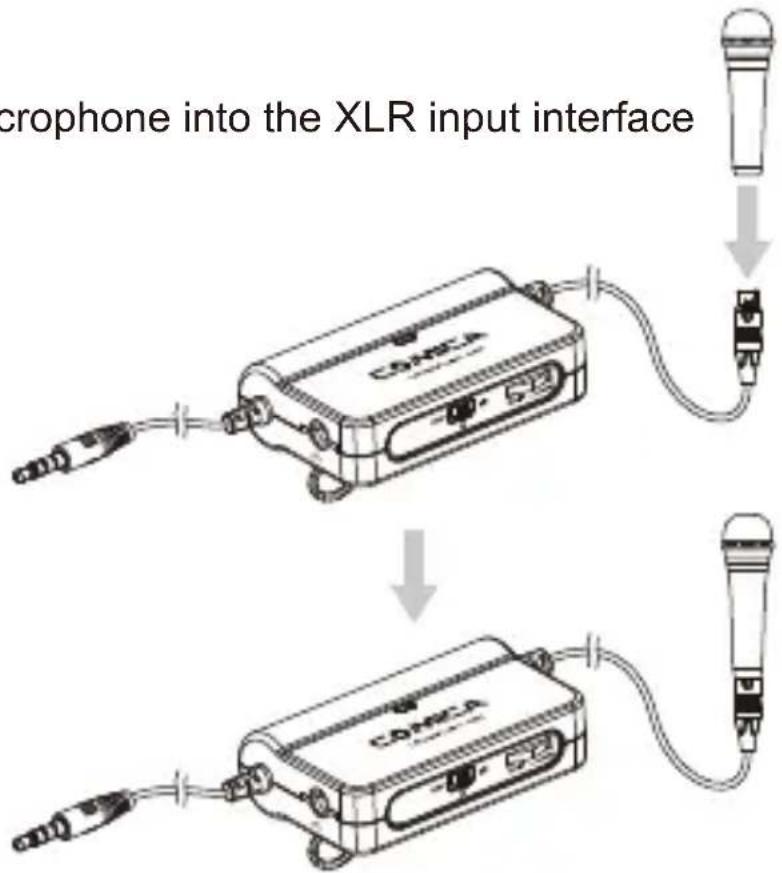
Insert the XLR Microphone into the XLR input interface
text_image
microphone into the XLR input interface
a. The product supports all XLR dynamic and positive condenser mic, and not support passive condenser mic which need external phantom power.
b. The product is compatible with IOS and Andriod systems. When used with Iphone 7 and other new version Iphones with Lightning jack, the original audio cable adapter (3.5mm-Lightning) is needed.
c. While used for smartphone, please set the smartphone to fly mode to avoid any interference.
d. While the microphone is used for IOS system phones, it supports both Iphone original audio recording mode and video recording mode.
e. While the microphone is used for Android System phones, it only supports phone's original audio recording mode but not video mode, you should download 3rd party APP to use while in video shooting mode.
1.Used with camera
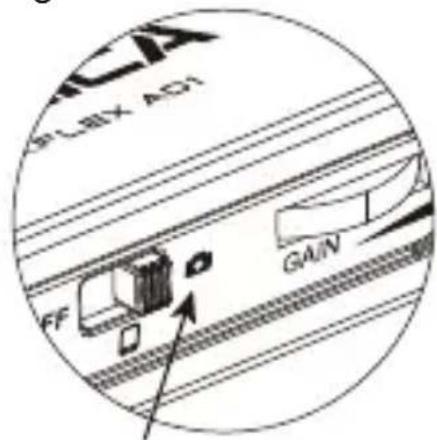
1.1 When used with camera, move the switch to camera, the indicator light turns green
text_image
SLCX AD1 GAIN FFMove to camera on the right side

text_image
the indicator light turns green COMICA1.2 Insert the 3.5mm output connector into the 3.5mm input interface of the camera for recording

flowchart
graph TD
    A["COMCA"] -->|Signal transmission| B["DSR Camera"]
    B -->|Data transfer| C["COMCA"]
- Used with smartphone
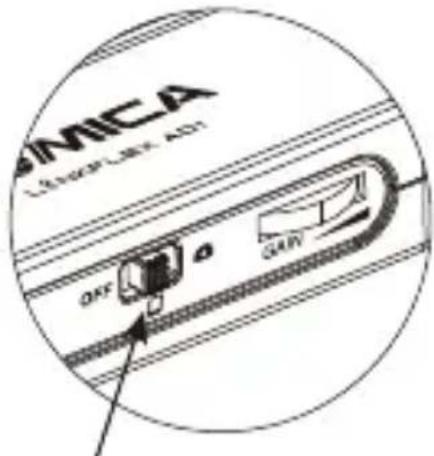
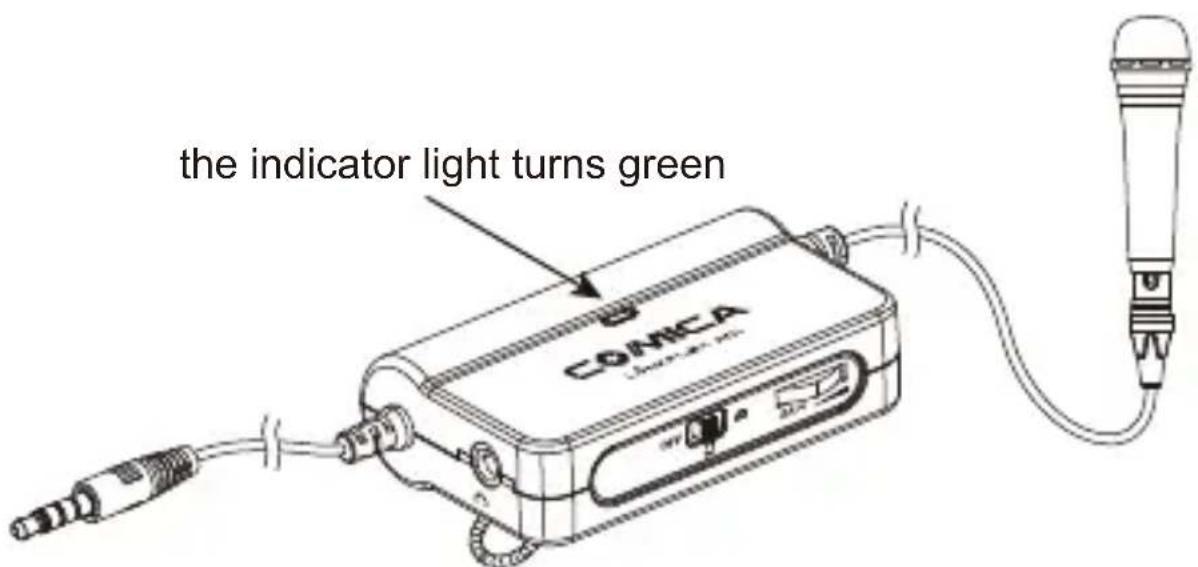
2.1 When used with smartphone, move the switch to smartphone, the indicator light turns green
text_image
MICA Lungs Link ADT OFF GAINMove to smartphone in the middle
text_image
the indicator light turns green COMICA2.2 Insert the 3.5mm output connector into the 3.5mm input interface of the smartphone and used with the recording system of smartphone for recording

flowchart
graph TD
    A["COMCA Device"] -->|USB cable| B["Smartphone"]
    B --> C["USB microphone"]
    C --> D["COMCA Device"]
    D --> E["Smartphone"]
Function Description
1. Gain Control Wheel
During the usage, the Gain Control Wheel adjust the output sensitivity of microphone
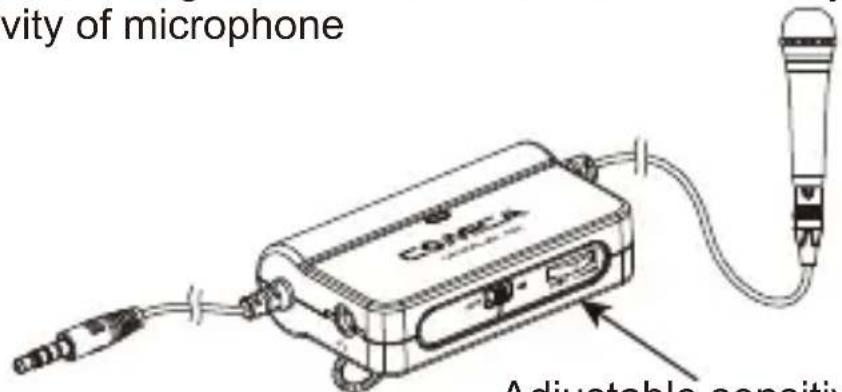
text_image
Activity of microphone CO/PCA Adjustable capacitiv2. Monitoring jack
Adjustable sensitivity drive plate
You can monitor the recording situation through the 3.5mm monitoring jack
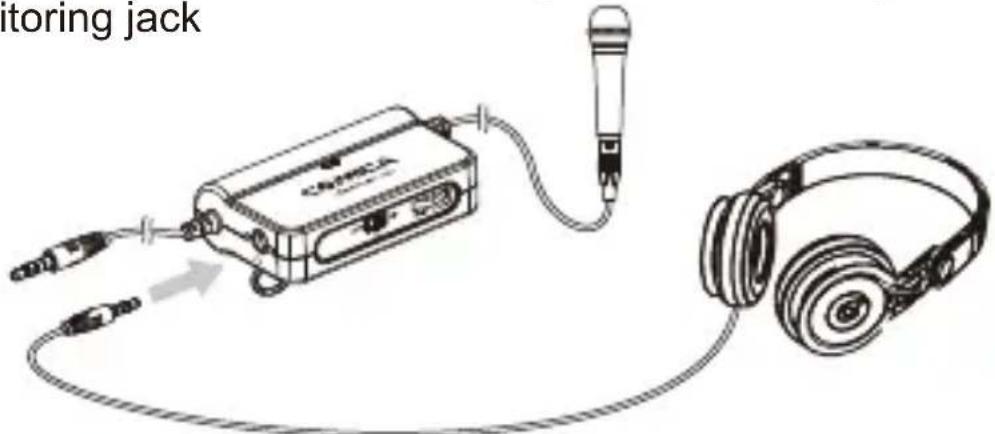
text_image
itoring jack3. On and off function instruction
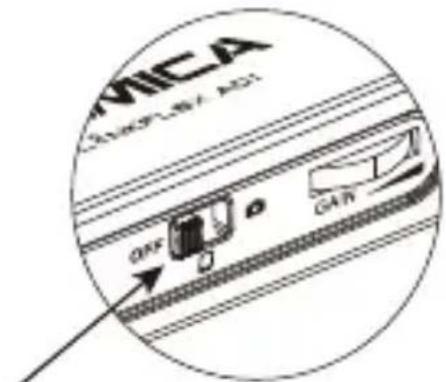
When the power of the battery is low, the indicator light turns red, and the battery should be replaced. When not in use, please move the switch to OFF, turn off the machine.
text_image
MICA OFF GAINMove to power switch on the left side
Specification
| Output | 3 pin XLR interface |
| Input | 3.5mm connector |
| Gain Range | Maximum increase -10dB |
| Frequency Range | 20Hz - 20kHz ±1dB |
| Distortion + Noise | <0.02%, RL=2kΩ, f=20~20KHz, Vo=0.7Vrms |
| Battery | CR2032 3V |
| Working Temperature | 0°C ~ +50°C |
| Storage Temperature | -20°C ~ +60°C |
LINKFLEX-AD1
natural_image
Exterior view of a COMICA LSP/PLA 4.0V audio recording device with coiled cables and connector (no text or symbols on main body)前言
natural_image
Black CATAA wireless device with attached cable and connector (no visible text or symbols)转换器主体 背夹

natural_image
Simple line drawing of a curved object resembling a stylized tool or device (no text or symbols)
natural_image
Black and white photo of a closed wallet with embossed design (no visible text or symbols)便携袋 说明
flowchart
graph TD
    A["COMCA"] -->|Signal transmission| B["DSR Camera"]
    B -->|Data acquisition| C["COMCA"]
- 搭配手机使用
natural_image
Line drawing of a cassette audio device connected to an earless headphones (no text or symbols present)3. 开/关/功能指示
text_image
MICA MAXPLEX AD1 OFF GAIN拨至左侧电源开关
技术参数
text_image
QR code image containing encoded data, no visible human-readable textwww.comica-audio.com