TSD-ALC2 - Hi-Fi System Atlas Sound - Free user manual and instructions
Find the device manual for free TSD-ALC2 Atlas Sound in PDF.


| Product Type | Two Channel Audio Level Controller/Limiter |
| Brand | Atlas Sound (AtlasIED) |
| Model | TSD-ALC2 |
| Series | Time Saving Devices |
| Chassis Color | Black |
| Chassis Material | Aluminum |
| Dimensions (H x W x D) | 1.5 x 4.0 x 2.75 inches (39 x 101 x 70 mm) |
| Weight | 6 oz (0.165 kg) |
| Power Supply | 24V DC, 60mA (1.4W), external (sold separately) |
| Inputs | 2 unbalanced RCA (L/R), 10kΩ impedance |
| Outputs | 2 unbalanced RCA (L/R), 150Ω impedance, adjustable 0-1.5V hard limit |
| Frequency Response | 20 Hz - 20 kHz (±1 dB) |
| THD | 0.5% @ 1 kHz |
| Signal-to-Noise Ratio | 80 dBV |
| Auto Level Threshold Range | 25 mV - 3 V |
| Level Adjustment Increment | Selectable 1 dB or 2 dB per step |
| Sample Rate | 42 samples per measurement, adjustment every 20 ms |
| Indicators | Power (blue), Signal (green), Input Peak (red), ALC Active (yellow) |
| Front Panel Controls | Input Level Attenuator, Output Level Limiter (both with removable knobs and security covers) |
| Rear Panel Features | DC power input (phoenix connector), RCA I/O, ramp speed switch (1 dB/2 dB), cable management retainers |
| Mounting Options | Velcro, multi-mount plate (included); optional 19" rack kit, half-rack kit, rear rack kit |
| Included Accessories | 2x Velcro strips, multi-mount plate with screws, 2x cable retainers, 2x knobs, 2x security covers |
| Certifications | External PSU: cUL, CE, RoHS, TUV |
| Warranty | 3 years on electronics (AtlasIED products), 1 year on electronics and control systems |
| Application | Restaurants, sports bars, schools, houses of worship, retail, hotels, event centers |
Frequently Asked Questions - TSD-ALC2 Atlas Sound
User questions about TSD-ALC2 Atlas Sound
0 question about this device. Answer the ones you know or ask your own.
Ask a new question about this device
Download the instructions for your Hi-Fi System in PDF format for free! Find your manual TSD-ALC2 - Atlas Sound and take your electronic device back in hand. On this page are published all the documents necessary for the use of your device. TSD-ALC2 by Atlas Sound.
USER MANUAL TSD-ALC2 Atlas Sound
The AtlasIED TSD-ALC2 is an automatic 2-channel audio level controller/limiter that allows designers and installers the ability to set predetermined maximum source levels. The TSD-ALC2 is great for installations with multiple program sources including satellite receivers, mp3 players, etc. that typically have vast output level irregularities. With the TSD-ALC2 inserted in line with these sources, the audience will not be distracted during high volume commercial breaks or when different inputs are selected. Retail stores, restaurants, sports bars, hotels, event centers, and other facilities can all benefit from improved sound when the TSD-ALC2 is integrated.
Features include stereo RCA input and output connectors, threshold level, ramp speed selection, and output gain adjustments. The TSD-ALC2 also works well when used in conjunction with Atlas Strategy Series Mixer Amplifiers. For level control and passive combining of stereo sources with AtlasIED amps, specify (1) AA-YSUM input cable in conjunction with (1) TSD-ALC2 for each source input.
The TSD-ALC2 is highly efficient and meets most energy standards as one 24V DC power supply (available separately) can power multiple Atlas Time Saving Devices.
The TSD-ALC2 is part of a full line of AtlasIED Time Saving Devices. These compact (1.5" x 4" x 2.75") units are designed to solve some of the common audio system problems in the easiest and in the most efficient and cost-effective way. All models are made from high quality components and include removable individual I/O connectors for quick and precise wiring, separate ground terminals for all I/Os assuring secured connections, and removable level controls that can be replaced with tamper-proof security covers.
Features
• Stereo Auto Level Control
• Unbalanced RCA Input and Output
• Threshold Level Adjustment
- Ramp Speed Selection
• Output Gain Control
• Security Covers Included for All Front Panel Controls
• Meets Most Energy Standards
- Compact Chassis Design
Audio Applications
- Satellite Feeds
- iPod
- CD Players
- MP3 Players
Installation
- Restaurants
- Sports Bars
- Schools
- Residential
- Playback Systems
• House of Worship
Understanding an Audio Auto Leveler
Variable audio levels between songs or TV programs and commercials can be very aggravating in a home or commercial environment. Because the audio content varies drastically, Auto Level Controllers (ALCs) require unique settings to maximize the audio auto level performance for the specific application. Most Audio Auto levelers on the market claim to seamless transition between sources or material, however no ALC can perfectly auto-level audio. No ALC has perfect seamless audio auto leveling. In fact, many bad designs that utilize old technologies or are incorrectly used have given ALCs a bad name. The TSD-ALC2 is designed with the latest technology and optimizes adjustments and settings for each unique installation.
Determining a signal's sample rate is important for an ALC to detect when the source material audio level is actually changing or if it is just dynamic changes within the song. A fast reaction time is necessary to quickly adjust the level but if it is set too fast, an audible pumping effect will occur when music content with a lot of drums goes to a piano, for example. Too slow of a reaction time can also be annoying during transitions between tracks or to commercial breaks. Another issue ALCs must overcome is the level of variation between input signals. If it is too large, the compensation creates an abrupt level change that is noticeable to the listener. If the level adjustment is too small, the song or commercial can be well into its content before the level adjustment occurs. Either way, the overall listening experience is disrupted.
The TSD-ALC2 solves these signal level issues without the need to of a computer and measurement tools to tailor the settings to the job. The TSD-ALC2 uses 42 audio samples per measurement, averages out the signal levels, and makes an adjustment every 20 milliseconds if required. This has been determined as the ideal sample rate to detect the audio dynamic content and make adjustments in most applications. The TSD-ALC2 also allows you to select how much the level can be adjusted, at either 1dB or 2dB increments. The TSD-ALC2 also incorporates an adjustable hard limiter so the maximum level in an audio system cannot be overdriven. The Output Level Limiter can be adjusted from 100mv to 1.5V.
The TSD-ALC2 provides a smooth transition between music or audio source selections. Auto level changes depend on how drastic the level needs to be adjusted but, in most situations, auto leveling isn't noticeable and will greatly improve the listening experience. Secondly, the output limiter feature prevents users from turning up the gain too loud and damaging your speakers - an invaluable feature that alone makes the TSD-ALC2 worth adding to any system.
Front Panel Description
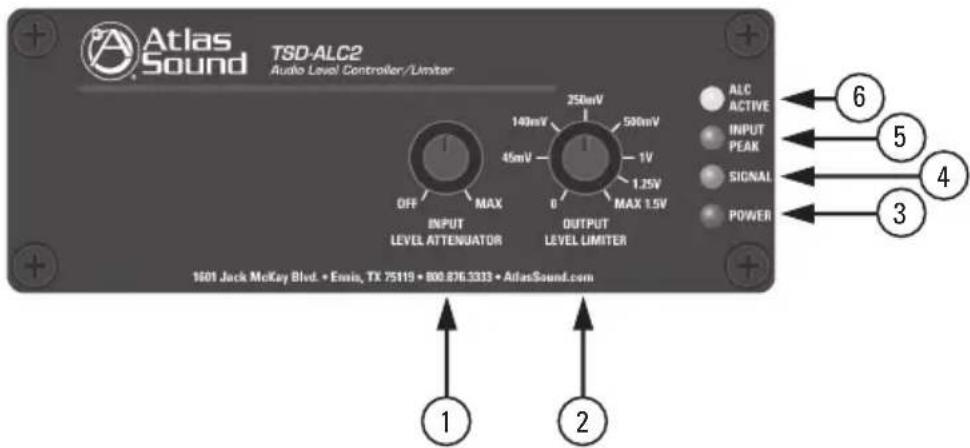
- Input Level Attenuator - Adjusts the level of the input signal applied to the ALC2. This only reduces the input signal and does not add signal gain. See the Setting the Level section on page 7. Turn counter-clockwise to decrease the signal. Note: The Input Level Control knob can be removed and replaced with a supplied security cover to prevent unauthorized adjustment.
- Output Level Limiter - Sets the maximum output signal that will be available at the outputs. Turn clockwise to increase the signal level and counter-clockwise to decrease it. Note: The Output Level Control knob can be removed and replaced with a supplied security cover to prevent unauthorized adjustment.
- Power LED - Illuminates Blue when 24VDC power is present.
- Signal LED - Illuminates Green when the input signal strength reaches 25mV to verify a signal path.
- Input Peak LED - Illuminates Red when the input signal reaches 3dBV below when signal clipping will occur. Occasional flashing is normal but if this indicator is continuously On, then reduce the input level using the Input Level Attenuator.
- ALC Active LED - Illuminates Yellow when circuitry is working. Note: If this LED is not illuminated or flashing, the Auto Level Control circuitry is not functioning and either the output signal at the source or the input level control on the ALC2 must be increased. This LED will not illuminate until the input level is 100mV.
Rear Panel Description
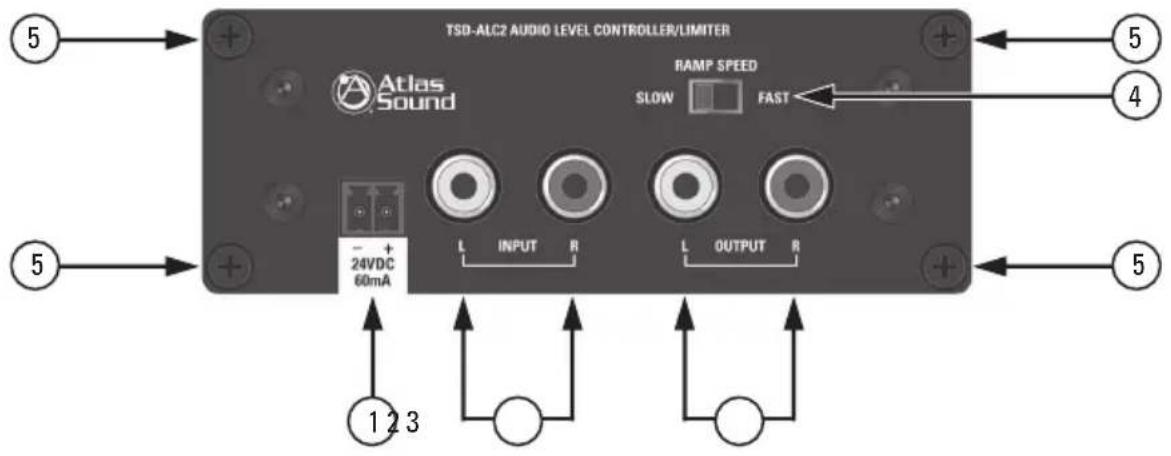
The TSD-ALC2 features Stereo RCA inputs and outputs and a removable phoenix style power connector that has a 3.5mm pitch between pins.
- DC Power Input - Each TSD that requires DC power comes with a 2 position connector for an external 24VDC power supply (sold separately). Because of the TSDs low power consumption, a single external power supply may power more than one TSD. Please refer to the specifications on current requirements in milliamps to match with the appropriate power supply. Note: It is acceptable to exceed the current requirements of the TSDs but NOT safe to use a power supply that is below the current requirement of the device.
- RCA Input - Connect unbalanced line level sources to these inputs. The source connections must be mated properly to the input connector or signal loss and/or noise may be introduced.
- RCA Output - Connect these unbalanced line level outputs to amplifiers or other devices. The output connections must be connected properly to the connectors or signal loss and/or noise may be introduced to other devices.
- Ramp Speed Switch - Select the audio level rate of change to fit your Ramp Speed. This switch selects between 1dB (slow) or 2dB (fast) change in level per transition step.
- Cable Management Retainer Points - Each TSD includes two cable retainer straps for securing the included cable management retainers. Remove one of the rear panel screws, align the panel hole with a retainer and firmly tighten the screws.
Cable Management
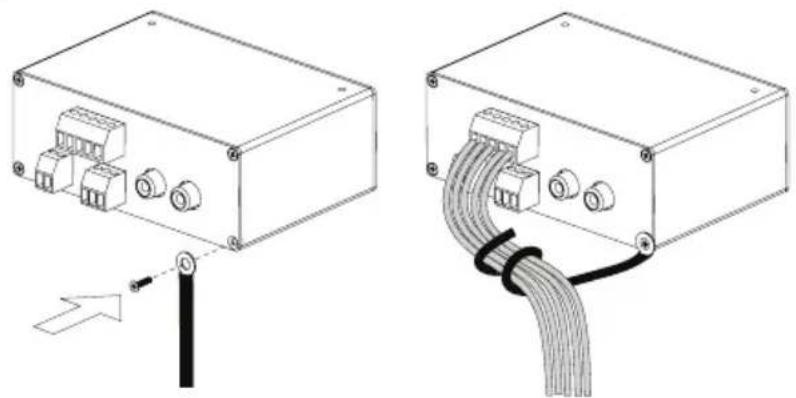
natural_image
Technical line drawing of an electronic device showing internal components and cable termination (no text or symbols)Knob and Security Cover
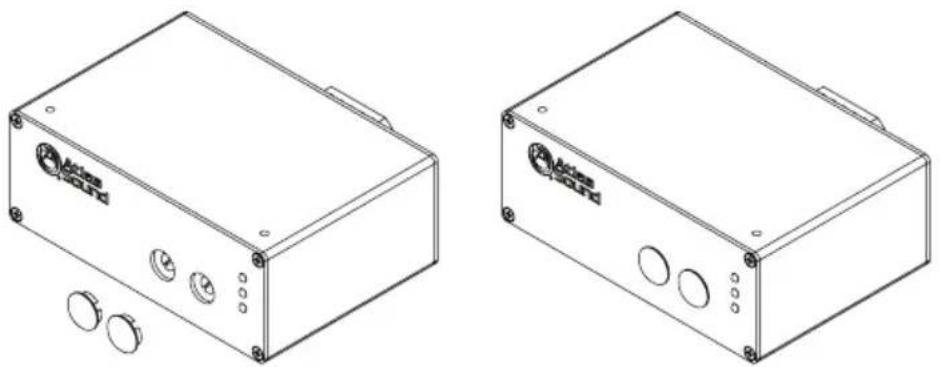
All front panel level controls feature a removable knob that can be replaced with an included security cover. Follow these steps to prevent potentiometer damage or unwanted changes.
- Knob Installation - Turn the potentiometer shaft fully counter-clockwise. Align the knob indicator to the lowest setting on the panel and the potentiometer shaft slot. Carefully press the knob onto the potentiometer shaft. Do not force or damage may occur to the potentiometer.
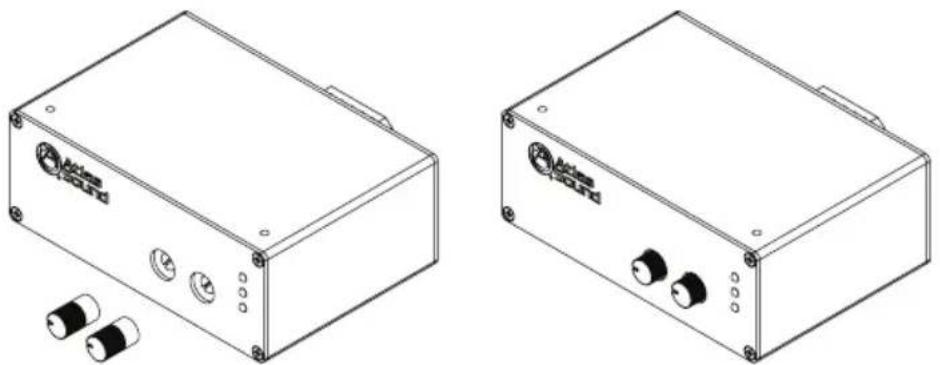
natural_image
Technical line drawings of two electronic device boxes with buttons and connectors (no text or symbols)- Security Cover Installation - Remove the knob from the panel and insert the cover. Small pliers may be required to remove the knobs. Align the security cover to the level control panel hole. Push the cover into the hole until it snaps into place. Do not force or damage may occur to the potentiometer.
natural_image
Two technical line drawings of a device casing with buttons and mounting holes, no text or symbols present.
1601 Jack McKay Blvd. • Ennis, Texas 75119 U.S.A. Telephone: 800.876.3333 • Fax: 800.765.3435
Mounting
Listed below are the ways to mount the TSD and the optional accessories that can be purchased.
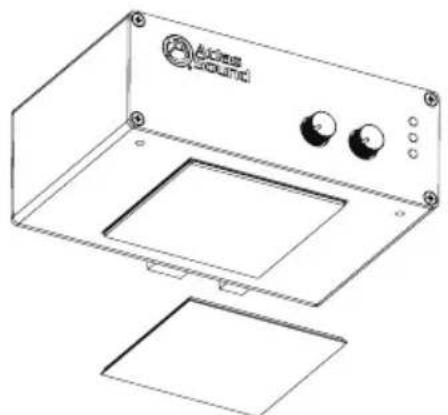
- Velcro™ - Each unit includes two 2" x 2" pieces of industrial-grade Velcro™ with adhesive backing to adhere to any flat surface. Clean all surfaces before applying the adhesive side of the Velcro™.
natural_image
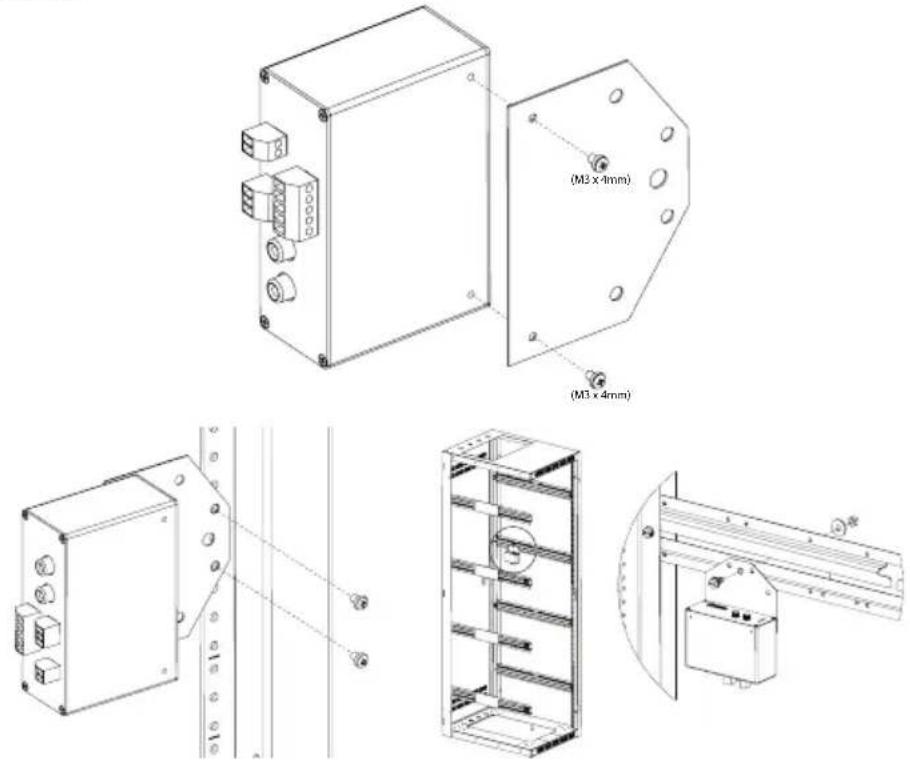
Line drawing of a device casing with labeled buttons and mounting base (no text or symbols)- Multi Mount Plate - Each TSD includes a versatile multi-position mounting plate. This plate allows the TSD to be mounted to any surface; but is ideal for use with rear rack rails or side rack hat channels. Use the included M3 x 4mm screws to install the plate on the TSD. Note: Only use the included M3 x 4mm screws as other screws may be too long and will cause internal damage to the TSD. The multi-position mounting plate is a new addition being included with TSDs. If the TSD being used did not include the mounting plate, contact AtlasIED customer service at 1-800-876-3333.

1601 Jack McKay Blvd. • Ennis, Texas 75119 U.S.A. Telephone: 800.876.3333 • Fax: 800.765.3435
AtlasIED.com - 7 -
Optional Mounting Accessories
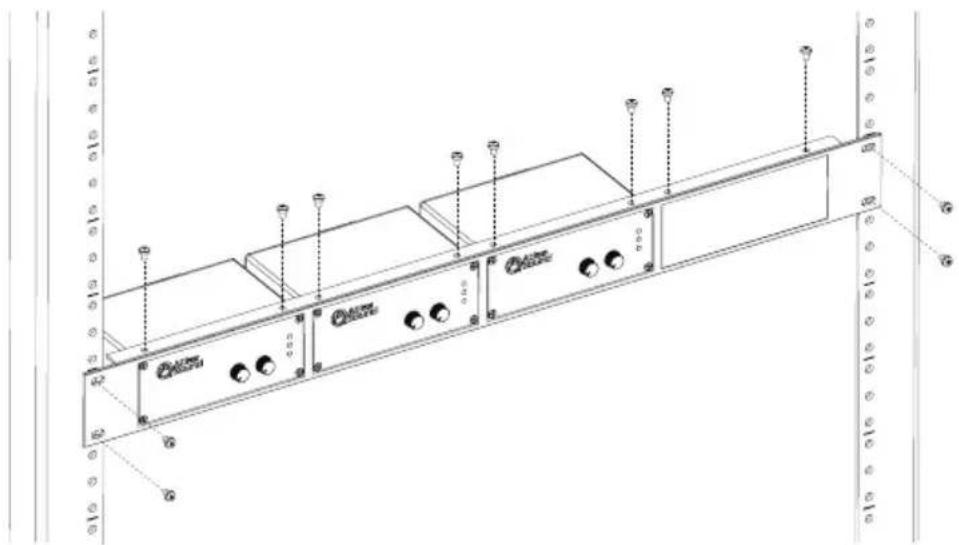
- TSD-RMK 19" Width Rack Mount Kit - For 19" rack mounting, AtlasIED offers an optional rack mount kit, the TSD-RMK. This rack mount kit can support up to four TSD units. The kit includes three blank panels designed to fill any unused slots. Use the included hardware to mount the TSD into the rack mount kit using the top mount screw holes on the TSD.
natural_image
Technical line drawing of a server rack with indicator lights and ports (no text or symbols)- TSD-RMKHR Half Width Rack Mount Kit - AtlasIED offers an optional rack mount kit that can be used in half width rack applications including the AtlasIED WMA-HR and AWR-HR models. The TSD-RMKHR can support up to two TSDs. Included is an extra blank panel to fill one of the spaces if only one TSD is being used.
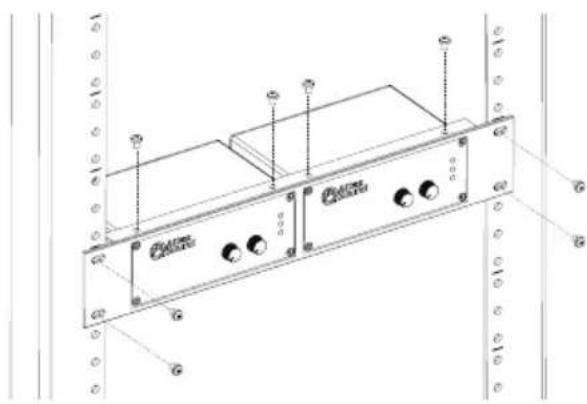
natural_image
Technical line drawing of a device chassis with labeled ports and connectors (no text or symbols present)- TSD-RRMK Rear Rack Mounting Kit - For complete flexibility in mounting a TSD or TSD external power supplies the optional TSD-RRMK is available. The TSD-RRMK can support mounting of either two larger TSDs with external power supplies or up to 4 TSD models. Note: Only use the included M3 x 4mm screws as other screws may be too long and will cause internal damage to the TSD.
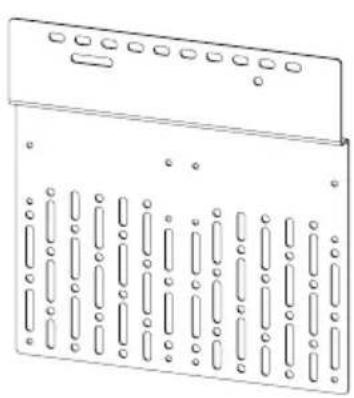
natural_image
Technical line drawing of a mechanical component with multiple slots and mounting holes (no text or symbols)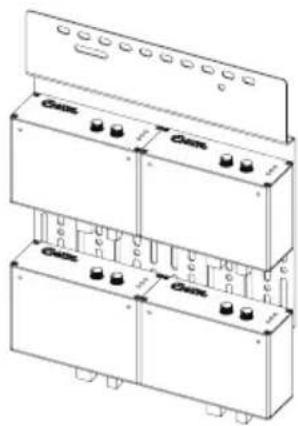
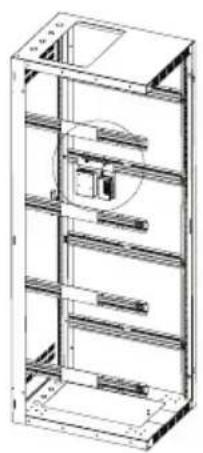
natural_image
Technical line drawing of a multi-level industrial shelving unit (no text or symbols)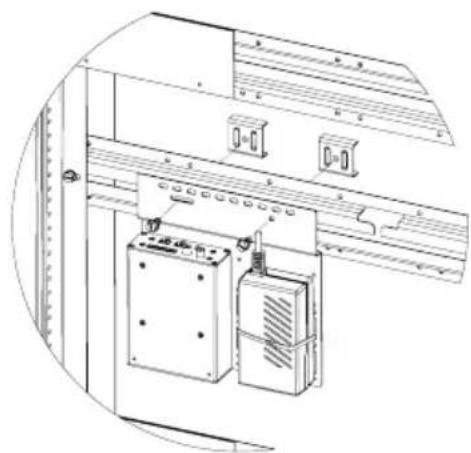
natural_image
Technical line drawing of an electrical cabinet with labeled components (no text or symbols)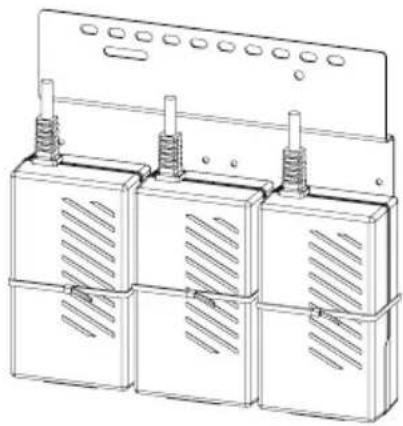
natural_image
Technical line drawing of three identical electrical enclosure units with heat sinks and ventilation grilles (no text or symbols)
Atlas
IED.川
1601 Jack McKay Blvd. • Ennis, Texas 75119 U.S.A.
Telephone: 800.876.3333 • Fax: 800.765.3435
AtlasIED.com - 9 -
Setting the Level
For optimization of the ALC2, it is important to understand that the set level should be the balance of input source signals from low input signal to strong input signal. The Auto Level Control circuit operates from a wide 50mV to 3V range of input voltages to accommodate iPods, CD players, computers, and satellite receivers with immense dynamic variation of music and commercial content. Follow these steps to calibrate the ALC to achieve optimal performance and review the Understanding an Audio Auto Leveler section on page 3.
-
Insert the ALC2 in line between audio source and the preamp or amplifier. Note: Turn the level controls on the amplifier to minimum or Off position.
-
Turn the Level Attenuator and the Output Level Limiter fully clockwise to Max positions.
-
Strong Input Signal Setup- If using a preamp or input source selector with more than one input source, setup the source with the loudest audio content and strongest signal first. Increase the input signal until the Signal LED is flashing and the Active LED is flashing steadily on the ALC. Once the Peak LED begins to flash, reduce the input signal until it stops. The Auto Level Control circuitry works best if the strongest input signal is just below the Peak threshold.
-
Low or Weak Signal Setup - After setting up the strongest input, select the content with the lowest input signal and check if the Active Limiter LED is flashing. If not, increase the input signal at the source or by using the Level Attenuator until the LED is flashing. The level setting is a balance between the strongest and weakest input signals.
-
Finally, set the output level to the amplifier. Choose a dynamic signal source for this set up and slowly increase the amplifier level control to the level desired in the audio system. If the level is too strong from the ALC2, turn the Output Level Limiter counter-clockwise to the level desired to match your amplifier gain and system listening level. Check the amplifier's Input Sensitivity specification and match the Output Limiter Level to it. For example, if the amplifier Input Sensitivity is 1V, the Output Limiter Level should be set at or below 1V to prevent clipping. Use the markings indicating the maximum output voltages on the Output Limiter Control to set your level so the maximum audio system level is fixed or limited.
Block Diagram
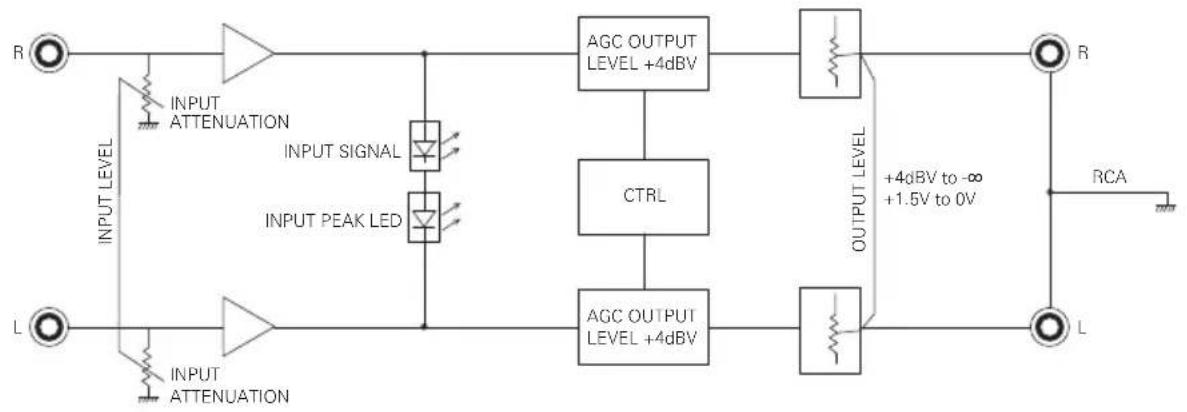
flowchart
graph LR
    R["Input"] --> ATTENUATION["INPUT ATTENUATION"]
    ATTENUATION --> INTU["INTU"]
    INTU --> PLEDAFFER["INPUT PEAK LED"]
    PLEDAFFER --> AGCOUTPER["AGC OUTPUT LEVEL +4dBV"]
    AGCOUTPER --> CTRL["CTRL"]
    CTRL --> AGCOUTPER2["AGC OUTPUT LEVEL +4dBV"]
    AGCOUTPER2 --> OUTPER["OUTPUT LEVEL"]
    OUTPER --> RCA["RCA"]
    RCA --> L["L"]
    L --> ATTENUATION2["INPUT ATTENUATION"]
    ATTENUATION2 --> INTU2["INTU"]
    INTU2 --> PLEDAFFER
    PLEDAFFER --> AGCOUTPER
    AGCOUTPER --> OUTPER
    OUTPER --> R["R"]
    R -->|+4dBV to -∞ +1.5V to 0V| RCA
Specifications
Description Two Channel Audio Level Controller/Limiter
Chassis Color Black
Chassis Material Aluminum
Inputs
Type Qty 2, Unbalanced
Connection RCA Left and Right
Impedance 10KΩ
Outputs
Type Qty 2, Unbalanced
Connection RCA Left and Right
Impedance 150Ω Unbalanced
Output Level Adjustable from 0V to 1.5V, Hard Limit
Controls
Input Level Attenuator Qty 1, Removable Knob with Security Cover
Output Level Limiter Qty 1, Removable Knob with Security Cover
Indicators
Input Signal Green, 25mV On Threshold
Input Peak Red, -3dB Before Clip
ALC Active Yellow, Onset of Input Level Reduction, 2.6V Threshold
Power Blue
Electrical
Frequency Response 20Hz - 20kHz (±1dB)
Auto Level Threshold Range 25mV - 3V
THD .5% @ 1kHz
Signal to Noise 80dBV
Output Level Limiter Range 0V - 1.5V
Sample Rate 42 per Adjustment
Delay Time 20ms Between Adjustment
Level Adjustment Increment 1dB or 2dB Selectable
Power Requirements
Voltage 24VDC
Power Consumption 60mA
Power Consumption 1.4W
Dimensions H 1.5" (39mm) x W 4" (101mm) x D 2.75" (70mm)
Weight 6oz, .165kg
Included Accessories
Velcro™ Industrial-Grade
Multi-Mount Plate Qty 1, Includes Two (2) M3 x 4mm Screws
Cable Retainers Qty 2
Level Control Knobs Qty 2
Level Control Security Covers Qty 2
Optional Accessories
TSD 24VDC Power Supply
TSD-RMK 1 RU 19" Width Rack Mount Panel (Supports 4 TSD Units)
TSD-RMKHR 1 RU Half Rack Width Panel (Supports 2 TSD Units)
TSD-RRMK Rear Rack Mounting Kit
Safety and Certifications
External Power Supply cUL, CE, RoHS, TUV
Notes:

Atlas IED.
1601 Jack McKay Blvd. • Ennis, Texas 75119 U.S.A. Telephone: 800.876.3333 • Fax: 800.765.3435
AtlasIED.com - 14 -
Notes:

Atlas

1601 Jack McKay Blvd. • Ennis, Texas 75119 U.S.A.
Telephone: 800.876.3333 • Fax: 800.765.3435
AtlasIED.com - 15 -
Limited Warranty
All products manufactured by AtlasIED are warranted to the original dealer/installer, industrial or commercial purchaser to be free from defects in material and workmanship and to be in compliance with our published specifications, if any. This warranty shall extend from the date of purchase for a period of three years on all AtlasIED products, including SOUNDOLIER brand, and ATLAS SOUND brand products except as follows: one year on electronics and control systems; one year on replacement parts; and one year on Musician Series stands and related accessories. Additionally, fuses and lamps carry no warranty. AtlasIED will solely at its discretion, replace at no charge or repair free of charge defective parts or products when the product has been applied and used in accordance with our published operation and installation instructions. We will not be responsible for defects caused by improper storage, misuse (including failure to provide reasonable and necessary maintenance), accident, abnormal atmospheres, water immersion, lightning discharge, or malfunctions when products have been modified or operated in excess of rated power, altered, serviced or installed in other than a workman like manner. The original sales invoice should be retained as evidence of purchase under the terms of this warranty. All warranty returns must comply with our returns policy set forth below. When products returned to AtlasIED do not qualify for repair or replacement under our warranty, repairs may be performed at prevailing costs for material and labor unless there is included with the returned product(s) a written request for an estimate of repair costs before any nonwarranty work is performed. In the event of replacement or upon completion of repairs, return shipment will be made with the transportation charges collect.
EXCEPT TO THE EXTENT THAT APPLICABLE LAW PREVENTS THE LIMITATION OF CONSEQUENTIAL DAMAGES FOR PERSONAL INJURY, ATLASIED SHALL NOT BE LIABLE IN TORT OR CONTRACT FOR ANY DIRECT, CONSEQUENTIAL OR INCIDENTAL LOSS OR DAMAGE ARISING OUT OF THE INSTALLATION, USE OR INABILITY TO USE THE PRODUCTS. THE ABOVE WARRANTY IS IN LIEU OF ALL OTHER WARRANTIES INCLUDING BUT NOT LIMITED TO WARRANTIES OF MERCHANTABILITY AND FITNESS FOR A PARTICULAR PURPOSE.
AtlasIED does not assume, or does it authorize any other person to assume or extend on its behalf, any other warranty, obligation, or liability. This warranty gives you specific legal rights and you may have other rights which vary from state to state.
Service
Should your Atlas TSD require service, please contact the AtlasIED warranty department at 1-877-689-8055, ext. 277 to obtain an RA number.
AtlasIED Tech Support can be reached at 1-800-876-3333 or support.atlasied.com.
Visit our website at www.AtlasIED.com to see other Atlas products.
©2017 Atlas Sound L.P. The Atlas "Circle A", Soundolier, and Atlas Sound are trademarks of Atlas Sound L.P.
IED is a registered trademark of Innovative Electronic Designs LLC. All Rights Reserved.
All other trademarks are the property of their respective owners. All specs are subject to change without notice. ATS003935 RevB 4/17

1601 Jack McKay Blvd. • Ennis, Texas 75119 U.S.A.
Telephone: 800.876.3333 • Fax: 800.765.3435
AtlasIED.com - 16 -
- Features
- Audio Applications
- Installation
- Understanding an Audio Auto Leveler
- Front Panel Description
- Cable Management
- Knob and Security Cover
- Mounting
- Optional Mounting Accessories
- Setting the Level
- Specifications
- Inputs
- Outputs
- Controls
- Indicators
- Electrical
- Power Requirements
- Included Accessories
- Optional Accessories
- Safety and Certifications
- Notes:
- Limited Warranty
- Service
Brand : Atlas Sound
Model : TSD-ALC2
Category : Hi-Fi System