Vdeo 4 Q4251 - Smartphone Micromax - Free user manual and instructions
Find the device manual for free Vdeo 4 Q4251 Micromax in PDF.


User questions about Vdeo 4 Q4251 Micromax
0 question about this device. Answer the ones you know or ask your own.
Ask a new question about this device
Download the instructions for your Smartphone in PDF format for free! Find your manual Vdeo 4 Q4251 - Micromax and take your electronic device back in hand. On this page are published all the documents necessary for the use of your device. Vdeo 4 Q4251 by Micromax.
USER MANUAL Vdeo 4 Q4251 Micromax
natural_image
Abstract gray graphic of five vertical bars with an exclamation mark, no text or symbols present.Q4251
User Guide
Contents
The Android Advantage....2
Read Me First....2
Understand Your Phone....3
Insert SIM and Memory Card 4
Charging the Battery 6
Google Account....6
Play Store 7
Notifications....7
Phone Security....9
Battery Saver Mode....11
Settings and Networks....11
Pair With Bluetooth Devices....12
Airplane Mode....13
Google Maps....13
Safety Precautions....14
Taking Care of your device 15
Battery Recommendations 15
Temperature and Humidity 16
Recycle your Phone 16
Disclaimer....16
Copyright....17
The Android Advantage
Micromax Q4251 comes with Android Marshmallow, which provides you a host of advanced and desirable features to give you an amazing Android experience.
Read Me First
- Please read all safety precautions and this user guide carefully before using your device to ensure safe and proper use.
- The descriptions in this user guide are based on the default settings of your device.
- Available features and additional services may vary by device, software, or service provider.
- Applications and their functions may vary based on the country, region, software or hardware specifications. Micromax is not liable for performance issues caused by third-party applications.
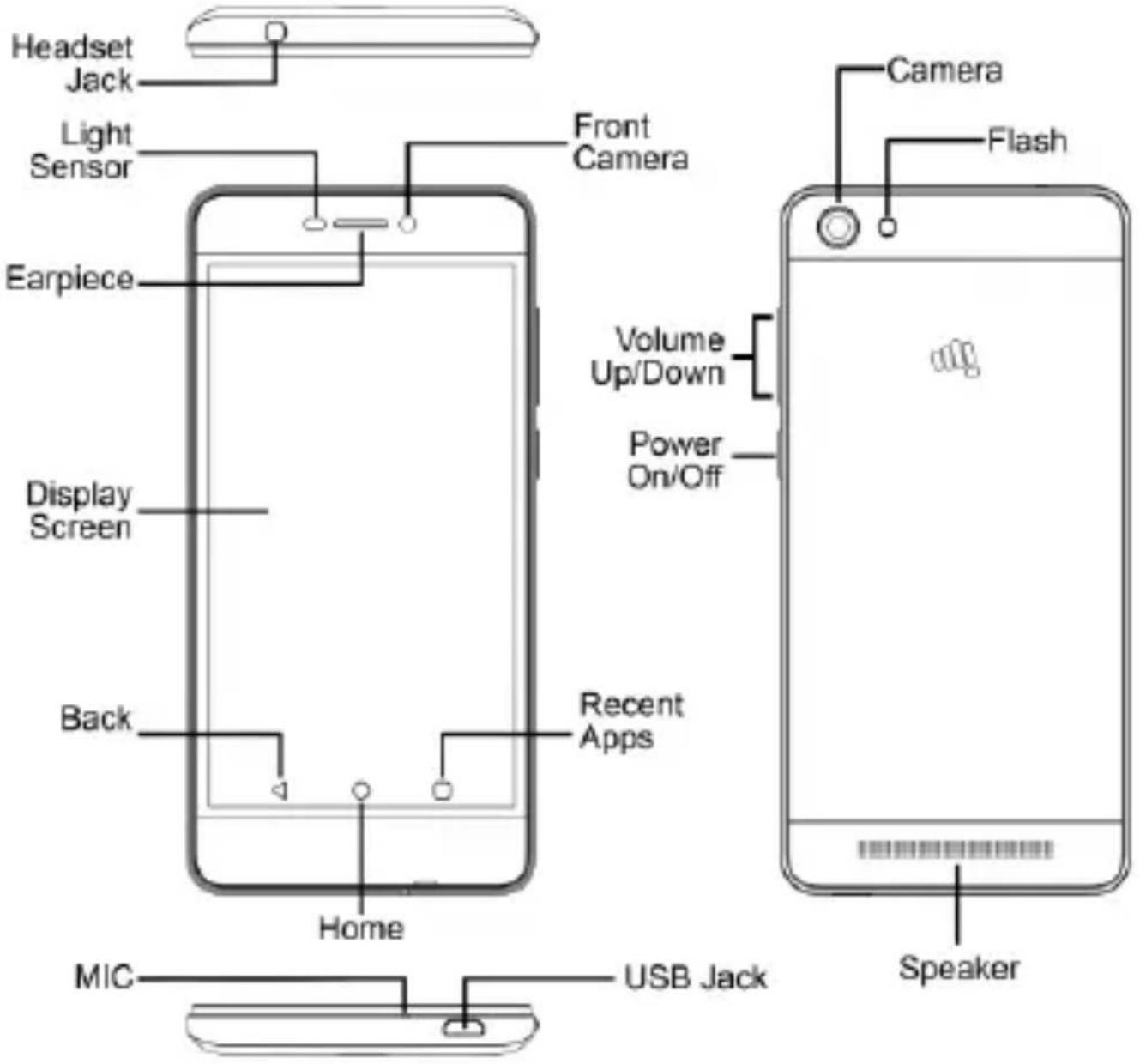
Understand Your Phone
text_image
Headset Jack Light Sensor Front Camera Earpiece Display Screen Back Home Recent Apps Volume Up/Down Power On/Off Camera Flash MIC USB Jack SpeakerInsert SIM and Memory Card
- Switch off your phone and remove the rear cover as shown:
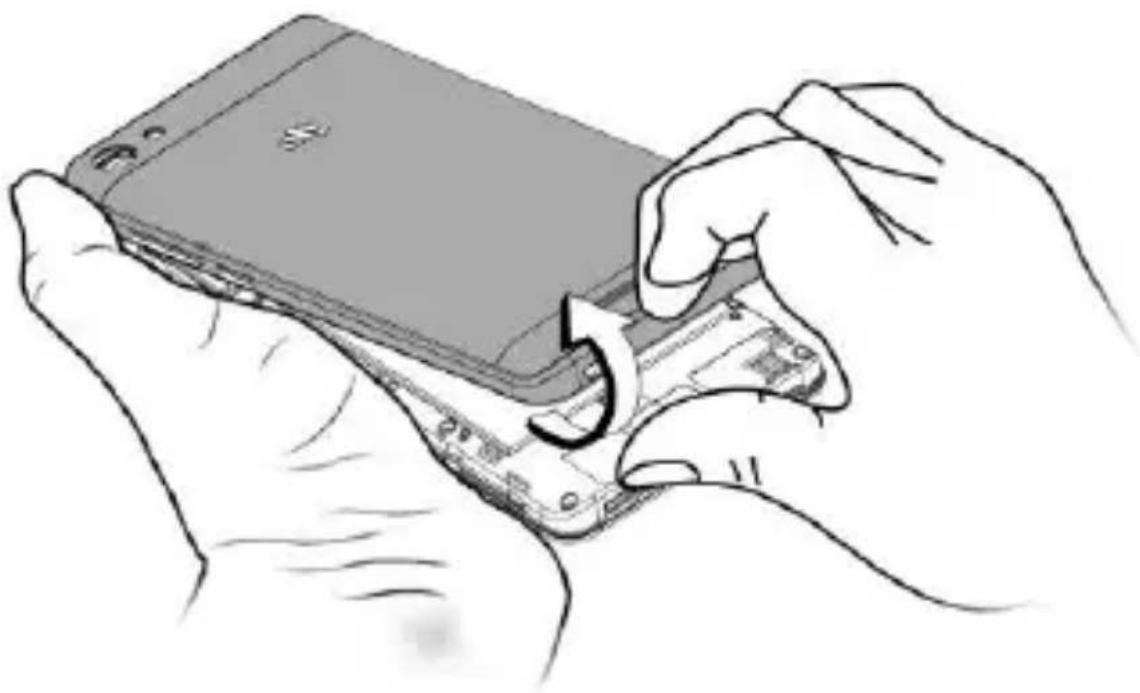
natural_image
Illustration of hands holding a smartphone with a partially open screen, showing the device being inserted (no text or symbols present)- Insert the SIM card(s) in the SIM slot(s), as shown:
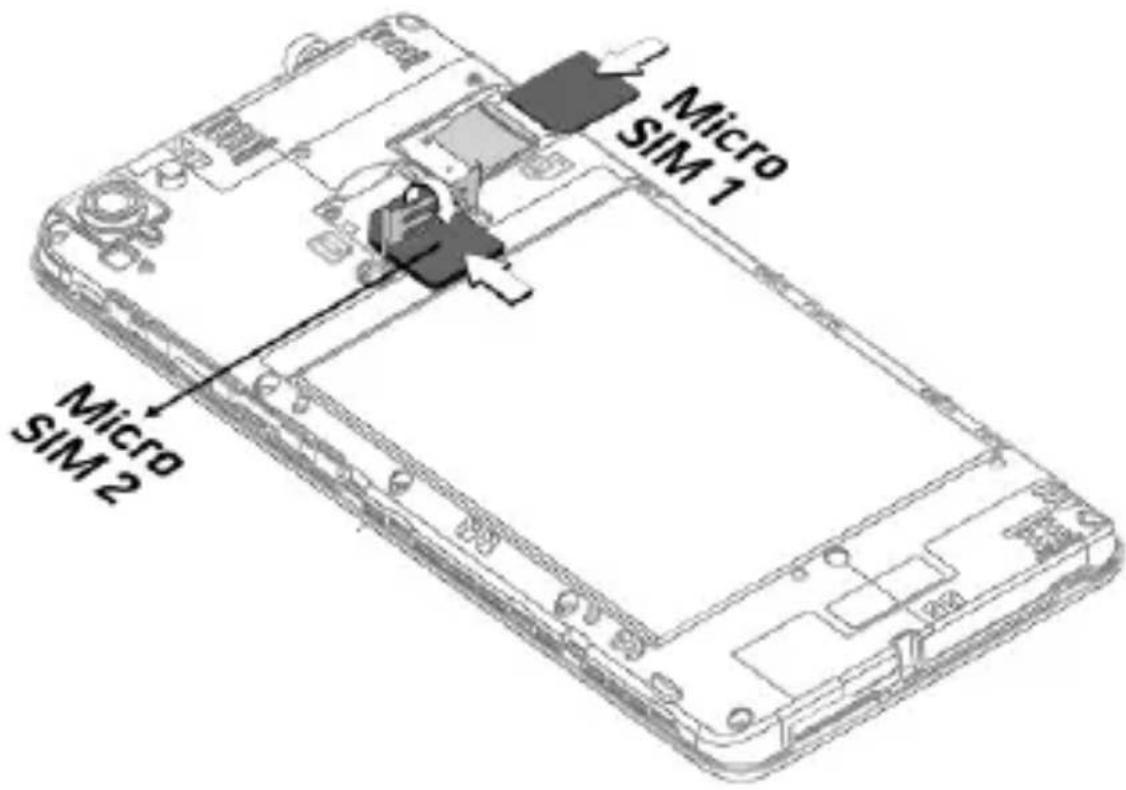
text_image
Micro SIM 1 Micro SIM 2- Insert the memory card correctly, as shown:
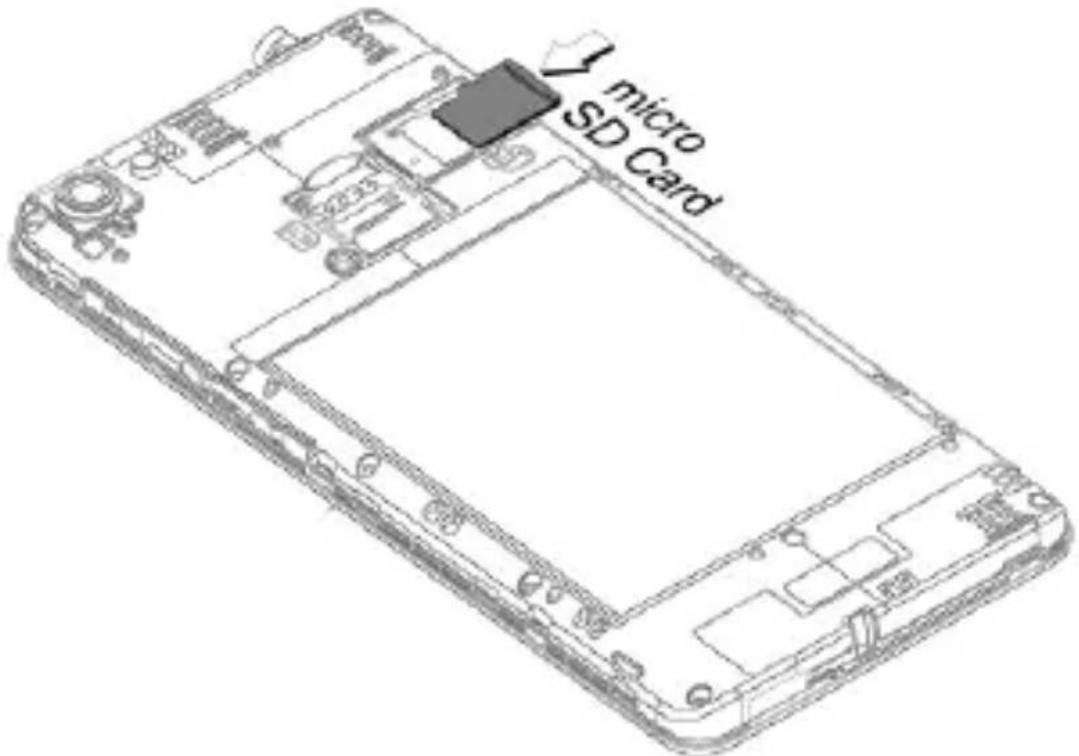
text_image
micro SD CardNote: The memory card slot is located above the micro SIM 1 slot.
- Place back the rear cover of the device.

Please keep the SIM card out of the reach of children.
Charging the Battery
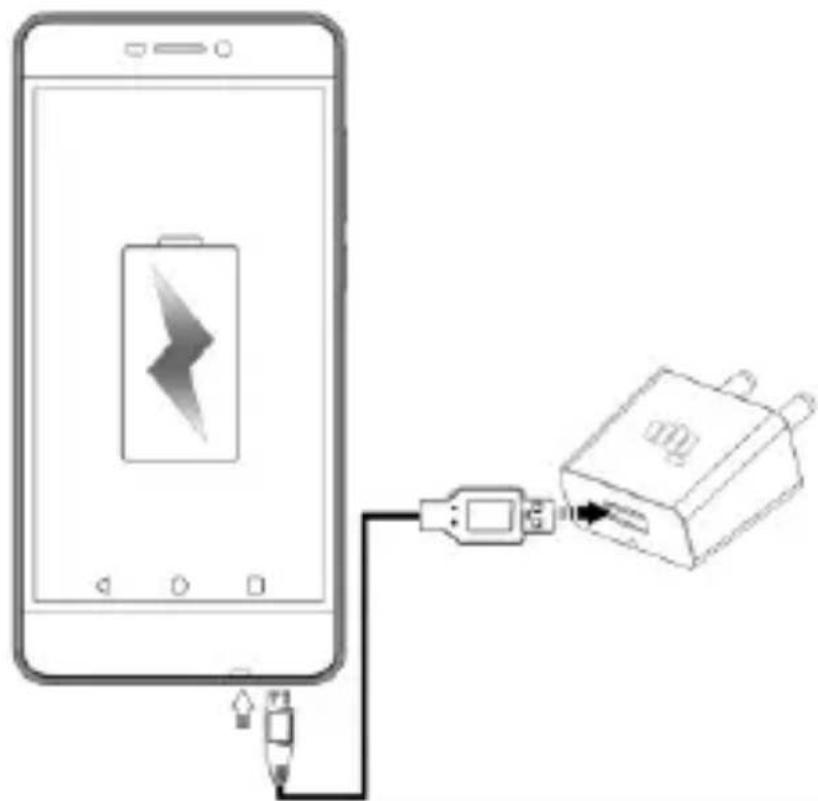
Before using the device for the first time, we recommend you to fully charge the battery.
natural_image
Diagram showing a smartphone connected to a battery via a cable, illustrating charging or connection (no text or symbols present)
Use only Micromax chargers and cables. Other chargers or cables may damage the battery or your device. This will invalidate your phone warranty.
Google Account
Your Google Account lets you take full advantage of applications and services offered by Google Play Store. Configure your Google account on this handset to get access to your Gmail, Google Play Store, Google Maps, and much more.

Internet connection is required to set up Google account.
You can configure your Google account from Settings → Accounts → Add account → Google.
i
If you do not have an existing Google account, you may create one from the account configuring step.
Play Store
After you have configured your google account, you can access play store by tapping icon and choose to download from unlimited entertainment sources, applications, games, movies, and books.
To view and manage the list of all inbuilt, downloaded, and running applications, go to Settings → Apps.
Notifications
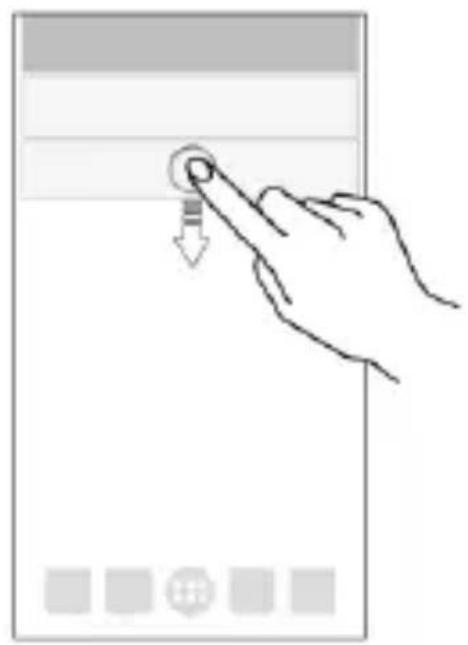
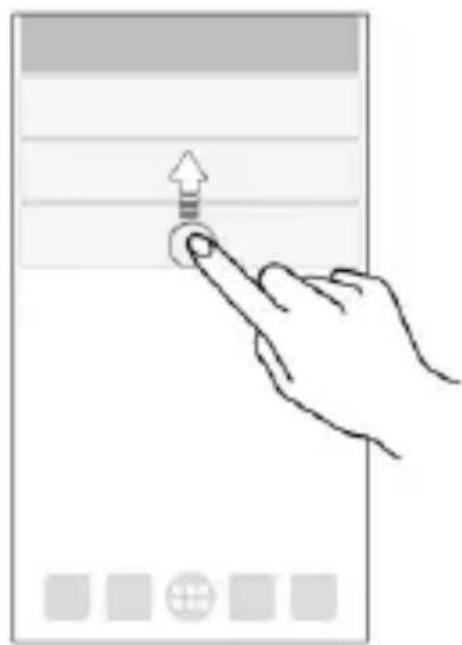
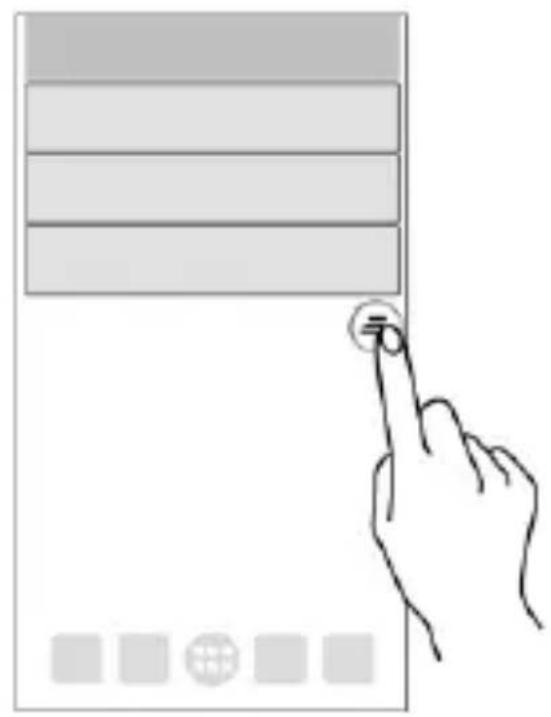
Notifications inform you of new messages and events as and when they appear on the device.
Open Notification panel
natural_image
Hand interacting with a touchscreen device (no text or symbols visible)Close Notification panel
natural_image
Hand interacting with a touchscreen device (no text or symbols visible)Clear all Notifications
natural_image
Illustration of a hand interacting with a digital tablet interface (no text or symbols visible)Open Quick Settings
text_image
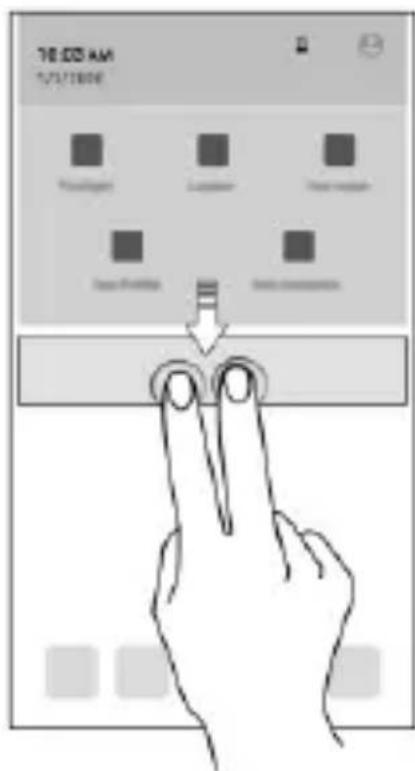
76:00 AM 1/21/2009Quick Settings allow access to basic phone features such as Airplane Mode, Wi-Fi, Brightness levels, and many more.
Phone Security
You can unlock your phone using a variety of methods.
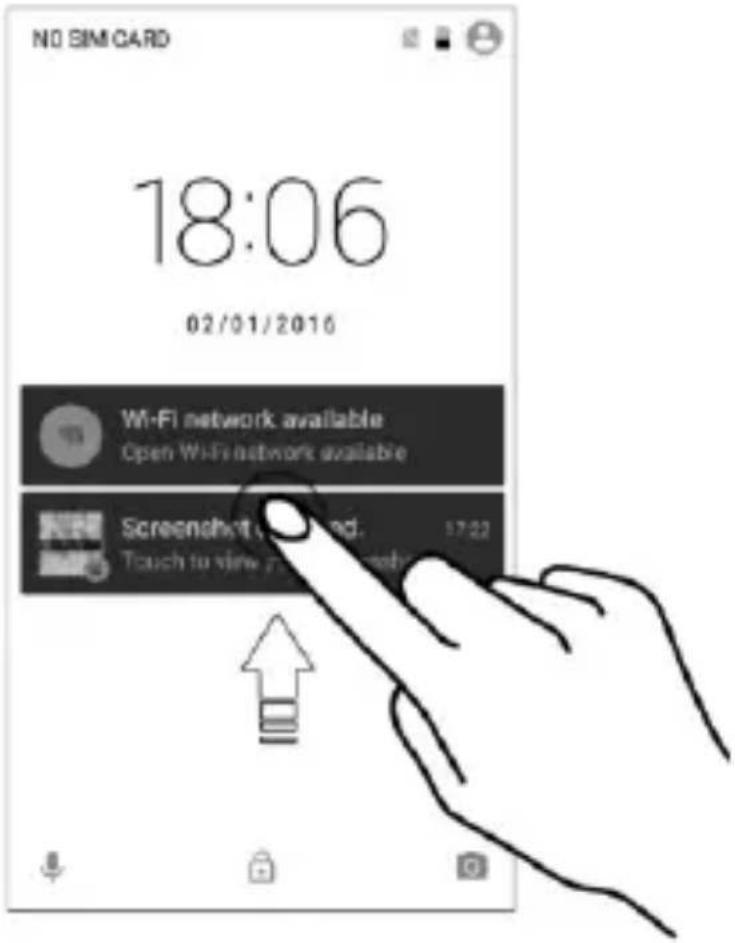
The default unlock method is Swipe. To unlock the screen, just swipe up on the lock screen.
To set other unlocking methods, go to Settings → Security → Screen lock.
Pattern
natural_image
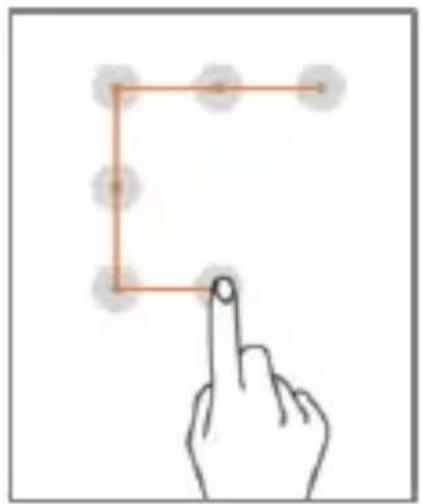
Hand pointing at a square outline with circular nodes, no text or symbols presentDraw your pattern to unlock! You can set your own pattern by connecting the dots to prevent your phone from unauthorized access.
PIN
text_image
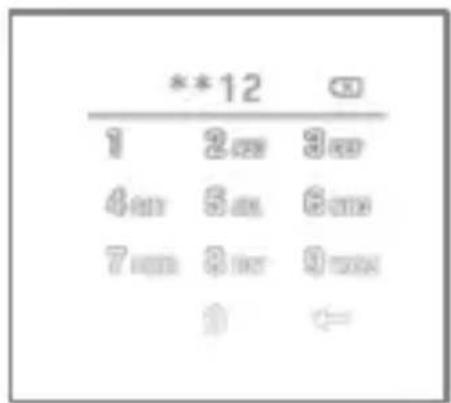
**12 1 2.00 3.00 4.00 5.00 6.00 7.00 8.00 9.00 0 ←Enter your PIN to unlock your phone! You can set a PIN as your screen password.
Password
text_image
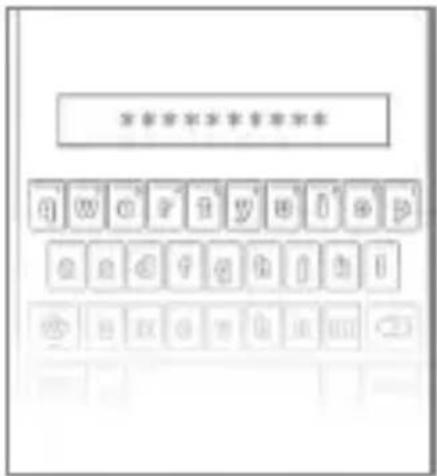
**********Enter your password to unlock! You can set your desired password as your screen password.
Battery Saver Mode
Your phone comes with a Battery Saver Mode that:
Saves power significantly by running only the essential apps while turning off background data.
Restricts the background data for apps like Gmail, Twitter, Facebook, etc. and limits the phone's performance to extend the battery life.
Automatically switches off when the phone is connected to a charger.
To enable Battery Saver mode:
- Go to Settings → Battery.
- Tap icon and select Battery saver.
Settings and Networks
Your phone can connect to various networks and devices. You can also transfer files to/from your PC through the data cable.
Connect to the Internet
Go to Settings→ SIM cards and enable Cellular data on your preferred SIM.
You might also need to configure the access point name for the data connection to work.

By default, the access point name gets configured once you insert the SIM, Or, your network provider sends the access point name settings via SMS. You may need to install these settings. If the access point names are not listed by default, please contact your network provider for the same.
You can configure the access point name from
Settings → More → Cellular networks → Access Point Names and select from the list.
Tethering & Portability
You can use your device as a modem and connect your PC or laptop to the Internet, when required.
Go to Settings → More → Tethering & portable hotspot
USB Tethering
- Connect your phone with your PC/Laptop via USB cable.
- Select the USB tethering option.
- Select your phone network as the network connection in your PC/laptop and get access to the Internet.
Wi-Fi Hotspot
- Tap Portable Wi-Fi hotspot option in your phone.
- Enable Wi-Fi on the other Wi-Fi enabled PC/laptop/handset, choose your phone as a Wi-Fi network to connect with it.
- View and configure Wi-Fi hotspot settings by tapping Set up Wi-Fi hotspot option.

Your mobile operator will charge you based on your data usage.
Bluetooth Tethering
- Pair your phone with a Bluetooth enabled PC/laptop via Bluetooth pairing option.
- Select the Bluetooth tethering option in your phone.
- On the paired PC/laptop, select the Bluetooth device (your phone) and choose to connect to the Internet.
Pair With Bluetooth Devices
Go to Settings → Bluetooth
- If Bluetooth is off, turn it on. Your phone scans and displays the Bluetooth devices in range.
- Tap the ID of the other device in the list to pair with it.
- You may be prompted to confirm passkey/pairing code on one of the
devices. The passkey/pairing code may display on one of the devices.
- Tap Pair to confirm the passkey/pairing code and pair the devices. On successful pairing, your phone connects to the device.

If the device you want to pair with is not in the list, make sure the Bluetooth on that device is turned on, then tap and select Refresh to search again.
Airplane Mode
Airplane Mode allows you to disable all mobile networks, Wi-Fi, and Bluetooth connections. To activate the airplane mode, open Quick settings and select Airplane mode.
Google Maps
Google Maps is a web-based service offered by Google Inc. which offers you access to various map-based services. You can view various streets, landmarks and can even plan your routes with the help of Google Maps.
Settings required for Google Maps access include:
- Enable location access from Settings → Location.
- Tap to start using Google Maps.

Internet connection is required for using Google Maps. When you use the map, you use your Internet connection to transfer data to and from your phone.

Google Maps application may not be available in every street, country or region.

Micromax does not guarantee the accuracy of any directional services.
Safety Precautions

Switch off your device in any area with potential explosive atmosphere such as refueling stations, fuel depots, chemical plants or places where blasting operation is in progress. Sparks arising out of radio frequency may cause fire or explosion. Remember to comply with legal requirements and local restrictions when using the phone.

Your Phone's radio waves may interfere with medical devices.
Preferably maintain a distance of 15.3 cm (6 inches) between a wireless device and implanted medical devices such as pacemaker or cardioverter defibrillator. Switch off your device when regulations require you to do so.

Always keep the phone and accessories out of reach of small children. Small parts such as the SIM card can be dismantled and swallowed by small children.
Do not place the phone near electromagnetic data carriers such as credit/Debit cards. Information stored on them could be lost.
Permanent damage to hearing may occur if you use earphones at high volume for prolonged periods. Set your volume to a safe level.
The mains voltage (V) specified on the power supply unit must not be exceeded to prevent damage to the charging device. The power supply must be plugged into an easily accessible AC power socket when charging the battery.

You may only open the phone to replace the battery (if not inbuilt), SIM card. All other changes to this device are strictly prohibited and will invalidate the warranty.
The phone may cause interference in the vicinity of TV sets, radios and PCs.
Do not use the phone while driving. Please put the phone safely in the phone stand. Do not put it onto any spot from which it may fall down during collision or emergency braking.

Flight is influenced by interference caused by the phone. It is not advised to switch on a phone during flight.

Please repair the device at Micromax authorized service center only. Repairing the device by yourself invalidates the warranty rules.
Taking Care of your device
Your device is a product of superior design and craftsmanship and should be handled with care in the following ways:
- Keep the device dry. Precipitation, humidity, and all types of liquids can rust the electronic circuits. If your device gets wet, wipe it with a dry cloth and take it to an authorized service center.
- Do not store the device in high or cold temperature. Extreme temperatures can shorten the life of electronic devices and damage batteries.
- Do not use or store the device in dusty, dirty areas. Its moving parts and electronic components can get damaged.
• Do not attempt to open the device other than as instructed in this guide. - Do not drop, knock, shake or bend the device. Rough handling can break internal circuit boards and fine mechanics.
- Do not use harsh chemicals, cleaning solvents, or strong detergents to clean the device. Only use a soft, clean, dry cloth to clean the surface of the device.
• Do not store or bring your device near magnetic fields for extended period of time.
Battery Recommendations
• We recommend you to charge the device at room temperature range.
- Batteries have life cycles. After a full charge, if the power reserve of the battery tends to deplete inordinately faster than usual, the battery life is at an end.
- Use only Micromax chargers and cables. Micromax will not be held responsible for user's safety when using incompatible accessories or supplies.
Temperature and Humidity
The device is designed for use within a temperature range of -20^ ± 5 to 45^ ± 5 , storage within the temperature range of -30^ ± 5 to 65^ ± 5 . In case of violation of these temperature conditions, the device can be damaged and battery life can be reduced.
The recommended humidity for maintaining the device is in the range 50 to 55%.
Do not expose your device to extreme temperatures or humidity.
Note: Micromax will not bear any responsibility for any incompliance with the above mentioned guidelines or improper usage of the mobile phone.
Recycle your Phone
natural_image
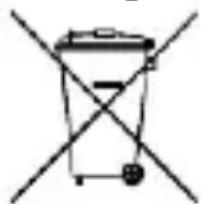
Simple line drawing of a trash bin with two crossed lines indicating no waste or prohibition (no text or symbols)The WEEE logo (shown at the left) appears on the product (battery, handset, and charger) to indicate that this product must not be disposed of or dumped with your other household wastes. You are liable to dispose of all your electronic or electrical waste equipment by relocating over to the specified collection point for recycling of such hazardous waste.
Collection and proper recovery of your electronic waste equipment at the time of disposal will allow us to help preserve the environment. Recycling of the electronic waste equipment will ensure safety of human health and environment. For more information on best practices for disposal of electronic and electrical waste, please visit to our web site:
www.micromaxinfo.com/weee.php.
Disclaimer
- The colors, specifications, functions and graphics shown/mentioned in the user manual may differ from the actual product. In such a case, the latter shall govern. Images shown are for representation purpose only. Specifications are subject to change without prior notice. Micromax keeps the right to modify the content in this user guide without prior notice.
- Upon first use of your device, your device will send information related to your mobile, IMEI numbers, location details and other software details through SMS* automatically. This information may be used as further specified in Micromax privacy policy**.
- Talk and standby times are affected by network preferences, type of SIM cards, connected accessories and individual usage patterns. Services and some features
may be dependent on the network, service/content providers, SIM cards, compatibility of the devices used and the content formats supported.
- Other product logos and company names mentioned herein may be trademarks or trade names of their respective owners.
• Available storage memory may vary based on the phone software.
*Operator tariff shall be applicable for SMS.
**Micromax privacy policy is available at www.micromaxinfo.com.
Copyright
All rights reserved. Reproduction, transfer, distribution or storage of part or all of the contents in this document in any form without the prior written permission of Micromax is strictly prohibited.
SAR Information
SAR Compliance
- Your device is designed not to exceed the limits of emission of radio waves recommended by international guidelines.
- SAR (Specific Absorption Rate) is the measurement of body-absorbed RF quantity when the device is in use. SAR value is ascertained according to the highest RF level generated during laboratory tests.
- The SAR value of the device may depend on factors such as proximity to the network tower, or use of accessories.
- The SAR value of the device at the head and body are 0.39 W/kg and 1.18 W/kg respectively averaged over 1 gm of human tissue.
SAR Recommendations
- Use a wireless hands-free system (headphone, headset) with a low power Bluetooth emitter.
- Keep your calls short and use SMS whenever more convenient. This advice applies especially to children, adolescents and pregnant women.
- Prefer to use your handset when the signal quality is good.
- People having active medical implants should preferably keep the handset at least 15 cm away from the implant.
- Maintain a preferable distance of 15 mm from the device.
The FCC Advice
Many people mistakenly assume that using a cell phone with a lower reported SAR value necessarily decreases a user's exposure to RF emissions, or is somehow "safer" than using a cell phone with a high SAR value. While SAR values are an important tool in judging the maximum possible exposure to RF energy from a particular model of cell phone, a single SAR value does not provide sufficient information about the amount of RF exposure under typical usage conditions to reliably compare individual handset models.
World Health Organization (WHO) Advice
Organizations such as the World Health Organization and the US Food and Drug Administration have stated that if people are concerned and want to reduce their exposure they could use a hands-free device to keep the handset away from the head and body during phone calls, or reduce the amount of time spent on the phone.
For Product Support:
Helpline Number
:18605008286
Working Hours
: Monday to Saturday (Except National & Public Holidays) 10 AM to 6:30 PM
Email Support (India)
: info@micromaxinfo.com
Email Support (International Market)
:ccdesk.global@micromaxinfo.com
Website
: www.micromaxinfo.com
DOWNLOADING
natural_image
Decorative icon set with musical notes, guitar, microphone, and camera (no text or symbols)mimicromax.com

Games: Premium & Coolest Gaming Titles. Choose from Action, Racing, Cricket & More.

Videos: Bollywood & Fun Videos. Pick your favourite from Comedy to Action.

Music: MP3 & Ringtones. Perfect mix of Latest & Evergreen.

Wallpapers: Animations & Wallpapers. Celebrities, Devotional, Nature & More.
Activate Internet connection and tap from your mobile browser now.
icon or visit mimicromax.com
* Operator data charges may apply.
Warranty Statement
Micromax Informatics Ltd. (hereinafter called "Micromax") warrants the Product to be free from defects in materials and workmanship, arising under normal use from the date of original purchase when brand new.
This Warranty is subject to the following terms and conditions:
- The Warranty is given only to the original purchaser of the Product ("Customer").
- The Warranty will be applicable for twelve (12) months from the date of original purchase for mobile handset, and six (06) months for accessories (included in the mobile device sales package). Customer should present the PROOF OF PURCHASE/invoice for claiming this Warranty.
- For the entire Warranty Period, Micromax or its authorized service centre/personnel will, at their discretion, without any charges and subject to Clause 6 repair or replace a defective Product. Repair or replacement may involve the use of same or equivalent reconditioned unit. Micromax will return the repaired handset or can replace with another same or equivalent handset to the Customer in full working condition. All replaced faulty parts or components will become the property of Micromax.
- The details of the service locations are available at the website www.micromaxinfo.com or alternatively can be taken from our service helpline 18605008286. For the handsets available beyond the municipal limits of the available service center, it is the responsibility of the Customer to bring the handset to the nearest service center at his/her own risk and expenses.
- For any handset repaired or replaced during the warranty period, the repaired or replaced handset shall continue to be within warranty period for the remaining time of the original warranty period of original handset.
- The warranty will not be applicable under the following circumstances:
a. The handset IMEL number/ serial number, the accessory date code, water indicator or the warranty seal has been removed, erased, defaced, altered or is illegible; or
b. Deterioration of the Product due to normal wear and tear; or
c. Usage other than in accordance with the user manual, rough handling, ingression off exposure to any kind of liquid (water, sweat, beverages, oils etc.), exposure to moisture, dampness or exposure to extreme thermal or
environmental conditions, corrosion, oxidation, unauthorized repairs, unauthorized spare parts usage, accidents, forces of nature, or other actions beyond the reasonable control of Micromax unless the defect was caused directly by defects in material or workmanship.
The Warranty will also not cover any physical damage to the surface of the handset including but not limited to cracks or scratches on the LCD or camera lens; or
d. Any defects caused by the fact that the battery has been short-circuited or by the fact that the seals of the battery casing or the cells are broken or show evidence of tampering or by the fact that the battery has been used in equipment other than those for which it has been specified; or
e. The defect was caused by a defective function of the service provider cellular network or other system.
- Any claim under the warranty is subject to notification to Micromax or a Micromax authorized service center for the alleged defect within a reasonable time of its occurrence and in no event later than the expiry of the warranty period.
The warranty terms state the entire warranty given by Micromax to the customer.
Micromax & its Authorized service centers will not be responsible for any kind of direct or indirect loss of customers' data stored/saved in the handset (including phonebook contacts, SMS, emails, ringtones other downloaded software, etc.) due to any kind of incidental failure of the handset and also at the time of service.
It is advised that before bringing the handset for service, kindly take a proper backup of the entire personal data and remove any confidential, proprietary, or personal information from the handset.
- Micromax reserves the right to charge a service fee for repair /service of any nature that is not covered by this warranty.
- Micromax obligation under this warranty shall be limited to repair or provide replacement of parts only. The maximum claim entertained by Micromax will be subject to maximum retail price of the handset purchased or the purchase price, whichever is lower.
- In event of any unforeseen circumstances, there is unavailability of certain spare parts; prevailing depreciation rules will be binding on the purchaser to accept as a commercial solution in lieu of repairs.
Micromax congratulates and thanks you for showing confidence in Micromax products and becoming our valued customer. To ensure a delightful product experience, Micromax recommends reading the User Guide carefully and contacting our customer care helpline to understand the product warranty period and conditions.
Customer Details
(This Warranty Card should be retained by the customer for availing warranty services)
Model Name ____
Product Serial No. ____
IMEI No. /MEID No.
Date of purchase

Dealer's Details
Name & Address ____
Customer Details
Name ____
Address
Contact No. ____
Customer signature & date
(I accept the terms & conditions of warranty)
natural_image
Empty rounded rectangle outline with no text, numbers, or symbols insideDealer signature with rubber stamp