EB50N - NAS ASUS - Free user manual and instructions
Find the device manual for free EB50N ASUS in PDF.


User questions about EB50N ASUS
0 question about this device. Answer the ones you know or ask your own.
Ask a new question about this device
Download the instructions for your NAS in PDF format for free! Find your manual EB50N - ASUS and take your electronic device back in hand. On this page are published all the documents necessary for the use of your device. EB50N by ASUS.
USER MANUAL EB50N ASUS
EB50N NearField Stereo Headset

natural_image
Illustration of a black VR headset with two controllers and a U-shaped connector (no text or symbols)Quick Start Guide
E8293 / First Edition / June 2013
Table of contents

NOTE / <注意> / / /
- For more details, refer to the user manual included in the support CD.
- 更多資訊,請參考請參考驅動程式與公用程式光碟中的使用手冊。
- Pour plus de détails, consultez le manuel de l'utilisateur contenu dans le CD de support.
- Para mais detalhes, consulte o manual do utilizador incluído no CD de suporte.
- Para obtener más detalles, consulte el manual del usuario incluido en el CD de soporte.
A quick look
text_image
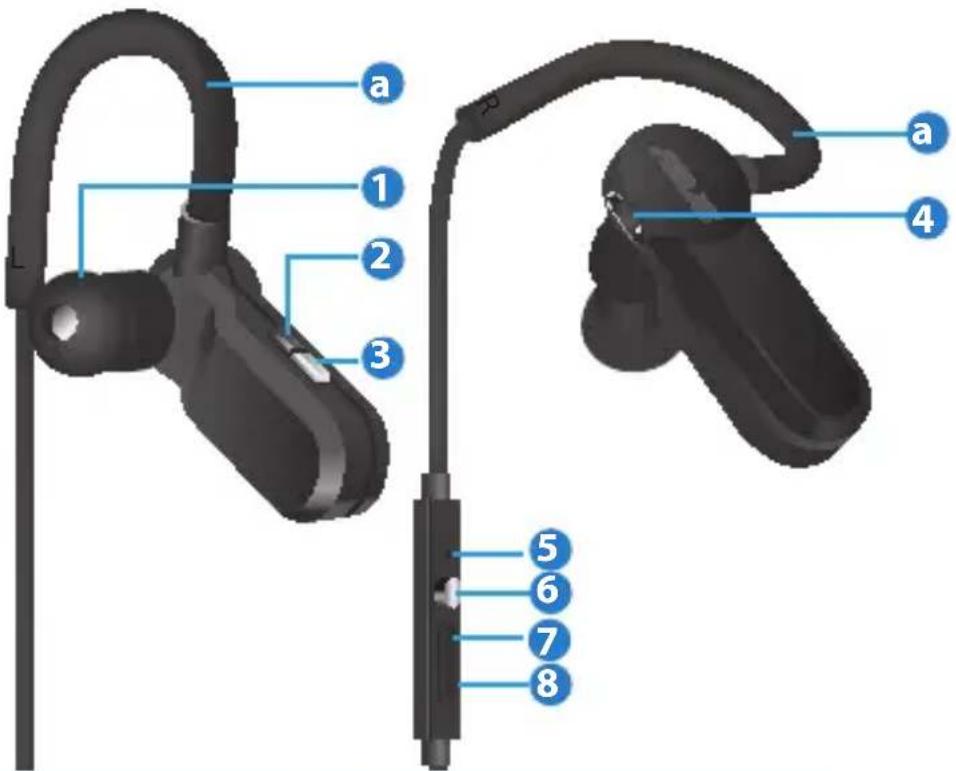
a 1 2 3 4 5 6 7 8| 1 Earphone 5 MIC | ||
| 2 LED indicator 6 (Play/Pause) button | ||
| 3 Power button 7 + (volume up) | ||
| 4 Micro-USB port 8 - (volume down) | ||

NOTE: If any of the items is damaged or missing, contact your retailer.

WARNING: DO NOT use the earphone while charging the device.
To wear EB50N:
- Loop the earhooks (a) over your ears.
- Press the earphones to your earholes.
Button features & LED indicators
| Status Activities LED Indications | ||
| Power on /off | Press Power button for two and a half seconds | Blue and red LEDs flash thrice simultaneously |
| Standby (not connected) | Blue LED flashes once per five seconds | |
| Pairing | Press Power button for five seconds | Blue and red LED flash alternatively |
| Pairing time 150 seconds | ||
| Standby (connected) | Blue LED flashes twice per five seconds | |
| Charging /Charge finished | Red LED lights up / off | |
| Warning on low voltage (3.43v ~ 3.53v) | Red LED flashes twice per five seconds | |
| Play music | Blue and red LEDs flash simultaneously once per five seconds | |
| Play/Pause | Short press ▶■ button (< half a second) | |
| Previous song | Press "-" for one second twice * | |
| Next song | Press "+" for one second | |
| Volume up | Short press "+" (< half a second) | |
| Volume down | Short press "-" (< half a second) | |
| Coming calls | Blue LED flashes quickly (once per 0.55 second) | |
Button features & LED indicators
| Status Activities LED indications | ||
| Call back the last number | Press ▶button for two and a half seconds when connected to the mobile phone | |
| Answer a call Short press | ▶11 button (less than half a second) | |
| Hang up | ||
| Reject a call | Press ▶button for two and a half seconds | |
| Keep A and switch to B (switch between A and B) | Long press ▶button | |
| Hang up A and answer B** | Short press ▶11 button | |
| Keep A and reject B** | Long press “-” button for one second | |
| 3-party communication*** | Press "+" and "-" buttons simultaneously | |
* Press for one second to restart the song and another second to return to the previous song.
** A: the current call; B: the second call
*** Ensure that your carrier and mobile phone support this function.
NearField Communication Pairing
natural_image
3D rendered image of a black handheld device with a curved cable and blue indicator line (no text or symbols)NFC area
| Items Description | |
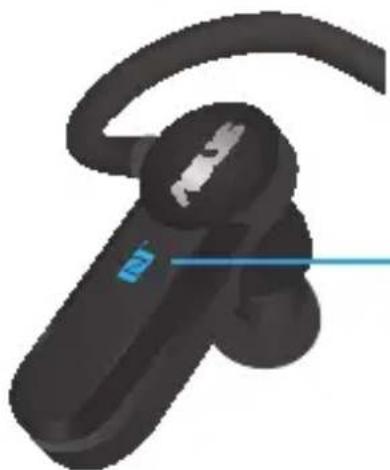
| Power on / Connection | Lightly touch the NFC area on your device.** |
| Power off | Touch and hold the NFC area till the power off signal*** shows up. |
* The NFC connection distance should be less than 3cm.
** Touching the NFC area again will break the existing connection.
*** Varies by device's settings.
Multi-point Connection
| Functions Activities Note | ||
| Enable multi-point connection on pairing mode | Short press "+" and "-" simultaneously (with four rising sounds) | Enable multi-point connection and pair bluetooth devices (mobile phones) respectively |
| Disable multi-point connection on pairing mode | Long press "+" and "-" simultaneously (three seconds) (with four falling sounds) | |
| Switch between connected phone A and B when they are both on audio-play mode | Short press ▶once | The two mobile phones should be on audio-play mode |
Federal Communications Commission Statement
This device complies with Part 15 of the FCC Rules. Operation is subject to the following two conditions:
- This device may not cause harmful interference.
- This device must accept any interference received, including interference that may cause undesired operation.
This equipment has been tested and found to comply with the limits for a Class B digital device, pursuant to Part 15 of the FCC Rules.
These limits are designed to provide reasonable protection against harmful interference in a residential installation.
This equipment generates, uses and can radiate radio frequency energy and, if not installed and used in accordance with the instructions, may cause harmful interference to radio communications.
However, there is no guarantee that interference will not occur in a particular installation.
If this equipment does cause harmful interference to radio or television reception, which can be determined by turning the equipment off and on, the user is encouraged to try to correct the interference by one or more of the following measures:
- Reorient or relocate the receiving antenna.
- Increase the separation between the equipment and receiver.
- Connect the equipment into an outlet on a circuit different from that to which the receiver is connected.
- Consult the dealer or an experienced radio/TV technician for help. This device complies with part 15 of the FCC Rules.
Operation is subject to the following two conditions:
(1) This device may not cause harmful interference, and
(2) this device must accept any interference received, including interference that may cause undesired operation.

CAUTION: Any changes or modifications not expressly approved by the grantee of this device could void the user's authority to operate the equipment.
NCC 警語
Authorised representative in Europe ASUS Computer GmbH
Address: HARKORT STR. 21-23, D-40880 RATINGEN, DEUTSCHLAND
Authorised distributors in Turkey BOGAZICI BIL GISAYAR SAN. VE TIC. A.S.
Tel: +90 212 3311000
Address: AYAZAGA MAH. KEMERBURGAZ CAD. NO.10 AYAZAGA/ISTANBUL
INDEX BILGISAYAR SISTEMLERI MUHENDISLIK SAN. VE TIC. A.S.
Tel: +90 212 3312121
Address: AYAZAGA MAH. CENDERE YOLU NO.9 AYAZAGA/ISTANBUL