PU-1106-KIT - Émetteur AV CYP - Free user manual and instructions
Find the device manual for free PU-1106-KIT CYP in PDF.


User questions about PU-1106-KIT CYP
0 question about this device. Answer the ones you know or ask your own.
Ask a new question about this device
Download the instructions for your Émetteur AV in PDF format for free! Find your manual PU-1106-KIT - CYP and take your electronic device back in hand. On this page are published all the documents necessary for the use of your device. PU-1106-KIT by CYP.
USER MANUAL PU-1106-KIT CYP
v1.3 HDMI over CAT6 Extender Set with IR Pass-through
OPERATION MANUAL

natural_image
Two black electronic devices labeled 'R' and 'POWER 5V', each with ports (HDMI INPUT, POWER 5V) and connection labels (VIDEO, CAT8 INPUT, DOC), shown against a white background.Table of Contents
- Introduction ...... 1
- Applications .... 1
- Package Contents .... 1
- System Requirements .... 1
- Features 2
- Specifications 3
- Operation Controls and Functions 4
7.1 Front Panel 4
7.2 Rear Panel 5
- Pin Assignment 6
8.1 IR Cable Pin Assignment 6
8.2 RJ-45 Pin Definitions 6
- Connection and Installation 7
- Acronyms 9
1. Introduction
The HDMI 1.3 transmitter and receiver over CAT6 is the ideal device to send your HDMI signals over long distances. Instead of using expensive HDMI cables, your existing CAT6 cables/sockets can replace HDMI cables while performing the same functions like transferring Deep Color (12 bits/color) video and lossless compressed (Dolby TrueHD, Dolby Digital Plus and DTS-HD Master Audio) digital audio. Moreover, you can use the existing remote to control the source and connect it to another transmitter and receiver to extend your HDMI signal to distances you never thought possible. This HDMI 1.3 Transmitter and receiver is your only choice when looking for an HDMI extender.
2. Applications
● Showroom display/control
● Home entertainment systems
● Commercial displays
● Lecture room display/control
3. Package Contents
● HDMI 1.3 Transmitter x 1
● HDMI 1.3 Receiver x 1
- IR Receiver x 1
- IR Blaster x 1
● 5V DC power supply adaptor x 2
● Operation Manual x 1
4. System Requirements
HDMI input source equipment, output HDMI displayer, two CAT6 cables and source equipment's remote control.
5. Features
● HDMI 1.3, HDCP 1.1 and DVI 1.0 compliant.
● Supports digital video formats in Deep Color Mode at up to 36 bits (12bits/color) and new lossless compressed (Dolby TrueHD, Dolby Digital Plus and DTS-HD Master Audio) digital audio.
● Supports CAT6 cables for data/DDC transmission
● Equalizes and recovers any incoming TMDS data before re-transmitting it in flawless quality regardless of the incoming signal.
- HDMI cable distance testing showed with 1080p/8bits & 12bits resolution the Input/Output distance can reach up to 15/15 meters away. With CAT6 cable, distance test with 1080p/8bits & 12bits resolution the I/O source can run up to 45/20m away.
Note:
A. Cable tested with CAT6/23AWG/Solid, using cables of another type may result in a different operating distance.
B. Cable distance tested with the following: PS3 40G, 37" Philips 8 bit LCD TV and 37" Samsung 12 bit LCD TV.
C. Figures provided in this manual are for reference only, actual performance may depend on the source and display used along with the type of cable.
● Supports CEC bypass and xvYCC
● Includes an IR Receiver and Blaster
● Supports wide range of IR frequencies from 30\~50KHz
- Can be connected to another transmitter and receiver to extend an HDMI signal to an extreme distance
6. Specifications
Transmitter 1 x HDMI
1 x IR Blaster
1 x CAT6 Output Video
1 x CAT6 Output DDC
Receiver 1 x HDMI
1 x Receiver
1 x CAT6 Input for Video,
1 x CAT6 Input for DDC
HDMI Input Cable 1080p 8-bit (15M), 12-bit (15M)
HDMI Output Cable 1080p 8-bit (15M), 12-bit (15M)
CAT6 Cable 1080p 8-bit (45M), 12-bit (20M)
Power Supply
5V/1A (US/EU standards, CE/FCC/UL certified)
(US/EU standards, CE/FCC/UL certified)
ESD Protection
Human body model: ±8kV (air-gap discharge)
± 4kV (contact discharge)
Dimensions (mm)
78.5(W) × 117(D) × 30(H) / Transmitter
78.5(W) × 72(D) × 30(H) / Receiver
Weight(g)
200 / Transmitter
90 / Receiver
Chassis Material
Aluminum
Silkscreen Color
Bibrek
Operating Temperature
0^ C 40^ C / 32^ F 104^ F
Storage Temperature
-20^ 60^ / -4^ 140^
Power Consumption
3.6W/TX, 3.6W/RX
Relative Humidity
20 \~ 90% RH (non-condensing)
7. Operation Controls and Functions
7.1 Front Panel
text_image
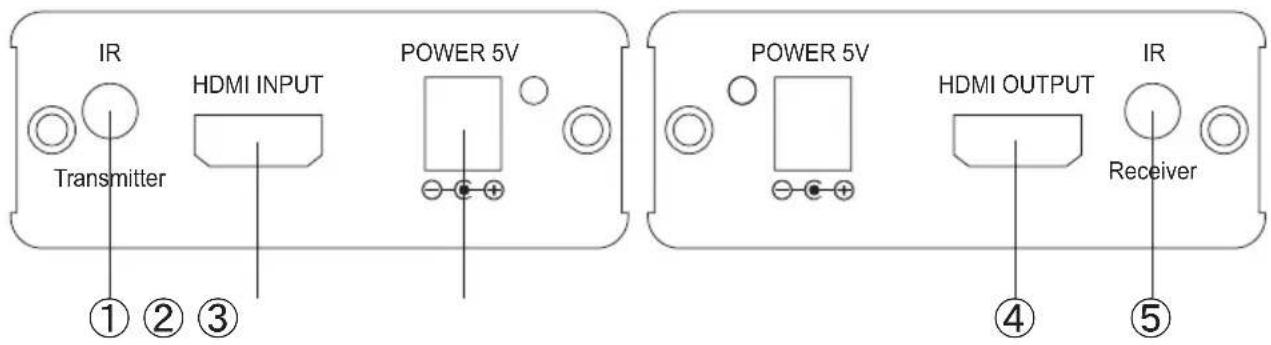
IR Transmitter ① ② ③ HDMI INPUT POWER 5V POWER 5V HDMI OUTPUT IR Receiver ④ ⑤① IR Transmitter: This slot is where you connect the IR blaster cable. Place the IR eye in front of the source equipment(s) in order to send an IR signal, the IR blaster has a frequency range from 30KHz to 50KHz.
② HDMI INPUT: This slot is where you connect the HDMI or DVI output port of your source equipment such as DVD/Blu-ray players or set-top-boxes with an HDMI cable or receiver unit, you may also connect this device to another unit from the same family or some other type of splitter to further extend an HDMI signal.
Example:

flowchart
graph LR
    A[" DVD Player "] --> B[" HDMI Cable "]
    B --> C[" PU-1106TX PU-1 CATX VIDEO "]
    C --> D[" DDC CAT6 "]
    D --> E[" HDMI Cable "]
    E --> F[" PU-22HC "]
    F --> G[" or "]
    F --> H[" PU-Q1H4C "]
    H --> I[" HDMI Cable "]
    I --> J[" HDMI Cable "]
    H --> K[" PU-Q1H8C "]
    K --> L[" HDMI Cable "]
    L --> M[" HDMI Cable "]
    N[" HDMI LCD TV "] --> O[" PU-1106TX PU-1 CATX VIDEO "]
    O --> P[" DDC CAT6 "]
    P --> Q[" HDMI Cable "]
    Q --> R[" HDMI Cable "]
    style A fill:#f9f,stroke:#333
    style N fill:#ccf,stroke:#333
    style O fill:#cfc,stroke:#333
    style P fill:#fcc,stroke:#333
    style Q fill:#cff,stroke:#333
③ Power: This slot is where you plug the 5V DC power supply into the unit and connect the adaptor to an AC outlet.
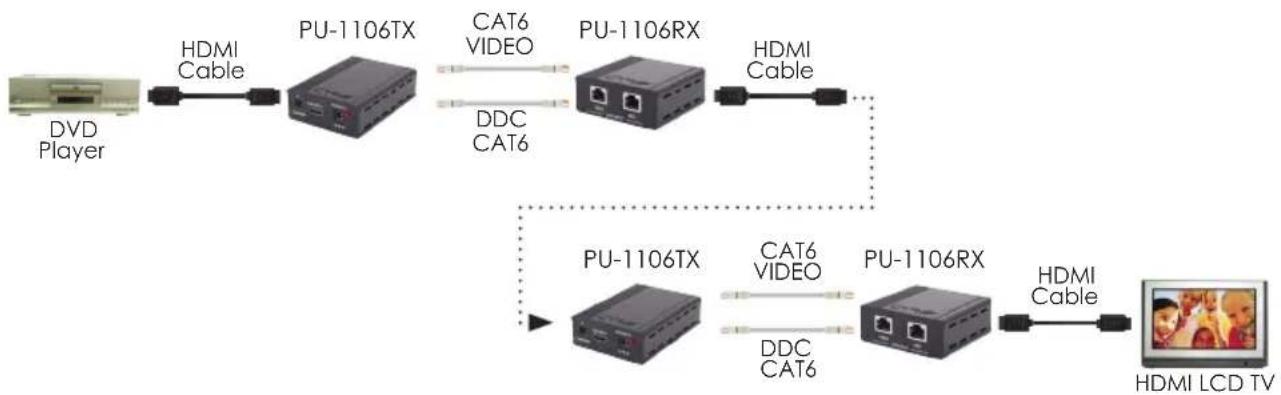
④ HDMI OUTPUT: This slot is where you connect the HDMI or DVI input port of your display such as HDTV's or HD monitors or you can connect this device to another unit from the same family or some other type of splitter to further extend an HDMI signal.
Example:
flowchart
graph LR
    A[" DVD Player "] -->|HDMI Cable| B[" PU-1106TX "]
    B -->|CAT6 VIDEO| C[" PU-1106RX "]
    B -->|DDC CAT6| C
    C -->|HDMI Cable| D[" PU-1106TX "]
    D -->|CAT6 VIDEO| E[" PU-1106RX "]
    D -->|DDC CAT6| E
    E -->|HDMI Cable| F[" HDMI LCD TV "]
⑤ IR Receiver: This slot is where you connect the IR receiver cable, place the IR eye in front of the display then use the existing remote to control the input source equipment. The IR receiver has a frequency range from 30KHz to 50KHz.
7.2 Rear Panel
text_image
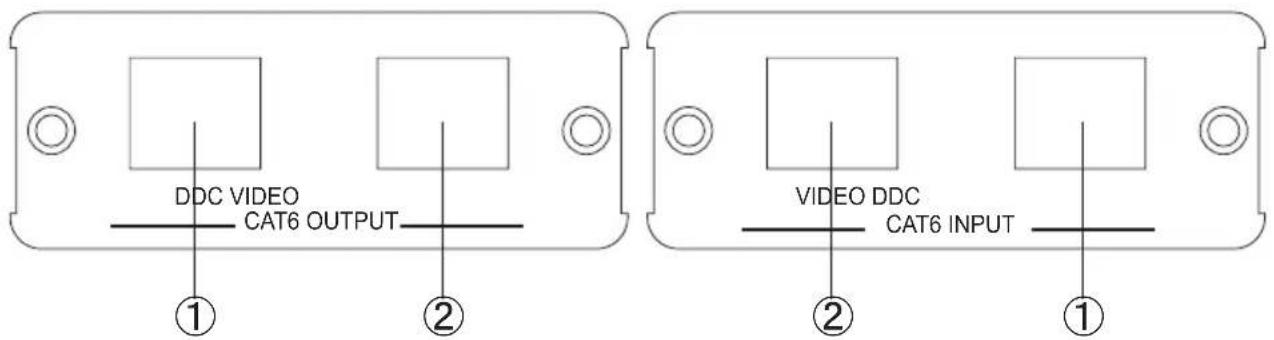
DDC VIDEO CAT6 OUTPUT ① ② VIDEO DDC CAT6 INPUT ② ①① DDC input/output: Connect the DDC output transmitter to the DDC input of the receiver using a CAT6 cable.
② Video input/output: Connect the video output of the transmitter to the video input of the receiver using a CAT6 cable.
8. Pin Assignment
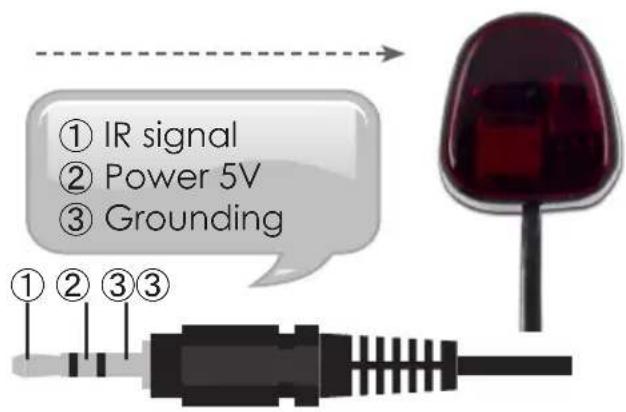
8.1 IR Cable Pin Assignment
IR Blaster IR Receiver
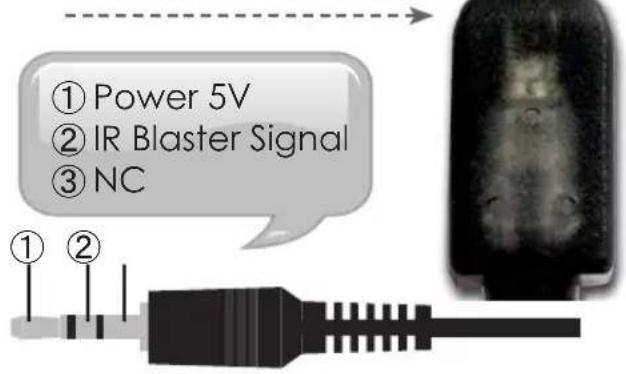
text_image
① Power 5V ② IR Blaster Signal ③ NC