GM-3300T - Audio Amplifier PIONEER - Free user manual and instructions
Find the device manual for free GM-3300T PIONEER in PDF.


| Product Type | Car Audio Amplifier |
| Brand | Pioneer |
| Model | GM-3300T |
| Category | 2-Channel Amplifier |
| Output Power (RMS) | 50 W × 2 (4 Ω), 100 W × 2 (2 Ω) |
| Output Power (Max) | 150 W × 2 (4 Ω) |
| Frequency Response | 10 Hz – 50 kHz |
| Signal-to-Noise Ratio | > 100 dB |
| Total Harmonic Distortion | < 0.05 % |
| Input Impedance | 10 kΩ |
| Supply Voltage | 14.4 V DC (11-16 V allowable) |
| Power Consumption | 20 A (max) |
| Dimensions (W × H × D) | 280 × 60 × 215 mm |
| Weight | 2.8 kg |
| High-Pass Filter | Yes, 80 Hz – 12 kHz, -12 dB/oct |
| Low-Pass Filter | Yes, 40 Hz – 500 Hz, -12 dB/oct |
| Audio Inputs | 2 × RCA (stereo) |
| Speaker Outputs | 2 channels (spring terminals) |
| Built-in Protection | Against short circuit, overheating, overvoltage |
| Additional Features | High-level input, bridged mode (mono 4 Ω) |
| Care and Cleaning | Wipe with a dry cloth; avoid liquids |
| Safety | Disconnect battery before installation; do not expose to water |
| Spare Parts and Repairability | Contact an authorized Pioneer service center |
Frequently Asked Questions - GM-3300T PIONEER
User questions about GM-3300T PIONEER
0 question about this device. Answer the ones you know or ask your own.
Ask a new question about this device
Download the instructions for your Audio Amplifier in PDF format for free! Find your manual GM-3300T - PIONEER and take your electronic device back in hand. On this page are published all the documents necessary for the use of your device. GM-3300T by PIONEER.
USER MANUAL GM-3300T PIONEER
BRIDGEABLE TWO-CHANNEL POWER AMPLIFIER
PIONEER ELECTRONICS (USA) INC
P.O. Box 1540, Long Beach, California 90801-1540, U.S.A.
TEL: (800) 421-1404
PIONEER EUROPE NV
Haven 1087, Keetberglaan 1, B-9120 Melsele, Belgium
TEL: (0) 3/570.05.11
PIONEER ELECTRONICS ASIACENTRE PTE. LTD.
253 Alexandra Road, #04-01, Singapore 159936
TEL: 65-6472-7555
PIONEER ELECTRONICS AUSTRALIA PTY. LTD.
178-184 Boundary Road, Braeside, Victoria 3195, Australia
TEL: (03) 9586-6300
PIONEER ELECTRONICS OF CANADA, INC.
300 Allstate Parkway, Markham, Ontario L3R OP2, Canada
TEL:1-877-283-5901
PIONEER ELECTRONICS DE MEXICO, S.A. de C.V.
Blvd. Manuel Avila Camacho 138 10 piso
Col.Lomas de Chapultepec, Mexico, D.F. 11000
TEL: 55-9178-4270
Published by Pioneer Corporation.
Copyright © 2006 by Pioneer Corporation.
All rights reserved.
Copyright © 2006 Pioneer Corporation
Before Using This Product
ENGLISH
Thank you for purchasing this PIONEER product. Before attempting operation, be sure to read this manual.
In case of trouble
When the unit does not operate properly, contact your dealer or the nearest authorized PIONEER Service Station.
CAUTION
Never replace the fuse with one of greater value or rating than the original fuse. Use of an improper fuse could result in overheating and smoke and could cause damage to the product and injury including burns.
CAUTION
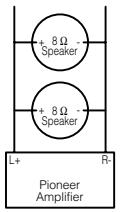
Diagram A - Propert
Diagram B - Improper
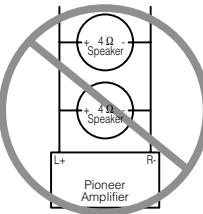
4Ω Bridged Mode
2Ω Bridged Mode
Do NOT install or use your Pioneer amplifier by wiring speakers rated at 4 (or lower) in parallel to achieve a 2 (or lower) bridged mode (Diagram B).
Amplifier damage, smoke, and overheating could result from improper bridging. The amplifier surface could also become hot to the touch and minor burns could result. To properly install or use a bridged mode for a two-channel amplifier and achieve a 4 load, wire two 8 speakers in parallel with Left + and Right - (Diagram A) or use a single 4 speaker. For a four-channel amplifier, follow the speaker output connection diagram for bridging as shown on the back of your amplifier, and wire two 8 speakers in parallel to achieve a 4 load or use a single 4 speaker per channel.
If you have any questions or concerns, please contact your local authorized Pioneer dealer or call Pioneer customer service.
WARNING
-
Always use the special red battery and ground wire [RD-223], which is sold separately. Connect the battery wire directly to the car battery positive terminal (+) and the ground wire to the car body.
-
Do not touch the amplifier with wet hands.
Otherwise you may get an electric shock. Also, do not touch the amplifier when it is wet.
-
For traffic safety and to maintain safe driving conditions, keep the volume low enough so that you can still hear normal traffic sound.
-
Check the connections of the power supply and speakers if the fuse of the separately sold battery wire or the amplifier fuse blows. Detect the cause and solve the problem, then replace the fuse with another one of the same size and rating.
-
To prevent malfunction of the amplifier and speakers, the protective circuit will cut the power supply to the amplifier (sound will stop) when an abnormal condition occurs. In such a case, switch the power to the system OFF and check the connection of the power supply and speakers. Detect the cause and solve the problem.
-
Contact the dealer if you cannot detect the cause.
-
To prevent an electric shock or short-circuit during connection and installation, be sure to disconnect the negative (-) terminal of the battery beforehand.
-
Confirm that no parts are behind the panel when drilling a hole for installation of the amplifier. Be sure to protect all cables and important equipment
such as fuel lines, brake lines and the electrical wiring from damage. DO NOT allow amplifier to come into contact with liquids due to, for example, the location
where the amplifier is installed. Electrical shock could result. Also, amplifier and speaker damage, smoke, and overheating could result from contact with liquids. In addition, the amplifier surface and the surface of any attached speakers could become hot to the touch and minor burns could result.
Setting the Unit
Power Indicator
The power indicator lights when the power is switched on.
BFC (Beat Frequency Control) Switch
If you hear a beat while listening to an AM broadcast with your car stereo, change the BFC switch using a small standard tip screwdriver.
Gain Control
If the sound level is too low, even when the volume of the car stereo used along with this power amplifier is turned up, turn gain control on the front of the power amplifier clockwise. If the sound distorts when the volume is turned up, turn the gain control counter-clockwise.
- When using with an RCA equipped car stereo (standard output of 500mV ), set to the NORMAL position. When using with an RCA equipped Pioneer car stereo with max. output of 4V or more, adjust level to match the car stereo output level.
- If you hear too much noise when using the speaker input terminals, turn the gain control counter-clockwise.
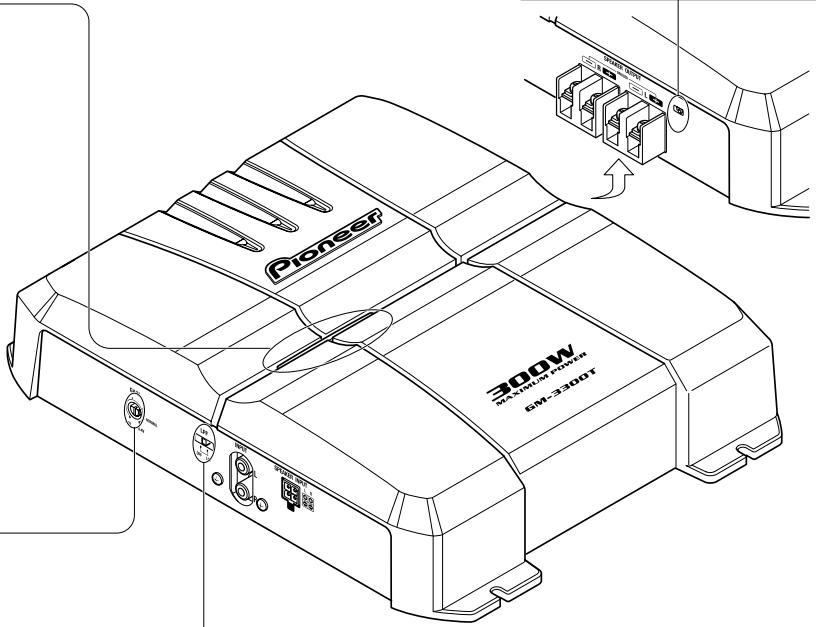
LPF (Low-Pass Filter) Select Switch
Set the LPF select switch as follows according to the type of speaker that is connected to the speaker output connector and the car stereo system:
| LPF Select Switch | Audio frequency range to be output | Speaker Type | Remarks |
| LPF (right) | 80 Hz and below with -12 dB/oc. cut off slope | Subwoofer | Connect a subwoofer. |
| OFF (left) | Full range | Full range |
CAUTION
- Disconnect the negative (-) terminal of the battery to avoid the risk of short-circuit and damage to the unit.
- Secure the wiring with cable clamps or adhesive tape. To protect the wiring, wrap adhesive tape around it where they lie against metal parts.
-
Do not route wires where they will get hot, for example where the heater will blow over them. If the insulation heats up, it may become damaged, resulting in a short-circuit through the vehicle body.
-
Make sure that wires will not interfere with moving parts of the vehicle, such as the gearshift, handbrake or seat sliding mechanism.
- Do not shorten any wires. Otherwise the protection circuit may fail to work when it should.
- Never feed power to other equipment by cutting the insulation of the power supply wire to tap from the wire. The current capacity of the wire will be exceeded, causing overheating.
- Never replace the fuse with one of greater value or rating than the original fuse. Use of an improper fuse could result in overheating and smoke and could cause damage to the product and injury including burns.
CAUTION
To prevent damage and/or injury
- Do not connect the speaker wire directly or connect a negative (-) lead wire for several speakers.
- This unit is for vehicles with a 12-volt battery and negative grounding. Before installing it in a recreational vehicle, truck or bus, check the battery voltage.
- If the car stereo is kept on for a long time while the engine is at rest or idling, the battery may go dead. Turn the car stereo off when the engine is at rest or idling.
-
If the system remote control wire of the amplifier is connected to the power terminal through the ignition switch (12 V DC), the amplifier will always be on when the ignition is on—regardless of whether the car stereo is on or off. Because of this, the battery could go dead if the engine is at rest or idling.
-
Speakers to be connected to the amplifier should conform with the standards listed below. If they do not conform, they may catch fire, emit smoke or become damaged. The speaker impedance must be 2 to 8 for stereo connection, and 4 to 8 for monaural and other bridge connection.
- Install and route the separately sold battery wire as far away as possible from the speaker wires. Install and route the separately sold battery wire ground wire, speaker wires and the amplifier as far away as possible from the antenna, antenna cable and tuner.
- Cords for this product and those for other products may be different colors even if they have the same function. When connecting this product to another product, refer to the supplied manuals of both products and connect cords that have the same function.
| Speaker Channel | Speaker Type | Power |
| Two-channel | Subwoofer | Nominal input: Min. 60 W |
| Other than subwoofer | Max. input: Min. 120 W | |
| One-channel | Subwoofer | Nominal input: Min. 180 W |
| Other than subwoofer | Max. input: Min. 300 W |
Connection Diagram
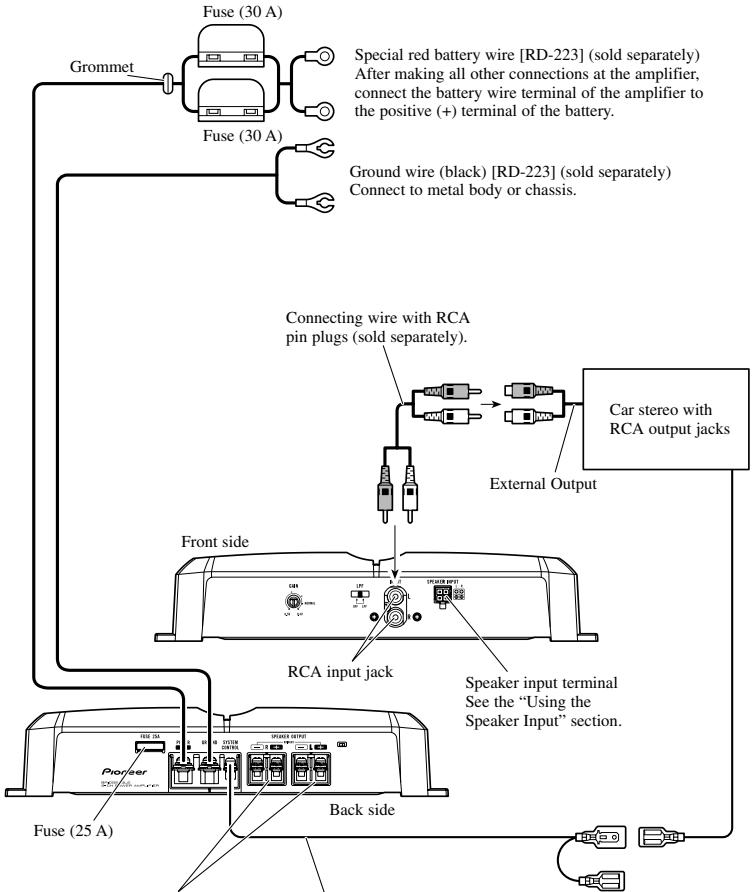
Speaker output terminal See the "Connecting the Speaker Wires" section for speaker connection instructions.
System remote control wire (sold separately) Connect the male terminal of this wire to the system remote control terminal of the car stereo (SYSTEM REMOTE CONTROL). The female terminal can be connected to the auto-antenna relay control terminal. If the car stereo does not have a system remote control terminal, connect the male terminal to the power terminal through the ignition switch.
Connecting the Power Terminal
- Always use the special red battery and ground wire [RD-223], which is sold separately. Connect the battery wire directly to the car battery positive terminal (+) and the ground wire to the car body.
1. Pass the battery wire from the engine compartment to the interior of the vehicle.
After making all other connections to the amplifier, connect the battery wire terminal of the amplifier to the positive (+) terminal of the battery.
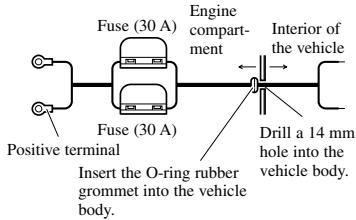
2. Twist the battery wire, ground wire and system remote control wire.
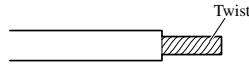
3. Attach lugs to wire ends. Lugs not supplied.
- Use pliers, etc., to crimp lugs to wires.
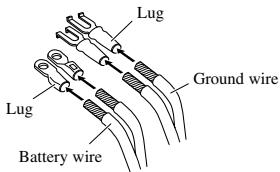
4. Connect the wires to the terminal.
Fix the wires securely with the terminal screws.
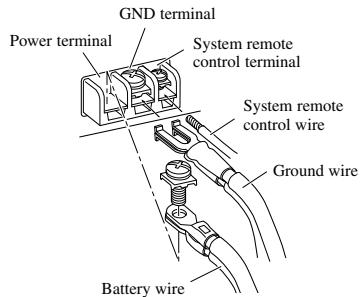
Failure to securely fasten the battery wire to the terminal using the terminal screws could cause the terminal area to overheat and could result in damage and injury including minor burns.
WARNING
Connecting the Speaker Output Terminals
1. Expose the end of the speaker wires using nippers or a cutter by about 10mm and twist.
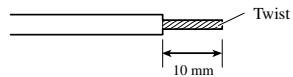
2. Attach lugs to speaker wire ends. Lugs not supplied.
- Use pliers, etc., to crimp lugs to wires.
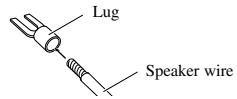
3. Connect the speaker wires to the speaker output terminals.
Fix the speaker wires securely with the terminal screws.
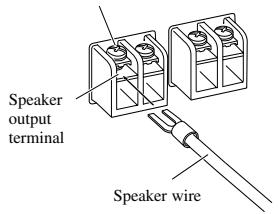
Terminal screw
Using the Speaker Input
Connect the car stereo speaker output wires to the amplifier using the supplied speaker input connector.
- Do not connect both the RCA input and the speaker input at the same time.
Connections when using the speaker input
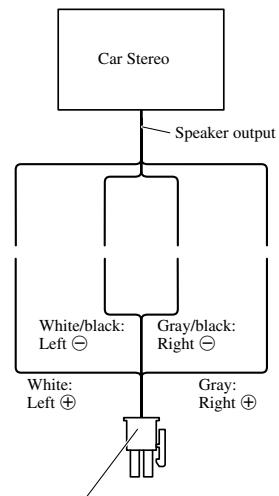
Speaker input connector
To speaker input terminal of this unit.
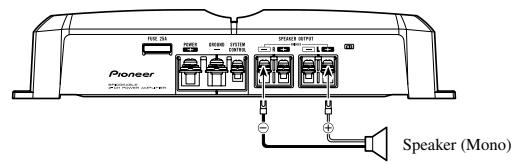
Connecting the Speaker Wires
The speaker output mode can be two-channel (stereo) or one-channel (mono). Connect the speaker leads to suit the mode according to the figures shown below.
- Do not connect both the RCA input and the speaker input at the same time
Two-channel mode (stereo)
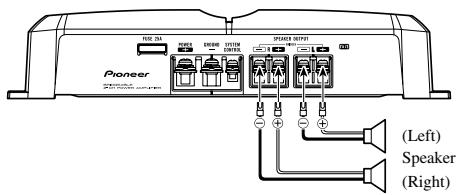
One-channel mode (mono)
Installation
ENGLISH
CAUTION
- Do not install in:
Places where it could injure the driver or passengers if the vehicle stops suddenly.
Places where it may interfere with the driver, such as on the floor in front of the driver's seat. - Make sure that wires are not caught in the sliding mechanism of the seats, resulting in a short-circuit.
- Confirm that no parts are behind the panel when drilling a hole for installation of the amplifier. Protect all cables and important equipment such as fuel lines, brake lines and electrical wiring from damage.
- Install tapping screws in such a way that the screw tip does not touch any wire. This is important to prevent wires from being cut by vibration of the car, which can result in fire.
- DO NOT allow amplifier to come into contact with liquids due to, for example, the location where the amplifier is installed. Electrical shock could result. Also, amplifier and speaker damage, smoke, and overheating could result from contact with liquids. In addition, the amplifier surface and the surface of any attached speakers could become hot to the touch and minor burns could result.
- To ensure proper installation, use the supplied parts in the manner specified. If any parts other than the supplied ones are used, they may damage internal parts of the amplifier, or they may become loose causing the amplifier to shut down.
- Never replace the fuse with one of greater value or rating than the original fuse. Use of an improper fuse could result in overheating and smoke and could cause damage to the product and injury including burns.
CAUTION:
To prevent malfunction and/or injury
- To ensure proper heat dissipation of the amplifier, be sure of the following during installation.
- Allow adequate space above the amplifier for proper ventilation.
-Do not cover the amplifier with a floor mat or carpet. -
DO NOT allow amplifier to come into contact with liquids due to, for example, the location where the amplifier is installed. Electrical shock could result. Also, amplifier and speaker damage, smoke, and overheating could result from contact with liquids. In addition, the amplifier surface and the surface of any attached speakers could become hot to the touch and minor burns could result.
-
Do not install the amplifier on unstable places such as the spare tire board.
- The best location for installation differs with the car model and installation location. Secure the amplifier at a sufficiently rigid location.
- Make temporary connections first and check that the amplifier and the system operate properly.
After installing the amplifier, confirm that the spare tire, jack and tools can be easily removed.
Example of installation on the floor mat or on the chassis
-
Place the amplifier where it is to be installed. Insert the supplied tapping screws (4× 18mm) into the screw holes. Push on the screws with a screwdriver so they make marks where the installation holes are to be located.
-
Drill 2.5mm diameter holes at the point marked, and install the amplifier, either on the carpet or directly to the chassis.
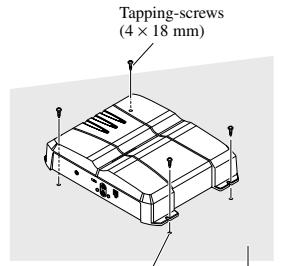
Drill a 2.5mm diameter hole Floor mat or chassis
Specifications
ENGLISH
Power source. 14.4 V DC (10.8 V to 15.1 V allowable)
Grounding system Negative type
Current consumption 15.0 A (at continuous power, 4
Average current drawn* 4.0 A (4 Ω for two channels)
7.8 A (4 Ω for one channel)
Fuse 25 A x 1
Dimensions 300 mm (W) × 60 mm (H) × 194 mm (D)
Weight 2.4 kg (Leads for wiring not included)
Maximum power output 120W× 2(4) / 300W× 1(4)
Continuous power output 60W× 2 (at 14.4V,4 ,20Hz to 20kHz 0.08% THD)
150W× 1 (at 14.4V,4 ,20Hz to 20kHz,0.8% THD)
75W× 2 (at 14.4V,2 ,20Hz to 20kHz,0.8% THD)
Load impedance 4Ω (2Ω to 8Ω allowable)
(Bridge connection: 4 to 8 allowable)
Frequency response 10 Hz to 50 kHz (+0 dB, -1 dB)
Signal-to-noise ratio 100 dB (IEC-A network)
Distortion 0.008% (10 W, 1 kHz)
Separation 70 dB (1 kHz)
Low pass filter Cut off frequency: 80Hz
Cut off slope: -12 dB/oc
Gain control RCA: 400mV to 6.5V
Speaker: 1.6V to 26V
Maximum input level / impedance .RCA: 6.5 V / 22 kO
Speaker: 26V / 40k
Note:
- Specifications and the design are subject to possible modification without notice due to improvements.
*Average current drawn
- The average current drawn is nearly the maximum current drawn by this unit when an audio signal is input. Use this value when working out total current drawn by multiple power amplifiers.