MSC-96-TNN - Charging cabinet Black Box - Free user manual and instructions
Find the device manual for free MSC-96-TNN Black Box in PDF.


User questions about MSC-96-TNN Black Box
0 question about this device. Answer the ones you know or ask your own.
Ask a new question about this device
Download the instructions for your Charging cabinet in PDF format for free! Find your manual MSC-96-TNN - Black Box and take your electronic device back in hand. On this page are published all the documents necessary for the use of your device. MSC-96-TNN by Black Box.
USER MANUAL MSC-96-TNN Black Box
Mass Charging Cabinets
User Manual
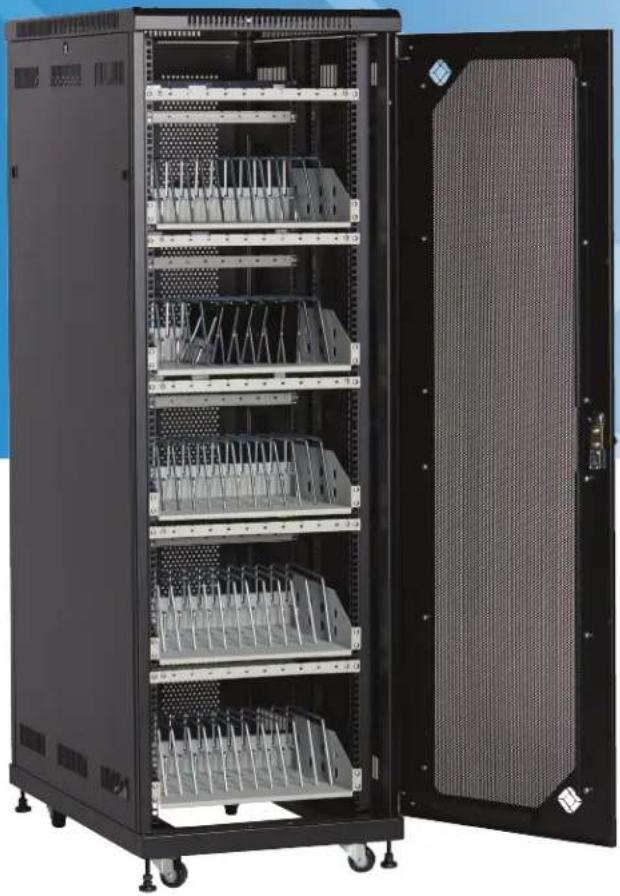
Provide high-capacity charging and storage for your tablets or laptops.
natural_image
Interior view of a server rack cabinet with multiple rack-mounted modules and a large open door (no visible text or labels)Trademarks Used in this Manual
Black Box and the Double Diamond logo are registered trademarks of BB Technologies, Inc.
Chromebook is a trademark of Google Inc.
iPad is a registered trademark of Apple, Inc.
UL is a registered trademark of Underwriters Laboratories.
Any other trademarks mentioned in this manual are acknowledged to be the property of the trademark owners.
We're here to help! If you have any questions about your application or our products, contact Black Box Tech Support at 877-877-2269 or go to blackbox.com and click on "Talk to Black Box."
You'll be live with one of our technical experts in less than 60 seconds.
Federal Communications Commission and Industry Canada Radio Frequency Interference Statements
This equipment generates, uses, and can radiate radio-frequency energy, and if not installed and used properly, that is, in strict accordance with the manufacturer's instructions, may cause interference to radio communication. It has been tested and found to comply with the limits for a Class A computing device in accordance with the specifications in Subpart B of Part 15 of FCC rules, which are designed to provide reasonable protection against such interference when the equipment is operated in a commercial environment. Operation of this equipment in a residential area is likely to cause interference, in which case the user at his own expense will be required to take whatever measures may be necessary to correct the interference.
Changes or modifications not expressly approved by the party responsible for compliance could void the user's authority to operate the equipment.
This digital apparatus does not exceed the Class A limits for radio noise emission from digital apparatus set out in the Radio Interference Regulation of Industry Canada.
Black Box Network Services shall not be liable for damages of any kind, including, but not limited to, punitive, consequential or cost of cover damages, resulting from any errors in the product information or specifications set forth in this document and Black Box Network Services may revise this document at any time without notice.
Safety Instructions and Electrical Precautions
Please read these operating instructions carefully. They contain important advice concerning the use and safety of your Mass Charging Cabinet. The Cabinet must only be used for its intended purpose in accordance with these operating instructions. Any misuse of the product will void the warranty.
- The power switch must be in the "OFF" position before plugging the Cabinet into a wall receptacle.
- The Cabinet must ONLY be connected to a 120-volt AC 15- or 20-amp power supply.
- The Cabinet must only be used by adults or with adult supervision.
• Always store the power cord around the cord wraps when transporting the Cabinet. - Never pull the Cabinet by the power cord.
- Do not plug the Cabinet in if the switch, receptacle(s), or power cord has been damaged. All electrical components on this product must be repaired by a qualified electrician.
- Do not use an extension cord in conjunction with the Cabinet.
- Do not use liquids in or around the Cabinet environment.
- Inadequate repair can create significant hazards to users and is not covered by warranty.
- For your safety, we recommend that a qualified electrician test the circuit you will be plugging the Cabinet into. The circuit should be checked for ground integrity and appropriate branch circuit protection.
- The Cabinet ground prong must be present for safe operation. If the plug is damaged or if the ground prong has been removed, it should be replaced by a qualified electrician.
- The use of the Cabinet, including plugging or unplugging laptops, plugging or unplugging the Cabinet, operating the control switch, and engaging or releasing the directional and locked casters, must be done with adult supervision.
• The Cabinet can be very heavy when fully loaded with laptops and should be moved about by persons physically able to do so. - The Cabinet should only be used for the storage and transport of tablets, laptops, and other similar devices.
- Misuse, incorrect operation, or inadequate repair of the Cabinet will void the warranty.
Table of Contents
Trademarks Used in this Manual 2
FCC and IC RFI Statements ....3
NOM Statement 4
Safety Instructions and Electrical Precautions....5
-
Specifications 7
-
Overview....13
2.1 Introduction....13
2.2 What's Included 13
2.3 Cabinet Configuration Examples for Chromebook Computer and Laptop Storage and Charging....13
2.3.1 MSC-60-CCN and MSC-60-CNN....13
2.3.2 MSC-72-CCN and MSC-72-CNN 15
2.4 Cabinet Configuration Examples for Tablet Storage and Charging 17
2.4.1 MSC-84-TCN and MSC-84-TNN 17
2.4.2 MSC-96-TCN and MSC-96-TNN....18
- Configuration and Setup 20
3.1 Routing the Cable (Cabinets with Shelves Sized for Tablets)....20
3.2 Fastening the Power Bricks and Routing the Cable (Cabinets with Shelves Sized for Chromebook Computers and Laptops)....22
- Using Your Mass Charging Cabinet......23
4.1 Charging Your Computers 23
4.2 Automated Power Controller Instructions 23
- Troubleshooting....24
5.1 Contacting Black Box....24
5.2 Shipping and Packaging....24
1. Specifications
Mass Charging Cabinets for Chromebook™ Computers and Laptops Specifications
| Part # | MSC-60-CCN | MSC-60-CNN | MSC-72-CCN | MSC-72-CNN |
| Approvals UL | * approved power strips | |||
| Assembled Yes | ||||
| Cable Access | Built-in knockout panels | Built-in knockout panels | Built-in knockout panels | Built-in knockout panels |
| Cable Management | Yes | No | Yes | No |
| Casters | 2.5" casters and leg levelers | 2.5" casters and leg levelers | 2.5" casters and leg levelers | 2.5" casters and leg levelers |
| Color | Black | Black | Black | Black |
| Components Included | (1) Mass Storage and Charging Cabinet (RM2520A)(5) Medium Shelves (UCCSHELFM-12)(5) Front cable management bars(6) Rear cable management bars(6) 12-outlet power strips (FDUBH12-S15-120V-R 3)(1) Automated Power Controller (CARTTIMER1)(1) 12-fL (3.6-m) Power Cord (UCCPC) | (1) Mass Storage and Charging Cabinet (RM2520A)(5) Medium Shelves (UCCSHELFM-12)(5) Rear cable management bars(6) 12-outlet power strips (FDUBH12-S15-120V-R 3)(1) Automated Power Controller (CARTTIMER1)(1) 12-fL (3.6-m) Power Cord (UCCPC) | (1) Mass Storage and Charging Cabinet (RM2540A)(6) Medium Shelves (UCCSHELFM-12)(6) Front cable management bars(6) Rear cable management bars(7) 12-outlet power strips (FDUBH12-S15-120V-R 3)(1) Automated Power Controller (CARTTIMER1)(1) 12-fL (3.6-m) Power Cord (UCCPC) | (1) Mass Storage and Charging Cabinet (RM2540A)(6) Medium Shelves (UCCSHELFM-12)(6) Rear cable management bars(7) 12-outlet power strips (FDUBH12-S15-120V-R 3)(1) Automated Power Controller (CARTTIMER1)(1) 12-fL (3.6-m) Power Cord (UCCPC) |
| Construction | 16-gauge steel cabinet and doors | 16-gauge steel cabinet and doors | 16-gauge steel cabinet and doors | 16-gauge steel cabinet and doors |
| Device Capacity | (60) ChromebookTM computers/laptops, (12) per shelf | (60) ChromebookTM computers/laptops, (12) per shelf | (72) ChromebookTM computers/laptops, , (12) per shelf | (72) ChromebookTM computers/laptops, , (12) per shelf |
| Doors | Mesh front door and split rear mesh door | Mesh front door and split rear mesh door | Mesh front door and locking split rear mesh door | Mesh front door and locking split rear mesh door |
| Locking | Key: Locking front door and rear access panel for easy cable management (keyed differently) | Key: Locking front door and rear access panel for easy cable management (keyed differently) | Key: Locking front door and rear access panel for easy cable management (keyed differently) | Key: Locking front door and rear access panel for easy cable management (keyed differently) |
| Power Management Dividers | 65 65 | 78 78 | ||
| Power (Input) | 110-120 VAC (6-foot attached power cord included), 50/60 Hz, Plug type: 5-15P, Outlet type: 5-15R | 110-120 VAC (6-foot attached power cord included), 50/60 Hz, Plug type: 5-15P, Outlet type: 5-15R | 110-120 VAC (6-foot attached power cord included), 50/60 Hz, Plug type: 5-15P, Outlet type: 5-15R | 110-120 VAG (6-foot attached power cord included), 50/60 Hz, Plug type: 5-15P, Outlet type: 5-15R |
| Power Outlet | 72, via (6) 12-outlet power strips | 72, via (6) 12-outlet power strips | 84, via (7) 12-outlet power strips | 84, via (7) 12-outlet power strips |
| On/Off Switch | Yes | Yes | Yes | Yes |
| Dimensions (Cabinet) | Interior: 66.5"H (38U) x 21.3"W x 38.5"D (168.9 x 54.1 x 97.8 cm); Exterior: 70.7"H (38U) x 23.6"W x 39.4"D (179.6 x 59.9 x 100.1 cm)NOTE: Exterior height does not include casters. | Interior: 66.5"H (38U) x 21.3"W x 38.5"D (168.9 x 54.1 x 97.8 cm); Exterior: 70.7"H (38U) x 23.5"W x 39.4"D (179.6 x 59.9 x 100.1 cm)NOTE: Exterior height does not include casters. | Interior: 73.5"H (42U) x 21.3"W x 38.5"D (186.7 x 54.1 x 97.8 cm); Exterior: 77.6"H (42U) x 23.5"W x 39.4"D (197.1 x 59.9 x 100.1 cm)NOTE: Exterior height does not include casters. | Interior: 73.5"H (42U) x 21.3"W x 38.5"D (186.7 x 54.1 x 97.8 cm); Exterior: 77.6"H (42U) x 23.5"W x 39.4"d (197.1 x 59.9 x 100.1 cm)NOTE: Exterior height does not include casters. |
| Dimensions (Slot) | With cable management: 10.5"H x 1.12"W x 15"D (26.67 x 2.84 x 38.1 cm)NOTE: This can be changed by using the zero U cable managers (if available for the shelf) or by raising the position of the cable management bar. | Without cable management: 12.25"H x 1.12"W x 15"D (31.11 x 2.84 x 38.1 cm) | With cable management: 10.5"H x 1.12"W x 15"D (26.67 x 2.84 x 38.1 cm)NOTE: This can be changed by using the zero U cable managers (if available for the shelf) or by raising the position of the cable management bar. | Without cable management: 12.25"H x 1.12"W x 15"D(31.11 x 2.84 x 38.1 cm) |
| Shipping Carton Dimensions | 80"H x 25"W x 40.5"D (203.2 x 63.5 x 102.87 cm) | 80"H x 25"W x 40.5"D (203.2 x 63.5 x 102.8 cm) | 87"H x 25.5"W x 40.5"D (220.9 x 64.7 x 102.8 cm) | 87"H x 25.5"W x 40.5"D (220.9 x 64.7 x 102.8 cm) |
| Weight Capacity | 2250 lb. (1020.6 kg) | 2250 lb. (1020.6 kg) | 2250 lb. (1020.6 kg) | 2250 lb. (1020.6 kg) |
| Warranty | Cabinet: Lifetime; Electronics: 3 years | |||
| Part # MSC-120 -CCN MSC-120 -CNN MSC-144-CCN MSC-144-CNN | ||||
| Approvals UL | * approved power strips | |||
| Assembled Yes | ||||
| Cable Access | Built-in knockout panels | Built-in knockout panels | Built-in knockout panels | Built-in knockout panels |
| Cable Management Yes | No Yes No | |||
| Casters | 2.5" casters and leg levelers | 2.5" casters and leg levelers | 2.5" casters and leg levelers | 2.5" casters and leg levelers |
| Color | Black | Black | Black | Black |
| Components Included | (1) Mass Storage and Charging Cabinet (RM2520A)(10) Medium Shelves (UCCSHELFM-12)(10) Front cable management bars(10) Rear cable management bars(10) 12-outlet power strips(PDUBH12-S15-120V-R3)(2) Automated Power Controllers (CARTTIMER1)(1) 12-ft. (3.6-m) Power Cord (UCCPC) | (1) Mass Storage and Charging Cabinet (RM2520A)(10) Medium Shelves (UCCSHELFM-12)(10) Rear cable management bars(10) 12-outlet power strips(PDUBH12-S15-120V-R3)(2) Automated Power Controllers (CARTTIMER1)(1) 12-ft. (3.6-m) Power Cord (UCCPC) | (1) Mass Storage and Charging Cabinet (RM2640A)(12) Medium Shelves (UCCSHELFM-12)(12) Front cable management bars(12) Rear cable management bars(12) 12-outlet power strips(PDUBH12-S15-120V-R3)(2) Automated Power Controllers (CARTTIMER1)(1) 12-ft. (3.6-m) Power Cord (UCCPC) | (1) Mass Storage and Charging Cabinet (RM2640A)(12) Medium Shelves (UCCSHELFM-12)(12) Rear cable management bars(12) 12-outlet power strips(PDUBH12-S15-120V-R3)(2) Automated Power Controllers (CARTTIMER1)(1) 12-ft. (3.6-m) Power Cord (UCCPC) |
| Construction | 16-gauge steel cabinet and doors | 16-gauge steel cabinet and doors | 16-gauge steel cabinet and doors | 16-gauge steel cabinet and doors |
| Device Capacity | (120) ChromebookTM computers/laptops, (12) per shelf | (120) ChromebookTM computers/laptops, (12) per shelf | (144) ChromebookTM computers/laptops, (12) per shelf | (144) ChromebookTM computers/laptops, (12) per shelf |
| Doors | Mesh front door and split rear mesh door | Mesh front door and split rear mesh door | Mesh front door and locking split rear mesh door | Mesh front door and locking split rear mesh door |
| Locking | Key: Locking front door and rear access panel for easy cable management (keyed differently) | Key: Locking front door and rear access panel for easy cable management (keyed differently) | Key: Locking front door and rear access panel for easy cable management (keyed differently) | Key: Locking front door and rear access panel for easy cable management (keyed differently) |
| Power Management Dividers | 130 | 130 156 | 156 | |
| Power (Input) | 110-120 VAC (6-foot attached power cord included), 50/60 Hz, Plug type: 5-15P, Outlet type: 5-15R | 110-120 VAC (6-foot attached power cord included), 50/60 Hz, Plug type: 5-15P, Outlet type: 5-15R | 110-120 VAC (6-foot attached power cord included), 50/60 Hz, Plug type: 5-15P, Outlet type: 5-15R | 110-120 VAG (6-foot attached power cord included), 50/60 Hz, Plug type: 5-15P, Outlet type: 5-15R |
| Power Outlet | 120, via (10) 12-outlet power strips | 120, via (10) 12-outlet power strips | 144, via (12) 12-outlet power strips | 144, via (12) 12-outlet power strips |
| On/Off Switch Yes | Yes Yes | Yes | ||
| Dimensions (Cabinet) | Interior: 66.5"H (38U) x 21.3"W x 38.5"D (168.9 x 54.1 x 97.8 cm); Exterior: 70.7"H (38U) x 23.6"W x 39.4"D (179.6 x 59.9 x 100.1 cm)NOTE: Exterior height does not include casters. | Interior: 66.5"H (38U) x 21.3"W x 38.5"D (168.9 x 54.1 x 97.8 cm); Exterior: 70.7"H (38U) x 23.5"W x 39.4"D (179.6 x 59.9 x 100.1 cm)NOTE: Exterior height does not include casters. | Interior: 73.5"H (42U) x 21.3"W x 41.7"D (186.7 x 54.1 x 105.9 cm); Exterior: 77.6"H (42U) x 24"W x 43.5"D (197.1 x 61 x 110.5 cm)NOTE: Exterior height does not include casters. | Interior: 73.5"H (42U) x 21.3"W x 41.7"D (186.7 x 54.1 x 105.9 cm); Exterior: 77.6"H (42U) x 24"W x 43.5"D (197.1 x 61 x 105.5 cm)NOTE: Exterior height does not include casters. |
| Dimensions (Slot) | With cable management: 10.5"H x 1.12"W x 15"D (26.67 x 2.84 x 38.1 cm)NOTE: This can be changed by using the zero U cable managers (if available for the shelf) or by raising the position of the cable management bar. | Without cable management: 12.25"H x 1.12"W x 15"D (31.11 x 2.84 x 38.1 cm) | With cable management: 10.5"H x 1.12"W x 15"D (26.67 x 2.84 x 38.1 cm)NOTE: This can be changed by using the zero U cable managers (if available for the shelf) or by raising the position of the cable management bar. | Without cable management: 12.25"H x 1.12"W x 15"D(31.11 x 2.84 x 38.1 cm) |
| Shipping Carton Dimensions | 80"H x 25"W x 40.5"D (203.2 x 63.5 x 102.87 cm) | 80"H x 25"W x 40.5"D (203.2 x 63.5 x 102.8 cm) | 88"H x 25"W x 46"D (223.5 x 63.5 x 116.8 cm) | 88"H x 25"W x 46"D (223.5 x 63.5 x 116.8 cm) |
| Weight Capacity | 2250 lb. (1020.6 kg) | 2250 lb. (1020.6 kg) | 2200 lb. (997.9 kg) | 2200 lb. (1020.6 kg) |
| Warranty | Cabinet: Lifetime; Electronics: 3 years | |||
Mass Charging Cabinets for Chromebook™ Computers and Laptops Specifications (continued)
| Part # MSC-168-CCN MSC-168-CNN | ||
| Approvals UL | * approved power strips | |
| Assembled Yes | ||
| Cable Access Built-in knockout panels Built-in knockout panels | ||
| Cable Management Yes No | ||
| Casters 2.5" casters and leg levelers 2.5" casters and leg levelers | ||
| Color Black Black | ||
| Components Included | (1) Mass Storage and Charging Cabinet (RM2640A)(14) Medium Shelves (UCCSHELFM-12)(14) Front cable management bars(14) Rear cable management bars(14) 12-outlet power strips(PDUBH12-S15-120V-R3)(2) Automated Power Controllers(CARTTIMER1)(1) 12-fL (3.6-m) Power Cord (UCCPC) | (1) Mass Storage and Charging Cabinet (RM2640A)(14) Medium Shelves (UCCSHELFM-12)(14) Rear cable management bars(14) 12-outlet power strips(PDUBH12-S15-120V-R3)(2) Automated Power Controllers(CARTTIMER1)(1) 12-ft. (3.6-m) Power Cord (UCCPC) |
| Construction | 16-gauge steel cabinet and doors | 16-gauge steel cabinet and doors |
| Device Capacity | (168) ChromebookTM computers/laptops, , (12) per shelf | (168) ChromebookTM computers/laptops, (12) per shelf |
| Doors | Mesh front door and locking split rear mesh door | Mesh front door and locking split rear mesh door |
| Locking | Key: Locking front door and rear access panel for easy cable management(keyed differently) | Key: Locking front door and rear access panel for easy cable management(keyed differently) |
| Power Management Dividers | 182 | 182 |
| Power (Input) | 110-120 VAC (6-foot attached power cord included), 50/60 Hz, Plug type: 5-15P,Outlet type: 5-15R | 110-120 VAC (6-foot attached power cord included), 50/60 Hz, Plug type: 5-15P,Outlet type: 5-15R |
| Power Outlet | 144, via (12) 12-outlet power strips | 144, via (12) 12-outlet power strips |
| On/Off Switch | Yes | Yes |
| Dimensions (Cabinet) | Interior:73.5"H (42U) x 21.3"W x 41.7"D (186.7 x 54.1 x 105.9 cm);Exterior:77.6"H (42U) x 24"W x 43.5"D (197.1 x 61 x 110.5 cm)NOTE: Exterior height does not include casters. | Interior:73.5"H (42U) x 21.3"W x 41.7"D (186.7 x 54.1 x 105.9 cm);Exterior:77.6"H (42U) x 24"W x 43.5"D (197.1 x 61 x 110.5 cm)NOTE: Exterior height does not include cassers. |
| Dimensions (Slot) | With cable management:10.5"H x 1.12"W x 15"D (26.67 x 2.84 x 38.1 cm)NOTE: This can be changed by using the zero U cable managers(if available for the shell) or by raising the position of the cable management bar. | Without cable management:12.25"H x 1.12"W x 15"D(31.11 x 2.84 x 38.1 cm) |
| Shipping Carton Dimensions | 88"H x 25"W x 46"D (223.5 x 63.5 x 116.8 cm) | 88"H x 25"W x 46"D (223.5 x 63.5 x 116.8 cm) |
| Weight Capacity | 2200 lb. (997.9 kg) | 2200 lb. (1020.6 kg) |
| Warranty | Cabinet: Lifetime;Electronics: 3 years | |
Mass Charging Cabinets for Tablets Specifications
| Part # | MSC-84-TCN | MSC-84-TNN | MSC-96-TCN | MSC-96-TNN |
| Approvals UL | * approved power strips | |||
| Assembled Yes | ||||
| Cable Access | Built-in knockout panels | Built-in knockout panels | Built-in knockout panels | Built-in knockout panels |
| Cable Management Yes No Yes No | ||||
| Casters | 2.5" casters and leg levelers | 2.5" casters and leg levelers | 2.5" casters and leg levelers | 2.5" casters and leg levelers |
| Color | Black | Black | Black | Black |
| Components Included | (1) Mass Storage and Charging Cabinet (RM2520A)(7) Small Shelves (UCCSHELFS-12)(7) Front cable management bars(7) Rear cable management bars(8) 12-outlet power strips(PDUBH12-S15-120V-R3) | (1) Mass Storage and Charging Cabinet (RM2520A)(7) Small Shelves (UCCSHELFS-12)(7) Rear cable management bars(8) 12-outlet power strips(PDUBH12-S15-120V-R3) | (1) Mass Storage and Charging Cabinet (RM2540A)(8) Small Shelves (UCCSHELFS-12)(8) Front cable management bars(8) Rear cable management bars(9) 12-outlet power strips(PDUBH12-S15-120V-R3) | (1) Mass Storage and Charging Cabinet (RM2540A)(8) Small Shelves (UCCSHELFS-12)(8) Rear cable management bars(9) 12-outlet power strips(PDUBH12-S15-120V-R3) |
| Construction | 16-gauge steel cabinet and doors | 16-gauge steel cabinet and doors | 16-gauge steel cabinet and doors | 16-gauge steel cabinet and doors |
| Device Capacity | (84) tablets, (12) per shelf | (84) tablets, (12) per shelf | (96) tablets, (12) per shelf | (96) tablets, (12) per shelf |
| Doors | Mesh front door and split rear mesh door | Mesh front door and split rear mesh door | Mesh front door and locking split rear mesh door | Mesh front door and locking split rear mesh door |
| Locking | Key: Locking front door and rear access panel for easy cable management (keyed differently) | Key: Locking front door and rear access panel for easy cable management (keyed differently) | Key: Locking front door and rear access panel for easy cable management (keyed differently) | Key: Locking front door and rear access panel for easy cable management (keyed differently) |
| Power Management Dividers | 91 | 91 105 | 105 | |
| Power (Input) | 110-120 VAC (6-foot attached power cord included), 50/60 Hz, Plug type: 5-15P, Outlet type: 5-15R | 110-120 VAC (6-foot attached power cord included), 50/60 Hz, Plug type: 5-15P, Outlet type: 5-15R | 110-120 VAC (6-foot attached power cord included), 50/60 Hz, Plug type: 5-15P, Outlet type: 5-15R | 110-120 VAG (6-foot attached power cord included), 50/60 Hz, Plug type: 5-15P, Outlet type: 5-15R |
| Power Outlet | 96, via (8) 12-outlet power strips | 96, via (8) 12-outlet power strips | 108, via (9) 12-outlet power strips | 108, via (9) 12-outlet power strips |
| On/Off Switch | Yes | Yes | Yes | Yes |
| Dimensions (Cabinet) | Interior: 66.5"H (38U) x 21.3"W x 38.5"D (168.9 x 54.1 x 97.8 cm); Exterior: 70.7"H (38U) x 23.6"W x 39.4"D (179.6 x 59.9 x 100.1 cm)NOTE: Exterior height does not include casters. | Interior: 66.5"H (38U) x 21.3"W x 38.5"D (168.9 x 54.1 x 97.8 cm); Exterior: 70.7"H (38U) x 23.5"W x 39.4"D (179.6 x 59.9 x 100.1 cm)NOTE: Exterior height does not include casters. | Interior: 73.5"H (42U) x 21.3"W x 38.5"D (186.7 x 54.1 x 97.8 cm); Exterior: 77.6"H (42U) x 23.5"W x 39.4"D (197.1 x 59.9 x 100.1 cm)NOTE: Exterior height does not include casters. | Interior: 73.5"H (42U) x 21.3"W x 38.5"D (186.7 x 54.1 x 97.8 cm); Exterior: 77.6"H (42U) x 23.5"W x 39.4"d (197.1 x 59.9 x 100.1 cm)NOTE: Exterior height does not include casters. |
| Dimensions (Slot) | With cable management: Small: 7"H x x 1.12"W x x 10"D (17.78 x 2.84 x 25.4 cm)NOTE: This can be changed by using the zero U cable managers (if available for the shelf) or by raising the position of the cable management bar. | Without cable management: Small: 8.75"H x 1.12"W x 10"D (22.227 x 2.84 x 25.4 cm) | With cable management: Small: 7"H x x 1.12"W x x 10"D (17.78 x 2.84 x 25.4 cm);NOTE: This can be changed by using the zero U cable managers (if available for the shelf) or by raising the position of the cable management bar. | Without cable management: Small: 8.75"H x 1.12"W x 10"D (22.227 x 2.84 x 25.4 cm) |
| Shipping Carton Dimensions | 80"H x 25"W x 40.5"D (203.2 x 63.5 x 102.87 cm) | 80"H x 25"W x 40.5"D (203.2 x 63.5 x 102.8 cm) | 87"H x 25.5"W x 40.5"D (220.9 x 64.7 x 102.8 cm) | 87"H x 25.5"W x 40.5"D (220.9 x 64.7 x 102.8 cm) |
| Weight Capacity | 2250 lb. (1020.6 kg) | 2250 lb. (1020.6 kg) | 2250 lb. (1020.6 kg) | 2250 lb. (1020.6 kg) |
| Warranty | Cabinet: Lifetime; Electronics: 3 years | |||
Mass Charging Cabinets for Tablets Specifications (continued)
| Part # MSC-192-TCN MSC-192-TNN | ||
| Approvals UL | * approved power strips | |
| Assembled Yes | ||
| Cable Access Built-in knockout panels Built-in knockout panels | ||
| Cable Management Yes No | ||
| Casters 2.5" casters and leg levelers 2.5" casters and leg levelers | ||
| Color Black Black | ||
| Components Included | • (1) Mass Storage and Charging Cabinet (RM2540A)• (16) Small Shelves (UCCSHELFS-12)• (16) Front cable management bars• (16) Rear cable management bars• (16) 12-outlet power strips (PDUBH12-S15-120V-R3) | • (1) Mass Storage and Charging Cabinet (RM2540A)• (16) Small Shelves (UCCSHELFS-12)• (16) Rear cable management bars• (16) 12-outlet power strips (PDUBH12-S15-120V-R3) |
| Construction | 16-gauge steel cabinet and doors | 16-gauge steel cabinet and doors |
| Device Capacity | (192) tablets, (12) per shelf | (192) tablets, (12) per shelf |
| Doors | Mesh front door and split rear mesh door | Mesh front door and split rear mesh door |
| Locking | Key: Locking front door and rear access panel for easy cable management (keyed differently) | Key: Locking front door and rear access panel for easy cable management (keyed differently) |
| Power Management Dividers | 208 | 208 |
| Power (Input) | 110-120 VAC (6-foot attached power cord included), 50/60 Hz, Plug type: 5-15P, Outlet type: 5-15R | 110-120 VAC (6-foot attached power cord included), 50/60 Hz, Plug type: 5-15P, Outlet type: 5-15R |
| Power Outlet | 96, via (8) 12-outlet power strips | 96, via (8) 12-outlet power strips |
| On/OFF Switch | Yes | Yes |
| Dimensions (Cabinet) | Interior:73.5"H (42U) x 21.3"W x 38.5"D (186.7 x 54.1 x 97.8 cm); Exterior:77.6"H (42U) x 23.6"W x 39.4"D (197.1 x 59.9 x 100.1 cm)NOTE: Exterior height does not include casters. | Interior:73.5"H (42U) x 21.3"W x 38.5"D (186.7 x 54.1 x 97.8 cm); Exterior:77.6"H (42U) x 23.6"W x 39.4"D (197.1 x 59.9 x 100.1 cm)NOTE: Exterior height does no include casters. |
| Dimensions (Slot) | With cable management:Small: 7"H x x 1.12"W x x 10"D (17.78 x 2.84 x 25.4 cm)NOTE: This can be changed by using the zero U cable managers (if available for the shelf) or by raising the position of the cable management bar. | Without cable management:Small: 8.75"H x 1.12"W x 10"D (22.227 x 2.84 x 25.4 cm) |
| Shipping Carton Dimensions | 80"H x 25"W x 40.5"D (203.2 x 63.5 x 102.87 cm) | 80"H x 25"W x 40.5"D (203.2 x 63.5 x 102.87 cm) |
| Weight Capacity | 2250 lb. (1020.6 kg) | 2250 lb. (1020.6 kg) |
| Warranty | Cabinet: Lifetime; Electronics: 3 years | |
Mass Charging Cabinets Accessories Specifications
| Part Number Accessory Specs | ||
| UCCDIVIDER-S PVC-Coated Shelf Divider for MSC-84 and MSC-96 Series | Construction: PVC coated steel;Dimensions: 4.25"H x 8.45"D (10.79 x 21.46 cm);Environmental: Indoor;Finish: Smooth black semi-gloss PVC | |
| UCCLINER-S-12 Fadded Shelf Liner for MSC-84 and MSC-96 Series | Construction: Polyurethane foam;Dimensions: 9.8"H x 17.5"W x 0.08*D (24.8 x 44.5 x 0.20 cm);Environmental: IndoorFinish: Black semi-gloss with a basket-weave texture;Storage positions: 12;Slot size: 1" (2.5 cm);Weight: 0.02 lb. (0.01 kg) | |
| UCCDIVIDER-ML PVC-Coated Shelf Divider for MSC-60 and MSC-72 Series | Construction: PVC coated steel;Dimensions: 6"H x 12.25*D (15.24 x 31.11 cm);Environmental: Indoor;Finish: Smooth black semi-gloss PVC; | |
| UCCLINER-M-12 Fadded Shelf Liner for MSC-60 and MSC-72 Series | Construction: Polyurethane foam;Dimensions: 15"H x 17.5"W x 0.08*D (38.1 x 44.5 x 0.20 cm);Environmental: IndoorFinish: Black semi-gloss with a basket-weave texture;Storage positions: 12;Slot size: 1" (2.5 cm);Weight: 0.02 lb. (0.01 kg) | |
| UCCSYNC15 15-Unit: Cambrionix Syncing Module | Physical:Connectors: Input: (1) 4-pin mini DIN;Output: (1) USB Type A male;Construction: Plastic outer housing;Dimensions: 1.75"H x 7.75"W x 3*D (4.45 x 19.69 x 7.62 cm);Environmental: Indoor;Finish: Light gray/white smooth and glossy plastic outer housing;Weight: 0.55 lb. (0.25 kg);Electrical (Sync and Charge unit):Current per port: 2.1 A max.;Input Voltage: 12 VDC;Input Current: 11.25 A;Output Current: 2.1 A per port;Output Voltage: 5.2 VDC per port;Electrical (USB cord):Connectors: Input: (1) USB Type A male;Output: (1) USB Type A male;Length: 40" (101.6 cm);Ratings: 30 VDC @ 176°F (80°C);Weight: 0.09 lb. (0.04 kg) | |
| UCCSYNC15-P Syncing Module Power Supply | Physical:Construction: Plastic outer housing;Dimensions: 1.75"H x 3.5"W x 7.75*D (4.45 x 8.89 x 19.68 cm);Environmental: Indoor;Finish: Matte black;Power Cord Length: 3.0-ft. (0.9-m);Weight: 2.2 lb. (1 kg);Electrical:Connectors: Input: (1) C14;Output: (1) 4-pin mini-DIN;Current: Input: 2.5 A;Output: 15 A;Voltage:Input: 100-240 VAC, 50-60 Hz;Output: 12 VDC;Power transformer Ratings: CE, cUL, TUV, FCC Part 15;Power Cord Ratings: 30-VDC, 176°F (80°C), VW-1, 14Ga, RU E323326 | |
| SMMB Syncing Module Mounting Bracket | Construction: Steel;Dimensions: 3.5"H x 19"W x 1.25*D (8.89 x 48.26 x 3.17 cm);Environmental: Indoor;Finish: SMMB: light gray powder coat (Pantone Cool Gray SC);Hook and Loop: Black;Weight: 2 lb. (0.9 kg) | |
| UCCPC 12-ft. (3.6-m) Power Cord | Connectors: (1) right-angle NEMA 5-15P;(1) IEC-60320-C13;Length: 12 ft. (3.75 m);Rating: 125 VAC, 15 A;Standards: UL* listed;Wire Type: SJTW 14/3 | |
2. Overview
2.1 Introduction
Charge, store, and secure 60–192 devices in a single cabinet (instead of using multiple carts to store the same amount of devices). These cabinets give you high-capacity charging in a comparatively small footprint (similar footprint to most large carts). Use the cabinets for stationary storage of large numbers of tablets/Chromebooks/laptops for charging.
To protect your devices from scratching, order rubber-coated dividers. To reduce device wear and tear, order a padded shelf liner.
To manage and update multiple tablets at one time, order a 15-unit Cambrionix syncing module.
Other custom options include network management switches and patch cables for updating and managing Chromebook™ computers and laptops.
Please read these operating instructions carefully. They contain important advice concerning the use and safety of your cabinet. This cabinet must only be used for its intended purpose in accordance with these operating instructions.
2.2 What's Included
For a complete list of what's included with each cabinet, refer to the Specifications charts on pages 7–8 of this manual.
2.3 Cabinet Configuration Examples for Chromebook Computer/Laptop Storage and Charging 2.3.1 MSC-60-CCN and MSC-60-CNN
natural_image
Exterior view of a black server rack cabinet with mesh doors and ventilation slots (no visible text or labels)
natural_image
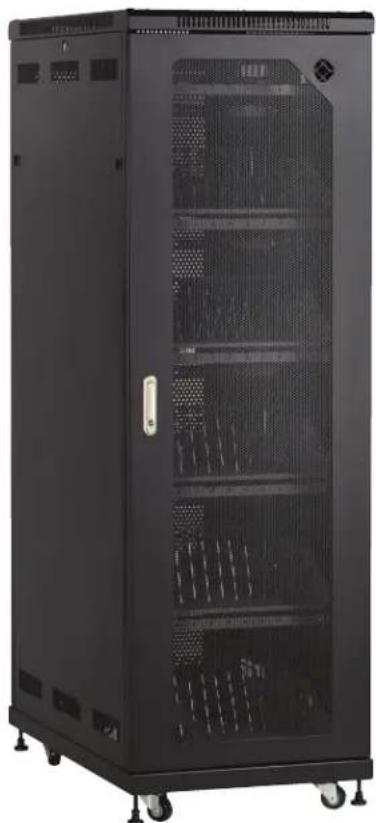
Exterior view of a black server rack cabinet with perforated doors and wheels (no visible text or labels)Figure 2-1. Front and back of MSC-60-CCN or MSC-60-CNN cabinet, doors closed.
natural_image
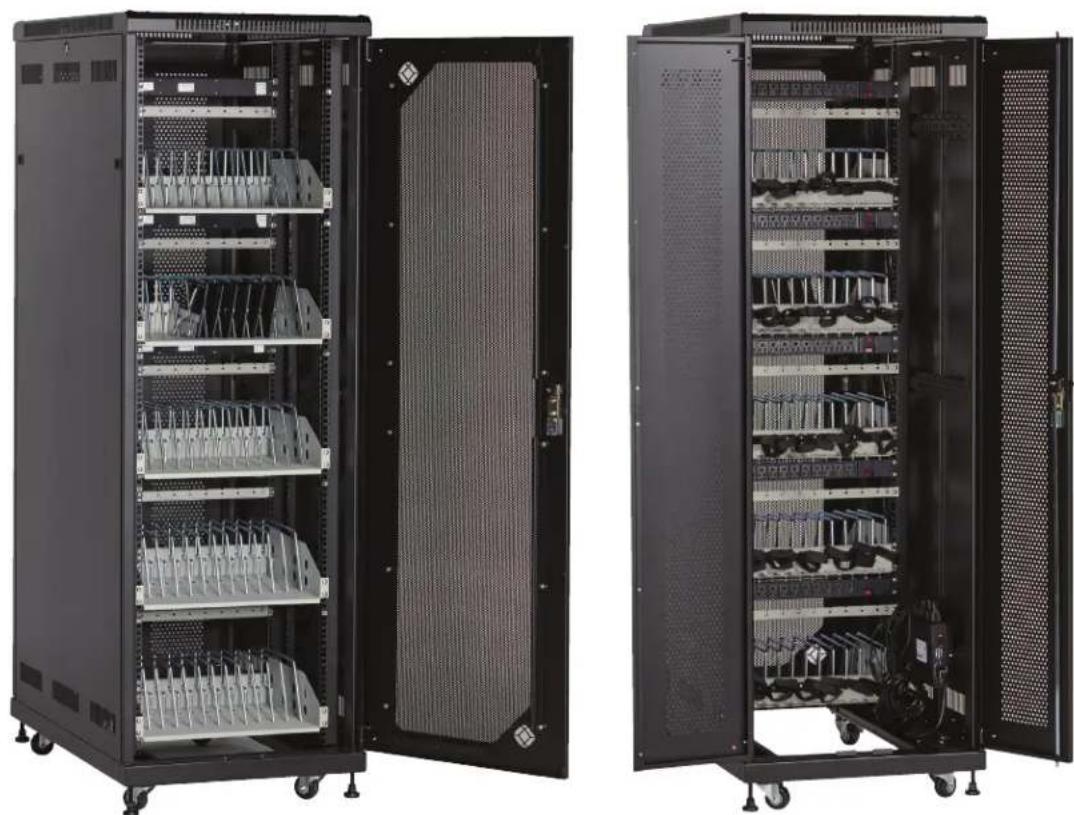
Two black server rack cabinets with internal components, open doors showing internal wiring and ventilation (no visible text or labels)Figure 2-2. Front and back of MSC-60-CCN or MSC-60-CNN cabinet, doors open.
natural_image
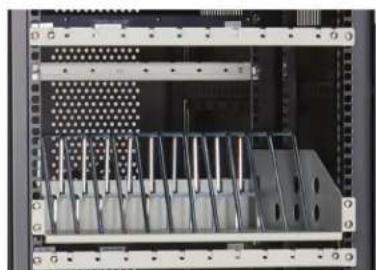
Interior view of a server rack unit with metal racks and a grid-patterned panel (no visible text or symbols)Figure 2-3. Front of MSC-60-CCN showing front cable management bars.
NOTE: The MSC-60-CNN does not have the optional front cable management bars installed. Otherwise, the MSC-60-CCN and MSC-60-CNN are physically the same. Both models have rear cable management.
2.3.2 MSC-72-CCN and MSC-72-CNN
natural_image
Black server rack with multiple drive units and a central-mounted power supply unit (no visible text or labels)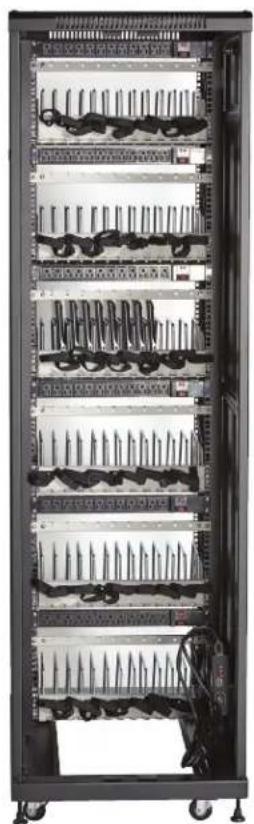
natural_image
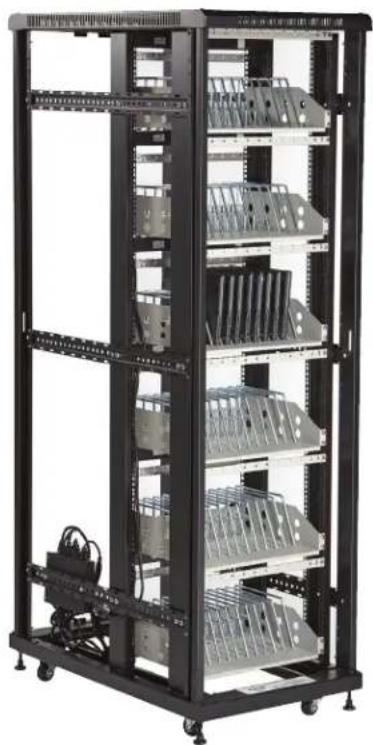
Interior view of a server rack cabinet with multiple racks and cable connectors (no visible text or labels)Figure 2-4. Front and back of MSC-72-CCN or MSC-72-CNN cabinet, doors removed.
natural_image
Interior view of a server rack cabinet with multiple rack-mounted modules and a closed door (no visible text or labels)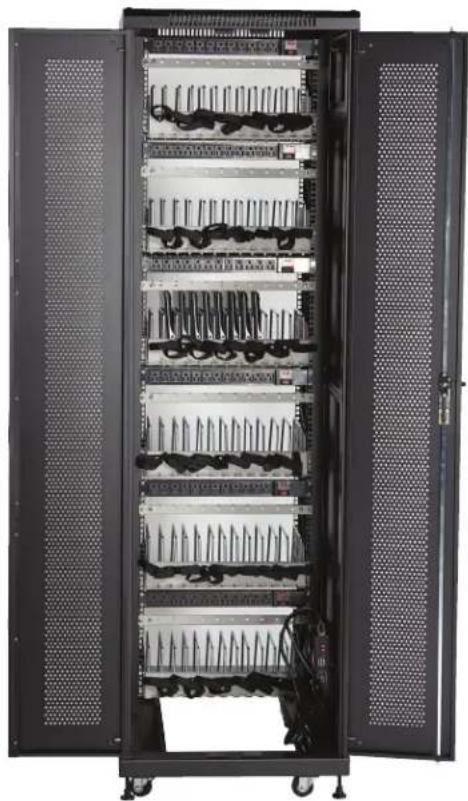
natural_image
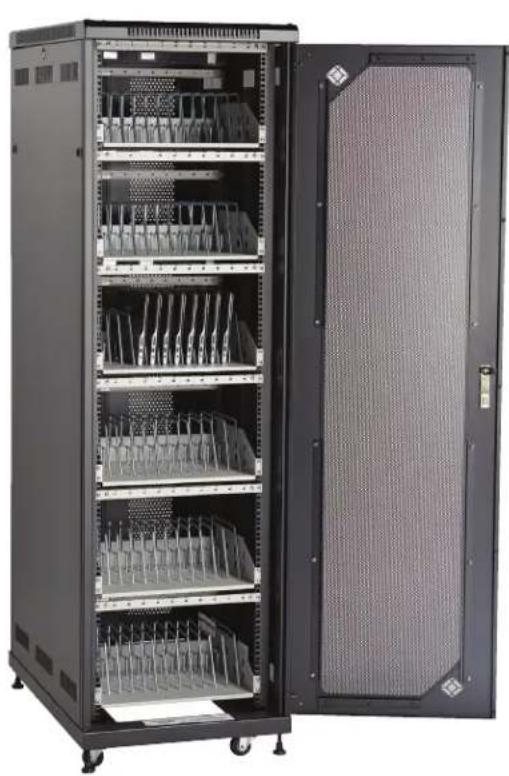
Interior view of a server rack cabinet with multiple rack-mounted cables and ventilation grilles (no visible text or labels)Figure 2-5. Front and back of MSC-72-CCN or MSC-72-CNN cabinet, doors open.

natural_image
Interior view of a server rack cabinet with multiple rack-mounted components (no visible text or labels)Figure 2-6. Front of MSC-72-CCN showing front cable management bars.
NOTE: The MSC-72-CNN does not have the optional front cable management bars installed. Otherwise, the MSC-72-CCN and MSC-72-CNN are physically the same. Both models have rear cable management.
2.4 Cabinet Configuration Examples for Tablet Storage and Charging 2.4.1 MSC-84-TCN and MSC-84-TNN

Figure 2-7. Front and back of MSC-84-TCN or MSC-84-TNN cabinet, doors open.

natural_image
Interior view of a server rack with multiple drive bays and labeled slots (no readable text or symbols)Figure 2-8. Front of MSC-84-TCN showing front cable management bars.
NOTE: The MSC-84-TNN does not have the optional front cable management bars installed. Otherwise, the MSC-84-TCN and MSC-60-TNN are physically the same. Both models have rear cable management.
2.4.2 MSC-96-TCN and MSC-96-TNN

natural_image
Two black server cabinets with ventilation grilles, shown from different angles (no visible text or labels)Figure 2-9. Front and back of MSC-96-TCN or MSC-96-TNN cabinet, doors closed.

natural_image
Black server rack cabinet with multiple rack-mounted modules and a single open door (no visible text or labels)
natural_image
Interior view of a server rack cabinet with open doors and rows of internal components (no visible text or labels)Figure 2-10. Front and back of MSC-96-TCN or MSC-96-TNN cabinet, doors open.
natural_image
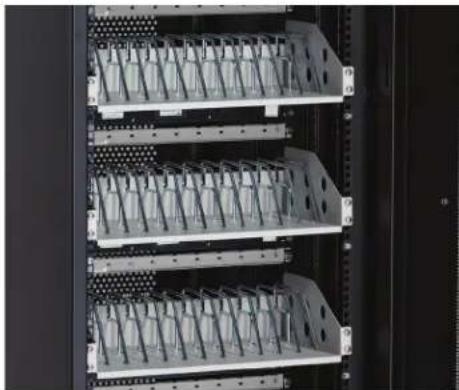
Interior view of a server rack with multiple rack-mounted components and mounting holes (no visible text or labels)Figure 2-11. Front of MSC-96-TCN showing front cable management bars.
NOTE: The MSC-96-TNN does not have the optional front cable management bars installed. Otherwise, the MSC-96-TCN and MSC-96-TNN are physically the same. Both models have rear cable management.
3. Configuration and Setup
Remove and discard all packaging materials and then lock the lockable casters.
Open and inspect the Cabinet to verify all doors, locks, and casters are working properly.
Do not plug the Cabinet into a wall outlet until all configurations and setup are complete.
3.1 Routing the Cable (Applies to MSC-84, MSC-96, and MSC-192 Part Numbers, Cabinets with Shelves sized for Tablets)
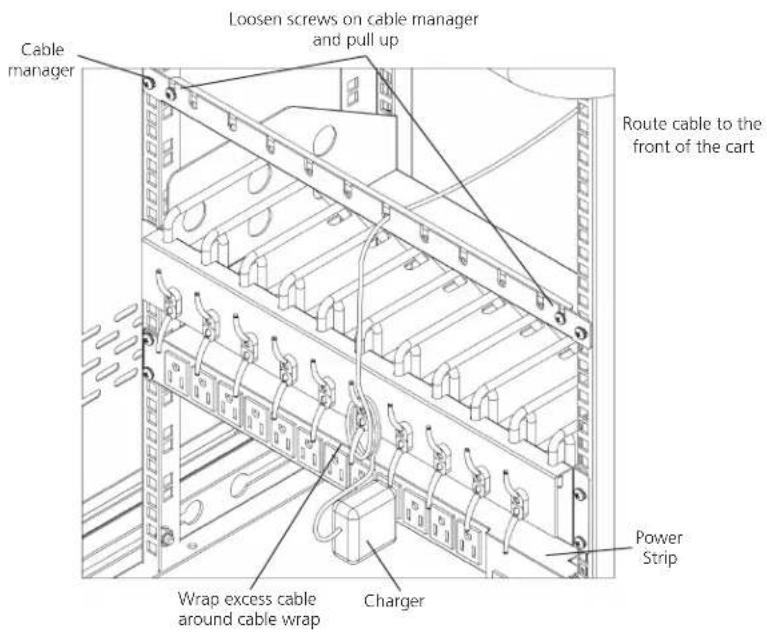
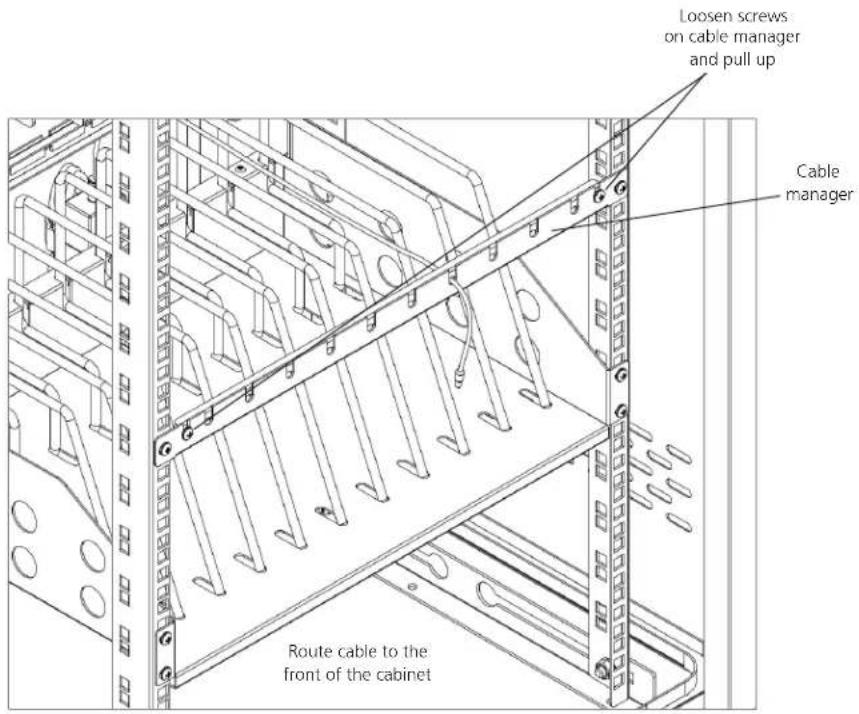
- At the back of the Cabinet, loosen the two screws on the cable manager, pull up on the top section of the cable manager, and place the device side of the charging cable into one of the slots. (See Figure 3-1.)
text_image
Cable manager Loosen screws on cable manager and pull up Route cable to the front of the cart Power Strip Charger Wrap excess cable around cable wrapFigure 3-1. Cable routing inside the cabinet.
- Replace the top section of the cable manager and tighten the screws.
- Route the device side of the charging cable to the front of the cart and repeat step 1 for the front cable manager.
NOTE: The optional front cable management bars are included only with the MSC-84-TCN, MSC-96-TCN, and MSC-192-TCN. - Wrap any excess cable around the cable wrap on the back of the shelf.
- Plug the charger power plug into the power strip located below the shelf.
text_image
Loosen screws on cable manager and pull up Cable manager Route cable to the front of the cabinetFigure 3-2. Routing the cable.
3.2 Fastening the Power Bricks and Routing the Cable (Applies to MSC-60, MSC-72, MSC-144, and MSC-168 Part Numbers, Cabinets with Shelves sized for Chromebook Computers and Laptops)
- Attach the wrapped cord and power brick to the back of the shelf using the hook and loop strap. Keep some extra cable unwrapped to plug into the power strip.
- Loosen the two screws on the cable manager, pull up on the top section of the cable manager, and place the device side of the charging cable into one of the slots.
- Replace the top section of the cable manager and tighten the screws.
- Route the device side of the charging cable to the front of the cart and repeat step 2 for the front cable manager (see Figure 3-3).
- Plug the charger power plug into the power strip located below the shelf.

text_image
Loosen screws on cable manager and pull up Route cable to the front of the cart Cable manager Power block and cord Power stripFigure 3-3. Fastening the power brick and routing the cable.
4. Using Your Mass Charging Cabinet
NOTE: The Cabinets are designed to be stationary; casters are included only to initially position the Cabinet for setup in the desired location.
4.1 Charging Your Computers
• After the devices have been loaded into the Cabinet, plug the power cord of the Cabinet into a suitable receptacle.
- For the models that have an Automated Power Controller included (MSC-60-CCN, MSC-60-CNN, MSC-72-CCN, and MSC-72-CNN), locate the internal power switches on the Automated Power Controller and power strips of the Cabinet and push the switches to the ON position.
4.2 Automated Power Controller Instructions
Before using your Automated Power Controller:
- For your safety, we recommend that a qualified electrician test the circuit you will plug the cart into. The circuit should be checked for ground integrity and appropriate branch circuit protection.
- The cart's ground prong must be present for safe operation. If the plug is damaged or if the ground prong has been removed, it should be replaced by a qualified electrician.
- Using the cart, including plugging it in or unplugging it, plugging in or unplugging the laptop(s) or other electrical equipment, or operating the control switch must be done with adult supervision.
The timer comes preset from the factory to alternate power between the power strips at 15-minute intervals.
All power strips cannot charge simultaneously.
By plugging the cart power cord into an approved outlet and flipping the red switches located on the automated power controller and power strips, the cart will begin charging.
To end power, turn the red switch on the timer off and unplug the cart from the wall outlet.
5. Troubleshooting
5.1 Contacting Black Box
If you determine that your Mass Charging Cabinet is malfunctioning, do not attempt to alter or repair the unit. It contains no user-serviceable parts. Contact Black Box Technical Support at 877-877-2269 or info@blackbox.com.
Before you do, make a record of the history of the problem. We will be able to provide more efficient and accurate assistance if you have a complete description, including:
- the nature and duration of the problem.
- when the problem occurs.
- the components involved in the problem.
- any particular application that, when used, appears to create the problem or make it worse.
5.2 Shipping and Packaging
If you need to transport your Mass Charging Cabinet:
- Package it carefully. We recommend that you use the original container.
- If you are returning the unit, make sure you include everything you received with it. Before you ship for return or repair, contact Black Box to get a Return Authorization (RA) number.
Black Box Tech Support: FREE! Live. 24/7.
Tech support the way it should be.

natural_image
Close-up portrait of a smiling man with short hair holding a small object, against a blue background (no text or symbols visible)Great tech support is just 60 seconds away at 877-877-2269 or blackbox.com.

BLACK BOX®
About Black Box
Black Box provides an extensive range of networking and infrastructure products. You'll find everything from cabinets and racks and power and surge protection products to media converters and Ethernet switches all supported by free, live 24/7 Tech support available in 60 seconds or less.
© Copyright 2016. Black Box Corporation. All rights reserved. Black Box ^® and the Double Diamond logo are registered trademarks of BB Technologies, Inc. Any third-party trademarks appearing in this manual are acknowledged to be the property of their respective owners.