PED10B1 - Unspecified Panduit - Free user manual and instructions
Find the device manual for free PED10B1 Panduit in PDF.


| Product Type | Single-Gang Faceplate |
| Color | White (Standard) |
| Material | High-Impact ABS Plastic |
| Dimensions | 2.75 x 4.5 inches (69.9 x 114.3 mm) |
| Weight | 0.07 kg (0.15 lbs) |
| Number of Ports | 1 |
| Mounting Type | Screw Mount or Snap-On |
| Flame Rating | UL 94 V-0 |
| Operating Temperature | -40°C to 70°C (-40°F to 158°F) |
| Standards Compliance | TIA/EIA-568-C, FCC Part 68 |
| Label Holder | Integrated Label Window |
| Application | Indoor Network Voice/Data/Video |
| RoHS Compliant | Yes |
| Warranty | 5 Years |
Frequently Asked Questions - PED10B1 Panduit
User questions about PED10B1 Panduit
0 question about this device. Answer the ones you know or ask your own.
Ask a new question about this device
Download the instructions for your Unspecified in PDF format for free! Find your manual PED10B1 - Panduit and take your electronic device back in hand. On this page are published all the documents necessary for the use of your device. PED10B1 by Panduit.
USER MANUAL PED10B1 Panduit
natural_image
Simple line drawing of a two-panel door with two handles and a handle (no text or symbols)Installation Instructions-Mounting Door to PEV Manager-7FT Sizes
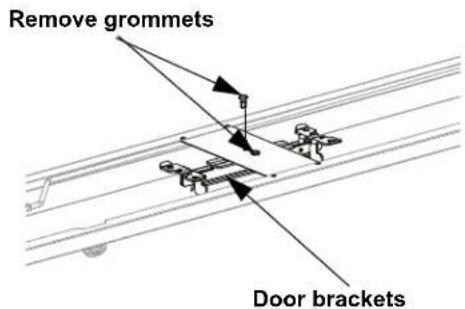
Step 1: Using a flat object, remove the grommets from the rear of the door. The door brackets can now be installed.
text_image
Remove grommets Door bracketsStep 2: Install door brackets to manager as shown using #12-24 screws Tighten screws to 15 in-lbs.
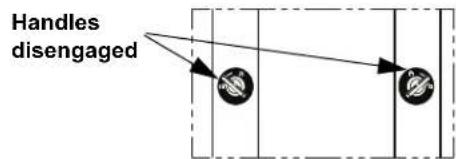
Step 3: Ensure that both handles are in the disengaged position.
text_image
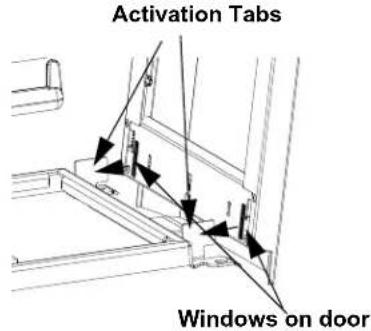
Handles disengagedStep 4: Set door onto ends of door bracket located on the bottom of the manager. Then ensure that activation tabs on the door bracket fit into windows on the door.
text_image
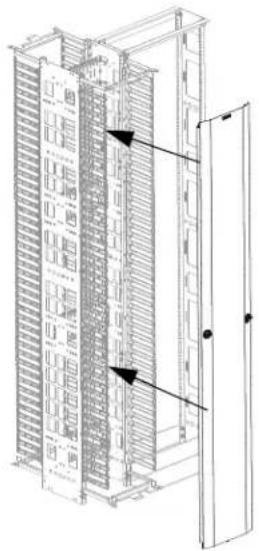
Activation Tabs Windows on doorStep 5: Fit activation tabs located on the top door bracket into the windows located on top of the door.
natural_image
Technical line drawing of a server rack cabinet with ventilation grilles and door (no text or symbols)
text_image
Top of manager #12-24 Screws Bottom of manager
text_image
Activation Tabs Windows on doorStep 6: Grasp fingers of manager with fingers and apply thumb to door face. Then squeeze together until handles pop into engaged position.
| DoorPart Number | Corresponding Vertical Manager | |
| Single Sided Dual | Sided | |
| PED6B1 PEVF6 PEV6PED8B1 PEVF8 PEV8PED10B1 | PEVF10 PEV10 | |
| PED12B1 PEVF12 PEV12 | ||
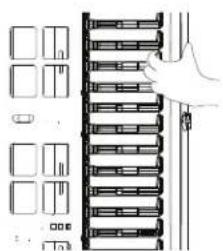
natural_image
Diagram of a hand placing a rack-mounted server into a rack, with no visible text or symbols
flowchart
graph TD
    A["Input Node 1"] --> C["Processing Node"]
    B["Input Node 2"] --> C["Processing Node"]
    C --> D["Handles engaged"]
FOR TECHNICAL SUPPORT www.panduit.com/resources/install_maintain.asp
Installation Instructions-Mounting Door to PRV Manager-7ft Sizes
Step 1: Using a flat object, remove the grommets from the rear of the door. The door brackets can now be installed.
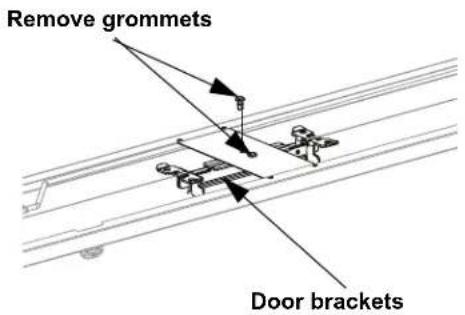
text_image
Remove grommets Door bracketsStep 2: Install door brackets to manager as shown using #12-24 screws. Use holes closest to the front of the manager. Tighten screws to 15 in-lbs.
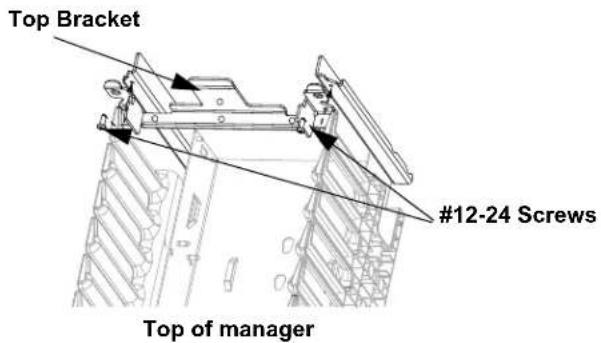
text_image
Top Bracket #12-24 Screws Top of manager
text_image
Bottom Bracket #12-24 Screws Outer holes Bottom of manager| DoorPart Number | Corresponding Vertical Manager | |
| Single Sided Dual | Sided | |
| PED6B1 PRVF6 PRV6PED8B1 PRVF8 PRV8PED10B1 PRVF10 PRV10PED12B1 PRVF12 PRV12 | ||
Step 3: Ensure that both handles are in the disengaged position.

text_image
Handles disengagedStep 4: Set door onto ends of door bracket located on the bottom of the manager. Then ensure that activation tabs on the door bracket fit into windows on the door.

text_image
Activation Tabs Windows on doorStep 5: Fit activation tabs located on the top door bracket into the windows located on top of the door.
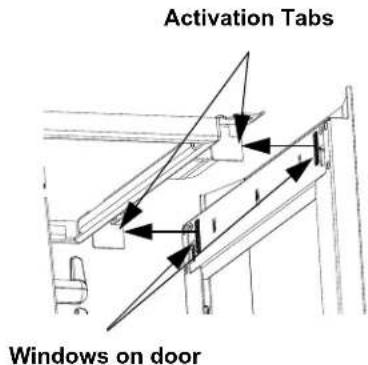
text_image
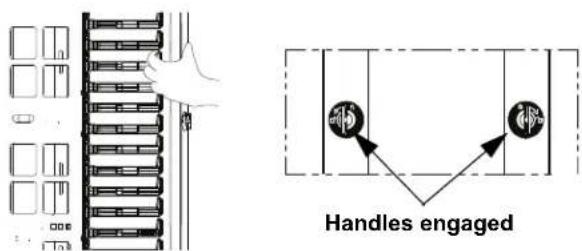
Activation Tabs Windows on doorStep 6: Grasp fingers of manager with fingers and apply thumb to door face. Then squeeze together until handles pop into engaged position.
text_image
Handles engagedFor Technical Support: www.panduit.com/resources/install_maintain.asp
Installation Instructions-Mounting Door to PEV Manager-8ft Sizes
Step 1: Remove all brackets from the door. Identify proper brackets for application and discard others.
Bracket used for mounting to PEV Manager (2 places)
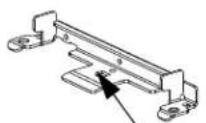
"D" Shape
Common Bracket with "D"
Brackets used for mounting to PRV Manager

No mark
Top Bracket
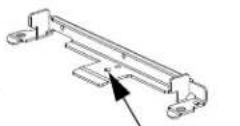
Diam
Bottom bracket
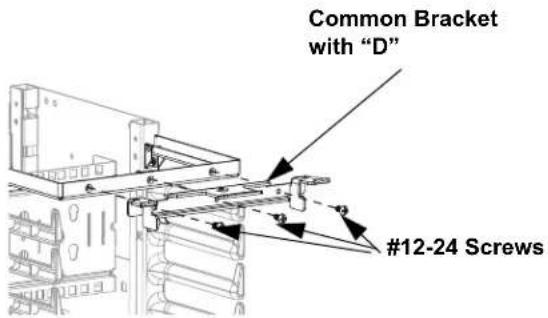
Step 2: Install door brackets to manager as shown using #12-24 screws. Use common brackets with "D" cutout on the tongue. Tighten screws to 15 in-lbs.
text_image
Common Bracket with "D" #12-24 ScrewsTop of manager
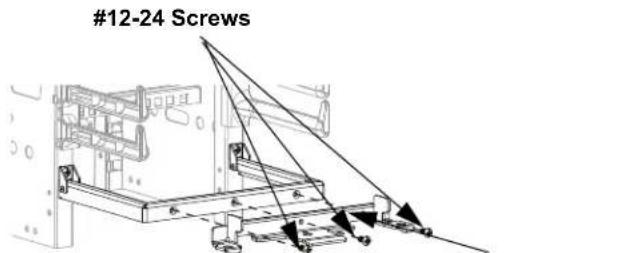
text_image
#12-24 ScrewsBottom of manager
| DoorPart Number | Corresponding Vertical Manager | |
| Single Sided Dual | Sided | |
| PED696B1 | PEVF696 PEV696 | |
| PED896B1 | PEVF896 PEV896 | |
| PED1096B1 | PEVF1096 PEV1096 | |
| PED1296B1 | PEVF1296 PEV1296 | |
Common Bracket with "D"
Step 3: Ensure that both handles are in the disengaged position.

text_image
Handles disengagedStep 4: Set door onto ends of door bracket located on the bottom of the manager. Then ensure that activation tabs on the door bracket fit into windows on the door.
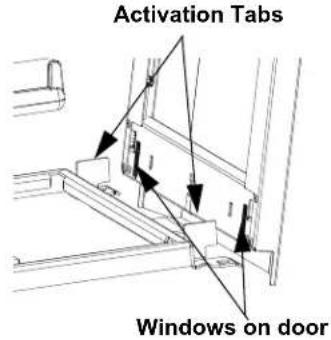
text_image
Activation Tabs Windows on doorStep 5: Fit activation tabs located on the top door bracket into the windows located on top of the door.
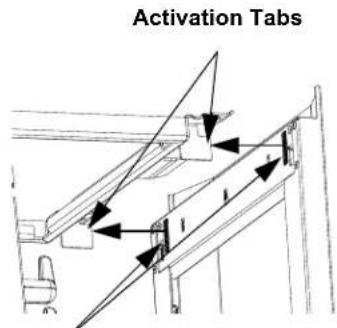
text_image
Activation TabsWindows on door
Step 6: Grasp fingers of manager with fingers and apply thumb to door face. Then squeeze together until handles pop into engaged position.

natural_image
Diagram of a server rack with multiple slots and a hand pointing to the rack (no text or symbols)
flowchart
graph TD
    A["Input Node 1"] --> B{V}
    B --> C["Output Node 2"]
Handles engaged
Installation Instructions-Mounting Door to PRV Manager-8ft Sizes
Step 1: Identify the top and bottom brackets to be used only for mounting PED*96B1 to PRV managers. The bottom bracket has a diamond on the tongue. See Page 3, Step 1.
Step 3: Ensure that both handles are in the disengaged position.

text_image
Handles disengagedStep 4: Set door onto ends of door bracket located on the bottom of the manager. Then ensure that activation tabs on the door bracket fit into windows on the door.
Step 2: Install door brackets to manager as shown using #12-24 screws. Use holes closest to the front of the manager. Tighten screws to 15 in-lbs.

text_image
Top Bracket #12-24 Screws Top of manager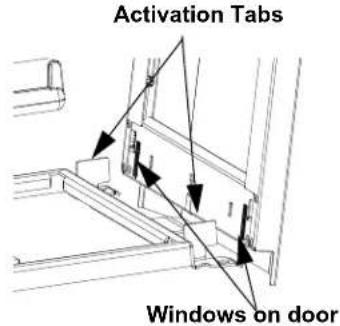
text_image
Activation Tabs Windows on doorStep 5: Fit activation tabs located on the top door bracket into the windows located on top of the door.

text_image
#12-24 Screws Outer holes Outer holes Bottom Bracket
text_image
Activation Tabs Windows on doorBottom of manager
| DoorPart Number | Corresponding Vertical Manager | |
| Single Sided Dual | Sided | |
| PED696B1 | PRVF696 PRV696 | |
| PED896B1 | PRVF896 PRV896 | |
| PED1096B1 | PRVF1096 PRV1096 | |
| PED1296B1 | PRVF1296 PRV1296 | |
Step 6: Grasp fingers of manager with fingers and apply thumb to door face. Then squeeze together until handles pop into engaged position.
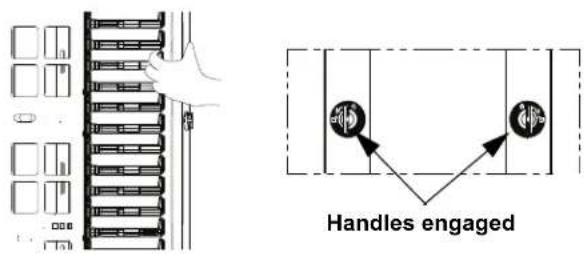
text_image
Handles engagedDoor Opening Instructions
Opening door to left: Disengage right-hand latch side of door by turning handle in clockwise direction to disengage position, then swing door open to left. Push door to close.

text_image
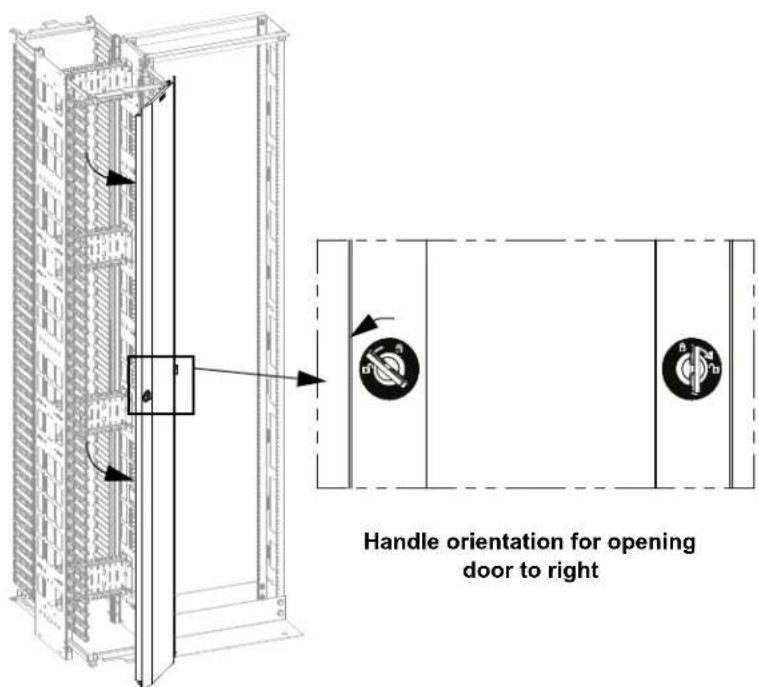
Handle orientation for opening door to leftOpening door to right: Disengage left-hand side of door only by turning handle in counterclockwise direction to disengage position, then swing door open to right. Push door to close.
text_image
Handle orientation for opening door to rightDoor Removal Instructions
Removing door: Place both handles in disengage position, then remove door.

text_image
Technical diagram of an industrial control cabinet with labeled components and directional arrows indicating assembly or movement.Handle orientation for removing door
This page intentionally left blank