UST-018 - Keyboard Unit - Free user manual and instructions
Find the device manual for free UST-018 Unit in PDF.
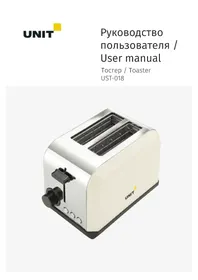


| Product Type | Toaster |
| Brand | Unit |
| Model | UST-018 |
| Power Consumption | 750 W |
| Voltage | 230 V ~ 50 Hz |
| Number of Slots | 2 |
| Functions | Toast, Defrost, Reheat, Cancel |
| Browning Levels | 1 to 6 |
| Color | White with black buttons |
| Material | Plastic and stainless steel |
| Crumb Tray | Removable, slide-out |
| Auto Shut-off | Yes, when toast is ready |
| Cancel Button | Yes, to interrupt toasting |
| Defrost Function | Yes, thaws and toasts frozen bread |
| Reheat Function | Yes, reheats cooled toast |
| Safety Features | Auto shut-off, non-immersion, keep away from children |
| Cleaning Instructions | Wipe with damp cloth, remove crumb tray, do not immerse |
| Manufacturer | UNIT Handelsgesellschaft G.m.b.H., Austria |
| Country of Origin | China |
Frequently Asked Questions - UST-018 Unit
User questions about UST-018 Unit
0 question about this device. Answer the ones you know or ask your own.
Ask a new question about this device
Download the instructions for your Keyboard in PDF format for free! Find your manual UST-018 - Unit and take your electronic device back in hand. On this page are published all the documents necessary for the use of your device. UST-018 by Unit.
USER MANUAL UST-018 Unit
Table of contents
Description of the instrument 9
Preparation for use 9
Operation of the device 10
Making toast 10
Browning 10
Defrost 11
Reheat 11
Cleaning
12
Precautions
When using the appliance observe the following precautions:
- Read the whole manual and save it for future use.
- The device is intended for household use only under standard conditions.
- Never operate the appliance with a defective mains cable.
- Make sure that the voltage indicated on the rating plate (located on the underside of the toaster) matches the voltage in your home.
- This device is not intended for use by children or persons with reduced physical or mental capabilities.
- Never immerse the toaster or power cord in water (or other liquids) and do not allow water to penetrate inside the device. This can result in fire or electric shock.
- Install the unit on a flat, stable surface at a safe distance from walls and furnishings.
- Do not operate the appliance near electric or gas stoves.
- Keep the appliance out of the reach of children.
- Do not allow children to use the device.
- Be careful, the outer wall of the device is hot at the time of work.
- Never lift the toaster by placing your fingers inside the slots for the bread.
- Before using the appliance make sure that the slices of bread fit easily into the slot. Not smooth or thick slices of bread can lead to blocking of the slot.
- Disconnect the appliance from the mains and let it cool before cleaning and when removing jammed in the slot of bread.
- Never use metal objects to remove bread jammed in the slot.
- Never leave the toaster unattended during operation.
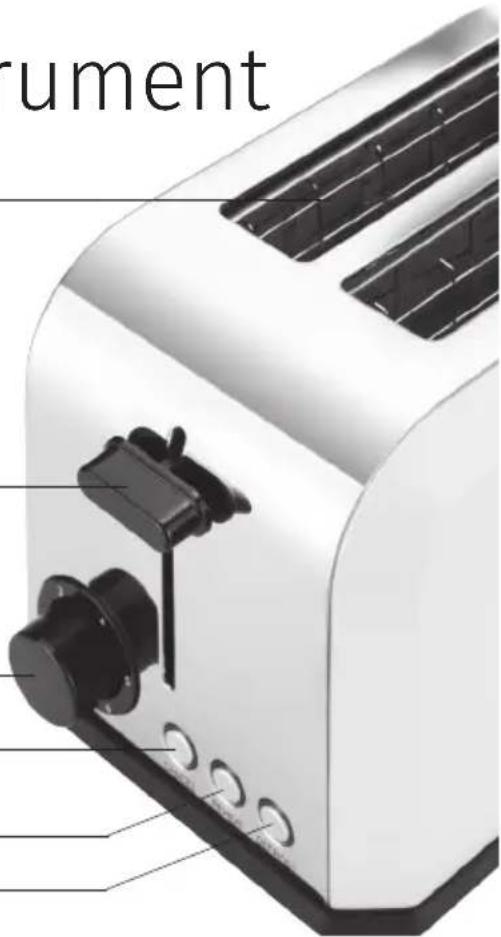
Description of the instrument
- The slots for toasting.
- Loading handle.
- Browning control.
- Cancel button.
- Reheat button.
- Defrost button.
1 2 ③ 4 5 6
Preparation for use
Unpack the appliance and remove all packaging material.
When you first turn it on, the heating element may emit an odor. Over time the smell will disappear.
We recommend turning on the device for the first time without bread.
- Connect your toaster to the mains and turn it on.
- Set the browning control ③ to the minimum position.
- Press the lever ② and push it down. Wait for the device to heat up. At the time of switching on, an odor may appear.
- Click «Cancel» to turn off the heating of the toaster.
- Unplug toaster from outlet and allow it to cool completely.
Operation of the device
Making toast
Place two slices of bread in the slots and set regulator ③ to the desired degree of roasting.
- Press the lever ② down until it locks in the down position. The toaster will automatically start to work. The indicator light of button «Cancel» will light up.
- If necessary you can interrupt the cooking process by pressing the «Cancel» button.
- When the toasts are ready, the lever ② rises to its original position, and the toaster will automatically turn off.
Note: The lever ② snaps into place in the down position if the appliance is not plugged in or the controller ③ is set to the minimum value.
Browning
Controller ③ varies the time during which the toast is prepared. Values can be set from 1 to 6, where 1 is minimal (toast lightly roasted), and 6 – maximum cooking time (toast deep-fried enough).
Dry or thin slices of bread will cook faster than moist or thick slices, so use a lower value roast for these types of bread.
Note: If the toast starts to smoke before the cooking process is complete, you can finish cooking yourself by pressing the "Cancel" button. The LED of the "Cancel" button will turn off.
Defrost
In this mode, first thaw the bread, then broil the toast. Working time will be longer than with fresh bread.
- Place frozen toast into the device.
- Use the controller (3) to set the desired degree of roasting.
- Lower the lever and press the "Defrost" button. The "Defrost" indicator light will turn on.
- When the toasts are ready, the lever rises to its original position, and the toaster will automatically turn off.
Reheat
If necessary, you can reheat cooled toast.
- Place toast into the device.
- Lower the lever and press the "Reheat" button. The "Reheat" indicator light will turn on.
- At the end of the cycle, the toaster will switch off automatically.
Note: In this mode you can warm up toasts without additional browning. If you heat bread with raisins or seeds in the toaster, remove them from the surface of the toast before preparation, because, once inside the toaster, they can result in damage to the toaster or even cause a fire.
Cleaning
- Before cleaning, unplug the toaster from the power outlet and allow it to cool.
- To clean the appliance, do not use abrasive substances.
- Never immerse the toaster in water. Watch carefully not to get water inside the device.
- Wipe the surface of the device with a slightly damp cloth, then wipe it dry.
- Slide out the tray for collecting crumbs, remove crumbs, and set the pan in place.
Attention!
Immediately after the end of the cooking process, the tray will be hot.
To avoid damage to the instrument, never place foreign objects in the compartments for toasts.
Model: UST-018
Power supply: 230 V ~ 50 Hz
Power: 750 W
This appliance is to be stored and used under the following conditions: temperature – not less than +5°C; relative humidity - not higher than 80%; aggressive impurities in the air: not allowable.
As the Manufacturer is constantly working on the improvement of its products, the design and technical specifications are subject to change without prior notice.
The head office of the manufacturer :
«UNIT Handelsgesellschaft G.m.b.H.» 131, Gersthofer Str., A-1180, Vienna, Austria
Exported by:
«UNIT Electronics (H. K.) Limited»
3905 Two Exchange Square, 8 Connaught Place, Central, Hong Kong.
Made in People's Republic of China (P.R.C.)
www.unit.ru



Brand : Unit
Model : UST-018
Category : Keyboard