CNSD-OMM013 - GPS Navigation System PIONEER - Free user manual and instructions
Find the device manual for free CNSD-OMM013 PIONEER in PDF.


| Product Type | Additional map data SD memory card |
| Brand | Pioneer |
| Model | CNSD-OMM013 |
| Category | GPS Navigation System - Accessory |
| Compatibility | AVIC-Z110BT and AVIC-U310BT (2009 map software) |
| Map Content | Mexico 2009 Map Data |
| Main Function | Provide additional map data for the navigation system |
| Activation Required | Yes, via password obtained online |
| Password | Generated online at www.pioneernavigationupdate.com |
| Included Items | SD Memory Card (1), Support Number Card, Brochure |
| Terms of Use | Personal use only, no unauthorized copying or transfer |
| Precautions | Do not modify map data, keep write protection unlocked, do not swallow, avoid heat/impact/liquids |
| Cleaning | Wipe terminals with a dry, clean cloth |
| After-Sales Service | Contact the retailer or Pioneer Electronics |
| Repairability | Requires the support number card as proof of authenticity |
| General Information | Keep SD card away from children, do not lose the support number card |
Frequently Asked Questions - CNSD-OMM013 PIONEER
User questions about CNSD-OMM013 PIONEER
0 question about this device. Answer the ones you know or ask your own.
Ask a new question about this device
Download the instructions for your GPS Navigation System in PDF format for free! Find your manual CNSD-OMM013 - PIONEER and take your electronic device back in hand. On this page are published all the documents necessary for the use of your device. CNSD-OMM013 by PIONEER.
USER MANUAL CNSD-OMM013 PIONEER
2009 Optional Mexico Map
This Optional SD card will only be compatible with the factory pre-installed 2009 map software in AVIC-Z110BT and AVIC-U310BT. For more information, please contact your Authorized Pioneer Electronics retailer or call us at 800-421-1404.
Notes Before Using the System
- Read the entire manual before using this product.
This package is unique, and cannot be used on more than one unit. - Web-connected computer is required for online issuance of password.
- NEVER modify any data on the SD memory card or your navigation system may not operate properly.
- Be sure to use this SD memory card, as the write-protect switch is unlocked. However, do not modify the prestored data in the SD memory card. If you do so, this SD memory card may not works properly.
- The data contained in this card is not installed into your navigation system. The content can be used only while this card is inserted in the SD card slot.
Parts supplied
- SD memory card (1 pcs.)
Media number card (MEDIA NUMBER CARD)
This booklet
Failure to operate
- Should the navigation system fail to operate properly, contact your dealer or nearest authorized Pioneer Service Station.
- Do not lose the supplied Media Number Card (MEDIA NUMBER CARD). If the Media Number Card is lost, reissue of the Media Number (MEDIA NUMBER) is not possible. Also you must submit the Media Number Card when repairs are needed. The card is necessary as proof of authenticity if service is required (including recovery).
After-sales service for Pioneer products
Please contact the dealer or distributor from which you purchased the product for after-sales service (including warranty conditions) or any other information. In case the necessary information is not available, please contact the companies listed below.
Please do not ship your product to the companies at the addresses listed below for repair without making advance contact.
U.S.A
Pioneer Electronics (USA) Inc.
CUSTOMER SUPPORT DIVISION
P.O.Box 1760 Long Beach,CA 90801-1760
800-421-1404
CANADA
Pioneer Electronics of Canada, Inc.
CUSTOMER SATISFACTION DEPARTMENT
300 Allstate Parkway Markham, Ontario L3R 0P2
1-877-283-5901
905-479-4411
Visit Our Web site
Visit us at the following site:
http://www.pioneerelectronics.com
In Canada
http://www.pioneerelectronics.ca
1 Register your product. We will keep the details of your purchase on file to help you refer to this information in the event of an insurance claim such as loss or theft.
2 Receive updates on the latest products and technologies.
3 Download owner's manuals, order product catalogs, research new products, and much more.
4 Receive notices of software upgrades and software updates.
SD memory card
Operating Environment
Operation manual addendum is stored in the PDF format on the SD memory card. To read the PDF manual, Adobe Reader (Version 4.0 or later) must be installed on your PC.
License
Please agree to Terms of Use indicated below before using the SD memory card. Do not use if you are unwilling to consent to the terms of its use.
Terms of Use
Copyright of data provided on the SD memory card belongs to Pioneer Corporation. Unauthorized transfer, duplication, broadcast, public transmission, translation, sales, lending or other such matters that go beyond the scope of "personal use" or "citation" as defined by Copyright Law may be subject to punitive actions. Permission to use the contents of SD memory card is granted under license by Pioneer Corporation.
General Disclaimer
Pioneer Corporation does not guarantee the operation of the SD memory card with respect to personal computers using any applicable OS. In addition, Pioneer Corporation is not liable for any damages incurred as a result of use of the SD memory card and is not responsible for any compensation.
Keep the SD memory card (including the SD card-shaped cushion) out of the reach of small children to prevent them from accidentally swallowing it.
Do not store the SD memory card in high temperatures or direct sunlight.
Do not subject the SD memory card to shock or impact.
Do not allow the SD memory card to come into contact with liquids. Damage to the SD memory card and your products could result from contact with liquids.
Be careful not to touch terminals on the SD memory card.
Doing so may cause connection failures. If any terminals are dirty, wipe them with a clean dry cloth.
The names of private corporations, products and other entities described herein are the registered trademarks or trademarks of their respective firms.
For more information, refer to "Operation Manual" of your navigation system.
Preparation requirement for the activation
Checking the device number
First, check your device number (DEVICE NUMBER, displayed such as Device# or Device Number) of your navigation system for later procedures. To display the device number, do the following.
AVIC-Z110BT
1 Display "Top Menu", and then touch [Settings].
For more details concerning the operation, refer to "Operation Manual" supplied with your navigation system.
2 Touch [System Settings].
The "System Settings" menu appears.
3 Touch [Service Information].
4 Write down the device number displayed on the screen to the supplied Media Number Card to avoid mistakes.
5 Turn off the vehicle engine to terminate the system.
The navigation system is also turned off.
AVIC-U310BT
1 Touch [Menu] on the map screen.
For more details concerning the operation, refer to "Operation Manual" supplied with your navigation system.
2 Touch [Service Info].
3 Write down the device number displayed on the screen to the supplied Media Number Card to avoid mistakes.
4 Turn off the vehicle engine to terminate the system.
The navigation system is also turned off.
Getting the password for authentication
For upgrade, an unique password issued online is necessary. Access the website with your PC and get your password. The following information is required.
Media Number (MEDIA NUMBER) printed on supplied Media Number Card (MEDIA NUMBER CARD)
Device Number (DEVICE NUMBER) of your navigation system
1 Access on the following website to issue your password. http://www.pioneernavigationupdate.com
In Canada: http://www.pioneernavigationupdate.ca
For issuing the password, follow the instruction on the website.
2 Record the password that you received.
You need to input this password accurately. Write down your password to avoid mistakes.
Activation procedures
To use this product on your navigation system, activation is required.
1 Park your vehicle in a safe place and apply the parking brake.
2 Insert the SD memory card into the SD card slot.
After a short pause, the keyboard for entering the password will appear.
For more details concerning the operation, refer to "Operation Manual" supplied with your navigation system.
3 Enter the password for authentication that you obtained, then touch [OK].
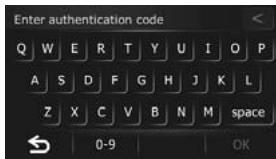
After you touch [OK], the system starts the authentication. When the authentication is finished properly, a message for confirmation will appear.
4 Touch [OK].
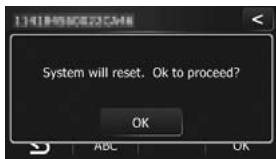
The navigation system restarts.
You can operate the navigation system by touching keys displayed on the screen as usual.
Checking whether the activation was done properly
AVIC-Z110BT
1 Display "Top Menu", and then touch [Settings].
For more details concerning the operation, refer to "Operation Manual" supplied with your navigation system.
2 Touch [Destination] on the "Top Menu".
3 Touch [Address].
4 Touch the key next to "Country" to display the country list.
"MEXICO" is displayed if the activation has done properly.
AVIC-U310BT
1 Touch [Menu] on the map screen.
For more details concerning the operation, refer to "Operation Manual" supplied with your navigation system.
2 Touch [Address].
3 Touch the key next to "Country" to display the country list.
"MEXICO" is displayed if the activation has done properly.

Note
The contained data can be used only while this SD memory card is inserted. For example, when a route is set to the destination contained in this SD memory card, the route is canceled if this SD memory card has been ejected.
Appendix
Troubleshooting
Messages in the procedures for updating
| Message | When | What to do (Reference) |
| The version of data is incorrect and cannot be used on this device. | Regional identification is failed. The regional data in the SD memory card does not match with the regional data of the map that is currently installed in the navigation system. | Use an appropriate data. |
| Authentication failed | The contents of optional SD memory card currently used are associated with another product. Therefore, the card cannot be used with the navigation system other than the associated one. | Use the optional SD memory card together with the navigation system that has not been associated with the same product. |
| Cannot be used with this version | The map version (map generation) on the optional SD memory card does not match with the version of the map data currently installed in the navigation system. | Use the optional SD memory card together with the navigation system that stores the same version map. |
http://www.pioneerelectronics.com
Au Canada
http://www.pioneerelectronics.ca
4-1, MEGURO 1-CHOME, MEGURO-KU
PIONEER ELECTRONICS (USA) INC.
P.O.Box 1540, Long Beach, California 90801-1540, U.S.A.
TEL: (800) 421-1404
PIONEER EUROPE NV
Haven 1087, Keetberglaan 1, B-9120 Melsele, Belgium/Belgique
TEL: (0) 3/570.05.11
PIONEER ELECTRONICS ASIACENTRE PTE. LTD.
253 Alexandra Road, #04-01, Singapore 159936
TEL: 65-6472-7555
PIONEER ELECTRONICS AUSTRALIA PTY. LTD.
178-184 Boundary Road, Braeside, Victoria 3195, Australia
TEL: (03) 9586-6300
PIONEER ELECTRONICS OF CANADA, INC.
300 Allstate Parkway, Markham, Ontario L3R 0P2, Canada
TEL: 1-877-283-5901
TEL: 905-479-4411
PIONEER ELECTRONICS DE MEXICO, S.A. de C.V.
Blvd.Manuel Avila Camacho 138 10 piso
Col.Lomas de Chapultepec, Mexico, D.F. 11000
TEL: 55-9178-4270
先锋股份有限公司
Published by Pioneer Corporation.
Copyright © 2009 by Pioneer Corporation.
All rights reserved.