HACX-205 - CD Player Hamilton Buhl - Free user manual and instructions
Find the device manual for free HACX-205 Hamilton Buhl in PDF.


User questions about HACX-205 Hamilton Buhl
0 question about this device. Answer the ones you know or ask your own.
Ask a new question about this device
Download the instructions for your CD Player in PDF format for free! Find your manual HACX-205 - Hamilton Buhl and take your electronic device back in hand. On this page are published all the documents necessary for the use of your device. HACX-205 by Hamilton Buhl.
USER MANUAL HACX-205 Hamilton Buhl
Never-Ending Learning Innovation
Portable CD/MP3 USB Player
HACX-205
INSTRUCTION MANUAL

natural_image
Blue handheld electronic device with CD and audio jack, no visible text or symbols on body
text_image
CAUTION RISK OF ELECTRIC SHOCK DO NOT OPEN This symbol indicates that dangerous voltage constituting a risk of electrical shock is present within this unit. CAUTION: TO REDUCE THE RISK OF ELECTRICAL SHOCK DO NOT REMOVE COVER. NO USER SERVICEABLE PARTS INSIDE REFER SERVICING TO QUALIFIED PERSONNEL. This symbol indicates that there are important operating and maintenance instructions in the literature accompanying this unit.PRECAUTION: DO NOT EXPOSE THIS PRODUCT TO WATER OR HUMIDITY TO AVOID RISK OF ELECTRIC SHOCK.
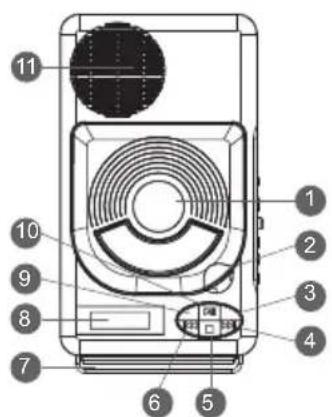
LOCATION OF CONTROLS
- CD DOOR
- CD DOOR OPEN AREA
- ALBUM/+10 BUTTON
- NEXT SKIP/SEARCH BUTTON
- STOP/USB BUTTON
- BACK SKIP/SEARCH BUTTON
- HANDLE
- LED DISPLAY
- PROGRAM/REPEAT BUTTON
- PLAY/PAUSE BUTTON
- SPEAKERS
- VOLUME CONTROL
- USB/CD MODE BUTTON
- POWER ON/OFF SWITCH
- HEADPHONES JACK
- DC JACK
- USB PORT
- BATTERY COMPARTMENT
text_image
Diagram of a device with numbered parts labeled 1 to 11, showing internal components and a circular component.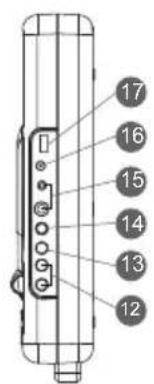
text_image
17 16 15 14 13 12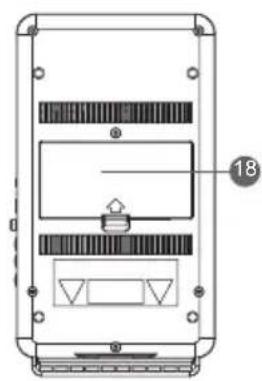
natural_image
Technical diagram of a device casing with internal compartments and mounting points (no text or symbols)Power Supply
Battery Operation
- Remove Battery Compartment Cover by gently pushing the clips down and outwards.
- Install 4 C-size batteries (UM-2 or equivalent) using correct polarities.
- Close the battery compartment cover.v
Note:
- The DC line cord must be unplugged from an outlet for battery operation.
- To avoid damage which may result from leaking batteries, remove the batteries when they become exhausted or when the unit is not being used for a long period of time.
Power ON/OFF (14)
Press once to turn on the unit and press again to turn off the unit.
Volume (+/-) (12)
Adjust the sound level.
Headphone Jack (15)
For private listening, insert a stereo headphone with plug diameter of 1/4" and 3.5mm into the jack, the output to the speaker will be disabled. Headphone volume is adjustable via the volume control of the unit. CAUTION: Listening at high volume level could damage user's ears.
Using the Function Buttons (3, 4, 5, 6, 9, 10)
The following CD/USB control keys on the main unit are used to control CD/USB functions.
- PLAY/PAUSE Pressing the button during the play mode will pause the contents until the button is pressed again.
- STOP ■ Press this key to stop playing CD/USB.
- SKIP ▶Press this key to skip to the next track (Continuous holding of this key will skip forward within the track). ◀Press this key to skip to previous track
(Continuous holding of this key will skip forward within the track).
- PROGRAM (Repeat Function): Press this key once ▶to repeat track and press twice to repeat album.*
- ALBUM/+10: Press this key to skip tracks at once.* *Note: These functions may not perform properly when using USB
Playing a CD
- Press the CD/USB Button (13) to select the CD mode.
- Open the CD tray by lifting the CD Door Open Tab (2), inset a CD and close the CD Door. Press PLAY/PAUSE button to start playing. While playing, the disc number key will light to indicate a disc currently playing.
- Press PLAY/PAUSE button to start playing. While playing, the disc number will be shown on the LED Display to indicate a track information.
Playing USB Files
- Press the CD/USB Button (13) to select the USB mode.
- Insert the USB drive into the USB port (17).
- Press PLAY/PAUSE button to start playing.
Programming CD Tracks
Your unit has a program memory to store the playing tracks (up to 20):
- Place a disc in the CD tray, then close the CD tray.
- Press the PROGRAM button to start the programming.
- Using the SKIP+ or SKIP- button to move the desired track then press the PROGRAM to select the track (repeat the step to add more tracks).
- To stop and reset the programmed tracks, press the STOP button. During setting the program play, you can press Program/Memory button on main unit or MEMORY key on remote control to cancel.
Caution:
Note: When in USB play mode, do not remove the USB driver from the USB input.
When there are important files in the USB device, do not connect it to the main unit to play. Do not play the CD-R/RW disc that has important files on it. Incorrect operation may cause file loss; our company assumes no responsibility.
Specifications:
General
Power requirement...... DC6V - 4 C batteries
Power consumption..... AC 2 watts
Weight.... 1.63 lbs
Dimensions.... 11.25" L x 6" W x 2.15" H
Operation temperature.... +5°C \~ +35°C
CD Player Section
Playback system...... Compact disc digital audio system
DAC...... 1 bit D/A converter with 8 times over sampling digital filter

text_image
WARRANTYProduct Registration Instructions
Visit: www.hamiltonbuhl.com
- Click on Customer Support
- Click on Product Registration Form
- Please fill out all fields marked with * to register
Our Mission:
Since our founding in 1933, HamiltonBuhl continues to evolve as a leader in technology products for education and industry. Our products are embraced by educators, corporate trainers, presenters, government agencies, and hospitals for their daily presentation, from classroom to the boardroom, HamiltonBuhl has the presentation product for you.