
PowerStacker LTCC20 - Laptop Hamilton Buhl - Free user manual and instructions
Find the device manual for free PowerStacker LTCC20 Hamilton Buhl in PDF.


| Product Type | 20-Bay Charging Cabinet |
| Model | LTCC20 |
| Brand | Hamilton Buhl |
| Capacity | Up to 20 devices (laptops, Chromebooks, iPads, tablets up to 15") |
| Dimensions (W x L x H) | 25.75" x 17.25" x 27.75" |
| Power Requirements | 110V/15A |
| Power Cord | 3-prong, 115V, 6-foot |
| Material | Powder-coated steel (various thicknesses) |
| Cooling System | Vented panels on three sides, no fans |
| Door Type | Two tamper-proof doors with locks |
| Security | Double-lock doors, surge protector included |
| Modularity | Stackable up to 4 units (10 to 40 bays) |
| Included Accessories | Rubber feet (4 pcs, LTGGRF) |
| Optional Accessories | Casters (LTDDCS), transport handles (LTEEHD), stacking plates (LTFFST), programmable timer (LTHHPT) |
| Installation Options | Table anchor (nuts/bolts not included) or optional casters |
| Warranty | 1 year (components and case) |
| Compatible Devices | Laptops, Chromebooks, iPads, tablets up to 15"; can mix types |
| Surge Protection | 10-outlet green surge protector in power compartment |
| Sequential Charging | Programmable timer supported (sold separately) to limit current draw |
| Country of Origin | Made in USA |
| User Age | Adult operation only |
Frequently Asked Questions - PowerStacker LTCC20 Hamilton Buhl
User questions about PowerStacker LTCC20 Hamilton Buhl
0 question about this device. Answer the ones you know or ask your own.
Ask a new question about this device
Download the instructions for your Laptop in PDF format for free! Find your manual PowerStacker LTCC20 - Hamilton Buhl and take your electronic device back in hand. On this page are published all the documents necessary for the use of your device. PowerStacker LTCC20 by Hamilton Buhl.
USER MANUAL PowerStacker LTCC20 Hamilton Buhl
PowerStacker™ Tower
with Modular Components
10-Bay (LTBB10) and 20-Bay (LTCC20) Charging Cabinets
HB Hamilton Buhl Never Ending Learning Innovation
80 Little Falls Road
Fairfield, NJ 07004
1-800-631-0868
www.HamiltonBuhl.com

natural_image
Interior view of a multi-level industrial cabinet with open doors and internal compartments (no visible text or symbols)Shown with optional casters (sold separately)
PowerStacker™ 10-Bay and 20-Bay Charging Cabinets
PowerStacker™ Charging Cabinet Index
Overview.... 2
Unpacking the Charging Cabinet
Initial Set Up
Understanding the Two Compartments
Safety Information
Warnings.... 3
Caution
Types of Units that can be Charged
Power Connection
Installation of the shelf
Surge Protector
Connection Charging Cables
LTBB10 Specifications.... 4
LTCC20 Specifications.... 5
PowerStacker ^™ Tower....6
PowerStacker™ Accessories.... 7
Multiple Stacking Plates - LTFFST
Rubber Feet - LTGGRF
Casters - LTDDCS
Transport Handles - LTEEHD
Programmer Timer - LTHHPT
Table Anchor Option
Product Registration.... 10
PowerStacker™ 10-Bay and 20-Bay Charging Cabinets


Product Registration Instructions
Visit: www.hamiltonbuhl.com
- Click on Customer Support
- Click on Product Registration Form
- Please fill out all fields marked with * to register
Our Mission:
Since our founding in 1933, HamiltonBuhl continues to evolve as a leader in technology products for education and industry. Our products are embraced by educators, corporate trainers, presenters, government agencies, and hospitals for their daily presentation, from classroom to the boardroom, HamiltonBuhl has the presentation product for you.
PowerStacker™ 10-Bay and 20-Bay Charging Cabinets
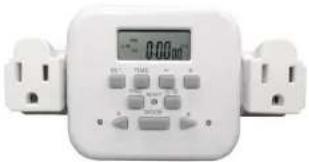
Programmer Timer - LTHHPT (sold separately)
Most classrooms provide 15-amp service. Occasions may occur where the unit will overload the circuit and cause a disruption. For these applications a programmable timer should be used. Follow the directions included in the programmable timer kit and attach it to the 110 circuit located in the back of the unit.
natural_image
White industrial electrical meter with digital display and control buttons (no visible text or symbols)Table Anchor Option
Two openings in the bottom plate of the unit are for the nut and bolt set for securing the unit to a table. Drill holes accordingly and secure the unit to the table. Note: Appropriate parts (nuts and bolts) must be purchased from any retail hardware stores based on proper measurements of your table.
PowerStacker ^™ 10-Bay and 20-Bay Charging Cabinets

Overview
Introducing the PowerStacker™ Tower from HamiltonBuhl. Built from the ground up, these new and unique products don't require any cooling fans, and feature a modular design with configurations ranging from as small as 10 charging units up to a maximum of 40 charging units.
Each cabinet can charge laptops, Chromebooks, iPads and other tablets simultaneously in the same cabinet. The double-lock doors ensure that devices are well-protected and tablets are secured, for round-the-clock protection while charging. They may also be programmed for sequential charging, so as not to exceed the 15 amp limit available in most classrooms.
Made in the USA!
Unpacking the Charging Cabinet for the First Time
New units are shipped in a custom-designed corrugated container. Accessories, if purchased, will come in a separate corrugated container. Place the PowerStacker ^™ on the floor with ample working space.
- Open the top of the container and fold down the four flaps.
- Remove any packaging materials located on the top of the container.
- Invert the PowerStacker™ leaving it in the shipping container.
- Lift the container off leaving the PowerStacker™ inverted on the floor.
- If feet or casters have been purchased, attach them to the bottom of the unit.
Once feet or casters have been attached, turn the PowerStacker™ upright, place it on a table and continue installation and set-up.
Initial Set-Up
The PowerStacker™ has two separate compartments. Looking at the front of the unit the smaller power compartment is on the right and the housing compartment is on the left. A door with locks secures both sections.
Understanding the Two Compartments
The purpose of having two compartments is for security and the safety of those using the system. Both compartments are secured with locking mechanism. There is NEVER a need to have children access the power compartment. The larger housing compartment is for low voltage use only.
Safety Information
These units are designed for adult operation. Reviewing of safety information is critical for proper operation prior to use.
PowerStacker™ 10-Bay and 20-Bay Charging Cabinets
Warnings
Please use the cabinets only as intended. Be sure to inspect the power cables thoroughly before every use. Do not operate with a damaged power cord. Set the power switch to OFF position before unplugging the unit from the wall, or before plugging the unit into the wall. Always grasp the plug to remove it from the outlet. Do not unplug by pulling the cable. Never use an extension cord with the unit.
Caution
To avoid overheating the unit, do not block the ventilation openings. If casters are attached, be sure to lock them during the charging mode, or when loading or unloading items from the cabinet. Always lock casters when unattended. Always remove the power cord before moving.
Types of Units That Can Be Charged
Because of its proprietary design the PowerStacker™ can charge multiple units of different designs simultaneously. Tablets, iPads, Chromebooks and notebooks up to 15" can be charged and intermixed throughout the unit.
Power Connection
Located on the lower right side of the unit is a male connector for providing power to the unit. Attach the 110V 3-prong connectors to the power switch assembly. Connect the other end to the wall outlet.
Installation of the Shelf
First, install the shelf in the power compartment separating the surge protector from the rest of the power compartment. All AC power adapters should be plugged into the green surge protector located on the bottom of the power compartment via the space provided in the back of the shelf.
Surge Protector
The surge protector is located at the bottom of the power compartment. The purpose of the surge protector is to provide power and to eliminate spikes that may come to the unit from the wall outlet. It has ten 110V female connectors. The surge protector is green. Each unit will be directly plugged into the surge protector to avoid any damages from power irregularity – green color surface.
Connecting Charging Cables
The charging cables should be threaded through the routing hole in either front or back of the wall separating the two compartments. Once routed through, attach them to the front inside or the back inside of the housing compartment using the connectors supplied.
PowerStacker™ 10-Bay and 20-Bay Charging Cabinets
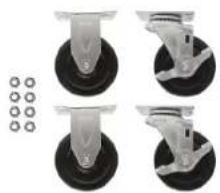
Casters - LTDDCS (sold separately)
Casters come in a set of four (two swivel and two non-swivel). Both types connect to the underside of the PowerStacker™. In each corner there are two stand-offs. Remove feet if currently installed. Place the two swivel casters under the housing compartment and the two non-swivel casters under the power compartment. Note: there are only two stand-offs for each caster. When completed, turn the cart over and continue with the installation.
natural_image
Four different types of industrial control wheels with black circular heads and four separate rows of small circular components (no text or symbols visible)Transport Handles - LTEEHD (sold separately)
Handles come in a set of two with washers and screws to attach from the inside. Each cabinet has holes for mounting the handles. Place one washer inside the cabinet and the other washer between handle and cabinet. Securely lighten the two screws on each handle. Handles can be also be used to tie down the charging cart to a stationary object by using a security cable.

PowerStacker ^® 10-Bay and 20-Bay Charging Cabinets
PowerStacker™ Accessories
INSTALLATION GUIDE
Multiple Stacking Plates - LTFFST (sold separately)
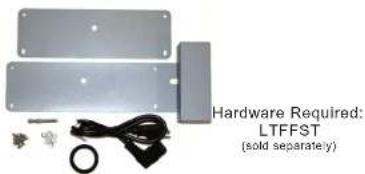
No more than 4 units can be stacked together. To secure them together, align all units in the stack and then attach the connecting plates using the eight screws and washers provided. Remove the round cover on right side and replace with bushing of same diameter. Route electrical cord from box above through bushing and plug into open plug below in back of charge cart.
Using the 90° 3' power cable, route from box above through bushing and plug into open plug below in back of charge cart. Make sure to turn on the switch prior to stacking another module. While looking at the front of the unit, use mounting plate that has a box on the right side end. This covers the switch and routing hole. Attach them together by using the supplied four screws and washers. Attach the flat plate using the remaining four screws and washers on the left side.

natural_image
Two metallic rectangular panels with bolt holes and screw fasteners, no text or symbols visibleRubber Feet - LTGGRF (included)
Feet come in a set of four. In each corner there are two mounting studs. Place three fender washers stacked as spacers in each corner by using outer studs. Place one foot over the stacked fender washer spacers in each corner and secure them with remaining nuts provided. When completed, turn the cart over and continue with the installation.

natural_image
Set of six black mechanical components with circular and square features, no visible text or symbolsPowerStacker™ 10-Bay and 20-Bay Charging Cabinets
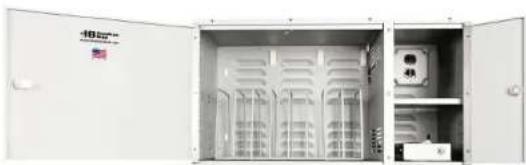
PowerStacker™ 10-Bay Charging Cabinet LTBB10
natural_image
Interior view of an open electrical cabinet with ventilation grilles and a control panel (no visible text or symbols)Specifications for LTBB10
Capacity: Ten units of different devices
Modularity: From 10 to 40 units
Material: Powder-coated steel using various thicknesses
Cooling: Vented panels on three sides
Doors: Two tamper-proof doors with locks on both doors
Wire Divider: Pre-installed
Includes: Four rubber feet (LTGGRF)
Power: 110V/15A
Power Cord: 3 prong/115V/6-foot
Dimensions: 25.75"(W) x 17.25"(L) x 14.0"(H)
Limited Warranty: 1 Year – Components and Case
PowerStacker™ 10-Bay and 20-Bay Charging Cabinets
PowerStacker™ 20-Bay Charging Cabinet
LTCC20

natural_image
Open industrial storage cabinet with metal grating and rack, no visible text or symbols on the cabinet itselfSpecifications for LTCC20
Capacity: Twenty units of different types
Modularity: From 10 to 40 units
Material: Powder-coated steel using various thicknesses
Cooling: Vented panels on three sides
Doors: Two tamper-proof doors with locks on both doors
Wire Divider: Pre-installed
Includes: Four rubber feet (LTGGRF)
Power: 110V/15A
Power Cord: 3 prong/115V/6-foot
Dimensions: 25.75"(W) x 17.25"(L) x 27.75"(H)
Limited Warranty: 1 Year – Components and Case

Shown with optional casters (sold separately)
PowerStacker ^™ 10-Bay and 20-Bay Charging Cabinets
The PowerStacker ^TM Tower
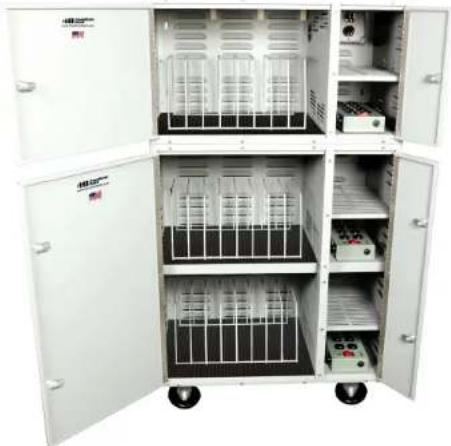
10-Bay with 20-Bay Configuration
Combined for a Total of 30-Bays
(Other configurations available)
To stack the 10-Bay on top of the 20-bay, additional hardware (LTFFST sold separately) is required to secure your Tower (hardware shown below). Follow the instructions shown for the Multiple Stacking Plates. Casters shown also sold separately.
natural_image
Interior view of a multi-level industrial equipment cabinet with open doors and internal compartments (no visible text or symbols)LTBB10 with LTCC20
Shown with optional casters (sold separately)
- PowerStacker™ Charging Cabinet Index
- Product Registration Instructions
- Our Mission:
- Programmer Timer - LTHHPT (sold separately)
- Table Anchor Option
- Overview
- Made in the USA!
- Unpacking the Charging Cabinet for the First Time
- Initial Set-Up
- Understanding the Two Compartments
- Safety Information
- Warnings
- Caution
- Types of Units That Can Be Charged
- Power Connection
- Installation of the Shelf
- Surge Protector
- Connecting Charging Cables
- Casters - LTDDCS (sold separately)
- Transport Handles - LTEEHD (sold separately)
- PowerStacker™ Accessories
- INSTALLATION GUIDE
- Multiple Stacking Plates - LTFFST (sold separately)
- Rubber Feet - LTGGRF (included)
- PowerStacker™ 10-Bay Charging Cabinet LTBB10
- Specifications for LTBB10
- PowerStacker™ 20-Bay Charging Cabinet
- LTCC20
- Specifications for LTCC20
- The PowerStacker TM Tower
- 10-Bay with 20-Bay Configuration
Brand : Hamilton Buhl
Model : PowerStacker LTCC20
Category : Laptop