MW90230 - Microwaves FAKIR - Free user manual and instructions
Find the device manual for free MW90230 FAKIR in PDF.


User questions about MW90230 FAKIR
0 question about this device. Answer the ones you know or ask your own.
Ask a new question about this device
Download the instructions for your Microwaves in PDF format for free! Find your manual MW90230 - FAKIR and take your electronic device back in hand. On this page are published all the documents necessary for the use of your device. MW90230 by FAKIR.
USER MANUAL MW90230 FAKIR
text_image
Fakir MAY0230 12:00 MAY0230 Auto Cook OPENmw 90230
Thank you for purchasing MW90230 Microwave Oven, which has been designed and manufactured to give you many years of trouble-free service.
You may already be familiar with using a similar product, but do please take time to read these instructions - they have been written to ensure you get the very best from your purchase.
Safety is important
For yours and others safety please read the instructions before using the appliance. Please keep this instruction in a safe place for the further use.
Important safeguards
When using electrical appliances, basic safety precautions should always follow to provide against the fire, electric shock and personnel injuries.
- Read the instruction carefully before using the appliance.
- Use this appliance only for its intended use as described in this manual. Do not use corrosive chemicals or vapors in this appliance. This type of oven is specifically designed to heat, cook or dry food. It is not designed for industrial or laboratory use.
- Your oven will not operate when the door is open through safety interlock system. Interlock system shouldn't be tampered and put out of operation. If the oven operates when its door open, this might cause the harmful microwave rays.
- Do not operate the oven when empty.
- Before operating your appliance make sure that spinning glass tray and spinning circle is placed perfectly. Please use the glass tray for all heatings and cookings.
- Do not operate this appliance if it has damaged cord or plug. If it is not working propely or if it has been damaged or dropped. Please apply an authorized Fakir service.
- Do not allow the children to use this appliance.
- When heating food in plastic or paper container, do not leave your oven. Paper or similar containers might burn and plastic containers might melt.
- Please remove metal wire twist-ties from package. Metal pieces might cause electric bounces.
- If smoke observed, switch off or unplug the appliance and keep the door closed in order to stifle any flames.
- Do not use the cavity for storage purposes. Do not leave paper products, cooking utensils or food in the cavity when not in use.
- Liquid or other food must not be heated in sealed containers since they are liable to explode.
- Microwave heating of beverage can result delayed eruptive boiling, therefore care has to be taken when handle the container.
- Do not fry food in the oven. Hot oil can damage over parts and utensils and even result in skin burns.
- Eggs in their shell and whole hard-boiled eggs should not be heated in microwave ovens since they may explode even after microwave heating has ended.
- Pierce foods with heavy skin such as potatoes, whole squashes, apples and chestnuts before serving.
- The contents of feeding bootles and babby jars should be stirred or shaken and the temperature should be checked before serving. Consequently, the temperature in babby jars will be diffused equally and this will prevent the skin burns. Before heating, put the baby jar cover and teat out.
- Please put your oven at least 8 c.m. inside on the bench for preventing the risk of falling over. Allow 30 cm of space above the oven, 10 cm at back and 5 cm at both sides to keep the sufficient airflow.
- Please do not put any items between door and oven that might prevent to close the door. Make sure that the door is securely closed. If there is any damage on the door, any problem on the door hinges or latches, do not operate the oven and contact with a qualified Fakir service.
- Please do not approximate the aliminuim foil pieces more than 2,5 cm to your oven's inside wall.
- Please put your oven to repair by Fakir service. Do not try to repair your oven by yourself.
- Before operating your appliance, make sure that your network's voltage is compatible with your appliance's voltage.
- All repair operations of the appliance should be done by an authorized Fakir service.
- Please keep this instruction for the further use.
WARNING: Please read the safeguards and the operating instructions carefully in the instruction manual for further usage.
-
Door Safety Lock System
-
Oven Window
-
Roller Ring
-
Shaft
-
Door Release Button
-
Control Panel
-
Oven Air Vent
-
Glass Tray
-
Grill Heater
-
Metal Rack
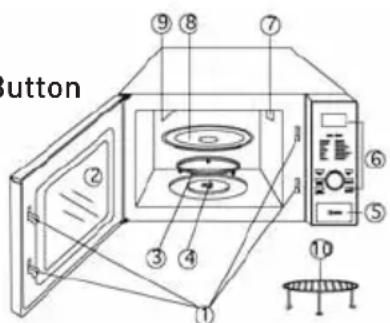
text_image
Button ① ② ③ ④ ⑤ ⑥ ⑦ ⑧ ⑨Specifications
Oven capacity: 23 litres
Voltage: 230V\~50Hz
Output: 900W
Power Consumption: 1400W(Microwave), 1000W(Gril)
Operation Frequency: 2450MHz
Outside Dimensions:
350mm(H)• 508mm(W)• 420mm(D)
Oven Cavity Dimensions: 214mm(H) •
332mm(W) • 346mm(D)
Net Weight: Approx. 16.5 kg
Installation
- Please put the oven out of its box. Leave the oven's inside empty and make sure that there isn't any packaging product or accessory left.
- Check the oven for any damage, such as misaligned or bent door, damaged door seals and sealing surface, broken or loose door hinges and latches and dents inside the cavity or on the door. If there is any damage, do not operate the oven and contact qualified Fakir service.
- This microwave oven must be placed on a flat which is 85 cm higher than the ground, stable surface to hold its weight and the heaviest food likely to be cooked in the oven.
- Do not place the oven where heat, moisture or high humidity are generated, or near combustible metarials.
- Allow 30 cm of space above the oven, 10 cm at back and 5 cm at both sides to keep the sufficient airflow. Do not cover or block any openings on the appliance. Do not remove feet.
- Do not operate the oven without glass tray, roller support and shaft in their proper position.
- Make sure that the power supply cord is undamaged and does not run under the oven or over any hot or sharp surface.
- The socket must be readily accessible so that it can be easily unplugged in an emergency.
- Do not use the oven outdoors.
Radio interference
Please place your oven at least 2 metres away from your radio, TV, or similar equipment like antenna. Operation of the microwave oven can cause interference to your radio, Tv, or similar equipment. When there is interference, it may be reduced or eliminated by taking the following measures:
-
Clean the door and sealing surface of the oven.
-
Reorient the receiving antenna of radio or television.
-
Relocate the microwave oven with respect to the receiver.
-
Move the microwave oven away from the receiver.
-
Plug the microwave oven into a different
outlet so that microwave oven and receiver are on different branch circuits.
Microwave cooking principles
Microwaves are a kind of energy types which are similar to television and radio waves. Arrange food carefully. Place thickest areas towards outside of dish. Watch cooking time. Cook for the shortest amount of time indicated and add more as needed. Food severely overcooked can smoke or ignite. Cover foods while cooking. Covers prevent spattering and help foods to cook evenly. Turn foods over once during microwaving to speed cooking of such foods as chicken and hamburgers. Large items like roasts must be turned over at least once. Rearrange foods as meatballs halfway through cooking both from top to bottom and from the center of the dish to the outside.
Utensils guide
Microwave can not penetrate metal, so metal utensils or dishes with metallic trim should not be used. Microwaves do not Pierce the metal, microwaves reflect from any metal in the oven and causes an electric leap. Many utensils, which are strong and not metal are suitable to operate in the microwave oven. Round/oval dishes rather than square/oblong ones are recommend, as food in corners tends to overcook.
| COOKWARE MICROWAVE GRILL COMBINATION | |||
| Heat-Resistant Glass Yes | Yes Yes | ||
| Non-Heat Resistant Glass | No | No | No |
| Heat Resistant Ceramics | Yes | Yes Yes | |
| Microwave-Safe Plastic Dish | Yes | No | No |
| Kitchen Paper | Yes | No | No |
| Metal Tray No Yes No | |||
| Aluminium Foil | No | Yes No | |
Setting clock time
FOR EXAMPLE: Suppose you want to set the oven clock time to 8:30 (A.M. or P.M.).
- Press Clock/Wei.Adj.buton
- Turn Time/Menu to set 8 o'clock.
- Pres Clock/Wei.Adj. buton.
- Turn time/Menu to set 30 min.
- Press Clock/Wei.Adj. to confirm the setting.
Microwave cooking
For microwave cooking, just pres the Power buton a number of times to select a cooking power level (0-100), and then use the Time/Menu dial to set a desired cooking time. The longest cooking time is 60 minutes.
Select power level by pressing the Power buton.
| PRESS PowerBUTTON DISPLAY COOKING POWER | ||
| once 100 100% | ||
| twice 80 80% | ||
| 3 times 60 60% | ||
| 4 times 40 40% | ||
| 5 times 20 20% | ||
| 6 times (setting timer) 0 0 |
For example, suppose you want to cook for 1 minute at 60% of microwave power.
- Press Stop/Cancel buton to reset the oven.
- Press Power buton 3 times.
- Turn Time/Menu to 1:00.
- Pres Start/Quick Start.
Grill
The longest cooking time is 60 minutes. The gril cooking is particularly useful for thin slices of meat, steaks, chops, kebabs, sausages of piece of chicken. It is also suitable for hot sandwiches and a u gratin dishes.
For example, suppose you want to gril for 12 minutes.
- Press Stop/Cancel button.
- Press Grill button.
- Turn the Time/Menu to 12:00
- Press Start/Quick Start.
Combination 1
The longest cooking time is 60 minutes. 30% time for microwave cooking. %70 for gril cooking. Use for fish, potatoes or a u gratin.
FOR EXAMPLE: Suppose you want to set combination 1 cooking for 25 minutes.
- Press Stop/Cancel button.
- Press Combination button once.
- Turn Time/Menu to 25:00.
- Press Start/Quick Start.
Combination 2
The longest cooking time is 60 minutes. 55% time for microwave cooking, 45% for gril cooking. Use for puddings omelettes, baked potatoes and poultry.
FOR EXAMPLE: Suppose you want to set combination 2 cooking for 12 minutes.
- Press Stop/Cancel button.
- Press Combination button twice.
- Turn Time/Menu to 12:00.
- Press Start/Quick Start.
Auto Cook Menu
For he following foods or cooking operation, you do not need to input cooking power and time. Try to focus on telling the oven what you want to cook and how much the food weighs. You can do so by turning the Time/Menu dial to select a food/operation category, then press the Clock/Wei.Adj. button to indicate the number of servings or approximate weights of food you are about to cook. The oven starts to work after you touching the Start/Quick Start.
You may need to turn food over at the middle of cooking time to obtain uniform cooking.
For example, to cook 300g of pizza.
- Turn Time/Menu dial clockwise to indicate pizza, which is the item 5 on the auto-menu.
- Press Clock/Wei.Adj. button to select the weight or amount of the food.
- Press Start/Quick Start.
Please remember that the result of auto cooking depends on factors such as the shape and size of food, your personnel preference as to the doneness of certain foods an deven how well you happen to place the food in the oven. If you find the result at any rate not quite satisfactory, please adjust the cooking time a little bit accordingly.
Auto Defrost
The oven can be used to defrost meat, poultry and seafood. The defrosting time and powerlevel are automatically set once the food category and the weight are programmed. The frozen food weight ranges from 100g to 1800g.
For example: Suppose you want to defrost 600g of fish.
- Press Stop/Cancel button.
- Turn Time/Menu dial to defrost setting by turning the dial until indicate weight 600g.
- Press Start/Quick Start.
Express Cooking
The oven will operate at HIGH power (100& power output) for EXPRESS cooking program. Just press the Start/Quick Start a number of times to set cooking time, the oven starts working immediately at full power.
Child Lock
Use the prevent unsupervised operation of the oven by little children. To set the CHILD LOCK; Press and hold the Stop/Cancel buton for 3 seconds, a beep sounds and LOCK indicator lights. To cancel the CHILD LOCK; Press and hold the Stop/Cancel buton for 3 seconds until lock indicator on display goes off.
Cleaning and Care:
- Turn off the oven and remove the power plug from the wall socket before cleaning.
- Keep the inside of the oven clean. When food splatters or spilled liquids adhere to oven walls, wipe with a damp cloth. Mild detergent may be used if the oven gets very dirty. Avoid the use of spray and other harsh
cleaners as they may stain, streak or dull the door surface.
-
The outside surfaces should be cleaned with a damp cloth. To prevent damage to the operating parts inside the oven, water should not be allowed to seep into the ventilation surface.
-
Wipe the door and window on both sides, the door seals and adjacent parts frequently with a damp cloth to remove any spills or spatters. Do not use abrasive cleaners.
-
Do not allow the control panel to become wet. Clean with a soft, damp cloth. When cleaning the control panel, leave oven door open to prevent oven from accidentally turning on.
-
If steam accumulates inside or around the outside of the oven door, wipe with a soft cloth. This may occur when the microwave oven is operated under high humidity condition. And it is normal.
-
It is occasionally necessary to remove the glass tray for cleaning. Wash the tray in warm sudsy water or in a dishwasher.
-
The roller ring and oven floor should be cleaned regularly to avoid excessive noise. Simply wipe the bottom surface of the oven with mild detergent. The roller ring may be washed in mild sudsy water or dishwasher. When removing the roller ring from cavity floor for cleaning, be sure to replace in the proper position.
-
Remove odors from your oven by combining a cup of water with the juice and skin of one lemon in a deep microwaveable bowl, microwave for 5 minutes. Wipe thoroughly and dry with a soft cloth.
-
When it becomes necessary to replace the oven light, please consult a qualified Fakir service to have it replaced.
-
The oven should be cleaned regularly and any food deposits removed. Failure to maintain the oven in a clean condition could lead to deterioration of the surface that could adversely affect the life of the appliance and possibly result in a hazardous situation.
-
Please do not dispose this appliance into the domestic rubbish bin, it should be
disposed to the particular disposal center provided by the municipalities.
Control Panel
Menu Action Screen
Cooking time power, action indicators, and clock time are displayed.
Power
Touch this button a number of times to set microwave cooking power level.
Grill
Press this button to set a gril-cooking program up to 60 minutes.
Combination
Cooking with combined microwave and gril power.
Time/Menu
Turn the dial to set the oven clock time and input cooking time.
Turn the Time/Menu dial to select an auto-cooking menu including auto defrost.
Wei. Adj.
After choosing an auto-cooking menu, use it to specify food weights or number of servings.
Clock/Wei. Adj.
Touch this button to set the clock. Touch the set weight of food.
Start/Quick Start
Touch to start a cooking program.
Simply touch it a number of times to set cooking time and cook immediately at full power level.
Stop/Cancel
Press to cancel setting or reset the oven before setting a cooking program.
Press once to temporarily stop cooking, or twice to cancel cooking altogether. It is also used for setting child lock.
Before you call for service, If the oven fails to operate:
- Check to ensure that the oven is plugged in securely. If it is not, remove the plug from the outlet, wait 10 seconds, and plug it in again securely.
- Check to ensure that the control panel is programmed correctly and the timer is set.
- Check to ensure that the door is securely closed engaging the door safety lock system. Otherwise, the microwave energy will not flow into the oven.
Grounding instructions,
This appliance must be grounded. This oven is equipped with a cord having a grounding wire with a grounding plug. It must be plugged into a wall receptacle that is properly installed and grounded. In the event of an electrical short circuit, grounding reduces risk of electric shock by providing an escape wire for the electric current. It is recommended that a separate circuit serving only the oven be provided. Using a high voltage is dangerous and may result in a fire or other accident causing oven damage.
WARNING: Improper use of the grounding plug can result in a risk of electric shock.
Note:
If you have any questions about the grounding or electrical instructions, consult an authorized Fakir service. Neither the manufacturer not the dealer can accept any liability for damage to the oven or personnel injury resulting from failure to observe the electrical connection procedures.