
Sonicare HealthyWhite HX6754 - Electric toothbrush PHILIPS - Free user manual and instructions
Find the device manual for free Sonicare HealthyWhite HX6754 PHILIPS in PDF.


| Product type | Electric toothbrush |
| Model | Sonicare HealthyWhite HX6754 |
| Brand | Philips |
| Brushing modes | Clean, Sensitive, Clean & White |
| Timer | Smartimer (2 min), Quadpacer (4 x 30 sec intervals) |
| Easy-start feature | Yes, gradual power increase over first 14 uses |
| Charge indicator | Deluxe: solid green (50-100%), flashing green (10-49%), flashing yellow (<10%); Standard: solid green (50-100%), flashing green (<50%) |
| Charging time | 24 hours for full charge |
| Input voltage | 100-240 V AC, 50-60 Hz |
| Battery type | Lithium-ion (typical) |
| Water resistance | Handle: water-resistant (can be rinsed) |
| Brush head replacement | Every 3 months |
| UV sanitizer (select models) | 10-minute sanitizing cycle, UV-C light |
| Dimensions (handle) | Approx. 2.5 x 1.5 x 10 cm (width x depth x height) |
| Weight (handle) | Approx. 130 g |
| Accessories included | Brush head, travel cap, color code ring, charger, UV sanitizer (select models) |
| Compatibility | Only Sonicare snap-on brush heads |
| Safety certifications | Compliant with safety standards for electromagnetic devices |
| Warranty | 2 years from date of purchase |
| Disposal | Recycle at official collection points |
Frequently Asked Questions - Sonicare HealthyWhite HX6754 PHILIPS
User questions about Sonicare HealthyWhite HX6754 PHILIPS
0 question about this device. Answer the ones you know or ask your own.
Ask a new question about this device
Download the instructions for your Electric toothbrush in PDF format for free! Find your manual Sonicare HealthyWhite HX6754 - PHILIPS and take your electronic device back in hand. On this page are published all the documents necessary for the use of your device. Sonicare HealthyWhite HX6754 by PHILIPS.
USER MANUAL Sonicare HealthyWhite HX6754 PHILIPS
Always here to help you / 始终如一地为您提供帮助
Register your product and get support at / 请登录以下网址并得到相应的帮助
www.philips.com/welcome

HealthyWhite


natural_image
Simple line drawing of an open book with a grid on the left and a closed page on the right (no text or symbols)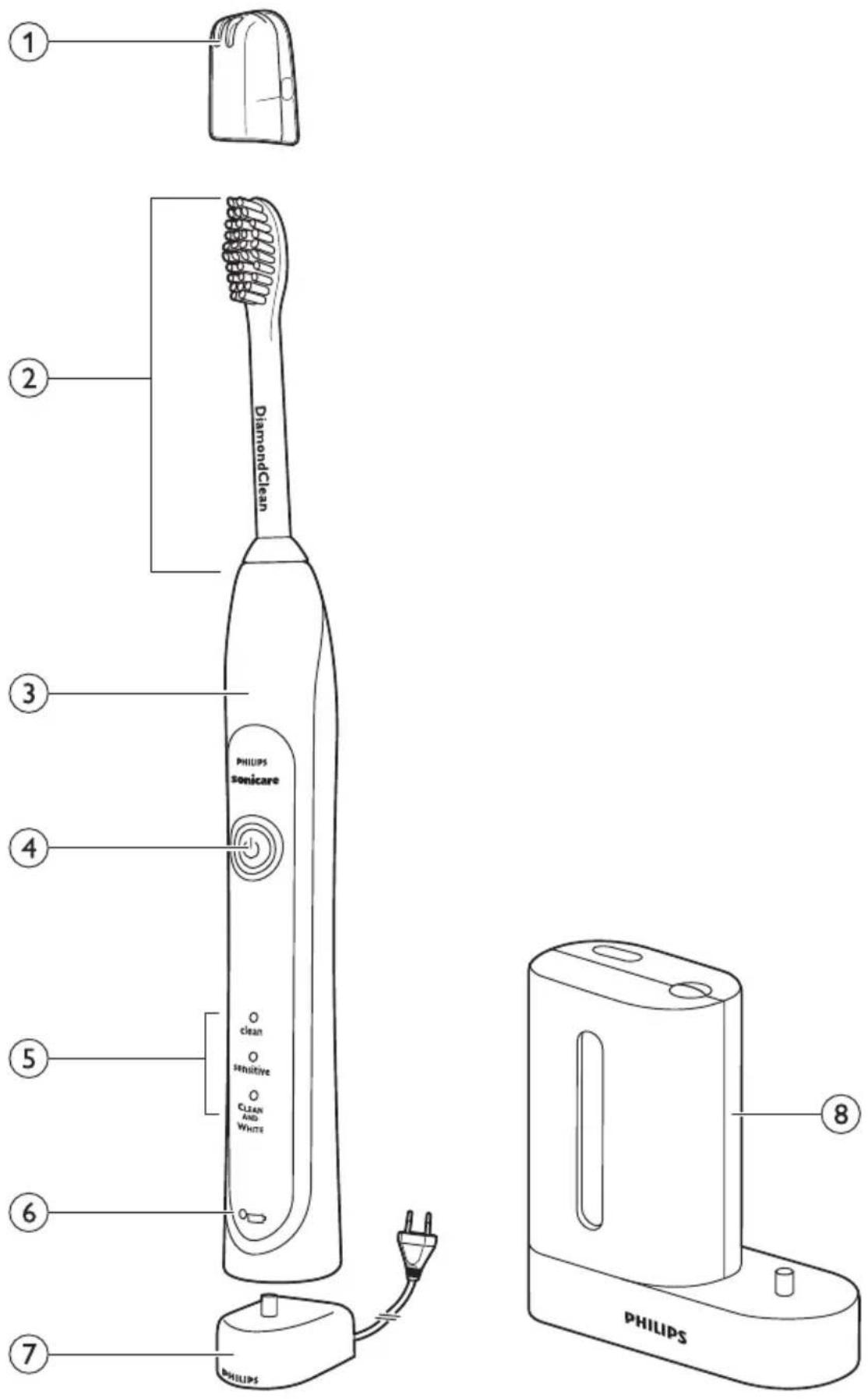
ENGLISH 6
한국어 17
繁體中文 28
简体中文 38
IMPORTANT SAFEGUARDS
READ ALL INSTRUCTIONS BEFORE USE
DANGERS
To reduce the risk of electrocution:
1 Do not place or store the product where it can fall or be pulled into a tub or sink.
2 Do not place the product in or drop it into water or any other liquid.
3 Do not reach for a product that has fallen into water. Unplug immediately.
4 Do not use the product while bathing.
WARNINGS
To reduce the risk of burns, electrocution, fire to persons:
1 Discontinue use if this product appears damaged in any way (brush head, handle, charger and sanitizer). This product contains no user-serviceable parts. Refer to chapter 'Warranty and support' if your Sonicare no longer works properly or needs repair.
2 Never use the charger or sanitizer if it has a damaged cord or plug.
3 Keep the cord away from heated surfaces.
4 Do not use the charger or sanitizer outdoors.
5 Do not use the charger or sanitizer if dropped into water.
6 This product is designed to clean your teeth, gums and tongue only. Use this product only for its intended use as described in this booklet. Discontinue use of this product and contact a physician/dentist if discomfort or pain is experienced.
7 This appliance is not intended for use by persons (including children) with reduced physical, sensory or mental capabilities, or lack of experience and knowledge, unless they have been given supervision or instruction concerning use of the appliance by a person responsible for their safety.
8 Children should be supervised to ensure that they do not play with the appliance.
9 Do not use attachments other than those recommended by the manufacturer.
10 If your toothpaste includes peroxide, baking soda or other bicarbonate (common in whitening toothpastes), thoroughly clean your brush head and handle with soap and water after each use. Otherwise plastic cracking may occur.
11 To avoid damage to the product, do not place the brush head, handle, sanitizer, charger or charger covers in the dishwasher for cleaning.
12 Discontinue use of the sanitizer if the UV light bulb remains on when the door is open. UV light can be harmful to the human eye and skin. Keep the sanitizer out of the reach of children at all times.
13 Do not operate the UV sanitizer without the protective screen in place to avoid contact with hot bulb.
14 The UV light bulb is hot during and immediately after the sanitizing cycle. Do not touch the UV light bulb when it is hot.
15 Do not operate the UV sanitizer where aerosol (spray) products are being used or where oxygen is being administered.
16 If the sanitizer is used for 3 consecutive UV clean cycles (i.e., 3 times in a row) a minimum of 30 minutes 'Off Time' is required before you start another UV clean cycle.
MEDICAL WARNINGS
1 Consult your dental professional before you use this product if you have had oral or gum surgery in the previous 2 months.
2 Contact your dental professional if excessive bleeding occurs after using this product or bleeding continues to occur after 1 week of use.
3 If you have a pacemaker or other implanted device contact your physician or the device manufacturer prior to use.
4 Sonicare has been tested and is compliant with safety standards for electromagnetic devices.
5 Consult your physician prior to using the Sonicare if you have medical concerns.
SAVE THESE INSTRUCTIONS
Your Sonicare (Fig. 1)
1 Hygienic travel cap
2 Brush head
3 Interchangeable color code ring
4 Handle with soft grip
5 Power on/off button
6 Brushing modes
7 Charge light indicator
- Deluxe charge indicator (select models)
- Standard charge indicator (select models)
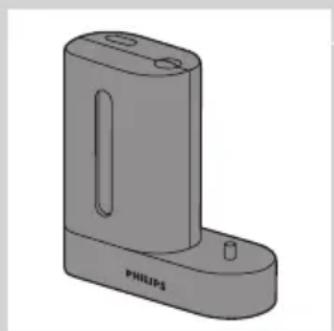
8 UV sanitizer with integrated charger and cord wrap (select models)
- Not shown: UV light bulb
- Not shown: Sanitizer drip tray
- Not shown: Protective screen for UV light bulb
Note: The contents of the box vary based on model purchased
Getting started
Changing the color code ring
Sonicare brush heads come with interchangeable color code rings to identify your brush head.
To change the color code ring:
1 Pull the color code ring from the bottom of the brush head.

natural_image
Illustration of a hand holding a screwdriver with an arrow indicating direction, alongside a separate ring and washer (no text or symbols)ENGLISH8

natural_image
Diagram of a hand holding a tool with arrows indicating force or movement (no text or symbols present)2 Install a new ring by slipping one edge of the new ring over the bottom of the brush head. Then press down on the other side to snap the ring into place.
Attaching the brush head

natural_image
Illustration of a hand using an electric toothbrush to apply a tip, with no text or symbols present.1 Align the brush head so the bristles face the front of the handle.
2 Firmly press the brush head down onto the metal shaft until it stops.
Note: There is a small gap between the color code ring and the handle.

natural_image
Simple line drawing of a lamp with a star-shaped base and cable (no text or symbols)Charging your Sonicare
1 Plug the charger into a live outlet.
2 Place the handle on the charger.
The battery charge indicator next to the battery symbol flashes to indicate that the toothbrush is charging.
Battery charge indicator
The battery charge indicator shows the approximate remaining battery charge.
Deluxe charge indicator (select models):
- Solid green: 50-100%
- Flashing green: 10-49%
- Flashing yellow: less than 10%
Standard charge indicator (select models):
- Solid green: 50-100%
- Flashing green: less than 50%
Note: When the battery of your Sonicare is low, you hear 3 beeps after the completion of the brushing cycle and the battery charge indicator flashes for 30 seconds.
Note: To keep the battery fully charged, you may keep your Sonicare on the charger when not in use. It takes 24 hours to fully charge the battery.
Using your Sonicare
Brushing instructions

natural_image
Illustration of a dental tool interacting with teeth (no text or symbols present)
flowchart
graph TD
    A["Step 1: Tooth arrangement"] --> B["Step 2: Stent placement"]
    B --> C["Step 3: Brush removal"]
    C --> D["Step 4: Stent placement"]
    D --> E["Step 5: Stent placement"]

natural_image
Illustration of a toothbrush brushing teeth with surrounding bone structure (no text or symbols)
natural_image
Illustration of a human mouth with teeth and a toothbrush touching the lower lip (no text or symbols)1 Wet the bristles and apply a small amount of toothpaste.
2 Place the toothbrush bristles against the teeth at a slight angle towards the gumline.
3 Press the power on/off button to turn on the Sonicare.
4 Apply light pressure to maximize Sonicare's effectiveness and let the Sonicare toothbrush do the brushing for you.
5 Gently move the brush head slowly across the teeth in a small back and forth motion so the longer bristles reach between your teeth. Continue this motion throughout your brushing cycle.
Note: To make sure you brush evenly throughout the mouth, divide your mouth into 4 sections using the Quadpacer feature (see chapter 'Features').
6 Begin brushing in section 1 (outside top teeth) and brush for 30 seconds before moving to section 2 (inside top teeth). Continue brushing in section 3 (outside bottom teeth) and brush for 30 seconds before moving to section 4 (inside bottom teeth).
7 After you have completed the brushing cycle, you can spend additional time brushing the chewing surfaces of your teeth and areas where staining occurs. You may also brush your tongue, with the toothbrush turned on or off, as you prefer.
Your Sonicare is safe to use on:
- Braces (brush heads wear out sooner when used on braces)
- Dental restorations (fillings, crowns, veneers)
- Braces (brush heads wear out sooner when used on braces) - Dental restorations (fillings, crowns, veneers)
Note: The toothbrush may be turned off at any time by pressing and holding the power on/off button for 2 seconds.
Clean and White mode brushing instructions
The Clean and White mode combines 2 minutes of Clean mode for a whole mouth clean, with an additional 30 seconds of White mode to focus on the visible front teeth.
1 Brush the first 2 minutes as instructed in steps 1-6 above.
2 After the 2 minutes of Clean mode, the White mode begins with a change in brushing sound and motion. That is your signal to start brushing the upper front teeth for 15 seconds
3 At the next beep and pause, move to the bottom front teeth for the final 15 seconds of brushing.
Brushing modes
Sonicare automatically starts in the default Clean mode. To select a different brushing mode:
1 Press the on/off button to toggle between modes.
The green LED indicates the selected mode.
Note: You can only switch between modes when the toothbrush is turned on.
Clean mode
Standard mode for superior teeth cleaning.
Sensitive mode (select models)
Gentle, yet thorough cleaning for sensitive gums and teeth.
Clean and White mode
2 minutes of Clean mode, with an additional 30 seconds of White mode to focus on your visible front teeth.
Note: When Sonicare is used in clinical studies, the default 2-minute Clean mode must be selected. However, in whitening/stain reduction studies, the Clean and White mode must be selected. The handle should be fully charged and the Easy-start feature deactivated.
Features
Easy-start
- This Sonicare model comes with the Easy-start feature activated.
- The Easy-start feature gently increases power over the first 14 brushings to ease into the Sonicare experience.
Note: Each of the first 14 brushings must be at least 1 minute in length to move through the Easy-start ramp-up cycle properly.
Note: When the Clean and White mode is selected, the Easy-start feature is inactive.
Deactivating or activating the Easy-start feature
1 Attach your brush head to the handle.
2 Place the handle in the plugged-in charger.
- To deactivate Easy-start:
Press and hold the power on/off button for 2 seconds. You hear 1 beep to indicate that the Easy-start feature has been deactivated.
- To activate Easy-start:
Press and hold the power on/off button for 2 seconds. You hear 2 beeps to indicate that the Easy-start feature has been activated.
Note: Using the Easy-start feature beyond the initial ramp-up period is not recommended and reduces Sonicare's effectiveness in removing plaque.
Smartimer
The Smartimer indicates that your brushing cycle is complete by automatically turning off the toothbrush at the end of the brushing cycle. Dental professionals recommend brushing no less than 2 minutes twice a day. If you want to pause or stop brushing during your 2-minute cycle, press and hold the power on/off button for 2 seconds. Press the power on/off button again and the Smartimer picks up where you left off.
The Smartimer automatically resets to the beginning of a 2-minute cycle if:
- brushing is paused for 30 seconds or longer.
- the handle is returned to the charger.
Quadpacer (select models)

- The Quadpacer is an interval timer that has a short beep and pause to remind you to brush the 4 sections of your mouth evenly and thoroughly.
- When you use the two-minute Clean or Sensitive mode, you hear a short beep and a pause in brushing action at 30, 60 and 90 second intervals.
- When you use the Clean and White mode, you hear and feel a change in the brush head sound and motion after 2 minutes of Clean mode. Then move the brush head to the visible top front teeth and brush them for 15 seconds. At the final beep and pause, move to the visible bottom teeth and brush them for 15 seconds.
Cord wrap on deluxe charger (select models)
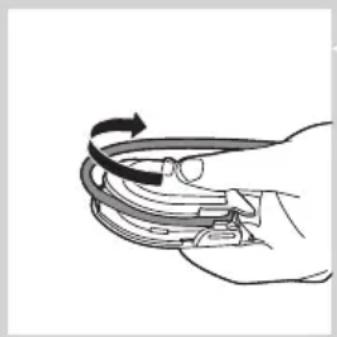
If your model includes the deluxe charger cover and base, the travel charger is pre-installed inside the cover. If you want to shorten the power cord, you can store excess cord in the cord wrap feature built into the charger base.

natural_image
Diagram of a mechanical device with a top component and internal components, no visible text or symbols1 To separate the charger cover from the charger base, press the two gray snap bars on the charger base and pull the white charger cover upwards.
ENGLISH ^12
natural_image
Illustration of a hand holding a curved mechanical component with an arrow indicating rotational motion (no text or symbols)
natural_image
Line drawing of hands connecting a cable to a connector (no text or symbols)2 Wrap excess power cord around the gray charger base as shown in the picture. Be sure to wrap the cord on the inside of the two snap levers.
3 When you have stored the excess cord, guide the power cord through the small groove in the rear of the gray charger base.
4 Reattach the charger cover by pressing it down over the charger base until it snaps into place.
Tip: For extra convenience during travel, you can remove the travel charger and use it without the charger cover and charger base.
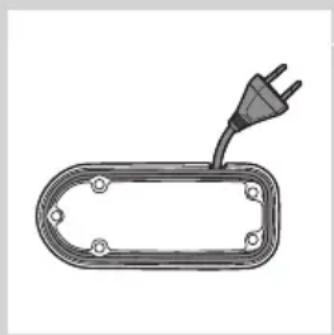
Cord wrap on sanitizer with integrated charger (select models)
natural_image
Diagram of a plug inserted into an electrical socket (no text or symbols)1 If your model includes the sanitizer, you can store excess cord using the cord wrap feature built into the bottom of the sanitizer.
Sanitizing (select models)
natural_image
3D rendering of a mechanical component with a labeled part 'PHILIPS' (no other text or symbols)- With the UV sanitizer you can clean your brush head after every use.
Unplug the sanitizer, discontinue use and call Consumer Care if:
- The UV light bulb remains on when the door is open.
- The window is broken or missing from the sanitizer.
- The sanitizer gives off smoke or a burning smell while it is operating.
Note: UV light can be harmful to the human eye and skin. This device should be kept out of reach of children at all times.
1 After brushing, rinse the brush head and shake off excess water.
Do not place the travel cap on the brush head during sanitization.
2 Place your finger in the door recess on top of the sanitizer and pull open the door.

natural_image
Hand holding a pen inserted into a cylindrical device with an arrow indicating left motion (no text or symbols)
natural_image
Line drawing of a Philips device with open lid and internal components (no text or symbols)3 Place the brush head on one of the 2 pegs in the sanitizer with the bristles facing the light bulb.
Note: Only clean Sonicare snap-on brush heads in the sanitizer.
Note: Do not clean Sonicare for Kids brush heads in the sanitizer.
4 Make sure the sanitizer is plugged into a live outlet of appropriate voltage.
5 Close the door and press the green power on/off button once to select the UV clean cycle.
Note: You can only turn on the sanitizer if the door is properly closed.
Note: The sanitizer stops if you open the door during the sanitizing cycle.
Note: The sanitizer cycle runs for 10 minutes and then automatically shuts off. ▶The sanitizer is in operation when the light glows through the window.
Cleaning
Do not clean the brush heads, handle, charger, charger covers or the UV sanitizer in the dishwasher.
Toothbrush handle
natural_image
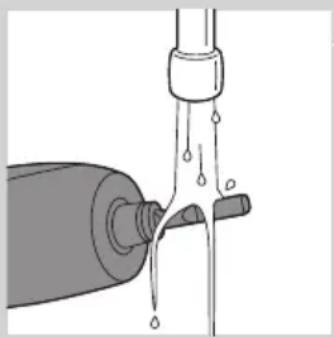
Illustration of a water droplet being poured into a bottle (no text or symbols)1 Remove the brush head and rinse the metal shaft area with warm water.
Do not push on the rubber seal on the metal shaft with sharp objects, as this may cause damage.
2 Use a damp cloth to wipe the entire surface of the handle.
Brush head

natural_image
Diagram of mechanical components with no visible text or symbols1 Rinse the brush head and bristles after each use.
2 Remove the brush head from the handle and rinse the brush head connection at least once a week with warm water.
Charger
1 Unplug the charger before cleaning.
2 Use a damp cloth to wipe the surface of the charger.
UV sanitizer (select models)

natural_image
Illustration of a hand inserting a component into an open device (no text or symbols visible)Do not immerse the sanitizer in water or rinse it under the faucet.
Do not clean the sanitizer when the UV light bulb is hot.
For optimal effectiveness, it is recommended to clean your sanitizer weekly.
1 Unplug the sanitizer.
2 Pull the drip tray straight out. Rinse the drip tray and wipe it clean with a damp cloth.
3 Clean all interior surfaces with a damp cloth.

natural_image
Technical line drawing of a mechanical component with internal structure and directional arrow (no text or symbols)4 Remove the protective screen in front of the UV light bulb.
To remove the screen, grasp the edges next to the snaps, gently squeeze and pull out the protective screen.
5 Remove the UV light bulb.
To remove the light bulb, grasp it and pull it out of the metal clasp.
6 Clean the protective screen and the UV light bulb with a damp cloth.
7 Reinsert the UV light bulb.
To reinsert the light bulb, align the bottom of the light bulb with the metal clasp and push the bulb into the clasp.
8 Reinsert the protective screen.
To reinsert the screen, align the pegs on the screen with the slots on the reflective surface near the UV light bulb. Push the screen straight into the slots on the sanitizer.
Storage
- If you are not going to use the product for an extended period of time, unplug it from the electrical outlet, clean it and store it in a cool and dry place away from direct sunlight. You can use the cord wrap (select models) to store the power cord in an organized manner.
- You can store brush heads on the pegs at the back of the charger.
Replacement
Brush head
- Replace Sonicare brush heads every 3 months to achieve optimal results.
- Use only compatible Sonicare replacement brush heads.
UV light bulb
- To purchase replacement UV light bulbs, contact your local Philips Consumer Care Center.
| Disposal | |
| Do not throw away the appliance with the normal household waste at the end of its life, but hand it in at an official collection point for recycling. By doing this, you help to preserve the environment. | |
| Warranty and support | |
| Philips guarantees its products for two years after the date of purchase. Defects due to faulty materials and workmanship will be repaired or replaced at Philips expense provided that convincing proof of purchase in the qualifying period is provided. Contact your local Philips Consumer Care Center.WARRANTY EXCLUSIONS | |
| What is not covered under warranty:- Brush heads- Damage caused by misuse, abuse, neglect, alterations or unauthorized repair.- Normal wear and tear, including chips, scratches, abrasions, discoloration or fading.- UV light bulbIMPLIED WARRANTIES | |
| ANY IMPLIED WARRANTIES, INCLUDING IMPLIED WARRANTIES OF MERCHANTABILITY AND FITNESS FOR A PARTICULAR PURPOSE, SHALL BE LIMITED TO THE DURATION OF THE EXPRESS WARRANTIES SET FORTH ABOVE. IN SOME STATES LIMITATIONSON DURATION OF IMPLIED WARRANTIES DO NOT APPLY.LIMITATION OF REMEDIES | |
| IN NO EVENT SHALL PHILIPS OR ANY OF ITS AFFILIATED OR SUBSIDIARY COMPANIES BE LIABLE FOR ANY SPECIAL, INCIDENTAL OR CONSEQUENTIAL DAMAGES BASED UPON BREACH OF WARRANTY, BREACH OF CONTRACT, NEGLIGENCE, TORT, OR AN OTHER LEGAL THEORY. SUCH DAMAGES INCLUDE, WITHOUT LIMITATION, LOSS OF SAVINGS OR REVENUE; LOSS OF PROFIT; LOSS OF USE; THE CLAIMS OF THIRD PARTIES INCLUDING, WITHOUT LIMITATION, DENTISTS AND DENTAL HYGIENISTS; AND COST OF ANY SUBSTITUTE EQUIPMENT OR SERVICES. SOME STATES DO NOT ALLOW THE EXCLUSION OR LIMITATION OF INCIDENTAL OF CONSEQUENTIAL DAMAGES. | |
Frequently asked questions
This chapter lists the questions most frequently asked about the appliance. If you cannot find the answer to your question, contact the Consumer Care Center in your country.
Question Answer
| Why doesn't the Sonicare work? You may need to recharge the Sonicare. Charge the Sonicare for at least 24 hours. | |
| Make sure that your Sonicare charger is plugged into a live electrical outlet and not into an outlet controlled by a light switch. | |
| You may need to reattach or replace the brush head. | |
| Why do I feel a tickling sensation when I use the Sonicare? | You may experience a slight tickling/tingling sensation when you use the Sonicare for the first time. As you become accustomed to brushing with Sonicare, this sensation diminishes. |
| The brush head chatters against my teeth. What can I do about this? | To avoid this, keep the brush head properly oriented, with the bristles placed on the gumline at a slight angle. |
| Why does the Sonicare seem less powerful? | You may need to charge the Sonicare. |
| The Easy-start feature may be on. Deactivate the Easy-start feature (See chapter 'Features'). | |
| You may need to replace your brush head. | |
| Why does the Sonicare seem to change power during brushing? | You may be in the Clean and White brushing mode. If this is the case, the toothbrush starts in the Clean mode for 2 minutes and then changes to the White mode for 30 seconds. The Clean and White mode has a different sound and brush movement. |
| Do I need a special charger if I travel with my Sonicare? | Travel tip: the Sonicare charger can be used with common worldwide voltages between 100-240V AC, at either 50 or 60Hz. A simple plug adapter is all that is required. |
| Why doesn't the UV sanitizer light go on? | You may need to plug the sanitizer into a live outlet. |
| You may need to shut the door of the sanitizer. | |
| You may need to replace the UV light bulb (see chapter 'Replacement'). | |
중요 안전 지침
natural_image
Illustration of a hand holding a screwdriver with an arrow indicating direction, alongside a separate diagram showing a washer and ring (no text or symbols)natural_image
Diagram of a hand holding a tool with arrows indicating force or movement (no text or symbols present)natural_image
Illustration of a hand using an electric toothbrush to apply a tip, with no text or symbols present.natural_image
Simple line drawing of a lamp or bulb with a star-shaped base and cable (no text or symbols)natural_image
Illustration of a dental tool interacting with teeth (no text or symbols present)
flowchart
graph TD
    A["Step 1: Tooth removal"] --> B["Step 2: Tooth removal"]
    B --> C["Step 3: Tooth removal"]
    C --> D["Step 4: Tooth removal"]
    D --> E["Step 5: Tooth removal"]

natural_image
Illustration of a toothbrush brushing teeth with a toothbrush touching the surface (no text or symbols)
natural_image
Illustration of a human mouth with teeth and a toothbrush touching the lower lip (no text or symbols)flowchart
graph TD
    A["Step 1: Tooth removal"] --> B["Step 2: Tooth removal"]
    B --> C["Step 3: Tooth removal"]
    C --> D["Step 4: Tooth removal"]
    D --> E["Step 5: Tooth removal"]
    E --> F["Step 6: Tooth removal"]
    F --> G["Step 7: Tooth removal"]
    G --> H["Step 8: Tooth removal"]
natural_image
Illustration of a human mouth with teeth and a toothbrush touching the lower lip area (no text or symbols)natural_image
Diagram of a mechanical device with a top component and internal components, no visible text or symbolsnatural_image
Illustration of a hand holding a curved mechanical component with a black arrow indicating rotational motion (no text or symbols)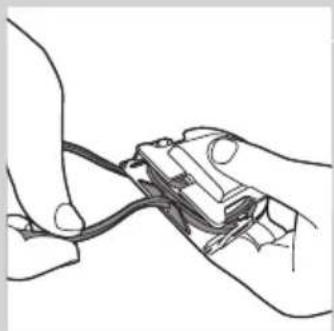
natural_image
Line drawing of hands connecting a cable to a connector (no text or symbols)natural_image
Simple line drawing of an electrical plug inserted into a rounded rectangular housing (no text or symbols)natural_image
3D rendering of a handheld electronic device with a slot and mounting bracket (no text or symbols visible)natural_image
Hand holding a cylindrical object with a black arrow pointing to it, no visible text or symbolsnatural_image
Line drawing of a medical device with a transparent casing and internal components (no text or symbols)natural_image
Diagram of a mechanical device pouring liquid into a bottle (no text or symbols)natural_image
Diagram of mechanical components with no visible text or symbolsnatural_image
Illustration of a hand inserting a component into an open device (no text or symbols visible)natural_image
Diagram showing a hand holding a tool with an arrow indicating direction, alongside a separate ring and a diagonal line (no text or symbols)繁體中文30

natural_image
Illustration of a hand holding a pen with arrows indicating force or movement (no text or symbols)natural_image
Illustration of a hand using a toothbrush to apply a single tooth (no text or symbols present)natural_image
Simple line drawing of a lamp or bulb with a star-shaped base and cable (no text or symbols)natural_image
Illustration of a dental tool interacting with teeth (no text or symbols present)
flowchart
graph TD
    A["Step 1: Tooth arrangement"] --> B["Step 2: Stent placement"]
    B --> C["Step 3: Brush removal"]
    C --> D["Step 4: Stent placement"]
    D --> E["Step 5: Stent placement"]

natural_image
Illustration of a toothbrush brushing teeth with multiple teeth (no text or symbols)
natural_image
Illustration of a human mouth with teeth and a toothbrush touching the lower lip (no text or symbols)natural_image
Line drawing of a human mouth with teeth and a toothbrush touching the lower lip (no text or symbols)natural_image
Diagram of a mechanical device with a top component and internal components, no visible text or symbolsnatural_image
Illustration of a hand holding a curved object with an arrow indicating rotation (no text or symbols)natural_image
Line drawing of a hand holding a small electronic component with wires (no text or symbols)natural_image
Line drawing of an electrical plug inserted into a rectangular housing (no text or symbols)natural_image
3D rendering of a mechanical part with two holes and a labeled 'PHILIPS' (no other text or symbols)natural_image
Hand holding a cylindrical object with a black arrow pointing to it, no visible text or symbolsnatural_image
Illustration of a water tap with liquid flowing from a bottle (no text or symbols)1 取下刷頭,用溫水沖洗金屬軸部分。
natural_image
Diagram of mechanical components with no visible text or symbolsnatural_image
Illustration of a hand inserting a component into an open electrical switch (no text or symbols visible)natural_image
Technical line drawing of a mechanical component with internal structure and directional arrow (no text or symbols)4 取下紫外線燈泡前方的護網。
natural_image
Illustration of a hand holding a tool with an arrow indicating direction, alongside a separate ring and a separate washer (no text or symbols)natural_image
Illustration of a hand holding a pen with arrows indicating force or movement (no text or symbols)natural_image
Illustration of a hand using an electric toothbrush to apply a tip, with no text or symbols present.natural_image
Simple line drawing of a lamp with a star-shaped base and cable, no text or symbols present1 将充电器插入带电的插座。
2 将牙刷手柄放在充电器上。
natural_image
Illustration of a dental tool interacting with teeth (no text or symbols present)natural_image
Illustration of a toothbrush brushing teeth with multiple teeth (no text or symbols)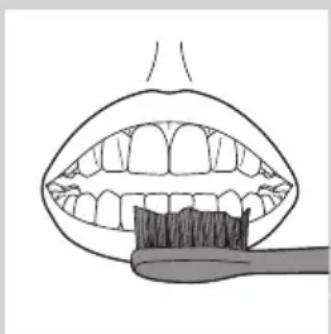
natural_image
Illustration of a human mouth with teeth and a toothbrush touching the lower lip (no text or symbols)natural_image
Illustration of a human mouth with teeth and a toothbrush touching the lower lip (no text or symbols)natural_image
Diagram of a mechanical device with a top component and internal components, no visible text or symbolsnatural_image
Illustration of a hand holding a device with a curved arrow indicating rotation (no text or symbols)natural_image
Line drawing of hands connecting wires to a mechanical component (no text or symbols)natural_image
Line drawing of a plug inserted into an open electrical enclosure (no text or symbols)natural_image
3D rendering of a mechanical component with a labeled part (PHILIPS) and two circular holes, no text or symbols beyond the label.natural_image
Hand holding a cylindrical object with a black arrow pointing to it, no visible text or symbolsnatural_image
Line drawing of a handheld toothbrush device with open lid and base (no text or symbols)natural_image
Diagram of a mechanical device pouring liquid into a bottle (no text or symbols)1 卸下牙刷头并用温水冲洗金属轴。
natural_image
Diagram of mechanical components with no visible text or symbols1 每次刷牙后冲洗牙刷头和刷毛。
natural_image
Illustration of a hand inserting a plug into an open electrical socket (no text or symbols visible)natural_image
Empty white rectangle with black border (no text or symbols)발행일자:2014/07/22
發行日期:2014/07/22
发行日期:: 2014/07/22
www.philips.com/Sonicare
©2014 Koninklijke Philips N.V. (KPNV). All rights reserved. PHILIPS and the Philips shield are registered trademarks of KPNV. Sonicare and the Sonicare logo are trademarks of Philips Oral Healthcare, Inc. and/or KPNV.
Protected by U.S. and international patents.
Other patents pending. Reg. U.S. Pat. & Tm. Off
受美国和国际专利的保护。
其它专利正在申请。美国专利及商标局。

100% recycled paper
100% 循环再造纸



- Always here to help you / 始终如一地为您提供帮助
- HealthyWhite
- IMPORTANT SAFEGUARDS
- READ ALL INSTRUCTIONS BEFORE USE
- DANGERS
- WARNINGS
- MEDICAL WARNINGS
- SAVE THESE INSTRUCTIONS
- Your Sonicare (Fig. 1)
- Getting started
- Changing the color code ring
- ENGLISH8
- Attaching the brush head
- Charging your Sonicare
- Battery charge indicator
- Using your Sonicare
- Brushing instructions
- Clean and White mode brushing instructions
- Brushing modes
- Clean mode
- Sensitive mode (select models)
- Clean and White mode
- Features
- Easy-start
- Deactivating or activating the Easy-start feature
- Smartimer
- Quadpacer (select models)
- Cord wrap on deluxe charger (select models)
- ENGLISH 12
- Cord wrap on sanitizer with integrated charger (select models)
- Sanitizing (select models)
- Unplug the sanitizer, discontinue use and call Consumer Care if:
- Cleaning
- Toothbrush handle
- Brush head
- Charger
- UV sanitizer (select models)
- Storage
- Replacement
- UV light bulb
- Frequently asked questions
- 繁體中文30
- 取下紫外線燈泡前方的護網。
Brand : PHILIPS
Model : Sonicare HealthyWhite HX6754
Category : Electric toothbrush