GTQ718 - Kibao Growing - Free user manual and instructions
Find the device manual for free GTQ718 Growing in PDF.


User questions about GTQ718 Growing
0 question about this device. Answer the ones you know or ask your own.
Ask a new question about this device
Download the instructions for your Kibao in PDF format for free! Find your manual GTQ718 - Growing and take your electronic device back in hand. On this page are published all the documents necessary for the use of your device. GTQ718 by Growing.
USER MANUAL GTQ718 Growing
Changing People's Life


natural_image
Back view of a black electronic device with ports and buttons (no visible text or symbols)8.6 mm
Tablet PC GTQ718
User Manual – English
Pag. 28 - 51
Manual do Utilizador
GTQ718
PORTUGUÊS
Índice
- Introdução .... 5
Chipset Allwinner A31s
Changing People's Life
The Growing Company S.A.
Rua da Argila, 620 | 4445-027 Alfena | Portugal

www.mygrowing.com
Changing People's Life
The Growing Company S.A.
Rua da Argila, 620 | 4445-027 Alfena | Portugal

www.mygrowing.com

PME lider 13
GROWING
Changing People's Life
The Growing Company S.A.
Rua da Argila, 620 | 4445-027 Alfena | Portugal

www.mygrowing.com
Changing People's Life
The Growing Company S.A.
Rua da Argila, 620 | 4445-027 Alfena | Portugal

www.mygrowing.com
5.2 Desinstalar
Changing People's Life
The Growing Company S.A.
Rua da Argila, 620 | 4445-027 Alfena | Portugal

www.mygrowing.com
7. Musica
Changing People's Life
The Growing Company S.A.
Rua da Argila, 620 | 4445-027 Alfena | Portugal

www.mygrowing.com


Pausar
Álbum
Lista de Reprodução
Repetir musica (s)
Reproduzir próxima
Reproduzir
Changing People's Life
The Growing Company S.A.
Rua da Argila, 620 | 4445-027 Alfena | Portugal

www.mygrowing.com
10. Câmera
natural_image
Digital camera interface showing a black screen with a red abstract background and control buttons (no readable text or symbols)natural_image
Digital camera interface showing a blue abstract background with control buttons and a red indicator light (no readable text or symbols)Changing People's Life
The Growing Company S.A.
Rua da Argila, 620 | 4445-027 Alfena | Portugal

www.mygrowing.com
All logos & trade marks are properties of the respective companies
Changing People's Life
The Growing Company S.A.
Rua da Argila, 620 | 4445-027 Alfena | Portugal

www.mygrowing.com
User Manual
GTQ718
ENGLISH
Index
- Introduction ...... 30
1.1 Content details of your GROWING Tablet. 30
1.2 Specifications of the GROWING Tablet 30
- Basic Operations ...... 31
2.1 Unlock Screen....31
2.2 Work Environment....31
2.3 Introduction to the main menu buttons 33
- Applications.... 34
3.1 List....34
3.2 Widgets ....34
3.3 Establish and control the desktop icons 35
3.4 Deleting the shortcut to an application desktop 35
3.5 Change the image of the desktop 36
- Connecting to the computer .... 37
- Management applications.... 38
5.1 Install....38
5.2 Uninstall....39
- Video 39
- Music....40
-
Recording Function 42
-
Settings.... 43
9.1 Wireless Networks and Other 43
9.2 Device 43
9.3 Personnel 43
9.4 Accounts....43
9.5 System 43
- Camera
10.1 Capture Photo 44
10.2 Video Capture 45
- Setting Wireless Networks 46
- Setting 3G Network ...... 47
- List of compatible 3G handsets .... 48
- Warranty 49
- EC-Declaration of Conformity 51
1. Introduction
1.1 Content details of your GROWING Tablet.
Each unit will have the following items:
• 1 x Tablet PC GROWING
- 1 x Adaptor
- 1 x USB cable
- 1 x USB OTG
- 1 x User Manual
1.2 Specifications of the GROWING Tablet
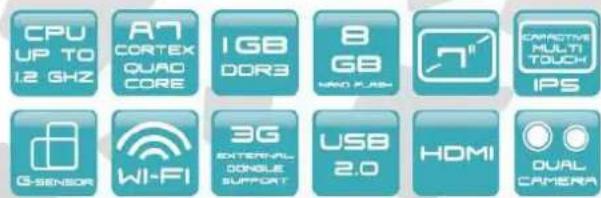
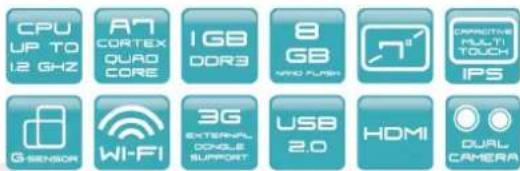
Chipset Allwinner A31s
Processor up to 1.2 GHz
Cortex A7 Quad Core
O.S. Android 4.2
1 GB DDR3 RAM
Supports 3D and
OpenGL ES 1.1/2.0 and OpenVG 1.1
8 GB Nand Flash internal memory
Micro SD slot expandable up to 32GB
Wi-Fi 802.11 b/g/n
Micro USB 2.0/USB 1.1
Mini HDMI 1080p
Sensors: Gyroscope, Accelerometer
3D Accelerated game
3.5 Audio jack for headphones
Stereo speakers for high fidelity
Built-in microphone
Built-in frontal Webcam 0.3 Mp
Built-in Rear Webcam 2.0 Mp
Screen size 7 inches HD IPS
1024x600 Resolution
Support external 3G Dongle
Color: 16 Million colors
Capacitive multi touch screen
Titanium aluminum chassis
Built-in lithium battery 2500mAh
Size 198 x 115 x 8.6 mm
Weight: 320g approx.
Accessories:
1 Adapt. (DC V/A)
1 USB cable
1 USB host
1 User Manual
2. Basic Operations
2.1 Unlock Screen
When you press the on / off once the system goes to sleep. Pressing again the system will enter the lock menu as shown in the following image.
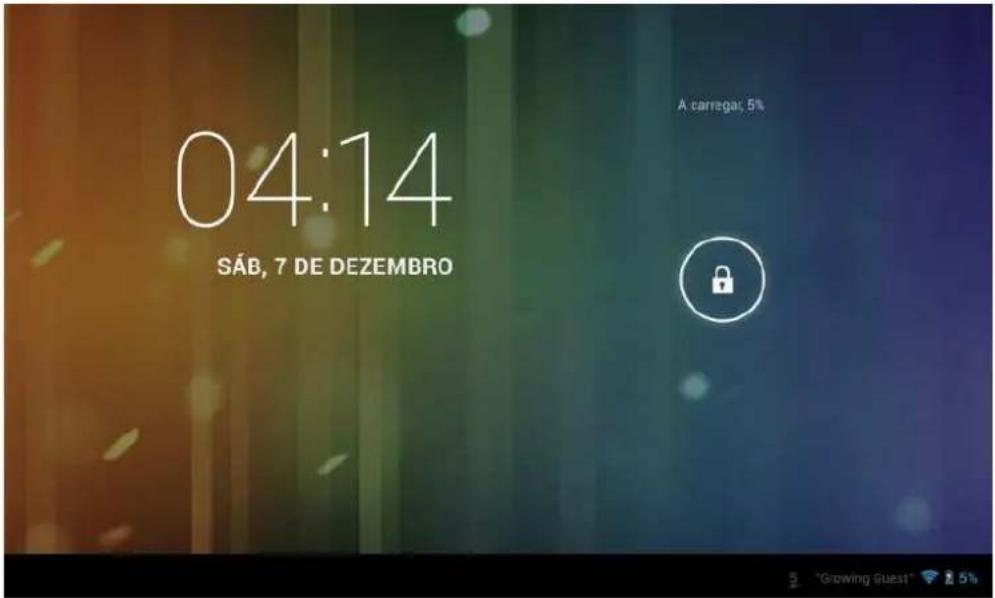
Click the unlock icon and move it to unlock the screen.
2.2 Work Environment
After unlocking the screen, the menu will appear as shown in the following image
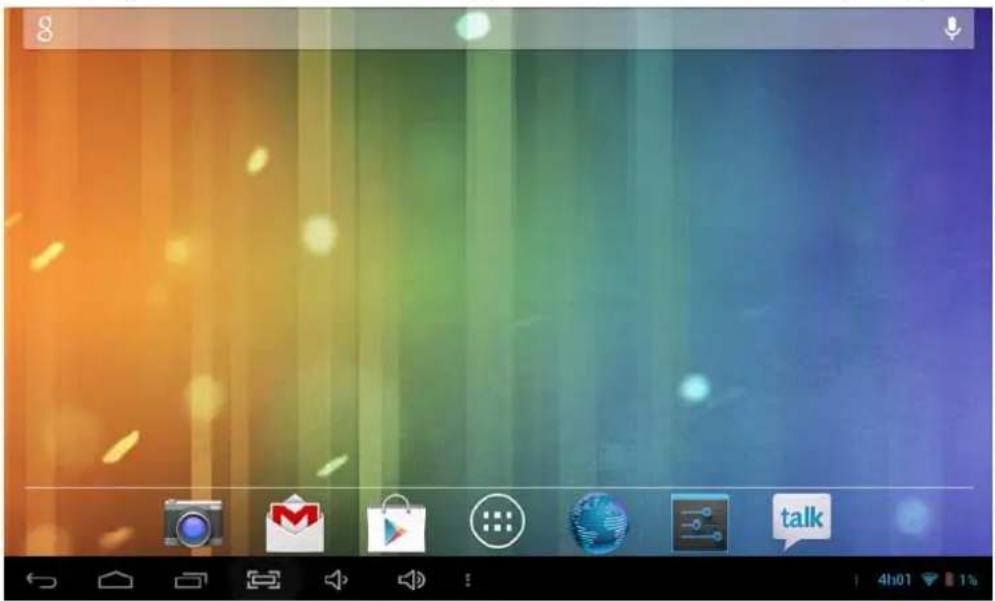
In Android 4.2.2 has up to 5 areas of work, to navigate between them will have to drag your finger to the right or left side.
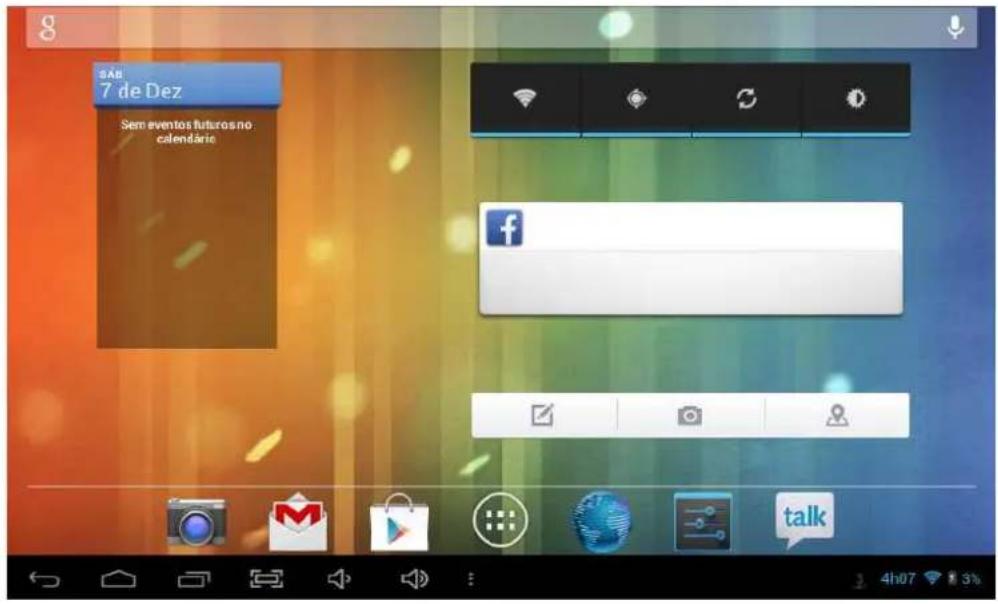
In the notification bar you can drag your finger down and more information will appear as shown in the following image.
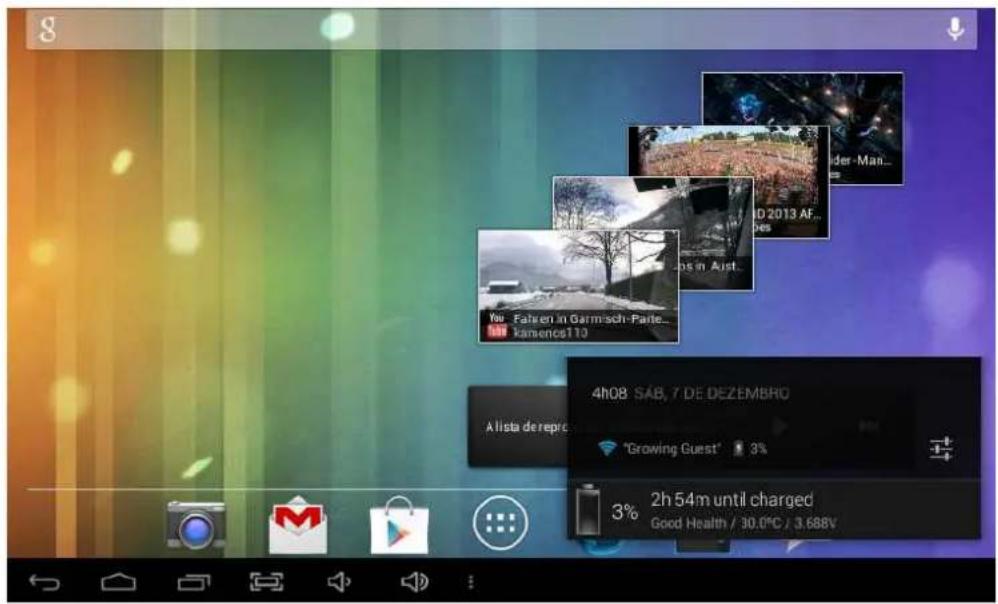
2.3 Introduction to the main menu buttons
| Image Feature | |
 | Click this icon to return to the previous menu. |
 | Click this icon to return to the workplace. |
 | List of recent applications. |
 | Volume control |
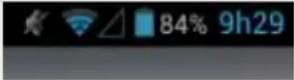 | Notification bar (battery icon / Wi-Fi etc.). |
3. Applications
3.1 List
From the main menu (desktop) click the icon enter the application menu as shown in the following image.
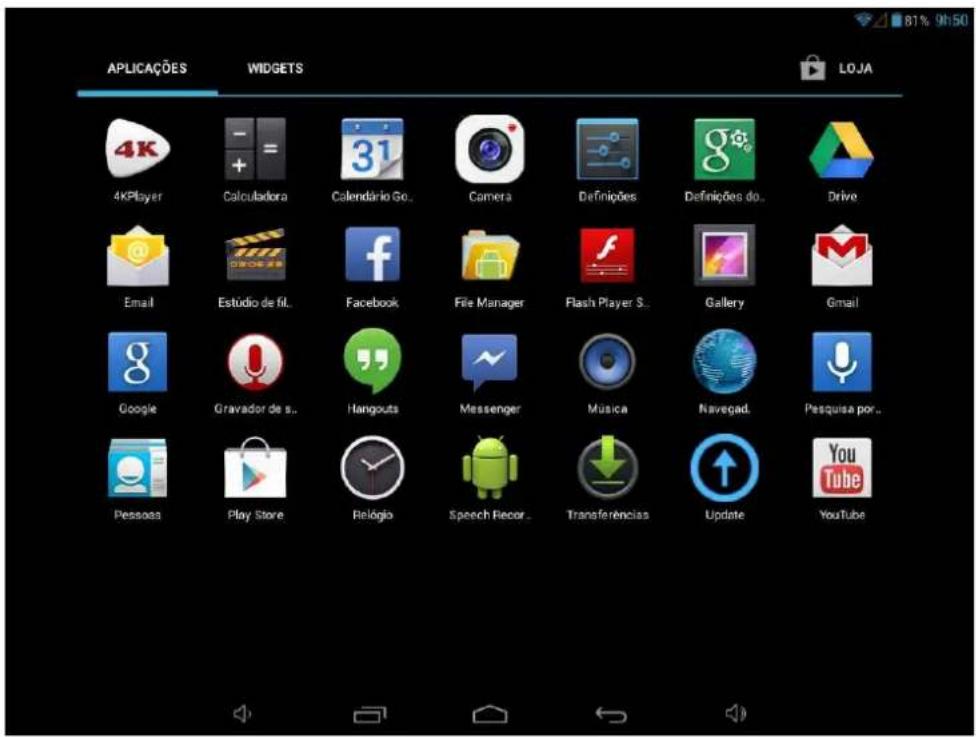
When you complete the first application screen will automatically create a second access to just drag your finger to the left and the other applications will be in the next screen.
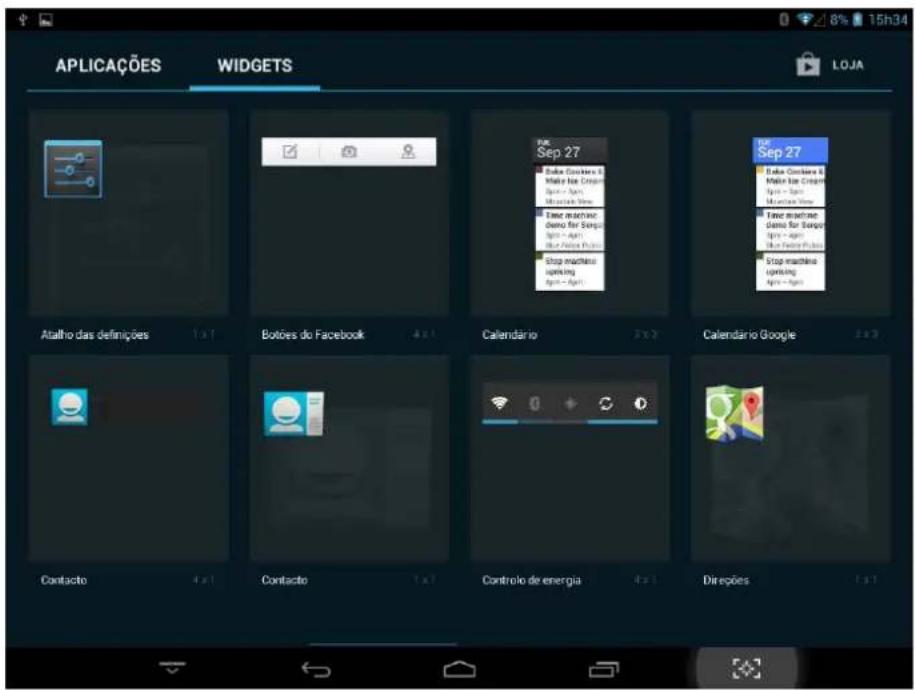
3.2 Widgets
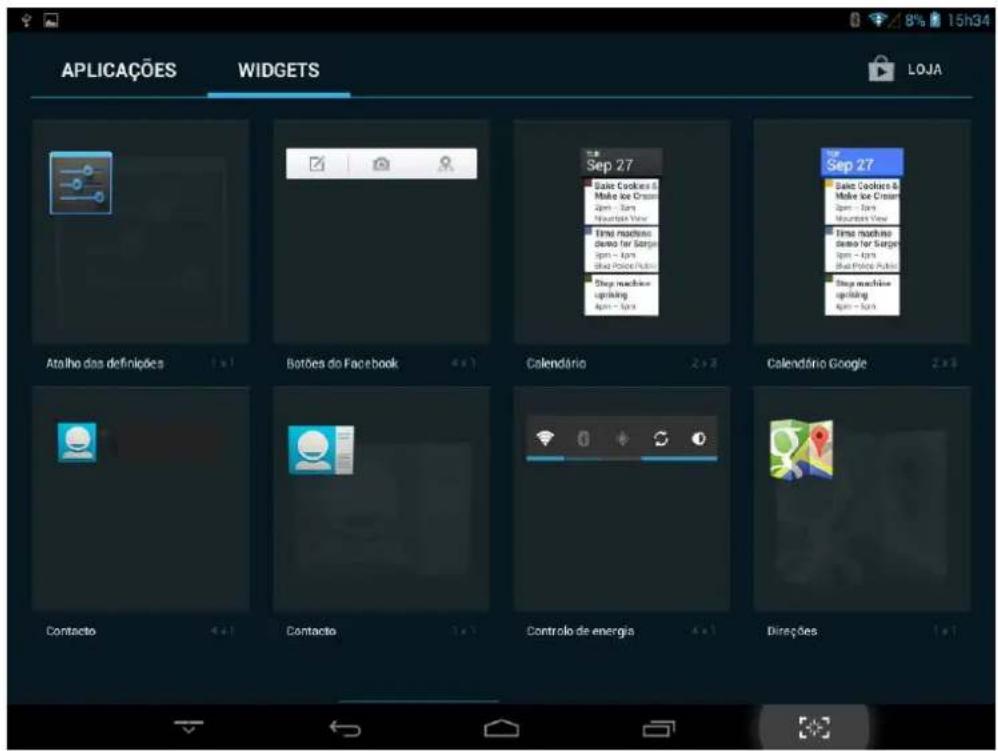
In the application menu, click APLICACÕES WIDGETS
enter the menu of widgets. Press on the widget and move to the main menu.
Note: The widgets only work in the areas of work

PME lider'13
GROWING
Changing People's Life
The Growing Company S.A.
Rua da Argila, 620 | 4445-027 Alfena | Portugal

www.mygrowing.com
3.3 Establish and control the desktop icons
In the application menu or widgets, press on the icon you want to create a shortcut on the desktop. Press on the application / widget where you want to move.
Note: Some widgets require internet connection to function properly.
3.4 Deleting the shortcut to an application desktop
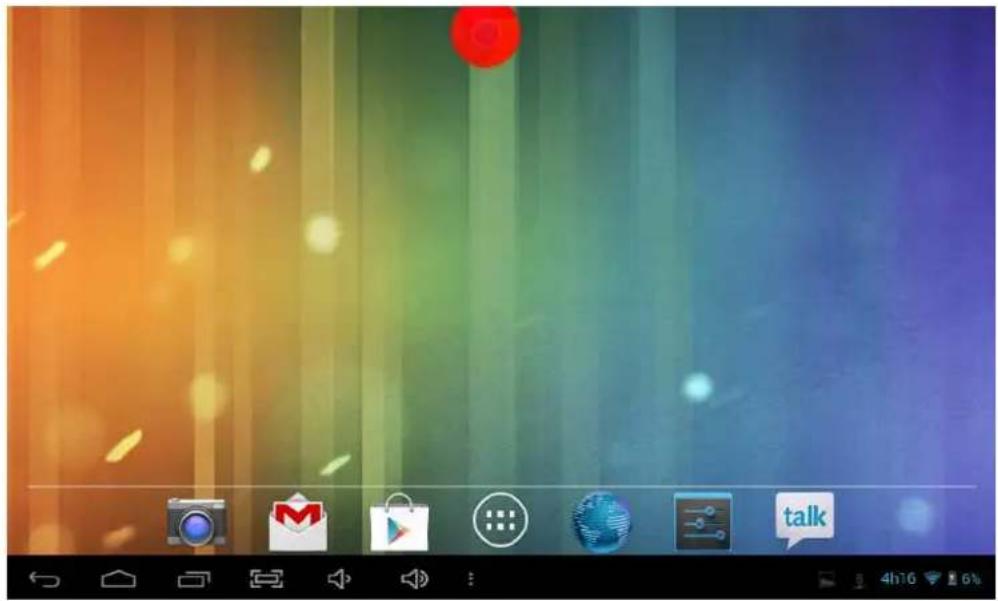
Press the icon you want to delete and move it up where you have an X. Keep up the icon turns red when you drop the red icon will be deleted.
3.5 Change the image of the desktop
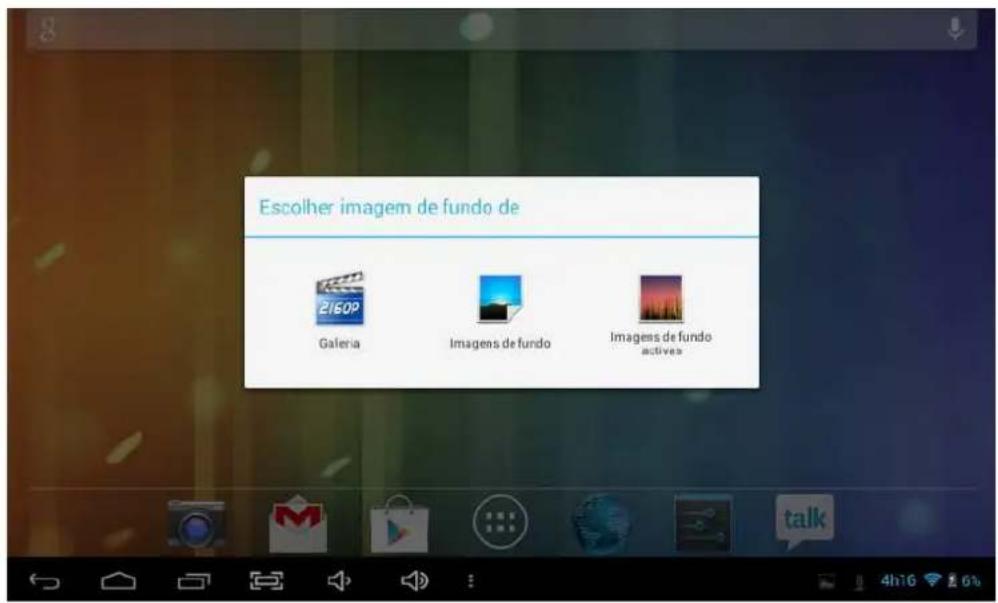
On the desktop press in a place that is not busy and a window will appear to select the picture. Choose images gallery system or to use a photo saved as image to the desktop.
4. Connecting to the computer
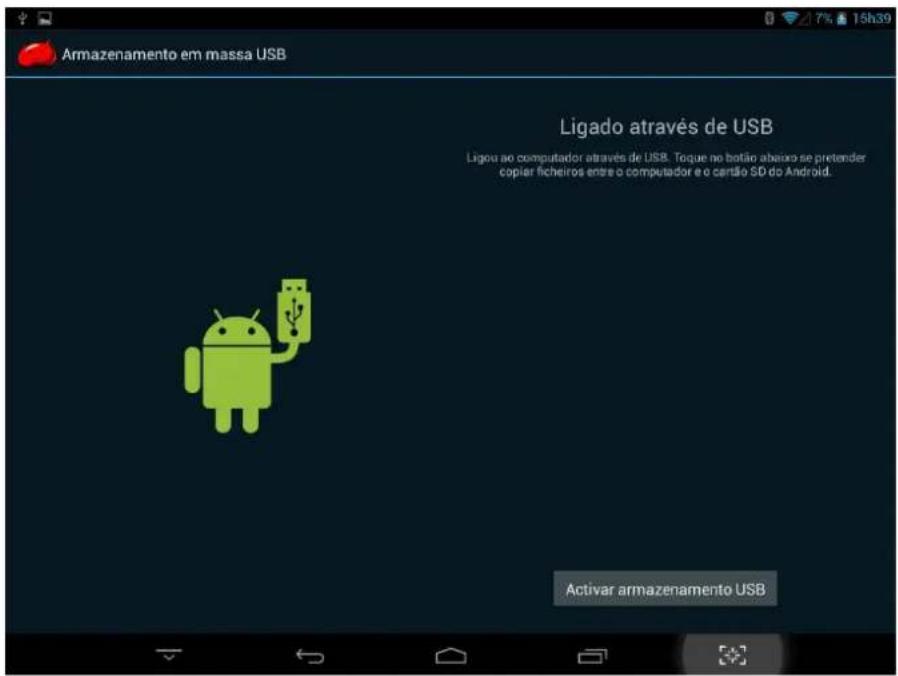
When connected to the computer can be used as USB disk. Click the icon to connect the USB storage:

5. Management applications
5.1 Install
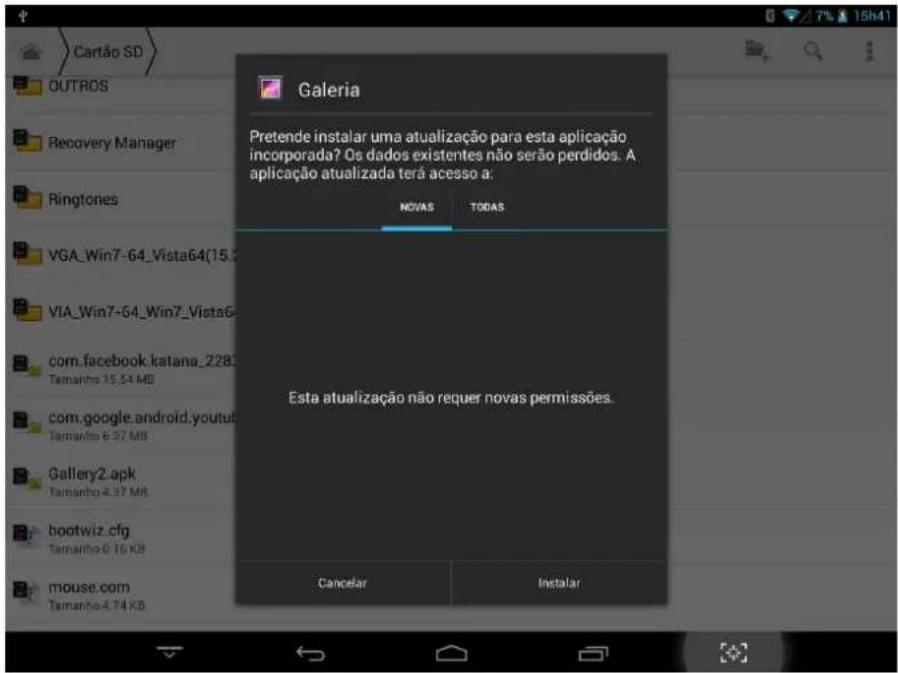
Opens the File Manager Choose the APK file you want to install the corresponding location where it was saved.
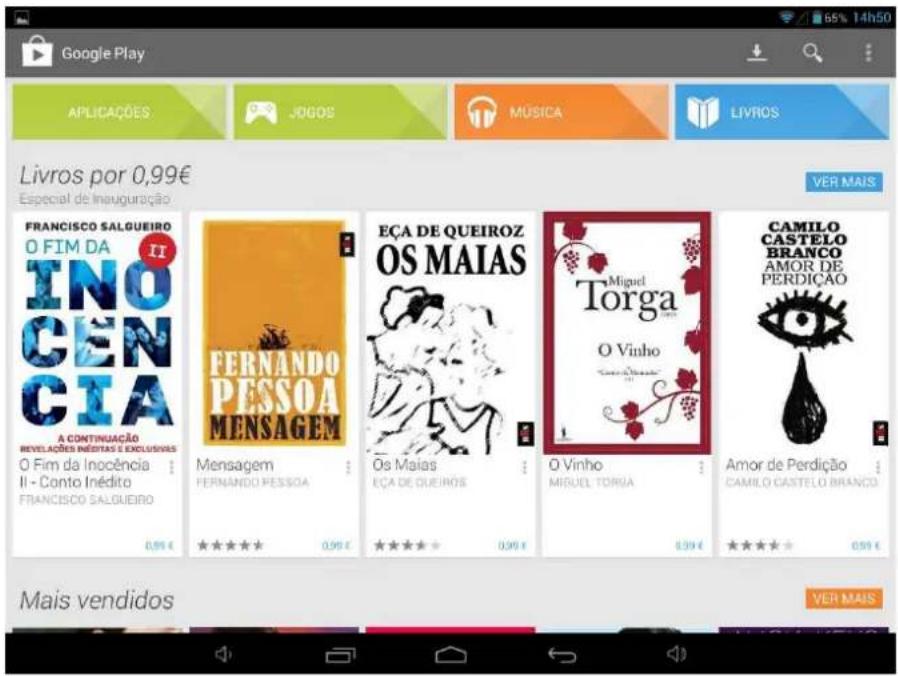
To install applications through Google Play (Market) will have to open the application and associate a Gmail account to your Tablet GROWING.
Changing People's Life
The Growing Company S.A.
Rua da Argila, 620 | 4445-027 Alfena | Portugal

www.mygrowing.com
5.2 Uninstall
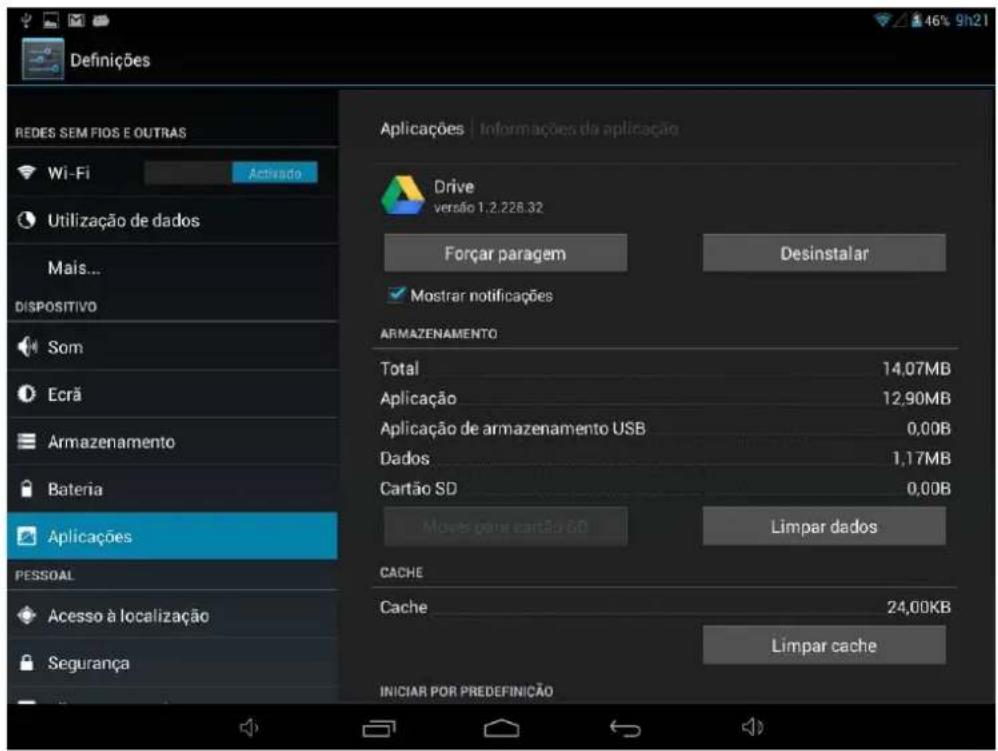
At settings select Applications and select the application and then uninstall. Select "Ok" and the application is uninstalled.
In the application menu select video player and select a video to be played.
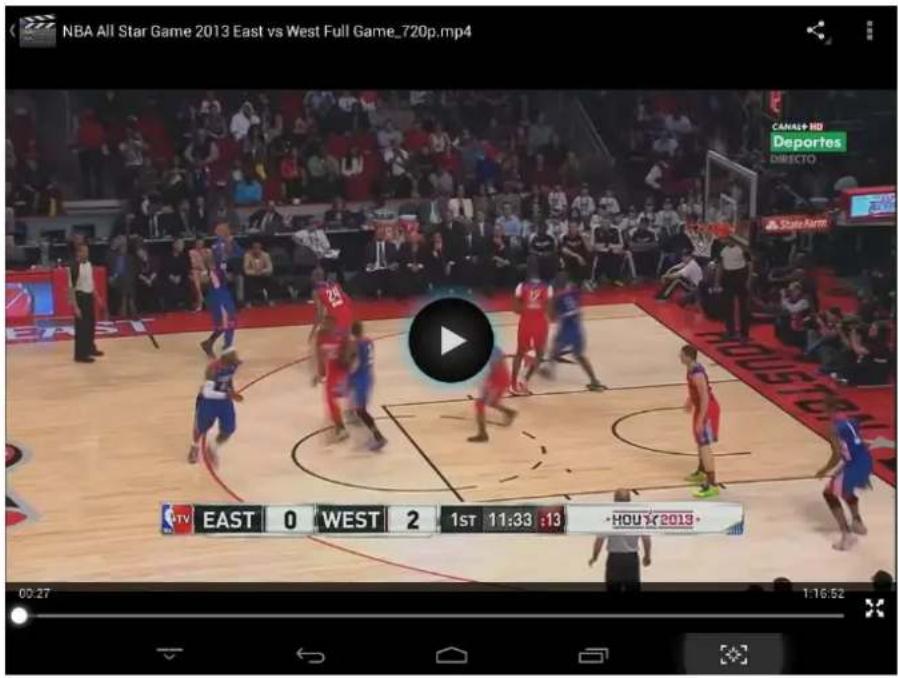
Slide the progress bar to adjust process.

Click the buttons on the video player.
| Image Function | |
| Play Video. | |
| Pause video. | |
| Other options: You can stop the video or change the repeat mode. | |
| View: Change the view mode. | |
| Function sharing: You can share the video from the email application among others. | |
When there are no video files in the playlist the system will automatically load files through the card. (The Tablet GROWING supports playback formats: mp4, 3gp, avi, fiv, mpg, mov).
7. Music
In the application menu click music.

PME lider 13
GROWING
Changing People's Life
The Growing Company S.A.
Rua da Argila, 620 | 4445-027 Alfena | Portugal

www.mygrowing.com
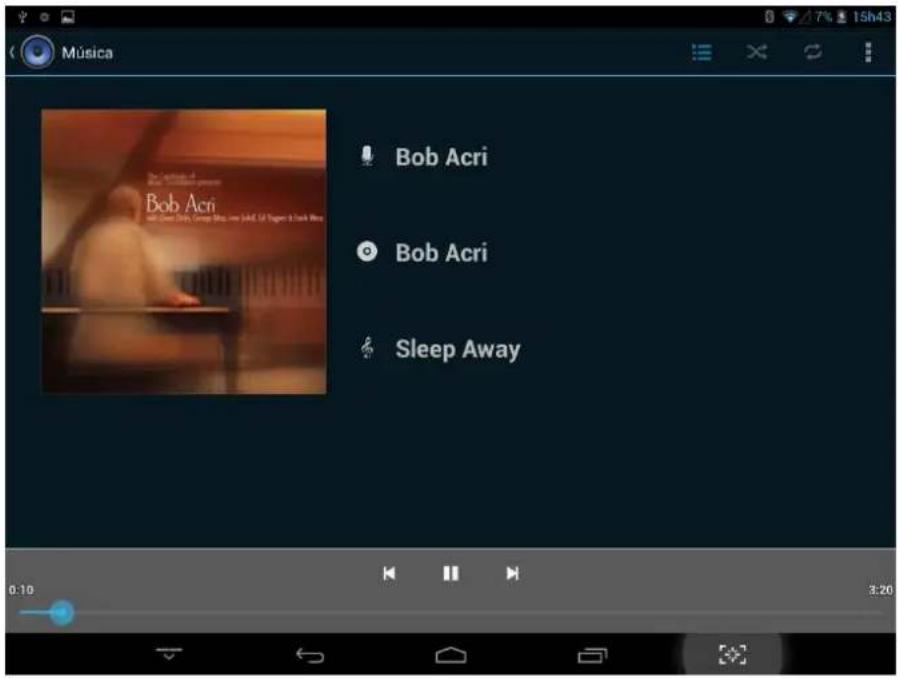
Slide the progress bar to adjust the reproduction process.
Click the buttons on the music player.
| Image Function | ||
 | Artist | |
 | Music | |
 | Random Music | |
 | Play last song | |
 | Pause | |

PME lider 13
GROWING
Changing People's Life
The Growing Company S.A.
Rua da Argila, 620 | 4445-027 Alfena | Portugal

www.mygrowing.com
| Album | |
| Playlist | |
| Repeat music (s) | |
| Play next | |
| Reproduce |
When no music files in the playlist the system will automatically load music files through the card. (The Tablet GROWING supports playback formats: mp3, aac, amr, ape, flac, imy, m4a, mid, mp2, mp3, ogg, wav).
8. Recording Function
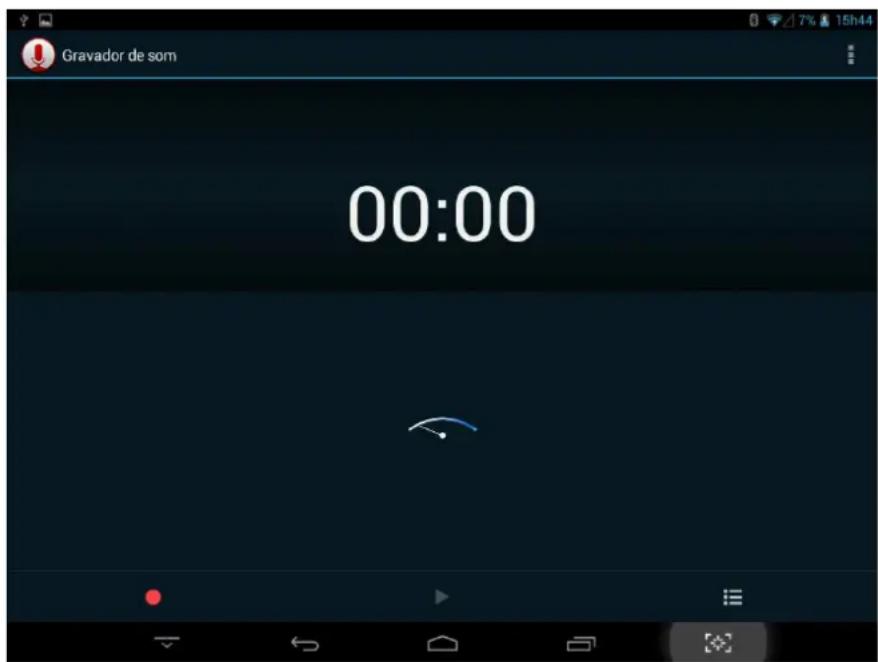
Click the recording icon to enter the recording interface, click to begin recording, click to stop recording.
Play recording: Please select a music application to play the recording.

PME líder 13
GROWING
Changing People's Life
The Growing Company S.A.
Rua da Argila, 620 | 4445-027 Alfena | Portugal

www.mygrowing.com
9. Settings
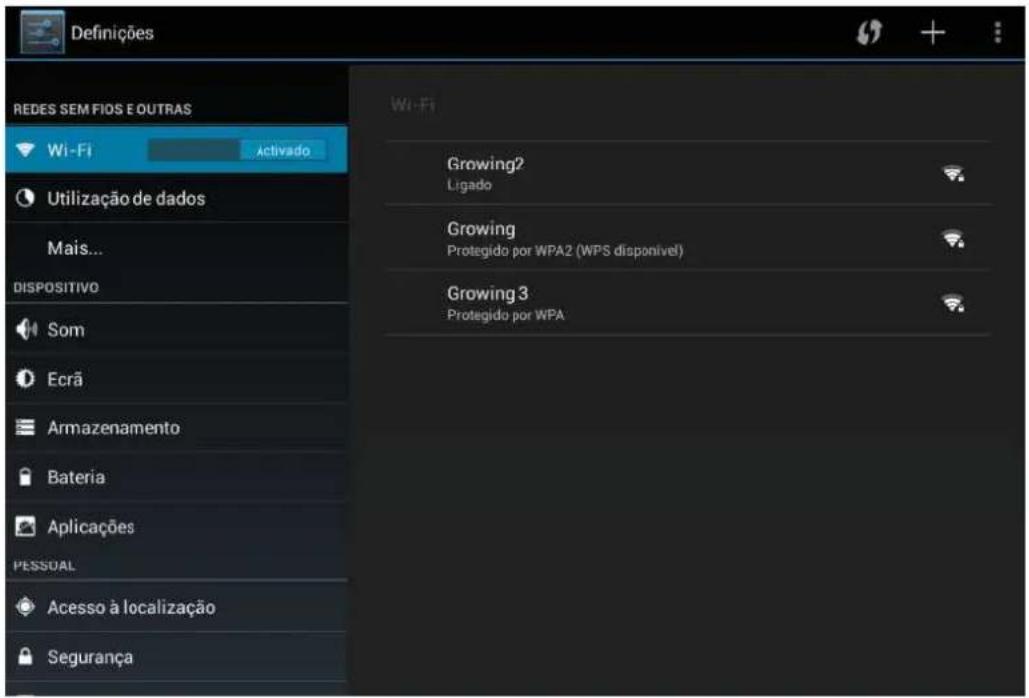
9.1 Wireless Networks and Other
You can turn on / off Wi-Fi, Bluetooth, select the flight mode, set cable internet, create a VPN, Hotspot Portable create and configure mobile networks.
9.2 Device
You can set the volume of the ringtone and notifications, ringing sound, the sound of the lock screen.
You can set brightness, hanging screen, background image, font size,
You can see the storage in use, installing micro sd card and install USB storage, view downloaded applications and uninstall and move to the micro SD, see the memory usage and see the battery usage.
9.3 Personnel
You can enable location services Google having Wi-fi or 3G turned on.
May submit a lock code and user information
You can choose the system language, and keyboard input method.
You can back up your data applications and make factory restore your tablet.
9.4 Accounts
You can add / remove email account, company, Google and Facebook.
9.5 System
You can set date, time zone, and view system information.

PME lider 13
GROWING
Changing People's Life
The Growing Company S.A.
Rua da Argila, 620 | 4445-027 Alfena | Portugal

www.mygrowing.com
10. Camera
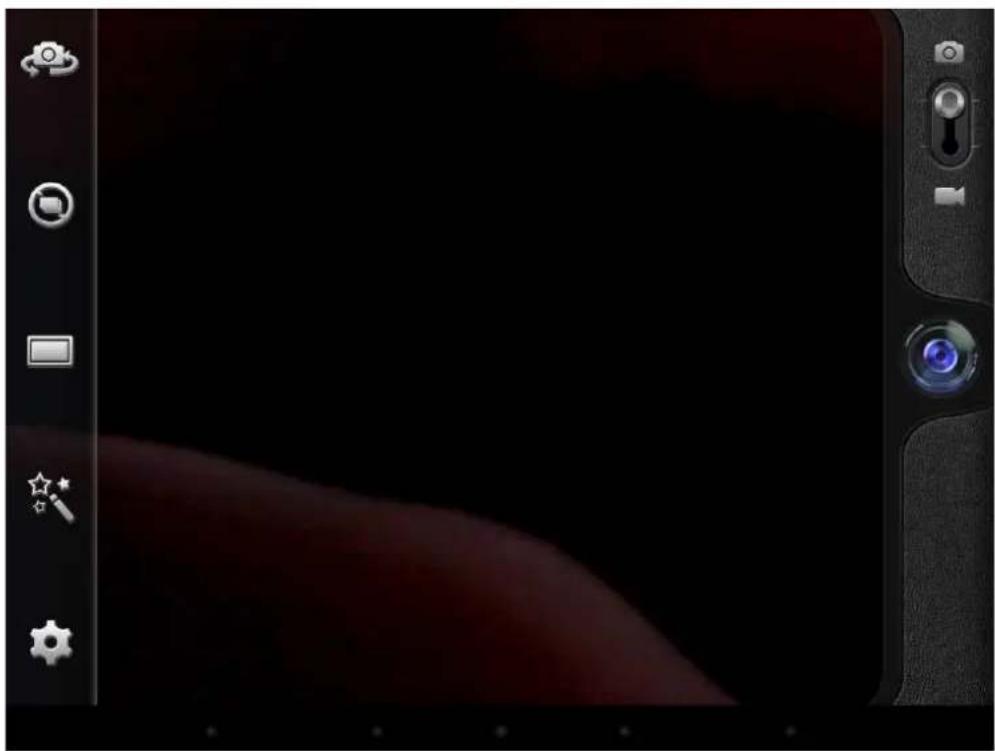
Click the icon to open the camera, take the picture or do video capture.
10.1 Capture Photo
natural_image
Digital camera interface showing a dark screen with a red curved band and tool icons (no readable text or symbols)Click the buttons on the camera.
| Image Feature | |
 | Switch camera mode front / rear |
 | Click this icon to choose the continuous shooting mode. |
 | Choose the type of camera between normal and panorama |
 | Choose the color scheme of the chamber |
 | Camera settings |
 | Take picture |
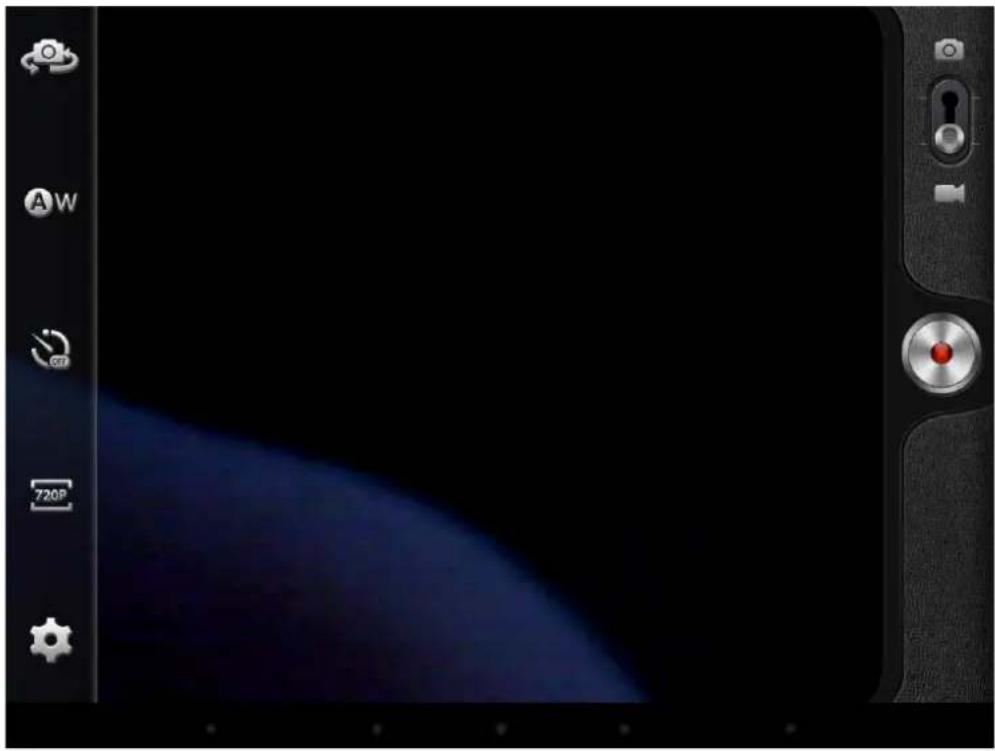
10.2 Video Capture
natural_image
Digital camera interface showing a blue abstract background with control buttons and a red indicator light (no readable text or symbols)Image Feature


11. Setting Wireless Networks
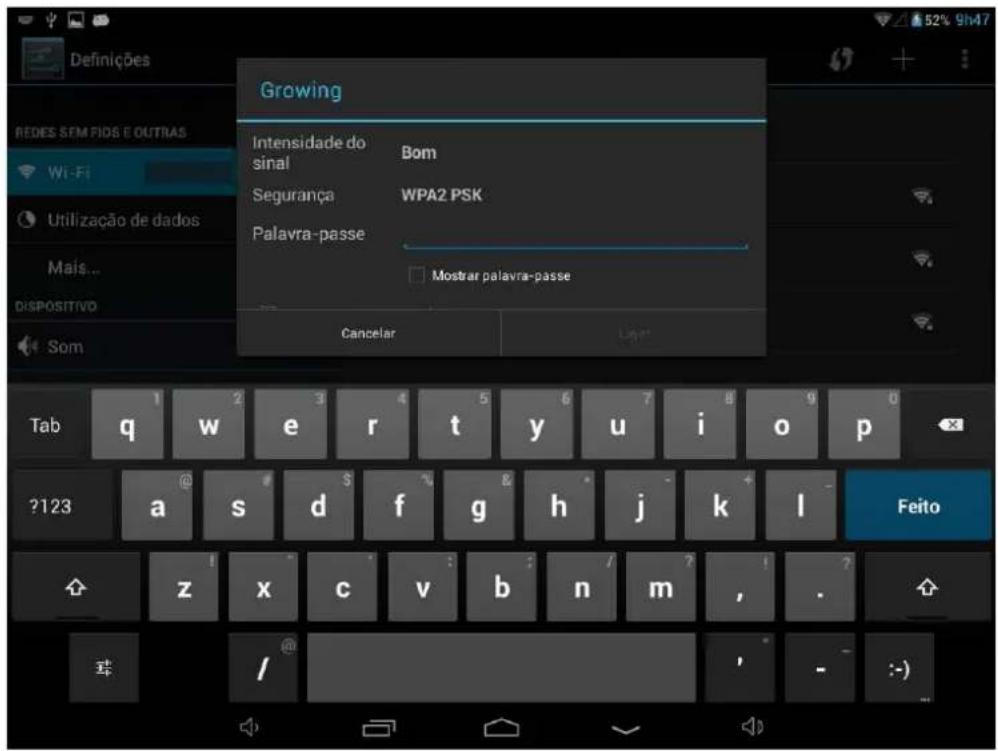
Follow these steps to configure the wireless network:
- Turn on Wi-Fi, Wi-Fi settings press The machine will search for networks automatically.
- Choose Wi-Fi network you want to connect.
- Press Connect. Some networks may ask keyword.
- In the settings screen Wi-Fi, pressing the menu button and pressing, advanced, you can see more options of Wi-Fi
12. Setting 3G Network
Follow these steps to configure the 3G network:
- Turn off Wi-Fi if connected.
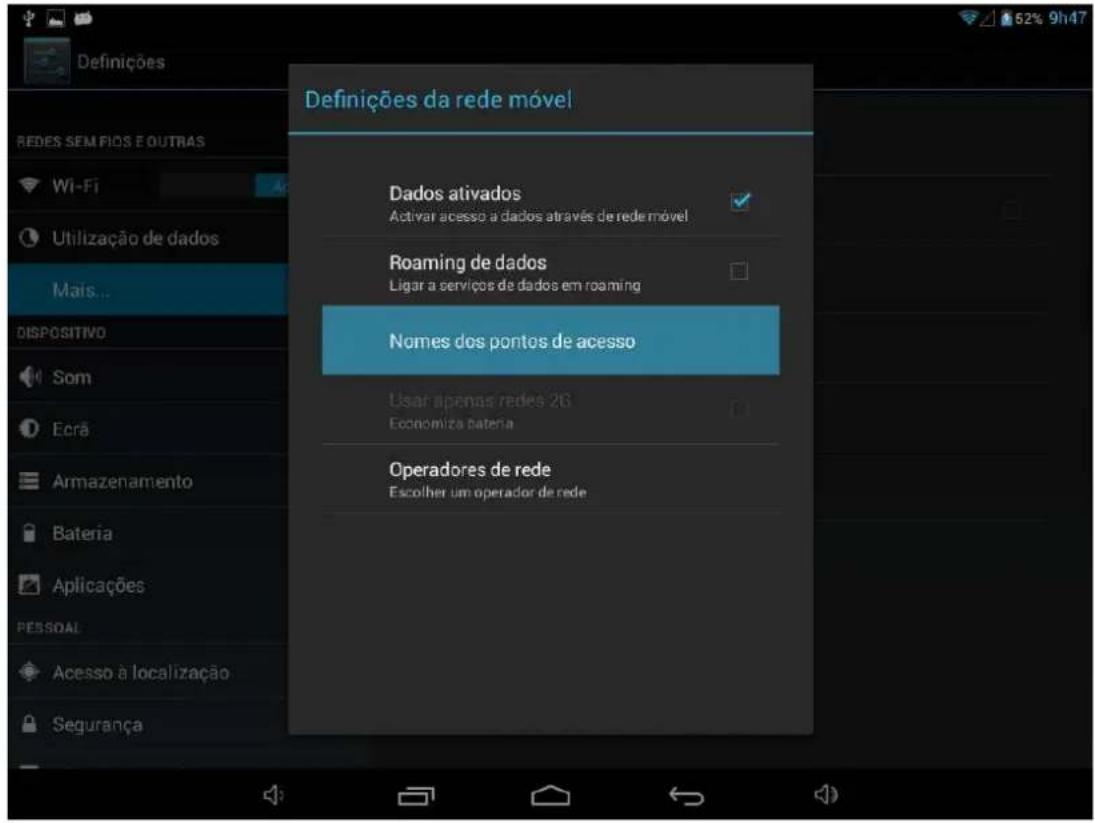
- Access the settings, select Other Wireless Networks and select mobile networks, make sure that the option of active data is enabled. Go back.
- Enter the point name (APN's) right to obtain 3G. Note: APN's range of network operator for that call customer support from your service provider will be provided to the NPC's.
13. List of compatible 3G handsets
| Model Model | |
| Huawei-E153 ZTE-MF628 | |
| Huawei-E156G ZTE-MF636 | |
| Huawei-E160E ZTE-MF110 | |
| Huawei-K3520 ZTE-MF626 | |
| Huawei-E170 ZTE-MF633 | |
| Huawei-E173 ZTE-MF637u | |
| Huawei-E176G ZTE-MF633BP+ | |
| Huawei-E1782 ZTE-MF170 | |
| Huawei-E180 ZTE-MF190 | |
| Huawei-E220 ZTE-TA356 | |
| Huawei-E226 ZTE-AC2736 | |
| Huawei-E230 ZTE-AC2736 | |
| Huawei-E261 ZTE-AC2746 | |
| Huawei-E270 ZTE-AC2766 | |
| Huawei-E272 ZTE-AC560 | |
| Huawei-E353 ZTE-AC580 | |
| Huawei-E1552 ZTE-AC581 | |
| Huawei-E1786 ZTE-AC590 | |
| Huawei-ET127 | |
| Huawei-EC122 | |
| Huawei-EC150 | |
| Huawei-EC156 | |
| Huawei-EC1270 | |
| Huawei-EC167 | |
| Huawei-EC189 |
Note: This list was provided by the CPU Allwinner maker, GROWING no responsibility if any of these devices are not compatible with our model.
14. Warranty
This product has Growing warranty against factory defects.
The product is a sophisticated electronic device. The Growing strongly recommends that you consult the user manual and the instructions supplied with the product and for the same. In turn, should take into account that the product may contain high precision displays, camera lenses and other similar parts that may be subject to scratching or other damage if not handled with extreme care. This Warranty does not cover in any case these situations.
Under warranty is explicit time specific guarantee, which acquire the product.
bar
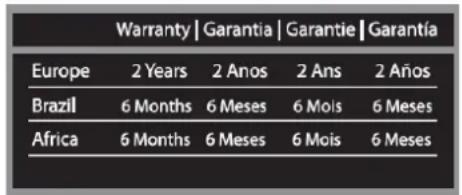
Warranty | Garantia | Garantie | Garantía | Region | 2 Years | 2 Anos | 2 Ans | 2 Años | | :--- | :--- | :--- | :--- | :--- | | Europe | 2 Years | 2 Anos | 2 Ans | 2 Años | | Brazil | 6 Months | 6 Meses | 6 Mois | 6 Meses | | Africa | 6 Months | 6 Meses | 6 Mois | 6 Meses |Frame Warranty
Policy Defects in LCD tablet
Despite the highest possible standards, the intricate manufacturing of screens "thin-film transistor" (TFT) liquid crystal display (LCD) may still produce slight visual imperfections.
These visual imperfections do not impair the performance of your tablet. However, the Growing will provide warranty service for the TFT LCD screen of your tablet when there are at least:
More than 5 bright spots or dark spots 8 (excluding 8).
These warranty conditions for TFT LCD screens are offered by TFT LCD manufacturers.
The Growing will however, by his will, repair or replace the product.
Please note: A bright dot is a pixel or sub-pixel that is always on white. A dark dot is a pixel or sub-pixel that is always off black.
This Warranty does not cover user manuals, software, configuration, content, data or links to third party included or downloaded on the tablet, included during installment, assembly, shipping or at any other time in the delivery chain or otherwise acquired by user.
The Growing does not guarantee that the software fits your needs, to work in combination with any hardware or software from a vendor independent, or that the operation of any software will be free from suffering interruptions or errors or that any defects present in the software can be subject to correction or rectification.
This warranty does not cover:

PME líder 13
GROWING
Changing People's Life
The Growing Company S.A.
Rua da Argila, 620 | 4445-027 Alfena | Portugal

www.mygrowing.com
Normal wear (including, without limitation, wear lenses of cameras, batteries or displays).
The defects caused by poor handling (including, without limitation, defects caused by sharp elements, folding, compression or falls, etc.).
Defects or damage caused by misuse of the tablet, including the use contrary to the instructions provided by Growing (eg, the manual instructions for use of the tablet).
Other acts beyond the reasonable control of Growing.
Warranty Policy Battery
The battery has 6 months Warranty.
This warranty does not cover defects caused by the fact that the battery be subjected to short-circuiting or the fact that the seals of the battery latch, tablet or cells were broken or show evidence of manipulation, either because the battery has been used in equipment for which was not specified.
Other important notices
We remind you that should make backup copies or keep written records of all important content and data stored in your Product, because there is the possibility of loss of data and content during repair or replacement.
All parts of the Product or other equipment will be replaced by Growing, from that time, ownership of Growing. If the Product is not covered by the terms and conditions of this Limited Warranty, Growing and service companies authorized by the same reserve the right to charge a fee for hand labor. To repair or replace the Product, Growing can use new products or parts equivalent to new or reconditioned.
For assistance Growing hotdog various channels:
- Contact your local vendor.
- On the site www.mygrowing.com support we have in the tool for technical support "Helpdesk".
- Directly to the Growing via phone (+351 808 20 29 30) or email to 808202930@growing.pt.
For assistance contact in Brazil for phone (11) 4979-6961 or email sac@growing.com.br
- On the site www.growing.com.br support we have in the tool for technical support "Helpdesk".
15. EC-Declaration of Conformity
EC-Declaration of Conformity to the Essencial Requirements of the applicable Directive 1999/5/EC
We, The Growing Company S.A., declare under our sole responsibility that the Radio-Communication products
Description: Tablet ; Brand : GROWING; Model No: GTQ718
are fully in conformity with the essential requirements of the Council Directive 1999/5/EC (R&TTE).
This declaration is based on the full compilace of the products with the following European standards:
Standards:
EN 55022:2010
EN 55024:2010
EN 61000-3-2:2006+A1:2009+A2:2009
EN 61000-3-3:2008
EN 60950-1:2006+A11:2009+A1:2010+A12:2011
CE-marking
Authorized Representative: The Growing Company S,A,
Address: Rua da Argila nº620
4445-027 Alfena – Portugal



All logos & trade marks are properties of the respective companies
Changing People's Life
The Growing Company S.A.
Rua da Argila, 620 | 4445-027 Alfena | Portugal

www.mygrowing.com
Manual del Usuario
GTQ718
ESPAÑOL
Índice
- Introducción 54
Chipset Allwinner A31s

PME lider 13
GROWING
Changing People's Life
The Growing Company S.A.
Rua da Argila, 620 | 4445-027 Alfena | Portugal

www.mygrowing.com
Changing People's Life
The Growing Company S.A.
Rua da Argila, 620 | 4445-027 Alfena | Portugal

www.mygrowing.com
6. Vídeo
Changing People's Life
The Growing Company S.A.
Rua da Argila, 620 | 4445-027 Alfena | Portugal

www.mygrowing.com
Changing People's Life
The Growing Company S.A.
Rua da Argila, 620 | 4445-027 Alfena | Portugal

www.mygrowing.com
Facebook.
9.5 Sistema
natural_image
Digital camera interface with tool icons and a red curved screen (no readable text or symbols)Changing People's Life
The Growing Company S.A.
Rua da Argila, 620 | 4445-027 Alfena | Portugal

www.mygrowing.com


natural_image
Digital camera interface showing a blue arc on screen, control buttons, and a red button (no readable text or symbols)Changing People's Life
The Growing Company S.A.
Rua da Argila, 620 | 4445-027 Alfena | Portugal

www.mygrowing.com
All logos & trade marks are properties of the respective companies
Changing People's Life
The Growing Company S.A.
Rua da Argila, 620 | 4445-027 Alfena | Portugal

www.mygrowing.com
Thank you for choosingGROWING
GROWING
Changing People's Life

TABLET GTQ718
PT
Chipset Allwinner A31s
Chipset Allwinner A31s
OpenGL ES 1.1/2.0 and OpenVS 1.1
8 GB de memoria, interno NAND Flash
Ranura Micro SD expandible hasta 32GB
Wi-Fi 802.11 b/g/a
Micro USB 2.0/USB 1.1
Mini HDMI 1080p
Chipset Allwinner A31s
Built-in battery lithium 2500mAh
Taille 198 x 115 x 8.6 mm
Poids: Approx. 320g
Accessoires:
1 Adapter. [DC V/A]
1 Cable USB
1 USB host
directive 1999/5/CE B&TTE
EN
Chipset Allwinner A31s
Processor up to 1.2 GHz
Cortex A7 Quad Core
0.S. Android 4.2
1 GB DDR3 RAM
Supports 30 and
OpenGL ES 1.1/2.0 and OpenVG 1.1
8 GB Nand Flash internal memory
Micro SD slot expandable up to 32GB
WI-HI 802.11 b/g/n
Micro USB 2.0/USB 1.1
Mini HDMI 1080p
Sensors: Gyroscope, Accelerometer
3D Accelerated game
3.5 Audio jack for headphones
Stereo speakers for high fidelity
Built-in microphone
Built-in frontal Webcam 0.3 Mp
Built-in Rear Webcam 2.0 Mp
Screen size 7 inches HD IPS
1024x600 Resolution
Support external 3G Dongle
Color: 16 Million colors
Capacitive multi touch screen
Titanium aluminum chassis
Built-in lithium battery 2500mAh
Size 198 x 115 x 8.6 mm
Weight: 320g approx
Accessories
1 Adapt. (DC V/A)
1 USB cable
1 USB host
1 User Manual
GROWING declares that this Tablet is
in compliance with the essential
requirements and other releva
provisions of Directive 1999/5/EC
R&ITIE
IPS display
IPS means In-Plane Switching.
Technically, an IPS display represents the colors better. (Whites are white, blacks are black, reds are red, etc...). It is used in small-format displays, where the use is more near vision, on large displays, it does not happen because the distance vision not particularize the difference in color. Factor is an IPS display to promote better viewing angles.
Display IPS
IPS significa In-Plane Switching
All logos & trade marks are properties of the respective companies
The Growing Company S.A.
Rua da Argila, 620 | 4445-027 Alfena | Portugal
Tel. +351 229 698 560 | Fax. +351 229 698 569

www.mygrowing.com