LA-NEX-CEF - Lens Adapter Vello - Free user manual and instructions
Find the device manual for free LA-NEX-CEF Vello in PDF.


| Product Type | Lens Adapter |
| Brand | Vello |
| Model | LA-NEX-CEF |
| Compatibility (Lens) | Canon EF/EF-S lenses |
| Compatibility (Camera) | Sony E-mount (NEX) cameras |
| Not Compatible With | Sony PXW-FS7 XDCAM Camcorder |
| Mount Type | Twist-lock with alignment dots |
| Dimensions (Approx.) | 2.5 x 2.5 x 0.5 in (63 x 63 x 12 mm) |
| Weight (Approx.) | 1.5 oz (42 g) |
| Power Source | None (mechanical only) |
| Material | Metal and plastic |
| Color | Black |
| Functions | Mounts Canon lenses on Sony E-mount cameras; manual focus and aperture control; retains infinity focus |
| Aperture Operation | Manual (stop-down metering required); aperture stays at largest f/stop if lens lacks manual collar |
| Focus | Manual only; no autofocus support |
| Electronic Contacts | None |
| Camera Setting Required | Enable "Release without Lens" in Sony NEX menu |
| Warranty | 1-year limited |
| Package Contents | 1x Lens Adapter |
| Maintenance | Keep clean from dust; store in dry place |
| Safety | No electrical hazards; handle with care to avoid drops |
Frequently Asked Questions - LA-NEX-CEF Vello
User questions about LA-NEX-CEF Vello
0 question about this device. Answer the ones you know or ask your own.
Ask a new question about this device
Download the instructions for your Lens Adapter in PDF format for free! Find your manual LA-NEX-CEF - Vello and take your electronic device back in hand. On this page are published all the documents necessary for the use of your device. LA-NEX-CEF by Vello.
USER MANUAL LA-NEX-CEF Vello
natural_image
Close-up of a black VELLO brand helmet with visible branding and mounting points (no text beyond brand name)INTRODUCTION
Thank you for choosing a Vello Lens Adapter. Vello lens adapters allow you to use lenses from manufacturers other than the maker of your camera body, so you can mount a lens on a camera body with which it would otherwise be incompatible. Vello Lens Adapters fit securely to the lens, but not so tightly that they are difficult to remove. Please follow these instructions to mount and remove your Vello Lens Adapter.
Although the lens will fit physically, automatic diaphragm (AE metering), and other functions dependent on communication between the camera body and lens, will be disrupted by a lens adapter. You will need to set exposures manually or meter in aperture priority (stop-down) mode. If the lens does not have a manual aperture collar, the aperture will be stopped to its largest f/stop. Focusing to infinity is retained.
Note: the LA-NEX-CEF will not work with the Sony PXW-FS7 XDCAM Camcorder.
All images are for illustrative purposes only.
TO MOUNT THE LENS ADAPTER
Note: Place the lens on a stable, flat surface when mounting or removing your Vello Lens Adapter.
natural_image
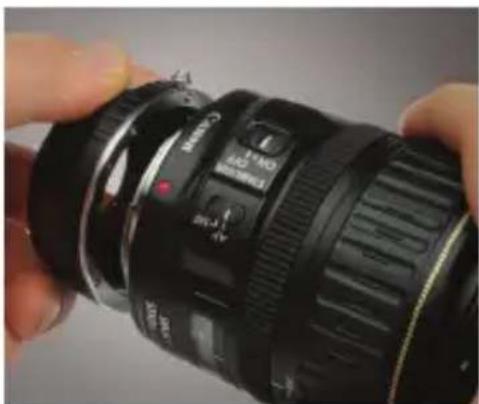
Close-up of a black Canon EF-190 DSLR camera lens held in hand, showing focal point and aperture (no text or symbols visible)- Line up the alignment notch on the lens adapter with the alignment marking on the lens. Canon EF lenses will have a red alignment dot, and Canon EF-S lenses will have a white alignment dot.
natural_image
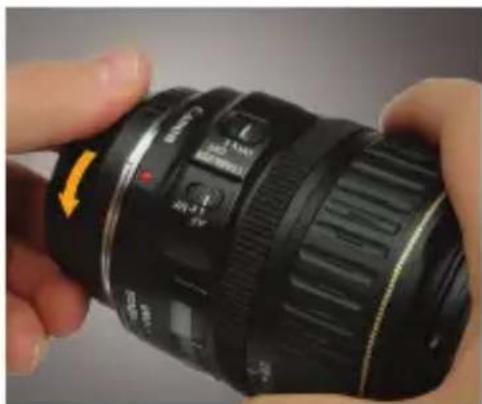
Close-up of a black NF-300 camera lens being held, with no visible text or symbols on the lens itself.- Rotate the lens adapter clockwise until it locks into place.
natural_image
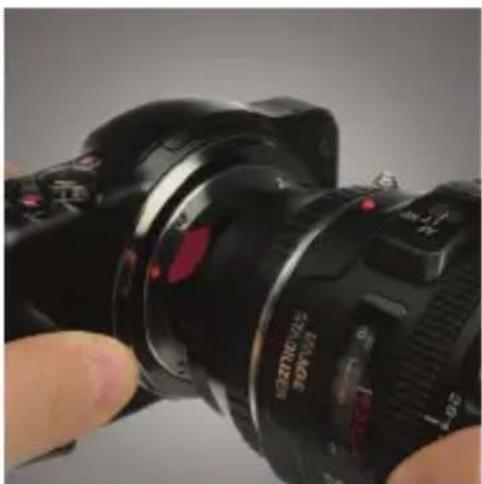
Close-up of a black DSLR camera with lens and adjustment knobs, held by a finger (no visible text or symbols on the device itself)- Line up the alignment dots on the lens adapter and the camera.
natural_image
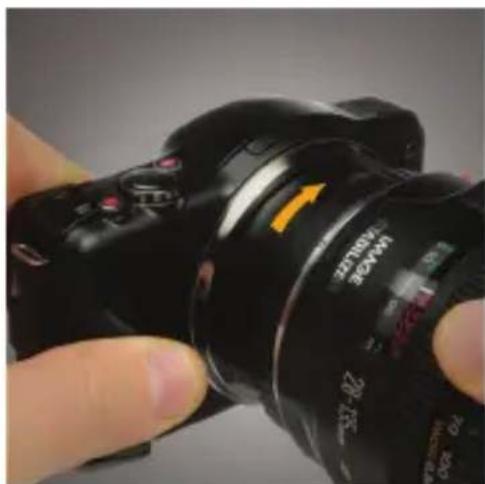
Close-up of a hand holding a black DSLR camera with a yellow directional arrow indicating rotation (no text or symbols on the device itself)- Rotate the lens assembly clockwise until it locks into place.
TO REMOVE THE LENS ADAPTER
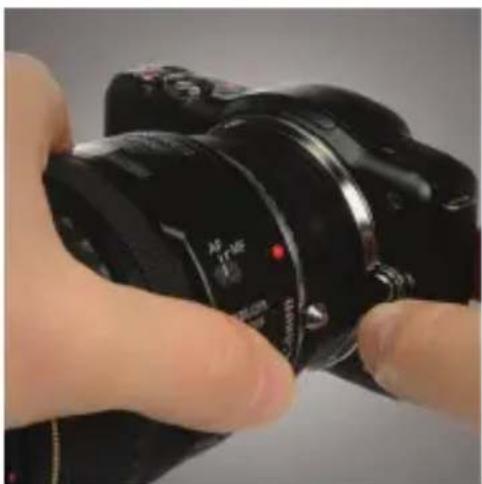
natural_image
Close-up of a hand holding a black DSLR camera with a red indicator light (no visible text or symbols)- Press the lens release button on the camera.
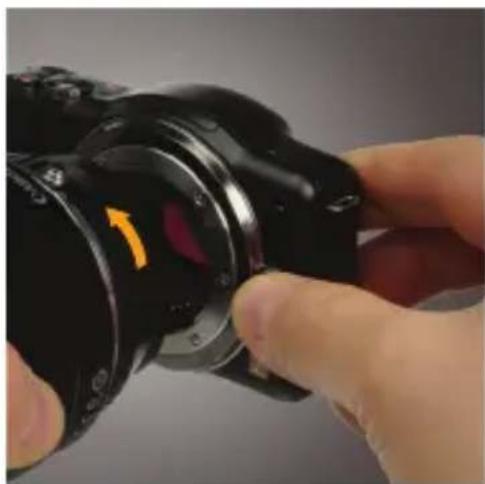
natural_image
Close-up of a hand holding a black DSLR camera with a yellow arrow indicating rotation (no text or symbols visible)- Rotate the lens assembly counterclockwise to release.
6
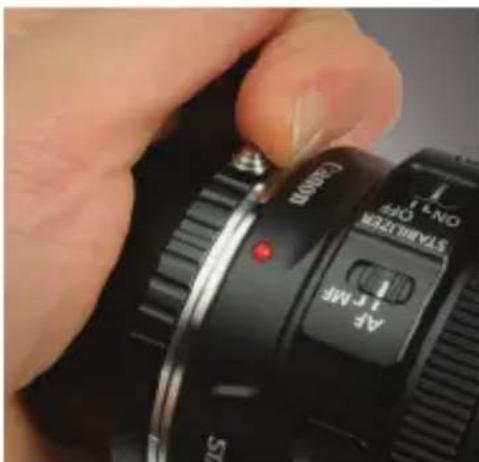
natural_image
Close-up of a hand adjusting a DSLR camera dial with a red indicator light (no readable text or symbols beyond branding)- Lift and hold the release pin on the lens adapter.
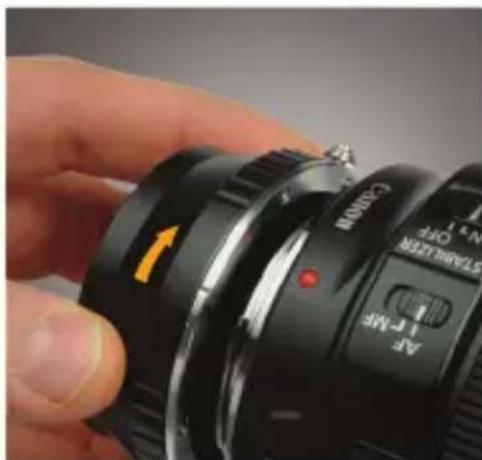
natural_image
Close-up of a hand holding a Canon EF 1-F-MF lens, showing the camera's left-hand rule and control buttons (no text beyond labels)- Rotate the lens adapter counterclockwise to release.
For Sony E-mount (NEX) cameras, enable the “Release without Lens” function in the menu of the camera. For Micro Four-Thirds (MFT) cameras, enable the “Shoot without Lens” function in the menu of the camera.
ONE-YEAR LIMITED WARRANTY
This VELLO product is warranted to the original purchaser to be free from defects in materials and workmanship under normal consumer use for a period of one (1) year from the original purchase date or thirty (30) days after replacement, whichever occurs later. The warranty provider's responsibility with respect to this limited warranty shall be limited solely to repair or replacement, at the provider's discretion, of any product that fails during normal use of this product in its intended manner and in its intended environment. Inoperability of the product or part(s) shall be determined by the warranty provider. If the product has been discontinued, the warranty provider reserves the right to replace it with a model of equivalent quality and function.
This warranty does not cover damage or defect caused by misuse, neglect, accident, alteration, abuse, improper installation or maintenance. EXCEPT AS PROVIDED HEREIN, THE WARRANTY PROVIDER MAKES NEITHER ANY EXPRESS WARRANTIES NOR ANY IMPLIED WARRANTIES, INCLUDING BUT NOT LIMITED TO ANY IMPLIED WARRANTY OF MERCHANTABILITY OR FITNESS FOR A PARTICULAR PURPOSE. This warranty provides you with specific legal rights, and you may also have additional rights that vary from state to state. To obtain warranty coverage, contact the Vello Customer Service Department to obtain a return merchandise authorization (“RMA”) number, and return the defective product to Vello along with the RMA number and proof of purchase. Shipment of the defective product is at the purchaser’s own risk and expense.
For more information or to arrange service, visit www.vellogear.com or call Customer Service at 212-594-2353.
Product warranty provided by the Gradus Group.
www.gradusgroup.com
VELLO is a registered trademark of the Gradus Group.
© 2015 Gradus Group LLC. All Rights Reserved.

VELLO™ A Gradus Group Brand

VELLO™
www.vellogear.com
© Copyright 2015 Gradus Group
VELLO is a registered trademark of the Gradus Group. © 2015 Gradus Group LLC. All Rights Reserved. All other trademarks are the property of their respective owners.
GG3
Brand : Vello
Model : LA-NEX-CEF
Category : Lens Adapter