
BATTERY CHARGER - Charger APPLE - Free user manual and instructions
Find the device manual for free BATTERY CHARGER APPLE in PDF.



| Product type | Wall charger |
| Brand | Apple |
| Model | Battery Charger |
| Compatibility | Apple devices (iPhone, iPad, iPod) |
| Input voltage | 100-240 V AC, 50/60 Hz |
| Input current | 0.15 A |
| Output voltage | 5 V DC |
| Output current | 1 A |
| Output power | 5 W |
| Output connector | USB-A |
| Dimensions (L x W x H) | 29.5 x 29.5 x 27.4 mm |
| Weight | 24 g |
| Housing material | White polycarbonate |
| LED indicator | None |
| Built-in protections | Short-circuit, overcurrent, and overheat protection |
| Standards | ICES-003 Class B, RoHS |
| Operating temperature | 0 °C to 35 °C |
| Storage temperature | -20 °C to 60 °C |
| Maintenance and cleaning | Wipe with a soft, dry cloth. Do not use chemicals. |
| Safety | Do not open the housing. Do not expose to moisture. Unplug during storms. |
| Spare parts and repairability | No spare parts available. If malfunctioning, replace the device. |
| Warranty | 1 year (according to seller's conditions) |
Frequently Asked Questions - BATTERY CHARGER APPLE
User questions about BATTERY CHARGER APPLE
0 question about this device. Answer the ones you know or ask your own.
Ask a new question about this device
Download the instructions for your Charger in PDF format for free! Find your manual BATTERY CHARGER - APPLE and take your electronic device back in hand. On this page are published all the documents necessary for the use of your device. BATTERY CHARGER by APPLE.
USER MANUAL BATTERY CHARGER APPLE
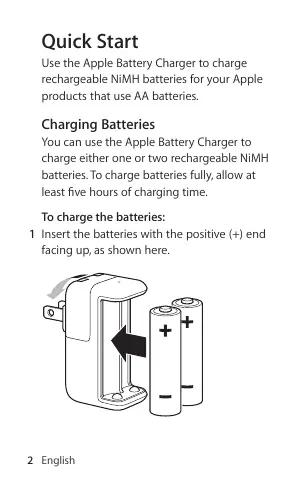
Use the Apple Battery Charger to charge rechargeable NiMH batteries for your Apple products that use AA batteries.
Charging Batteries
You can use the Apple Battery Charger to charge either one or two rechargeable NiMH batteries. To charge batteries fully, allow at least five hours of charging time.
To charge the batteries:
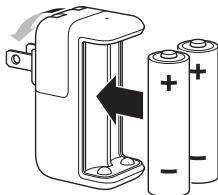
1 Insert the batteries with the positive (+) end facing up, as shown here.
2 English
2 Extend the prongs and plug the charger into a power outlet.
Charge Status
The indicator light on top of the Apple Battery Charger displays the charging status of the batteries.
- Amber: The batteries are charging.
- Green: The batteries are charged and ready to use—the green indicator light shuts off after six hours.
-
No light: May indicate any of the following conditions:
-
The batteries are charged and ready to use.
-
The inserted batteries are too deeply discharged to register immediately.
-
Flashing Amber: May indicate any of the following conditions:
-
The batteries haven't been properly installed in the charger.
-
An unsupported type of battery is in the charger.
- The batteries may be faulty or damaged and should be replaced.
Using an Adapter
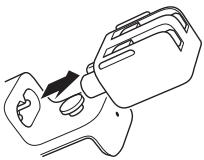
You can replace the AC plug on the Apple Battery Charger with the AC power cord that came with your Mac, or with any of the adapters in the Apple World Travel Adapter Kit.
To replace the AC plug:
1 Unplug the charger from the power outlet.
2 Slide the AC plug away from the charger to remove it.
4 English
3 Slide the adapter end of the AC power cord or travel adapter onto the charger until it's firmly seated.
Safety Information
WARNING: Failure to follow these safety instructions could result in fire, electric shock, or other injury or damage.
Batteries
Use only NiMH rechargeable batteries in the Apple Battery Charger. Don't try to charge nonrechargeable AA batteries (alkaline, lithium, or NiCad) in the charger.
Caution: Risk of explosion if battery is replaced by an incorrect type. Dispose of used batteries according to the instructions.
Don't open or puncture the batteries, install them backwards, short circuit, or expose them to fire, high temperatures, or water. Keep batteries out of the reach of children.
Handling
When you use the Apple Battery Charger to charge rechargeable NiMH batteries, make sure the charger is fully assembled before you plug it into a power outlet. Do not connect or disconnect the charger with wet hands.
The Apple Battery Charger may become warm during normal use. Always allow adequate ventilation around the charger and use care when handling it.
Unplug the Apple Battery Charger if any of the following conditions exist:
- The charger plug, the adapter, or the charger case is damaged.
- The charger is exposed to rain, liquid, or excessive moisture.
- You suspect the charger needs service or repair.
- The AC power cord has become frayed or damaged.
- You suspect damage to a battery.
This appliance is not intended for use by persons (including children) with reduced physical, sensory, or mental capabilities, or lack of experience and knowledge, unless they have been given supervision or instruction concerning use of the appliance by a person responsible for their safety. Children should be supervised to ensure that they do not play with the appliance.
Specifications
Input: AC 100-240 volts (V), 50/60 hertz (Hz)
The Apple Battery Charger is for use only with listed Information Technology Equipment (ITE).
快速入门
Apple Battery Charger:
Regulatory Compliance Information
FCC Compliance Statement
This device complies with part 15 of the FCC rules. Operation is subject to the following two conditions: (1) This device may not cause harmful interference, and (2) this device must accept any interference received, including interference that may cause undesired operation. See instructions if interference to radio or television reception is suspected.
Radio and Television Interference
The equipment described in this manual generates, uses, and can radiate radio-frequency energy. If it is not installed and used properly—that is, in strict accordance with Apple's instructions—it may cause interference with radio and television reception.
This equipment has been tested and found to comply with the limits for a Class B digital device in accordance with the specifications in Part 15 of FCC rules. These specifications are designed to provide reasonable protection against such interference in a residential installation. However, there is no guarantee that interference will not occur in a particular installation.
You can determine whether your equipment is causing interference by unplugging it. If the interference stops, it was probably caused by the equipment.
If your equipment does cause interference to radio or television reception, try to correct the interference by using one or more of the following measures:
- Turn the television or radio antenna until the interference stops.
- Move the equipment to one side or the other of the television or radio.
- Move the equipment farther away from the television or radio.
- Plug the equipment into an outlet that is on a different circuit from the television or radio. (That is, make certain the equipment and the television or radio are on circuits controlled by different circuit breakers or fuses.)
If necessary, consult an Apple Authorized Service Provider or Apple. See the service and support information that came with your Apple product. Or, consult an experienced radio or television technician for additional suggestions.
Important: Changes or modifications to this product not authorized by Apple Inc. could void the FCC compliance and negate your authority to operate the product.
Responsible party (contact for FCC matters only):
Apple Inc. Corporate Compliance
1 Infinite Loop, MS 26-A
Cupertino, CA 95014
Industry Canada Statements
Europe—EU Declaration of Conformity
See www.apple.com/euro/compliance.
中国
| 有毒或有害物质 | 零部件 | ||
| 电路板 | 附件 | ☐池 | |
| 铅(Pb) | X | O | X |
| 汞(Hg) | O | O | O |
| 镉(Cd) | O | O | O |
| 六价铬(Cr,VI) | O | O | O |
| 多溴联苯(PBB) | O | O | O |
| 多溴二苯醚(PBDE) | O | O | O |
Apple and the Environment
Apple Inc. recognizes its responsibility to minimize the environmental impacts of its operations and products. More information is available on the web at: www.apple.com/environment
Turkey
EEE Yonemelignie (Elektrik) ve Elektronik Eyslarda Bazi Zarali Mudeleri Kullanmin Srinandinilmasma Dair Yonemelik) uygundur.
Disposal and Recycling Information
When this product reaches its end of life, please dispose of it according to your local environmental laws and guidelines.
For information about Apple's recycling program, visit www.apple.com/environment/recycling.
European Union—Disposal Information

The symbol above means that according to local laws and regulations your product should be disposed of separately from household waste. When this product reaches its end of life, take it to a collection point designated by local authorities. Some collection points accept products for free. The separate collection and recycling of your product at the time of disposal will help conserve natural resources and ensure that it is recycled in a manner that protects human health and the environment.
Battery Disposal Information
Dispose of batteries according to your local environmental laws and guidelines.
www.apple.com/support
© 2010 Apple Inc. All rights reserved.
Apple, the Apple logo, and Mac are trademarks of Apple Inc., registered in the U.S. and other countries.
2A034-5635-A Printed in XXXX

- Charging Batteries
- To charge the batteries:
- English
- Charge Status
- Using an Adapter
- To replace the AC plug:
- English
- Safety Information
- Batteries
- Handling
- Specifications
- 快速入门
- Regulatory Compliance Information
- FCC Compliance Statement
- Radio and Television Interference
- Industry Canada Statements
- Europe—EU Declaration of Conformity
- Apple and the Environment
- Turkey
- Disposal and Recycling Information
- European Union—Disposal Information
- Battery Disposal Information
- www.apple.com/support
Brand : APPLE
Model : BATTERY CHARGER
Category : Charger