ESF6550ROW - Dishwasher AEG-ELECTROLUX - Free user manual and instructions
Find the device manual for free ESF6550ROW AEG-ELECTROLUX in PDF.



| Product type | Built-in dishwasher |
| Brand | AEG-ELECTROLUX |
| Model | ESF6550ROW |
| Dimensions (W x H x D) | 596 x 850 x 610 mm |
| Net weight (estimated) | 45 kg |
| Capacity | 12 place settings |
| Supply voltage | 220-240 V / 50 Hz |
| Water pressure min./max. | 0.5 / 8 bar (0.05 / 0.8 MPa) |
| Programs | ECO, AUTO, Intensive 70°C, Glass 45°C, Quick 30 min, Pre-wash |
| Water consumption (ECO) | 9-11 L |
| Energy consumption (ECO) | 0.9-1.0 kWh |
| Energy class | Not specified (old label) |
| Noise level | Not specified |
| Special functions | EnergySaver, Multitab, MyFavourite, Delay start 1-24 h |
| Water softener | Adjustable manually and electronically |
| Tub material | Stainless steel |
| Safety | Anti-flood device, child lock (via program), electrical safety |
| Maintenance | Removable filters, self-cleaning wash arms |
| Spare parts | Recommendation to use original Electrolux parts |
| Repairability | Authorized after-sales service, parts available |
Frequently Asked Questions - ESF6550ROW AEG-ELECTROLUX
User questions about ESF6550ROW AEG-ELECTROLUX
0 question about this device. Answer the ones you know or ask your own.
Ask a new question about this device
Download the instructions for your Dishwasher in PDF format for free! Find your manual ESF6550ROW - AEG-ELECTROLUX and take your electronic device back in hand. On this page are published all the documents necessary for the use of your device. ESF6550ROW by AEG-ELECTROLUX.
USER MANUAL ESF6550ROW AEG-ELECTROLUX
natural_image
Abstract geometric composition with three overlapping white circles on a gray background (no text or symbols)CONTENTS
- SAFETY INSTRUCTIONS 3
- PRODUCT DESCRIPTION 5
- CONTROL PANEL 6
- PROGRAMMES 6
- OPTIONS 8
- BEFORE FIRST USE 9
- DAILY USE 11
- HINTS AND TIPS 13
- CARE AND CLEANING 14
- TROUBLESHOOTING 15
- TECHNICAL INFORMATION 17
- ENVIRONMENT CONCERNS 17
WE'RE THINKING OF YOU
Thank you for purchasing an Electrolux appliance. You've chosen a product that brings with it decades of professional experience and innovation. Ingenious and stylish, it has been designed with you in mind. So whenever you use it, you can be safe in the knowledge that you'll get great results every time.
Welcome to Electrolux.
Visit our website for:

Get usage advice, brochures, trouble shooter, service information: www.electrolux.com

Register your product for better service: www.electrolux.com/productregistration

Buy Accessories, Consumables and Original spare parts for your appliance: www.electrolux.com/shop
CUSTOMER CARE AND SERVICE
We recommend the use of original spare parts.
When contacting Service, ensure that you have the following data available. The information can be found on the rating plate. Model, PNC, Serial Number.

Warning / Caution-Safety information
General information and tips
Environmental information
Subject to change without notice.
1. ⚠ SAFETY INSTRUCTIONS
Before the installation and use of the appliance, carefully read the supplied instructions. The manufacturer is not responsible if an incorrect installation and use causes injuries and damages. Always keep the instructions with the appliance for future reference.
1.1 Children and vulnerable people safety

WARNING!
Risk of suffocation, injury or permanent disability.
- Do not let persons, children included, with reduced physical sensory, reduced mental functions or lack of experience and knowledge use the appliance. They must have supervision or instruction for the operation of the appliance by a person who is responsible for their safety.
- Do not let children play with the appliance.
- Keep all packaging away from children.
- Keep all detergents away from children.
- Keep children and pets away from the appliance door when it is open.
1.2 Installation
- Remove all the packaging.
- Do not install or use a damaged appliance.
- Do not install or use the appliance where the temperature is less than 0 °C.
- Obey the installation instruction supplied with the appliance.
Electrical connection

WARNING!
Risk of fire and electrical shock.
- The appliance must be earthed.
- Make sure that the electrical information on the rating plate agrees with the power supply. If not, contact an electrician.
-
Always use a correctly installed shock-proof socket.
-
Do not use multi-plug adapters and extension cables.
- Make sure not to cause damage to the mains plug and to the mains cable. Should the appliance power supply cable need to be replaced, this must be carried out by our Service Centre.
- Connect the mains plug to the mains socket only at the end of the installation. Make sure that there is access to the mains plug after the installation.
- Do not pull the mains cable to disconnect the appliance. Always pull the mains plug.
- Do not touch the mains cable or the mains plug with wet hands.
- This appliance complies with the E.E.C. Directives.
Water connection
- Make sure not to cause damage to the water hoses.
- Before you connect the appliance to new pipes or pipes not used for a long time, let the water flow until it is clean.
- The first time you use the appliance, make sure that there is no leakage.
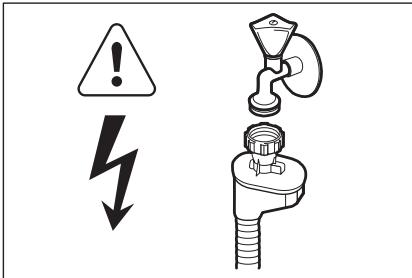
- The water inlet hose has a safety valve and a sheath with an inner mains cable.
text_image
Safety warning symbols and diagram showing a warning triangle with lightning bolt and a valve above a pipe fitting
WARNING!
Dangerous voltage.
- If the water inlet hose is damaged, immediately disconnect the mains plug from the mains socket. Contact the Service to replace the water inlet hose.
1.3 Use
- This appliance is intended to be used in household and similar applications such as:
- Staff kitchen areas in shops, offices and other working environments
- Farm houses
- By clients in hotels, motels and other residential type environments
- Bed and breakfast type environments.

WARNING!
Risk of injury, burns, electrical shock or fire.
- Do not change the specification of this appliance.
- Put knives and cutlery with sharp points in the cutlery basket with the points down or in a horizontal position.
- Do not keep the appliance door open without supervision to prevent to fall on it.
- Do not sit or stand on the open door.
-
Dishwasher detergents are dangerous. Obey the safety instructions on the detergent packaging.
-
Do not drink and play with the water in the appliance.
- Do not remove the dishes from the appliance until the programme is completed. There can be detergent on the dishes.
- The appliance can release hot steam if you open the door while a programme operates.
- Do not put flammable products or items that are wet with flammable products in, near or on the appliance.
- Do not use water spray and steam to clean the appliance.
1.4 Disposal

WARNING!
Risk of injury or suffocation.
- Disconnect the appliance from the mains supply.
- Cut off the mains cable and discard it.
- Remove the door catch to prevent children and pets to get closed in the appliance.
2. PRODUCT DESCRIPTION
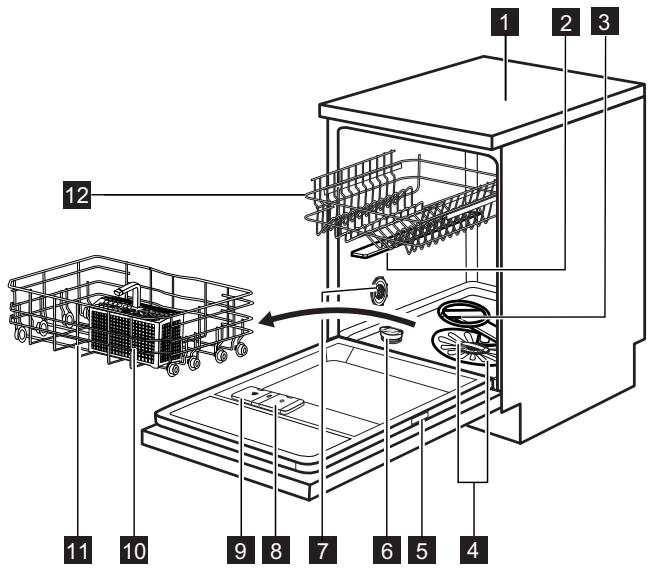
text_image
Technical diagram of a refrigerator with numbered parts and internal components, showing exploded view and assembly steps.1 Worktop
2 Upper spray arm
3 Lower spray arm
4 Filters
5 Rating plate
6 Salt container
7 Water hardness dial
8 Rinse aid dispenser
9 Detergent dispenser
10 Cutlery basket
11 Lower basket
12 Upper basket
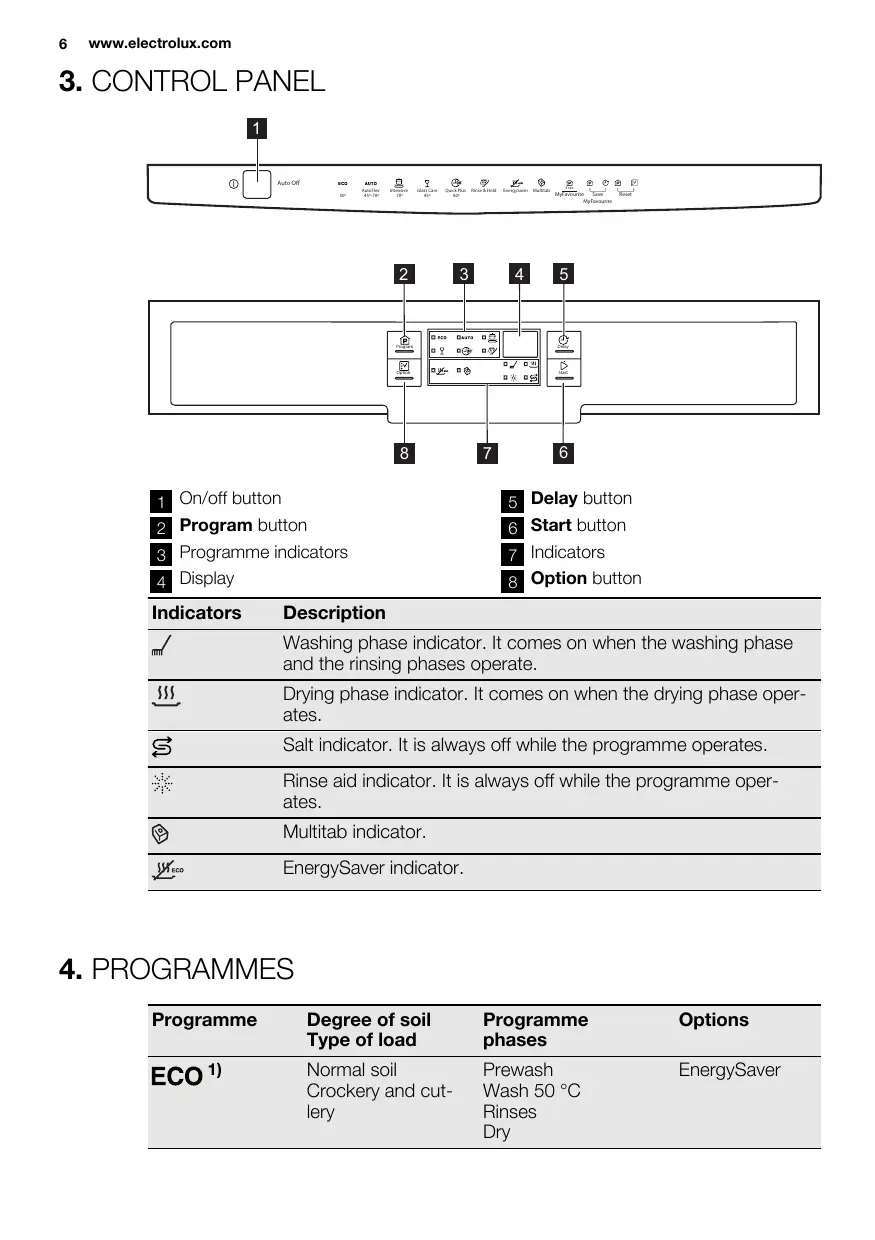
3. CONTROL PANEL

text_image
1 Auto Off ECO AUTO Automotive 45%-70% Interface 70% Glass Care 45% Quick Plus 60% Rims & Hold EnergyLaser Multisub MyFavourite Save MyFavourite Reset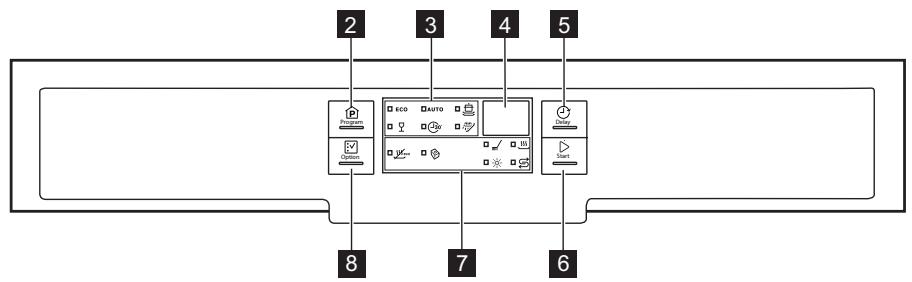
flowchart
graph TD
    A["Program"] --> B["ECO"]
    B --> C["Auto"]
    C --> D["start"]
    D --> E["End"]
    style A fill:#f9f,stroke:#333
    style B fill:#ccf,stroke:#333
    style C fill:#cfc,stroke:#333
    style D fill:#fcc,stroke:#333
    style E fill:#ffc,stroke:#333
| 1 | On/off button | 5 | Delay button |
| 2 | Program button | 6 | Start button |
| 3 | Programme indicators | 7 | Indicators |
| 4 | Display | 8 | Option button |
| Indicators | Description |
| Washing phase indicator. It comes on when the washing phase and the rinsing phases operate. | |
| Drying phase indicator. It comes on when the drying phase operates. | |
| Salt indicator. It is always off while the programme operates. | |
| Rinse aid indicator. It is always off while the programme operates. | |
| Multitab indicator. | |
| EnergySaver indicator. |
4. PROGRAMMES
1) With this programme you have the most efficient use of water and energy consumption for crockery and cutlery with normal soil. (This is the standard programme for test institutes).
2) The appliance senses the degree of soil and the quantity of items in the baskets. It automatically adjusts the temperature and quantity of the water, the energy consumption and the programme duration.
3) With this programme you can wash a load with fresh soil. It gives good washing results in a short time.
4) Use this programme to quickly rinse the dishes. This prevents the remaining food to bond on the dishes and bad odours to come out from the appliance.
Do not use detergent with this programme.
| Programme | Degree of soil Type of load | Programme phases | Options |
| ECO1) | Normal soil Crockery and cutlery | Prewash Wash 50 °C Rinses Dry | EnergySaver |
| AUTO^2) | All Crockery, cutlery, pots and pans | Prewash Wash from 45 °C to 70 °C Rinses Dry | EnergySaver |
| Heavy soil Crockery, cutlery, pots and pans | Prewash Wash 70 °C Rinses Dry | EnergySaver | |
| Normal or light soil Delicate crockery and glassware | Wash 45 °C Rinses Dry | EnergySaver | |
| 30' 3) | Fresh soil Crockery and cutlery | Wash 60 °C Rinse | |
| 4) | All | Prewash |
Consumption values
| Programme1) | Duration (min) | Energy (kWh) | Water (l) | |
| ECO | 165 - 175 | 0.9 - 1.0 | 9 - 11 | |
| AUTO | 40 - 150 | 0.7 - 1.4 | 7 - 14 | |
 | 150 - 160 | 1.4 - 1.6 | 13 - 14 | |
| [603S] | 70 - 80 | 0.8 - 0.9 | 11 - 12 | |
 | 30 | 0.9 | 9 | |
| [AVCH] | 14 | 0.1 | 4 | |
1) The pressure and the temperature of the water, the variations of the mains supply, the options and the quantity of dishes can change the values.
Information for test institutes
For all the necessary information for test performance. send an email to:
info.test@dishwasher-production.com
Write down the product number (PNC) that is on the rating plate.
5. OPTIONS
i Activate or deactivate the options before the start of a programme. You cannot activate or deactivate the options while a programme operates.
If one or more options are set, make sure that the related indicators are on before the programme starts.
5.1 EnergySaver
This option decreases the temperature in the last rinse phase.
The use of this option decreases the energy consumption (up to 25%) and the programme duration.
The dishes can be wet at the end of the programme.
How to activate the EnergySaver option
- Press Option until the EnergySaver indicator comes on. In the display you can see the update of the programme duration.
- If the option is not applicable to the programme, the related indicator does not come on.
5.2 Multitab
Activate this option only when you use the combi detergent tablets.
This option deactivates the use of rinse aid and salt. The related indicators stay off.
The programme duration can increase.
How to activate the Multitab option
- Press the on/off button to activate the appliance.
- Press Option until the Multitab indicator comes on.
The option stays on until you deactivate it.
Press Option until the Multitab indicator goes off.
If you stop to use the combi detergent tablets, before you start to
use separately detergent, rinse aid and dishwasher salt, do these steps:
- Deactivate the Multitab option.
- Set the water softener to the highest level.
- Make sure that the salt container and the rinse aid dispenser are full.
- Start the shortest programme with a rinsing phase, without detergent and without dishes.
- Adjust the water softener to the water hardness in your area.
- Adjust the released quantity of rinse aid.
5.3 MyFavourite
With this option you can set and memorise the programme that you use more frequently.

You can only memorise 1 programme at a time. A new setting cancels the previous one.
How to memorise a programme
- Press the on/off button to activate the appliance.
- Set the programme that you want to memorise. You can also set applicable options together with the programme. It is not possible to memorise the options Multitab and Delay.
- Press and hold, at the same time, Program and Delay until the indicators of the programme and of the options start to flash.
How to set the MyFavourite programme
- Press and hold Program until the indicators that are related to the MyFavourite programme and options come on
- The display shows the duration of the programme.
5.4 Acoustic signals
The acoustic signals operate when the appliance has a malfunction or when the adjustment of the level of the water softener occurs. It is not possible to deactivate these acoustic signals.
There is also an acoustic signal that operates when the programme is completed. By default, this acoustic signal is off, but it is possible to activate it.
How to activate the acoustic signal for the end of programme
- Press the on/off button to activate the appliance.
- Press and hold, at the same time, Program and Option for a few seconds.
- Press and hold, at the same time, Delay and Start until the programme in-
dicators ECO, AUTO and start to flash.

4. Press Delay.
• The programme indicators ECO and AUTO go off.
• The programme indicator 📄 continues to flash.
- The display shows the current setting.
| 16 | Acoustic signal on |
| 06 | Acoustic signal off |
-
Press Delay to change the setting.
-
Press the on/off button to deactivate the appliance and to confirm the setting.
6. BEFORE FIRST USE
-
Make sure that the set level of the water softener agrees with the water hardness in your area. If not, adjust the water softener. Contact your local water authority to know the water hardness in your area.
-
Fill the salt container.
-
Fill the rinse aid dispenser.
-
Open the water tap.
-
Processing residues can stay in the appliance. Start a programme to remove them. Do not use detergent and do not load the baskets.

If you use the combi detergent tablets, activate the Multitab option.
1) Factory position.
2) Do not use salt at this level.
6.1 Adjusting the water softener
| Water hardness | Water softener adjustment | ||||
| German degrees (°dH) | French degrees (°fH) | mmol/l | Clarke degrees | Manual | Electronic |
| 51 - 70 | 91 - 125 | 9.1 - 12.5 | 64 - 88 | 21) | 10 |
| 43 - 50 | 76 - 90 | 7.6 - 9.0 | 53 - 63 | 21) | 9 |
| 37 - 42 | 65 - 75 | 6.5 - 7.5 | 46 - 52 | 21) | 8 |
| 29 - 36 | 51 - 64 | 5.1 - 6.4 | 36 - 45 | 21) | 7 |
| 23 - 28 | 40 - 50 | 4.0 - 5.0 | 28 - 35 | 21) | 6 |
| 19 - 22 | 33 - 39 | 3.3 - 3.9 | 23 - 27 | 21) | 51) |
| 15 - 18 | 26 - 32 | 2.6 - 3.2 | 18 - 22 | 1 | 4 |
| 11 - 14 | 19 - 25 | 1.9 - 2.5 | 13 - 17 | 1 | 3 |
| 4 - 10 | 7 - 18 | 0.7 - 1.8 | 5 - 12 | 1 | 2 |
| < 4 | < 7 | < 0.7 | < 5 | 12) | 12) |

You must adjust the water softener manually and electronically.
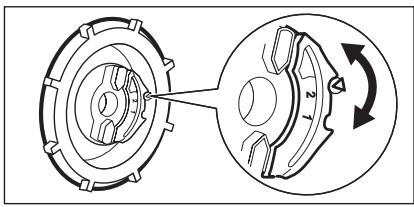
Manual adjustment
natural_image
Mechanical gear assembly diagram showing two components with a central knob and directional arrow (no text or labels)Turn the water hardness dial to the position 1 or 2.
Electronic adjustment
- Press the on/off button to activate the appliance.
- Press and hold, at the same time, Program and Option for a few seconds.
-
Press and hold, at the same time, Delay and Start until the programme in-
dicators ECO, AUTO and start to flash. -
Press Program.
• The programme indicators
AUTO and go off.
- The programme indicator ECO continues to flash.
- The acoustic signals operate. E.g. five intermittent acoustic signals = level 5.
-
The display shows the current setting of the water softener. E.g. 5 L = level 5.
-
Press Program again and again to change the setting.
-
Press the on/off button to deactivate the appliance and to confirm the setting.
6.2 Filling the salt container
text_image
SALE ZOUT SALE SEL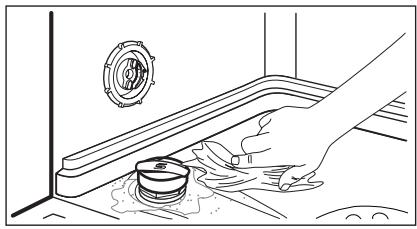
natural_image
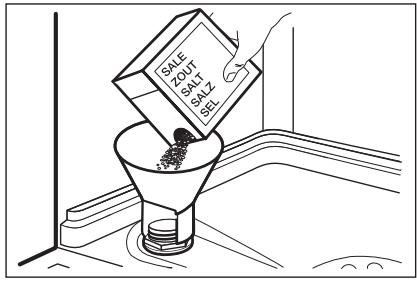
Line drawing of a hand cleaning a drain with a pipe and sink (no text or symbols)- Turn the cap counterclockwise and open the salt container.
- Put 1 litre of water in the salt container (only for the first time).
- Fill the salt container with dishwasher salt.
- Remove the salt around the opening of the salt container.
- Turn the cap clockwise to close the salt container.

CAUTION!
Water and salt can come out from the salt container when you fill it. Risk of corrosion. To prevent it, after you fill the salt container, start a programme.
6.3 Filling the rinse aid dispenser
text_image
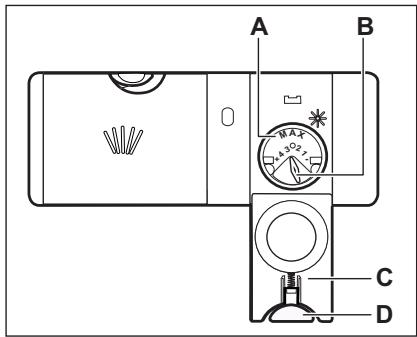
A B C D- Press the release button (D) to open the lid (C).
- Fill the rinse aid dispenser (A), no more than the mark 'max'.
- Remove the spilled rinse aid with an absorbent cloth to prevent too much foam.
- Close the lid. Make sure that the release button locks into position.

You can turn the selector of the released quantity (B) between position 1 (lowest quantity) and position 4 (highest quantity).
7. DAILY USE
- Open the water tap.
- Press the on/off button to activate the appliance.
- If the salt indicator is on, fill the salt container.
-
If the rinse aid indicator is on, fill the rinse aid dispenser.
-
Load the baskets.
- Add the detergent.
- Set and start the correct programme for the type of load and the degree of soil.
7.1 Using the detergent
text_image
A B 30 20 C7.2 Setting and starting a programme
The Auto Off function
To decrease the energy consumption, this function automatically deactivates the appliance a few minutes after:
- You have not closed the door.
- You have not pressed Start to start the programme.
- The programme is completed.
Starting a programme without delay start
- Open the water tap.
- Press the on/off button to activate the appliance. The indicator and the duration of the last set programme come on.
- Close the appliance door.
-
Set a programme.
-
If you want to start the last set programme, press Start.
- If you want to set the MyFavourite programme, press and hold Program until the indicators that are related to the MyFavourite programme and options come on.
-
If you want to set a different programme, press Program again and again until the indicator of the programme you want to set comes on. You can also set the applicable options.
-
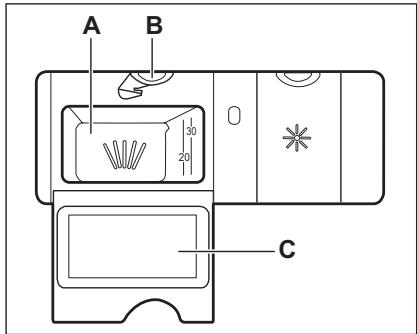
Press the release button (B) to open the lid (C).
- Put the detergent in the compartment (A).
- If the programme has a prewash phase, put a small quantity of detergent on the inner part of the appliance door.
- If you use detergent tablets, put the tablet in the compartment (A).
- Close the lid. Make sure that the release button locks into position.
The display shows the duration of the programme.
-
Press Start to start the programme.
-
The washing phase indicator comes on.
- The programme duration starts to decrease with steps of 1 minute.
Starting a programme with delay start
- Set the programme.
- Press Delay again and again until the display shows the delay time you want to set (from 1 to 24 hours).
- The countdown starts automatically. When the countdown is completed. The programme starts.
Opening the door while the appliance operates
If you open the door, the appliance stops. When you close the door, the appliance continues from the point of interruption.
Cancelling the delay start while the countdown operates
- Press and hold, at the same time, Program and Option until the duration of the set programme comes on.
- Press Start to start the programme.

The cancelling of the delay start cancels also the set options (except Multitab). Make sure, before you press Start, to set the options again.
Cancelling the programme
Press and hold, at the same time, Program and Option for a few seconds.

Make sure that there is detergent in the detergent dispenser before you start a new programme.
At the end of the programme
When the programme is completed, the display shows 0:00.
- The phase indicators go off.
- The indicator of the programme continues to stay on.
- Press the on/off button or wait for the Auto Off function to automatically deactivate the appliance.
- Close the water tap.
Important
- Let the dishes become cold before you remove them from the appliance. Hot dishes can be easily damaged.
- First remove the items from the lower basket, then from the upper basket.
- There can be water on the sides and on the door of the appliance. Stainless steel becomes cool more quickly than the dishes.
8. HINTS AND TIPS
8.1 The water softener
Hard water contains a high quantity of minerals that can cause damage to the appliance and bad washing results. The water softener neutralises these minerals. The dishwasher salt keeps the water softener clean and in good conditions. It is important to set the right level of the water softener. This makes sure that the water softener uses the correct quantity of dishwasher salt and water.
8.2 Using salt, rinse aid and detergent
- Only use salt, rinse aid and detergent for dishwasher. Other products can cause damage to the appliance.
- The rinse aid helps, during the last rinsing phase, to dry the dishes without streaks and stains.
- Combi detergent tablets contain detergent, rinse aid and other added agents. Be sure that these tablets are applicable to the water hardness in your area. Refer to the instructions on the packaging of the products.
- Detergent tablets do not fully dissolve with short programmes. To prevent detergent residues on the tableware, we
recommend that you use the tablets with long programmes.

Do not use more than the correct quantity of detergent. Refer to the instructions on the detergent packaging.
8.3 Loading the baskets

Refer to the supplied leaflet with examples of the load of the baskets.
- Only use the appliance to wash items that are dishwasher-safe.
- Do not put in the appliance items made of wood, horn, aluminium, pewter and copper.
- Do not put in the appliance items that can absorb water (sponges, household cloths).
- Remove remaining food from the items.
- To remove easily remaining burned food, soak pots and pans in water before you put them in the appliance.
- Put hollow items (cups, glasses and pans) with the opening down.
-
Make sure that cutlery and dishes do not bond together. Mix spoons with other cutlery.
-
Make sure that glasses do not touch other glasses.
- Put the small items in the cutlery basket.
- Put the light items in the upper basket. Make sure that they do not move.
- Make sure that the spray arms can move freely before you start a programme.
8.4 Before starting a programme
Make sure that:
- The filters are clean and correctly installed.
- The spray arms are not clogged.
- The position of the items in the baskets is correct.
- The programme is applicable for the type of load and for the degree of soil.
- The correct quantity of detergent is used.
- There is dishwasher salt and rinse aid (unless you use combi detergent tablets).
- The cap of the salt container is tight.
9. CARE AND CLEANING

WARNING!
Before maintenance, deactivate the appliance and disconnect the mains plug from the mains socket.

Dirty filters and clogged spray arms decrease the washing results.
Make a check regularly and, if necessary, clean them.
9.1 Cleaning the filters
text_image
C C B A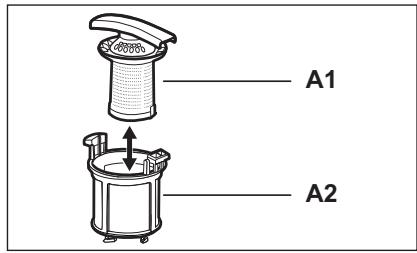
text_image
A1 A2-
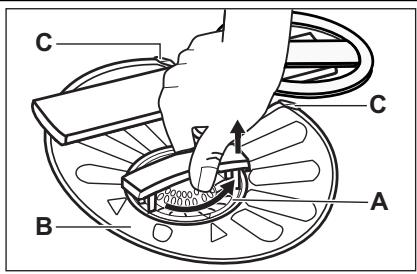
Turn the filter (A) counterclockwise and remove it.
-
To disassemble the filter (A), pull apart (A1) and (A2).
- Remove the filter (B).
- Wash the filters with water.
- Put the filter (B) to its initial position. Make sure that it assembles correctly under the two guides (C).
natural_image
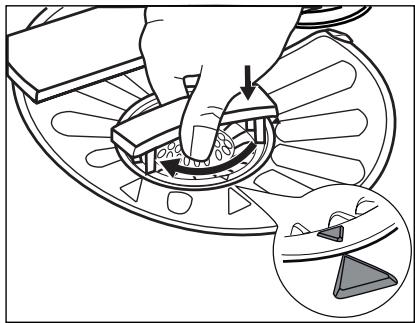
Diagram showing a hand using a tool to adjust or install a circular component, with an inset close-up highlighting a triangular component (no text or symbols present)- Assemble the filter (A) and put it into position in filter (B). Turn it clockwise until it locks.

An incorrect position of the filters can cause bad washing results and damage to the appliance.
9.2 Cleaning the spray arms
Do not remove the spray arms. If the holes in the spray arms are clogged, remove remaining parts of soil with a thin pointed object.
9.3 External cleaning
Clean the appliance with a moist soft cloth.
Only use neutral detergents. Do not use abrasive products, abrasive cleaning pads or solvents.
10. TROUBLESHOOTING
The appliance does not start or it stops during operation. Before you contact the Service, refer to the information that follows for a solution to the problem.
With some problems, the display shows an alarm code:
• ,10 - The appliance does not fill with water.
• ,20 - The appliance does not drain the water.
• ,30 - The anti-flood device is on.

WARNING!
Deactivate the appliance before you do the checks.
| Problem | Possible solution |
| You cannot activate the appli-ance. | Make sure that the mains plug is connected to the mains socket. |
| Make sure that there is not a damaged fuse in the fuse box. | |
| The programme does not start. | Make sure that the appliance door is closed. |
| Press Start. | |
| If the delay start is set, cancel the setting or wait for the end of the countdown. | |
| The appliance does not fill with water. | Make sure that the water tap is open.Make sure that the pressure of the water supply is not too low. For this information, contact your local water authority. |
| Make sure that the water tap is not clogged. | |
| Make sure that the filter in the inlet hose is not clogged. | |
| Make sure that the inlet hose has no kinks or bends. | |
| The appliance does not drain the water. | Make sure that the sink spigot is not clogged. |
| Make sure that the drain hose has no kinks or bends. | |
| The anti-flood device is on. | Close the water tap and contact the Service. |
After the checks are completed, activate the appliance. The programme continues from the point of interruption.
If the problem occurs again, contact the Service.
If the display shows other alarm codes, contact the Service.
10.1 If the washing and drying results are not satisfactory
Whitish streaks or bluish layers on glasses and dishes
- The released quantity of rinse aid is too much. Adjust the rinse aid selector to a lower position.
- The quantity of detergent is too much.
Stains and dry water drops on glasses and dishes
- The released quantity of rinse aid is not sufficient. Adjust the rinse aid selector to a higher position.
- The quality of the detergent can be the cause.
Dishes are wet
- The programme is without a drying phase or with a low temperature drying phase.
- The rinse aid dispenser is empty.
- The quality of the rinse aid can be the cause.
- The quality of the combi detergent tablets can be the cause. Try a different brand or activate the rinse aid dispens-
er and use rinse aid together with the combi detergent tablets.

Refer to ‘HINTS AND TIPS’ for other possible causes.
10.2 How to activate the rinse aid dispenser
The activation of the rinse aid dispenser can occur only with the Multitab option activated.
- Press the on/off button to activate the appliance.
- Press and hold, at the same time, Program and Option for a few seconds.
-
Press and hold, at the same time, Delay and Start until the programme indicators ECO, AUTO and start to flash.
-
Press Option.
- The programme indicators ECO and go off.
• The programme indicator AUTO continues to flash.
- The display shows the current setting.

Rinse aid dispenser off

Rinse aid dispenser on
-
Press Option to change the setting.
-
Press the on/off button to deactivate the appliance and to confirm the setting.
-
Adjust the released quantity of rinse aid.
-
Fill the rinse aid dispenser.
-
TECHNICAL INFORMATION
| Dimensions | Width / Height / Depth (mm) | 596 / 850 / 610 |
| Electrical connection | Refer to the rating plate. | |
| Voltage | 220-240 V | |
| Frequency | 50 Hz | |
| Water supply pressure | Min. / max. (bar / MPa) | (0.5 / 0.05) / (8 / 0.8) |
| Water supply 1) | Cold water or hot water2) | max. 60 °C |
| Capacity | Place settings | 12 |
| Power consumption | Left-on mode | 0.10 W |
| Off-mode | 0.10 W | |
1) Connect the water inlet hose to a water tap with a 3/4" thread.
2) If the hot water comes from alternative sources of energy, (e.g. solar panels, aeolian energy), use the hot water supply to decrease energy consumption.
12. ENVIRONMENT CONCERNS
Recycle the materials with the symbol

. Put the packaging in applicable containers to recycle it.
Help protect the environment and human health and to recycle waste of electrical
and electronic appliances. Do not dispose appliances marked with the symbol 📋
with the household waste. Return the product to your local recycling facility or contact your municipal office.
МАЗМУНЫ
text_image
Safety warning symbols and diagram showing a warning triangle with lightning bolt and a valve above a plug.