TP7040TWF - Tumble dryer AEG-ELECTROLUX - Free user manual and instructions
Find the device manual for free TP7040TWF AEG-ELECTROLUX in PDF.



| Product type | Heat pump dryer |
| Brand | AEG-ELECTROLUX |
| Model | TP7040TWF |
| Dimensions (H x W x D) | 85 x 60 x 58 cm |
| Depth with open door | 109 cm |
| Net weight | 52 kg |
| Power supply | 220-230 V, 6 A, 1050 W |
| Maximum load capacity | 7 kg |
| Drum volume | 108 L |
| Energy efficiency class | A |
| Energy consumption (cotton cupboard dry) | 1.85 kWh |
| Programs | COTTONS (Extra dry, Cupboard dry, Ready to iron), MIXED FABRICS (Extra dry, Cupboard dry, Ready to iron), Wool, Jeans, Microfibre, Easy ironing, Refresh, Timed drying, etc. |
| Functions | Extra delicate, Intensive, Extended anti-crease, Buzzer signal, Timed drying, Delayed start, Child safety |
| Child safety | Yes |
| Door reversibility | Yes |
| Maintenance | Clean filters after each cycle, empty water tank, clean condenser |
| Permissible ambient temperature | +5°C to +35°C |
| Optional accessories | Stacking kit, Drain kit, Pedestal with drawer |
Frequently Asked Questions - TP7040TWF AEG-ELECTROLUX
User questions about TP7040TWF AEG-ELECTROLUX
0 question about this device. Answer the ones you know or ask your own.
Ask a new question about this device
Download the instructions for your Tumble dryer in PDF format for free! Find your manual TP7040TWF - AEG-ELECTROLUX and take your electronic device back in hand. On this page are published all the documents necessary for the use of your device. TP7040TWF by AEG-ELECTROLUX.
USER MANUAL TP7040TWF AEG-ELECTROLUX
natural_image
Two-step diagram showing hand positioning of a device with checkmark and X mark (no text or symbols)natural_image
Line drawing of a kitchen appliance with a door and button, no text or symbols presentnatural_image
Pure diagram of a circular component with arrows indicating rotation, surrounded by dots and an open circle (no text or symbols)natural_image
Technical diagram of a circular device with internal components and mounting brackets (no text or symbols)natural_image
Diagram of a device interior showing a circular component with a black arrow pointing to a textured area, no text or symbols present.natural_image
Illustration of a hand pressing down on a device component with a black arrow indicating the process (no text or symbols present)natural_image
Diagram of a hand inserting a fan into a device with a circular top and mesh pattern (no text or symbols)natural_image
Illustration of a hand pressing down on a device component with a black arrow indicating rotation (no text or symbols present)natural_image
Diagram of a hand placing a component into a device casing with a mesh chamber (no text or symbols)natural_image
Line drawing of a hand using a tool to lift a component, with no visible text or symbols
natural_image
Technical line drawing of a mechanical device with a handle and internal panel (no text or symbols)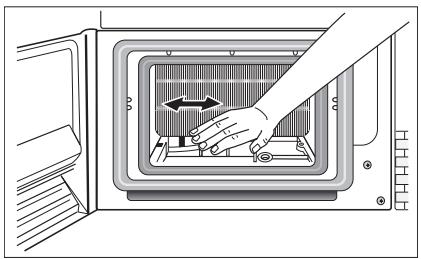
natural_image
Illustration of a hand pressing down on a microwave oven with a directional arrow (no text or symbols)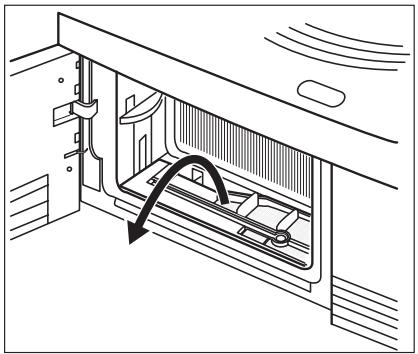
natural_image
Technical line drawing of a mechanical assembly with an arrow indicating motion direction (no text or symbols)
natural_image
Technical illustration of two mechanical assembly setups labeled a and b, showing internal components and alignment (no text or symbols present)natural_image
Illustration of a hand inserting a component into a microwave oven (no text or symbols visible)Thank you for choosing one of our high-quality products.
To ensure optimal and regular performance of your appliance please read this instruction manual carefully. It will enable you to navigate all processes perfectly and most efficiently. To refer to this manual any time you need to, we recommend you to keep it in a safe place. And please pass it to any future owner of the appliance.
We wish you much joy with your new appliance.
CONTENTS
| OPERATING INSTRUCTIONS | 29 |
| IMPORTANT SAFETY INFORMATION | 29 |
| ENVIRONMENT | 31 |
| INSTALLATION | 32 |
| Transporting the appliance | 32 |
| Appliance positioning | 32 |
| Removing transport safety packaging | 32 |
| Electrical connection | 33 |
| Changing door stop | 33 |
| Special accessories | 34 |
| PRODUCT DESCRIPTION | 35 |
| CONTROL PANEL | 36 |
| Control panel | 36 |
| Display | 36 |
| BEFORE FIRST USE | 37 |
| PROGRAMME CHART | 37 |
| DAILY USE | 39 |
| Sorting laundry | 39 |
| Average laundry weights | 39 |
| Switching appliance/drum light on | 40 |
| Laundry loading | 40 |
| Selecting the programme | 41 |
| EXTRA DELICATE (EXTRA SANFT) function | |
| 41 | |
| INTENSIVE (TROCKNEN PLUS) function | 41 |
| LONG ANTI-CREASE (KNITTERSCHUTZ PLUS) function | 41 |
| BUZZER (SIGNAL) function | 42 |
| TIME (ZEITWAHL) function | 42 |
| DELAY START (ZEITVORWAHL) | 42 |
| CHILD LOCK function | 42 |
| Starting the programme | 43 |
| Changing programme | 43 |
| Laundry unloading | 43 |
| CARE AND CLEANING | 44 |
| Cleaning fluff filter | 44 |
| Cleaning the door seal | 45 |
| Emptying the water reservoir | 45 |
| Cleaning heat exchanger filters | 46 |
| To clean the drum | 48 |
| Clean operating screen and housing | 48 |
| WHAT TO DO IF ... | 49 |
| MACHINE SETTINGS | 50 |
| TECHNICAL SPECIFICATIONS | 51 |
| SERVICE | 52 |
Subject to change without notice
OPERATING INSTRUCTIONS
IMPORTANT SAFETY INFORMATION

In the interest of your safety and to ensure the correct use, before installing and first using the appliance, read this user manual carefully, including its hints and warnings. To avoid unnecessary mistakes and accidents, it is important to ensure that all people using the appliance are thoroughly familiar with its operation and safety features. Save these instructions and make sure that they remain with the appliance if it is moved or sold, so that everyone using it through its life will be properly informed on appliance use and safety.

- Please read the instruction book before using this appliance.
General safety
- It is dangerous to alter the specifications or attempt to modify this product in any way.
- This appliance is not intended for use by persons (including children) with reduced physical and sensory conditions or lack of experience and knowledge, unless they have been given supervision or instruction concerning use of the appliance by a person responsible for their safety.
- Make sure that small children and pets do not climb inside the drum. To avoid this, please check into the drum before using.
- Any objects such as coins, safety pins, nails, screws, stones or any other hard, sharp material can cause extensive damage and must not be placed into the machine.
- In order to avoid danger of fires caused by excessive drying, do not use appliance to dry the following items: Cushions, quilts etc. (these items accumulate heat).
- Items such as foam rubber (latex foam), shower caps, waterproof textiles, rubber backed articles and clothes or pillows fitted with foam rubber pads should not be dried in the tumble dryer.
• Always unplug the appliance after use, cleaning and maintenance. - Under no circumstances should you attempt to repair the machine yourself. Repairs carried out by inexperienced persons may cause injury or serious malfunctioning. Contact your local Service Centre. Always insist on genuine spare parts.
- Items that have been soiled with substances such as cooking oil acetone, petrol, kerosene, spot removers, turpentine, waxes and wax removers should be washed in hot water with an extra amount of detergent before being dried in the tumble dryer.
- Danger of explosion: Never tumble dry items that have been in contact with inflammable solvents (petrol, methylated spirits, dry cleaning fluid and the like). As these substances are volatile, they could cause an explosion. Only tumble dry items washed with water.
- Risk of fire: items that have been spotted or soaked with vegetable or cooking oil constitute a fire hazard and should not be placed in the tumble dryer.
- If you have washed your laundry with stain remover you must execute an extra rinse cycle before loading your tumble dryer.
- Please make sure that no gas lighters or matches have accidentally been left in pockets of garments incase they are loaded into appliance

WARNING!
- Risk of fire! Never stop a tumble dry before the end of the drying cycle unless all items are quickly removed and spread out so that the heat is dissipated.
- Lint must not be allowed to accumulate around the tumble dryer.
- Risk of electric shock! Do not spray down the appliance with jets of water.
- The final part of a tumble dryer cycle occurs without heat (cool down cycle) to ensure that the items are left at a temperature that ensures that items will not be damaged.
- The tumble dryer is not to be used if industrial chemicals have been used for cleaning.
- Ensure you have good ventilation in the installation room to avoid the back flow of gases into the room from appliances burning other fuels, including open fires.
Installation
- This appliance is heavy. Care should be taken when moving it.
- When unpacking the appliance, check that it is not damaged. If in doubt, do not use it and contact the Service Centre.
- All packaging must be removed before use. Serious damage can occur to the product and to property if this is not adhered to. See relevant section in the user manual.
- Any electrical work required to install this appliance should be carried out by a qualified electrician or competent person.
- If the machine is situated on a carpeted floor, please adjust the feet in order to allow air to circulate freely under the appliance.
- After having installed the appliance, check that it is not pressing or standing on its electrical supply cable.
- If the tumble dryer is placed on top of a washing machine, it is compulsory to use the stacking kit (optional accessory).
Use
- This appliance is designed for domestic use. It must not be used for purposes other than those for which it was designed.
- Only wash fabrics which are designed to be machine dried. Follow the instructions on each garment label.
- Do not dry unwashed items in the tumble dryer.
- Do not overload the appliance. See the relevant section in the user manual.
- Clothes which are dripping wet should not be placed in the dryer.
- Garments which have been in contact with volatile petroleum products should not be machine dried. If volatile cleaning fluids are used, care should be taken to ensure that the fluid is removed from the garment before placing in the machine.
- Never pull the power supply cable to remove the plug from the socket; always take hold of the plug itself.
- Never use the tumble dryer if the power supply cable, the control panel, the working surface or the base are damaged so that the inside of the tumble dryer is accessible.
- Fabric softeners, or similar products should be used as specified by the fabric softener instructions.
- Caution – hot surface : Do not touch the door light cover surface when the light is switched on.
(Only dryers equipped with internal drum light)
Child safety
- This machine is not intended for use by young children or infirm persons without supervision.
- Children often do not recognise the hazards associated with electrical appliances. Children should be supervised to ensure that they do not play with the appliance.

WARNING!
- Danger of suffocation! The packaging components (e.g. plastic film, polystyrene) can be dangerous to children - Keep them out of children's reach.
- Keep all detergents in a safe place out of children's reach.
- Make sure that children or pets do not climb inside the drum.
ENVIRONMENT
The symbol ☒ on the product or on its packaging indicates that this product may not be treated as household waste. Instead it should be taken to the appropriate collection point for the recycling of electrical and electronic equipment. By ensuring this product is disposed of correctly, you will help prevent potential negative consequences for the environment and human health, which could otherwise be caused by inappropriate waste handling of this product. For more detailed information about recycling of this product, please contact your local council, your household waste disposal service or the shop where you purchased the product.
Environmental information
The packaging materials are environmentally friendly and can be recycled. The plastic components are identified by markings, e.g. >PE<, >PS<, etc. Please dispose of the packaging materials in the appropriate container at the community waste disposal facilities.

The heat pump of your tumble dryer contains a closed refrigerant circuit filled with a refrigerant which is free from fluoro-chloro-hydrocarbons. The refrigerant circuit in the heat pump must not be damaged.

WARNING!
When a unit is no longer being used:
- Pull the plug out of the socket.
- Cut off the cable and plug and dispose of them.
- Dispose of the door catch. This prevents children from trapping themselves inside and endangering their lives.
INSTALLATION
Transporting the appliance

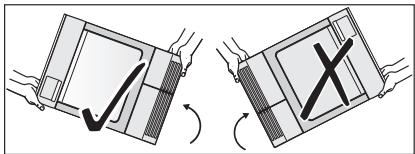
Only tip the appliance on its left side to transport (see illustration), if it cannot be transported in an upright position.
natural_image
Two-panel diagram showing hand positioning of a device with checkmark and X mark, no text or symbols present
WARNING!
If the appliance was not transported in an upright position, leave it to stand for 12 hours before connecting it to the electricity supply and using it for the first time, so that the oil can flow back to the compressor. Otherwise the compressor could be damaged.
Appliance positioning
- It is recommended that, for your convenience, the appliance is positioned close to your washing machine.
- The tumble dryer must be installed in a clean place, where dirt does not build up.
- Air must be able to circulate freely all round the appliance. Do not obstruct the front ventilation grille or the air intake grilles at the back of the appliance.
- To keep vibration and noise to a minimum when the tumble dryer is in use, it should be placed on a firm, level surface.
- Once in its permanent operating position, check that the tumble dryer is absolutely level with the aid of a spirit level. If it is not, raise or lower the feet until it is.
- The feet must never be removed. Do not restrict the floor clearance through deep pile carpets, strips of wood or similar. This might cause heat built-up which would interfere with the operation of the appliance.

- The hot air emitted by the tumble dryer can reach temperatures of up to 60^ C. The appliance must therefore not be installed on floors which are not resistant to high temperatures.
- When operating the tumble dryer, the room temperature must not be lower than +5°C and higher than +35°C, as it may affect the performance of the appliance.
- Should the appliance be moved, it must be transported vertically.
- The appliance must not be installed behind a lockable door, a sliding door a door with a hinge on the opposite side to that of the appliance in such a way that a full opening of the tumble dryer is restricted.
Removing transport safety packaging

CAUTION!
Before use all parts of the transport packaging must be removed.
- Open loading door
- Pull off adhesive strips from inside appliance on top of drum.
- Remove foil hose and polystyrene padding from the appliance.
natural_image
Illustration showing a hand inserting a fan into a washing machine (no text or symbols present)Electrical connection
Details on mains voltage, type of current and the fuses required should be taken from the type plate. The type plate is fitted near the loading aperture (see "Product description" chapter).
Connect the machine to an earthed socket, in accordance with current wiring regulations.
WARNING!
The manufacturer declines any responsibility for damage or injury through failure to comply with the above safety precautions.
Should the appliance power supply cable need to be replaced, this must be carried out by our Service Center.
WARNING!
The plug must be accessible after installing the machine.
Changing door stop
WARNING!
Before changing the door stop, disconnect the mains plug.
- Open loading door.
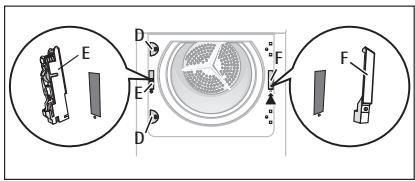
- Unscrew hinge A from the front of the appliance and take off the loading door.
- Remove cover plates B. To do this, insert a thin screwdriver into the slots as shown in the illustration, push downwards slightly and pry out the cover plates.

-
Use an appropriate tool and exert pressure to unfasten locking block C from the snap-on fixture, take out and re-insert on the other side having rotated the block through 180°.
-
Unscrew hinge A from the loading door, rotate through 180^ , re-insert on the opposite side and screw down.
-
Re-insert cover plates Bon the opposite site having first rotated them through 180°.
-
Unscrew cover plates D from the front of the appliance, rotate through 180°, screw on the opposite side.
- Unscrew door lock E, push down slightly and remove from the front of the appliance.
- Push snap-in button F in and down, push cover down slightly and remove from front of the appliance.
- Change door lock E over to the opposite side, screw down the door interlock.
- On the other side, insert cover F and allow snap-in button to lock into place.
- Insert loading door and hinges into recesses on the front of the appliance and screw down.
Note regarding contact protection: The appliance is only secure for operations again once all plastic parts have been inserted.
Special accessories
STACKING KIT
Available from your authorized dealer.
The stacking kit is to install the tumble dryer on the top of the 60 cm wide front load washing machine. The installation helps to get more space.
Read carefully the instructions supplied with the kit.
DRAINING KIT
Available from your authorized dealer (can be attached to some types of the tumble dryers). Installation kit for through draining of the condensed water into a basin, siphon, gully, etc. After installation the water container is drained automatically. The water container must stay in the appliance.
Installed hose must be on the height from minimum of 50 cm to maximum of 1 m from floor level. The hose cannot be in loop. If possible decrease the length of the hose.
Read carefully the instructions supplied with the kit.
PEDESTAL WITH THE DRAWER
Available from your authorized dealer.
To put the appliance higher at the level which helps to easy load and remove the laundry. The drawer can be use for laundry storage e.g. : towels, cleaning products and more.
Read carefully the instructions supplied with the kit.
PRODUCT DESCRIPTION

1 Control panel
2 Water reservoir
3 Drum light
4 Fine fluff filter
5 Coarse fluff filter
6 Fluff filter
7 Rating plate
8 Loading door (reversible)
9 Heat exchanger door, fluff filter, heat exchanger
10 Button for opening door in plinth
11 Ventilation grille
12 Adjustable feet
CONTROL PANEL
Control panel
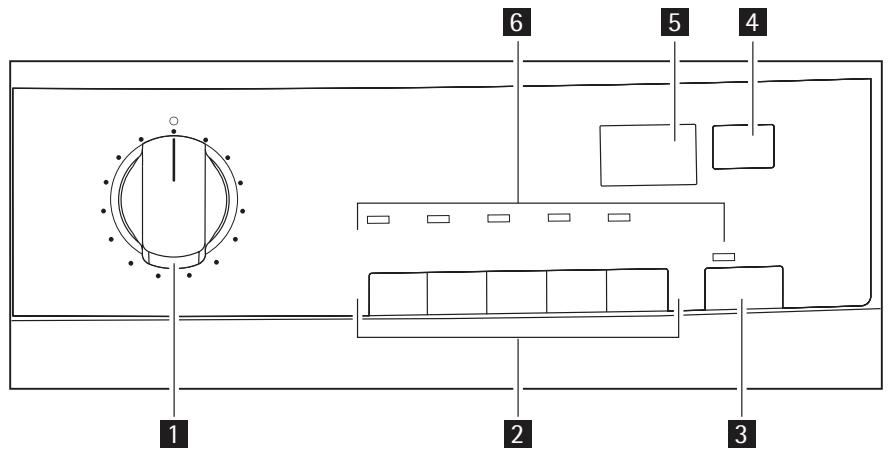
1 Programme selector and on/off switch
2 Function buttons
3 START PAUSE button
4 DELAY START (ZEITVORWAHL) button
5 Display
6 Status LED
Display

1 time to end / error message
2 warnings
3 long anti-crease icon
4 cycle phase status
5 delay time option icon
6 child lock icon
 | |||
| [16150] | [2417] | [1982] | [1994] |
| drying (drying phase indicator) | cooling (drying phase indicator) | crease guard (drying phase indicator) | long anti-crease |
| [16270] | [2012] | [1962] | [1912] |
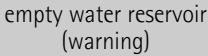 | clean filter (warning) | 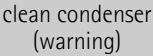 | chickock |
| [2272] | [1948] | [4430] | [1538] |
| [2272] | [2070] |  | [1677] |
BEFORE FIRST USE
In order to remove any residues which may have been produced during production, wipe the dryer drum with a damp cloth or carry out a brief drying cycle (ca. 30 min.) with damp cloths in the machine.
At the beginning of drying cycle (3-5 min.) there could be a slightly higher sound level. It is because of start of the compressor that is normal for compressor powered appliances such: refrigerators, freezers.
1) maximal weight of dry clothes
2) For test institutes only:
PROGRAMME CHART
| Programmes | Load^1) | Application/properties | Options | Care mark |
| COTTONS (BAUMWOLLE) | ||||
| EXTRA DRY (EX-TRATROCKEN) | 7 kg | To dry thick or multi- layered fabrics, e.g. terry towelling items, bathrobes. | all except EXTRA DELICATE (EXTRA SANFT) and TIME (ZEITWAHL) | [Special] [Special] |
| CUPBOARD DRY (SCHRANK-TROCKEN) ^2) | 7 kg | To dry fabrics of even thicknesses, e.g. terry towelling items, knitwear, towels. | all except EXTRA DELICATE (EXTRA SANFT) and TIME (ZEITWAHL) | [Special] [Special] |
| IRON DRY (BÜ-GELTROCKEN) ^2) | 7 kg | To dry normal thickness cotton or linen laundry, e. g. bedding, table linen. | all except EXTRA DELICATE (EXTRA SANFT) and TIME (ZEITWAHL) | [Special] [Special] |
| EASY CARE (MISCHGEWEBE) | ||||
| EXTRA DRY (EX-TRATROCKEN) ^2) | 3 kg | To dry thick or multi-layered fabrics, e. g. pullovers, bedding, table linen. | all except TIME (ZEITWAHL) | [Special] [Special] [Special] |
| CUPBOARD DRY (SCHRANK-TROCKEN) | 3 kg | To dry thin fabrics which are not ironed, e.g. easy care shirts, table linen, baby clothes, socks, lingerie with bones or wires. | all except TIME (ZEITWAHL) |  |
| IRON DRY (BÜ-GELTROCKEN) | 3 kg | To dry thin fabrics which are also to be ironed, e.g. knitwear, shirts. | all except TIME (ZEITWAHL) |  |
| special | ||||
| TIME PRO-GRAMME (ZEIT-PROGRAMM) | 7 kg | To dry laundry with the time set by the user. | all except EXTRA DELICATE (EXTRA SANFT) and IN-TENSIVE (TROCK-NEN PLUS) |  |
| BED LINEN (BETTWÄSCHE) | 3 kg | To dry bed linen (single and double sheet, pillowcase, bedspread, duvet cov-er). | all except EXTRA DELICATE (EXTRA SANFT) and TIME (ZEITWAHL) |  |
| JEANS | 7 kg | To dry leisure clothing, such as jeans, sweat-shirts, etc., of different material thicknesses (e.g. at the neck, cuffs and seams). | all except EXTRA DELICATE (EXTRA SANFT) and TIME (ZEITWAHL) |  |
| MICRO-FIBRE (MIKROFASER) | 1 kg | To dry thin fabrics, polyester and polya-mide, which are not ironed. | all except EXTRA DELICATE (EXTRA SANFT) and TIME (ZEITWAHL) |  |
| EASY IRON PLUS (LEICHTBÜGELN PLUS) | 1 kg (or 5 shirts) | To dry easy care cloths such as shirts and blouses. After this programme the cloths iron easiest. To have good result, we recommend to shake the wet cloths and put straight in the tumble dryer. After the programme end, remove the cloths and put on the cloths hanger. | all except EXTRA DELICATE (EXTRA SANFT) and TIME (ZEITWAHL) |  |
| FRESHEN-UP (AUFFRISCHEN) | 1 kg | To refresh or clean softly the clothes. | LONG ANTI-CREASE (KNIT-TERSCHUTZ PLUS), BUZZER (SIGNAL), DELAY START (ZEITVOR-WAHL) | |
| WOOL CARE (WOLLPFLEGE) | 1 kg | To refresh the cloths made of wool . The cloths become soft and cosy. We re-commend to remove the cloths immedi-ately after the programme end. | BUZZER (SIG-NAL), DELAY START (ZEITVOR-WAHL) | |
To make a performance test use the standard programmes which are specified in the EN 61121 document. If is necessary to correct the remaining moisture level of the laundry, adjust the programme with the INTENSIVE (TROCKNEN PLUS) function.
3) select EXTRA DELICATE (EXTRA SANFT)
DAILY USE
Sorting laundry
- Sort by fabric type:
- Cotton/linen for programmes in COTTONS (BAUMWOLLE) programme group.
- Mixtures and synthetics for programmes in SYNTHETICS (MISCHGEWEBE) programme group.
- Sort by care label: The care labels mean:
| Drying in the tumble dryer possible in principle | |
| Drying at normal temperature | |
| Drying at reduced temperature | |
| Drying in the tumble dryer not possible |

Do not place in the appliance any wet laundry which is not specified on the care label as being suitable for tumble-drying.
This appliance can be used for all wet laundry items which are labelled as suitable for tumble-drying.
- Do not dry new, coloured textiles together with light-coloured laundry items. Textile colours may bleed.
- Do not dry cotton jersey and knitwear with the EXTRA programme. Items may shrink!
- Wool and wool-like textiles can be dried using the WOOL CARE (WOLLPFLEGE) programme.
Preparing laundry
- To avoid laundry becoming tangled: close zips, button up duvet covers and tie loose ties or ribbons (e.g. of aprons).
- Empty pockets. Remove metal items (paper clips, safety pins, etc).
- Turn items with double-layered fabrics inside out (e.g. with cotton-lined anoraks, the cotton layer should be outermost). These fabrics will then dry better.

Do not overload the appliance. Observe max. loading volume of 7 kg.
Average laundry weights
| bathrobe | 1200 g |
| quilt cover | 700 g |
| man's work shirt | 600 g |
| man's pyjamas | 500 g |
| sheet | 500 g |
| tablecloth | 250 g |
| man's shirt | 200 g |
| night dress | 200 g |
| pillow case | 200 g |
| towelling towel | 200 g |
| blouse | 100 g |
| ladies' briefs | 100 g |
| men's underpants | 100 g |
| napkin | 100 g |
| tea cloth | 100 g |
Switching appliance/drum light on
Turn the programme selector to any programme or turn it to DRUM LIGHT (BELEUCH-TUNG). The appliance has been switched on. When the loading door is opened, the drum light is illuminated.
Laundry loading

CAUTION!
Do not jam the laundry in between the loading door and rubber seal.
- Open the loading door:
Push against the loading door (push point) - Load the laundry (do not force it in).
- Close the loading door securely. Lock must audibly lock.

natural_image
Line drawing of a kitchen appliance with a door and button, no text or symbols presentSelecting the programme
Use the programme selector to set the programme you require. The estimated time to end of the programme appears on the LCD, e.g. 2.32 (hours. minutes).
During the cycle, time elapses by steps of one minute.
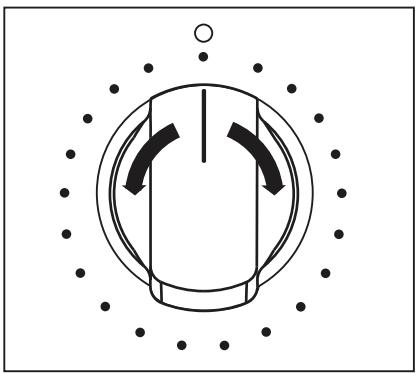
natural_image
Pure diagram of a circular component with internal curved arrows, surrounded by dots and a small circle (no text or symbols)EXTRA DELICATE (EXTRA SANFT) function
For especially gentle drying of sensitive fabrics with the 📍 care label and for temperature-sensitive textiles (e.g. acrylic, viscose). Programme is executed with reduced heat.
Delicate function is only suitable for use with loads of up to 3 kg.
To activate it:
- Choose the drying programme.
- Press EXTRA DELICATE (EXTRA SANFT) button (1) - the LED above is on.
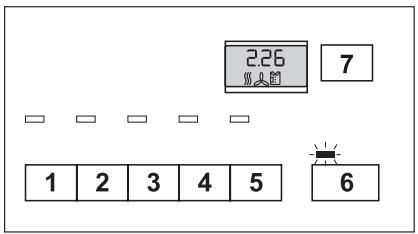
To deselect function press again EXTRA DELICATE (EXTRA SANFT) button (1). The LED above is off.
INTENSIVE (TROCKNEN PLUS) function
You can increase the drying result by using the INTENSIVE (TROCKNEN PLUS) function
To activate it:
- Choose the drying programme.
- Press INTENSIVE (TROCKNEN PLUS) button (2) - the LED above is on.
To deselect function press again INTENSIVE (TROCKNEN PLUS) button (2). The LED above is off.
LONG ANTI-CREASE (KNITTERSCHUTZ PLUS) function
This function prolongs anti-crease phase what gives 90 min. in total. The drum rotates in intervals during this phase. The laundry thereby remains relaxed and free of creases.
To activate it:
- Choose the drying programme.
- Press LONG ANTI-CREASE (KNITTERSCHUTZ PLUS) button (3) - the LED above is on and display shows the following icon 📋.
If this additional function is selected, the anti-crease phase at the end of the drying cycle is lengthened by 60 minutes. The laundry can be removed at any time during the anti-crease phase.
To deselect function press again LONG ANTI-CREASE (KNITTERSCHUTZ PLUS) button. The LED above is off and 90 from the icon disappears 📋.
BUZZER (SIGNAL) function
The appliance is supplied with the BUZZER (SIGNAL) function deactivated.
The buzzer sounds or plays a tune when activated during:
- cycle end
- anti-crease phase and when phase starts or ends
- cycle interruption by a warning
- alarm
To activate it:
- Choose the drying programme.
- Press BUZZER (SIGNAL) button (4) - the LED above is on.
To deselect function press again BUZZER (SIGNAL) button (4). The LED above is off.
To select the programme duration after setting the TIME PROGRAMME (ZEITPROGRAMM). You can select a programme duration from 10 mins to 3 hrs in 10-minute steps.
- Turn the programme knob to the TIME PROGRAMME (ZEITPROGRAMM). The blinking 10' appears in the display. (corresponding to the cooling phase).
- Press the TIME (ZEITWAHL) button (5) repeatedly until the desired programme duration is shown in the display, e.g. 20 for a programme of 20 minutes.
If the programme duration is not selected, the duration is automatically set to 10 mins.
Allows to delay the start of a drying programme from minimum of 30 min. to maximum of 20 hours.
- Select the drying programme and additional options.
- Push the DELAY START (ZEITVORWAHL) button again and again until the necessary delay start is shown in the display, e.g. 12h if the programme has to start after 12 hours.
- To activate the delay timer, push the START PAUSE button. Time to start elapses in the displayed.
CHILD LOCK function
The child lock can be set to prevent a programme being accidentally started or a programme in operation being accidentally changed. The child lock function locks all buttons and the programme knob. The child lock can be activated or deactivated by holding down the LONG ANTI-CREASE (KNITTERSCHUTZ PLUS) (3) and BUZZER (SIGNAL) (4) buttons simultaneously for 5 seconds.

- Before programme is started: Appliance cannot be used
- After programme is started: Programme in operation cannot be changed
The 📁 icon appears in the display to indicate that the child safety device is activated. The child safety device is not deactivated once the programme comes to an end. If you want to set a new programme, you must first deactivate the child safety device.
Starting the programme
Press the START PAUSE button (6). The programme is started.
The programme phase is shown in LCD by appropriate icon:
- - drying phase indication
- ℰ - cooling phase indication
-
- anti-crease phase indication
During program selection all appropriate phase icons are displayed. When program is started only current cycle phase is indicated by single icon.
Changing programme
To change a programme which has been selected by mistake once the programme has started, first turn the programme selector to OFF (AUS) and then reset the programme.

The programme cannot longer be changed directly once the programme has started. If nevertheless there is an attempt to change the programme on the programme dial, the programme progress display and the maintenance indicators flash. If an option (excluding the buzzer) is set, Err appears in the multidisplay. The drying programme is not however affected by this (laundry protection).
Laundry unloading
Once the drying cycle is complete, display shows a blinking ☐, anti-crease 📋 icon appears on LCD. If the BUZZER (SIGNAL) button (4) has been pressed, an acoustic signal sounds intermittently for about one minute.

The drying cycles are automatically followed by an anti-crease phase which lasts around 30 minutes. The drum rotates at intervals during this phase. This keeps the laundry loose and free of creases. The laundry can be removed at any time during the anti-crease phase. (The laundry should be taken out towards the end of the anti-crease phase at the latest to prevent creases from forming.) If LONG ANTI-CREASE (KNITTERSCHUTZ PLUS) function has been selected, the anti-crease phase is lengthened by 60 minutes.
- Open door.
- Before removing the laundry, remove fluff from the micro-fine filter. It is best to use a damp hand for this purpose. (See "Care and cleaning" chapter.)
- Remove laundry.
- Turn the programme selector to OFF (AUS).

After each drying cycle:
- Clean the micro-fine filter and fine filter
-
Drain the condensed water container
(See chapter "Care and cleaning".) -
Close the door.
CARE AND CLEANING
Cleaning fluff filter
The filters collect all the fluff which collect during drying. To ensure that the tumble dryer works perfectly, the fluff filters (micro-fine filter and fine strainer) must be cleaned after each drying cycle.
The warning icon ⚙ is on to remind you of this operation.

CAUTION!
Do not operate the tumble dryer without fluff filters or with damaged or blocked fluff filters.
- Open loading door
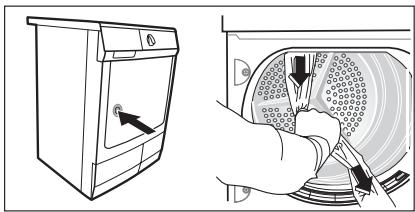
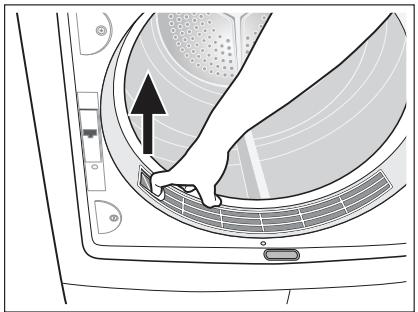
- Use a moist hand to clean the micro-fine filter, which is built into the lower part of the loading aperture.

natural_image
Technical diagram of a circular device with internal components and labeled parts (no readable text or symbols)- After a period of time, a gleam because of detergent residue on laundry forms on the filters. When this occurs, clean the filters with warm water using a brush. Remove the filter from the door pulling it out. It can be positioned with the tooth facing to the left or to the right).
After cleaning do not forget to put it back.
natural_image
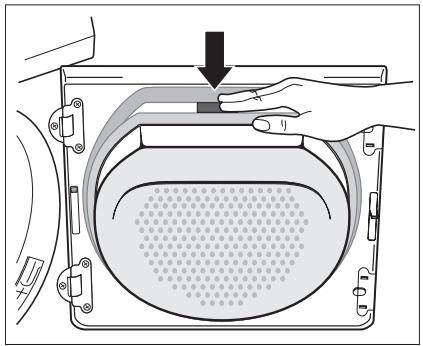
Diagram of a device interior showing a hand inserting a component into a circular housing (no text or symbols visible)- Push down the unlock button on the large coarse filter.
Large mesh filter jumps up.
natural_image
Diagram of a hand pressing down on a mechanical component with a downward arrow indicating force or direction (no text or symbols present)- Take out fine strainer.
- Remove fluff from fine strainer. It is best to use a moist hand for this purpose.

Clean the full filter area
The strainer area does not have to be cleaned after every drying cycle, but should be checked regularly and cleaned of fluff if necessary.
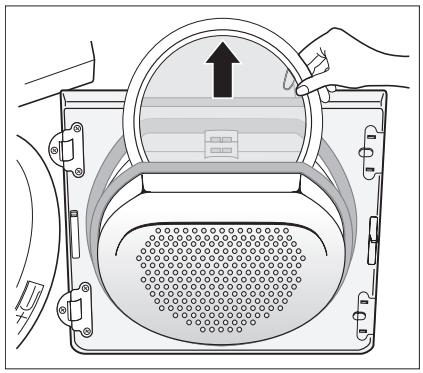
- To do this, grip the top of the large mesh filter and pull it forwards until it comes loose from the 2 brackets.
- Remove fluff from the full filter area. It is best to use a vacuum cleaner for this purpose.
- Push both journals of the large mesh filter into the brackets on the loading door until they snap into place.
-
Re-insert fine strainer.
-
Push against the large mesh filter until it locks into the interlock.

If the fine strainer is not fitted, the large mesh filter will not snap into place and the loading door cannot be closed.
natural_image
Diagram of a washing machine with hand operating the lid and vent, showing internal components (no text or symbols)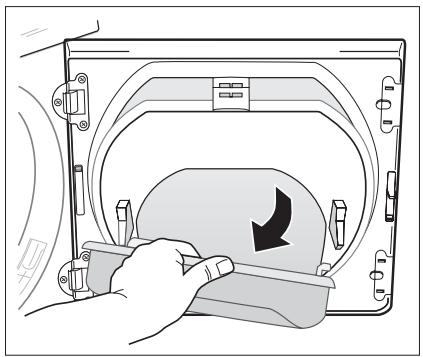
natural_image
Illustration of a hand pressing down on a device component with a black arrow indicating rotation (no text or symbols present)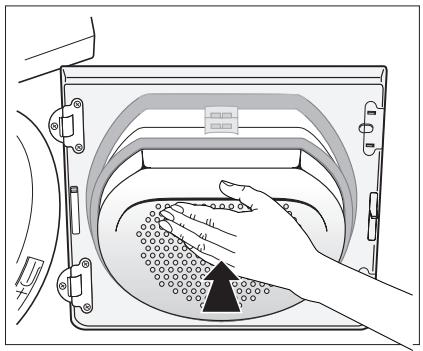
natural_image
Illustration of a hand placing a textured object into a device casing (no text or symbols visible)Cleaning the door seal
Clean the door seal with a moist cloth immediately after the drying cycle is completed.
Emptying the water reservoir
Empty the water reservoir after each drying cycle.
If the water reservoir is full, an active programme will break off automatically and the empty container ≈ symbol on the display will light up. To continue the programme, the water reservoir must first be empty.

WARNING!
Risk of poisoning. The water from the water reservoir is not applicable to drink or to prepare meals.
- Pull out the water reservoir 1 and pull up the water reservoir drainage pipe as far as it will go 2.
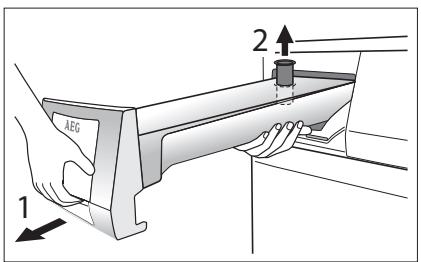
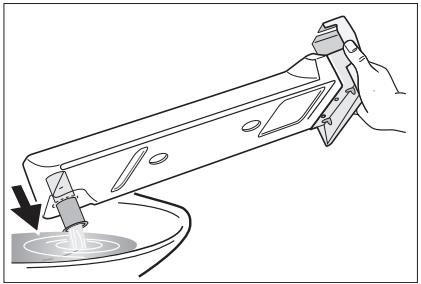
- Pour condensed water out into a basin or similar receptacle.
- Slide outlet connections in and refit water reservoir.
If the programme has been interrupted as a result of the water reservoir being full: Push the START PAUSE button to continue the drying cycle.
natural_image
Line drawing of a hand using a tool to apply liquid onto a surface (no text or symbols present)
The water from the water reservoir can be used as distilled water, e.g. for steam ironing.
But first filter the water (e.g. with a coffee filter) to remove residue and small pieces of the fluff.
Cleaning heat exchanger filters
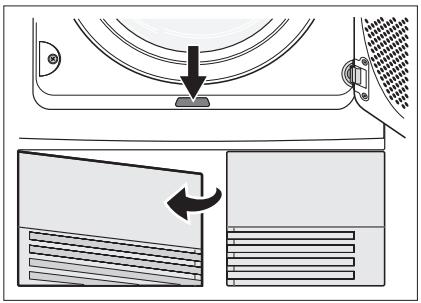
If the indicator clean base filters lights up, the heat exchanger fluff filters in the base of the appliance must be cleaned, i.e. after each 3 drying cycles. Both filters are located in the appliance base.

Water can collect in the filter housing therefore it is normal for the heat exchanger fluff filters to become wet.

- Do not operate the tumble dryer without the fluff filters.
- Clogged filters cause higher energy consumption (drying cycle elongation) and tumble dryer damage.
-
A dirty heat pump can only be cleaned up with a costly process.
-
Open loading door
-
Open door in plinth: To do this, push the release button on the bottom of the door aperture and open the door in the plinth to the left.
-
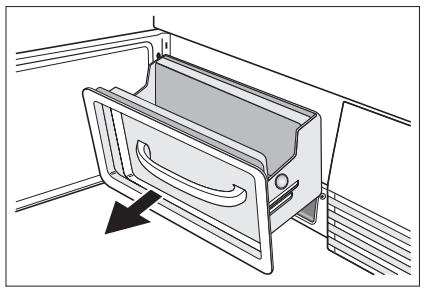
Pull filter housing out of the base by the handle.
-
To clean the fluff filter: Remove filter from filter housing push the pressure points on the sides and pull the filter frame up and out of the housing. Remove fluff from the fluff filter with a moist hand.
-
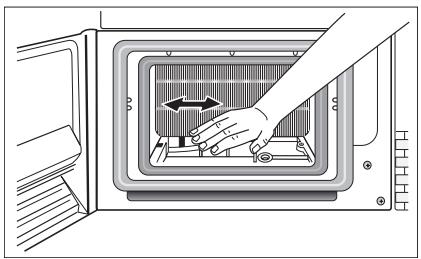
Use a moist hand to remove the fluff from the filter in the base.

natural_image
Technical line drawing of a mechanical device with a handle and internal components, showing no text or symbols.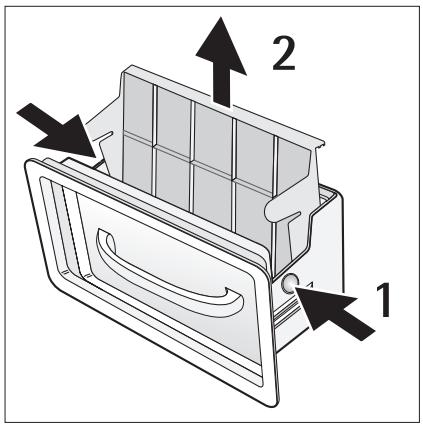
natural_image
Illustration of a hand pressing down on a microwave oven with a directional arrow (no text or symbols)If necessary pull out and clean the filter with warm water using a wiper or brush. Clean the inside of the door, the fluff filter chamber and the rubber seals of fluff.
natural_image
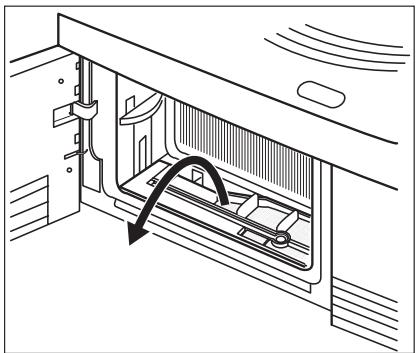
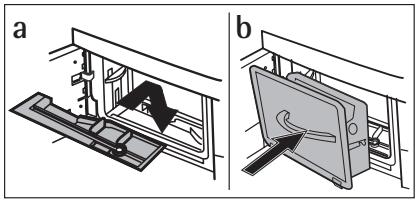
Diagram of a mechanical device with an arrow indicating motion or force direction (no text or symbols present)- Insert the fluff filter into the base a. Insert the second fluff filter into the filter housing (it has to audibly lock) and slide it inside the filter chamber b. Close the door in plinth. Note: If the fluff filter is not inserted in the filter housing, the filter housing cannot be slide into the appliance base.
- As necessary, approx. once every 6 months, remove the fluff from the heat exchanger using the sponge supplied. When doing this, please use rubber gloves.
Tip: The fluff can be removed more easily if it is first dampened (e.g. with a laundry dampener) or with the help of vacuum cleaner.
natural_image
Technical diagram showing two mechanical assembly states (a and b) with no visible text or symbols
natural_image
Illustration of a hand inserting a component into a microwave oven (no text or symbols visible)To clean the drum

CAUTION!
Do not use abrasive materials to clean the drum. Use a soft detergent to clean the inner side of the drum and the drum blades.

Keep the inner surface of the drum and the drum blades clean. The minerals from the water or cleaning agents can collect on the inner surface of the drum. This cause that the laundry is not sufficient dry.
Clean operating screen and housing

CAUTION!
Do not use furniture cleaners or aggressive cleaning agents to clean the appliance. Use a damp cloth to wipe down the operating screen and housing.
WHAT TO DO IF ...
Troubleshooting by yourself
| Problem1) | Possible cause | Remedy |
| Dryer does not work. | Dryer not connected to mains supply. | Plug in at mains socket. Check fuse in fuse box (domestic installation). |
| Loading door opened. | Close loading door | |
| The START PAUSE button not pressed. | Press the START PAUSE button. | |
| Unsatisfactory drying results. | Incorrect programme set. | Set suitable programme.2) |
| Fluff filters clogged. | Clean fluff filters.3) | |
| Heat exchanger clogged. | Clean heat exchanger.3) | |
| Max. loading exceeded. | Respect max. loading volume. | |
| Covered ventilation grill. | Uncover ventilation grill in base area. | |
| Residue inside the drum. | Clean the drum inside. | |
| High water hardness. | Set suitable water hardness4). | |
| Loading door does not close | Filters not locked in place. | Install fine filter and/or snap course filter into place. |
| Err(Error) on the LCD.5) | Attempt to change parameters after start of the programme. | Turn the dryer off and on. Set requested parameters. |
| No drum light | Programme selector in OFF position. | Turn it to DRUM LIGHT (if available) or to any programme. |
| Defective light bulb. | Replace light bulb (see next section). | |
| Abnormally elapsing time on the LCD5) | Time to end is calculated on the basis of: type, volume and dampness of laundry. | Automatic process; this is not a machine fault. |
| Programme inactive | Full water reservoir. | Empty water reservoir3), press START PAUSE button. |
| Drying cycle to short | Small laundry volume./Too dry laundry for selected programme. | Select time programme or higher drying level (e.g. EXTRA DRY). |
| Drying cycle to long6) | Fluff filters clogged. | Clean fluff filters. |
| To high loading volume. | Respect max. loading volume. | |
| Laundry insufficiently spun. | Spun adequately the laundry. | |
| Particularly high room temperature - no machine fault. | Lower the room temperature if possible. |
1) In case of error message on the LCD (e.g. E51-only dryers with the LCD): Switch the dryer off and on. Set programme. Press the START PAUSE button. Does not work? - inform local service and quote the error code.
2) follow program recommendation - see Programme overview chapter
3) see Care and cleaningchapter
4) see Machine settings chapter
5) only dryers with the LCD
6) Note: After around 5 hours the drying cycle ends automatically (see Drying cycle complete section).
Changing the bulb for interior lighting
Only use a special bulb which is designed specially for dryers. The special bulb can be obtained from your local service centre.

When the appliance is switched on, the interior lighting switches itself off after 4 minutes when the door is open.

WARNING!
Do not use standard bulbs! These develop too much heat and may damage the appliance! Before replacing the bulb, disconnect the mains plug; with a permanent connection: fully unscrew or deactivate the fuse.
- Unscrew cover above the bulb (this can be found directly behind the loading aperture, at the top; refer to "Description of machine" section.)
- Replace defective bulb.
- Screw cover back down.
Check the correct positioning of o-ring gasket before screwing back the door light cover. Do not operate the dryer when missing o-ring gasket on door light cover.

WARNING!
For safety reasons, the cover must be screwed down tightly. If this is not done, the dryer must not be operated.
MACHINE SETTINGS
1) Water contains, a variable quantity of limestone and mineral salts of which quantities vary according to geographical locations thus varying its conductivity values. Relevant variations of the conductivity of the water compared to those prefixed by the factory could slightly influence the residual humidity of the laundry at the end of the cycle. Your dryer allows you to regulate the sensitivity of the drying sensor based on conductivity values of the water.
2) By default the warning LED is always on at the end of the drying cycle or during the cycle if the water reservoir is full. When using an external drain for the condensed water warning can be offi
| Setting | Implementation |
| Buzzer permanent on/off | 1. Turn the programme selector to any programme.2. Press simultaneously the EXTRA DELICATE (EXTRA SANFT) (1) and INTENSIVE (TROCKNEN PLUS) (2) buttons and hold down for approx. 5 seconds.- diode above BUZZER (SIGNAL) button (4) starts lighting - buzzer permanently on.- lighting diode comes off - buzzer permanently off.3. The buzzer is by default always off. You can use the BUZZER (SIGNAL) button (4) to activate or deactivate sound but the machine does not memorize your selection. |
| Water hardness ^1) | Turn the programme selector to any programme.Press simultaneously the EXTRA DELICATE (EXTRA SANFT) (1) and TIME (ZEITWAHL) (5) buttons and hold down for approx. 5 seconds. The current setting is on the display:low conductivity <300 μS/cmmedium conductivity 300-600 μS/cmhigh conductivity >600 μS/cmPress the START PAUSE button (6) sequentially until you set desired level.To memorize setting press simultaneously the EXTRA DELICATE (EXTRA SANFT) (1) and TIME (ZEITWAHL) (5) buttons or turn knob to OFF (AUS) position |
| Emptying water reservoir warning off ^2) | Turn the programme selector to any programme.Press simultaneously the INTENSIVE (TROCKNEN PLUS) (2) and TIME (ZEITWAHL) (5) buttons and hold down for approx. 5 seconds.The current setting is on the display:warning icon and - - - - - - - - - - - - - - - - - - - - - - - - - - - - - - - - - - - - - - - - - - - - - - - - - - - - - - - - - - - - - - - - - - - - - - - - - - - - - - - - - - - - - - - - - - - - - - - - - - - - |
TECHNICAL SPECIFICATIONS
CE
1) different loading volume data may be needed in some countries as a result of different measuring methods
2) in accordance to EN 61121
3) hints for test institutes: cycle has to be checked in accordance to EN 61121
| Height x width x depth | 85 x 60 x 58 cm |
| Drum volume | 108 l |
| Depth with loading door open | 109 cm |
| Height can be adjusted by | 1.5 cm |
| Weight when empty | approx. 52 kg |
| Loading volume (depends on programme) ^1) | max. 7 kg |
| Voltage | 220-230 V |
| Necessary fuse | 6 A |
| Total power | 1050 W |
| Energy efficiency class | A |
| Energy consumption (7 kg of cotton, pre-drained at 1000 rpm) ^2) | 1.85 kWh |
| Average annual energy consumption | 124,2 kWh |
| Use | Domestic |
| Permitted ambient temperature | + 5°C to + 35°C |
| Consumption valuesThe consumption values have been established under standard conditions. They can deviate when the appliance is operated in domestic circumstances. | |
| Programme | applianceaverage drying time in min. |
| COTTON CUPBOARD DRY 3) | 1.85/ 140 (7 kg load pre-drained at 1000 rpm)1.57/ 123 (7 kg load pre-drained at 1400 rpm) |
| COTTON IRON DRY 3) | 1.39/ 110 (7 kg load pre-drained at 1000 rpm) |
| SYNTHETICS CUPBOARD DRY 3) | 0.58/ 45 (3 kg load pre-drained at 1200 rpm) |
SERVICE
If there are technical faults, first check if you can remedy the problem yourself with the help of the operating instructions - see chapter What to do if....
If you cannot remedy the problem on your own, get in touch with the Customer Care Department or one of our service partners.
To assist you quickly, these data are necessary:
- Model description
- Product number (PNC)
- Serial number (S No. is on rating plate stuck to the product - to find it see chapter Product description))
- Type of failure
– Any error messages shown by the display.
So that you have the necessary reference numbers from your appliance at hand, we recommend that you write them in here:
| Model description: | ...... |
| PNC: | ...... |
| S No: | ...... |

www.aeg.com/shop


CE
- OPERATING INSTRUCTIONS
- IMPORTANT SAFETY INFORMATION
- General safety
- WARNING!
- Installation
- Use
- Child safety
- ENVIRONMENT
- Environmental information
- Transporting the appliance
- Appliance positioning
- Removing transport safety packaging
- CAUTION!
- Electrical connection
- Changing door stop
- Special accessories
- STACKING KIT
- DRAINING KIT
- PEDESTAL WITH THE DRAWER
- PRODUCT DESCRIPTION
- CONTROL PANEL
- BEFORE FIRST USE
- DAILY USE
- Sorting laundry
- Preparing laundry
- Switching appliance/drum light on
- Laundry loading
- Selecting the programme
- EXTRA DELICATE (EXTRA SANFT) function
- INTENSIVE (TROCKNEN PLUS) function
- LONG ANTI-CREASE (KNITTERSCHUTZ PLUS) function
- BUZZER (SIGNAL) function
- CHILD LOCK function
- Starting the programme
- Changing programme
- Laundry unloading
- CARE AND CLEANING
- Cleaning fluff filter
- Clean the full filter area
- Cleaning the door seal
- Emptying the water reservoir
- Cleaning heat exchanger filters
- To clean the drum
- Clean operating screen and housing
- WHAT TO DO IF ...
- Changing the bulb for interior lighting
- MACHINE SETTINGS
- TECHNICAL SPECIFICATIONS
- CE
- SERVICE
Brand : AEG-ELECTROLUX
Model : TP7040TWF
Category : Tumble dryer