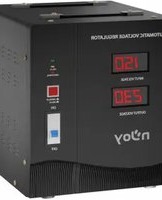
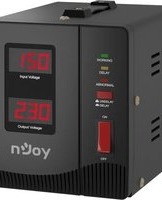
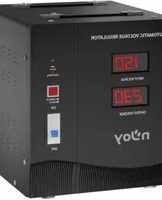
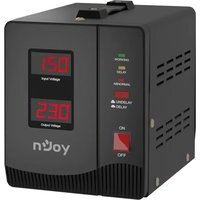
Alvis AVRL-5005TAL-CS01B - Régulateur de tension automatique nJoy - Free user manual and instructions
Find the device manual for free Alvis AVRL-5005TAL-CS01B nJoy in PDF.


| Product Type | Automatic Voltage Regulator (AVR) |
| Model | Alvis AVRL-5005TAL-CS01B |
| Brand | nJoy |
| Power Rating | 5000 VA |
| Input Frequency | 45–65 Hz (pure sine wave only) |
| Output Regulation | Automatic boost and buck (AVR) |
| Protection Features | Over-voltage, under-voltage, over-temperature, over-current, short circuit, surge and spike suppression |
| Time Delay | Selectable: 6 seconds (undelay) or 3 minutes (delay) via switch |
| LED Indicators | Green (normal), Yellow (delaying), Red (protecting) |
| Display | Alphanumeric (H, L, c, E1, E2) |
| Wiring (3000/5000 models) | Hardwired: input phase, input neutral, output phase, output neutral, earth cable |
| Operating Environment | Indoor, temperature and humidity controlled, free of conductive contaminants, adequate airflow (min 20 cm clearance) |
| Certificate / Compliance | WEEE directive (separate collection for recycling) |
| Package Contents | AVR unit, user manual, power cord (attached), warranty card |
| Intended Applications | Computers, hydrophore, medical and laboratory equipment, UPS input |
| Safety Notes | Do not exceed rated capacity; disconnect load before resetting; use only in pure sine wave environment |
Frequently Asked Questions - Alvis AVRL-5005TAL-CS01B nJoy
User questions about Alvis AVRL-5005TAL-CS01B nJoy
0 question about this device. Answer the ones you know or ask your own.
Ask a new question about this device
Download the instructions for your Régulateur de tension automatique in PDF format for free! Find your manual Alvis AVRL-5005TAL-CS01B - nJoy and take your electronic device back in hand. On this page are published all the documents necessary for the use of your device. Alvis AVRL-5005TAL-CS01B by nJoy.
USER MANUAL Alvis AVRL-5005TAL-CS01B nJoy
Thank you for purchasing our products!
Please read this manual before using the product.
nJoy is a brand of power and backup protection products that create solutions for multiple levels of environment complexity, residential to industrial.
The nJoy Alvis Series is the ideal protection for computers or other electronic equipment. With its AVR-protected sockets regulates the input voltage and eliminates the problems created by under-voltage or over-voltage fluctuations. Besides, it is provided with selection for delay time that eliminates transients that can affect connected equipment. This high performance AVR Series comes with the versatility to fit all kinds of equipment with its input voltage range selection.
The following models belong to the Series:

bar
| Category | Value | | :--- | :--- | | 1000VA | Alvis 1000 | | 2000VA | Alvis 2000 | | 3000VA | Alvis 3000 | | 5000VA | Alvis 5000 |1 Package Contents
√ AVR Unit.
√ User Manual.
√ Power Cord (attached).
√ Warranty Card.
2 Product Overview

Front View


flowchart
graph TD
    A["ALVIS 2000"] --> B["AUTOMATIC VOLTAGE REGULATOR"]
    B --> C["OUTPUT VOLTAGE"]
    B --> D["GREEN LED power on"]
    B --> E["YELLOW LED: delaying"]
    B --> F["RED LED: protecting"]
    B --> G["DELAY BUTTON"]
    B --> H["POWER SWITCH"]
    B --> I["CFF"]
    B --> J["nJoy"]
    J --> K["Ground"]

Alvis 1000
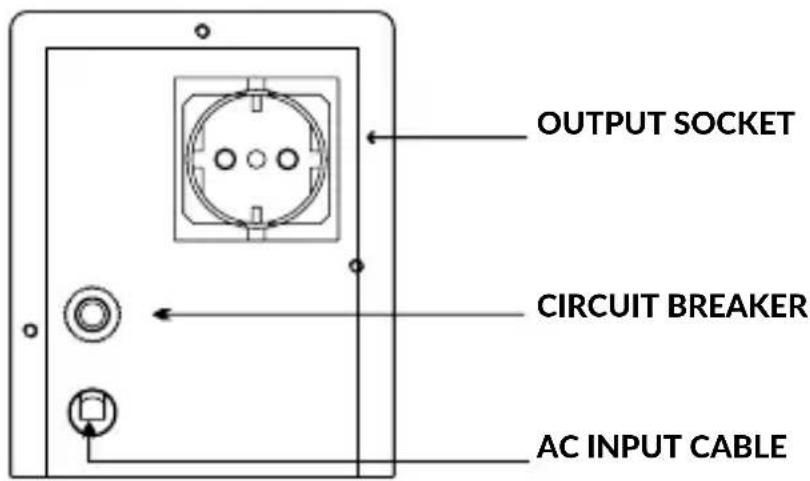
Alvis 2000
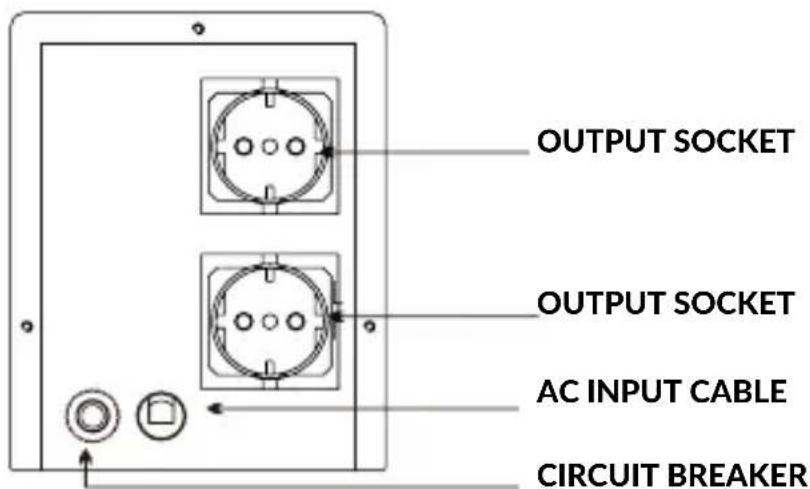
Alvis 3000/
Alvis 5000

OUTPUT PHASE CABLE OUTPUT NEUTRAL CABLE EARTH CABLE INPUT NEUTRAL CABLE INPUT PHASE CABLE
General Specifications3
Microprocessor control guarantees high reliability
Time delay function eliminates transients that can affect connected equipment
Under-voltage, over-voltage, over-heat and over current protection
◆ Provides stable output voltage
Provide surge and spike suppression
NOTE: For the full list of technical specifications please see the AlvisSeries datasheet found at www.nJoy.global
Important Safety Warnings4
The unit is designed only for use within 45Hz to 65Hz (depending on the model) input frequency and pure sine wave environment. Any other input frequency or wave form will affect the voltage range and load capability.
Please DO NOT connect the unit to the environment with direct current or simulated sine wave.
To prevent the risk of fire or electric shock, install the device in a temperature and humidity controlled indoor area free of conductive contaminants. (See the specifications in the product's datasheet for the acceptable temperature and humidity range.)
Don't connect any appliances to AVR, which exceeds its rated power capacity.
Instalation and Initial Startup5
Step 1. Inspection
Remove the unit from the shipping package and inspect it for damage that might have occurred during transportation. Notify the carrier and place of purchase if any damage is found.
Step 2. Placement & Storage Conditions
Install the unit in a protected area that is free of excessive dust and has adequate air flow. Please place the unit away from other units at least 20cm to avoid interference. Do NOT block the top or side air vents on the unit. Do not use the unit in an environment where the ambient temperature or humidity is outside the limits listed in the specifications. Operate the unit in an environment free of excessive dust, mechanical vibration, inflammable gases and explosive or corrosive atmospheres.

Step 3. Connect the Loads
The AVR-protected receptacles will provide stable power to connected devices by boosting and bucking the input power. Therefore simply connect sensitive loads to AVR-protected receptacles in order to secure them.
3.1 Make sure all appliances are turned "OFF", and put the POWER SWITCH of AVR to "OFF" position.
3.2 For Alvis 1000 and 2000, plug the appliances into the OUTPUT SOCKET of the AVR
3.3 For Alvis 3000 and 5000 make wiring connection as shown in Figure 1.

FIGURE 1
OUTPUT PHASE CABLE OUTPUT NEUTRAL CABLE EARTH CABLE INPUT NEUTRAL CABLE INPUT PHASE CABLE
Step 4. Turn On/Off the Unit
Turn on the unit by pressing the power switch to "ON" position. Then, all connected devices will be powered on.
6 Operation
6.1 Delay Operation
The "DELAY" means the output of the AVR will be delayed for a specific time, after switching on the AVR or the output is restored from a protecting status.
It will prevent the appliances from being damaged due to frequent switching on and off.

Undelay

Delay
The default delay time is 6 seconds (UNDELAY) or 3 minutes (DELAY). Press down the DELAY BUTTON to select the "DELAY", or press it up to select the "UNDELAY".

For the appliances with motors and compressors, like fans, refrigerators, cooler, freezers, air-conditioners, pumps, small motors, please select □ Delay.
6.2 Over Voltage (High Voltage) Protection
In case that input voltage is over the normal range, the output will be cut off automatically and a letter "H" will be shown in the display.
When input mains power returns to normal range, the AVR will restore the output automatically.
6.3 Under Voltage (Low Voltage) Protection
In case that input voltage is below the normal range, the output will be cut off automatically and a letter "L" will be shown in the display.
When input mains power returns to normal range, the AVR will restore the output automatically.
6.4 Over Temperature Protection
In case that the temperature of transformer windings is beyond the normal range, the output will be cut off automatically and letter "c" will be flashing in the display.
When temperature of transformer windings returns to normal range, the AVR will restore the output automatically.
6.5 Short Circuit Protection
In case a short circuit happens to the AVR or appliances, the AIR BREAKER or CIRCUIT BREAKER will trip off to cut off the input power supply.
Check if the appliances have been short circuited, if so, please remove them.

If the AVR is short circuited, do not use it! Please turn to the authorized dealer or service center.
6.6 Smart Overload Protection
Once it is overloaded, the AVR will give display warning to inform the user to reduce the connected appliances.
When load is >110%±8%: output will be cut off within 30s if overload is not removed
When load is >120%±8%: output will be cut off within 6s if overload is not removed
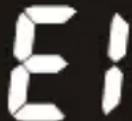
Once it's protected, the AVR will retry to restore output for 3 times, if overload is still not removed during this period, the AVR will stop retrying to restore output, at this time a letter "E1" or "E2" will be flashing in the display.
When letter "E1" or "E2" is flashing, even if the overload is removed, the output won't be restored. In this case, please conduct below steps:
(a) Put the "POWER SWITCH" to "OFF" position to disconnect mains power.
(b) Switch off all the connected appliances, and remove the exceeding load.
(c) Switch on AVR and then switch on the appliance.
7 LED Indicators
| Mode LED Indication | |
| Normal Green led lighting | |
| Time Delay | Yellow flashing & Green led lighting |
| Abnormal(output cutoff) Red | & Green led lighting |
8 Applications
The Alvis Series is design for use with voltage sensitive equipment such as: computers, hydrophore, medical and laboratory equipment.
When using the voltage regulator with an Uninterruptible Power Supply (UPS) connect the UPS to the output receptacle of the Series unit then connect it (the AVR) to the wall outlet.
Troubles and solutions9
| Problem/ error code | Possible Cause Solutions | |
| Power LED is not ON. | Power switch isn't ON. AC plug connection failed. AC socket without power or power failure. | Check if the mains is normal. |
| Check if the power cord is connected firmly. | ||
| Check if the connected devices are connected to the unit firmly. | ||
| Check if the unit is turned on. Use the below table to solve the minor problems | ||
| Circuit breaker is"tripped". | The unit is overload. | Remove some loads first. Reset the circuit breaker by pressing the button again. |
| The unit is turned off automatically and the Power LED is not lit. | The unit is overheated. It's internal protected function. | Remove some loads and wait until the unit cool down. Then turn on the unit again. |
 Output Voltage Output Voltage | Overload protecting when load is >110%, but less than120% | Remove unnecessary appliances connected; if still not solved, contact the dealer |
 Output Voltage Output Voltage | Overload protecting when load is >120% | Remove unnecessary appliances connected; if still not solved, contact the dealer |
 Output Voltage Output Voltage | Under voltage protection | Wait till input voltage increases to normal range |
 Output Voltage Output Voltage | Over voltage protection | Wait till input voltage decreases to normal range |
 Output Voltage Output Voltage | Over temperature protection for Transformer windings | Wait till the temperature of Transformer windings decreases to normal range |

Disposal of Old Electrical & Electronic Equipment
(Applicable in the European Union and other European countries with separate collection systems)
This symbol on the product or on its packaging indicates that this product shall not be treated as household waste.
Instead it shall be handed over to the applicable collection point for the recycling of electrical and electronic equipment.
By ensuring this product is disposed of correctly, you will help prevent potential negative consequences for the environment and human health, which could otherwise be caused by inappropriate waste handling of this product.
The recycling of materials will help to conserve natural resources.

Memo
Va multumim ca ati ales produsele noastre!
natural_image
Abstract orange logo design with curved shapes (no text or symbols)
- Thank you for purchasing our products!
- Package Contents
- Product Overview
- Front View
- General Specifications3
- Important Safety Warnings4
- Instalation and Initial Startup5
- Step 1. Inspection
- Step 2. Placement & Storage Conditions
- Step 3. Connect the Loads
- Step 4. Turn On/Off the Unit
- Operation
- Delay Operation
- Undelay
- Delay
- Over Voltage (High Voltage) Protection
- Under Voltage (Low Voltage) Protection
- Over Temperature Protection
- Short Circuit Protection
- Smart Overload Protection
- LED Indicators
- Applications
- Troubles and solutions9
- Disposal of Old Electrical & Electronic Equipment
- Memo
- Va multumim ca ati ales produsele noastre!
Brand : nJoy
Model : Alvis AVRL-5005TAL-CS01B
Category : Régulateur de tension automatique