DR-50 - Cellphone ROLAND - Free user manual and instructions
Find the device manual for free DR-50 ROLAND in PDF.


| Product Type | Cellphone (mobile phone) |
| Model | Roland DR-50 |
| Dimensions | Approx. 110 x 46 x 14 mm |
| Weight | Approx. 90 g with battery |
| Display | 1.8-inch color TFT LCD |
| Battery | Li-ion 800 mAh, removable |
| Standby Time | Up to 300 hours |
| Talk Time | Up to 4 hours |
| Charging | Micro USB, 5V/500mA |
| Network | GSM 900/1800 MHz |
| SIM Card | Single SIM (standard size) |
| Camera | VGA rear camera |
| Memory | Internal: 128 MB, expandable via microSD up to 16 GB |
| Connectivity | Bluetooth 2.1, micro USB 2.0 |
| Audio | Speakerphone, 3.5mm headphone jack |
| FM Radio | Yes, with headset as antenna |
| Torch | LED flashlight |
| Key Features | SMS, MMS, alarm clock, calculator, calendar |
| Maintenance | Clean with dry soft cloth; avoid liquids |
| Safety | Keep away from water and extreme heat; use only approved charger |
| Spare Parts | Battery, charger, earphones available from Roland service centers |
| Repairability | Battery and SIM card removable; repair by qualified technicians |
Frequently Asked Questions - DR-50 ROLAND
User questions about DR-50 ROLAND
0 question about this device. Answer the ones you know or ask your own.
Ask a new question about this device
Download the instructions for your Cellphone in PDF format for free! Find your manual DR-50 - ROLAND and take your electronic device back in hand. On this page are published all the documents necessary for the use of your device. DR-50 by ROLAND.
USER MANUAL DR-50 ROLAND
Cardioid Dynamic Microphone
Owner's Manual
We'd like to take a moment to thank you for purchasing the Roland DYNAMIC MICROPHONE.
Before using this unit, carefully read the section entitled: "IMPORTANT NOTES." This section provides important information concerning the proper operation of the unit. Additionally, in order to feel assured that you have gained a good grasp of every feature provided by your new unit, this manual should be
read in its entirety. The manual should be saved and kept on hand as a convenient reference.
Copyright © 2005 ROLAND CORPORATION
All rights reserved. No part of this publication may be reproduced in any form without the written permission of ROLAND CORPORATION.
IMPORTANT NOTES
- Howling could be produced depending on the location of microphones relative to speakers. This can be remedied by:
- Changing the orientation of the microphone(s).
- Relocating microphone(s) at a greater distance from speakers.
- Lowering volume levels.
- Protect the unit from strong impact. (Do not drop it!)
- Do not open or perform any internal modifications on the unit.
- Never use or store the unit in places that are:
- Subject to temperature extremes (e.g., direct sunlight in an enclosed vehicle, near a heating duct, on top of heat-generating equipment); or are
• Damp (e.g., baths, washrooms, on wet floors); or are - Humid; or are
- Exposed to rain; or are
• Dusty; or are
- Subject to high levels of vibration.
- When using the microphone with the stand recommended by Roland (ST-210 or ST-259), make sure the legs of the tripod are opened wide enough to keep the equipment from falling over. The stand must be carefully placed so it is level and sure to remain stable.
- For everyday cleaning wipe the unit with a soft, dry cloth or one that has been slightly dampened with water. To remove stubborn dirt, use a cloth impregnated with a mild, non-abrasive detergent. Afterwards, be sure to wipe the unit thoroughly with a soft, dry cloth.
- Never use benzine, thinners, alcohol or solvents of any kind, to avoid the possibility of discoloration and/or deformation.
text_image
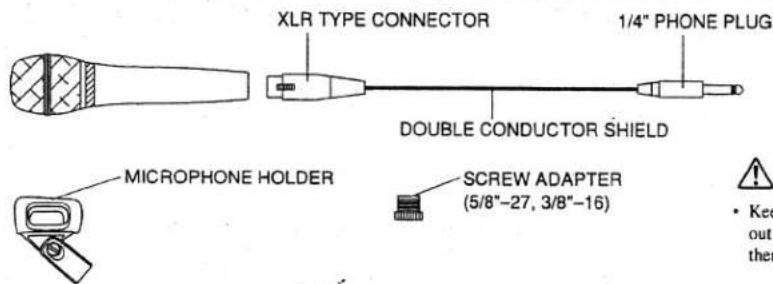
XLR TYPE CONNECTOR 1/4" PHONE PLUG DOUBLE CONDUCTOR SHIELD MICROPHONE HOLDER SCREW ADAPTER (5/8"-27, 3/8"-16) • Keep out therWARNING
- Keep the included Screw Adapter in a safe place out of children's reach, so there is no chance of them being swallowed accidentally.
FEATURES
• Hyper Cardioid handheld mic enhanced shock-absorption for unit protection and reduced mic handling noise
• Double-Screen structure to reduce breath noise
OPERATION
- Connect the XLR connector to the microphone.
- Connect the other side (standard phone jack) of the cable to the input jack of the unit you use, such as mixer.
- If you wish to install the microphone to a microphone stand, use the supplied microphone holder. If the microphone holder does not fit the stand, try exchanging the screw adapter. (U 5/8, W 3/8)
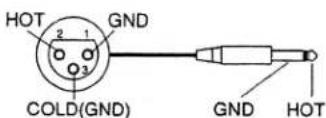
PIN ASSIGNMENT
The pin assignment for XLR type connectors is as shown below. Before making any connections, make sure that this pin assignment is compatible with that of all your other devices.
MICROPHONE

MICROPHONE CABLE
POLAR PATTERNS

radar
| Angle (°) | Value | |---|---| | 0 | 1 | | 30 | 2 | | 60 | 3 | | 90 | 4 | | 120 | 5 | | 150 | 6 | | 180 | 7 | | 210 | 8 | | 240 | 9 | | 270 | 10 | | 300 | 11 | | 330 | 12 |FREQUENCY RESPONSE
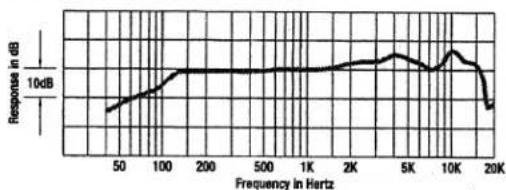
line
| Frequency in Hertz | Response in dB | | ----------------- | -------------- | | 50 | ~8 | | 100 | ~10 | | 200 | ~10 | | 500 | ~10 | | 1K | ~10 | | 2K | ~10 | | 5K | ~10 | | 10K | ~10 | | 20K | ~8 |MAIN SPECIFICATIONS
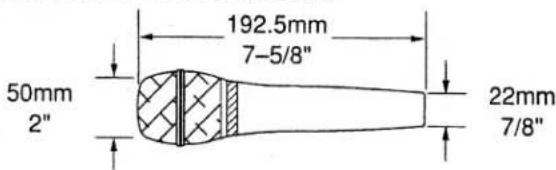
text_image
50mm 2" 192.5mm 7-5/8" 22mm 7/8"Type Dynamic
Frequency Response 90—16,000 Hz
Output Impedance 300 Ω
Polar Patterns ......Hyper Cardioid
Sensitivity -54 dB (0 dB=1 V/Pa, 1 kHz)
Dimensions (dia head × length × dia grip) 50 × 192.5 × 22 mm
Weight 355 g
Accessories
Microphone cable (4.5 m)
Microphone holder 1
Screw adapter (5/8"-27, 3/8"-16)....1
Carrying case....1
* In the interest of product improvement, the specifications and/or appearance of this unit are subject to change without prior notice.