
EHS8680XHIC9064B - Hob AEG-ELECTROLUX - Free user manual and instructions
Find the device manual for free EHS8680XHIC9064B AEG-ELECTROLUX in PDF.


| Product type | Ceramic hob |
| Brand | AEG-ELECTROLUX |
| Model | EHS8680XHIC9064B |
| Cooking surface | Ceramic glass, 4 rapid incandescent zones |
| Cooking zones | 1 single-circuit, 1 double circuit, 1 triple circuit, 1 fish zone (round/oval) |
| Appliance dimensions (W x D x H) | 896 mm x 506 mm x 47 mm |
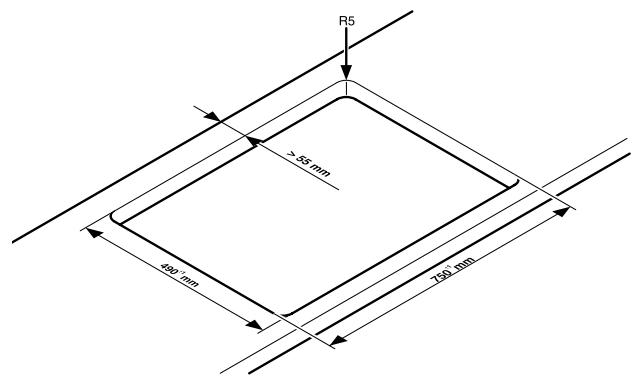
| Cut-out dimensions (W x D) | 880 mm x 490 mm, corner radius R5 |
| Weight | Approx 12 kg (estimate) |
| Power supply | 230 V / 400 V, 50/60 Hz (to be confirmed by an installer) |
| Heat settings | 9 levels (1-9) + keep warm |
| Main functions | Automatic cooking, timer (auto-off and countdown), keep warm, control panel lock |
| Safety | Child lock, safety shut-off (zone and panel), lock, residual heat indicator |
| Display | Digital, power indication, residual heat, errors |
| Cleaning and maintenance | Scraper for tough dirt, specific ceramic glass cleaner, no steam cleaner |
| Installation | Built-in, electrical connection by certified professional |
| Repairability | AEG-ELECTROLUX after-sales service, spare parts available |
| Certifications | CE (compliant with low voltage and electromagnetic compatibility directives) |
Frequently Asked Questions - EHS8680XHIC9064B AEG-ELECTROLUX
User questions about EHS8680XHIC9064B AEG-ELECTROLUX
0 question about this device. Answer the ones you know or ask your own.
Ask a new question about this device
Download the instructions for your Hob in PDF format for free! Find your manual EHS8680XHIC9064B - AEG-ELECTROLUX and take your electronic device back in hand. On this page are published all the documents necessary for the use of your device. EHS8680XHIC9064B by AEG-ELECTROLUX.
USER MANUAL EHS8680XHIC9064B AEG-ELECTROLUX
natural_image
Four white octagons arranged in a 2x2 grid on a black background (no text or symbols)EHS 8680 X
Dear customer
Please read these operating instructions carefully. Pay particular attention to the „Safety Instructions” section on the first pages. Please retain these operating instructions for later reference. Pass them on to any potential new owners of the appliance.
The following symbols are used in the text:

Safety information
Warning! Information which serves your personal safety.
Important! Information on how to avoid damaging the appliance.

Information and practical hints

Environmental information
- These numbers indicate step by step how to use the appliance as required.
- ...
- ...
In the event of any disturbances, these operating instructions contain information on how to eliminate the fault yourself; refer to the section "Rectifying faults".
Printed on environmentally compatible paper.
Thinking ecologically means acting ecologically...
Contents
Operating instructions .... 4
Safety instructions 4
Intended usage 4
Appliance operation 4
Appliance implementation 4
Appliance cleaning 4
Avoid damage to the appliance 5
Environmental awareness 5
Your appliance components 6
Appliance description 8
Ceramic glass hob 8
Your appliance functions 9
Operating the hob 10
Before using for the first time 10
Touch Control-Sensor fields 10
Switching on the appliance 11
Switching off the appliance 11
Cancelling the safety cut-out 11
Heat setting 12
Setting the keep warm function 12
Switching off the cooking zone 13
Switching the casserole cooking zone on and off 14
Switching the double ring cooking zone on and off 15
Switching the triple ring cooking zone on and off 16
Using the automatic warm-up function ..... 18
Do not use the automatic warm-up function 18
Using the child safety feature 19
Lock implementation 21
Timer implementation 22
Hob operation tips ...... 25
Pots and pans 25
Energy saving 25
Cooking with and without the automatic warm-up function .... 26
Cleaning and care 28
Hob 28
Rectifying faults 29
Technical data 32
Appliance dimensions 32
Cut-out dimensions 32
Installation instructions....33
Safety instructions 33
Appliance assembly 33
Connect the appliance electrically ..... 34
Service and Spare Parts 35
Guarantee Conditions 36
Standard guarantee conditions 36
Exclusions 36
European Guarantee 36
Hob mounting....105
Operating instructions
Safety instructions
The safety aspects of this appliance comply with the accepted technical standards and the German Appliance Safety Law. However, as the manufacturer we also believe it is our responsibility to familiarise you with the following safety instructions.

Please observe these instructions otherwise guarantee claims on the manufacturer will be nullified.
Intended usage
This appliance may only be used for normal cooking and frying of foods in the home.

This appliance complies with the following EU directives
- 73/23/EWG dated 19.02.1973 Low voltage directive
- 89/336/EWG dated 03.05.1989 (EMC-directive including Amending Directive 92/31/EWG).
• 93/68/EWG dated 22.07.1993 CE Identification directive.
Appliance operation
The appliance may only be mounted and connected electrically by trained and authorised specialised personnel.
The appliance may only be operated when properly built into standard, suitable built-in cabinets or worktops.
In the event of malfunctions and damage (breaks, cracks or fissures) the appliance must be switched off and disconnected from the power supply.
The appliance may only be repaired by trained and authorised specialised personnel (factory customer care service, specialist dealers).
Appliance implementation
Careless handling on the cooking zones represents a risk of burns.
Keep small children away from the appliance at all times.
Keep older children under instruction and supervision when they are using the appliance.
Please exercise care and attention when operating the appliance.
The handles of cooking utensils must not project out over the hob.
The handles of cooking utensils must not be positioned above a hot and warm cooking zone.
Be careful when plugging in electrical appliances into main sockets near the appliance.
Connecting leads must not come into contact with any hot parts of the appliance.
Overheated fats and oils catch fire quickly. You should supervise cooking when preparing foods in fat or oil (e.g. chips).
Switch off the cooking zones after use.
The residual heat from hot pots or pans heats the ceramic glass hob although the residual heat display does not indicate this.
Appliance cleaning
Always switch off the appliance before cleaning.
The cooking zones must have cooled down to the extent that they may be touched without risk of burning.
For reasons of safety, never use a steam jet or a high pressure cleaner to clean the hob.
Avoid damage to the appliance
Never use the hob as a work surface or for storage.
Do not operate the cooking zones with empty pots or pans, or with no pots and pans on them.
Avoid boiling pots and pans dry.
Ceramic glass is insensitive to temperature shocks and is very robust, however it is not unbreakable. Especially sharp and hard objects that fall on the cooking surface could damage it.
Do not use any cast iron pots or pans with damaged bases with rough edges or burrs. Sliding these across the hob could cause scratches.
Do not place any pots or pans on the frame of the hob. Scratches and damage to the varnished surface may occur.
Always make sure that no acid-containing liquids such as vinegar, lemon or lime-dissolving agents are split on the hob frame as these can cause dull spots to appear.
Remove sugary substances with a cleaning scraper while still hot. If left to cool down, it may damage the surface when removed.
Keep objects and materials, liable to melt (e.g. synthetic materials, aluminium foils etc.), away from the ceramic glass surface.
Remove melted substances with a cleaning scraper while still hot. If left to cool down, it may damage the surface when removed.
Environmental awareness
All packaging materials used can be recycled.
The materials used must not be disposed of in the household refuse.
The national and regional regulations for the proper and orderly recovery of the packaging materials and the appliance in the recycling chain are to be observed.
Disposing of the packaging material
The plastic materials are identified as follows:
| Symbol | Plastic | Use |
| PE | Polyethylene | Outer wrapping, bags |
| PS | Polystyrene (CFC free) | Cushioning parts |
Appliance disposal
The appliance may only be disconnected from the power supply by trained and authorised specialised personnel.
The specialised person must put the appliance out of commission electrically (removal of connection cable).
Your appliance components
Your hob components
Ceramic glass cooking surface: The appliance has a ceramic glass surface with four rapid response cooking zones.
The cooking surface is non-porous and furthermore proof against abrupt fluctuations in temperature. Pots may therefore be swapped from a hot to a cold zone.
The smooth surface is easy to clean.
Rapid response cooking zones: The appliance has rapid response cooking zones. The particularly powerful radiant heater elements substantially shorten the amount of time taken for the zones to heat up.
On switching on the cooking zones a brief buzzing tone in the heating elements may be heard. This noise is physically conditioned and has no negative influences on the appliance's function. It is no longer heard once the cook zone is sufficiently heated.
Single ring cooking zone: The cooking area has a single ring cooking zone. With this, your appliance has a cooking zone for smaller pots. This saves energy.
Double ring cooking zone: The cooking area has a double ring cooking zone. With this, your appliance has a cooking zone with variable size, e.g., for smaller pots. This saves energy.
Triple ring cooking zone: The cooking area has a triple ring cooking zone. With this, your appliance has a cooking zone with variable size, e.g., for smaller pots. This saves energy.
Casserole cooking zone (multi-purpose cooking zone): The cooking area is equipped with a casserole cooking zone (multi-purpose cooking zone). Depending on the setting it may be used as a round or oval cook zone.
Control panel elements
Sensor fields: Your appliance is operated using Touch-Control-sensor fields.
| Sensor field | Function | |
| 1 | On/Off | Switching the appliance on and off (separate main switch). |
| Double ring cooking zone | Switching outer heating ring on and off. | |
| Triple ring cooking zone | Switching centre heating ring on and off. | |
| Switching outer heating rings on and off. | ||
| Casserole cooking zone | Switching outer heating ring on and off. | |
| 4 | Heat setting selection | Increasing heat setting/timer. |
| 5 | Heat setting selection | Decreasing heat setting/timer. |
| 6 | Timer | Switching the timer on and off. |
| 7 | Locking | Locking/unlocking the control panel. |
Displays: Digital displays and/or control lamps inform the user about heat settings, selected functions as well as any possible residual heat of the corresponding cooking zone.
| Display | Description | |
| 0 | The appliance is switched on. | |
| 1-9 | Heat setting | Set cooking zone heat setting. |
| 0 | Keep warm function | Keep warm function is set. |
| R | Automatic warm-up function | Automatic warm-up function is activated. |
| E | Error display | A malfunction has occurred. |
| H | Residual heat display | The cooking zone is switched off but still hot. |
| L | Child safety feature | Child safety feature is activated. |
| - | Safety cut-out is activated. |
| Control lamp | Description |
| On/Off | The appliance is switched on/off. |
| Double ring cooking zone | The outer heating ring is switched on. |
| Bottom triple ring cooking zone | The centre heating ring is switched on. |
| Top triple ring cooking zone | The outer heating ring is switched on. |
| Casserole cooking zone | The outer heating ring is switched on. |
| Timer function | The respective cooking zone is operated via the timer. |
Appliance description
Ceramic glass hob
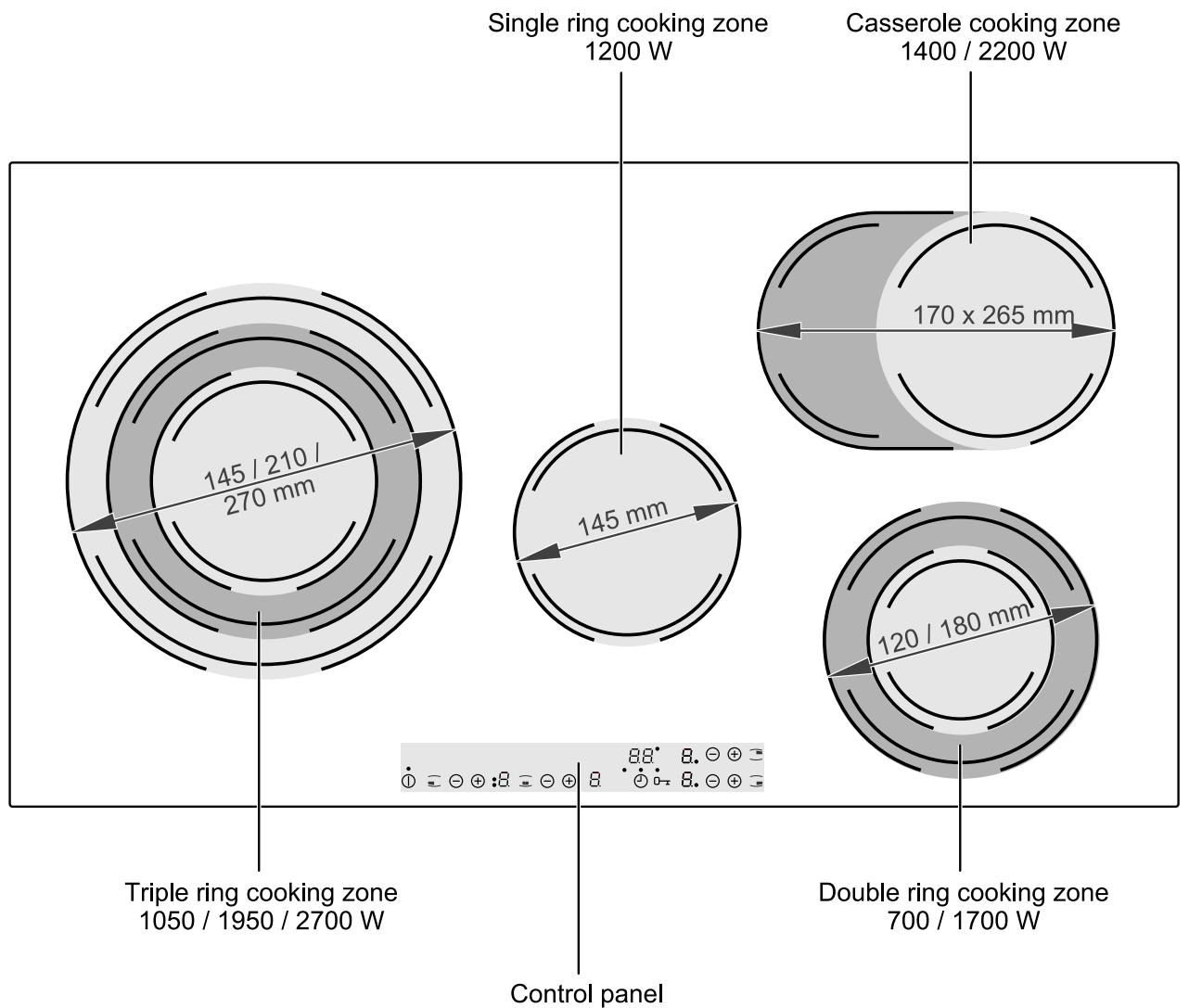
other
| Cooking Zone | Area (mm) | | -------------------------- | --------- | | Single ring cooking zone | 145 | | Casserole cooking zone | 170 | | Double ring cooking zone | 120 | | Triple ring cooking zone | 145 |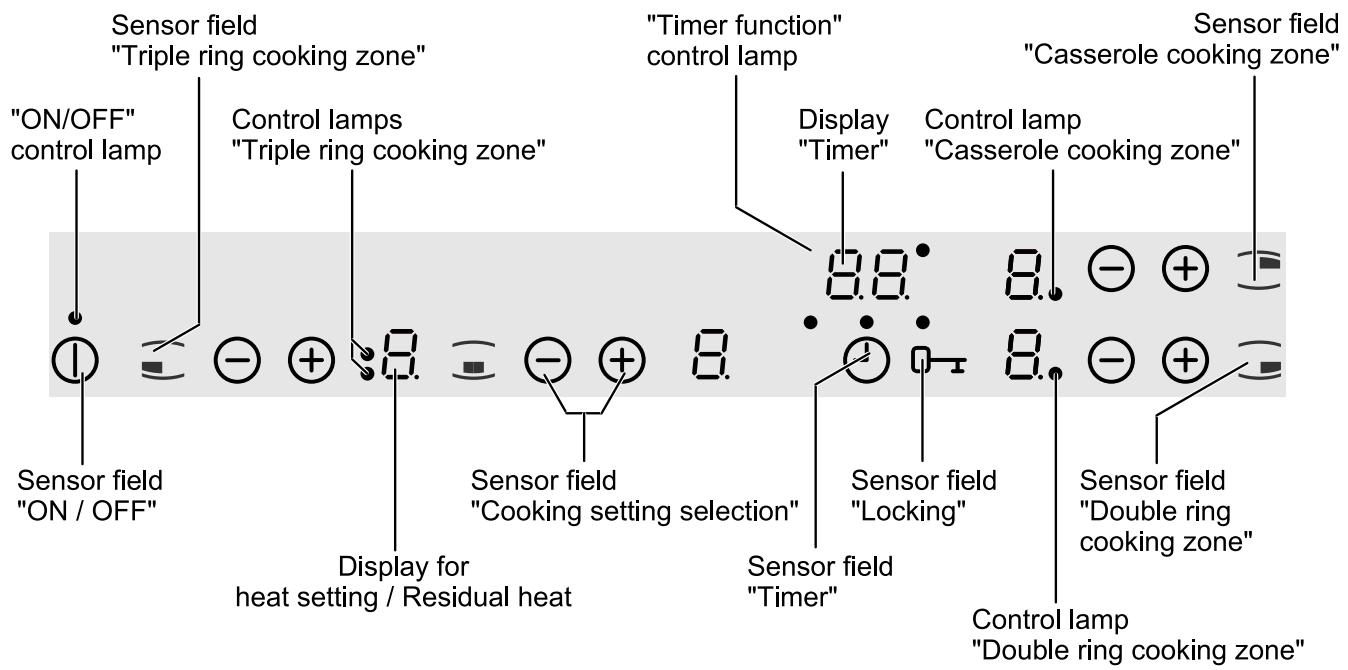
Your appliance functions
Automatic warm-up function: All cooking zones may be regulated in nine stages and feature an automatic warm-up function.
Using the automatic warm-up function the cooking zone operates for a specific time at full power and then switches back automatically to the heat setting selected.
The duration of the warm-up phase depends on the heat setting selected.
Direct control of each cooking zone: Each cooking zone is directly controlled via the appropriate touch control sensor fields.
Error display: for errors lights up in the display when a malfunction occurs on the appliance (see section „Rectifying faults“).
Child safety feature: L With this function the hob can be locked to prevent any unintentional switching on of the appliance.
Residual heat display: ^H for residual heat will illuminate if the cooking zone becomes hot enough for there to be a risk of burning.
When the ceramic glass hob is switched off the residual heat display extinguishes only once the cooking zone has cooled down to the point that there is no longer a risk of burning.
Control panel safety switch-off: Moisture (e.g. a wet cloth) or liquids boiling over on the control panel immediately switch off all cooking zones.
Hob safety switch-off: If, once the hob is switched on, a heat setting is selected on a cooking zone within approx. 10 seconds, the hob will switch off automatically.
If one or several sensor fields are pressed for longer than approx. 10 seconds, e.g. by a pot resting on it/them, the hob will switch off automatically.
If all cooking zones are switched off, the hob will switch off automatically after approx. 10 seconds.
Cooking zone safety switch-off: If a cooking zone is not switched off or changed within a specific period it will switch off automatically.
| Heat setting | Switch-off after |
| u, 1, 2, | 6 hours |
| 3, 4, | 5 hours |
| 5 | 4 hours |
| 6, 7, 8, 9 | 1.5 hours |
Timer: The timer features two functions:
- the automatic switch-off function. On the expiry of the set time the cooking zone switches off automatically.
- the minute minder („Egg timer“). On the expiry of the set time an acoustic signal is emitted.
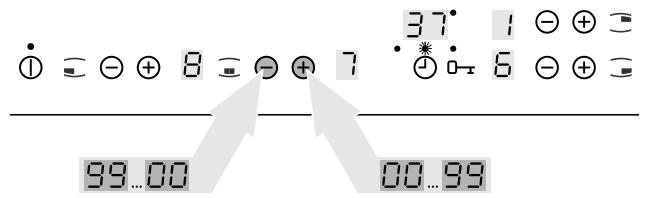
The timer may be set in one minute intervals up to 99 minutes.
Keep warm function: Meals may be kept hot using the keep warm function (heat setting ).
Locking: With the exception of the „ON/OFF“ sensor field the control panel may be locked at any time to avoid the settings being misadjusted.
Operating the hob
Before using for the first time

IMPORTANT!
Damage to the ceramic glass surface.
Aggressive, scouring cleaning agents may damage the ceramic glass surface.
Use only water and washing-up liquid.
- Wash down the ceramic glass hob with hot water and washing-up liquid and rub dry (with a tea towel).

IMPORTANT!
Damage to the ceramic glass surface.
Burnt-on stickers and film damage the ceramic glass surface.
Remove stickers and film.
- Switch on the cooking zones briefly one after another to check them.

When used for the first time a slight odour may be detected briefly.
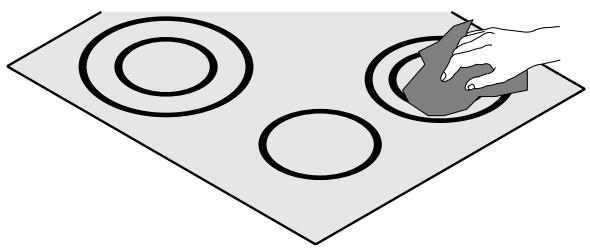
natural_image
Illustration of a hand placing a small object into a circular pattern on a flat surface (no text or symbols)Touch Control-Sensor fields
In order to operate the Touch Control sensor fields place your finger from above onto the required field until the corresponding display lights up or extinguishes, and/or the desired function is carried out.
For faster setting keep your finger on the sensor field until the required value is attained.
All settings are acknowledged by an acoustic signal.
Switching on the appliance
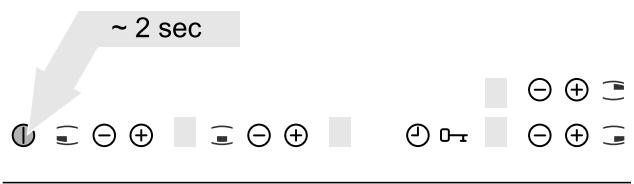
To switch on the appliance completely, touch the "ON/OFF" sensor field ①.
Touch the „ON/OFF“ sensor field ① for approx. two seconds.
☐ is illuminated in the digital display.

If the cooking zone is not set within ten seconds the appliance is switched off automatically.
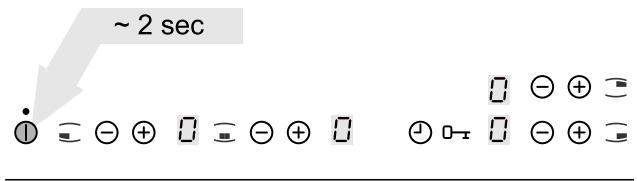
Switching off the appliance
To switch off the appliance completely, touch the „ON/OFF“ sensor field ①.
Touch the „ON/OFF“ sensor field ① for approx. two seconds.
The digital displays extinguish.

Existing residual heat ^H is displayed in the cooking zones' digital displays.
Cancelling the safety cut-out
In order to cancel the activated safety cut-out function the appliance must be switched off and on again via the „ON/OFF“ sensor field ①.
The appliance is operational.
Heat setting
The heat setting is selected or changed by the respective „heat setting selection“ ⊕ and ⊖ sensor fields.
Increase heat setting
Touch the „heat setting selection“ ⊕ sensor field. The required heat setting lights up in the digital display.
Decrease heat setting
Touch the „heat setting selection“ ⊖ sensor field. The required heat setting lights up in the digital display.
Setting the keep warm function
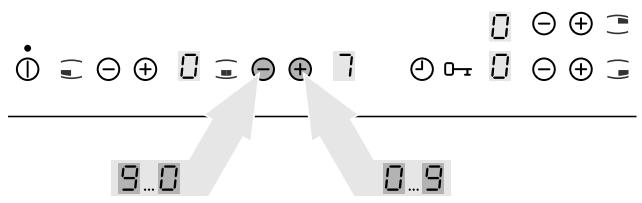
Heat setting is used as a keep warm function for all cooking zones.
Touch the „heat setting selection“ sensor fields ⊕ or ⊖.
The keep warm function lights up in the digital display .
Switching off the cooking zone

WARNING!
Risk of burning due to residual heat.
After switching-off the cooking zone takes some time to cool down.
Check ceramic glass hob.
Check residual heat display ^H .
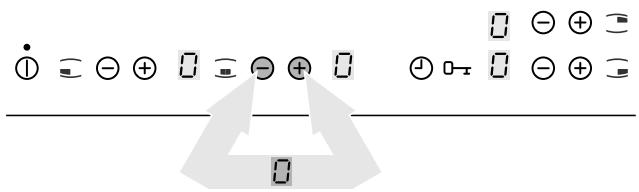
There are two variants for switching off a cooking zone.
Variant 1
Touch the „heat setting selection“ sensor fields ⊕ or ⊖ simultaneously.
☐ is illuminated in the digital display.
The cooking zone is switched off.
Variant 2
Touch the „Heat setting selection“ sensor field until is indicated in the digital display.
☐ is illuminated in the digital display.
The cooking zone is switched off.

If all cooking zones are switched off the appliance switches off automatically after ten seconds.

Existing residual heat ^H is displayed in the cooking zones' digital displays.

Following a power failure existing residual heat will no longer be indicated in the digital displays.

Residual heat may be used to melt or keep food hot.
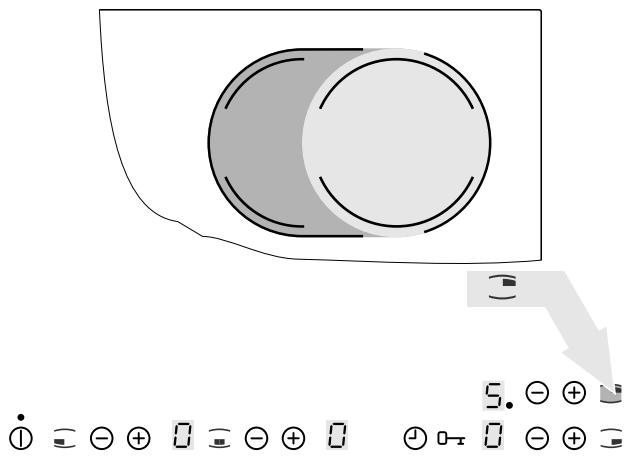
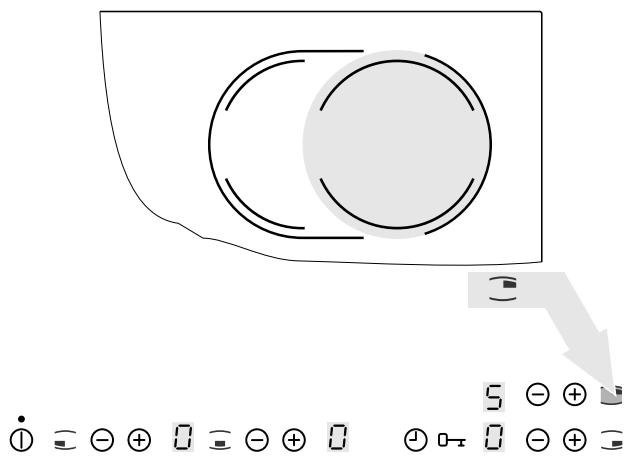
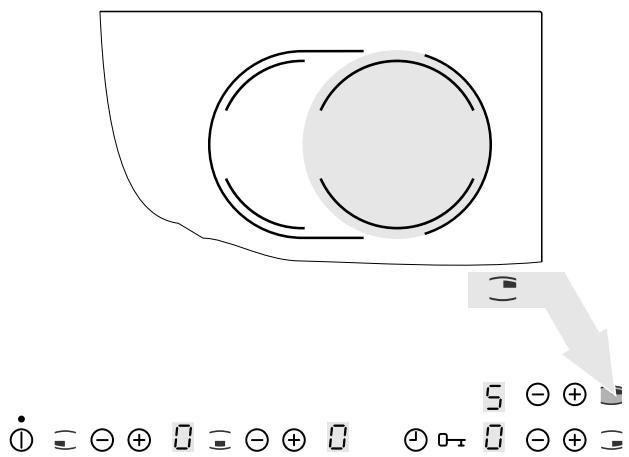
Switching the casserole cooking zone on and off
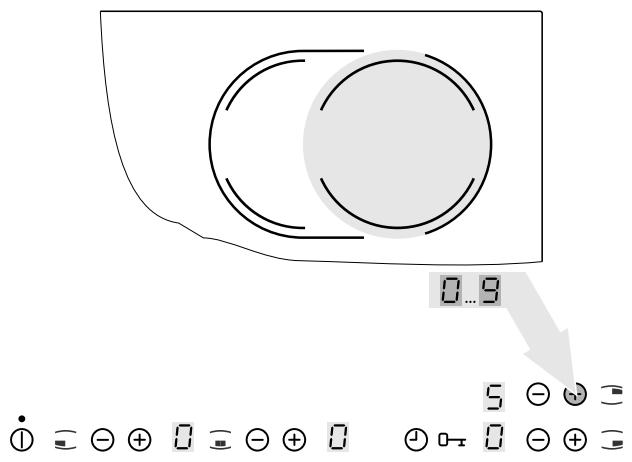
Depending on the size of the pot or pan, the "casserole cooking zone" sensor field can be used to switch between the two sizes of the casserole cooking zone.

This can only be activated when a heat setting has already been made for the inner heating ring.
Switching on the casserole cooking zone
1. Set the desired heat setting.
The required heat setting lights up in the digital displays.
2. Touch the „casserole cooking zone“ sensor field ☐.
The outer heating ring is switched on.
The control lamp “casserole cooking zone” illuminates.
Switch off the outer heating ring
Touch the „casserole cooking zone” sensor field
The outer heating ring is switched off.
The control lamp “casserole cooking zone” extinguishes.
Switching the double ring cooking zone on and off
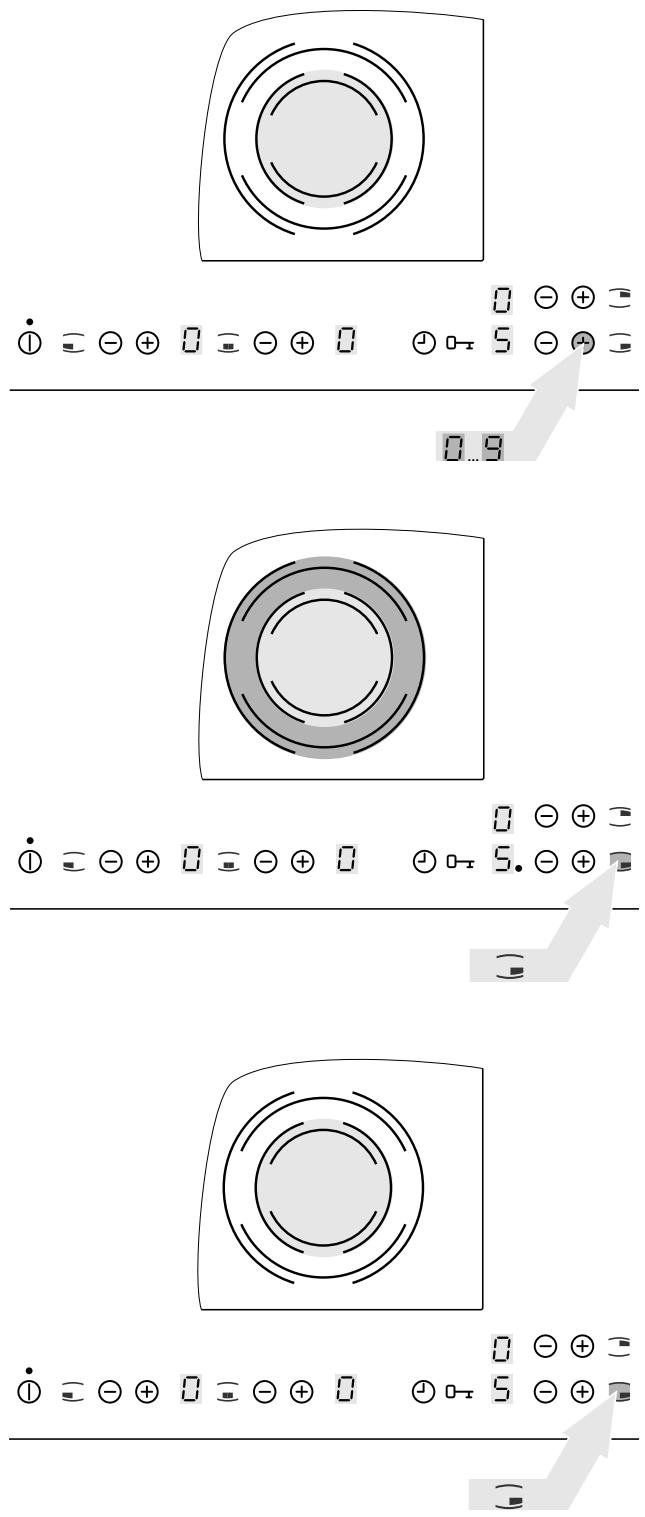
Depending on the size of the pot or pan, the "double ring cooking zone" sensor field can be used to switch between the two sizes of the zone.

This can only be activated when a heat setting has already been made for the inner heating ring.
Switch on the outer heating ring
1. Set the desired heat setting.
The required heat setting lights up in the digital displays.
2. Touch the „double ring cooking zone” sensor field ≡.
The outer heating ring is switched on.
The control lamp “double ring cooking zone” illuminates.
Switch off the outer heating ring
Touch the „double ring cooking zone” sensor field.
The outer heating ring is switched off.
The control lamp “double ring cooking zone” extinguishes.
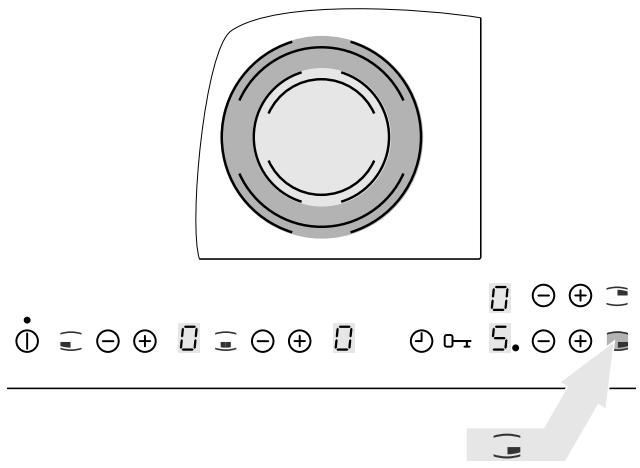
Switching the triple ring cooking zone on and off
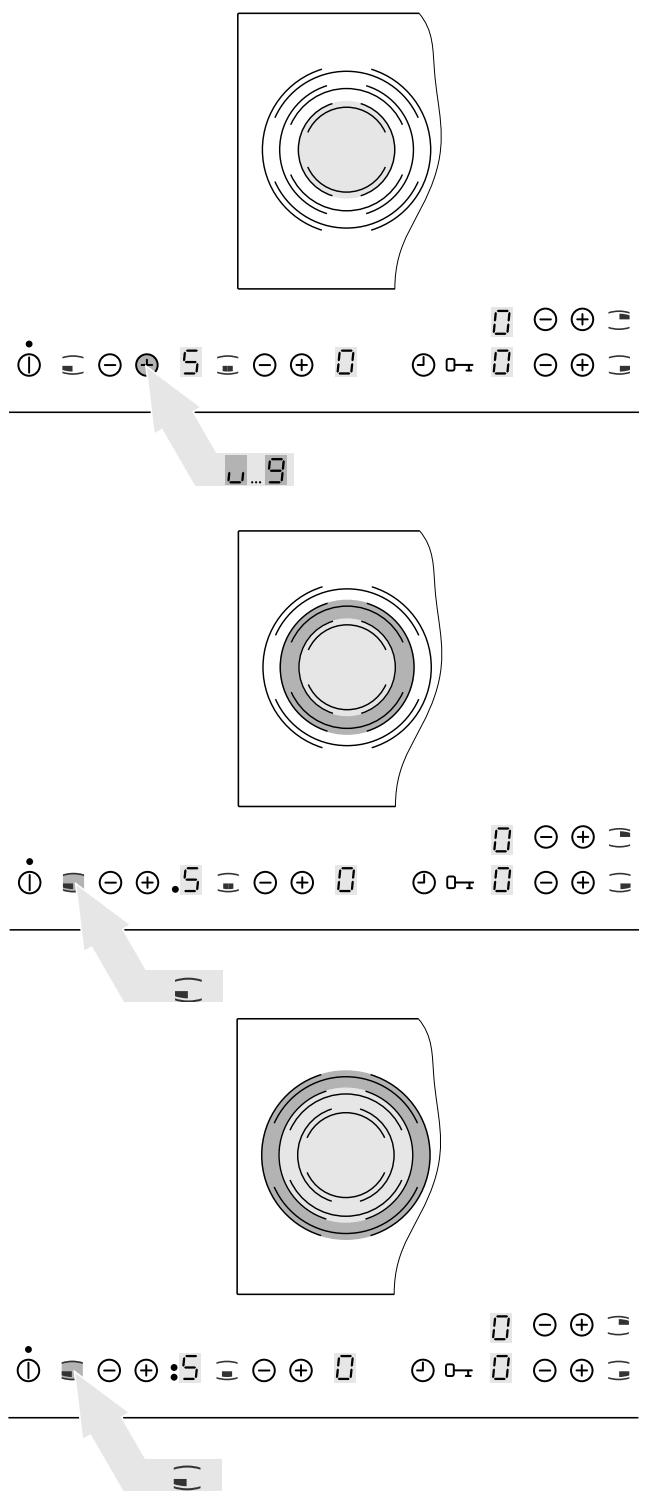
Depending on the size of the pot or pan, the “triple ring cooking zone” sensor field can be used to switch between the three sizes of the zone.

This can only be activated when a heat setting has already been made for the inner heating ring.
Switching on the triple ring cooking zone
1. Set the desired heat setting.
The required heat setting lights up in the digital displays.
2. Touch the „triple ring cooking zone” sensor field ≡.
The middle heating ring is switched on.
The control lamp “triple ring cooking zone” illuminates.
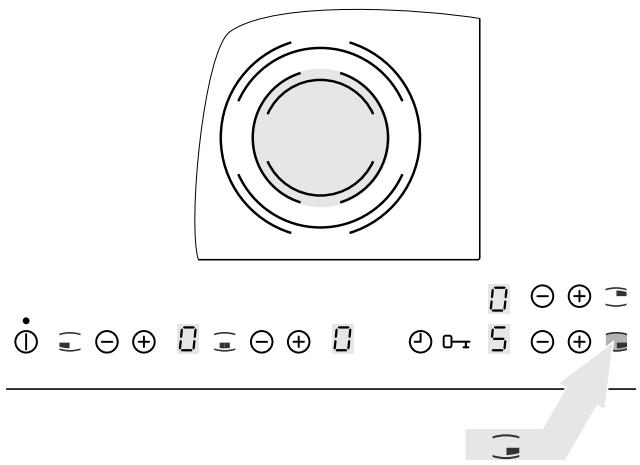
3. Touch the „triple ring cooking zone” sensor field ≡.
The outer heating ring is switched on.
The „top triple ring cooking zone“ control lamp lights up.
Switch off the outer heating ring
Touch the „triple ring cooking zone” sensor field ☐.
The outer and middle heating ring, respectively, is switched off.
The relevant control lamp “triple ring cooking zone” extinguishes.
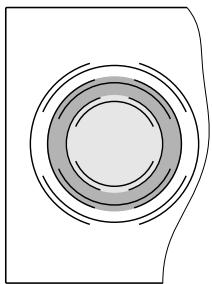
natural_image
Pure diagram of concentric circular layers without any text, numbers, or symbols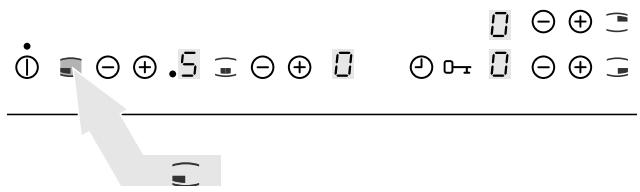
Using the automatic warm-up function
Switching on the automatic warm-up function
The duration of the warm-up phase depends on the heat setting selected.
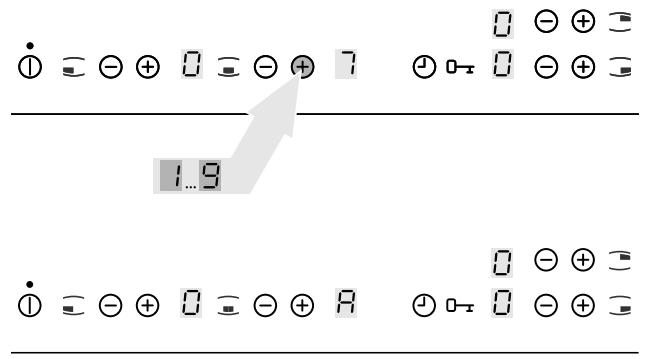
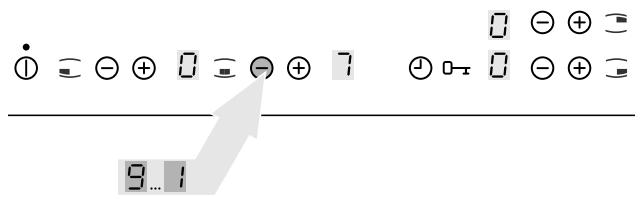
Set the required heat setting ( ^1 to ^8 ) via the “heat setting selection” sensor field .
The set power level lights up in the digital display.
^8 lights up in the digital display after approx. five seconds.
The automatic warm-up function is activated.

In the event of residual heat being present the automatic warm-up function will not be activated for this cooking zone.
After the end of the warm-up time, the heat setting selected will be shown again.

When the automatic warm-up function is active select a higher heat setting, e.g.
^5 instead of ^3 , the warm-up time will be automatically adjusted to the selected heat setting.
If you select a lower heat setting the automatic warm-up function will be switched off immediately.
Switching off the automatic warm-up function
Only an activated automatic warm-up function may be switched off.
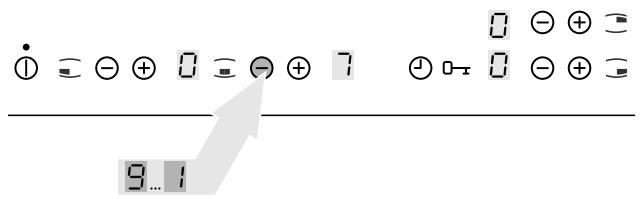
Touch the „heat setting selection“ ⊖ sensor field. The heat setting selected lights up in the digit display.
The automatic warm-up function is switched off.
Do not use the automatic warm-up function
The cooking zone is used without the automatic warm-up function if the required heat level is set via the „heat setting selection“ ⊖ sensor field.
Using the child safety feature
With the child safety feature, the hob can be protected against undesirable use.
Switching on the child safety feature
The appliance is switched on and all the cooking zones are switched off.
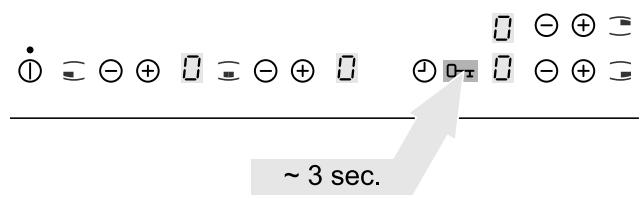
- Touch the „locking“ sensor field _x for approx. 3 seconds.
An acoustic signal is sounded.
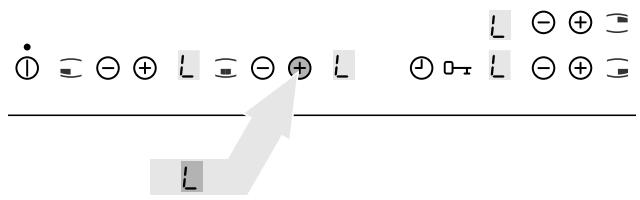
- Touch any of the „heat setting selection“ sensor fields ⊕.
In the digital displays, there appears
The child safety feature is activated.
The appliance switches off automatically after a few seconds.
Bypassing the child safety feature
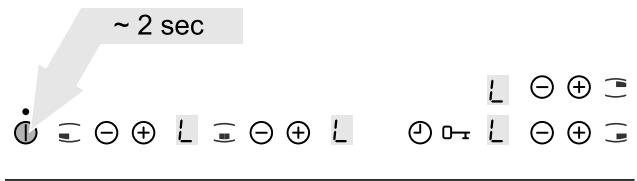
The child safety feature can be bypassed for the one-time use of the appliance (up to the next switch-off of the appliance). At the next switch-on, the child safety feature is automatically activated again.
- Switch on the appliance.
L is illuminated in the digital display.
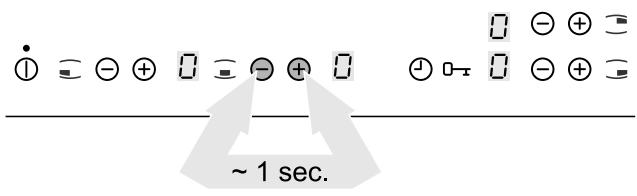
- Touch the „heat setting selection“ sensor fields
⊕ and ⊖ for approx. one second simultaneously.
An acoustic signal is sounded.
☐ is illuminated in the digital display.
The child lock is switched off until the appliance is switched off.
Switching off the child safety feature
-
Switch on the appliance.
L is illuminated in the digital display. -
Touch the „locking“ sensor field ^0-x for approx. 3 seconds.
An acoustic signal is sounded.

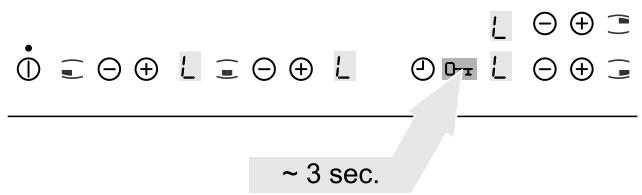
- Touch any of the „heat setting selection“ sensor fields ⊖.
In the digital displays lights up ☐
The child safety feature is switched off.
The appliance switches off automatically after a few seconds.

Lock implementation
At any random time during cooking, the control panel can be locked with the exception of the sensor field „ON/OFF“ ① in order to prevent a changing of the settings caused by, for example, the wiping with a cloth.
Locking the control panel
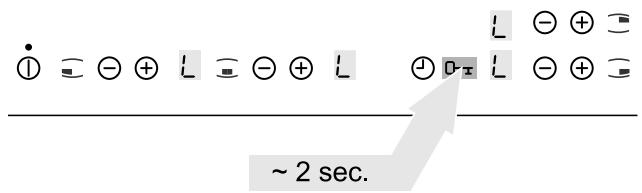
Touch the „locking“ sensor field ^0-x for approx. 2 seconds.
- lights up for five seconds in the digital displays. The control panel is locked.

If a sensor field is touched L lights up in the digital displays.

Unlocking the control panel
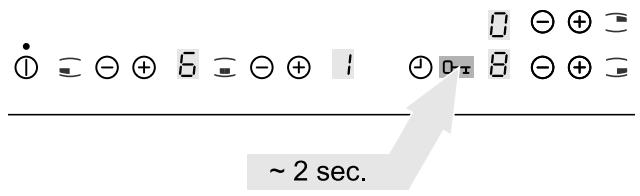
Touch the „locking“ sensor field ^0-x for approx. 2 seconds.
The control panel may be used.

When switching off the appliance, the locking function is automatically switched off.
Timer implementation
You can use the timer in two ways:
- as automatic switch-off function for a set heat level
- as minute minder („egg timer“) for a switched-off cooking zone.
Cooking zone selection
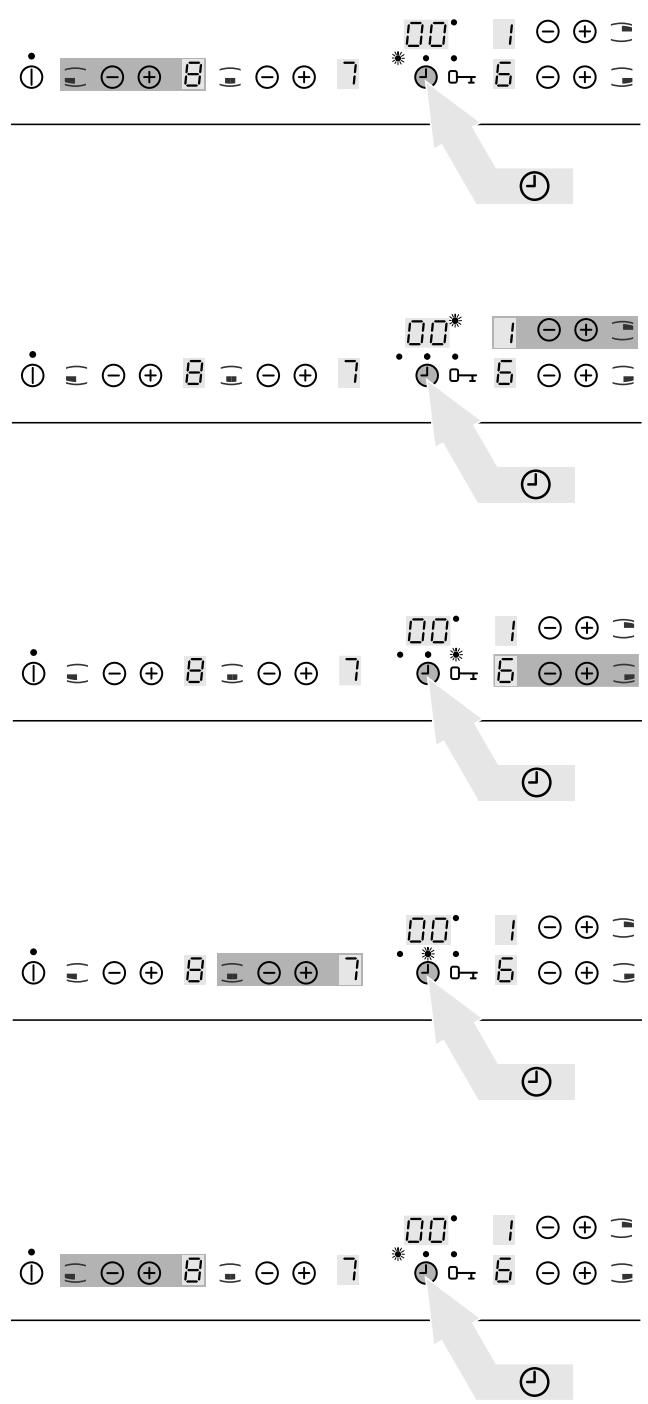
- Touch the „timer“ sensor field ⏻.
In the timer display, there appears ☐☐.
The cooking zone „timer function“ control lamps light up.
The „timer function“ control lamp of the adjustable cooking zone flashes.
- Touch the „timer“ sensor field ⏻.
The „timer function“ control lamp of the next adjustable cooking zone flashes.
Time setting
- Cooking zone selection.
The „timer function“ control lamp of the adjustable cooking zone flashes.
- Set the required time via the „heat setting selection“ sensor fields ⊕ or ⊖ .
The set time is indicated in the timer display.

For a faster adjustment, touch the “heat setting selection” sensor fields ⊕ or ⊖ for such time until the required value is obtained.
The time for the selected cooking zone is activated after approx. five seconds.

If the time is set for several cooking zones the timer display will indicate the shortest cooking time in each case and the „timer function“ control lamp of the appropriate cooking zone will flash.
Once the time has expired 00 is indicated in the timer display, the „timer function“ control lamp flashes and an acoustic signal is sounded for approx. two minutes.

The acoustic signal is switched off by touching the „timer“ sensor field ⏻.
Remaining time display
- Select the required cooking zone.
The remaining time is indicated in the timer display.
The “timer function” control lamp belonging to the cooking zone flashes.
Time changing
- Select the required cooking zone.
The remaining time is indicated in the timer display.
The „timer function“ control lamp of the adjustable cooking zone flashes.
- The required time is set via the „heat setting selection“ sensor fields ⊕ or ⊖.
The set time is indicated in the timer display.
The time for the selected cooking zone is changed.
Switching off cooking zone and automatic switch-off function
If a cooking zone is switched off the timer settings for this cooking zone are automatically switched off.
Switching off the timer
- Select the required cooking zone.
The remaining time is indicated in the timer display.
The „timer function“ control lamp of the adjustable cooking zone flashes.
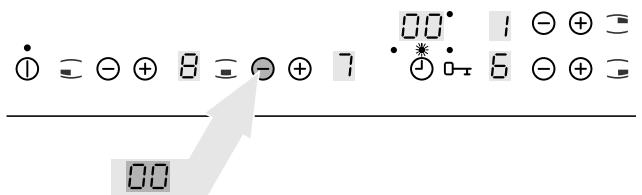
- Set the time via the „heat setting selection“ sensor field ⊖ to zero.
In the timer display, there appears 00.
The timer is switched off.
Hob operation tips
Pots and pans
The better the pot, the better the cooking results.
- You can recognise good pots and pans by their bases. The base should be as thick and flat as possible.
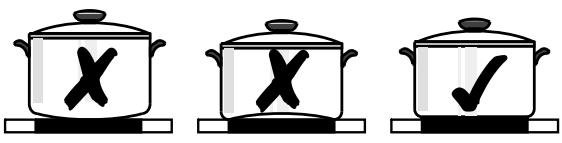
- When buying new pots and pans, pay particular attention to the diameter of the base. Manufacturers often only state the diameter of the rim.
- Pots with aluminium or copper bases can cause metallic discolouring on the ceramic glass surface which is very difficult or impossible to remove.
- Do not use cast iron pots or pots with damaged bases which are rough and/or have burrs on them. Scratches can occur if they are slid across the surface.
- When cold, pot bases are normally bowed slightly inwards (concave). They should never be bowed outwards (convex).
- If you use special pots and pans (e.g., a pressure cooker, simmering pan, wok etc.) please observe the manufacturer's instructions.
General information
- The base should always be clean and dry.
- In order to avoid ugly scratches on the ceramic glass cooking surface, do not slide pots and pans around but lift them up instead when changing positions.
- Scratches can result from grains of sand (e.g., after washing out vegetables) which are dragged with the pot across the cooking surface.
- Always use large pots for dishes with lots of liquid so that nothing can boil over.
Energy saving

You will save valuable energy by observing the following points:
- Always position pots and pans before you switch on the cooking zone.
- Dirty cooking zones and pot bases increase power consumption.
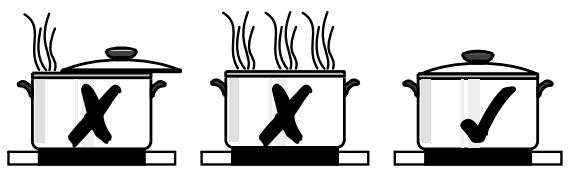
- Whenever possible, always have the lid firmly placed on the pots and pans so that they are completely covered.
natural_image
Three identical cooking pots with steam rising, each marked with a 'X' and one with a checkmark (no text or symbols)- Switch off the cooking zones before the end of the cooking time to use the residual heat for keeping foods warm or for melting purposes.
- The base of the pot should have the same size as the cooking zone.
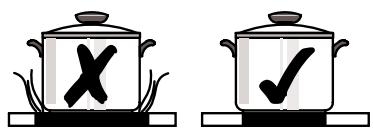
- Using a pressure cooker shortens the cooking times by up to 50%.
Cooking with and without the automatic warm-up function
The automatic warm-up function is suitable for:
- Dishes that start off cold, are heated up at high power and do not need to be continually watched when cooking on the lower heat setting.
- Dishes that are put into a hot frying pan.
The automatic warm-up function is not suitable for:
- Goulash, beef olives and similar braised dishes that need continual turning until browned correctly, have liquid added and are then braised until cooked,
- Dumplings, pasta dishes with lots of liquid,
• Cooking with pressure cookers, - Very large quantities of soups/stews with more than 2 litres of liquid.
General information:
- When cooking without the automatic warm-up function, we recommend the use of a high heat setting to warm up the food (with the -button) and then leaving the dish to finish cooking at a suitable lower heat setting.
- Pay special attention to the results of your first use of the appliance. You can then decide which heat setting is the best for „your dishes” in the “quantities you are accustomed to preparing” with your own „pots and pans”. You will then quickly appreciate the advantages of the automatic function and will feel secure and relaxed with your new hob.
Duration of the warm-up phase
The duration of the warm-up phase depends on the heat setting selected.
| Heat setting | Duration of the warm-up phase [min] |
| 1 | 1 |
| 2 | 1,7 |
| 3 | 4,8 |
| 4 | 6,5 |
| 5 | 10,2 |
| 6 | 2 |
| 7 | 3,5 |
| 8 | 4,5 |
| 9 | --- |
Typical heat settings for cooking
The details shown in the following table are guidelines. The heat setting required for cooking depends on the quality of the pans and on the type and quantity of food.
| Heat setting | Warm-up time of the automatic function1)[Min.] | Slow cooking procedure | Examples for use |
| 9 | Warming up FryingDeep-fat frying | Warming up large amounts of liquid boiling pasta, browning of meat, (browning goulash, pot-roast) | |
| 8 | 4,5 | Fast frying | Steaks, pieces of loin, potato fritters, fried sausages, pancakes/flat cakes |
| 7 | 3,5 | ||
| 6 | 2,0 | Frying | Schnitzel/cutlets, liver, fish, rissoles, fried eggs |
| 5 | 10,2 | Boiling | Boiling up to 1.5 l liquid, potatoes, vegetables |
| 4 | 6,5 | ||
| 3 | 4,8 | Steaming Sautéing Poaching | Steaming and sautéing of small quantities of vegetables, cooking rice and milk-based dishes |
| 2 | 1,7 | ||
| 1 | 1,0 | Melting | Melting butter, dissolving gelatine, melting chocolate |
| 0 | 0,5 | Keeping warm | Keeping food warm |
1) When cooking without the automatic warm-up function, the warm-up time can be individually selected.

When heating up or frying, we recommend using the warm-up setting „ ^9 “ and then continue cooking foods that require longer cooking times at a suitable lower heat setting.
Cleaning and care
Hob

Important! Cleaning agents must not come into contact with the hot ceramic glass surface! All cleaning agents must be removed with plenty of clean water after cleaning because they have a caustic effect when the zones are heated up again.
Never use any aggressive cleaners such as grill or oven sprays, coarse scourers or abrasive pot cleaners.

Clean the ceramic glass surface after every use when it is hand-warm or in a cold condition. In this way you avoid spillage burning solidly to the surface.
Remove scale and water marks, fat spots and metallic shimmer discolouring with commercially available ceramic glass or stainless steel cleaner.
Minor soiling
natural_image
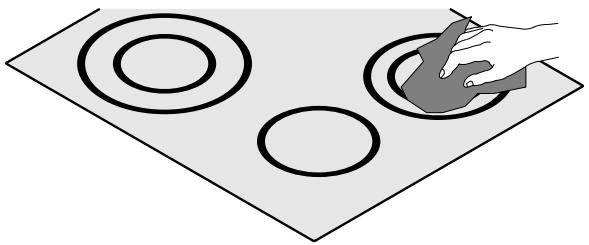
Illustration of a hand holding a circular object on a flat surface, with three concentric circles and one ring (no text or symbols)- Wipe the ceramic glass surface with a damp cloth and a little washing up liquid.
- Then, rub dry with a clean cloth. Cleaner residues must not remain on the surface.
- Once a week, you must thoroughly clean the entire ceramic glass cooking surface with a commercially available ceramic glass or stainless steel cleaner.
- Then wipe the ceramic glass surface using plenty of clean water and rub dry with a clean fluff-free cloth.
Stubborn soiling
natural_image
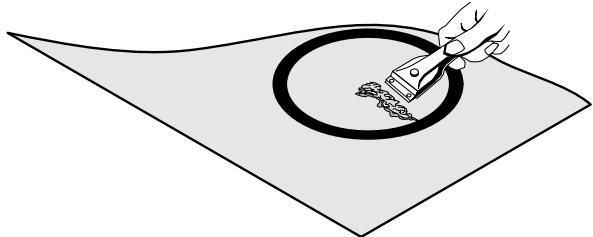
Illustration of a hand using a tool to clean or brush a circular object on a flat surface (no text or symbols)- To remove food that has boiled over, or to remove stubborn splashes, use a ceramic hob scraper.
- Place the scraper at an angle to the ceramic glass surface.
- Remove the soiling by sliding the blade.

Scrapers and ceramic glass cleaners are available from Service Force.
Problem soiling
- Remove burnt-on sugar, melted plastic, aluminium foil or other materials which melt immediately while there are in a hot condition, using a suitable cleaning scraper.

Important! You risk burning yourself when using the cleaning scraper on the hot cooking zone!
- Then clean the hob normally when it has cooled down.

If the cooking zone on which something has melted has already cooled down, warm it up again before cleaning.
Scratches or dark marks on the ceramic glass surface, caused for example by a pot or pan base with sharp edges, cannot be removed. However, they do not impair the functioning of the hob.
Rectifying faults
It is possible that faults have been caused by a minor error which you can rectify yourself with the help of the following instructions.
If the malfunction cannot be cleared with the following information please contact your specialist dealer or Service Force.

If you request a service visit to resolve a fault listed above or because of improper operation, the visit of the customer service technician is not free of charge even during the guarantee period.
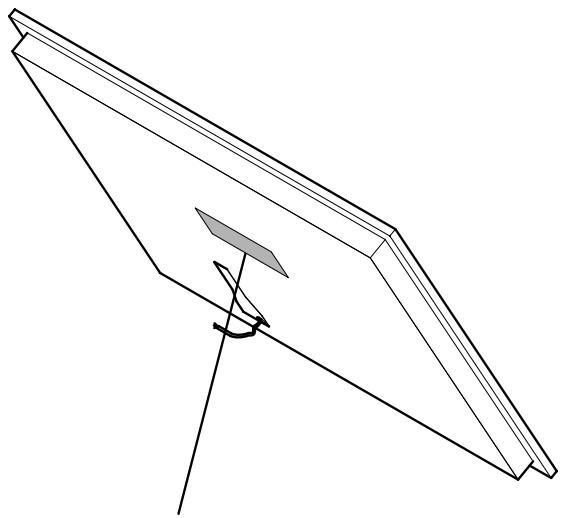
If the ceramic glass hob has a glass fracture, please specify to the customer service the three-digit number, which is printed on the glass plate.
| Malfunction | Cause | Remedy |
| The digital displays go out of order. | The power has failed. | 1. Wait for the power cut to end.2. Switching on the appliance. |
| The household fuse has been tripped. | Insert fuse.The fuse is tripped again:1. Switching off the appliance2. Call a qualified electrician. | |
| The overheat protection feature has switched off all cooking zones and inhibited their functions. | Allow the cooking zones to cool down. | |
| The error display flashes. | The overheat protection feature has switched off the double ring cooking zone and inhibited its functions. | Allow the cooking zone to cool down. |
| Liquid or a damp cloth on the touch control sensor fields. | 1. Disconnect the appliance from the mains power supply (remove fuse).2. Allow the appliance to cool down.3. Cleaning the ceramic glass hob.4. Connect the appliance to the mains power supply (insert fuse).5. Switching on the appliance. The error display continues to flash:1. Switching off the appliance2. Disconnect the appliance from the mains power supply (remove fuse).3. Call the customer care service. | |
| The ceramic glass hob has fissures, cracks or breaks. | Hard or sharp objects have fallen on the ceramic glass surface. | 1. Switch off the appliance.2. Disconnect the appliance from the mains power supply (remove fuse).3. Call the customer care service. |
| The cooking zones do not work. | The appliance is not switched on. | Switching on the appliance. |
| The required cooking zone is not switched on. | Switch on the cooking zone. | |
| The required heat setting is not set. | Set the heat setting. | |
| The household fuse has been tripped. | Insert fuse.The fuse is tripped again:1. Switching off the appliance2. Call a qualified electrician. | |
| The cooking zones cannot be switched on. | The child safety feature is switched on. | Switch off the child safety feature (see „child safety feature“ section). |
| Since switching on the appliance more than 10 seconds have elapsed. | Switch the appliance back on. | |
| Since selecting the cooking zone more than 10 seconds have elapsed. | Re-select the cooking zone. | |
| The cooking zones cannot be switched off. | Since selecting the cooking zone more than 10 seconds have elapsed. | Re-select the cooking zone. |
| The residual heat display is out of order. | The power has failed for a short time. | 1. Wait for the power cut to end.Switching on the appliance.The existing residual heat is no longer displayed. |
| The electronics are defective. | 1. Switch off the appliance.2. Disconnect the appliance from the mains power supply (remove fuse).3. Call the customer care service. | |
| The residual heat display does not indicate anything. | The cooking zone was only switched on for a short time. | There is no malfunction if the cooking zone is cold. |
| The electronics are defective. | 1. Switch off the appliance.2. Disconnect the appliance from the mains power supply (remove fuse).3. Call the customer care service. | |
| There was a power cut. | The existing residual heat is no longer displayed. | |
| The automatic warm-up function cannot be switched on. | The cooking zone still features residual heat. | Allow the cooking zone to cool down. |
| The heat setting is set via the „heat setting selection“ sensor field ⊖. | 1. Switch off the cooking zone.2. Set the heat setting via the “heat setting selection” sensor field ⊕. | |
| The automatic timer switch-off function cannot be set. | The cooking zone is not selected. | Cooking zone selection |
| The control panel is locked. | Unlock the control panel. | |
| The automatic timer switch-off function cannot be switched off. | The cooking zone is not selected. | Cooking zone selection |
| The control panel is locked. | Unlock the control panel. | |
| The timer minute minder cannot be set. | The automatic switch-off function of one cooking zone is set. | Switch off the automatic switch-off function. |
| The control panel is locked. | Unlock the control panel. | |
| The timer minute minder cannot be switched off. | The control panel is locked. | Unlock the control panel. |
| The appliance does not respond to control panel entries. | The appliance is switched off. | Switching on the appliance. |
| The electronics are defective. | 1. Switch off the appliance.2. Disconnect the appliance from the mains power supply (remove fuse).3. Call the customer care service. | |
| The overheat protection feature has switched off all cooking zones and inhibited their functions. | Allow the cooking zones to cool down. |
Technical data
Appliance dimensions
| Width | 896 mm |
| Depth | 506 mm |
| Height | 47 mm |
Cut-out dimensions
| Width | 880 mm |
| Depth | 490 mm |
| Corner radius | R5 |
Installation instructions
Safety instructions
The appliance may only be mounted and electrically connected by trained and authorised specialised personnel.

Please observe these instructions otherwise guarantee claims on the manufacturer will be nullified.
The general guidelines for the operation of electrical appliances, the regulations of the responsible utility company and the specifications in this assembly manual are to be observed.
With regard to fire protection this appliance complies with EN 60 335-2-6. Only this type of appliance may be installed with a high cupboard or wall on one side.
Appliance assembly
The appliance must be disconnected from the mains power supply during mounting, dismantling and servicing.
On unpacking the appliance please ensure that it is intact and check for evidence of transportation damage. Damaged appliances must not be mounted or connected.
The supplier and forwarding company must be notified of any transportation damage immediately.
The packaging should be disposed of in an environment-friendly manner.
The required minimum distances to other appliances (refer to their technical specifications) in your kitchen must be maintained.
The appliance must not be mounted directly adjacent to doors or under windows. Windows opening or bursting open may knock hot cooking utensils off the hob.
Drawers should not be fitted underneath the hob.
Installation must be such as to ensure protection against shock.
The kitchen unit in which the appliance is fitted must satisfy the stability requirements of DIN 68930.
For protection against moisture, all cut surfaces must be sealed with a suitable sealing material.
On tiled work surfaces, the joints in the area where the hob is seated must be completely filled with grout.
On natural, artificial stone or ceramic tops, the snap action springs must be bonded in place with a suitable artificial resin or two-component adhesive.
Check the seal in the support surround for a perfect fit and continuous contact.
No additional silicone sealing mass must be applied as this will hinder removal for service purposes.
To dismantle, the hob must be pressed out from below.
Clean the worktop around the cut-out area.
Connect the appliance electrically

DANGER!
Risk of life due to electrical current.
Voltage may be supplied to the mains terminal.
- Please observe electrical engineering safety regulations.
- De-energise the mains terminal.

IMPORTANT!
Damage due to electrical current.
Loose, incorrect terminal connections cause voltage flashovers.
- Execute terminal connections according to the regulations.
-
Provide cable with a strain relief feature.
-
Connect the cables on the appliance and mains terminal.
- Provide cable with a strain relief feature.
- Check the terminal connections.
- Appliance cleaning (see „Before first-time use“).
- Check readiness for operation.
The appliance is connected electrically.
Service and Spare Parts
If you wish to purchase spare parts or require an engineer, contact your local Electrolux Service Force Centre by telephoning:
08705 929 929
Your telephone call will be automatically routed to the Service Force Centre covering your post code area.
For the address of your local Service Force Centre and further information about Service Force, please visit the website at
www.serviceforce.co.uk
When you contact the Service Centre they will need the following information:
- Your name & address, including post code.
- Your telephone number.
- Clear and concise details of the fault.
- The model and serial number of the appliance (found on the rating plate).
- The purchase date:
Please note that a valid purchase receipt or guarantee documentation is required for in-guarantee service calls.
Customer Care
For general enquiries concerning your Electrolux appliance or for further information on Electrolux products please contact our Customer Care Department by letter or telephone at the address below or visit our website at
www.electrolux.co.uk.
Customer Care Department
Electrolux
55-77 High Street
Slough
Berkshire, SL1 1DZ
Tel. 08705 950950 (*)
natural_image
Pure technical line drawing of a triangular structural component with no text or symbols| Modell EHS 8680 X | Prod.Nr. 949 591 394 | ||
| Typ: 55HCD 68AO | 230 V AC 50 Hz | 421715 | |
| Made in Germany | Ser.Nr.:...... | 7,8 kW | |
(*) Calls may be recorded for training purposes.
Guarantee Conditions
Standard guarantee conditions
We, Electrolux, undertake that if within 12 months of the date of the purchase this Electrolux appliance or any part thereof is proved to be defective by reason only of faulty workmanship or materials, we will, at our option repair or replace the same FREE OF CHARGE for labour, materials or carriage on condition that:
- The appliance has been correctly installed and used only on the electricity supply stated on the rating plate.
- The appliance has been used for normal domestic purposes only, and in accordance with the manufacturer's instructions.
- The appliance has not been serviced, maintained, repaired, taken apart or tampered with by any person not authorised by us.
- All service work under this guarantee must be undertaken by a Service Force Centre.
- Any appliance or defective part replaced shall become the Company's property.
- This guarantee is in addition to your statutory and other legal rights.
Home visits are made between 8.30am and 5.30pm Monday to Friday. Visits may be available outside these hours in which case a premium will be charged.
Exclusions
This guarantee does not cover:
- Damage or calls resulting from transportation, improper use or neglect, the replacement of any light bulbs or removable parts of glass or plastic.
- Costs incurred for calls to put right an appliance which is improperly installed or calls to appliances outside the United Kingdom.
- Appliances found to be in use within a commercial environment, plus those which are subject to rental agreements.
- Products of Electrolux manufacture which are not marketed by Electrolux.
European Guarantee
If you should move to another country within Europe then your guarantee moves with you to your new home subject to the following qualifications:
- The guarantee starts from the date you first purchased your product.
- The guarantee is for the same period and to the same extent for labour and parts as exists in the new country of use for this brand or range of
- products.
- This guarantee relates to you and cannot be transferred to another user.
- Your new home is within the European Community (EC) or European Free Trade Area.
- The product is installed and used in accordance with our instructions and is only used domestically, i.e. a normal household.
- The product is installed taking into account regulations in your new country.
Before you move please contact your nearest Customer Care centre, listed below, to give them details of your new home. They will then ensure that the local Service Organisation is aware of your move and able to look after you and your appliances.
| France | Senlis | +33 (0) 3 44 62 20 13 |
| Germany | Nürnberg | +49 (0) 800 234 7378 |
| Italy | Pordernone | +39 (0) 800 11 7511 |
| Sweden | Stockholm | +46 (0) 20 78 77 50 |
| UK | Slough | +44 (0) 1753 219898 |
Chère cliente, cher client,
other
| Circuit Type | Diameter (mm) | Power (W) | | --- | --- | --- | | Zone de cuisson triple circuit | 1050 / 1950 / 2700 | 145 | | Zone de cuisson monocircuit | 1200 | 145 | | Zone poissonnière | 1400 / 2200 | 170 | | Zone de cuisson double circuit | 700 / 1700 | 120 | The diagram includes a legend for the center circle 'Bandeau de commande'. A small numeric display shows '88° 8. Θ ⊕ = 3' and '8. Θ ⊕ = 8'.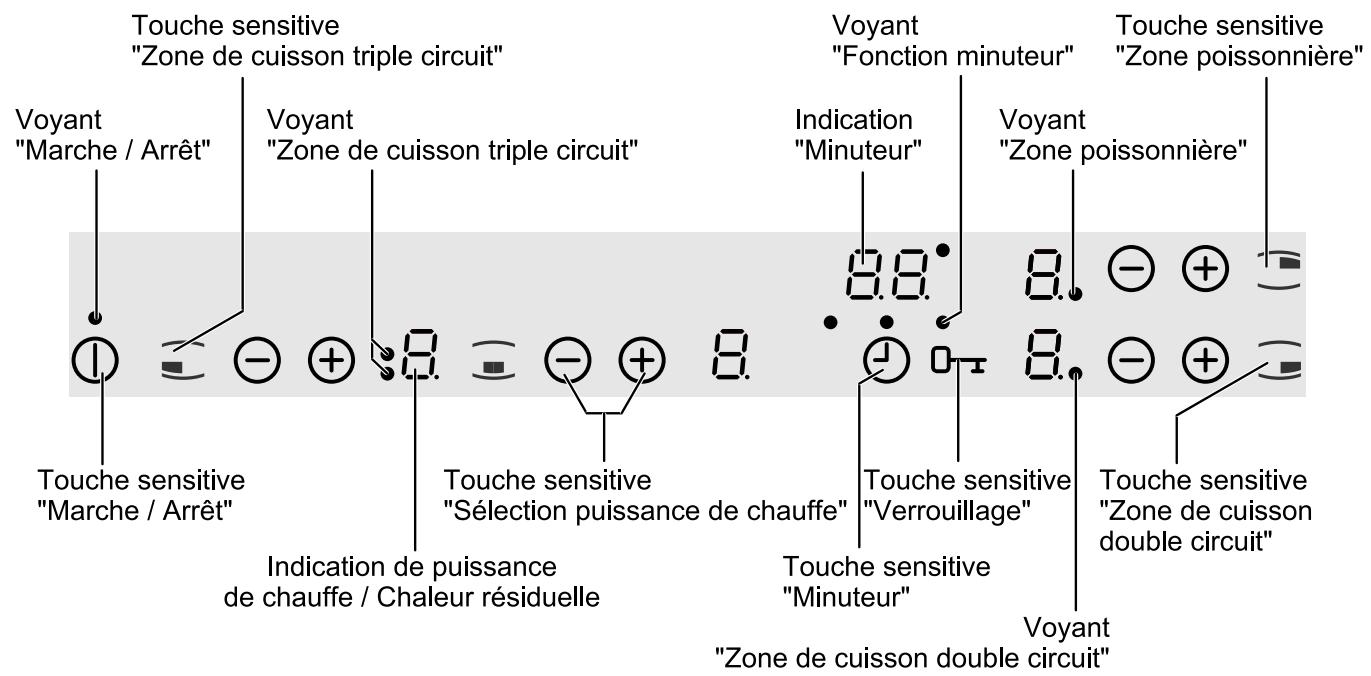
natural_image
Illustration of a hand placing a circular object onto a flat surface with three concentric circles (no text or symbols)Allumer l'appareil
Eteindre l'appareil
natural_image
Pure diagram of concentric circular layers without any text, numbers, or symbols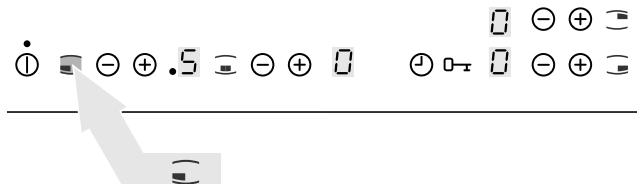
\~ 3 sec.
Régler le temps
Modifier le temps
natural_image
Simple line drawing of a hand holding a circular object on a flat surface, with three circles and one ring (no text or symbols)natural_image
Illustration of a hand using a tool to clean or brush inside a circular pipe on a flat sheet (no text or symbols)natural_image
Pure technical line drawing of a triangular structural component with a central slot and angular cut (no text or symbols)| Modell EHS 8680 X | Prod.Nr. 949 591 394 | ||
| Typ: 55HCD 68AO | 230 V AC 50 Hz | 421715 | |
| Made in Germany | Ser.Nr.:...... | 7,8 kW | |
Geachte klant,
natural_image
Illustration of a hand placing a circular object onto a flat surface with three concentric circles (no text or symbols)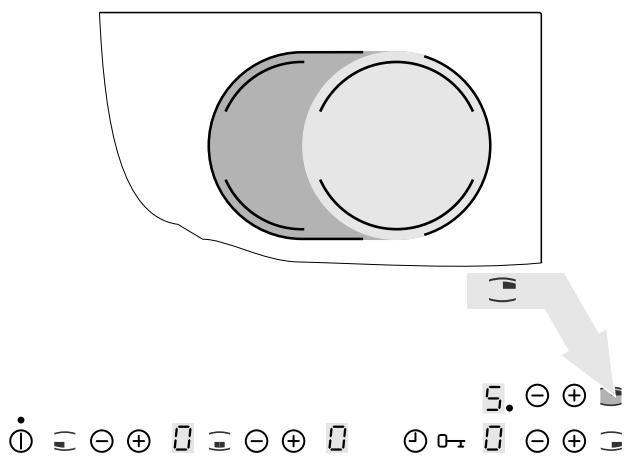
natural_image
Pure diagram of concentric circular layers without any text, numbers, or symbols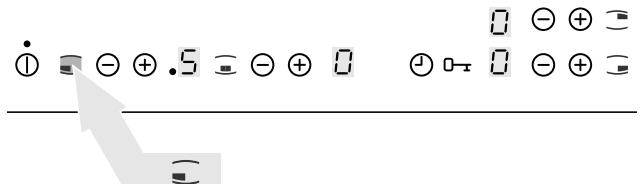
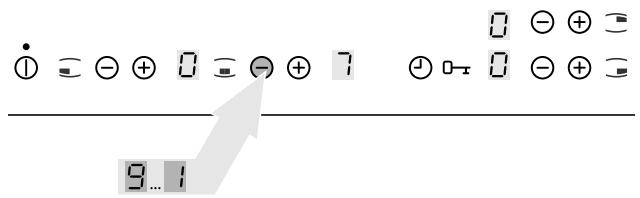
De kinderbeveiliging overbruggen
De timer gebruiken
De tijd instellen
natural_image
Illustration of three circles on a flat surface with a hand holding a shaded object (no text or symbols)natural_image
Illustration of a hand using a tool to clean or brush a circular object on a flat surface (no text or symbols)natural_image
Pure technical line drawing of a structural component with no text or symbols| Modell EHS 8680 X | Prod.Nr. 949 591 394 | ||
| Typ: 55HCD 68AO | 230 V AC 50 Hz | 421715 | |
| Made in Germany | Ser.Nr.:...... | 7,8 kW | |
Hob mounting / Montage de la table de cuisson / De kookplaat monteren

The electrical connection should be performed by a qualified electrician according to the information in the „Electrical connection of the appliance“ section on page 34.

natural_image
Diagram showing a square plate with a warning sign and a hand holding a cup, no text or symbols present.Step / Etape / Stap 2
Step / Etape / Stap 4
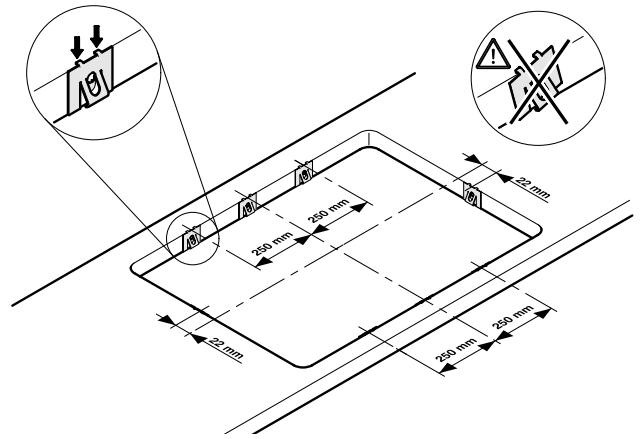
Step / Etape / Stap 5
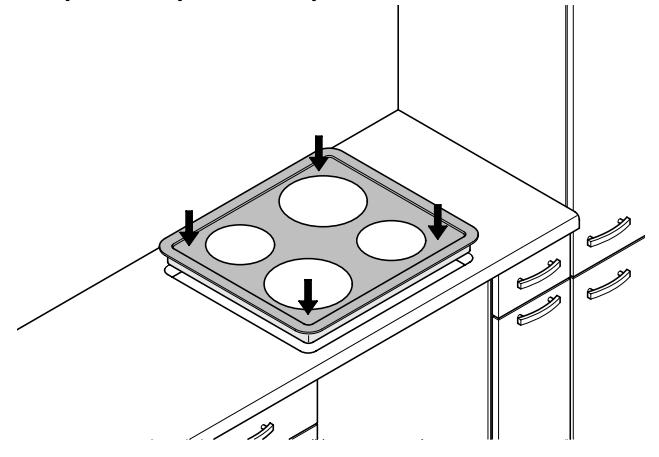
natural_image
Technical line drawing of a tray with four circular cutouts and arrows indicating direction (no text or symbols)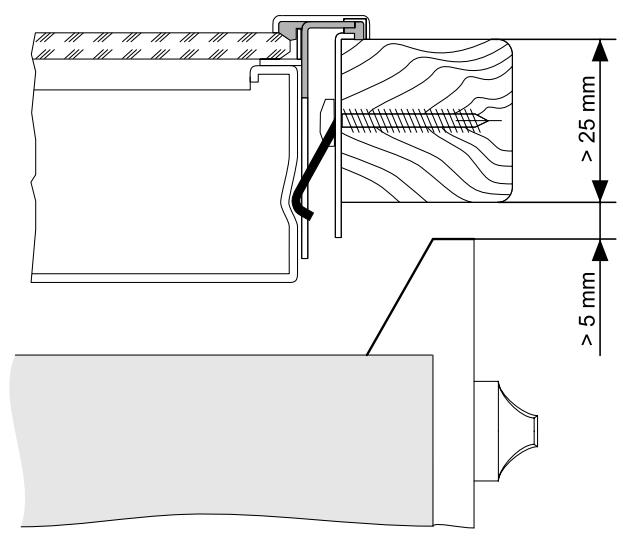
822 924 331-B-071103
Subject to modification without notice
- Dear customer
- The following symbols are used in the text:
- Contents
- Operating instructions .... 4
- Safety instructions 4
- Appliance description 8
- Operating the hob 10
- Hob operation tips ...... 25
- Cleaning and care 28
- Rectifying faults 29
- Technical data 32
- Installation instructions....33
- Safety instructions 33
- Appliance assembly 33
- Connect the appliance electrically ..... 34
- Service and Spare Parts 35
- Guarantee Conditions 36
- Hob mounting....105
- Operating instructions
- Safety instructions
- Intended usage
- Appliance operation
- Appliance implementation
- Appliance cleaning
- Avoid damage to the appliance
- Environmental awareness
- Disposing of the packaging material
- Appliance disposal
- Your appliance components
- Your hob components
- Control panel elements
- Appliance description
- Your appliance functions
- Operating the hob
- Before using for the first time
- IMPORTANT!
- Touch Control-Sensor fields
- Switching on the appliance
- Switching off the appliance
- Cancelling the safety cut-out
- Heat setting
- Increase heat setting
- Decrease heat setting
- Setting the keep warm function
- Switching off the cooking zone
- WARNING!
- Variant 1
- Variant 2
- Switching the casserole cooking zone on and off
- Switching on the casserole cooking zone
- Set the desired heat setting.
- Touch the „casserole cooking zone“ sensor field ☐.
- Switch off the outer heating ring
- Switching the double ring cooking zone on and off
- Switch on the outer heating ring
- Touch the „double ring cooking zone” sensor field ≡.
- Switching the triple ring cooking zone on and off
- Switching on the triple ring cooking zone
- Touch the „triple ring cooking zone” sensor field ≡.
- Touch the „triple ring cooking zone” sensor field ≡.
- Using the automatic warm-up function
- Switching on the automatic warm-up function
- Switching off the automatic warm-up function
- Do not use the automatic warm-up function
- Using the child safety feature
- Switching on the child safety feature
- Bypassing the child safety feature
- Switching off the child safety feature
- Lock implementation
- Locking the control panel
- Unlocking the control panel
- Timer implementation
- Cooking zone selection
- Time setting
- Remaining time display
- Time changing
- Switching off cooking zone and automatic switch-off function
- Switching off the timer
- Hob operation tips
- Pots and pans
- General information
- Energy saving
- Cooking with and without the automatic warm-up function
- The automatic warm-up function is suitable for:
- The automatic warm-up function is not suitable for:
- General information:
- Duration of the warm-up phase
- Typical heat settings for cooking
- Cleaning and care
- Hob
- Minor soiling
- Stubborn soiling
- Problem soiling
- Rectifying faults
- Technical data
- Installation instructions
- Appliance assembly
- Connect the appliance electrically
- DANGER!
- Service and Spare Parts
- 929 929
- www.serviceforce.co.uk
- Customer Care
- www.electrolux.co.uk.
- Guarantee Conditions
- Standard guarantee conditions
- Exclusions
- This guarantee does not cover:
- European Guarantee
- Chère cliente, cher client,
- Allumer l'appareil
- Eteindre l'appareil
- Régler le temps
- Modifier le temps
- Geachte klant,
- De kinderbeveiliging overbruggen
- De timer gebruiken
- De tijd instellen
- Hob mounting / Montage de la table de cuisson / De kookplaat monteren
Brand : AEG-ELECTROLUX
Model : EHS8680XHIC9064B
Category : Hob