KOM0774 - Action Camera Quer - Free user manual and instructions
Find the device manual for free KOM0774 Quer in PDF.


User questions about KOM0774 Quer
0 question about this device. Answer the ones you know or ask your own.
Ask a new question about this device
Download the instructions for your Action Camera in PDF format for free! Find your manual KOM0774 - Quer and take your electronic device back in hand. On this page are published all the documents necessary for the use of your device. KOM0774 by Quer.
USER MANUAL KOM0774 Quer
natural_image
Black-and-white photo of a mounted radar or camera device with a dome-shaped top and sensor array (no visible text or symbols)KOM0774
Car DVR
Owner's manual EN
Instruction to keys function
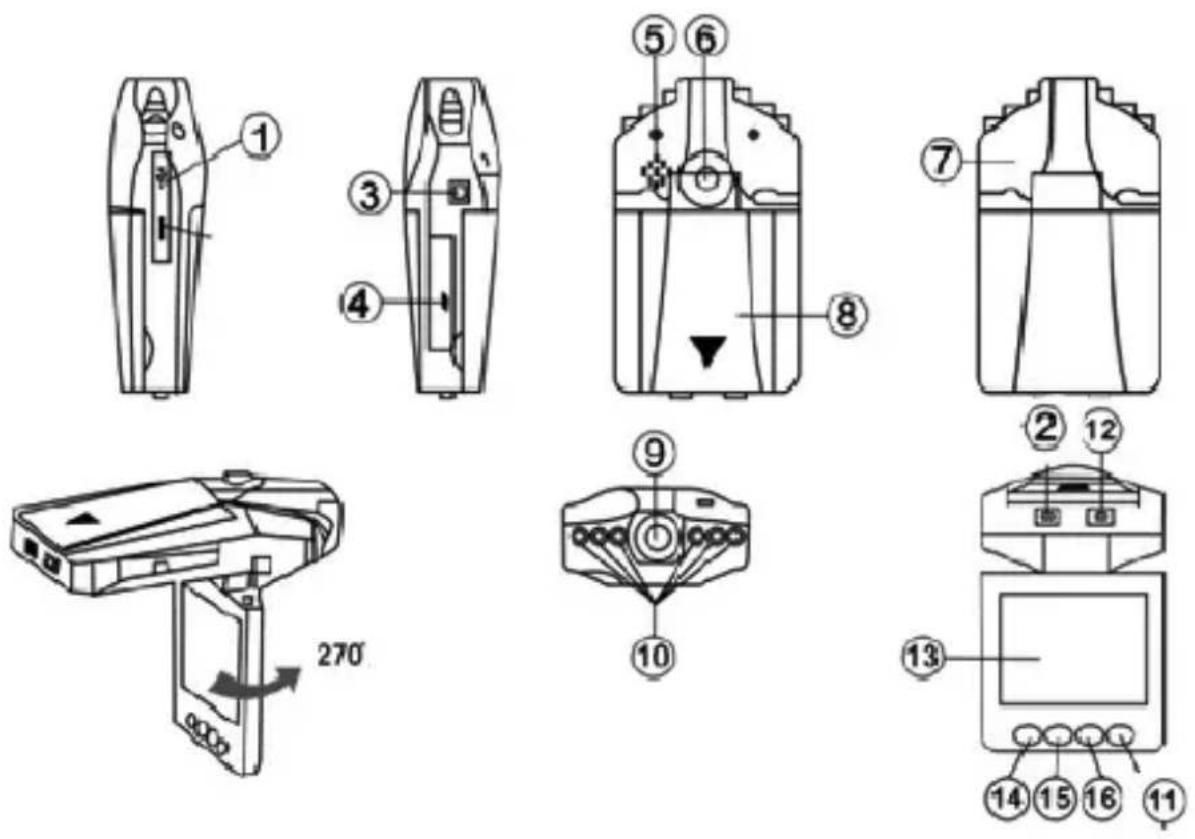
1 USB Interface
2 On/Off key
3.5V power input jack
4 SD/MMC card slot
5 Speaker
6 Bracket hole
7 MIC
8 Battery cover
9 Lens
10 Infrared lamp
11 Mode (Record/Photo/Preview)
12 Record/Photo wor-
king (blue) indicator,
charge (red) indicator
13 2.5-inch color display
14 Menu
15, 16 Down/Up key
Accessories
- Operation Manual
- Bracket
- USB cable
- Car charger (with 24V/12V to 5V output voltage converter inside)
Instruction of the car video recorder
Power supply (two modes):
A) Using built-in rechargeable lithium battery
Charge mode: 1) connect to car charger; 2) Connect to computer by USB interface
The red indicator is on during charging. It will turn off after the DVR is charged full.
Note: When supplying power with lithium battery, it is required to press On/Off key 2 to start or stop DVR recording.
B) Connecting 12V/24V car charger
After vehicle started, DVR starts recording automatically. It saves the file and turn off automatically 5 seconds later after vehicle is shut down.
Note: Only car charge source with 5V output can be used.
Function Description
EN
DVR has record/photo/preview functions. You can switch between these modes at your discretion.
A) Record mode
Press down the On/Off key 2 or connect to car charger, the DVR goes into record mode and starts
recording automatically. (Note: please insert SD/MMC card before using.). Now the blue indicator flashes.
The recorded video files are stored in SD/MMC card. Press Record key 12 to stop recording. Now the blue indicator illuminate solid.
B) Photo mode
Turn the unit on and press the Mode key 11 to enter the photo mode. Press the Photo key 12 to take photo.
C) Preview mode
Turn the unit on and press the Mode key 11 twice to enter the preview mode.
Press the Up/Down key to select the desired file for browsing. Press Record key 12 to “Play/Pause”.
D) Delete Function
In preview mode, press the Menu key 14 to enter deletion screen. Press the Record key 12 to enter the screen to select deleting “Single/All/Selected” (with Up/Down). Finally, press the Record key 12 to confirm. You can also select “Thumbnails” and “Preview Playback Volume” and press the Record key 12 to confirm.
Menu Settings
Turn the unit on and press Menu key 14 to enter the settings screen. Press Up/Down key to cycle through the items listed.
Press key 12 to enter setting screen of the selected item, press Up/Down key to select specific parameter. Finally, press key 12 to confirm and exit.
1) Video Resolution Settings: 640×480 pixels.
2) Time marker: Close/Date/Date and Time (When "Close" is selected, no time will be displayed on the video file.)
3) Motion Detection: On/Off
With “On” selected, DVR enter standby mode automatically after vehicle started. When there is any object moves before DVR, the DVR will start video recording automatically. When the object stops moving, DVR will stop recording and save the file. Or when power is off, it will also stop recording.
4) Recorder: On/Off (when "Off" is selected, DVR will not record sound)
5) Video save time: 2 minutes / 5 minutes / 15 minutes
On the settings screen, press Menu key again, DVR enters the following settings:
Press Up/Down key to select the items, press 12 key to confirm and exit.
1) Format: Cancel/Execute;
2) Language: English / Traditional Chinese / Simplified Chinese / Japanese / Russian;
3) Reset system: Cancel/Execute (Select "Execute" to restore default settings);
EN
4) Optical frequency: 50HZ/60HZ
5) Date and Time:
Press REC key to enter, press UP/DOWN to set date, press 12 key to go to the next setting. When all settings are completed, press 12 key to confirm and exit.
Note: Before setting, press DOWN/UP key to select [Year/Month/Date], [Date/Month/Year] or [Month/Date/Year] modes.
6) Infrared lamp: Auto/Off
Downloading File
1) Connect computer and DVR with USB cable;
2) "Removable disk" icon appears in My Computer;
3) Down the file in folder DEIM/100DSCIM.
Notices
1) Please insert SD/MMC card before recording;
2) This video recorder has cyclic recording function. When the storage medium is full, the video recorder will store the recorded content from the very beginning of the storage medium and cover the old file.
(Note: To present all the old files being deleted immediately, the saved files are separated into sections by 2 minutes / 5 minutes / 15 minutes. When SD/MMC card is full, the old files will be covered as sections one by one.
3) When lithium battery is low, DVR screen displays
"Low Battery", the unit turns off 10 seconds later. 4) If any abnormalities occur in the system, please remove the battery and install it again to reset the system.
Technical Parameters
1) Video Resolution: 640×480 pixels
2) Cyclic shooting:
3) Save format: AVI
4) Power supply: built-in lithium battery/car charger
5) Support SD/MMC card: 32GB maximum
6) Voice recording
7) Output: USB
8) 2.5-inch color display, 270 degrees rotation
Specifications are subject to change without notice.
EN
English
Correct Disposal of This Product (Waste Electrical & Electronic Equipment)
(Applicable in the European Union and other European countries with separate collection systems)
This marking shown on the product or Its literature, indicates that It should not be disposed with other household wastes at the end of its working life. To prevent possible harm to the environment or human health from uncontrolled waste disposal, please separate this from other types of wastes and recycle it responsibly to promote the sustainable reuse of material resources.
Household users should contact either the retailer where they purchased this product, or their local government office, for details of where and how they can take this item for environmentally safe recycling. Business users should contact their supplier and check the terms and conditions of the purchase contract. This product should not be mixed with other commercial wastes for disposal
Made in China for LECHPOL Zbigniew Leszek, Miętne, 1 Garwolińska Street, 08-400 Garwolin.


EN
Opis urządzenia