KOM0480 - Keyboard Quer - Free user manual and instructions
Find the device manual for free KOM0480 Quer in PDF.


| Product Type | Keyboard |
| Model | KOM0480 |
| Brand | Quer |
| Dimensions (approx) | 44 x 13 x 3 cm |
| Weight (approx) | 500 g |
| Power Source | USB (5V, 100 mA) |
| Connection Type | Wired USB |
| Number of Keys | 104 (US layout) |
| Multimedia Keys | Yes, 12 programmable keys |
| Compatibility | Windows, macOS, Linux |
| Materials | ABS plastic |
| Cable Length | 150 cm |
| Cleaning Instructions | Wipe with a soft, dry cloth |
| Operating Temperature | 0°C to 40°C |
| Storage Temperature | -20°C to 60°C |
| Safety Precautions | Avoid exposure to moisture; do not disassemble |
| Spare Parts | Not provided; replacement keyboard available |
| Repairability | Not user-serviceable; consult technician |
| Warranty | 1 year limited warranty |
Frequently Asked Questions - KOM0480 Quer
User questions about KOM0480 Quer
0 question about this device. Answer the ones you know or ask your own.
Ask a new question about this device
Download the instructions for your Keyboard in PDF format for free! Find your manual KOM0480 - Quer and take your electronic device back in hand. On this page are published all the documents necessary for the use of your device. KOM0480 by Quer.
USER MANUAL KOM0480 Quer
KOM0480
natural_image
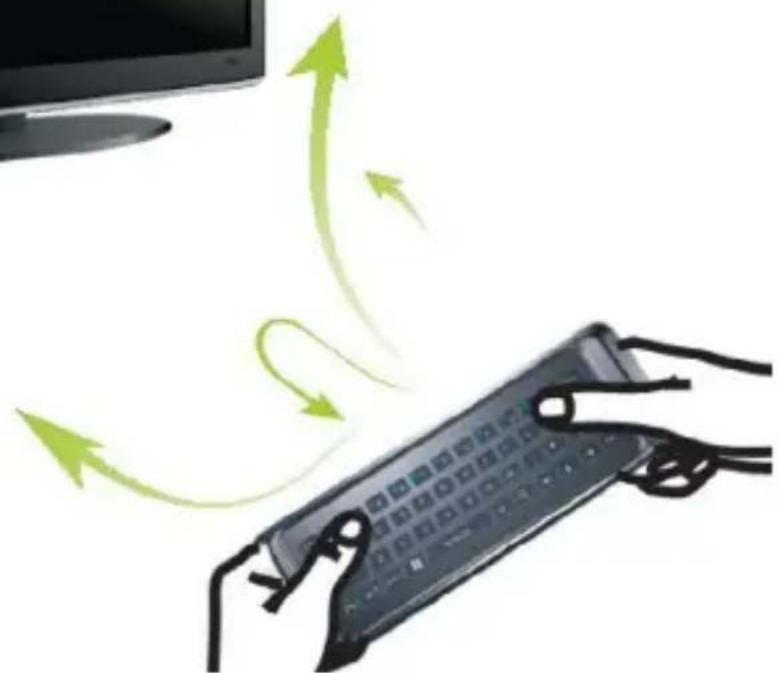
Illustration of hands using a remote control device with green arrows indicating motion or circulation (no text or symbols)Bedienungsanleitung
DE
Wireless keyboard
Owner's manual
EN
Instrukcja obsługi
PL
Manual de utilizare
RO
I. Remote Function Description
Air Mouse Remote Function
Air-mouse Remote air mouse function using 6-axis technology (3-axis gyro and 3-axis accelerometer sensor technology), namely the use of remote control built-in 3-axis accelerometer sensor and 3-axis gyro to measure mouse moves around the air up and down, left and right. And use self-developed 3-axis gyro and 3-axis accelerometer sensor algorithm to its precise converted to the displacement of the mouse on the screen. The advanced air mouse helps to manipulate your set-top box or computer freely away from the desktop. Press „Menu” key to enable/disable this function.
Press the other function keys to achieve the corresponding functions.
Motion felling game controller features
This remote control supports the 6-axis game intervention (3-axis gyro and 3-axis accelerometer sensor game intervention). Enter the matched interface for motion game, you can activate the motion game function according to the game interface instruction. The games includes: Angry birds, Fruit ninja, Table tennis, Tennis, Golf, Skiing, Need for Speed etc.
Sleep mode
If no button is pressed for over 20 seconds, the remote will enter sleep mode. Press any button can wake up the remote control.
EN
II. Operating instructions
1. Remote control and receiver connection (Pairing)
The remote control and receiver is default paired in factory. Just need to plug the receiver into USB socket of the set-top box (computer), the receiver can automatically connect to the remote control. Irregular connection and communication between the remote and receiver, that caused by any operation error during using of the remote, or other reasons, can be reconnected through the following methods:
Press [OK] and [BACK] keys for about 3 to 5 seconds. The operation indicating LED starts flashing. It indicates the remote enters Code Matching Mode. Release both keys, and plug the USB receiver to the USB socket of TV or Computer within 20 seconds. The remote and device starts auto code matching. If LED turns off, it means the code is successfully matched.
2. Air mouse travelling speed (sensitivity) adjustment function (option)
The Air mouse sensitivity is divided into 4 gears. The greater the value of air mouse is, the faster the speed (the higher sensitivity) of air mouse will be. The default gear is gear 3.
- Speed up the air mouse speed: Press [OK] + [V+] for about 3 seconds. Indicating light flashes twice. The CPI increase 1 gear on the basis of current speed.
- Slow down the air mouse speed: Press [OK] + [V-] for about 3 seconds. Indicating light flashes twice. The CPI decrease 1 gear on the basis of current speed.
Note: When the speed reaches the highest gear (gear 4), remote control can no longer speed up. It can only implement “slow down” operation.
3. Lithium battery charging (air mouse remote)
When battery is lack of power, please recharge it as soon as possible. This remote is using rechargeable Lithium battery. When battery is in low voltage, you can recharge the battery by computer via USB socket, or recharged by 5V USB power supply via USB cable. While charging, the red indicating light turns on. After fully charged, red indicating light turns off.
III. Product Spec and Parameters
Carrier frequency: 2.4GHz ISM frequency range, Auto Frequency hopping
Protocol: HID, USB 2.0
Effective distance: 8m
Battery: 3.7V Lithium battery, 320mAh
Operation voltage: 3.7V \~ 4.2V
Operation current: <40mA
Temperature scope: -5^ +50^
Dongle: Mini USB Dongle
System: Support Windows, Android, Linux etc. And it is adjustable according to user's system.
Specifications are subject to change without notice.
„The Lechpol company declares that product KOM0480 is consistent with the essential requirements and other relevant provisions of directive 1999/5/EC. The proper declaration for download from www.lechpol.eu”
English

Correct Disposal of This Product (Waste Electrical & Electronic Equipment)
(Applicable in the European Union and other European countries with separate collection systems)
This marking shown on the product or its literature, indicates that it should not be disposed with other household wastes at the end of its working life. To prevent possible harm to the environment or human health from uncontrolled waste disposal, please separate this from other types of wastes and recycle it responsibly to promote the sustainable reuse of material resources.
Household users should contact either the retailer where they purchased this product, or their local government office, for details of where and how they can take this item for environmentally safe recycling. Business users should contact their supplier and check the terms and conditions of the purchase contract. This product should not be mixed with other commercial wastes for disposal
Made in China for LECHPOL Zbigniew Leszek, Miętne, 1 Garwolińska Street 08-400 Garwolin.

EN