KOM0331 - Keyboard Quer - Free user manual and instructions
Find the device manual for free KOM0331 Quer in PDF.


User questions about KOM0331 Quer
0 question about this device. Answer the ones you know or ask your own.
Ask a new question about this device
Download the instructions for your Keyboard in PDF format for free! Find your manual KOM0331 - Quer and take your electronic device back in hand. On this page are published all the documents necessary for the use of your device. KOM0331 by Quer.
USER MANUAL KOM0331 Quer
Wireless keyboard Quer at 2.4 GHz dedicated to Android Smart TV dongle
KOM0331
Bedienungsanleitung
Owner's manual
Instrukcja obsługi
Manual de utilizare
DE
EN
PL
RO
flowchart
graph TD
    A["Controller"] --> B["HTP/C/PTV"]
    A --> C["Pad/PC etc."]
    A --> D["Android TV BOX"]
    A --> E["Mobile phone (only bluetooth support)"]
DE
Touchpad
To avoid injury, death of personnel or damage to the equipment the operator must refer to the explanations in this User's Manual.
Battery: There is a lithium-ion rechargeable battery in this device. Don't water this device, or put it in a humid environment for a long time or the device will be damaged.

Attention to traffic safety
(CAR PC): Do not use the device while driving. When you want to use it, please park your car.

Turn off this device on planes
This Electronic wireless product can disturb the communications systems of planes. Please turn if off before boarding.
In vicinity of dangerous goods to be shut down
In gas station and close to fuel and chemical agents and other hazardous materials are as,please turn the device off.

Turn off this device in hospital
Please turn the device off in areas with “no wireless device” indication. Wireless devices may interfere with implanted cardiac pacemakers, hearing aids and other. Medical implant devices.

Interference
All wireless devices may be subject to interference, thus affecting the performance of this product.
Accissories
Only use factory specified parts. Please use the supplied travel charging cable. the use of other charging devices may be dangerous.
Overview
This is a wonderful combo, 2.4GHz Mini Wireless QWERTY keyboard, TouchPad combo, with USB interface Adapter
For the lectuer, sales manager, presenter, from within a 30' radius make a presentation and operate PC wirelessly. Change slides and screen options, write on the screen, emphasize words and objects just by using this wireless Mini Keyboard and Mouse with Touch Pad.

For people who want to watch internet TV play on their standard TV, via broadband and a PC, like NBC, ABC, FOX and IPTV, Android TV Box, if use this wireless mini combo, who can sit in comfortable chair and select viewing pleasures without walking to computer to change channels or scroll through options.
Introduction
Product overview
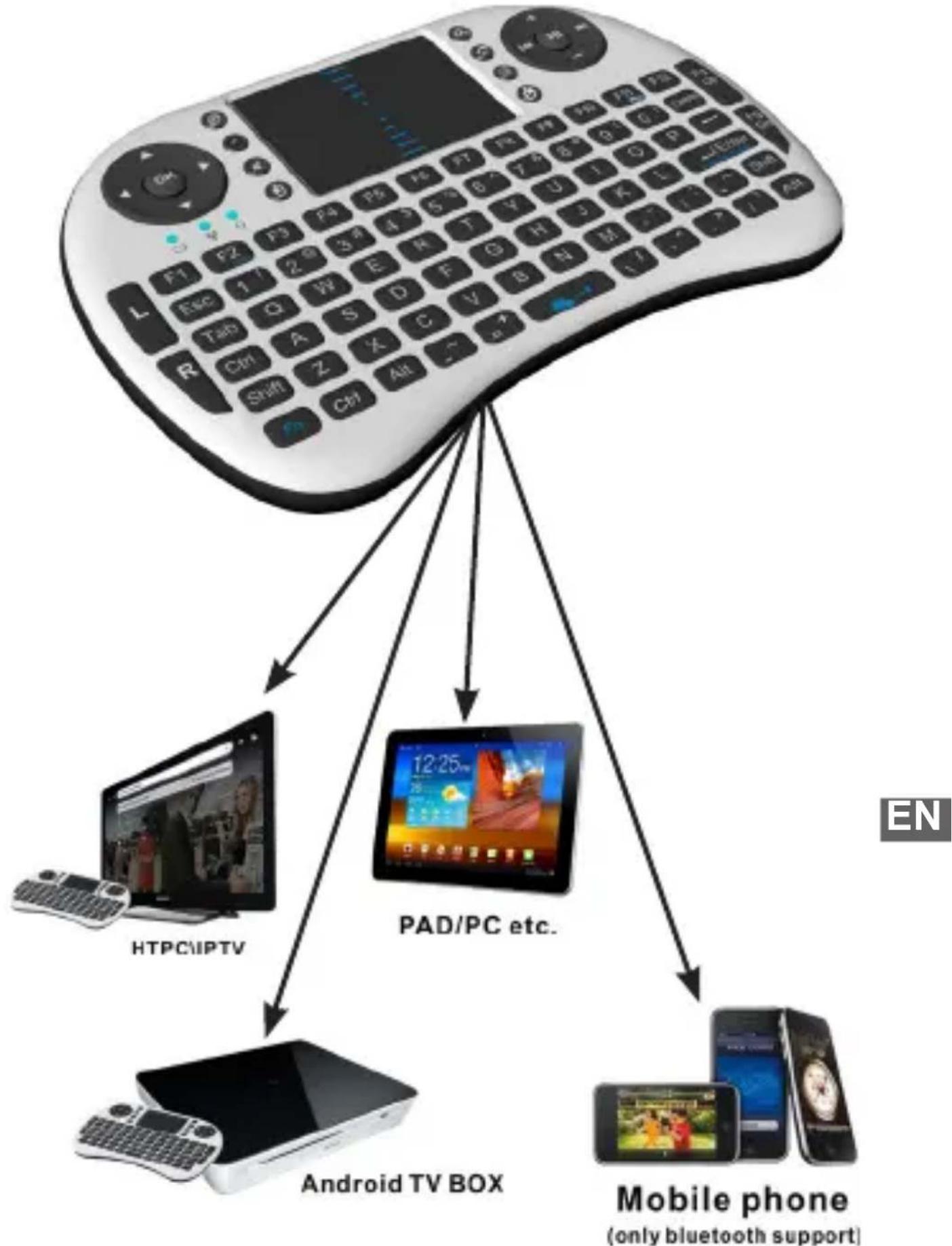
flowchart
graph TD
    A["Remote Control Console"] --> B["Mobile Phone (only bluetooth support)"]
    A --> C["Android TV BOX"]
    A --> D["PAD/PC etc."]
    A --> E["HTPC/IPTV"]
    A --> F["English Language"]
    style A fill:#f9f,stroke:#333
    style B fill:#ccf,stroke:#333
    style C fill:#cfc,stroke:#333
    style D fill:#fcc,stroke:#333
    style E fill:#cff,stroke:#333
    style F fill:#ffc,stroke:#333
Touchpad
This product was added to the innovative function Of the mouse wheel,when you press the Fn button With your fingers Touch anywhere in the sliding regionk,can facilitate the realization of the mouse wheel functions.This human design,it can be easier for to browse the web better,edit documents.
Connecting the receiver
Slide the receiver out from the side of keyboard, and insert to the devices with a standard USB interface. Once connected, slide the power switch to the „ON” position located on the left side of the unit to establish the connection.
Auto sleep and wake feature
The keyboard also features an auto sleep and auto wake mode. If there is a long period of inactivity, the keyboard will automatically go into a sleep mode. During the sleep mode, the user can wake the unit up by pressing any key. The 2.4 GHz receiver and keyboard's RF indicator will continue to flash and will not power down.
Switching off the keyboard after use
After finishing using the keyboard, push the switch to the off position. This turns off the power, of the keyboard. The USB receiver should be plugged out from the PC and then inserted back in the keyboard so it is being kept safely.
Charging the battery(Only for Configure A)
The device with built-in lithium-ion battery, please use only approved data lines and chargers.
Fully charge the unit before operating for the first time. This device can be used when charging, but will extend the charging time;
When the battery is low, the low-voltage light will flash to warn the user. The unit will automatically turn off if the battery has been depleted.
Notes: This product has the configuration of A and B configuration can choose
Configure A: lithium battery version, this version built in rechargeable lithium battery, additional charge USB line.
Configure B: install AAA * 2 battery, this version does not support the charging function.
Appendix
Technical parameters, specification
Measurements (L x W x H): 146.8 x 97.5 x 19mm
Weight (grams): 110g
Operational Range: up to 10 meters
Transmit power : +5db Max.
Operation voltage: 3.3V
Operation current: < 50mA
Charging current: < 300mA
Sleep current: < 1mA
Computer system requirements
Windows 2000
Windows XP
Windows Vista, Windows CE, Windows 7
Linux(Debian-3.1, Redhat-9.0 Ubuntu-8.10 Fedora-7.0 tested)
Maintenance
- Do not attempt to disassemble the device or replace rechargeable battery. Doing so will void the warranty.
- The battery will discharge if stored for a long period of time without usage.
- Use the specified charger. Disconnect the device after the battery has been fully charged. Overcharging the battery will shorten the life span of the battery.
- Do not expose the device in extreme heat or cold. Extreme temperatures will cause the life span of the battery to shorten.
- Use only a damp cloth with mild soap to clean the device. Solvents and other cleaning agents may cause damage to the device.

Troubleshooting
Below are some basic troubleshooting scenarios for the device. Please contact support from the place of purchase if you are unable to resolve any issues with the device.
| Problem Possible issue Solution | ||
| Unit does not respond. | 1. Low battery power.2. Unit is not turned on. | 1. Configure A: Charge the device for at least 15 minutes. Configure B: Replacement of the AAA * 2 battery2. Check if the switch selected to the “ON” position. |
| Keyboard cannot establish a connection to the receiver. | 1. The receiver may not be inserted correctly. | 1. Disconnect and reconnect the receiver to the USB port. |
| The mouse pointer moves erratically and/or unresponsive. | 1. Device may not be within optimal range of the receiver2. Low voltage3. Dust or oil on the touchpad. | 1. Bring the unit closer to the receiver.2. Please recharge(for Configure A) or replace the battery(for Configure B)3. Clean the touchpad with a damp cloth. |
| The unit does not charge (only for Configure A.) | 1. Defective battery.2. Check connections | 1. Contact your local dealer for replacements.2. Verify if the device is securely connected to the charger. |
Notes:
In line with the policy of continued development The manufacturer reserves the right to amend the specifications without prior notification, The pictures and date in the stylebook are consult only, If there is fluctuation, According to the real object please.
Since devices using 2.4G technology communicate using radio waves, your device and the other devices do not need to be in direct line-of-sight. The connection can be subject to interference from obstructions, such as walls, or other electronic devices




Correct Disposal of This Product (Waste Electrical & Electronic Equipment)
(Applicable in the European Union and other European countries with separate collection systems) This marking shown on the product or Its literature, indicates that It should not be disposed with other household wastes at the end of its working life. To prevent possible harm to the environment or human health from uncontrolled waste disposal, please separate this from other types of wastes and recycle it responsibly to promote the sustainable reuse of material resources. Household users should contact either the retailer where they purchased this product, or their local government office, for details of where and how they can take this item for environmentally safe recycling. Business users should contact their supplier and check the terms and conditions of the purchase contract This product should not be mixed with other commercial wastes for disposal
Made in China for LECHPOL Zbigniew Leszek, Miętne, 1 Garwolińska Street 08-400 Garwolin.
Środki ostrożności

flowchart
graph TD
    A["Remote Control Device"] --> B["Mobile Phone"]
    A --> C["Android TV BOX"]
    A --> D["PAD/PC etc."]
    A --> E["HTPCLIPTV"]
    A --> F["Mobile phone (only bluetooth support)"]