SLU0049 - Headphones Quer - Free user manual and instructions
Find the device manual for free SLU0049 Quer in PDF.


| Product Type | Wireless Over-Ear Headphones |
| Model | SLU0049 |
| Brand | Quer |
| Dimensions | Approx. 20 x 18 x 8 cm (folded) |
| Weight | Approx. 250 g |
| Power Supply | Built-in rechargeable lithium-ion battery, 500 mAh |
| Charging Time | Approx. 2 hours |
| Battery Life | Up to 20 hours of playback |
| Connectivity | Bluetooth 5.0, 3.5 mm audio jack (wired mode) |
| Driver Size | 40 mm |
| Frequency Response | 20 Hz - 20 kHz |
| Impedance | 32 Ohm |
| Microphone | Built-in omnidirectional microphone |
| Controls | On-ear buttons: volume, playback, call control |
| Main Functions | Wireless music streaming, hands-free calling, active noise cancellation (ANC), voice assistant support |
| Cleaning and Maintenance | Wipe with a soft, dry cloth. Do not use liquids or cleaners. Store in a cool, dry place. |
| Safety Warnings | Do not use at high volume for extended periods to prevent hearing damage. Keep away from water and heat sources. |
| Spare Parts and Repairability | Replacement ear cushions and charging cable available. Repairs should be done by qualified personnel. |
| General Information | Supports SBC, AAC codecs. Foldable design for portability. Includes USB charging cable and audio cable. |
Frequently Asked Questions - SLU0049 Quer
User questions about SLU0049 Quer
0 question about this device. Answer the ones you know or ask your own.
Ask a new question about this device
Download the instructions for your Headphones in PDF format for free! Find your manual SLU0049 - Quer and take your electronic device back in hand. On this page are published all the documents necessary for the use of your device. SLU0049 by Quer.
USER MANUAL SLU0049 Quer
FM Stereo Headphones
SLU0049

natural_image
Abstract composition of blue circles with varying sizes and shades, no text or symbols presentBedienungsanleitung
DE
User's manual EN
To protect you ear, please control your using time of the headphone at high volume within a limited range and set the volume to a safe level. The higher the volume is, the shorter the safe listening time will be.
To avoid damage or failure:
- It is strictly prohibited to exposing the headphone in the places with temperature, e.g. Places near heating device or car with direct sunlight.
- It is strictly prohibited to dip the headphone into water.
- It is strictly prohibited to use the cleanser containing alcohol, ammonia, benzene or abrasive. If needed, please clean it with a piece of soft cloth and diluted soap water.
Operating and storage temperature:
It is strictly prohibited to operate and store the headphone in the places with temperature lower than-15°C(5°F) or higher than 55°C(131°F). Low temperature will shorten the lifespan of battery.
About stereo headphone
Adjustable headband
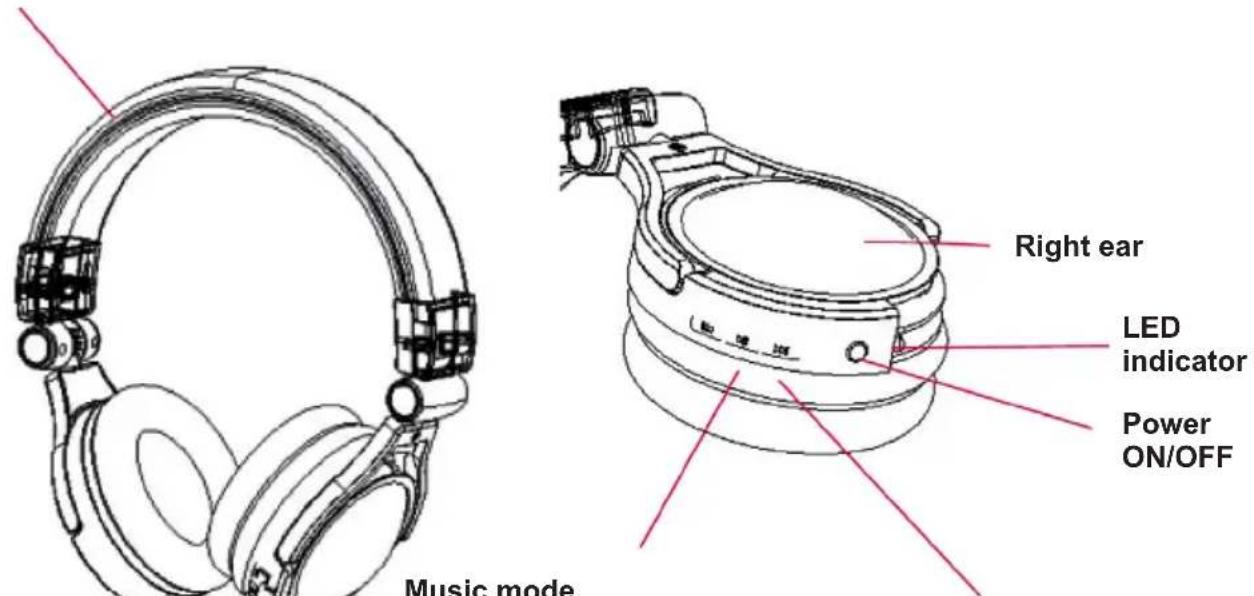
Music mode
Press upwards: pre song
Press downwards: next song
▶/II : Play/ Pause
Press and hold downwards:
Vol-
Press and hold upwards: Vol+
FM radio mode
Press and hold: MODE
Press upwards: Pre station
Press downwards: Next station
Press mode: Automatic tuning and storing
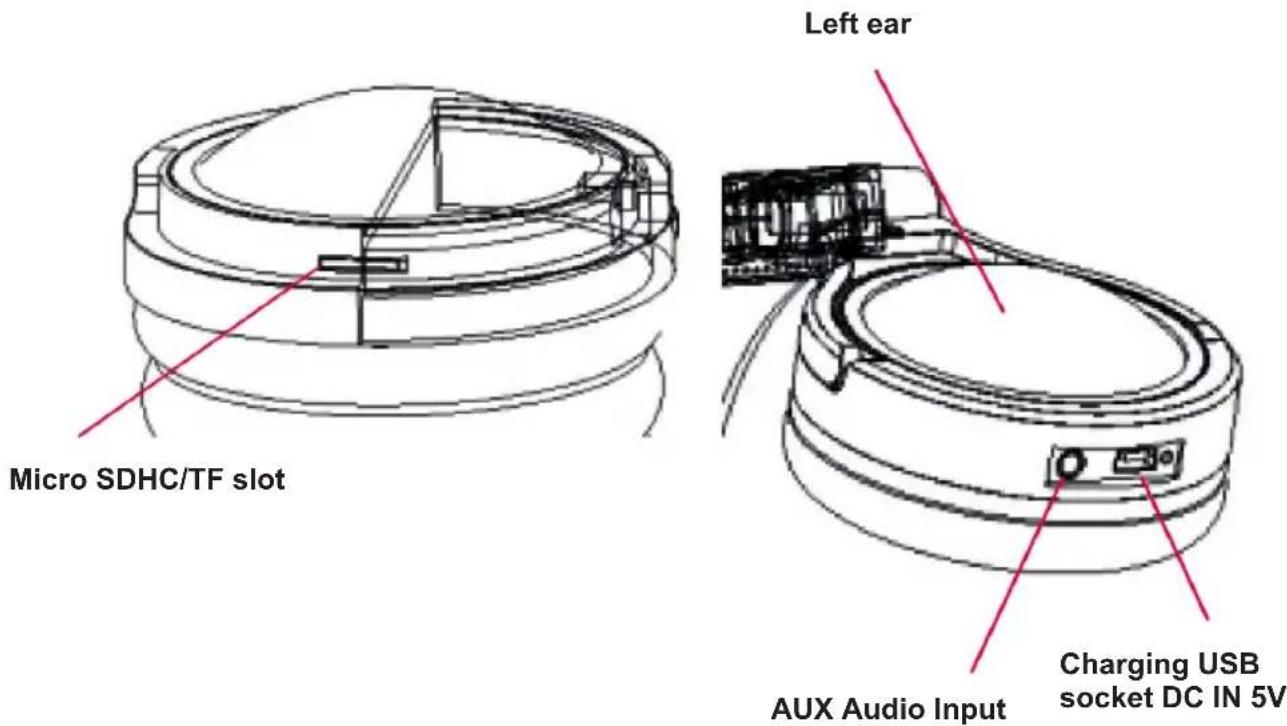
Start operation
Power switch
- Turn on: press 3 seconds until LED flashing.
- Turn off: press 3 seconds until LED extinguish.
Radio mode
In radio mode, after pressing and holding MODE, L blue dictator of the player flashes, meaning that radio function is on. When the L blue indicator goes off, press short MODE automatic searching station and storing.
| Purpose Operating method Response of LED | indicator | |
| Listen to radio program | Press and hold ▶/II in music mode | L red indicator lights constantly. |
| Previous/Next station | Push upwards ◀◀◀ or push downwards ▶▶▶ | |
| Station manual searching | Press short ▶/II till searching over | |
| Volume adjustment Press up | ward and hold Vol-ume + or press downward and hold Volume - | |
* The player is a stereo receiver. However, the weak signal will make it automatically to single channel. Ln case of strong signal, it automatically switch to stereo.
Music mode
| Purpose Operating method Response of LED | indicator | |
| Play / Pause | Press ▶/II | Play: L indicator lights in blue.Pause: Stop flashing. |
| Previous / Next Song | Push upwards ◀◀◀ or push downwards ▶▶I | |
| Volume adjustment Push Volume + upward or Volume - downward | ||
Use connecting cable
Before connecting to audio jack, please power the headphone off.
What music will be if with no soul? Your stereo earphone is with uncommon sound effect. Based on quality Nd speaker unit, it can achieve excellent dynamic feeling, stereo, bass and tremble. It is really great pity to use it only on Mp3 or enjoy music.
Plug one end of the accessory cable into audio input interface of the earphone, and connect the other and with the 3.5mm earphone jack of the music player, with excellent performance.
Charging
- Before charging the headphone, please turn off the headphone.
- It is strictly prohibited to charge the headphone during using.
- The charging time need 2 hours, the LED turns red, L indicator will automatic extinguish after charging full.
EN
Technical specifications
Standard charge time: Approx. 2 hours
Radio frequency range: 87.6-108MHz
Frequency response: 20Hz-20KHz
Speaker dimensions: 40mm
Sensibility: 110 +/- 3dB
Magnetic type: Nd
Specifications are subject to change without notice.
English
Correct Disposal of This Product (Waste Electrical & Electronic Equipment)
(Applicable in the European Union and other European countries with separate collection systems)
This marking shown on the product or its literature, indicates that It should not be disposed with other household wastes at the end of its working life. To prevent possible harm to the environment or human health from uncontrolled waste disposal, please separate this from other types of wastes and recycle it responsibly to promote the sustainable reuse of material resources.
Household users should contact either the retailer where they purchased this product, or their local government office, for details of where and how they can take this item for environmentally safe recycling. Business users should contact their supplier and check the terms and conditions of the purchase contract. This product should not be mixed with other commercial wastes for disposal
Made in China for LECHPOL Zbigniew Leszek, Miętne, 1 Garwolińska Street 08-400 Garwolin.
EN