Fighter RF - Mouse Tracer - Free user manual and instructions
Find the device manual for free Fighter RF Tracer in PDF.


User questions about Fighter RF Tracer
0 question about this device. Answer the ones you know or ask your own.
Ask a new question about this device
Download the instructions for your Mouse in PDF format for free! Find your manual Fighter RF - Tracer and take your electronic device back in hand. On this page are published all the documents necessary for the use of your device. Fighter RF by Tracer.
USER MANUAL Fighter RF Tracer
Tracer Fighter RF mouse Instructions for use
CZ
Myš Tracer Fighter RF Návod k obsluze
SK
Myš Tracer Fighter RF Návod na obsluhu
RU
Tracer Fighter RF mouse ____
Instructions for use
Package Contents:
- Mouse Tracer Fighter RF
- Nano-receiver Dongle
- Quick start guide
- AA battery
System Requirement:
• IBM PC or compatibility machine
• Windows 7/Vista/XP/ME/2000
- USB port
Installing the Battery
- This wireless mouse requires 1pcs AA battery (included).
- Undraw the cover.
- Insert the battery according to marks.
- Push the cover to close.
Connect to PC USB Port
• Take out this device and find out PC USB Port
- Connect this device with PC USB Port, before this step, please refer to your PC manuals and find out the correct way for linking.
Mouse pairing
Press and hold the right mouse button and scroll button simultaneously. Now place the battery inside the mouse and release the buttons. Next connect the receiver to your computer. After a short while (the computer needs to install the receiver) the mouse should be operational. If not, repeat the entire process.
Caution
Please dont try to disassemble this device by yourself, it may bring danger.
Button definition
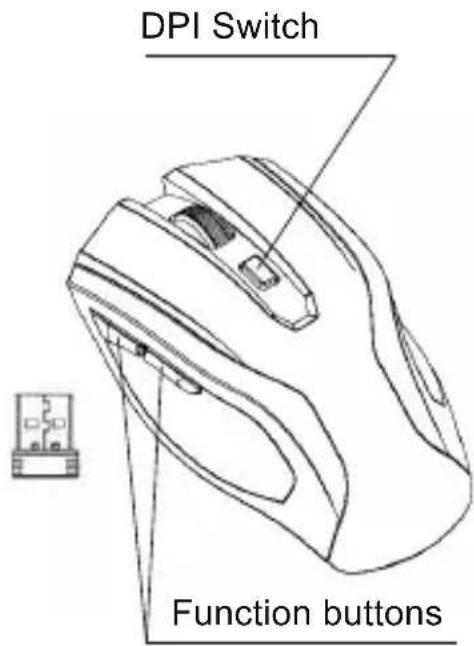
DPI Switch.
Mouse dpi switchable between 800 dpi and 1600 dpi. Function buttons.
Note: If you do not move the mouse a long time (more than 10 minutes), it will enter power-saving mode, In your PC off, or unplug the receiver, the mouse will enter the same power-saving mode, then whether you press the mouse button the mouse is not any work, only if your PC to open, so that the receiver correctly work by pressing the mouse left/middle/right keys at any one of three buttons in order to let your mouse wake-up into the normal operating mode
EN
Tracer Fighter RF mouse \_\_\_\_
Instructions for use

Important safety information
Battery-powered devices
- The following safety measures apply to products that use rechargeable or disposable batteries. - Incorrect use of batteries may result in leakage, overheating or explosion. Battery leak can cause corrosion and can be toxic. It may also cause skin and eye burns and it is harmful if swallowed.
To reduce the risk of injury:
- Keep batteries away from children.
- Do not heat, take apart, pierce, destroy or throw batteries into fire. Do not insert reversely. Strictly observe the [+ ] and [-] indications.
- Do not mix old and new batteries as well as batteries of different type (e.g. carbon-zinc with alkaline batteries).
- Do not touch battery ends with metal objects when the batteries are inserted into your device. The objects may heat up, causing burns.
- Remove batteries if they are drained or if your device will not be used for a long time.
- Remove drained, old or worn out batteries and have them disposed of or recycled according to your local waste disposal regulations.
- If batteries are leaking, remove them, making sure your skin and clothes do not come in contact with the liquid. If they do, rinse the affected area with water. Before inserting new batteries, clean the battery compartment thoroughly with a damp paper towel.
For disposable batteries only
- Warning. To avoid the risk of explosion, do not insert batteries of incorrect type. Use only batteries of the same size and type (alkaline, zinc-carbon or zinc-chloride).
- Do not charge disposable batteries.
For rechargeable batteries only:
- Warning. To avoid the risk of explosion, do not insert batteries of incorrect type. Use only batteries of the same type and rating as batteries supplied with your device.
- Do not charge your batteries using chargers other than the one supplied.
Battery removal/changing:
Carry out the entire battery insertion procedure in the reversed order.