AS80MA11 - Door/window sensor ELRO - Free user manual and instructions
Find the device manual for free AS80MA11 ELRO in PDF.


User questions about AS80MA11 ELRO
0 question about this device. Answer the ones you know or ask your own.
Ask a new question about this device
Download the instructions for your Door/window sensor in PDF format for free! Find your manual AS80MA11 - ELRO and take your electronic device back in hand. On this page are published all the documents necessary for the use of your device. AS80MA11 by ELRO.
USER MANUAL AS80MA11 ELRO
AS80MA11 Magnetic Detector
Installation Instructions
General Introduction
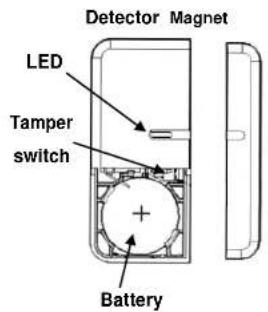
The Magnetic Detector is used in security or home automation applications to detect opening or closing of doors/windows. It consists of two parts: a Detector and a Magnet. Opening the protected door/window will remove the magnetic field, sending an alarm signal to the gateway.
Product Overview
text_image
Detector Magnet LED Tamper switch Battery
text_image
Screw mounting hole Battery Mylar (for models with battery included)Binding with Homesys
- Models with battery included: The battery is isolated by a mylar film to deactivate the detector during shipment. Do not remove the mylar film yet. Models without battery included: Do not insert the battery yet.
- Log into th eELRO Smart Home Alarm account from a web browser.
- Select "System", then "Add a Device".

text_image
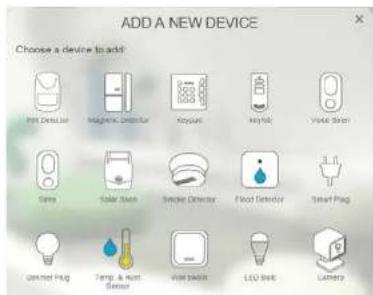
SETTINGS SECURITY AGERTS JVP VERS AUTOMATION SYSTEM LOGS SYSTEM Add a device- Select "Magnetic Detector".
text_image
ADD A NEW DEVICE Choose a device to add: Fire Detector Magazine, Dish Fan Acropain Keyhole Water Sink Sims Solar Sink Smoke Detector Flood Detector Smart Plug Camera Plug Temp & Rent Sensor Water Switch LED Belt Camera- The following screen will appear. This means the gateway is entering binding mode.

text_image
ADD A NEW DEVICE Add a Magnetic Detector Press the user's button for 4s. 035000 Abort- Models with battery included: Pull out the mylar film, the LED should turn ON.
Models without battery included: Open the battery cover and insert the battery.

text_image
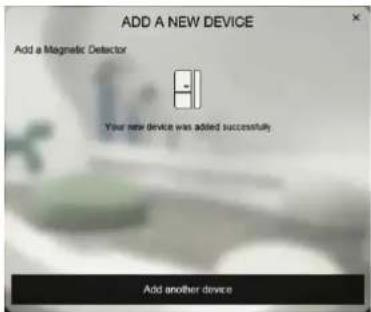
OR 2400 BATTERY BATTERY COVER OR 2400 BATTERY BATTERY COVER- The screen below will appear within 10 seconds if the process is successful.
text_image
ADD A NEW DEVICE Add a Magnetic Detector Your new device was added successfully. Add another device- Time-out will occur if the binding process was unsuccessful. Please refer to the Troubleshooting section.
Manual Binding
- Remove the battery cover of the detector leaving the battery inside the detector.
- Repeat steps 4 to 5 of the Binding with ELRO Smart Home Alarm section.
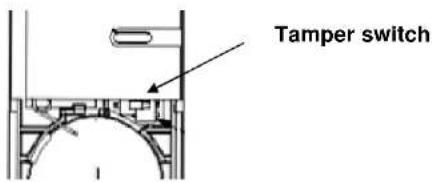
- Locate the Tamper switch as shown below.
text_image
Tamper switch- Press and hold the Tamper switch for about 4 seconds and release. The LED will start to blink repeatedly. This implies detector has now entered the binding mode and is waiting to receive binding signals from the gateway.
- Within 5 seconds, the LED indicator will then stop flashing and turn off, indicating the learning procedure is completed. The screen below will appear indicating the process is successful.

text_image
ADD A NEW DEVICE Add a Magnetic Detector Your new device was added successfully. Add another deviceTesting
(1) Go to System, and select ARM

text_image
SECURITY AUTY KIDS AUTOZONE TICKER LPG SECURITY Air Phone/AVI 1 Phone/AVI 2 Queue(2) Wait for 30 secs, then separate the detector from the magnet (at least 3.5cm distance apart).
(3) If the test is successful the system will trigger an alarm (alarms are listed in "Events").
Notes: It is necessary that the system is powered and connected to internet.
(4) If the test is unsuccessful, please check the troubleshooting section.
Mounting
-
Mount the Magnetic Detector in dry interior locations only.
-
Do not place the unit near combustible substances or any source of heat, e.g. fires, radiators, boilers etc.
Note: Mounting the detector to a metal frame or within 1 meter of metalwork (e.g. radiators, water pipes) may affect radio range of the device. Please use plastic or wooden spacers to separate the detector and metal surface when required.
Installation
- Fit the magnet on the moving part of the door / window opposite the detector (or vice versa, if necessary). Use the provided self-adhesive tape to secure them in place.

natural_image
Simple line drawing of a door with a small inset image on the right side (no text or symbols)- Make sure the parallel gap between the magnet and detector is less than 20mm and that they are aligned. An alarm will be triggered if the gap is greater than 35mm.
- Perform the test using the same steps described in Operation & Testing section above to ensure the unit is working properly.
Maintenance
- Low Battery: When the battery becomes low, the detector will report back to the gateway every 20 minutes. If the door or window is open the LED will flash to indicate low battery condition to the user.
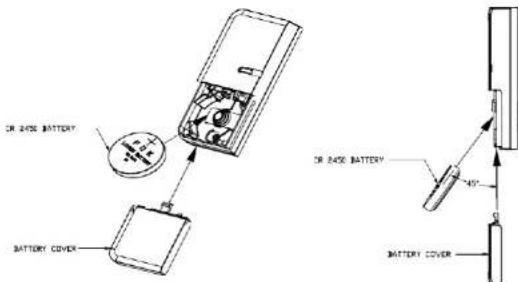
- If the battery needs to be changed, please insert the batteries at a 45^ angle as shown below.
text_image
IN RAGE BATTERY BATTERY COVER IN RAGE BATTERY 40° BATTERY COVERTroubleshooting
The troubleshooting table lists some possible causes and solutions. Please contact your original retailer or nearest service center if the below solutions cannot solve your problem.
| Symptom | Cause of Failure | Recommendation |
| LED does not light up | 1. Run out of battery power.2. Reverse battery polarity. | 1. Remove the battery cover to enter hardware test mode.Remove the magnet and the LED should light up.If not, replace the replace the battery.2. Refit the battery with correct polarity. |
| With battery cover removed (Test mode), the LED lights up but there is no response from gateway. | 1. Check if detector has completed binding with Gateway.2. Cannot communicate | 1. Follow the steps for Manual Binding2. Place the magnetic detector closer to the gateway. |
Reset to Factory Settings
To reset back to factory default state:
(1) Press and hold the Tamper switch for 3 seconds until the LED flashes moderately. Release the button. The unit enters code binding mode and a 30-second countdown starts.
(2) Within the 30-second countdown, press and hold the link button for more than 6 seconds until the LED turns off.
(3) Remove the batteries and re-insert them again. If the LED blinks slowly for 30 seconds this implies the device is reset back to factory mode.
Specifications
| Battery | CR2450 3.0V 620mAh Lithium battery |
| Operating Temperature | -10°C to 40°C |
| Frequency Range | 868MHz |
** Specifications are subject to change without notice.
CE

WARNING:
Do not dispose of electrical appliances as unsorted municipal waste, use separate collection facilities.
Contact your local government for information regarding the collection systems available.
If electrical appliances are disposed of in landfills or dumps, hazardous substances can leak into the groundwater and get into the food chain, damaging your health and well-being.
When replacing old appliances with new ones, the retailer is legally obligated to take back your old appliance for disposal at least for free of charge.
| ELRO EuropePostbus 9607 - Box E8001006 GC AmsterdamThe Netherlands | GUARANTEEWww.elro.eu | V1 | Symbols: Recycling and disposal: The WEEE symbol means that this product and batteries must be disposed separately from other household waste.When it reaches the end of life, take it to a designated waste collection point in your area to guarantee a safe disposal or recycling. Protect the environment, health and natural resources! |